This article is contributed. See the original author and article here.
Over the last year, we have found new ways to create engaging virtual experiences at work. We’ve transformed spaces in our homes to offices, developed new skillsets for remote collaboration, and in some cases, adopted new technology to get work done. I often hear from our customers about the burden of using different tools to…
This article is contributed. See the original author and article here.
It’s time to turn content into knowledge with the help of AI. Let the service reason over your data while you focus on curating a unique employee experience that meets your users where they are already working.
In this episode, Chris and I talk with CJ Tan (principal PM manager | Microsoft) about her role at Microsoft on the Project Cortex team. We dig into knowledge roles, deployment practices, common scenarios, and top of mind for ‘what’s next.’ We don’t think that AI is the only substitute for IA. People, metadata, and AI interact better together. CJ walks us through how it all works from pilot to broad-scale use and adoption.
Intrazone guest: CJ Tan (principal PM manager | Microsoft)
BONUS | New episode of Microsoft Mechanics – part 1 of 5 on Viva, “Introduction to Microsoft Viva, an Employee Experience Platform” with Jeremy Chapman:
And hey, we have a new logo for the show – you’ll now see it in all the podcast feeds. Our intent was to emphasize the inclusivity of Microsoft 365, promoting connectedness between people, content, and apps. Note the teal through lines. In addition, we addressed feedback to make the logo more accessible across platforms. Let us know what you think in comments below:
The Intrazone introduces a new logo, showing how it appears in a square format (left) and a rectangle format (right).
Links to important on-demand recordings and articles mentioned in this episode:
Be sure to visit our show page to hear all the episodes, access the show notes, and get bonus content. And stay connected to the SharePoint community blog where we’ll share more information per episode, guest insights, and take any questions from our listeners and SharePoint users (TheIntrazone@microsoft.com). We, too, welcome your ideas for future episodes topics and segments. Keep the discussion going in comments below; we’re hear to listen and grow.
The SharePoint teams want you to unleash your magic, creativity, and productivity – and be compliant about it all. And we will do this, together, one compliance score point at a time.
Left to right [The Intrazone co-hosts]: Chris McNulty, director (SharePoint/Viva – Microsoft) and Mark Kashman, senior product manager (SharePoint – Microsoft).
The Intrazone, a show about the Microsoft 365 intelligent intranet (aka.ms/TheIntrazone)
This article is contributed. See the original author and article here.
Introduction
Application management is the core function of maintaining existing application portfolios. While traditional approaches to application management can constrain enterprises and hamper modernization and digital transformation initiatives, the latest monitoring and automatic alerting capabilities can help increase speed and agility.
With the advent of cloud platforms, most organizations now have an application footprint that resides in the cloud. This trend is increasing over time and brings about a paradigm shift in how cloud-hosted applications must be monitored. Most cloud platforms, including Microsoft Azure, provide their own set of native tools that enable application monitoring. This article covers the relationship between application management and monitoring tools, recommendations on how to choose the right monitoring tool and DXC Technology’s automation solution for monitoring applications in Microsoft Azure.
Application management services and monitoring tools: How they play together
Application management services address ongoing support for applications, typically involving defect repair and issues that arise in a supported application. Application issues are typically reported by users or customers even before the support team realizes an issue exists, leading to poor customer satisfaction, and more often than not, a portion of these issues tends to be repetitive, which means the same procedure to resolve the issue has to be applied manually over and over again. These manual and repetitive tasks often account for up to 40 percent of the application support team’s workload.
This is where monitoring tools can play a major role. By using techniques such as real-user monitoring and synthetic monitoring, it is possible to proactively identify issues with the application. Real-user monitoring can detect issues that occur in the application during use. Synthetic monitoring enables checking whether the application is available and also enables simulating a user for specific scenarios to test whether the application is working as expected.
Troubleshooting an issue when a monitoring tool is in place means that the support team uses real data points captured by the tool, which enables it to identify the root cause of the issue — thus eliminating the need for guesswork. By adding hooks to these monitoring mechanisms, it is possible to automatically detect when an issue or incident occurs in a specific application and also to alert relevant stakeholders when the issue occurs.
These detection and reporting capabilities mean the application support team can be made aware of the issue immediately and don’t have to wait for users or customers to report the issue. Automatic detection and alerting enables the team respond to the incident faster, reducing the mean time to restore (MTTR). Depending on the scenario, real-time notification means the application support team may be able to either fix the issue before it is found by the user or at least add an upfront warning message to the user that a specific feature is unavailable and undergoing maintenance.
Correspondingly, for a subset of the repetitive issues, it may be possible to automate a sequence of manual steps to arrive at an automatic resolution. Implementing the appropriate monitoring solution, coupled with automation capabilities, makes it possible to lower costs up to 30 percent.
Application monitoring strategies:
As more enterprises adopt cloud platforms for hosting applications, it is important to have a strategy to monitor the applications. This enables the application management team to respond quickly to issues that arise.
Cloud platform vendors such as Microsoft provide cloud-native monitoring tools to the cloud platform. In addition, vendors that used to provide tools for monitoring on-premises applications hosted have jumped onto the cloud bandwagon and now provide tools for monitoring in the cloud. As the focus of this article is on Cloud native monitoring, only the key advantages of the Cloud-native monitoring tools are covered here:
Key advantages of cloud-native monitoring tools
No installation or additional licensing requirements – one can provision and configure the tools and the monitoring of the application starts immediately.
No additional licensing requirements – the cost of the monitoring tool is charged like any other Azure resource as part of the monthly Cloud Spend.
The DXC approach: Application Service Automation and AMS
DXC Technology’s approach to monitoring and automation, known as Application Service Automation (ASA), includes a modular framework that covers the entire closed-loop automation cycle from automatic detection to correction.
This framework is both platform- and technology-agnostic and can be adapted to various tool stacks based on customer needs. The solution described next adheres to DXC’s underlying ASA framework but is based fully on cloud-native tools provided by Microsoft Azure. The next section presents how Azure-native tools can be leveraged to provide an Azure-based variant of DXC’s ASA framework.
This solution focuses on providing application monitoring and adds some custom-built automation features. It provides a high-level guideline on how the cloud-native monitoring tools provided by the Azure platform can be used in combination to provide a successful monitoring solution. Here is an introduction to the tools that would be used as part of the solution.
Azure cloud-native monitoring tools
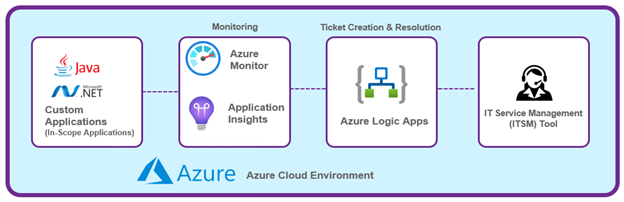
The Azure platform brings with it monitoring and orchestration tools that have been incorporated into this solution. Depicted below is a high-level reference view of the Azure-native tools used.
Figure 1. Microsoft Azure cloud-native monitoring tools
The in-scope applications shown in the diagram represent the portfolio of applications for which cloud-native monitoring using Azure-native tools needs to be enabled. The IT Service Management (ITSM) tool shown on the right-hand side represents the customer’s ticketing tool where the incident details are captured.
Azure Monitor is a comprehensive native monitoring service provided by Azure as part of its cloud platform for monitoring, which can collect and analyze telemetry data from applications. It comprises several tools, each providing various types of support from an application-monitoring perspective. The main ones are:
Azure Monitor for VMs and Azure Monitor for Containers provide monitoring of the infrastructure components.
Azure Application Insights enable tracing of user requests as they travel through an application, and they have the ability to collect and capture telemetry that is emitted from applications. Azure Application Insights also provide features such as multistep web tests and URL ping tests, which enable synthetic monitoring capabilities.
Azure Monitor Alerts provide a mechanism to trigger an action based on the evaluation of a metric captured in Azure Application Insights and Azure Monitor.
Azure Logic Apps are a serverless compute capability available on Azure platform and used as part of the automated resolution strategy of the solution. DXC’s solution approach for monitoring applications based on Azure Application Insights is defined below.
The in-scope application is first enabled to emit telemetry by adding the specific Application Insights software development kit (SDK) — either the Java SDK or the .NET SDK — to the application. Azure Application Insights has SDKs for Java, .NET, ASP.NET Core, Node.js, Python and JavaScript at the time this article is written.
The application is recompiled and deployed onto the Azure virtual machine (VM). Only the addition of the SDK is needed, and no further intrusive code changes are necessary. Once this is done, the application starts to emit telemetry, which is captured in the Azure Application Insights.
Application Insights also support monitoring based on “codeless attach” or “auto-instrumentation,” where applications can be monitored without the need to add the SDK. This approach is still evolving, and not all scenarios are supported yet. For the latest information on this approach, refer to the Microsoft documentation on the topic.
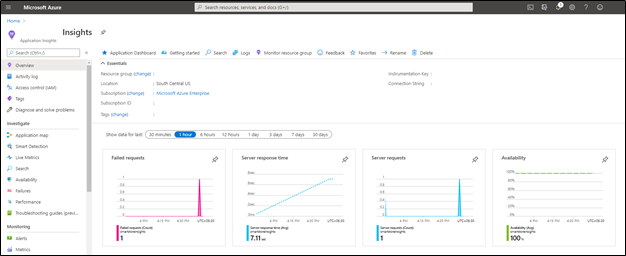
Figure 2 – Azure Application Insights dashboard
As can be seen in Figure 2, in case the application emits exceptions, they are then captured as well under the “Failed Requests” section. The logical next step is to propagate this error to the ITSM tool and ensure that a ticket is raised. This can be done either by
using an Azure Alert and then attaching an Action Group that calls a Logic App, or
directly by using a Logic App that polls the Application Insights Logs for exceptions and then raises a ticket in the ITSM tool via the DXC CASA module (CASA is DXC’s custom built module that helps integrate the different toolsets and is short for “Controller for ASA”). Here we take the latter approach since it provides additional flexibility.
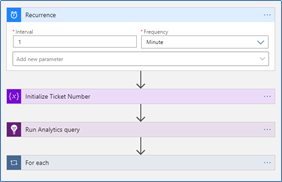
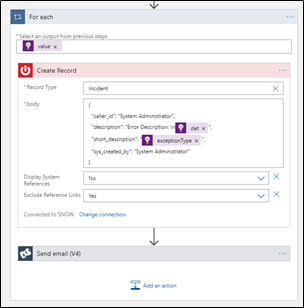
Figure 3 shows the Azure Logic App that is querying Application Insights by using the built-in Connector for Azure Application Insights. Once the exception details are retrieved from the query, the app is used to create an ITSM ticket in the ITSM ticketing tool using connectors. As an example, a ServiceNow connector is shown here.
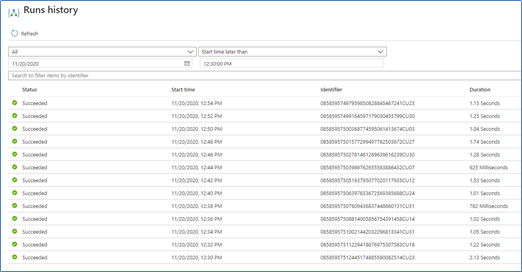
Here, the serverless computing elements such as Azure Logic Apps are used to integrate and orchestrate error reporting to the ITSM tool and also notify relevant stakeholders. The use of serverless components such as Logic Apps for orchestration of the error detection and resolution brings several advantages. Logic Apps tend to be low-maintenance since Azure handles patches and updates — unlike a virtual machine (VM) that would itself add management overhead costs. Logic Apps are based on the concept of “low-code, no-code” development and rapidly support implementation of the required logic with low effort. Logic Apps also store Run History for each instance that has run and provide a historical visualization of each run, including the runtime values present at the time of the run.
Figure 4 – Azure Logic Apps – run history
If an error occurs in the application, this error is captured in the Azure Application Insights. By means of the orchestration built with the help of Azure Logic Apps and DXC CASA, this error is now propagated to the ITSM layer.
If we assume that this issue is a frequent and repetitive one, an evaluation is done to determine whether it has the potential to be automated. If the automation aspect is found feasible, that approach is implemented — ensuring that the issue can also be automatically fixed.
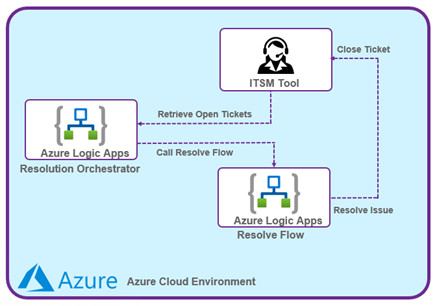
Figure 5 – Automation Resolution Using Logic Apps
The Logic Apps layer is used as both the resolution orchestrator and for implementing the actual resolution flow. The resolution orchestrator will receive the open tickets from the ITSM tool via the DXC CASA module and then delegates the resolution to the specific resolve flow. Azure Logic Apps are leveraged as mechanisms for implementing the specific automated resolution (the resolve flow) as well. The automation responsible for fixing the issue would be both scenario-specific and application-specific, and therefore more details about the specific issue are not covered as part of this article. The DXC CASA module ensures that the ticket open and closure data is propagated to the Data Lake which powers the Dashboard. This Dashboard layer provides insights into the workings of the entire closed loop automation via various graphical charts.
Once the application- and scenario-specific automation runs, the issue is fixed automatically. The automation mechanism would also close the ticket that was created once the fix has been applied, thus providing an end-to-end automation of the issue.
Key benefits
Improving resiliency by ensuring a higher uptime for the application while lowering the MTTR
Improving customer experience by detecting and reacting to issues before the customer is effected.
Leveraging automation to accelerate processes, reducing redundant manual efforts
Reducing cost, as the overall cost of a solution built using the described approach will be much lower than solutions based on any of the leading third-party tools.
Conclusion
This article covers application-monitoring strategies, cloud-native monitoring tools and third-party tools for monitoring the relationship between application management services and monitoring tools. Its recommendation with regard to monitoring tools is to find the right fit of the tool based on business criticality and the type of application. Microsoft Azure provides all the relevant building blocks required to weave together an end-to-end solution, which includes application monitoring, automated ticket creation, as well as automated resolution. For more information, visit: DXC Application Service Automation.
Vikram Srivatsa is a senior architect and part of the Worldwide Applications Service Line at DXC Technology, based in Bengaluru, India. He has vast experience in architecting enterprise applications, and his current area of focus includes creation of cloud-native solutions for the enterprise.
Ashish Thakur is a product engineer for Application Services at DXC Technology, based in Noida, India. He is knowledgeable in cloud and service delivery automation using Azure-native tools and in architecting solutions and building proofs of concept.
This article is contributed. See the original author and article here.
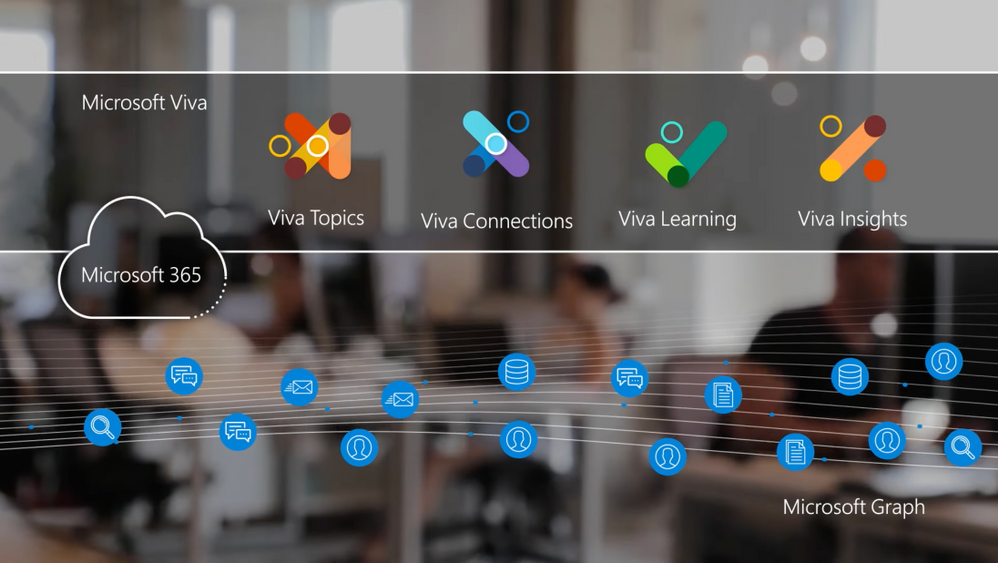
Tour Microsoft Viva, the new employee experience platform that connects learning, insights, resources, and communication. Viva is a unique set of curated and AI enriched experiences built on top of and integrated with the foundational services of Microsoft 365. Join Jeremy Chapman as he shares Viva’s capabilities, the underlying tech, and your core options for enabling and configuring Microsoft Viva as a team leader or admin.
Microsoft Viva’s 4 core modules:
Viva Topics— builds a knowledge system for your organization
Viva Connections— boosts employee engagement
Viva Learning— creates a central hub to discover learning content and build new skills
Viva Insights— recommends actions to help improve productivity and wellbeing
As an employee:
Get more time to focus and recharge — no matter where you’re working from.
Connect with others, stay informed and engage
Accelerate learning new skills, and balance your time at work.
At an organizational level:
Boost morale and retention and the overall success of your organization.
Foster a new culture of support for employees, so even when not physically together with colleagues, they feel connected to collective goals.
Employees can easily leverage the knowledge and connections of their work community to get things done and feel invested in their career growth.
We are Microsoft’s official video series for IT. You can watch and share valuable content and demos of current and upcoming tech from the people who build it at #Microsoft.
-Welcome to Microsoft Mechanics and our Essentials Series on the new employee experience platform, Microsoft Viva. In the next few minutes, I’ll introduce you to Viva’s capabilities, explain the underlying tech and your core options for enabling and configuring Microsoft Viva as a team leader or admin.
-You can think of Viva as a unique set of curated and AI-enriched experiences built on top of and integrated with the foundational services of Microsoft 365, which extends your existing investments. As an employee, Viva experiences are crafted to help you more easily connect with others and the information around you, stay informed and engaged, accelerate your learning of new skills and balance your time at work, giving you more time to focus and recharge no matter where you’re working from. At an organizational level, Viva can help foster a new culture of support for employees, so that even when they are not physically together with colleagues they always feel a strong connection to collective goals. They can more easily leverage the knowledge and connections of their work community to get things done and feel invested in their career growth and wellbeing, all of which can boost morale and retention and the overall success of your organization.
-Microsoft Viva experiences today are delivered across four core modules with more on the way. First, Viva Topics builds a knowledge system for your organization. With Viva Topics, you can discover knowledge connected to specific topics quickly in the context of your work. This helps you to easily connect the dots between people and information and take action. Now the underlying AI provides a useful baseline around topics and subject matter experts by organizing information into accessible knowledge within the apps and services you use every day. Think of it as a Wikipedia where AI does the first draft keeping it up-to-date, and then employees can collectively contribute their expertise to crowdsource knowledge across your organization, and knowledge managers can review and curate topic pages for accuracy.
-Next, Viva Connections is all about boosting employee engagement. Everyone from your everyday users, specific employee groups and departments through to your frontline workers. Expanding upon SharePoint home sites and news feeds as well as Yammer communities, it’s designed to give you a curated, company-branded experience that delivers personalized news, conversations, and other commonly used resources within the context of the apps you use every day, like Microsoft Teams.
-Then Viva Learning creates a central hub for individuals and teams to discover learning content and build new skills, all within the flow of their everyday work in Microsoft Teams. Viva Learning exposes recommended content by managers, experts, and peers to upskill employees. And they can also search for content that meets their specific needs as well as share and discuss learning, for example in chat. Content can come from learning providers, in-house custom materials stored in SharePoint, and your Learning Management Systems. Learning recommendations can also be surfaced directly inside of Viva Insights.
-Speaking of which, our fourth module, Viva Insights, leverages the MyAnalytics and Workplace Analytics foundation to deliver data-driven, privacy-protected insights and recommended actions to help individuals and teams improve productivity and wellbeing. So for individuals, Viva Insights offers actionable reminders for regular breaks and mindfulness activities in the flow of work, including integration with Headspace. Manager and leader insights provide visibility into work patterns that can lead to burnout and stress. And the new Glint dashboard helps leaders more accurately get a pulse of their organization by providing insight into the factors that impact engagement, so that they can take action.
-So, now that you know what the core experiences are, and the good news is, as part of the Microsoft 365 service, there’s little additional work required to implement Microsoft Viva for your organization. This is helped by the underlying AI together with Microsoft Graph that provides signals including the activities, relationships, and content spanning your organization to automate the delivery of core aspects of the experience. And you can extend this even further with SharePoint Syntex to transform your content into knowledge with AI-driven forms processing and document understanding. That said, while AI gives you a great starting point, you have control over curating, customizing, and targeting these experiences.
-Now while we’ll go deeper on the specific things you can do during the rest of the series, here are just some of the highlights. Differentiated experiences across roles, departments and geographies are managed using groups in Azure Active Directory to tailor what people see. For example, in Viva Connections you can build a branded and personalized experience, as well as target information using adaptive cards to reach specific groups. Another example is with Viva Topics, where you can do several things, such as targeting the experience toward specific audiences. As a Microsoft 365 admin, you have full control to configure access to Viva modules and experiences. For example, you can customize Viva Learning to curate online training from your preferred content providers and your own company-developed content so that it’s available all in one place. And you can also make Viva modules discoverable in the context of Microsoft Teams.
-Next, there are granular options to set up Viva Topics for your organization. For example, you can crowdsource information where everyone can create and edit topic pages, or you can establish additional governance oversight by assigning knowledge managers to review and curate topics for accuracy and suitability. For Viva Learning, Knowledge admins can also be assigned to curate learning content, and they can also feature specific learning content for everyone in the organization. And for Viva Insights, you can create custom policies to tailor personal experiences, while manager and leader insights are available to licensed users of Workplace Analytics.
-Now as you would expect, privacy and security are built into all Microsoft Viva experiences. And any information protection and compliance controls you’ve configured in Microsoft 365 are respected when you access content. For example, you can only see the files and documents you have permissions to see in Viva Topics and the same is true for Viva Connections. For Viva Topics, you can exclude topics by name and even entire sites that you don’t want the service to crawl as it builds the knowledge index. Additionally, Viva is GDPR compliant, for example personal experiences from Viva Insights are only visible to individuals. For manager and leader insights, safeguards like aggregation, de-identification, and differential privacy are built-in to protect individual privacy. Also, in Viva Topics you can unlist yourself as a topic expert to prevent others from contacting you. And in Viva Learning, recommended learning is only visible to the target employee and the person who made the recommendation.
-As an employee experience platform, of course Microsoft Viva is extensible. As we’ve shown, Viva builds on Microsoft Teams and Microsoft 365 platforms to provide the organizing layer for integrated employee experiences. This gives you an extensibility layer that ensures faster and broader integration with your existing tools and systems. Viva Topics and Viva Connections extensibility leverage the same patterns and practices of the familiar SharePoint Framework to build out custom experiences. For example, you can build custom web parts for your home site and topic pages. And you can use adaptive cards for your Viva Connections dashboard to expose specific content and target the right employees with the right resources. Experiences are infused with a strong and growing ecosystem of partners, and it’s designed to integrate with your existing systems. For example, you’ll be able to use Viva Learning connectors to integrate with popular Learning Management Systems to surface assigned or mandatory trainings. Also, LMS integration and APIs will be available via Microsoft Graph, so you can integrate your own custom solutions.
-Viva is also built to integrate across learning resources. So for example, Viva Learning brings in content from Skillsoft, PluralSight, Coursera, edX, LinkedIn Learning, Microsoft Learn, and Microsoft 365 training with even more on the way. And Viva Insights can pull in data from existing apps and services, such as Zoom and Slack or SAP SuccessFactors.
-So that was a quick overview of Microsoft Viva and how it brings together communications, knowledge, learning, resources, and insights into an integrated experience that empowers you and your teams to be your best from anywhere you work and in the tools you use every day. This is part one of our series explaining Microsoft Viva. Keep checking back to aka.ms/VivaMechanics for deep dives on all the Viva modules where we’ll show you how you to configure and setup the experiences. And you can learn more at aka.ms/Viva. Thanks for watching.
This article is contributed. See the original author and article here.
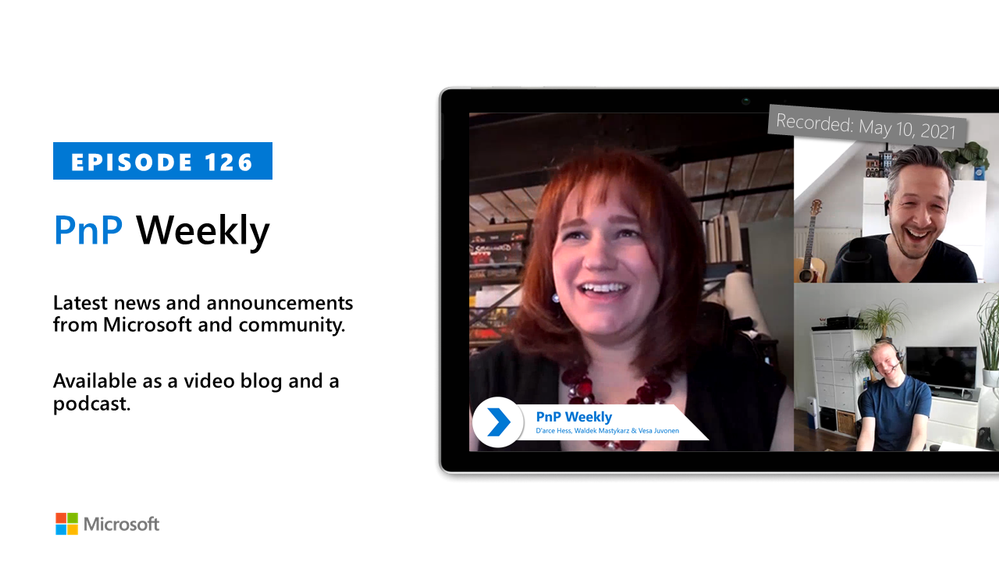
In this installment of the weekly discussion revolving around the latest news and topics on Microsoft 365, hosts – Vesa Juvonen (Microsoft) | @vesajuvonen, Waldek Mastykarz (Microsoft) | @waldekm are joined by Rhode Island, US-based, MVP, professional archer, blogger and presenter specializing in UI/UX, information architecture and user adoption at TrnDigital, D’arce Hess | @ DarceHess. Topics discussed in this session include: The path to IT and on becoming an MVP, reflections on UX/UI changes over the years and designing custom experiences that addresses business processes. In post pandemic times, organizations will be circling back to optimize Microsoft Teams experiences while vendors will continue efforts to land the right extensibility stories. Microsoft Viva – with great power comes great responsibility and ideas about prepping for Viva. Finally, thoughts on women in IT and on using what we learn in school in the field. Microsoft and the Community delivered 18 articles in this last week. This session was recorded on Monday, May 10, 2021.
Please remember to keep on providing us feedback on how we can help on this journey. We always welcome feedback on making the community more inclusive and diverse.
This episode was recorded on Monday, May 10, 2021.
These videos and podcasts are published each week and are intended to be roughly 45 – 60 minutes in length. Please do give us feedback on this video and podcast series and also do let us know if you have done something cool/useful so that we can cover that in the next weekly summary! The easiest way to let us know is to share your work on Twitter and add the hashtag#PnPWeekly. We are always on the lookout for refreshingly new content. “Sharing is caring!”
Here are all the links and people mentioned in this recording. Thanks, everyone for your contributions to the community!
Want to ask a question or in general engage with the community – Add a note in the Microsoft 365 PnP Community hub athttps://aka.ms/m365pnp/community
Check out all the great community calls, SDKs, and tooling for Microsoft 365 fromhttps://aka.ms/m365pnp
If you’d like to hear from a specific community member in an upcoming recording and/or have specific questions for Microsoft 365 engineering or visitors – please let us know. We will do our best to address your requests or questions.



![Left to right [The Intrazone co-hosts]: Chris McNulty, director (SharePoint/Viva – Microsoft) and Mark Kashman, senior product manager (SharePoint – Microsoft).](https://www.drware.com/wp-content/uploads/2021/04/fb_image-89.jpeg "Chris-Mark_in-studio.jpg")



Recent Comments