by Contributed | May 19, 2021 | Technology
This article is contributed. See the original author and article here.
Isn’t it time for a better search? We are increasingly turning to search engines to accomplish tasks and make decisions – in fact over half the internet population will start their internet experience with a search engine.
Microsoft Search transforms the way people in your organization find the info they need—no matter where you are in your cloud journey. Either integrated with Microsoft 365 or as a standalone solution. Microsoft Search is a secure, easily managed, enterprise search experience that works across all your applications and services to deliver more relevant search results and increase productivity – and search works best when measured.
In this article, we’ll share some details on how to measure how well search is working for you in SharePoint.
NOTE To learn more about tenant-wide Microsoft Search usage reports visit Search Usage Reports | Microsoft Docs. Learn more about classic SharePoint usage reports at Classic usage and popularity reports to be discontinued – SharePoint | Microsoft Docs. For information on modern SharePoint usage reports see View usage data for your SharePoint site – SharePoint (microsoft.com).
If you are a site collection administrator, we’ve recently made several improvements to search usage reporting to help you understand:
- What are the top queries on a site collection per day or per month?
- How many search queries are users performing on average?
- Which queries are getting low clicks as they are simply not showing up in any results?
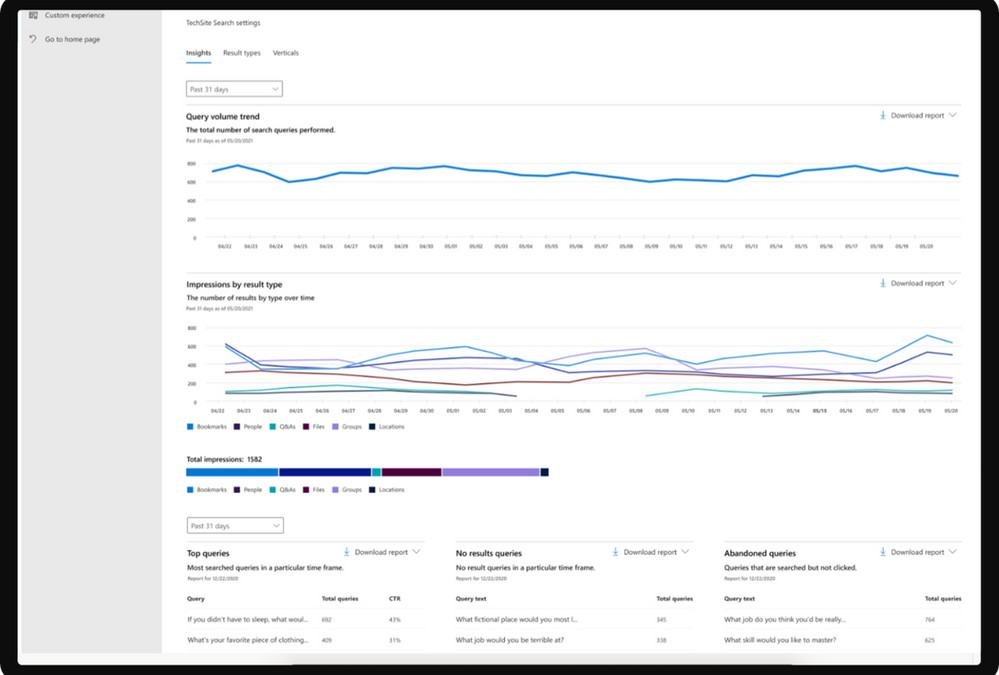
Modern site collection search usage reports with Microsoft Search provide a few graphs and tables generated from searches that are executed from search in modern sites. You can see data from the past 31 days (about 1 month), per day, or monthly for the previous year. These reports are just rolling out so it will take time to accrue historical data.
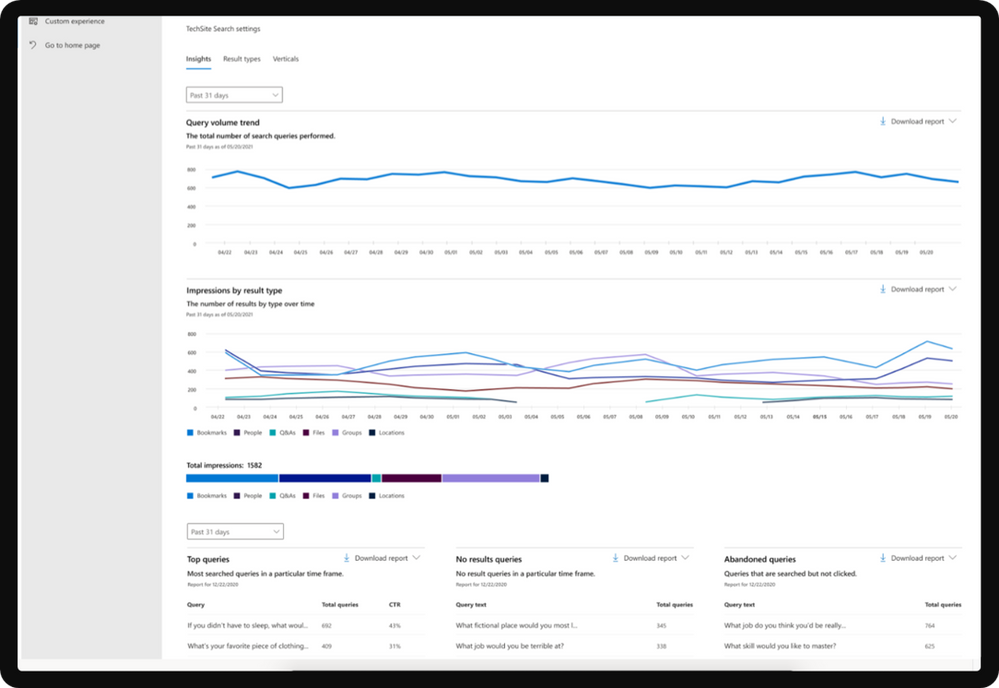
Overview of search reports
Report
|
Description
|
Query Volume
|
This report shows the number of search queries performed. Use this report to identify search query volume trends and to determine periods of high and low search activity.
|
Top Queries
|
This report shows the most popular search queries. A query is added to this report when it is searched at least three times with a click on a result. Use this report to understand what types of information your users are searching for.
|
Abandoned Queries
|
This report shows popular search queries that receive low click-through. Use this report to identify search queries that might create user dissatisfaction and to improve the discoverability of content.
|
No Results Queries
|
This report shows popular search queries that returned no results. Use this report to identify search queries that might create user dissatisfaction and to improve the discoverability of content.
|
Impression distribution
|
This report shows impressions over various timeframes. The timeline shows the daily number of impressions for a result type. Determine which result type is most frequently, or infrequently, used. Use this report to understand what result types users are using and any changes in user behavior over a period of time.
|
Viewing reports
To get started with search usage reports in modern sites, navigate to Microsoft search | Configure search settings | Insights under Site collection settings.
The first date picker lets you pick past 31 days (about 1 month) or past 12 months for the first 2 graphs. The second date picker lets you select a particular day or month for the bottom 3 tables (top, abandoned, no results). Downloading a report will allow you to see reports from a broader range of time. Click on the download arrow and select past 31 days (about 1 month) or past 12 months. The report is downloaded as an Excel spreadsheet. If you selected the past 31 days (about 1 month), the spreadsheet will have an individual tab for each day. The past 12 months download will have a tab for each month.
If you have any feedback on search usage reports in SharePoint, let us know in the comments below.
by Contributed | May 19, 2021 | Technology
This article is contributed. See the original author and article here.
We are getting close to the upcoming GA of Azure IoT Edge for Linux on Windows, also known as EFLOW, in the next few weeks. Over the past few months, we have had many conversations with customers and partners on how EFLOW enables them for the first time to run production Linux-based cloud-native workloads on Windows IoT.
During those conversations it became clear that many organizations simply do not have the knowledge in-house or on their remote locations to manage and deploy Linux systems but that they would love to take advantage of Linux workloads in their environment. With EFLOW they can retain their existing Windows IoT assets plus benefit from the power of Windows IoT for applications that require an interactive UX and high-performance hardware interaction. There is no longer a need to choose between Windows or Linux; customers can now leverage the best of both platforms.
EFLOW provides the ability to deploy Linux IoT Edge modules onto a Windows IoT device. This opens a world of capabilities for commercial IoT as well as AI/ML with the availability of pre-built modules from the Azure Marketplace such as Live Video Analytics, SQL Edge, and OPC Publisher as a few examples. As a developer, you may also choose to implement your own custom modules using the Linux distribution of your choice to address specific business requirements. Running Linux modules on Windows IoT becomes a seamless of your solution.
Windows IoT is deployed in millions of intelligent edge solutions around the world in numerous industries including manufacturing, retail, medical equipment and public safety. Customers choose Windows to power their edge devices because it is an out of the box that provides a rich platform to create locked-down, interactive user experiences with natural input, provides world class security, enterprise grade device management, and 10 years of servicing allowing you to build a solution that is designed to last. In addition to all these features, customers also want to benefit from existing Linux workloads and leverage the advances in cloud-native development.
Since many of you tried out EFLOW during the Public Preview, we would like to invite you to join us, the EFLOW engineering team, during Build next week and bring any questions and feedback you might have. There are two sessions that will discuss EFLOW:
Ask the Experts: Bringing Azure Linux workloads to Windows
Azure IoT Edge for Linux, also known as EFLOW allows you to manage and deploy your Linux workloads on Windows devices using your existing Microsoft management resources and technology to efficiently optimize all your computing assets. Develop your Linux solutions, publish them on the Azure IoT Edge Marketplace and run them on Windows IoT.
When? Tuesday, May 25 3:30 PM – 4:00 PM Pacific Daylight Time
Talking Industry Trends in AI for Computer Vision Applications
Industries across the globe are getting disrupted to the digital and AI transformations. While this trend is already underway, the tremendous potential for the businesses is fueling constant innovations and demanding solutions that are flexible, scalable and efficient across multiple industries. In this discussion, we will cover interesting current trends across various industries including Retail, Industrial, Healthcare and more, as well as explore what is next in these industries.
When? Wednesday, May 26 1:00 PM – 1:30 PM Pacific Daylight Time
We hope to see you in one of those sessions. Want to get started with EFLOW and get your feet wet before then?
EFLOW is available on all Hyper-V capable Windows 10 installations. This makes 100s of millions of existing devices EFLOW capable, which can easily be managed and connected through Azure.
Start by watching the IoT Show: IoT Edge for Linux on Windows 10 IoT Enterprise on Channel9.
Detailed documentation to get started is available at https://aka.ms/AzIoTEdgeforLinuxOnWindows
If you want to stay up to date and get notified of future updates to Azure IoT Edge for Linux on Windows, you can register using this link. Note that the information you will share will only be used by Microsoft for the purpose of keeping you informed about this product.
by Contributed | May 19, 2021 | Technology
This article is contributed. See the original author and article here.
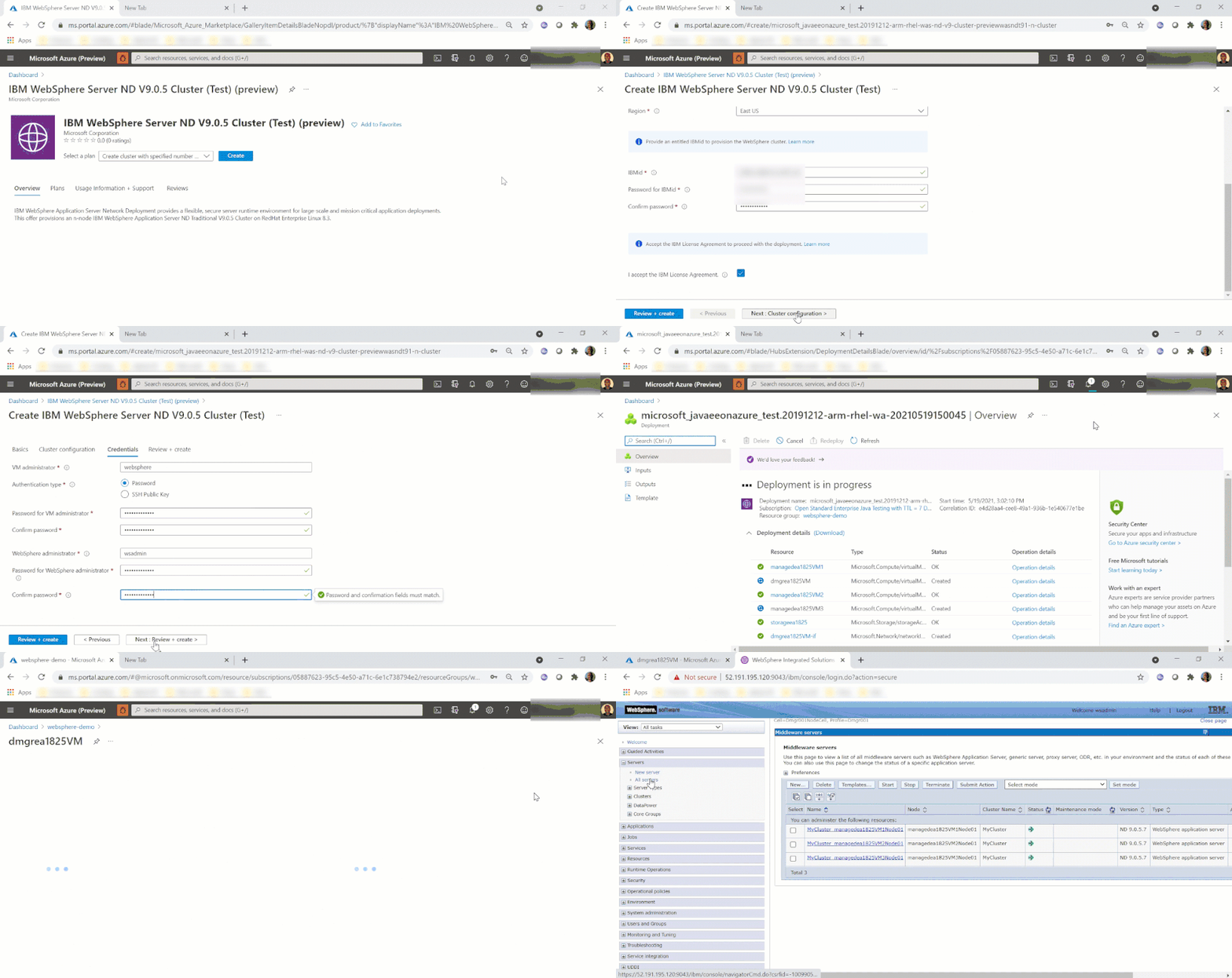
We are very happy to announce the availability of a new solution to run the IBM WebSphere Application Server (Traditional) Network Deployment on Azure Linux Virtual Machines. The solution is jointly developed and supported by IBM and Microsoft. The solution enables easy migration of WebSphere workloads to Azure by automating most of the boilerplate resource provisioning tasks to set up a highly available cluster of WebSphere servers on Azure Virtual Machines. Evaluate the solution for full production usage and reach out to collaborate on migration cases.
IBM and Microsoft Partnership
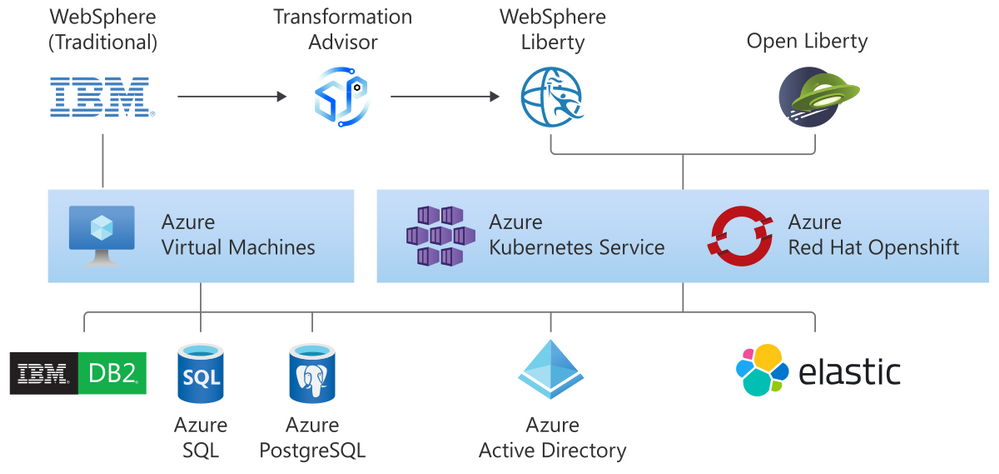
The solution is part of a broader partnership between IBM and Microsoft to enable the WebSphere product portfolio on Azure. WebSphere products are key components in enabling enterprise Java workloads. The partnership aims to cover a range of use cases from mission critical existing traditional workloads to cloud-native applications. Offers target Open Liberty on Azure Red Hat OpenShift (ARO), WebSphere Liberty on ARO, WebSphere Application Server on Virtual Machines, Open Liberty on the Azure Kubernetes Service (AKS), and WebSphere Liberty on AKS.
As part of the partnership, we previously released guidance for running WebSphere Liberty and Open Liberty on ARO in December, 2020. We also released guidance for running WebSphere Liberty and Open Liberty on AKS in March 2021.
All offers enable further integration with services such as databases (Db2, Azure SQL, Azure PostgreSQL, Azure MySQL), Azure App Gateway, Azure Active Directory, and ELK.
Solution Details and Roadmap
The WebSphere on Virtual Machines solution is aimed at automatically provisioning several Azure resources quickly. The automatically provisioned resources include virtual network, storage, network security group, Java, Linux, and WebSphere. With minimal effort, you can set up a fully functional n-node WebSphere cluster including the Domain Manager and Console. The solution supports WebSphere 9.0.5 on Red Hat Enterprise Linux (RHEL) 8.3.
The solution enables a variety of robust production-ready deployment architectures. Once the initial provisioning is completed by the solution, you are free to further customize the deployment including integrating with more Azure services.
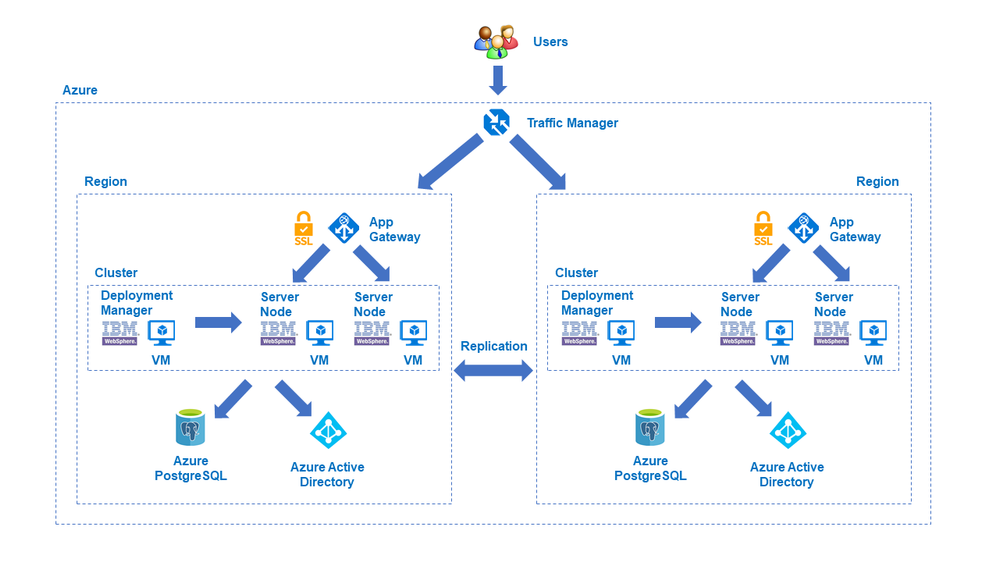
In the next few months, IBM and Microsoft will also provide jointly developed and supported Marketplace solutions targeting WebSphere Liberty/Open Liberty on ARO and WebSphere Liberty/Open Liberty on AKS.
The WebSphere on Virtual Machines solution follows a Bring-Your-Own-License model. You must have the appropriate licenses from IBM and be properly licensed to run offers in Azure. Customers are also responsible for Azure resource usage.
Get started with WebSphere on Azure Virtual Machines
Explore the solution, provide feedback, and stay informed of the roadmap. You can also take advantage of hands-on help from the engineering team behind these efforts. The opportunity to collaborate on a migration scenario is completely free while solutions are under active initial development.
by Contributed | May 19, 2021 | Technology
This article is contributed. See the original author and article here.
1. Excellence in SAP Operations & Connecting SAP Systems to Azure Sentinel
SAP certified NetWeaver Applications running on Azure in 2014 and since this time thousands of customers have moved their SAP landscape to Azure. Many customers updated their SAP applications either to modern SAP Support Pack releases or migrated to S4 during the move to Azure.
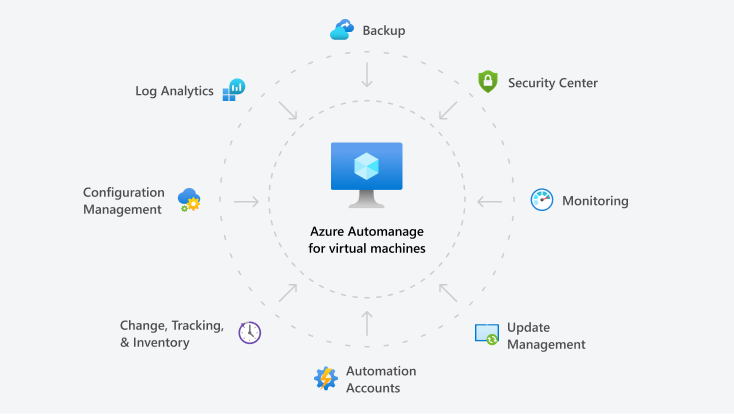
Customers have also leveraged many of the features built into the Azure platform to improve Security, Monitoring, Patching, Backup, Configuration Management and achieve better overall “Operational Excellence”.
More information about Azure Automanage can be found Azure Automanage | Microsoft Azure
Azure Sentinel is an integrated scalable, cloud-native, security information event management (SIEM) and security orchestration automated response (SOAR) solution. A good overview of Azure Sentinel can be found What is Azure Sentinel? | Microsoft Docs
Azure Sentinel: SAP Threat Protection extends this capability to be able to monitor and analyze application level events from SAP systems. This feature is currently in Preview, registration is available https://aka.ms/sapsecsurvey
SAP Threat Protection uses a Docker to host a “connector” VM that interfaces SAP to Azure Sentinel
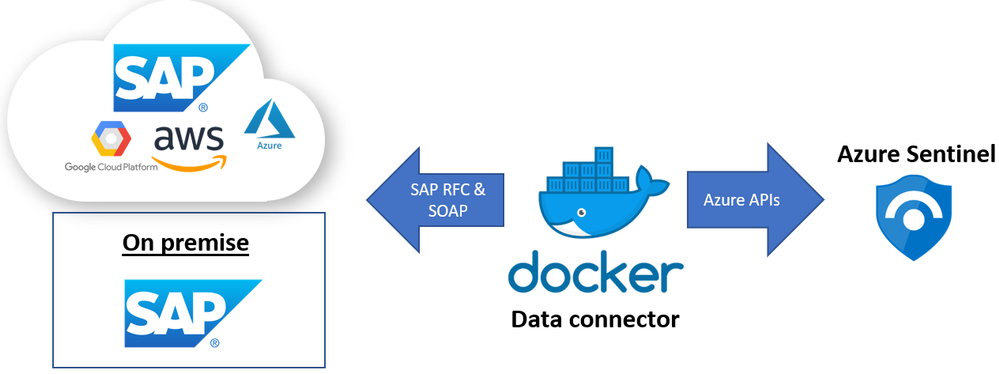
SAP Threat Protection is still in preview and the monitoring capabilities are still being defined. Below are some examples of events that can be monitored:
SAP Business Logic – transaction monitoring, User + Role management
SAP Application Layer – Authentication and Audit log
Database Layer (HANA) – user access and Backup/Restore
OS & Network Layer – file monitoring
More information about which events can be monitored is available to customers who join the Preview for SAP Threat Protection
Installation details:
- SAP Threat Protection can connect to SAP systems running on-prem, in private cloud, Azure or other public clouds
- The solution supports SAP NetWeaver ABAP systems with SAP_BASIS 740 and higher
- For optimal functionality please use SAP_BASIS versions 750 SP13 and higher .
- Make sure older systems have the following SAP Notes applied :
- SAP Note 2641084 – standardized read access for the Security Audit log data
- SAP Note 2173545 – CD: CHANGEDOCUMENT_READ_ALL
- SAP Note 2502336 – RSSCD100 – read only from archive, not from database
- Importing some SAP Transports may be required
- Each SAP system requires and each SAP client requires its own container instance
- The VM and Sentinel workspace can be in different Azure subscriptions and even different Azure AD tenants
- Each SAP connector instance (docker container) supports one SAP client
- The AuditLog file is across SAP clients (system wide) hence in a multi-client SAP system should only be enabled for one instance to avoid data duplication.
Sentinel Blog: Azure Sentinel – Microsoft Tech Community
Preview program at: https://aka.ms/SecurityPrP
Security community at: https://aka.ms/SecurityCommunity
Free public webinars series at: https://aka.ms/SecurityWebinars
Visit our YouTube channel: https://aka.ms/SecurityCommunityVideos
Sentinel Pricing: https://azure.microsoft.com/en-us/pricing/details/azure-sentinel/
Recommended training and certifications AZ-500(Microsoft Certified: Azure Security Engineer Associate) https://docs.microsoft.com/en-us/learn/certifications/exams/az-500
Thanks to Ravi Alwani for contributing this topic
New Azure Monitor for SAP Solutions HA Cluster features – Microsoft Tech Community – Thanks to
Ross Sponholtz for contributing this topic
2. Azure Snapshot Backup for Oracle (including ASM) & Oracle News
This topic contains information for customers running SAP on Oracle systems on Azure:
- Oracle customers including ASM customers can use Azure Backup to take snapshots to Backup or Restore their databases Back up and recover an Oracle Database 19c database on an Azure Linux VM using Azure Backup – Azure Virtual Machines | Microsoft Docs
- The recommended versions are Oracle Linux (OL) 8.3 recommended OL Kernel patch is 5.4.17-2102.200.13.el8uek.x86_64 and Oracle Database 19.10 SBP
- The latest supported Oracle Database release is in 2799920 – Patches for 19c: Database
- When setting up Oracle DataGuard on Azure the tnsnames.ora file should be configured as explained in this document
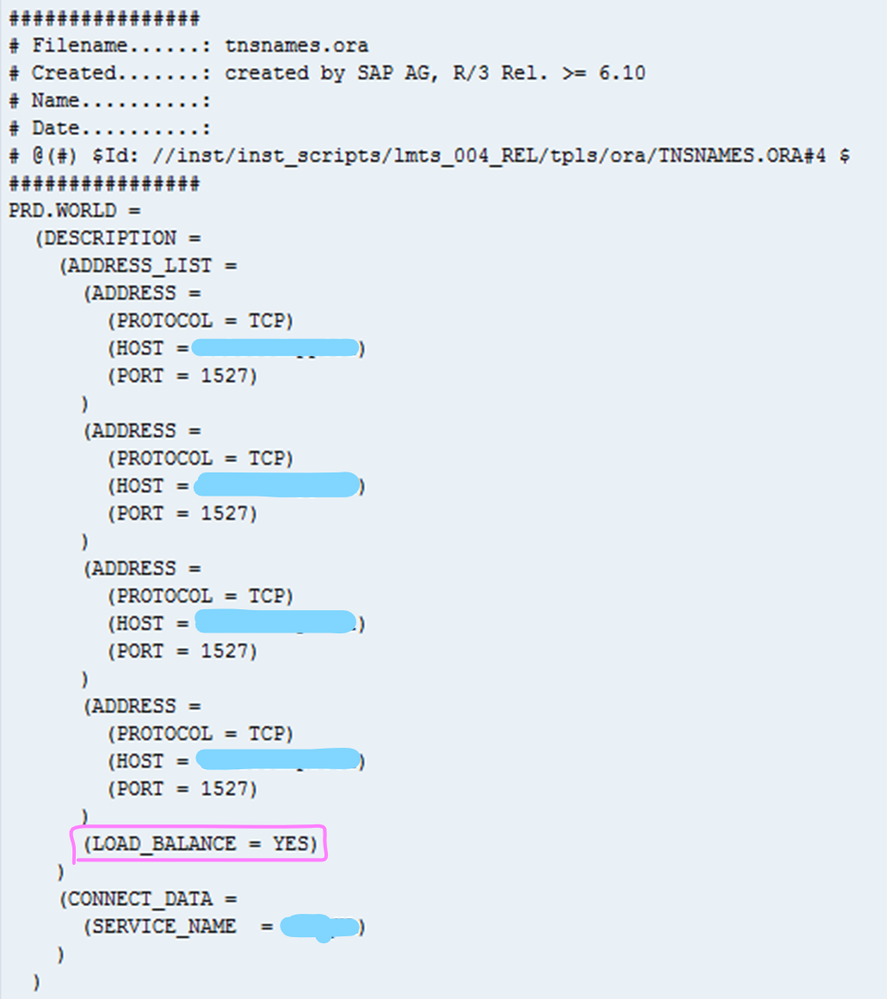
- In all cases it is recommend to review this SAP Note if there are performance problems 1817553 – Checklist for performance problems in SAP Oracle Databases
3. Azure Storage Block Size Physical Constrains & DBMS Disk Storage Guidance
Several customers have encountered issues with DBMS server High Availability technologies and the different types of storage available on Azure. Software based DBMS replication technologies such as SQL Server AlwaysOn, Hana HSR and Oracle DataGuard may not function correctly if the Primary and Secondary(ies) Node are using Azure storage with a different sector size.
Most Enterprise DBMS storage engine logic detects the disk Sector Size and will align the Transaction Log File(s) metadata and internal boundaries to match the Sector Size (either 512 or 4096 bytes). When using SQL AlwaysOn, HSR or DataGuard with different Sector Sizes on Primary and Replica nodes alignment problems may occur. Some DBMS may handle this (such as SQL Server which will print a warning in the errorlog) and some may not.
The SAP on Azure storage guidance has been updated to include a recommendation to ensure the sector size is the same between HA nodes. Depending on the DBMS and the type of replication technology used the same constraints around Disk Sector size may exist for Disaster Recovery nodes as well.
“Bytes Per Sector”
|
“Bytes per Physical Sector”
|
Drive Type
|
Azure Storage
|
4096
|
4096
|
4K Native
|
UltraDisk
|
512
|
4096
|
Advanced Format (also known as 512E)
|
Premium
|
512
|
512
|
512-byte native
|
–
|
The Linux command fdisk -l or Windows command fsutil ntfsinfo

The diagram below illustrates the benefits of 4K Native.

Additional information for SQL Server can be found here Message misaligned log IOs which required falling back to synchronous IO in SQL Server Error Log – Microsoft Tech Community
SAP HANA Azure virtual machine storage configurations – Azure Virtual Machines | Microsoft Docs
Azure storage types for SAP workload – Azure Virtual Machines | Microsoft Docs
4. Linux Cluster Updates – Redhat & Suse
Customers running on Suse 15 may experience an issue similar to the below – Failed: ‘ServicePrincipalCredentials’ object has no attribute ‘get_token’, if using Azure Fence Agent.

This problem was introduced with package version python3-azure-mgmt-compute-17.0.0-6.7.1 and may occur on any of the SLES 15.X images. The problem can be resolved by downgrading the “python3-azure-mgmt-compute” package
To downgrade the package run this command (two hyphens in front of oldpackage)
#zypper install –oldpackage python3-azure-mgmt-compute=4.6.2-6.3.1
After downgrading it is possible to prevent upgrades of this package with this command:
#zypper addlock python3-azure-mgmt-compute
Customers running Redhat 7.x and 8.x with Pacemaker clusters are recommended to review this Redhat article
This blog will be updated with more information about this issue shortly.
An azure-lb resource fails with error “kill: (xxxx) – No such process” in a Pacemaker cluster – Red Hat Customer Portal
5. Moving Job Logs from Filesystem to Database
In SAP Basis release SAP_BASIS 7.51 it is possible to move Job Logs from the file system to the database. As of SAP_BASIS 7.52 this behavior is defaulted (though it is possible to switch to file system via parameters).
This topic is explained in SAP Note 2360818 – Job log in the database
Instead of storing job log data on the file system this information will be stored in a number of tables TBTCJOBLOG0-9
Very large global single instance SAP systems can have millions and in some cases tens of millions of files in /sapmnt. The majority of these files are usually Job Logs. Customer moving very large systems to Azure with more than 200,000-300,000 files in the /sapmnt file system should test carefully.
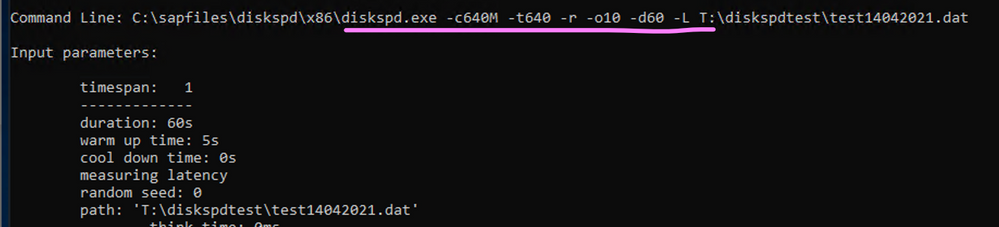
Microsoft delivers a tool called diskspd for Windows and Linux that can be used to test disk performance.
It is recommended to follow the process below when moving a large system with a very large /sapmnt to Azure:
- Monitor the total number of files on /sapmnt. Determine if Job Logs comprise the majority of the files
- If possible switch to storing the Job Logs in the database
- If possible clean up Job Log files more regularly
- Use sysstat/SAR, Perfmon or SAN specific tools to monitor the IO patterns on the storage sharing /sapmnt
- Create a /sapmnt on Azure with the same performance capability as measured in step #4
- Run diskspd on this empty file system
- Copy the contents of /sapmnt to the /sapmnt file system on Azure
- Rerun diskspd on the file system on Azure with many files – compare the results to #6
A sample command line that would stress a disk is below
Download Diskspd for Windows and Linux
Use DISKSPD to test workload storage performance – Azure Stack HCI | Microsoft Docs
GitHub – microsoft/diskspd-for-linux: A disk io load-generator and benchmarking tool for Linux, based on the Windows tool diskspd.
How to use Diskspd to check IO subsystem performance – SQLTerritory.com
https://wiki.scn.sap.com/wiki/display/SI/SAP+Kernel%3A+Important+News
6. Optimizing DMO Migrations to Azure – Some Basic Infrastructure Tools
SAP DMO can be used to directly migrate from AnyDB -> SQL Server or to Hana, perform an upgrade and migrate to another datacenter such as Azure. DMO offers a number of different “Zero Downtime” options. These are explained very well in this blog:
Downtime Optimization Approach – Let’s talk all about different ZERO’s | SAP Blogs
This blog explains how to feed a DMO test cycle with the results of a previous test cycle thereby automatically optimizing table splitting – MIGRATE_UT_DUR.XML and MIGRATE_DT_DUR.XML
DMO: optimizing system downtime is timeless… | SAP Blogs
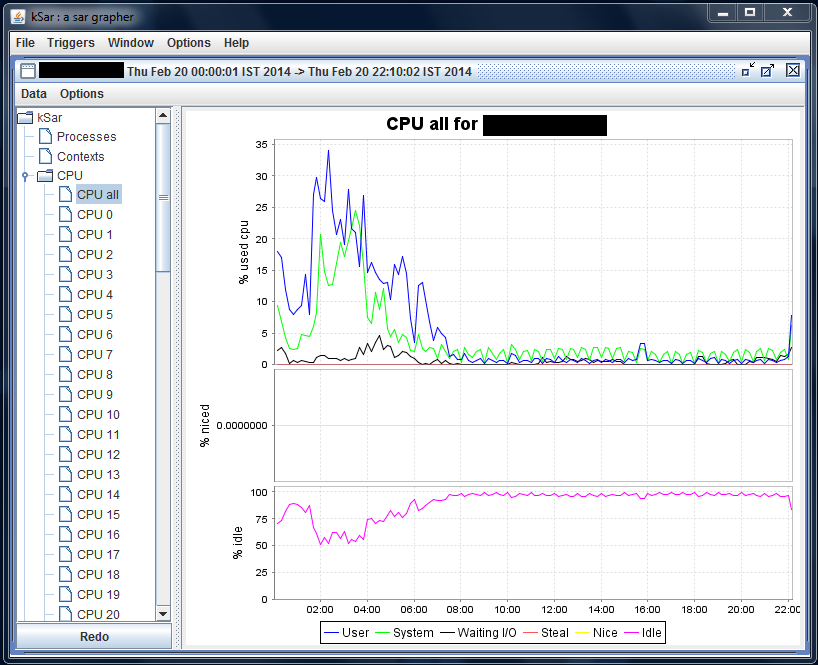
There are two tools that are very useful to isolate and determine the source of resource constraints during a DMO test cycle. During the DMO process writing to the Transaction Log and the DBMS Checkpoint/Savepoint processes in may become a critical gating factor. Another possible problem that is easily identified with these tools is asymmetric CPU load (one CPU core pegged at 100% for long periods of time while other CPUs are at 0%). NMON and SAR allow very clear instant and historical visualization of key performance metrics.
On the Hana DB server and the VM(s) running DMO it is highly recommended to install nmon and sysstat(SAR).
- Unfortunately NMON is not available in any respository such as zypper, apt, yum and must be downloaded http://nmon.sourceforge.net/pmwiki.php
- sysstat or SAR may or may not be installed and activated by default. Typically most Suse gallery images have SAR running by default. Check the directory /var/log/sa. If the directory does not exist or does not contain recent sarXX files then follow the steps below
- KSAR is a graphical tool that presents system performance information in a simple and easy to interpret way. This tool requires a runtime JVM https://github.com/vlsi/ksar
If sysstat needs to be installed follow the steps below
# sudo yum install sysstat
# sudo service sysstat restart
Redirecting to /bin/systemctl restart sysstat.service
The /var/log/sa/sarXX files can be copied onto a Windows PC with sftp
sftp -i <keyfilename>.pem azureuser@<xx.xx.xx.xx>
get /var/log/sa/sar<XX>
Run “Java -jar C:sap_mediaksar.jar“
7. Windows Cluster Across Azure Regions
Recently some customers and partners have asked about Azure Cross Region clusters.
Technically this is possible, though this deployment pattern has not been tested or validated on Azure so far.
The SAP note 1425520 – Disable NI cache for host and service names prevents the SAP application server from caching hostname to IP address lookups. This forces more calls to DNS which in turn may need tuning to lower the TTL (Time to Live).
The blog below and attached video are essential reading for any customer considering such a solution.
Can I run an SAP system in different network subnets? | SAP Blogs
SAP NetWeaver on Network Level (ondemand.com)
Cross region geoclusters for SQL Server are already supported and documented
8. Update on Support Matrix for SAP on Azure
In recent months many new features have become available for SAP customers. The list below is a very brief overview of recommended features and updated documentation
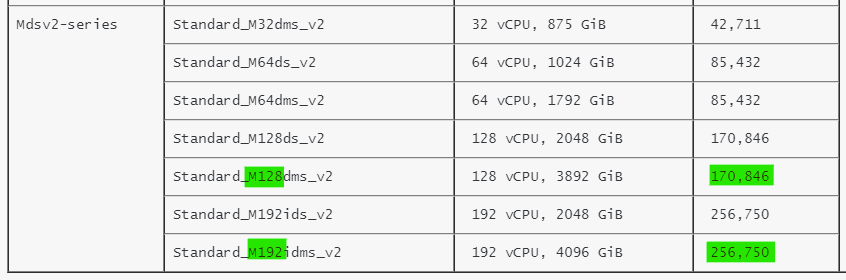
- New VM types certified for Hana & NetWeaver!
These new VMs based on Intel® Xeon® Platinum 8280 (Cascade Lake) processor with an all core base frequency of 2.7 GHz and 4.0 GHz single core turbo frequency deliver an increase from 134,000 SAPS to 170,000 SAPS for 128 cpu configurations. A new 192 cpu VM delivers 256,000 SAPS. Note the restrictions on OS versions. Check this link for Hana Certifications
https://techcommunity.microsoft.com/t5/running-sap-applications-on-the/general-availability-of-m-series-msv2-mdsv2-medium-memory-vms/ba-p/2271293
https://docs.microsoft.com/en-us/azure/virtual-machines/msv2-mdsv2-series
SAP Note 1928533 already shows Msv2/Mdsv2 in the chapter “Supported Azure VM types for SAP products on Windows and Linux”
- Azure Hana Large Instances now support a 12TB DRAM + 12TB Intel Optane configuration, improving TCO and performance. A new benchmark result has been published here
- Azure offers the ability to run IBM pSeries and Nutanix environments. The certification and support of SAP NetWeaver and Hana on these solutions is handled by the respective vendor.
Skytap on Azure (microsoft.com)
Hybrid Cloud Solutions with Nutanix and Microsoft Azure
- Multiple Hana datafile support for ANF. There is a 16TB maximum file size limit on NFS therefore multiple Hana datafiles are required for large customers. HANA Data File Partitioning – Installation – Microsoft Tech Community
- It is now possible to backup Azure Files in Azure Backup Back up Azure file shares in the Azure portal – Azure Backup | Microsoft Docs
9. Gen2 Azure VM Does Not Reboot After Suse 15.x Upgrade
Customers running Suse 15 on Generation2 VMs may notice that a VM fails to reboot after an in-place service pack upgrade.
The problem may occur during any upgrade vector such as from the original SLES 15 RTM release to SLES SP1 or SLES SP1 upgrading to SLES SP2.
Service Pack upgrades on Suse Pacemaker systems are generally not recommended so this problem is so far confined to SAP Application servers or surrounding VMs such as Webdispatcher. The issue exclusively applies to Generation2 Virtual Machines and does not apply to Generation1. SLES released a TID with the way to get out of the situation after an unsuccessful post-upgrade reboot or what to do after the upgrade finished before you reboot the VM in this article: grub2 error: symbol `grub_file_filters’ not found | Support | SUSE
Customers planning to upgrade their SLES 15.x versions to a more recent service pack please review this TID.
Linux Rescue VM for Suse Chroot environment in a Linux Rescue VM. – Virtual Machines | Microsoft Docs
10. Windows & SQL Server Topics
There are several new and important Windows and SQL Server topics:
SQL Server 2012 is nearing end of life and in addition to end of life there may be some licensing changes for 3rd party cloud deployments
3049393 – SQL Server 2012 end of Microsoft Extended Support in July 2022
Azure Backup for SQL Server now fully supports nearly all SQL Server Backup & Restore Restore SQL Server databases on an Azure VM – Azure Backup | Microsoft Docs
More features for SQL Server can be found here SQL Server – Microsoft Tech Community
More features for Azure Backup can be found here Azure Backup (@AzureBackup) / Twitter
Customers with hardened Active Directory (“RestrictRemoteSam” security feature) may observe this error in the SAPInst errorlog – OS message 1332 (No mapping between account names and security IDs was done). Use the latest version of SWPM
SWPM now fully supports hardened Domain controllers
3030014 – SWPM stops during check of group membership
2831797 – How to disable page locks during a SAP NetWeaver import on MS SQL Server to prevent deadlocks on split tables
2814195 – Can use a Query Store?
2807743 – Release planning for Microsoft SQL Server 2019
2751450 – SAP Systems on Windows Server 2019
3004493 – 500ms delays in communication between ABAP and MS SQL database
2931465 – Reduce network latency (RTT) using Proximity placement groups on Microsoft Azure – NetWeaver
Additional Links & Notes
Azure Certification and Training courses
Collections – MicrosoftAzuretrainingandcertifications | Microsoft Docs
SAP on Azure Free Online Training Course. Exam AZ-120: Planning and Administering Microsoft Azure for SAP Workloads
https://docs.microsoft.com/en-us/learn/certifications/exams/az-120
A free Certification Exam offer is here https://docs.microsoft.com/en-us/learn/certifications/microsoft-build-cloud-skills-challenge-2020-free-certification-exam-offer
The main SAP on Azure site https://azure.microsoft.com/en-us/solutions/sap/
SAP on Azure Resources https://azure.microsoft.com/en-us/solutions/sap/resources/
SAP on Azure Updates on the main Azure site https://azure.microsoft.com/en-us/updates/?query=sap
SAP on Azure Documentation “Getting Started” https://docs.microsoft.com/en-us/azure/virtual-machines/workloads/sap/get-started
Azure Charts – Your Cloud Radar https://azurecharts.com/
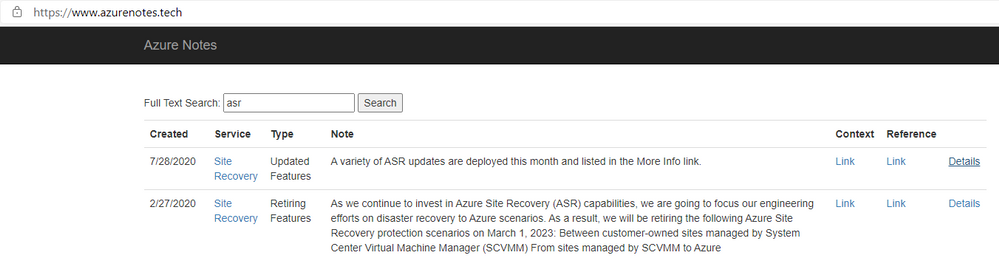
https://www.azurenotes.tech allows you to filter the very large number of new features, updates and documentation references for a given Azure feature (in the example below ASR)
3rd party content in this blog is used under “fair use” copyright exception for promoting scholarship, discussion, research, learning and education


Recent Comments