
by Contributed | May 19, 2021 | Technology
This article is contributed. See the original author and article here.
Agenda:
May’s call, hosted by David Chesnut, featured the following presenters and topics:
- Abid Rahman announced the GA of keyboard shortcuts and shared plans for the feature going forward. – 00:59
- Sohail Zafar announced the GA of contextual tabs and updates about the feature and plans going forward. – 11:03
- Special guest presenter Damien Bird (DamoBird365) demonstrated how to use Office Scripts with Power Automate to generate and fill in an invoice with data from SharePoint, and then save to a PDF. – 19:57
- Juan Balmori shared Outlook updates on event-based activation and announced new preview events. – 35:09
Q&A (Question & Answers)
Unfortunately, we had some issues with the chat during the call. We apologize to folks who were not able to ask a question. If you have a question, you can reach out to us by using our short survey form. We’ll address any questions in the form during the next call.
Is it possible to see a demonstration of debugging Outlook add-ins in the Outlook application on mobile devices? Ideally for a local developer instance of an add-in server rather than one publicly accessible (since a hurdle is getting the mobile device to communicate successfully with lab instance of add-in server). We’ve encountered issues on Android with certificates running lab instances of add-ins so would like to see a demonstration of recommended approach to testing on mobile devices.
Thanks for this request! We’re working to schedule this demo this on a future call.
When the Outlook REST API is decommissioned in November 2022, what API should add-ins deployed to customer hosted Exchange Servers (2016/2019) use for mobile support? Will the Outlook REST API remain active for Exchange Server and just be decommissioned for O365 accounts?
We’re still working through details on this, and we plan to share more guidance in the future.
Is there any movement on supporting reading values, such as AppDomains and custom properties, from the add-in manifest at runtime through Office.js? The request has come up over the years on forums and been raised on UserVoice. We would prefer to write a key and value to the manifest, instead of passing values to URL endpoints, as this opens the door to people injecting their own values outside of the manifest to those endpoints.
This feature is not on our backlog. We migrated UserVoice requests that had over 100 votes to our new Microsoft 365 Developer Platform Ideas Forum. We’d ask that you Submit an Idea on this page and recreate your request. If there’s enough interest from the community we’ll definitely consider it. Thanks!
What is the roadmap for Office.js for PowerPoint? When will it achieve feature parity with VSTO APIs?
VSTO is a huge API surface, which is why we approach building out the Office JS API based on prioritized scenarios. It’s tremendously helpful to understand the scenarios you are trying to unlock and what API’s you need. That helps us prioritize. Please let us know which scenarios you need enabled on our Ideas page and use the “Office Add-ins development” label. We’re planning to deliver increased API surface area for PowerPoint going forward.
In Excel on the web, when you close an Office Add-In, it creates a bar on the left side of Excel and puts an icon for the add-in on that bar, allowing the user to quickly show or hide add-ins from there. Will this be available in Excel on the desktop?
Thanks for this feature request! Can you let us know more about this on our ideas page and provide a screen shot to help us understand better?
Will you support Excel.Range.Interior characters and the ability to apply formatting at the character level?
Thanks for this request! We’re looking into supporting this. Can you please create a request for this on our ideas page?
Resources:
Keyboard shortcuts
Custom contextual tabs
Office Scripts demo by Damien Bird
Outlook event-based activation
Office Add-ins community call
Office Add-ins feedback
The next Office Add-ins community call is on Wednesday, June 9, 2021 at 8:00AM PDT. Get the calendar invite at https://aka.ms/officeaddinscommunitycall.
by Contributed | May 19, 2021 | Technology
This article is contributed. See the original author and article here.
Today, we are releasing an update (“hotfix”) to our latest generally available version of Windows Admin Center! Windows Admin Center version 2103.2 is now available in preview. Thank you to our customers, partners, and fans for helping us to continue to improve and make Windows Admin Center better! We’re working constantly to ensure users of our product have the best user experience.
This version of Windows Admin Center includes key bug fixes and feature updates to the Azure sign in process, support for Azure China, as well as additional updates to the Events and Remote Desktop tool experience.
Download Windows Admin Center v2103.2 today!
Platform updates
Bug fixes
“Access Denied” fixed
We know several users were met with an “Access denied” error upon starting Windows Admin Center and were unable to use the Windows Admin Center v2103 as a result. We have updated the logic of our automatic extension updates feature to fix this issue.
PowerShell commands fixed
In the v2103 release, many users were unable to utilize PowerShell to manage their Windows Admin Center settings and connections. In this release, you should be able to effectively use these commands to configure your Windows Admin Center gateway.
Certificate error fixed
We know some users were having difficulties navigating in v2103 and kept being presented with an SSL certificate error message. In this release, we have added a fix for this issue and this SSL certificate error message should not occur.
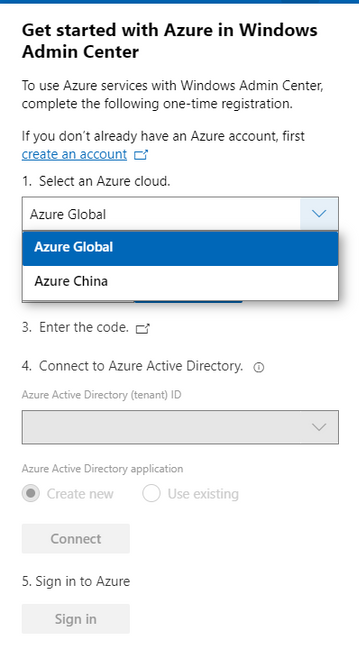
Windows Admin Center now supports signing into the Azure China cloud
The request for Windows Admin Center to expand their Azure support matrix to sovereign clouds has been a long-standing ask, especially as we continue to introduce additional hybrid capabilities to Windows Admin Center. In this release, when you register your gateway to Azure, you will be prompted to select the cloud you’d like to register in. The two options in this dropdown are Azure Global and Azure China, with Azure Global selected by default. After registering your gateway with your selected cloud, Windows Admin Center will assume that further Azure operations, like Azure sign-in, will be done through the cloud your gateway is registered in.
Some of the Azure services included in Windows Admin Center are not currently supported in Azure China. For more detailed information on the regional support for each Azure service, visit the Microsoft Azure website.
Other updates
- Option to “Install now” for automatic updates (in Windows Admin Center update settings)
- Improvements to the Azure sign-in process and bugfixes
- Updates to notification styling
- Accessibility improvements and bug fixes
Core management tools
Events tool updates
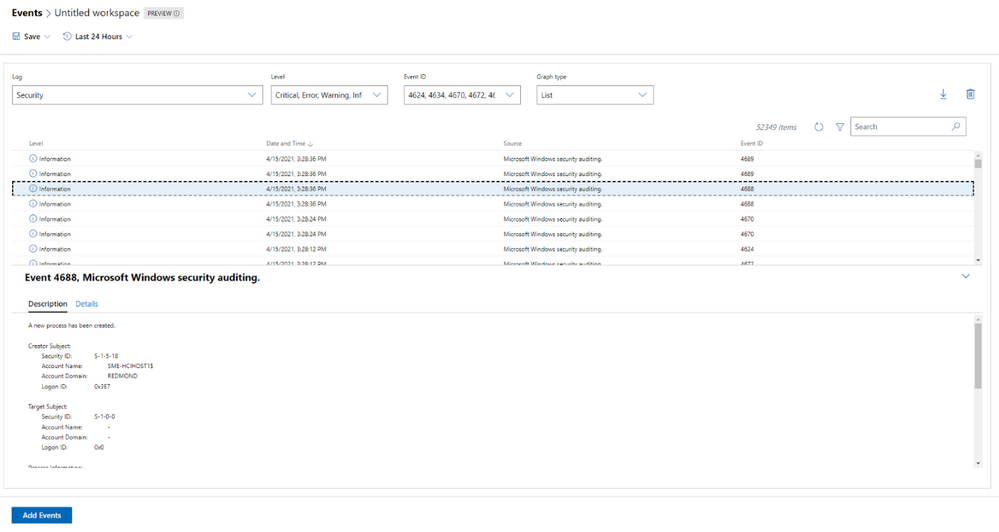
When we released the new look of the Events tool in our 2103 release, we did so with the caveat that not all the existing Events tool functionality was available in this new experience. In this release, we work towards rectifying that with the following improvements:
- The Details pane is now available in the new experience.
- We’ve fixed loading issues that occurred when changing event attributes while viewing events in stacked bar format.
- We’ve tweaked the dropdown menus slightly, so the displayed information remains accurate, even when you modify attributes of an event.
Remote Desktop tool updates
We’ve made a few changes to the Remote desktop tool in this release based on feedback we’ve received through UserVoice.
Windows Admin Center uses TLS ciphers in the Remote Desktop tool when connecting to a client machine. Historically, many of the ciphers offered by Windows Admin Center in this tool were cipher block chain (CBC) ciphers. In this release, we’ve upgraded the remote desktop web client library, and it now includes a wider selection of supported ciphers for you to choose from when you’re setting up RDP on your Windows Admin Center gateway. You should now be able to select ciphers from several suites, with options for both CBC and Galois/Counter mode (GCM).
Additionally, several users had reported through UserVoice that the language of their keyboard in the Remote Desktop tool did not match the language that had been selected. This was a large fix and it is currently only available to users who have access to our Windows Admin Center Insiders extension feed. To add the Insiders extension feed, navigate to the Feeds tab in Extension manager and add https://aka.ms/wac-insiders-feed to the feed list. Then, look for the updated “Remote Desktop” extension.
The Windows Time service extension is now in preview!
The Windows Time service extension uses the Windows Time service (W32Time) to synchronize the date and time for all computers running in Active Directory Domain Services (AD DS). Time synchronization is critical for the proper operation of many Windows services and line-of-business (LOB) applications. The Windows Time service uses the Network Time Protocol (NTP) to synchronize computer clocks on the network. NTP ensures that an accurate clock value, or timestamp, can be assigned to network validation and resource access requests.
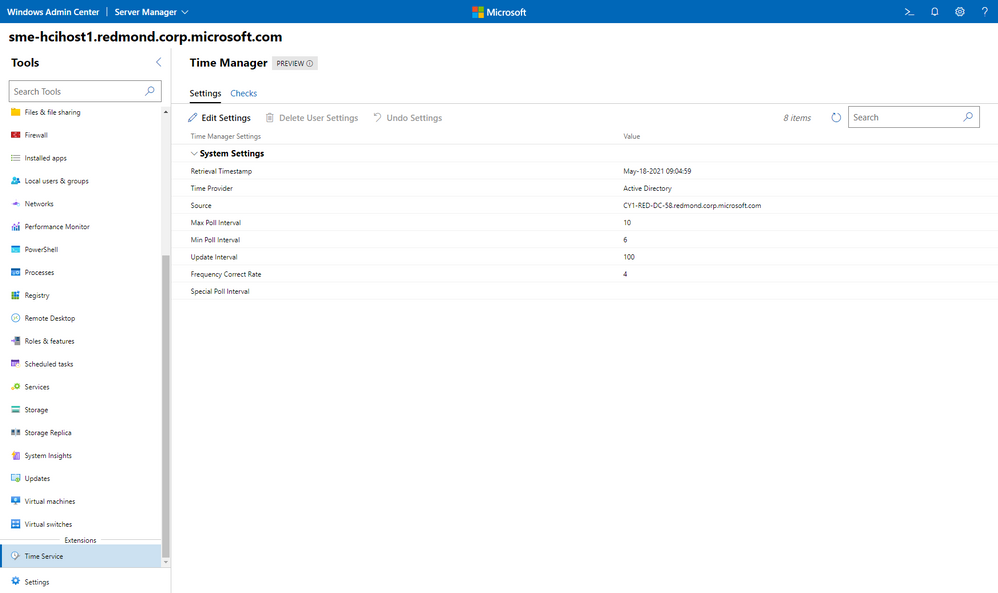
This extension is currently only available to users who have access to our Windows Admin Center Insiders extension feed. To add the Insiders extension feed, navigate to the Feeds tab in Extension manager and add https://aka.ms/wac-insiders-feed to the feed list.
Other changes
- Azure hybrid center bug fixes – We want your experience using Windows Admin Center and Azure to be clean and seamless. In this release, we made several bug fixes to enhance the look of the tool.
- Azure Arc bug fixes – In this release, we improved the Azure Arc user experience by fixing several bugs. Users should no longer face issues with the links in the Azure Arc tool and the disconnect experience.
Partner ecosystem
Windows Admin Center continues to value the collaboration efforts we have with our partners, and these past few months have been a very active period! Since our 2103 release in March, five of our partners have released new or updated versions of their extensions. If you’re interested in developing a Windows Admin Center extension, visit our documentation to get started.
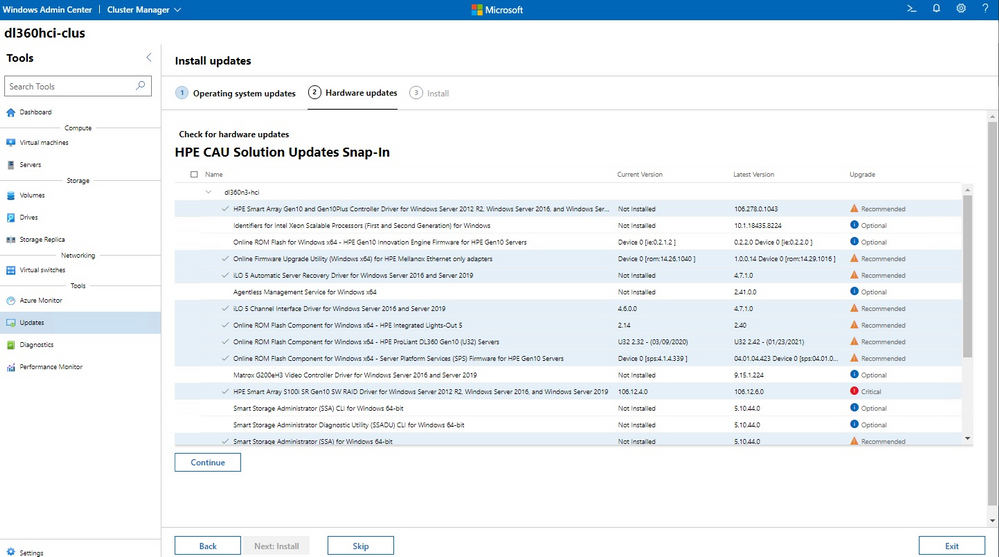
The HPE Azure Stack HCI Cluster Deployment and Update Snap-in is now available. The HPE Deployment snap-in reports the firmware and software inventory and status generated by HPE Smart Update Manager (SUM), then initiates installation of the selected components, followed by showing the completion status. The HPE Update snap-in reports the firmware and software inventory and status generated by HPE Smart Update Manager (SUM). The selected components will get updated on the cluster from Cluster-Aware-Updating (CAU) orchestration.
The cluster deployment snap-in will appear in the Azure Stack HCI cluster create wizard, and the update snap-in will appear in the update wizard in the Updates tool when connected to a cluster.
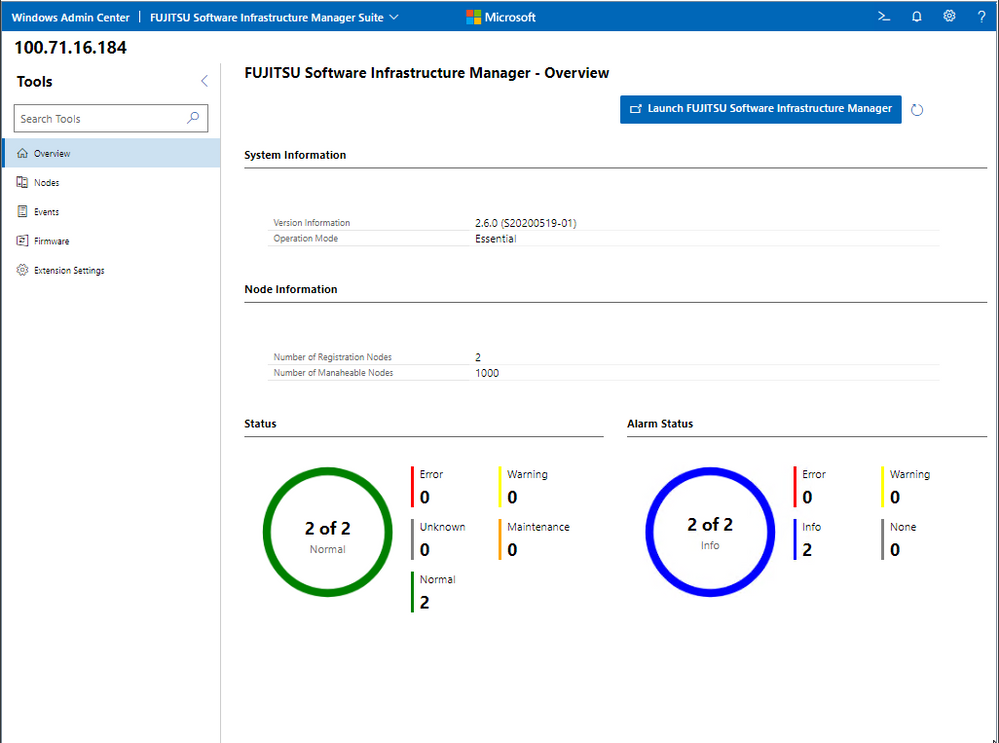
Fujitsu Software Infrastructure Manager (ISM) is now available. By installing ISM, multiple and various types of information and communications technology (ICT) devices can be managed in an integrated way. With this software, you can monitor the status of all the ICT devices in a data center or a machine room. You can also execute batch firmware updates for multiple devices and configure servers automatically. It can reduce costs of operation management and increase the operation quality.
Other partner extension updates
- DataON MUST Pro v2.1.0 – This version of DataON MUST Pro includes slight improvements to the inventory page.
- Fujitsu ServerViewR RAID v1.2.1 – The overview page has been updated to include a refresh button.
- Fujitsu ServerViewR Health v2.0.1 – There are several improvements in this release, including the addition of a refresh button to the overview page and new Windows Admin Center notifications for network error messages. Additionally, you can now perform health monitoring without ServerView agents.
- HPE Server and Azure Stack HCI v1.3.0 – The Inventory tab of the Server extension now reports SSD drive life expectancy and surfaces a warning message upon crossing a threshold. The Overview tab of the Azure Stack HCI extension has been updated with improved cluster classification and storage information reporting.
- Lenovo XClarity Integrator v3.1.23 – The newest release of this extension includes several bugfixes.
- QCT Management Suite v2.3.0 – Updates to this extension include Redfish support, a redesigned overview page, optimization for update experiences, and LLDP support.
Download today!
We hope you enjoy this latest update of Windows Admin Center, the various new functionality in preview, and all the extensions now available. Learn more and download today!
As always, thanks for your ongoing support, adoption, and feedback. Your contributions through user feedback continue to be very important and valuable to us, helping us prioritize and sequence our investments.
<3,
Windows Admin Center Team (@servermgmt)
by Contributed | May 19, 2021 | Technology
This article is contributed. See the original author and article here.
Join Azure Storage product teams and your peers at Build to take part in meaningful conversations about the tools you use every day. Share insights, discover new perspectives, and problem-solve in a collaborative environment to shape the future of Microsoft products.
Check out these product roundtable related to Azure Storage:
Designing and building data-centric cloud native applications
Tuesday, May 25 | 9:30AM – 10:30AM PDT
Azure Storage is a key enabler for cloud native application development and deeply integrated with almost every Azure service. We’ve built key features in the storage services for mobile and web app development, serverless computing and containerized workloads. In this roundtable, we’ll present the upcoming roadmap for these features and welcome your feedback. Share how you’re designing and building apps that work with persistent data and how we can improve to help you build great apps.
Build and run stateful container applications on Azure
Wednesday, May 26 | 3:00PM – 4:00PM PDT
Customers are increasingly using stateful container applications leveraging storage. These environments are prevalent both on-premises and cloud environments running at production scale. Containers provide simplicity, agility, scalability and mobility to applications but this requires careful planning when using state. We would like to learn about your experience running stateful applications on Azure or the Edge.
Register for Build 2021.
We are excited to see you there!
by Contributed | May 19, 2021 | Technology
This article is contributed. See the original author and article here.
Hello everyone, here is part 3 of a series focusing on Endpoint Protection integration with Configuration Manager. This series is recorded by Steve Rachui, a Microsoft principal premier field engineer.
This session focuses on the BitLocker management capabilities integrated into Configuration Manager. Steve details how to configure the integration, how it works and demonstrates the integration in action.
Next in the series Steve focuses on how Configuration Manager can be used to manage the integrated Windows Firewall settings.
Posts in the series
Go straight to the playlist
by Contributed | May 19, 2021 | Technology
This article is contributed. See the original author and article here.
Summary
As containers and cloud native workloads continue to grow, ensuring that customers can reliably acquire vendor artifacts becomes crucial. Microsoft is committed to offer its customers reliable and performant experience for pulling Microsoft container images from the Microsoft Container Registry (MCR or mcr.microsoft.com). MCR contains the full catalog of container images produced by Microsoft with their most up-to-date versions and tags. By leveraging Azure’s global footprint, MCR offers public access to Microsoft’s images globally. With that in mind, we are deprecating all /microsoft org container images hosted in Docker Hub repositories on June 30th, 2021.
How does this impact you?
If you continue to reference Microsoft container images using repositories in Docker Hub, this will have impact on your development, deployment, and automation scripts.
Examples for such references are: `FROM microsoft/*` in Dockerfile or `docker run microsoft/*` in automation scripts. You can leverage https://grep.app/ to discover such references in OSS scripts.
- Starting June 1st, 2021 pulls of microsoft/ org container images from Docker Hub registry will be throttled according to Docker Terms of Use. This will limit the number of pulls that you are allowed within certain time period.
- Starting July 1st, 2021 repositories from microsoft/ org on Docker Hub will be removed. At this point development, deployment and automation scripts that still reference /microsoft org images from Docker Hub registry will break.
To avoid any impact on your development, deployment or automation scripts, you must update `docker pull` commands, `FROM` statements in Dockerfiles, and other references to /microsoft container images to explicitly reference the mcr.microsoft.com registry.
We understand that certain repositories from microsoft/ org on Docker Hub registry are highly trafficked, and customers relying on them may not be able to complete these changes by June 30th, 2021. We are working to identify those repositories and provide extension for them. A list of such repositories and for how long they will be available will be published on MCR’s GitHub repository by June 1st, 2021.
Mapping of Docker Hub repositories to MCR repositories
Mapping between the repository names on Docker Hub and MCR can be found on MCR’s GitHub repository.
Guidance for Consuming Public Container Images
Having a controlled workflow for consumption of public content like container images from Docker Hub and MCR is a key for building a secured and reliable software supply chain. Please see the Open Container Initiative’s Consuming Public Content for general guidance and Azure’s guidance for consuming public content.
Background
Back in 2018, we announced the transition of Microsoft container images hosting to MCR with syndication to Docker Hub, which laid the ground for worldwide distribution of Microsoft container images. Last year Docker announced an update of their terms of use and plans for image retention – both changes impacting pulls of container images from Docker Hub. Microsoft and Docker have worked closely to provide smooth transition for customers who need to pull /microsoft org container images. Docker Hub pages were updated to reflect the new pull location, mcr.microsoft.com, and are continuously updated with information how to pull up-to-date tags from MCR. We will continue this collaboration to provide an easy and frictionless discoverability mechanism for Microsoft container images through Docker Hub.
How to get additional help?
We understand that there may be unanswered questions. You can get additional help by submitting an issue on GitHub or sending an email to mcrfeedback@microsoft.com.


Recent Comments