by Contributed | May 27, 2021 | Technology
This article is contributed. See the original author and article here.
Analytics and data are key to understand the impact of our efforts. Over the last few months, we’ve shipped new ways to measure activity happening in Yammer across Communities, Knowledge, and Live Events.
Today we are thrilled to announce the general availability of Conversation Insights. These insights empower authors and community managers to measure the reach and engagement of their conversations and announcements to understand what content resonates best with audiences.
Conversation Insights is available on Yammer.com on the web, and through the Yammer Communities App in Microsoft Teams.
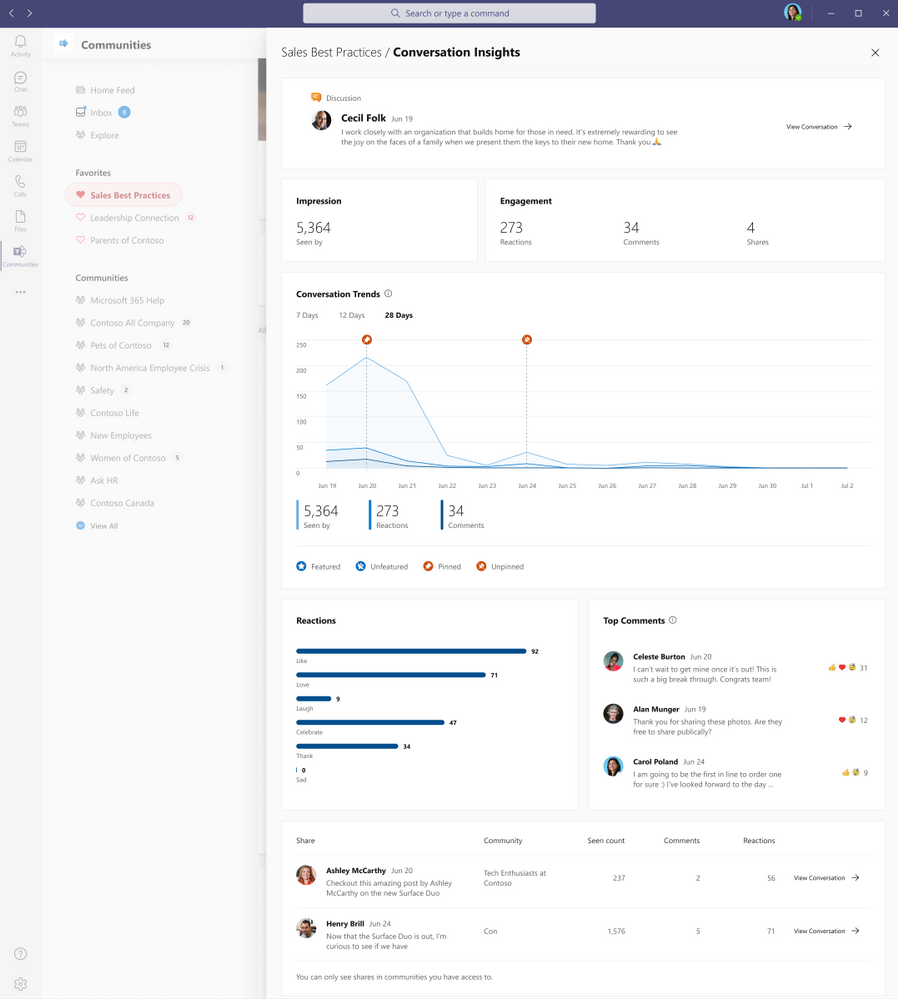 Conversation Insights
Impressions and Engagement
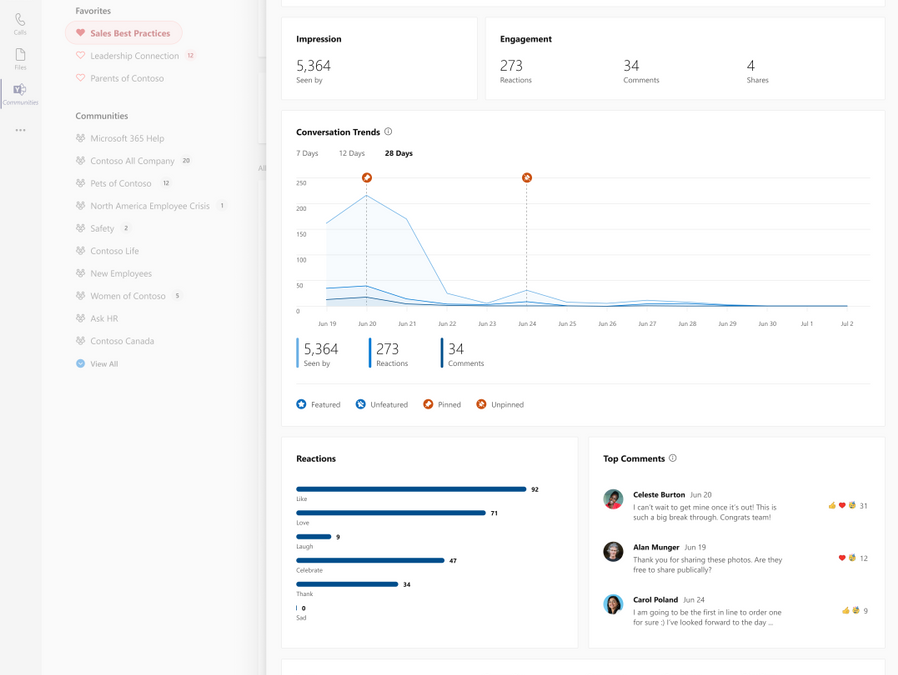
Get a topline summary of the metrics that matter most – the number of people that have seen this conversation and their engagement through comments, reactions, and shares.
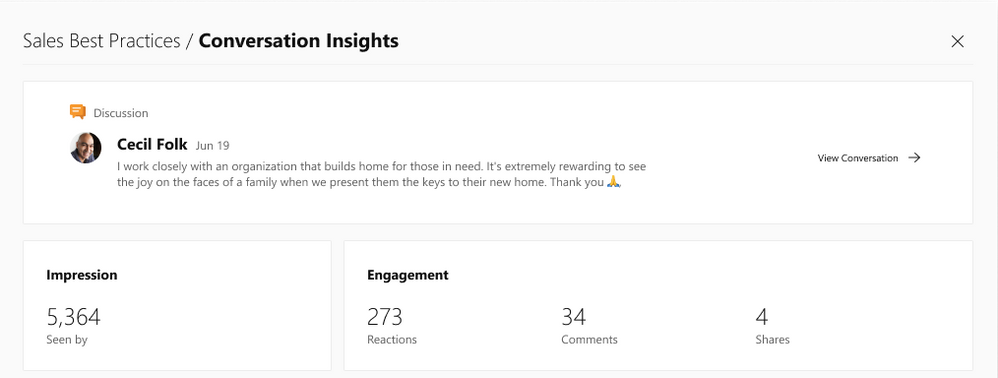 Impressions and engagement
Recognize Trends
Understand the engagement impact of taking actions to pin the conversation in a community or feature it across the network.
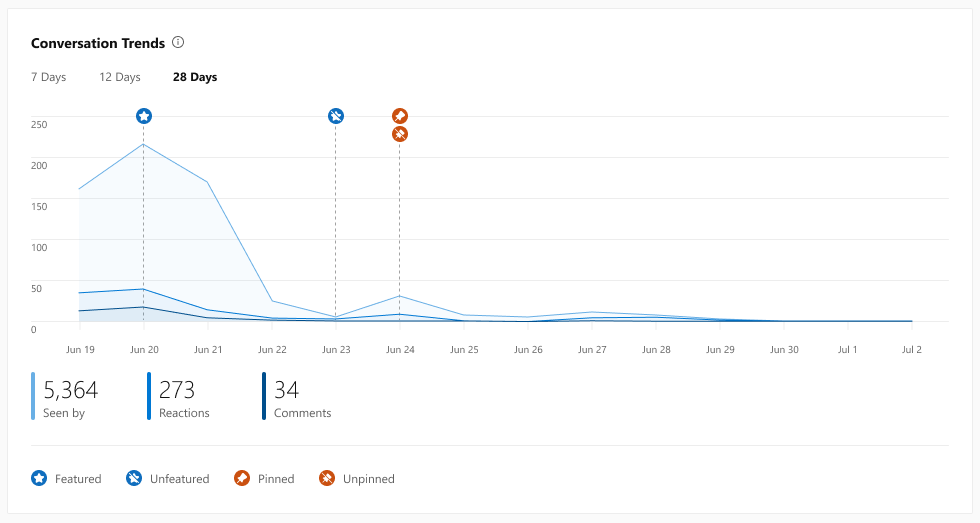 Conversation Trends
See how people react
Get a breakdown of reaction types on the conversation to get a measure of how people felt, and see which comments people most are interested in engaging with.
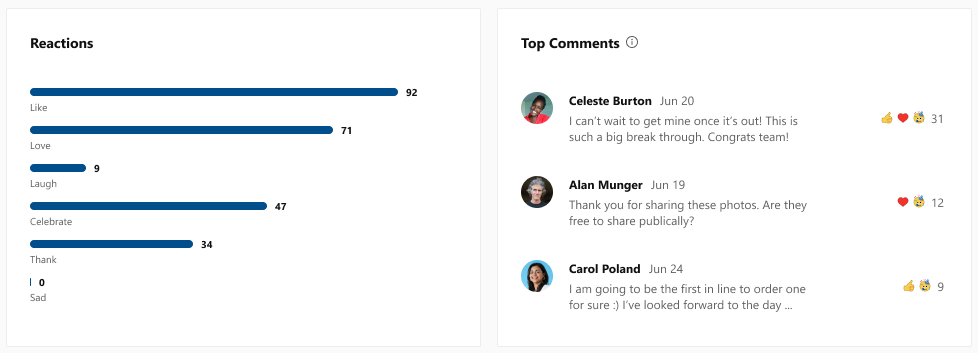 Reactions and comments
Measure spiraling engagement
See if your conversation went “viral” through the number of shares, how many people saw it, comments, and reactions, all in an easy-to-use dashboard.
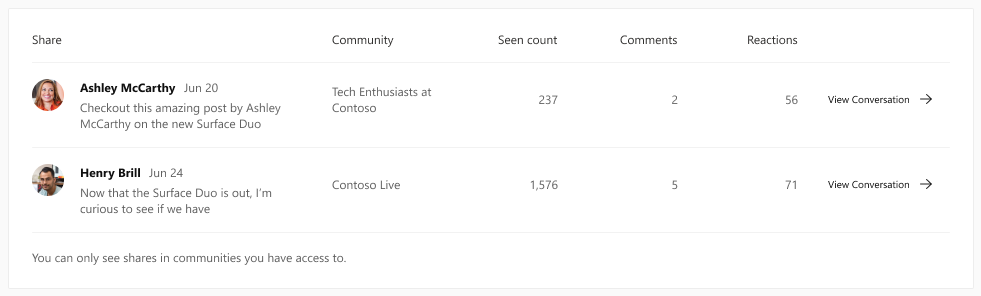 Shares
A new tool for corporate communicators and community managers
These new conversation insights provide a new way for corporate communications teams to track their internal campaigns and announcements. And partnered with the Yammer Communities app for Microsoft Teams, it paves the way for communicators to reach everyone wherever they work, and track the effectiveness of their messages in a whole new way.
See the official documentation.
We’re continuing to strengthen the integration between communities and Microsoft 365 to give everyone the tools and information they need to stay connected and thrive. Keep an eye on our blog for more news coming soon.
Sameer Sitaram
Sameer is a Product Manager on the Yammer team
by Contributed | May 27, 2021 | Technology
This article is contributed. See the original author and article here.
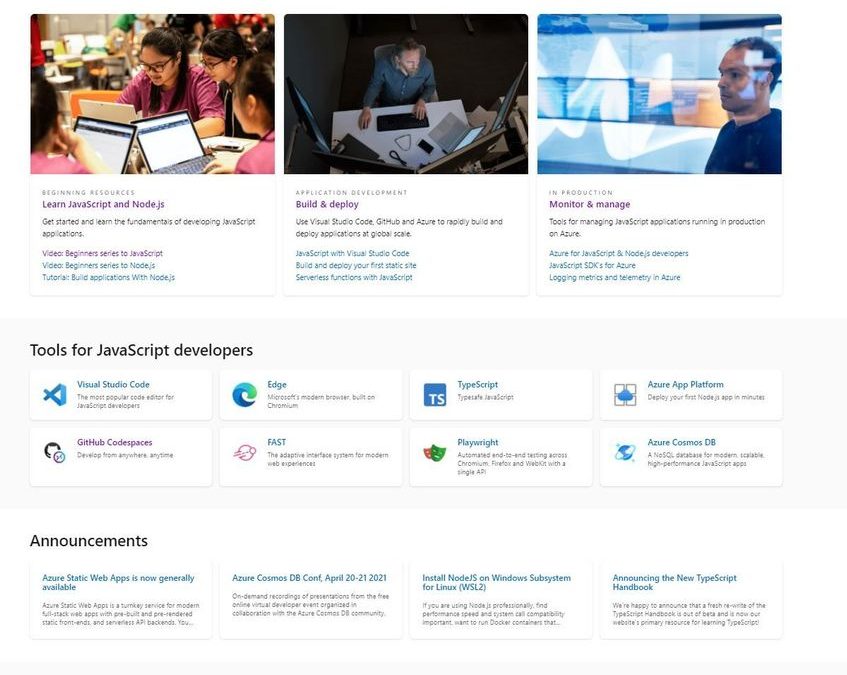
Welcome to docs.microsoft.com/javascript.
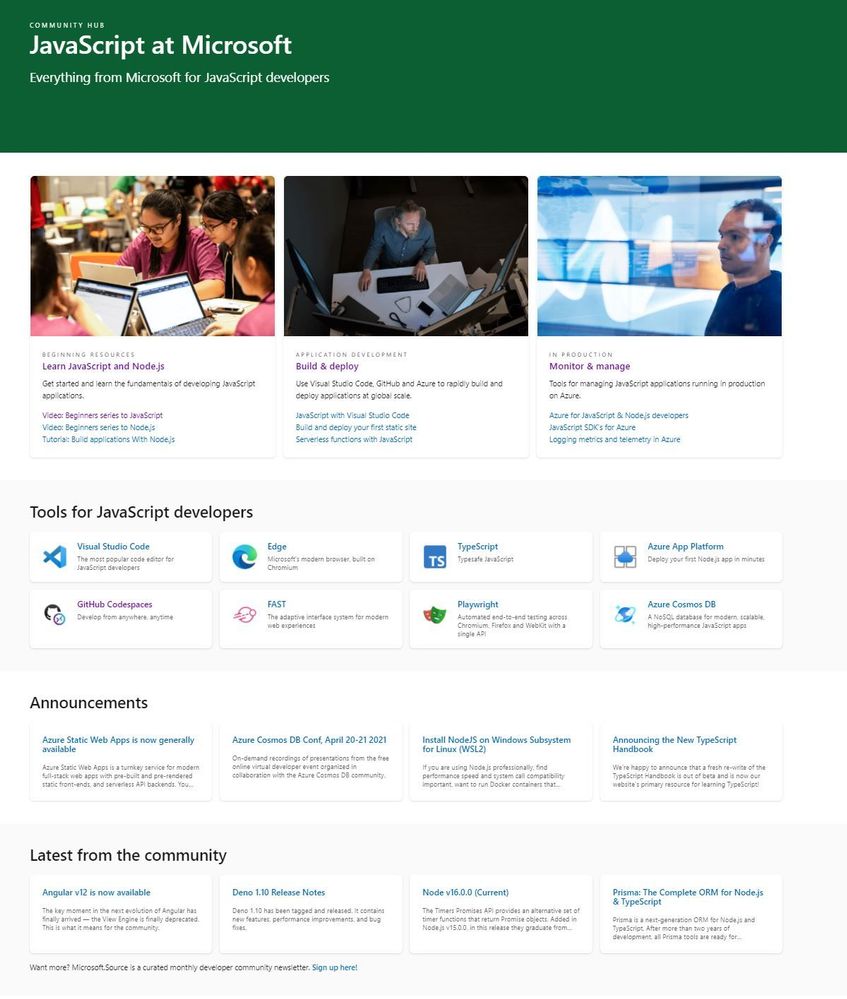
This is a new landing page designed to be a front-door to our end-to-end tools, services and runtimes for JavaScript developers.
Some of the resources which support Educators and Students.
BEGINNING RESOURCES
by Contributed | May 27, 2021 | Technology
This article is contributed. See the original author and article here.
Once again, the Microsoft CSM (Customer Success Manager) team representing State & Local Government customers has produced a new 4-week series on the topic of Meetings in Microsoft Teams.
The recordings can now be found online in a new YouTube playlist here, which complements our previous series.
Customers are getting great value from having these series done on a regular basis. Not only does it help to reinforce key meeting best practices, but it’s also important given the constant flow of innovation and features that roll out to Microsoft Teams every month. This series is also timely as we near the full deprecation of Skype for Business Online (SfBO), and many customers are working to make sure their users have a smooth transition from their use of SfBO meetings to now Teams meetings.
Here’s a description of the sessions you’ll find:
- Before the Meeting
- Introduction to Teams – Why Teams Meetings?
- Ways to Access Teams; Choosing How to Meet
- Setting Meeting Expectations – Roles and Access
- Meeting Extensibility
- During the Meeting
- Meetings Features (Part 1 and Part 2)
- Sharing Assets During a Meeting
- After the Meeting
- Sharing Outcomes of the Meeting
- Post-meeting Collaboration & Learning Resources
- Use Cases for the Teams Mobile App
- Best Practices
- Accessibility in Teams
- Troubleshooting Common Teams Meetings Issues
- Teams Meetings GCC Roadmap
- Advantages of Teams as a Platform
Related Teams for Government articles: Notifs in GCC | Custom Apps in GCC | Gamification of Teams
by Contributed | May 27, 2021 | Technology
This article is contributed. See the original author and article here.
Looking for a way to preserve your Oracle partition strategy while modernizing to Azure SQL? SQL Server Migration Assistant’s new automatic partition conversion allows you to retain your current partition model even when there is no direct type mapping. Dive into this significant time-saving feature in this episode of Data Exposed with Alexandra Ciortea and Xiao Yu.
Watch on Data Exposed
Resources:
by Contributed | May 27, 2021 | Technology
This article is contributed. See the original author and article here.
This month, we’re releasing new productivity and security capabilities. You can view the complete list of What’s New in the 2105 (May) release for details. Below you’ll find more about my favorite features shipped this month. As usual, I appreciate your feedback. Comment on this post, connect with me on LinkedIn, or tag me @RamyaChitrakar on Twitter.
Protecting data on different device types with filters
Filters let you maximize your current asset investments while protecting data on personal, company-owned, and shared devices. You can use filters to target policy and apps based on specific device attributes. The applications are endless. Out of many customer use cases, these three consistently guide our filters development:
- You want to apply a consistent compliance policy setting the minimum OS version on all enrolled Android devices but omit Microsoft Teams Android devices from this policy. Now, you can simply apply one compliance policy across your entire portfolio and filter out the device type where it doesn’t make business sense to apply the policy.
- Part of your device environment includes iPadOS devices that run a business-critical app certified by a regulatory agency for use with specific OS versions. Your iPadOS devices cannot update their OS until the app is certified for use with the latest OS. You also have bring your own device (BYOD) iOS devices, which meet your minimum OS policy but can update any time your user wants to take advantage of the latest features and security updates. You can now create one policy for updating all iOS devices but filter specific iPadOS devices from the policy. That way your BYOD devices stay current and your iPadOS devices remain under your update control.
- Your device portfolio includes Autopilot-enrolled Windows 10 devices, BYOD Windows 10 devices, and Windows Virtual Desktops, which several of your developers have for testing. You have an app purchased for business use but due to licensing restrictions, you don’t want BYOD Windows devices or Windows 10 virtual devices to use the app licenses. You can now make the app available on all Windows 10 devices in your portfolio but omit BYOD and virtual OSs.
Check out this post for more details on filters and look for additional device attributes and capabilities in the future. Watch this video to see filters in action:
Several customers have asked how to best approach filters. We recommend that you:
- Assess all the assignments in your organization. Many customers have a mix of corporate and personal devices.
- Review each app assignment and policy.
- Evaluate if these assignments and policies are correctly scoped or if there’s a device filter that you can apply to better meet the app or policy needs.
- Determine if one filter can be used in multiple scenarios as a reusable entity – this simplifies the management and application of filters.
- Test and apply filters.
I am incredibly proud of the engineering work done to build the filters capability. Our rules engine performance for filter evaluation is world class – our scale testing found filter evaluations for 350K device check-ins took less than 1 second! The feature works in conjunction with Azure Active Directory groups and complements your identity management group options to ensure you have flexibility for your business needs.
Supporting Windows 10 Enterprise multi-session (public preview)
You’ve likely used Windows Virtual Desktop – it delivers a Windows 10 desktop experience on any device, anywhere, integrated with Microsoft 365 security features and often at a reduced cost as you can use existing licenses to save cost with a modern-cloud-based virtual desktop infrastructure and pay only for what you use. This preview will enable your frontline workforce to share the same enterprise multi-session virtual machine! You can quickly and easily enroll, provision, and manage the virtual machine with a new, simplified policy authoring experience targeted to shared Windows multi-session devices.
See your organization’s multi-session virtual machines in the Microsoft Endpoint Manager admin center:
Customizing and managing policies more easily
The settings catalog makes it easier to customize, set, and manage device and user policy settings. Many customers have shared that managing policy configuration through custom Open Mobile Alliance Uniform Resource Identifier (OMA-URI) policy is cumbersome, difficult to report on, and often unsupportable. Our 2105 service release supports your move from Group Policy Objects (GPO) or custom OMA-URI to cloud-based consolidated policies. We’ve added 5,000 settings to the settings catalog for Edge, Office, and OneDrive, including additional settings for macOS and Windows!
With settings catalog, we aim to close the gap on available configuration service providers (CSP) settings in Windows, standardize policy settings across the console (such as with a “not configured” policy option), and simplify the policy creation workflow. Try these new settings in a few ways:
- Start from an empty policy and simply select what you want from a library of available settings.
- Use one of several pre-created templates that will provide the security, user experience, and productivity settings most used by customers.
- Compare what you’ve set as your baseline with what’s configurable in the cloud through CSPs. This is a good option if you still have a number of GPO settings. Last month, we released a Group Policy analytics preview tool that makes it possible to compare your GPO settings with Mobile Device Management policy CSPs.
- Review your custom OMA-URI policies and compare them to the options in the settings catalog. Reporting and conflict resolution greatly improve when you move off custom OMA-URI policies.
- Add policies we’ve introduced this month into your existing already configured baselines.
Explore more detailed information on the settings catalog or watch a short demonstration of a few of the new settings:
We keep our customers’ needs top of mind. This month, we introduced several capabilities to improve your daily life. We listen to your feedback and make changes and investments aimed at improving the user experience as well as simplifying IT administration. Questions? Feedback? Comment on this post, connect with me on LinkedIn, or tag me @RamyaChitrakar on Twitter.


Recent Comments