by Contributed | May 27, 2021 | Technology
This article is contributed. See the original author and article here.
Azure Synapse now enables you to query data stored in Apache Delta Lake format. This is one of the top feedback requests and we are happy to announce that this feature is now available in public preview.
In this article you will learn how to run the T-SQL queries on a Delta Lake storage from your Synapse workspace.
What is Delta Lake?
Delta Lake is an open-source data format that enables you to update your big data sets with guaranteed ACID transaction behavior. Delta Lake is a layer placed on top of your existing Azure Data Lake data that can be fully managed using Apache Spark APIs available in both Azure Synapse and Azure Databricks.
Delta Lake is one of the most popular updateable big data formats in big data solutions, and frequently used by many data engineers who need to prepare, clean, or update data stored in data lake, or apply machine learning experiments.
Why would you query Delta Lake with Azure Synapse?
Azure Synapse provides a serverless endpoint with every Synapse workspace. This provides a few key benefits when it comes to querying Delta Lake data:
- Easy data sharing between Azure Synapse and Azure Databricks without the need to copy and transform data.
- Connecting a large ecosystem of reporting and analysis tools with your data stored in Delta Lake format.
- Favorable pay-per-use consumption model where you don’t need to pre-provision resources. You are paying only for the queries that you are executing.
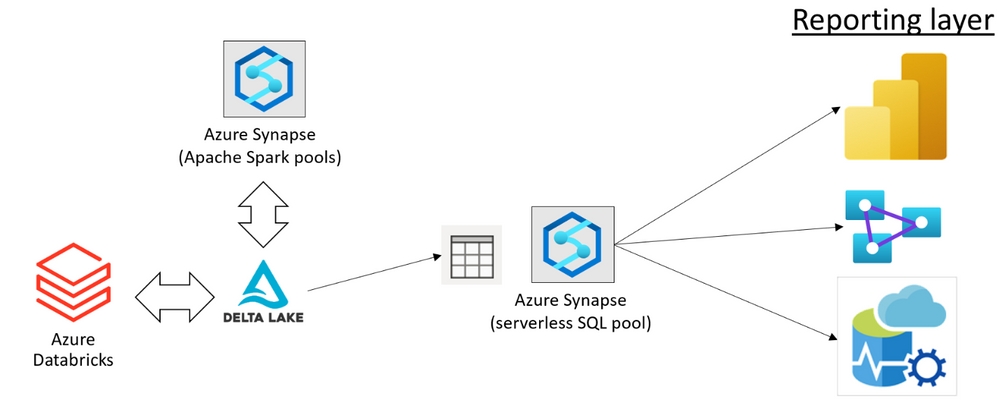
You can use Azure Synapse and Azure Databricks to prepare and modify your Delta Lake data sets placed in the Azure Data Lake storage. Once your data engineers have prepared the data, your data analysts can create reports using the tools such as Power BI.
Using the serverless query endpoint in Azure Synapse, you can create a relational layer on top of your Delta Lake files that directly references the location where Azure Synapse and Azure Databricks are used to modify data. This way, you can get the real-time analytics on top of the Delta Lake data set without any need to wait for a pipeline to copy and prepare data.
Data sharing without copy, load, or transformation of Delta Lake files is the main benefit of serverless SQL pools. The serverless endpoint in Azure Synapse represents a bridge between a reporting/analytics layer where you use Power BI or Azure Analysis Services, and your data stored in Delta Lake format. This enables a variety of tools that work on T-SQL endpoints to access Delta Lake data.
In this solution, every role in your organization that works with big data can use the preferred tools to complete their tasks:
- Data engineers can keep using the standard tools for data preparation and transformation (for example the notebooks in Azure Synapse or Jupyter environment).
- Data analysts can keep using their favorite reporting tools such as Power BI to analyze data and present the reports to the end users.
Azure Synapse enables your teams to implement end-to-end solutions on top of Delta Lake files with no friction or a need to change their standard tools.
How to query Delta Lake in Azure Synapse?
The serverless endpoint in Azure Synapse (serverless SQL pool) enables you to easily query data stored in Delta Lake format. You just need to provide a URI of the Delta Lake folder to the OPENROWSET function and specify that the format is DELTA. If you have plain parquet files, you can easily convert them to Delta Lake format using Apache Spark.
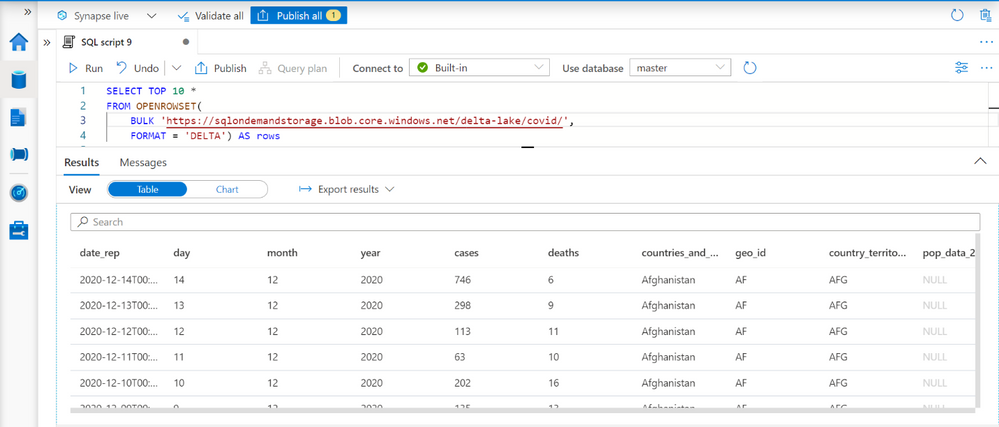
This query enables you to explore data in your Delta Lake data sets. The OPENROWSET function will automatically determine the columns in Delta Lake format and their data types by inspecting Delta Lake folder.
When you complete exploration, you can create views or external tables on top of your Delta Lake folder. The partitioned views are preferred approach if you have partitioned Delta Lake structure because they can more optimally execute your queries and eliminate the partitions that do not contain the data that should be returned in the queries.
Tools and applications such as Power BI or Azure Analysis Service can read data from these views or external tables, without need to know that the underlying data is stored in Delta Lake format.
Learn more about Delta Lake query capabilities in Synapse documentation.
Feedback
This feature is currently in public preview, and the Azure Synapse team is happy to hear your feedback.
Some features such as temporal/time-travel queries, automatic synchronization of Delta Lake tables created in Spark pools, and updates of Delta Lake data are still not available in the public preview. We would be happy to get your feedback related to the new features in this scenario, so you can post your ideas in Azure Feeback site.
by Contributed | May 27, 2021 | Technology
This article is contributed. See the original author and article here.
We are happy to announce that Office Scripts in Excel for the web is now generally available for all eligible users!
What is Office Scripts?
Office Scripts is an automation feature-set in Excel for the web that allows users with all levels of programming experience to automate their repetitive workflows.
“Office Scripts not only enabled the workbook to be located in the cloud, it also replaced all the pre-existing manual updating and maintenance process. It became 100% fully autonomous!” – Leslie Black, Developer, Analysis Cloud Limited.
|
To get started, use the Action Recorder to record the actions you take in Excel. These actions are then translated into a script that you can run at any time. No programming experience required! Need to modify your scripts? Use the Code Editor! It’s a TypeScript-based editor directly within Excel for the web. Use it to edit your existing scripts or to create new ones using the Office Scripts API.
https://www.microsoft.com/en-us/videoplayer/embed/RWEBYs
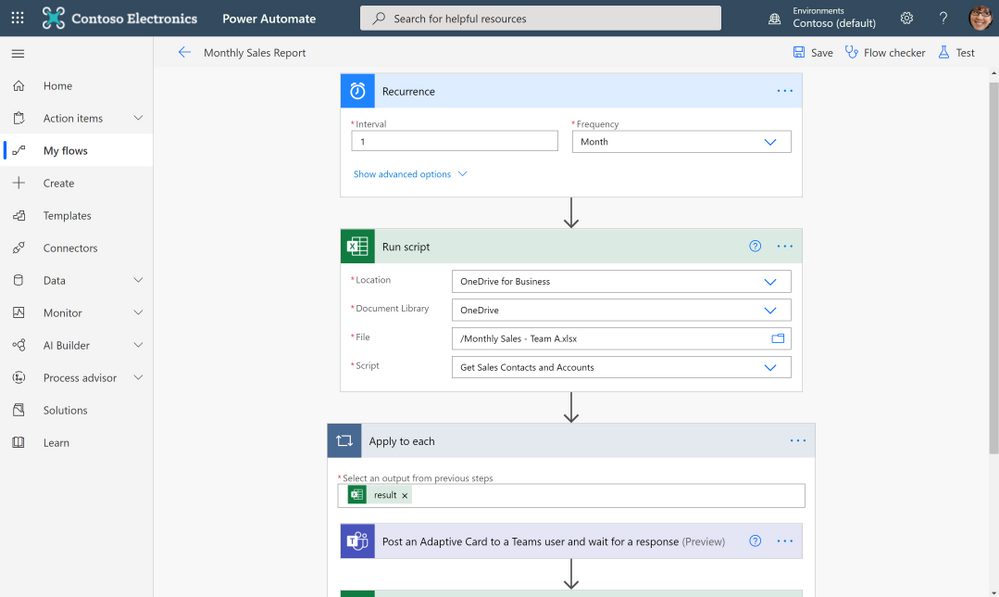
Want to run a script on a schedule? Use Power Automate and create a Flow to schedule your Office Script to run at a certain time. Or maybe you want to trigger a script to run based on the creation of a new file in a SharePoint site? Power Automate also allows you to trigger scripts based on events from other applications and services to create cross-application workflows.
“Since creating the solution and publicizing it internally, I have been asked and have implemented it for another two areas in our Intranet, so they also have an automated process. In total, it saves us around six hours effort per month and consequently we have many colleagues (IT and non-IT) starting to use Office Script to help make their work lives easier.” – Gareth Naylor, Group Wide Architect/Strategist, Uniper
|
What licenses include Office Scripts?
Office Scripts is currently available for all users that have a commercial or EDU license that gives access to the Microsoft 365 office desktop apps (e.g., Office 365 E3 and E5 licenses). If you have an eligible license, you’ll find the Office Scripts feature-set in the Automate tab in the ribbon. Please note that if you do not have the Automate tab in Excel for the web, your admin may have disabled the feature.
Learn More
Get started scripting with our numerous sample scripts based on real-world scenarios. These samples cover a wide variety of automated solutions from the fundamentals of the Office Scripts API to how to create cross-workbook and cross-application automated workflows with Power Automate.
You can also learn more about Office Scripts from these resources:
Learn from the Office Scripts community:
Next steps
Please reach out to us as you try out the Office Scripts feature! Your input is critical to make Office Scripts better.
- Ask questions on Microsoft Q&A under the ‘office-scripts-dev’ tag if you get stuck or have questions about how to automate a workflow.
- Have feedback on Office Scripts? Send us a smile or a frown. You can also send us feedback by selecting the Send Feedback button located in the overflow menu of the Code Editor.
by Contributed | May 26, 2021 | Technology
This article is contributed. See the original author and article here.
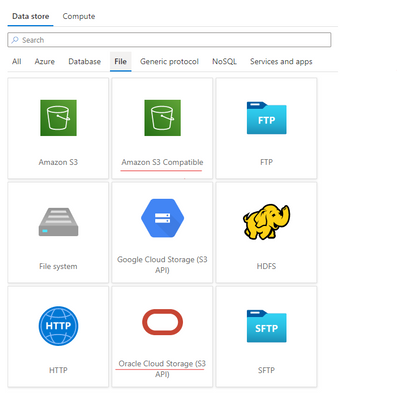
Azure Data Factory is continuously enriching the connectivity to enable you to easily integrate with diverse data stores. We recently released two new connectors: Oracle Cloud Storage; Amazon S3 Compatible Storage, with which you can seamlessly copy files as is or parsing files with the supported file formats and compression codecs from Oracle Cloud Storage or Amazon S3 Compatible Storage for downstream analysis and consumption. Both of the connectors are supported in copy activity as source. You can now find the Oracle Cloud Storage connector and Amazon S3 Compatible Storage connector from ADF connector gallery as below.
Learn more from ADF Oracle Cloud Storage connector and Amazon S3 Compatible Storage documentation. For a full list of data stores that are supported in ADF, see this connector overview article.
by Contributed | May 26, 2021 | Technology
This article is contributed. See the original author and article here.
SQL Server does not sniff for variable, it just simply uses the fixed value.
I’m going to use AdventureWorks 2019 in this post.
——————–Please run this script—————
use AdventureWorks2019
go
IF exists(select 1 from sys.tables where name=’SalesOrderDetail’ and schema_id=schema_id(‘dbo’))
drop table SalesOrderDetail
go
select * into SalesOrderDetail from [Sales].[SalesOrderDetail]
go
create statistics iProductID ON SalesOrderDetail(productid) with fullscan
go
dbcc traceon(3604,2363)—trace flag 2363 displays more detail about the selectivity
go
——————–Please run this script—————
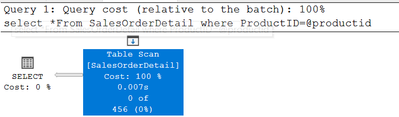
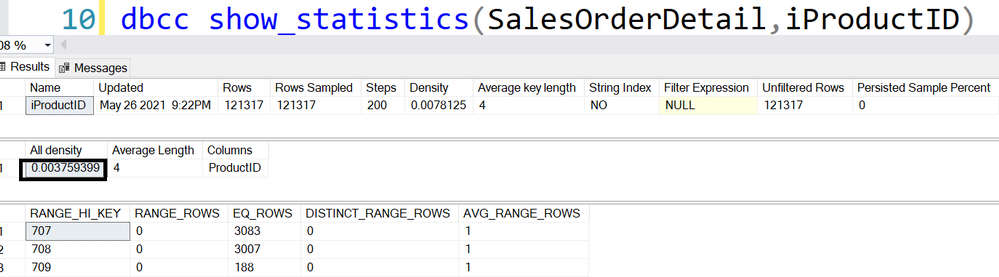
Equality(=): all density
DECLARE @pid INT = 0
SELECT * FROM SalesOrderDetail WHERE ProductID = @pid
456=‘All density’*card=0.003759399*121317
DBCC execution completed. If DBCC printed error messages, contact your system administrator.
———————————-trace flag 2363 output———————————-
Begin selectivity computation
Input tree:
LogOp_Select
CStCollBaseTable(ID=1, CARD=121317 TBL: Sales.SalesOrderDetail)
ScaOp_Comp x_cmpEq
ScaOp_Identifier QCOL: [AdventureWorks2019].[Sales].[SalesOrderDetail].ProductID
ScaOp_Identifier COL: @pid
Plan for computation:
CSelCalcHistogramComparison(POINT PREDICATE)
Loaded histogram for column QCOL: [AdventureWorks2019].[Sales].[SalesOrderDetail].ProductID from stats with id 3
Selectivity: 0.0037594
Stats collection generated:
CStCollFilter(ID=2, CARD=456.079)
CStCollBaseTable(ID=1, CARD=121317 TBL: Sales.SalesOrderDetail)
End selectivity computation
———————————-trace flag 2363 output———————————-
Non-Equality(<>): 0.9
DECLARE @pid INT = 0
SELECT * FROM SalesOrderDetail WHERE ProductID <> @pid
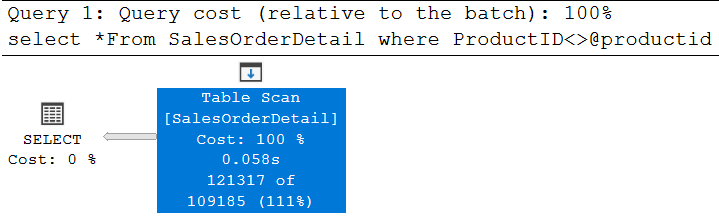
121317*0.9=109185.3, is rounded down to 109185
———————————-trace flag 2363 output———————————-
Begin selectivity computation
Input tree:
LogOp_Select
CStCollBaseTable(ID=1, CARD=121317 TBL: SalesOrderDetail)
ScaOp_Comp x_cmpNe
ScaOp_Identifier QCOL: [AdventureWorks2019].[dbo].[SalesOrderDetail].ProductI
ScaOp_Identifier COL: @productid
Plan for computation:
CSelCalcFixedFilter (0.9)
Selectivity: 0.9
Stats collection generated:
CStCollFilter(ID=2, CARD=109185)
CStCollBaseTable(ID=1, CARD=121317 TBL: SalesOrderDetail)
End selectivity computation
———————————-trace flag 2363 output———————————-
Inequality(>,>=,<,<=):0.3
declare @productid int=0
select *From SalesOrderDetail where ProductID>@productid
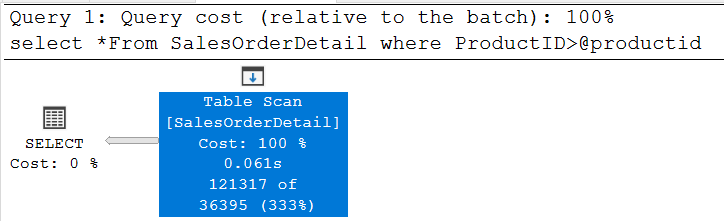
121317*0.3=36395.1, is around down to 36395
Please try >=,< and <=, they all use the same selectivity.
———————————-trace flag 2363 output———————————-
Begin selectivity computation
Input tree:
LogOp_Select
CStCollBaseTable(ID=1, CARD=121317 TBL: SalesOrderDetail)
ScaOp_Comp x_cmpGt
ScaOp_Identifier QCOL: [AdventureWorks2019].[dbo].[SalesOrderDetail].ProductID
ScaOp_Identifier COL: @productid
Plan for computation:
CSelCalcFixedFilter (0.3)
Selectivity: 0.3
Stats collection generated:
CStCollFilter(ID=2, CARD=36395.1)
CStCollBaseTable(ID=1, CARD=121317 TBL: SalesOrderDetail)
End selectivity computation
———————————-trace flag 2363 output———————————-





























































Recent Comments