by Contributed | Jun 9, 2021 | Technology
This article is contributed. See the original author and article here.
In March, we announced the general availability of .NET 5.0 support on Azure Functions with the new .NET isolated process worker. Today, we’re happy to share more exciting news for .NET on Azure Functions! Visual Studio 2019 v16.10 now includes full support for .NET 5.0 isolated function apps. In addition, we’re announcing an early preview of Azure Functions running on .NET 6.0 in both the isolated process and in-process programming models.
Visual Studio support for .NET 5.0 isolated function apps
Visual Studio 2019 v16.10, released in May, includes full support for creating, local debugging, and deploying .NET 5.0 isolated process Azure Functions apps. Update your Visual Studio now and try the new tutorial.
Sneak peek: .NET 6.0 on Azure Functions
The Azure Functions team is committed to providing full support for .NET 6.0 as soon as .NET 6.0 is generally available in November 2021. Azure Functions supports two programming models for .NET—isolated process and in-process (learn more). Today, we’re providing early previews of .NET 6.0 for both programming models.
To run .NET 6.0, you need Azure Functions V4. Local tooling support for creating, running, and deploying .NET 6.0 function apps is currently limited to a preview release of Azure Functions Core Tools V4. You can still use Visual Studio or Visual Studio Code to write your functions.
A few important points to keep in mind for this preview:
Use the latest release of Azure Functions Core Tools V4 preview.
At this time, you can only deploy .NET 6.0 function apps to Azure Functions V4 preview on Windows hosting plans.
Currently, there are no optimizations enabled for .NET 6.0 apps in Azure. You may notice increased cold-start times.
While other language workers are included in the current Core Tools V4 preview, they are unsupported at this time. Continue to use Azure Functions V3 and Core Tools V3 for other languages and production workloads.
Note that .NET 6.0 on Azure Functions is currently offered as an early preview and there is no official support. Try it out and let us know what you think using GitHub Issues. Watch for a public preview announcement later this year.
Run isolated process functions on .NET 6.0
.NET functions using the isolated model run in a separate process from the Azure Functions host. This decoupling allows you to install dependencies without worrying about conflicts with host dependencies. Its programming model also provides greater flexibility in how you configure your app’s startup.
.NET 5.0 is the first .NET version supported by the isolated model. Today, you can also run isolated process functions on .NET 6.0 Preview 4!
See the following wiki article to learn more and build your first .NET 6 Azure Functions app.
Quickstarts: Azure Functions v4 (.NET 6) early preview
The isolated process model for .NET is new and there are some differences compared to the in-process model. Many will be addressed as the programming model continues to evolve. If you need access to features that are currently missing, such as Durable Functions, use the in-process model.
Run .NET 6.0 in-process functions with Azure Functions V4 preview
Starting today, you can also run in-process .NET 6.0 functions with an early preview of Azure Functions V4. You have access to the same features and capabilities as V3—including support for rich binding types and Durable Functions.
See the following wiki article to learn more and build your first .NET 6 Azure Functions app.
Quickstarts: Azure Functions v4 (.NET 6) early preview
What’s next for .NET on Azure Functions
Thanks for checking out our announcements and we’re excited for you to try them out. And in case you missed it, Azure App Service also announced early access for .NET 6.0 Preview today.
There’s a lot more planned for Azure Functions in the coming months. We’re bringing .NET 6.0 Azure Functions support to tools like Visual Studio and Visual Studio Code and to all hosting plans in Azure. Expect a public preview of Azure Functions V4 in the third quarter of this year and general availability in November. Follow our twitter account for the latest updates: @AzureFunctions.
by Contributed | Jun 9, 2021 | Technology
This article is contributed. See the original author and article here.
We will go through the below topics in the blog:
- Introduction on APIM self-hosted gateway and how do we configure custom domain for it.
- Case Study: 502 error returned by V1 Application gateway when using HTTPS protocol.
- V2 Application gateway’s difference between V1 when verify server cert.
*In this blog, AG = Application Gateway. SH-gateway = self-hosted gateway.
If you are not familiar with AG and APIM integration, here are two well composed blogs that let us know how to work with AGv1, AGv2 and Managed APIM.
APIM with Application Gateway v1 – Microsoft Tech Community
Integrating API Management with App Gateway V2 – Microsoft Tech Community
Introduction on APIM self-hosted gateway and how do we configure custom domain for it.
To describe in brief, self-hosted gateway is APIM packaged in a Linux Docker image and can be deploy to any VM or on-prem machines.
More information here: Self-hosted gateway overview | Microsoft Docs
The blog will not include deploying the self-hosted gateway as the thesis is to explain some common issues that we will get when an App gateway is in front of it.
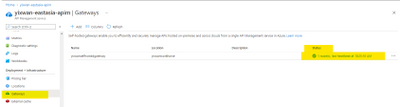
One easy way to find out if your self-hosted gateway is pulling API configurations from Azure is to check this ‘Status’.
A green light means the heartbeat connectivity is successfully established.
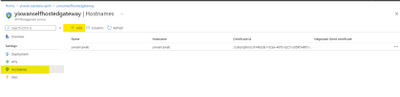
Configure the custom domain here at the ‘Hostname’ blade.
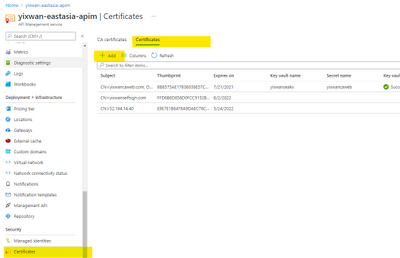
We will need to upload the pfx format first to the ‘Certificate’ blade of the APIM. So we can list it out here.
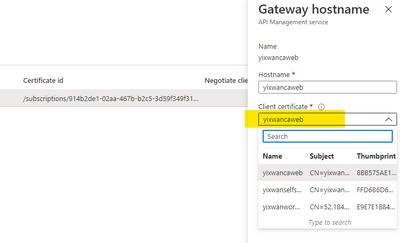
Once we made the hostname change, if we are following the docker container log for the self-hosted gateway, we can see an event being created. That means the hostname has taken effect.
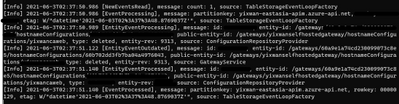
Case Study: 502 errors returned by V1 Application gateway when using HTTPS
Background:
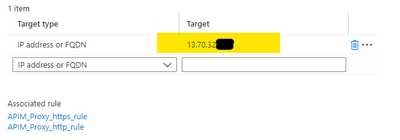
My V1 AG’s backend setting is targeting my SH-gateway’s hosting VM’s public IP.
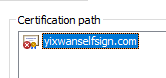
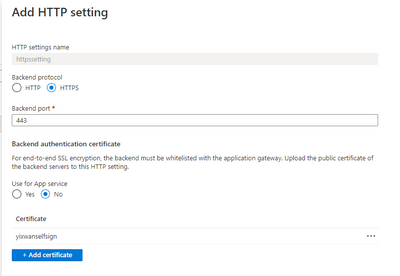
I used a self-signed certificate for my SH-gateway’s domain. And have uploaded the cer format of this certificate to the AG.

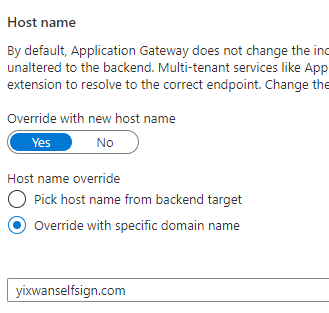
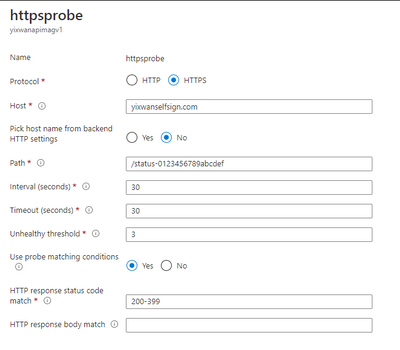
I have over-written the hostname in http setting and custom probe.
Test HTTPS with postman, got 502 error.
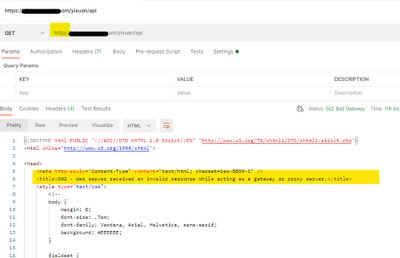
HTTP however is working as expected, so I am suspecting the issue could be with the certificate. However, I have already uploaded the cer format to AG.
To narrow down and test HTTPS connectivity, I bypassed the AG and accessed the SH-gateway directly with IP:port. The IP is the docker container hosting VM’s public IP.
openssl s_client -connect XX.XX.XX.XX:443 -showcerts
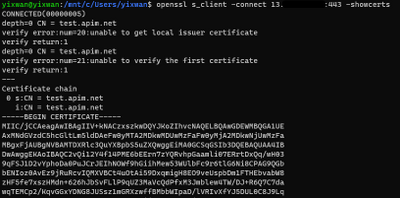
As in the screenshot, the certificate that the server returned is not the custom domain certificate I configured for the SH-gateway. It is returning test.apim.net, the default self-signed cert.
I realized that when we access the APIM with IP, there is no SNI header in the request. Based on the APIM documentation:
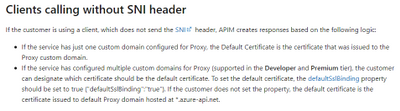
In other words, for Managed APIM, we need to choose a default custom certificate for APIM to return, and the catch here is that SH-gateway will not let us choose defaultSslBinding. So, if there is no SNI header in the requests, SH-gateway always return the default test.apim.net cert.
But I was expecting the AG overwrites the hostname header and the SNI supposed to be set. After some research, I found the answer in AG’s documentation.
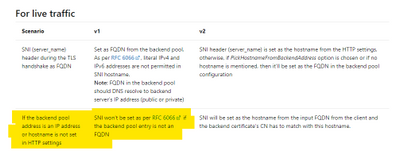
In conclusion, V1 AG set requests’ SNI uses backend pool setting, which means the hostname overwrites does not modify the SNI header, hence if we put IP as a backend pool target, SH-gateway’s server cert always mismatches with the cert we uploaded to the AG.
There are two solution options for this issue with AGv1:
- Use FQDN as a backend target. Don’t use IP.
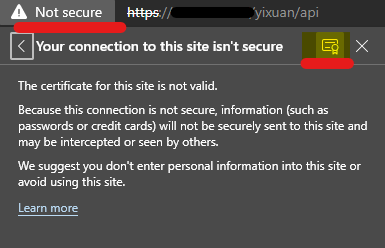
- Use IP as a backend target, and download the test.apim.net cert, upload it to AG’s http setting. We need to give up custom domain with this solution.
For the solution No.2, I navigated to SH-gateway by IP with browser and downloaded the certificate from the browser.
V2 AG’s difference when verify server certificate
Since the AG will verify server cert’s root cert, and the test.apim.net does not have a root cert. The HTTPS requests will get 502 even if we uploaded this cert to APIM.

Therefore, if we configure custom domain for SH-gateway and use V2 AG in front of it,
1)The custom domain cert needs to be issued with well-known CA
2)Or it can be self-signed with a root cert, with the root cert uploaded to AG.
Hope this blog will help you identify the reason we get 502 when configure AG with APIM SH-gateway.
Appendix:
Enabling end to end TLS on Azure Application Gateway | Microsoft Docs
What is SNI? How TLS server name indication works | Cloudflare
by Contributed | Jun 9, 2021 | Technology
This article is contributed. See the original author and article here.
As IT Administrators, we all face daily challenges solving problems for our constituents. As we have seen over the last year, the world can use our help. In our small corner of the world, we would like to do our part to give back. When we, as IT Admins, use self-help resources to fix issues without opening support cases, we enable Microsoft to repurpose a portion of these savings towards social good.
Therefore, we invite you to join us in our effort to give back to communities in need! The Diagnostics for Social Good campaign is designed to help solve your technical issues while at the same time helping support global communities.
How it Works
IT admins run customer diagnostics in the Microsoft 365 admin center to resolve issues without logging a support request and Microsoft will donate to global non-profits that support COVID-19 relief efforts in India as well as vaccination supplies across the world. (Read more about the Microsoft 365 admin center here.) Learn more about covered scenarios and how to run the diagnostics below:
Why we are focused on Diagnostics for Social Good
We all have an opportunity to change the world. In the technology industry, we are privileged to be able to have a broad impact on millions of people. We know what’s possible and we know that we can contribute to help. As we introduce our new Diagnostics for Social Good initiative, we want to recognize the opportunity we all have to support others. As we move forward, we are looking for feedback and areas where we can help IT admins keep their technology environment healthy while giving back.
Microsoft has demonstrated a passion for giving to address critical issues facing local communities and abroad. Giving has become part of our culture, and one way we live our mission to empower every person and organization on the planet to achieve more.
Our business practices and policies reflect our commitment to making a positive impact around the globe, and we work continuously to apply the power of technology to earn and sustain the trust of our customers and partners, and the communities in which we live and work.
by Contributed | Jun 9, 2021 | Technology
This article is contributed. See the original author and article here.
The 21.06 Azure Sphere OS quality update is now available for evaluation in the Retail Eval feed. The retail evaluation period provides 14 days for backwards compatibility testing. During this time, please verify that your applications and devices operate properly with this release before it is deployed broadly via the Retail feed. The Retail feed will continue to deliver OS version 21.04 until we publish 21.06 in two weeks. Note: there was no 21.05 update.
This evaluation release of 21.06 includes enhancements and bug fixes for the OS only; it does not include an updated SDK.
Areas of special focus for compatibility testing with the 21.06 release should include:
- Apps and functionality utilizing SPI Flash.
- Apps and functionality utilizing wolfSSL.
For more information on Azure Sphere OS feeds and setting up an evaluation device group, see Azure Sphere OS feeds and Set up devices for OS evaluation.
For self-help technical inquiries, please visit Microsoft Q&A or Stack Overflow. If you require technical support and have a support plan, please submit a support ticket in Microsoft Azure Support or work with your Microsoft Technical Account Manager. If you would like to purchase a support plan, please explore the Azure support plans.
![[Event Recap] Humans of IT @ Microsoft Build (May 25th-27th, 2021)](https://www.drware.com/wp-content/uploads/2021/06/fb_image-112.png)
by Contributed | Jun 9, 2021 | Technology
This article is contributed. See the original author and article here.
We hope you were able to attend the Humans of IT sessions at Microsoft Build 2021! If you missed the live sessions, no worries! Read on for a recap and links to view the sessions on demand.
Over 70,000 software engineers and web developers from all over the world came together virtually for a 48-hour event that was jam packed with topics covering Windows, Microsoft Azure and other Microsoft technologies. Humans of IT had the opportunity to have 5 sessions over the course of this event, covering topics that aligned with the human side of developing and highlighted people using tech for good.
Microsoft Build: Day 1 (Tuesday, May 25)
The Humans of IT sessions within the Connection Zone kicked off with Thao Le and Nirupa Kalathur discussing how the BabyBot can enable easier access to information and help solve communication gaps between HR and employees. Thao began the session explaining what exactly the BabyBot does and how it can be used followed by sharing a heartwarming video, highlighting the benefits of the bot. Nirupa finished the session with a demo before taking some time to answers questions from the audience.
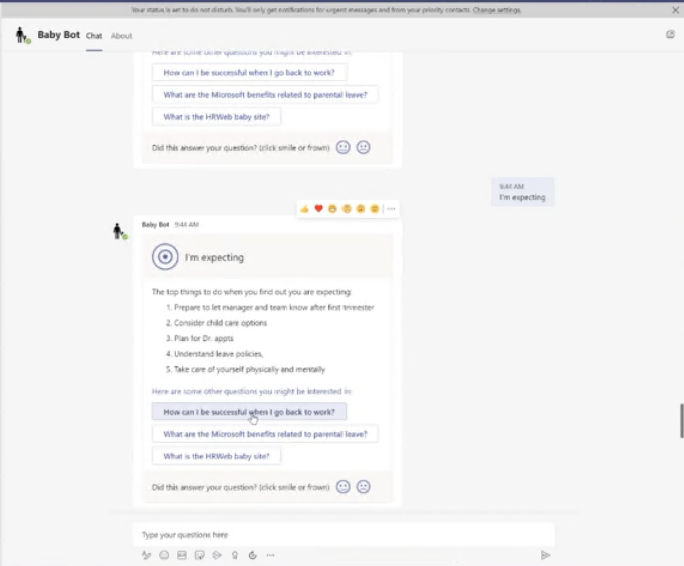
What viewers thought of this session:
- “Baby Bot was eye-opening! I found myself thinking of all the ways it would be beneficial to use w/in my own company. New Hire Bot, New Manager/Lead Bot, just so many places it would be useful and much more user friendly for how people think vs placing documents or handbooks or on a SharePoint site”
- “This was a good session with powerful insight on how to connect HR with employees. I am excited to see what else the bot can do for HR and other departments.”
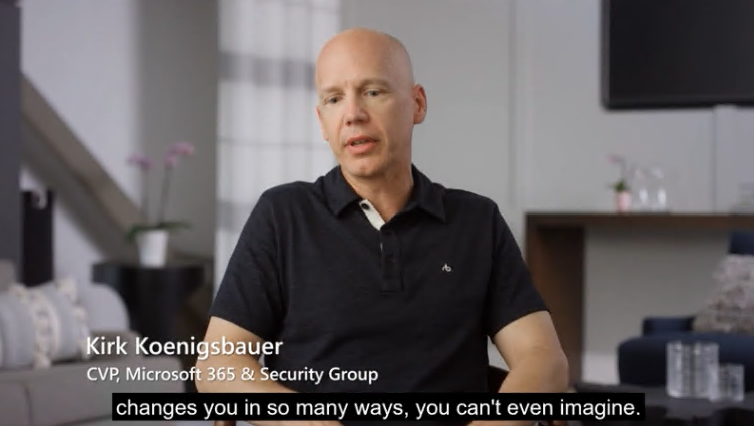
Jay Harris and Chris Koenig wrapped up Day 1 of the Humans of IT sessions and taught attendees about how they can use their developer skills to give back with GiveCamp. Chris kicked off this session discussing the background for GiveCamp and how he came up with the idea. Jay spoke about how GiveCamp got to where it is today, how other developers can participate, and upcoming events they are hosting.
Microsoft Build: Day 2 (Wednesday, May 26)
Day 2 of Microsoft Build Humans of IT sessions kicked off with Chris Gill who spoke about languishing and his experience with it. He covered tips that helped him that may be able to help others dealing with languishing.
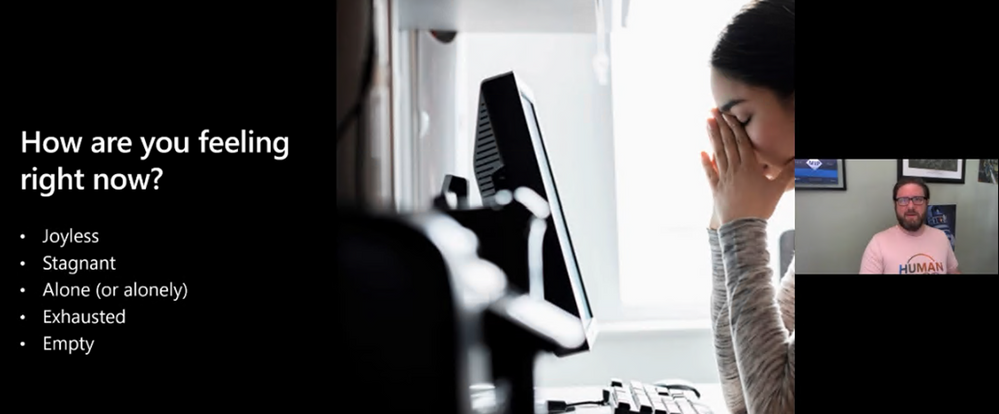
What viewers thought of this session:
- “I left this session feeling a sense of calm and with some concrete things to work on. Thank you.”
- “These type of sessions are extremely valuable, we need to remove the stigmatism of mental health and be transparent about how we are feeling. Openly talking about our struggles allows others to understand they are not alone and that provides relief.”
- “Please have more talks like this in future events. This session was relevant to my current professional situation.”
Day 2 Human of IT sessions wrapped up with Leslie Ramirez and Leomaris Reyes discussing how MVPs from the Dominican Republic went to Haiti to create the first Microsoft Developers Community in Haiti. Hear about their story, what inspired them, and how they made it happen.
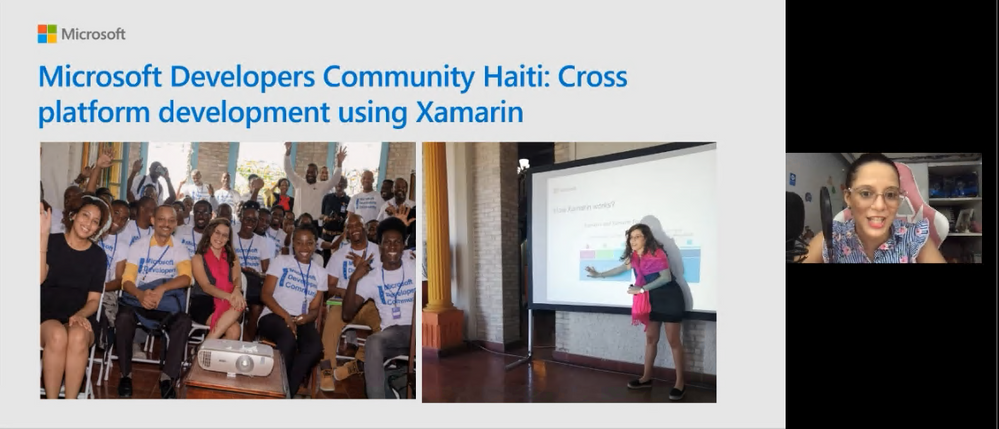
Microsoft Build: Day 3 (Thursday, May 27)
The final Humans of IT session at Build had quite the lineup with a panel including Kolaru Adeola, Clement Dike, Ayodeji Folarin, Bettirose Ngugi, Oluwaseyi Oluwawumiju, and Samuel Omodadepo expertly moderated by David Okeyode. They discussed their passion for working with grassroot communities and shared their individual stories of how they are all working towards the same goal of transforming the future of tech in Africa.
We are truly grateful to have been able to share the voices of so many amazing speakers and (virtually) encourage and inspire thousands of attendees this year on a global scale in a deeply meaningful, human way.
We hope you enjoyed the Humans of IT track @ Microsoft Build as much as we did, and we’ll see you next year!
Missed a session and want to catch up? Or perhaps you want to re-watch them all over again?
Access all the Humans of IT session recordings here.
Share your Microsoft Build experience with us:
- What were your favorite Humans of IT session? Why?
- What do you hope to see from Humans of IT at the next virtual conference?
We want to hear from you in the comments below. Thank you for being a part of the community and this MS Build experience.
See you next time!
#HumansofIT
#MSBuild
#CommunityRocks
#ConnectionZone


Recent Comments