by Contributed | Jun 14, 2021 | Technology
This article is contributed. See the original author and article here.
When we announced the members of the Microsoft Azure Data Community Advisory Board, we promised to follow up with more details. Today is step one making good on that promise. We wanted to offer some details on what their role will be, how long they’ll serve and how they’ll be replaced. Current members of the board are Wolfgang Strasser, Randolph West, Annette Allen, Monica Rathbun, Javier Villegas, Tillmann Eitelberg, Pio Ballistoy, Gaston Cruz and Kevin Kline. They were chosen because they have a strong reputation in the community, are known as leaders, represent various cross sections from the community including small, medium, and large user groups, global regions and personal demographics. Additionally, we’ve asked a larger group of members of the data community to serve as part of an Advisory Committee. Those members are John Morehouse, Warwick Rudd, Raul Sarachaga, Oliver Engels, Josh Smith, Rob Sewell, Gianluca Sartori, Anupama Natarajan, Jody Roberts, Elena Lopez, Rodrigo Crespi and André Kamman. With a few open positions yet to be filled.
What does the Advisory Board do?
The Advisory Board’s job is to advise Microsoft on what the Azure Data Community needs, wants and what will maintain the health of the community. The board is Microsoft facing and does not task or send edicts out to the Community. Board members and Microsoft representatives meet to discuss community and user group efforts. Moving forward, to be transparent, we will be publishing minutes from these meetings.
What does the Advisory Committee do?
Advisory Committee is comprised of community members that are user group leaders, conference organizers and speakers, that serve as a broader group of eyes and ears. They have two jobs. First, they will help inform the board on what the community needs. Second, they’ll be tasked with helping the board execute the ideas, solutions, tasks and projects identified by MS, the board, and the committee.
How long do board members serve and how are they selected?
Board members will serve a 2-year term before stepping down. For the current board, we’ll stagger these terms at 12 month, 18 months and 24 months, to avoid replacing the board all at once. Since there are nine members of the board, these terms will be broken up in 3-3-3 for each. We haven’t settled on HOW we’ll replace board members but we’re working on it. The first set of replacements will likely come from the larger committee as they’ll be more familiar with the process and direction of the board.
The current board was selected by the Microsoft Azure Data Community team and in consultation with a few members of the community. Keep in mind, this entire initiative is Community Owned, Microsoft Empowered. Microsoft isn’t dictating what happens next. One of their first tasks is building the road and guard rails for their future path. They’ll define the rules for serving and codify how they’ll operate in the future. Remember, the board members aren’t deciding things the community will do. They advise Microsoft, not the community. They’re deciding on what they think Microsoft should do for user groups and the community. They aren’t an elected Board of Directors for a professional association making decisions on conferences, money being spent, sponsorships, etc.
How do we define Community?
That’s simple. We don’t. That’s not for Microsoft or the Advisory Board to decide. We agree that it’s a discussion worth having, and it won’t be easy. At its broadest definition, the community is anyone that uses SQL. At its most narrow, it’s someone who attends a particular conference. In between, there are user group attendees or registered members of a professional association. We’ve learned this year that Community isn’t defined by one single thing or by an umbrella organization with a structured membership. It’s much more. What exactly that means is up to you.
How can I make my voice heard?
While you are welcome to reach out to individual members of the board or committee, we’ve set up a form for you to submit your questions and comments to them directly https://aka.ms/AzureDataCommunityBoard
by Contributed | Jun 14, 2021 | Technology
This article is contributed. See the original author and article here.
Summary
One of the top 10 Azure consuming companies has multiple country government-mandated requirements to block egress to and ingress from IP addresses and IP address ranges on a dynamic embargoed/sanctioned IP list. In other words, various country governments across the globe forbid the company from sending traffic to certain addresses.
- This is across more than 20 Azure regions and over 4,000 Subscriptions for dozens of lines of business
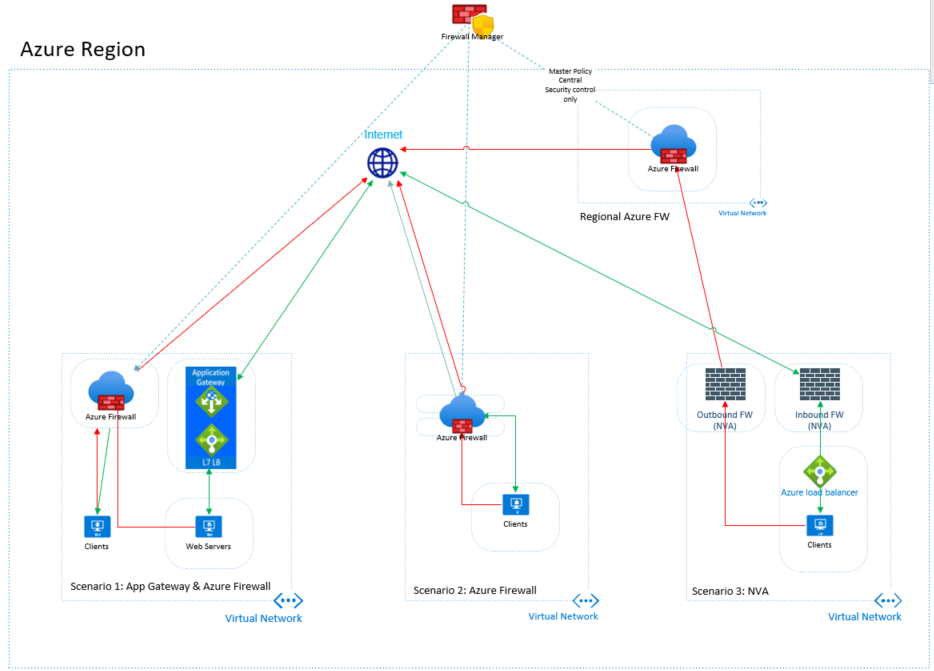
- This includes regions with existing Azure Firewalls, those with a 3rd party Network Virtual Appliance functioning as a firewall, and regions containing both Web Application Gateway and an Azure Firewall (see Figure 1 below).
- This list of embargoed IPs is currently 5,000 address ranges and could grow to 75,000 over the next 2-3 years.
- The company’s global security group provides these addresses in a text file and mandates that changes to these IP addresses should be applied into production within 24 hours.
- They also mandate that there should be no lapse in coverage when the list is updating (no period of time a blocked IP could get through).
The company needed a very agile solution that could translate a dynamically changing list of IP addresses and CIDR ranges into active policy applied globally across any Azure region and can scale to huge numbers of subscriptions. It needed to be very low maintenance, work quickly, and not allow for bypassing.
Solution Summary: The Microsoft CE DSE team came up with a solution leveraging Azure Firewall Policy and Azure Function Apps to enforce a parent Network Rule policy that is based on automatically updating IP Groups to control traffic to these embargoed locations across their global enterprise.
Details
Global Network
The global network has a disparate blend of network topologies, managed by dozens of lines of business (LoB). Some have both an App Gateway publishing websites and an Azure Firewall controlling general traffic (Scenario 1, below). Others have only an Azure Firewall (Scenario 2), and a handful have 3rd party Network Virtual Appliances (NVA) controlling ingress and egress (Scenario 3). In each of these scenarios, Azure Firewall policy is used to enforce the network traffic. Additionally, Azure Firewall Manager, could be added into the mix to push this policy from a single, central location to multiple firewalls (however, it does incur additional cost). Representative sample network topologies are shown in Figure 1, below.
Figure 1
Solution Elements
The building blocks of the solution are as follows in Figure 2 below. The placement of resources into separate Resource Groups as implemented is not a necessity.
Storage
A storage account containing a blob storage container is required as the target location for the controlled IP address list.
Azure Function App
The function app provides the automation behind the solution. It is configured to watch and trigger off any text files getting dropped into the blob storage container. It runs a simple PowerShell script that runs the logic to split the IP addresses into the desired number of pieces, and then runs Set-AzIPGroup in parallel processing to assign those ranges to the IP Groups.
Azure Firewall
A Network Rules Collection rule inside of Azure Firewall Policy defines the action (deny) and is linked to the IP Groups. Azure Firewall Manager can optionally be used to push this parent policy to any number of Azure Firewalls in the Azure Tenant, even across regions.
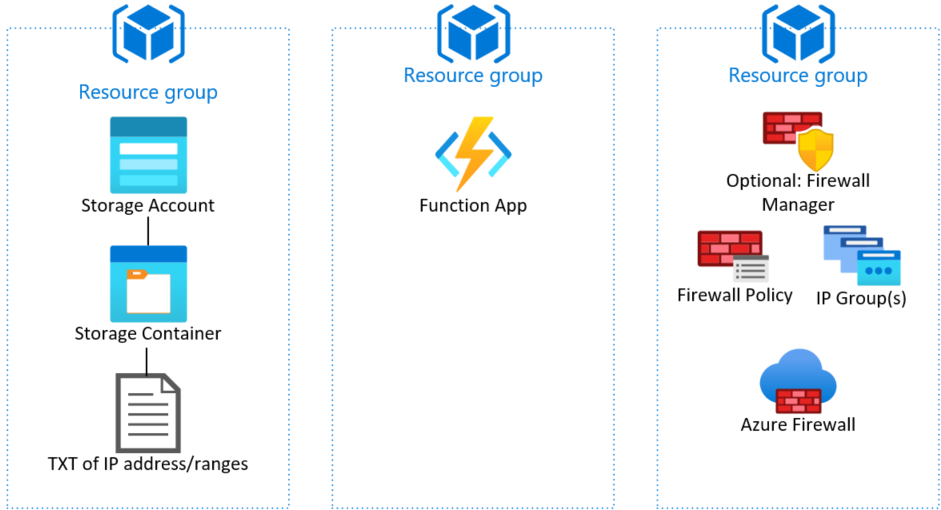 Figure 2
High Level Flow
Here’s how the pieces fit together (see Figure 3 below). As mentioned, the company’s global security department receives mandated embargoed IP range lists from various government and regulatory agencies and compiles them into a simple text file, with one IP/IP CIDR range per line.
This is the sequence of events:
- Global Security drops the text file with the IP addresses/ranges into an Azure Storage Blob Container.
- An Azure Function watches this container, and any time a text file gets dropped, it parses this text file using a PowerShell script that…
- Determines the number of IP addresses to include for each IP Group, based on a user-defined parameter that controls the limit. This lets the customer choose to spread the IPs out over a defined list of IP Groups or load each IP Group full before starting the next one. Then…
- The Azure function updates the IP Groups.
- In tests of up to 13,000 IP addresses, this takes less than 5 minutes, typically, with runs up to about 11 minutes when reducing from 8,000+ IPs down to only a handful of addresses
- Because no security rule is being deleted and then re-created, only the IP Group re-defined, there is no lapse of coverage. Blocked IPs will remain blocked during the updates and only be allowed if they drop out from the updated list.
- The process repeats itself each time Global Security drops a new version of the file in the blob storage.
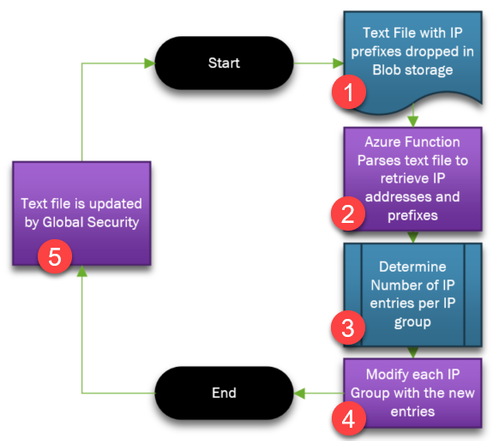 Figure 3
End Result
The outcome of this solution meets the mandates of global security. Global security gets to control the embargoed list of IP addresses/ranges in a manner that can be implemented company-wide, across the globe in minutes, well within their 24 hour SLA. Lines of Business are not able to add exceptions to this list, as it’s enforced as a parent policy. Because it is IP Groups getting updated (as opposed to a firewall network rule getting deleted and re-created), there’s never a lapse in IP blocking, except when an IP address drops off the embargo list, which is the desired behavior.
This is a very scalable solution that can accommodate the largest customers. There is no limit to the number of IP addresses/ranges that can be added to an IP Group (although the Azure networking team only has tested up to 5,000 and can guarantee performance to that number), with up to 100 IP Groups linked to a firewall rule, and multiple rules allowed, there are few scale scenarios this cannot handle.
There can be substantial cost involved to the customer, as Azure Firewall can add up, however. In my next article I’ll cover the same general scenario and mechanism, which relies upon the new Azure Network Manager (ANM) feature instead of Azure Firewall. ANM does not scale as much, but should be (pricing is not set yet, as of this article writing) a much lower price point.
Appendix
Here are more details about the solution.
Capabilities
- Parses a .txt file dropped into a storage blob container to split it into user-defined sized pieces, corresponding to the number of IP Groups in use.
- Updates the IP Groups with the new IP lists.
Specifics
- An Azure Function app has been created for this process.
- The function watches a specific blob storage container for ANY txt file.
- Currently the file name is not important, but could be used to specify region to run against or other desired effect with some minor code changes.
- Text file needs to have each IP address/IP range to block on a separate line.
- The function breaks the list of IP prefixes into IP Groups, based on the defined $numOfRules and $chunkSize variables (see Figure 4).
- Total number of IP addresses/ranges in the text file gets divided by the $chunkSize across the $numOfRules.
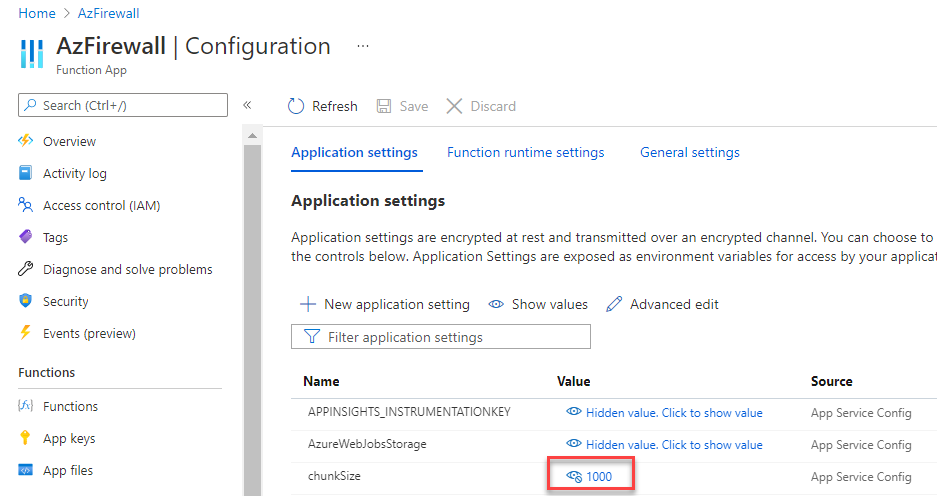 Figure 4
- The function overwrites any previously defined IP Group entries. It does not remove and recreate the IP Groups, as to preserve existing blocked access. The firewall policy network rules will automatically see this change and update behavior accordingly.
- Some of the PoC environment specifics are defined by parameters in the code, such as Resource Group.
- Logging is provided through Subscription|Activity Log.
Function Actions
- Parses the text file that was discovered in the blob storage.
- Divides the list up according to $numOfRules and $chunkSize parameters.
- Uses Set-AzIpGroup to redefine the IP Group membership.
Considerations
- IP Groups can have any number of IPs in them, but the product group has only tested up to 5,000 and can guarantee good performance at that level.
- This is the number of LINE ITEMs… a line item can be either an IP address (1.2.3.4) or and IP range (1.2.3.0/24)
- There can be up to 100 IP groups, for a max of 500,000 IP addresses/ranges entries that are tested to perform well. Numbers above this are possible, but there is no guarantee of performance.
- Network rules can contain multiple IP Groups in them, so a single rule could be linked to all of the IP Groups in use, for a simpler rule set.
- If you want to enforce the Firewall Policy Parent Policy to the child policy, with NO ability to REMOVE the enforcement of that parent policy:
- LoBs lose the ability to set DNS, Threat Intelligence, TLS Inspection, IDPS, Secured Virtual Hubs and other global settings.
- If LoBs need to change those, you can initially not lock the parent policy down, set the global settings and then lock it down so that LoB can’t change the parent policy and global settings.
- LoBs could add their own additional firewall rules
- The Azure Subscription log can be used so see the modified groups.
- Notification of IP Group update failure can be set through automation.
- PowerShell can be modified to include file name or have more of the settings exposed as Azure Function configuration values and generally improved.
- The company in question was only concerned about egress traffic, as other controls blocked that traffic inbound, but the same IP Groups could be used with a Network Rule to control ingress traffic.
Azure function PowerShell code* (provided by my DSE colleague Damir Zelenic):
# Input bindings are passed in via param block.
param([byte[]] $InputBlob, $TriggerMetadata)
function Split-Array($InputArray, [int]$Size)
{
$parts = [Math]::Ceiling($InputArray.count / $Size)
$outArray = New-Object System.Collections.Generic.List[psobject]
for ($i = 1; $i -le $parts; $i++)
{
$start = ($i - 1) * $size
$end = $i * $size - 1
if ($end -ge $InputArray.count) { $end = $InputArray.count - 1 }
$outArray.Add($InputArray[$start..$end])
}
return $outArray
}
# Write out the blob name and size to the information log.
Write-Host "PowerShell Blob trigger function Processed blob! Name: $($TriggerMetadata.Name) Size: $($InputBlob.Length) bytes"
$startT = Get-Date
$enc = [System.Text.Encoding]::ASCII
$addr = $enc.GetString($InputBlob)
$addrArr = $addr.Split("`n")
# $addrArr = $addr.Split("`r`n")
# Write-Host $addrArr
$numOfRules = 13 #This is user defined; for PoC the rules were pre-created and bound to a firewall network rule
[int]$chunkSize = $env:chunkSize
Set-AzContext -SubscriptionName "demo-anmtest2"
$count = $addrArr.Count
Write-Host "Number of IP addresses $($count)"
$ipGroups = Get-AzIpGroup -ResourceGroupName anmtest2-net-rg -Name from_file*
# if there is only one element in array (number of elements smaller than chunk size)
# indexing is wrong, index is not 0 but number of elements in "inner" array?!
if ($chunkSize -ge $count)
{
# first group only
Write-Output "Adding IPs for single group..."
$group = $ipGroups[0]
$group.IpAddresses.RemoveRange(0, $group.IpAddresses.Count)
$group.IpAddresses.AddRange([System.Collections.Generic.List[string]]$addrArr)
Set-AzIpGroup -IpGroup $group
}
else
{
$ipArr = Split-Array -InputArray $addrArr -Size $chunkSize
$groupArr = @()
Write-Output "Adding IPs for multiple groups..."
for ($i = 0; $i -lt $ipArr.Count; $i++)
{
$group = $ipGroups[$i]
$group.IpAddresses.RemoveRange(0, $group.IpAddresses.Count)
$group.IpAddresses.AddRange([System.Collections.Generic.List[string]]$ipArr[$i])
$groupArr += $group
}
$groupArr | foreach -Parallel {
Set-AzIpGroup -IpGroup $_
}
}
# Get rest and remove IPs
Write-Output "Removing IPs..."
if ($chunkSize -ge $count)
{
$groupsToRemoveIPs = $ipGroups[1..($numOfRules - 1)]
}
else
{
$groupsToRemoveIPs = $ipGroups[$ipArr.Count..($numOfRules - 1)]
}
$groupsToRemoveIPs | foreach -Parallel {
if ($_.IpAddresses.Count -gt 0)
{
$_.IpAddresses.RemoveRange(0, $_.IpAddresses.Count)
Set-AzIpGroup -IpGroup $_
}
}
$endT = Get-Date
$totT = $endT - $startT
Write-Output $totT
*Disclaimer
The sample scripts are not supported under any Microsoft standard support program or service. The sample scripts are provided AS IS without warranty of any kind. Microsoft further disclaims all implied warranties including, without limitation, any implied warranties of merchantability or of fitness for a particular purpose. The entire risk arising out of the use or performance of the sample scripts and documentation remains with you. In no event shall Microsoft, its authors, or anyone else involved in the creation, production, or delivery of the scripts be liable for any damages whatsoever (including, without limitation, damages for loss of business profits, business interruption, loss of business information, or other pecuniary loss) arising out of the use of or inability to use the sample scripts or documentation, even if Microsoft has been advised of the possibility of such damages.
Representative Test Run Times
The table below shows run times tested during implementation. We fed a text file containing various numbers of IP ranges (left column) to the Azure Function and waited for completion. The resulting time is shown in the right column. Tests were performed in the sequence shown in the table.
Qty IP Addresses in the Text file
|
Function Running time (mm:ss)
|
8005
|
4:40
|
13
|
4:00
|
8005
|
1:45
|
13
|
3:50
|
11157
|
3:57
|
13
|
4:25
|
13
|
5:25
|
13
|
3:40
|
11157
|
4:55
|
13
|
5:33
|
8005
|
4:29
|
11157
|
4:48
|
13
|
4:38
|
11157
|
7:53
|
13
|
9:29
|
11157
|
3:22
|
8005
|
5:23
|
11157
|
2:38
|
13
|
5:08
|
8005
|
2:36
|
11157
|
3:38
|
Conclusion
Putting this all together, we end up with a simple to implement and maintain solution for an enterprise’s central security to enforce a set of IP addresses or ranges across all of their Azure assets that traverse the Azure Firewall. Requiring only minutes to go into effect, this combination of Azure Storage blob, Azure Function, IP Groups and Azure Firewalls can scale to handle up to the largest enterprise customers and insure that mandated block lists can be achieved.
by Contributed | Jun 14, 2021 | Technology
This article is contributed. See the original author and article here.
If you would like to download the azure app service contents to on-prem server and restore back to azure app service using powershell script, you can refer following steps.
First, we can use KUDU Zip REST API download the folders as ZIP files.
GET /api/zip/{path}/
For more details, here is a document for your reference.
https://github.com/projectkudu/kudu/wiki/REST-API#zip
Since we need to use automated method way to do this, we can use service principal to connect azure account, then generate the token to call REST API.
For service principal, you can refer following document to create service principal.
https://docs.microsoft.com/en-us/azure/active-directory/develop/howto-create-service-principal-portal
In order to call REST API, powershell usually use the Invoke-RestMethod module to call API.
However, Invoke-RestMethod may have some problem when the site contains a lot of files.
This was raised in github issue as following link.
https://github.com/projectkudu/kudu/issues/1448#issuecomment-253796347
There is a workaround posted in above link you can refer.
It looks like it’s tied to Invoke-RestMethod and Invoke-WebRequest though, it seems to work fine when using System.Net.WebClient instead, so that can be a workaround for this.
So the final script would be as following:
$resourceGroupName = "henryapprg"
$webAppName = "freewinhe"
$slotName =  ""
$localPath = "c:testhenry.zip"
$ClientSecret = "serviceprincipalclientsecret"
$ApplicationID = "serviceApplicationID"
$TenantID = "tenantid"

#use service principal to connect Azure Account
$passwd = ConvertTo-SecureString $ClientSecret -AsPlainText -Force
$pscredential = New-Object System.Management.Automation.PSCredential($ApplicationID, $passwd)
Connect-AzAccount -Credential $pscredential -Tenant $TenantID -ServicePrincipal

#generate token with Azure Account.
$azProfile = [Microsoft.Azure.Commands.Common.Authentication.Abstractions.AzureRmProfileProvider]::Instance.Profile
$context =Get-AzContext
$profileClient = New-Object Microsoft.Azure.Commands.ResourceManager.Common.RMProfileClient($azProfile)
Write-Debug ("Getting access token for tenant" + $currentAzureContext.Subscription.TenantId)
$token = $profileClient.AcquireAccessToken($context.Subscription.TenantId)
$token.AccessToken
$kuduApiAuthorisationToken = 'Bearer {0}' -f $token.AccessToken


    if ($slotName -eq ""){
        $kuduApiUrl = "https://$webAppName.scm.azurewebsites.net/api/zip/site/wwwroot/"
    }
    else{
        $kuduApiUrl = "https://$webAppName`-$slotName.scm.azurewebsites.net/api/zip/site/wwwroot/"
    }
    $virtualPath = $kuduApiUrl.Replace(".scm.azurewebsites.", ".azurewebsites.").Replace("/api/zip/site/wwwroot", "")
    Write-Host " Downloading File from WebApp. Source: '$kuduApiUrl'. Target: '$localPath'..." -ForegroundColor DarkGray


#Call zip Rest API to download the Zip file from webapp.
`
$WebClient = New-Object System.Net.WebClient
$WebClient.Headers.Add('Authorization', $kuduApiAuthorisationToken)
$WebClient.Headers.Add('ContentType', 'multipart/form-data')
$WebClient.DownloadFile($kuduApiUrl, $localPath)
Second, there is a document that introduce a powershell command to zip deploy.
https://docs.microsoft.com/en-us/azure/app-service/deploy-zip#with-powershell
Publish-AzWebapp -ResourceGroupName <group-name> -Name <app-name> -ArchivePath <zip-file-path>
So the restore script would be like this:
$localPath = "c:testhenry.zip"
$ClientSecret = "serviceprincipalclientsecret"
$ApplicationID = "serviceApplicationID"
$TenantID = "tenantid"

#use service principal to connect Azure Account
$passwd = ConvertTo-SecureString $ClientSecret -AsPlainText -Force
$pscredential = New-Object System.Management.Automation.PSCredential($ApplicationID, $passwd)
Connect-AzAccount -Credential $pscredential -Tenant $TenantID -ServicePrincipal


Publish-AzWebapp -ResourceGroupName "henryapprg" -Name "phpwinhenry" -ArchivePath $localPath -Force

by Contributed | Jun 13, 2021 | Technology
This article is contributed. See the original author and article here.
This is the next segment of our blog series highlighting Microsoft Learn Student Ambassadors who achieved the Gold milestone and have recently graduated from university. Each blog in the series features a different student and highlights their accomplishments, their experience with the Student Ambassadors community, and what they’re up to now.
Today we meet Chetan Madan who is from India and just graduated from Gharati Vidyapeeth’s College of Engineering.
Responses have been edited for clarity and length.
When you joined the Student Ambassador community in the fall of 2019, did you have specific goals you wanted to reach, such as a particular skill or quality? How has the program impacted you in general?
My initial goal was to be able to reach a wide range of people to share my knowledge, to share opportunities, to provide a direction to young students for them to be able to gain new skills without having to rely on their schools or pay a hefty amount to gain a skill that they could have learnt themselves anyway. For myself, I wanted to work on my social skills. I wanted to be able to talk to a group of people without constantly worrying. The program definitely helped me achieve my goal since a large part of being in any community involves interacting with people you have never met before.
What are the accomplishments that you’re the proudest of and why?
The achievement that I am proudest of is the formation of the Microsoft Learn Student Ambassador chapter in my college. When I got selected into the program, there was just one other Ambassador from my college. We knew that every new Ambassador that enters the program has some questions about how to reach people, how to engage students, etc. I am focused on sharing knowledge and skills with others. Hence, the idea came up of a college chapter to support new Ambassadors as well as people who were planning to apply to the program.
I handled the whole process of arranging the permissions from the college authorities, convinced the current Student Ambassadors to join the chapter, talked to the program’s Community Program Managers, and handled the formalities. Once we were an official chapter, I held an introductory session for the new Student Ambassadors to familiarize them with the program. I also helped some Alpha Student Ambassadors to organize their first student engagement [editor’s note: this is one of the early milestones for Student Ambassadors; they are asked to host an event to move to the next level in the program]. I am really proud that we established the chapter, held events in collaboration, and have reached a level where the number of Student Ambassadors from my institute has doubled.
What do you have planned now that you’ve graduated? What’s next for you after the university?
My current plan is to work and gain some experience with software development, and after I get an idea of how things work in a professional environment, I plan to go for a master’s degree. I believe that some work experience will give me a better sense of how I want to pursue my post-graduation. In the long run, I hope to have a full-time career in machine learning and AI research, but for the time being, I think I’ll start with software engineering for now. Other than that, I have been associated with OpenMined as a mentor for their “Private AI Series” in a part-time role for a while now, and I plan to stay connected and work on some Open-Source privacy-preserving AI tools.
If you could redo your time as a Student Ambassador, is there anything you would have done differently?
I would probably try to make more friends in the community! I do regret treating the Student Ambassador community as a workplace instead of a general fun place to socialize with people. When I started with the community, being the introvert I am, I used to have very limited interaction with my fellow Student Ambassadors, particularly in the first six months or so. Of course, I wasn’t trying to hold back, but looking back, I think I should have been more socially active within the community.
If you were to describe the community to a student who is interested in joining, what would you say about it to convince him or her to join?
I would probably tell them about the kind of opportunities that the community offers. We have leagues covering almost every major technical and non-technical field, and with every field and team, you find people who are interested in the same things as you. I cannot think of any other platform where a student can develop their technical skills, soft skills, organizing skills, and grow as a person. And you get to share your journey with a community of amazingly supportive program managers who are there to support you in every step of your journey and your fellow Ambassadors who are growing with you. It completes your student journey and gives you everything that a school or a university doesn’t.
What advice would you give to new Student Ambassadors?
I would very strongly recommend joining all the regional and the “All hands” calls, which highlight the very essence of the community.
Secondly, I would advise any new member to focus on their growth rather than just doing the bare minimum that they have to do to advance through the program. Set goals for yourself and have a clear idea of what you want to achieve. This will make it easier to track your progress and keep you from feeling lost or directionless.
What is your motto in life, your guiding principle?
Never restrict yourself! Never place an upper limit on what you think you are capable of. I believe that everyone is capable of achieving amazing things and reaching incredible heights. This has been my guiding principle, and all my achievements have been a direct result of its application. Do not be afraid of trying out something, even if you feel you will fail. Not trying is way worse than not succeeding.
What is one random fact about you that few people are aware of?
I am a music lover. I literally charge myself with music to function through the day. Music to me serves the same purpose that coffee serves for a lot of people.
Good luck to you in the future, Chetan!

by Contributed | Jun 11, 2021 | Technology
This article is contributed. See the original author and article here.
This series highlights Microsoft Learn Student Ambassadors who achieved the Gold milestone and have recently graduated from university. Each blog features a different student and highlights their accomplishments, their experience with the Student Ambassadors community, and what they’re up to now.
Today we’d like to introduce Arpita Gupta, who is from India and recently graduated from Vellore Institute of Technology in Vellore, India.
Responses have been edited for clarity and length.
When you became a Student Ambassador in the fall of 2019, did you have any specific goals you wanted to reach, like attain a skill or work on a particular quality? What were they, and did being a Student Ambassador help you achieve them?
My main aim when I joined the program was to enhance my technical skills and knowledge. I wanted to explore different fields and then choose the right one for me. I particularly found my interest in the field of machine learning and learnt a lot of new things.
The program has also helped me in my overall personality development. I have become more confident and tenacious. The Student Ambassador community provided me a lot of opportunities to interact with like-minded people all across the globe which helped me grow as an individual.
What are the accomplishments that you’re the proudest of and why?
In April 2020, I got a chance to conduct a session in the Global AI Virtual Tour where I covered the basics of machine learning. The main purpose was to pique interest of students unaware of the field. I wanted my session to be not just informative but to pave the way for beginners. While preparing for the talk, I learnt a lot of new things. For example, I got to know about different libraries, their usage and working, and I understood machine learning through real-life examples, like that even in minute things like filtering spam and non-spam mails, machine learning is used. Machine Learning is such a vast field that has absolutely no bounds. The more we dive into it, the more there is to learn.
In the session, I also covered how to complete a Microsoft Learn path [editor’s note: this is one of the initial milestones of the Student Ambassador program]. A lot of new Student Ambassadors wanted to know how to complete a Learning path and the correct approach to it. As my session was specifically for beginners and students who wanted to get into the field of machine learning, I decided to cover a learning path along with some basic explanations in my session. Not only it would help the students understand the subject theoretically but practically as well.
Apart from this, I have also conducted other events in college and online as well. All of them were a huge success with a good number of audience members. I am just glad that I was able to help so many students who wanted to learn and are passionate about tech.
Another accomplishment that I am proud of is when my team got ranked as first runner-up in one of the web-a-thons hosted by my college when I was in my sophomore year. We made a comparative e-commerce website user interface. Although I didn’t know a lot of things back then, I tried to develop something new with whatever knowledge I had. While working on this project, I learnt a lot of things like integrating APIs with the website and worked on a lot of new technologies like Javascript, bootstrap etc.
What do you have planned now that you’ve graduated? What’s next for you after university?
After my graduation, I will be joining F5 Networks, an American company that specializes in application delivery networking and application security. I’ll be in Hyderabad working as a Software Engineer where I will get to experience the ins and outs of the corporate world. Understanding and working on different networking technologies is absolutely amazing, and I am looking forward to this amazing experience.
If you could redo your time with the Student Ambassadors community, is there anything you would have done differently?
My only regret is that I didn’t join this community sooner. I got to know about this program in my third year. If I had known about this program earlier, I would have joined it before. As a result, I missed a lot of sessions and informative workshops which I could have attended.
Another thing that I would redo is to spend more time in this program’s activities in my fourth year. Due to certain circumstances during lockdown and also because of my placements, I was not able to spend enough time conducting events and sessions or attending them. If I could turn back time, I would manage my time more efficiently in order to take part in more sessions and events.
If you were to describe the community to a student who is considering joining, what would you say to convince them to join?
I would like to say that if you are passionate enough about technology, then this is the right platform for you. There is a lot to learn, and there are a lot of opportunities that this program provides. So come join us, grab them, and become a better version of yourself.
And what advice would you give to new Student Ambassadors?
There are mainly 2 things that I would like to advise all the newly joined Student Ambassadors:
- Be active in the community: Taking my own example, it took me quite some time to open up to my peers and to become active in the community. But the more you interact, the more you learn. All the students in this community are here to help one another. So interact with others, learn and grow together.
- Don’t be scared of making mistakes: No one is perfect. We all make mistakes. Someone who is afraid to fail has never tasted success. So embrace your failures instead of backing out of hard work. Mistakes hone your skills.
Do you have a motto in life, a guiding principle that drives you?
We learn more from failures than from success. Don’t let it stop you. Failure builds character.
Lastly, on a lighter note, can you share one random fun fact about you that not many people know?
A fun fact about me is that I love travelling and exploring new places. It helps me to relax and take some time off from my daily routine. I also get to know about the culture and lifestyle of the people living in different regions of the country. Hence, traveling is fun.
Thank you, Arpita, and good luck to you in all your future endeavors!


Recent Comments