
by Contributed | Feb 10, 2022 | Business, Microsoft 365, Microsoft Teams, Technology
This article is contributed. See the original author and article here.
Now through July 2023, small businesses like yours can get a 60 percent discount on a 12-month Microsoft 365 Business Basic, Business Standard, or Business Premium subscription.
The post A special offer for small businesses using Google’s legacy G Suite appeared first on Microsoft 365 Blog.
Brought to you by Dr. Ware, Microsoft Office 365 Silver Partner, Charleston SC.

by Contributed | Feb 10, 2022 | Technology
This article is contributed. See the original author and article here.
We continue to expand the Azure Marketplace ecosystem. For this volume, 118 new offers successfully met the onboarding criteria and went live. See details of the new offers below:
|
Get it now in our marketplace
|
|
BDRSuite Backup for Microsoft 365: Safeguard your entire Microsoft 365 domain, including emails, contacts, calendars, OneDrive for Business, SharePoint Online, and Microsoft Teams with agentless and automated backups using BDRSuite Backup for Microsoft 365. |
 |
Cado Response: Cado Response is a forensic and incident response platform built for enterprise cloud environments. The solution’s advanced capability allows experts to detect previously undetected threats across dynamic and ephemeral resources, including containers. |
 |
DNS Guard: This comprehensive security solution from BGProtect deters malicious activity on the network across all your devices and Domain Name System (DNS) assets. DNS Guard quickly identifies the root cause of current and past attacks and offers mitigation strategies.
|
 |
EDUardo Sustainability Simulation: EDUardo’s eco module trains companies to minimize environmental impact using lifelike simulations in real time. Participants can learn about sustainable production processes while navigating the challenges of green transformation.
|
 |
EuroLinux: EuroLinux is an enterprise-class Linux operating system based on Red Hat Enterprise Linux source code. Functionally compatible with RHEL, Oracle Linux, and CentOS Linux, EuroLinux is designed for both servers and workstations.
|
 |
HoloMaintenance: HoloMaintenance uses Microsoft HoloLens and Microsoft Azure services to provide real time, remote repair and maintenance support to onsite operators. Experts can guide frontline workers through complex repairs, thus saving time and cost. |
 |
Jetdocs: Automate and create your own internal ticketing and approval system across different service teams with Jetdocs. Fully integrated with Microsoft Teams, Jetdocs comes with over 80 templates built to work right out of the box and improve response time.
|
 |
Jetveo Platform and App Builder: The Jetveo Platform and App Builder offers the best of both worlds by combining an intuitive user interface with the power of C# and low-code programming. It enables developers to provide business solutions quickly and efficiently.
|
 |
Labelbox: Designed to help AI teams build and operate production-grade machine learning systems, Labelbox allows AI teams to rapidly create training data with minimal human supervision and improve model performance within a unified platform.
|
 |
LAMP Stack by Cloudwrxs: This Cloudwrxs LAMP image enables developers to easily build websites and applications by providing a secure, stable, and high-performance coding environment. The image comes with the latest releases of PHP, Apache, and MariaDB on Linux.
|
 |
Microsoft 365 GroupMGR: This governance tool provides an overview of all existing groups, users, and their related assets in the Microsoft 365 environment. Integrated with Microsoft Teams and SharePoint, GroupMGR keeps all your data secure and private.
|
 |
Pavooq: Pavooq is an online platform that visually analyzes the quality of your workplace communication. Using graphs and supporting stats it can measure your team’s cohesion and reveal pitfalls and potential risks caused by employee communication patterns.
|
 |
ProntoForms for SharePoint: Empower your field service staff with ProntoForms mobile solution which allows technicians to collect complex data on their mobile devices, access company data remotely while in the field, and automatically share results with back-office systems such as a Microsoft SharePoint and Microsoft OneDrive.
|
 |
Reverse Lit Lights Detection API: Using an AI-generated image, VicissimDet or Vehicle Reverse Lit Lights Detector API enables applications to detect if the reverse lights of a vehicle are activated. It is used to develop surveillance apps to regulate traffic and parking violations.
|
 |
SSHepherd: SSHepherd is a critical component of your multi-layered security strategy. Reduce external brute force attacks by hiding SSH/RDP attack surfaces from hackers’ scans, automatically or manually terminate sessions based on rogue behavior, and more.
|
 |
Vitis 2021.1 Development VM – CentOS 7.8: This offer from Xilinx provides a Vitis 2021.1 AI acceleration solution on CentOS 7.8. Use it to accelerate vision and image processing, data analytics, machine learning, quantitative finance, and other diverse workloads.
|
 |
Vitis 2021.1 Development VM – Ubuntu 18.04: This offer from Xilinx provides a Vitis 2021.1 AI acceleration solution on Ubuntu 18.04. Use it to accelerate vision and image processing, data analytics, machine learning, quantitative finance, and other diverse workloads.
|
 |
Vitis 2021.1 Development VM – Ubuntu 20.04: This offer from Xilinx provides a Vitis 2021.1 AI acceleration solution on Ubuntu 20.04. Use it to accelerate vision and image processing, data analytics, machine learning, quantitative finance, and other diverse workloads.
|
 |
WordPress: This offer from ATH Infosystems provides an image of WordPress optimized for production environments on Microsoft Azure. WordPress is a free and open-source content management system (CMS) written in PHP and paired with a MySQL or MariaDB database.
|
 |
Workday for Microsoft Teams: This solution by Workday allows employees to quickly access data and tasks without having to leave their collaboration environment. Give feedback to team members, request time off, and submit expenses without leaving Microsoft Teams.
|
 |
Xilinx Alveo U250 2021.1 Deployment VM-CentOS 7.8: Xilinx’s offer provides a pre-installed Xilinx runtime and deployment shell for accelerating applications on the Alveo U250 accelerator card. This Azure-based virtual machine comes preconfigured with CentOS 7.8.
|
 |
Xilinx Alveo U250 2021.1 Deployment VM-Ubuntu 18.04: This offer from Xilinx provides a pre-installed Xilinx runtime and deployment shell for accelerating applications on the Alveo U250 accelerator card. This Azure-based virtual machine comes preconfigured with Ubuntu 18.04.
|
 |
Xilinx Alveo U250 2021.1 Deployment VM-Ubuntu 20.04: This offer from Xilinx provides a pre-installed Xilinx runtime and deployment shell for accelerating applications on the Alveo U250 accelerator card. This Azure-based virtual machine comes preconfigured with Ubuntu 20.04.
|
Go further with workshops, proofs of concept, and implementations
|
 |
AI & Machine Learning: 11-Day Proof of Concept: Experts from DCube will review your technical and business requirements and demonstrate how Microsoft Azure data and analytics services can help you build a machine learning solution. This offer is available only in French.
|
 |
Apps Modernization: 4-Week Proof of Concept: Develonica’s proof of concept is designed to help you modernize your in-house legacy applications using Microsoft Azure, Microsoft Teams, and Microsoft Power Platform. Learn how to maximize the ROI on your IT investment.
|
 |
Azure Business Continuity: 2-Week Implementation: Minimize the impact of cyberattacks with Zak Solutions’ disaster recovery implementation using Microsoft Azure Site Recovery and Microsoft Operations Management Suite (OMS) monitoring solution.
|
 |
Azure Container Quick Start: 3-Day Workshop: In this hands-on workshop for IT professionals who want to get a better understanding of the Microsoft Azure container services ecosystem, UMB’s experts will demonstrate the architectural possibilities, agility, and resource efficiency of Azure Kubernetes Services.
|
 |
Azure Data Factory: 1-Day Workshop: Create data-driven workflows and transform data at scale with no code or maintenance requirement in this workshop by SWORD. The experts from SWORD will provide an overview of hybrid ETL and ELT pipelines within the Azure Data Factory visual environment.
|
 |
Azure Design & Migration: 6-Week Implementation: Byte’s team will assess, map, design, and migrate your data and workloads to Microsoft Azure with zero-to-minimal disruption. Fast track your digital transformation journey using Microsoft’s Cloud Adoption Framework (CAF).
|
 |
Azure DevOps Migration: 2-Week Proof of Concept: Plan your TFS to Azure DevOps migration with DCube’s solution. Experts will show your how to design and develop workflows for your organization’s code build and deployment. This offer is available only in French.
|
 |
Azure Landing Zone: 3-Week Implementation: Maximize your cloud adoption benefits with Cegeka’s implementation of a secure and compliant Azure Landing Zone based on Microsoft’s Cloud Adoption Framework (CAF).
|
 |
Azure Networking Services: 4-Week Proof of Concept: Projetlys will review your company’s on-premises applications and then prepare them for migration to Microsoft Azure while taking into account compatibility constraints, business impacts and cost assessment. This offer is available only in French.
|
 |
Azure Purview: 2-Week Implementation: This pilot engagement is designed for customers who want to start with workloads that offer quick wins before committing to a full deployment. Data#3 will on-board your first set of data in Azure Purview and help you uncover valuable insights. along with best practices and tools to plan your migration.
|
 |
Azure Purview: 5-Day Proof of Concept: For organizations who are considering Azure Purview to meet their data governance requirements, Data#3 proof of concept provides a platform to evaluate Azure Purview. Participants will receive a qualified overview and a road map of recommended next steps and best practices.
|
 |
Azure Purview: 8-Week Implementation: The experts at Data#3 will simplify the deployment process of Azure Purview and help you efficiently manage your data across the enterprise. Help your data curators access the information they need to make better decisions.
|
 |
Azure Synapse Analytics & Customer Insights: 1-Day Workshop: Elevate your customer engagement strategy with Agile Solutions’ workshop. Learn to use the Azure Synapse data platform to identify and convert potential sales leads and gain insights to retain and grow your existing customer base.
|
 |
Azure Synapse Analytics: 1-Day Workshop: SWORD will provide an overview of the capabilities of Azure Synapse Analytics along with Power BI. Learn how advanced predictive analytics and visualization can offer valuable business insights and transform your work processes.
|
 |
Azure Virtual Desktop Virtualization: 2-Day Workshop: Experts from novaCapta will demonstrate the benefits of implementing Microsoft Azure Virtual Desktop or Windows 365 so your employees can access a secure, productive, and collaborative workplace from anywhere.
|
 |
Azure Virtual Desktop: 3-Week Proof of Concept: Enable a secure, remote desktop experience for employees while taking advantage of Microsoft Azure Virtual Desktop’s security features. Fellowmind’s proof of concept will deliver an actionable roadmap for full implementation.
|
 |
Azure VMware Solution: 2-Week Proof of Concept: Computacenter will demonstrate the value of Azure VMware solution and will utilize a 3-node trial cluster for this proof of concept. A roadmap to accelerate your cloud adoption will be provided.
|
 |
Cloud Application Migration: 2-Day Workshop: R Systems will evaluate your on-premises workloads and resources, including virtualized Windows and Linux machines, and prepare them for migration to Microsoft Azure. Training will be offered in Polish or English.
|
 |
Cloud Engagements: 3-Day Implementation: Leverage Xpand IT’s extensive experience in Microsoft Azure technology in these two prepackaged offers that will help you lay down the foundations for building a cloud-native business.
|
 |
Cognitive Plant Operations Adviser: 8-Week Implementation: The deep causal reasoning embedded in TCS’ solution will make your plant operations predictive, prescriptive, and future-ready. Using Microsoft Azure cognitive services, this solution can reduce your industry operations and maintenance costs.
|
 |
Data & AI Opportunity Catalogue: 1-Day Workshop: AI Consulting Group’s opportunity catalogue will expose your organization to the art of possibilities. You will uncover key AI adoption opportunities available through Microsoft Azure AI and ML accelerators that can be customized to your business needs.
|
 |
Data Modernization on Azure: 6-Day Proof of Concept: The experts from DCube will support you in the development and implementation of your data platform using a host of Microsoft Azure data and analytics services. Learn how your enterprise can increase scalability, optimize performance, and reduce cost. This offer is available only in French.
|
 |
Data Platform: 60-Day Implementation: Empower your business with a scalable and affordable modern data platform. Using a combination of Microsoft solutions, Long View Systems consultants will help you change the way you create, consume, and communicate information.
|
 |
Digital Product Workbench: 8-Week Implementation: With this consulting offer from Virtusa, you can see how the digital product workbench implemented on Microsoft Azure can help accelerate and innovate your product development cycle while reducing costs.
|
 |
Endpoint Management: 5-Day Workshop: In this engagement, experts from vNext IQ will show you how to manage and protect your devices, apps, and users with Microsoft Defender for Endpoint. Integrate intelligent security and risk-based controls into your existing environment.
|
 |
IoT Solution Design Workshop: 5-Day Workshop: T-Systems Multimedia Solutions will collaborate with you to develop a use case to implement a host of Microsoft Azure services so you can deploy smart industrial IoT solutions. Gain real-time insights and optimize your production processes. This offer is available only in German.
|
 |
Legacy System Modernization: 5-Week Implementation: The experts from Kanda Software will modernize your existing on-premises legacy applications using a multitude of modalities like refactoring, rehosting, or rebuilding as per your technical and business requirements.
|
 |
Linux OSS DB Migration: 8-Week Implementation: In this end-to-end engagement, Bosch will migrate your Linux and open source databases to Microsoft Azure. This implementation will enable your organization to execute a secure migration strategy while optimizing cloud spend.
|
 |
Microsoft Azure + Citrix: 5-Day Workshop: Learn to extend your Citrix applications and desktops to Microsoft Azure in this productivity without limits workshop. eGroup will provision the necessary resources so your users can access apps and data as and when needed.
|
 |
Microsoft Azure + Zerto: 5-Day Workshop: eGroup will help you investigate the usage of Microsoft Azure as a disaster recovery replication target utilizing Zerto virtual replication. The goal is to test and manage your recovery solution while running it in a disaster-recovery mode.
|
 |
Microsoft Azure Sentinel: 5-Week Workshop: ProArch will empower your IT team to identify and quickly triage security alerts and proactively block threats to your Microsoft 365 cloud and on-premises environments by utilizing Microsoft Sentinel.
|
 |
Microsoft Azure Virtual Desktop: 1-Week Workshop: eGroup will tailor a Microsoft Azure Virtual Desktop workshop to fit your unique business needs. This offer comes with a customized setup, deployment, and UI so users can access applications as needed while keeping your data safe.
|
 |
Migrating Workloads to Cloud: 12-Week Implementation: Kanda Software consultants will plan, prepare, migrate, and run your workloads to a new environment in Microsoft Azure. Reduce costs while increasing the performance and availability of your cloud applications.
|
 |
OneData Master & Metadata Tool: 2-Week Implementation: OneDNA offers an easy-to-use tool to manage your master and metadata from a central location. This Microsoft Azure-based tool allows you to securely store your data on any platform of your choice.
|
 |
Shift Analytics on Azure: 1-Week Proof of Concept: In this proof of concept, experts from SWORD will demonstrate the advantages of Microsoft Synapse Analytics as they support and optimize your cloud integration journey.
|
 |
Turnkey Business Ready Azure: 2-Week Implementation: Infield’s solution offers an array of fixed-cost plans for any industry. The goal is to provide a future-ready Azure governance model to enable cost management, automation, monitoring, and compliancy validation.
|
Contact our partners
|
Aireen
|
App Modernization Asset Discovery: 3-Week Assessment
|
Architecture Technical Engagement (ATE): 10-Day Evaluation
|
Aspen Unified PIMS
|
Avanade Mainframe Modernization
|
Azure Arc Consulting: 5-Day Assessment
|
Azure Cost Optimization: 2-Week Assessment
|
Azure Data & Analytics: Half-Day Assessment
|
Azure Migration: 4-Week Assessment
|
Azure Milestone Application: 4-Hour Assessment
|
Azure Purview Data Governance: 3-Day Briefing
|
Azure Synapse Migration: 6-Week Assessment
|
Azure VMware AVS Consulting: 5-Day Assessment
|
Azure VMware Solution: 15-Day Assessment
|
Barracuda Data Inspector
|
BEXTLabs – Virtual Machines
|
Bimasakti Property and Tenancy Management System
|
Cognigy AI
|
Conscia Cyberdefense Enterprise Solution
|
Conscia Cyberdefense XDR Protection
|
Corporate Instructor – New-Age Corporate Training
|
Credivera
|
Cross-Play Enablement Blueprint (CEB)
|
CSG Journey Orchestration
|
Data Security Protection Toolkit (DSPT) View
|
Database Performance Diagnostics: 4-Week Evaluation
|
Electronic Design Automation: Root Cause Analysis
|
E-Test Center
|
Expense Management
|
FEITIAN Passwordless Key Azure Active Directory Sign-In
|
FintechX Open Banking & Open Finance API Platform
|
GravityZone Security for Containers
|
GravityZone Security for Virtualized Environments
|
HARAGO, KIRAGO – Azure Virtual Desktop Management Portal
|
Helpdesk for Microsoft 365
|
HR Master
|
Identity Troubleshooter
|
Jalios Workplace
|
Magnifica Business
|
Managed Detection & Response (MDR) for Endpoints
|
Managed XDR for Cloud
|
Managed XDR for Hybrid
|
Microsoft Dynamics 365 Online Training
|
Move to Cloud: 11-Day Assessment
|
Multiplayer Mode Enablement (MME)
|
Node-RED Professional
|
One Control Tower
|
QueryPie – Data Governance Solution
|
QVine Soar Cloud Consulting: Business Automation, Data Management, AI/ML
|
SAP on Azure Consulting: 1-Week Assessment
|
SCORE+: HEDIS Performance Management Suite
|
SkyStep Orthotics ERP SaaS
|
TeamViewer for Frontline Workers
|
Text Classification Engine: 2-Hour Evaluation Briefing
|
UniteAR Augmented Reality Platform
|
Verme Workforce Management Platform
|
VisitTracker for Microsoft Teams
|
Zero Trust Security Assessment
|
|
by Contributed | Feb 9, 2022 | Technology
This article is contributed. See the original author and article here.
This post was authored by Leo Furlong, a Solutions Architect at Databricks.
Many Azure customers orchestrate their Azure Databricks pipelines using tools like Azure Data Factory (ADF). ADF is a popular service in Azure for ingesting and orchestrating batch data pipelines because of its ease of use, flexibility, scalability, and cost-effectiveness. Many Azure Databricks users leverage ADF, for not only ingesting RAW data into data landing zones in Azure Data Lake Storage Gen2 (ADLS) or Azure Blob Storage, but also for orchestrating the execution of Azure Databricks notebooks that transform data into a curated Delta Lake using the medallion architecture.
In its current form, ADF customers can execute Azure Databricks jobs using the execute Notebook, Python, or Jar activities. Under the covers, these activities create a job in Azure Databricks by submitting to the Runs submit API and checking for status completion using the Runs get API. ADF customers can also execute an existing Azure Databricks job or Delta Live Tables pipeline to take advantage of the latest job features in Azure Databricks. It is extremely easy to execute an Azure Databricks job in ADF using native ADF activities and the Databricks Jobs API. The approach is similar to how you can execute an Azure Databricks Delta Live Tables pipeline from ADF. Additionally, you can have ADF authenticate to Azure Databricks using a personal access token (PAT), Azure Active Directory (Azure AD) token, or Managed Identity, with the last option being the best practice and least complex.
Configuration for Executing Azure Databricks Jobs from ADF
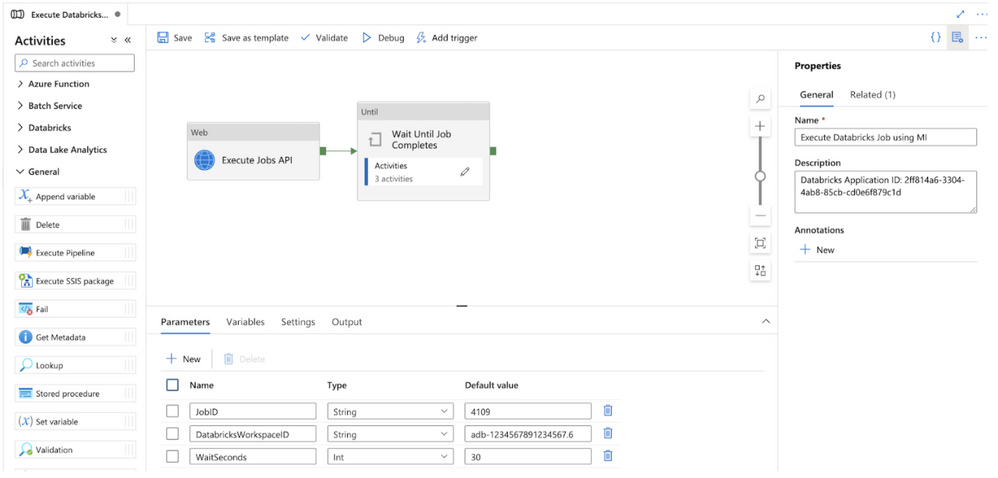
The sections below walkthrough how to build and configure a modular ADF pipeline that can execute any Azure Databricks defined job using out-of-the-box ADF pipeline activities and managed identity authentication. The full sample code can be found in the following Gists (regular and with parameters). You can also program the pipeline yourself using the following steps.
Figure 1 – Modular ADF pipeline for executing Azure Databricks jobs using managed identities (MI)
Step 1 – Create ADF pipeline parameters and variables
The pipeline has 3 required parameters:
- JobID: the ID for the Azure Databricks job found in the Azure Databricks Jobs UI main screen. This parameter is required.
- DatabricksWorkspaceID: the ID for the workspace which can be found in the Azure Databricks workspace URL. This parameter is required.
- WaitSeconds: the number of seconds to wait in between each check for job status.
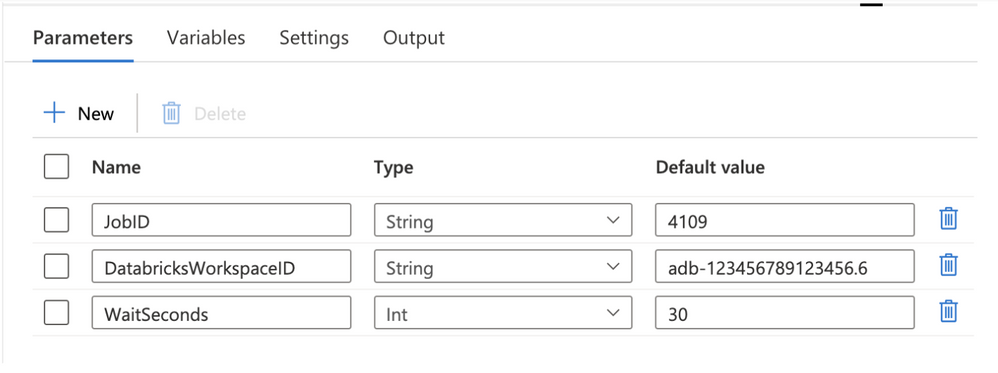
Figure 2 – ADF pipeline parameters
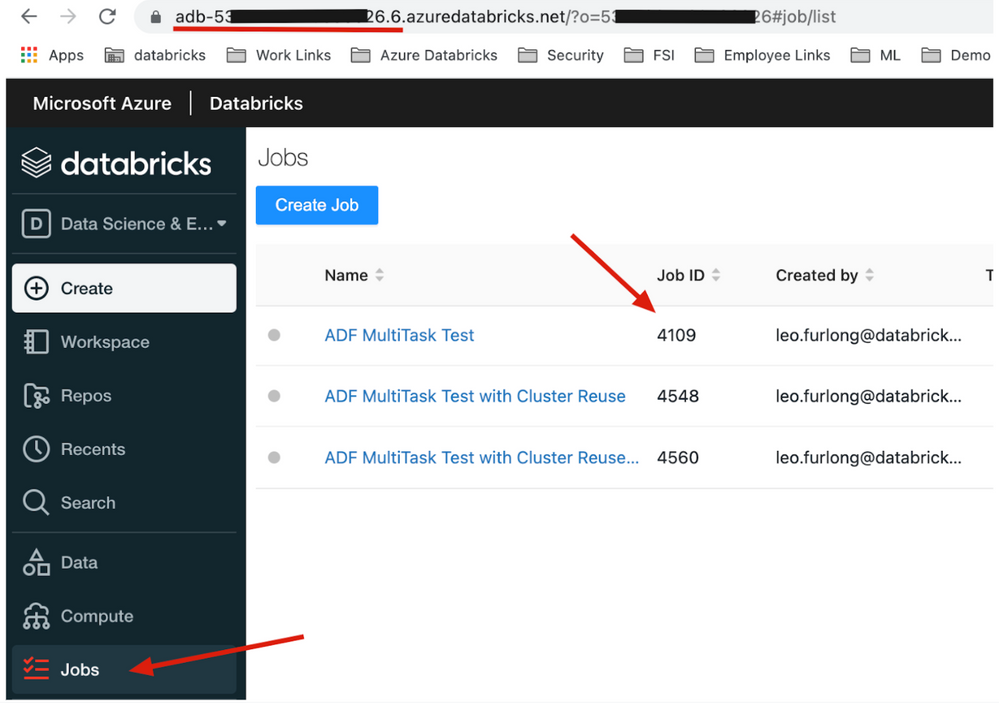
Figure 3 – Example Azure Databricks Jobs UI
The pipeline also has one variable called JobStatus with a default value as “Running”. This variable will be used to set the Job status while we are running the Azure Databricks job. When the Job Status changes, the ADF pipeline will update the variable.
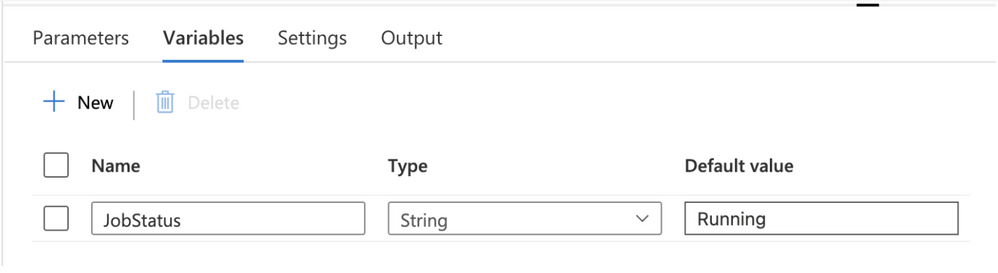
Figure 4 – ADF pipeline variables
Step 2 – Execute the Azure Databricks Run Now API
The first step in the pipeline is to execute the Azure Databricks job using the Run Now API. This is done using the ADF Web activity and leveraging dynamic expressions. Configure the following values in the web activity:
URL: click “Add dynamic content” and enter the formula @concat(‘https://’,pipeline().parameters.DatabricksWorkspaceID,’.azuredatabricks.net/api/2.1/jobs/run-now’).
Method: POST
Body: click “Add dynamic content” and enter the formula @concat(‘{“job_id”:’,pipeline().parameters.JobID,’}’).
Integration runtime: select the correct integration runtime for your environment. The integration runtime should have network connectivity to the Azure Databricks workspace.
Authentication: select Managed Identity in the drop down menu.
Resource: enter the value 2ff814a6-3304-4ab8-85cb-cd0e6f879c1d. This ID represents the identifier for the Azure Databricks login application in Azure and is consistent for all tenants and customers.
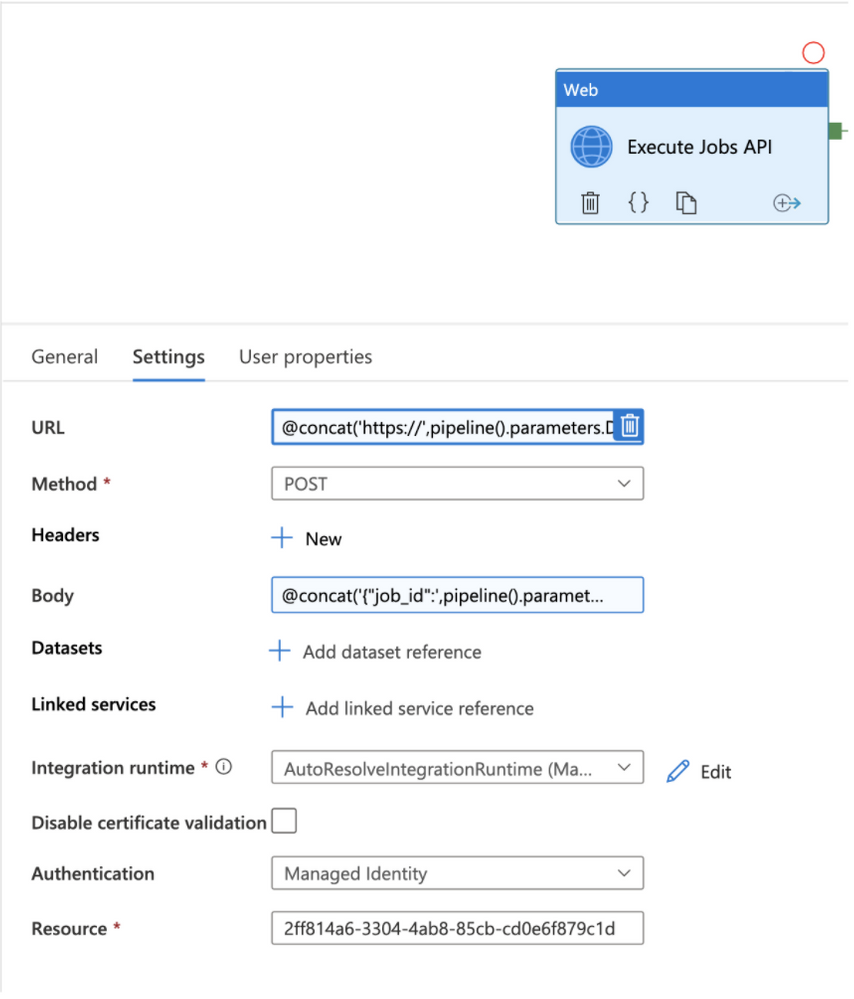
Figure 5 – Web Activity to execute Azure Databricks job

Figure 6 – Dynamically constructed URL

Figure 7 – Dynamically constructed body
Step 3 – ADF Until activity
The second step in the pipeline is an Until activity. The Until activity will be used to check the Azure Databricks job execution status until it completes. All activities inside of the Until activity will execute until the JobStatus pipeline variable is no longer equal to the value “Running”. Configure the following values in the Until activity:
Expression: click “Add dynamic content” and enter the formula @not(equals(variables(‘JobStatus’),’Running’)).
Timeout: optionally, enter a timeout value for the Until activity that is less than the default.
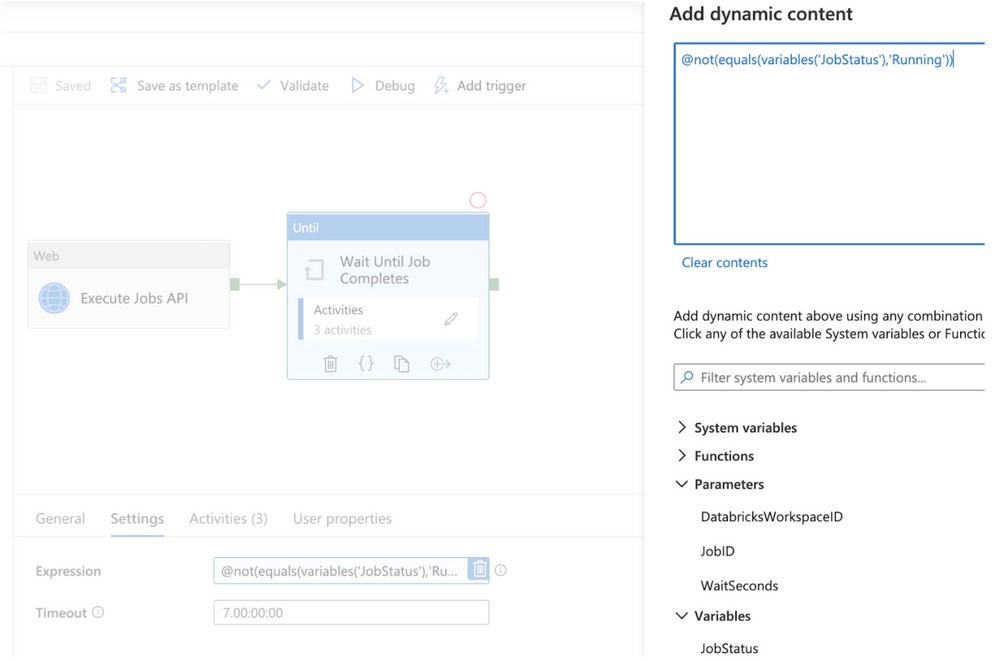
Figure 8 – ADF Until activity
To program activities inside the Until activity, click on the pencil button in the Activities menu. Within the Until activity, 3 activities are used to check the Azure Databricks job status, set the ADF pipeline variable, and wait to recheck the job status if it hasn’t already completed.
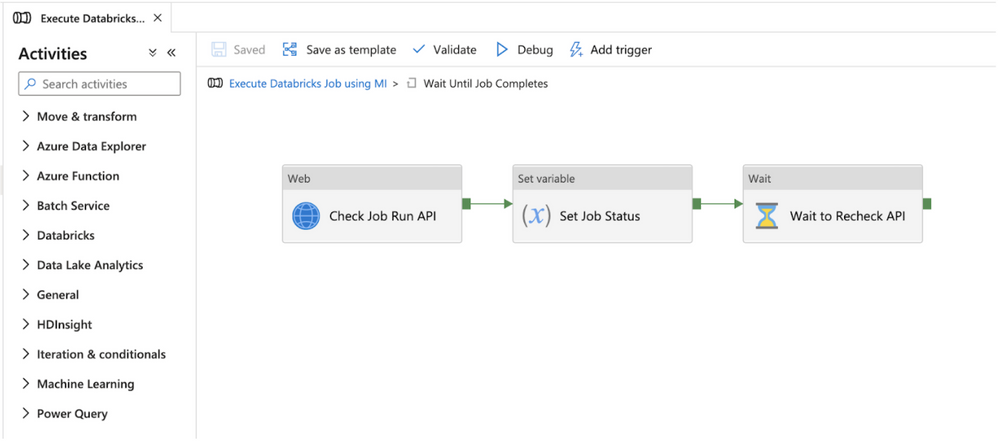
Figure 9 – Check Azure Databricks job status flow
Step 4 – Check the Azure Databricks Job status using the Runs get API
The first activity inside the Until activity is to check the Azure Databricks job status using the Runs get API. This is done using the ADF Web activity and leveraging dynamic expressions. The return value from the Runs get API call will not only provide the Job status, but it will also provide the status for the individual tasks in a multi-task job and provide the Run URLs to navigate to the Azure Databricks job run executions in the Azure Databricks workspace UI for viewing status or troubleshooting. Configure the following values in the web activity:
URL: click “Add dynamic content” and enter the formula @concat(‘https://’,pipeline().parameters.DatabricksWorkspaceID,’.azuredatabricks.net/api/2.1/jobs/runs/get?run_id=’,activity(‘Execute Jobs API’).output.run_id). Make sure the activity value in the formula is equal to the name of the first web activity you created in the pipeline.
Method: GET
Integration runtime: select the correct integration runtime for your environment. The integration runtime should have network connectivity to the Azure Databricks workspace.
Authentication: select Managed Identity in the drop down menu.
Resource: enter the value 2ff814a6-3304-4ab8-85cb-cd0e6f879c1d. This ID represents the identifier for the Azure Databricks login application in Azure and is consistent for all tenants and customer.
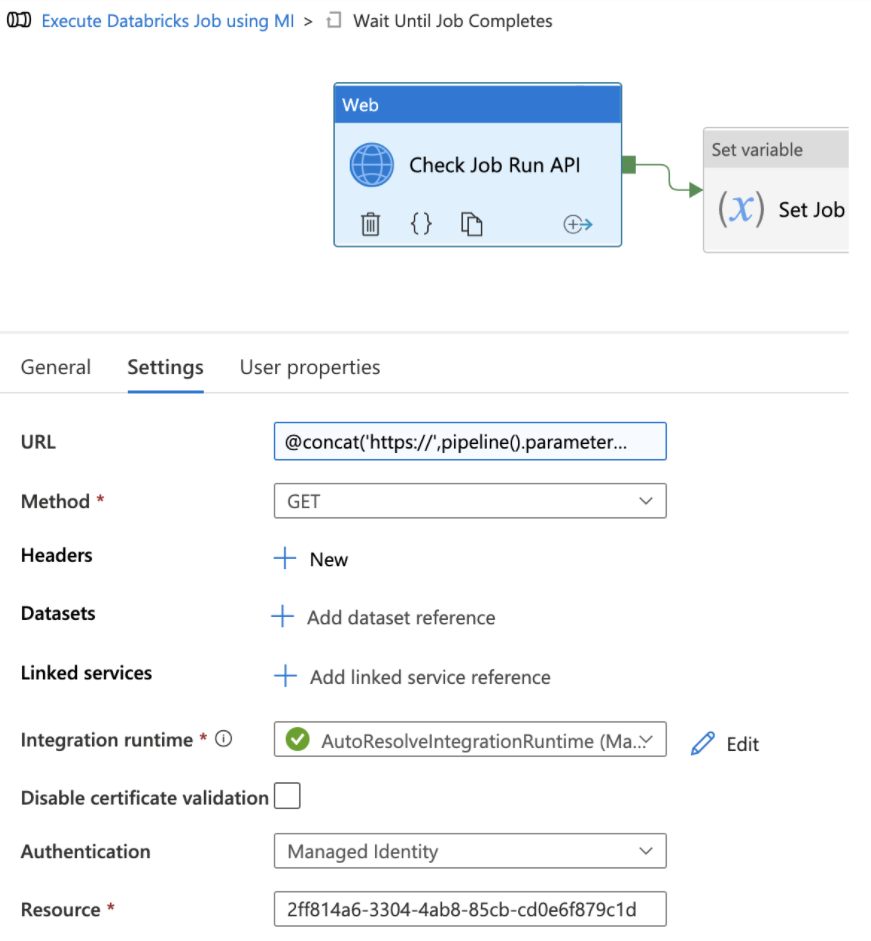
Figure 10 – Get job run status

Figure 11 – Dynamic job run status expression
Step 5 – Set ADF variable with job run status
The second activity inside the Until activity is a Set variable activity which is used to set the value of the pipeline variable JobStatus to the value returned from the Runs get API call. The expression checks whether the API return value of the life_cycle_state field is “PENDING” or “RUNNING” and sets the variable to “Running”. If the life_cycle_state field is not “PENDING” or “RUNNING”, then the variable is set to the result_state field. Configure the following values in the set variable activity:
Name: in the Name drop down menu, select the JobStatus variable
Value: click “Add dynamic content” and enter the formula. Make sure the activity name in the formula matches the name of your first Until web activity.
@if(
or(
equals(activity(‘Check Job Run API’).output.state.life_cycle_state, ‘PENDING’), equals(activity(‘Check Job Run API’).output.state.life_cycle_state, ‘RUNNING’)
),
‘Running’,
activity(‘Check Job Run API’).output.state.result_state
)
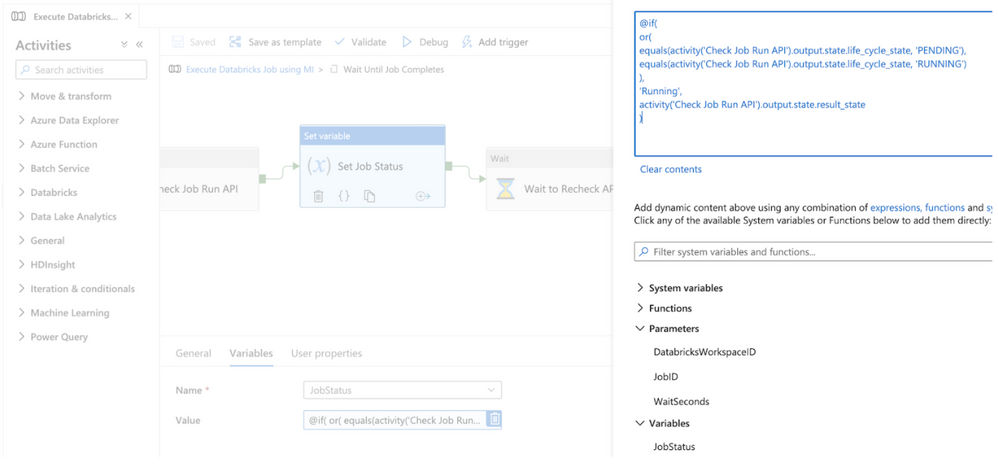
Figure 12 – Set the variable to the Runs get output
Step 6 – Wait to recheck job run status
The third activity inside the Until activity is a Wait activity which is used to wait a configurable number of seconds before checking the Runs get API again to see whether the Azure Databricks job has completed. Configure the following values in the wait activity:
Wait time in seconds: click “Add dynamic content” and enter the formula. @pipeline().parameters.WaitSeconds
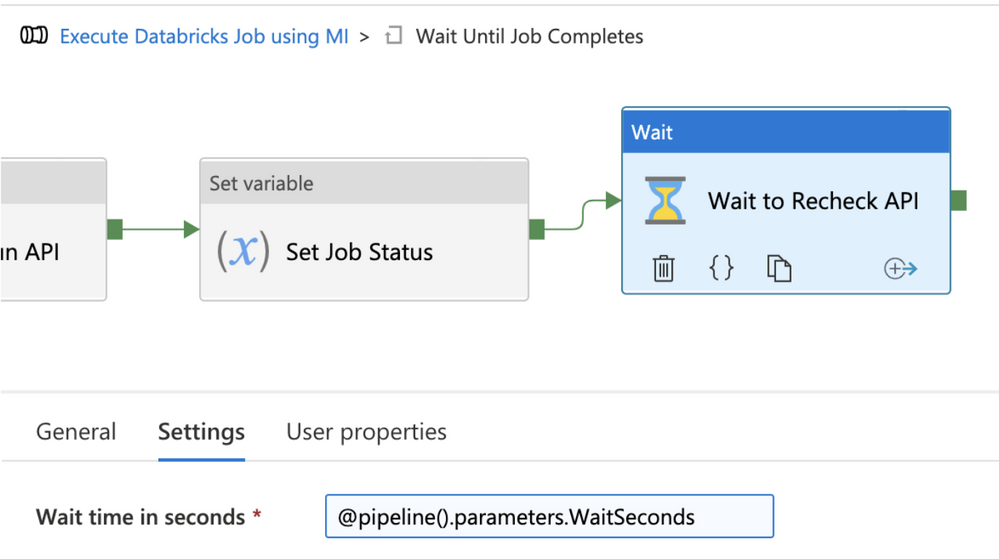
Figure 13 – Wait before rechecking job status
Use modular ADF pipeline to execute Azure Databricks jobs
The modular pipeline is now complete and can be used for executing Azure Databricks jobs. In order to use the pipeline, use the Execute Pipeline activity in master pipelines used to control orchestration. In the settings of the activity, configure the following values:
Invoked pipeline: select “Execute Databricks Job using MI” from drop down menu
Wait on completion: checked
Parameters: set the values for the pipeline parameters:
- JobID: the ID for the Azure Databricks job found in the Azure Databricks Jobs UI main screen.
- DatabricksWorkspaceID: the ID for the workspace which can be found in the Databricks workspace URL.
- WaitSeconds: the number of seconds to wait in between each check for job status.
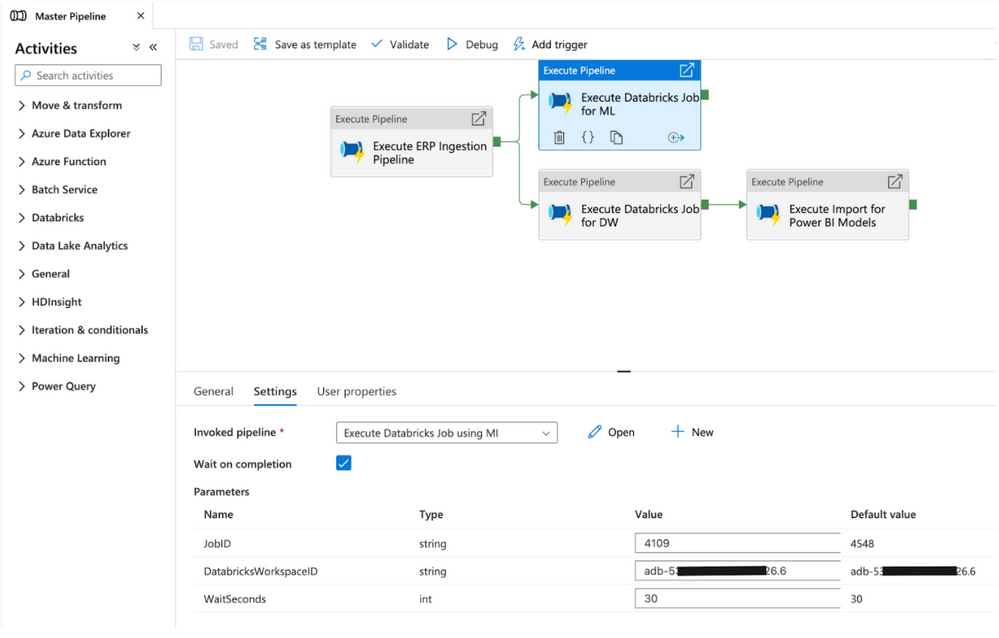
Figure 14 – Execute Pipeline activity in master pipeline
Adding the Managed Identity Authentication
Instructions for adding the ADF Managed Identity to the Azure Databricks workspace as a Contributor (Workspace admin) are in the following blog article.
If your organization wants to give the ADF Managed Identity limited permissions, you can also add the ADF Application ID to the Azure Databricks workspace using the Service Principal SCIM API. You can then assign permissions to the user using the permissions API. The Application ID for the ADF Managed Identity can be found in Azure Active Directory under Enterprise Applications.
Leveraging cluster reuse in Azure Databricks jobs from ADF
To optimize resource usage with jobs that orchestrate multiple tasks, you can use shared job clusters. A shared job cluster allows multiple tasks in the same job run to reuse the cluster. You can use a single job cluster to run all tasks that are part of the job, or multiple job clusters optimized for specific workloads. To learn more about cluster reuse, see this Databricks blog post.
by Contributed | Feb 8, 2022 | Technology
This article is contributed. See the original author and article here.
We are excited to announce that LAMBDA and LAMBDA helper functions are now generally available to anyone using Production: Current Channel builds of Excel. In conjunction with LAMBDA going to production, we are also announcing the release of a new add-in, the advanced formula environment, sponsored by the Microsoft Garage and Microsoft Research, which allows for improved formula authoring experiences and easy import/export of named LAMBDAs.
Thanks to all of our Insiders for using the LAMBDA functions and giving us feedback! As a result we’ve also made a few changes that we’ll outline below in addition to talking about the advanced formula authoring environment, a Microsoft Garage project.
Let’s start with a quick example.
IFBLANK
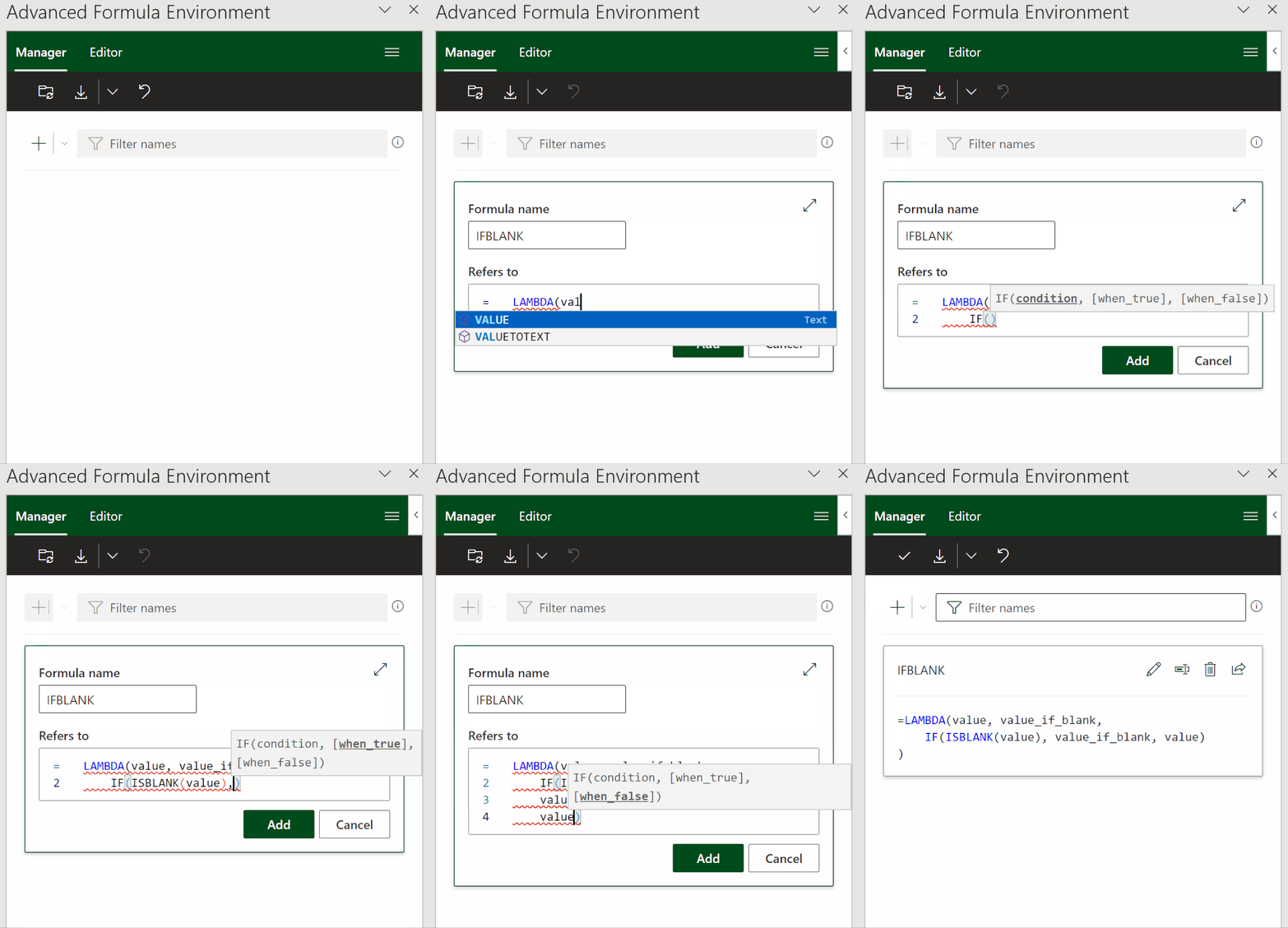
A task I regularly encounter is replacing certain values in a dataset, such as errors or blanks cells. Excel provides IFERROR to replace error values, but there is no function to replace blank cells. Fortunately, with LAMBDA, we can define our own function, IFBLANK.
Instead of authoring this in the grid and then importing to the name manager, I will instead author this in the new formula environment and then sync it to the workbook to make use of it in the grid.
In today’s scenario I am trying to create a quick count of the meals that have been requested for a dinner party I am hosting.
Without IFBLANK, Excel, by default returns a 0 for blanks. I could work around this but I also need to get a count of orders which I will do using MAP and REDUCE to author one formula so I can get updated counts as I continue to get more responses from guests.
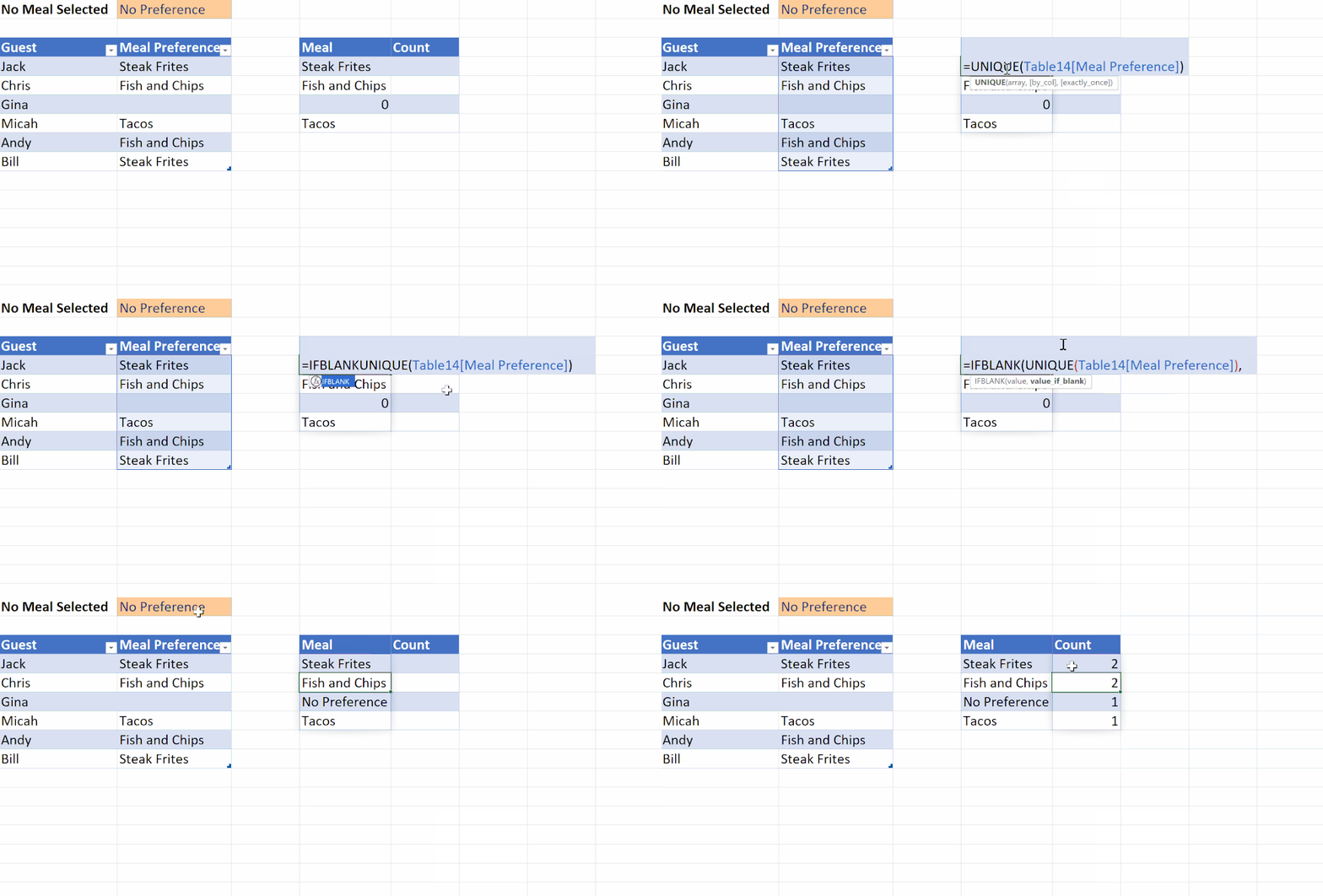
Here’s the formula I used for the counts:
=MAP(D4#, LAMBDA(meal, REDUCE(0, IFBLANK(Table14[Meal Preference], B1), LAMBDA(meal_count, preference, IF(meal=preference, meal_count+1, meal_count)))))
Lets go over some improvements and changes we have made on our journey through Insiders to the LAMBDA feature in general.
Changes made to LAMBDA
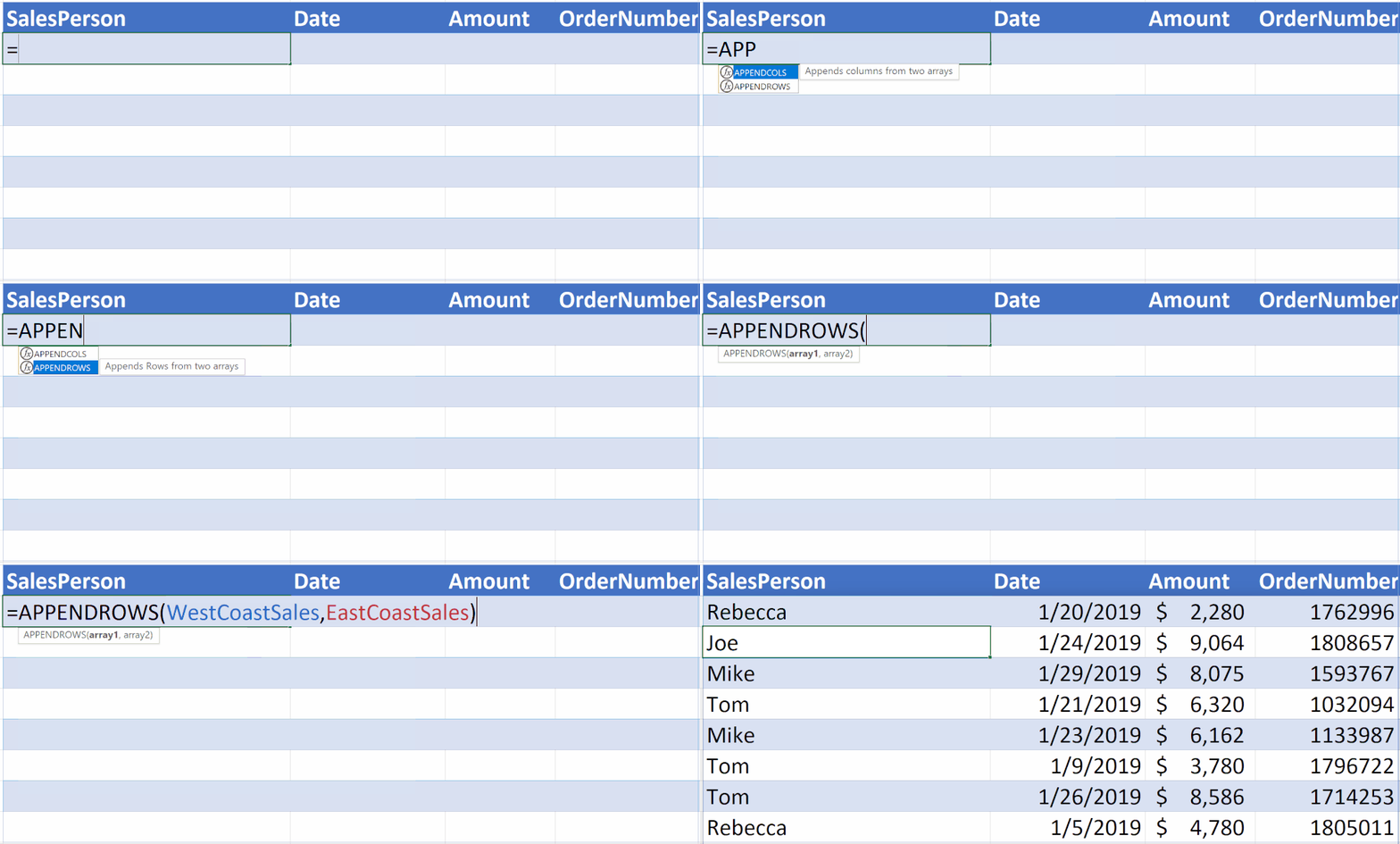
Function tooltips
We have added support for function tooltips for named LAMBDAs in addition to auto-completing the open parentheses character when calling these functions. In other words, calling a function defined using a LAMBDA is exactly the same as calling a native function.
Recursion limit increase
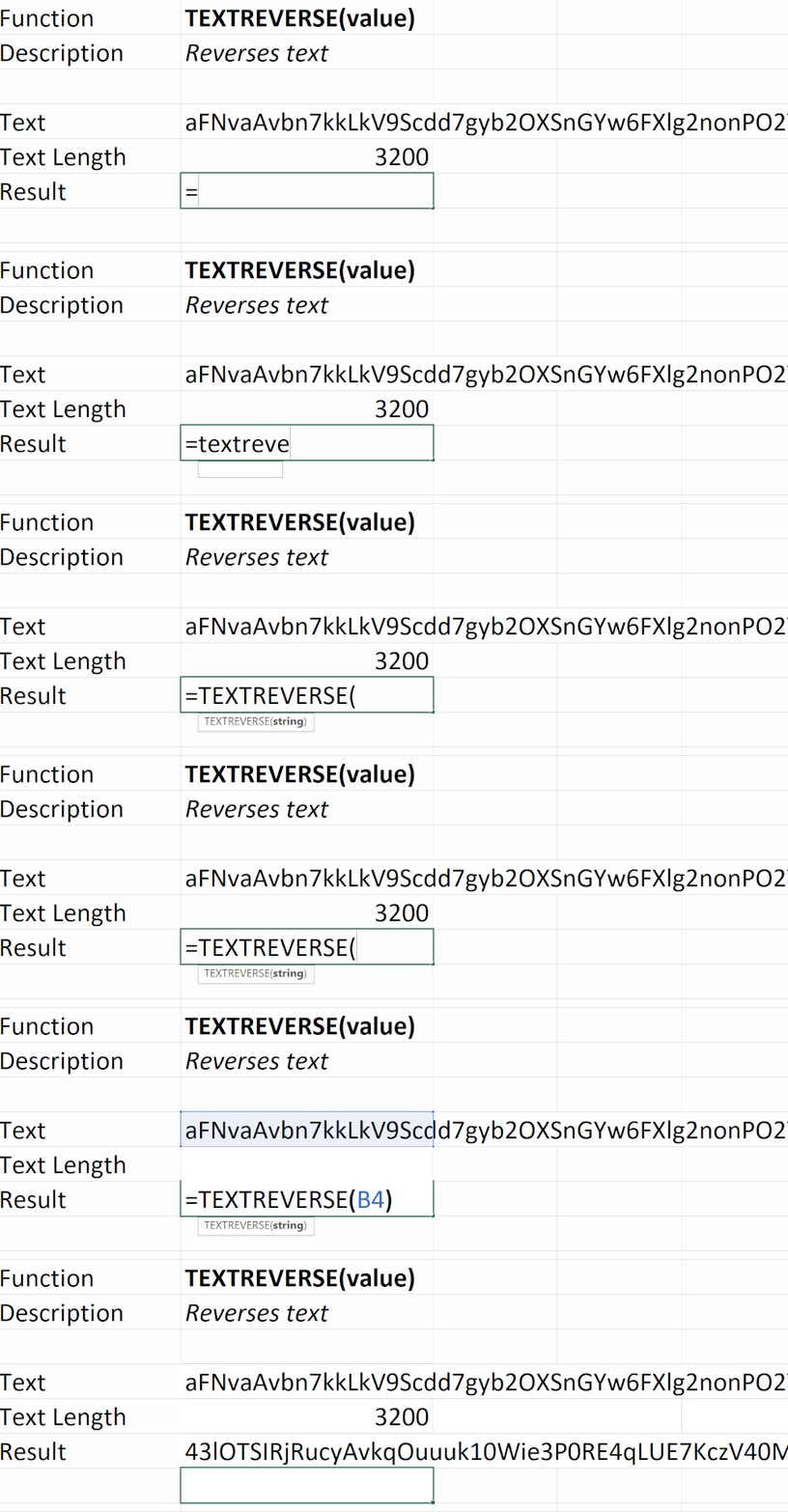
We have upped the limit of recursion by 16 times its original limit. In this example, the text string is 3200 characters long and would have previously returned a #NUM when called with a LAMBDA that recursively reverses a text string.
LAMBDA helper function outputs
We changed the way that the LAMBDA helper functions handle arrays of references.
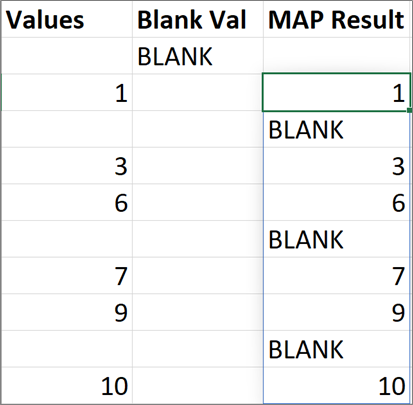
Previously when a LAMBDA helper function returned an array and the associated LAMBDA returns a single cell, a #CALC error would be returned. We have changed this to automatically return the cell value as the output of the LAMBDA function.
In this example, Excel would have returned a #CALC but now will return the results.

Advanced formula environment, a Microsoft Garage project
Today we are introducing a new tool to aid in the authoring of more complex named formulas. The advanced formula environment is a space where we are hoping to experiment and explore new and different methods for authoring formulas with special functionality designed with LAMBDAs and LET in mind.
Key features of the new tool:
- Advanced formula authoring capabilities found in modern IDEs
- Intellisense
- Commenting
- Inline errors
- Auto tabulation
- Code collapse
- And more…
- Undo/redo of formula edits within the manager
- Namespaces to allow for groups of named functions
- Import and export functionality
- Text and GitHub Gist import
- Different views to filter your names and edit in a single location
The environment is available on all platforms where Office Add-ins are available (Mac, Windows, Web)
Let’s take a look at some of the functionality so you can get started with managing and editing your new and pre-existing named functions!
Manager and Editor Views
There are two major views contained within the advanced formula environment, Manager and Editor.
Manager
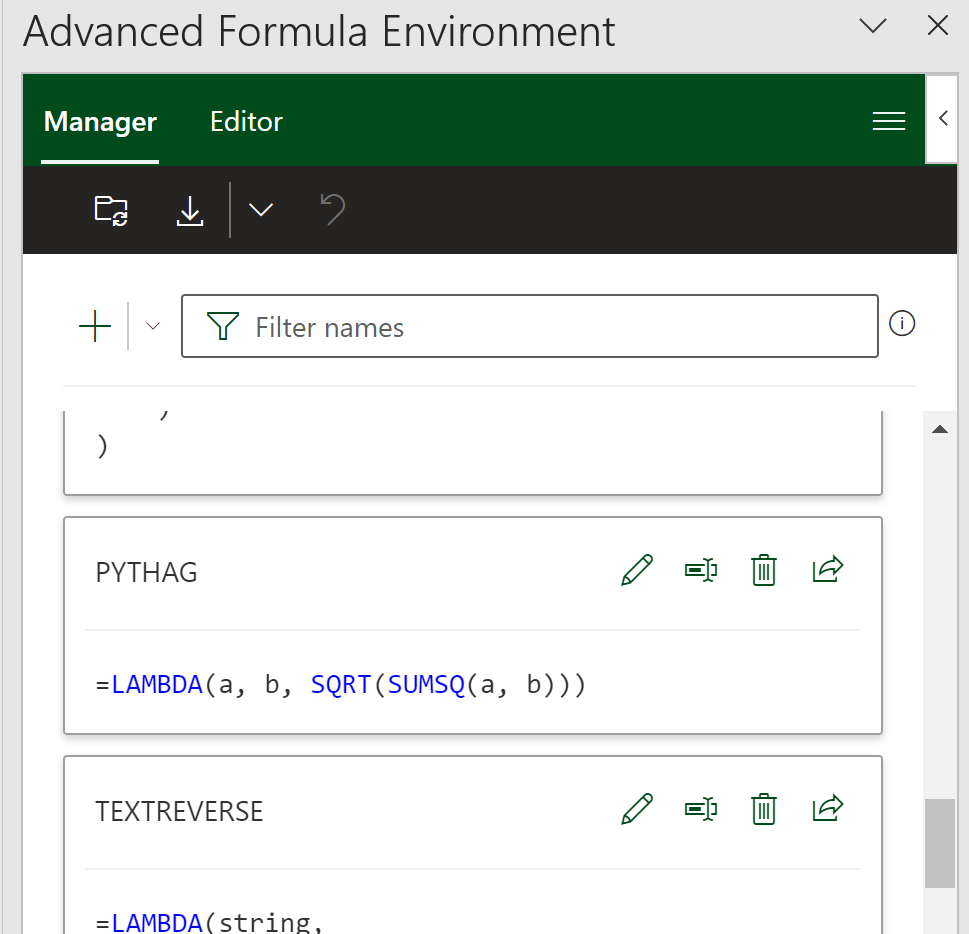
The Manager is where you will see all of your names with their own individual cards and associated quick actions. Much like the Name Manager but with more functionality.
 |
Edit the name |
 |
Rename the formula |
 |
Delete the entry |
 |
Export the definition for sharing |
Editor
The Editor is where you can go to edit all entries within the workbook or create new namespaces for collections of formulas.
This is where I usually go when I want to dive in to create more complex functions as you get the full version of the editor in this view and can create multiple names sequentially.
The workbook section contains all names which are not attached to a given sheet but instead are saved globally in the workbook.
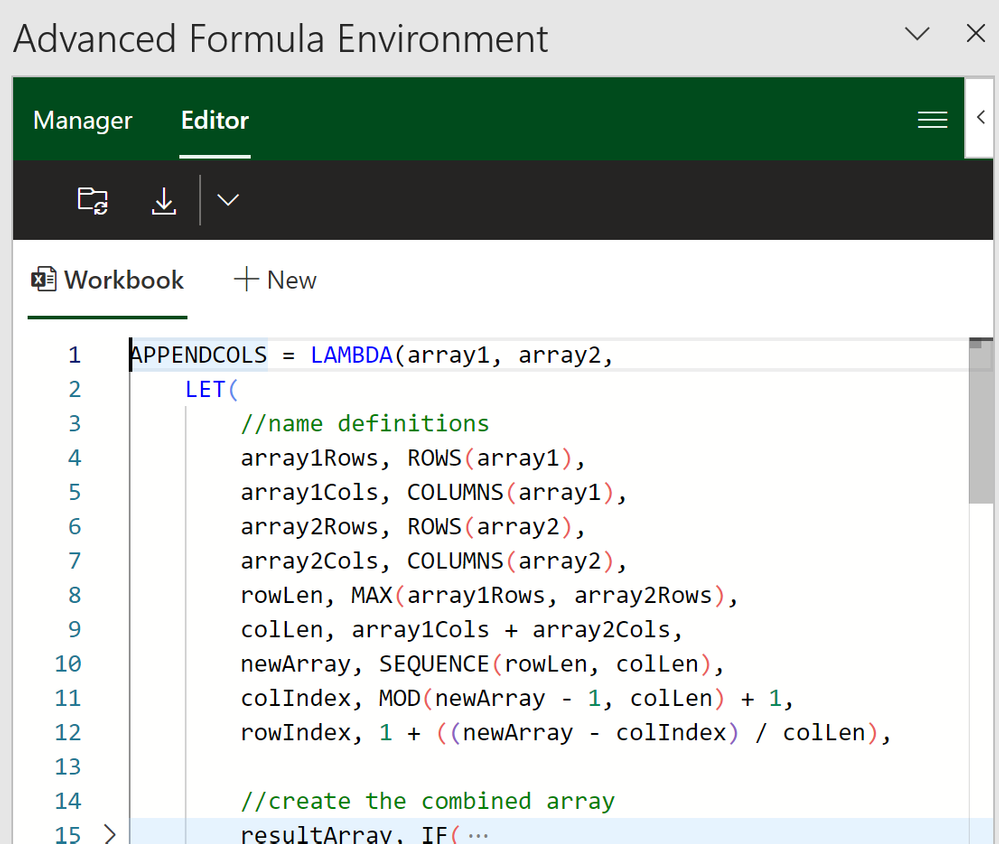
Some of my favorite pieces of functionality are the ability to easily add new lines, tabulate sections of the formula while also being able to comment out pieces of my formula that I might be working on, or collapse definitions so I can more easily dig into specific areas. Not to mention, if I change my mind later, I can easily undo/redo any changes I am actively working on.
Here’s another example I made for a chess game I have been building for fun in Excel.

Importing
The advanced formula environment can import definitions into the manager. You can important individual definitions as well as libraries of definitions via text or through GitHub Gists.
The main entry point for importing can be found by selecting the action in the actions bar. The main entry point defaults to “From URL” but the dropdown reveals the “From text” option.
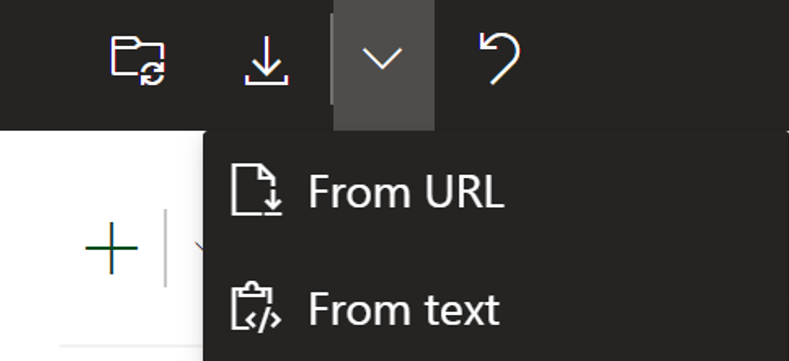
If you’d like to try out this functionality yourself I am including a gist with some of the examples I created today on top of additional LAMBDAs I have used in prior posts. I think this is a better way to share than having you copy/paste from a blog post, so lets be the first to try it out!
aka.ms/LAMBDAGist (make sure to use the URL you are redirected to as the add-in doesn’t let you use non gist paths)
We look forward to the libraries of LAMBDAs the community produces and hearing from you all about what does and doesn’t work in this new environment we have created.
Feedback
We are actively looking for feedback on the experience and would invite you to provide feedback either through techcommunity or by going to this github repository.
Accessing LAMBDA functions today
To get access to LAMBDA functions, please make sure you have updated to the latest version of Excel. Specifically versions greater than or equal to:
- Windows: 16.0.14729.20260
- Mac: 16.56 (Build 21121100)
- iOS: 2.56 (Build 21120700)
- Android: 16.0.14729.20176
What version of Office am I using?
Accessing the advanced formula environment
You can use this link or manually install if from the app
https://aka.ms/get-afe
To access the advanced formula environment, simply search for the “advanced formula environment” within the built-in add-ins store of Excel and install it like any other Office add-in.
- Go the Insert Tab
- Select the Get Add-ins button
- Search for “advanced formula environment”
- Click the “Add” button
Once the add-in is installed, you should be able to find it on your home tab. The ribbon button looks like the picture below.
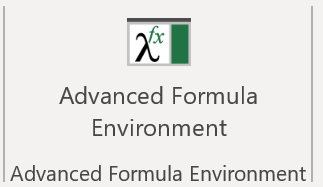
Click here to learn more about Office Add-ins
Learn more
To learn more about LAMBDA and the advanced formula environment, please check out the links below and in the meantime we are excited to hear more about the ways you have used LAMBDA in your own workbooks!
LAMBDA Help
Advanced Formula Environment
Availability notes
LAMBDA is now available to Office 365 Subscribers in Production: Current Channel
To stay connected to Excel and its community, read the Excel blog posts and send us ideas and suggestions via UserVoice. You can also follow Excel on Facebook and Twitter.
A joint collaboration
The last thing I would like to mention is that all of this was done as a joint collaboration between Microsoft Research and Excel Engineering. It’s been a blast building out all the experiences you see today and it wouldn’t have been possible without the brilliant researchers at Microsoft Research Cambridge.
Chris Gross
Program Manager, Excel
Jack Williams
Lead Developer and Researcher, Microsoft Research Cambridge
by Contributed | Feb 7, 2022 | Technology
This article is contributed. See the original author and article here.
It’s a challenging time in software security; migration to the modern cloud, the largest number of remote workers ever, and a global pandemic impacting staffing and supply chains all contribute to changes in organizations. Unfortunately, these changes also give bad actors opportunities to exploit organizations:
“Cybercriminals are targeting and attacking all sectors of critical infrastructure, including healthcare and public health, information technology (IT), financial services, and energy sectors. Ransomware attacks are increasingly successful, crippling governments and businesses, and the profits from these attacks are soaring.”
– Microsoft Digital Defense Report, Oct 2021
|
For years Microsoft Office has shipped powerful automation capabilities called active content, the most common kind are macros. While we provided a notification bar to warn users about these macros, users could still decide to enable the macros by clicking a button. Bad actors send macros in Office files to end users who unknowingly enable them, malicious payloads are delivered, and the impact can be severe including malware, compromised identity, data loss, and remote access. See more in this blog post.
“A wide range of threat actors continue to target our customers by sending documents and luring them into enabling malicious macro code. Usually, the malicious code is part of a document that originates from the internet (email attachment, link, internet download, etc.). Once enabled, the malicious code gains access to the identity, documents, and network of the person who enabled it.”
– Tom Gallagher, Partner Group Engineering Manager, Office Security
|
For the protection of our customers, we need to make it more difficult to enable macros in files obtained from the internet.
Changing Default Behavior
We’re introducing a default change for five Office apps that run macros:
VBA macros obtained from the internet will now be blocked by default.
For macros in files obtained from the internet, users will no longer be able to enable content with a click of a button. A message bar will appear for users notifying them with a button to learn more. The default is more secure and is expected to keep more users safe including home users and information workers in managed organizations.
“We will continue to adjust our user experience for macros, as we’ve done here, to make it more difficult to trick users into running malicious code via social engineering while maintaining a path for legitimate macros to be enabled where appropriate via Trusted Publishers and/or Trusted Locations.”
– Tristan Davis, Partner Group Program Manager, Office Platform
|
This change only affects Office on devices running Windows and only affects the following applications: Access, Excel, PowerPoint, Visio, and Word. The change will begin rolling out in Version 2203, starting with Current Channel (Preview) in early April 2022. Later, the change will be available in the other update channels, such as Current Channel, Monthly Enterprise Channel, and Semi-Annual Enterprise Channel.
At a future date to be determined, we also plan to make this change to Office LTSC, Office 2021, Office 2019, Office 2016, and Office 2013.
End User Experience
Once a user opens an attachment or downloads from the internet an untrusted Office file containing macros, a message bar displays a Security Risk that the file contains Visual Basic for Applications (VBA) macros obtained from the internet with a Learn More button.
 A message bar displays a Security Risk showing blocked VBA macros from the internet
The Learn More button goes to an article for end users and information workers that contains information about the security risk of bad actors using macros, safe practices to prevent phishing & malware, and instructions on how to enable these macros by saving the file and removing the Mark of the Web (MOTW).
What is Mark of the Web (MOTW)?
The MOTW is an attribute added to files by Windows when it is sourced from an untrusted location (Internet or Restricted Zone). The files must be saved to a NTFS file system, the MOTW is not added to files on FAT32 formatted devices.
IT Administrator Options
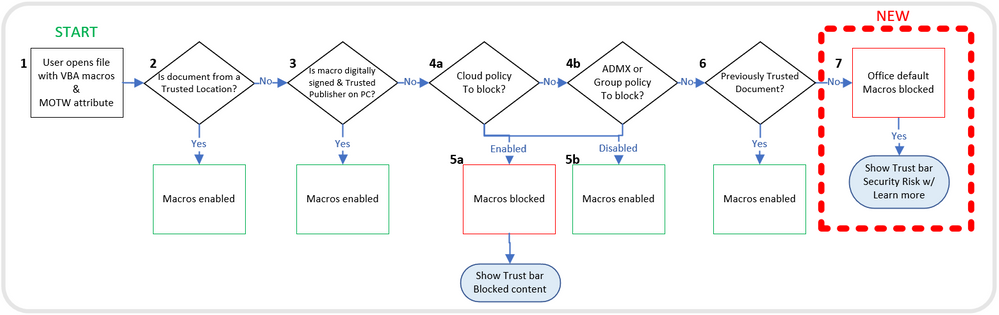
This chart shows the evaluation flow for Office files with VBA macros and MOTW:
Evaluation flow for Office files with VBA macros and MOTW
Organizations can use the “Block macros from running in Office files from the Internet” policy to prevent users from inadvertently opening files from the internet that contain macros. Microsoft recommends enabling this policy, and if you do enable it, your organization won’t be affected by this default change.
“Setting policy is a powerful tool for IT Admins to protect their organizations. For years we’ve recommended blocking macros obtained from the internet in our security baselines, and many customers have done so. I’m pleased Microsoft is taking the next step to securing everyone with this policy by default!”
– Hani Saliba, Partner Director of Engineering, Office Calc
|
Additionally, there are two other options to know your files are safe:
- Opening files from a Trusted Location
- Opening files with digitally signed macros and providing the certificate to the user, who then installs it as a Trusted Publisher on their local machine
To learn more about how to get ready for this change and recommendations for managing VBA macros in Office files, read this article for Office admins.
Thank you,
Office Product Group
VBA Team & Office Security Team
More helpful information on the threats of Ransomware:
Continue the conversation by joining us in the Microsoft 365 Tech Community! Whether you have product questions or just want to stay informed with the latest updates on new releases, tools, and blogs, Microsoft 365 Tech Community is your go-to resource to stay connected!


Recent Comments