
Extracting SAP data using OData – Part 1 – The First Extraction
This article is contributed. See the original author and article here.
| Before implementing data extraction from SAP systems please always verify your licensing agreement. |
One of the greatest opportunities of having SAP on Azure is the rich portfolio of integration services, especially focusing on data. And one of the best use cases for using SAP data on Azure is the possibility of blending it with data coming from external sources. The last ten years have proven that while SAP is one of the most important IT solutions for many customers, it’s not the only one. We witness a significant shift from having a single solution towards implementing multiple specialized systems surrounding the core ERP functionalities.
These surrounding solutions can be pretty much anything – from a cloud CRM system to an advanced Excel spreadsheet filled with fancy formulas, which many finance people love so much. We can’t forget about business partners, who send data worth blending with information you already own.
To provide value, you need to democratize and integrate your data. When you look at your data in isolation, most times you won’t get the big picture. You’ll probably miss information on how the huge marketing campaign influenced the sales of your new product. Was it worth the spend? Should you repeat it? To make data-driven decisions, organizations invest their time and energy in building reliable common data platforms that connect the dots between various areas of the business.
SAP remains one of the key systems of records, and ensuring a reliable data flow to a common data platform is essential. The question I often hear is how to approach data extraction from an SAP system. High volumes of data, frequent changes, and proprietary protocols don’t make things easier. Getting data directly from the underlying database is probably not the best idea, as it often breaches licensing terms. Simultaneously there are also technical challenges. Some complex data structures, like cluster tables, are impossible to extract from this layer. A while ago, the RFC-based data extraction through an application server was a leading solution. It’s still a viable approach, especially if you reuse available BW extractors to populate the schema information.
There is also a third option available, which is getting more powerful, especially if you’re lucky enough to have recent release of an SAP system. While I don’t think the protocol offers significant advantages in the extraction process (and sometimes it causes much pain), its integration possibilities make it worth a closer look. Yes, you got it right – I’m talking about OData.
The increasing adoption of the OData protocol and much-invested energy by SAP makes it the most advanced data integration method. There is a large library of available OData services published by SAP. All SAP Fiori apps use OData to read information from the back-end system. You can even expose CDS-views as an OData service and query them from external applications. And while I’m aware of the problems that OData-based extraction brings, I still think it’s worth your attention.
Over the next couple of episodes, I will show you how to use OData services to extract SAP data using Azure Synapse. My goal is to provide you with best practices to embrace OData and use SAP data with information coming from other sources. Today I’m giving you a quick overview of the Azure Synapse and its data integration capabilities. We will build a simple ETL / ELT pipeline to extract data from one of the available OData services. In the coming weeks, I’ll cover more advanced scenarios, including delta extraction, client-side caching, and analytic CDS views.
INTRODUCTION TO AZURE SYNAPSE
I want to keep the theory as short as possible, but I think you will benefit from a brief introduction to Azure Synapse. Especially, if you’re unfamiliar with Azure tools for data analytics. Whenever you work with data, there are a few steps involved to retrieve a piece of information or insight. I guess we are all familiar with the ETL acronym, which stands for Extract – Transform – Load. It basically describes a process that gets data from one system, modifies them, and then uploads them to a target solution. For example, to a data warehouse, making it available for reporting.
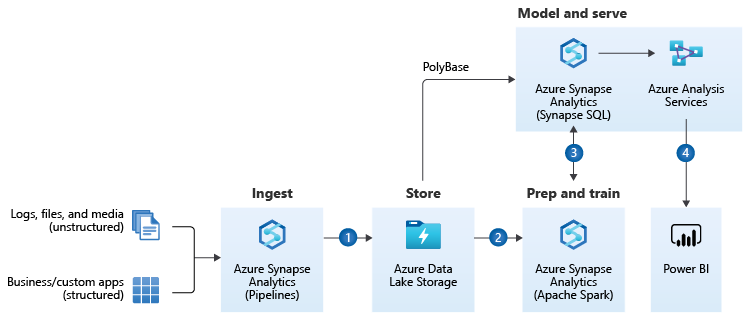
I like the way Microsoft extends the data warehousing model. It provides a solution that consolidates all the steps required to get an actual insight. No matter what is the source and format of data and what are the expected target results. It can be a simple report or an action triggered by the Machine Learning algorithm. The heart of the Modern Data Warehouse platform is Azure Synapse – a complete analytics solution that together with massively scalable storage allows you to process and blend all sorts of data. No matter if you work with highly structured data sources, like an SAP system, or if you want to analyze streaming data from your IoT device, you can model and query your dataset from one data platform hosted on Azure.
(source: Microsoft.com)
A part of the Modern Data Warehouse concept that we will pay special attention to is data ingestion. We will use Synapse Pipelines to copy data from an SAP system to Azure Data Lake and make it available for further processing.
To streamline data movements, Azure Synapse offers more than 90 connectors to the most common services. Six of them works with SAP landscapes. Depending on the source system, each offers a unique type of connectivity. The SAP Tables retrieves data from NetWeaver tables using RFC protocol. For SAP BW systems, you can copy data using MDX queries or by OpenHub destination. There is even a dedicated connector that uses the OData protocol.
Configurable building blocks simplify the process of designing a pipeline. You can follow a code-free approach, but in upcoming episodes, I’ll show you how to use a bit of scripting to fully use the power of the ingestion engine. A basic pipeline uses a single Copy Data activity that moves data between the chosen source and target system. More advanced solutions include multiple building blocks that can be executed in sequence or parallel, creating a flow of data that calls various services within a single execution.
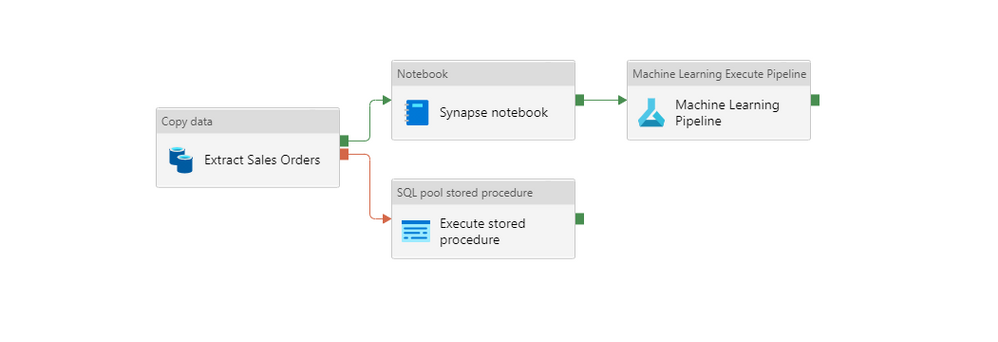
Linked Service is a definition of the connection to a service. You can think of it as a connection string that stores essential information to call an external service – like a hostname, a port or user credentials. A dataset represents the format of the data. When you save a file in the lake, you can choose to keep it as a CSV file, which is easy to read and edit using a notepad, or a specialized parquet file type, which offers columnar storage and is more efficient when working with large amounts of data.
An Integration Runtime provides compute resources that connect to the service and run transformation created as data flows. It’s a small application that you could compare to the SAP Cloud Connector. It acts as a proxy between the cloud-based ingestion engine and your resources. There are two main types of Integration Runtime available:
- Azure Integration Runtime
- Self-Hosted Integration Runtime
The Azure Integration Runtime allows you to connect to public services available over the internet, but with Private Endpoints, you can also use it inside Azure Virtual Network. To establish a connection with a system hosted on-premise, you should instead use the Self-Hosted version of the runtime. Using custom connection libraries or choosing the Parquet file format also mandates using the self-hosted integration runtime.
In this blog series, I will use the Self-Hosted Integration Runtime. The installation process is simple, and Microsoft provides extensive documentation, so I won’t provide a detailed installation walkthrough.
CREATE AZURE SYNAPSE ANALYTICS WORKSPACE
It’s time to get our hands dirty and create some resources. From the list of available Azure Services, choose Azure Synapse and create a new workspace. On the first tab, provide initial information like the resource group and the service name. An integral part of the Azure Synapse is the data lake which can be created during the service provisioning.
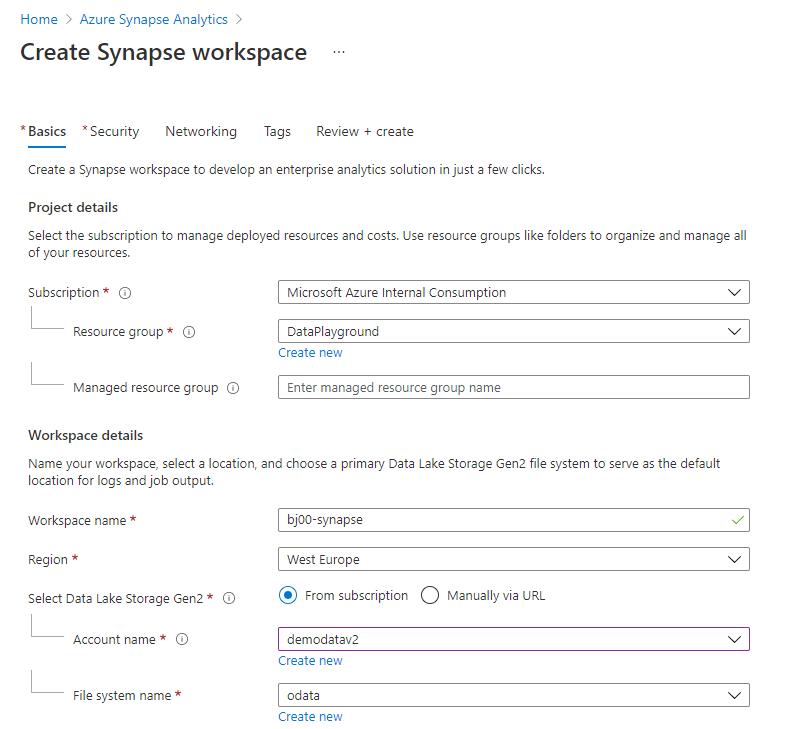
You can maintain user SQL Administrator credentials on the Security Tab. On the same tab, you can integrate Azure Synapse with your virtual network or change firewall rules. To follow this guide, you don’t have to change any of those default settings.
The Review screen shows a summary of settings and provides a high-level cost estimation. Click Create to confirm your choices and deploy the service.
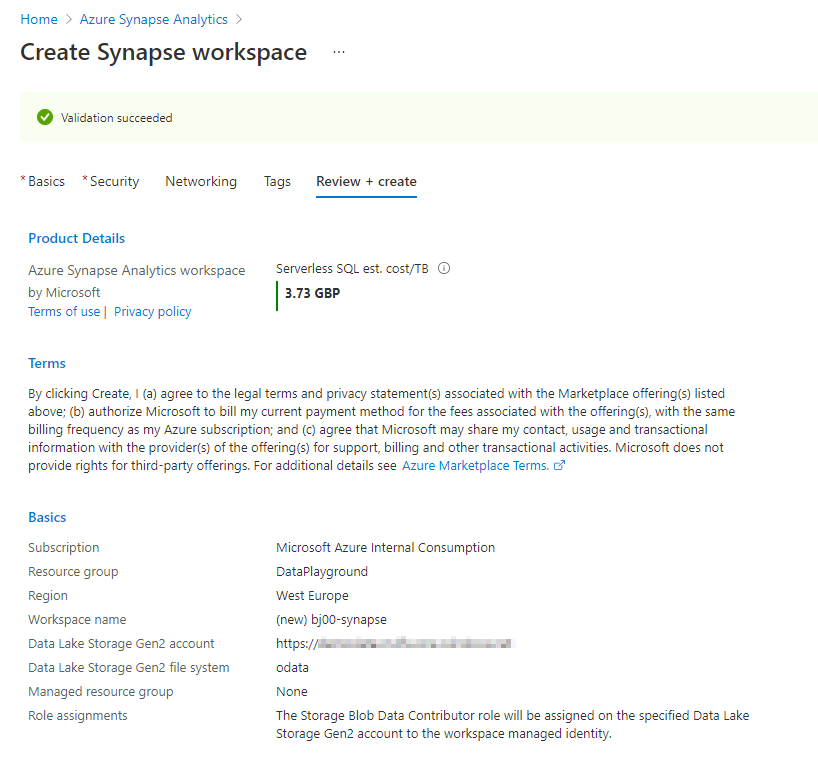
That’s it! Within a couple of minutes, Azure deploys the service, and you can access the Synapse Studio.
CREATE INTEGRATION RESOURCES
| There is a GitHub repository that contains the source code for every episode of the blog series GitHub – BJarkowski/synapse-pipelines-sap-odata-public |
Azure Synapse Studio is the place where you manage your data engineering and data analytics processes. It provides you with quick-start templates that you can use and rapidly build your data solution. But we’ll take a longer path – I want you to understand how the service works and how to design data pipelines, so no shortcuts in this guide!
The menu on the left side of the screen provides easy access to Synapse features. Take a moment to walk around. The Data element allows you to explore your data. You can connect to SQL and Spark pools or browse data stored in the lake. To write code, like SQL queries or stored procedures, you will use the Develop workspaces. But the place where we will spend most of our time is the Integrate area. Here you can provision pipelines and build processes that copy information from one system to another. We will also frequently use Monitoring features to see the status and progress of an extraction job.
To start designing the very first pipeline, create a Linked Service that stores the SAP connection information. You can do it in the Manage section. Choose Linked Services item – you will notice that you already have two entries there – one of them pointing to the Azure Data Lake Storage that you defined during Synapse service provisioning.
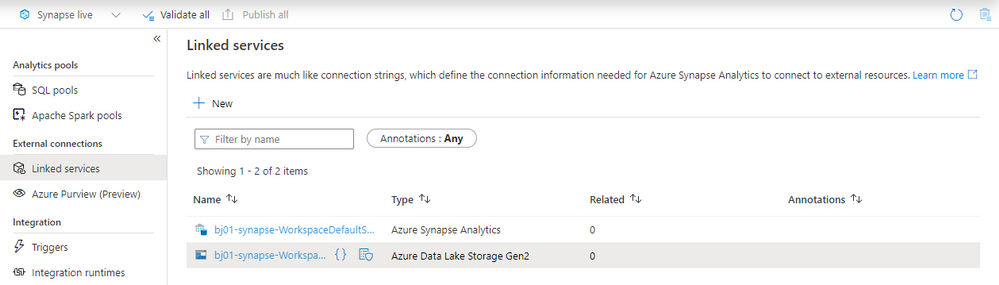
The predefined connection is used internally by Synapse and allows you to explore the data lake. To use the parquet file format in the data lake, we will create another connection that uses the Self-Hosted Integration Runtime.
Click the New button at the top and choose Azure Data Lake Gen2 from the list.
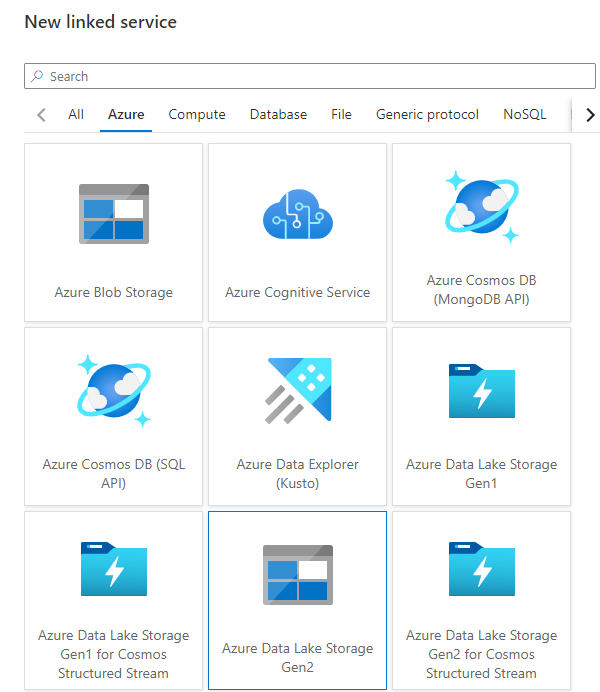
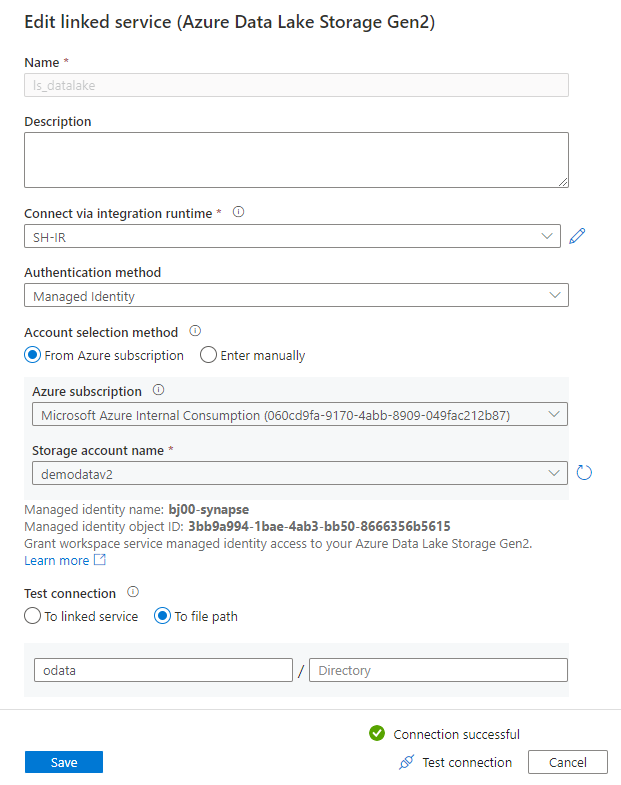
Provide the connection name in the New Linked Service screen and choose the storage account from the list. I’m using Managed Identity as the authentication method as it provides the most secure way of accessing the data lake without using any authentication keys.
If you haven’t installed the Self-Hosted Integration Runtime yet, this is the right moment to do it. When you expand the selection box Connect via Integration Runtime, you will notice the “New” entry. Select it, and the wizard will guide you through the installation process.
Finally, I run the connection test (verifying access to the path where I want my files to land) and save settings.
The connection to the storage account is defined. Now, we have to do the same for the SAP system. As previously, click the “New” button at the top of the screen. This time choose OData as the service type.
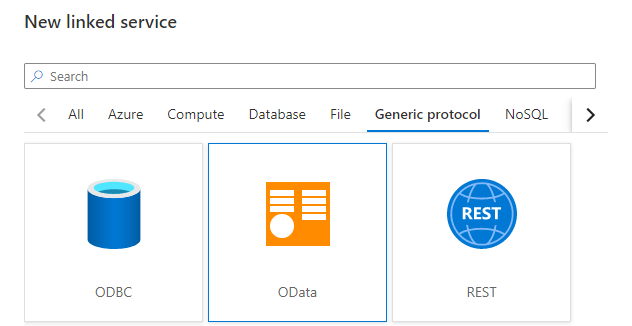
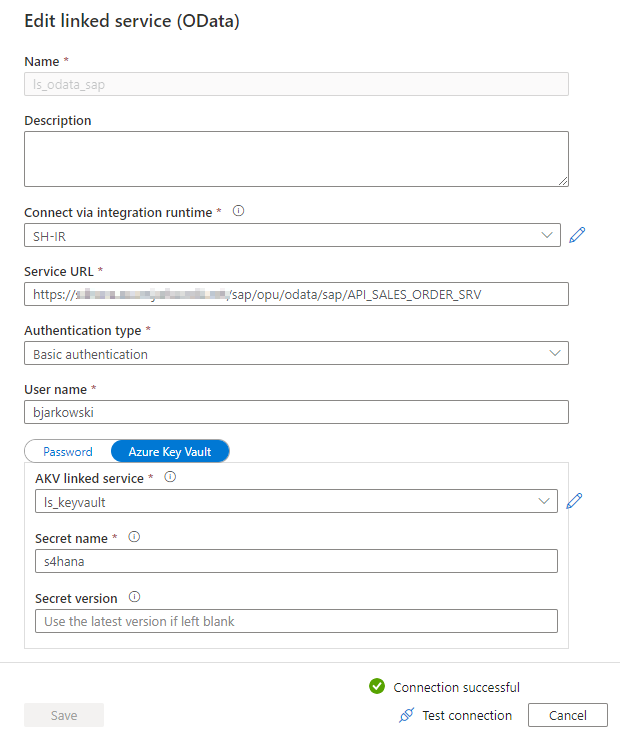
When defining an OData connection, you have to provide the URL pointing to the OData service. During the connection test, Synapse fetches the service metadata and reads available entities. Throughout the blog series, I will be using various OData services. I’m starting with the API_SALES_ORDER_SRV service that allows me to extract Sales Order information.
Using credentials in the pipeline is a sensitive topic. While it is possible to provide a username and password directly in the Linked Service definition, my recommendation is to avoid it. Instead, to securely store secrets, use the Key Vault service. Using a secret management solution is also a prerequisite for using parameters in Linked Service, which will be the topic of the next episode.
When you select Key Vault instead of password authentication, the Synapse Studio let you define a connection to the vault. It is stored as another linked service. Then you can reference the Secret instead of directly typing the password.
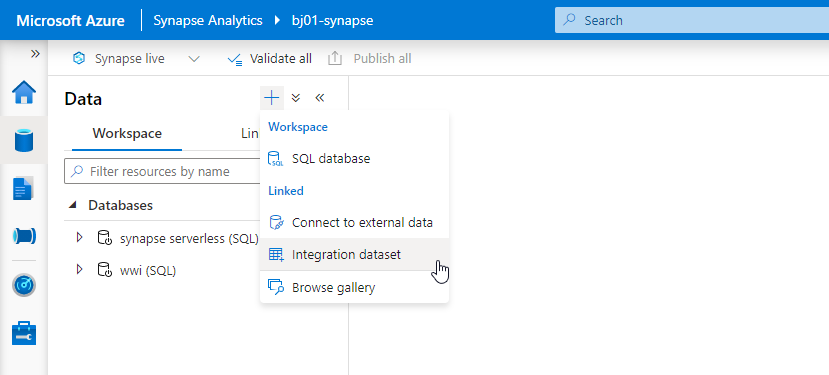
Whenever you want to save your settings, click the Publish button at the top of the screen. It is the right moment to do it as both connections are working, and we can define datasets that represent the data format. Switch to the Data view in the Synapse Studio and then click the plus button to create a new Integration Dataset.
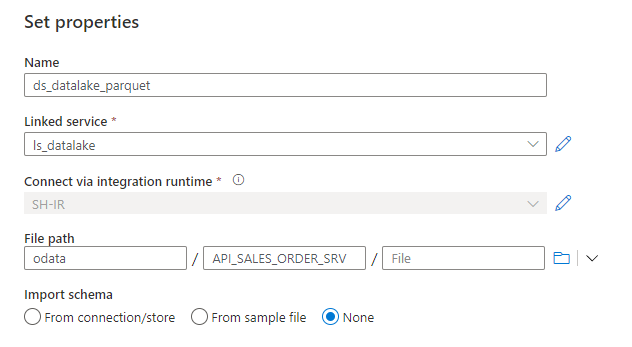
Firstly, we’ll create a dataset that represents a file stored in the storage account. Choose Azure Data Lake Gen2 as the data store type. Then, choose the format of the file. As mentioned earlier, we’ll use parquet format, which is well-supported across Azure analytics tools, and it offers column store compression. Remember that this file format requires Java libraries deployed on the Integration Runtime.
Provide the name of the dataset and choose the previously created Linked Service pointing to the data lake. Here you can also choose the path where the file with extracted data will be stored. Click OK to confirm your settings and Publish changes.
Create a dataset for the OData service. This time you’re not asked to choose the file format, and instead, you jump directly to the screen where you can associate the dataset with the OData linked service. It is also the place where you can choose the Entity to extract – Synapse automatically fetches the list using the OData metadata.
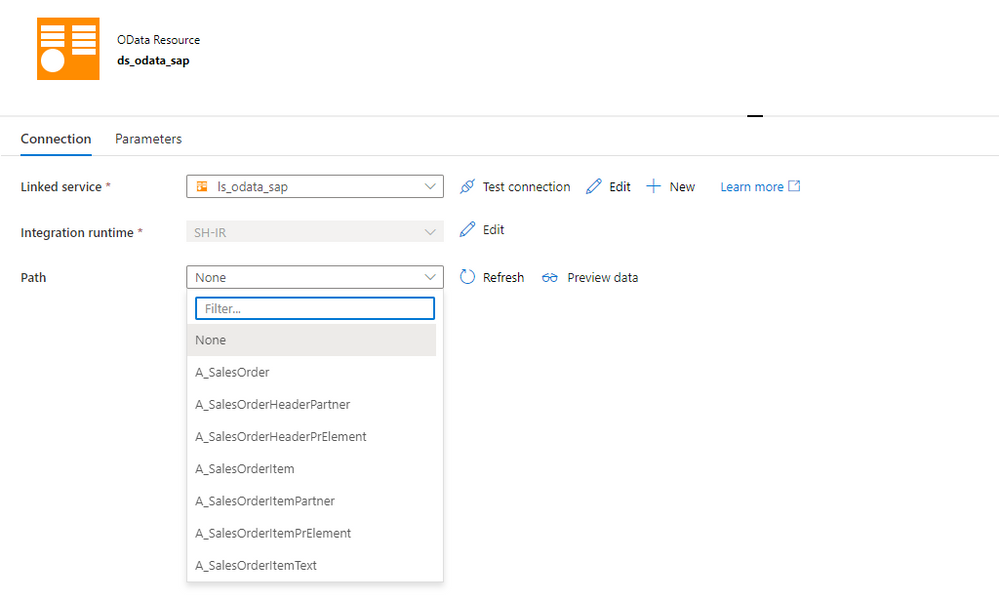
I selected the A_SalesOrder entity to extract sales orders headers.
BUILD THE FIRST PIPELINE
Having all linked services and datasets defined, we can move to the Integrate area to design the first pipeline. Click on the plus button at the top of the screen and choose Pipeline from the menu.
All activities, that you can use as part of your pipeline, are included in the menu on the left side of the modeller. When you expand the Move & Transfer group, you’ll find a Data Copy activity that we will use to transfer data from the SAP system to Azure Data Lake. Select and move it to the centre of the screen.
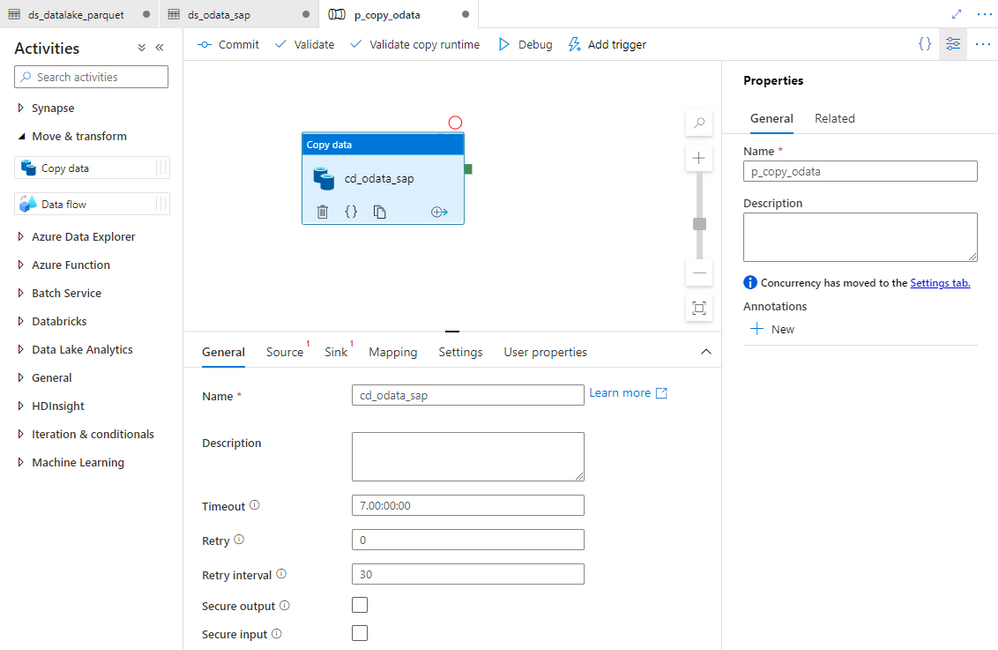
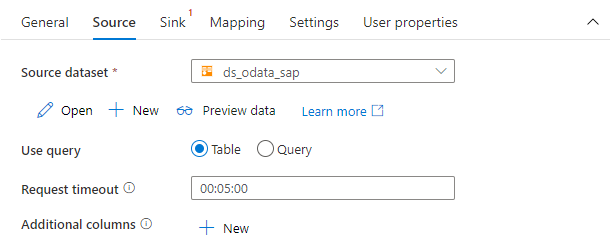
You can customize the copy data process using settings grouped into four tabs. Provide the name of the activity on the General tab. Then on the Source tab, choose the dataset that represents to SAP OData service.
Finally, on the Sink tab select the target dataset pointing to the data lake.
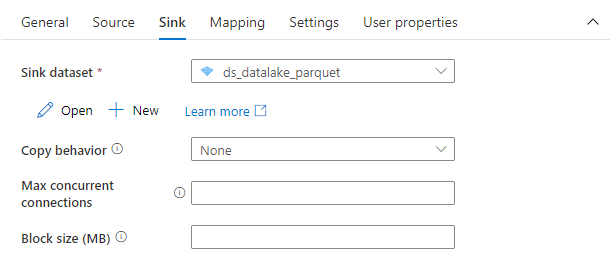
That’s everything! You don’t have to maintain any additional settings. The Copy Data process is ready. Don’t forget to Publish your changes, and we can start the extraction process.
EXECUTION AND MONITORING
To start the pipeline, click on the Add Trigger button and then choose Trigger Now.
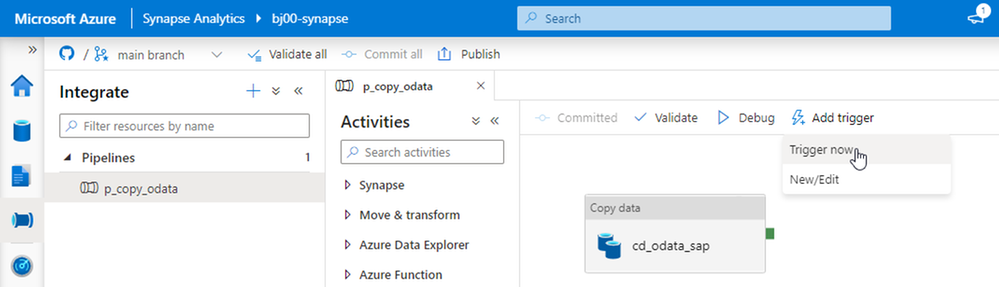
Within a second or two, Synapse Studio shows a small pop-up saying the pipeline execution has started. Depending on the size of the source data, the extraction process can take a couple of seconds or minutes. It can also fail if something unexpected happens. Switch to Monitor view to check the pipeline execution status. You can see there the whole history of the extraction jobs.
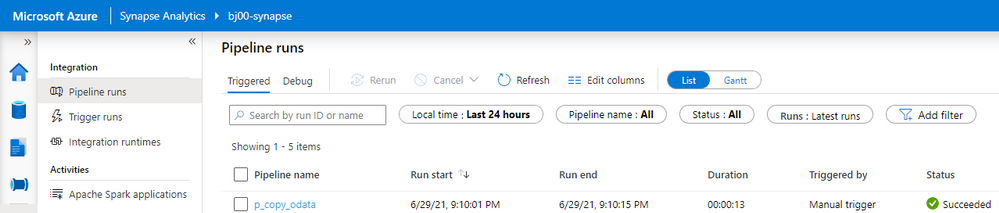
By clicking on the pipeline name, you can drill down into job execution and display details of every activity that is part of the process. Our extraction was very basic, and it consisted of just a single Copy Data activity. Click on the small glasses icon next to the activity name to display detailed information.
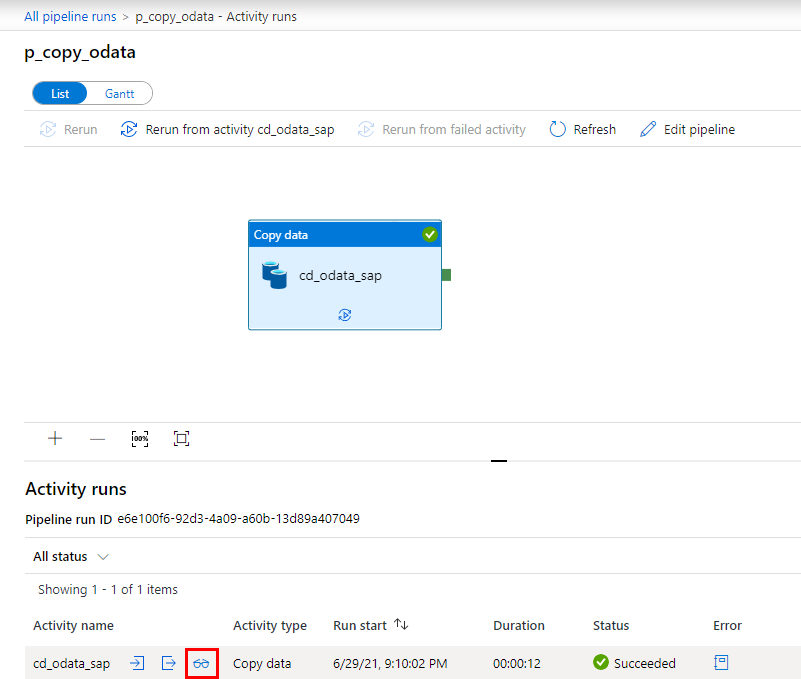
The detailed view of the copy activity provides the most insightful information about the extraction process. It includes the number of processed records, the total size of the dataset and the time required to process the request. We will spend more time in the monitoring area in future episodes when I’ll show you how to optimize the data transfer of large datasets.
As the extraction job completed successfully, let’s have a look at the target file. Move to the Data view and expand directories under the data lake storage. Choose the container and open the path where the file was saved. Click on it with the right mouse button and choose Select Top 100 rows.
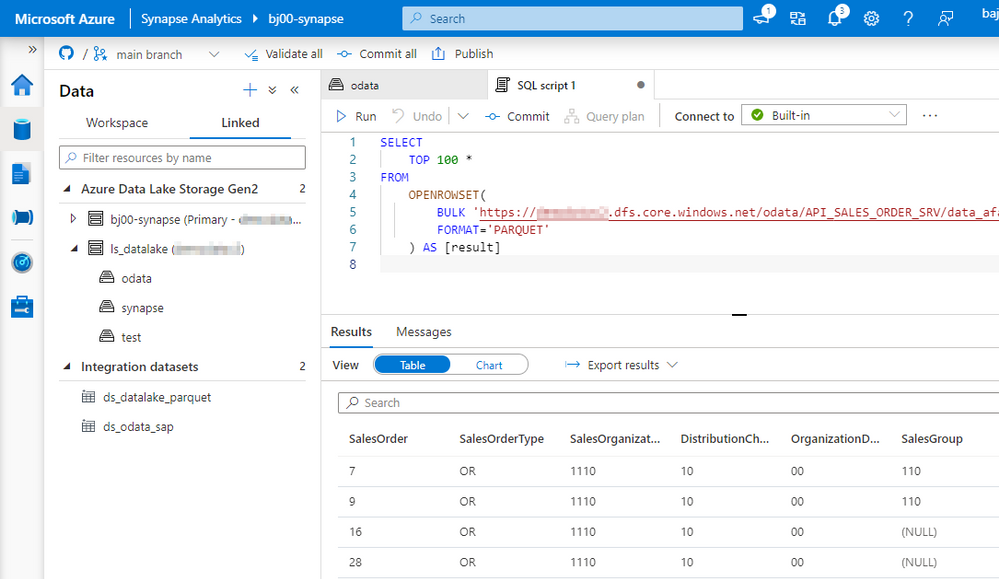
In this episode, we’ve built a simple pipeline that extracts SAP data using OData protocol and saves them into the data lake. You’ve learnt about basic resources, like linked services and datasets and how to use them on the pipeline. While this episode was not remarkably challenging, we’ve built a strong foundation. Over the next weeks, we will expand the pipeline capabilities and add advanced features. In the meantime, have a look at my GitHub page, where I publish the full source code of the pipeline.



Recent Comments