Watch how to improve on-the-job guidance with mixed reality

Watch how to improve on-the-job guidance with mixed reality

This article is contributed. See the original author and article here.

Traditional guidance or upskilling usually requires a trained trainer, a trainee, some mix of resources like work instructions, parts manuals, or checklists, and a real-world or simulated task to perform. In this scenario, a skilled worker (the trained trainer) guides the trainee through the job until they have mastered the process and can work alone. This process is called on-the-job guidance, and while it has been effective in supporting workforce development for decades, it has always been challenging from a resource and scale perspective.

Over the past decade, however, organizations across industries have engaged in digital transformation, leveraging advances in technology to reimagine business processes to make them more effective and efficient. This is what Microsoft Dynamics 365 Guides is all about, including its application in training and development to empower employees with step-by-step holographic instructions right where the work happens. This article highlights three ways to use Dynamics 365 Guides to improve the employee experience.

1. Empower self-guided learning

One of the key benefits of utilizing mixed reality applications is that it frees the trainer from the trainee. For example, a trainer can develop a digital process guide that any number of trainees can then utilize without requiring the trainer to be physically present. This empowers workers to embark on self-guided learning by equipping them with task instructions, essential data, and model visualizations directly in the flow of work. The result is increased efficiency from a resource perspective and improved productivity, quality, and safety from the worker’s perspective.

The idea of self-guided learning is nothing new; in mixed reality, though, self-guided learning is dramatically improved by delivering information where and when it is needed in the training process. For example, in the following video, we see how Dynamics 365 Guides allows for self-guided learning that keeps workers in the flow of work by moving with them, directing attention to the next step, and providing the information needed every step of the way.

This embed requires accepting cookies from the embed’s site to view the embed. Activate the link to accept cookies and view the embedded content.

This site uses cookies for analytics, personalized content and ads. By continuing to browse this site, you agree to this use.

Learn more in our overview of Dynamics 365 Guides.

Similar scenarios unfold thousands of times per day in manufacturing plants around the world. From the machinist securing a part in a multi-axis lathe who needs to check a read-out on a gauge to the repair technician working on a new piece of equipment, when workers can always access a virtual library of parts manuals and assembly instructions wherever they are, they can stay in the flow of work longer. This is one reason that Forrester found that mixed reality improved field task efficiency by 40 percent and reduced rework by 7 percent, saving $13,680 annually per field task worker.1

2. Embrace mixed reality

As shown in the video below, Dynamics 365 Guides works by overlaying 3D visualizations and holograms alongside connected work instructions and reference materials in a real-world environment, all without sacrificing autonomy or range of movement. Plus, Dynamics 365 Guides also allows anyone to create new guides with low-code/no-code authoring so that your organization can respond quickly and efficiently to new training needs. In this short video clip, you can see how authoring steps taken on a PC, automatically align to a hologram placed in the work environment.

This embed requires accepting cookies from the embed’s site to view the embed. Activate the link to accept cookies and view the embedded content.

This site uses cookies for analytics, personalized content and ads. By continuing to browse this site, you agree to this use.

3. Enable hands-free triggers

In addition to providing frontline workers with immersive instructions, Dynamics 365 Guides also allows action-activated triggers to mimic real-world actions. For example, HoloLens 2 can track worker hand movements and automate guidance based on where a worker’s hands are located in the process. This is demonstrated in the video below. When the worker completes a task, such as tightening a bolt or screw, the worker is automatically shown a holographic prompt directing them to the next step in the process. This helps build muscle memory and improves the learning process.

This embed requires accepting cookies from the embed’s site to view the embed. Activate the link to accept cookies and view the embedded content.

This site uses cookies for analytics, personalized content and ads. By continuing to browse this site, you agree to this use.

Not only do hands-free triggers keep workers in the flow of work longer, but they are also more accurate than asking a coworker what to do next, which may or may not yield the correct answer, and more efficient than referring to traditional work instructions, which breaks the concentration on the task at hand. Moreover, enabling hands-free triggers, either with hand tracking or voice activation, improves process safety, particularly in industries like manufacturing, where significant amounts of rotating machinery are found.

What’s next?

This article shows that embracing mixed reality, empowering self-guided learning, and enabling hands-free triggers are three ways to transform on-the-job guidance. We’ve also published videos that explore how intuitive placing and working with holograms can be, features for hands-free work, and a look at the level of detail you can accomplish with Dynamics 365 Guides. If you are ready to start empowering your frontline workers today, we invite you to get started with a free 60-day trial of Dynamics 365 Guides. Or to learn more, check out our learning path, Work with Dynamics 365 Guides.


1Forrester, 2021. The Total Economic Impact Of Mixed Reality Using Microsoft HoloLens 2.

The post Watch how to improve on-the-job guidance with mixed reality appeared first on Microsoft Dynamics 365 Blog.

Brought to you by Dr. Ware, Microsoft Office 365 Silver Partner, Charleston SC.
Mitigating Attacks Against Uninterruptable Power Supply Devices

This article is contributed. See the original author and article here.

CISA and the Department of Energy (DOE) are aware of threat actors gaining access to a variety of internet-connected uninterruptable power supply (UPS) devices, often through unchanged default usernames and passwords. Organizations can mitigate attacks against their UPS devices, which provide emergency power in a variety of applications when normal power sources are lost, by removing management interfaces from the internet.

Organizations can mitigate attacks against UPS devices by immediately removing management interfaces from the internet. Review CISA and DOE’s guidance on mitigating attacks against UPS devices for additional mitigations and information.

Guarantee capacity access with on-demand capacity reservations—now available

Guarantee capacity access with on-demand capacity reservations—now available

This article is contributed. See the original author and article here.

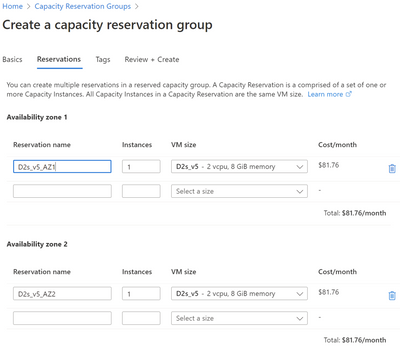
Today we are announcing the general availability of on demand capacity reservations for Azure Virtual Machines. This new feature allows you to deploy and manage the compute capacity required to run Azure VMs separately from the VMs themselves.


On-demand capacity reservations create new options for you to better manage your compute capacity needs. During our discussions with Azure customers, they often identify the following scenarios:


  • Business-critical applications — use on-demand capacity reservations to protect their capacity, for example when taking these VMs offline to perform updates.


  • Disaster recovery (DR) — set aside compute capacity to ensure a seamless recovery in the event of a natural disaster. The compute capacity can be repurposed to run other workloads whenever DR is not in effect. The VM maintenance can be handled by keeping core images up to date without the need to deploy or maintain VMs outside of DR testing.


  • Special events—claiming capacity ahead of time provides assurance that your business can handle the extra demand.


bill_deforeest_0-1648485450447.png


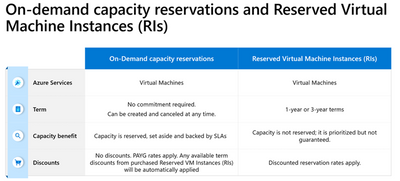
On demand capacity reservations come with a capacity SLA. Unused reserved capacity and Virtual Machines using reserved capacity are both eligible for Azure Reserved Virtual Machine Instance term discounts. However, Reserved VM Instances and on-demand capacity reservations are very different and offer two separate sets of benefits captured in the table below:


bill_deforeest_1-1648485450478.png


Additional Azure services are integrating with on-demand capacity reservations. The Azure Site Recovery service has public preview support for attaching reserved capacity for DR purposes.  


Existing and future capabilities


The number of Azure Virtual Machines series and sizes supported has increased since the start of the public preview.


Specifically, the following Azure Virtual Machines series are now supported:


  • Burstable (B-series VMs)

  • General-purpose VMs (Av2, Dv2-series VMs and newer generations including Dv5 and Dasv5-series VMs, including support for both Intel and AMD-based VM sizes)

  • Memory-optimized VMs (Ev3-series VMs and newer generations including Ev5 and Easv5-series VMs; both Intel and AMD-based VM sizes)

  • Compute-optimized VMs (Fv1-series VMs and newer generations)


Microsoft is finalizing support for additional Azure Virtual Machines series. At this time, we expect previews in Q2/Q3 2022, followed by general availability, for the following VM series:


  • Storage optimized VMs (L-series)

  • Additional memory-optimized VMs (M-series)

  • GPU-enabled VMs (NC-series and NV-series)


Azure also offers VM series using InfiniBand networking: ND, HB, and HC VM series. These series will be supported in the future.


The VM deployment methods supported with on demand capacity reservations during public preview are now supported with general availability: single VMs and Virtual Machine Scale Sets using uniform orchestration mode. Starting today, on-demand capacity reservations for Virtual Machine Scale Sets flexible orchestration mode is in public preview. Please read the documentation to learn more.


Additional Azure services will provide on-demand capacity reservations. For example, Azure Site Recovery has enabled public preview use of reserved capacity for disaster recovery. The Azure Kubernetes Service (AKS) has also released preview support to associate node pools with reserved capacity.  


Resources to get started


There are two demonstration videos currently available:


Additionally, you can read the on demand capacity reservation documentation that includes sample code.

3 key considerations when choosing an order management system

3 key considerations when choosing an order management system

This article is contributed. See the original author and article here.

The COVID-19 pandemic has pushed “order management” from the backend of logistics operations to the spotlight of supply chain and commerce strategies. Retailers, consumer package goods (CPG) companies, and distributors rushed to adapt their business models to fulfill the explosive growth of online orders through different digital channels. End-customers and organizations buy through various channels such as marketplaces, in-store, mobile apps, and even social media. They expect faster and more convenient ways for pickups and returns, such as pickup in-store, at a partner’s location, and for returns, drop off at the nearest location, QR codes, and even at-home pickup.

As the number of order sources and fulfillment options grow exponentially, organizations need the right order management solution to keep up with the evolving digital commerce landscape. This blog looks at three key aspects to consider when selecting an order management solution and how Microsoft Dynamics 365 Intelligent Order Management can help you.

1. Open and modern platform

The adoption of online shopping, and the addition of more consumers and businesses online for all types of transactions with the pandemic, have created a demand for convenience and personalization in digital commerce. As the number of online marketplaces grows, retailers, CPG, distributors, and manufacturers with business-to-business (B2B) and direct-to-consumer (D2C) business models require to accept orders from an ever-growing external ecosystem. Receiving orders from multiple sources increases order management and supply chain complexity. Therefore, these organizations need an order management solution that helps them accept orders from anywhere to keep pace with the continuing evolution of e-commerce.

Dynamics 365 Intelligent Order Management has an open and modern platform that seamlessly integrates with organizations’ existing tech stack. Its architecture reduces implementation time through out-of-the-box pre-built connectors to the best-of-breed ecosystem of partners for order source, delivery, tax compliance, price calculation, and logistics services such as Adobe Commerce, J.B. Hunt, Krber, Uber Freight, Avalara, Vertex, Flexe, Big Commerce, Far Eye, Commerce Tools, Flintfox, Ship Station, and Orderful. Moreover, this platform architecture is composable and flexible to allow supply chain professionals to build in an incremental way through a modular and API-first approach and a supply chain control tower, which ultimate goal is supply chain visibility.

Learn about more extended capabilities in our blog: FedEx and Dynamics 365 reimagine commerce experiences.

2. Real-time visibility and intelligent fulfillment optimization

The 2021 Gartner supply chain risk and resilience survey shows that for 83 percent of large organizations, better supply chain ecosystem visibility is a top priority.1 And another Gartner research shows that 60 percent of chief supply chain officers (CSCOs) are expected to make faster, more accurate, and consistent decisions in real-time.2 The cycle-time of business processes continues to accelerate, particularly in order management processes that serve consumers who expect faster and more convenient shipping to the location of their choice. To succeed in these conditions, companies need a solution that simplifies omnichannel order fulfillment by providing real-time visibility and AI-infused real-time data.

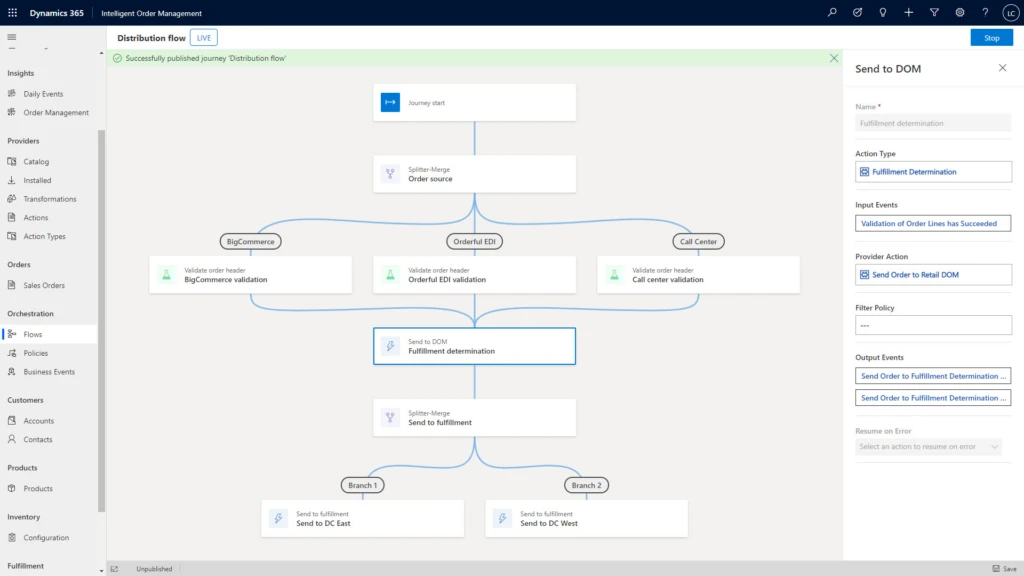
With Dynamics 365 Intelligent Order Management, supply chain and commerce professionals can model and automate responses to order constraints by using a journey orchestration designer and assigning rules in a low-code/no-code friendly user interface with drag and drop actions instead of coding. Dynamics 365 Intelligent Order Management uses an intelligent fulfillment optimization service to infuse AI into order fulfillment within your supply chain network. The intelligent optimization engine works to ensure the right products are delivered from the right source in the right quantities so that you always maximize profits, minimize costs, and satisfy service-level requirements.

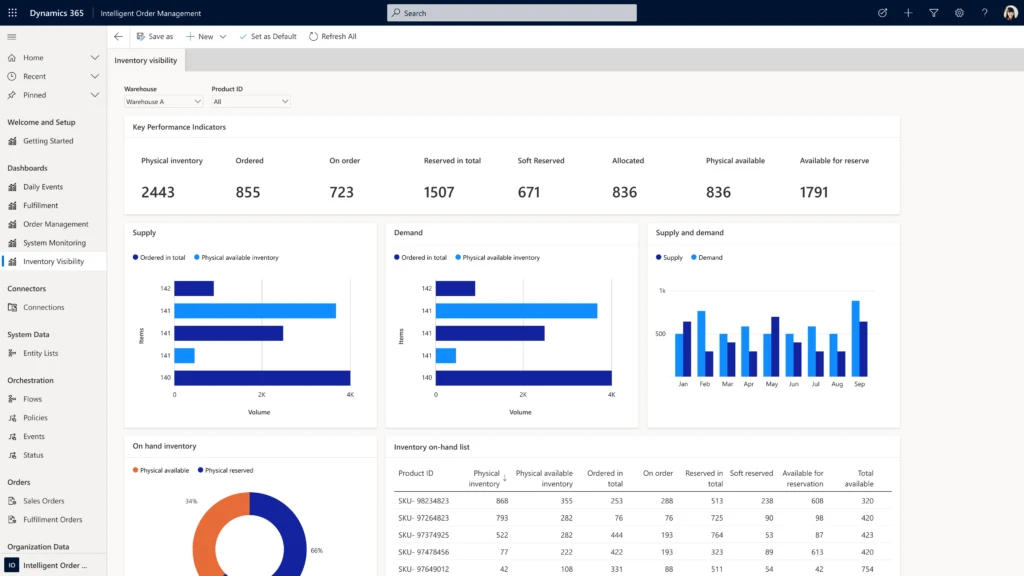
Dynamics 365 Intelligent Order Management Inventory Visibility Dashboard.
Dynamics 365 Intelligent Order Management Rules based order orchestration flow policy designer.

3. Faster deployment times

Accepting orders from anywhere carries an additional challenge: implementation. Businesses need an order management solution that allows them to get up and running quickly. Not only do they need to be able to accept orders from anywhere, but many organizations also have existing systems that they would like to augment, not replace. If you are in the process of updating your order management system and fall into this category, then understanding what is involved in the implementation process is critically important. Will custom coding be required to integrate with your enterprise resource planning (ERP) and warehouse management system (WMS)? How about your customer relationship management (CRM) or transportation management system (TMS)? For most, the best solution is a cloud-based integrated-service-as-a-software (iSaaS) that uses RESTful APIs and can be easily configured using a low-code/no-code user interface.

Applications that take this approach enable supply chain and commerce professionals to continue to use and benefit from legacy applications, while also providing the agility to easily connect and integrate with modern web-based solutions. This is the approach that we have taken with Dynamics 365 Intelligent Order Management because it delivers these benefits and accelerates the digital transformation process regardless of where a company is in its digital transformation journey.

You can learn more in our infographic: Top five reasons to update your order management solution.

What’s next?

It is essential to look for an order management solution that will give you out-of-the-box pre-built connectors to an ecosystem of partners, provide real-time order visibility, intelligent fulfillment optimization, and get up you running quickly with seamless integration with your existing tech stacks, such as ERP and CRM systems. Traditional, on-premises order management systems can lack the flexibility required to keep pace with the rapidly evolving world of e-commerce.

With Dynamics 365 Intelligent Order Management, you can leverage our modern cloud technology, integrate with your existing platforms, and quickly implement new capabilities that enable AI, automation, order flow orchestration, and on-demand scalability. Get started today with Dynamics 365 Intelligent Order Management free trial and turn order fulfillment into a competitive advantage.


Sources:

1- Gartner, Infographic: Supply Chain Visibility Is Fundamental to Resilience in Supply Ecosystems, February 10th, 2022.

2- Gartner, Reinventing Supply Chain for the Future, Learn four key innovations, 2021.

GARTNER is the registered trademark and service mark of Gartner Inc., and/or its affiliates in the U.S. and internationally and has been used herein with permission. All rights reserved.

The post 3 key considerations when choosing an order management system appeared first on Microsoft Dynamics 365 Blog.

Brought to you by Dr. Ware, Microsoft Office 365 Silver Partner, Charleston SC.
Announcing Office 365 Government Secret cloud to help secure classified data

Announcing Office 365 Government Secret cloud to help secure classified data

This article is contributed. See the original author and article here.

Today, we’re excited to announce the upcoming launch of a new US Government cloud environment: Office 365 Government Secret which is currently in government review pending accreditation and targeting availability starting mid-2022.

The post Announcing Office 365 Government Secret cloud to help secure classified data appeared first on Microsoft 365 Blog.

Brought to you by Dr. Ware, Microsoft Office 365 Silver Partner, Charleston SC.