This article is contributed. See the original author and article here.
Every year, millions of basketball fans fill out brackets for the Division I Men’s College Basketball Tournament hoping to predict the team that will win it all. The Microsoft Business Applications Applied AI group has joined in on the fun, leveraging AI to help guide our bracket picks.
So far, we’ve had a pretty good run. Out of the 17 million brackets submitted for the 2022 ESPN Men’s Tournament Challenge, the Microsoft Business Applications Applied AI group’s bracket is ranked 21st on the leaderboard, which after four rounds (semifinal stage) is more accurate than 99.9997 percent of all brackets submitted at the beginning of the competition.
In this post, I’ll discuss how we built this bracket and explain how we use similar techniques to power AI capabilities in Microsoft Dynamics 365 applications. Why does this matter? Because businesses want to make better decisions and achieve better outcomes, andas the accuracy of our tournament predictions help showturning to AI to provide those insights can deliver impressive outcomes.
How we build our tournament AI model
Since readers are probably more interested in the construction of our bracket, let’s start with that (for business-minded readers, you can skip to the next section). We’ve previously explained how to build better brackets, and we had deeper dives providing details of our models. To summarize, we take over 10 years of historical data for teams and analyze many factors, including:
Regular season and tournament outcomes.
Current player composition, excluding injured team members unavailable for the tournament.
Historical competitive success of the head coaches coaching this year’s teams.
Success away from home and in neutral sites, which is where all tournament games happen for the men.
Historical analyses of seeds and conference successes.
With these factors, we created a model which determined that 5th seeded Houston was dramatically underrated at that position and we were thus able to correctly predict their upset wins over 4-seed Illinois and 1-seed Arizona and that 8th seeded North Carolina would upset 1-seed Baylor and 4-seed UCLA. The model understood team strengths well enough that by the quarterfinals, each of the four teams we predicted to make the semifinals was the stronger remaining seeded team in the four contests. And fortunately for us, all four teams delivered to ensure we’d have a perfect semifinal bracket going into this weekend.
Solving business problems with AI
Businesses have many questions they need answers to today. For example, what’s the likelihood that a customer will churn? What’s the predicted lifetime value of a customer? What products should be recommended to a customer? Will I have enough supply of a given product on the shelf? Accurately answering these questions leads to better outcomes, as customers are retained, loyalty programs are designed to reward your best customers, and customers see the products that are most relevant to them available on the shelf. We have built easy-to-use, out-of-box AI models that are trained on your data so you can get the predictions optimized for your business to answer these questions.
These models use the same concepts that we used to create our bracket, as the propensity of a business outcome can be modeled similarly to that of a sports outcome. Take, for instance, the classical Recency, Frequency, and Monetary (RFM) model for predicting churn.
For recency, in the basketball model we look at streaks and “last 10” performance, while in business churn, we look at the recent purchase history of a customer.
For frequency, we might analyze the number of wins a team has for basketball, while analogously we look at the quantity of purchases from a customer for our business applications models.
Finally, for monetary, this would be the point differential in basketball and quantity of spend in our churn model.
This is only a subset of all features we analyzed to give you an idea of our approach.
Beside the questions above, there are a lot of other questions that businesses are asking in every domain. For example, what are customers saying about our product? How do we identify business entities in text? How do we find the most relevant news articles about suppliers? How do we analyze your processes and automatically label the activities that are being done to identify bottlenecks and suggest improvements? We have AI capabilities to help answer these questions available in our Dynamics 365 product family today.
Of course, AI models need not be fully self-service as human intuition and guidance can be included when desired. This is why we have spent time discussing the importance of explain-ability of models in a recent post. People can take AI and use it as a guide to improve decision-making both in creating a bracket as well as solving your business problems. Namely, our AI models explain the insights so that you can add in your own intuition when planning your next marketing campaign or building your next material requirements plan.
Keeping pace on and off the court
The dynamic nature of our models can be seen with the tournament, too, where we incorporated the early results from additional post-season college tournaments to adjust the modeled strengths of conferences before main bracket play beganin 2022, this meant observing a stronger Atlantic Coast Conference based on Virginia upsetting Mississippi State and Wake Forest winning in outcomes from another tournament’s first round. Such a signal increased the model’s confidence in this conference, leading it to correctly pick a Duke versus North Carolina semifinal and a quarterfinal run for Miami.
In business, the only constant is change. How do you pivot and adjust to the latest disruptions in your supply chain? How would you route customer support calls to the best agents based on real-time staffing changes and that day’s routing behavior? We’re running a full court press in solving these types of problems, so if you want to learn more about how AI can help your business, try our line of business applications, visit our Insights blog, and come apply to the many AI-powered jobs we have for Dynamics 365.
This article is contributed. See the original author and article here.
The Federal Bureau of Investigation (FBI) has released a Private Industry Notification (PIN) to inform U.S. Government Facilities Sector partners of cyber actors conducting ransomware attacks on local government agencies that have resulted in disrupted operational services, risks to public safety, and financial losses.
This article is contributed. See the original author and article here.
The Azure SQL Migration extension for Azure Data Studio provides a seamless and robust migration experience to help you migrate your SQL Server databases to Azure. However, if you have multiple databases across multiple SQL Server instances, migrating them together at scale using graphical UI may not be the most efficient method. Today, we are announcing Public Preview of new migration capabilities added to Az.DataMigration module in Azure PowerShell and az datamigration extension in Azure CLI. With these migration capabilities added to Azure PowerShell and Azure CLI, you can automate tasks and activities related to SQL Server database assessments, performance data collection for Azure recommendations and migration of multiple databases (across multiple SQL Server instances) at scale.
By automating migration activities, you can save time and efficiently migrate a large number of SQL Server databases to Azure SQL Managed Instance or SQL Server on Azure Virtual Machines. For example, the code snippet below demonstrates a SQL Server database migration to Azure SQL Managed Instance using Azure CLI with three commands.
Step 1: Create a new Azure Database Migration service in your Azure subscription.
az datamigration sql-service create --resource-group "myRG" --sql-migration-service-name "myMigrationService" --location "EastUS2"
Step 2: Configure and start online database migration from SQL Server on-premises (with backups in Azure Storage) to Azure SQL Managed Instance.
Step 3: Perform a migration cutover once all backups are restored to Azure SQL Managed Instance.
$migOpId = az datamigration sql-managed-instance show --managed-instance-name "mySQLMI" --resource-group "myRG" --target-db-name "AdventureWorks2008" --expand=MigrationStatusDetails --query "properties.migrationOperationId"
az datamigration sql-managed-instance cutover --managed-instance-name "mySQLMI" --resource-group "myRG" --target-db-name "AdventureWorks2008" --migration-operation-id $migOpId
Sample scripts to run end-to-end SQL Server database migrations to Azure SQL Managed Instance or SQL Server on Azure Virtual Machines are available in the Azure Samples Github repository (aka.ms/sqldatamigration-samples).
This article is contributed. See the original author and article here.
Organizations face new challenges every day. Priorities change, markets shift, opportunities emergethe pace isn’t slowing down. As your competitors transform their business models and customer expectations evolve, your future depends on how well you can empower your teams to adapt, innovate, and make a positive impact every day. You need to be ready for disruption, to embrace constant change, and, most of all, be fast on your feet.
Building a more agile future
That’s why we’re excited to invite you to the Microsoft Business Applications Launch Event on April 6, 2022. Register now for your first look at hundreds of new features, enhancements, and innovations to transform your business into a more agile, customer-centric organization.
Catch all the latest advancements across Microsoft Dynamics 365 being unveiled, including:
More collaborative content creation, improved authoring efficiency, and advanced personalization using Dynamics 365 Marketing.
Ambient and actionable business data, a single workspace in Sales Hub, and AI-guided live feedback with Dynamics 365 Sales.
Simplified setup with guided, task-based experiences and inbox enhancements for rapid issue resolution using Dynamics 365 Customer Service.
Subscription billing and intelligent automation around invoicing, ledger settlements, and year-end close services in Dynamics 365 Finance.
And that’s just the start. You’ll also learn how new features across Microsoft business applications are already helping our customers navigate change and seize opportunities. You’ll hear from Charles Lamanna, Microsoft Corporate Vice President of Business Applications and Platform, about how your business can innovate by modernizing processes and uncovering game-changing insights. Then listen in as senior Microsoft engineers and experts behind the technology guide you through the latest advancements in Dynamics 365 and Microsoft Power Platform 2022 release wave 1 and how they’ll help you:
Adapt quickly to change as new business priorities, market conditions, and customer opportunities emerge.
Innovate everywhere by solving problems with solutions that ease collaboration and work seamlessly together.
Deliver more value to your customers in less time by quickly adopting or enhancing solutions that accelerate results.
Create more memorable customer experiences by modernizing your processes and uncovering insights into your supply chain.
Real-life innovation
Your inside look at business applications goes even more in-depth with demonstrations of real-life customer scenarios, led by the experts who know Dynamics 365 and Microsoft Power Platform inside and out. See new capabilities in actionand learn what’s possiblefor organizations big and small, across every industry. You’ll be the first to find out how new features are aligned with customer needs to help solve pain points across organizations, ease everyone’s workload, and take on today’s toughest business challenges.
Fresh insights
Innovation in AI, mixed reality, and industry solutions is enabling a new generation of agile organizations. Understand the why and how behind the trends with insights and best practices from industry leaders on how to accelerate results. Have questions for the experts? You’ll have a chance to ask them during the live Q&A chat. You don’t want to miss this digital launch event packed full of ways to help you adapt fast, collaborate with ease, innovate together, and make a positive impact. We hope to see you there.
This article is contributed. See the original author and article here.
Custom Neural Voice, a feature of Azure Cognitive Services for Speech, is a great way to create a highly natural synthetic voice that sounds almost identical to your voice actor. This synthetic voice can then be used in a variety of different scenarios including audiobooks, language learning, reading news content and many more. Since its launch, Custom Neural Voice has empowered organizations such as AT&T, Duolingo, Progressive, and Swisscom to develop branded speech solutions that delight users. (For more details, read the Innovation Stories blog).
Microsoft has made it simple to train a professional custom neural voice by using a small set of recordings from the target voice (from 300 to 2,000 sentences or short phrases, which is about 30 minutes to 3 hours of speech data). However, the studio recording process takes time and many customers are looking for a way to try the voice customization capability more easily.
Today we are glad to introduce Custom Neural Voice Lite, a new feature in public preview, which enables users to clone their voice by recording just 5 minutes of speech data. This new feature makes it extremely easy for customers to create a synthetic voice that sounds natural.
Custom Neural Voice Lite
Custom Neural Voice (CNV) now supports two project types, Pro and Lite. The Pro version is best for professional scenarios like brand and character voices for chat bots, or audio content reading. In this blog, we provide detailed instructions on how to create a professional custom neural voice. The new Lite version is best for producing quick demos or creating personal voice clones.
Due to the sensitivity of the technology, we have limited the access and use of Custom Neural Voice. However, every customer with a valid Azure Speech resource can create CNV Lite voices by recording their own voice for evaluation purposes. After creating a CNV Lite voice, the customer must submit an application with their use case to gain full access to the Custom Neural Voice capability before they can use the voice for business scenarios.
The following table summarizes the key differences between the CNV Pro and CNV Lite project types.
Items
Lite (Preview)
Pro
Target scenarios
Demonstration or evaluation
Professional scenarios like brand and character voices for chat bots, or audio content reading
Training data
Record online from your own computer using Speech Studio
Bring your own data. Recording in a professional studio is recommended.
Scripts for recording
Provided in Speech Studio
Use your own scripts that match the use case scenario. Microsoft provides example scripts for reference.
Required data size
20-50 utterances
300-2,000 utterances
Training time
Less than 1 compute hour
Approximately 20-40 compute hours
Voice quality
Moderate quality
High quality
Availability
Anyone can record samples online and train a model for demo and evaluation purpose. Full access to Custom Neural Voice is required if you want to deploy the CNV Lite model for business use.
Data upload is not restricted, but you can only train and deploy a CNV Pro model after access is approved. CNV Pro access is limited based on eligibility and usage criteria. Request access on the intake form.
Pricing
Per unit prices apply equally for both the CNV Lite and CNV Pro projects. Check the pricing details here.
Per unit prices apply equally for both the CNV Lite and CNV Pro projects. Check the pricing details here.
To get an idea of how a Lite voice sounds like, check the samples below.
Language
Human recording
TTS (CNV Lite)
English
Chinese
How it works
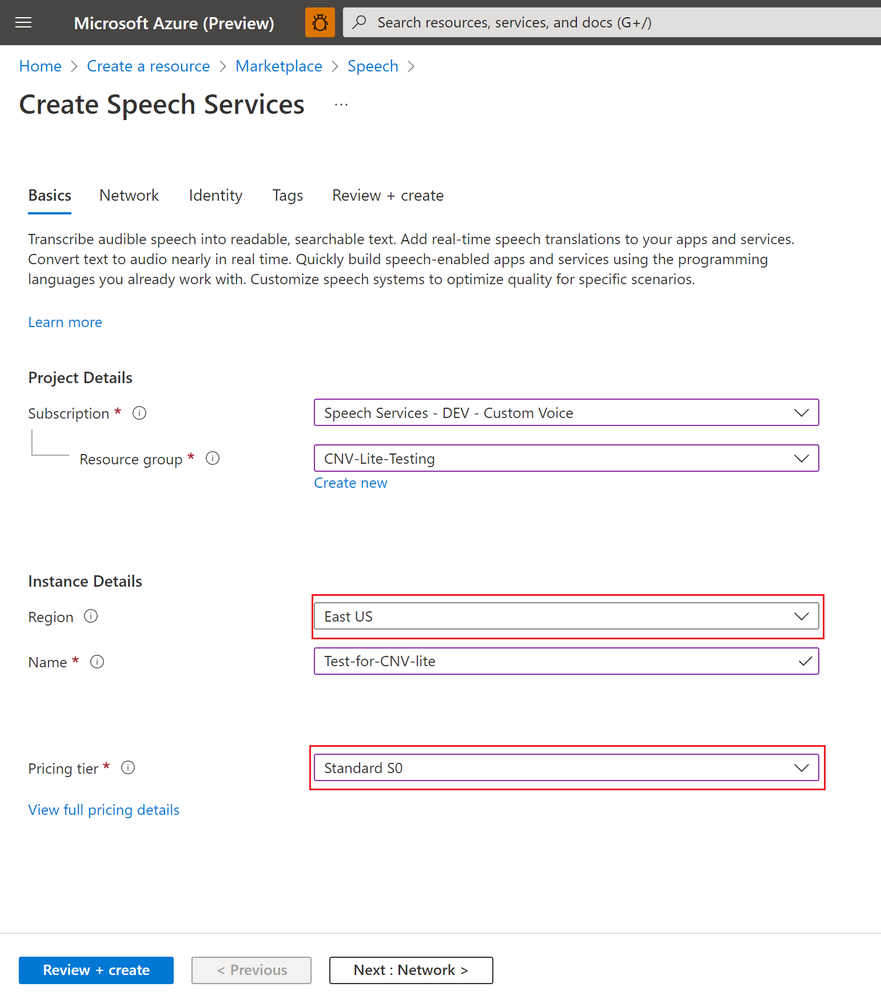
A Speech service resource is required before you can create a Custom Neural Voice project. If you do not have a Speech resource in Azure, follow these instructions to create one. Make sure you select one of these regions for your resource – East US, Southeast Asia, or UK South where Custom Neural Voice training is supported. Select S0 for the pricing tier. Free tiers are not available for Custom Neural Voice.
Creating a Speech resource
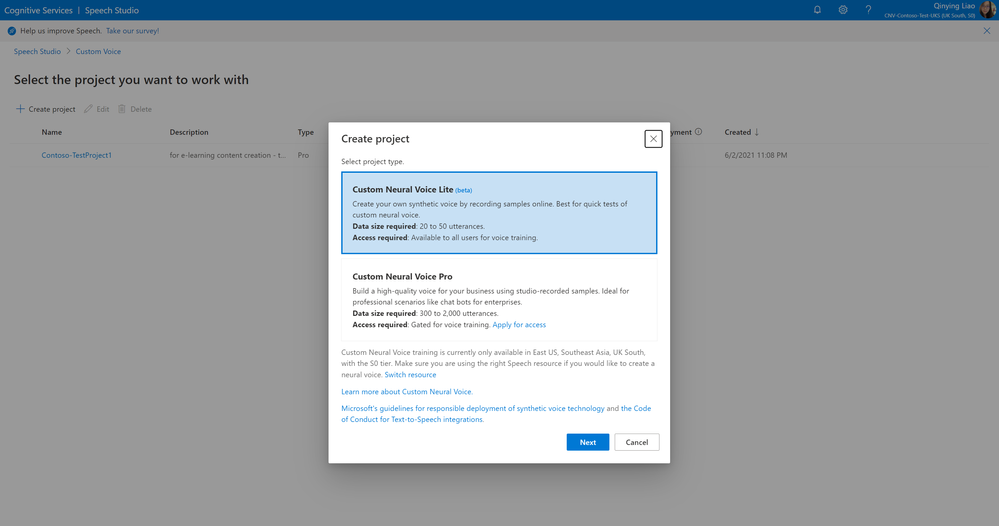
To build your CNV Lite voice, go to Speech Studio. Log in with the right Speech resource selected. Then click on the ‘Custom Voice’ tile and select to create a Custom Neural Voice Lite project. CNV Lite now supports English and Chinese (Mandarin).
Creating a CNV Lite project
Once the project is successfully created, you can start to build your voice. Before you move forward, make sure you read and understand the Voice Talent Terms of Use, and provide your agreement for Microsoft Speech Studio to collect your voice data (at this step, for evaluation purpose). To protect each user’s voice identity, the Lite project will be removed within 90 days if your company does not have its business use case approved by Microsoft (check the limited access policy), or the voice talent whose data is used for training does not provide explicit agreement for using his/her voice to generate synthetic speech outside of the evaluation purpose (check the voice talent disclosure requirement).
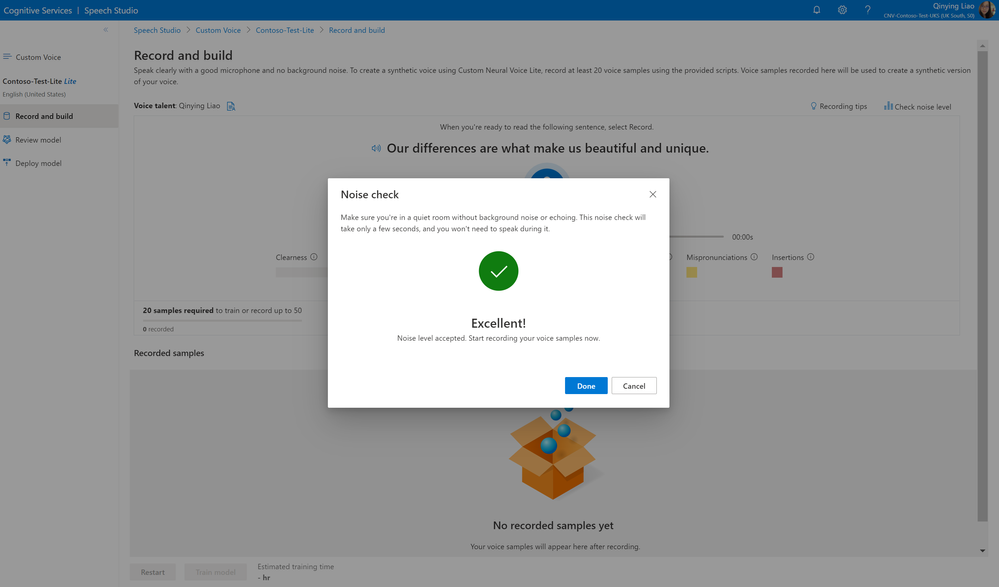
Once you have accepted the terms of use, you can start to record your voice samples. Read the recording instructions carefully. The quality of your recording data is critical to the training output. Check your environmental noise and do not record if noises are detected.
Noise check before voice recording
Tips for recording:
Increase the clarity of your samples by using a high-quality microphone. Speak about 8 inches away from the microphone to avoid mouth noises.
Relax and speak naturally. Allow yourself to express emotions as you read the sentences.
To keep a consistent energy level, record all sentences in one session.
Pronounce each word correctly and speak clearly. After recording each sample, check its quality metric before continuing to the next one.
Although you can create a model with just 20 samples, it’s recommended that you record up to 50 to get better quality.
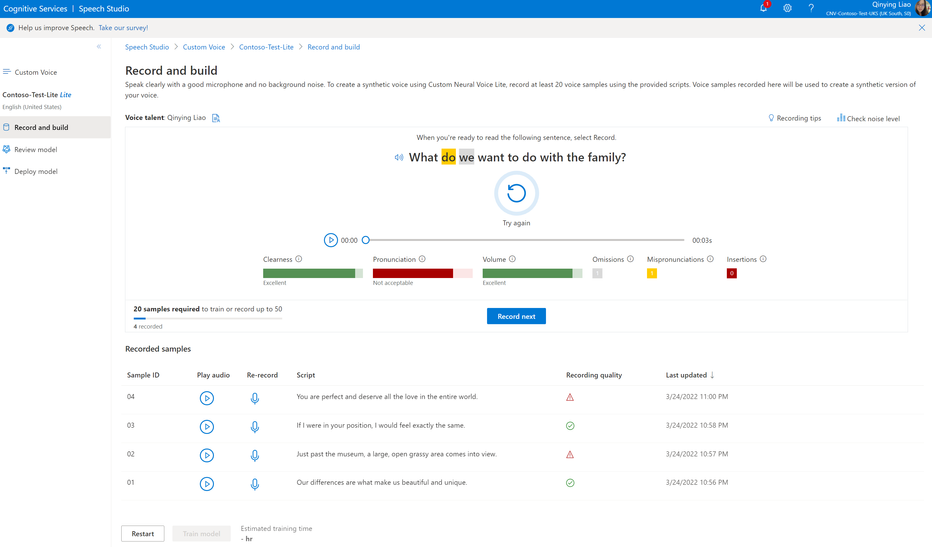
After each sample is recorded, double check the audio quality before you click to record the next. Several metrics are provided to help you review the quality, enabled with the pronunciation assessment technology.
As shown in the screenshot below, mispronunciations are automatically detected on each audio. It’s recommended that you make sure your recorded audio is green with accepted quality.
“Clearness” indicates the speech signal against the noise. You get a higher clearness score if the noise level is lower.
“Pronunciation” shows the accuracy of your pronunciation at the sentence level. You should make sure you pronounce each word correctly with no omission or insertion.
“Volume” of your voice in the recording should be kept stable. Don’t speak too far or too close to your mic. An audio that’s too loud or too low volume is not acceptable.
Recording voice samples with quality check
After you have recorded at least 20 samples, and checked the quality is all good, you can click the ‘Train model’ button at the bottom of the page to start your voice training. It’s estimated that each training takes about 40 minutes. Check the pricing page to get an idea of the cost before you hit ‘Create’.
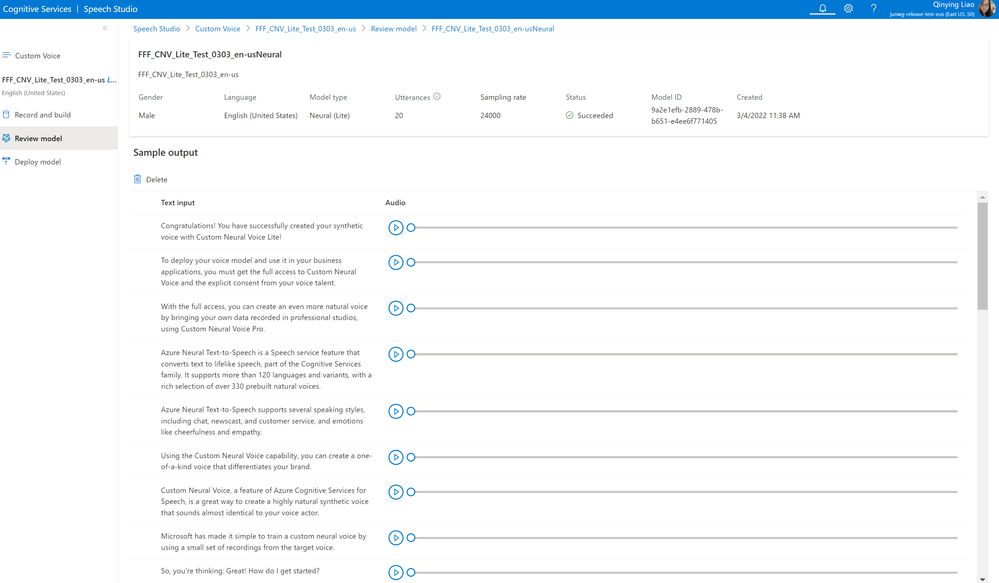
Once the model is successfully created, you can listen to the sample output for demo and evaluation purpose.
Sample output of a CNV Lite voice model
To deploy your voice model and use it in your applications, you must get full access to Custom Neural Voice and explicit consent from your voice talent. You can submit a request form here. For guidance on applying for Custom Neural Voice, you can watch this short video. With the full access approved, you can get your CNV Lite voice integrated with your apps, or move to create a CNV Pro project with professional studio recordings for an even more natural voice. Check this blog for the instructions to create a high-quality professional voice.
Learn more
We are excited about the future of Neural TTS with human like, diverse and delightful quality under the high-level architecture of XYZ-Code AI framework. Our technology advancements are also guided by Microsoft’s Responsible AI process, and our principles of fairness, inclusiveness, reliability & safety, transparency, privacy & security, and accountability. We put these ethical standards into practice through the Office of Responsible AI (ORA), which sets our rules and governance processes, the AI, Ethics, and Effects in Engineering and Research (Aether) Committee, which advises our leadership on the challenges and opportunities presented by AI innovations, and Responsible AI Strategy in Engineering (RAISE), a team that enables the implementation of Microsoft responsible AI rules across engineering groups.




 ) or https:// means you’ve safely connected to the .gov website. Share sensitive information only on official, secure websites.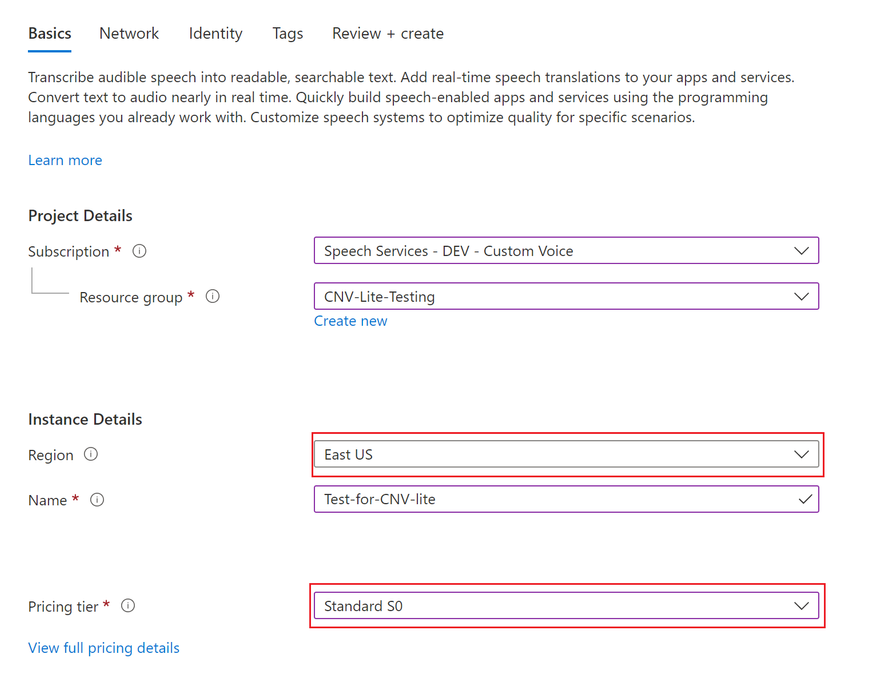

Recent Comments