Data enhancements in education accelerator

Data enhancements in education accelerator

This article is contributed. See the original author and article here.

As part of our work to make Dataverse more relevant to our education partners, the 2022 release wave 1 of the Dynamics 365 education accelerator includes features that we developed in response to your feedback. In addition to new and enhanced data model entities, you’ll find updated sample applications that demonstrate how to use the entities in K-12 and higher education.

What’s new in the education data model

  • An enhanced learner record captures students’ home language, preferred language, accommodations, achievements, program level, and mode of study.
  • A new school record captures information about school hierarchy, calendar, schedule, special learning needs, and daily attendance.
  • A new teacher certification management record captures certification requirements, process, and completions.

What’s new in the sample applications

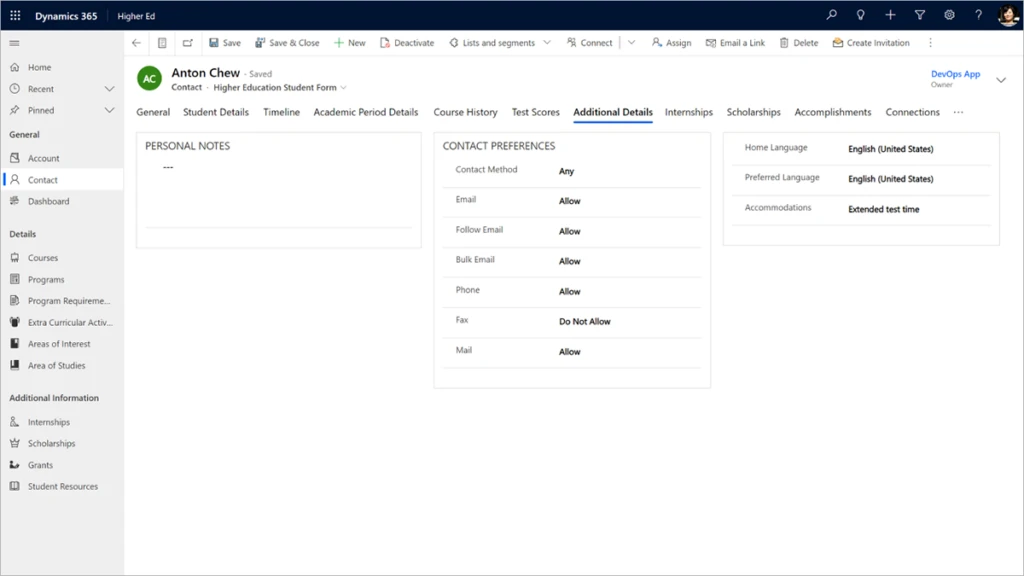
The higher education and K-12 model-driven apps capture more detailed information in the contact data for each student, such as home and preferred languages.

Screenshot of student details page in education accelerator for higher education.

The higher education and K-12 student portals capture achievement data.
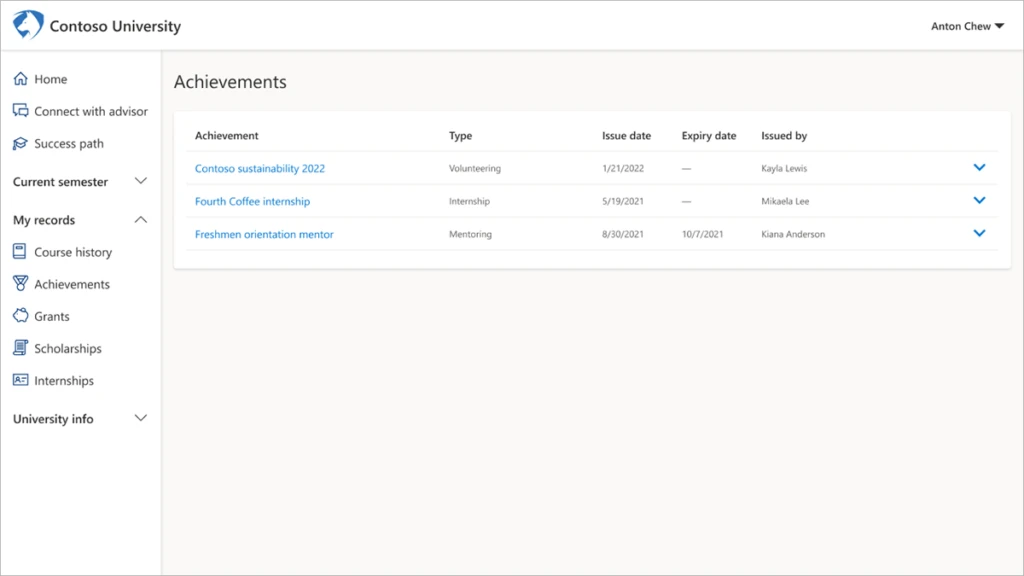
Screenshot of student achievements page in education accelerator for higher education.

The K-12 portal captures school calendar data.
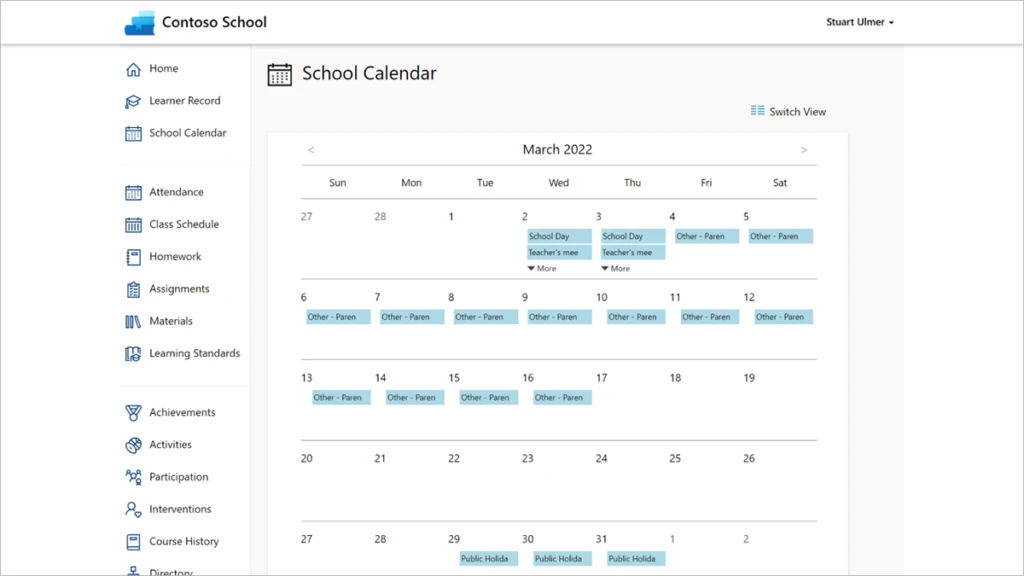
Screenshot of school calendar page in education accelerator for higher education.

The K-12 model-driven app captures teachers’ certification and credential information.
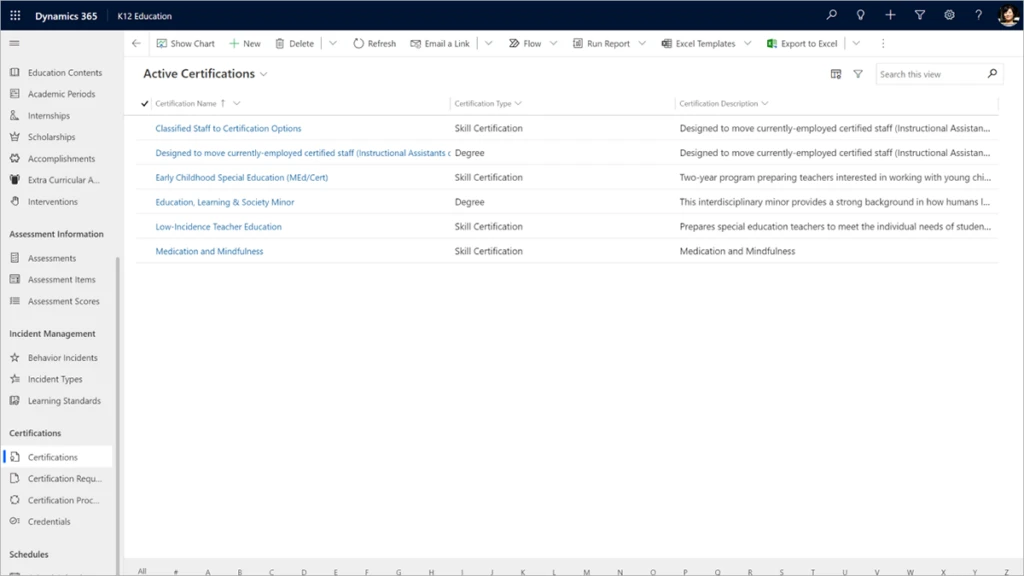
Screenshot of teacher certification page in education accelerator for higher education.

What our partners are saying

“As an ISV who has aligned with the Higher Education Accelerator (HEA) since V1, we see the April 22 (V4) release of HEA as a substantial step forward for partners and customers. With the inclusion of the learner record, school calendar, instructor certifications and other new features along with the ability to leverage components from K-12 for Higher Ed, this release truly enriches our greymatter Higher Education Lifecycle CRM and allows us to deliver a comprehensive learner record and true Student 360 view to empower institutions like the College of Southern Nevada to create exceptional student experiences.”

Shekar Kadaba, CEO, Frequency Foundry

“We are seeing a real positive response from the K-12 space since the recent releases of the industry accelerator. It is providing a platform that allows schools to adjust to the ever-changing demands for their industry. The flexible nature of the accelerator has meant that schools have been able to start modernizing the way they interact with their parents and students through the different channels provided with the Dynamics 365 platform. One of the many advantages we have seen for schools is how they can move away from the traditional siloed environment. This has allowed them to interact with their data in ways they have not been able to previously. It is an exciting time being a partner in the education space and leveraging the Microsoft Education Accelerator and Power Platform to improve the whole customer experience in schools.”

Brad Orders, Solution Specialist, Fusion5

“For PwC, keeping our clients’ systems evergreen is as important as upgrading and extending their usability. Private preview allows us to plan and schedule updates in our clients’ data models. We are excited about the new release, which expands the student learning profile and workforce development and directly addresses what we have learned from schools.”

Khue Trinh, Lead Solution Architect Connected School, PwC

Next steps

  • Get started right away with version 4.0 of the Dynamics 365 education accelerator on Microsoft AppSource. The data model, solutions, sample applications and data, Power BI reports, and UX controls that come with the education accelerator are available to any Microsoft Power Platform developer.
  • For more information, read the education accelerator documentation.

The post Data enhancements in education accelerator appeared first on Microsoft Dynamics 365 Blog.

Brought to you by Dr. Ware, Microsoft Office 365 Silver Partner, Charleston SC.
Change in naming convention of user’s Name parameter

Change in naming convention of user’s Name parameter

This article is contributed. See the original author and article here.

We want to inform you about a change that we are working on. This change will be rolled out in a phased manner starting in the later part of April 2022.


The Name parameter associated with a user within a tenant should be unique. However, while we sync objects from Azure Active Directory to Exchange Online, the way Name parameter is being evaluated currently led to periodic conflicts. We realized that the current method is not the best method to compute this parameter. Hence, we want to move away from current method to a more robust way of generating the Name parameter which is through ExternalDirectoryObjectId (EDOID).


EDOID value is unique. We’ll use this GUID as Name instead of synchronizing the Name from on-premises or using the alias (if Name is not specified). With this change the DistinguishedName (DN) value will also get impacted. To better understand how this will impact objects in a tenant where directory synchronization is enabled, consider the following example:


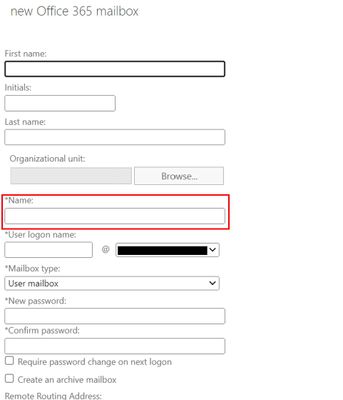
With this new change, when creating a new Office 365 (remote) mailbox from on-premises Exchange Admin Center, the Name field will no longer synchronize to Exchange Online.


NamePropChange.jpg


Before changes are implemented:
DisplayName: Jeff Smith
Name: Jeff Smith
Alias: jsmith
DistinguishedName: CN= Jeff Smith,OU=(tenant).onmicrosoft.com, OU=Microsoft Exchange Hosted Organizations, DC=NAMP283A001, DC=PROD,DC=OUTLOOK, DC=COM
ExternalDirectoryObjectId: 12313c53-fff7-46d4-8b83-71fb317d1853


After changes are implemented:


DisplayName: Jeff Smith
Name: 12313c53-fff7-46d4-8b83-71fb317d1853
Alias: jsmith
DistinguishedName: CN= 12313c53-fff7-46d4-8b83-71fb317d1853, OU=(tenant).onmicrosoft.com, OU=Microsoft Exchange Hosted Organizations, DC=NAMP283A001, DC=PROD, DC=OUTLOOK, DC=COM 


In this example, both the Name and DistinguishedName are updated with the EDOID value.


Note: This would also mean that any subsequent CN value change in Exchange on-premises will not be reflected in the object’s Name property in Exchange Online.


Will this change not allow modification of the Name property?
Customers can still use Exchange PowerShell cmdlets (Set-User, Set-MailUser, Set-Mailbox with -Name parameter) to update the Name property in Exchange Online. Since the cmdlets ensure uniqueness, it would allow the operation to succeed only when the passed Name is unique in the tenant. 


How will the change impact new and existing users?
The updated naming logic would take effect only during new user creation. Existing users won’t get impacted in any way.


Please note that since we will start using EDOID as Name in Exchange Online, we shall stop allowing changes in CN to reflect in Name property in Exchange Online for all users (both new and existing). 


We recommend that Administrators evaluate any scripts or other automation that may rely on the Name property and update them accordingly.


Exchange Online Team

CISA Adds 10 Known Exploited Vulnerabilities to Catalog

This article is contributed. See the original author and article here.

CISA has added 10 new vulnerabilities to its Known Exploited Vulnerabilities Catalog, based on evidence of active exploitation. These types of vulnerabilities are a frequent attack vector for malicious cyber actors and pose significant risk to the federal enterprise. Note: to view the newly added vulnerabilities in the catalog, click on the arrow on the of the “Date Added to Catalog” column, which will sort by descending dates. 

Binding Operational Directive (BOD) 22-01: Reducing the Significant Risk of Known Exploited Vulnerabilities established the Known Exploited Vulnerabilities Catalog as a living list of known CVEs that carry significant risk to the federal enterprise. BOD 22-01 requires FCEB agencies to remediate identified vulnerabilities by the due date to protect FCEB networks against active threats. See the BOD 22-01 Fact Sheet for more information. 

Although BOD 22-01 only applies to FCEB agencies, CISA strongly urges all organizations to reduce their exposure to cyberattacks by prioritizing timely remediation of Catalog vulnerabilities as part of their vulnerability management practice. CISA will continue to add vulnerabilities to the Catalog that meet the meet the specified criteria

Dynamics 365 Finance helps chief financial officers tackle the subscription economy

Dynamics 365 Finance helps chief financial officers tackle the subscription economy

This article is contributed. See the original author and article here.

For over a decade, revenue recognition has remained one of the most complex areas that finance leaders must navigate and manage. At the same time, more and more businesses are introducing subscription-based offerings in an effort to meet evolving consumer needs for innovative and convenient products and services while also creating new and predictable revenue streams. Indeed, the average US consumer now has four subscriptions, according to McKinsey & Company.1 It is no surprise then that the subscription economy is forecast to grow at a blistering pace in both B2C and B2B markets, rising 18.5 percent year-over-year from $224 billion in 2021 to $275 billion in 2022.2

As organizations add new subscription-based offerings, though, their revenue recognition processes become more complex, and many are challenged to incorporate the pricing and billing scenarios necessary to operate successfully at scale. To meet the growing need of organizations to manage the unique demands of subscription-based business models, we are excited to announce the general availability of Subscription billing for Microsoft Dynamics 365 Finance. Subscription billing is offered at no additional cost to users of Dynamics 365 Finance.

Introducing a new approach to Subscription billing

Often, the most difficult challenge of transitioning to new subscription-based business models is adopting the right technology solution and aligning operational processes to support the complexities of recurring revenue. For example, consumers pay for a single, convenient line item with product-as-a-service offerings. Internally though, obligations and financial performance must be managed. This usually requires organizations to become proficient at allocating portions of customer payments for revenue recognition in multiple revenue streams, such as separate accounting for hardware revenue and the monthly recurring revenue from related and ongoing service contracts.

Subscription billing is specifically designed for managing the ins and outs of recurring revenue and does so through three primary features: recurring contract billing, revenue allocation, and revenue and expense deferrals. In the remainder of this blog post, we provide a general overview of these features and explore how they help chief financial officers (CFOs) to tackle the challenges of the subscription economy.

Learn more: Subscription billing overview.

Recurring contract billing

The ability to correctly account for the revenue from complex subscription offerings is critical to obtaining an accurate picture of recurring revenue, maintaining financial compliance, and providing business leaders with the insights needed to accelerate growth. Subscription billing includes a recurring contract billing feature to help organizations overcome this specific challenge. With recurring contract billing, users have advanced control over pricing and billing parameters, contract renewal, and consolidated invoicing. Recurring contract billing can also handle specific billing requirements such as one-off, milestone, and usage-based, and can incorporate tiered or flat pricing strategies. Ultimately, the recurring contract billing feature shortens the quote-to-cash process. The user experience is also improved by providing an easy pathway to consolidate invoices by customer or item and simplifying the contact renewal and termination process.

Revenue allocation

As we mentioned earlier, allocating revenue into several revenue streams for accounting purposes is one of the unique challenges that participants in the subscription economy face. The revenue allocation feature of Subscription billing provides users with the ability to automate complex allocations and to ensure revenue compliance by handling pricing and revenue allocation across multiple items. Specifically, it helps organizations comply with International Financial Reporting Standard (IFRS) 15 and Accounting Standards Codification (ASC) 606 by assigning default and standalone selling prices and methods to items. This way, users gain flexibility and control by allocating revenue based on standalone prices.

Revenue and expense deferrals

Another challenge in the subscription economy is remaining in compliance with regulations that are still evolving, especially around revenue and expense deferrals. With changing regulations on how organizations recognize revenue, finance teams are apt to get bogged down in spreadsheets, working manually to create formulas and consolidate data for reporting. However, with Subscription billing’s revenue and expense deferrals feature, users can automate revenue and expense deferral processes in alignment with US generally accepted accounting principles (GAAP) standards. The solution also provides a robust and straightforward way of creating schedules for future period postings and consolidating invoices. 

What’s next?

In this article, we discussed the growth of the subscription economy and the unique challenges that organizations face when transitioning or adding new subscription-based business models. We looked at how three features, recurring contract billing, revenue allocation, and revenue and expense deferrals, help CFOs tackle the challenges of the subscription economy.

Subscription billing is offered at no additional charge to users of Dynamics 365 Financeand we’re excited to announce some recent enhancements that make this offering even better. Thanks to a new licensing agreement with Binary Stream Software, Subscription billing now includes advanced features such as support for complex billing, both usage-based and tiered models, and advanced reporting capabilities for companies with recurring revenue. To learn more, check out our recent webinar, How to thrive in a subscription economy, where you can hear from our guest speaker, CEO and President of Binary Stream Software, Lak Chahal.


Sources:

1- McKinsey & Company, 2021. Sign up now: Creating consumerand businessvalue with subscriptions.

2- Juniper Research, 2022. What Will the Subscription Economy Deliver in 2022?

The post Dynamics 365 Finance helps chief financial officers tackle the subscription economy appeared first on Microsoft Dynamics 365 Blog.

Brought to you by Dr. Ware, Microsoft Office 365 Silver Partner, Charleston SC.

What’s new in Windows Holographic, version 22H1

What’s new in Windows Holographic, version 22H1

This article is contributed. See the original author and article here.

22H1_Final_Hero_3840x2160.png


Windows Holographic, version 22H1 is now available! In this article we’ll go over some of the highlights of this release and some recent months. If you’re interested in full details check out our official release notes.


Features continually evolve in Windows Holographic based on your feedback. We packed this new update with features for both end-users and IT admins with the goal of making the day-to-day usage of your HoloLens 2 more intuitive and customizable.


To get the 22H1 build now, go to -> Settings -> Update & Security -> Windows Update Select Check for updates. IT Admins can use Windows Update for Business (WUfB) and MDM policy to update their fleet of HoloLens. Note that you must upgrade to Windows Holographic, version 21H1 Update before you can upgrade to Windows Holographic, version 22H1.


Feature Highlights:


We have made some great improvements for our last flagship feature, Moving Platform Mode. Moving out of the beta phase, there’s new improved methods for enabling Moving Platform Mode and new settings you can configure while using it such as setting the down direction to be a different direction than gravity. Here’s 3 new ways to enable Moving Platform Mode which is different depending on how or when you want it enabled.


Feature


Description


Target User


Moving Platform Mode Settings


Toggle Moving Platform Mode and more via Settings


End users


Moving Platform Mode MDM policies


Configures new MPM settings via MDM


IT Admins


Moving Platform Mode SDK


Configures MPM via Apps


Developers


Start gestures settings – These are a new solution for those who want to keep the Start menu from appearing while doing tasks that involve looking downwards and actively using their hands. There are several options you can use or combine, such as requiring the user to look at their wrist or holding the icon for two seconds.


Power and Thermal SDK for apps – Try out this hot new feature for when it gets hotter in temperature. If you are in a warm environment or are pushing your app to the limits, and you’ve built your own app, then you can include this SDK to include notification events and have custom actions. These can help keep your app running longer.


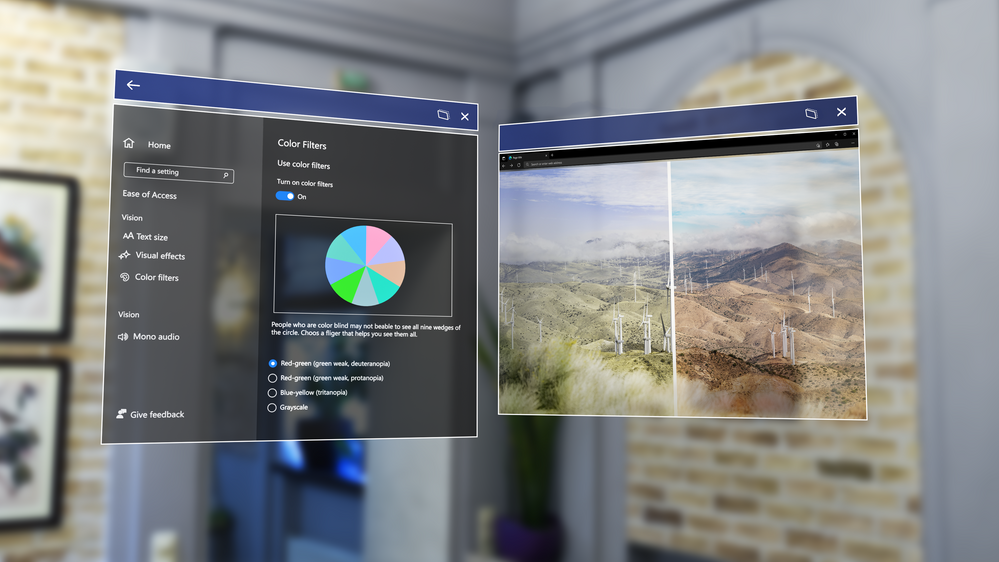
Color-blind mode – Color-blind mode is a feature that makes HoloLens more accessible using new color filters that can help make things easier to view. Try it, you might be surprised at the difference it makes.


Single app kiosk policy for launching other apps – A new Mixed Reality policy, that allows you to launch specific apps from a Single App Kiosk app. This is useful if you want to use a specific app, but might need access to Settings to change Wi-fi, or Edge to perform a sign in.


As always, you can follow our IT admin update checklist to prepare for when you update your fleet of HoloLens 2 devices to the latest update.

Dynamics 365 Finance helps chief financial officers tackle the subscription economy

Attend the Project Management for a Connected World digital event

This article is contributed. See the original author and article here.

Collaborate, innovate, and deliver with Microsoft

As work becomes more complexwith employees, customers, and partners spread across the globeorganizations must improve productivity and operations to stay competitive. Business leaders and project managers need tools that help them stay on top of their work, align teams around common objectives, and elevate project performance.

On April 20, 2022 at the Project Management for a Connected World digital conference, you’ll learn how Microsoft’s connected project experiencesMicrosoft Planner, Microsoft Project, and Microsoft Dynamics 365 Project Operationshelp you stay organized and deliver successful projects. With multiple breakout sessions to choose from, you can create a schedule that matches your goals. Plus, get your questions answered in a Q&A chat that runs throughout the event.

Explore when to use Planner, Project, and Dynamics 365 Project Operations

Planner, Project, and Project Operations enable people to effectively manage projects of all sizes and complexity. Planner works with Microsoft 365, and specifically Microsoft Teams, to help you create and share plans and information-rich tasks with collaborators. Project is the simple and powerful project management solution that helps you execute initiatives of varying sizesfrom quick projects to larger, more complex programs. Project Operations connects sales, resource management, project management, and accounting teams for greater visibility and collaboration.

Project Management for a Connected World is a great opportunity to dive deeper into each of these products to learn which one is most appropriate for your needs. Sessions like, “Choosing the right project management products for your organization” will help you connect the right tools with your upcoming and ongoing projects. You’ll also learn about the differences and benefits of Planner, Project, and Project Operations.

Get up to speed on the latest product updates and roadmaps

At this event, you’ll be able to connect with Microsoft product engineering to learn how the most recent product updates keep pace with the growth of your business and the evolving market. You’ll also get to delve into how the product roadmaps will meet the needs of a more complex hybrid workplace.

For example, the “Microsoft Project introduction and roadmap” session will show the releases over the last year that help drive more collaboration and visibility across your projects, and you’ll get a peek into the exciting innovations planned on the product roadmap.

In “Microsoft Planner: Introduction and roadmap” you’ll learn about the latest Planner updates and future releases.

You can also choose to attend sessions that dive deeper into Project Operations. Explore how the latest releases help boost efficiency in project planning and delivery. Learn more about investments in onboarding, estimating, and resourcing, and find out what Microsoft has planned for Project Operations in the coming months.

Learn how to deliver successful projects with Microsoft solutions

Running successful projects requires smart management of people, attention to budgets, and mitigation of project risks. The right tools give you good visibility across all these aspects of project management, and they allow you to dig into the details as needed.

Whether you’re interested in facilitating teamwork across a hybrid team, effectively resourcing your projects, or managing risk, there will be sessions that will help you understand how project management solutions from Microsoft support you.

Sessions like, “Collaborate better and turn connected project operations data into impact,” will show you how Project Operations helps you work smarter by breaking down the silos between customer relationship management (CRM), enterprise resource planning (ERP), and project management. “Accelerate projects while maintaining project management organization (PMO) governance” will give you a view into how other organizations manage programs, develop governance workflows, and mitigate issues and risk. These and other sessions will give you strategies for using Planner, Project, and Project Operations to run your projects more effectively.

Save your spot

Attend Project Management for a Connected World on April 20, 2022 to learn how Microsoft’s connected project experiences help you run projects more efficiently and deliver results.

Project Management for a Connected World

Collaborate, innovate, and deliver with Microsoft

Wednesday, April 20, 2022

9:00 AM to 11:00 AM Pacific Time (UTC-8)

The post Attend the Project Management for a Connected World digital event appeared first on Microsoft Dynamics 365 Blog.

Brought to you by Dr. Ware, Microsoft Office 365 Silver Partner, Charleston SC.