Architectural Guidance – Azure Monitor private links with Microsoft Sentinel

Architectural Guidance – Azure Monitor private links with Microsoft Sentinel

This article is contributed. See the original author and article here.

Firstly, I would like to thank  Benjamin Kovacevic for his help with this article.


In this blog post, I will try to simplify one of the confusions and a popular question seen by many organizations around the ability to use private links together with Microsoft Sentinel.


Starting with basics:


Microsoft Sentinel


Microsoft Sentinel is a cloud-native SIEM solution that is built on top of the log analytics workspace and hence, Microsoft Sentinel requires data to be ingested into that same log analytics workspace for its operation.


Log analytics workspace


Log analytics workspace is a native Azure monitoring resource that is part of Azure monitor as Azure monitor contains also resources like application insights and DCR resources and so on.


Microsoft Sentinel log source types


Microsoft Sentinel log sources are either:


  • Diagnostic-based data sources: This type covers data ingested through the diagnostic settings from Azure PaaS and/or Saas services. Examples like: Activity logs, Azure AD audit logs, Azure Data factories, Key vaults, and so on. Once configured, data starts to flow from the Azure resource to the log analytics workspace.


  • Service-to-service data integration: This type covers direct connections from other Microsoft services like Defender for Endpoint, Defender for Cloud, Defender for Office365, and so on. Once the connection is turned on, data starts to flow automatically through the Azure backend to the log analytics workspace.


  • Agent-based-ingestion log sources: This covers all ingestion that is based on either AMA or LAA (MMA) agents. Data sources could be VMs that are running in Azure, on-premises, or in other cloud platforms.


  • REST API based ingestion: This covers data ingestion and queries through pipelines line LogicApp connectors, Function Apps, and some 3rd party connectors in Microsoft Sentinel.


Azure Monitor Private link


Private link in Azure Monitor is a network restriction and security mechanism that could be used to force traffic to flow only through private connections from a VNET to an azure monitor resource. In this context, we will focus on log analytics workspace as our Azure monitor resource.


Type1: Ingesting data through diagnostic settings


As mentioned in this document under exception section, data ingested through diagnostic settings pipeline by default go over a secure private channel and is not impacted by private links.


mahmoudmsft_0-1670499888010.png


The same goes for type2 service-to-service data integrations as they also flow through Azure backbone.


Type3: Agent-based-ingestion log sources


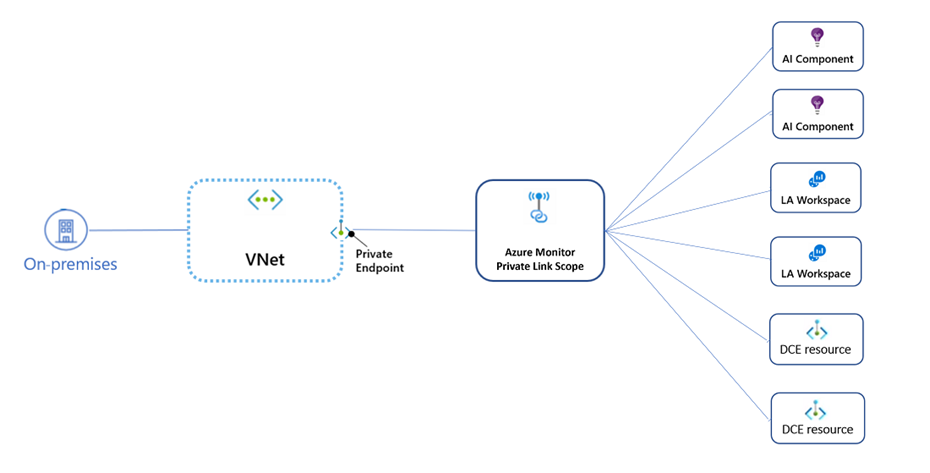
The best way to look at the concept under the context of this type3 is to examine the following diagram taken from this document


mahmoudmsft_1-1670499928586.png


Note that On-premises here could also be replaced by VNETs on azure as well because the same concept applies.


So the idea is simply that traffic from on-premises (or any VNET on Azure) will communicate to the private endpoint IP address that is associated with the private link scope object.


Fact 1: This basically means that it primarily depends on how DNS is configured.


Fact 2: On the workspace level, an On/Off setting exists to control whether to accept data ingestion not originating from private link scope or not.


Fact 3: On the workspace level, an On/Off setting exists to control whether to accept log queries not originating from private link scope or not.


Fact 4: The private link scope could be covering all log analytic workspaces or some of them. At this point, we need to pay attention to the private link mode (private only or open).


Private only mode: allows the traffic VNet to only reach resources in the link scope. traffic to log analytics workspace out of the link scope is blocked.


Open mode: allows the VNet to reach log analytic workspaces that are covered by the private link scope AND log analytics workspaces that are not covered by the private link scope. (if they accept traffic from public networks). The Open mode is useful for a mixed mode of work (accessing some resources publicly and others over a Private Link), or during a gradual onboarding process.


So to simplify it, the following matrix should give an idea of how the result looks like for interactions between these four items. For other workspaces that are not covered by the same link scope, the following matrix applies


link scope mode


Workspace Setting:


Accept data ingestion from public networks not connected through a Private Link Scope


Outcome


Public traffic


Private only


On


Blocked


Private only


Off


Blocked


Open


On


Allowed


Open


Off


 Blocked


As expected, any log ingestion traffic for log analytics workspaces that are not covered by the same private link scope will be denied and only allowed if the link scope mode is set to Open


Our Recommendations from the field


  • Considering Azure monitor private link should be associated with either a concrete requirement or certain compliance obligations.

  • Use link mode: open when newly onboarding Microsoft Sentinel and switch to link mode: private only mode only after careful assessment of implication on all log analytics workspaces that are available and assessment of network and DNS design.
CISA Releases Three Industrial Control Advisories

This article is contributed. See the original author and article here.

CISA has released three (3) Industrial Control Systems (ICS) advisories on 08 December 2022. These advisories provide timely information about current security issues, vulnerabilities, and exploits surrounding ICS.

CISA encourages users and administrators to review the newly released ICS advisories for technical details and mitigations:

Announcing new pricing and capabilities in Compliance Manager premium templates

Announcing new pricing and capabilities in Compliance Manager premium templates

This article is contributed. See the original author and article here.

In the modern era, organizations need to comply with several international, federal, or local regulatory obligations. Microsoft Purview Compliance Manager contains a library of 350+ regulations designed to help you reduce the time it takes to get compliant, stay compliant, and scale your company’s compliance. Today, we are excited to announce the following changes to your premium templates:


What you need to know:


  1. Pricing is dropping to $6,000 per unit, per year

  2. Regulations under the same family will count as a single template

  3. Microsoft 365 E5 customers will be able to use their first 3 premium templates for free


Reduced pricing


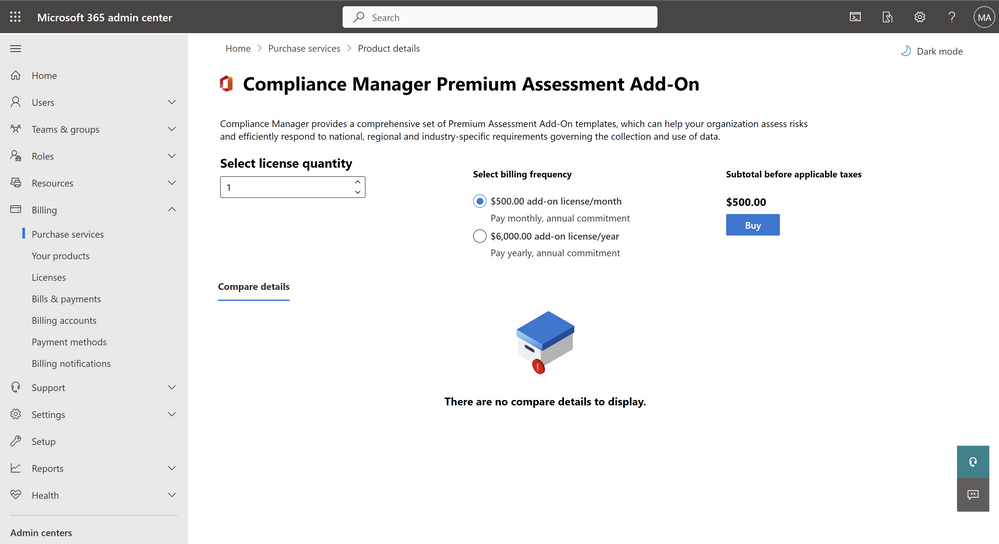
Research suggests that organizations need to comply with 5-10 regulations on average. At Microsoft, we strive to empower every organization to achieve more, and that means giving you access to the greatest number of templates at the most affordable price. Starting today, customers across all segments can purchase our premium templates at an all-time low price of $6,000 per year or just $500 per month!


Daniel_Hidalgo_0-1670428537246.png


Figure 1: New price for Compliance Manager Add-On


Grouped regulations


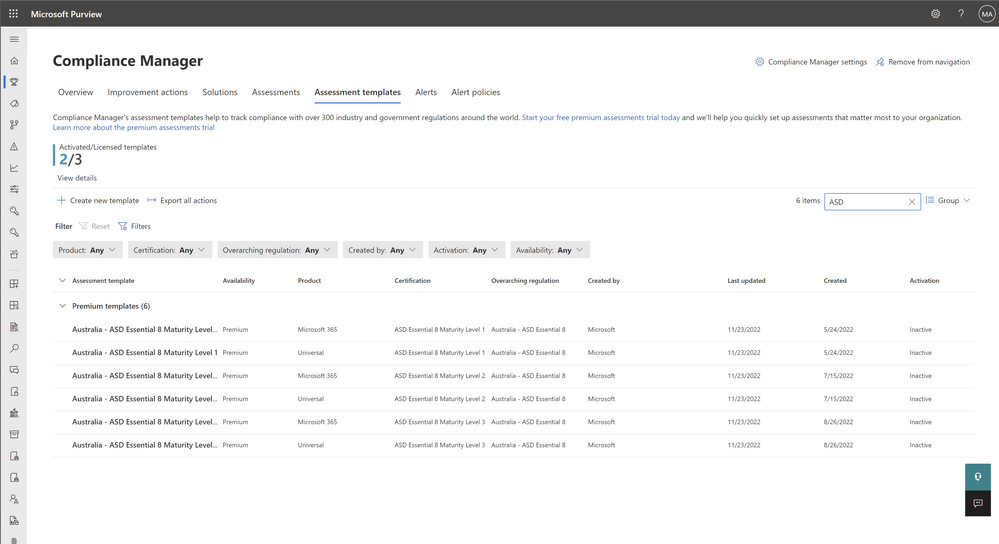
Some regulations have different maturity levels. Starting today, regulations under this category are considered part of the same “family” and will count as a single premium template. The examples below showcase what is and what is not grouped together as part of this change.


Grouped: Payment Card Industry Data Security Standard (PCI-DSS) version 3 and version 4 are all versions of the same standard and will count as a single template.


Not Grouped: NIST 800-53 and NIST 800-171 are different standards, and therefore count as different templates


Daniel_Hidalgo_2-1670428614334.png


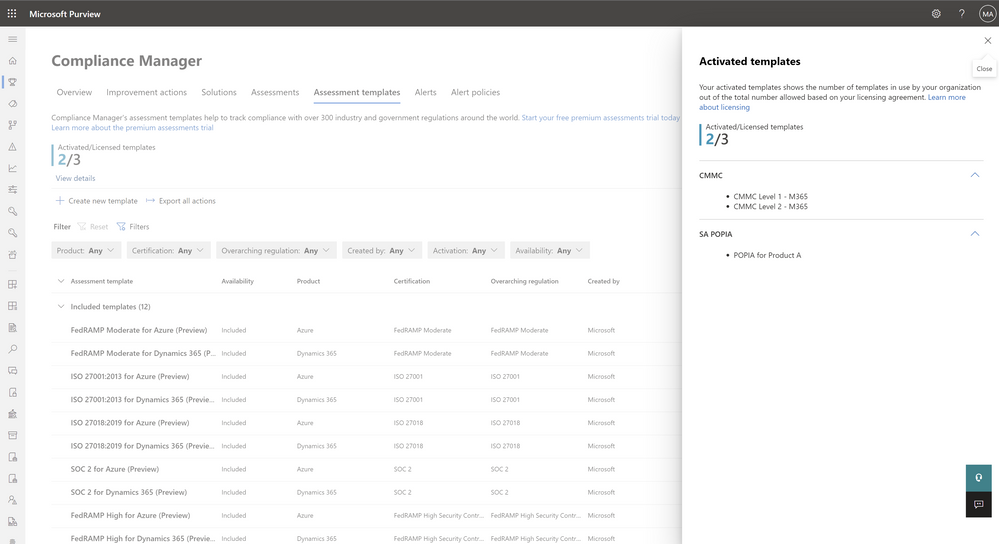
Figure 2: Example of grouped templates (ie: Australia – ASD Essential 8)


Benefits for E5 customers


Prior to today, you were entitled to the following regulations: ISO27001, NIST 800-53, and GDPR as part of your E5 services. Starting today, we are no longer prescribing these regulations. You can now choose up to any 3 premium templates from the library of supported regulations and select the ones that fit your specific needs.


Daniel_Hidalgo_1-1670428576791.png


Figure 3: E5 customers can choose their first 3 premium templates for free


*Note: Customers on E1, E3, and other license types will have to purchase these at $6,000 per unit.


Get started today!


We are committed to helping organizations do more with less by delivering capabilities that make the end-to-end compliance experience more efficient and affordable. Get started with Compliance Manager through the Microsoft Purview portal today!


Have any questions? Visit our Technical Documentation for the latest information.

Microsoft is named a Leader in 2022 Gartner® Magic Quadrant™ for Field Service Management

Microsoft is named a Leader in 2022 Gartner® Magic Quadrant™ for Field Service Management

This article is contributed. See the original author and article here.

From automating work orders to leveraging mixed reality, Microsoft Dynamics 365 Field Service continues to evolve to meet the growing changes of field operations and support seamless collaboration. Quality service is crucial to organizations remaining resilient despite uncertainty. Employees are working from remote or distributed locations, reducing the amount of personalized interaction. Customers are demanding self-service options that empower them to resolve issues.

As assets grow in complexity, remote monitoring of Internet of Things (IoT) devices continues to transform service from a cost center to a revenue generator. Changes in technologies that personalize the service experience, increase worker productivity, and optimize service operations elevate the frontline worker effectiveness and increase customer experience. These differentiators propelled Dynamics 365 Field Service.

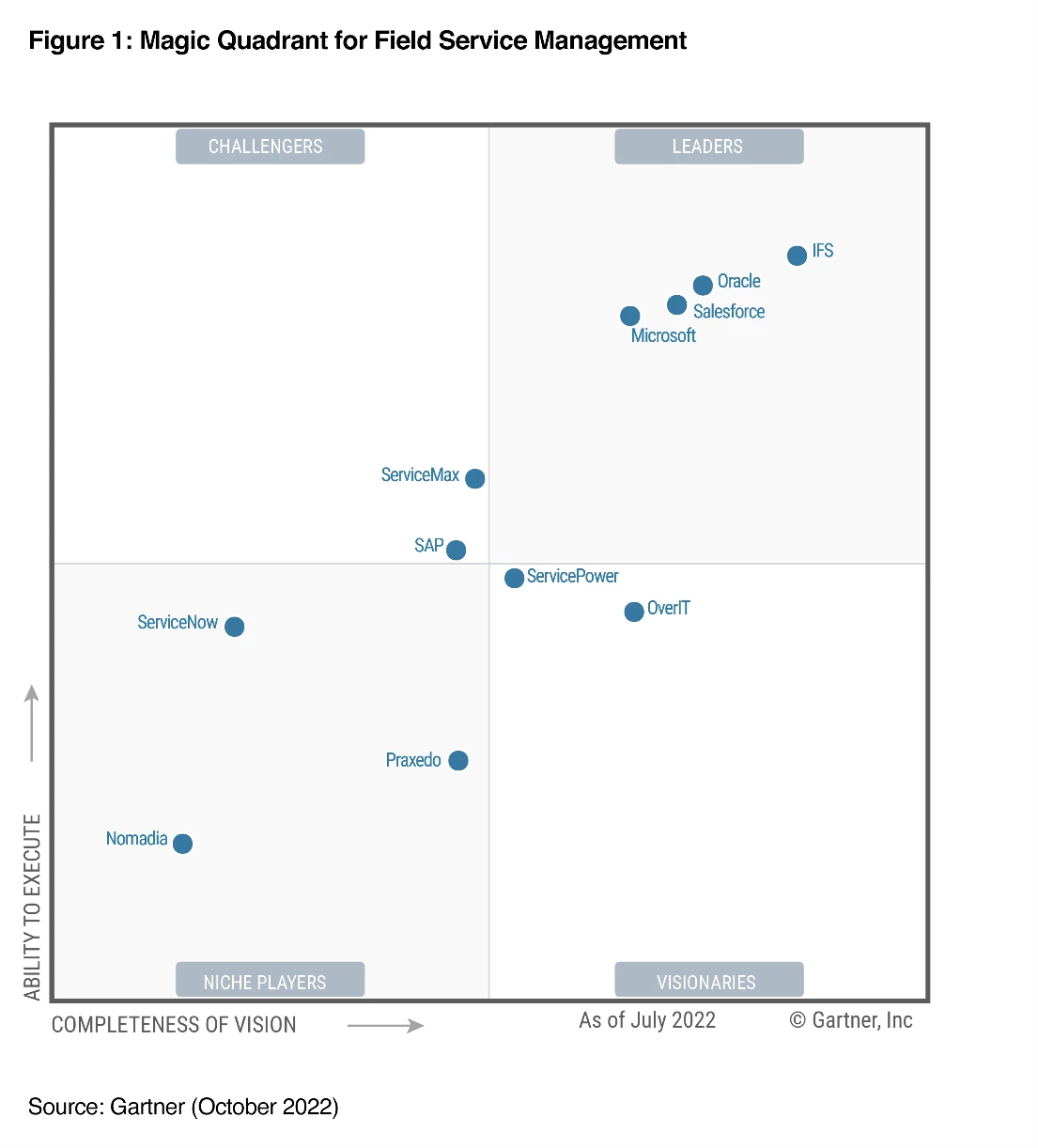
It is with great pride that Microsoft shares its position as a Leader within the 2022 Gartner Magic Quadrant for Field Service Management* for the third consecutive year.

We believe this placement recognizes Microsoft’s continuous investment and authority across our service solution and cloud functionality.

Figure 1: Magic Quadrant for Field Service Management**

Gartner defines field service management (FSM) as a discrete market within the broader customer service and support software market. FSM suites support field service providers (FSPs) whose technicians travel to customer locations to provide installation, repair, and maintenance services for equipment and systems (consumer, commercial, or industrial). FSPs may also manage, maintain, and monitor these assets under a predefined service or maintenance contract.

What is Connected Field Service?

By using the power of IoT and cloud services, Connected Field Service enables organizations to transform the way they provide service from a costly break/fix model to a proactive, predictive service model. Organizations can respond faster through a combination of IoT diagnostics, scheduling, asset maintenance, and inventory on the same platform.

Through remote monitoring, technicians can quickly identify the equipment and the issueoften before the customer is even aware. IoT devices communicate with the field service management system, sending alerts to technicians about anomalies with the device. Remote field service technicians can quickly isolate the issue and sometimes resolve the problem by sending device commands or resetting the device without ever stepping foot on the customer’s site.

Clean Energy reaps value from Connected Field Service

Take, for example, Clean Energy,one of the largest providers of renewable natural gas. The company offers renewable natural gas as a transportation fuel, significantly reducing pollution and greenhouse gas caused by diesel and gasoline. It owns, operates, and maintains 550 stations across the United States and Canada. Clean Energy also develops renewable natural gas production facilities.

Reducing pollution is important to Clean Energy. Not to mention, the extensiveness of Clean Energy’s operation along with siloed data and applications created the need for specialized systems. Overcoming silos and meeting their pollution-reduction goal hinges on internal efficiency, anchored by a collaborative, well-integrated infrastructure. The company began its journey with Microsoft Dynamics 365 and now manages its environment using Dynamics 365. It also takes in and analyzes sensor data from its automated fuel stations using Microsoft Azure IoT and equipped its technicians with Microsoft Dynamics 365 Remote Assist.

Technicians are now empowered with data and can pull up information about their teams and the stations they’re managing. The analysis performed by Microsoft Azure IoT Central results in a request to generate a work order to Dynamics 365 Field Service. That data is then sent to the company’s Azure Data Lake for use in management reportingand eventually, to create the base for predictive analytics. And because the IoT sensors transmit status data, those technicians no longer get up in the middle of the night to drive long distances to inspect stations that don’t need ita contribution to greater job satisfaction.

With Connected Field Service, Clean Energy is achieving its efficiency and cost savings goals. During the past couple of years, it pivoted seamlessly to remote work, reducing travel with virtual training and supporta win for the planet.

Clean Energy is just one of many organizations that has reaped value from Connected Field Service and is harnessing its capabilities to build stronger, more collaborative, and proactive service delivery.

Adult male sitting at office desk, smiling with headset on.

Dynamics 365 Field Service

This is where innovation meets what’s possible.

The bottom line

Many service organizations consist of dispatchers answering service calls, putting customers on hold, asking the same questions repeatedly, while searching for the next available technician to dispatch. This process is inefficient, costly, and unsatisfying to the customer.

The world of field service is changing. Today, service organizations are evolving into profit centers, redefining business models, and creating powerful and fulfilling customer experiencesall supported by global edge solutions like Dynamics 365 Field Service.

We’re excited to be positioned as a Leader in the Gartner Magic Quadrant and are committed to bringing you the best and most featured field service application available. Depend on the multidimensional capabilities of Dynamics 365 Field Service to help you better personalize customer engagements, improve employee effectiveness, and optimize service operations now and tomorrow.

Read the 2022 Gartner Magic Quadrant for Field Service Management report.

Learn more about:


Source: Gartner, Magic Quadrant for Field Service Management, Jim Robinson, Leif-Olof Wallin, 24 October 2022

*Gartner and Magic Quadrant are registered trademarks and service marks of Gartner, Inc. and/or its affiliates in the U.S. and internationally and are used herein with permission. All rights reserved.

**This graphic was published by Gartner, Inc. as part of a larger research document and should be evaluated in the context of the entire document. The Gartner document is available upon request from Microsoft.

Gartner does not endorse any vendor, product or service depicted in its research publications, and does not advise technology users to select only those vendors with the highest ratings or other designation. Gartner research publications consist of the opinions of Gartner’s research organization and should not be construed as statements of fact. Gartner disclaims all warranties, expressed or implied, with respect to this research, including any warranties of merchantability or fitness for a particular purpose.

The post Microsoft is named a Leader in 2022 Gartner® Magic Quadrant™ for Field Service Management appeared first on Microsoft Dynamics 365 Blog.

Brought to you by Dr. Ware, Microsoft Office 365 Silver Partner, Charleston SC.

Communities in Microsoft Teams: Connect, collaborate, and share

Communities in Microsoft Teams: Connect, collaborate, and share

This article is contributed. See the original author and article here.

We’re excited to announce Communities in Microsoft Teams—a new set of easy-to-use features that enable people to come together, connect, share, and collaborate.

The post Communities in Microsoft Teams: Connect, collaborate, and share appeared first on Microsoft 365 Blog.

Brought to you by Dr. Ware, Microsoft Office 365 Silver Partner, Charleston SC.

Communities in Microsoft Teams: Connect, collaborate, and share

Communities in Microsoft Teams: Connect, collaborate, and share

This article is contributed. See the original author and article here.

We’re excited to announce Communities in Microsoft Teams—a new set of easy-to-use features that enable people to come together, connect, share, and collaborate.

The post Communities in Microsoft Teams: Connect, collaborate, and share appeared first on Microsoft 365 Blog.

Brought to you by Dr. Ware, Microsoft Office 365 Silver Partner, Charleston SC.