by Contributed | Dec 18, 2020 | Alerts, Microsoft, Security, Technology
This article is contributed. See the original author and article here.
Microsoft security researchers have been investigating and responding to the recent nation-state cyber-attack involving a supply-chain compromise followed by cloud assets compromise.
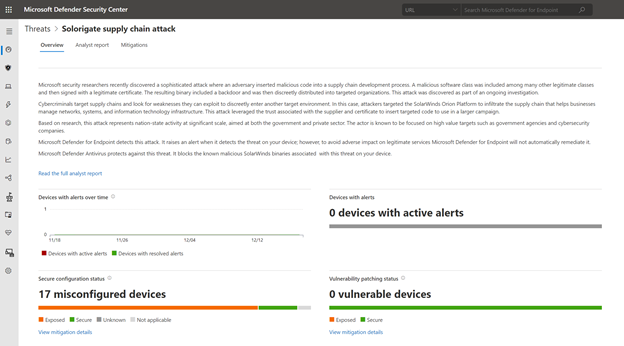
Microsoft 365 Defender can help you track and respond to emerging threats with threat analytics. Our Threat Intelligence team has published a new Threat analytics report, shortly following the discovery of this new cyber attack. This report is being constantly updated as the investigations and analysis unfold.
The threat analytics report includes deep-dive analysis, MITRE techniques, detection details, recommended mitigations, updated list of indicators of compromise (IOCs), and advanced hunting queries that expand detection coverage.
Given the high profile of this threat, we have made sure that all our customers, E5 and E3 alike, can access and use this important information.
If you’re an E5 customer, you can use threat analytics to view your organization’s state relevant to this attack and help with the following security operation tasks:
- Monitor related incidents and alerts
- Handle impacted assets
- Track mitigations and their status, with options to investigate further and remediate weaknesses using threat and vulnerability management.
For guidance on how to read the report, see Understand the analyst report section in threat analytics.
Read the Solorigate supply chain attack threat analytics report:
For our E3 customers, you can read similar relevant Microsoft threat intelligence data, including the updated list of IOCs, through the MSRC blog. Monitor the blog, Customer Guidance on Recent Nation-State Cyber Attacks, where we share the latest details as the situation unfolds.
by Scott Muniz | Dec 18, 2020 | Security
This article was originally posted by the FTC. See the original article here.
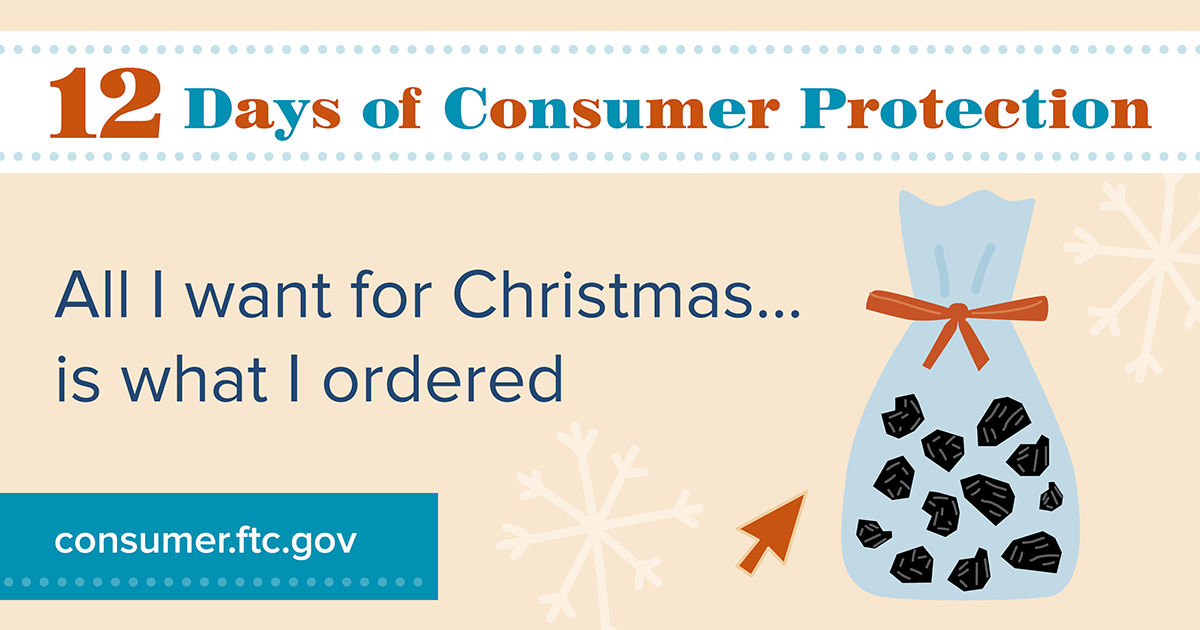
You’ve probably spent a good part of 2020 doing some online shopping. Now that the holidays are here, you definitely want to be sure you — or your friends and family — actually get what you ordered. On this 11th day of Consumer Protection, take these steps to help Rudolph find his way to your house.
- Confirm that the seller is legit. Read reviews and recommendations about the product, seller, and warranties from sources you trust. Look for reviews about their reputation and customer service, and be sure you can contact the seller if you have a dispute.
- ’Twas the night before? Look carefully at the shipping date before you order. If there’s no date given, the seller has 30 days to ship. If you’re notified about a delay in shipping, you have the right to cancel the order and get a full refund. If you decide to cancel, let the seller know right away so you won’t be billed.
- Give them some credit. If possible, pay with a credit card — that gives you many protections under the law. If you pay with a credit card, you may be able to dispute certain charges — and temporarily withhold payment for those charges pending an investigation.
- Track — and guard — your delivery. Keep a record of your order, including tracking numbers. That way you can see where your stuff is in the shipping process. Also, consider having your items held at the post office or delivered to a family member or neighbor in case you’re not home. Some companies have their own secure locations where you can have your merchandise delivered. This protects you from having some Grinch steal your holiday right from your doorstep.
Brought to you by Dr. Ware, Microsoft Office 365 Silver Partner, Charleston SC.
by Scott Muniz | Dec 17, 2020 | Security, Technology
This article is contributed. See the original author and article here.
The National Security Agency (NSA) has released a cybersecurity advisory on detecting abuse of authentication mechanisms. This advisory describes tactics, techniques, and procedures used by malicious cyber actors to access protected data in the cloud and provides guidance on defending against and detecting such activity.
CISA encourages users and administrators to review the NSA cybersecurity advisory and CISA Activity Alert AA20-352A and take the appropriate mitigation actions.
by Contributed | Dec 17, 2020 | Microsoft, Security, Technology
This article is contributed. See the original author and article here.
Microsoft Information Protection (MIP) is a built-in, intelligent, unified, and extensible solution to protect sensitive data in documents and emails across your organization. MIP provides a unified set of capabilities to know and protect your data and prevent data loss across Microsoft 365 apps (e.g., Word, PowerPoint, Excel, Outlook), services (e.g., Microsoft Teams, SharePoint, Exchange, Power BI), on-premises locations (e.g., SharePoint Server, on-premises files shares), devices, and third-party apps and services (e.g., Box and Dropbox).
We are excited to announce availability for new MIP capabilities:
- General availability of Exact Data Match user interface in Microsoft 365 compliance center and configurable match
- External sharing policies for Teams and SharePoint sites, in public preview
- Customer key support for Teams, in public preview
- Expansion of MIP sensitivity labels support to Power BI desktop application (PBIX), in public preview
Exact Data Match user interface in Microsoft 365 compliance center
The first step to effectively protect your data and prevent data loss is to understand what sensitive data resides in your organization. Foundational to Microsoft Information Protection are its classification capabilities—from out-of-the-box sensitive information types (SITs) to Exact Data Match (EDM). Out-of-box SITs use pattern matching to find the data that needs to be protected. Credit card numbers, account numbers, and Social Security Numbers are examples of data that can be detected using patterns. MIP offers 150+ out-of-the-box sensitive information types mapped to various regulations worldwide. EDM is a different approach. It is a classification method that enables you to create custom sensitive information types that use exact data values. Instead of matching on generic patterns, EDM finds exact matches of data to protect the most sensitive data in your organization. You start by configuring the EDM custom SIT and uploading a CSV table of the specific data to be protected, which might include employee, patient, or other customer-specific information. You can then use the EDM custom SIT with policies, such as Data Loss Prevention (DLP), to protect your sensitive data. EDM nearly eliminates false positives, as the service compares the data being copied or shared with the data uploaded for protection.
We continue to invest in and enhance our EDM service, increasing its service scale by a factor of 10 to support data files containing up to 100 M rows, while decreasing by 50% the time it takes for your data to be uploaded and indexed in our EDM cloud service. To better protect sensitive data uploaded into our EDM service, we added salting to the hashing process, which adds additional protection for the data while in transit and within the cloud repository. You can learn more about these EDM enhancements and details on how to implement in this three-part blog series.
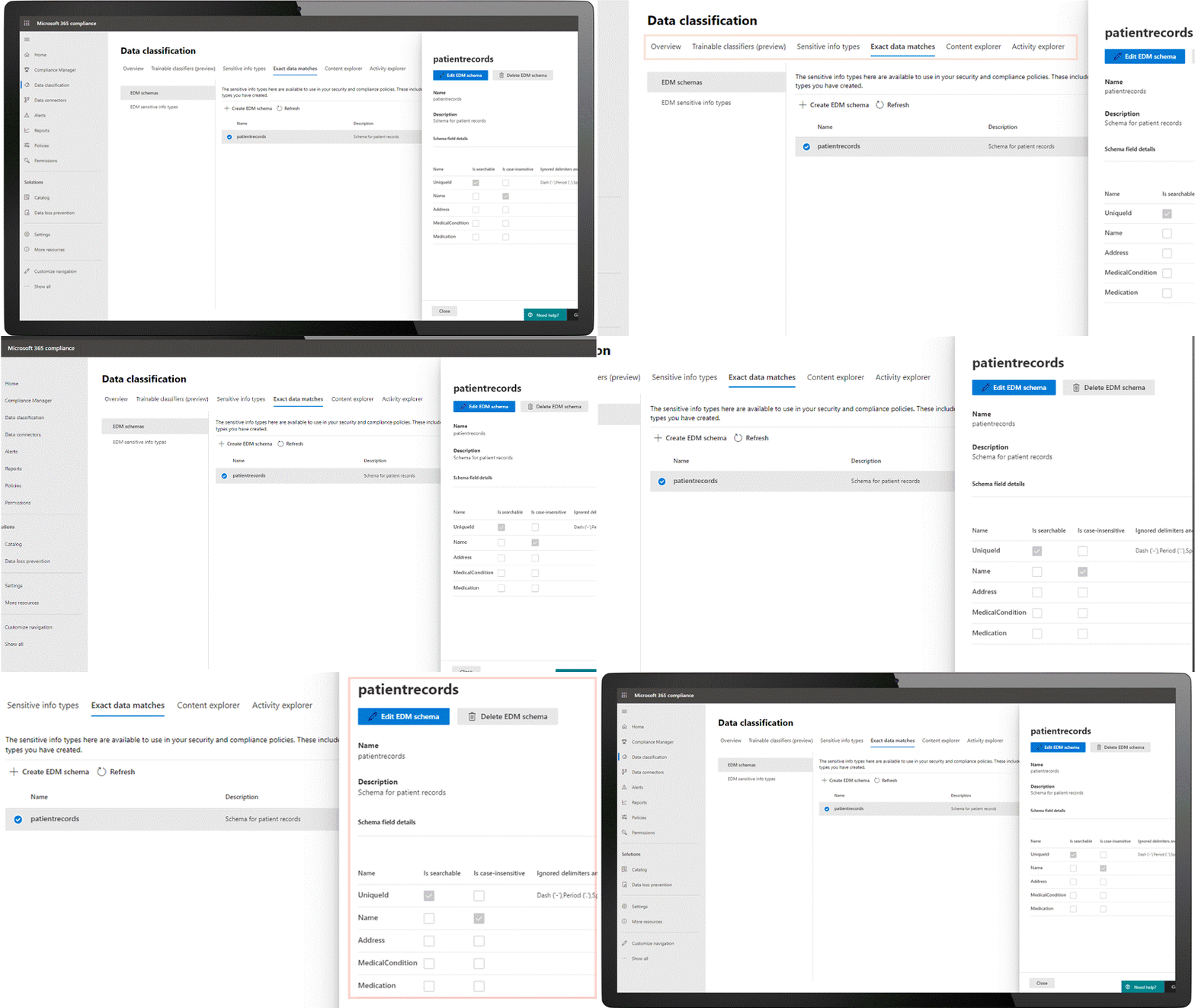
Today we are announcing general availability of a user interface in the Microsoft 365 compliance center to configure and manage EDM in the portal, in addition to the option of using PowerShell. This allows customers who are unable to use PowerShell or prefer to use the UI to manage EDM. Learn more here.
Figure 1: Details of an Exact Data Match schema
We are also announcing general availability of configurable match (aka normalization). This feature will add additional flexibility in defining the matches, allowing you to protect your confidential and sensitive data more broadly. For example, you can elect to ignore case so customer email address will match whether it is capitalized or not. Similarly, you can choose to ignore punctuation such as spaces or dashes in the data such as for social security number. Learn more here.
External sharing policies for Teams and SharePoint sites
Core to Microsoft Information Protection are sensitivity labels. You can apply your sensitivity labels to not only protect document and emails but also to protect entire Teams and sites. In spring, we enabled you to apply a sensitivity label to a Team or site and associate that label with policies related to privacy and device access. This allows for holistically securing sensitive content whether it is in a file or in a chat by managing access to a specific team or site. Along with manual and auto-labeling of documents on SharePoint and Teams, this capability helps you scale your data protection program to manage the proliferation of data and the challenge of secure collaboration while working remotely.
We are pleased to announce that you can now also associate external sharing policies with labels to achieve secure external collaboration. This capability is in public preview. Administrators can tailor the external sharing settings according to the sensitivity of the data and business needs. For example, for ‘Confidential’ label you may choose to block external sharing whereas for ‘General’ label you may allow it. Users then simply select the appropriate sensitivity label while creating a SharePoint site or Team and the appropriate external sharing policy for SharePoint content is automatically applied. It is common for projects at an organization to involve collaboration across employees, vendors, and partners. This capability further helps ensure only authorized users can get access to sensitive data in Teams and SharePoint sites.
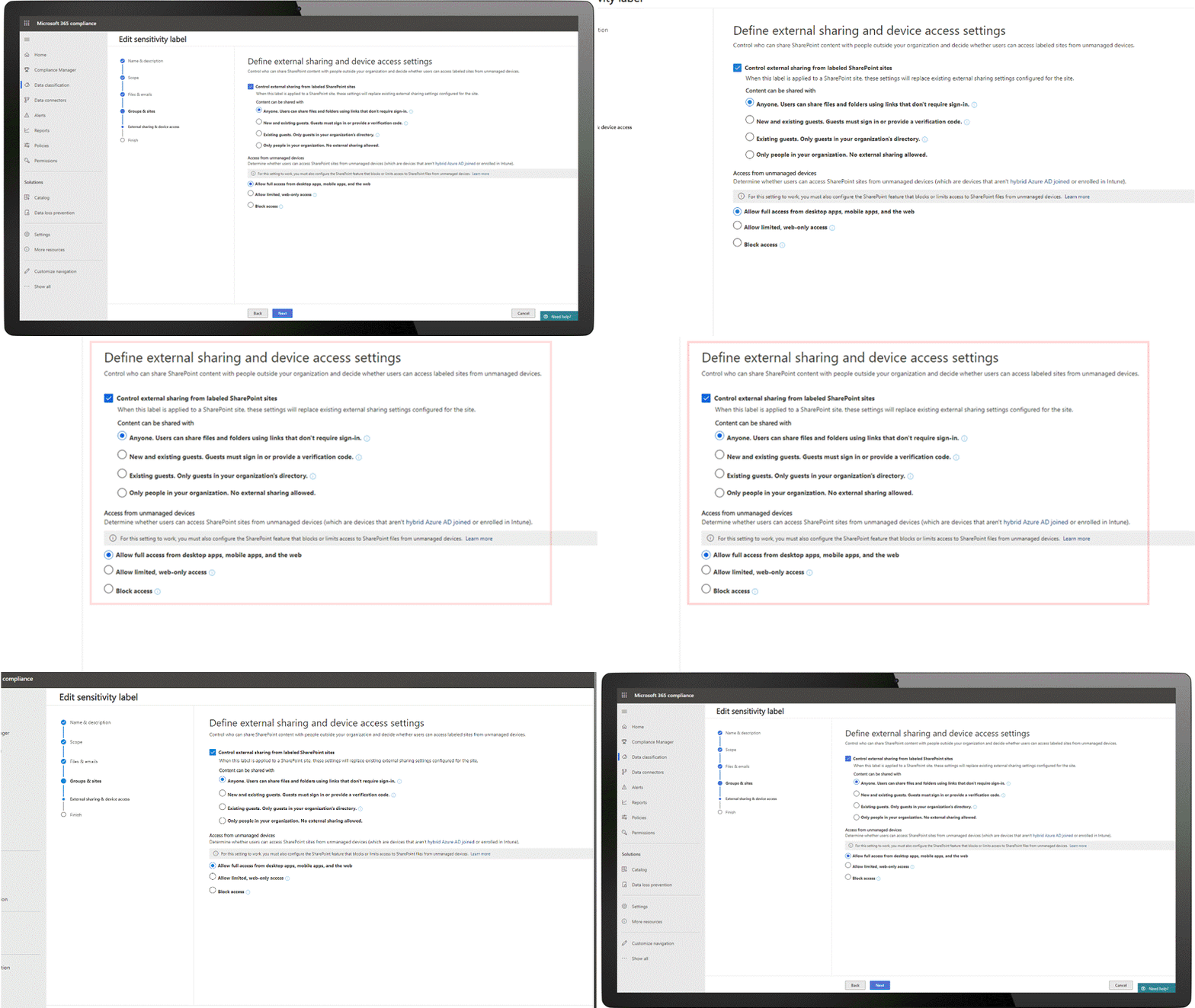
Figure 2: External sharing policies available alongside policy for unmanaged device access
Customer Key support for Teams
Microsoft 365 provides customer data protection at multiple layers, starting with volume-level encryption enabled through BitLocker, and then there is protection at the application layer. We offer Customer Key, so you can control a layer of encryption for your data in Microsoft’s data centers, with your own keys. This also enables you to meet requirements of compliance regulations for controlling your own keys.
Customer Key was already available for SharePoint, OneDrive, and Exchange. Today, we are pleased to announce that Customer Key is available in Public Preview for Microsoft Teams. You can now assign a single data encryption policy at the tenant level to encrypt your data-at-rest in Teams and Exchange. Click here to learn more.
Sensitivity labels in Power BI desktop
In June we announced general availability of MIP sensitivity labels in Power BI service, helping organizations classify and protect sensitive data even as it is exported from Power BI to Excel, PowerPoint and PDF files, all this without compromising user productivity or collaboration.
We’re now expanding MIP sensitivity labels support to Power BI desktop application (PBIX), in public preview, to enable content creators to classify and protect sensitive PBIX files while authoring datasets and reports in Power BI desktop. The label applied on PBIX files persist when uploaded to Power BI service. Learn more here.
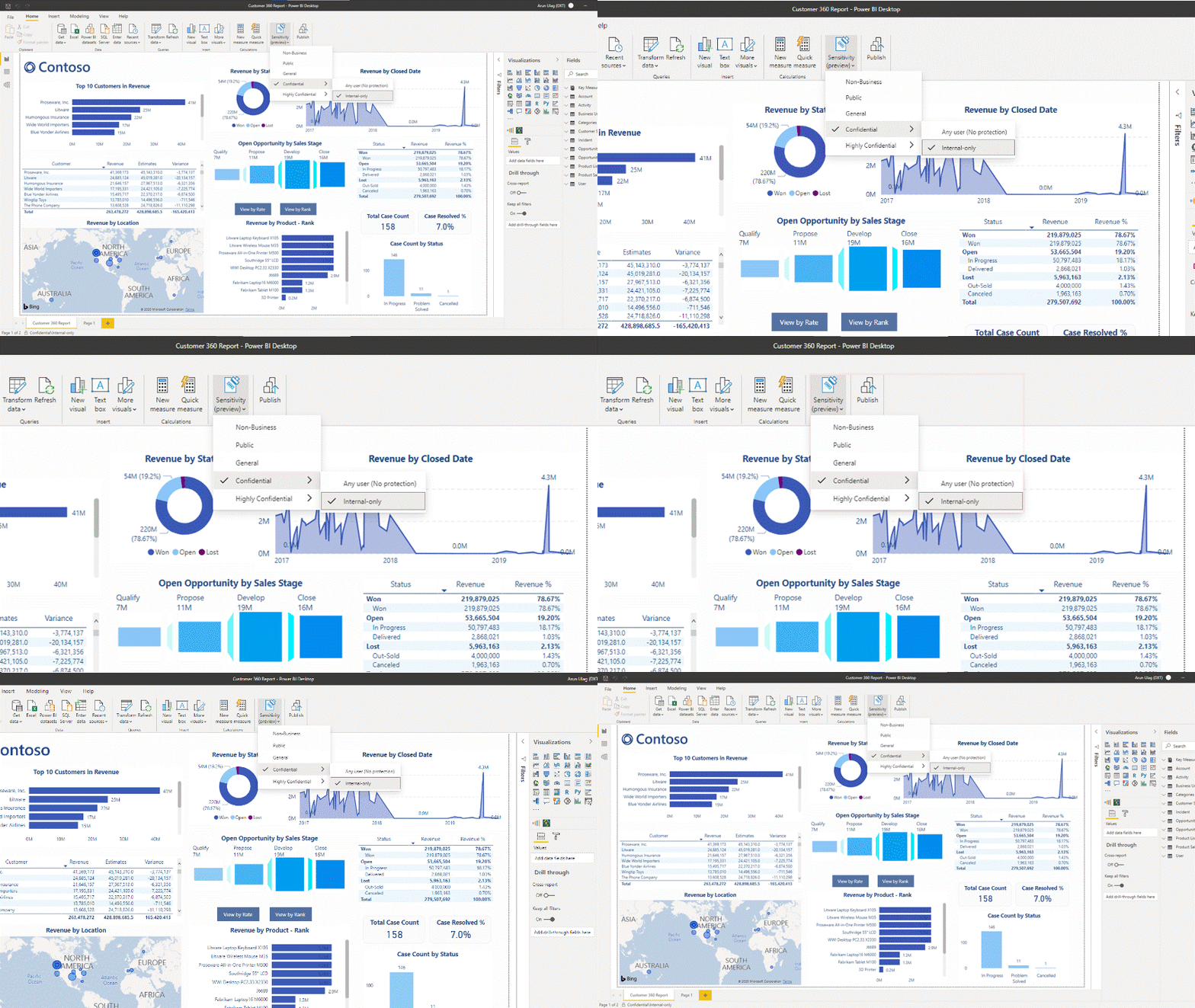
Figure 3: Sensitive built-in label experience in Power BI Desktop
We are also announcing the availability of a new API that enables administrators to get information on sensitivity labels applied to content in Power BI service. With this information, Power BI and Compliance admins can answer questions like which workspaces in Power BI service have reports with a specific label. Learn more here.
Data is the currency of today’s economy. Data is being created faster than ever in more locations than organizations can track. To secure your data and meet compliance requirements like the General Data Protection Requirement (GDPR) – you need to know what data you have, where it resides, and have capabilities to protect it. The above new capabilities are part of the built-in, intelligent, unified, and extensible solution that Microsoft Information Protection offers to enable both administrators and users to protect organization data while staying productive.
Getting Started
Here’s information on licensing and on how to get started with the capabilities announced today:
Maithili Dandige, Principal Group Program Manager
by Scott Muniz | Dec 17, 2020 | Security, Technology
This article is contributed. See the original author and article here.
This Alert uses the MITRE Adversarial Tactics, Techniques, and Common Knowledge (ATT&CK®) version 8 framework. See the ATT&CK for Enterprise version 8 for all referenced threat actor tactics and techniques.
The Cybersecurity and Infrastructure Security Agency (CISA) is aware of compromises of U.S. government agencies, critical infrastructure entities, and private sector organizations by an advanced persistent threat (APT) actor beginning in at least March 2020. This APT actor has demonstrated patience, operational security, and complex tradecraft in these intrusions. CISA expects that removing this threat actor from compromised environments will be highly complex and challenging for organizations.
One of the initial access vectors for this activity is a supply chain compromise of the following SolarWinds Orion products (see Appendix A).
- Orion Platform 2019.4 HF5, version 2019.4.5200.9083
- Orion Platform 2020.2 RC1, version 2020.2.100.12219
- Orion Platform 2020.2 RC2, version 2020.2.5200.12394
- Orion Platform 2020.2, 2020.2 HF1, version 2020.2.5300.12432
Note: CISA has evidence of additional initial access vectors, other than the SolarWinds Orion platform; however, these are still being investigated. CISA will update this Alert as new information becomes available.
On December 13, 2020, CISA released Emergency Directive 21-01: Mitigate SolarWinds Orion Code Compromise, ordering federal civilian executive branch departments and agencies to disconnect affected devices. Note: this Activity Alert does not supersede the requirements of Emergency Directive 21-01 (ED-21-01) and does not represent formal guidance to federal agencies under ED 21-01.
CISA has determined that this threat poses a grave risk to the Federal Government and state, local, tribal, and territorial governments as well as critical infrastructure entities and other private sector organizations. CISA advises stakeholders to read this Alert and review the enclosed indicators (see Appendix B).
Key Takeaways
- This is a patient, well-resourced, and focused adversary that has sustained long duration activity on victim networks.
- The SolarWinds Orion supply chain compromise is not the only initial infection vector this APT actor leveraged.
- Not all organizations that have the backdoor delivered through SolarWinds Orion have been targeted by the adversary with follow-on actions.
- Organizations with suspected compromises need to be highly conscious of operational security, including when engaging in incident response activities and planning and implementing remediation plans.
Click here for a PDF version of this report.
Overview
CISA is aware of compromises, which began at least as early as March 2020, at U.S. government agencies, critical infrastructure entities, and private sector organizations by an APT actor. This threat actor has demonstrated sophistication and complex tradecraft in these intrusions. CISA expects that removing the threat actor from compromised environments will be highly complex and challenging. This adversary has demonstrated an ability to exploit software supply chains and shown significant knowledge of Windows networks. It is likely that the adversary has additional initial access vectors and tactics, techniques, and procedures (TTPs) that have not yet been discovered. CISA will continue to update this Alert and the corresponding indicators of compromise (IOCs) as new information becomes available.
Initial Infection Vectors [TA0001]
CISA is investigating incidents that exhibit adversary TTPs consistent with this activity, including some where victims either do not leverage SolarWinds Orion or where SolarWinds Orion was present but where there was no SolarWinds exploitation activity observed. Volexity has also reported publicly that they observed an intrusion into a think tank using, as an initial intrusion vector, a Duo multi-factor authentication bypass in Outlook Web App (OWA) to steal the secret key.[1] Volexity attributes this intrusion to the same activity as the SolarWinds Orion supply chain compromise, and the TTPs are consistent between the two. This observation indicates that there are other initial access vectors beyond SolarWinds Orion, and there may still be others that are not yet known.
SolarWinds Orion Supply Chain Compromise
SolarWinds Orion is an enterprise network management software suite that includes performance and application monitoring and network configuration management along with several different types of analyzing tools. SolarWinds Orion is used to monitor and manage on-premise and hosted infrastructures. To provide SolarWinds Orion with the necessary visibility into this diverse set of technologies, it is common for network administrators to configure SolarWinds Orion with pervasive privileges, making it a valuable target for adversary activity.
The threat actor has been observed leveraging a software supply chain compromise of SolarWinds Orion products[2] (see Appendix A). The adversary added a malicious version of the binary solarwinds.orion.core.businesslayer.dll into the SolarWinds software lifecycle, which was then signed by the legitimate SolarWinds code signing certificate. This binary, once installed, calls out to a victim-specific avsvmcloud[.]com domain using a protocol designed to mimic legitimate SolarWinds protocol traffic. After the initial check-in, the adversary can use the Domain Name System (DNS) response to selectively send back new domains or IP addresses for interactive command and control (C2) traffic. Consequently, entities that observe traffic from their SolarWinds Orion devices to avsvmcloud[.]com should not immediately conclude that the adversary leveraged the SolarWinds Orion backdoor. Instead, additional investigation is needed into whether the SolarWinds Orion device engaged in further unexplained communications. If additional Canonical Name record (CNAME) resolutions associated with the avsvmcloud[.]com domain are observed, possible additional adversary action leveraging the back door has occurred.
Based on coordinated actions by multiple private sector partners, as of December 15, 2020, avsvmcloud[.]com resolves to 20.140.0[.]1, which is an IP address on the Microsoft blocklist. This negates any future use of the implants and would have caused communications with this domain to cease. In the case of infections where the attacker has already moved C2 past the initial beacon, infection will likely continue notwithstanding this action.
SolarWinds Orion typically leverages a significant number of highly privileged accounts and access to perform normal business functions. Successful compromise of one of these systems can therefore enable further action and privileges in any environment where these accounts are trusted.
Anti-Forensic Techniques
The adversary is making extensive use of obfuscation to hide their C2 communications. The adversary is using virtual private servers (VPSs), often with IP addresses in the home country of the victim, for most communications to hide their activity among legitimate user traffic. The attackers also frequently rotate their “last mile” IP addresses to different endpoints to obscure their activity and avoid detection.
FireEye has reported that the adversary is using steganography (Obfuscated Files or Information: Steganography [T1027.003]) to obscure C2 communications.[3] This technique negates many common defensive capabilities in detecting the activity. Note: CISA has not yet been able to independently confirm the adversary’s use of this technique.
According to FireEye, the malware also checks for a list of hard-coded IPv4 and IPv6 addresses—including RFC-reserved IPv4 and IPv6 IP—in an attempt to detect if the malware is executed in an analysis environment (e.g., a malware analysis sandbox); if so, the malware will stop further execution. Additionally, FireEye analysis identified that the backdoor implemented time threshold checks to ensure that there are unpredictable delays between C2 communication attempts, further frustrating traditional network-based analysis.
While not a full anti-forensic technique, the adversary is heavily leveraging compromised or spoofed tokens for accounts for lateral movement. This will frustrate commonly used detection techniques in many environments. Since valid, but unauthorized, security tokens and accounts are utilized, detecting this activity will require the maturity to identify actions that are outside of a user’s normal duties. For example, it is unlikely that an account associated with the HR department would need to access the cyber threat intelligence database.
Taken together, these observed techniques indicate an adversary who is skilled, stealthy with operational security, and is willing to expend significant resources to maintain covert presence.
Privilege Escalation and Persistence [TA0004, TA0003]
The adversary has been observed using multiple persistence mechanisms across a variety of intrusions. CISA has observed the threat actor adding authentication tokens and credentials to highly privileged Active Directory domain accounts as a persistence and escalation mechanism. In many instances, the tokens enable access to both on-premise and hosted resources. Microsoft has released a query that can help detect this activity.[4]
Microsoft reported that the actor has added new federation trusts to existing infrastructure, a technique that CISA believes was utilized by a threat actor in an incident to which CISA has responded. Where this technique is used, it is possible that authentication can occur outside of an organization’s known infrastructure and may not be visible to the legitimate system owner. Microsoft has released a query to help identify this activity.[5]
User Impersonation
The adversary’s initial objectives, as understood today, appear to be to collect information from victim environments. One of the principal ways the adversary is accomplishing this objective is by compromising the Security Assertion Markup Language (SAML) signing certificate using their escalated Active Directory privileges. Once this is accomplished, the adversary creates unauthorized but valid tokens and presents them to services that trust SAML tokens from the environment. These tokens can then be used to access resources in hosted environments, such as email, for data exfiltration via authorized application programming interfaces (APIs).
CISA has observed in its incident response work adversaries targeting email accounts belonging to key personnel, including IT and incident response personnel.
These are some key functions and systems that commonly use SAML.
- Hosted email services
- Hosted business intelligence applications
- Travel systems
- Timecard systems
- File storage services (such as SharePoint)
Detection: Impossible Logins
The adversary is using a complex network of IP addresses to obscure their activity, which can result in a detection opportunity referred to as “impossible travel.” Impossible travel occurs when a user logs in from multiple IP addresses that are a significant geographic distance apart (i.e., a person could not realistically travel between the geographic locations of the two IP addresses during the time period between the logins). Note: implementing this detection opportunity can result in false positives if legitimate users apply virtual private network (VPN) solutions before connecting into networks.
Detection: Impossible Tokens
The following conditions may indicate adversary activity.
- Most organizations have SAML tokens with 1-hour validity periods. Long SAML token validity durations, such as 24 hours, could be unusual.
- The SAML token contains different timestamps, including the time it was issued and the last time it was used. A token having the same timestamp for when it was issued and when it was used is not indicative of normal user behavior as users tend to use the token within a few seconds but not at the exact same time of issuance.
- A token that does not have an associated login with its user account within an hour of the token being generated also warrants investigation.
Operational Security
Due to the nature of this pattern of adversary activity—and the targeting of key personnel, incident response staff, and IT email accounts—discussion of findings and mitigations should be considered very sensitive, and should be protected by operational security measures. An operational security plan needs to be developed and socialized, via out-of-band communications, to ensure all staff are aware of the applicable handling caveats.
Operational security plans should include:
- Out-of-band communications guidance for staff and leadership;
- An outline of what “normal business” is acceptable to be conducted on the suspect network;
- A call tree for critical contacts and decision making; and
- Considerations for external communications to stakeholders and media.
MITRE ATT&CK® Techniques
CISA assesses that the threat actor engaged in the activities described in this Alert uses the below-listed ATT&CK techniques.
- Query Registry [T1012]
- Obfuscated Files or Information [T1027]
- Obfuscated Files or Information: Steganography [T1027.003]
- Process Discovery [T1057]
- Indicator Removal on Host: File Deletion [T1070.004]
- Application Layer Protocol: Web Protocols [T1071.001]
- Application Layer Protocol: DNS [T1071.004]
- File and Directory Discovery [T1083]
- Ingress Tool Transfer [T1105]
- Data Encoding: Standard Encoding [T1132.001]
- Supply Chain Compromise: Compromise Software Dependencies and Development Tools [T1195.001]
- Supply Chain Compromise: Compromise Software Supply Chain [T1195.002]
- Software Discovery [T1518]
- Software Discovery: Security Software [T1518.001]
- Create or Modify System Process: Windows Service [T1543.003]
- Subvert Trust Controls: Code Signing [T1553.002]
- Dynamic Resolution: Domain Generation Algorithms [T1568.002]
- System Services: Service Execution [T1569.002]
- Compromise Infrastructure [T1584]
SolarWinds Orion Owners
Owners of vulnerable SolarWinds Orion products will generally fall into one of three categories.
- Category 1 includes those who do not have the identified malicious binary. These owners can patch their systems and resume use as determined by and consistent with their internal risk evaluations.
- Category 2 includes those who have identified the presence of the malicious binary—with or without beaconing to avsvmcloud[.]com. Owners with malicious binary whose vulnerable appliances only unexplained external communications are with
avsvmcloud[.]com—a fact that can be verified by comprehensive network monitoring for the device—can harden the device, re-install the updated software from a verified software supply chain, and resume use as determined by and consistent with a thorough risk evaluation.
- Category 3 includes those with the binary beaconing to
avsvmcloud[.]com and secondary C2 activity to a separate domain or IP address. If you observed communications with avsvmcloud[.]com that appear to suddenly cease prior to December 14, 2020— not due to an action taken by your network defenders—you fall into this category. Assume the environment has been compromised, and initiate incident response procedures immediately.
Compromise Mitigations
If the adversary has compromised administrative level credentials in an environment—or if organizations identify SAML abuse in the environment, simply mitigating individual issues, systems, servers, or specific user accounts will likely not lead to the adversary’s removal from the network. In such cases, organizations should consider the entire identity trust store as compromised. In the event of a total identity compromise, a full reconstitution of identity and trust services is required to successfully remediate. In this reconstitution, it bears repeating that this threat actor is among the most capable, and in many cases, a full rebuild of the environment is the safest action.
SolarWinds Orion Specific Mitigations
The following mitigations apply to networks using the SolarWinds Orion product. This includes any information system that is used by an entity or operated on its behalf.
Organizations that have the expertise to take the actions in Step 1 immediately should do so before proceeding to Step 2. Organizations without this capability should proceed to Step 2.
- Step 1
- Forensically image system memory and/or host operating systems hosting all instances of affected versions of SolarWinds Orion. Analyze for new user or service accounts, privileged or otherwise.
- Analyze stored network traffic for indications of compromise, including new external DNS domains to which a small number of agency hosts (e.g., SolarWinds systems) have had connections.
- Step 2
- Affected organizations should immediately disconnect or power down affected all instances of affected versions of SolarWinds Orion from their network.
- For federal agencies: Until such time as CISA directs affected agencies to rebuild the Windows operating system (OS) and reinstall the SolarWinds software package, agencies are prohibited from (re)joining the Windows host OS to the enterprise domain. Affected entities should expect further communication from CISA and await guidance before rebuilding from trusted sources utilizing the latest version of the product available.
- Additionally:
- Block all traffic to and from hosts, external to the enterprise, where any version of SolarWinds Orion software has been installed.
- Identify and remove all threat actor-controlled accounts and identified persistence mechanisms.
- Step 3
- Only after all known threat actor-controlled accounts and persistence mechanisms have been removed:
See Joint Alert on Technical Approaches to Uncovering and Remediating Malicious Activity for more information on incident investigation and mitigation steps based on best practices.
CISA will update this Alert, as information becomes available and will continue to provide technical assistance, upon request, to affected entities as they work to identify and mitigate potential compromises.

by Scott Muniz | Dec 17, 2020 | Security
This article was originally posted by the FTC. See the original article here.
If you’ve explored alternative treatments for medical conditions, you’ve probably noticed that CBD products are pretty popular. But if an ad claims a CBD-based product is scientifically proven to cure or treat your symptoms, take that with a dose of caution to prevent losing money and, possibly, putting your health at risk.
Today, the FTC announced six proposed complaints and settlement agreements as part of “Operation CBDeceit.” This operation is a law enforcement sweep against companies claiming their CBD products treat serious diseases and chronic health conditions like diabetes, depression, arthritis, heart disease, Alzheimer’s, and cancer. The FTC also says one of the companies charged people’s credit cards for bottles of CBD extract they hadn’t ordered. The proposed settlements would ban these companies and their affiliates from making disease prevention and cure claims without adequate scientific proof to back them up. As part of the settlements, the companies would have to notify people who bought their CBD products that no scientific evidence supports the companies’ serious health-related claims.
Operation CBDeceit is the FTC’s latest crackdown against companies making misleading or false statements about the health benefits of their products. Before CBD companies can claim their products are proven to treat or cure symptoms or diseases, they must have scientific evidence that meets the standards set by experts in those diseases and conditions.
Before you try CBD-based or any other products, take these steps to protect yourself:
-
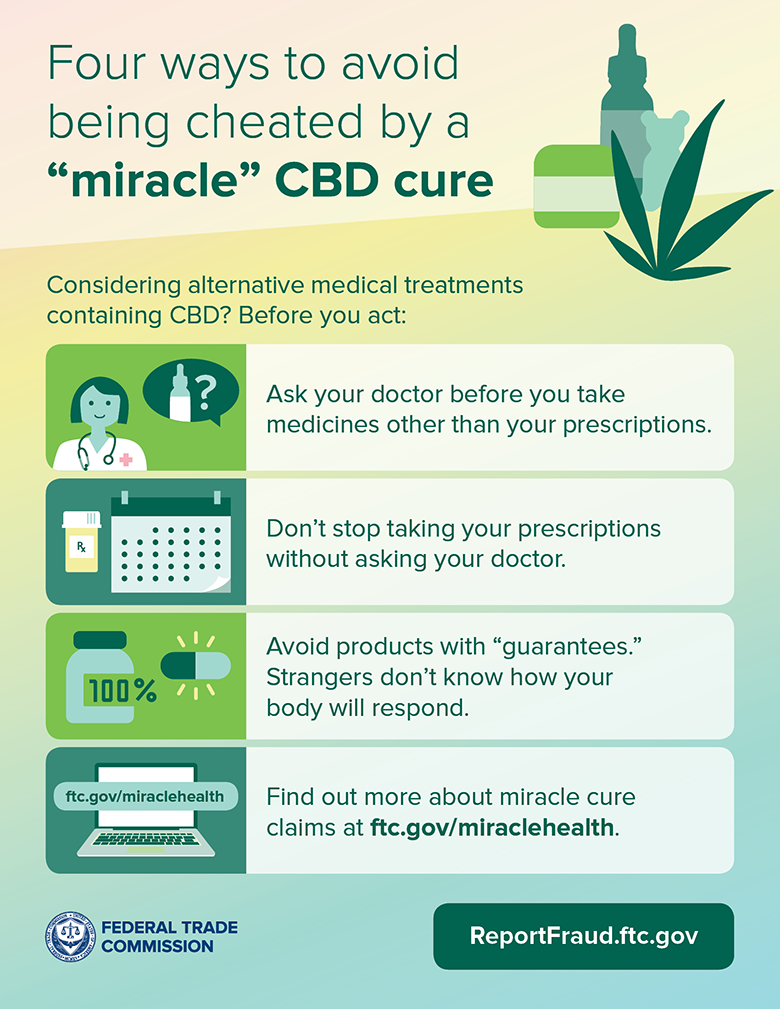
Talk to your doctor before trying any alternative medicines — and definitely before you stop taking any prescription medications. .
-
Avoid products that say they’re “guaranteed” to treat your condition. These people don’t even know you. How can they know a product will work with your body to treat your condition?
-
Find out more about miracle cure claims by reading the infographic below and visiting FTC.gov/miraclehealth.
If you think a company deceived you about how effective its products are, report it to the FTC at ReportFraud.ftc.gov.
Brought to you by Dr. Ware, Microsoft Office 365 Silver Partner, Charleston SC.


Recent Comments