by Scott Muniz | Jul 14, 2020 | Azure, Microsoft, Technology, Uncategorized
This article is contributed. See the original author and article here.
Intro
In this blog I want to give a very condensed overview of key architecture patterns for designing enterprise data analytic environments using Azure PaaS.
This will cover:
1 Design Tenets
2 People and Processes
3 Core Platform
3.1 Data Lake Organisation
3.2 Data Products
3.3 Self Service Analytics
4 Security
5 Resilience
6 DevOps
7 Monitoring and Auditing
8 Conclusion
This blog is primarily aimed at decision makers, leadership, and architects. By the end you should be able to narrate the big picture below by having a basic understanding of key patterns, how Azure enforces governance yet accelerates development via self-service and DevOps, a clear prescriptive solution, and an awareness of relevant follow-up topics. This will provide a broad high-level overview of running an analytics platform in Azure. Links to detailed and in-depth material will be included for further reading. Whilst there is a lot of information, we will dissect and discuss piece by piece.
The architecture presented here is based on real-world deployments using GA services with financially backed SLAs and support.
When Azure Synapse, the unified analytics service that provides a service of services to streamline the end to end journey of analytics into a single pane of glass, goes fully GA we’ll be able to further simplify elements of the design.
This architecture has been adjusted over time to account for various scenarios I’ve encountered with customers, however I should call out some organisations require more federation and decentralisation, in which cases a mesh architecture may be more suitable.
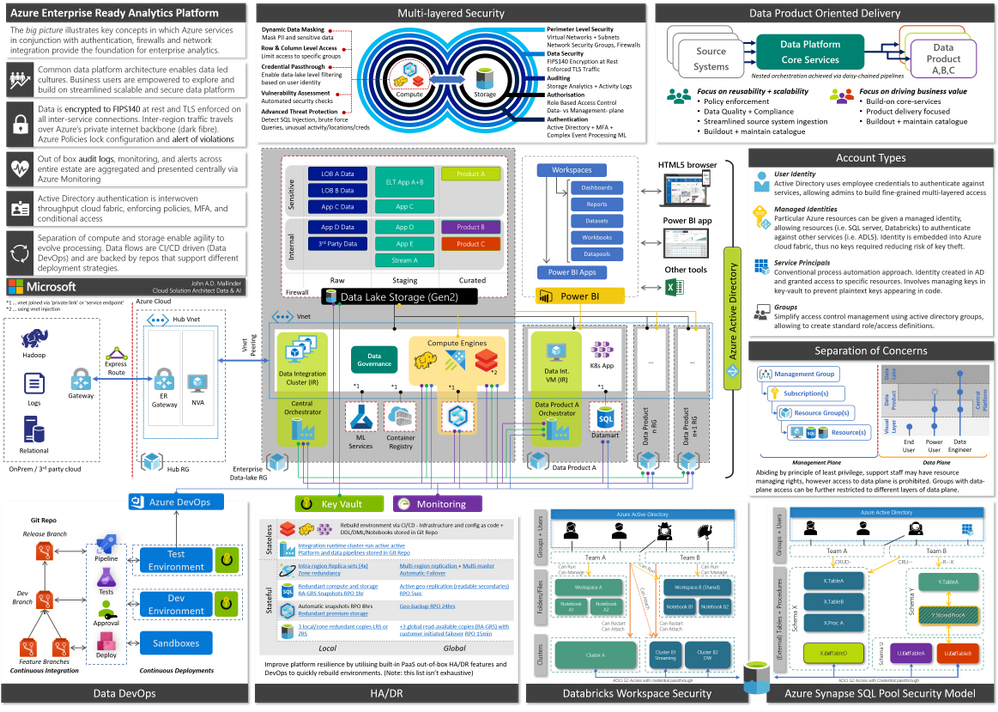
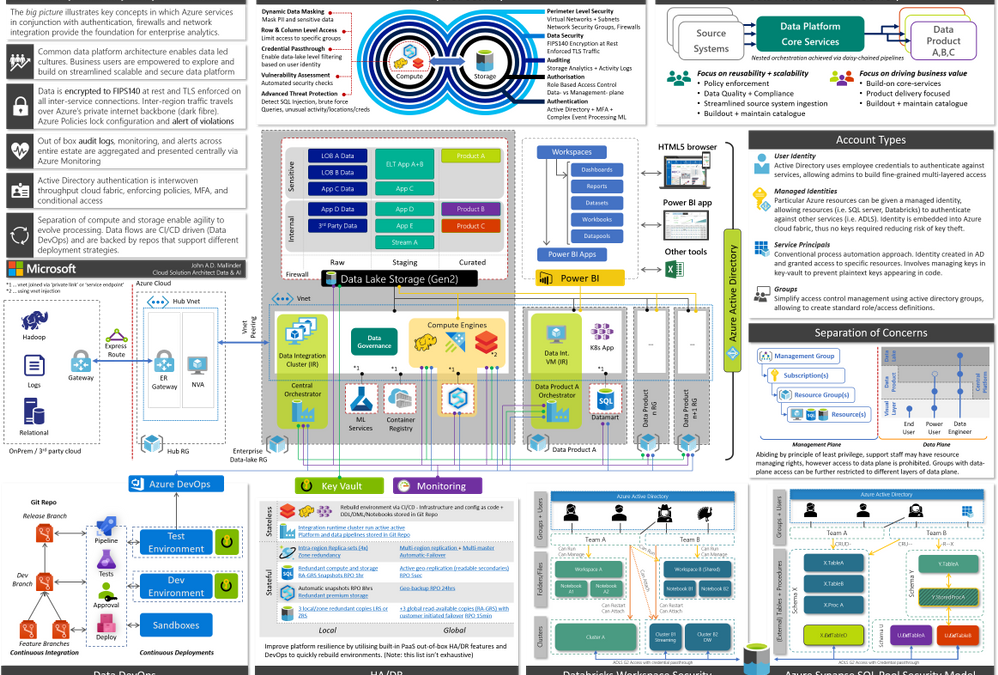
Figure 1, full version in attachment
Operating an enterprise data platform is the convergence of data-ops, security, governance, monitoring, scale-out, and self-service analytics. Understanding how these facets interplay is crucial to appreciate the nuances that make Azure compelling for enterprises. Let us start by defining core requirements of our platform.
1 Design Tenets
| 1. Self-Service |
We want to support power-users and analysts, with deep business operational understanding, to allow them to view data in context of other data sets and derive new insights. Thus, creating a culture where data-led decisions are encouraged, short circuiting bureaucracy and long turnaround times. |
| 2. Data Governance |
As data becomes a key commodity within the organisation it must be treated accordingly. We need to understand what data is, its structure, what it means, and where it is from regardless where it lives. Thus, creating visibility for users to explore-, share-, and reuse- datasets. |
| 3. Holistic Security |
We want a platform which is secure by design – everything must be encrypted in transit and at rest. All access must be authorised and monitored. We want governance controls to continuously scan our estate and ensure it is safe and compliant. |
| 4. Resilience |
We want self-healing capabilities that can automatically mitigate issues and pro-actively contact respective teams. Reducing downtime and manual intervention. |
| 5. Single Identity |
We want to use single-sign-on across the estate, so we can easily control who has access to the various layers (platform, storage, query engines, dashboards etc) and avoid the proliferation of ad-hoc user accounts. |
| 6. Scalable by Design |
We want to be able to efficiently support small use-cases as well as pan-enterprise projects scaling to PBs of data, whether it is a handful- or 1000s of users. |
| 7. Agility |
Aka a modular design principle, we need to be able to evolve the platform as and when new technologies arrive on the market without having to migrate data and re-implement controls, monitoring, and security. Layers of abstraction between compute and storage decouple various services making us less reliant on any single service. |
| 8. DevOps |
We want to streamline and automate as many deployment processes as possible, to increase platform productivity. Every aspect of the platform is expressed as code and changes are tested and reviewed in separate environments. Deployments are idempotent allowing us to continuously add new features without impacting existing services. |
2 People and Processes
The architecture covers people, processes, and technology – in this section we are going to start with the people and identify how groups work together.
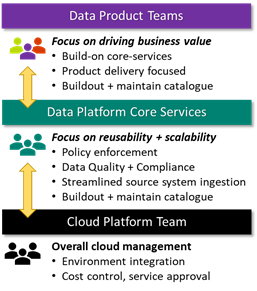
We define three groups, Data Platform Core Services (DPCS), Cloud Platform Team (CPT), and Data Product teams. The DPCS and data product groups consist of multiple scrum teams, who in turn have a mix of different specialists (data -analyst, -engineer, -scientist, -architect, tester, and scrum master) tailored to their remit and managed by a platform or analytics manager.
Data Platform Core Services (DPCS) primary focus is to think in terms of data democratisation and platform reusability. This translates to building out a catalogue of data assets (derived from various source systems) and monitor the platform with respect to governance and performance. It is essential that DPCS sets up channels to collect feedback using a combination of regular touchpoints with stakeholders and DevOps feedback mechanisms (i.e. GitHub bug/feedback tickets). A key success measure is the avoidance of duplicate integrations to the same business-critical systems.
DPCS scrum teams are aligned to types of source system (i.e. streaming, SAP, filesystem) and source domain (i.e. HR, finance, supply chain, sales etc.). This approach requires scrum teams to be somewhat fluid as individuals may need to move teams to cater to required expertise.
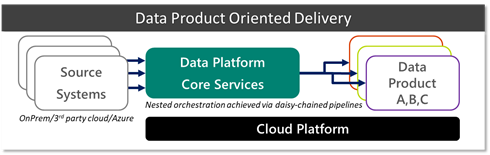
 Onboarding a new data source is typically the most time-consuming activity, due to data and network integration, capacity testing, and approvals. Crucially however, these source integrations are developed with reusability in mind, in contrast to building redundant integrations per project. Conceptually, sources funnel into a single highly scalable data lake that can be mounted by several engines and support granular access controls.
DPCS can be thought of as an abstraction layer from source systems, giving data product teams access to reusable assets. Assets can be any volume, velocity, or variety.
DPCS heavily leans on services and support provided by the Cloud Platform Team (CPT) which own the overall responsibility of the cloud platform and enforcement of organisation wide policies. CPT organisation and processes has been covered extensively in Azure Cloud Adoption Framework (CAF).
The third group represents the Data Product teams. Their priority is delivering business value. These teams are typically blended with stakeholders and downstream teams to create unified teams that span across IT and business and ensure outcomes are met expediently. In the first instance these groups will review available data sources in the data catalogue and consume assets where possible. If a request arises for a completely new source, they proceed by engaging DPCS to onboard a new data source. Subject to policies, there may be scenarios where data product teams can pull in small ad-hoc datasets directly, either because it is too niche or not reusable.
A data product is defined as a project that will achieve some desired business outcome – it may be something simple such as a report, ad-hoc analysis in spark all the way up to a distributed application (i.e. Kubernetes) providing data services for downstream applications.
There is a lot to be said here about people and processes, however in the spirit of conciseness we will leave it at the conceptual level. CIO.com and Trifacta provide additional interesting views on DataOps and team organisation.
This partnership between DPCS and various Data Product teams is visualised below.
3 Core Platform
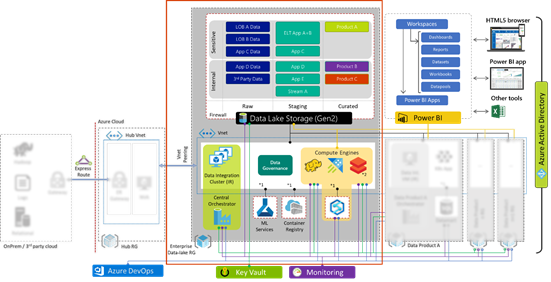
The centre represents the core data platform (outlined by the red box) which forms one of the spokes from the central hub, which is a common architectural pattern. The hub resource group on the left is maintained by the cloud platform team and acts as the central point of logging, security monitoring, and connectivity to on-prem environments via express route or site-to-site VPN. Thus, our platform forms an extension of the corporate network.
Our enterprise data platform ‘spoke’ provides all the essential capabilities consisting of:
| Data Movement |
Moving and orchestrating data using Azure Data Factory (ADF) allows us to pull data in from 3rd party public + private clouds, SaaS, and on-prem via Integration Runtimes enabling central orchestration. |
| Data Lake |
Azure Data Lake Storage Gen2 (ADLS G2) provides a resilient scalable storage environment, that can be accessed from native and 3rd party analytic engines. Further if has built in auditing, encryption, HA, and enforces access control. |
| Analytic Engines |
Analytic compute engines provide a query interface over data (i.e. Synapse SQL, Data Explorer, Databricks (Spark), HDInsight (Hadoop), 3rd party engines etc.) |
| Data Catalogue |
Data cataloguing service to discover and classify datasets for self-service (Azure Data Catalogue Gen2, Informatica, Collibra and more) |
| Visualisation |
Using Power Bi to enable citizen analytics by simplifying consumption and creation of analytics to present reports, dashboards, and publish insights across the org |
| Key Management |
Azure Key vault securely store service principal credentials and other secrets which can be used for automation |
| Monitoring |
Azure Monitor aggregates logs and telemetry from across the estate and surfaces system health status via single dashboard |
| MLOps |
Azure Machine Learning provides necessary components to support AI/ML development, model life cycle management, and deployment activities using DevOps methodology
|
Crucially, all PaaS services mentioned above are mounted to a private virtual network (VNET, blue dotted box) via service endpoints and private links. Which allows us to lock-down access to within our corporate network, blocking all external endpoints/traffic.
This core platform is templated and deployed as code via CI/CD, and Azure Policies are leveraged to monitor and enforce compliance over time. A sample policy may state all firewalls must block all incoming ports, and all data must be encrypted regardless of who is trying to make these changes including admins. We will further expand on security in the next segment.
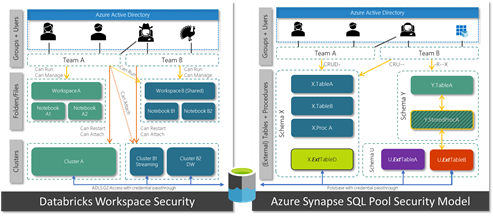
Data Product teams may just need a UI to run some queries, at which point they can use the DPCS analytic engines (Azure Synapse, Databricks, HDInsight etc.). Analytic engines expose mechanisms to deny and allow groups access to different datasets. In Azure Databricks for instance we can define which groups can access (attach), and control (restart, start, stop) individual compute clusters. Other services such as Azure Data Explorer, and HDInsight expose similar constructs.
What about Azure Synapse?
The majority of essential capabilities above are streamlined into a single authoring experience within Azure Synapse, greatly simplifying overall management and creation of new data products. Whilst providing support for new features such as on-demand SQL.
Whilst Azure has over 150 services to cater for all sorts of requirements, our core analytic platform provides all key capabilities to enable an end to end enterprise analytics using a handful of services. From a skills standpoint teams can focus on building out core expertise as opposed to having to master many different technologies.
As and when new scenarios arise, architects can assess how to complement the platform and expand capabilities shown in the diagram below.
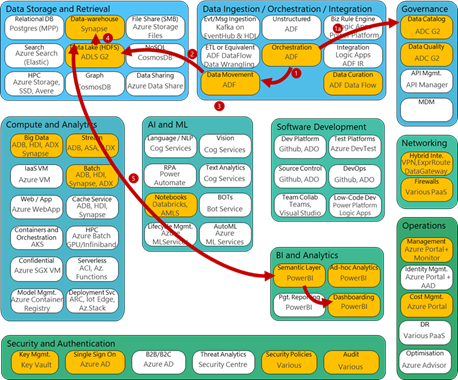
Figure 2, capability model adapted from Stephan Mark-Armoury. This model is not exhaustive.
3.1 Data Lake Organisation
The data lake is the heart of the platform and serves as an abstraction layer between the data layer and various compute engines. Azure Data Lake Storage Gen2 (ADLS G2) is highly scalable and natively supports the HDFS interface, hierarchical folder structures, and fine-grained access control lists (ACLs), along with replication, and storage access tiers to optimise cost.
This allows us to carve out Active Directory groups to grant granular access, i.e. who can read or write, to different parts of the data-lake. We can define restricted areas, shared read-only areas, and data product specific areas. As ADLS G2 natively integrates with Azure Active Directory we can leverage SSO, for access and auditing.
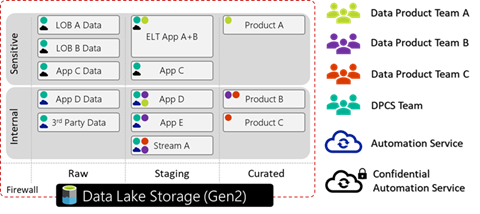 Figure 3, an ADLS G2 account with three file systems (raw, staging, and curated), data split by sensitivity. Different groups have varying read-write access to different parts of the lake.
Data lake design can get quite involved and architects must settle for a logical partitioning pattern. For instance, a company may decide to store data by domain (finance, HR, engineering etc.), geography, confidentiality etc.
Whilst every organisation must make this assessment for themselves, a sample pattern could look like the following:
{Layer} > {Org | Domain} > {System} > {Sensitivity} > {Dataset} > {Load Date} > [Files]
I.e. Raw > Corp > MyCRM > Confidential > Customer > 2020 > 04 > 08 > [Files]
The Hitcher Hikers Guide to the Data-lake is an excellent resource to understand different considerations that companies need to make.
3.2 Data Products
If a DP team needs a more custom setu p, they can request their own resource group which is mounted to the DPCS VNET. Thus, they are secured and integrated to all DPCS services such as the data-lake, analytic engines etc. Within their resource group they can spin up additional services, such as a K8S environment, databases etc. However, they cannot edit the network or security settings. Using policies DPCS can enforce rules on these custom deployed services to ensure they adhere to respective security standards.
There are various reasons for DP teams to request their own environment:
- federated layout – some groups want more control yet still align with core platform and processes
- highly customised – some solutions require a lot of niche customisation (e.g. optimisation)
- solutions that require a capability that is not available in the core platform
In short DP teams can consume data assets from the core platform, and process them in their own resource group which can represent a data product.
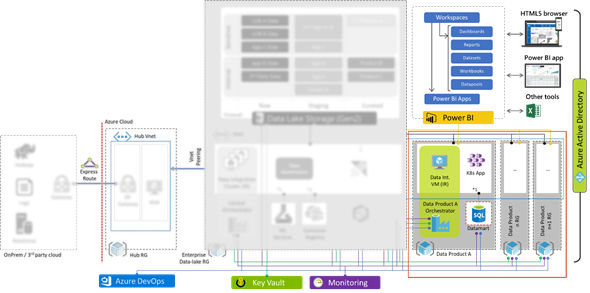
Figure 4 deploying additional data products that require custom setup
In a separate blog I discuss how enterprises may employ multiple Azure Data Factories to enable cross-factory integration.
3.3 Self Service Analytics
Self-service analytics has been a market trend for many years now with PowerBI being a leader, empowering analysts and the like to digest and develop analytics with minimal IT intervention .
Users can access data using any of the following methods:
| PowerBI |
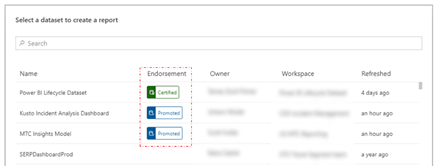
Expose datasets as a service – DPCS can establish connections to data in Power BI allowing users to discover and consume these published datasets in a low-no-code fashion, join, prepare, explore, and build reports and dashboards. Using the ‘endorsement’ feature within Power BI DPCS can indicate whether content is certified, promoted or not. Alternativel y, users can define and build their own ad-hoc data sets within Power BI.
|
| ADF Data Flows |
Azure Data Factory Mapping- (visual spark) and wrangling- (power query) data flows provide a low-/no-code experience to wrangle data and integrate as part of a larger automated ADF pipeline. |
| Code first query access |
Power-users may demand access to run spark or SQL commands. DPCS can expose this experience using any of their core platform analytic engines. Azure Synapse provides on-demand spark and SQL interfaces to quickly explore and analyse several datasets. Azure Databricks provides a premium spark interface. By joining the respective Azure Active Directory group (AAD) access to different parts of the system can be automated subject to approval. DPCS can apply additional controls in the analytic engine, i.e. masking sensitive data, hiding rows or columns etc. |
| Direct storage access |
The data-lake supports POSIX ACLs, some groups such as data engineers may request read access to some datasets and read/write access to others, for instance their storage workspace (akin to a personal drive), by joining respective AAD groups. From there they can mount it into their tool of choice.
|
4 Security
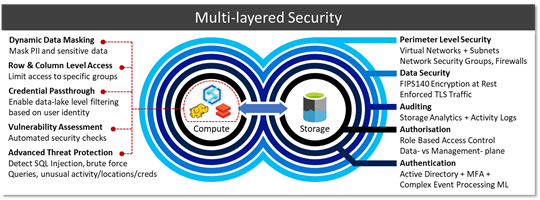
As mentioned earlier the architecture leverages PaaS throughout and is locked down in order to satisfy security requirements from security conscious governments and organisations.
| Perimeter security |
PaaS public endpoints are blocked, Virtual Networks (VNETs) ports in-/out-bound are controlled via Network Security Groups (NSGs). On top of this customers may opt to use services such as Azure Network Watcher or 3rd party NVAs to inspect traffic. |
| Encryption |
By default, all services, regardless whether data is in transit or at rest is encrypted. Many services allow customers to bring their own keys (BYOK) integrated with Azure Key Vaults FIPS140-2 level 2 HSMs. Microsoft cannot see or access these keys. Caveat emptor, your data cannot be recovered if these keys are lost/deleted. |
| Blueprints and policies |
Using Azure policies, we can specify security requirements, i.e. that data must remain encrypted at rest and in-transit. Our estate is continuously audited against these policies and violations denied and/or escalated. |
| Auditing |
Auditing capabilities give us low-level granular logs which are aggregated from all services and forwarded onto to Azure Monitor to allow us to analyse events. |
| Authz |
As every layer is integrated with Azure Active Directory (AAD) we can carve out groups that provide access to specific layers of our platform– moreover we can define which of these groups can access which parts of the data-lake, for instance which tables within a database, which workspaces in Databricks, which dashboards and reports in Power BI. |
| Credential passthrough |
Some services boast credential-passthrough allowing Power BI to pass logged-in user details into Azure Synapse to run row- or column level filtering, which in turn could pass those same credentials to the storage layer (via external tables) to fetch some data from the data lake which can verify whether presented user has read access on the mapped file/folder. |
| Analytics Runtime Security |
On top of these capabilities the various analytic runtimes provide additional mechanisms to secure data, such as masking, row/column level access, advanced threat protection and more subject to individual engines. |
Thus, we end up with layers of authorisation mapped against single identity provider which is woven into the fabric of our data platform creating defense in depth. Thus, avoiding proliferation of ad-hoc identities, random SSH accounts, or identity federations that take time to sync.
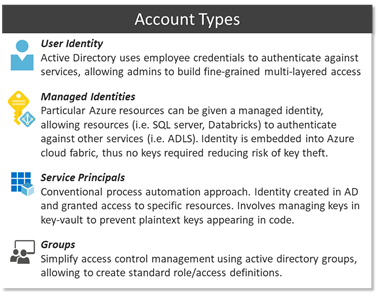 Whilst Azure does support service principals for automation, a simpler approach is to use Managed Identities (MIs) which are based on the inherent trust relationship between services and the Azure platform. Thus, services can be given an implicit identity that can be granted access to other parts of the platform. This escapes the need for key life-cycle management.
Using this identity model, we can define granular separation of concerns. Abiding by the principle of least privilege, support staff may have resource managing rights, however access to the data plane is prohibited. As an example, the support team could manage replication settings and other config in an Azure DB via the Azure Portal or CLI yet denied access to the actual database contents. Some user with data-plane access on the contrary may be denied access to platform configuration, i.e. firewall config, and is restricted to an area (i.e. table, schema, data-lake location, reports etc.) within the data plane.
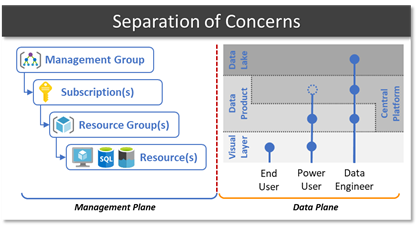
As an example, we could create a “Finance Power-User” group who are given access to some finance related workspaces in Power BI, plus access to a SQL interface in the central platform that can read restricted finance tables and some common shared tables. Standard “Finance users” on the other hand only have access to some dashboards and reports in Power BI. Users can be part of multiple groups inheriting access rights of both groups.
Orgs spend a fair amount of time defining what this security structure looks like as in many cases business domains, sub-domains and regions need to be accounted for. This security layout influences file/folder and schema structures.
5 Resilience
Whilst I will not do cloud HA/DR justice in a short blog its worth highlighting various native capabilities available within some of the PaaS services. These battle-tested capabilities allow teams to spend more time on building out value-add features as opposed to time consuming, but necessary resilience. This is a summary and by no means exhaustive.
Stateless
Stateful
Conceptually we split services into 2 groups. Stateless services that can be rebuilt from templates without losing data versus stateful that require data replication and storage redundancy in order to prevent data loss and meet RPO/RTO objectives. This is based on the premise that compute and storage is separated.
Organisations should also consider scenarios in which data lake has been corrupted or deleted, accidentally, deliberately, or otherwise.
Account level: Azure Resource locks prevent modification or deletion of an Azure resource.
Data level: Create incremental ADF copy-job to create second in second ADLS account. Note: Currently soft-delete, change-feed, versioning, and snapshots, are blob only, however will eventually support multi-protocol access.
Some organisations are happy with a locally redundant setup, others request zonal redundancy, whilst others need global redundancy. There are various out-of-the-box capabilities designed for various scenarios and price-points.
6 DevOps
Running DevOps is another crucial facet in our strategy. We are not just talking about the core data platform, i.e. CI/CDing templated services, but also how to leverage DataOps to manage data pipelines, data manipulation language (DML), and DDL (data definition language). The natural progression after this is MLOps, i.e. streamlining ML model training and deployment.
Moving away from traditional IT waterfall implementation and adopting a continuous development approach is already a proven paradigm. GitHub, Azure DevOps, and Jenkins all provide rich integration into Azure to support CI/CD.
Due to idempotency of templates and cli commands, we can deploy the same artefacts multiple times without breaking existing services. Our scripts are pushed from our dev environment to git repositories which trigger approval and promotion workflows to update the environment.
Whilst some customers go with the template approach (Azure Resource Manager templates) others prefer the CLI method, however both support idempotency allowing us to run the same template multiple times without breaking the platform.
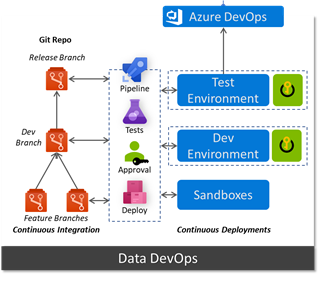 Using a key-vault per environment we can store configurations which reflect their respective environment.
However, CI/CD does not stop with the platform, we can run data ingestion pipelines in a similar manner. Azure Data Factory (ADF) natively integrates with git repos and allows developers to adopt Git Flow workflow and work on multiple feature branches. ADF can retrieve config parameters for linked services (i.e. the component that establishes a connection to a data source) from the environment’s key vault, thus connection string, usernames etc reflect the environment they’re running in and more importantly aren’t stored in code. As we promote an ADF pipeline from dev to test or test to prod it will automatically pick up the parameters for that specific environment from the key vault.
This means very few engineers need admin access to the production data platform. Whilst Data Product teams should adhere to the same approach, they do not have to bound by the same level of scrutiny, approvals, and tests.
Services such as Azure Machine Learning are built specifically to deal with MLOps and extend the pattern discussed above to training and tracking ML models and deploying them as scalable endpoints, on-prem, edge, cloud, and other clouds. GigaOm walk through first principles and implementation approach: Delivering on the Vision of MLOps..
7 Monitoring and Auditing
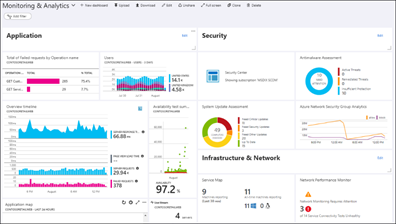
Whilst all services outlined in the architecture have their own native dashboards to monitor metrics and KPIs, they also support pushing their telemetry into an Azure Monitor instance, creating a central monitoring platform for all services used end to end. Operators can run custom queries, create arbitrary alerts, mix and match widgets on a dashboard, query from Power BI, or push into Grafana.
8 Conclusion
Brining all the facets we have discussed together, we end up with a platform that is highly scalable, secure, agile, and loosely coupled. A platform that will allow us to evolve at the speed of business and prioritise the satisfaction of our internal customers.
I have seen customers go through this journey and end up with as few as 2 people running the day to day platform, whilst the remaining team are engaged developing data products. Allowing teams to allocate time and effort on biz value creation vs ‘keeping the lights on’ activities.
Whilst each area is perhaps a couple blog posts, I hope I was able to convey my thoughts collected over numerous engagements from various customers, further I hope I demonstrated why Azure is a great fit for customers large or small.
Much of this experience will be simplified with the arrival of Azure Synapse, however the concepts discussed here give you a solid understanding of the inner workings.
by Scott Muniz | Jul 13, 2020 | Azure, Microsoft, Technology, Uncategorized
This article is contributed. See the original author and article here.
In our recently released AKS Engine on Azure Stack Hub pattern we’ve walked through the process of how to architect, design, and operate a highly available Kubernetes-based infrastructure on Azure Stack Hub. As production workloads are deployed, one of the topics that need to be clear and have operational procedures assigned, is the Patch and Update (PNU) process and the differences between Azure Kubernetes Service (AKS) clusters in Azure and AKS Engine based clusters on Azure Stack Hub. We have invited Heyko Oelrichs, who is a Microsoft Cloud Solution Architect, to explore these topics and help start the PnU strategy for the AKSe environments on Azure Stack Hub.
Before we start let’s introduce the relevant components:
- AKS Engine is the open-source tool (hosted on GitHub) that is also used in Azure (under the covers) to deploy managed AKS clusters and is available to provision unmanaged Infrastructure-as-a-Service (IaaS) based Kubernetes Clusters in Azure and Azure Stack Hub.
- Azure Stack Hub is an extension of Azure that provides Azure services in the customer’s or the service provider’s datacenter.
The PNU process of a managed AKS cluster in Azure is partially automated and consists of two main areas:
- Kubernetes version upgrades are triggered manually either through the Portal, Azure CLI or ARM. These upgrades contain, next to the Kubernetes version upgrade itself, upgrades of the underlaying base OS image if available. These upgrades typically cause the reboot of the cluster nodes.
Our recommendation is to regularly upgrade the Kubernetes version in your AKS cluster to stay supported and current on new features and bug fixes.
- Security updates for the base OS image are applied automatically to the underlaying cluster nodes. These updates can include OS security fixes or kernel updates. AKS does not automatically reboot these Linux nodes to complete the update process.
The PNU process on Azure Stack Hub is pretty much similar with a few small differences we want to highlight here. First thing to note is that Azure Stack Hub runs in a customer or service provider data center and is not managed or operated by Microsoft.
That also means that Kubernetes clusters deployed using AKS Engine on Azure Stack Hub are not managed by Microsoft. Neither the worker nodes nor the control plane. Microsoft provides the tool AKS Engine and the base OS images (via the Azure Stack Hub Marketplace) you can use to manage and upgrade your cluster.
On a high level, AKS Engine helps with the most important operations:
Important to note though is, that AKS Engine allows you to upgrade only clusters that were originally deployed using the tool, clusters that were created without and outside of AKS Engine cannot be maintained and upgraded using AKS Engine.
Upgrade to a newer Kubernetes version
The aks-engine upgrade command updates the Kubernetes version and the AKS Base Image. Every time that you run the upgrade command, for every node of the cluster, the AKS engine creates a new VM using the AKS Base Image associated to the version of aks-engine used.
The Azure Stack Hub Operator together with the Kubernetes Cluster administrator should make sure, prior to each upgrade:
- that no system updates or scheduled tasks are planned
- that the subscription has enough space for the entire process
- that you have a backup cluster and that it is operational
- that the required AKS Base image is available, the right AKS Engine version is used as well as that the target Kubernetes version is specified and supported
The aks-engine repository on GitHub contains a detailed description of the upgrade process.
Upgrade the base OS image only
There might be valid reasons, for example dependencies to specific Kubernetes API versions and others, to not upgrade to a newer Kubernetes version, while still upgrading to a newer release of the underlaying base OS image. Newer base OS images contain the latest OS security fixes and kernel updates. This base OS image only upgrade is possible by explicitly specifying the target version, see here.
The process is the same as for the Kubernetes version upgrade and also contains a reboot/recreation of the underlaying cluster nodes.
Applying security updates
The third area, that’s already baked into AKS Engine based Kubernetes clusters and does not need manual intervention is the process of how security updates are applied. This applies for example to Security updates that were released before a new base OS image is available in the Azure Stack Hub Marketplace or between two aks-engine upgrade runs, e.g. as part of a monthly maintenance task.
These Security updates are automatically installed using the Unattended Upgrade mechanism. Unattended Upgrade is a tool built into Debian, which is the foundation of Ubuntu which is the Linux distro used for AKS and AKS Engine based Kubernetes clusters. It’s enabled by default and installs security updates automatically, but does not reboot the Kubernetes cluster nodes.
Note: this automatic installation is done in connected environments, where the Azure Stack Hub workloads in user-subscriptions have access to the Internet. Disconnected environments need to follow a different approach.
Rebooting the nodes can be automated using the open-source KUbernetes REboot Daemon (kured) that watches for Linux nodes that require a reboot, then automatically handle the rescheduling of running pods and node reboot process.
Update types and components
|
Component(s)
|
Updates
|
Responsibility
|
|
Azure Stack Hub
|
Microsoft software updates can include the latest Windows Server security updates, non-security updates, and Azure Stack Hub feature updates.
OEM hardware vendor-provided updates can contain hardware-related firmware and driver update packages.
|
Azure Stack Hub Operator
Go to Azure Stack Hub servicing policy to learn more.
|
|
AKS Engine
|
AKS Engine updates typically contain support for newer Kubernetes versions, Azure and Azure Stack API updates and other improvements.
|
Kubernetes cluster operator
Visit the aks-engine releases and documentation on GitHub to learn more.
|
|
AKS Base Image
|
AKS Base Images are released on a regular basis and contain newer operating system versions, software components, security and kernel updates. These images are available through the Azure Stack Hub Marketplace.
|
Azure Stack Hub Operator + Kubernetes cluster operator
|
|
Kubernetes
|
Kubernetes releases minor versions roughly every three months. These releases include new features and improvements. Patch releases are more frequent and are only intended for critical bug fixes in a minor version. These patch releases include fixes for security vulnerabilities or major bugs impacting a large number of customers and products running in production based on Kubernetes.
|
Kubernetes cluster operator
Visit Supported Kubernetes versions in Azure Kubernetes Service (AKS) and Supported AKS Engine versions to learn more.
|
|
Linux (Ubuntu) and Windows Node Updates
|
Some Linux updates are automatically applied to Linux nodes (as described above). These updates include OS security fixes or kernel updates.
Windows Server nodes don’t receive daily updates. Instead an aks-engine upgrade deploys new nodes with the latest base Window Server image and patches.
|
Kubernetes cluster operator
Azure Stack Hub Operator (to provide new OS images)
|
Conclusion and Responsibilities
- New AKS Base OS Images are regularly released via the Azure Stack Hub Marketplace and have to be downloaded by the Azure Stack Operator.
- New AKS Base OS Images and Kubernetes versions are applied using aks-engine upgrade and include the recreation of the nodes – this does not affect the operation of the cluster or the user workloads
- Azure Stack Hub Operators play a crucial role in the overall upgrade process and should be consulted and involved in every upgrade process
- *very important* the Azure Stack Hub Operator should always consult the Release Notes that come with each update and inform the Kubernetes cluster administrator of any known issues.
- Kubernetes cluster operators have to be aware of the availability of new updates for Kubernetes and AKS Engine and to apply them accordingly.
- AKS Engine supports specific versions of Kubernetes and the AKS Base Image.
- Security updates and kernel fixes are applied automatically and do not automatically reboot the cluster nodes.
- Kubernetes cluster operators should implemented kured or other solutions to gracefully reboot cluster nodes with pending reboots to complete the update process
This article and especially the list of responsibilities and considerations above is intended to give you a starting point and an idea of how to structure and execute the PNU process for AKSe environments. The details of the PNU process and how they relate to the application architecture are the most critical pieces of a successful and reliable operation. Separating the layers (the Azure Stack Hub platform, the ASKe platform, the application and respective data itself) would help towards being prepared to support an outage at each layer – and having operations prepared for each of them as well as mitigation steps required, would help minimize the risk.
by Scott Muniz | Jul 13, 2020 | Azure, Microsoft, Technology, Uncategorized
This article is contributed. See the original author and article here.
When it comes to remote work, the employee experience and security are equally important. Individuals need convenient access to apps to remain productive. Companies need to protect the organization from adversaries that target remote workers. Getting the balance right can be tricky, especially for entities that run hybrid environments. By implementing Zscaler Private Access (ZPA) and integrating it with Azure Active Directory (Azure AD), Johnson Controls was able to improve both security and the remote worker experience. In today’s “Voice of the Customer” blog, Dimitar Zlatarev, Sr. Manager, IAM Team, Johnson Controls, explains how it works.
Building a seamless and secure work-from-home experience
By Dimitar Zlatarev, Sr. Manager, IAM Team, Johnson Controls
When COVID-19 began to spread, because of our commitment to employee safety, Johnson Controls transitioned all our office workers to remote work. This immediately increased demand on our VPN, overwhelming the solution. Connections speeds slowed, making it difficult for employees to conveniently access on-premises apps. Some workers couldn’t connect to the VPN at all. To address this challenge, we deployed an integration between Azure AD and ZPA. In this blog, I’ll describe how ZPA and Azure AD support our Zero Trust journey, the roll-out process, and how the solution has improved the work-from-home experience.
Enabling productive collaboration in a dynamic, global company
Johnson Controls offers the world’s largest portfolio of building products, technologies, software, and services. Through a full range of systems and digital solutions, we make buildings smarter, transforming the environments where people live, work, learn and play. To support 105,000 employees around the world, Johnson Controls runs a hybrid technology environment. A series of mergers and acquisitions has resulted in over 4,000 on-premises applications for business-critical work. Some of these apps, like SAP, include multiple instances. Our strategy is to find software-as-a-service (SaaS) replacements for most of our on-premises apps, but in the meantime, employees need secure access to them. Before coronavirus shifted how we work, the small percentage of remote workers used our VPN with few issues.
To centralize authentication to our cloud apps, we use Azure AD. The system for cross-domain identity management (SCIM) makes it easy to provision accounts, so that employees can use single sign-on (SSO) to access Office 365 and non-Microsoft SaaS apps, like Workday, from anywhere.
We deployed Azure AD Self-Served Password Reset (SSPR) early in 2019 to allow employees to reset their passwords without helpdesk support. With this deployment, we’ve reduced helpdesk costs for password resets, account lockouts by 35% within the first three months and 50% a year later.
Securing mobile workers with a Zero Trust strategy
When employees began working from home, there were no issues accessing our Azure AD connected resources, but our VPN solution was significantly stretched. As an example, it could only support about 2,500 sessions in the entire continent of Europe, yet Slovakia alone has 1,700 employees. To expand capacity, we needed new equipment, but we were concerned that upgrading the VPN would be expensive and take too long. Instead, we saw an opportunity to accelerate our Zero Trust security strategy by deploying ZPA and integrating it with Azure AD.
Zero Trust is a security strategy that assumes all access requests—even those from inside the network—cannot be automatically trusted. In this model, we need tools that verify users and devices every time they attempt to communicate with our resources. We use Azure AD to validate identities with controls such as multi-factor authentication (MFA). MFA requires that users provide two authentication factors, making it more difficult for bad actors to compromise an account. Azure AD Privileged Identity Management (PIM) is another service that we use to provide time-based and approval-based role activation to mitigate the risks of unnecessary access permission on highly sensitive resources.
ZPA is a cloud-based solution that connects users to apps via a secure segment between individual devices and apps. Because apps are never exposed to the internet, they are invisible to unauthorized users. ZPA also doesn’t rely on physical or virtual appliances, so it’s much easier to stand up.
Enrolling 50,000 users in 3 weeks
To minimize disruption, we decided to roll out ZPA in stages. We began by generating a list of critical roles, such as finance and procurement, that needed to be enabled as quickly as possible. We then prioritized the remaining roles. This turned out to be the hardest part of the process.
Setting up ZPA with Azure AD was simple. First, Azure AD App Gallery enabled us to easily register the ZPA app. Then we set up provisioning, targeted groups, and then populated the groups. Once the appropriate apps were set up, we piloted the solution with ten users. The next day we rolled out to 100 more. As we initiated the solution, we worked with the communications team to let employees know what was happening. We also monitored the process. If there were issues with an app, we delayed deployment to the people with relevant job profiles. Zscaler joined our daily meetings and stood by our side throughout the roll out. By the end of the first week we had enabled 7,000 people. We jumped to 25,000 by the second, and by the third week 50,000 people were enrolled in ZPA.
Simplifying remote work with SSO
One reason the process went so smoothly is because the ZPA Azure AD integration is much easier to use than the VPN solution. Users just need to connect to ZPA. There is no separate sign-in. When employees learned how convenient it was, they asked to be enabled.
With ZPA and Azure AD, we were quickly able to scale up remote work. Employees are more productive with a reliable connection and simplified sign-in. And we are further down the path in our Zero Trust security strategy.
Learn more
In response to COVID-19, organizations around the world have accelerated modernization plans and rapidly deployed products to make work from home easier and more secure. Microsoft partners, like Zscaler, have helped many organizations overcome the challenges of remote work in a hybrid environment with solutions that integrate with Azure AD.
Learn how to integrate ZPA with Azure AD
Top 5 ways you Azure AD can help you enable remote work
Developing applications for secure remote work with Azure AD
Microsoft’s COVID-19 response
by Scott Muniz | Jul 13, 2020 | Azure, Microsoft, Technology, Uncategorized
This article is contributed. See the original author and article here.
This post was inspired by Azure/Azure-Api-Management-DevOps-Resource-Kit and targets the How-To process vs the semantics of the problem and the proposed solution, which are very well defined in the Resource Kit GitHub page as well as providing release builds and source code for the tools used throughout this guide.
In this scenario our Azure API Management service (APIM for short) has been deployed and in production for some time already, the API publishers and API developers all use the Azure Portal to operate the service and launch new APIs. Publishers and Developers have agreed that it is time to adopt a DevOps process to streamline the development, management, and environment promotion of their APIs.
This is a transformation journey, thus it is important to keep in mind that the current Prod APIM will still be Prod. Our journey will:
- Provision Dev environment
- Adopting a DevOps process
- For API publishers
- For API developers
- Going Prod with DevOps
Provision Dev environment
The Dev environment is created by taking a snapshot of Prod to achieve symmetric between the two environments. During this step the two instances are not synchronized, therefore, you can either abstain from making changes to Prod, or repeat the initial manual deployment of Dev.
We will:
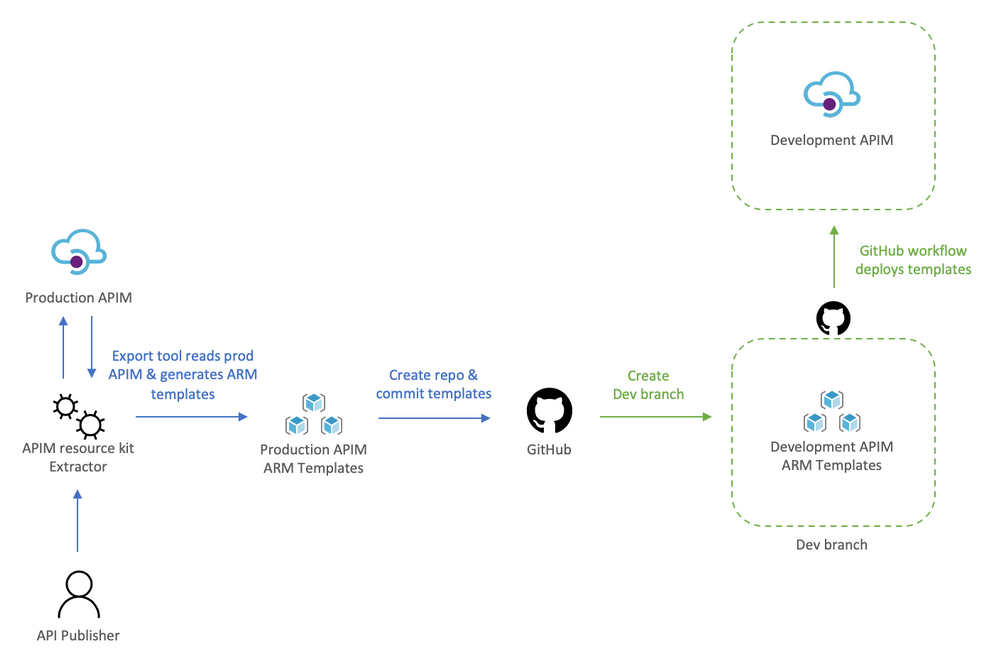
- Use the extractor tool to capture the current Prod deployment,
- Check the Prod ARM templates into a new repository, and create a dev branch,
- Deploy dev branch to our Dev environment
To help us visualize the process let’s take a look at the following diagram:
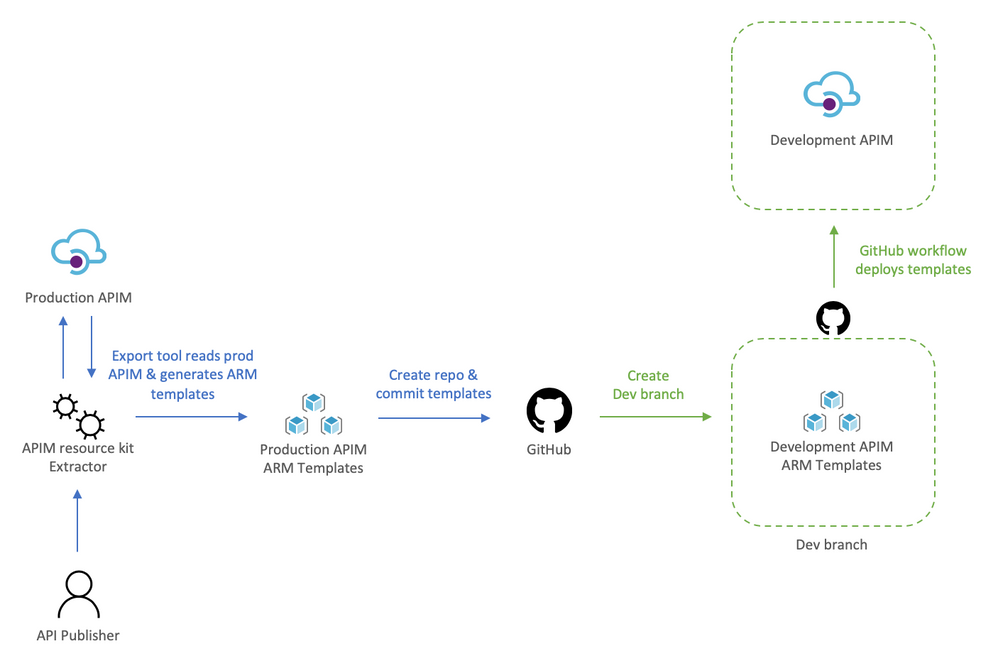
Using the extractor tool to capture Prod
Because we are in a transformation journey, we want the capture to entirely reflect Prod, thus the config used for the Extractor is set to use the production APIM as the source and the destination, this way the ARM templates generated are always production ready. Remember, we are creating development off production, we will override parameters at deployment time to target the Dev instance.
The config file defines how the Extractor will generate the templates, the following apimExtract.json will use the same instance as the source and target, split each API into its own entity, and parameterize most of the assets needed.
{
    "sourceApimName": "apim-contoso",
    "destinationApimName": "apim-contoso",
    "resourceGroup": "Prod-Serverless-App1",
    "fileFolder": "./contoso",
    "linkedTemplatesBaseUrl": "https://raw.githubusercontent.com/romerve/RvLabs/master/servless-devops/apim/contoso",
    "policyXMLBaseUrl": "https://raw.githubusercontent.com/romerve/RvLabs/master/servless-devops/apim/contoso/policies",
    "splitAPIs": "true",
    "paramServiceUrl": "true",
    "paramNamedValue": "true",
    "paramApiLoggerId": "true",
    "paramLogResourceId": "true"
}
Extract the current deployment of your environment:
apimtemplate extract --extractorConfig apimExtract.json
The initial extraction saves the ARM templates to contoso folder. This folder will only store files that have extracted and that are considered service level.
Once the extractor finishes generating the ARM templates, they need to be added to a repository. This will give us a master branch with production ready templates, which will later be automatically deployed via Pull Request ( PR ).
Checking ARM templates into the repository
Head over to Github and create a new repository. Prepare your folder hierarchy before adding, committing, and pushing the ARM templates.
At the root, we have two folders:
- contoso: which is the folder created by the extractor tool and contains the templates
- apis: this folder is not used now, but will be used later for all API development, and used by API developers
With the initial commit done, we are ready to create a the dev branch:
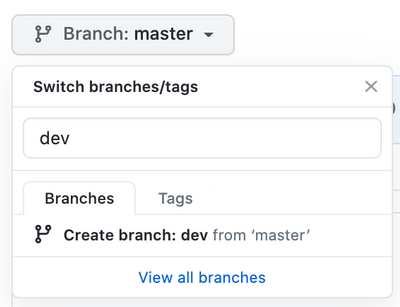
Checkpoint: by now you should have:
- ARM templates of Prod APIM instance
- A repository with Prod templates checked into master
- A new dev branch
Deploy dev branch to Dev APIM
I’ll be using GitHub Actions to automate deployments to Dev APIM and subsequently to Prod APIM.
The workflow Dev-Apim-Service.yaml has the following responsibilities:
- Set environmental variables at the job scope so they can be used across the entire workflow. Besides specifying the dev resources to target, we use a built in variable GITHUB_REF to build URLs used for dev deployments. Additionally, because service level changes and APIs can be develop at different rates, we use On.Push.Paths to specifically where service level templates are placed.
- Uses the Checkout Action and the Azure Login Action. The Azure Login action makes use of a service principal to login and run commands against your Azure subscription. To create and use a service principal, create a GitHub secret with the output of:
az ad sp create-for-rbac
--name "myApp" --role contributor
--scopes /subscriptions/{subscription-id}/resourceGroup/{resource-group}
--sdk-auth
# Replace {subscription-id}, {resource-group} with the subscription, resource group details of your APIM environments
- The las two actions: Deploy APIM Service and APIs, and Deploy APIs will use the Azure CLI to deploy the service template, and then each of the extracted APIs. Important to note that here even when we use the parameters file, we still override the service name and URLs so that the proper environment is used. The Deploy APIs step queries APIM using az rest to get a list of APIs to iterate over the APIs and deploy them.
At this point you should have a full CI/CD workflow that automatically deploys your Dev branch into your Dev APIM instance. Before continuing, this would be a good place to validate the Dev instance and ensure all is working as expected.
Adopting a DevOps process to manage, operate, and develop APIs in Azure API Management
Once the initial Dev APIM has been created it is important that the two personas: API publishers, and API developers incorporate new steps in their process. Typically, API publishers will use the Azure Portal to make changes, and API developers would be working with OpenAPI, but this could also cause configuration drift, and having the two instances running different APIs.
Therefore, API publishers and developer need to incorporate the Azure APIM Resource Kit in their process workflow. need use the Extractor tool as the last step in their process.
For API publishers
The following diagram illustrates how an API publisher would work with the Dev APIM.
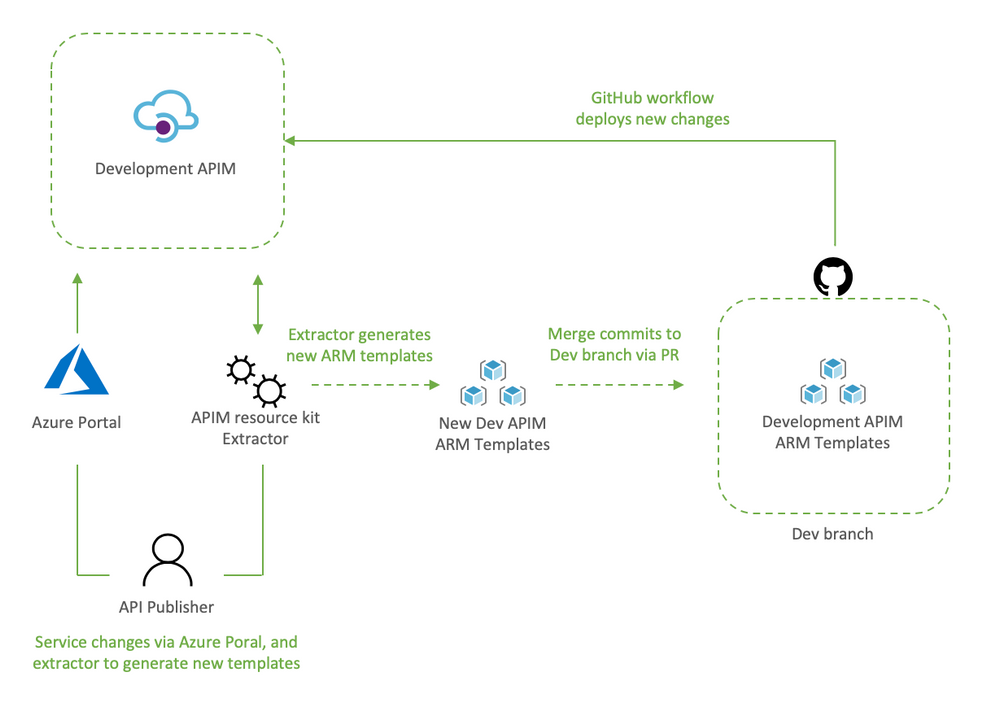
API publishers would:
- Clone the Dev branch to their local environment
- Make the desired changes to Dev APIM using the Azure Portal
- Capture the newly applied changes by running extrator tool (apimtemplate extract –extractorConfig apimExtract.json ) against the Dev APIM
- Add, and commit the new or updated templates into the locally cloned repo (git commit -a)
- Push the updated templates to automatically re-deploy the changes to Dev APIM (git push)
The reason the changes done via the portal are then re-applied to Dev APIM via Github Actions it’s validate that templated can be successfully deployed via code, and it allows for dev branch to be merged into master via PR.
Dev branch deployments is triggered by Dev-Apim-Service.yaml, which filters branch level events to only include changes done to contoso and overrides parameters to target Dev APIM.
For API developers
The diagram would show what a developer process would look like.
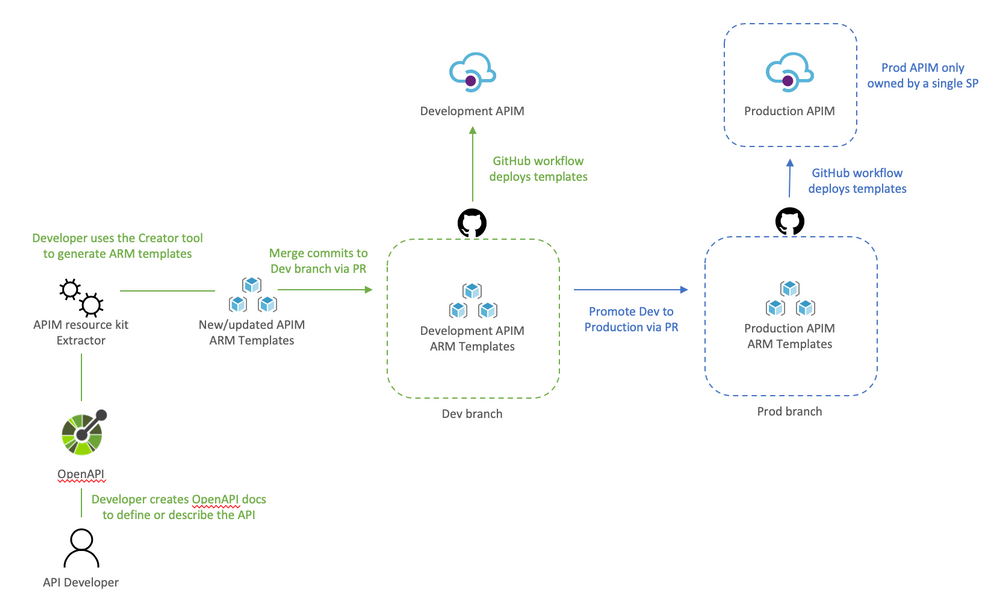
API developers would:
- Clone dev branch to their local environment
- Define or update API docs
- Use the creator tool to generate ARM templates (apimtemplate create –configFile ./apis/<API-FOLDER>/<API>.yml)
- Add, and commit new or updated templates into the locally cloned repo (git commit -a )
- Push the changes to trigger the Dev deployment (git push)
The reason the APIs are saved to apis instead of somewhere inside contoso folder it’s so that developing APIs does not trigger an APIM service deployment. And using a separate workflow Dev-Apim-Apis.yaml we can better control how the two are triggered and deployed.
Going Prod with DevOps
Once Dev APIM is validated and publishers and developers have incorporated the changes in their process, it is time to promote Dev to Prod. The promotion it’s done by creating a pull request from dev to master as illustrated below.
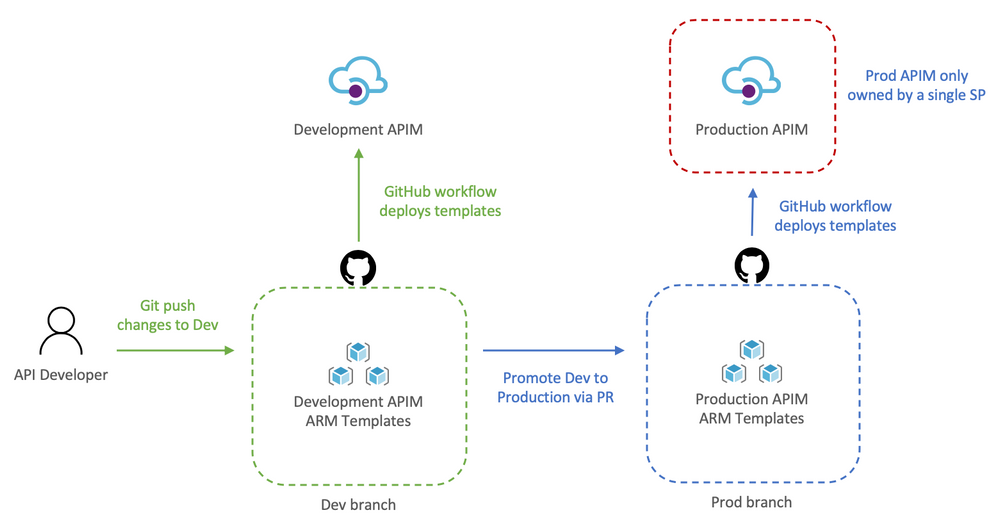
Let’s review how this works:
- API developer push changes to repo’s dev branch
- The push triggers the workflow to automatically deploy Dev APIM
- API developer creates a pull request
- The team reviews the PR and approves the PR to merge dev changes into master
- Merging into master triggers Github Actions to deploy to prod
Because the templates’ parameters files already target prod there is no need to override anything, therefore, the CD workflow simply deploys any templates it finds in contoso and apis.
Now that Dev and Prod are deploying successfully, we apply RBAC permissions to Prod just to make sure that no one can access the resource via the portal, cli, powershell, etc and make “unmannaged” changes. This can be done by:
- Launch the Azure Portal and select the Prod Resource Group
- Select Access Control (IAM)
- Remove any previously assigned roles
by Scott Muniz | Jul 13, 2020 | Azure, Microsoft, Technology, Uncategorized
This article is contributed. See the original author and article here.
Howdy folks,
Today we’re announcing the public preview of the ability to sign-in to Azure AD with email in addition to UPN (UserPrincipalName). In organizations where email and UPN are not the same, it can be confusing for users when they can’t use their familiar email address to sign-in. With this preview capability, you can enable your users to sign in with either their UPN or their email address, helping them avoid this confusion.
This feature can be enabled by setting the AlternateIdLogin attribute in the HomeRealmDiscoveryPolicy. Please use the instructions in our documentation to set this up in your organization.
Some customers are using capabilities in Azure Active Directory (Azure AD) Connect to achieve this today, but that requires them to set the email address as the UPN in Azure AD. With this preview capability, you can now use the same UPN across on-premises Active Directory and Azure AD to achieve the best compatibility across Office 365 and other workloads, while still allowing your users to sign in with either their UPN or email, further simplifying their experience.
We hope this change simplifies the sign-in experience for your end users.
As always, we’d love to hear any feedback or suggestions you may have. Please let us know what you think in the comments below or on the Azure AD feedback forum.
Stay safe and be well,
Alex Simons (@Alex_A_Simons)
Corporate VP of Program Management
Microsoft Identity Division

by Scott Muniz | Jul 13, 2020 | Azure, Microsoft, Technology, Uncategorized
This article is contributed. See the original author and article here.
|
We continue to expand the Azure Marketplace ecosystem. For this volume, 56 new offers successfully met the onboarding criteria and went live. See details of the new offers below:
|
Applications
|
 |
CiraSync: CiraSync from Cira Apps Limited quickly syncs the Office 365 global address list and public folder contacts to smartphones. It works with Azure Active Directory and features enterprise single sign-on and easy configuration.
|
 |
CiraSync Contact Management (Single User): This free, single-user version of CiraSync from Cira Apps Limited quickly syncs the Office 365 global address list and public folder contacts to smartphones. It works with Azure Active Directory and features enterprise single sign-on and easy configuration.
|
 |
CSP Portal for ConnectWise and AutoTask: LANcom Technology’s CSP Portal syncs your customer cloud service provider (CSP) subscriptions to ConnectWise or AutoTask for automated invoicing, enabling you to save time, increase revenue, and redirect your resources to innovate and spend more time with customers.
|
 |
DataVisor Feature Platform: DataVisor’s Feature Platform allows users to build sophisticated machine learning models, accelerate the feature engineering process from weeks to minutes, and rapidly deploy features in production. It supports real-time and batch processing, and it seamlessly integrates with your machine learning solutions.
|
 |
Digital Insurance Middleware Platform: InsureMO from eBaotech is a platform as a service that acts as middleware for the insurance industry, freeing insurers from legacy constraints and enabling them to effectively connect to stakeholders. Meet the demands of the digital age without investing in risky and expensive core system replacement.
|
 |
e[datascientist] – Exploration: Eagle Genomics’ e[datascientist] exploration module expands on the knowledge and reach of a single scientist or team of scientists to broaden the potential for innovation, reduce time to insight, and maximize the value of data from existing research.
|
 |
ejudge – Online Judge for Code on Ubuntu: ejudge is an easy-to-use contest management system for conducting programming tournaments and supporting training courses, where automatic checking of programs is required.
|
 |
Enerfy Loyalty: Use Enerfy Loyalty to reward auto insurance customers while gaining predictive insights that will take underwriting to a new level. Collect valuable customer data, increase customer satisfaction, strengthen customer retention, and gain new customers through peer recommendations.
|
 |
Foxit Document Transformation Services: Foxit’s Document Transformation Services (DTS) provides enterprise-class conversion and compression technology that integrates with document systems to improve business efficiency, ensure compliance, protect personally identifiable information (PII), and reduce cloud storage/egress costs.
|
 |
FRISS Fraud Detection at Claims: FRISS Fraud Detection at Claims uses real-time AI fraud scoring to help property and casualty insurers during the claims process. High-risk claims are automatically flagged for investigation and sincere customers are swiftly served.
|
 |
GrowthEnabler B2B Innovation Sourcing Marketplace: Source and manage innovative digital solutions with GrowthEnabler, an online B2B marketplace and objective decision insights platform. GrowthEnabler helps chief experience officers drive cross-functional team collaboration and engage with emerging disruptors.
|
 |
Hyperledger Besu Quickstart: Hyperledger Besu is an Ethereum-based blockchain using the standards developed by the Enterprise Ethereum Alliance. It’s compatible with Solidity smart contracts and is suited for enterprise use cases that require privacy, high throughput, and finality such as settlement, digital asset issuance, and payments.
|
 |
ICTFAX – FAX Software Server for LINUX CentOS 7.7: This hardened image offered by Tidal Media is an email-to-fax, fax-to-email, and web-to-fax gateway application that supports extensions/ATA and REST APIs along with G.711 faxing, PSTN faxing, and FoIP T.38 origination and termination.
|
 |
iSpring Suite Annual Subscription: iSpring Suite is a Microsoft PowerPoint-based authoring toolkit from iSpring Solutions that enables users to create slide-based courses, quizzes, dialog simulations, screencasts, video lectures, and other interactive learning materials.
|
 |
Jitsi Video Chat Server for Ubuntu 18.04 LTS: This offer from Tidal Media includes Jitsi, a ready-to-run and easy-to-maintain videoconferencing solution deployed on Ubuntu 18.04 LTS. Jitsi passes everyone’s video and audio to all participants rather than mixing them first, resulting in lower latency and better quality.
|
 |
Kanboard – Kanban Project Management on Ubuntu: This Kanboard image offered by Tidal Media is an easy-to-use project management software solution using the Kanban methodology. Focusing on simplicity and minimalism, it presents all your important information in one place, including projects, calendar, assigned tasks, and subtasks.
|
 |
Observa Artificial Intelligence: Observa’s AI provides real-time insight into retail sales, marketing, and promotional campaigns. Ensure your pricing and promotions are accurate, and learn how you compare to your competition.
|
 |
officeatwork | Uploader User Subscription: officeatwork is a Microsoft 365 solution containing apps and add-ins that provide Office 365 users with a simple way to create, upload, and update their Office 365 content. The Uploader comes with the Admin Center app, allowing administrators to configure the Uploader experience for all users.
|
 |
ownCloud – File Sync and Share Server for Ubuntu: This ready-to-run image from Tidal Media enables users to securely access and share data from anywhere on any device. ownCloud enterprise file sharing improves transparency, security, and control, and it can easily be integrated into your environment.
|
 |
Phabricator – Git, Code, Manage Server for Ubuntu: Phabricator is a set of tools for developing software. It includes apps that help users manage tasks and sprints; review code; host Git, SVN, or Mercurial repositories; build with continuous integration; and review designs.
|
 |
SFTP – FTP Server for Windows Server 2019 OpenSSH: This secure SFTP server solution uses SFTP/SSH server software, and the ready-to-use image offered by Tidal Media enables users to securely transfer data over the SSH protocol using AES, DES, and Blowfish encryption.
|
 |
ShookIOT Essentials: Simplify and accelerate your Industrial Internet of Things (IIOT) transformation journey with ShookIOT Essentials, an asset-centric, vendor-neutral object model that provides secure, fast, and reliable intelligence to all assets. Turn big data into insights across your industrial infrastructure and operations.
|
 |
Simplifai Emailbot: Simplifai Emailbot understands your inbound emails and triggers actions in back-end systems according to your business rules. It integrates with common email servers (Exchange, Gmail, and more) and can be configured to call any external API.
|
 |
SymbioSys Commission-as-a-Service: SymbioSys Commission-as-a-Service is a one-stop service for insurers that facilitates the configuration and administration of all types of simple and complex commission contracts. Maintain compliance and reduce the time and cost of administering diverse types of commissions without compromising accuracy.
|
 |
Taiga Project Management Server for Ubuntu 16.04: Taiga Project Management Server for Ubuntu 16.04 is an open-source project management platform for Agile developers, designers, and project teams. This Taiga image offered by Tidal Media provides intuitive backlog and sprint planning.
|
 |
Tuleap Agile Management Server on LINUX CentOS 7.7: Tuleap is an application lifecycle management system that facilitates the planning of software releases, the prioritization of business requirements, the assignment of tasks to project members, the monitoring of project progress, and the creation of reports.
|
 |
Value Maximizer: Medisolv’s Value Maximizer uses AI to forecast payments in Centers for Medicare & Medicaid Services (CMS) hospital quality programs. Simulate your performance by measure in each program, and learn which measures need to be improved to maximize your incentive payments.
|
 |
Virtual Assist: Suitable for insurance companies, facility maintenance teams, and property managers, Codafication’s Virtual Assist provides a secure way for people and businesses to share their stories instantly via video. Improve customer service and performance score cards while mitigating risk and increasing safety.
|
 |
Xlight FTP Server for Windows Server 2019: This offer from Tidal Media includes Xlight FTP Server for Windows Server 2019, an easy-to-use high-performance FTP server with low CPU usage. Features include remote administration, SSL, SFTP, ODBC, LDAP, Active Directory support, and IPv6 support.
|
Consulting services
|
 |
Azure Virtual Network Endpoints: Extend your virtual network private address space with Microsoft Azure Virtual Network (VNet) service endpoint policies managed by KoçSistem’s experts. This offer includes 24/7 system monitoring, testing, and more.
|
 |
Custom Software Development: 2 Hour-Assessment: Join Tech Fabric LLC’s enterprise architect and chief sales officer for a free custom software development consultation. You’ll learn about Tech Fabric’s microservices and API-led connectivity approach, the benefits of Microsoft Azure, and more.
|
 |
Free 5 Day Azure Analytics Services Assessment UK: Zensar Technologies will assess your analytics investments and landscape, discuss your business objectives, and work with you to create a custom Azure analytics solution architecture. This offer is for customers in the United Kingdom.
|
 |
Free 5 day Azure Migration Assessment Offer UK: Zensar Technologies will review your applications estate (servers, database, web apps, and data) and deliver a detailed roadmap to initiate an applications migration to the cloud. This offer is for customers in the United Kingdom.
|
 |
KoçSistem Azure Active Directory & DirSync: KoçSistem’s expert managed services team will use Microsoft Azure tools to monitor your systems 24/7 based on defined metrics. Easily manage identities with Azure Active Directory, DirSync services, and KoçSistem’s assistance.
|
 |
KoçSistem Azure App Service: In this offer, KoçSistem will integrate Microsoft Azure applications with your SaaS platforms and on-premises data sources. KoçSistem will also manage role-based access, define automation for scaling, and monitor system health and performance.
|
 |
KoçSistem Azure Application Gateway: Manage traffic to your web applications with Microsoft Azure Application Gateway and KoçSistem’s managed services team. KoçSistem will monitor your systems and route definitions of customer web applications according to requests.
|
 |
KoçSistem Azure Backup Management: Simplify your data recovery processes with KoçSistem’s 24/7 management of Microsoft Azure Backup services. In addition to system monitoring, KoçSistem will create and plan business continuity and disaster recovery scenarios.
|
 |
KoçSistem Azure CDN: Efficiently deliver web content to your users with Microsoft Azure Content Delivery Network and the assistance of KoçSistem. This offer includes management and implementation of Azure CDN, along with ongoing help desk services.
|
 |
KoçSistem Azure Container Service (AKS): Let KoçSistem manage your company’s usage of Microsoft Azure Kubernetes Service. This offer features DevOps deployment strategies, cluster version upgrades, cluster security, storage structure, rollback management, and more.
|
 |
KoçSistem Azure Database Management: KoçSistem’s team will manage and monitor your Microsoft Azure database services, involving performance analysis and error analysis. KoçSistem supports Azure SQL Managed Instance, Azure Cache for Redis, Azure Cosmos DB, and several other database systems.
|
 |
KoçSistem Azure DNS: In this offer, KoçSistem’s expert network managed services team will manage your Microsoft Azure DNS hosting operations and provide ongoing help desk support for outages or degraded service.
|
 |
KoçSistem Azure Express Route: In this managed service, KoçSistem will provide real-time monitoring of your Microsoft Azure ExpressRoute connection. This offer includes design, deployment, configuration, migration, and management of Azure ExpressRoute.
|
 |
KoçSistem Azure Key Vault Management: Increase security and control over your keys and passwords with Azure Key Vault services managed by KoçSistem. In addition to 24/7 monitoring, KoçSistem will handle all necessary classifications and authorizations in Azure Key Vault access.
|
 |
KoçSistem Azure MFA Management: In this offer, KoçSistem will manage your Microsoft Azure Multi-Factor Authentication (MFA), assigning licenses, blocking or unblocking users, updating safe IP lists, and making configuration changes.
|
 |
KoçSistem Azure Monitoring & Automation: In this managed service, KoçSistem’s team will use Microsoft Azure tools, including Azure Monitor and Azure Log Analytics, to monitor and automate your applications, infrastructure, and network.
|
 |
KoçSistem Azure Network Security Groups: Using Azure network security groups, KoçSistem’s expert managed services team will manage your network traffic, filter your networks, and communicate with your on-premises resources.
|
 |
KoçSistem Azure Network Watcher: In this offer, KoçSistem’s team will manage Microsoft Azure Network Watcher for your organization, performing diagnostics tests and more to increase your network performance.
|
 |
KoçSistem Azure Security Center Managed Service: Get hybrid security management and threat protection with Microsoft Azure Security Center services managed by KoçSistem’s team of experts. This offer includes installation and distribution for on-premises systems.
|
 |
KoçSistem Azure Storage Management: Reduce investment costs and reduce your datacenter storage management responsibilities with the help of KoçSistem’s managed services team, who will help you handle your Microsoft Azure storage and database services.
|
 |
KoçSistem Azure Traffic Manager: Allow KoçSistem to manage Microsoft Azure Traffic Manager for your organization so you can achieve higher availability and faster response time. KoçSistem will create profiles, add endpoints, test functionality, and manage DNS controls.
|
 |
KoçSistem Azure Virtual Machines: In this offer, KoçSistem will manage your organization’s use of Microsoft Azure Virtual Machines, handling capacity operations and adding, removing, and updating storage units. Benefit from an on-demand, highly scalable, and protected virtualized infrastructure.
|
 |
KoçSistem Azure Virtual Network (VNet): In this managed service, KoçSistem will monitor your Microsoft Azure Virtual Network (VNet) usage based on defined metrics. Incidents will be automatically launched in case of any problem with the system.
|
 |
KoçSistem Azure Virtual Network TAP: Continuously mirror traffic from a virtual network to a packet collector with Microsoft Azure virtual network Terminal Access Point (TAP) managed by KoçSistem’s team of experts. KoçSistem will provide ongoing help desk services and CDN management.
|
 |
KoçSistem Azure Virtual Private Network: In this offer, KoçSistem’s team will handle Azure Virtual Private Network (VPN) services, including continuity management and transmitting information for tunnels to be created over a VPN gateway.
|
 |
KoçSistem Azure Virtual WAN: Optimize and automate branch connectivity with Microsoft Azure Virtual WAN managed by KoçSistem. This offer includes full-time monitoring, addition mapping, service pack changes, and more.
|
 |
Oracle on Azure: 14-Day Implementation: Asseco Data Systems’ Oracle to Microsoft Azure migration service is designed for users who seek high performance and scalability with full engineering support, troubleshooting, and cost optimization.
|
|





Recent Comments