by Contributed | Nov 17, 2020 | Azure, Microsoft, Technology
This article is contributed. See the original author and article here.
Follow the same steps mentioned here Publish a bot to Azure – Bot Composer | Microsoft Docs However to publish Azure Bot Framework Composer Bot to already existing Resource Group, follow below steps.
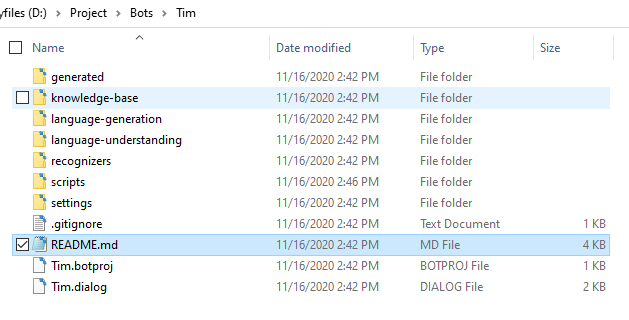
You can find the provisioning steps in the readme.md file which is automatically created when you create a new Bot in Bot Composer.
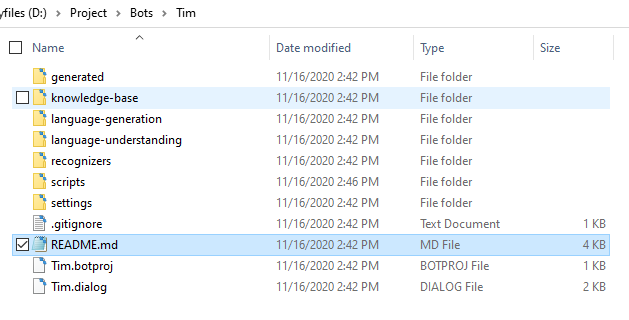
As of now, by default, provisioning script creates a new Resource Group appending environment value to it and does not deploy the services to an existing Resource Group.
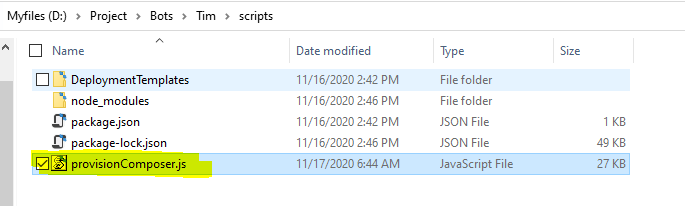
Find value
const resourceGroupName = ${name}-${environment};
and change it to
const resourceGroupName = ${name};
in the file provisionComposer.js and save. With this simple change, it will not append the given Environment value to Resource Group name.
Why this will work?
In provisionComposer.js file, the code
const createResourceGroup = async (client, location, resourceGroupName) => { logger({ status: BotProjectDeployLoggerType.PROVISION_INFO, message: "> Creating resource group ...", }); const param = { location: location, }; return await client.resourceGroups.createOrUpdate(resourceGroupName, param); };
uses function client.resourceGroups.createOrUpdate – this function just checks if the RG exists or not, it’s present, it’ll use the same RG, if not, it’ll create a new RG and also if you provide a new location it’ll update the location to existing RG.
by Contributed | Nov 17, 2020 | Azure, Microsoft, Technology
This article is contributed. See the original author and article here.
Organizations are leveraging artificial intelligence (AI) and machine learning (ML) to derive insight and value from their data and to improve the accuracy of forecasts and predictions. In rapidly changing environments, Azure Databricks enables organizations to spot new trends, respond to unexpected challenges and predict new opportunities. Data teams are using Delta Lake to accelerate ETL pipelines and MLflow to establish a consistent ML lifecycle.
Solving the complexity of ML frameworks, libraries and packages
Customers frequently struggle to manage all of the libraries and frameworks for machine learning on a single laptop or workstation. There are so many libraries and frameworks to keep in sync (H2O, PyTorch, scikit-learn, MLlib). In addition, you often need to bring in other Python packages, such as Pandas, Matplotlib, numpy and many others. Mixing and matching versions and dependencies between these libraries can be incredibly challenging.

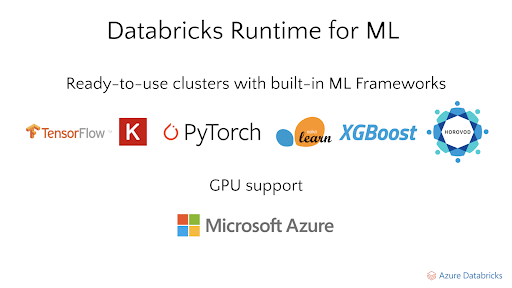
Figure 1. Databricks Runtime for ML enables ready-to-use clusters with built-in ML Frameworks
With Azure Databricks, these frameworks and libraries are packaged so that you can select the versions you need as a single dropdown. We call this the Databricks Runtime. Within this runtime, we also have a specialized runtime for machine learning which we call the Databricks Runtime for Machine Learning (ML Runtime). All these packages are pre-configured and installed so you don’t have to worry about how to combine them all together. Azure Databricks updates these every 6-8 weeks, so you can simply choose a version and get started right away.
Establishing a consistent ML lifecycle with MLflow
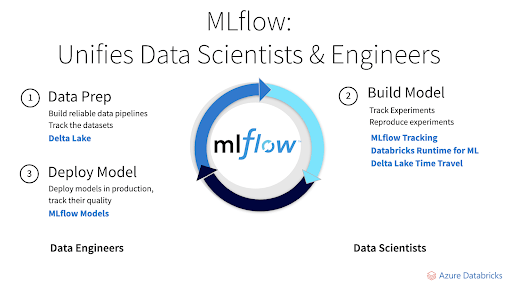
The goal of machine learning is to optimize a metric such as forecast accuracy. Machine learning algorithms are run on training data to produce models. These models can be used to make predictions as new data arrive. The quality of each model depends on the input data and tuning parameters. Creating an accurate model is an iterative process of experiments with various libraries, algorithms, data sets and models. The MLflow open source project started about two years ago to manage each phase of the model management lifecycle, from input through hyperparameter tuning. MLflow recently joined the Linux Foundation. Community support has been tremendous, with 250 contributors, including large companies. In June, MLflow surpassed 2.5 million monthly downloads.
Diagram: MLflow unifies data scientists and data engineers
Ease of infrastructure management
Data scientists want to focus on their models, not infrastructure. You don’t have to manage dependencies and versions. It scales to meet your needs. As your data science team begins to process bigger data sets, you don’t have to do capacity planning or requisition/acquire more hardware. With Azure Databricks, it’s easy to onboard new team members and grant them access to the data, tools, frameworks, libraries and clusters they need.
Alignment Healthcare
Alignment Healthcare, a rapidly growing Medicare insurance provider, serves one of the most at-risk groups of the COVID-19 crisis—seniors. While many health plans rely on outdated information and siloed data systems, Alignment processes a wide variety and large volume of near real-time data into a unified architecture to build a revolutionary digital patient ID and comprehensive patient profile by leveraging Azure Databricks. This architecture powers more than 100 AI models designed to effectively manage the health of large populations, engage consumers, and identify vulnerable individuals needing personalized attention—with a goal of improving members’ well-being and saving lives.
Building your first machine learning model with Azure Databricks
by Contributed | Nov 17, 2020 | Azure, Microsoft, Technology
This article is contributed. See the original author and article here.
Today, Azure is proud to take the next step toward our commitment to enabling customers to harness the power of AI (Artificial Intelligence) at scale. For AI, the bar for innovation has never been higher with hardware requirements for training models far outpacing Moore’s Law. Technology leaders across industries are discovering new ways to apply the power of machine learning, accelerated analytics and AI to make sense of unstructured data. The natural language models of today are exponentially larger than the largest models of four short years ago.
OpenAI’s GPT-3 model, for instance, has three orders of magnitude more parameters than the ResNet-50 image classification model that was at the forefront of AI in the mid-2010s. These kinds of demanding workloads required the development of a new class of system within Microsoft Azure, from the ground-up using the latest hardware innovations.
The Azure team has built on our experience virtualizing the latest GPU technology, and building the public cloud industry’s leading InfiniBand-enabled HPC virtual machines to offer something totally new for AI in the cloud. Each deployment of an ND A100 v4 cluster rivals the largest AI supercomputers in the industry in terms of raw scale and advanced technology. These VMs enjoy the same unprecedented 1.6 Tb/s of total dedicated InfiniBand bandwidth per VM, plus AMD Rome-powered compute cores behind every NVIDIA A100 GPU as used by the most powerful dedicated on-premise HPC systems. Azure adds massive scale, elasticity, and versatility of deployment, as expected by Microsoft’s customers and internal AI engineering teams.
This unparalleled scale and capability of interconnect in a cloud offering, with each GPU directly paired with a high-throughput low-latency InfiniBand interface, offers our customers a unique dimension of scaling on demand without managing their own datacenters.
Today, at SC20, we’re announcing the public preview of the ND A100 v4 VM family, available from one virtual machine to world-class supercomputer scale, with each individual VM featuring:
- Eight of the latest NVIDIA A100 Tensor Core GPUs with 40 GB of HBM2 memory, offering a typical per-GPU performance improvement of 1.7x – 3.2x compared to V100 GPUs- or up to 20x by layering features like new mixed-precision modes, sparsity, and MIG- for significantly lower total cost of training with improved time-to-solution
- VM system-level GPU interconnected based on NVLINK 3.0 + NVswitch
- One 200 Gigabit InfiniBand HDR link per GPU with full NCCL2 support and GPUDirect RDMA for 1.6 Tb/s per virtual machine
- 40 Gb/s front-end Azure networking
- 6.4 TB of local NVMe storage
- InfiniBand-connected job sizes in the thousands of GPUs, featuring any-to-any and all-to-all communication without requiring topology aware scheduling
- 96 physical AMD Rome vCPU cores with 900 GB of DDR4 RAM
- PCIe Gen 4 for the fastest possible connections between GPU, network and host CPUs- up to twice the I/O performance of PCIe Gen 3-based platforms
Like other Azure GPU virtual machines, ND A100 v4 is also available with Azure Machine Learning (AML) service for interactive AI development, distributed training, batch inferencing, and automation with ML Ops. Customers can choose to deploy through AML or traditional VM Scale Sets, and soon many other Azure-native deployment options such as Azure Kubernetes Service. With all of these, optimized configuration of the systems and InfiniBand backend network is taken care of automatically.
Azure Machine Learning provides a tuned virtual machine (pre-installed with the required drivers and libraries) and container-based environments optimized for the ND A100 v4 family. Sample recipes and Jupyter Notebooks help users get started quickly with multiple frameworks including PyTorch, TensorFlow, and training state of the art models like BERT. With Azure Machine Learning, customers have access to the same tools and capabilities in Azure as our AI engineering teams.
Accelerate your innovation and unlock your AI potential with the ND A100 v4.
Preview sign-up is open. Request access now.
Additional Links
by Contributed | Nov 17, 2020 | Azure, Microsoft, Technology
This article is contributed. See the original author and article here.
Thanks to Preeti Krishna and Alp Babayigit for the great help.
We have published several Blog posts on how Azure Sentinel can be used Side-by-Side with 3rd Party SIEM tools, leveraging cloud-native SIEM and SOAR capabilities to forward enriched alerts.
Today many enterprises consume more and more cloud services, there is a huge requirement for cloud-native SIEM, this is where Azure Sentinel comes in play and has following advantages:
- Easy collection from cloud sources
- Effortless infinite scale
- Integrated automation capabilities
- Continually maintained cloud and on-premises use cases enhanced with Microsoft TI (Threat Intelligence) and ML (Machine Learning)
- Github community
- Microsoft research and ML capabilities
- Avoid sending cloud telemetry downstream (send cloud data to on-premise SIEM)
There are several best practice integration options available how to operate Azure Sentinel in Side-by-Side.
|
Alerts
|
Events
|
Upstream to sentinel
|
CEF
Logstash
Logic Apps
API
|
CEF
Logstash
API
|
Downstream from Sentinel
|
Security Graph Security API PowerShell
Logic Apps
API
|
API
PowerShell
|
In this Blog post we want to focus more on how Azure Sentinel can consume security telemetry data directly from a 3rd Party SIEM like Splunk.
Why do we want to share this scenario? For some scenarios it makes sense to use data from 3rd Party SIEMs for correlation with available data sources in Azure Sentinel, also Sentinel can be used as single pane of glass to centralize all incidents (generated by different SIEM solutions) and finally you will probably have to deliver the side-by-side for a while until your security team will be more comfortable working within the new SIEM (Azure Sentinel).
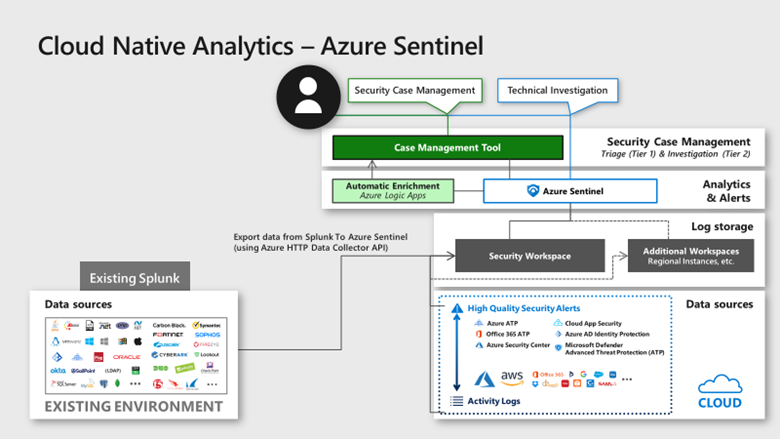
In this diagram, we show how Splunk data can be correlated into Azure Sentinel providing a consolidated SIEM view
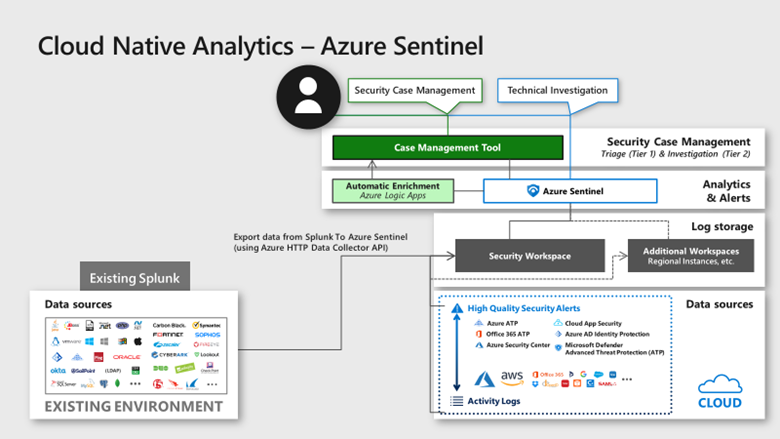
Scenario description:
When you add data to Splunk, the Splunk indexer processes it and stores it in a designated index (either, by default, in the main index or in the one that you identify). Searching in Splunk involves using the indexed data for the purpose of creating metrics, dashboards and alerts.
Let’s assume that your security team wants to collect data from Splunk platform to use Azure Sentinel as their centralized SIEM. In order to implement this scenario, we can rely on different options but the one I was thinking about is to rely on data stored in Splunk index then create a scheduled custom alert to push this data to the Azure Sentinel API.
In order to send data from Splunk to Azure Sentinel, my idea was to use the HTTP Data Collector API, more information can be found here. You can use the HTTP Data Collector API to send log data to a Log Analytics workspace from any client that can call a REST API.
All data in the Log Analytics workspace is stored as a record with a particular record type. You format your data to send to the HTTP Data Collector API as multiple records in JSON. When you submit the data, an individual record is created in the repository for each record in the request payload.
Based on Splunk Add-on Builder here, I created an add-on which trigger an action based on the alert in Splunk. You can use Alert actions to define third-party integrations (like Azure Sentinel) or add custom functionality. Splunk Add-on Builder uses Python code to create your alert action, here is the code I used within the Add-on: https://docs.microsoft.com/en-us/azure/azure-monitor/platform/data-collector-api#python-3-sample
To make this simple I have created an Add-on for you to use. You need just to install it in your Splunk platform.
Let’s start the configuration!
Preparation & Use
The following tasks describe the necessary preparation and configurations steps.
- Onboarding of Splunk instance (latest release), can be found here
- Get the Log Analytics workspace parameters: Workspace ID and Primary Key from here
- Install the Azure Sentinel App for Splunk: can be found here
Onboard Azure Sentinel
Onboarding of Azure Sentinel is not part of this blog post, however required guidance can be found here.
Add-on Installation in Splunk Enterprise
In Splunk home screen, on the left side sidebar, click “+ Find More Apps” in the apps list, or click the gear icon next to Apps then select Browse more apps.
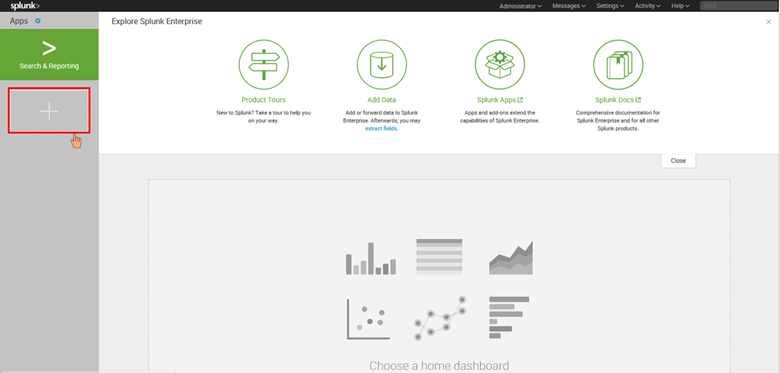
Search for Azure Sentinel in the text box, find the Azure Sentinel Add-On for Splunk and click Install.
After the add-on is installed reboot of Splunk is required, click Restart Now.
Configure the Azure Sentinel add-on for Splunk
Refer to Define RealTime Alerts documentation to set up Splunk alerts to send logs to Azure Sentinel. To validate the integration, the audit index is used as an example, for an “_audit”- this repository stores events from the file system change monitor, auditing, and all user search history. You can query the data by using index=”_audit” in the search field as illustrated below.
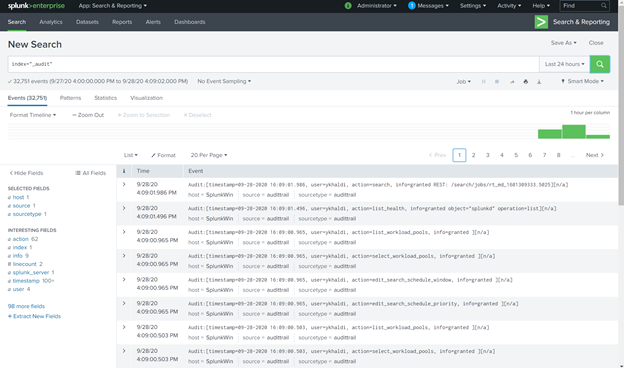
Then use a scheduled or real-time alert to monitor events or event patterns as they happen. You can create real-time alerts with per-result triggering or rolling time window triggering. Real-time alerts can be costly in terms of computing resources, so consider using a scheduled alert, when possible.
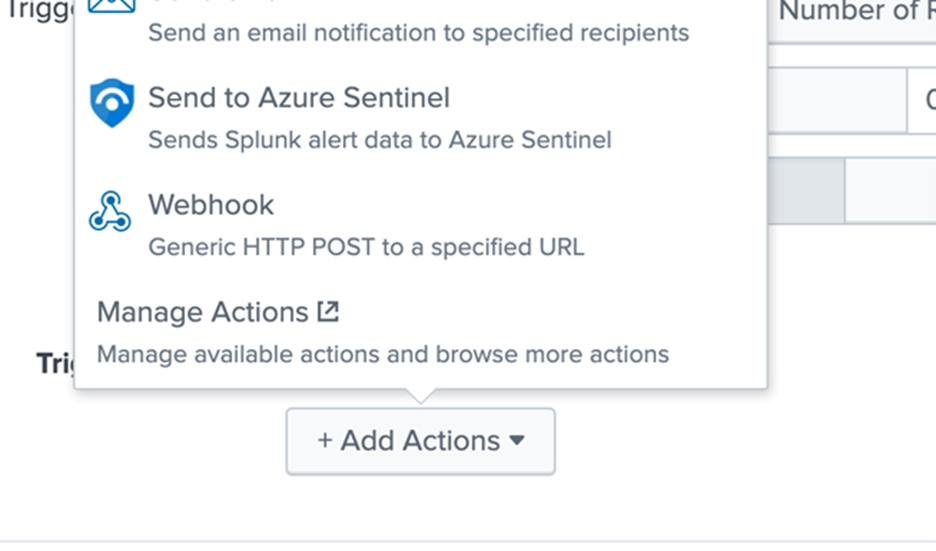
Set up alert actions, which can help you respond to triggered alerts. You can enable one or more alert actions. Select “Send to Azure Sentinel” action, which appears after you install the Azure-Sentinel add-on as shown in the diagram below.
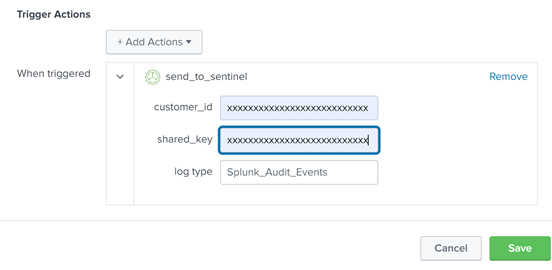
Fill in the required parameters as shown in the diagram below:
- Customer_id: Azure Sentinel Log Analytics Workspace ID
- Shared_key: Azure Sentinel Log Analytics Primary Key
- Log_Type: Azure Sentinel custom log name
Note: These parameters are required and will be used by the application to send data to Azure Sentinel through the HTTP Data Collector API.

View Splunk Data in Azure Sentinel
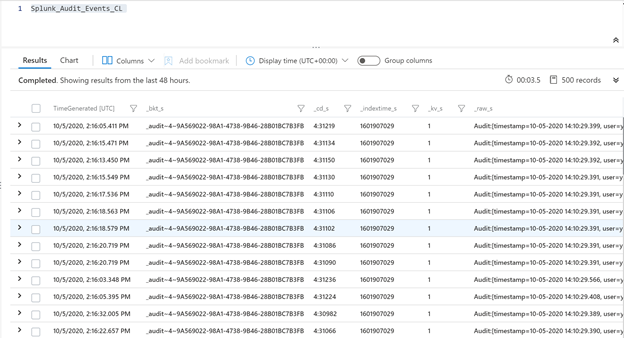
The logs will go to a custom Azure Sentinel table called ‘Splunk_Audit_Events_CL’ as shown below. The table name aligns with the log name provided in the Figure 4 above. It can take few minutes for events to be available.
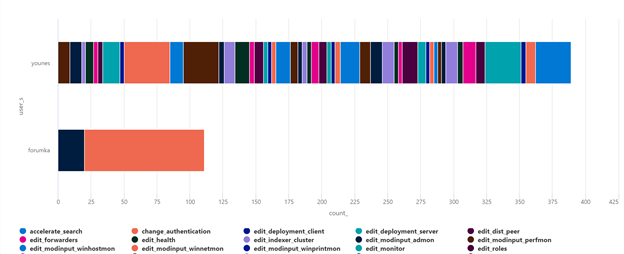
You can query the data in Azure Sentinel using Kusto Query Language (KQL) as shown below.
Splunk_Audit_Events_CL | summarize count() by user_s, action_s | render barchart
As mentioned at the beginning of this blog, Azure Sentinel can be used as single pane of glass to centralize all incidents (generated by different SIEM solutions).
When a correlation search included in the Splunk Enterprise Security or added by a user, identifies an event or pattern of events, it creates an incident called notable event. Correlation searches filter the IT security data and correlate across events to identify a particular type of incident (or pattern of events) and then create notable events.
Correlation searches run at regular intervals (for example, every hour) or continuously in real-time and search events for a particular pattern or type of activity. The notable event is stored in a dedicated notable index. You can import all notable events into Azure Sentinel using the same procedure described above.
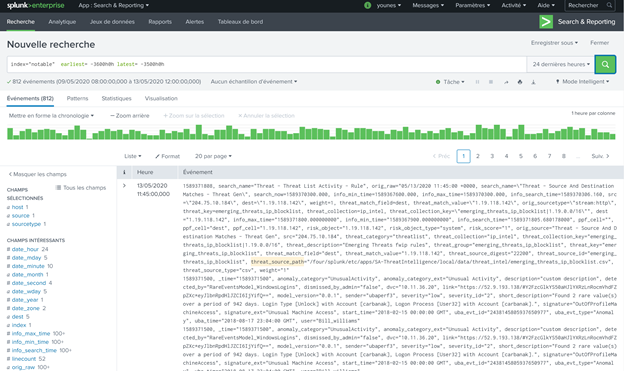
The results will be added to a custom Azure Sentinel table called ‘Splunk_Notable_Events_CL’ as shown below.
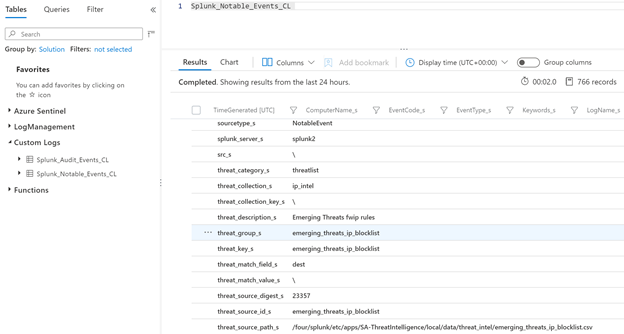
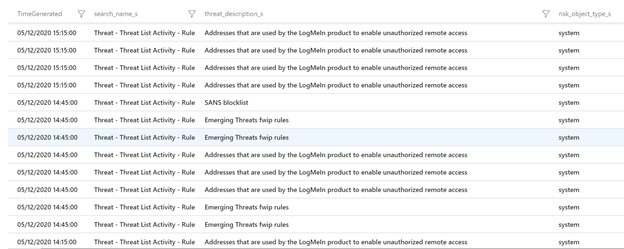
You can easily query Splunk incidents in Azure Sentinel:
Splunk_Notable_Events_CL
| extend Origin_Time= extract(“([0-9]{2}/[0-9]{2}/[0-9]{4} [0-9]{2}:[0-9]{2}:[0-9]{2})”, 0, orig_raw_s )
| project TimeGenerated=Origin_Time , search_name_s, threat_description_s, risk_object_type_s
Splunk SPL to KQL
As mentioned above, you will probably have to deliver the side-by-side for a while until your security team will be more comfortable working within the new SIEM (Azure Sentinel). One challenge is how migrate rules and searches from Splunk to Azure Sentinel.
Azure Sentinel is using Kusto Query Language (KQL) to query the data. Splunk is using search-processing-language (SPL) for that.
You can consider this project: https://uncoder.io to transform the query!
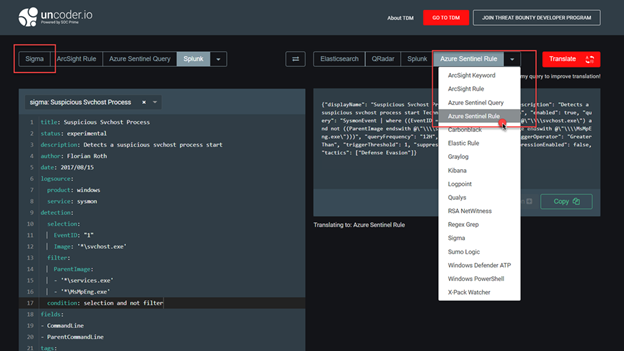
Uncoder.io is SOC Prime’s free tool for SIEM search language conversion. Uncoder relies to enable event schema resolution across platforms.
Uncoder.IO is the online translator for SIEM saved searches, filters, queries, API requests, correlation and Sigma rules to help SOC Analysts, Threat Hunters and SIEM Engineers. Serving as one common language for cyber security it allows blue teams to break the limits of being dependent on single tool for hunting and detecting threats.
Also consider this nice initiative from Alex Teixeira:
https://github.com/inodee/spl-to-kql
Summary
We just walked through the process of standing up Azure Sentinel Side-by-Side with Splunk. Stay tuned for more Side-by-Side details in our blog channel.

by Contributed | Nov 17, 2020 | Azure, Microsoft, Technology
This article is contributed. See the original author and article here.
Abstract:
With DevOps, we now deploy Production code every so often, hence our security practices need to evolve too.
In this session we will covering DevSecOps which is about making security an important part of DevOps process and see how to implement a secure and compliant development process in our Azure DevOps pipelines so we can run security tests during Continuous Integration (CI) builds and Continuous Deployment (CD) releases.
Webinar Date & Time : December 11, 2020. Time 4.00 PM IST (10.30 AM GMT)
Invite : Download the Calendar Invite
Speaker Bio:

Ahetejazahmad Khan is working as a Support Engineer at Azure DevOps Team, India. His day to day role is to enable DevOps engineers around the world to achieve more. His role provides him a unique view of technology and customers. He partners with Field teams, Products groups to help our customers and developers. He currently focuses on Azure DevOps technologies. He is a Microsoft Certified DevOps: Support Specialist, Azure Fundamentals and Azure Administrator Associate.

Avina Jain is a Support Engineer with Azure DevOps team in India. Her role gives her the opportunity to work with engineers and help them address their business goals and strategic solution requirements.
She is always focused on providing a positive experience to customers.
Devinar 2020


Recent Comments