Lesson Learned #142: Login Timeout Expired connecting to Azure SQL Database

This article is contributed. See the original author and article here.

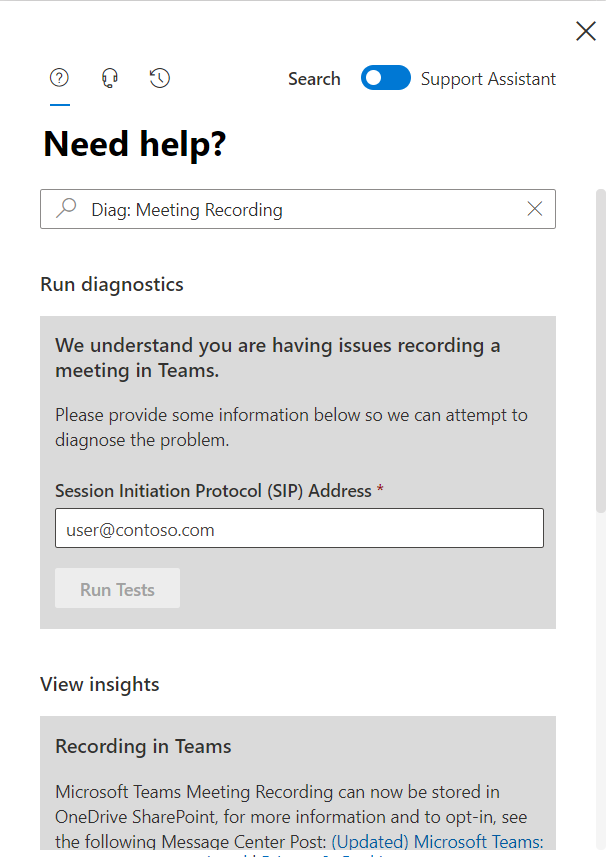
These last weeks we got several cases that our customers reported the following error message: Login timeout expired – A network-related or instance-specific error has occurred while establishing a connection to SQL Server. Server is not found or not accessible. Check if instance name is correct and if SQL Server is configured to allow remote connections. For more information see SQL Server Books Online.
TCP Provider: A connection attempt failed because the connected party did not properly respond after a period of time, or established connection failed because connected host has failed to respond, in the following video I would like to share with you what is the issue, how to identify, fix and prevent it. 


Enjoy!
Azure DevOps Boards and Excel!

Azure DevOps Boards and Excel!

This article is contributed. See the original author and article here.

As many of you may know I run the Glasgow Azure User Group, and over the last three years I’ve had the privilege to hear a good number of excellent speakers deliver their sessions at the group’s meetups.  Recently Tricia Sinclair, delivered a brill session going into Azure DevOps Boards.  Something I use daily, but don’t even scratch the surface of functionality wise.  So, Tricia’s session opened a whole new world to me.


DevOps Boards and Excel


During her session Tricia mentioned there was a plugin for Excel that allowed you to bulk import or modify DevOps Board items, which I had no idea existed! 


This plug in is part of the Azure DevOps Office Integration 2019 feature that allows non-developers to interact with Azure DevOps.  Now I don’t believe this tool is only for non-developers, I think it can help everyone that needs to interact with DevOps Boards.


To get to work with this feature you need to have Excel 2010 or later installed, the plug, be a member of the project you want to interact with, have the relevant permissions to modify items in the project you want to interact with and of course be using Azure DevOps.  For a full list of prerequisites please do check out the official documentation.


Use Excel to create items in Azure DevOps Boards


Using Azure DevOps Boards to keep track of work items, bugs, whatever it might be is an awesome way to create visibility for you and your team, however, it can be a bit tiresome entering a bunch of those things at a time.  And being able to bulk load would be handy and this is what the plugin allows you to do!


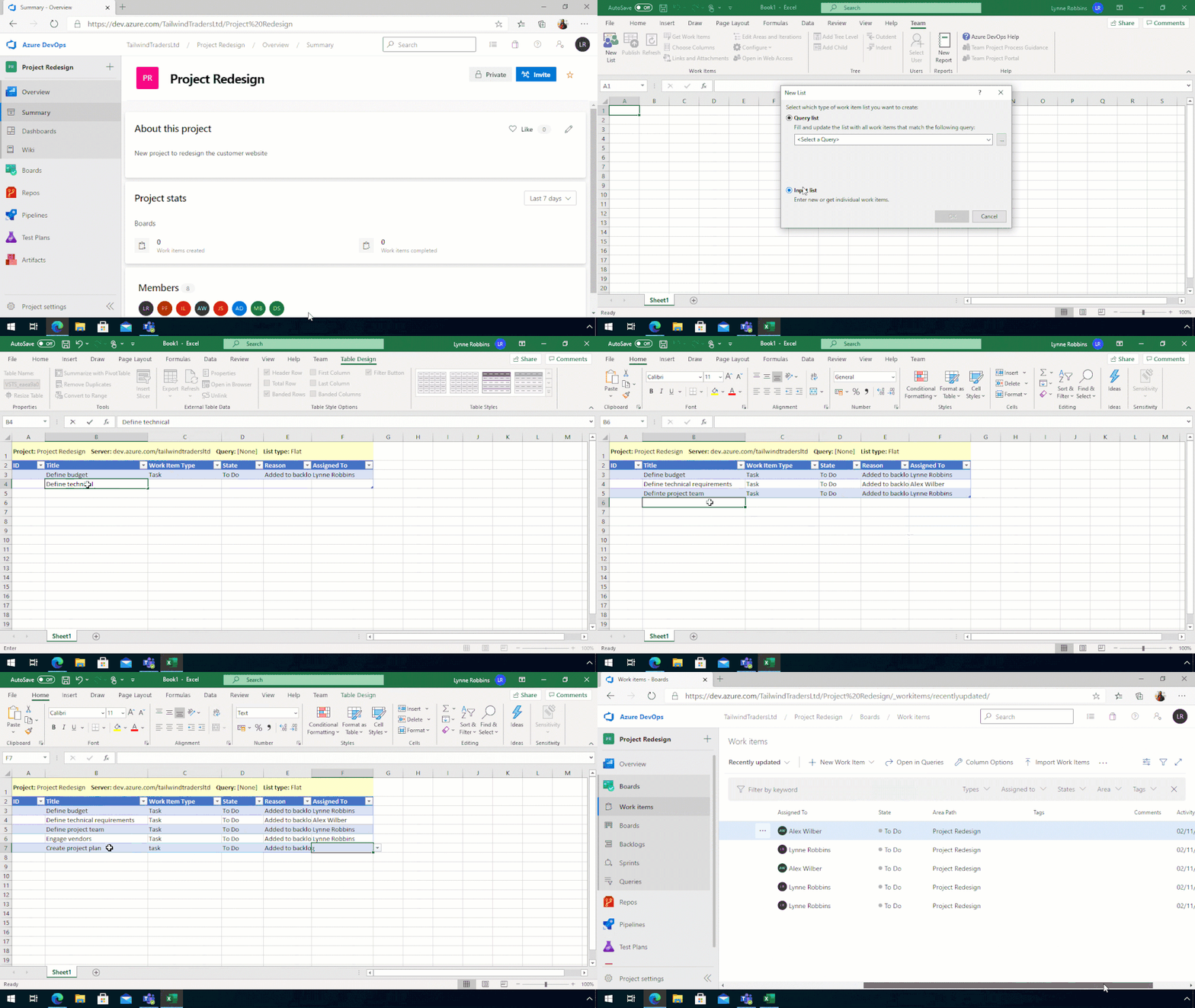
Once you install the plug in when you open Excel, you have a tab called Team, which allows you to connect with Azure DevOps within Excel.


So, if you have a new Azure DevOps Project and want to bulk import a bunch of tasks for the team to work through you can do that by connecting Excel to the Project and starting the list.


Create a new DevOps List from ExcelCreate a new DevOps List from Excel


You can also do this if you have new tasks or bugs or issues, to add to an existing project.  And I will be using this feature in the future to track my work, especially when I’ve been neglecting my duties and not adding my tasks to the team board.


Update items from Excel to your Azure DevOps Board


What about updating items, you can do that as well.  Which again allows you to create items, update items, add more information to items.  All of that is available.


The best way I have found to bulk update tasks on an existing project is to have a query setup that pulls the items I want to update and then use that to help pull the information into Excel.


Opening up the plug in within Excel, this time I tell it I want to pull the information from the query.
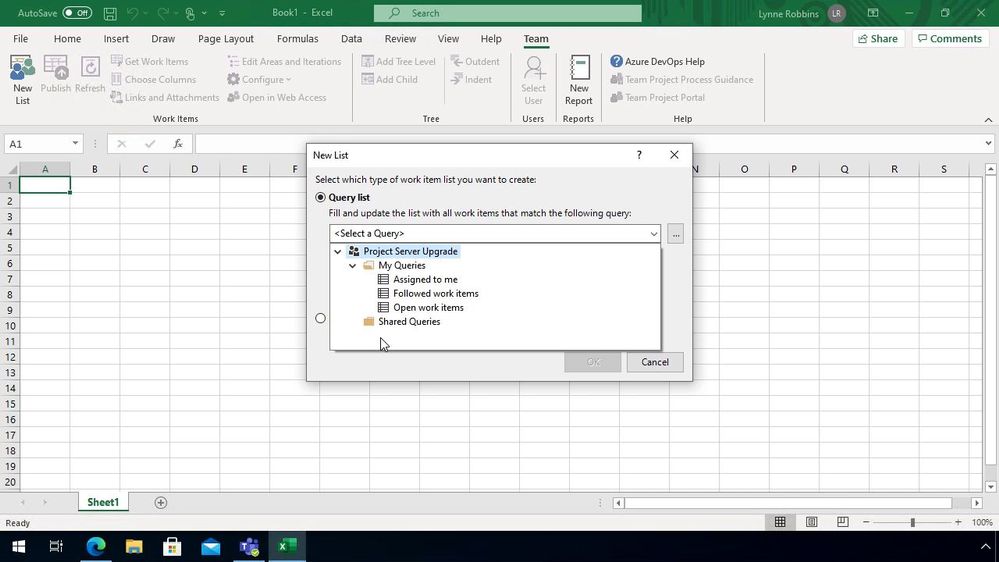


Pull information from DevOps into ExcelPull information from DevOps into Excel

Once the information is pulled down I can update the items that I need to, either bulk closing items, or reassigning the items to others.


It’s also a great opportunity to link any items together using the “Links and Attachment” button or even uploading any supporting information for that item.
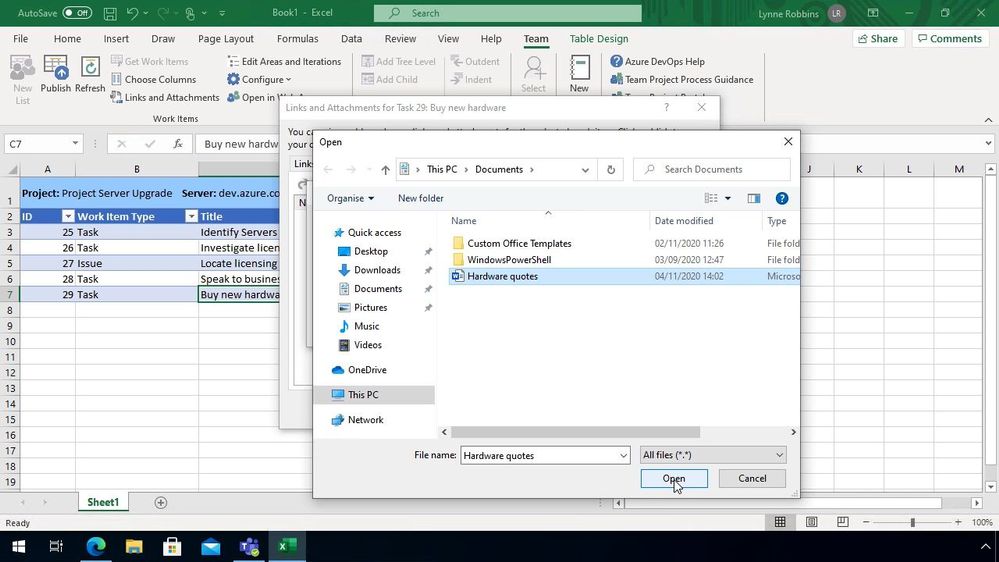


Add files to your DevOps ItemsAdd files to your DevOps Items


Speed up those admin tasks


As I said at the top of this blog post I don’t think this is something only for non-developers I think this is a great tool for everyone, if you set aside time at the end of your week to go through and update your Azure DevOps Board this can help speed things up.  I’d love to hear if you are using this plugin and if it’s helping to speed up the management of your items or not!




Experiencing Data Access issue in Azure portal for Log Analytics – 11/19 – Investigating

This article is contributed. See the original author and article here.

Initial Update: Thursday, 19 November 2020 01:20 UTC

We are aware of issues within Log Analytics and are actively investigating. Some customers may experience issues with missed or delayed Log Search Alerts or experience difficulties accessing data for resources hosted in West US2 and North Europe. 
  • Work Around: None
  • Next Update: Before 11/20 01:30 UTC
We are working hard to resolve this issue and apologize for any inconvenience.
-Saika

Control holiday lights with Python, Azure IoT and Power Apps

Control holiday lights with Python, Azure IoT and Power Apps

This article is contributed. See the original author and article here.

app-controlled-lights.gif


As the December holiday season descends, some cultures celebrate with lights, where’s other folks have breaks from school and are looking for a fun project to work on. Whatever your reason – we have a fun project for you.


This project uses a Raspberry Pi with W2812 programmable LEDs (also known as NeoPixels), controlled by Azure IoT Central and Power Apps to give you phone controlled holiday lights.


Check out the blog post for all the details:


Control holiday lights with Python, Azure IoT and Power Apps on Dev.to


This is part of a series of fun Python projects we are calling Python Fun Bites. You can find the whole series on our announcement post on Dev.to.

Using the VirusTotal V3 API with MSTICPy and Azure Sentinel

Using the VirusTotal V3 API with MSTICPy and Azure Sentinel

This article is contributed. See the original author and article here.

MSTICPy, our CyberSec toolset for Jupyter notebooks, has supported VirusTotal lookups since the very earliest days (the earliest days being only around two years ago!). We recently had a contribution to MSTICPy from Andres Ramirez and Juan Infantes at VirusTotal (VT), which provides a new Python module to access the recently-released version 3 of their API.


As well as a Python module, which provides the interface to lookup IoCs via the API, there is also a sample Jupyter notebook demonstrating how to use it.


As a side note, we’re delighted to get this submission, not just because it brings support for the awesome new VirusTotal API, but it is also first substantial contribution to MSTICPy from anyone outside MSTIC (Microsoft Threat Intelligence Center). Big thanks to Juan and Andres!


The two biggest features of the API are:


  • the ability to query relationships between indicators

  • the ability to visualize these relationships via an interactive network graph.


There is also an easy-to-use Python object interface exposed via the vt_py and vt_graph_api Python libraries (these are both required by the MSTICPy vtlookup3 module). You can read more about the VT Python packages by following the links in the previous sentence.


Why you would want to use VTLookup3


Alerts and incidents in Azure Sentinel will nearly always have a set of entities attached to them. These entities might be things like IP addresses, hosts, file hashes, URLs, etc. This is common to many SOC environments.


Let’s take an example of Microsoft Defender for Endpoint (MDE) alerts ingested into Azure Sentinel.


Note: MDE is the new name for Microsoft Defender Advance Threat Protection (MDATP) so you will probably see both terms kicking around for a while.


incidents.png


If we look at the incident detail and click on the Entities tab we see a list of entities related to the incident.


incident_detail.png


As part of your SOC triage you will want to check on whether any of these file hashes are known bad and possibly explore other related files, IPs. domains, etc. MSTICPy allows you to do custom correlation with arbitrary external data sources, including VT.


We will use one of the file hashes taken from this incident as we explore VT Lookup capabilities. Although our example below uses a file hash, you could use a URL, domain or IP Address as your starting point.


Getting started


There is a little bit of setup to do before you can get going.


Note: MSTICPy with extras
We’re in the process of moving a lot of the growing list of MSTICPy dependencies into optional installs. These are known as “extras” in the Python setup world. VirusTotal are the first to be “extra”d but we’re not picking on them. It was just, as a new package, it was easiest to start the dependency refactoring with a new library.


Install msticpy with the “vt3” extra


pip install msticpy[vt3]

or just install the vt_py and vt_graph_api packages directly:


pip install vt-py vt-graph-api nest_asyncio


Note: the nest_asyncio package is required for use in notebooks but not if you’re use the vtlookup3 module and VTLookup3 class in Python code.


In the notebook, import the modules:


from msticpy.sectools.vtlookupv3 import VTLookupV3
import nest_asyncio

And create an instance of the VTLookup3 class.


vt_lookup = VTLookupV3(vt_key)


You need to supply your VirusTotal API key when you create the VTLookup3 instance. You can supply this as a string or store it in your msticpyconfig.yaml configuration file.


This code, taken from the notebook will try to find the VT API key in your configuration.


from msticpy.common.provider_settings import get_provider_settings
vt_key = get_provider_settings(“TIProviders”)[“VirusTotal”].args[“AuthKey”]

Note: in the configuration file you can specify that the API key value be retrieved from an environment variable or from an Azure Key Vault. See MSTICPy Package Configuration for more details.


Using VTLookup3


VTLookup3 has the following methods:


  • lookup_ioc – for single item lookups

  • loopkup_iocs – for multiple lookups


  • lookup_ioc_relationships – to find IoCs and attributes that are related to the searched-for IoC


  • lookup_iocs_relationships – to find relationships for multiple entities

  • create_vt_graph – to build a graph from a relationship set

  • render_vt_graph – to display the graph in the notebook.


We’ll look at each of these in turn.


Note: we use the terms IoC (indicator of compromise) and observable interchangably in this article. They indicate data items such as IP addresses, URLs, file hashes etc. that may be observed during an attack and thus become indicators of compromise.


Looking up a single IoC/observable


lookup_ioc works much like the other TI providers in MSTICPy except that it returns the results as a pandas DataFrame, even for a single IoC query.


FILE = ‘ed01ebfbc9eb5bbea545af4d01bf5f1071661840480439c6e5babe8e080e41aa’
example_attribute_df = vt_lookup.lookup_ioc(observable=FILE, vt_type=‘file’)
example_attribute_df


If an entry matching this ID is found in VT it is returned with some basic attributes such as submission times, name, and type.


single_ioc_lookup.png


Since the time stamp is returned as a Unix serial timestamp you might want to re-format into a more readable form using code like this.


example_attribute_df.assign(
first_submission=pd.to_datetime(example_attribute_df.first_submission_date, unit=“s”, utc=True),
last_submission=pd.to_datetime(example_attribute_df.last_submission_date, unit=“s”, utc=True)
)

This adds two columns to the data that display as human-readable datetimes


Note: we plan to change this soon so that the API will return datetime types directly.


We’ve added a convenience function to the notebook that allows you to return full details for a VirusTotal object. This isn’t done by default in the built-in methods but you can use this to query additional data for specific IDs.


ioc_full_details.png


Note: get_object will be exposed in the core VTLookup3 interface in a future version. This simply implements the vt_py client.get_object call. You can use the vt_py method directly or go the VirusTotal site to see the details rendered in a more consumable fashion.


Looking up IoC Relationships


The lookup_ioc_relationships method shows off some of the capability of the new API. From a single indicator you can retrieve any related IoCs (in this case we’re using the same file hash as above). In the example here we’re retrieving any known parent processes for the malware that we are investigating.


example_relationship_df = vt_lookup.lookup_ioc_relationships(
observable=FILE,
vt_type=‘file’,
relationship=‘execution_parents’)
example_relationship_df


This returns a DataFrame with the IDs of any related IoCs, their types, and the relationship type to the original observable.


lookup_relationships.png


The source column is the ID of our original observable. The target column contains the known execution parents of this file. The results represent a simple graph with the nodes being the source and targets and edges being the relationship_type between them.


Use the limit parameter to this function to restrict how many related entities are returned.


You can look up details of any of the related parents using the get_object() function – but don’t do that just yet until you’ve read the next section.


Looking up multiple observables – lookup_iocs


You can use lookup_iocs to lookup multiple observables in a single call (e.g. IoCs extracted from a set of process events). Assuming that the observables are in a DataFrame called input_df, call lookup_iocs as follows:


results_df = vt_lookup.lookup_iocs(
observables_df=input_df,
observable_column=”colname_with_ioc”,
observable_type_column=”colname_with_vt_type”
)


You can also submit the DataFrame that we generated earlier – example_relationship_df – directly as an input to lookup_iocs. In this case it will default to using the target and target_type columns for the observable_column and observable_type_column parameters, so these do not need to be specified as parameters.


Executing this brings back some basic details about each target item listed in our example_relationship_df DataFrame.


lookup_iocs.png


Expanding the Graph – looking up relationships for multiple IoCs


lookup_iocs_relationships is the equivalent of lookup_ioc_relationships but taking multiple IoC/observables as input.


contacted_domains.png


The output from this is shown using the previously generated DataFrame as input. Like lookup_iocs, this is defaulting to using the target and target_type columns for the observable_column and observable_type_column parameters; so we haven’t needed to include these parameters in the call.


You can use this API with an arbitrary DataFrame as input, specifying the observable_column and observable_type_column parameters. The data in both columns must be in the correct format for submission with valid vt_type strings (see the documentation for further details)


Importing the data to networkx


Networkx is probably the most popular Python graphing library. It only includes basic visualization capabilities but it does support a rich variety of graphing analysis and query functions. Since the data structure of the VT relationships is a graph, you can easily import the data into a networkx graph (and also plot it). Having the ability to manipulate the graph in networkx allows you to apply graphing functions and analysis on the data, such as finding the most central nodes, or those having the most neighbors.


We’ve given a simple example of importing the relationships DataFrame into a networkx graph and plotting a simple view of it with Bokeh.


from bokeh.io import output_notebook, show
from bokeh.plotting import figure, from_networkx
from bokeh.models import HoverTool

graph = nx.from_pandas_edgelist(
example_multiple_relationship_df.reset_index(),
source=”source”,
target=”target”,
edge_attr=”relationship_type”,
)

plot = figure(
title=”Simple graph plot”, x_range=(-1.1, 1.1), y_range=(-1.1, 1.1), tools=”hover”
)
g_plot = from_networkx(graph, nx.spring_layout, scale=2, center=(0, 0))
plot.renderers.append(g_plot)

output_notebook()
show(plot)


bokeh_graph.png


While this may look cosmic, it isn’t hugely informative and isn’t interactive in any way. On to better things…


Displaying the VT Graph


To see the data in its full glory use the create_vt_graph and render_vt_graph methods:


graph_id = vt_lookup.create_vt_graph(
relationship_dfs=[example_relationship_df, example_multiple_relationship_df],
name=”My first Jupyter Notebook Graph”,
private=False,
)

vt_lookup.render_vt_graph(
graph_id = graph_id,
width = 900,
height = 600
)

You may need to be patient with these APIs since a complex graph can take a while to build and render. In a few moments you should see an interactive graph render into an IFrame in the notebook as seen in the screen shot below.


vt_graph2.gif


Exploring the graph on the VirusTotal site brings more capabilities such as being able to view further details about the graph entities, to search within the graph, and to search for, and add, additional nodes.


We very much appreciate this addition to MSTICPy. It brings a lot more of the power of VirusTotal data and exploration to the world of hunting and investigation in Jupyter notebooks.


Azure Marketplace new offers – Volume 95

Azure Marketplace new offers – Volume 95

This article is contributed. See the original author and article here.


We continue to expand the Azure Marketplace ecosystem. In November, 65 offers from Cognosys Inc. successfully met the onboarding criteria and went live. Cognosys continues to be a leading Marketplace publisher, with more than 600 solutions available. See details of the new offers below:


Applications


Cognosys image.png

Apache Web Server with CentOS 7.8: This image offered by Cognosys contains Apache Web Server version 2.4.6-93.el7 with CentOS 7.8. Apache Web Server, one of the most popular web servers, is free and open-source software.


Cognosys image.png

Apache Web Server with Ubuntu 20.04 LTS: This image offered by Cognosys contains Apache Web Server version 2.4.41 with Ubuntu 20.04 LTS. Apache Web Server, one of the most popular web servers, is free and open-source software.


Cognosys image.png

CentOS 7.8: This image offered by Cognosys contains CentOS 7.8. CentOS is a community-developed distribution of the Linux operating system and is compatible with Red Hat Enterprise Linux.


Cognosys image.png

CentOS 8.2: This image offered by Cognosys contains CentOS 8.2. CentOS is a community-developed distribution of the Linux operating system and is compatible with Red Hat Enterprise Linux.


Cognosys image.png

Docker CE with CentOS 7.7 Free: This image offered by Cognosys contains Docker CE with CentOS 7.7. Docker Community Edition (CE) is a free, community-supported version of Docker’s open-source containerization platform. Docker CE is aimed at developers and do-it-yourself operations teams.


Cognosys image.png

Docker CE with CentOS 7.8: This image offered by Cognosys contains Docker CE version 3:19.03.12-3.el7 with CentOS 7.8. Docker Community Edition (CE) is a free, community-supported version of Docker’s open-source containerization platform.


Cognosys image.png

Docker CE with CentOS 8.0 Free: This image offered by Cognosys contains Docker CE with CentOS 8.0. Docker uses operating system-level virtualization to deliver software in packages called containers. Docker Community Edition (CE) is a free, community-supported version of Docker’s open-source containerization platform.


Cognosys image.png

Docker CE with CentOS 8.1: This image offered by Cognosys contains Docker CE with CentOS 8.1. Docker Community Edition (CE) is a free, community-supported version of Docker’s open-source containerization platform.


Cognosys image.png

Docker CE with CentOS 8.2: This image offered by Cognosys contains Docker CE with CentOS 8.2. Docker Community Edition (CE) is a free, community-supported version of Docker’s open-source containerization platform.


Cognosys image.png

Docker Community Server with Ubuntu 20.04 LTS: This image offered by Cognosys contains Docker Community Server with Ubuntu 20.04 LTS. Docker Community Server is ideal for developers and small teams looking to get started with Docker and experimenting with container-based apps.


Cognosys image.png

HAProxy 2.0 with Ubuntu 20.04: This image offered by Cognosys contains HAProxy 2.0.16 with Ubuntu 20.04. HAProxy is free open-source software that provides a high-availability load balancer and proxy server for TCP and HTTP-based applications. It’s used by Twitter, Reddit, GitHub, and many other high-profile websites.


Cognosys image.png

HAProxy with CentOS 8.2: This image offered by Cognosys contains HAProxy 1.8.23 with CentOS 8.2. HAProxy is free open-source software that provides a high-availability load balancer and proxy server for TCP and HTTP-based applications. It’s used by Twitter, Reddit, GitHub, and many other high-profile websites.


Cognosys image.png

IIS on Windows Server 2016 Free: This image offered by Cognosys contains IIS on Windows Server 2016. Internet Information Services (IIS) is extensible web server software created by Microsoft. The scalable and open architecture of IIS can handle media streaming, web applications, and other demanding tasks.


Cognosys image.png

IIS on Windows Server 2019 Free: This image offered by Cognosys contains IIS on Windows Server 2019. Internet Information Services (IIS) is extensible web server software created by Microsoft. The scalable and open architecture of IIS can handle media streaming, web applications, and other demanding tasks.


Cognosys image.png

Jenkins Docker Container with Ubuntu 20.04 LTS: This image offered by Cognosys contains Jenkins Docker Container with Ubuntu 20.04 LTS. Jenkins is an open-source continuous integration tool written in Java and used for software development. 


Cognosys image.png

Jenkins with Ubuntu Server 20.04 LTS: This image offered by Cognosys contains Jenkins version 2.235.2 with Ubuntu Server 20.04 LTS. Jenkins is an open-source continuous integration tool written in Java and used for software development.


Cognosys image.png

LAMP with CentOS 7.8: This image offered by Cognosys contains LAMP with PHP 7.3 on CentOS 7.8. The LAMP stack, composed of open-source software, is used for web application development.


Cognosys image.png

LAMP with CentOS 7.8 MariaDB 10: This image offered by Cognosys contains LAMP with CentOS 7.8, PHP 7.3, and MariaDB 10. The LAMP stack, composed of open-source software, is used for web application development.


Cognosys image.png

LAMP with Ubuntu Server 20.04 LTS: This image offered by Cognosys contains LAMP with Ubuntu Server 20.04 LTS. The LAMP stack, composed of open-source software, is used for web application development.


Cognosys image.png

LMS powered by Moodle with CentOS 7.8: This image offered by Cognosys contains Moodle 3.9.2 with CentOS 7.8. Moodle is an open-source learning management system for distance education and other e-learning projects.


Cognosys image.png

MariaDB 10 with CentOS 7.8: This image offered by Cognosys contains MariaDB 10.5.4 with CentOS 7.8. MariaDB Server is an open-source relational database made by the original developers of MySQL.


Cognosys image.png

MariaDB 10 with CentOS 8.2: This image offered by Cognosys contains MariaDB 10.5.4 with CentOS 8.2. MariaDB Server is an open-source relational database made by the original developers of MySQL.


Cognosys image.png

Matomo with Windows Server 2016: This image offered by Cognosys contains Matomo with Windows Server 2016. Matomo is an open-source web analytics platform with a focus on enabling businesses to comply with the General Data Protection Regulation and the California Consumer Privacy Act.


Cognosys image.png

Mautic with CentOS 8.2: This image offered by Cognosys contains Mautic 3 with CentOS 8.2. Mautic is open-source software that helps online businesses automate repetitive marketing tasks, such as lead generation, contact scoring, and contact segmentation.


Cognosys image.png

Mautic with Ubuntu 20.04 LTS: This image offered by Cognosys contains Mautic 3 with Ubuntu 20.04 LTS. Mautic is open-source software that helps online businesses automate repetitive marketing tasks, such as lead generation, contact scoring, and contact segmentation.


Cognosys image.png

MediaWiki with CentOS 8.2: This image offered by Cognosys contains MediaWiki 1.34.2 with CentOS 8.2. Originally developed for Wikipedia, MediaWiki is an open-source wiki engine used to power collaboratively edited reference projects.


Cognosys image.png

MediaWiki with Windows Server 2016: This image offered by Cognosys contains MediaWiki 1.34.2 with Windows Server 2016. Originally developed for Wikipedia, MediaWiki is an open-source wiki engine used to power collaboratively edited reference projects.


Cognosys image.png

MediaWiki with Windows Server 2019: This image offered by Cognosys contains MediaWiki 1.34.2 with Windows Server 2019. Originally developed for Wikipedia, MediaWiki is an open-source wiki engine used to power collaboratively edited reference projects.


Cognosys image.png

MySQL 5.7 with CentOS 7.8: This image offered by Cognosys contains MySQL 5.7.31 with MySQL Community Server 5.7.18 and CentOS 7.8. MySQL is an open-source relational SQL database management system for developing web-based software applications.


Cognosys image.png

MySQL 8.0 with CentOS 8.2: This image offered by Cognosys contains MySQL 8.0.17 with MySQL Community Server 8.0.17 and CentOS 8.2. MySQL is an open-source relational SQL database management system for developing web-based software applications.


Cognosys image.png

NGINX with CentOS 7.8: This image offered by Cognosys contains NGINX 1.16.1 with CentOS 7.8. NGINX is an all-in-one API gateway, cache, load balancer, web application firewall, and web server.


Cognosys image.png

NGINX with Ubuntu Server 20.04 LTS: This image offered by Cognosys contains NGINX 1.18.0 with Ubuntu Server 20.04 LTS. NGINX is an all-in-one API gateway, cache, load balancer, web application firewall, and web server.


Cognosys image.png

Node.js 10 with CentOS 8.2: This image offered by Cognosys contains Node.js v10.22.0 with CentOS 8.2. Node.js, an open-source cross-platform JavaScript runtime environment, is used for developing tools and applications.


Cognosys image.png

Node.js 10 with Ubuntu 20.04 LTS: This image offered by Cognosys contains Node.js v10.22.0 with Ubuntu Server 20.04 LTS. Node.js, an open-source cross-platform JavaScript runtime environment, is used for developing tools and applications.


Cognosys image.png

Node.js 12 with CentOS 7.8: This image offered by Cognosys contains Node.js v12.18.3 with CentOS 7.8. Node.js, an open-source cross-platform JavaScript runtime environment, is used for developing tools and applications.


Cognosys image.png

Node.js 12 with CentOS 8.2: This image offered by Cognosys contains Node.js v12.18.3 with CentOS 8.2. Node.js, an open-source cross-platform JavaScript runtime environment, is used for developing tools and applications.


Cognosys image.png

Node.js 12 with Ubuntu 20.04 LTS: This image offered by Cognosys contains Node.js v12.18.3 with Ubuntu Server 20.04 LTS. Node.js, an open-source cross-platform JavaScript runtime environment, is used for developing tools and applications.


Cognosys image.png

Node.js 14 with CentOS 7.8: This image offered by Cognosys contains Node.js v14.7.0 with CentOS 7.8. Node.js, an open-source cross-platform JavaScript runtime environment, is used for developing tools and applications.


Cognosys image.png

Node.js 14 with CentOS 8.2: This image offered by Cognosys contains Node.js v14.7.0 with CentOS 8.2. Node.js, an open-source cross-platform JavaScript runtime environment, is used for developing tools and applications.


Cognosys image.png

OpenJDK 11 with CentOS 7.7 Free: This image offered by Cognosys contains OpenJDK 11 with CentOS 7.7. OpenJDK is an open-source implementation of Java SE (Java Platform, Standard Edition), which is used for developing and deploying Java applications.


Cognosys image.png

OpenJDK 11 with CentOS 7.8: This image offered by Cognosys contains OpenJDK 11.0.7 with CentOS 7.8. OpenJDK is an open-source implementation of Java SE (Java Platform, Standard Edition), which is used for developing and deploying Java applications.


Cognosys image.png

OpenJDK 8 with CentOS 7.7 Free: This image offered by Cognosys contains OpenJDK 8 with CentOS 7.7. OpenJDK is an open-source implementation of Java SE (Java Platform, Standard Edition), which is used for developing and deploying Java applications.


Cognosys image.png

OpenJDK 8 with CentOS 7.8: This image offered by Cognosys contains OpenJDK 8 with CentOS 7.8. OpenJDK is an open-source implementation of Java SE (Java Platform, Standard Edition), which is used for developing and deploying Java applications.


Cognosys image.png

PHP 5.6 with Ubuntu Server 20.04 LTS: This image offered by Cognosys contains PHP 5.6.4 with Ubuntu Server 20.04 LTS. PHP is a fast, flexible, and pragmatic scripting language suited for web development.


Cognosys image.png

PHP 7.3 with CentOS 7.7 Free: This image offered by Cognosys contains PHP 7.3 with CentOS 7.7. PHP is a fast, flexible, and pragmatic server-side scripting language suited for web development.


Cognosys image.png

PHP 7.3 with CentOS 7.8: This image offered by Cognosys contains PHP 7.3.2 with CentOS 7.8. PHP is a fast, flexible, and pragmatic server-side scripting language suited for web development.


Cognosys image.png

PHP 7.3 with CentOS 8.0: This image offered by Cognosys contains PHP 7.3 with CentOS 8.0. PHP is a fast, flexible, and pragmatic server-side scripting language suited for web development.


Cognosys image.png

PHP 7.4 with Ubuntu Server 20.04 LTS: This image offered by Cognosys contains PHP 7.4 with Ubuntu Server 20.04 LTS. PHP is a fast, flexible, and pragmatic server-side scripting language suited for web development.


Cognosys image.png

PostgreSQL with CentOS 7.8: This image offered by Cognosys contains PostgreSQL 9.2.24 with CentOS 7.8. PostgreSQL is an object-relational database management system that can handle workloads ranging from small, single-machine applications to large, internet-facing applications with many concurrent users.


Cognosys image.png

PostgreSQL with Ubuntu 20.04 LTS: This image offered by Cognosys contains PostgreSQL 12.2 with Ubuntu 20.04 LTS. PostgreSQL is an object-relational database management system that can handle workloads ranging from small, single-machine applications to large, internet-facing applications with many concurrent users.


Cognosys image.png

PrestaShop with Ubuntu 20.04 LTS: This image offered by Cognosys contains PrestaShop 1.7 with Ubuntu 20.04 LTS. PrestaShop, an open-source e-commerce platform, enables users to create an online store and grow their business with marketing and promotional tools.


Cognosys image.png

Python 2 with CentOS 7.8: This image offered by Cognosys contains Python 2.7.5 with CentOS 7.8. Python is an interpreted, object-oriented programming language used for rapid application development. Its easy-to-learn syntax emphasizes readability and reduces the cost of program maintenance.


Cognosys image.png

Python 2 with Ubuntu 20.04 LTS: This image offered by Cognosys contains Python version 2.7.18rc1 with Ubuntu 20.04 LTS. Python is an interpreted, object-oriented programming language used for rapid application development. Its easy-to-learn syntax emphasizes readability and reduces the cost of program maintenance.


Cognosys image.png

Python 2.7 with Ubuntu 20.04 LTS: This image offered by Cognosys contains Python version 2.7.18rc1 with Ubuntu 20.04 LTS. Python is an interpreted, object-oriented programming language used for rapid application development. Its easy-to-learn syntax emphasizes readability and reduces the cost of program maintenance.


Cognosys image.png

Python 3 with CentOS 7.8: This image offered by Cognosys contains Python 3.6.8 with CentOS 7.8. Python is an interpreted, object-oriented programming language used for rapid application development. Its easy-to-learn syntax emphasizes readability and reduces the cost of program maintenance.


Cognosys image.png

Python 3 with Ubuntu 20.04 LTS: This image offered by Cognosys contains Python 3.8.2 with Ubuntu 20.04 LTS. Python is an interpreted, object-oriented programming language used for rapid application development. Its easy-to-learn syntax emphasizes readability and reduces the cost of program maintenance.


Cognosys image.png

Python 3.6 with Ubuntu 20.04 LTS: This image offered by Cognosys contains Python 3.6.9 with Ubuntu 20.04 LTS. Python is an interpreted, object-oriented programming language used for rapid application development. Its easy-to-learn syntax emphasizes readability and reduces the cost of program maintenance.


Cognosys image.png

Python 3.7 with Ubuntu 20.04 LTS: This image offered by Cognosys contains Python 3.7.4 with Ubuntu 20.04 LTS. Python is an interpreted, object-oriented programming language used for rapid application development. Its easy-to-learn syntax emphasizes readability and reduces the cost of program maintenance.


Cognosys image.png

Python 3.8 with Ubuntu 20.04 LTS: This image offered by Cognosys contains Python 3.8 with Ubuntu 20.04 LTS. Python is an interpreted, object-oriented programming language used for rapid application development. Its easy-to-learn syntax emphasizes readability and reduces the cost of program maintenance.


Cognosys image.png

Redis with CentOS 7.8: This image offered by Cognosys contains Redis 3.2.12 with CentOS 7.8. Redis is an open-source, in-memory, NoSQL data structure store that’s used as a database, cache, and message broker.


Cognosys image.png

Redis with Ubuntu 20.04 LTS: This image offered by Cognosys contains Redis 5:5.0.7-2 with Ubuntu 20.04 LTS. Redis is an open-source, in-memory, NoSQL data structure store that’s used as a database, cache, and message broker.


Cognosys image.png

Ubuntu 20.04 LTS: This image offered by Cognosys contains Ubuntu Server 20.04 LTS. Ubuntu is an open-source operating system based on the Debian Linux distribution. It has three editions: Desktop, Server, and Core.


Cognosys image.png

WordPress with CentOS 7.8: This image offered by Cognosys contains WordPress 5.4.2 with CentOS 7.8. WordPress is open-source software for building websites, blogs, or apps.


Cognosys image.png WordPress with CentOS 8.2: This image offered by Cognosys contains WordPress 5.4.2 with CentOS 8.2. WordPress is open-source software for building websites, blogs, or apps.
Cognosys image.png

WordPress with Ubuntu 20.04 LTS: This image offered by Cognosys contains WordPress 5.4.2 with Ubuntu 20.04 LTS. WordPress is open-source software for building websites, blogs, or apps.