by Contributed | Nov 30, 2020 | Azure, Microsoft, Technology
This article is contributed. See the original author and article here.
One of the most important questions customers ask when deploying Azure DDoS Protection Standard for the first time is how to manage the deployment at scale. A DDoS Protection Plan represents an investment in protecting the availability of resources, and this investment must be applied intentionally across an Azure environment.
Creating a DDoS Protection Plan and associating a few virtual networks using the Azure portal takes a single administrator just minutes, making it one of the easiest to deploy resources in Azure. However, in larger environments this can be a more difficult task, especially when it comes to managing the deployment as network assets multiply.
Azure DDoS Protection Standard is deployed by creating a DDoS Protection Plan and associating VNets to that plan. The VNets can be in any subscription in the same tenant as the plan. While the deployment is done at the VNet level, the protection and the billing are both based on the public IP address resources associated to the VNets. For instance, if an Application Gateway is deployed in a certain VNet, its public IP becomes a protected resource, even though the virtual network itself only directly contains private addresses.
A consideration worth making is that the cost is not insignificant – a DDoS Protection plan starts at $3,000 USD per month for up to 100 protected IPs, adding $30 per public IP beyond 100. When the commitment has been made to investing in this protection, it is very important for you to be able to ensure that investment is applied across all required assets.
Azure Policy to Audit and Deploy
We just posted an Azure Policy sample to the Azure network security GitHub repository that will audit whether a DDoS Protection Plan is associated to VNets, then optionally create a remediation task that will create the association to protect the VNet.
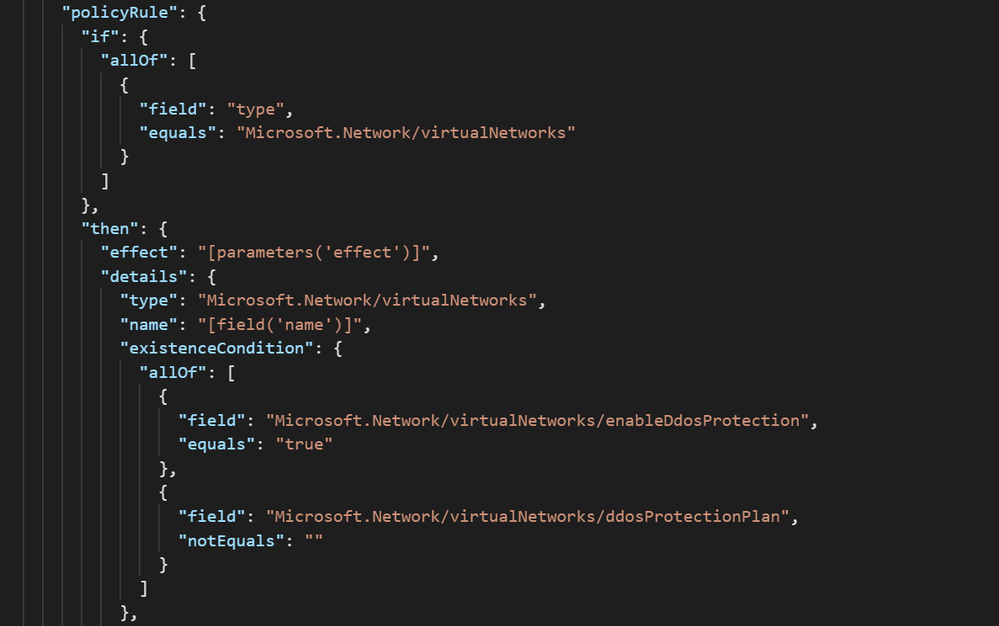
The logic of the policy can be seen in the screenshot below. All virtual networks in the assignment scope are evaluated against the criteria of whether DDoS Protection is enabled and has a plan attached:
Further down in the definition, there is a template that creates the association of the DDoS Protection Plan to the VNets in scope. Let’s look at what it takes to use this sample in a real environment.
Creating a Definition
To create an Azure Policy Definition:
- Navigate to Azure Policy –> Definitions and select ‘+ Policy Definition.’
- For the Definition Location field, select a subscription. This policy will still be able to be assigned to other subscriptions via Management Groups.
- Define an appropriate Name, Description, and Category for the Policy.
- In the Policy Rule box, replace the example text with the contents of VNet-EnableDDoS.json
- Save.
Assigning the Definition
Once the Policy Definition has been created, it must be assigned to a scope. This gives you the ability to either deploy the policy to everything, using either Management Group or Subscription as the scope, or select which resources get DDoS Protection Standard protection based on Resource Group.
To assign the definition:
- From the Policy Definition, click Assign.
- On the Basics tab, choose a scope and exclude resources if necessary.
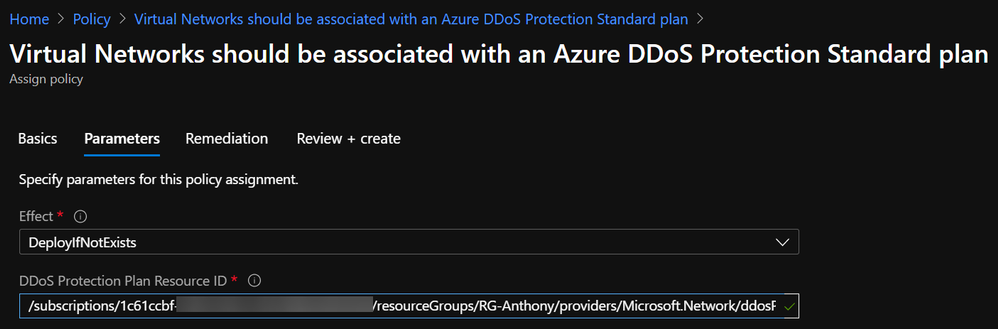
- On the Parameters tab, choose the Effect (DeployIfNotExists if you want to remediate) and paste in the Resource ID of the DDoS Protection Plan in the tenant:
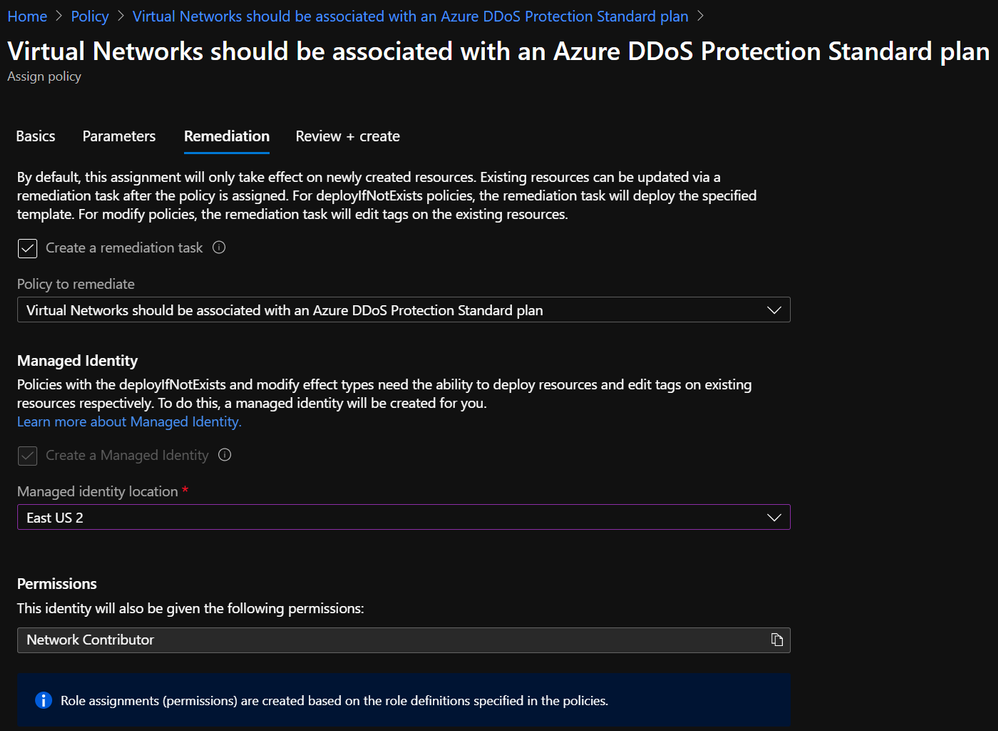
- On the Remediation tab, check the box to create a remediation task and choose a location for the managed identity to be created. Network Contributor is an appropriate role:
- Create.
Modifying the Policy Definition
The process outlined above can be used to apply DDoS Protection to collections of resources as defined by the boundaries of management groups, subscriptions, and resource groups. However, these boundaries do not always represent an exhaustive list of where DDoS Protection should or should not be applied. Sure, some customers want to attach a DDoS Protection Plan to every VNet, but most will want to be more selective.
Even if resource groups are granular enough to determine whether DDoS Protection should be applied, Policy Assignments are limited to a single RG per assignment, so the process of creating an assignment for every resource group is prohibitively tedious.
One solution to the problem of policy scoping is to modify the definition rather than the assignment. Let’s use the example of an environment where DDoS Protection is required for all production resources. Production environments could exist in many different subscriptions and resource groups, and this could change as new environments are stood up.
The solution here is to use tags as the identifier of production resources. In order to use this as a way to scope Azure Policy Assignments, you must modify the definition. To do this, a short snippet needs to be added to the policy rule, along with corresponding parameters (or copied from VNet-EnableDDoS-Tags.json)
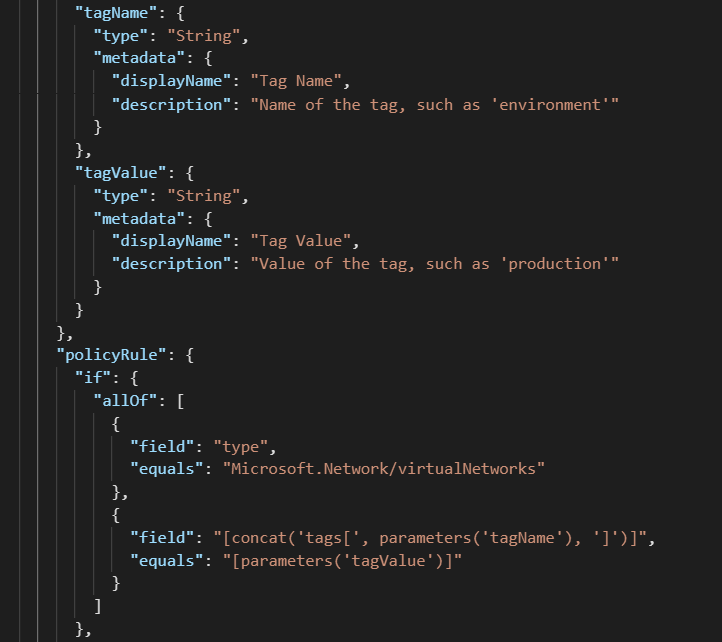
After modifying a definition to look for tag values, the corresponding assignment will look slightly different:
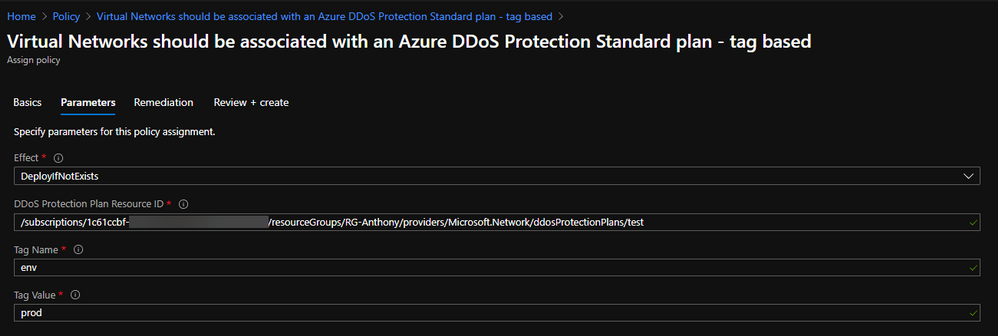
In this configuration, a single Policy Definition can be assigned to a wide scope, such as a Management Group, and every tagged resource within will be in scope.
Verifying Compliance
When a Policy Assignment is created using a remediation action, the effect of the policy should guarantee compliance with requirements. To gain visibility into the auditing and remediation done by the policy, you can go to Azure Policy à Compliance and select the assignment to monitor:

A successful remediation task denotes that the VNet is now protected by Azure DDoS Protection Standard.
End-to-End Management with Azure Policy
Moving beyond plan association to VNets, there are some other requirements of DDoS Protection that Azure Policy can help with.
On the Azure network security GitHub repo, you can find a policy to restrict creation of more than one DDoS Protection Plan per tenant, which helps to ensure that those with access cannot inadvertently drive up costs.
Another sample is available to keep diagnostic logs enabled across all Public IP Addresses, which keeps valuable data flowing to the teams that care about such data.
The point that should be taken from this post is that Azure Policy is a great mechanism to audit and enforce compliance with DDoS Protection requirements, and it has the power to control most other aspects of Azure security and compliance.
by Contributed | Nov 30, 2020 | Azure, Microsoft, Technology
This article is contributed. See the original author and article here.
Today, I worked on a service request that our customer got an issue that depending on the driver that they are using they are not able to see data in a specific column.
Sometimes, it is hard to debug the application or specify the driver to use to extract this data. In this Powershell command you could specify the driver and the provider to obtain this data.
Basically, you need to define the parameter of the connection and the provider to connect. In terms of provider you could use
- 1 – Driver: OLEDB – Provider: SQLOLEDB
- 2 – Driver: OLEDB – Provider: MSOLEDBSQL
- 3 – .Net SQL Client
- 4 – Driver: ADO – Provider: SQLOLEDB
- 5 – Driver: ADO – Provider: MSOLEDBSQL
Enjoy!
by Contributed | Nov 30, 2020 | Azure, Microsoft, Technology
This article is contributed. See the original author and article here.
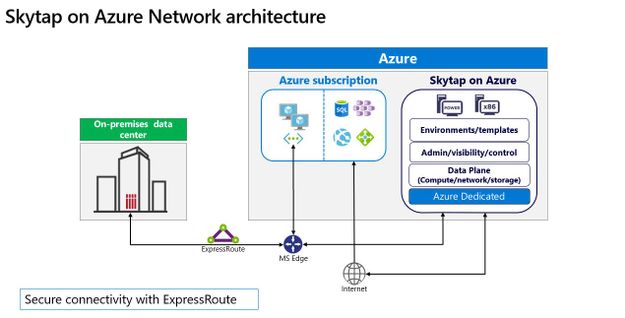
Cloud migration remains a crucial component for any organization in the transformation of their business, and Microsoft continues to focus on how best to support customers wherever they are in that journey. Microsoft works with partners like Skytap to unlock the power of Azure for customers relying on traditional on-premises application platforms.
Skytap on Azure is a cloud service purpose-built to natively run traditional IBM Power workloads in Azure. And we are excited to share that Skytap on Azure is available for purchase and provisioning directly through Azure Marketplace, further streamlining the experience for customers.
The migration of applications running on IBM Power to the cloud is often seen as a difficult and challenging move involving re-platforming. With Skytap on Azure, Microsoft brings the unique capabilities of IBM Power9 servers to Azure, directly integrating with Azure networking enabling Skytap to provide its platform with minimal connectivity latency to Azure native services.
Skytap has more than a decade of experience working with customers, such as Delphix, Schneider Electric, and Okta, and offering extensible application environments that are compatible with on-premises data centers; Skytap’s environments simplify migration and provide self-service access to develop, deploy, and accelerate innovation for complex applications.
“Until we started working with Skytap, we did not have a public cloud option for our IBM Power Systems customers that provided real value over their on-premise systems. Now, with Skytap on Azure we’re excited to offer true cloud capabilities like instant cloning, capacity on demand and pay-as-you-go options in the highly secure Azure environment,” said Daniel Magid, CEO of Eradani.

Skytap on Azure offers consumption-based pricing, on-demand access to compute and storage resources, and extensibility through RESTful APIs. With Skytap availability on Azure Marketplace customers can get started quickly, and at a low cost. Learn more about Skytap on Azure here, additionally take a look at the latest video from our Microsoft Product team here.
Skytap on Azure is available in the East US Azure region. Given the high level of interest we have seen already, we intend to expand availability to additional regions across Europe, the United States, and Asia Pacific. Stay tuned for more details on specific regional rollout availability.
Try Skytap on Azure today, available through the Azure Marketplace. Skytap on Azure is a Skytap first-party service delivered on Microsoft Azure’s global cloud infrastructure.
Published on behalf of the Microsoft Azure Dedicated and Skytap on Azure Team
by Contributed | Nov 30, 2020 | Azure, Microsoft, Technology
This article is contributed. See the original author and article here.
Azure Sentinel Logic Apps connector is the bridge between Sentinel and Playbooks, serving as the basis of incident automation scenarios. As we prepare for new Incident Trigger capabilities (coming soon), we have made some improvements to bring the most updated experience to playbooks users.
Note: existing playbooks should not be effected. For new playbooks, we recommend using the new actions.
Highlights:
- Operate on most up-to-date Incidents API
- New dynamic fields are now available
- Less work to accomplish incident changes
- Assign Owner ability in playbooks
- Format rich comments in a playbook
What’s new?
Update Incident: One action for all Incident properties configuration
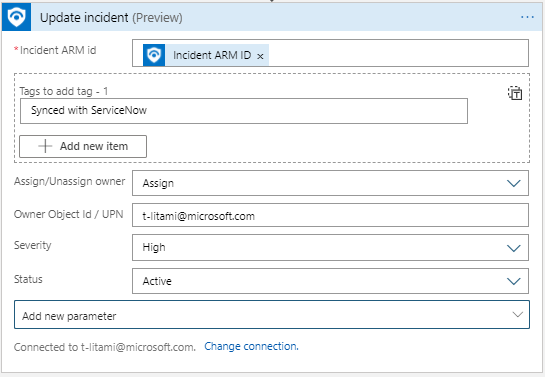
Now it is simpler to update multiple properties at once for an incident. Identify the Incident you want to operate on and set new values for any field you want.
Update Incident replaces the actions: Change Incident Severity, Change Incident Status, Change Incident Title, Change Incident Description, Add/Remove Labels. They will still work in old playbooks, but eventually will be removed from the actions gallery for future use.
Assign Owner in playbooks
As part of new Update Incident, it is now possible to assign an owner to an incident in a playbook. For example, based on incident creation time and SecOps staffing information (for example, from a you can assign the incident to the right shift owners:
- Set Assign/Unassign owner to Assign
- Set Owner with the Object ID or User Principal Name.
Post Rich Comments with HTML editor
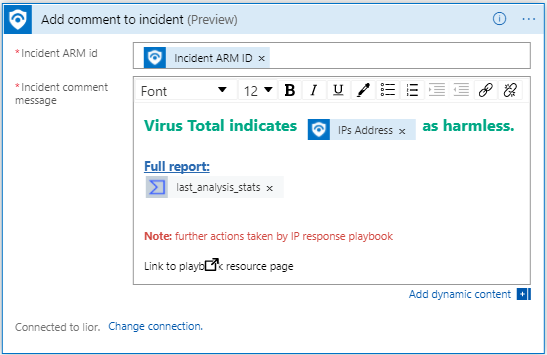
Recently, Azure Sentinel added support for HTML and Markdown for Incident Comments. Now, we added an HTML editor to the Add comment to Incident so you can format your comments.
One identifier for working on Azure Sentinel Incidents
Previously, you had to supply 4 fields in order to identify the incident to update. New Update Incident and Add Comment to Incident require only one field (instead of 4) to identify the incident that meant to be changed: Incident ARM ID.
If your playbooks start with Azure Sentinel Alert trigger (When an Azure Sentinel Alert is Triggered), use Alert – Get Incident to retrieve this value.
Get Incident: Now with most updated Sentinel API
Alert – Get Incident allows playbooks that start with Azure Sentinel Alert Trigger (When an alert is triggered) to reach the incident that holds the alert.
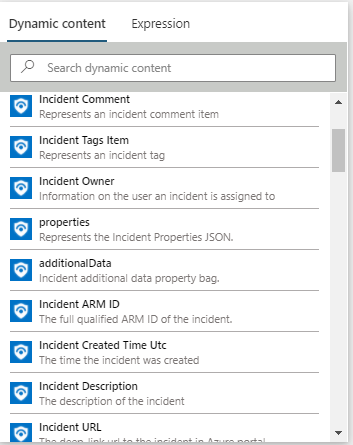
Now, new fields are available and are aligned to the Incident API.
For example, Incident URL can be included in an Email to the SOC shared mailbox or as part of a new ticket in Service Now, for easy access to the incident in the Azure Sentinel portal.
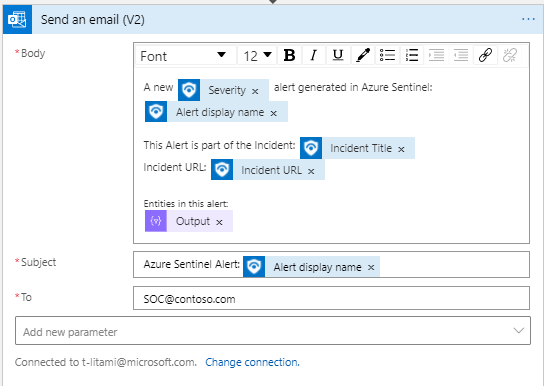
This action’s inputs have not changed, but the response became richer:
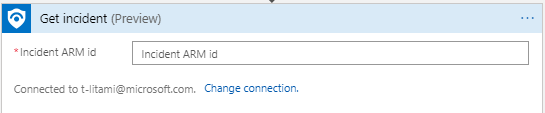
In addition, we supplied another action called Get Incident which allows you to identify incidents using the Incident ARM ID, so you can use any other Logic Apps trigger and still get Incident details. It returns the same Incident Schema. For example, if you work with another ticketing system which supports triggering Logic Apps, you can send the ARM ID as part of the request.
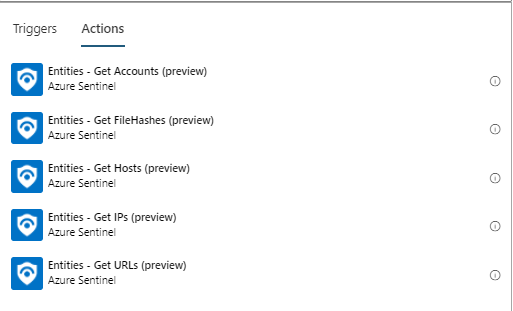
Get Entities: names change
As we prepare for our new Incident Trigger experience, when entities will be received both from incidents an alerts, we changed the name of the actions Alert – Get IPs/Accounts/URLs/Hosts/Filehashes to Entities – Get IPs/Accounts/URLs/Hosts/Filehashes.
Learn more
Azure Sentinel Connector documentation
by Contributed | Nov 30, 2020 | Azure, Microsoft, Technology
This article is contributed. See the original author and article here.
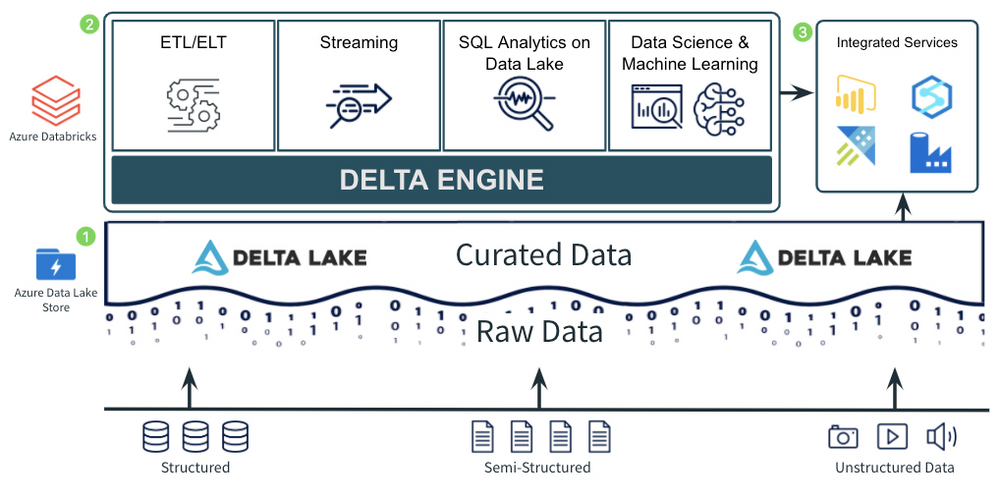
This post is part of a multi-part series titled “Patterns with Azure Databricks”. Each highlighted pattern holds true to 3 principles for modern data analytics:
- A Data Lake to store all data, with a curated layer in an open-source format. The format should support ACID transactions for reliability and should also be optimized for efficient queries.
- A foundational compute layer built on open standards. The foundational compute Layer should support most core use cases for the Data Lake. This includes ETL, stream processing, data science and ML, and SQL analytics on the data lake. Standardizing on a foundational compute service provides consistency across the majority of use cases. Being built on open standards ensures rapid innovation and a non-locking, future-proof architecture.
- Easy integration for additional and/or new use cases. No single service can do everything. There are always going to be new or additional use cases that aren’t best handled by the foundational compute layer. Both the open, curated data lake and the foundational compute layer should provide easy integration with other services to tackle these specialized use cases.
Pattern for Ingestion, ETL, and Stream Processing
Companies need to ingest data in any format, of any size, and at any speed into the cloud in a consistent and repeatable way. Once that data is ingested into the cloud, it needs to be moved into the open, curated data lake, where it can be processed further to be used by high value use cases such as SQL analytics, BI, reporting, and data science and machine learning.
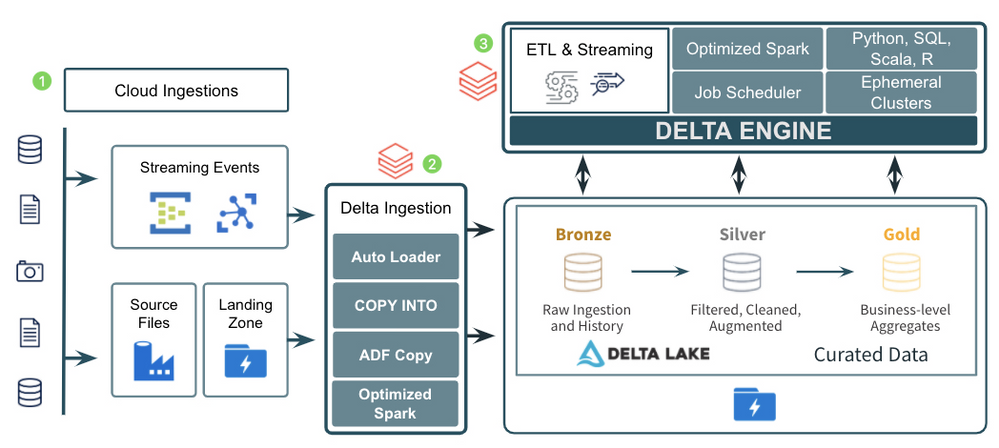
The diagram above demonstrates a common pattern used by many companies to ingest and process data of all types, sizes, and speed into a curated data lake. Let’s look at the 3 major components of the pattern:
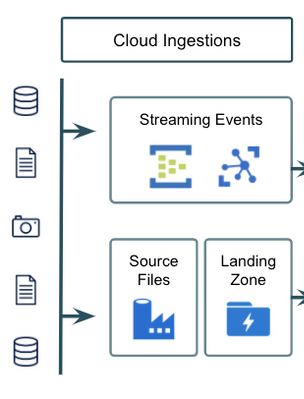
- There are several great tools in Azure for ingesting raw data from external sources into the cloud. Azure Data Factory provides the standard for importing data on a schedule or trigger from almost any data source and landing it in its raw format into Azure Data Lake Storage/Blob Storage. Other services such as Azure IoT Hub and Azure Event Hubs provide fully managed services for real time ingestion. Using a mix of Azure Data Factory and Azure IoT/Event Hubs should allow a company to get data of just about any type, size, and speed into Azure.
- After landing the raw data into Azure, companies typically move it into the raw, or Bronze, layer of the curated data lake. This usually means just taking the data in its raw, source format, and converting it to the open, transactional Delta Lake format where it can be more efficiently and reliably queried and processed. Ingesting the data into the Bronze curated layer can be done in a number of ways including:
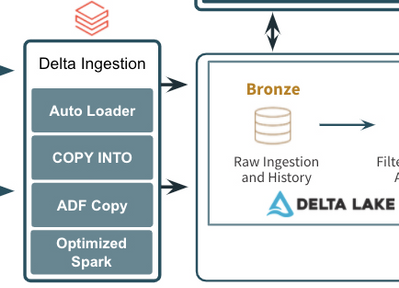
- Basic, open Apache Spark APIs in Azure Databricks for reading streaming events from Event/IoT Hubs and then writing those events or raw files to the Delta Lake format.
- The COPY INTO command to easily copy data from a source file/directory directly into Delta Lake.
- The Azure Databricks Auto Loader to efficiently grab files as they arrive in the data lake and write them to the Delta Lake format.
- The Azure Data Factory Copy Activity which supports copying data from any of its supported formats into the Delta Lake format.
- After the raw data has been ingested to the Bronze layer, companies perform additional ETL and stream processing tasks to filter, clean, transform, join, and aggregate the data into more curated Silver and Gold datasets. Using Azure Databricks as the foundational service for these processing tasks provides companies with a single, consistent compute engine (the Delta Engine) built on open standards with support for programming languages they are already familiar with (SQL, Python, R, Scala). It also provides them with repeatable DevOps processes and ephemeral compute clusters sized to their individual workloads.
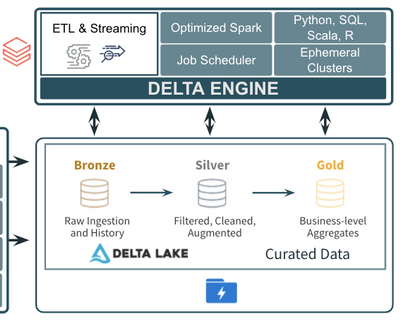
The ingestion, ETL, and stream processing pattern discussed above has been used successfully with many different companies across many different industries and verticals. It also holds true to the 3 principles discussed for modern data analytics: 1) using an open, curated data lake for all data (Delta Lake), 2) using a foundational compute layer built on open standards for the core ETL and stream processing (Azure Databricks), and 3) using easy integrations with other services like Azure Data Factory and IoT/Event Hubs which specialize in ingesting data into the cloud.
If you are interested learning more about Azure Databricks, attend an event, and check back soon for additional blogs in the “Patterns with Azure Databricks” series.
by Contributed | Nov 30, 2020 | Azure, Microsoft, Technology
This article is contributed. See the original author and article here.
If you’ve built and managed Windows Servers in an on-premises environment, you may have a set of configuration steps as well as regular process and monitoring alerts, to ensure that server is as secure as possible. But if you run a Windows Server VM in Azure, apart from not having to manage the physical security of the underlying compute hardware, what on-premises concepts still apply, what may you need to alter and what capabilities of Azure should you include?
Windows Security Baselines – Most server administrators would start by configuring the default Group Policy settings to meet their organization’s security requirements, and would search for guidance on other settings that could be tweak to make the environment more restrictive. Traditional Windows Server hardening guidance can now get out of date easily, as we ship more frequent updates and changes to the operating system, though some practices are universally good to apply. In addition, security guidance can change, especially as we learn from the latest threats.
To keep up with the current advice, relevant to your server’s current patch levels, we recommend the use of the Windows Security Baselines. Provided inside the Security Compliance Toolkit, the baselines bring together feedback from Microsoft security engineering teams, product groups, partner and customers into a set of Microsoft-recommended configuration settings and their security impact. On the Microsoft Security Baselines blog, you can keep track of changes to the baselines through the Draft and Final stages, for example as they relate to the Windows Server version 20H2 release
This guidance applies to Windows Server whether it’s on-premises or in the Cloud.
Hardening your Windows Server – In addition, my colleague Orin Thomas does a great presentation on Hardening your Windows Server environment. It includes things like Credential Guard, Privileged Administration Workstations, Shielded VMs and more. Download the presentation deck and the demo videos here: Orin-Thomas/HardenWinSvr: Hardening Windows Server presentation (github.com)
Server Roles and applications
You also need to pay attention to the role that your server is performing, which will install additional files and settings to the base operating system, for example if it’s running IIS or SQL Server. These components come with their own security guidance, and Orin has written up advice on hardening IIS here: Windows Server 101: Hardening IIS via Security Control Configuration.
And then there’s the configuration of any applications you are hosting on the server. Have you custom applications been developed to protect against attacks or exploits? Are any third-party applications secure or do they require you to “relax” your security configurations for them to function properly (for example, turning off UAC)? Do you restrict who can install applications onto your server and which applications can be installed or run?
Microsoft Azure considerations
With some of the Windows Server considerations covered, let’s explore the Azure considerations and capabilities.
Networking
One of the biggest differences to running an on-premises server is how you manage the network configuration. IaaS VMs should always be managed through Azure, not via their network settings inside the operating system.
RDP – It’s still not a good idea to leave open the default RDP port, due to the high number of malicious attempts at taking servers down by flooding this port with invalid authentication attempts. Instead, for a secure connection to a remote server session for administration, check out Azure Bastion instead which is instigated through the Azure Portal.
Network security groups – Network security groups allow granular control of traffic to and from Azure resources, including traffic between different resources in Azure. Plan your routing requirements and configure these virtual firewalls to only allow necessary traffic.
Just-in-time VM access – If you do have a requirement to open ports sometimes, consider implementing just-in-time (JIT) VM access. This allows Azure Security Center to change networking settings for a specified period of time only, for approved user requests.
VPN Gateways – Implement a virtual network gateway for encrypted traffic between your on-premises location and your Azure resources. This can be from physical sites (such as branch offices), individual devices (via Point to Site gateways) or through private Express Route connections which don’t traverse the public internet. Learn more at What is a VPN Gateway?
Identity
Role Based Access Control – Specific to Azure, Role Based Access Control (RBAC) lets you control who has access to the properties and configuration settings of your Azure resources via the Azure Resource Manager (including the Azure Portal, PowerShell, the Azure CLI and Cloud Shell). These permissions are packaged by common roles, so you could assign someone as a Backup Operator and they’d get the necessary rights to manage Azure Backup for the VM, for example. This identity capability helps you implement a “least privilege” model, with the right people having only the access that they need to perform their roles.
Privileged Identity Management – Similar to JIT VM access, Privileged Identity Management enables an approved user to elevate to a higher level of permissions for a limited time, usually to perform administration tasks.
Other advanced Identity features – With the Cloud, you can take advantage of additional advanced security features for securing authentication requests, including Conditional Access and Multi-Factor Authentication. Check out Phase 1:Build a foundation of security in the Azure Active Directory feature deployment guide.
Security Compliance & Monitoring
Azure Security Benchmarks – Similar to the Windows Security Benchmarks, the Azure Security Benchmarks help you baseline your configuration against Microsoft recommended security practices. These include how security recommendations map to security controls from industry sources like NIST and CIS, and include Azure configuration settings for your VM (such as privileged access, logging and governance).
Azure Defender for Servers – Azure Security Center allows for advanced security capabilities and monitoring of server VMs with Azure Defender for Servers. This is my “if you only do one thing in this article, do this” recommendation. It’s needed for JIT access and also includes things like file integrity monitoring, adaptive network hardening and fileless attack detection.
Azure Policy – Other things can fall under the security umbrella, like staying compliant with the Payment Card Industry’s Data Security Standard (PCI DSS), or ensuring that Cloud resources can only be created in an approved list of countries (with corresponding Azure regions) for your organization. Investigate how Azure Policy can help enforce these requirements when a new VM is created or can alert you if an existing VM has it’s configuration changed so it’s now non-compliant.
Conclusion
While it’s easy to imagine a security scenario of an open application database or a hacking attempt to exploit application code, there are a significant number of security aspects to running a Windows Server VM in the cloud too. Start with this list and you’re going in the right direction to make your cloud servers as secure as possible, aligned with the specific requirements for your organization.


Recent Comments