Extend Copilot capabilities with plugins   

Extend Copilot capabilities with plugins   

This article is contributed. See the original author and article here.

In Dynamics 365 Customer Service, agents use Copilot to resolve issues based on the corpus of data in their organization’s knowledge base or SharePoint. Additionally, we are introducing prompt plugins, enabling agents to securely access Dataverse data such as customers, products, and cases, through Copilot. This enables agents to gain a better understanding of customer needs, preferences, and history, which empowers them to provide more personalized and effective support. 

With Copilot Studio, we enable customers to build and manage their prompt plugins to address various types of customer scenarios based on the organization’s needs. Plugins reduce the need for customer service representatives to switch to other tabs and tools to do their work. The result is improved resolution time and customer satisfaction. Organizations can build a single plugin and use that plugin in all copilots. So, regardless of where an agent asks a service-related question, they benefit from a consistent experience. 

Create prompt plugins

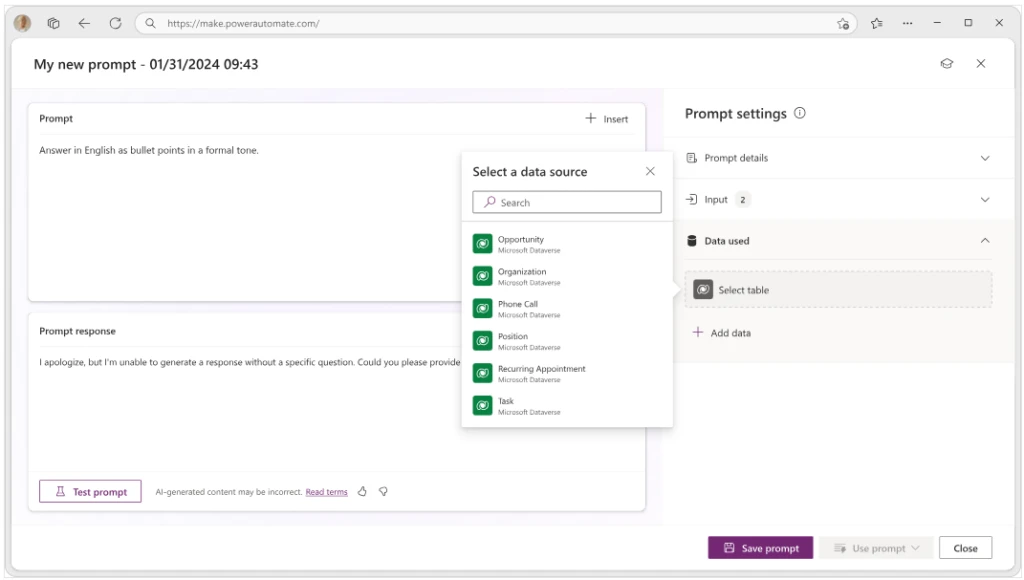
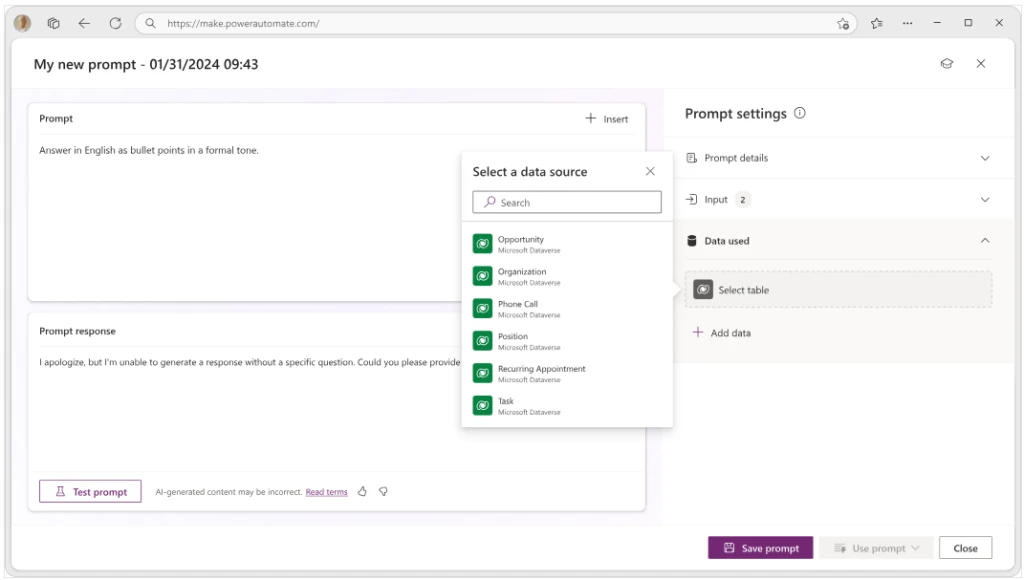
You can create a prompt plugin using Copilot Studio and choose the data from Dataverse based on your needs.  

graphical user interface, application, email

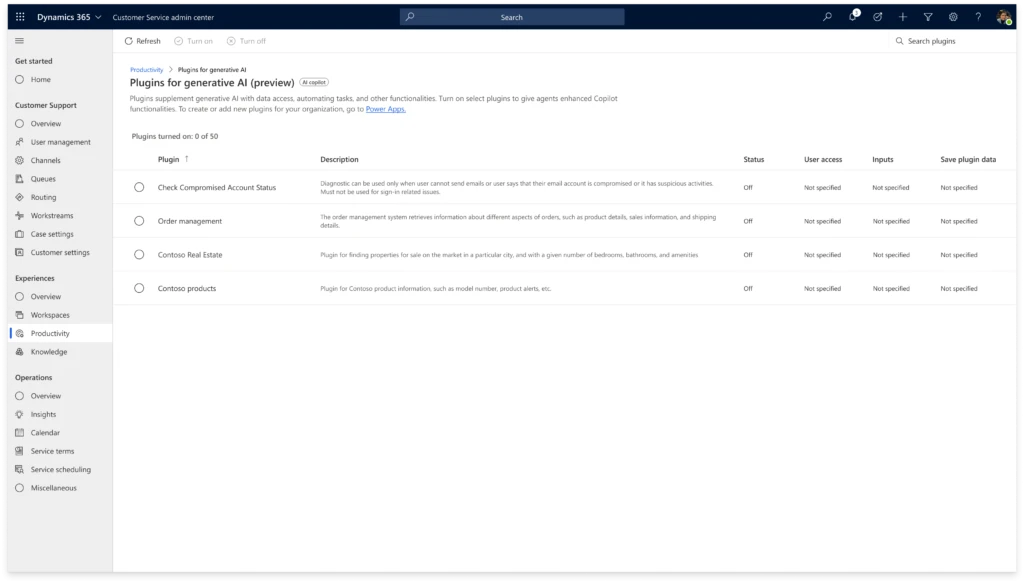
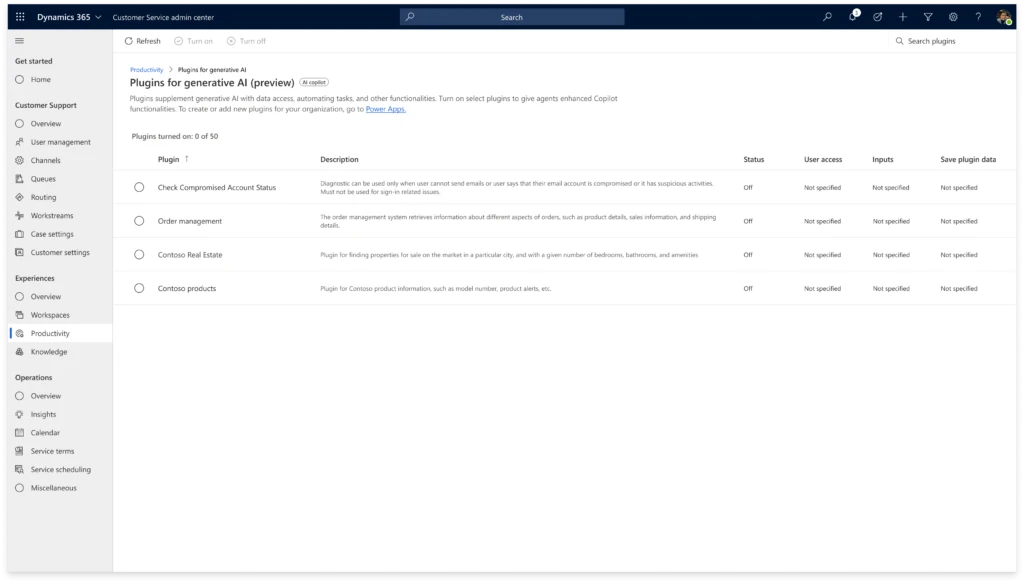
Once you generate prompt plugins, the Customer Service administrator can manage plugins in the Customer Service admin center.

Administrators have the following capabilities:

  • Turn on and turn off the plugins
  • Provide access to all Copilot users or manage user access by roles
  • Map data field input parameters for the plugin, reducing how much context agents have to manually add to the prompt during plugin use
  • Manage the plugin data storage in Dataverse

Use prompt plugins

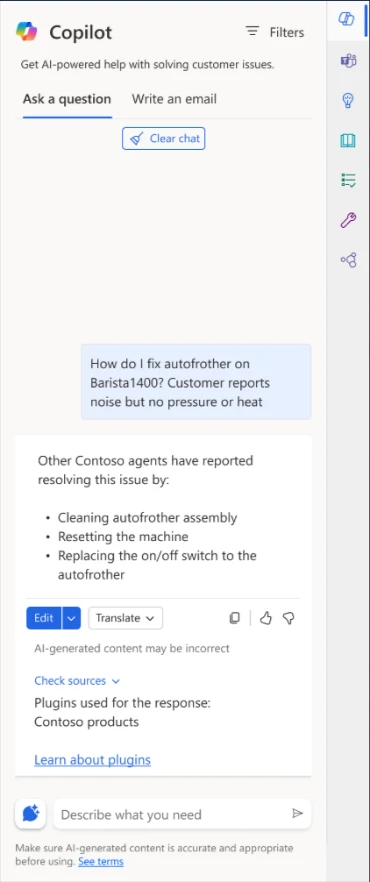
Empower agents to access solutions from multiple entities through Copilot, offering unified and enlightening experience. Agents can use targeted phrases in Copilot to get responses from plugins to quickly gather information about a case.

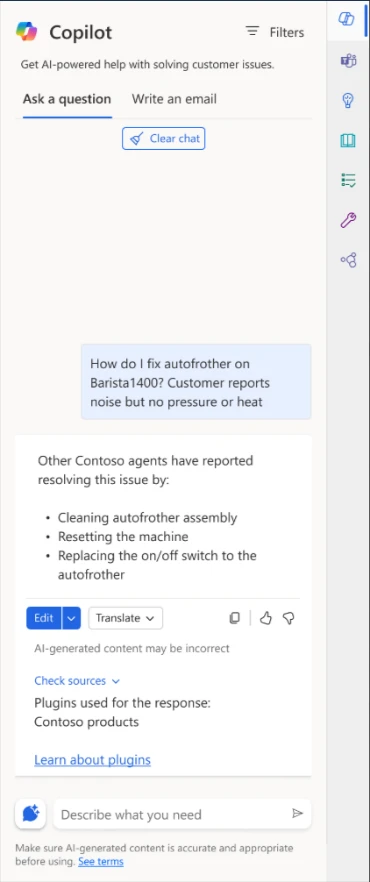
Copilot automatically identifies the plugin based on the agent’s question. With deep understanding of the user’s intent, Copilot can select the right plugin to help the agent, resulting in better experience for customers who have their issues addressed faster.

When the agent clicks Check sources, they can see the plugin used to generate the response. They can also click the Learn about plugins documentation link to understand how plugins work and their use in Copilot.

If Copilot didn’t identify a plugin, it falls back to the knowledge source to create a response to the agent.

graphical user interface, text, application

Coming soon: Other types of plugins

Connector plugins extend Copilot’s value by connecting to a variety of external data sources and applications that agents rely on to answer customer queries. The plugins let your agents securely access data from those systems through Copilot without juggling multiple different systems to deliver service. For example, the agents can retrieve information like purchase orders and shipping details via Copilot without logging in to order management systems. The agents simply ask for what they need, and Copilot responds, resulting in decreased time to resolution.

Learn more

Below are the detailed steps to create and configure prompt plugins for your organization.

  1. Create prompt plugins in Copilot Studio
  2. Configure plugins in Customer Service admin center
  3. Use plugins in Copilot in Dynamics 365 Customer Service

The post Extend Copilot capabilities with plugins    appeared first on Microsoft Dynamics 365 Blog.

Brought to you by Dr. Ware, Microsoft Office 365 Silver Partner, Charleston SC.

Extend Copilot capabilities with plugins   

Extend Copilot capabilities with plugins   

This article is contributed. See the original author and article here.

In Dynamics 365 Customer Service, agents use Copilot to resolve issues based on the corpus of data in their organization’s knowledge base or SharePoint. Additionally, we are introducing prompt plugins, enabling agents to securely access Dataverse data such as customers, products, and cases, through Copilot. This enables agents to gain a better understanding of customer needs, preferences, and history, which empowers them to provide more personalized and effective support. 

With Copilot Studio, we enable customers to build and manage their prompt plugins to address various types of customer scenarios based on the organization’s needs. Plugins reduce the need for customer service representatives to switch to other tabs and tools to do their work. The result is improved resolution time and customer satisfaction. Organizations can build a single plugin and use that plugin in all copilots. So, regardless of where an agent asks a service-related question, they benefit from a consistent experience. 

Create prompt plugins

You can create a prompt plugin using Copilot Studio and choose the data from Dataverse based on your needs.  

graphical user interface, application, email

Once you generate prompt plugins, the Customer Service administrator can manage plugins in the Customer Service admin center.

Administrators have the following capabilities:

  • Turn on and turn off the plugins
  • Provide access to all Copilot users or manage user access by roles
  • Map data field input parameters for the plugin, reducing how much context agents have to manually add to the prompt during plugin use
  • Manage the plugin data storage in Dataverse

Use prompt plugins

Empower agents to access solutions from multiple entities through Copilot, offering unified and enlightening experience. Agents can use targeted phrases in Copilot to get responses from plugins to quickly gather information about a case.

Copilot automatically identifies the plugin based on the agent’s question. With deep understanding of the user’s intent, Copilot can select the right plugin to help the agent, resulting in better experience for customers who have their issues addressed faster.

When the agent clicks Check sources, they can see the plugin used to generate the response. They can also click the Learn about plugins documentation link to understand how plugins work and their use in Copilot.

If Copilot didn’t identify a plugin, it falls back to the knowledge source to create a response to the agent.

graphical user interface, text, application

Coming soon: Other types of plugins

Connector plugins extend Copilot’s value by connecting to a variety of external data sources and applications that agents rely on to answer customer queries. The plugins let your agents securely access data from those systems through Copilot without juggling multiple different systems to deliver service. For example, the agents can retrieve information like purchase orders and shipping details via Copilot without logging in to order management systems. The agents simply ask for what they need, and Copilot responds, resulting in decreased time to resolution.

Learn more

Below are the detailed steps to create and configure prompt plugins for your organization.

  1. Create prompt plugins in Copilot Studio
  2. Configure plugins in Customer Service admin center
  3. Use plugins in Copilot in Dynamics 365 Customer Service

The post Extend Copilot capabilities with plugins    appeared first on Microsoft Dynamics 365 Blog.

Brought to you by Dr. Ware, Microsoft Office 365 Silver Partner, Charleston SC.
Enabling fast, flexible, cost-effective service with Microsoft Copilot in Dynamics 365 Field Service

Enabling fast, flexible, cost-effective service with Microsoft Copilot in Dynamics 365 Field Service

This article is contributed. See the original author and article here.

This post was co-authored by Safiyyah O’Quinn, Senior Product Marketing Manager and Ghazanfar Riaz, Head of Digital Consulting, Visionet

Fast, efficient service, it’s what everybody wants. And today’s field service organizations are answering the call by adopting next-generation AI technologies that can help them be more flexible and responsive to customers while also driving revenue, reducing overtime, and ensuring more predictable arrival and completion times. Service managers, field technicians, and customers all benefit.

Streamlining work order and resource management to improve service metrics is always top of mind for field service managers. Microsoft Copilot in Dynamics 365 Field Service brings the power of next-generation AI to field service managers, enabling them to automate work order management and optimize scheduling with data-driven recommendations based on travel time, resource availability, and skill sets. Recently, we announced new capabilities in the Microsoft Dynamics 365 Field Service web app that enable field managers to interact with Copilot using natural language to find pertinent information about work orders. Copilot can assist in retrieving work order details, summarizing them, and presenting them in an easily digestible format. Copilot can also go beyond searching work orders to searching other Microsoft Dataverse records including accounts, contacts, opportunities, and more. In addition, field service managers can now configure data that Copilot uses to generate work order summaries in Dynamics 365 Field Service for more advanced reviews before closing work orders to ensure they’re meeting customer needs.

Resource Scheduling Optimization (RSO) is an add-in to Dynamics 365 Field Service that automatically suggests the technicians, equipment, and facilities (such as warehouses) best equipped to handle a given job. Ghazanfar Riaz, Head of Digital Consulting at Visionet, a Microsoft Managed Partner, believes that having the ability to extend Field Service in conjunction with Resource Scheduling Optimization and Microsoft Copilot Studio can help service organizations be more customer-centric, flexible, and efficient.

“Dynamics 365 Field Service has catalyzed a shift towards smarter, more efficient field services management. With the integration of Microsoft Copilot into Dynamics 365 Field Service, service organizations are now more equipped to consistently exceed customer expectations and build long-lasting relationships at every point of interaction.”

Ghazanfar Riaz, Head of Digital Consulting, Visionet

Microsoft’s latest update to Dynamics 365 Field Service introduces enhanced Copilot capabilities, designed to serve as a field service manager’s AI assistant. Using natural language, managers can now converse with Copilot to swiftly extract essential details and summaries from work orders and transform complex data into clear, actionable insights. Field service managers can also use Copilot to adeptly navigate Dataverse records, including accounts, contacts, and opportunities, for a more holistic view of the customer landscape.

Additionally, field service managers can tailor how Copilot generates work order summaries to help ensure the best possible schedules for field technicians and the best possible outcomes for customers. By using Copilot in Dynamics 365, field service management becomes a more intuitive and intelligent experience, ensuring customer needs are not just understood but anticipated and met.

Let’s take a closer look at how Visionet extended Dynamics 365 Field Service and RSO capabilities to achieve a more customized, adaptable system and greater efficiency in resource scheduling scenarios.

Optimizing schedules for field service technicians

With rising customer expectations, many service organizations have opted to supplement their operations by using contractors or other third-party services to address any gaps in service. In these cases where contractors or third parties are involved, knowing what resources to use—especially when automating resource scheduling for efficiency—can be tricky and time consuming. In addition, contractors and third-party resources are often more expensive than in-house technicians, so many service organizations want to ensure they’re using those resources strategically.

Service managers often find themselves manually reallocating contractors or other third-party resources, consuming valuable time. Visionet identified an opportunity to enhance Field Service RSO, which facilitates automated schedule creation, by extending its capabilities to offer improved scheduling insights and enable automation on a larger scale.  Service managers can efficiently assign bookings by setting preferences for factors such as cost (weighing the use of in-house technicians against contractors), skill set, territory, and availability. With these preferences established, service managers and dispatchers can use this enhanced RSO feature to optimize daily or weekly schedules more effectively and generate precise recommendations.

Visionet is collaborating with service organizations to further augment Field Service RSO by integrating Copilot automation capabilities. Using natural language interactions, field service managers can quickly pinpoint specific resources or assets needed for jobs. This helps ensure that work orders are evenly distributed, skill sets are appropriately matched to tasks, and more costly resources are employed judiciously to maintain cost efficiency.

Managing downtime for field service technicians

Downtime for field technicians, particularly when it’s unexpected, can disrupt service and revenue. Service managers often find themselves needing to reorganize schedules due to unforeseen circumstances such as illness, emergency calls, mandatory training, or meetings that prevent technicians from being in the field. Recognizing this challenge, Visionet enhanced the Field Service RSO by incorporating customizations that improve scheduling flexibility.

Now, service managers can specify planned, non-productive events like mandatory training sessions, weekly team meetings, work breaks, and other time off directly within the system and specify whether they are one-time or recurring. The RSO uses this information to automatically adjust schedules accordingly and ensure no service interruptions occur.

Responding in real time to daily schedule changes

For many service organizations, things can change from minute to minute. Customers can experience outages due to weather, utility maintenance, road construction—the possibilities are endless. In addition, field technicians can get held up by traffic or an accident on the freeway, or even by a customer issue that was more complicated than what was initially scoped. And sometimes, customers need to cancel or reschedule service—even when a technician is already on the way. To help with this, Visionet enhanced Field Service RSO so service managers can use the Intra Day feature to help optimize work order schedules on the fly. With this feature, service managers can dynamically adjust a day’s schedule in response to various situations such as cancellations or rescheduling, incoming high-priority trouble tickets, unexpected gaps in technicians’ schedules, delays in ongoing assignments, or fluctuations in resource availability. This level of agility in scheduling ensures that service disruptions are handled with maximum efficiency.

Take, for instance, a scenario where a customer faces an unexpected broadband outage during the day, and the problem can’t be fixed remotely. In that case, a service manager may dispatch a field technician to the location to resolve the issue quickly and limit service interruption. Reviewing the Field Service RSO board, the manager can find an available technician with the expertise that’s best suited to address the customer’s issue promptly. The manager then assigns the new work order and reorganizes the day’s schedule to accommodate this change.

A field employee walking outside by solar panels, holding a tablet

Dynamics 365 Field Service

Interact with Copilot using new capabilities in the Field Service web app.

Stepping up field service with next-generation AI

We’re excited to be sharing all the ways you can use Copilot Studio with Copilot in Dynamics 365 Field Service to extend AI capabilities that can help make your field service organization more efficient, productive, and responsive to customers.

We invite you to visit the Microsoft booth (216), along with our partners, at Field Service Palm Springs to discover how Copilot in Dynamics 365 Field Service works alongside frontline teams to streamline work order management and increase technician productivity. Learn more about AI-powered experiences for your frontline on Monday, May 6, by attending:

  • Chair Opening Remarks by Héctor Garcia Tellado, General Manager, Microsoft Dynamics 365 Frontline Applications
  • The Customer Journey Panel: Revaluating and Remapping Service Workflows to Optimize Automation Tool Adoption and Enhance CX

The post Enabling fast, flexible, cost-effective service with Microsoft Copilot in Dynamics 365 Field Service appeared first on Microsoft Dynamics 365 Blog.

Brought to you by Dr. Ware, Microsoft Office 365 Silver Partner, Charleston SC.
Enabling fast, flexible, cost-effective service with Microsoft Copilot in Dynamics 365 Field Service

Enabling fast, flexible, cost-effective service with Microsoft Copilot in Dynamics 365 Field Service

This article is contributed. See the original author and article here.

This post was co-authored by Safiyyah O’Quinn, Senior Product Marketing Manager and Ghazanfar Riaz, Head of Digital Consulting, Visionet

Fast, efficient service, it’s what everybody wants. And today’s field service organizations are answering the call by adopting next-generation AI technologies that can help them be more flexible and responsive to customers while also driving revenue, reducing overtime, and ensuring more predictable arrival and completion times. Service managers, field technicians, and customers all benefit.

Streamlining work order and resource management to improve service metrics is always top of mind for field service managers. Microsoft Copilot in Dynamics 365 Field Service brings the power of next-generation AI to field service managers, enabling them to automate work order management and optimize scheduling with data-driven recommendations based on travel time, resource availability, and skill sets. Recently, we announced new capabilities in the Microsoft Dynamics 365 Field Service web app that enable field managers to interact with Copilot using natural language to find pertinent information about work orders. Copilot can assist in retrieving work order details, summarizing them, and presenting them in an easily digestible format. Copilot can also go beyond searching work orders to searching other Microsoft Dataverse records including accounts, contacts, opportunities, and more. In addition, field service managers can now configure data that Copilot uses to generate work order summaries in Dynamics 365 Field Service for more advanced reviews before closing work orders to ensure they’re meeting customer needs.

Resource Scheduling Optimization (RSO) is an add-in to Dynamics 365 Field Service that automatically suggests the technicians, equipment, and facilities (such as warehouses) best equipped to handle a given job. Ghazanfar Riaz, Head of Digital Consulting at Visionet, a Microsoft Managed Partner, believes that having the ability to extend Field Service in conjunction with Resource Scheduling Optimization and Microsoft Copilot Studio can help service organizations be more customer-centric, flexible, and efficient.

“Dynamics 365 Field Service has catalyzed a shift towards smarter, more efficient field services management. With the integration of Microsoft Copilot into Dynamics 365 Field Service, service organizations are now more equipped to consistently exceed customer expectations and build long-lasting relationships at every point of interaction.”

Ghazanfar Riaz, Head of Digital Consulting, Visionet

Microsoft’s latest update to Dynamics 365 Field Service introduces enhanced Copilot capabilities, designed to serve as a field service manager’s AI assistant. Using natural language, managers can now converse with Copilot to swiftly extract essential details and summaries from work orders and transform complex data into clear, actionable insights. Field service managers can also use Copilot to adeptly navigate Dataverse records, including accounts, contacts, and opportunities, for a more holistic view of the customer landscape.

Additionally, field service managers can tailor how Copilot generates work order summaries to help ensure the best possible schedules for field technicians and the best possible outcomes for customers. By using Copilot in Dynamics 365, field service management becomes a more intuitive and intelligent experience, ensuring customer needs are not just understood but anticipated and met.

Let’s take a closer look at how Visionet extended Dynamics 365 Field Service and RSO capabilities to achieve a more customized, adaptable system and greater efficiency in resource scheduling scenarios.

Optimizing schedules for field service technicians

With rising customer expectations, many service organizations have opted to supplement their operations by using contractors or other third-party services to address any gaps in service. In these cases where contractors or third parties are involved, knowing what resources to use—especially when automating resource scheduling for efficiency—can be tricky and time consuming. In addition, contractors and third-party resources are often more expensive than in-house technicians, so many service organizations want to ensure they’re using those resources strategically.

Service managers often find themselves manually reallocating contractors or other third-party resources, consuming valuable time. Visionet identified an opportunity to enhance Field Service RSO, which facilitates automated schedule creation, by extending its capabilities to offer improved scheduling insights and enable automation on a larger scale.  Service managers can efficiently assign bookings by setting preferences for factors such as cost (weighing the use of in-house technicians against contractors), skill set, territory, and availability. With these preferences established, service managers and dispatchers can use this enhanced RSO feature to optimize daily or weekly schedules more effectively and generate precise recommendations.

Visionet is collaborating with service organizations to further augment Field Service RSO by integrating Copilot automation capabilities. Using natural language interactions, field service managers can quickly pinpoint specific resources or assets needed for jobs. This helps ensure that work orders are evenly distributed, skill sets are appropriately matched to tasks, and more costly resources are employed judiciously to maintain cost efficiency.

Managing downtime for field service technicians

Downtime for field technicians, particularly when it’s unexpected, can disrupt service and revenue. Service managers often find themselves needing to reorganize schedules due to unforeseen circumstances such as illness, emergency calls, mandatory training, or meetings that prevent technicians from being in the field. Recognizing this challenge, Visionet enhanced the Field Service RSO by incorporating customizations that improve scheduling flexibility.

Now, service managers can specify planned, non-productive events like mandatory training sessions, weekly team meetings, work breaks, and other time off directly within the system and specify whether they are one-time or recurring. The RSO uses this information to automatically adjust schedules accordingly and ensure no service interruptions occur.

Responding in real time to daily schedule changes

For many service organizations, things can change from minute to minute. Customers can experience outages due to weather, utility maintenance, road construction—the possibilities are endless. In addition, field technicians can get held up by traffic or an accident on the freeway, or even by a customer issue that was more complicated than what was initially scoped. And sometimes, customers need to cancel or reschedule service—even when a technician is already on the way. To help with this, Visionet enhanced Field Service RSO so service managers can use the Intra Day feature to help optimize work order schedules on the fly. With this feature, service managers can dynamically adjust a day’s schedule in response to various situations such as cancellations or rescheduling, incoming high-priority trouble tickets, unexpected gaps in technicians’ schedules, delays in ongoing assignments, or fluctuations in resource availability. This level of agility in scheduling ensures that service disruptions are handled with maximum efficiency.

Take, for instance, a scenario where a customer faces an unexpected broadband outage during the day, and the problem can’t be fixed remotely. In that case, a service manager may dispatch a field technician to the location to resolve the issue quickly and limit service interruption. Reviewing the Field Service RSO board, the manager can find an available technician with the expertise that’s best suited to address the customer’s issue promptly. The manager then assigns the new work order and reorganizes the day’s schedule to accommodate this change.

A field employee walking outside by solar panels, holding a tablet

Dynamics 365 Field Service

Interact with Copilot using new capabilities in the Field Service web app.

Stepping up field service with next-generation AI

We’re excited to be sharing all the ways you can use Copilot Studio with Copilot in Dynamics 365 Field Service to extend AI capabilities that can help make your field service organization more efficient, productive, and responsive to customers.

We invite you to visit the Microsoft booth (216), along with our partners, at Field Service Palm Springs to discover how Copilot in Dynamics 365 Field Service works alongside frontline teams to streamline work order management and increase technician productivity. Learn more about AI-powered experiences for your frontline on Monday, May 6, by attending:

  • Chair Opening Remarks by Héctor Garcia Tellado, General Manager, Microsoft Dynamics 365 Frontline Applications
  • The Customer Journey Panel: Revaluating and Remapping Service Workflows to Optimize Automation Tool Adoption and Enhance CX

The post Enabling fast, flexible, cost-effective service with Microsoft Copilot in Dynamics 365 Field Service appeared first on Microsoft Dynamics 365 Blog.

Brought to you by Dr. Ware, Microsoft Office 365 Silver Partner, Charleston SC.
Maximizing Efficiency: Operating an External Shared Warehouse with Warehouse Management Only Mode

Maximizing Efficiency: Operating an External Shared Warehouse with Warehouse Management Only Mode

This article is contributed. See the original author and article here.

Editor: Denis Conway

Introduction

This blog post is a follow-up to the Leverage Warehouse management only mode to optimize your business blog post. Warehouse management only mode was presented as a transformative tool for enhancing warehouse operations without the need for extensive system overhauls. Warehouse management only mode improves efficiency, and flexibility within existing infrastructure. The preview release of Warehouse management only mode was explored to discover its potential in revolutionizing warehouse management practices.

In this blog post you will learn about how a wholesaler used the Warehouse management only mode feature in Microsoft Dynamics 365 Supply Chain Management to handle shared warehouse operations for multiple sales subsidiaries.

Image: Warehouse Manager checking inventory

Business requirements

The client’s requirement was to distribute product master data among all sales subsidiaries, and to restrict each one to managing only their own physical inventory in the same distribution centre (DC) building. The DC building needed to handle all inbound, outbound, and correction updates for all sales subsidiaries.

Implementation

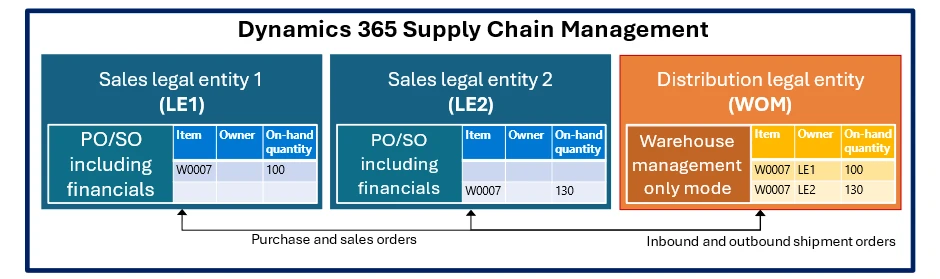
The client chose to use Microsoft Dynamics 365 Supply Chain Management in a single-instance deployment model. They set up a separate legal entity for each sales subsidiary and an additional legal entity for distribution.

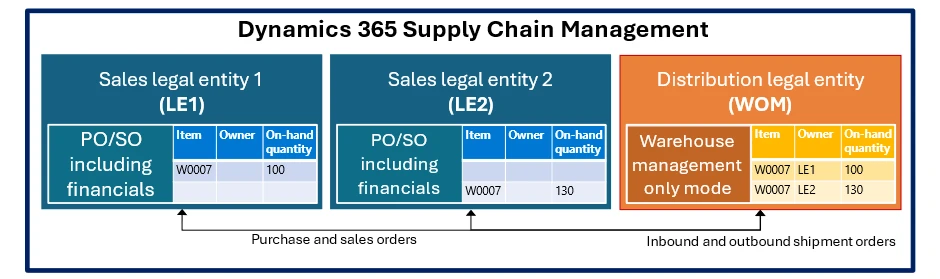
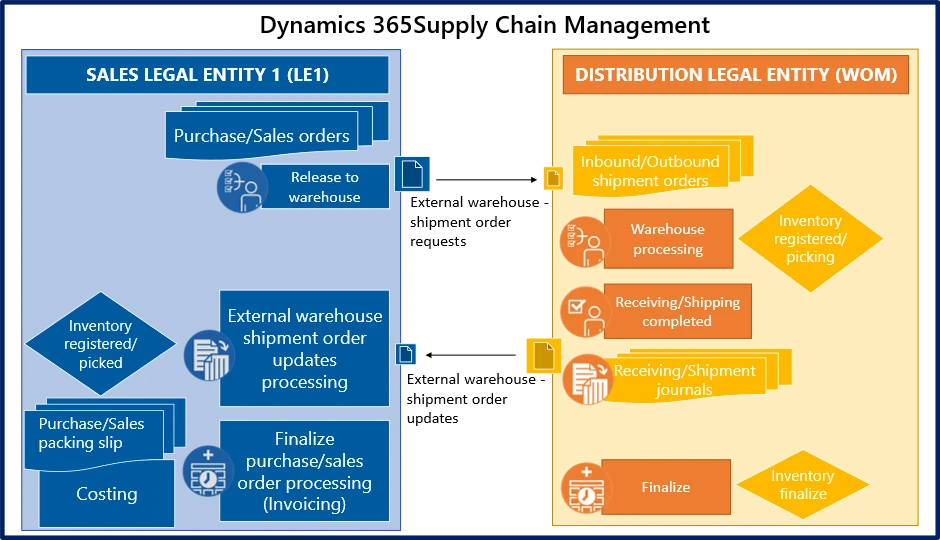
Figure 1: This diagram shows the wholesaler implementation with two sales subsidiaries using purchase and sales orders, which are fulfilled by a third legal entity running the Warehouse management only mode capability.

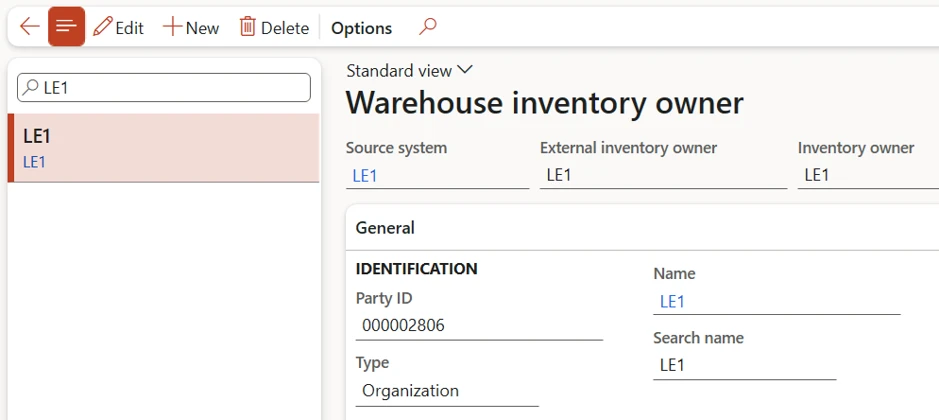
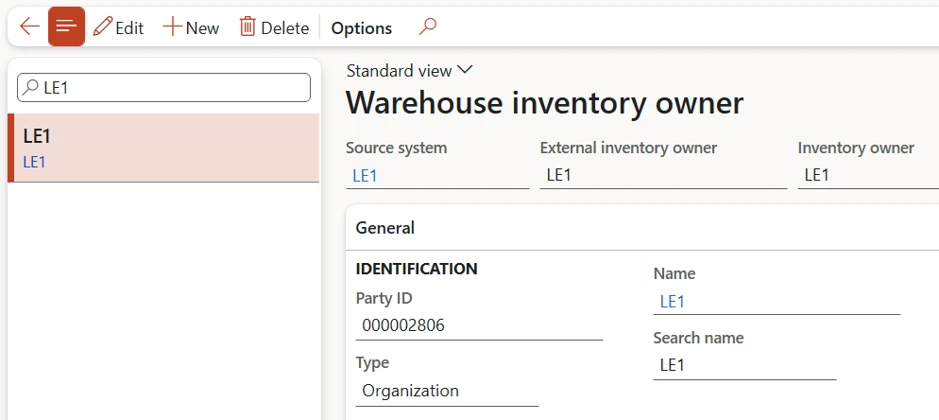
The implementation uses an inventory owner dimension for each sales subsidiary to control the physical inventory in the DC for the same item numbers. This ensures that the DC only allows shipping an item when physical inventory exists for the related legal entity.

graphical user interface, application
Figure 2: This screenshot shows how to set up an inventory owner dimension value to be linked to the sales subsidiary legal entity LE1 in this example.

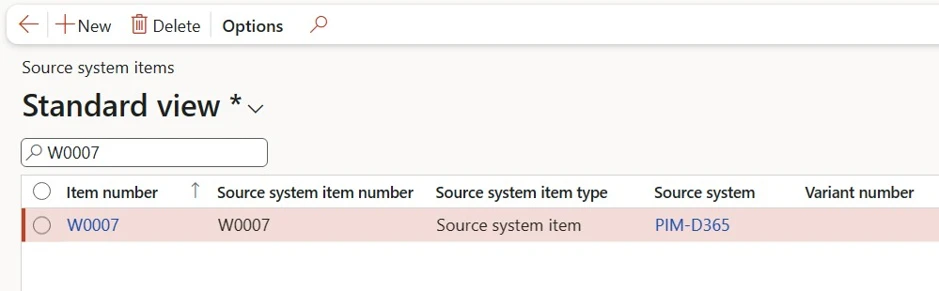
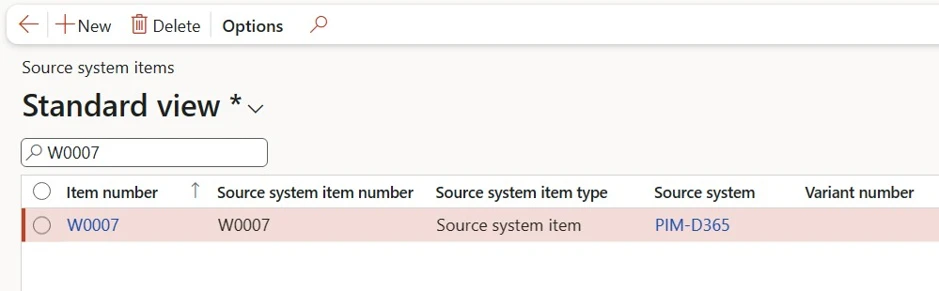
The distribution legal entity maps item numbers using a dedicated source system record to define the source system items.

graphical user interface, text, application, email
Figure 3: This screenshot from the Source system items page shows how to set up a dedicated source system to link item numbers between the legal entities.

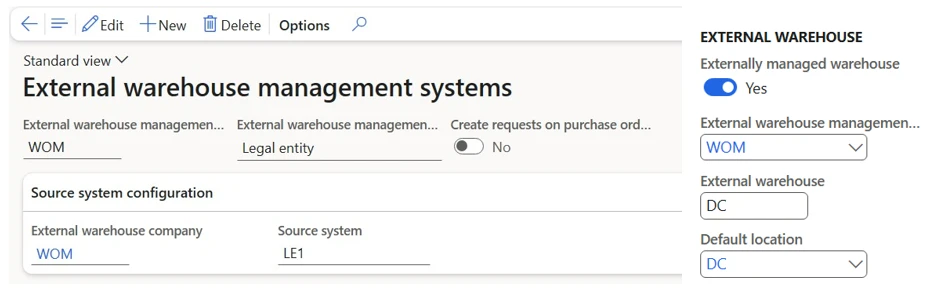
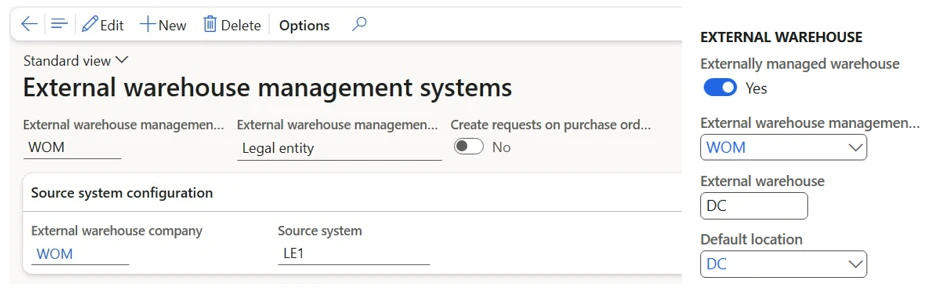
Each sales subsidiary has an external warehouse linked to the DC building in the distribution legal entity.

graphical user interface, text, application, email
Figure 4: Screenshot parts showing an example of how to set up the system to run an externally managed warehouse process.

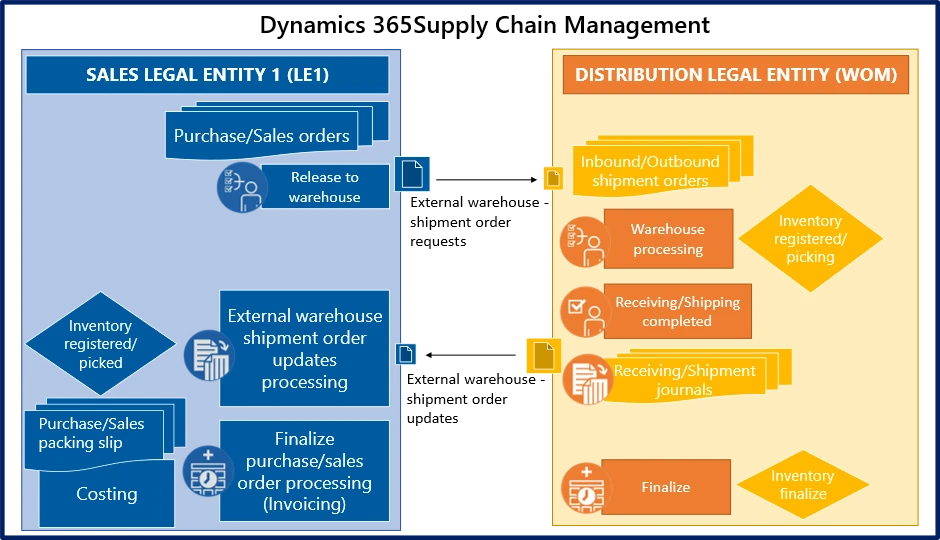
The system automatically creates inbound and outbound shipment orders each time a sales subsidiary releases purchase and sales orders against the DC.

The DC can combine several shipment orders from different sales subsidiaries into a single load and report back via an external warehouse shipment order updates message to each of the legal entities, when it completes the receiving or shipping of the requested inventory.

In each sales subsidiary an automated process updates the related purchase and sales order line transactions, so each sales subsidiary can continue with the order processing.

Figure 5: This diagram shows the order process flows.

Conclusion

In conclusion, the integration of Warehouse management 0nly mode within Microsoft Dynamics 365 Supply Chain Management has effectively addressed the intricate demands of the wholesaler, facilitating streamlined management of shared warehouse operations across multiple sales subsidiaries. Through the utilization of this advanced feature, the client has realized significant improvements in efficiency and flexibility within their existing infrastructure.

The establishment of separate legal entities, coupled with meticulous configuration of inventory owner dimensions and source system mappings, has ensured seamless management of physical inventory for each sales subsidiary within the distribution centre. Moreover, the automation of inbound and outbound shipment orders, alongside the capability to consolidate multiple orders into a single delivery, has greatly enhanced logistics processes and overall operational efficiency.

As a result, the wholesaler is positioned to capitalize on the benefits of this implementation, with optimized warehouse management practices fostering smoother operations and laying the foundation for future growth and success. Don’t miss this opportunity to try out this feature and see how it can transform your business. 


Learn More

Try out the preview release today and get ready to experience the power of Warehouse management only mode.

To learn more about how Warehouse management only mode works and how to set it up, see Warehouse management only mode in Supply Chain Management.

Dynamics 365 Supply Chain Management capabilities

Modernize your supply chain to enhance visibility, improve planning, streamline procurement, and optimize fulfilment – Learn More


The post Maximizing Efficiency: Operating an External Shared Warehouse with Warehouse Management Only Mode appeared first on Microsoft Dynamics 365 Blog.

Brought to you by Dr. Ware, Microsoft Office 365 Silver Partner, Charleston SC.
Maximizing Efficiency: Operating an External Shared Warehouse with Warehouse Management Only Mode

Maximizing Efficiency: Operating an External Shared Warehouse with Warehouse Management Only Mode

This article is contributed. See the original author and article here.

Editor: Denis Conway

Introduction

This blog post is a follow-up to the Leverage Warehouse management only mode to optimize your business blog post. Warehouse management only mode was presented as a transformative tool for enhancing warehouse operations without the need for extensive system overhauls. Warehouse management only mode improves efficiency, and flexibility within existing infrastructure. The preview release of Warehouse management only mode was explored to discover its potential in revolutionizing warehouse management practices.

In this blog post you will learn about how a wholesaler used the Warehouse management only mode feature in Microsoft Dynamics 365 Supply Chain Management to handle shared warehouse operations for multiple sales subsidiaries.

Image: Warehouse Manager checking inventory

Business requirements

The client’s requirement was to distribute product master data among all sales subsidiaries, and to restrict each one to managing only their own physical inventory in the same distribution centre (DC) building. The DC building needed to handle all inbound, outbound, and correction updates for all sales subsidiaries.

Implementation

The client chose to use Microsoft Dynamics 365 Supply Chain Management in a single-instance deployment model. They set up a separate legal entity for each sales subsidiary and an additional legal entity for distribution.

Figure 1: This diagram shows the wholesaler implementation with two sales subsidiaries using purchase and sales orders, which are fulfilled by a third legal entity running the Warehouse management only mode capability.

The implementation uses an inventory owner dimension for each sales subsidiary to control the physical inventory in the DC for the same item numbers. This ensures that the DC only allows shipping an item when physical inventory exists for the related legal entity.

graphical user interface, application
Figure 2: This screenshot shows how to set up an inventory owner dimension value to be linked to the sales subsidiary legal entity LE1 in this example.

The distribution legal entity maps item numbers using a dedicated source system record to define the source system items.

graphical user interface, text, application, email
Figure 3: This screenshot from the Source system items page shows how to set up a dedicated source system to link item numbers between the legal entities.

Each sales subsidiary has an external warehouse linked to the DC building in the distribution legal entity.

graphical user interface, text, application, email
Figure 4: Screenshot parts showing an example of how to set up the system to run an externally managed warehouse process.

The system automatically creates inbound and outbound shipment orders each time a sales subsidiary releases purchase and sales orders against the DC.

The DC can combine several shipment orders from different sales subsidiaries into a single load and report back via an external warehouse shipment order updates message to each of the legal entities, when it completes the receiving or shipping of the requested inventory.

In each sales subsidiary an automated process updates the related purchase and sales order line transactions, so each sales subsidiary can continue with the order processing.

Figure 5: This diagram shows the order process flows.

Conclusion

In conclusion, the integration of Warehouse management 0nly mode within Microsoft Dynamics 365 Supply Chain Management has effectively addressed the intricate demands of the wholesaler, facilitating streamlined management of shared warehouse operations across multiple sales subsidiaries. Through the utilization of this advanced feature, the client has realized significant improvements in efficiency and flexibility within their existing infrastructure.

The establishment of separate legal entities, coupled with meticulous configuration of inventory owner dimensions and source system mappings, has ensured seamless management of physical inventory for each sales subsidiary within the distribution centre. Moreover, the automation of inbound and outbound shipment orders, alongside the capability to consolidate multiple orders into a single delivery, has greatly enhanced logistics processes and overall operational efficiency.

As a result, the wholesaler is positioned to capitalize on the benefits of this implementation, with optimized warehouse management practices fostering smoother operations and laying the foundation for future growth and success. Don’t miss this opportunity to try out this feature and see how it can transform your business. 


Learn More

Try out the preview release today and get ready to experience the power of Warehouse management only mode.

To learn more about how Warehouse management only mode works and how to set it up, see Warehouse management only mode in Supply Chain Management.

Dynamics 365 Supply Chain Management capabilities

Modernize your supply chain to enhance visibility, improve planning, streamline procurement, and optimize fulfilment – Learn More


The post Maximizing Efficiency: Operating an External Shared Warehouse with Warehouse Management Only Mode appeared first on Microsoft Dynamics 365 Blog.

Brought to you by Dr. Ware, Microsoft Office 365 Silver Partner, Charleston SC.