This article is contributed. See the original author and article here.
Knowledge is the lifeblood of customer service organizations. Timely access to the most accurate and relevant knowledge articles critically influences agents’ productivity and ability to deliver exceptional customer support and boost CSAT scores.
Agents rely on the availability of an up-to-date knowledge base. Additionally, they bring a wealth of tacit insights and personal competency to troubleshoot and resolve customer cases. However, once resolved, these valuable knowledge insights remain trapped unless documented by someone—whether knowledge authors or agents. This process requires additional effort, time, and specialized writing skills. It may also be outside the agents’ core priorities, especially in high-velocity support operations.
Harvesting such tacit knowledge insights from resolved cases into mainstream knowledge articles can significantly help other agents discover and reuse them, accelerating overall knowledge sharing.
Introducing knowledge draft assist in Dynamics 365 Customer Service
We’re thrilled to announce the launch of knowledge draft assist, now in preview. This Copilot feature helps agents generate knowledge draft proposals from resolved case data.
How does it work?
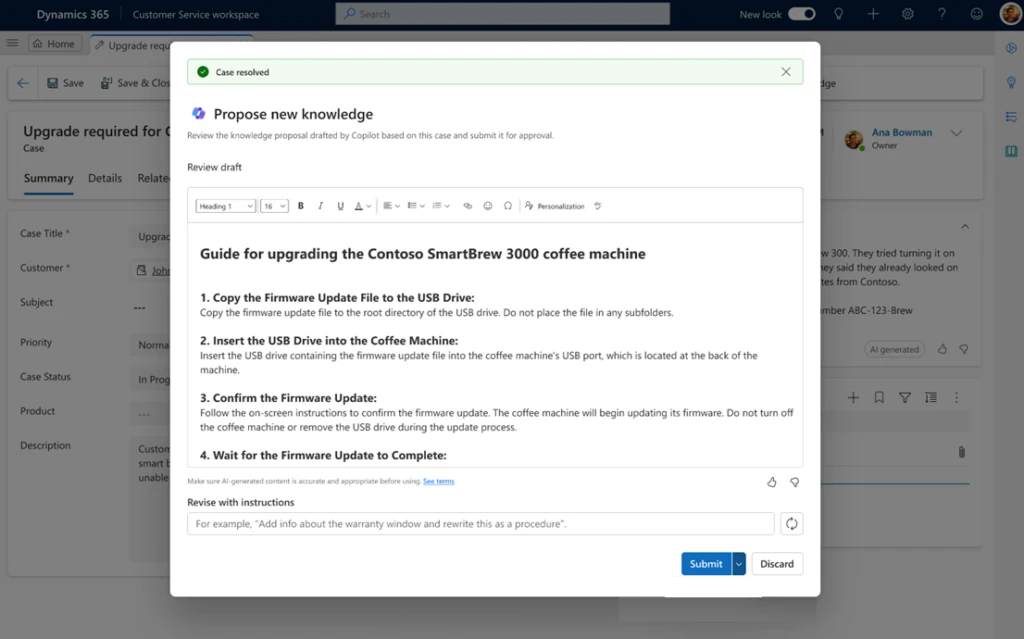
As the agent resolves a case, they can now click the Propose new knowledge using this case checkbox. This triggers Copilot to auto-generate an initial knowledge draft from a set of important case data. Copilot uses case descriptions, email exchanges, summaries, and agent notes to quickly draft a knowledge article. The agent can further revise the article using multi-turn prompts in natural language.
This auto-generated knowledge draft encompasses symptoms, root causes, troubleshooting steps, and insights. The draft adheres to industry-standard Knowledge-Centered Service (KCS) format. The agent can validate the draft and send it for further content quality and compliance checks to downstream reviewers for approval and publishing.
Next-generation AI that is ready for enterprises
Microsoft Azure OpenAI Service offers a range of privacy features, including data encryption and secure storage. It also allows users to control access to their data and provides detailed auditing and monitoring capabilities. Microsoft Dynamics 365 is built on Azure OpenAI, so enterprises can rest assured that it offers the same level of data privacy and protection.
AI solutions built responsibly
We are committed to creating responsible AI by design. Our work is guided by a core set of principles: fairness, reliability and safety, privacy and security, inclusiveness, transparency, and accountability. We are putting those principles into practice across the company to develop and deploy AI that will have a positive impact on society.
Learn more about drafting knowledge articles with Copilot
This article is contributed. See the original author and article here.
Knowledge is the lifeblood of customer service organizations. Timely access to the most accurate and relevant knowledge articles critically influences agents’ productivity and ability to deliver exceptional customer support and boost CSAT scores.
Agents rely on the availability of an up-to-date knowledge base. Additionally, they bring a wealth of tacit insights and personal competency to troubleshoot and resolve customer cases. However, once resolved, these valuable knowledge insights remain trapped unless documented by someone—whether knowledge authors or agents. This process requires additional effort, time, and specialized writing skills. It may also be outside the agents’ core priorities, especially in high-velocity support operations.
Harvesting such tacit knowledge insights from resolved cases into mainstream knowledge articles can significantly help other agents discover and reuse them, accelerating overall knowledge sharing.
Introducing knowledge draft assist in Dynamics 365 Customer Service
We’re thrilled to announce the launch of knowledge draft assist, now in preview. This Copilot feature helps agents generate knowledge draft proposals from resolved case data.
How does it work?
As the agent resolves a case, they can now click the Propose new knowledge using this case checkbox. This triggers Copilot to auto-generate an initial knowledge draft from a set of important case data. Copilot uses case descriptions, email exchanges, summaries, and agent notes to quickly draft a knowledge article. The agent can further revise the article using multi-turn prompts in natural language.
This auto-generated knowledge draft encompasses symptoms, root causes, troubleshooting steps, and insights. The draft adheres to industry-standard Knowledge-Centered Service (KCS) format. The agent can validate the draft and send it for further content quality and compliance checks to downstream reviewers for approval and publishing.
Next-generation AI that is ready for enterprises
Microsoft Azure OpenAI Service offers a range of privacy features, including data encryption and secure storage. It also allows users to control access to their data and provides detailed auditing and monitoring capabilities. Microsoft Dynamics 365 is built on Azure OpenAI, so enterprises can rest assured that it offers the same level of data privacy and protection.
AI solutions built responsibly
We are committed to creating responsible AI by design. Our work is guided by a core set of principles: fairness, reliability and safety, privacy and security, inclusiveness, transparency, and accountability. We are putting those principles into practice across the company to develop and deploy AI that will have a positive impact on society.
Learn more about drafting knowledge articles with Copilot
This article is contributed. See the original author and article here.
In the quickly changing world of AI, Microsoft Dynamics 365 Business Central is leading the way with innovations that have equipped more than 30,000 small and medium-sized businesses to succeed. Powered by next-generation AI, Microsoft Copilot in Dynamics 365 Business Central introduces new ways to streamline workflows, boost productivity, and unlock creativity. At a time when nine out of ten people want simpler ways to automate daily tasks, Copilot helps to free time so employees can focus on their most meaningful work.1
Copilot in Business Central is your everyday AI companion, helping you to speed through tasks, build momentum, and improve the way work gets done. With Copilot, you can:
Get answers quickly and easily using natural language.
Spark creativity with creative content ideas.
Save time by automating tedious, repetitive tasks.
Anticipate and overcome business challenges.
Reclaim time for important work
In a small or medium-sized business, there is often a lot to do and not enough people to get it all done. Everyday activities like tracking down documents and bringing new employees up to speed can drain your valuable time. Conversational chat using Copilot in Business Central helps you answer questions quickly and easily, locate records faster, and even learn new skills—all using natural language. Save time and effort by navigating to documents without having to use traditional menus, and rapidly onboard new users with answers to questions on how, when, or why to do things.
Unlock creativity with marketing text suggestions
Copilot in Business Central helps product managers to banish writer’s block and drive sales with compelling AI-generated marketing text suggestions. Using key attributes already in Business Central like color and material, Copilot can create product descriptions in seconds tailored to your preferred tone, format, and length. Once you’ve made any adjustments, you can easily publish to Shopify or other ecommerce platforms with just a few clicks.
Simplify the sales order process
Creating or updating customer orders can be a tedious process, often requiring repetitive lookups or navigating through extensive product catalogs. To quickly add items to a sales quote or order, Copilot enables you to describe the goods or services needed, paste in relevant details from an email, or reference a previous order. Based on your prompt, Copilot then suggests line items from your product catalog. By streamlining the order taking process, Copilot frees time for sales teams to focus on building relationships and delivering exceptional customer experiences.
Automate workflows quickly and easily
Streamlining business processes is easier than ever with Copilot helping to create Microsoft Power Automate flows using natural language. Users can simply express their needs directly in Business Central, and Copilot drafts an initial automation flow for you. You can continue refining the flow in Power Automate with Copilot by your side, streamlining the process of tailoring best-practice workflows to your business.
Nine out of ten people want simpler ways to automate daily tasks so they can focus on the work that matters.1
Streamline month end with enhanced bank reconciliation
Reconciling bank transactions has traditionally been a time-consuming monthly task, especially with complex scenarios where multiple charges consolidate into a single transaction. Copilot in Business Central makes bank reconciliation easier by analyzing bank statements that you import into Business Central, matching transactions, and proposing entries for transactions that weren’t auto-matched. By comparing and interpreting transaction descriptions, amounts, dates, and patterns across fields, Copilot can help you improve the accuracy of your financial records while reducing manual effort.
Keep finances organized with e-invoice matching
Say goodbye to hours spent manually merging incoming e-invoices with outstanding purchase orders. Using rule-based matching and assistance from Copilot, you can quickly compare and map incoming e-invoices to your open orders. Save time and keep your accounts payable current, all while building positive supplier relationships with on-time payments.
Make data-driven decisions with analysis assistance
Business Central has powerful built-in capabilities to create analytical views of data, but manually constructing those views requires time and skill. Copilot simplifies analysis by transforming raw data into clear views with totals, grouping, pivots, and filters—all from simple text instructions and without ever leaving Business Central. Prompted by just a simple sentence, Copilot can identify trends and anomalies in your data, helping you make data-driven decisions that propel your business forward.
Boost customer service with inventory forecasting
Effective inventory management is crucial in a competitive business environment as it can significantly influence a company’s success and customer retention. This process involves balancing customer service with cost control. Maintaining low inventory reduces working capital, but risks missing sales due to stock shortages. Using AI, the sales and inventory forecast extension uses past sales data to forecast future demand, helping to prevent stockouts. Once a shortfall is identified, Business Central streamlines the replenishment process by generating vendor requests, helping you keep your customers happy by fulfilling their orders on time.
Reduce risk with late payment prediction
Managing receivables effectively is vital for a business’s financial wellbeing. With the late payment prediction extension, you can reduce outstanding receivables and refine your collections approach by forecasting if outstanding sales invoices are likely to be paid on time. For instance, if a payment is anticipated to be delayed, you could modify the payment terms or method for that customer. By proactively addressing potential late payments and adapting accordingly, you can minimize overdue receivables, reduce risk of non-payment, and ultimately improve your financial performance.
Improve financial stability with cash flow analysis
Powered by AI, Business Central can create a comprehensive cash flow analysis to help you monitor your company’s cash position. Cash flow is a critical indicator of a company’s solvency, and cash flow analysis is an important future-focused planning tool that helps you maintain control over your financial health and make proactive adjustments to meet your financial commitments. With insights from Business Central, you can pivot quickly to safeguard your company’s fiscal wellbeing, such as by obtaining loans to cover cash shortfalls or cutting back on credit when you have surplus cash.
Transform the way work gets done with Copilot in Business Central
Copilot gives your company an edge with AI-powered innovations that are a catalyst for unleashing human potential, fostering creativity, and driving efficiency in ways previously unimaginable. The integration of AI into everyday business processes is not just about staying ahead in a competitive market, it’s about redefining what’s possible in the workplace. With Dynamics 365 Business Central, your company is empowered to navigate today’s complex business environment with agility, precision, and a renewed focus on what truly matters.
Dynamics 365 Business Central
Work smarter, adapt faster, and perform better with Business Central.
This article is contributed. See the original author and article here.
Microsoft Places—available today in public preview—is an AI-powered app that coordinates when you’re planning to come in and where you’ll work, enables improved connections with coworkers, and optimizes the effectiveness and engagement of the workplace. Importantly, Places features are accessible across surfaces you regularly use for coordination and collaboration, like Outlook and Microsoft Teams, so flexible work coordination and connection can happen within your normal flow of work.
This article is contributed. See the original author and article here.
In the quickly changing world of AI, Microsoft Dynamics 365 Business Central is leading the way with innovations that have equipped more than 30,000 small and medium-sized businesses to succeed. Powered by next-generation AI, Microsoft Copilot in Dynamics 365 Business Central introduces new ways to streamline workflows, boost productivity, and unlock creativity. At a time when nine out of ten people want simpler ways to automate daily tasks, Copilot helps to free time so employees can focus on their most meaningful work.
Copilot in Business Central is your everyday AI companion, helping you to speed through tasks, build momentum, and improve the way work gets done. With Copilot, you can:
Get answers quickly and easily using natural language.
Spark creativity with creative content ideas.
Save time by automating tedious, repetitive tasks.
Anticipate and overcome business challenges.
Reclaim time for important work
In a small or medium-sized business, there is often a lot to do and not enough people to get it all done. Everyday activities like tracking down documents and bringing new employees up to speed can drain your valuable time. Conversational chat using Copilot in Business Central helps you answer questions quickly and easily, locate records faster, and even learn new skills—all using natural language. Save time and effort by navigating to documents without having to use traditional menus, and rapidly onboard new users with answers to questions on how, when, or why to do things.
Unlock creativity with marketing text suggestions
Copilot in Business Central helps product managers to banish writer’s block and drive sales with compelling AI-generated marketing text suggestions. Using key attributes already in Business Central like color and material, Copilot can create product descriptions in seconds tailored to your preferred tone, format, and length. Once you’ve made any adjustments, you can easily publish to Shopify or other ecommerce platforms with just a few clicks.
Simplify the sales order process
Creating or updating customer orders can be a tedious process, often requiring repetitive lookups or navigating through extensive product catalogs. To quickly add items to a sales quote or order, Copilot enables you to describe the goods or services needed, paste in relevant details from an email, or reference a previous order. Based on your prompt, Copilot then suggests line items from your product catalog. By streamlining the order taking process, Copilot frees time for sales teams to focus on building relationships and delivering exceptional customer experiences.
Automate workflows quickly and easily
Streamlining business processes is easier than ever with Copilot helping to create Microsoft Power Automate flows using natural language. Users can simply express their needs directly in Business Central, and Copilot drafts an initial automation flow for you. You can continue refining the flow in Power Automate with Copilot by your side, streamlining the process of tailoring best-practice workflows to your business.
Nine out of ten people want simpler ways to automate daily tasks so they can focus on the work that matters.1
Streamline month end with enhanced bank reconciliation
Reconciling bank transactions has traditionally been a time-consuming monthly task, especially with complex scenarios where multiple charges consolidate into a single transaction. Copilot in Business Central makes bank reconciliation easier by analyzing bank statements that you import into Business Central, matching transactions, and proposing entries for transactions that weren’t auto-matched. By comparing and interpreting transaction descriptions, amounts, dates, and patterns across fields, Copilot can help you improve the accuracy of your financial records while reducing manual effort.
Keep finances organized with e-invoice matching
Say goodbye to hours spent manually merging incoming e-invoices with outstanding purchase orders. Using rule-based matching and assistance from Copilot, you can quickly compare and map incoming e-invoices to your open orders. Save time and keep your accounts payable current, all while building positive supplier relationships with on-time payments.
Make data-driven decisions with analysis assistance
Business Central has powerful built-in capabilities to create analytical views of data, but manually constructing those views requires time and skill. Copilot simplifies analysis by transforming raw data into clear views with totals, grouping, pivots, and filters—all from simple text instructions and without ever leaving Business Central. Prompted by just a simple sentence, Copilot can identify trends and anomalies in your data, helping you make data-driven decisions that propel your business forward.
Boost customer service with inventory forecasting
Effective inventory management is crucial in a competitive business environment as it can significantly influence a company’s success and customer retention. This process involves balancing customer service with cost control. Maintaining low inventory reduces working capital, but risks missing sales due to stock shortages. Using AI, the sales and inventory forecast extension uses past sales data to forecast future demand, helping to prevent stockouts. Once a shortfall is identified, Business Central streamlines the replenishment process by generating vendor requests, helping you keep your customers happy by fulfilling their orders on time.
Reduce risk with late payment prediction
Managing receivables effectively is vital for a business’s financial wellbeing. With the late payment prediction extension, you can reduce outstanding receivables and refine your collections approach by forecasting if outstanding sales invoices are likely to be paid on time. For instance, if a payment is anticipated to be delayed, you could modify the payment terms or method for that customer. By proactively addressing potential late payments and adapting accordingly, you can minimize overdue receivables, reduce risk of non-payment, and ultimately improve your financial performance.
Improve financial stability with cash flow analysis
Powered by AI, Business Central can create a comprehensive cash flow analysis to help you monitor your company’s cash position. Cash flow is a critical indicator of a company’s solvency, and cash flow analysis is an important future-focused planning tool that helps you maintain control over your financial health and make proactive adjustments to meet your financial commitments. With insights from Business Central, you can pivot quickly to safeguard your company’s fiscal wellbeing, such as by obtaining loans to cover cash shortfalls or cutting back on credit when you have surplus cash.
Transform the way work gets done with Copilot in Business Central
Copilot gives your company an edge with AI-powered innovations that are a catalyst for unleashing human potential, fostering creativity, and driving efficiency in ways previously unimaginable. The integration of AI into everyday business processes is not just about staying ahead in a competitive market, it’s about redefining what’s possible in the workplace. With Dynamics 365 Business Central, your company is empowered to navigate today’s complex business environment with agility, precision, and a renewed focus on what truly matters.
Dynamics 365 Business Central
Work smarter, adapt faster, and perform better with Business Central.
This article is contributed. See the original author and article here.
One year ago, generative AI burst onto the scene and for the first time since the smartphone, people began to change the way they interact with technology. People are bringing AI to work at an unexpected scale — and now the big question is, how’s it going?
As AI becomes ubiquitous in the workplace, employees and businesses alike are under extreme pressure. The pace and intensity of work, which accelerated during the pandemic, has not eased, so employees are bringing their own AI to work. Leaders agree AI is a business imperative — and feel the pressure to show immediate ROI — but many lack a plan and vision to go from individual impact to applying AI to drive the bottom line.
At the same time, the labor market is set to shift and there’s a new AI economy. While some professionals worry AI will replace their job, the data tells a more nuanced story — of a hidden talent shortage, more employees eyeing a career change, and a massive opportunity for those willing to skill up.
“AI is democratizing expertise across the workforce,” said Satya Nadella, Chairman and Chief Executive Officer, Microsoft. “Our latest research highlights the opportunity for every organization to apply this technology to drive better decision-making, collaboration — and ultimately business outcomes.”
For our fourth annual Work Trend Index, out today, we partnered with LinkedIn for the first time on a joint report so we could provide a comprehensive view of how AI is not only reshaping work, but the labor market more broadly. We surveyed 31,000 people across 31 countries, identified labor and hiring trends from LinkedIn, analyzed trillions of Microsoft 365 productivity signals and conducted research with Fortune 500 customers. The data points to insights every leader and professional needs to know — and actions they can take — when it comes to AI’s implications for work.
1. Employees want AI at work — and won’t wait for companies to catch up.
Three in four knowledge workers (75%) now use AI at work. Employees, overwhelmed and under duress, say AI saves time, boosts creativity and allows them to focus on their most important work. While 79% of leaders agree AI adoption is critical to remain competitive, 59% worry about quantifying the productivity gains of AI and 60% worry their company lacks a vision and plan to implement it. While leaders feel the pressure to turn individual productivity gains into organizational impact, employees aren’t waiting to reap the benefits: 78% of AI users are bringing their own AI tools to work. The opportunity for every leader is to channel this momentum into ROI.
2. For employees, AI raises the bar and breaks the career ceiling.
We also see AI beginning to impact the job market. While AI and job loss are top of mind for some, our data shows more people are eyeing a career change, there are jobs available, and employees with AI skills will get first pick. The majority of leaders (55%) say they’re worried about having enough talent to fill open roles this year, with leaders in cybersecurity, engineering, and creative design feeling the pinch most.
And professionals are looking. Forty-six percent across the globe are considering quitting in the year ahead — an all-time high since the Great Reshuffle of 2021 — a separate LinkedIn study found U.S. numbers to be even higher with 85% eyeing career moves. While two-thirds of leaders wouldn’t hire someone without AI skills, only 39% of users have received AI training from their company. So, professionals are skilling up on their own. As of late last year, we’ve seen a 142x increase in LinkedIn members adding AI skills like Copilot and ChatGPT to their profiles and a 160% increase in non-technical professionals using LinkedIn Learning courses to build their AI aptitude.
In a world where AI mentions in LinkedIn job posts drive a 17% bump in application growth, it’s a two-way street: Organizations that empower employees with AI tools and training will attract the best talent, and professionals who skill up will have the edge.
3. The rise of the AI power user — and what they reveal about the future.
In the research, four types of AI users emerged on a spectrum — from skeptics who rarely use AI to power users who use it extensively. Compared to skeptics, AI power users have reoriented their workdays in fundamental ways, reimagining business processes and saving over 30 minutes per day. Over 90% of power users say AI makes their overwhelming workload more manageable and their work more enjoyable, but they aren’t doing it on their own.
Power users work for a different kind of company. They are 61% more likely to have heard from their CEO on the importance of using generative AI at work, 53% more likely to receive encouragement from leadership to consider how AI can transform their function and 35% more likely to receive tailored AI training for their specific role or function.
“AI is redefining work and it’s clear we need new playbooks,” said Ryan Roslansky, CEO of LinkedIn. “It’s the leaders who build for agility instead of stability and invest in skill building internally that will give their organizations a competitive advantage and create more efficient, engaged and equitable teams.”
The prompt box is the new blank page
We hear one consistent piece of feedback from our customers: talking to AI is harder than it seems. We’ve all learned how to use a search engine, identifying the right few words to get the best results. AI requires more context — just like when you delegate work to a direct report or colleague. But for many, staring down that empty prompt box feels like facing a blank page: Where should I even start?
Today, we’re announcing Copilot for Microsoft 365 innovations to help our customers answer that question.
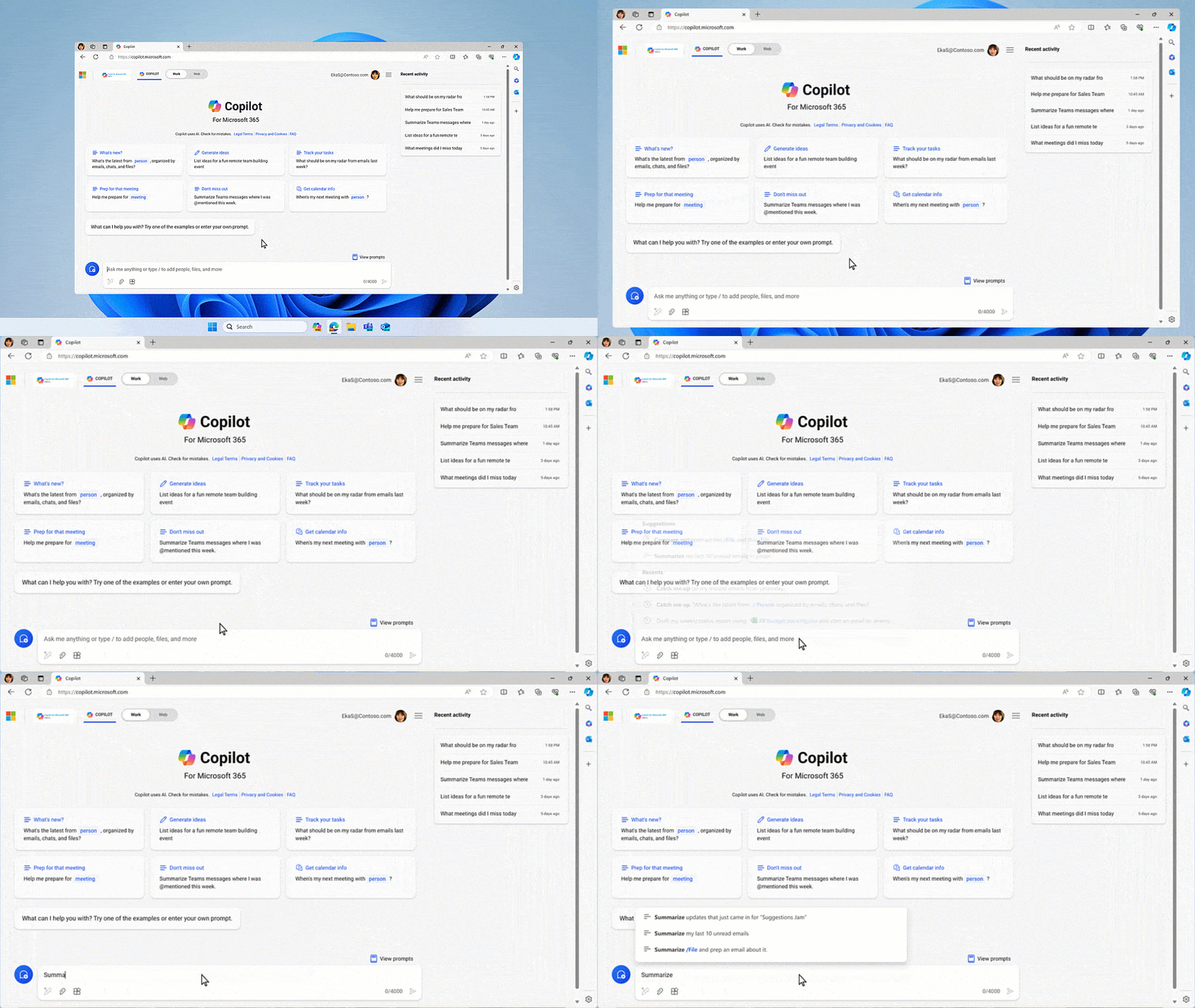
If you’ve got the start of a prompt, Copilot will offer to auto-complete it to get to a better result, suggesting something more detailed to help ensure you get what you’re looking for. That not only speeds things up, it offers you new ideas for how to leverage Copilot’s power.
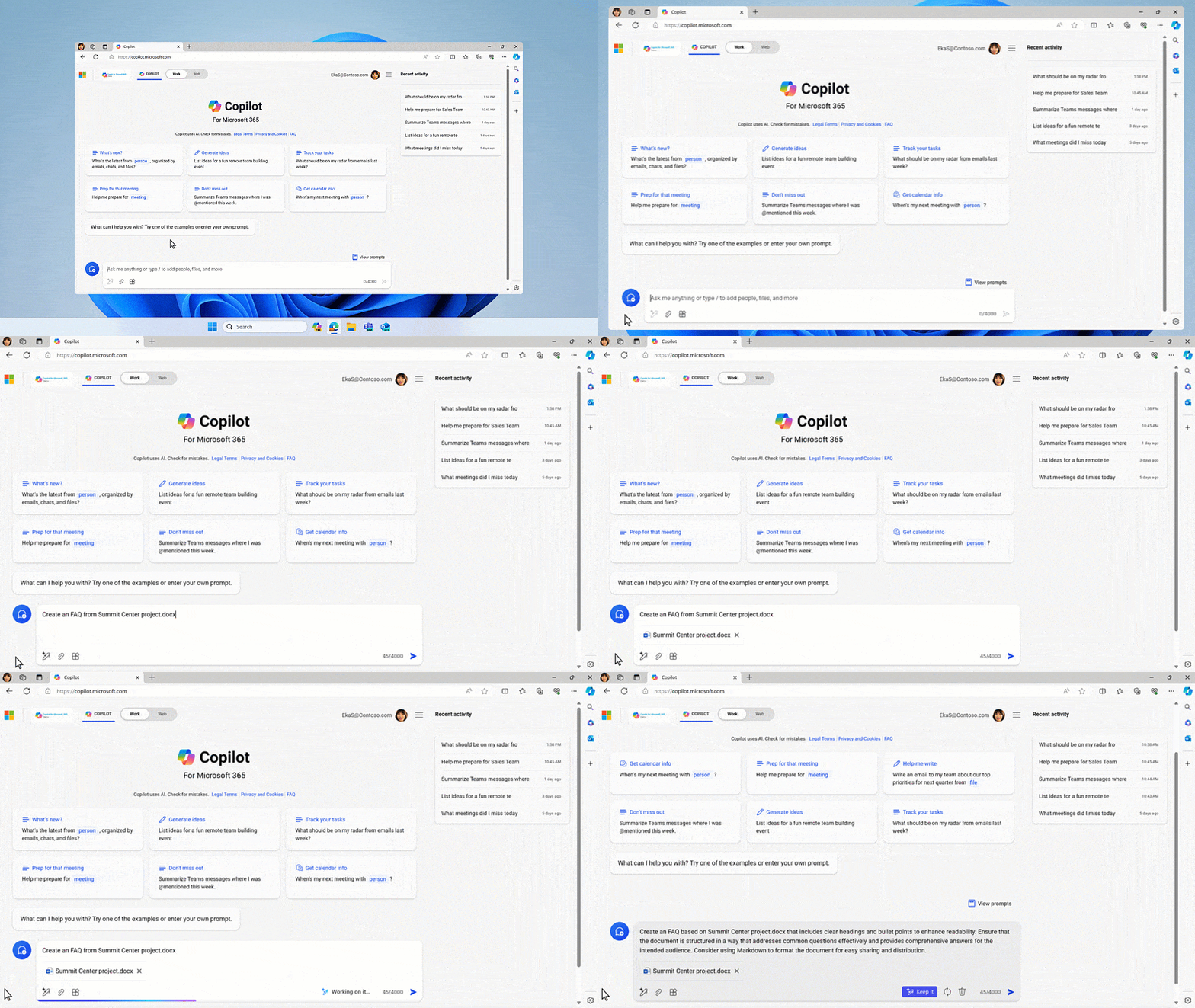
Other times, you know exactly what you want — you’re just not sure how to ask. With its new rewrite feature, Copilot turns a basic prompt into a rich one with the click of a button, turning everyone into a prompt engineer.
Catch Up, a new chat interface that surfaces personal insights based on your recent activity, provides responsive recommendations, like “You have a meeting with the sales VP on Thursday. Let’s get you prepared — click here to get detailed notes.”
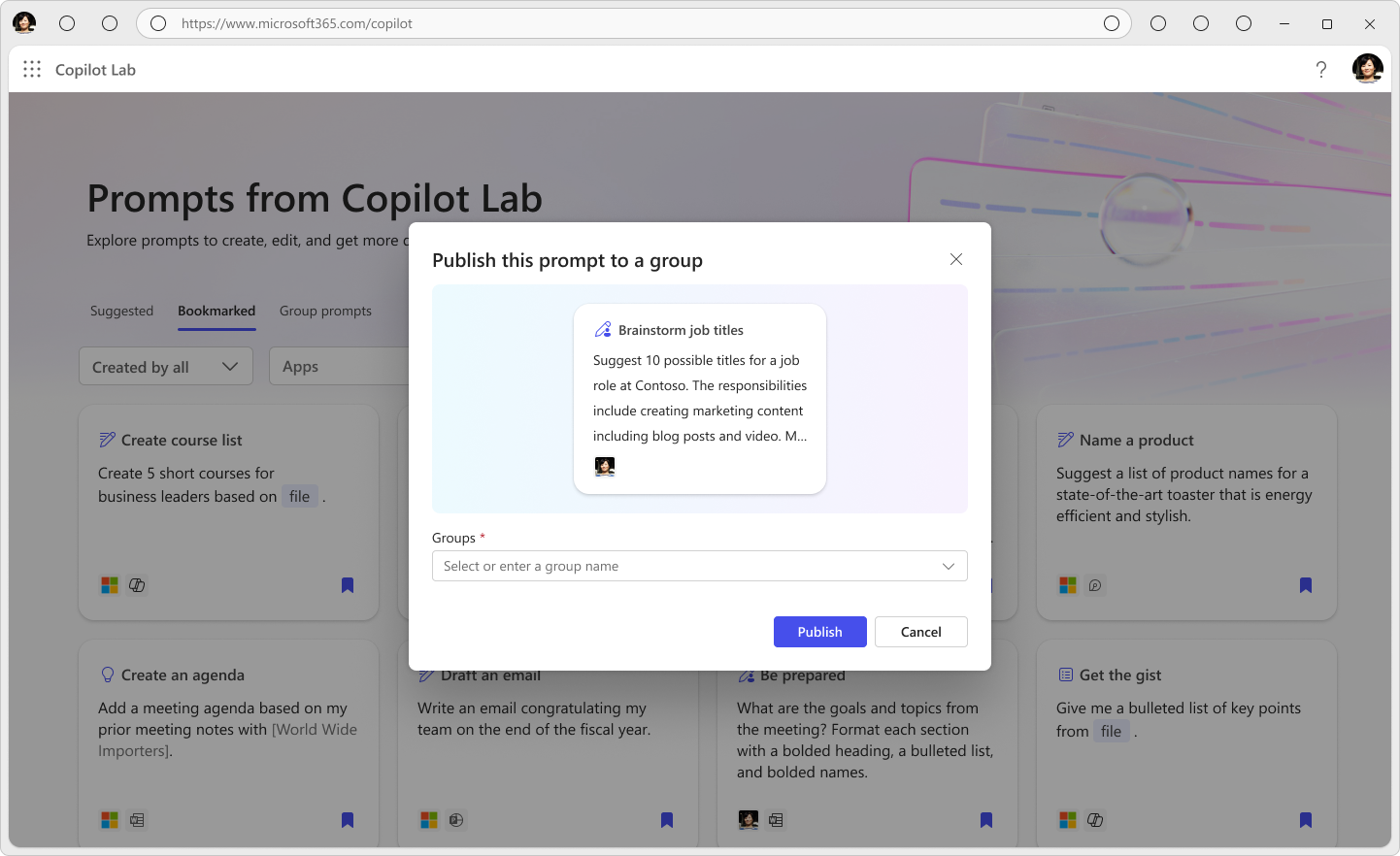
We also know that every role, team and function has unique needs and ways of working. To help create prompts for exactly the work you do, you’ll soon be able to create, publish and manage prompts in Copilot Lab that are expressly tailored to your closest teams.
These features will be available in the coming months, and in the future, we’ll take it a step further, with Copilot asking you questions to get to your best work yet.
LinkedIn has also made free over 50 learning courses to empower professionals at all levels to advance their AI aptitude.
Head to WorkLab for the full Work Trend Index Report, and head to LinkedIn to hear more from LinkedIn’s Chief Economist, Karin Kimbrough, on how AI is reshaping the labor market.
And for all the blogs, videos and assets related to today’s announcements, please visit our microsite.






Recent Comments