How Microsoft Dynamics 365 Fraud Protection helps Worldline combat fraud

How Microsoft Dynamics 365 Fraud Protection helps Worldline combat fraud

This article is contributed. See the original author and article here.

Online fraud increased significantly during the recent pandemic and economic downturn, with losses of an estimated $12 billion worldwide.1 To ensure continuous protection, organizations need modern solutions to protect from a range of fraudfrom payment fraud, bots, account takeover, and returns and discounts fraud.

We are partnering with Worldline, the European leader in the payments and transactional services industry, to help protect thousands of global organizations and their customers from a wide scope of fraud. Worldline will integrate our award-winning Microsoft Dynamics 365 Fraud Protection services into their leading digital payments suite to provide their users additional security and trust by future-proofing their businesses.

Helping to protect world-class digital payments for a trusted world

With its global reach and its commitment to innovation, Worldline is the technology partner of choice for merchants, banks, and third-party acquirers as well as public transport operators, government agencies, and industrial companies in all sectors. Powered by over 20,000 employees in more than 50 countries, Worldline provides its clients with sustainable, trusted, and secure solutions across the payment value chain, fostering their business growth wherever they are.

Now, Worldline’s customers will benefit from Microsoft’s award-winning fraud prevention technology. Purchase protection can help protect revenue by improving the transaction acceptance rate reduce checkout friction. Account protection can help protect a business’s reputation and safeguard user accounts from abuse and fraud by combating fake account creation, account takeover, and fraudulent account access. Finally, loss prevention helps protect revenue by identifying anomalies and potential fraud on returns and discounts and provides the tools to quickly take action to mitigate losses.

How it works: scalable fraud protection across millions of transactions

Screening every transaction for traceable ‘fingerprints’ on fraudulent transactions would be impossible without technology such as the award-winning adaptive AI that powers Dynamics 365 Fraud Protection. Worldline customers can start with a mixture of pre-set fraud controls and adaptive AI that can learn to better identify fraud both on a client’s own site and as part of a globe-spanning fraud protection network. Customers will be able to see Dynamics 365 Fraud Protection working right away thanks to an intuitive user interface and real-time analytics.

Users can also customize their rules and controls to find the perfect balance of preventing fraud and reducing customer friction. Users will be able to curate their fraud prevention to meet their unique business needs with the help of a comprehensive dashboard that analyses false positives, optimizes rules to increase acceptance, and a virtual fraud analyst interface.

By leveraging the world-class digital payment and transactional services of Worldline and leading AI-powered fraud protection capabilities from Dynamics 365, customers can protect against the impact of fraud, which can range from severe disruptions to society to minor inconveniences; from widespread cyber-attacks across payment systems to day-to-day false-positive transaction alerts that can both be annoying to customers and harmful to businesses.

Our mission at Microsoft is to empower every person and every organization on the planet to achieve more. We are honored to be a part of Worldline’s leading payment solutions and to empower them to achieve their vision to “design and operate leading digital payment and transactional solutions that enable sustainable economic growth and reinforce trust and security in our societies. We make them environmentally friendly, widely accessible and support social transformation.” Read the full Worldline story.

Learn more

To learn more about Dynamics 365 Fraud Protection and our capabilities including how purchase protection helps protect your revenue by improving the acceptance rate of e-commerce transactions, how account protection helps protect your reputation by defending against bot attacks, fake account creation, account takeover, and fraudulent account access, and how loss prevention helps protect revenue by identifying anomalies on returns and discounts. For more advanced and technical details, check out our Dynamics 365 Fraud Protection documentation.

Don’t forget to read our free e-book “Protecting Customers, Revenue, and Reputation from Online Fraud” for a more in-depth look at Dynamics 365 Fraud Protection.


1-“eCommerce Fraud Presents A $12 Billion Problem,” PYMNTS, March 14, 2020.

The post How Microsoft Dynamics 365 Fraud Protection helps Worldline combat fraud appeared first on Microsoft Dynamics 365 Blog.

Brought to you by Dr. Ware, Microsoft Office 365 Silver Partner, Charleston SC.

How Microsoft Dynamics 365 Fraud Protection helps Worldline combat fraud

Driving empathetic, connected service experiences with Dynamics 365

This article is contributed. See the original author and article here.

The ongoing global pandemic has permanently changed our livesfrom how we interact, where we work, and how we work. If there’s one major takeaway we’ve learned from the continuously evolving macroeconomic climate, it’s that efficient, reliable, and timely service delivery has become more critical than ever. The sophisticated, often complex machinery and equipment that keep our businesses and society running smoothly depend on regular servicing and maintenance.

Efficient field service management is an area that is fast becoming a top priority for organizations worldwide. With the infusion of cutting-edge technology including mixed reality, machine learning, and AI, Microsoft Dynamics 365 Field Service has enabled organizations to deliver timely service to their end customers and drastically reduced the need for onsite visits especially during a time of stringent travel restrictions and border closures.

For frontline workers who previously had to only focus on how to install, diagnose or repair a device, they now needed to focus on getting the job done with minimal in-person contact and social distancing measures. TSIA reported that 78 percent of field service organizations ceased deploying technicians to customer sites during the height of the pandemic.1 This may have been a reaction to 75 percent of consumers not wanting a field technician physically in their home unless absolutely necessary.2

The heart of field service lies in its people-centricitythus, having to physically distance oneself from the customers whom you serve inevitably puts most companies in a challenging position. This frustration led to an evolution in service delivery. The pandemic compelled field service workers to rethink their overall approach to daily operations, including completing initial diagnostics and troubleshooting by telephone, video calling, and other digital tools where possible. To comply with social distancing measures, field technicians often had to arrange onsite visits only when customers would be on break or away from the site. Technicians made every effort to minimize their time onsite and needed to ensure they had all the right parts and tools ready so they would not have to return for follow-up visits to complete the task. These accommodations may have helped to maintain or at least reduce any negative impact on service delivery rates despite limited resources due to travel and other restrictions but may not be sufficient when organizations are faced with a sudden deluge of service requests.

Now, many companies have begun investing in tools like Dynamics 365 Field Service and Dynamics 365 Remote Assist that can help ensure the health and safety of both the technician and customers while maintaining business continuity regardless of ongoing global situations. Together, these tools enable organizations to deliver exceptional servicebe it remote or in-person, if neededto customers, automate time-consuming case creation and work order processes to ultimately help organizations develop resiliency to weather through challenging times.

Adoption of Connected Field Service

During the COVID-19 pandemic, service organizations pivoted to new work arrangements faster than they expected, and companies jumped quickly ahead into the future workplace. One of these pivots was the turn to virtual productivity platforms, namely Connected Field Service, which has provided a wealth of advantages. These platforms allow service providers to fix problems remotely and even proactivelyall while avoiding onsite services that could otherwise compromise employee and customer safety. The enormous value of this technology was realized during the height of the pandemic, making it useful and applicable across many industries. This realization fueled explosive growth in Connected Field Service, which would’ve taken a longer, slower path without the urgency of digital transformation during these critical times.

The global pandemic greatly accelerated innovation in service delivery with Connected Field Service and rapidly became a prerequisite for not only survival, but success in a variety of industries. Transitioning from the typical break/fix model, Connected Field Service has revolutionized this traditional business model, going beyond proactive to now even predictive service models that utilize multiple facets of asset maintenance, Internet of Things (IoT) diagnostics, scheduling, and inventory management on a single platform.

Connected Field Service has been proven to dramatically improve productivity and achieves a quick return on investment. This cohesive solution using Dynamics 365 Field Service and Remote Assist has truly transformed the field service management categorywhat used to take several technicians hours or even days to manage manually can now often be resolved in mere minutes with real-time support from remote experts using 3D mixed reality annotations right within the technician’s real-world environment. Now, service management cases can be easily created, edited, and managed end-to-end through one connected system to help track issues from ticket creation all the way through to issue resolution.

By using Connected Field Service, companies can identify and address issues more effectively with remote monitoring of IoT devices that can send IoT signals and trigger alerts via Dynamics 365 Field Service. Technicians can remotely diagnose and troubleshoot issues even before the customer detects the issue, minimizing costly downtime and time-consuming service calls. Field service organizations can also leverage device diagnostic data to proactively schedule device service and leverage predictive analytics with AI, increasing productivity and reducing costs associated with the reactive break/fix model.

Connected Field Service offers a solution to the dilemma of service delivery in a landscape where physical and digital environments are blending. As devices, sensors, gateways, data, and applications become more advanced and as connectivity methods become more economical like IoT plug and play, more technologies can be easily connected to these networks and achieve even greater efficiencies.

Predicting the future of Field Service Management

The need for Connected Field Service will undoubtedly continue to growaccelerating response times, increasing productivity, reducing operational costs with the ultimate goal of exceeding customers’ expectations to drive long-term customer satisfaction and loyalty. In fact, Juniper Research estimates that the number of IoT devices this year will reach 46 billion and this figure is expected to jump to 125 billion by 2030.3

Contact-free service will continue its evolution as more and more customers become advocates of the experience, embracing the idea of new technologies, processes, and procedures while driving migration to IoT devices. Meanwhile, AI-driven technician scheduling will help organizations optimize resources and minimize costs by ensuring that technicians with the right skillsets are dispatched whenever and wherever they are needed.

Advances in AI and mixed reality will help spur additional growth by increasing productivity with leading-edge tools such as Dynamics 365 Remote Assist on both iOS and Android mobile devices and the HoloLens 2. Field service organizations can enable Dynamics 365 Remote Assist One-Time Calling (OTC) for customers to walk them through processes to deliver remote, contact-free service. Mixed reality will also enable customers to share their real-time views with remote experts to help minimize the need for in-person, onsite support. No wonder some industry analysts expect shipments of mixed reality devices to exceed five million in the next three years.4

Of course, there will always be issues that will require in-person onsite support, such as emergency response or complex machinery repairs, but for a large segment of work, remote work is certainly a valuable option and is likely here to stay. For jobs that must be serviced onsite, advances in AI will help enhance the process by optimizing scheduling resources and dispatching technicians with the right expertise. For instance, advanced AI capabilities within Dynamics 365 Field Service will optimize technician schedules by automatically dispatching the most experienced technician closest to the customer site. Plus, the Field Service mobile app will automatically notify the customer by text so that they are aware of the service technician’s estimated arrival time, and can easily track the technician’s geolocation via the app.

When onsite, technicians can use mixed reality technology like Dynamics 365 Remote Assist on HoloLens 2 to access critical information about the device they’ve been sent to repair, including service history and diagnosticsall anchored within their real-world environment. If they encounter any unexpected complexities during the repair, they can simply connect with a remote expert to share their real-time view, and leverage 3D annotations right in their physical work environment to help guide them along.

Embracing innovation

Cloud-based technologies, the adoption of mobile-based, and Connected Field Service management solutions have all helped create the right conditions to enable field workers to complete their service requests remotely and efficientlymuch to the delight of customers.

These challenging times in human history have taught us to embrace innovationnot just to merely weather through the storm, but to ensure long-term resilience. Connected Field Service is no longer an option and mixed reality technologies like Remote Assist, HoloLens 2, and Dynamics 365 Guides are anything but science fiction. These technologies have all earned their place in service delivery and together, help to fuel business continuity, create additional revenue streams, and most of all, ensure customer satisfaction and long-term engagement. Discover how to deliver empathetic, connected service experiences today.

Find out more on Connected Field Service.

Learn about Dynamics 365 Field Service and delivering proactive service.

Get the latest on Dynamics 35 Remote Assist and Dynamics 365 Guides.


1-“Impact of COVID-19 on OEM Field Service Organizations“, Vele Galovski, TSIA, April 9, 2020

2-“Enhancing Remote Maintenance using Visual Technology“, Andrew Mort, CustomerThink, September 10, 2020

3-“How Many IoT Devices Are There in 2021?“, Juniper Research, March 29, 2021

4-“Mixed Reality For Field Service“, Danny Wieder, Field Service News, June 3, 2019

The post Driving empathetic, connected service experiences with Dynamics 365 appeared first on Microsoft Dynamics 365 Blog.

Brought to you by Dr. Ware, Microsoft Office 365 Silver Partner, Charleston SC.

Enable productivity with native mobile experiences optimized for sellers

Enable productivity with native mobile experiences optimized for sellers

This article is contributed. See the original author and article here.

In the last year, business travel and face-to-face meetings have reduced significantlybut global workforces are busier than ever. The pace of selling has sped up during the pandemic, and the common pain points sellers face have become exacerbated as they juggle more responsibilities and obligations across work, home, and multiple time zones.

Sellers need to complete their tasks quickly and efficiently, where menial functions are automated and data entry is minimal, allowing them to accomplish their goals and achieve results in less time.

The new Dynamics 365 Sales mobile app, now generally available, brings together the best of the core solutions sellers use most. With Microsoft Outlook, Microsoft Teams, and Dynamics 365 Sales, the mobile app creates a frictionless selling experience, streamlined for a seller’s hectic workday. The app integrates native mobile device capabilities with the best of Microsoft and Dynamics 365 Sales concepts: collaboration, productivity, engagement, and intelligent workflows to create a streamlined native mobile app experience.

The Sales mobile app is also easily extendable using Microsoft Power Platform. With the new mobile sales app, Dynamics 365 Sales supports the always-on expectations so today’s sellers can work from almost anywhere.

Start the day ahead of the game

The Dynamics 365 Sales mobile app keeps sellers on the critical path with real-time push notifications that the organization can customize based on individual business needs. Reminders and insights not only keeps sellers on top of updates to key record details, but it also can alert them to more complex issues, such as opportunities with upcoming closed dates that have shown little or no recent activities. The app can also extract and alert sellers to potential issues, directly from their Outlook inbox, such as licenses for an account that are soon to expire.

Inside the app, the home page highlights the most useful and relevant information for sellers to conduct their daily tasks. The app displays upcoming meetings, recent contacts, and recently viewed records, pulled from Outlook and Dynamics 365 Sales, in the primary focus mode. From the home screen, sellers can create any entity or activity, including notes and contacts. Sellers can easily drill down for more information about any entity.

graphical user interface, text, application, chat or text message

Come prepared to every customer engagement

On the meetings tab, sellers can review their calendar and join Microsoft Teams meetings with one click of a button.

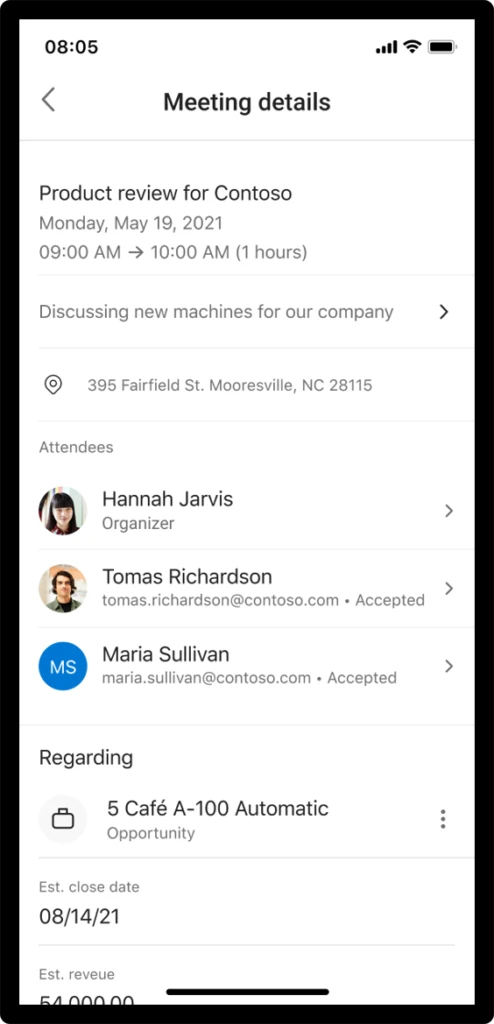
For face-to-face travel, the app provides location links to quickly access the device’s native maps app. The new Dynamics 365 Sales app provides sellers with relationship and logistics data sourced from Outlook and Dynamics 365 Sales. In a single meeting card, the seller knows key meeting details and attendee responses from Outlook. Dynamics 365 Sales data is pulled so the seller sees associated opportunity title, estimated revenue, closed date, pipeline phase, notes, and AI-generated reminders.

graphical user interface, text, application, chat or text message

Conduct daily tasks with ease, while on the go

Sellers can find contacts they need to reach with recently modified records with typo-proof search capabilities. With the quick view forms optimized for mobile devices, sellers have easy access to make quick updates and drill into a full view if they need more details. Sellers can quickly add notes, create contacts, and update data in relevant records.

Save time, and escape manual data entry

The Dynamics 365 Sales mobile app reduces manual entry and saves valuable time by supporting voice dictated notes while still fresh in the seller’s minds. Sellers can also take photos of their notes in hard copy and associate to the appropriate records as attachments. The app also allows sellers to scan business cards automatically into contacts so sellers have all the relevant details exactly where they are needed for future reference.

Note capture in camera on phone in Dynamics 365 Sales mobile

Work and domestic responsibilities have blurred across time zones, creating longer workdays that seemingly never end. And, as always, the pressure on sellers to hit goals and achieve results does not abate. The Dynamics 365 Sales mobile app brings together powerful, seller-specific workflows with Microsoft Teams, Outlook, and Sales to give sellers an incredibly powerful edge to stay at the top of their game.

The Dynamics 365 mobile app is a deeply integrated, on-the-go CRM (customer relationship management) that supercharges sales organizations.

Learn More

In the coming weeks, we will be encouraging users to download and begin using the new Sales mobile app.

Learn more about the mobile app and its capabilities: Using the Dynamics 365 Sales mobile app | Microsoft Docs

Enable the Dynamics 365 Sales mobile app in Advanced Settings: Prerequisites for the Dynamics 365 Sales mobile app | Microsoft Docs

To download the mobile app now:

Apple App Store: Dynamics 365 Sales on the App Store (apple.com)

Google Play: Dynamics 365 Sales – Apps on Google Play

The post Enable productivity with native mobile experiences optimized for sellers appeared first on Microsoft Dynamics 365 Blog.

Brought to you by Dr. Ware, Microsoft Office 365 Silver Partner, Charleston SC.

3 aspects to consider when migrating to Dynamics 365 in the cloud—it’s like building your next dream house

3 aspects to consider when migrating to Dynamics 365 in the cloud—it’s like building your next dream house

This article is contributed. See the original author and article here.

Migrating your on-premises business applications to the cloud can be like building your very own dream home. It’s incredibly exciting and will be perfect for your unique needs but can feel daunting when going at it alone. Ensuring you have a strong plan is crucial. Let’s explore this metaphor a bit more as we examine three critical components in your cloud journey and how you can leverage the Microsoft Dynamics 365 Migration Program all along the way.

Much like a top-notch architect and contractor makes building your dream home easier, the Dynamics 365 Migration Program enables on-premises customers to simplify and accelerate their move to the cloud. It offers end-to-end migration support working directly with Microsoft cloud architects and specialized migration partners. The program offers access to a no-charge migration assessment, pricing offers, tools, and migration support for qualified customers. Get expert help through the Dynamics 365 Migration Program to move from Dynamics AX or Dynamics CRM to the cloud.

Before you “break ground” on your cloud migration, however, there are three core aspects to considerbudget, requirements, and location.

1. Budget:

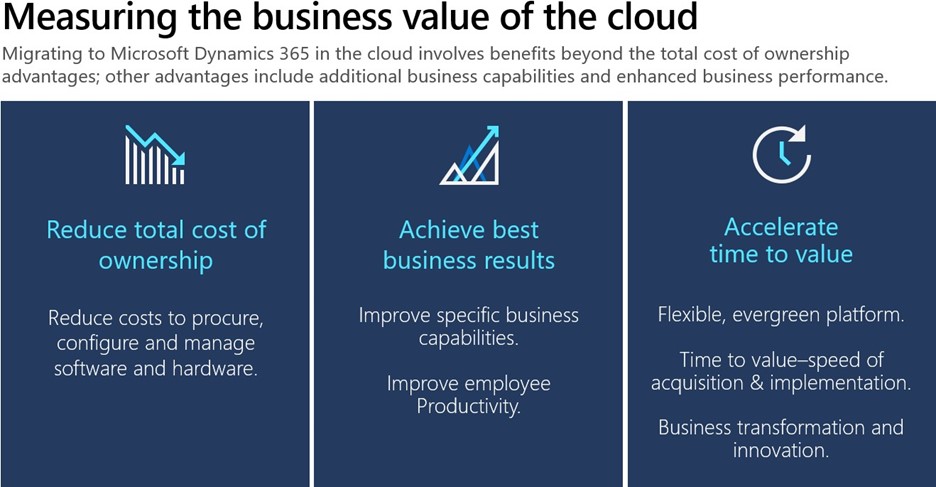
When building a dream home, ensuring you have a good understanding of your true budget is usually a good place to start. A reasonable place to begin is to compare your housing costs today with your future costs. Maybe you are renting or making mortgage payments on an existing house and you want to compare your current payments to your dream home mortgage. Chances are this new mortgage cost along with the one-time down payment may look overwhelming compared to your current rent or mortgage, but this is an incomplete view. It is incredibly important to factor in all of the service costs involved in maintenance, upgrades, and repairs of your current residence. This applies to on-premises costs as wellit is crucial to calculate the total cost of ownership, including IT costs, upgrade costs, and server costs to avoid any surprises. See the Forrester TEI study for Dynamics AX and Dynamics CRM to learn what other customers have found when making the cost comparison.

Picture highlighting the 3 benefits of moving to the cloud reduce total cost of ownership, achieve best business results, and accelerate time to value

2. Requirements:

Once you have a clear line of sight to the budget requirements, next comes the fun partthe design and specifications of your new house. When you are thinking about your future needs, why limit yourself to old ways of doing things? What about your partner’s, kids’, and pets’ changing needs? Your toddler will grow up to be a teenager in no time and will need a study room, or maybe your partner wants to start working from home and needs a quiet office space. Is all of your old stuff going to your new house, or might it make sense to get rid of the old boxes that you haven’t opened in the last 10 years? Likewise, when migrating to the cloud, it is an opportunity to refresh, evolve, or completely get rid of your old business practices that don’t make sense anymore. Do you still want that big file cabinet when you can store things securely online? To fully understand what it will take for you to migrate your existing on-premises data, customizations, integrations, and functionality to the cloud, you should sign-up for a no-charge, no-obligation Microsoft migration assessment. The assessment will give you deep insights into what it will take in terms of time and effort to migrate to the cloud. Apply today for the Microsoft migration assessment to get started.

3. Location:

Your ideal dream house should be in a spot where you feel safe and have the option to expand your living space when needed. Some neighborhoods, for example, are simply preferred because of the safety they offer in addition to the flexible zoning laws that allow future expansion. Maybe you want to build that second floor or mother-in-law suite in the future when your family grows or add those privacy hedges you have always wanted. Isn’t it great to always have that option and only invest when you are ready? With Dynamics 365 you can access cutting-edge technology, control costs, and improve IT productivity by migrating to the cloud. Dynamics 365 offers physical, infrastructure, and operational security with Microsoft Azure. It also offers scaling to the desired capacity to accommodate a variable number of users. Learn more about all the benefits of migrating from Dynamics AX and Dynamics CRM to Dynamics 365 in the cloud.

Image of a building connecting to a cloud

Finally, when considering building that future dream house, it can be exciting and nerve-wracking at the same time. Migrating your on-premises enterprise resource planning (ERP) or customer relationship management (CRM) to the cloud is no different with the same or more anxiety associated. It is very important to fully consider all the costs, design aspects, and platform features before you can determine the best migration path for your company. With Dynamics 365 Migration Program hundreds of customers like you have already benefitted from our no-charge, no-obligation Microsoft Standard Migration Assessment.

I was impressed about the information I got out of this migration assessment. It will give us confidence for the next steps” Senior Business Analyst

The Microsoft Standard Migration Assessment is the first step to help you understand the value of cloud migration and how to get there. This Microsoft-managed assessment is delivered virtually, typically requiring four to eight hours of a customer’s time. The Microsoft Standard Migration Assessment is available worldwide for users of Dynamics AX and Dynamics CRM. Download handouts for the Dynamics AX and Dynamics CRM Standard Migration Assessment.

Join the Dynamics 365 Migration Program

Get in touch with us today: Dynamics 365 Migration Program and join the Dynamics 365 Migration Community to connect with experts and fellow customers. Migration is an important decisiondo it right to minimize risk. Microsoft is here to guide you throughout the entire process.

The post 3 aspects to consider when migrating to Dynamics 365 in the cloud—it’s like building your next dream house appeared first on Microsoft Dynamics 365 Blog.

Brought to you by Dr. Ware, Microsoft Office 365 Silver Partner, Charleston SC.
Bringing Visio to Microsoft 365: Diagramming for everyone

Bringing Visio to Microsoft 365: Diagramming for everyone

This article is contributed. See the original author and article here.

With the shift to hybrid work comes the need for business leaders to create a new, flexible operating model spanning people, places, and processes. Every business process will need to be transformed and diagrams are often the starting point for many process updates. They enable leaders across the organization to improve and visually communicate processes…

The post Bringing Visio to Microsoft 365: Diagramming for everyone appeared first on Microsoft 365 Blog.

Brought to you by Dr. Ware, Microsoft Office 365 Silver Partner, Charleston SC.

Run quality assurance automatically with robotic process automation

Run quality assurance automatically with robotic process automation

This article is contributed. See the original author and article here.

Organizations have an increasing demand to automate standard business processes and provide more convenient interactions to their staff. With robotic process automation and Microsoft Power Automate, businesses gain efficiency and accuracy by using an experience to automate repetitive processes in Dynamics 365.

Read a related blog post: Enhance workplace automation with prebuilt RPA templates for Dynamics 365

Workers on the manufacturing floor use quality orders in Dynamics 365 Supply Chain Management to request quality assurance processes for selected items on manufacturing lines. Potential defects or problems are typically raised based on visual observations, abnormalities in production processes, sensor data, or AI-driven predictive analysis.

Our automation solution template for Supply Chain Management demonstrates how you can use Power Automate to automate business processes to create quality orders.

Watch a video: Utilize RPA to create quality orders in Dynamics 365 Supply Chain Management

graphical user interface, application

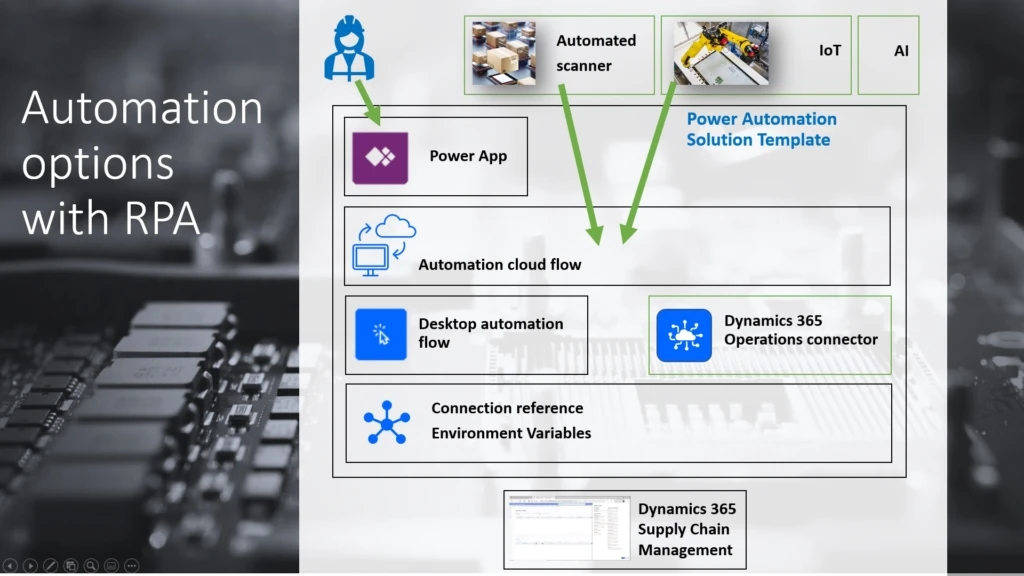
The Power Automate solution template includes a cloud automation flow and a desktop automation flow that automate the creation of quality orders in Supply Chain Management.

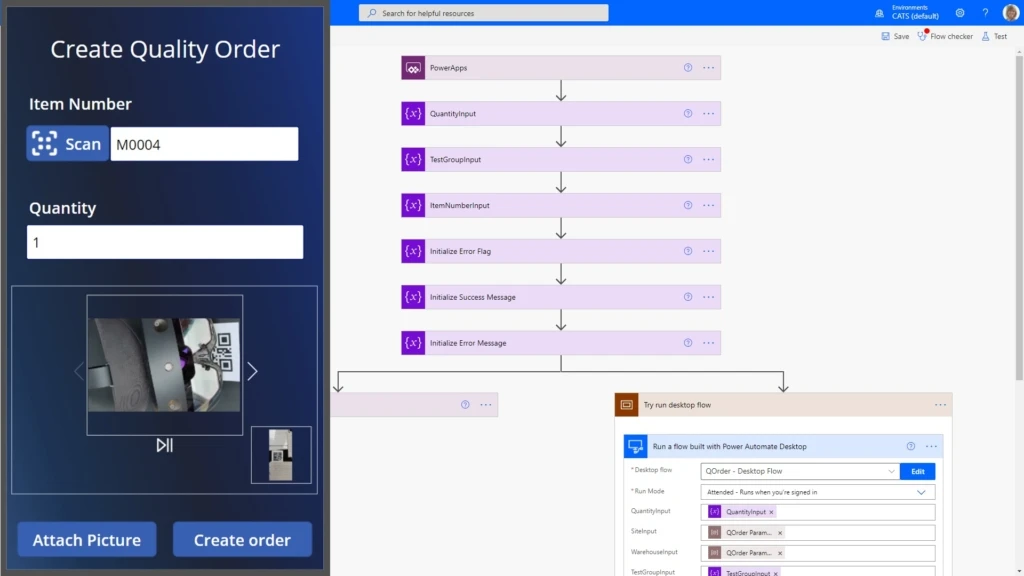
Although the automation can be started from different event sources and signals, the QOrder app is included in the solution template. It’s an example of user inputdriven automation that is typically used in visual inspections, together with scanning item QR codes, entering quantities, and attaching camera pictures.

The automation solution template also includes parameters that you can use to configure the automation for a specific use case in a production facility.

Find more information about how to use this and other automation templates

How the automation solution works

The automation solution runs in your instance of Power Automate. After you download and import the solution template into your solutions in the Power Automate portal, you first specify a set of parameters that configure quality order creation in your Supply Chain Management environment, parameters for your quality management scenario, and a connection to your desktop automation host. This host will open your Supply Chain management environment and create the quality order when requested by the automation flows.

Find more information about deployment

Download the Automation solution template

Screenshot of the QOrder application and one of the automation flows.

Solution parameters are used to provide credentials and values that are the same for all automation runs. In the preceding example, the configuration parameters are values for Site, Warehouse, and Test Group. Item numbers, quantities, and (optionally) picture attachments are entered by the initiating party for each automation. You can, of course, customize the automation solution to meet your needs.

Find more information in the installation documentation

After the solution installation and configuration are completed, you can find the assets listed in your solution. After the app has been published for your organization and shared, users can sign into Power Apps on their mobile device, open the app, and start creating quality orders.

The app will capture the input from the user and create a row in a data table called QOrder_Queue to request a new quality order. The cloud flow from the QOrder automation solution was started during the installation process and will automatically pick up the new request. It will then contact the desktop automation flow through the configured on-premises connector on the automation host. The desktop automation flow, in turn, will begin the creation of the quality order in your Supply Chain Management portal.

You can also view the history of automation runs in your solution instance. Select QOrder – Cloud Flow Monitor Queue, and review the run history.

We have also added a second cloud flow that can be used to call directly into the desktop automation of the quality order creation host. You can use this other automation flow to connect to more signals to create quality orders. The signals include signals from sensors that use IoT Central, or even AI-based predictive decision-making processes.

Note that this is the first preview version of the solution template, and some functionality is limited. In this release, a picture that is attached in the QOrder app won’t yet be attached to the quality order in Supply Chain Management. We will add this and more capabilities in iterative enhancement updates.

Next steps

For a complete step-by-step guide about how to download, install, and use the sample solution for automating quality order creation, see Automate quality order creation on Dynamics 365 Supply Chain Management with Robotic Process Automation using Power Automate Desktop

The post Run quality assurance automatically with robotic process automation appeared first on Microsoft Dynamics 365 Blog.

Brought to you by Dr. Ware, Microsoft Office 365 Silver Partner, Charleston SC.