Three new voice features for Outlook mobile—now on iOS, and coming soon to Android

Three new voice features for Outlook mobile—now on iOS, and coming soon to Android

This article is contributed. See the original author and article here.

If you feel like you are juggling more meetings, emails, and chats than ever, you’re probably right—and you’re certainly not alone. In our recent Work Trend Index annual report, Microsoft shared data that clearly illustrated how the digital intensity of workers’ days has increased substantially. Email is no exception—the number of emails delivered to commercial…

The post Three new voice features for Outlook mobile—now on iOS, and coming soon to Android appeared first on Microsoft 365 Blog.

Brought to you by Dr. Ware, Microsoft Office 365 Silver Partner, Charleston SC.

Empower seller excellence with customer feedback solutions

Empower seller excellence with customer feedback solutions

This article is contributed. See the original author and article here.

In today’s digital landscape, sellers face new changes at a rapid pace, making it more important than ever to be equipped with the right information when connecting with customers. The sales journey is like a game of strategyyou have to carefully deliver the right details at the right time in order to successfully provide great customer experiences. However, many sellers miss the opportunity to source customer feedbacka proven way to improve the buying experience and deepen customer relationships. According to a Walker study at the end of 2020, customer experience overtook both price and product as the key brand differentiator.1

Customer feedback is an essential source of data for optimizing your customer experience throughout the sales process. Microsoft Dynamics 365 Customer Voice works with Microsoft Dynamics 365 Sales to source feedback, engaging with customers at key points within the buyer journey. This captures input on critical steps within the sales process to gain relevant, contextual customer feedback that companies can leverage to improve the customer experience. Learn more about seamlessly connecting Dynamics 365 Sales and Dynamics 365 Customer Voice in our free e-book, “The Power of Knowing Your Customers.”

KPMG leverages automation for customer obsession

Successful companies that prioritize customer experience aren’t afraid to ask customers how they can improve. They seek to understand how their customers feel about the product, service, and sales engagement in order to recognize patterns that reveal opportunities for improvement. A constant loop of gathering feedback and making improvements drives toward the best possible customer experience.

One organization that’s harnessing the power of understanding customer needs is KPMG Australia. The company deployed Dynamics 365 Sales as its end-to-end sales solution to deliver more value to customers in every interaction. After capturing and analyzing customer feedback, KPMG leverages these insights from Dynamics 365 Sales to develop strategies their sellers can use to generate more satisfied customers.

“We are using Dynamics 365 Customer Voice and Dynamics 365 Sales to provide the right solution to the right customer at the right time. And, using automation, we provide our teams the important feedback from our clients in the form of data and tasks that not only help sellers be more effective and successful in the upfront pitch, but also help them provide the greatest value in delivery.” Anthony Coops, Head of Major Projects and Pursuits, KPMG Australia

To stay in sync with the customer, feedback is critical to continued success. The right data keeps sellers constantly learning about changing customer needs, driving a customer-centric culture that leads to stronger relationships and life-long customers.

Capture feedback during the buying process

Sellers and customers know that the buying process can be complicated, but by listening to your customers, this process can be simplified.

With Dynamics 365 Customer Voice, sellers can easily capture feedback on the buying process, seamlessly connecting the data into Dynamics 365 Sales. Your sellers can become more agile and effective in their interactions with contacts, accounts, and opportunities with rich insights from customer feedback. Watch the video below to learn how to easily capture feedback with surveys in Dynamics 365.

This embed requires accepting cookies from the embed’s site to view the embed. Activate the link to accept cookies and view the embedded content.

This site uses cookies for analytics, personalized content and ads. By continuing to browse this site, you agree to this use.

Once the survey is sent, Dynamics 365 Customer Voice automatically adds the customer feedback to the contact or account record and updates the status of the survey. Responses, customer sentiment, and trigger words are all compiled into survey results within Dynamics 365 Sales, allowing users to view trends and access data quickly. Now, sellers can be empowered to collect feedback throughout any point of the buying process, utilize the data to adapt their selling strategy in the moment, and optimize their customer engagement.

The value of personalization in selling

Customers feel understood and prioritized when sellers make each interaction personalized. Many organizations know the value of personalization but don’t leverage it effectively to increase sales. KPMG utilized the power of the Dynamics 365 suite to evolve their practice and processes, turning interactions into personalized experiences.

“We are always thinking about how to use core systems to bring our teams closer to our clients in order to drive improved quality and client experience. As we mature and leverage our technology in new ways, our obsession with quality and client value has moved from an “here’s what you should do next” approach, to a system with specific personas that recognize our teams’ and our clients’ unique needs and preferences.” Anthony Coops, Head of Major Projects and Pursuits, KPMG Australia

Surveys give your customer a voice in optimizing the sales process. With Dynamics 365 Customer Voice, sellers engage customers more effectively because feedback is integrated into the unified view of the customer. Combined with Dynamics 365 Sales, seller productivity gets a boost because seller feedback improves automated processes and next best activity workstreams. By leveraging the power of customer feedback, sellers are more equipped than ever to drive revenue through every opportunity.

Learn more

To learn more about Microsoft’s feedback management solution, visit the Dynamics 365 Customer Voice website or start your free Dynamics 365 Customer Voice trial today.

Watch Dynamics 365 Sales demos or take a guided tour to see how Dynamics 365 Sales can empower your sellers with actionable insights. Start a free Dynamics 365 Sales trial today.

Learn more about seamlessly connecting Dynamics 365 Sales and Dynamics 365 Customer Voice in our free e-book, “The Power of Knowing Your Customers.”


1“Customers 2020: A Progress Remote”, Walker, 2020

The post Empower seller excellence with customer feedback solutions appeared first on Microsoft Dynamics 365 Blog.

Brought to you by Dr. Ware, Microsoft Office 365 Silver Partner, Charleston SC.

Empower seller excellence with customer feedback solutions

Save time by cloning sales forecasts in Dynamics 365 Sales

This article is contributed. See the original author and article here.

Companies need accurate sales forecasts to keep on track to meet quarterly and annual revenue goals.

In Dynamics 365 Sales 2021 release wave 1, sellers can now clone an existing forecast when they need to make edits, and gain immediate clarity on revenue scenarios. The existing forecast remains intact while you configure different scenarios quickly and seamlessly.

This enhancement helps you plan for upcoming periods, when a few simple tweaks to the scheduling timeframe in an existing forecast will give you the insights you need.

Cloning not only eliminates repetitive data entry, but it also helps prevent forecasting errors.

With forecast cloning, these capabilities are now available:

  • Change the rollup and hierarch entities and their relationship.
  • Change the top of the hierarchy.
  • Change the timeframe of a forecast.
  • Change the hierarchy entity and user lookup field that defines who can access each record of the forecast.
  • Change a forecast category option set, add columns, or modify columns.
  • Add or modify filters that limit the data which drives the forecast.

For more information, read how to bring predictability to your revenue pipeline.

Next steps


The post Save time by cloning sales forecasts in Dynamics 365 Sales appeared first on Microsoft Dynamics 365 Blog.

Brought to you by Dr. Ware, Microsoft Office 365 Silver Partner, Charleston SC.

Enhance workplace automation with prebuilt RPA templates for Dynamics 365 (preview)

Enhance workplace automation with prebuilt RPA templates for Dynamics 365 (preview)

This article is contributed. See the original author and article here.

For many businesses, success increasingly depends on having the agility to innovate and adapt to rapid change, responding to customer needs, competitive pressure, and industry trends. But this is a difficult challenge when employees are buried in time-consuming busywork like repetitive tasks or complex processes.

That’s why we are dedicated to helping organizations like yours automate manual business processes, across both legacy and modern applications, so you can focus on what’s most important for your business and customers. In March, we released robotic process automation (RPA) capabilities in Microsoft Power Automate Desktop for Windows 10 users.

This month, we are introducing enhanced workplace automation capabilities for Microsoft Dynamics 365a set of prebuilt RPA solution templates, now available for public preview, that seamlessly integrate with select Dynamics 365 applications

Initially available for Dynamics 365 Customer Service, Dynamics 365 Supply Chain Management, and Dynamics 365 Finance, the prebuilt automation templates enable teams to rapidly automate common business scenariosfreeing time from day-to-day manual, repetitive, and error-prone tasks.

Developers can further extend any of those solutions by using custom actions, custom connectors, Microsoft Azure services, and APIs to take full advantage of Microsoft’s one cloud and data ecosystem.

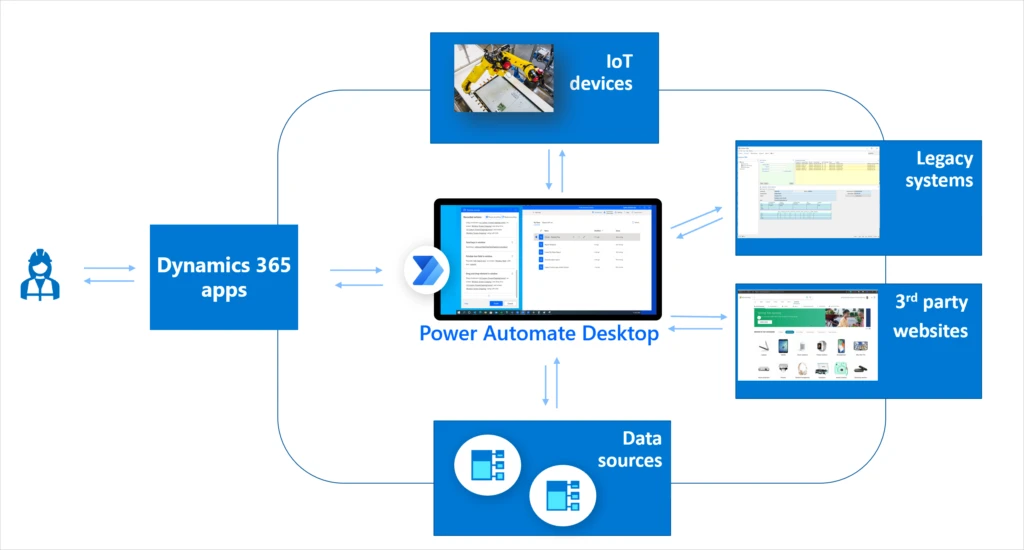
Flow chart for RPA automation

Save time across customer service, finance, and supply chain roles

Explore some of the ways that RPA can help streamline processes and save valuable time across the workforce.

Dynamics 365 Customer Service: Helping call center agents rapidly validate customer credentials

Most contact centers require agents to validate or authenticate customer identities before proceeding with the service engagement. By enhancing Dynamics 365 Customer Service with RPA, agents can automate steps of the validation process, streamlining call times and helping agents to troubleshoot and solve customer issues faster.

Dynamics 365 Supply Chain Management: Streamline ordering of replacement parts for manufacturing line equipment

We’ve heard from manufacturing customers about the need to improve the process of ordering replacement parts for equipment on the factory floor. Often, technicians who identify defective parts on the manufacturing line need to write down part numbers, and then place the orders into the tracking system one by one. This is an inefficient and error-prone process. By integrating RPA processes into Dynamics 365 Supply Chain Management, technicians can simply scan or enter part details and submit orders on the spot, saving time and effort. Since Power Automate natively integrates with Azure IOT connectors, this solution can be easily extended to use the Azure IoT management system.

Watch a video to learn more about the new capabilities included in the latest update to Dynamics 365 Supply Chain Management.

Dynamics 365 Finance: Perform end of cycle financial close tasks, such as report generation and account validation

At the end of each financial period, finance team members perform standard recurring tasks in order to close the period (month-end, quarter-end, year-end). Many of these tasks include end-of-cycle report generation for the purpose of account validation and documentation. By integrating RPA capabilities in Power Automate, Dynamics 365 Finance helps streamline many of these manual and time-consuming processes, freeing up finance team members to focus on more critical strategic tasks while at the same time maintaining the accuracy that is highly demanded by the more and more restrictive finance audit regulations.

Next steps

Take the first step to enable your customer service, supply chain, and finance teams to automate processes in Dynamics 365. Get a free Power Automate RPA trial license and install Power Automate Desktop, and then import the three solutions mentioned above into your environment to set it up. Check out the documentation for steps to get started.

Send us your feedback, and we’ll work hard to address your feedback and improve the preview experience.

The post Enhance workplace automation with prebuilt RPA templates for Dynamics 365 (preview) appeared first on Microsoft Dynamics 365 Blog.

Brought to you by Dr. Ware, Microsoft Office 365 Silver Partner, Charleston SC.

Northeastern University uses Dynamics 365 Guides mixed reality to deliver experiential learning

Northeastern University uses Dynamics 365 Guides mixed reality to deliver experiential learning

This article is contributed. See the original author and article here.

“What kind of cool opportunities are there in the research and education space and how can we leverage that technology?” These were the types of questions that educators at Northeastern University asked themselves when looking for solutions to provide unique, immersive experiences for their students. Education and experiential learning have seen incredible value in the development of virtual reality, augmented reality, and mixed reality technology and content, according to Statista.1 Traditional, more passive learning methods are failing to meet the needs of modern education, and institutions like Northeastern University are rapidly exploring and adopting more innovative and impactful solutions.

Students need a tactile, active, and hands-on experience that helps them retain information longer and apply acquired knowledge in real-world situations, even while learning. Microsoft Dynamics 365 Guides and HoloLens 2 give professors and leaders in learning and development a game-changing approach to experiential and hands-on learning.

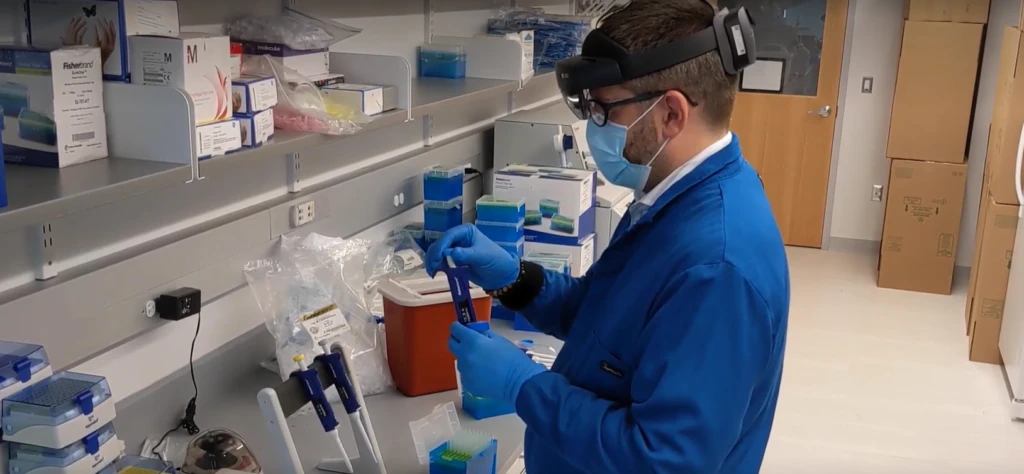
A technician in a laboratory wearing HoloLens and working with lab materials

Move from traditional to experiential learning

The biotech department at Northeastern University knew it needed to expand its traditional learning model to provide students with more experiential learning opportunities. They discovered Microsoft’s mixed reality solutions and immediately saw the value of applying this technology to lectures, classroom training, and research.

The value of mixed reality became even more clear after the COVID-19 pandemic shutdown university facilities and sent students home. Northeastern University started using mixed reality as part of their pandemic response, working to ensure students didn’t miss out on their education even while at home. Using Dynamics 365 Guides and HoloLens 2 the students at Northeastern University received an immersive learning experience despite the challenges of the coronavirus lockdown.

“The HoloLens really emphasized the power of visual learning in a specific space, but not actually having to be there.”Jared Auclair PhD, Director of Executive Training and Biotechnology Programs, Northeastern University

A person walking through a laboratory wearing HoloLens

Reduce training time with Dynamics 365 Guides

Before Northeastern University introduced mixed reality to the training process, it took three hours for Dr. Auclair to teach a relatively simple technique inside the lab. Working closely with his students, Dr. Auclair often spent time in person to help them get it right. Now, using Dynamics 365 Guides, Northeastern University has cut training time by 83 percent. Students can now acquire the technique required in no more than 30 minutes and discovered a new-found independence.

“We can get them into HoloLens 2, and they can go through a program by themselves being guided by the guides. It’s a beauty of it that I don’t have to be there. And then, we can bring them in the lab and ensure they’ve been trained properlyI think Dynamics 365 Guides has the potential to be a game-changer in the training realm of biotech.”Jared Auclair PhD, Director of Executive Training and Biotechnology Programs, Northeastern University

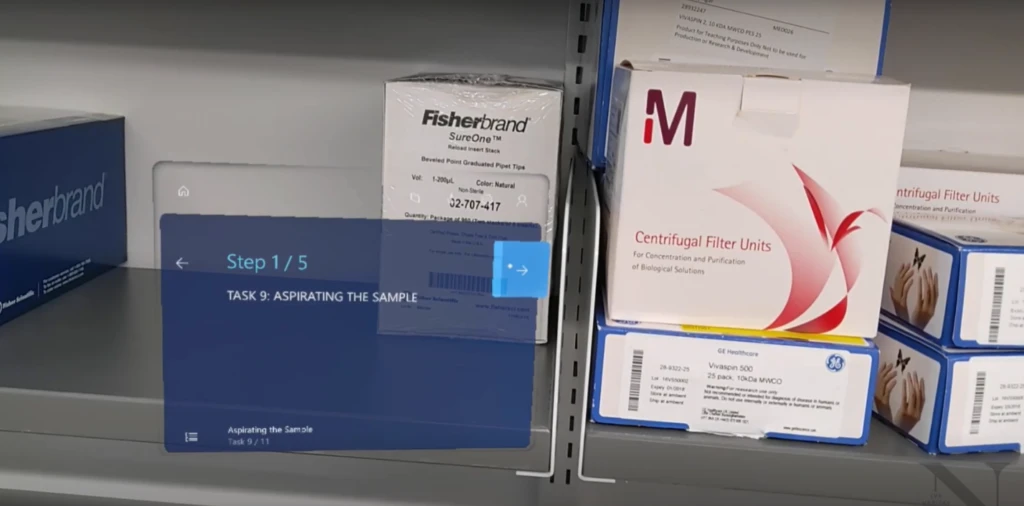
Visualization of one of the steps in Dynamics 365 Guides

Empower students to do more with mixed reality

In addition to reducing training time, mixed reality has freed up critical time for specialists who no longer need to be present during in-classroom training. They can spend this extra time giving feedback and preparing the student for more complex techniques. At Northeastern University, students using mixed reality can quickly apply their skills in the real world and appreciate the independence and flexibility this learning method provides, particularly during such an uncertain time.

“We’re excited about exploring the new possibilities of using this kind of technology for experiential learning in whatever kind of setting, given that this technology is now more widely available.”Nick Wilson, Associate Director, Center for Advancing Teaching and Learning Through Research, Northeastern University

Get started with Dynamics 365 Guides


1-“XR/AR/VR/MR technology investment directions worldwide 2016-2019″, Lionel Sujay Vailshery, March 16, 2021, Statista.

The post Northeastern University uses Dynamics 365 Guides mixed reality to deliver experiential learning appeared first on Microsoft Dynamics 365 Blog.

Brought to you by Dr. Ware, Microsoft Office 365 Silver Partner, Charleston SC.
Empower seller excellence with customer feedback solutions

Update for our customers using Russian payroll capabilities of Dynamics AX 2012 R3

This article is contributed. See the original author and article here.

We have made the decision not to invest in transitioning the Russian payroll capabilities in Dynamics AX 2012 R3 over to Dynamics 365.

However, we’ll continue to support existing Russian payroll capabilities for organizations on an Enhancement Plan during the mainstream support and extended support through October 12, 2021 and January 10, 2023, respectively. For more information about Dynamics AX 2012 R3 lifecycle, read this article.

Although we do not recommend it, organizations can continue using Russian payroll capabilities with the knowledge that all regulatory updates and non-security hotfixes for Dynamics AX 2012 R3 will end on October 12, 2021, and security hotfixes will end on January 10, 2023.

Here are answers to some common questions for organizations impacted by this decision.

Why is support of Dynamics AX 2012 R3 Russian payroll capabilities not being continued in future releases?

Payroll is not included in the global strategic focus of the Dynamics 365 portfolio. Partners and ISVs are best positioned to provide payroll functionality that is compliant with local regulations and tax updates.

What Russian payroll solution is recommended when I move to Dynamics 365 Finance?

We recommend that organizations work with their implementation partner to determine the best local payroll solution based on their specific needs.

Does being active on a support or service plan ensure continued support for the Dynamics AX 2012 R3 solution?

Yes. Organizations active on an Enhancement Plan will receive mainstream support and extended support. The mainstream support for Dynamics AX 2012 R3 ends on October 12, 2021. Extended support for Dynamics AX 2012 R3 ends on January 10, 2023. For more information about Dynamics AX 2012 R3 lifecycle, read this article.

Can I continue to use the Russian payroll capabilities included in Dynamics AX 2012 R3?

Yes, but regulatory updates and non-security hotfixes for the Russian Payroll feature for Dynamics AX 2012 R3 will be discontinued on October 12, 2021.

Is support for Dynamics AX 2012 R3 Russian payroll capabilities being retired?

No. Dynamics AX 2021 R3 is included in mainstream support until October 12, 2021, which means Microsoft provides security hotfixes, non-security hotfixes, and regulatory updates. After the end of mainstream support, it will be included in extended support from October 13, 2021 to January 10, 2023. Microsoft will continue to provide security hotfixes only. There won’t be additional support for non-security hotfixes nor will there be regulatory updates. Dynamics AX 2012 R3 will be out-of-support starting on January 11, 2023. For more information about Dynamics AX 2012 R3 lifecycle, read this article.

Will the Russian payroll capabilities of Dynamics AX 2012 R3 be available in Dynamics 365 on-premises deployments?

Russian payroll capabilities of Dynamics AX 2012 R3 won’t be available in Dynamics 365 as a cloud service or for on-premises deployment. We suggest you work with your implementation partner to determine the best option for you.

What if I want to continue to use the Russian payroll capabilities after the end of the mainstream support for Dynamics AX 2012 R3?

Organizations using Russian payroll capabilities in AX 2012 R3 are welcome to use it after it is discontinued. However, we do not recommend doing this, as payroll regulations are continuously changing, and the existing product will not be compliant.

Will out-of-the-box integration be provided with any payroll solution for Russia, similar to integration with some US solutions, such as Ceridian or ADP?

Microsoft works with ISVs on enabling seamless integration with payroll providers for different geographies. Monitor Microsoft AppSource and other communication channels for alternative solutions.

Next steps

We recommend that you contact your implementation partner to determine the best payroll solution to meet your needs and build a plan to migrate to a new solution.

Send email to RUPayrollInquiry@microsoft.com with any questions about these changes. Find more information about the Russian payroll capabilities in the documentation.

The post Update for our customers using Russian payroll capabilities of Dynamics AX 2012 R3 appeared first on Microsoft Dynamics 365 Blog.

Brought to you by Dr. Ware, Microsoft Office 365 Silver Partner, Charleston SC.