The AI-powered contact center, part 4: Enhance contact center security with biometric authentication

The AI-powered contact center, part 4: Enhance contact center security with biometric authentication

This article is contributed. See the original author and article here.

When a customer needs support, they not only expect fast, convenient ways to get help, but also to have their personal information protected. However, when verifying that people are who they say they are, many contact centers use traditional authentication methods that are no longer fit for purpose. That’s why the biometric security on the Microsoft Digital Contact Center Platform is so essentialwith biometrics, contact centers can provide intelligent fraud prevention and fast, effortless customer authentication. 

Why contact center security must change

The classic methods for verifying customer identities and weeding out fraudsters depend on knowledge-based authentication (KBA)the PINs, passwords, and security questions we are all familiar with.

However, KBA causes problems in multiple ways:

  1. It’s very easy for fraudsters to steal, buy, or phish for customers’ information, which makes it simple for them to pass KBA checks.
  2. Lengthy authentication processes add friction to the customer journeyand often have to be performed multiple times as customers move between channels.
  3. Customers expect brands to know who they are; they don’t want to sit through an interrogation to prove their identity.
  4. Customers often lose or forget the authentication information they need, increasing the time, effort, and frustration of the interaction as they search for usernames and passwords.

That is why biometric security is so important for helping organizations protect their customers and their business.

With biometrics, organizations can leave the issues of KBA in the past by enabling fast, frictionless, and accurate authentication for genuine customers while quickly detecting fraudsters and preventing fraud in every channel.

By layering voice, behavioral, and conversational biometrics (how people sound, how they behave, and what they say) with non-biometric factors, a central AI risk engine can make intelligent assessments of authentication and fraud risk. By using biometrics, the system can identify the actual person behind the interaction, rather than just the information they have or the device they are using.

And now that Nuance Gatekeeper biometric security is closely integrated with Microsoft products on the Microsoft Digital Contact Center Platform, our combined solutions will multiply the benefits for all our customers.

Seamless authentication

The combination of Gatekeeper and Microsoft Dynamics 365 Customer Service on the Microsoft Digital Contact Center Platform will help strengthen the overall identification and verification (ID&V) process and give agents tools that help them provide seamless service across any channel. While customer relationship management (CRM) data provides the customer ID, multimodal biometrics bolsters verification to validate customer identities quickly and accurately. Meanwhile, call validation detects common fraud tactics like Automatic Number Identification (ANI) spoofing, and environment detection interrogates the trustworthiness of device and network signals.

Stronger fraud prevention

As stated earlier, biometric security has a dramatic impact on organizations’ ability to detect and prevent fraud in customer engagements across any channel. Dynamics 365 Fraud Protection is a perfect complement to biometricsproviding an adaptive AI tool that guards organizations against payment fraud, account takeovers, and many other transactional fraud threats.

With these technologies working in unison, the AI has an enriched data set to make better-informed decisions about when to use step-up authentication or flag a transaction or individual as suspicious. Gatekeeper identifies the human behind the transaction while Dynamics 365 examines the transaction itselfa powerful combination that delivers a unique offering in the fraud protection market.

Enhanced personalization

With biometric authentication, it is also much simpler to personalize customer engagements from the beginning; particularly with passive voice biometrics, where customers can be identified and their experience tailored within seconds as they explain their need to an agent or a conversational interactive voice response (IVR).

Voice biometrics solutions make it simpler to offer personalized service and specialized support to a variety of customers. For example, Telefnica, the leading Spanish telco needed a way to prioritize vulnerable customers at the start of the pandemic, when call volumes skyrocketed. It used voice biometrics to identify seniors based on numerous voice characteristics and route them directly to a priority service line, offering a more personalized experience for seniors who depend on Telefnica to keep them connected.

There is also an opportunity to create more personalized experiences for employees. Another exciting benefit of bringing Nuance and Microsoft products together on the Microsoft Digital Contact Center Platform is the integration between Gatekeeper and Azure Active Directory (Azure AD). Employees at many enterprises across the globe use Azure AD to log into their accounts every day, and that will become even simpler by using biometric authentication instead of usernames and passwords.

Create a more secure contact center

Our vision for the future of the digital contact center is one where biometric security is built into all customer engagements to streamline, personalize, and protect every interaction.

By integrating our products on a single platform, we are bringing that vision to life, empowering customer engagement teams to serve and sell more effectively and enabling fraud teams to detect and prevent more fraud.

Learn more about our contact center solution

Throughout this series, we have explored how to create engaging, personalized digital experiences, achieve superior self-service voice support, and build conversational AI applications with the protection of advanced biometric security solutions. This is the contact center of the future, made possible through the Microsoft Digital Contact Center Platform.

The post The AI-powered contact center, part 4: Enhance contact center security with biometric authentication appeared first on Microsoft Dynamics 365 Blog.

Brought to you by Dr. Ware, Microsoft Office 365 Silver Partner, Charleston SC.

Discover how Microsoft Teams Phone keeps 12 million PSTN users connected

Discover how Microsoft Teams Phone keeps 12 million PSTN users connected

This article is contributed. See the original author and article here.

With Microsoft Teams Phone, we have been unabashed in our belief that the future of calling is built on VoIP calling that delivers rich voice and video experiences across organizational boundaries. Teams Phone VoIP calling capabilities are complemented by an enterprise-grade PSTN service that provides customers with the ultimate flexibility in how they communicate and collaborate.

The post Discover how Microsoft Teams Phone keeps 12 million PSTN users connected appeared first on Microsoft 365 Blog.

Brought to you by Dr. Ware, Microsoft Office 365 Silver Partner, Charleston SC.

Discover how Microsoft Teams Phone keeps 12 million PSTN users connected

From intuitive sharing with OneDrive to driving prioritization with Viva Goals—here’s what’s new in Microsoft 365

This article is contributed. See the original author and article here.

In today’s shifting macroeconomic climate, Microsoft is focused on helping organizations in every industry use technology to overcome challenges and emerge stronger. From enabling hybrid work to bringing business processes into the flow of work, Microsoft 365 helps organizations deliver on their digital imperative so they can do more with less.

The post From intuitive sharing with OneDrive to driving prioritization with Viva Goals—here’s what’s new in Microsoft 365 appeared first on Microsoft 365 Blog.

Brought to you by Dr. Ware, Microsoft Office 365 Silver Partner, Charleston SC.

The AI-powered contact center, part 4: Enhance contact center security with biometric authentication

The Total Economic Impact of Dynamics 365 Finance

This article is contributed. See the original author and article here.

According to Forrester Consulting, today’s enterprise resource planning systems (ERP) have entered a new era. In this view, ERPs have become increasingly experience-driven to reflect their critical role in digital business and are characterized by agility and AI-driven processes. Forrester calls this new breed of ERP digital operations platforms (DOP). Within the context of DOPs, we are pleased to share the results of a recently commissioned Total Economic Impact (TEI) study conducted by Forrester Consulting on behalf of Microsoft. The study examines the potential return on investment (ROI) that enterprises may realize by deploying Microsoft Dynamics 365 Finance.

Methodology and purpose

Forrester’s TEI study is a methodology developed specifically to assist companies with the complexities of procuring technology solutions. The TEI study also aids technology vendors in objectively evaluating and communicating their solutions’ value proposition. To these ends, the TEI study discussed here provides a framework for business decision-makers to assess the potential financial impact of implementing Dynamics 365 Finance.

Ultimately, the financial impact of the 2022 study is a projection for a composite organization developed by Forrester through real-world interviews of four businesses that currently use Dynamics 365 Finance. These businesses’ experiences and the interviews’ results are aggregated to create a composite organization. For this study, the composite organization is a retail and wholesale business with 50 retail locations, 100 wholesale customers, 2,000 employees, 120 finance team members, and annual revenue of $750 million.

Keep reading to learn the key challenges facing the composite organization and critical findings of the study.

Key challenges

The organizations interviewed for the TEI study shared several common challenges, including: 

  • Legacy solutions with high maintenance costs.
  • Significant customization of solutions.
  • Lack of standardized financial processes.
  • Reliance on manual processes and tribal knowledge.
  • Lack of real-time visibility.

Ultimately, these challenges led the composite organization to search for and invest in a solution that could:

  • Deliver out-of-the-box core financial and accounting processes.
  • Empower financial teams with real-time visibility.
  • Enable the organization to scale in step with current business demands.

Key findings

Dynamics 365 Finance enables organizations to overcome the limitations of heavily customized legacy ERP solutions. In so doing, it frees finance professionals from the burden of manual and cumbersome processes. At the same time, it provides access to real-time insights and a level of platform flexibility that previous solutions lacked, allowing organizations to keep pace with the speed of digital business.

Forrester’s study revealed three quantifiable impact areas: productivity improvements of finance team members, IT staff productivity improvements, and legacy cost savings. Let’s examine each of these areas in more detail to see how Dynamics 365 Finance delivers value to enterprise finance.

Finance staff productivity improvements

Before implementing Dynamics 365 Finance, interviewees pointed out how legacy ERP actively constrained the organization by requiring manual report creation and distribution. This meant that not only did financial processes require more headcount to support, but also that once reports were distributed, the information was often stale. Plus, process standardization was practically impossible because these organizations also had significantly different processes and systems in use depending on the region, location, and type of location (retail, office, and more).

Deploying Dynamics 365 Finance allowed the organizations to standardize and streamline financial processes across locations. At the same time, by leveraging real-time information and automation, finance teams were able to repurpose some team members to support higher-value-added work and avoid adding additional headcount through external hires.   

The three-year present value of productivity improvements in finance staff was $2.30 million.

IT staff productivity improvements

Similarly, there were also IT staff productivity improvements as the organizations migrated from legacy, on-premises ERP solutions to the cloud-based ERP architecture of Dynamics 365 Finance. In most cases, the legacy solutions were in place for over a decade, leading to several challenges. Most notably, the ERP solutions had become highly customized over the years and required significant resources to administer and maintain functionality. This problem was particularly challenging because team members with expertise and knowledge of the various customizations had moved on to other roles or organizations. The lack of continuity made further customizations even more difficult and time-consuming.

By standardizing with Dynamics 365 Finance, the composite organization considerably reduced IT administrator and developer hours by deploying a solution that provided greater functionality with fewer customizations and was easier to support overall.

The IT staff productivity improvements present value over three years was $402,870.

Legacy cost savings

Dynamics 365 Finance also allowed the organizations to realize savings by avoiding costs that would have been incurred with their legacy solutions. By preventing these legacy costs, the move to Dynamics 365 Finance reduced infrastructure expenditures, decommissioned redundant solutions across regions and lines of business, reduced financial auditing expenses, and lowered the cost to scale with demand. The avoidance of these legacy costs resulted in a projected present value savings of $3.52 million over three years.

Other benefits

Beyond the quantifiable benefits above, the organizations interviewed for the TEI study also unlocked other benefits, such as:

  • Real-time visibility and data which improved decision-making and agility.
  • Improved regulatory compliance.
  • Greater system availability.
  • Integration with the Microsoft ecosystem.
  • Better quality of life for finance employees.

Next steps

As we have seen here, Forrester’s TEI study uncovered three primary quantifiable impact areas and several soft benefits. Taken together, the study found that Dynamics 365 Finance delivered a total economic impact of $3.41 million in financial savings over three years. The total investment required was $2.8 million and provided an ROI of 122 percent.

To dig deeper into the results and to better understand what Dynamics 365 Finance can do for your business, check out our webinar covering a recent discussion of the TEI study with our guests, Forrester Senior Consultant Richard Cavallaro and Principal Analyst Leslie Joseph. You can also download and read the full study: The Total Economic Impact of Microsoft Dynamics 365 Finance.


Sources:

Forrester. The Total Economic Impact Of Microsoft Dynamics 365 Finance. July 2022.

The post The Total Economic Impact of Dynamics 365 Finance appeared first on Microsoft Dynamics 365 Blog.

Brought to you by Dr. Ware, Microsoft Office 365 Silver Partner, Charleston SC.
The AI-powered contact center, part 3: Build powerful conversational AI solutions

The AI-powered contact center, part 3: Build powerful conversational AI solutions

This article is contributed. See the original author and article here.

To remain competitive and thrive, organizations must differentiate their brand through outstanding customer service experiences. As customer expectations and business needs continuously shift, enterprises need the agility to rapidly create, maintain, and optimize those experiences with the latest technologies, including sophisticated AI, without relying on external vendors.

What enterprises need are options that keep them in controla choice of no-code, low-code, and pro-code AI development tools that offer the freedom to quickly build the conversational AI applications they need. After the recent launch of the Microsoft Digital Contact Center Platform, organizations now have those options.

The right tools for the job 

Some organizations want the flexibility and agility to build their own conversational solution in-house on an end-to-end software-as-a-service (SaaS) solution that is quick to deploy, monitor and tune; one that can easily be self-managed by their subject experts. For such organizations, Microsoft Power Virtual Agents and the underlying low-code Power Platform is the right choice. Power Virtual Agents solutions are used widely in many industriesfrom airlines to technology firmsand for a variety of use cases, from internal-facing help desk solutions to external-facing chatbots across multiple channels and languages.

Some examples of Power Virtual Agents users include:

  • A municipal government with 1.4 million citizens using Power Virtual Agents and Microsoft Teams to empower subject matter experts to easily address employee queries.
  • A sports and events organization using Dynamics 365 and Power Virtual Agents to scale their contact center with a 97 percent resolution rate.
  • A financial institution using Power Virtual Agents and Dynamics 365 to enable text and voice enabled bots to serve customers banking needs. 

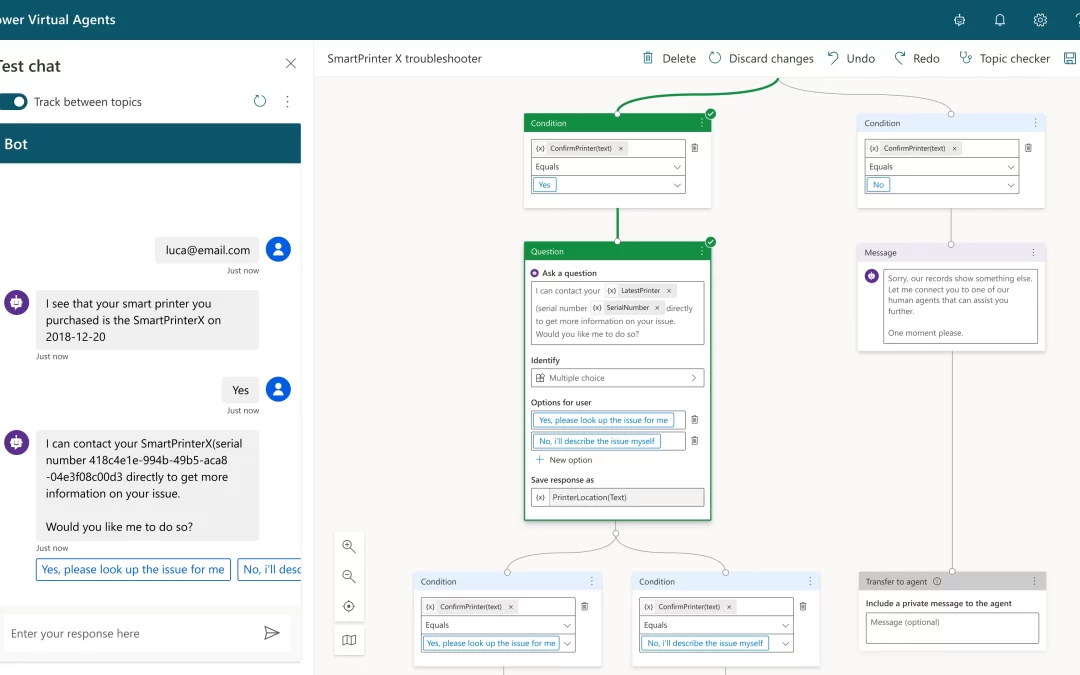
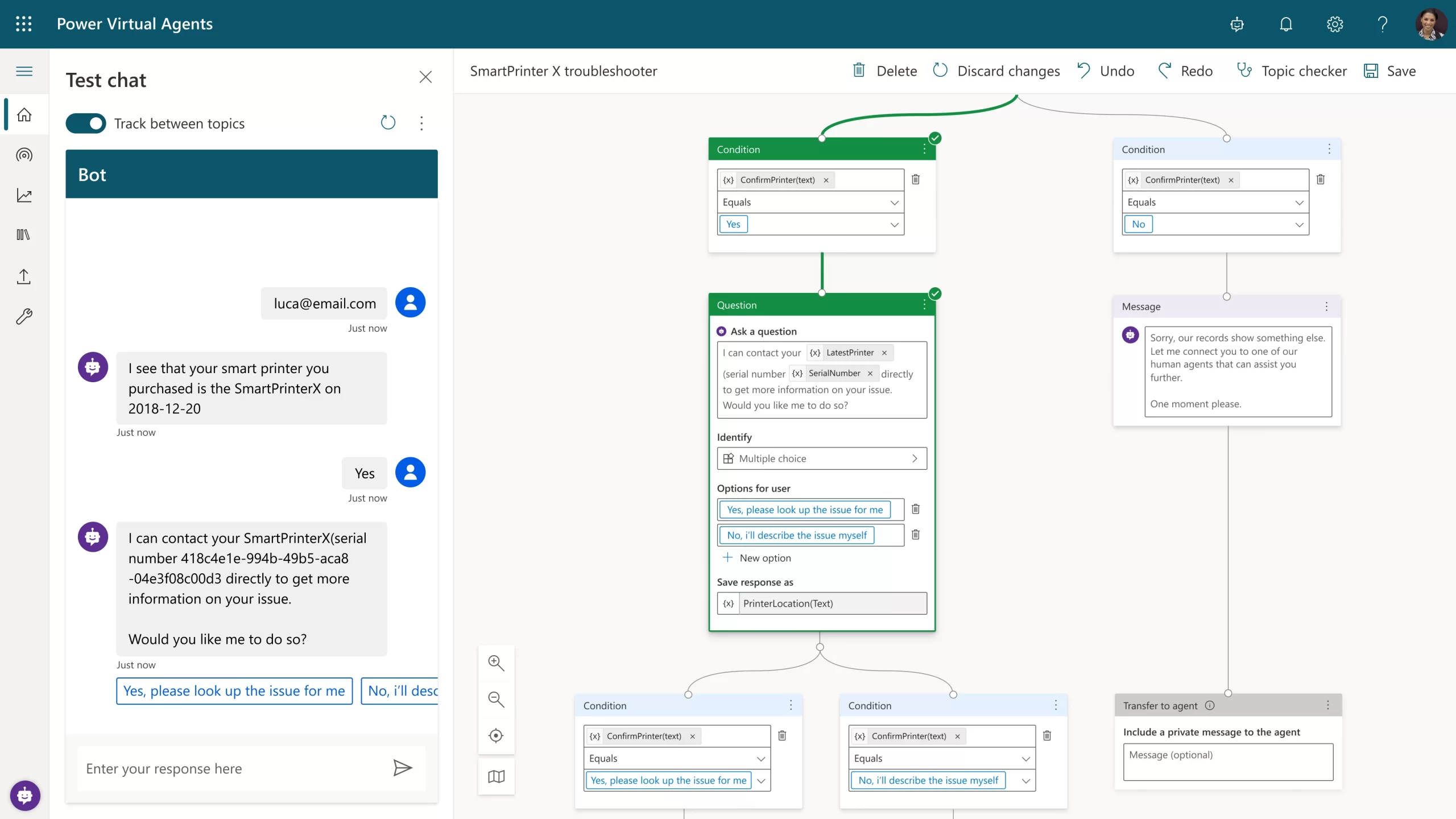
Figure 1: Power Virtual Agents intuitive graphical interface showing the conversational flow design and topic navigation.

For large enterprises that need a custom-built natural language model or those with sophisticated interactive voice response (IVR) omnichannel needs, Nuance Mix is the right choice. Such organizations can also call on Nuance Professional Services teams at any stage of their project, drawing on deep expertise in developing, deploying, tuning, and optimizing custom-built conversational AI applications. Omnichannel IVRs and chatbots built using Mix by Nuance Professional Services are widely used by large enterprises, including Fortune 100 companies, from large telcos to major retailers across the world in multiple languages.

Some examples of Nuance Mix users include:

  • A large airline putting Nuance Mix at the center of its virtual assistant (VA) and IVR omnichannel strategy to add transactional self-service functionalities
  • A 5G mobile network operator using Nuance Mix to create a customer care VA that enables its customers to resolve issues by simply speaking or typing.
  • A recognized leader in clinical communication and workflow solutions using Nuance Mix to enable care teams to communicate and collaborate in real-time.

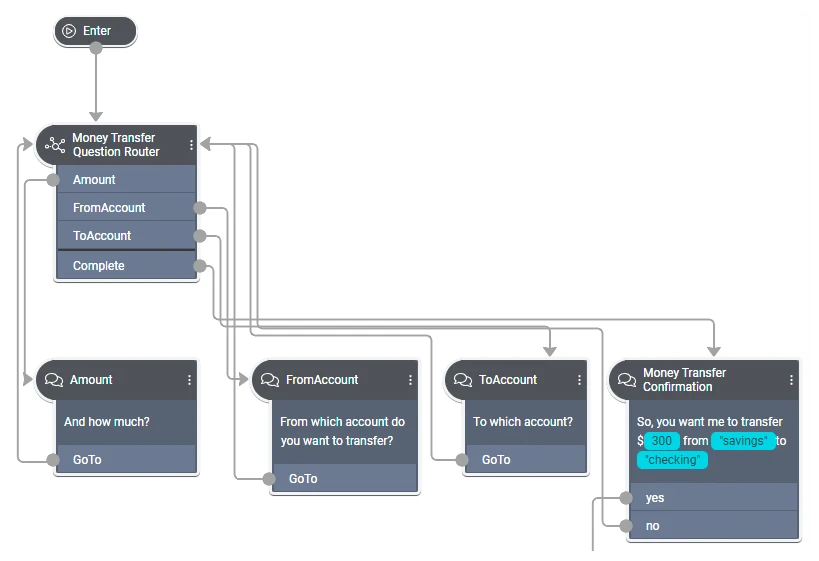
n Mix.dialog, call flow designers build on core components that can orchestrate mixed‑initiative dialogs
Figure 2: In Mix.dialog, call flow designers build on core components that can orchestrate mixed‑initiative dialogs.

Shaping the future of the contact center together

Regardless of which solution organizations begin with, the Digital Contact Center Platform will provide interoperability between them. As we continue to bring Nuance Mix and Power Virtual Agents closer together on the Digital Contact Center Platform, their strengths will make powerful conversational AI solutions even easier and faster to build. And as ever, our commitment to protecting your current investments is thanks to backward compatibility and a clear, disruption-free migration path to any future solutions.

Next steps

In the final article in this series, we will turn our attention to biometrics and fraud prevention in the digital contact center. In the meantime, learn more about how to create engaging, personalized digital experiences, and achieve superior self-service voice support with the Microsoft Digital Contact Center Platform.

The post The AI-powered contact center, part 3: Build powerful conversational AI solutions appeared first on Microsoft Dynamics 365 Blog.

Brought to you by Dr. Ware, Microsoft Office 365 Silver Partner, Charleston SC.
The AI-powered contact center, part 4: Enhance contact center security with biometric authentication

The AI-powered contact center, part 2: Achieve superior self-service voice support

This article is contributed. See the original author and article here.

Many people still prefer to pick up the phone when they want to access customer service. Many others find that the phone is a vital last resort when they fail to get answers in digital channels. Regardless of why people call a contact center, it is essential that the experience is fast, simple, and satisfying.

In the first article in the series, we talked about how the Microsoft Digital Contact Center Platform is an open, extensible, and collaborative platform for delivering seamless, omnichannel customer engagement at scale. In this article, we’ll look at how the Microsoft Digital Contact Center Platform brings together Nuance and Microsoft innovations to help organizations engage customers efficiently and effectively in the voice channelfrom the moment they reach the interactive voice response (IVR) system.

Reimagining the voice channel

Most IVRs make customers navigate a maze of menu options and listen to irrelevant messages because they lack the intelligence to resolve inquiries themselves. They frustrate customers, who have learned to keep pressing ‘0’ or shout “agent!” to reach a human agent who has no knowledge of what happened during the IVR session. That forces the customer to restart their search for a satisfactory resolution. These can be frustratingeven infuriatingcustomer experiences, which can damage brand loyalty.

With a conversational IVR, however, callers can explain their needs in their own words and get answers to questions in a few seconds.

Conversational IVRs use natural language understanding (NLU) to interpret what callers want to accomplish and resolve their issues in a fast, satisfying self-service experience. Of course, some interactions will require a live agent (like complex queries, sensitive issues, or high-value transactions), so AI-powered IVRs route those calls to an available agent with the right skill set.

The best conversational IVRs can recognize thousands of complex instances of customer intent from customers’ natural spoken words, tone, and patterns; dramatically improving the customer experience. For example, when the health insurance company Humana replaced its legacy system with a conversational IVR, its Net Promoter Score (NPS) rose by 80 percent.

Making customer experiences better

Modern IVR solutions give callers intelligent, seamless, conversational self-service experiences that lead to faster resolutions, increased customer satisfaction, and lower service costs.

The most advanced IVR systems can improve customer experiences in many ways. They can offer callers the option to shift to digital experiences such as a virtual assistant or live chat to get faster servicewhile maintaining context throughout the engagement. They can also integrate with call-back management systems, so when wait times are long, the IVR gives customers the option to be called back rather than waiting in line.

On the Microsoft Digital Contact Center Platform, conversational IVRs can create even more value for customersand for organizationsby uniting Microsoft and Nuance innovations. When the IVR escalates an engagement to a live agent, it can hand over the full context of the conversation. The agent desktop can also pull in a unified view of the customer, including previous interactions, purchase history, and more. Agents feel empowered to quickly address queries and issues, increasing their productivity, while the customer feels understood and valued.

Intelligent routing means happier, more loyal agents

Conversational IVRs can handle most routine inquiries and even more complex interactions, increasing call containment and minimizing transfers to agents. When transfers are needed, agents have a clear view of the context of incoming calls and can serve customers more effectively. And because agents are no longer handling routine interactions, they can apply their skills to higher-value, more rewarding engagements, which in turn increases agent experience and loyalty.

For example, at a major global telco, a conversational IVR successfully handles more than 70 percent of the 4 million calls it receives each month, reducing the strain on the organization’s live agents.

On the Microsoft Digital Contact Center Platform, IVRs use intelligent routing to further increase the ability of agents to resolve most incoming calls successfully and swiftly. The real-time data and context from the IVR enhance call handling by intelligently routing callers to the live agent best suited to help, while providing them with the information needed to provide rapid, reliable resolution. That leads to higher customer and agent satisfaction as well as a significant reduction in contact center costs.

Faster, more secure interactions

One of the most valuable developments in modern IVR technology is the addition of biometric authentication. Voice biometrics technology in Nuance Gatekeeper can accurately identify customers (and fraudsters) based on more than 1,000 characteristics of their “voiceprint” using only half a second of their natural speech.

Authenticating callers using voice biometrics increases security (because PINs and passwords can be easily bought or stolen) and eliminates the need for agents to spend time on lengthy, often tedious knowledge-based authentication processes. It also enables deeper level of personalization. By seamlessly authenticating a caller in the IVR with voice biometrics, a conversational IVR can use existing data sources to understand the caller’s relationship with the brand, past history, and other data points to personalize the experience. One of the world’s largest asset managers uses passive voice biometrics to authenticate 79 percent of customers as they speak with its conversational IVR. By automating the caller authentication process, the contact center reduced the average handle time for each call by 82 seconds because agents no longer have to begin every interaction by verifying the caller’s identity.

Intelligent IVR applications for every need

The Microsoft Digital Contact Center Platform makes it easy to build an enterprise-grade, secure, conversational voicebot or FAQ application for the IVR that can handle everything from straightforward queries to complex interactions. What’s more, these applications will be purpose-built to meet specific requirements and business goals.

Organizations can build DIY voicebots in Nuance Mix (more on that in our next article) or call on the expertise of Nuance’s professional services teams, speech scientists, data scientists, and conversational design specialists. And as the Microsoft Digital Contact Center Platform continues to evolve, organizations will be able to build voicebots with Microsoft Power Virtual Agents, then enhance and evolve those bots with Nuance Mix.

Defining the future of voice support together

By bringing together Nuance Conversational IVR and Mix, Microsoft Power Virtual Agents, and Microsoft Dynamics 365 Customer Service, along with Microsoft Azure Communications Services and Azure Cognitive Services, organizations now have a single platform to create innovative customer and agent experiences.

For example, organizations can build bespoke, enterprise-grade applications using highly intelligent call routing capabilities in Dynamics 365; or create smart, personalized, empathetic, and natural IVR and bot applications with Azure Cognitive Services. It is now possible to turn those innovative “what if?” customer service ideas into reality. And, of course, it is all possible while protecting your current investments thanks to backwards compatibility and a clear, disruption-free migration path to any future solutions.

Next steps

Next time, we will dive deeper into how Nuance MixNuance’s conversational AI tooling platformcomplements Microsoft Power Virtual Agents. Until then, learn more about the Microsoft Digital Contact Center Platform and how to create engaging, personalized digital experiences.

The post The AI-powered contact center, part 2: Achieve superior self-service voice support appeared first on Microsoft Dynamics 365 Blog.

Brought to you by Dr. Ware, Microsoft Office 365 Silver Partner, Charleston SC.