This article is contributed. See the original author and article here.
Today, Microsoft announced the general availability of Windows 11 2022 Update, the first major update to the operating system that secures your hybrid work. This update includes some critically important new features designed to keep your organization safe in an ever-changing threat landscape without compromising the Windows experiences that help your employees collaborate and do their best work.
This article is contributed. See the original author and article here.
Customers appreciate the quick access to help that self-service bots provide. They want to be empowered to research and solve issues on their own, which increases their brand loyalty. Knowledge management integration in Microsoft Power Virtual Agents enables customers to find answers from a knowledge base directly in a bot conversation, and still get help from a human agent when needed.
Your human agents benefit, too. They don’t need to spend time answering straightforward questions that customers would prefer to find answers to themselvesif they had an easy way to search. Your agents have more time to deal with complex issues that truly need human intervention.
Display Dynamics 365 knowledge articles in self-service bot conversations
With knowledge search integrated in Power Virtual Agents, self-service bots can display articles from a Dynamics 365 knowledge base in an adaptive card in the chat.
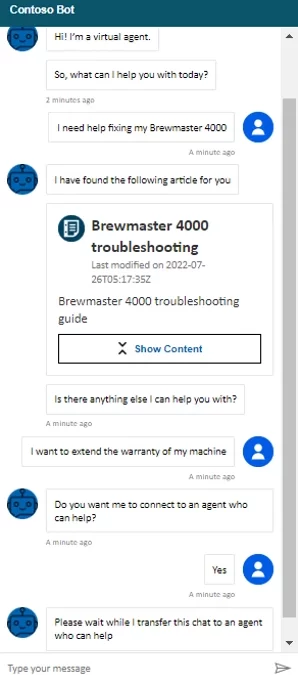
Let’s say Monique has an issue with a Brewmaster 4000 coffee machine. Preferring to look for information on her own, she goes to the Contoso Coffee website. After a proactive greeting from Contoso’s self-service bot, Monique describes her issue. The bot searches the Dynamics 365 knowledge base and returns an adaptive card that links to an article on how to troubleshoot Brewmaster 4000 coffee machines. Monique is satisfied with the information.
She also wants to extend the warranty on her machine. The bot offers to connect her to a human agent. Monique agrees, and the bot hands the conversation off to a live agent.
Configure your self-service bots to search Dynamics 365 knowledge articles
Before you can integrate knowledge management with your self-service bots, you need to satisfy some prerequisites:
You must have knowledge management configured in Dynamics 365 Customer Service.
Your environment must have Dataverse search enabled.
You must have knowledge base articles published to a Power Apps portal.
You must have a bot with at least one topic.
Broadly speaking, configuring the integration is a four-step process:
Set connection references for the “Search Dynamics 365 knowledge articles” flow.
Turn on the flow action in Power Virtual Agents.
Add the action to the topic.
Publish the bot.
Set connection references and turn on the search flow
Go to the Power Apps maker portal (https://make.powerapps.com) and select the notification to update connection references. If you don’t see the notification, you’ll need to ask your admin to set the connection references and turn on the flow for you.
Configure the references for the connections to Microsoft Dataverse and Content Conversion.
Next, turn on the “Search Dynamics 365 knowledge articles” flow. For the full procedure, go to Set connection references in the documentation.
Add the action to a topic in your self-service bots
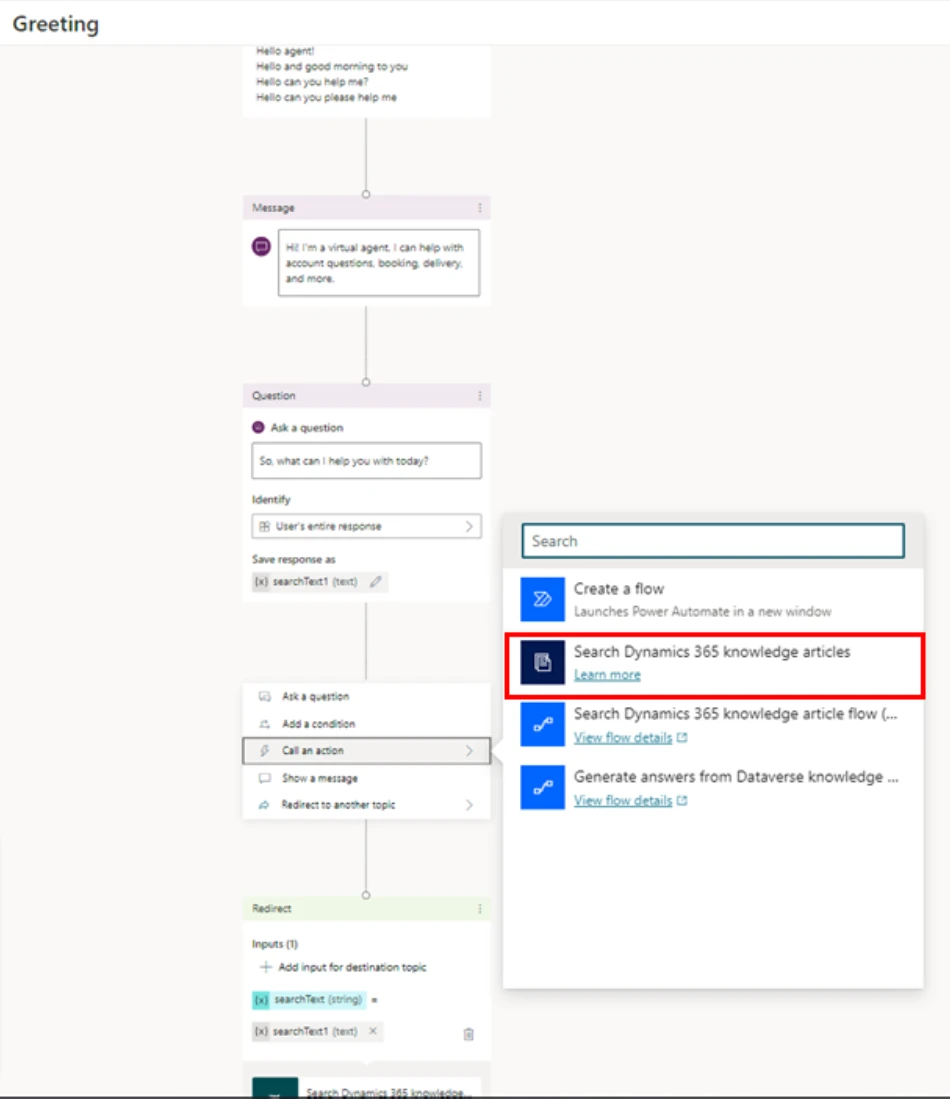
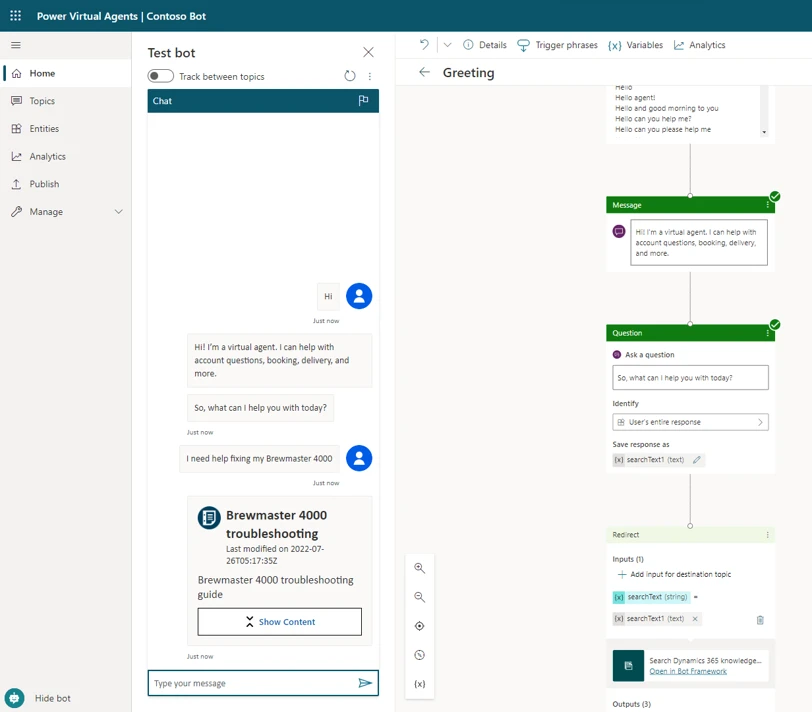
In the example below, we’re going to add the search flow action to the “Greeting” topic in our bot. The “Greeting” topic has preconfigured trigger phrases and a question. At the output of the question, we need to call the “Search Dynamics 365 knowledge articles” flow action, as shown in the following figure.
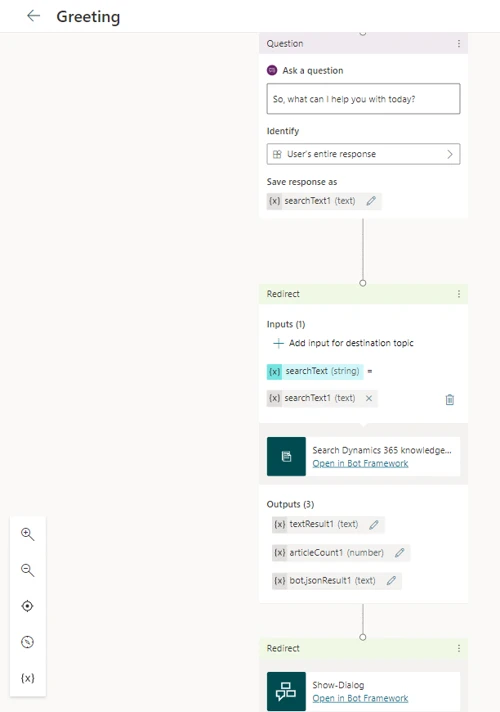
The customer’s response to the question is available in the variable “searchText1 (text),” which acts as an input to the action. The action’s outputthat is, the result of the knowledge base searchis stored in the variable “bot.jsonResult1 (text),” which is redirected to “Show Dialog” to present the output in an adaptive card.
Save the topic and publish the bot.
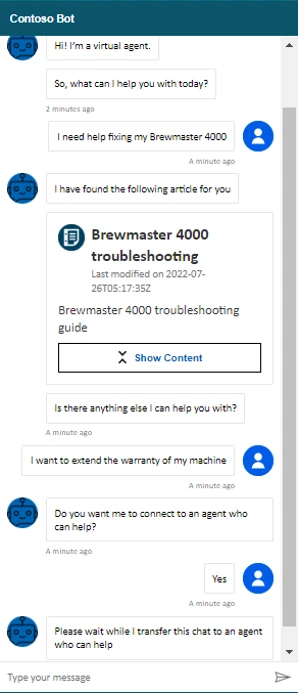
The following illustration shows the output from our example.
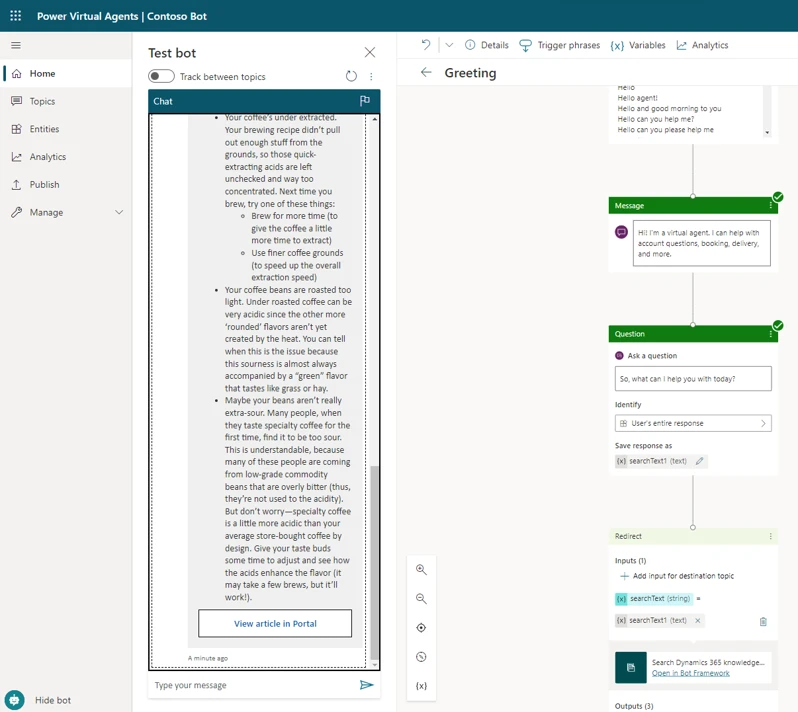
When the customer selects Show Content, the chat displays a summary of the knowledge article, along with a link to view it in the portal.
For more information about showing the results in an adaptive card, go to Render results in the documentation.
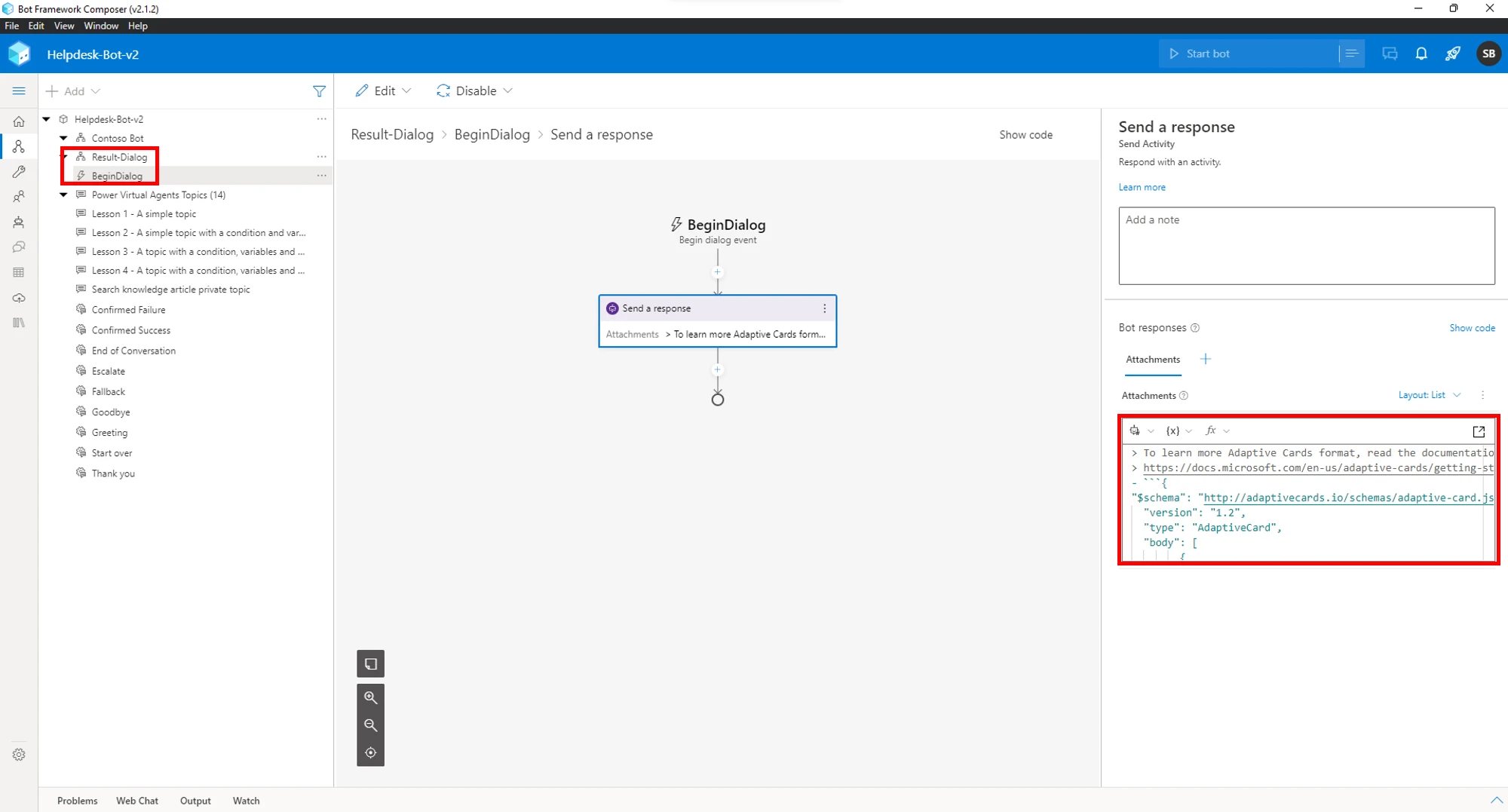
If the default adaptive card doesn’t meet your needs, the Bot Framework Composer provides an easy way to modify it. In the following picture, we’re using the Bot Framework Composer to tweak the output of “Show Dialog.”
Learn more
For more information about knowledge management in Dynamics 365 Customer Service and how to add it to your self-service bots, check out the documentation:
This article is contributed. See the original author and article here.
Now more than ever organizations need a single, integrated experience that makes working together easier and more engaging for their employees whether they are all in the same room, remote, or—for many of us—a mix of both. Because of this, Microsoft is happy to announce changes to our Microsoft Teams Rooms licensing model.
This article is contributed. See the original author and article here.
Organizations are looking for ways to offer hyper-personalized service and foster deeper relationships with their customers. Customers want to connect to agents who understand their needs. They feel more comfortable talking to an agent who has served them in the past, knows about their issues, and can resolve them quickly. Agents want to serve their customers, meet service-level agreements (SLAs), and receive high satisfaction ratings. The key to achieving all these goals is a good relationship between agents and customers. Preferred agent routing in Microsoft Dynamics 365 Customer Service can help build those relationships.
Introducing preferred agent routing in Customer Service
With the preferred agent routing feature in Dynamics 365 Customer Service, organizations can offer relationship management to their customers. Once set up, the unified routing system will connect the customers to their corresponding preferred agents, thus ensuring a delightful service experience.
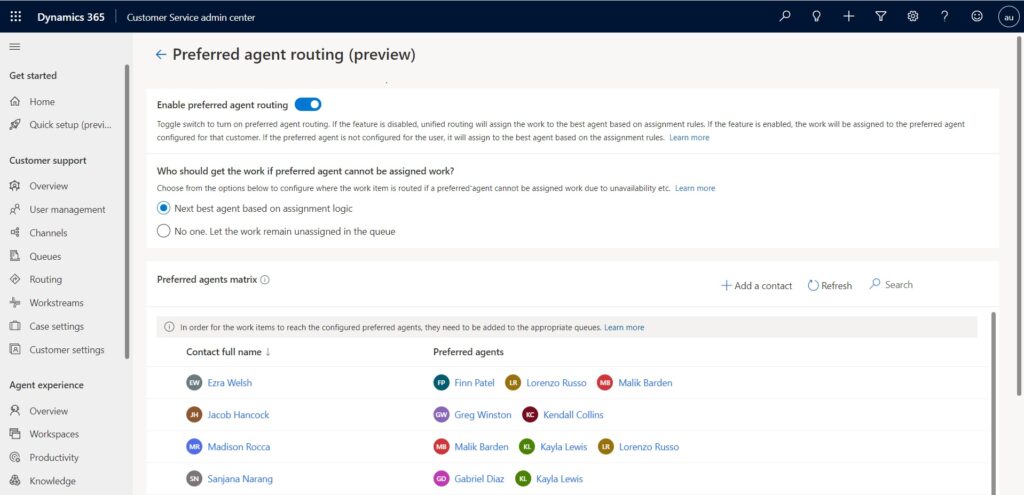
Administrators can associate up to three agents with a contact to help ensure that if a customer’s most preferred agent isn’t available, they can still be connected to an agent who is familiar with their past interactions and preferences.
Fallbacks ensure no customer goes unattended
In case no preferred agent is available, fallback options ensure that a customer will never be left unattended. Administrators can choose one of two fallback options:
Next best agent based on assignment logic. The system will try to find an available agent based on the assignment rules already in place. If no preferred agent is found or is available, then the work item is assigned to other available agents, ensuring that the customer is always served. We suggest this option for live chat conversations and voice channel calls.
No one. Let the work remain unassigned in the queue. A supervisor or available agent must manually pick up the work item. We suggest this option for asynchronous or social channels, where the customer doesn’t directly connect to a live agent.
Preferred agent routing in action: Contoso Coffee’s Gold membership plan
To see how your organization can benefit from preferred agent routing, consider the following scenario based on the illustration above.
Contoso Coffee recently started offering a Gold membership plan. Gold membership comes with premium customer service, which includes a dedicated relationship manager (preferred agent).
Madison calls the support line to report a problem with her old coffee machine. She has such a pleasant interaction with the support agent, Malik, that she buys a Contoso Caf 100 and enrolls in the Gold membership plan.
When Kayla, the customer success manager, gets the new subscription information, she reviews Madison’s customer service history. Noticing the positive sentiment in her interaction with Malik, she associates Malik as Madison’s preferred agent.
A few months later, Madison buys a bag of coffee beans and receives the wrong product. She initiates a chat to get a replacement. The chat is automatically routed to Malik, Madison’s preferred agent. Knowing her purchase history and remembering that she had praised Arabica coffee beans in their previous interaction, Malik suggests replacing the incorrect product with Contoso’s new Arabica beans, recommended for the Caf 100.
Madison feels happy and satisfied with the personalized support she received, without having to explain her issue to different agents. Malik feels happy to receive a high satisfaction rating from Madison.
Learn more
Check out the documentation for more information about automatic assignment and preferred agent routing in Dynamics 365 Customer Service:
This article is contributed. See the original author and article here.
We all know one, the person whose weekend is consumed by a singular passion for their favorite sports team. Their weekdays are dedicated to deconstructing the recent drama while contemplating the narrative awaiting the Saturday or Sunday afternoon ahead. The rain-soaked terraces are home to them. The booming music of the arena is their hymn book, and the legendary names hanging from the rafters are their heroes. A peek into their closet will reveal a sea of matching colors printed on scarves and t-shirts. Their social media will be awash with images of heroes present and past, opinions of games told in terms worthy of epic conquests, and, of course, the barbed insult to anyone who dares question the validity of their narrative.
This is the world of the sports “super fan”they are the backbone of the world’s greatest sports franchises. Along with their passion, the super fan is the mainstay of a team’s economy, accounting for a disproportionate number of ticket sales, merchandise, media impressions, and revenue. Teams all over the world love their super fans. In some countries and sports, they have seats in the boardroom and strong voices in ownership decisions. And while it is tempting to view the super fan as a dynastic, generational phenomenon passed on through time and culture, the truth is that today, the super fan is a function of data as much as history. Big, multidimensional data gleaned from the numerous touch points between fans and sports franchises is woven into insights that are specific and actionable at an individual level. Data is how casual fans ascend the ladder of engagement to become super fans and how super fans are rewarded and celebrated.
Row 15 seat 164 in Valencia’s vast Mestalla Stadium is a hallowed place. It is occupied by a statue honoring Seor Vicente Navarro Aparicio, a lifelong Valencia CF fan who sat in that seat for 25 years, never missing a game, even when his eyesight failed him in his later years. Seor Aparicio is the very definition of “super fan.” Valencia CF is more than 100 years old with a proud history of Spanish and international success, and a worldwide fan base of more than 50 million supporters. Although fan engagement has always been a top priority, the club didn’t always know its fans or what they needed in the intimate detail they do today. When Franco Segarra joined Valencia CF as Innovation Director, he immediately recognized the need for a new game plan to enhance fan engagement.
“Super fans aren’t like ordinary customers. They are passionateexperiencing euphoria and shedding tears or losing sleep with the inevitable ups and downs. The sport is steeped in tradition, where fans have special rituals, passed down from parents and grandparents. Therefore, each fan is unique. Fragmented data makes it impossible to understand, let alone deliver, deeply personal experiences that speak to each fan as an individual.”Franco Segarra, Innovation Director, Valencia CF.
Franco Segarra, Innovation Director, Valencia CF
Innovate personalized customer experiences
As an innovative and forward-thinking organization, Valencia CF is continuously improving the global fan experience and building new connections with their fans. Using Microsoft Dynamics 365, the club gained new and actionable insights and a deeper understanding of its fans. With an integrated data architecture, Valencia can run personal campaigns with its season ticket holders. From deploying an app to speed food orders in the stadium to checking in with 1,500 season ticket holders who missed in-person games during the COVID-19 lockdowns, Valencia has used the insights from its customer data to create delightful, rewarding, and engaging fan experiences. By applying custom Al on top of the unified data, the club was able to predict which season ticket holders were most likely to attend games. For those who missed two consecutive games, Valencia CF reached out with a tailored email. And for a subsegment of the fans, football legends Ricardo Arias and Miguel Angel Bossio, who played for Valencia CF in the 80s and 90s, made personal calls.
“Imagine the older fans’ reactions when their all-time favorite idol calls to say hi and see how things are goingit’s an unforgettable experience. It also gave us the opportunity to sincerely thank our fans and hear firsthand what’s on their mind. Customer insights helped us engage at the right moment with a meaningful personal touch that deepened the relationship and strengthened loyalty.”Franco Segarra, Innovation Director, Valencia CF.
Take a look at how Valencia CF leveraged customer data and technology to create amazing fan experiences.
This embed requires accepting cookies from the embed’s site to view the embed. Activate the link to accept cookies and view the embedded content.
Valencia CF demonstrates that transforming a casual fan into a super fan is about delighting and engaging that fan on a one-to-one basis.
Super fans are increasingly important in the world of sports brands. Building the commitment of the super fan is not just about tradition and generational influence. It’s about data, and more specifically, drawing all the diverse data sources into one platform driving innovation. But we are only at the beginning of this data journey, and Microsoft is the partner enabling sports teams all over the world to discover the exciting possibilities when the power of integrated data is unleashed.
This article is contributed. See the original author and article here.
As more sophisticated cyber criminals take aim at hybrid and remote workers, Microsoft is working to raise awareness among Exchange Online customers that one of the most important security steps they can take is to move away from outdated, less secure protocols, like Basic Authentication. As previously announced, we are turning off Basic Authentication in Exchange Online for all tenants starting October 1, 2022.





Recent Comments