Transform retail customer experiences with the Microsoft Customer Experience Platform

Transform retail customer experiences with the Microsoft Customer Experience Platform

This article is contributed. See the original author and article here.

National Retail Federation (NRF) 2023: Retail’s Big Show is here, and thousands of people are joining together in New York City to collectively envision what’s next for the future of retail. The lessons and best practices to be shared have important implications for other industries as well. Retailers, operating in a highly competitive environment, are often the first to blaze the trail of innovation in customer experience.

Elevating the consumer shopping experience requires companies to deliver more relevant, streamlined experiences throughout the retail value chain. That delivery starts with unifying disparate data from sources across the end-to-end shopper journey. Driving customer acquisition, retention, and business growth requires a connection between your customers, your people, and your data.

Marketers today are rethinking their data strategies, looking for ways to take ownership of their customer data and to use that resource to create valued customer relationships in a time of tightening privacy legislation. Microsoft continues to make significant investments in helping organizations across industries fulfill customer demands for privacy and personalization while optimizing marketing return on investment (ROI). To that end, we are excited to showcase the Microsoft Customer Experience Platforman opportunity for organizations to jump-start their customer experience transformationsat NRF 2023.

a person sitting at a table in a room

Microsoft Customer Experience Platform

A platform that puts you in control of your customer data

Deliver more relevant customer engagements with the Microsoft Customer Experience Platform

The Microsoft Customer Experience Platform is an end-to-end customer experience platform that brings together industry-leading applications spanning Dynamics 365 Customer Insights, Dynamics 365 Marketing, Dynamics 365 Sales, Dynamics 365 Customer Service, Dynamics 365 Commerce, Microsoft Advertising, Microsoft PromoteIQ, Microsoft Clarity, Microsoft Azure Synapse Analytics, and Microsoft Purview.

With full ownership of their data, organizations can engage buyers the way they expect. With a deep understanding of customers and rich, out-of-the-box insights, organizations can now maximize the value of their customer data. By determining and predicting intent, they can deliver the right content on the right channel and in the right moment. And, with AI-orchestrated journeys, organizations can engage customers in powerful new ways, delivering connected experiences across every customer touchpointall the way from awareness, to purchase, to service.

For Chief Data Officers (CDO) and their data wranglers, the solution delivers on their need to balance technology investments and business productivity demands with the scalability to support ever-changing business complexities. The Microsoft Customer Experience Platform integrates seamlessly with your existing Azure Data Lake to remove the complexities of duplicating the ingestion and storage of data, while making it faster to combine data with other sources and deliver unmatched time to insight.

Teams responsible for enterprise-wide data and information strategies, including privacy, governance, and data quality, can feel secure knowing that the solution fulfils their needs while, at the same time, it is helping them create business value. As consumers increasingly adopt digital technology, the data they generate creates both an opportunity for enterprises to improve their consumer engagement and a responsibility to keep consumer data safe. At the same time, consumers are increasingly exercising their rights to privacy, given the growing awareness of data misuse and breaches. The solution safeguards customer privacy and honors customer consent with built-in and configurable tools that automatically store and manage consent.

Turn insights into understanding to deliver tailored customer experiences

For Chief Marketing Officers (CMO) and their marketing teams, the Microsoft Customer Experience Platform serves as a secure, single source of truth. For marketing leaders who want to elevate customer experiences, the Microsoft Customer Experience Platform is the solution that enables your organization to build deep customer connections while maintaining full control of your data. The consolidated, real-time data powers operational excellence while AI and machine learning capabilities pave a path to competitive advantage. Having the ability to predict customers’ needs and wants means marketers can turn insights into true understanding of their prospects and customers. By leaning on their data with the magic of AI, they can now easily test and measure to ensure their investments are resulting in the most efficient and optimal outcomes. As a result, personalization becomes their crucial strategy. Businesses can now deliver tailored recommendations, content, offers, and experiences, across all channels and devices, along the entire customer journey.

Chief Executive Officers (CEO) also benefit from the solution, knowing that it is helping their teams align on growth and opportunities. The Microsoft Customer Experience Platform can aide in progress by helping to instill a digital mindset for internal processes and, as a result, create a positive, productive culture. Teams looking for new revenue streams can accelerate progress when they have a left-to-right view across the business.

Organizations like Campari Group and Leatherman rely on this end-to-end platform to successfully deliver great brand experiences and build quality customer relationships in an era of heightened customer expectations. Customers attending NRF will have the opportunity to see, first-hand, the power of Microsoft Dynamics 365 in fueling next-generation customer experience.

Extend capabilities to meet retailers’ unique needs

With the power of Microsoft Business Applications, organizations can transform customer experience, driving topline sales and improving operational efficiencies that lead to sustained profitability and meaningful growth. With the Microsoft Customer Experience Platform, retailers can optimize marketing ROI by unlocking customer data with AI-driven insights to deliver connected, personalized experiences at scale.

Customer experience is the most effective avenue for sustainable competitive advantage and often the most important barometer of success. The most successful retailers are taking control of their customer data in this time of uncertainty and changing shopper expectations, engaging in new ways across every touchpoint, creating raving fans.

Microsoft’s growing ecosystem of partners helps customers extend the robust capabilities of the Microsoft Customer Experience Platform. Our partners are dedicated to serving retailers’ unique needs by helping provide integrated retail industry-specific solutions that extend the core capabilities of the Microsoft Customer Experience Platform. They are trusted allies, helping customers to identify new opportunities for benefiting from innovations, and to accelerate the time-to-value for investments. A robust partner ecosystem extends the value of the Microsoft Customer Experience Platform with additional solutions to address the most urgent challenges the retail industry is facing today.

Join Microsoft at NRF 2023

To find out how you can unlock the value of your customer data to fuel your customer experience transformation, we invite you to join us at NRF. For more information about Microsoft announcements at NRF, be sure to read How Microsoft Teams empowers your retail workers to do more with less and the Microsoft Cloud for Retail blog. Not traveling for the show? Learn more with our Microsoft Learn collection of resources and contact your account manager today to find out how you can harness insights to inform and deliver more relevant, connected customer experiences.

The post Transform retail customer experiences with the Microsoft Customer Experience Platform appeared first on Microsoft Dynamics 365 Blog.

Brought to you by Dr. Ware, Microsoft Office 365 Silver Partner, Charleston SC.
Direct inbound calling: Premier support made easy

Direct inbound calling: Premier support made easy

This article is contributed. See the original author and article here.

Jamie is an IT admin working on managing Contoso’s IT services. Because his work is mission critical, he has a premier support account with the IT infrastructure provider. This includes direct technical support access to a specific support agent with deep knowledge of Jamie’s setup and requirements.  

Jamie is working on enabling a new service in production. He knows there is some risk that he may run into an issue in the process. It gives Jamie peace of mind that he is only one call away from contacting a domain expert with knowledge of his setup if needed. 

Introducing direct inbound calling in Dynamics 365 Customer Service 

Many customer contact centers have scenarios where the ability to contact a specific agent via phone is critical. Handling such setups via workstreams is very cumbersome and not recommended. 

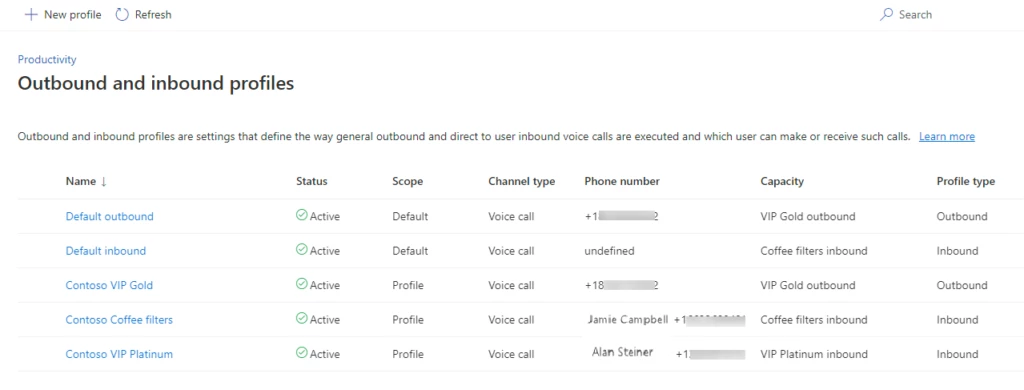
The voice channel in Dynamics 365 Customer Service now provides the ability to configure direct callbacks with just a few clicks. Organizations can set up callbacks using either a default inbound profile as a configuration that can apply to all enabled agents, or specific inbound profiles for select agents. These configurations can account for special behavior settings requirements that differ from the default, e.g., agents that handle sensitive account data vs. technical customer support. Inbound profiles are modeled after existing outbound profiles, which make it intuitive to configure and manage both within the same admin UI.

table

Here are some important concepts to know when you are configuring direct inbound calling: 

  • To enable direct inbound calling, assign a personal phone number to an agent and associate the capacity profile defined in the default inbound profile. 
  • You can specify call behaviors for one or a set of agents. 
  • Agent names are listed with phone numbers for easy agent number lookup when configuring inbound profiles. 
  • Personal agent voice mail receives calls made directly to an agent’s phone number when the agent is unavailable. 

Create personal support experiences and relationships with direct calling 

Back at Contoso, Jamie is running into a service deployment issue. Normally, this would make him very nervous as he is on the clock to finish the deployment over the weekend. What makes the difference for him is that he can simply contact support agent Ana via a direct phone call. Ana knows about the Contoso deployment and is available to take the direct call and help Jamie. She decides to stay on the call with Jamie during the rest of the deployment. Jamie loves that personalized service and is super happy that he went with this IT infrastructure provider. 

For more information, read the documentation: Set up inbound calling for the voice channel | Microsoft Learn 

The post Direct inbound calling: Premier support made easy appeared first on Microsoft Dynamics 365 Blog.

Brought to you by Dr. Ware, Microsoft Office 365 Silver Partner, Charleston SC.
Customer Service voice support channel launches in Canada 

Customer Service voice support channel launches in Canada 

This article is contributed. See the original author and article here.

Since the November 2021 launch in select geographic regions of the native voice channel in Microsoft Dynamics 365 Customer Service, we have been expanding worldwide to satisfy growing customer demand. We are proud to announce that we now support local country regions as well. As of November 30, 2022, the voice support channel is live in Canada. 

Native voice support channel capabilities 

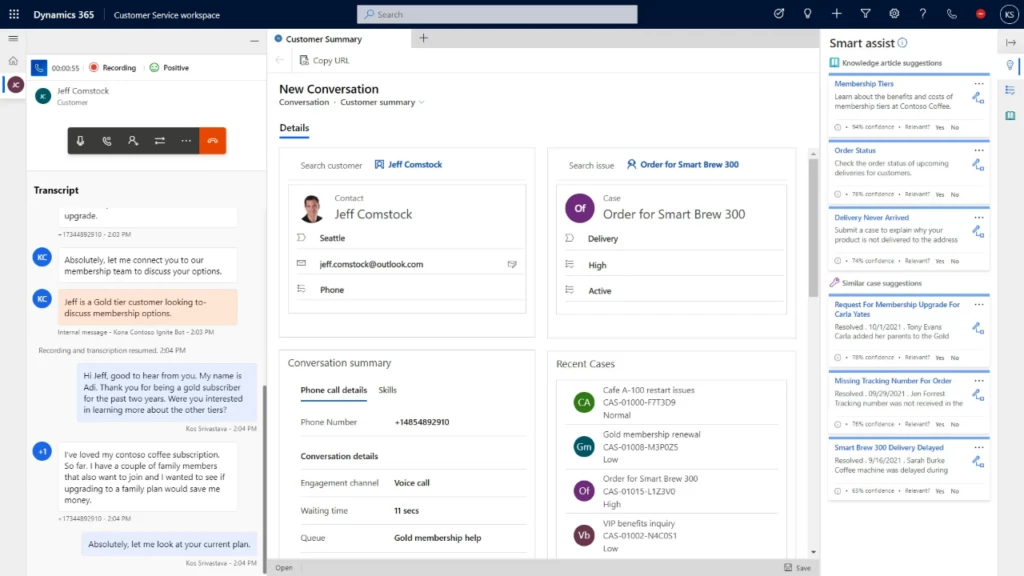
The integrated voice channel allows customer service representatives to communicate with customers on the phone to resolve issues. The Canada launch includes all the features that the voice channel in omnichannel Customer Service environments supports today. 

graphical user interface, application

Self-serve voice support channel with Power Virtual Agents

The Canada general availability launch also integrates Power Virtual Agents. Subject matter experts can build conversational interactive voice response (IVR) bots in just a few clicks to help customers quickly self-serve, reducing contact center operation costs. Learn how to configure Power Virtual Agents bots for voice.

Azure direct routing and Microsoft calling plans 

The launch of the voice channel in the Canada is supported by Azure Communication Services, with Azure direct routing in preview.  Learn how you can use the telephony carrier of your choice.

The Canada voice support channel is also supported by Microsoft calling plans in public preview. Customers can purchase their own numbers through Azure subscriptions. Check your eligibility and learn how to enable Microsoft calling plans.

As the native voice channel in Dynamics 365 Customer Service continues to expand in regions, languages, and capabilities, subscribe to this blog for the latest updates. Set up your Omnichannel for Customer Service and install the voice channel today. Install voice channel in Omnichannel for Customer Service | Microsoft Learn

Learn more

Read the documentation to learn about the features the voice channel now supports in Canada: Voice channel in Omnichannel for Customer Service | Microsoft Learn

Learn about other supported locations and languages here: Supported cloud locations, languages, and locale codes for voice channel | Microsoft Learn

The post Customer Service voice support channel launches in Canada  appeared first on Microsoft Dynamics 365 Blog.

Brought to you by Dr. Ware, Microsoft Office 365 Silver Partner, Charleston SC.
Direct callback: Because nobody likes to wait on the phone

Direct callback: Because nobody likes to wait on the phone

This article is contributed. See the original author and article here.

Ana is excitedly setting up her new smartphone when the screen goes blank. In dismay, she calls customer service. The estimated wait time is more than 45 minutes, and she is number 7 in the queue because all agents are busy handling holiday call volume. She decides to stay on the line listening to music on hold for 45 minutes. By the time she gets to speak to an agent, she is relieved but a bit angry. Her first support experience with the smartphone manufacturer is less than pleasant, and this is before she even has a chance to discuss her issue. If the company had implemented direct callback, now available in Microsoft Dynamics 365 Customer Service, Ana’s first engagement with it would have been much more reassuring. 

Introducing direct callback in Dynamics 365 Customer Service 

Many customer contact centers face limited agent availability during spikes in call volume. At such times, customer satisfaction drops as wait times are long and abandonment rates increase. Staffing for peak volumes is costly and inefficient. So, what can you do to use agent capacity efficiently while keeping customer satisfaction high and even adding a personal touch? 

The voice channel in Dynamics 365 Customer Service now provides an overflow action known as direct callback. When your organization configures direct callback, customers have the option to receive a call back as soon as an agent is available without having to remain on the phone in the queue. 

Here are some important concepts to know when you are configuring direct callback: 

  • Direct callback is configured as an overflow action in overflow management.  
  • This setting applies to the queue level.  
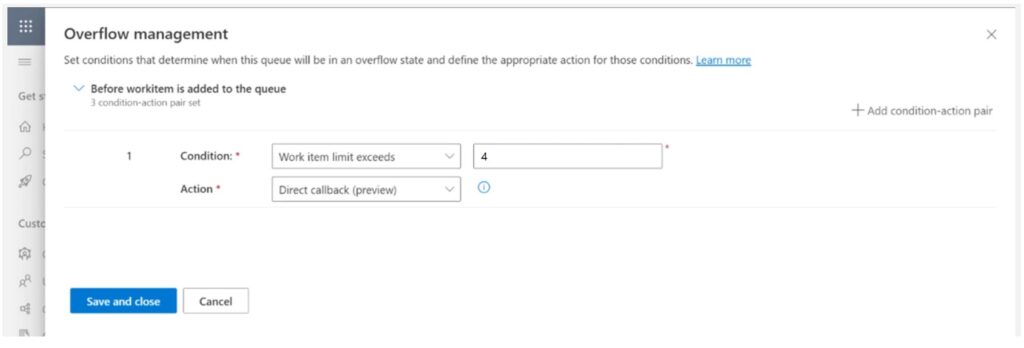
  • There are two conditions for this overflow actionwait time exceeds n minutes or work item limit exceeds n items. 

Two editable automated messages are available for the customer when your organization enables direct callback: 

  • Offer customer callback: Offers the customer the option to receive a call back instead of waiting on the phone. 
  • Customer callback response: Acknowledges the customer’s choice to be called back and ends the call.

graphical user interface, application

So how does this work? Here are the logical scenario steps: 

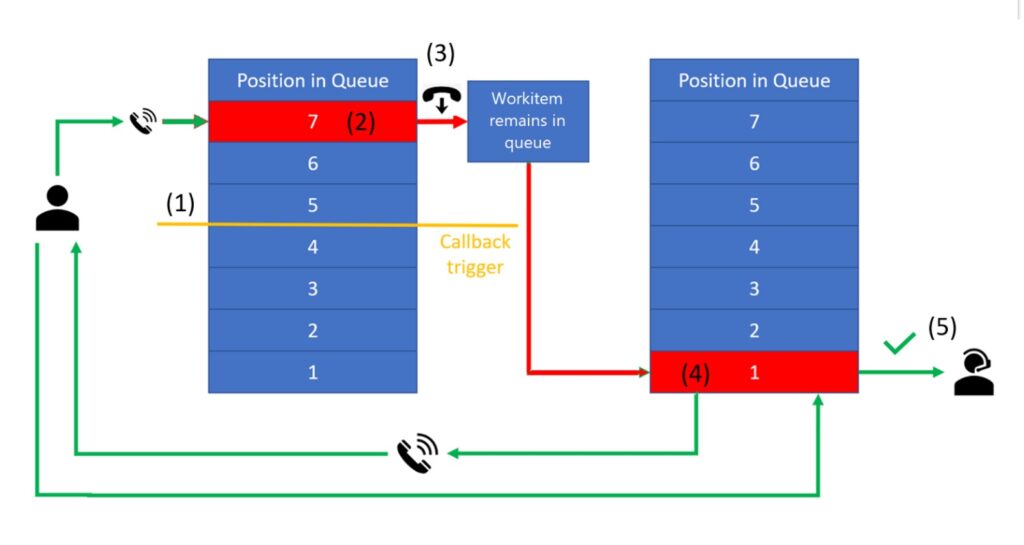
  1. The customer calls customer support. 
  1. The direct callback option is triggered by queue overflow conditions where associated action is direct callback (1).
  1. A bot asks if the customer prefers a callback when an agent is available instead of waiting in queue (2).
  1. When the customer presses 1 for yes, the call ends but the work item remains in queue (3).
  1. Once the work item reaches position 1, Dynamics 365 Customer Service initiates a voice call (4).
  1. When the agent accepts the conversation, Dynamics 365 Customer Service calls the customer (5). This preview dialing mode ensures that an agent will be on the call when the customer picks up the phone.

Empower agents to show customers you care 

The next time Ana calls the company’s customer service number at peak demand time, she is offered the option to be called back as soon as an agent is available instead of waiting in the queue. An agent who is aware that Ana called earlier returns her call. This experience builds Ana’s confidence in the smartphone company because she feels that it values her time, and the call back offers personalized attention. In addition to higher CSAT, direct callback also allows organizations to utilize agents more productively with confidence that they are handling peak loads well. 

Learn more

For more information, read the documentation: Use direct callback to manage overflowing queues | Microsoft Learn

Not yet a Dynamics 365 Customer Service customer? Take a tour and get a free trial.

The post Direct callback: Because nobody likes to wait on the phone appeared first on Microsoft Dynamics 365 Blog.

Brought to you by Dr. Ware, Microsoft Office 365 Silver Partner, Charleston SC.
Accelerate your year-end close process

Accelerate your year-end close process

This article is contributed. See the original author and article here.

The year-end close process is a cumbersome, multi-step task that ensures an organization can provide accurate annual reports and financial statements for its stakeholders. It’s critical to get it right, but the process can be intimidating and overwhelming. Trying to balance the workload among overstressed accounting staff can result in errors, multiple manual adjustments, and pressure on the finance department. The new Optimize year-end close feature in Microsoft Dynamics 365 Finance can help.

Year-end close moves to a dedicated service with more visibility

With the new optimization, the heavy processing moves to a dedicated service, reducing resource consumption on SQL and batch servers and allowing the process to run more efficiently. The time saved enables your finance team to react quickly to make necessary adjustments.

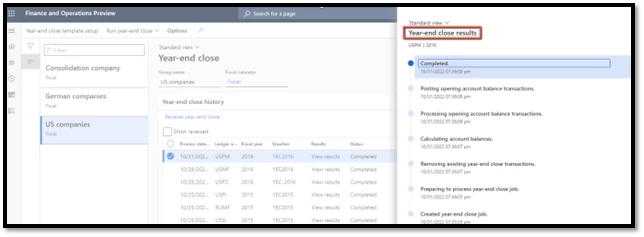
What’s more, users can view the status of the process for each legal entity in real time from its own page rather than having to go to the batch job history. The added visibility gives the accounting manager confidence that each step is progressing. And when the year-end process is complete, they’ll have insight into how long each step took.

graphical user interface, application, Teams

 We’ve also added some balance sheet financial dimensions in detail to the Year-end close template page, giving organizations more control. This also reduces the need to create many financial dimension balances, all of which require time and processing.

How to get started

Excited to try this new functionality? There are just two steps that you need to follow.

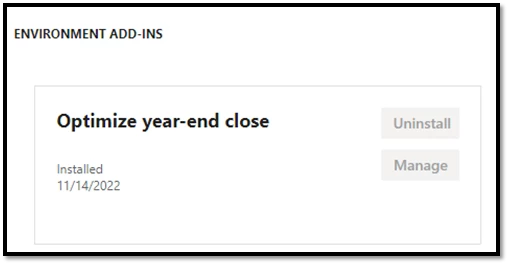
First, install the Optimize year-end close service add-in from your project in Microsoft Dynamics Lifecycle Service.

graphical user interface, text, application

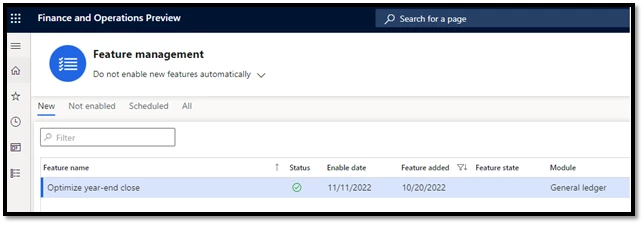
Then, enable Optimize year-end close in Feature management.

graphical user interface, text, application, website

The new functionality is available immediately in versions 10.0.29 and later of Dynamics 365 Finance.

You can go back to the current functionality by disabling the optimization in Feature management.

Next steps

Read the documentation for a more detailed look at the feature: Optimize year-end close – Finance | Dynamics 365 | Microsoft Learn.

Learn more about what else is new in Dynamics 365 Finance.

Not yet a Dynamics 365 Finance customer? Take a guided tour and start a free trial.

The post Accelerate your year-end close process appeared first on Microsoft Dynamics 365 Blog.

Brought to you by Dr. Ware, Microsoft Office 365 Silver Partner, Charleston SC.
Engage customers using highly personalized content—easily, efficiently, and at scale

Engage customers using highly personalized content—easily, efficiently, and at scale

This article is contributed. See the original author and article here.

Your customers’ inboxes are like a firehose that never stops. How do you make sure they’ll notice your communications in the flood? With personalized content tailored just for them. Generic, boilerplate messages make customers feel like they’re just another number. Personalized experiences make your customers feel heard and understood. Over time this builds trust and increases their loyalty.

You’ve collected data and insights that can be used to personalize your marketing content. However, most marketers find it hard to turn their customer data into personalized content at scale. It’s usually complex, and often requires HTML coding or learning database concepts. Lucky for you that Microsoft Dynamics 365 Marketing makes it so easy. Discover all the ways Dynamics 365 Marketing offers to customize your content at scale with an easy-to-use interfaceno coding required!

Personalized content increases customer engagement with tailored email marketing

Imagine you’re a marketer working for Fourth Coffee, an established coffee bean roaster that has relied primarily on its wholesale business relationships. Now you want to expand your business by going direct to consumers with a coffee club and curated digital outreach. A newsletter is a great way to keep your brand top of mind for coffee club members and other customers who have opted in to receive it.

Let’s discover how easy it is to craft a monthly newsletter that keeps your customers wanting more. We’ll create a newsletter template that uses dynamic text and content blocks to include personalized greetings. Then we’ll use conditional content to include a personalized offer that’s aligned to your customers’ interests and matches your business needs.

Create consistent templates with content blocks

Let’s start by making sure your newsletter complies with your brand requirements so customers know who it’s from with just a glance. It should always look consistent no matter who sends it out each month, too. We’ll accomplish both goals using content blocks. (Be sure to set up your brand profile to take advantage of more capabilities for maintaining brand consistency.)

Start in the email designer. Pick an existing email template or create your own layout. Include a section at the top (the “header”) with your brand logo. Include another section at the bottom (the “footer”) with contact information and any required legal text. Then insert sections with layouts that contain placeholder content. Save the entire email as a template.

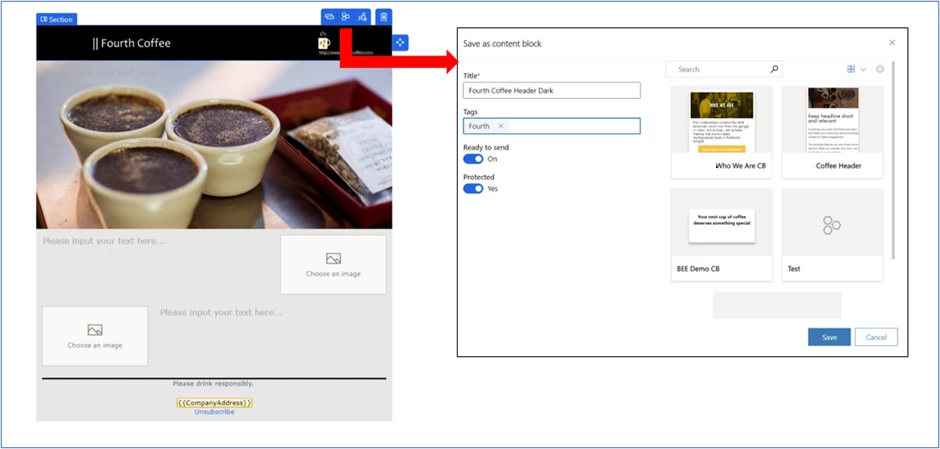
You can also save the header and footer sections as individual content blocks. You can even protect them so that no one else can modify them. Anyone in your team can easily reuse these content blocks in other marketing assets. This not only saves them time; it ensures all required legal text is always included to meet regulatory requirements and provides the consistent look and feel that’s so important for your company’s brand image.

graphical user interface, application

Use dynamic text to populate your customers’ information

Personalizing your newsletter to greet your customers by name and include unique details catches their attention right away. Dynamics 365 Marketing comes with commonly used dynamic text, such as “FirstName,” that you can insert in your newsletter. You can also define your own dynamic text, such as “Membership number.”

A best practice is to create a library of standard dynamic text so that anyone else on your team can use it to create personalized content.

graphical user interface, application, PowerPoint

Include personalized offers and visuals with conditional content

You don’t have to stop at personalized greetings. Use conditional content to include customized offers and visuals to pique your customers’ interest and make them more likely to click through.

Let’s return to our Fourth Coffee example. To reward your loyal customers, youve decided to make an exclusive offer to your coffee club members. You’ll use conditional content to offer members 30% off an Arabica selection, while non-members will get 10% off.  You have two options.

The firstand easiestis to use two different images. Each image contains a different discount. You’ll use the customer’s coffee club membership status to display the correct image.

graphical user interface

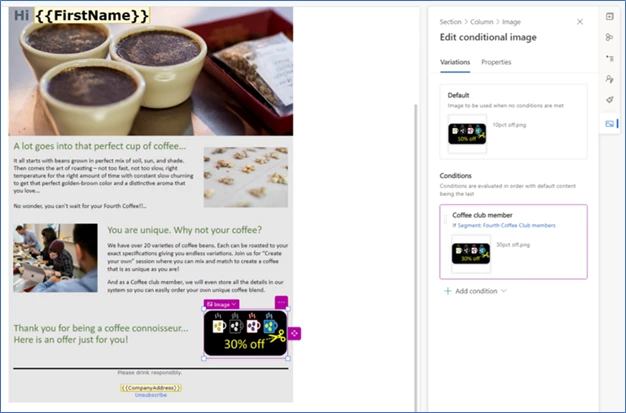
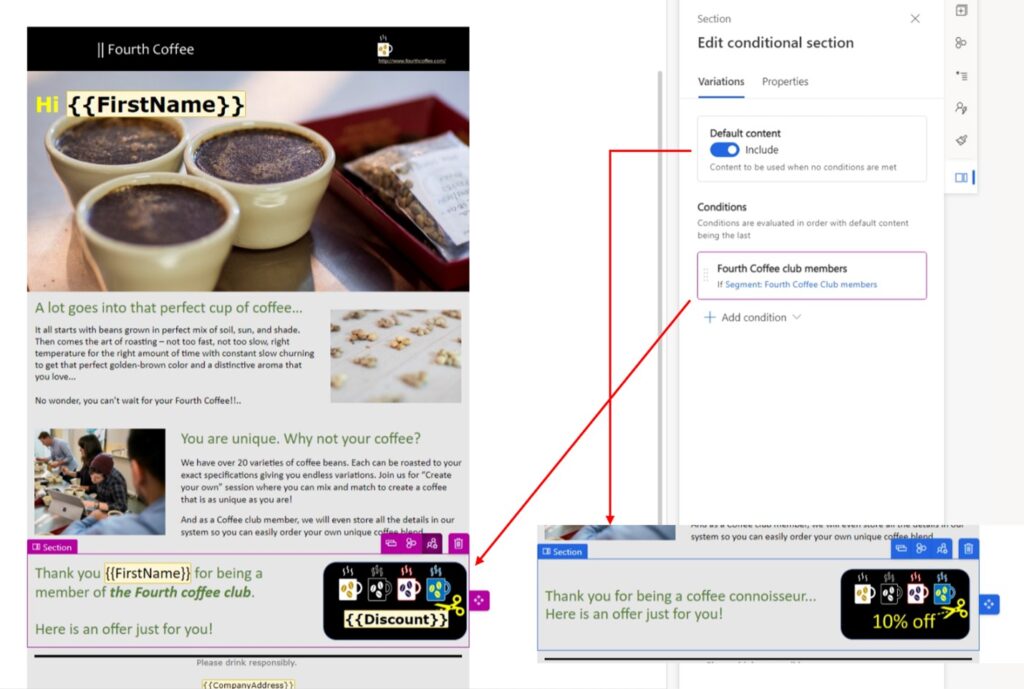
The second option is to use conditional content at the section level. This allows you to personalize images, columns, text, etc., in the section. In the example below, we overlayed dynamic text on the same background image. This way, the specific discount value can be inserted from any table in Microsoft Dataverse where discounts are stored. It can be updated automatically, and marketers don’t need to change anything in the email. This option is particularly useful for limited-time offers such as Black Friday discounts or a flash sale.

graphical user interface

You can save the entire conditional section as a content block. You or your team can quickly and easily reuse this personalized offer in other emails and reduce errors.

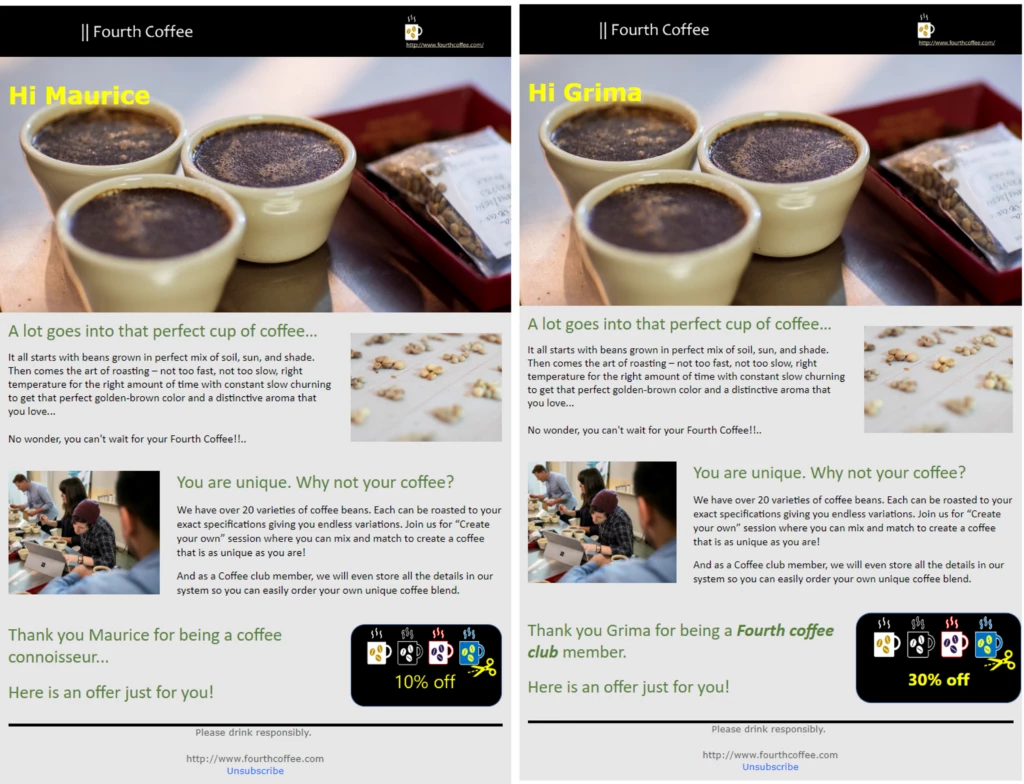
And here’s the perfectly personalized newsletter your club members and non-members will receive:

graphical user interface, website

There are countless other ways to use conditional content in your email marketing campaigns. For instance, you can include an image that reflects your customer’s interests or highlights a landmark in their city or state. You might customize your footer by including conditional social links, legal text, and unsubscribe settings based on your recipient’s country.

With just a few clicks, you can create a library of powerful and reusable content blocks that can help you personalize future messages in no time, while ensuring brand consistency.

Learn more

Learn how Dynamics 365 Marketing can help you use your customer data to create personalized content that engages your customers, strengthens your brand, and meets your business needs:

Not yet a Dynamics 365 Marketing customer? Take a guided tour and start a free trial!

The post Engage customers using highly personalized content—easily, efficiently, and at scale appeared first on Microsoft Dynamics 365 Blog.

Brought to you by Dr. Ware, Microsoft Office 365 Silver Partner, Charleston SC.