
by Scott Muniz | Jul 17, 2020 | Azure, Microsoft, Technology, Uncategorized
This article is contributed. See the original author and article here.
1. New VM Type Certified & Generally Available – Intel Based Ev4
Azure Edsv4 based on the latest generation Intel CascadeLake CPU is now certified and supported for both Hana and NetWeaver AnyDB. Hana OLTP and OLAP are both certified.
The VM types available are:
|
VM Size
|
vCPU
|
RAM
|
SAPS
|
Hana Certification
|
NW Certification
|
|
Standard_E2ds_v4
|
2
|
16
|
3,142
|
–
|

|
|
Standard_E4ds_v4
|
4
|
32
|
6,284
|
–
|

|
|
Standard_E8ds_v4
|
8
|
64
|
12,569
|
–
|

|
|
Standard_E16ds_v4
|
16
|
128
|
25,138
|
–
|

|
|
Standard_E20ds_v4
|
20
|
160
|
31,422
|

|

|
|
Standard_E32ds_v4
|
32
|
256
|
50,275
|

|

|
|
Standard_E48ds_v4
|
48
|
384
|
75,413
|

|

|
|
Standard_E64ds_v4
|
64
|
504
|
100,550
|

|

|
Hana is certified for productive use on Eds_v4 VM sizes larger than E20ds_v4 in combination with Azure Storage options with the following conditions:
- Premium Disk: /hana/data
- UltraSSD Disk: /hana/data or /hana/log
- ANF: /hana/data and /hana/log
- Any storage type may be used for /hana/shared and/or /usr/sap/SID
- It is not supported to use Premium or UltraSSD Disk for /hana/data and ANF for /hana/log
More information on Certification can be found in the SAP IaaS Hardware Certification Directory and more information about Hana Storage Configuration on Azure can be found here.
All Ev4 are certified and supported for NetWeaver on Azure Premium Storage and Azure UltraSSD Disk. Azure NetApp Filer service will be available for AnyDB later.
For a complete list of Certified VM Types for SAP Applications review SAP Note 1928533 – SAP Applications on Azure: Supported Products and Azure VM types
The check availability of these Virtual Machine types in nearby Azure Regions here
Note: As at July 2020 the Edsv4 and Ddsv4 only are supported. The Esv4 without an internal SSD disk is not supported.
2. Confirm VM Availability in Zones Before Deployment
The powershell script below can be used to confirm which VM types are available in an Azure region prior to deploying VMs. It is important to run this script using the actual subscription that host the VMs. After planning the VM Types and zones submit a quota request to begin deploying
Get-AzComputeResourceSku | where {$_.Locations.Contains(“southeastasia”) -and $_.LocationInfo[0].Zones -ne $null -and $_.ResourceType.Equals(“virtualMachines”)}


In the above example B-series is available in all 3 zones in Singapore, but Mv2 is available in zones 1 and 3.
3. Multi-SID Clustering for RedHat & Suse & a New Fencing Agent for Suse 12.x & 15.1
Multi-SID clustering of up to 5 ASCS on the same two node cluster is now supported for both Suse and Redhat.
High availability for SAP NetWeaver on Azure VMs on SUSE Linux Enterprise Server for SAP applications multi-SID guide
High availability for SAP NetWeaver on Azure VMs on Red Hat Enterprise Linux for SAP applications multi-SID guide
It is highly recommended that prior to installing a Linux Multi-SID cluster a “test lab” installation is performed on some test VMs and great care must be taken to document IP address and port numbers.
Suse now supports the same STONITH mechanism that is implemented for Redhat. The Suse Pacemaker service is now able to connect to the Azure Fabric and restart a hung or fenced VM. This functionality requires an update to the Python/Python3 libraries and the package for the Azure SDK (python-azure-mgmt-compute on SLES12 ; python3-azure-mgmt-compute on SLES15).
After implementing these packages the Python versions can be verified via the commands
python –version
python3 –version
4. Recommended Blogs for SAP on Azure Customers & Consultants
My colleague Anjan Banerjee has developed some very useful blogs based on real customer deployments. The topics for these blogs are based on questions from consultants. For example “Can I run Business Objects on SQL Azure DB PaaS?”.
Installation of SAP Netweaver ABAP 7.50 on DB2/UDB 11.1 with HADR (Highly available Database Environment) in Azure Cloud
SAP Single Sign-on : Kerberos/SPNEGO Setup for AS-JAVA
SAP On Azure : High-Availability Setup of SAP Content Server 7.53 with MaxDB in Windows Environment
SAP On Azure : HIGH AVAILIABILITY setup for SAP NETWEAVER with SAP ASE 16 DB on WINDOWS SERVER
SAP on AZURE: HIGH AVAILIABILITY setup for SAP BusinessObjects Business Intelligence 4.2 SP8 with SQL server on Windows
SAP on AZURE: SAP BusinessObjects Business Intelligence Platform Setup with Azure SQL DB (Managed PaaS database)
The full list of blogs can be found here
Another useful blog from Etienne Dittrich can be found here
5. Requirements for SAP on Windows & Linux: OS Boot Disk
Several customer escalations have been traced to inadequate performance of the OS Boot Disk. Based on these support cases it is strongly recommended to use Premium Storage for the OS Boot Disk. The same limitations and constraints that exist for Standard storage and that are documented in SAP Note 2367194 – Use of Azure Premium SSD Storage for SAP DBMS Instance also apply to the OS Boot Disk.
The minimum recommended Premium Disk for a large high performance VM (such as E64v3 or higher) would be P15 or higher.
In extreme cases small OS Boot Disks using Standard storage can cause a VM to appear to freeze under high IO load.
6. Azure Storage Updates
Azure Storage options and features continue to expand and improve. Below is a brief list of features recently released and in preview:
- Disk Bursting is a feature that allows certain disk types to temporarily exceed their quota for a specified period of time. Note: the disk quota increase does not change the VM level quota
- Update to the Hana Storage Guide for Azure. Key changes include:
- LVM Stripe Size recommendations have slightly changes in response to some new performance testing results
- A specific recommendation to ensure /hana/data, /hana/log and /hana/shared are always placed in separate Volume Groups.
- Most Linux OS the IO Scheduler changes from NOOP to NONE
https://www.suse.com/support/kb/doc/?id=7024299
https://www.suse.com/support/kb/doc/?id=7024298
- Azure Files Premium for Windows SMB 3.x with Active Directory Integration – this feature is now in preview
- Azure Files Premium for NFS 4.1 – this feature is now in private preview
- Azure Shared Disk – this feature is in preview and currently under evaluation for suitability for SAP solution
- sFTPaaS – sFTP as a Service is in planning. This feature would eliminate the requirement for VMs to provide sFTP services
A new blog will be released when Azure Files Premium for Windows and Linux is available for SAP customers
7. SQL Server Backup to URL – How to Throttle Backup Throughput
Modern releases of SQL Server supports direct backup to URL to multiple target blob files. The throughput to multiple blob files approach the Network Throughput Quota for a VM type. When the backup network traffic saturates the VM the VM may be unresponsive. Problems such as AlwaysOn initiating a failover may occur.
To prevent these issues the backup parameter MAXTRANSFERSIZE can be limited.
The precise value for MAXTRANSFERSIZE depends on the number of blob files, the VM size and other factors.
Test values MAXTRANSFERSIZE = 3145728 and monitor network throughput and stability. If the throughput is too high reduce the MAXTRANSFERSIZE value by half and retest.
BACKUP DATABASE <DB SID> TO
<URL PATH>
WITH COMPRESSION, BUFFERCOUNT = 4, MAXTRANSFERSIZE = 3145728, BLOCKSIZE = 65536, CHECKSUM, FORMAT, STATS = 5,
ENCRYPTION ( ALGORITHM = AES_256, SERVER CERTIFICATE = ‘ + @P_CERT +’ );
Additional links are here and here
8. SQL Server 2019 Generally Available for NetWeaver Customers
SQL Server 2019 is now Generally Available for NetWeaver systems. The minimum supported release for SAP applications is SQL Server 2019 CU3. It is generally recommended to apply the latest Support Pack and Cumulative Update available
New features in SQL Server 2019 can be found here
2779625 – Setting up Microsoft SQL Server 2019
2807743 – Release planning for Microsoft SQL Server 2019
2779607 – Configuration Parameters for SQL Server 2019
2922820 – DBSL Support for SQL Server 2019
2656107 – Support for Microsoft ODBC Drivers for SQL Server in SAP NetWeaver
Business Objects Supports both Windows Server 2019 and SQL Server 2019. In addition to SQL Server 2019 IaaS solution Azure SQL DB PaaS is fully supported for Windows platforms on SAP BO releases 4.2 SP8 and 4.3 and higher
9. Update on Support Matrix for SAP on Azure
In recent months many new features have become available for SAP customers. The list below is a very brief overview of recommended features and updated documentation
- Proximity Placement Groups (PPG) are recommended for every SAP installation
- SuSE 15.1 fully supported for HANA & NetWeaver on Azure
- SuSE 12 Support Pack 5 fully supported for HANA & NetWeaver on Azure
- RHEL 8.1 – in testing. RHEL 8.0 will not be supported for Hana and will not be supported on Azure
- RHEL 7.7 & 7.8 are not certified for Hana yet by SAP
- Oracle Linux 7.7 on Mv2 now supported
- Recommended stack for Oracle Customers – OEL 7.7 + Oracle 19.6c + Grid + ASM. Oracle 18 is not recommended
- Windows 2019 – fully supported for NetWeaver and most standalone SAP components. Hyper-V support matrix can be found here
- SAP ASE documentation update
- DB2 High Availability HADR on Azure – HADR is available for Linux only. Windows support is not released
10. Update on Azure Site Recovery
Azure Site Recovery is a very popular feature for SAP customers. The support matrix for Azure Site Recovery A2A can be found here
Use the “Find” function to search for support – for example to find “zone” to determine zone support.
ASR Azure to Azure now supports:
- Zone to Zone replication
- Replication from one Region to a specific Zone in another Region
- Generation 2 Images
- All OS that are commonly deployed by SAP customers Windows 2019, Suse 15.1, Suse 12.5, RedHat and OEL 7.7
- ADE for Linux and Windows
- Proximity Placement Groups
Transcontinental ASR (example: Primary in USA and DR in Europe) – contact Microsoft. Some customers have asked about “Tertiary ASR” which typically involves Zone-to-Zone ASR within a single region and then additional ASR to another Region. This is not possible as of July 2020.
Additional information on Azure Site Recovery for SAP solutions can be found here:
https://docs.microsoft.com/en-us/azure/site-recovery/site-recovery-sap
https://aka.ms/asr_sap
11. SAP on Azure YouTube Channel
The official SAP on Azure YouTube Channel contains a lot of Azure Data Factory, OData, PowerBI, Single Sign On, IoT Integration to SAP and other topics. Suggestions for additional topics for the YouTube channel can be posted in this blog or the YouTube channel comments section.
https://www.youtube.com/c/SAPonAzure/videos
12. SAP on Azure – Customer Success Stories
Two interesting customer success stores are available. A large Pharmasuetical customer Zuellig Pharma moved their entire datacenter to Azure including a VLDB Suite on Hana system. This Suite on Hana system runs on Mv2 416 and 13 E32v3 application servers. The project was executed by T-Systems
A recent Press Release can be found here
Swiess Re has deployed a new S4 system on Azure. The partner was Cognizant – the SAP on Azure Microsoft Partner of the year 2020
13. SQL Server AlwaysOn Setup & Configuration
The setup and configuration of SQL Server AlwaysOn has been fully automated and integrated into SWPM.
The previous versions of scripts such as sap_revlogin should not be used anymore as they may cause inconsistencies and support problems.
For all new installations, migrations, upgrades and homogeneous or heterogeneous system copies SAP Note 1772688 – SQL Server AlwaysOn and SAP applications should be followed.
Some recommended guidelines:
- Do not use sap_revlogin
- Use the latest version of SWPM available
- A failover from AlwaysOn Primary to Secondary is always required as certain objects can only be created in the active AlwaysOn replica
- After running the AlwaysOn Setup procedure in SWPM run DBA Cockpit in SAPGUI and check the “AlwaysOn Setup Check”
- Perform a test failover and check the ABAP or Java application server can start normally. Check trace files (such as dev_w0) if there is any issue
- Check SQL Server Agent standard jobs are correctly configured on all AlwaysOn nodes
- Ensure Transaction Log and DB Backup jobs/procedures are configured so such that in event of a failover (planned or unplanned) the Transaction Log is backed up (to ensure recoverability and avoid Log Full situations)
- If the DB is protected with TDE follow the procedures for AlwaysOn + TDE
14. SAP Hana 2.0 Support Pack 5 – Released
SAP has released Hana 2.0 Support Pack 5. New features can be found here
2932865 – SAP HANA 2 SPS05 Revision 050.00
Hana 2.0 Revision Strategy
2378962 – SAP HANA 2.0 Revision and Maintenance Strategy
2235581 – SAP HANA: Supported Operating Systems
Additional Links & Notes
SAP Monitor for Azure is now in Public Preview. Highly recommended to test this feature: https://azure.microsoft.com/en-us/blog/azure-monitor-for-sap-solutions-is-now-in-preview/
Learning Journey for SAP ASE
SAP ASE Learning Journey – Administration & Monitoring
SAP ASE Learning Journey – Installation & Upgrade
A utility to check the latency between Availability Zones
https://github.com/Azure/SAP-on-Azure-Scripts-and-Utilities/tree/master/AvZone-Latency-Test
SQL Server releases, support packs and cumulative updates
https://techcommunity.microsoft.com/t5/sql-server/bg-p/SQLServer/label-name/SQLReleases
Azure Backup for SAP Hana – support matrix
https://docs.microsoft.com/en-us/azure/backup/sap-hana-backup-support-matrix
https://docs.microsoft.com/en-us/azure/backup/backup-azure-vm-backup-faq
Recommended blog for Hana troubleshooting. Highly recommended to load scripts onto every Hana DB instance 1969700 – SQL Statement Collection for SAP HANA https://blogs.sap.com/2017/09/04/health-checks-of-hana-system/
Latest news about SAP Kernels
https://wiki.scn.sap.com/wiki/display/SI/SAP+Kernel%3A+Important+News
A very useful powershell script for parsing SAP NetWeaver trace files is below. Thanks to Ashley Zebrowski for providing this. Powershell is available for Windows and Linux https://docs.microsoft.com/en-us/powershell/azure/install-az-ps?view=azps-4.3.0
while($true) {
$s = Get-Content .dev_w* | sls ‘<search string goes here>‘ -context 2 | out-string -stream | sls ‘2020’
$a = @()
foreach ($line in $s) {
$date = [datetime]::parseexact(($line -replace ‘ C ‘,”), ‘ddd MMM dd HH:mm:ss:fff yyyy’, $null)
$a += $date
}
clear
“Most recent connection drops:”
$a | sort -unique -descending | select -first 20 | %{$_.tostring(‘yyyy/MM/dd HH:mm:ss.fff K’)}
}
Microsoft has released a new RDP client that is highly recommended https://docs.microsoft.com/en-us/azure/virtual-machines/workloads/sap/hana-vm-operations-storage
by Scott Muniz | Jul 17, 2020 | Uncategorized
This article is contributed. See the original author and article here.
By: Shanthi Thillairajah | PM | Microsoft Endpoint Manager – Intune
NOTE: This feature is in the latest build, but the UI is rolling out. We’ll update this post when it’s fully available to use!
Microsoft Endpoint Manager – Intune support for Android Enterprise corporate-owned devices with a work profile is now in public preview! You can start enrolling devices here in the Microsoft Endpoint Manager admin center. Corporate-owned devices with a work profile is one of the corporate management scenarios in the Android Enterprise solution set. This corporate-owned, personally-enabled (COPE) scenario offers separation between work and personal profiles, similar to that offered for personally–owned work profile devices, while giving admins more device-level control. IT admins can see, control, and configure the work accounts, applications, and data in the work profile, while end users are guaranteed that admins will have no visibility into the data and applications in the personal profile. This scenario is targeted at organizations that wish to enable personal use on corporate-owned single-user devices that they have provided for work. This management scenario is available for Android 8+ (Oreo and higher) devices.
What is available in the first preview release?
This preview release is intended to demonstrate the corporate-owned work profile capabilities that we have built so far. We hope to gather feedback and iterate on the design and functionality before the end-to-end scenario becomes generally available in the Microsoft Endpoint Manager admin center. The following features are included in today’s preview:
- Enrollment: Create multiple enrollment profiles with unique tokens that do not expire. This includes device enrollment using NFC, token entry, QR code, Zero Touch, or Knox Mobile Enrollment.
- Device Configuration: A subset of the existing settings for fully managed and dedicated devices.
- App Management: App assignments, app configuration, and associated reporting capabilities. Support for app protection policies will be added in a subsequent preview update.
- Device Compliance: The compliance policies that are currently available for fully managed devices.
- Device Action: Delete device (factory reset), reboot device, and lock device are available.
- Conditional Access: The conditional access capabilities that are currently available for fully managed devices.
- Resource Access: Certs, Wi-Fi, and VPN. Support for PFX Create is not available in this preview.
- MTD Support: Admins can push MTD apps to the work profile.
What features are in development?
We are continuing to develop several other features while we collect feedback on this preview. We anticipate adding in the features below in subsequent preview updates prior to general availability. This post will be updated when these features are available in public preview:
- Support for app protection policies (APP, also known as MAM).
- Personal usage policies – these settings will configure the personal side of the device, including disabling camera and screen capture on the personal side.
- Work profile password configuration – these settings will create requirements for the work profile password. Device password configuration will be available in the initial preview release.
- Password reset device action for the work profile.
- Filter fully managed, dedicated, and corporate-owned work profile devices separately.
Device Enrollment
Intune admins can enable enrollment for this scenario by selecting the “corporate-owned devices with a work profile” enrollment tile (indicated with the red arrow below). Admins can create multiple enrollment profiles with unique tokens that do not expire.
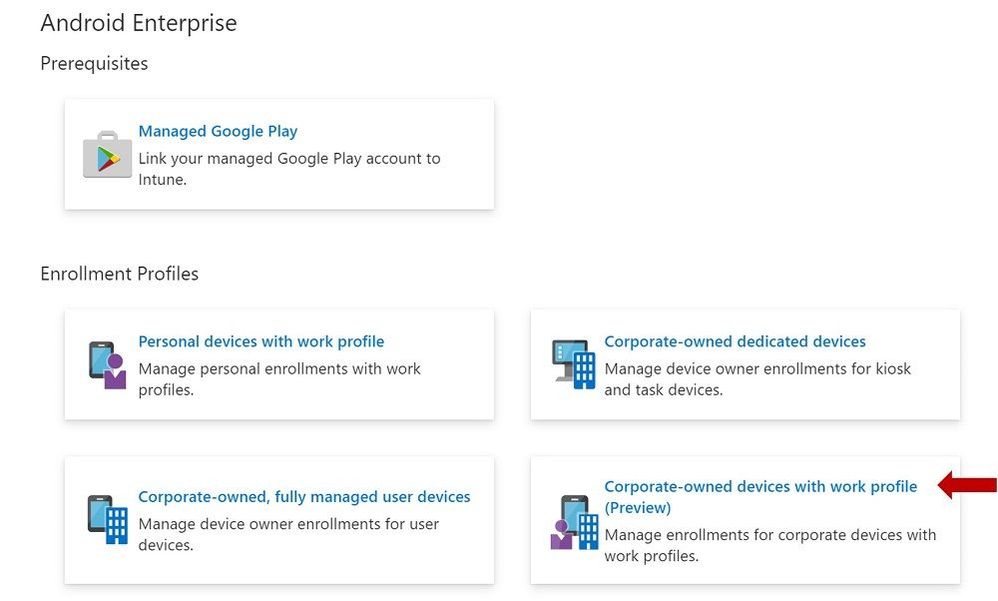 Enrollment Profiles | Corporate-owned devices with work profile (Preview)
End User Enrollment
There are new screens in the end user enrollment flow that help inform the user about the functionality of the work profile and personal profile on the device. Here are some examples of the screens:
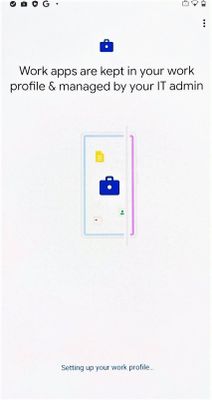 Figure 1. Setting up your work profile
 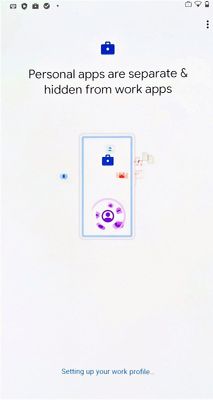 Figure 2. Setting up your work profile
Next, there are screens that will guide your end user through setting up admin requirements like creating a device password, installing work applications, and registering the device. After a successful enrollment, the user should see two sections labeled work and personal after they swipe up to see their full application list.
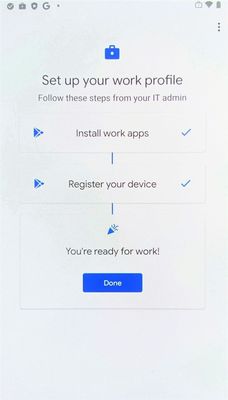 Figure 3. Setting up your work profile
 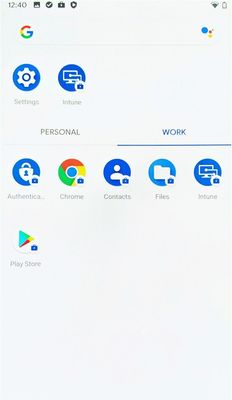 Successful enrollment
Device Configuration
You can create device configuration profiles to assign to corporate-owned devices with a work profile to disable device features, assign certificates, or configure VPN.
To create a device configuration profile, select a profile under the “Fully Managed, Dedicated, and Corporate-Owned Work Profile” category shown below. Device configuration profiles in this category can be applied to fully managed, dedicated, and corporate-owned work profile devices.
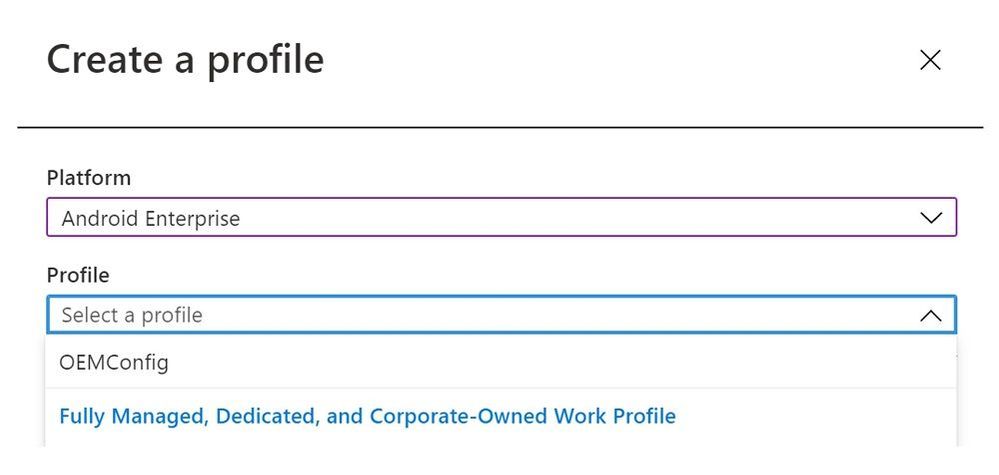 Create a profile – Device configuration profile
Some of the settings in the Device Restrictions profile do not apply to corporate-owned devices with a work profile; however, there are headers under each setting category that indicate which device types a particular setting can be applied to. Below is an example of these headers used in the Users and Accounts category.
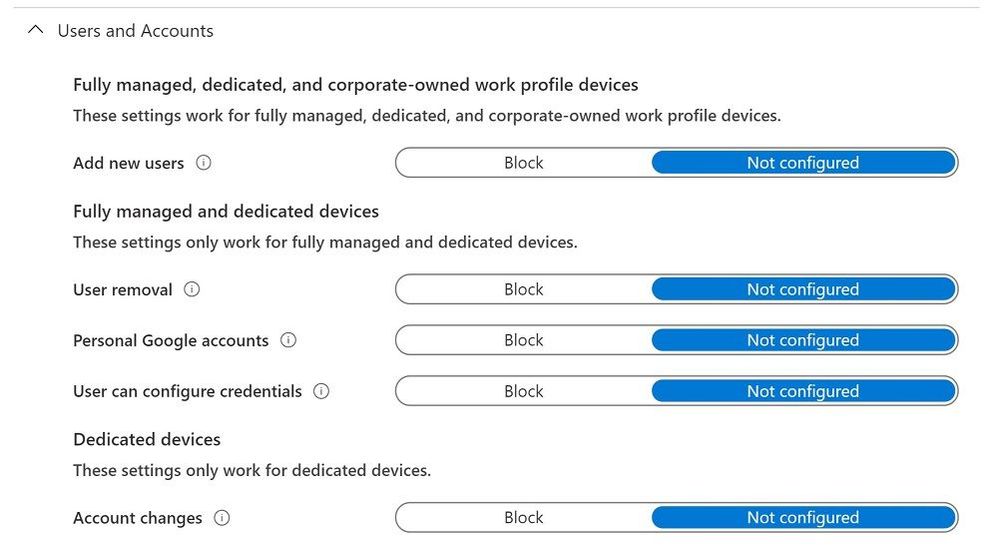 Device restrictions profile – Users and Accounts
Some settings only apply at the work-profile level for corporate-owned devices with a work profile. These settings still apply device-wide for fully managed and dedicated devices. They are marked with the “work profile-level” descriptor in the setting name, as shown in the example below.
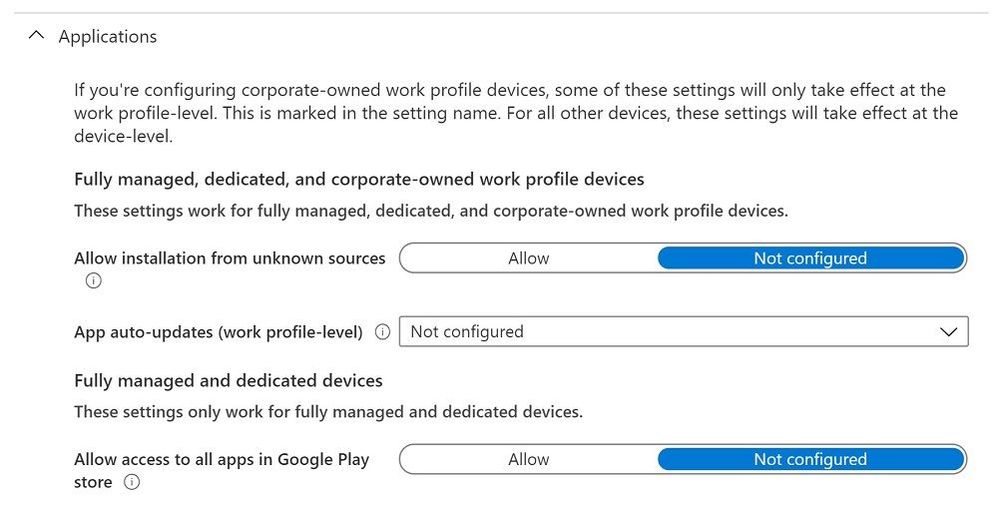 Device restrictions profile – Applications
Device Compliance
The compliance settings that are available for fully managed and dedicated devices will be applicable to corporate-owned devices with a work profile for this preview. To create a compliance policy, admins should select “Android Enterprise” as the platform and “Fully managed, dedicated, and corporate-owned work profile” as the policy type.
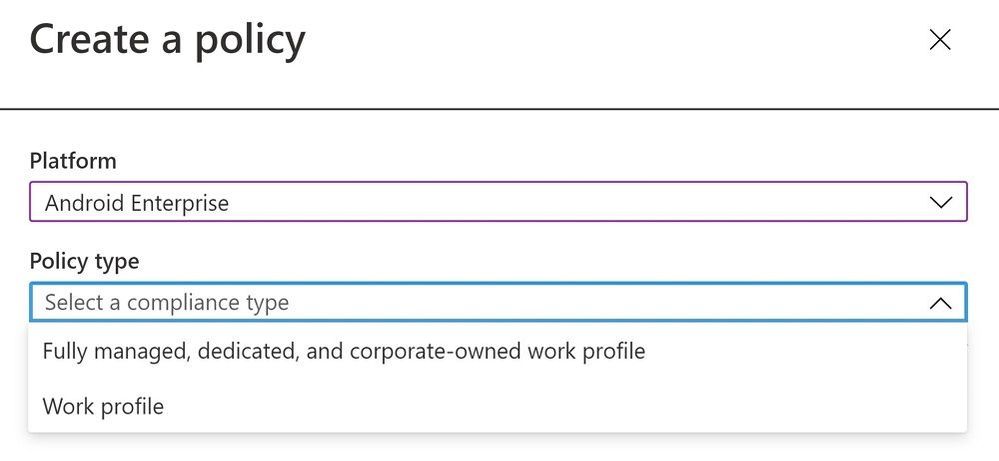 Create a policy – Device compliance policy
App Management
IT admins can deploy apps and utilize app configuration for corporate-owned devices with a work profile as a part of this preview release. To create an app configuration policy for managed devices, admins should select “Android Enterprise” for the platform and “Fully Managed, Dedicated, and Corporate-Owned Work Profile” for the profile type.
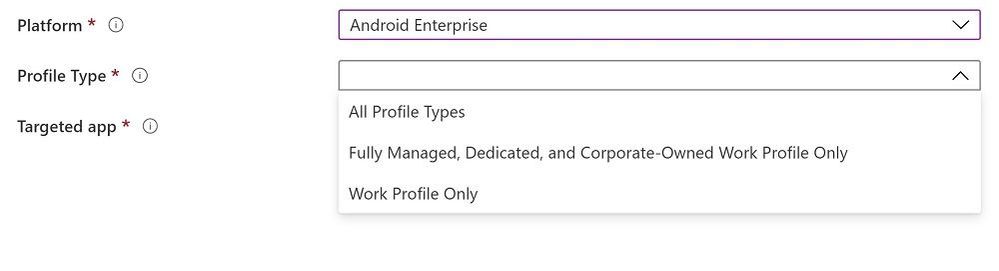 Create a policy – App configuration policy
As referenced above, there is no support for app protection policies (APP, also known as MAM) in this preview release.
Customer Support for This Preview
The available preview features are fully supported through our Intune support channels.
Known Issues
There is a known issue with being able to enforce a device-wide password. End users have the ability to get around device password requirements on corporate-owned devices with a work profile, regardless of admin policy. This happens when a user turns off the “use one lock” setting on their device which enables setting separate work profile and device passwords. This effectively allows the user to turn off device password and only use a work profile password with the requirements that the admin set for device password. We are working to address this issue in an upcoming release.
How Can You Reach Us?
As you validate and build out the Android Enterprise corporate-owned devices with a work profile preview scenarios, we would appreciate your feedback on IT admin’s device configuration and end-user’s device enrollment experiences. Keep us posted on your Android experience through comments on this blog post, through Twitter (@IntuneSuppTeam), and request any new features on UserVoice.
Android Enterprises Resources
For information about the new privacy protections on company-owned devices, refer to Google’s blog post.
Documentation
by Scott Muniz | Jul 17, 2020 | Azure, Microsoft, Technology, Uncategorized
This article is contributed. See the original author and article here.
Final Update: Friday, 17 July 2020 21:11 UTC
We’ve confirmed that all systems are back to normal as of 07/17, 20:30 UTC. Our logs show the incident started on 07/17, 19:20 UTC and that during the 1 hour and 10 minutes that it took to resolve the issue some customers with Application Insights resources in South Central US geographical region may have experienced intermittent metrics data gaps and incorrect alert activation.
- Root Cause: The failure was due to an issue in one of our dependent services.
- Incident Timeline: 1 hour and 10 minutes – 07/17, 19:20 UTC through 07/17, 20:30 UTC
We understand that customers rely on Application Insights as a critical service and apologize for any impact this incident caused.
-Sindhu
Initial Update: Friday, 17 July 2020 20:14 UTC
We are aware of issues within Application Insights and are actively investigating. Some customers with Application Insights resources in South Central US geographical region may experience intermittent metrics data gaps and incorrect alert activation.
- Work Around: None
- Next Update: Before 07/17 22:30 UTC
We are working hard to resolve this issue and apologize for any inconvenience.
-Sindhu
by Scott Muniz | Jul 17, 2020 | Azure, Microsoft, Technology, Uncategorized
This article is contributed. See the original author and article here.
Initial Update: Friday, 17 July 2020 20:14 UTC
We are aware of issues within Application Insights and are actively investigating. Some customers with Application Insights resources in South Central US 2 geographical region may experience intermittent metrics data gaps and incorrect alert activation.
- Work Around: None
- Next Update: Before 07/17 22:30 UTC
We are working hard to resolve this issue and apologize for any inconvenience.
-Sindhu
by Scott Muniz | Jul 17, 2020 | Uncategorized
This article is contributed. See the original author and article here.
“Challenges are the biggest opportunity that will help you learn and grow,” says Alagunila Meganathan, a 4-time MVP awardee for Azure.
Alagunila hails from the remote village of Rasipuram – whose name originates from Rasi which means “constellation” in many Indian languages – about 350 kilometres from Chennai (Madras) in the southern state of Tamil Nadu in India. And from that constellation emerged a bright tech star glowing with aspirations to empower thousands of young women to follow their tech passions.
Alagunila, who is fondly known as Nila, started her career as a college professor in the Department of Master of Computer Applications. A dual postgraduate degree holder in Computer Engineering and Computer Applications, Nila understands the difficulties of overcoming remote locations more than most.
India is a melting pot of geological terrains and languages where the landscape and linguistics change every 100 kilometres. Yet, the urge for knowledge and empowerment couldn’t keep this MVP from emerging as a community leader and inspiring others to adapt to the challenges successfully.
Nila has since become an idol for the budding female tech aspirants in the community she influences. She started her journey by spreading awareness about hackathons, bootcamps, meetups and other national and international tech events. Nila, in working to spread the experience of such activities, soon connected with other like-minded MVPs to support college girls to attend events in cities like Delhi, Pune, Mumbai, Hyderabad, Cochin, Trivandrum, Bangalore and Chennai.
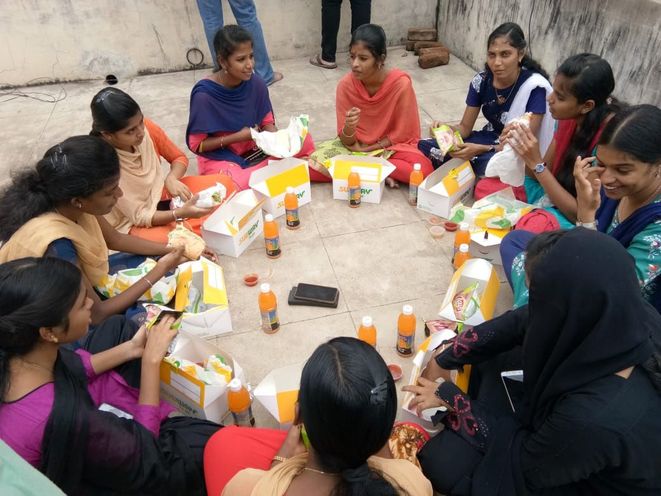
Travelling to such events would involve multiple days of transit across various modes of public transport, meaning hopefuls would need to cover their expenses as well as accommodation and food. Added to this was the cultural nuances of allowing young girls to travel alone with strangers away from their homes for the sake of imbibing knowledge and experience. Sometimes, families sometimes simply could not afford the expenses nor the risk involved.
So, Nila and team assisted some girls by sponsoring part of their expenses as well as exposing the tech aspirants to the opportunities of being a part of the industry. This, along with the mentorship given in speaking and writing, provided immense confidence for the girls entering the industry and during early employment.
In view of the challenges, Nila with the help of fellow MVPs set up a dedicated community Microsoft DEV. Geeks (part of the Global AI Community) for students from rural locations. The sessions were delivered in the local language to help better understanding of the concepts and build familiarity and warmth within the community.
To overcome the challenge of finding a central venue for the meetups, the team collaborated with companies to provide convenient venues which were easily accessible by public transport. This initiative started with 35 participants and slowly grew to more than 100. Soon running out of available space, the young students would stand outside the venue or employ makeshift chairs to ensure they could continue their learning journey.
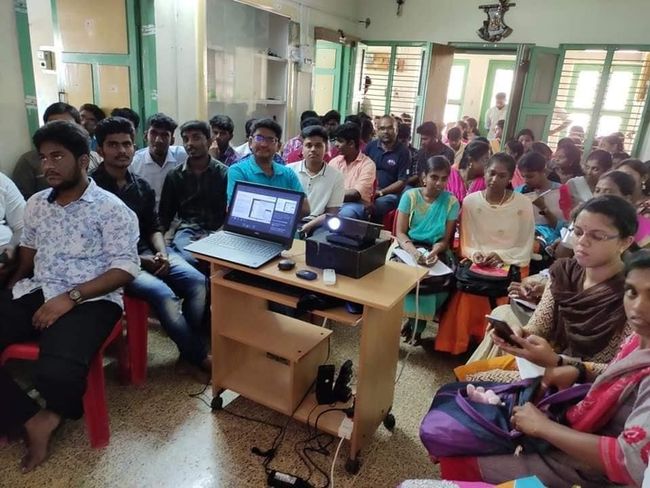
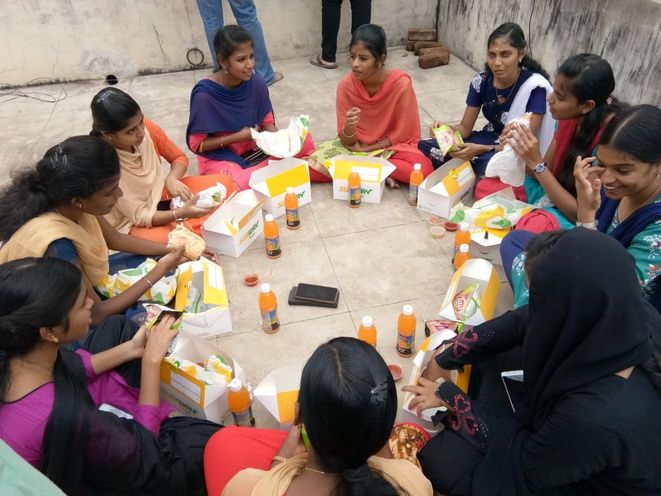
Following the sessions, the experts then joined the students for lunch on the roof. This post-session exercise became an integral part of the learning process with Lunch & Learn with Microsoft MVPs. The team continued to encourage participation with multi-language sessions, social media interaction, student feedback integration, and event invitation through the Global AI Community groups page.
Not to be deterred by the pandemic, Nila and seven other MVPs – hailing predominantly from cities like Coimbatore, Cochin, Madurai, Salem, Thiruvananthapuram, Ooty and others – started a webinar series of rural upskilling called Learn with Microsoft MVPs.
Between them, the MVPs use their expertise in Azure, Developer Technologies, and Office Applications & Development to teach students not only in India but from countries like Italy and Australia.
Online and offline, Nila believes in knowledge being the true metric of success. Therefore, she continues to follow her pursuit of knowledge by sharing more and meeting new people.
Nila advises young graduates by using her own journey of challenges and successes as an example.
A true community leader, Nila mentors young aspirants to find their preferred tech platform and continue their journey as a ‘techie’ in any city of their choice. Location, as evidenced by Nila, is secondary – the most important part is finding your passion and pursuing it.



by Scott Muniz | Jul 17, 2020 | Azure, Microsoft, Technology, Uncategorized
This article is contributed. See the original author and article here.

This week we held POWERful DEVs Conference, the first virtual conference of its kind. There was a showcase of how developers can leverage the Power Platform to build applications faster and with far less effort. Checkout the link above to the conference agenda and head over to the Microsoft Channel 9/Microsoft Developer You Tube channel to see all of the content on demand.
Content Round Up
How to Run Custom Scripts on Azure Arc Enabled Servers
Thomas Maurer
With the latest update for Azure Arc for Servers, you are now able to deploy and use extensions with your Azure Arc enabled servers. With the Custom Script extension, you can run scripts on Azure Arc enabled servers and works similar to the custom script extension for Azure virtual machines (VMs). There is an extension for Windows and Linux servers, which is a tool that can be used to launch and execute machine customization tasks post configuration automatically.
Creating Custom Connector from Azure Functions with Swagger
Justin Yoo
This post shows how to create a custom connector from Swagger document, automatically generated from Azure Functions instance on-the-fly, and how to apply the custom connector to Power Automate and Power Apps.
Manage Hyper-V VMs using PowerShell Direct
Thomas Maurer
PowerShell Direct lets you remotely connect to a Virtual Machine running on a Hyper-V host, without any network connection inside the Virtual Machine. PowerShell Direct uses the Hyper-V VMBus to connect inside the Virtual Machine. This feature is convenient if you need it for automation and configuration for Virtual Machines or if you, for example, messed up network configuration inside the virtual machine, and you don’t have console access.
Instagram Content Analysis Code Sample using Cognitive Services
Dmitry Soshnikov
In this example, we try to figure out what makes people like pictures on Instagram more. To do so, we use Cognitive Services Vision API, and some Python and Machine Learning Magic. You can easily run this sample for yourself by opening code in Visual Studio Codespaces.
Studying for AI-900
Sarah Lean
Now Artificial Intelligence, Machine Learning, is absolutely not my area of expertise, I am very much a infrastructure gal. However, I love to learn new things and stretch myself every now and again, and sitting the AI-900 exam and passing it is firmly in my sights, and I thought I’d share some of the resources I have bookmarked and am using for my study.
PowerShell Basics: How to Delete Microsoft Teams Cache for All Users
Anthony Bartolo
Sometimes there is a need to delete Microsoft Teams cache to quicken the adoption of an in-band policy change or simply troubleshoot an issue. The challenge here is that the cache for Microsoft Teams is in multiple directories. This can be done manually but would result in a slow and tedious process. Again, we turn to PowerShell to automate this process and this time it’s a one-liner that addresses this opportunity.
Azure Log Analytics for Azure Arc Enabled Servers
Thomas Maurer
In this blog post, we are going to have a quick look at how you can access Azure Log Analytics data using Azure Arc for Servers. The Azure Log Analytics agent was developed for management across virtual machines in any cloud, on-premises machines, and those monitored by System Center Operations Manager. The Windows and Linux agents send collected data from different sources to your Log Analytics workspace in Azure Monitor, as well as any unique logs or metrics as defined in a monitoring solution. When you want to access these logs and run queries against these logs, you will need to have access to the Azure Log Analytics workspace. However, in many cases, you don’t want everyone having access to the full workspace. Azure Arc for Servers provides RBAC access to log data collected by the Log Analytics agent, stored in the Log Analytics workspace the machine is registered.
Let people try your query in Microsoft Graph Explorer
Ayca Bas
Microsoft Graph Explorer is a wonderful learning space for the ones who are looking for testing Microsoft Graph APIs and reviewing the responses quickly. It provides the simple authentication where you can login, then see the response preview with your own tenant data.
Today, we will explore one of the most practical features of Graph Explorer: “Share Query“.
Manage Azure Event Hubs with Azure Service Operator on Kubernetes
Abhishek Gupta
Azure Service Operator is an open source project to help you provision and manage Azure services using Kubernetes. In this blog post, you will get a high level overview of Azure Service Operator, how to set it up, use it to provision Azure Event Hubs and deploy apps to Kubernetes which use the Azure Event Hubs cluster
Getting Started with GraphQL on Azure – Part 1
Aaron Powell
This is the first part of my GraphQL on Azure series and we look at the different ways to host a GraphQL server on Azure, and some recommendations on why different options work for different reasons.
Improving CollectionView Scrolling
Brandon Minnick
Sometimes scrolling a Xamarin.Forms.CollectionView (especially on Android) can be choppy. This post shows how to fix it!
Xamarin Podcast – July Edition
Matt Soucoup
Xamarin.Forms 4.7 is out and the Inverter Converter is all the rage!! … well … multi-value bindings are all the rage – but that doesn’t have quite the ring of Inverter Converter. This month James and Matt run down the rest of the great features in Xamarin.Forms 4.7 including how it helps you manage light and dark themes, eliminates the need for James’ image circle plug-in, and makes writing Grid row and column definitions so, so, so much easier.
by Scott Muniz | Jul 17, 2020 | Uncategorized
This article is contributed. See the original author and article here.
During Day three of our Back To School event, Maria Langworthy, PM on Microsoft’s Education Experiences Team, gave a great overview of the connected classroom. Maria is an education researcher who has worked with large international education systems to develop both pedagogy and technology solutions that drive 21st century learning.
Maria talked about a set of publications Microsoft has produced to address some of the challenges schools are facing as they transition to remote learning. These publications detail how to design an effective remote learning system. Topics include connectivity and device planning, platform planning, education resources and materials planning, and how each of these aspects interoperate and can be facilitated with Microsoft tools. These resources also include an abundance of training and support material and can be found here- https://aka.ms/resilientlearning
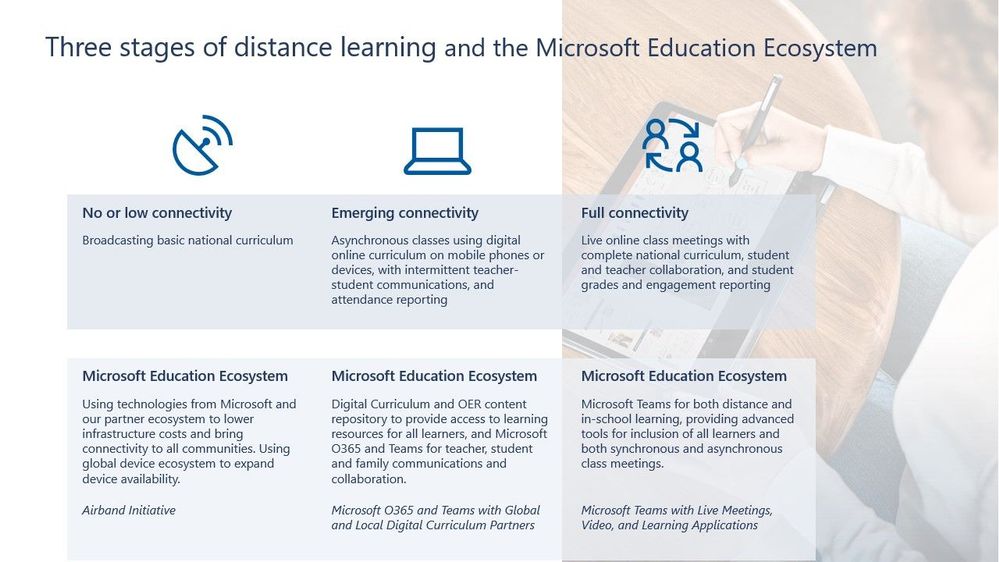
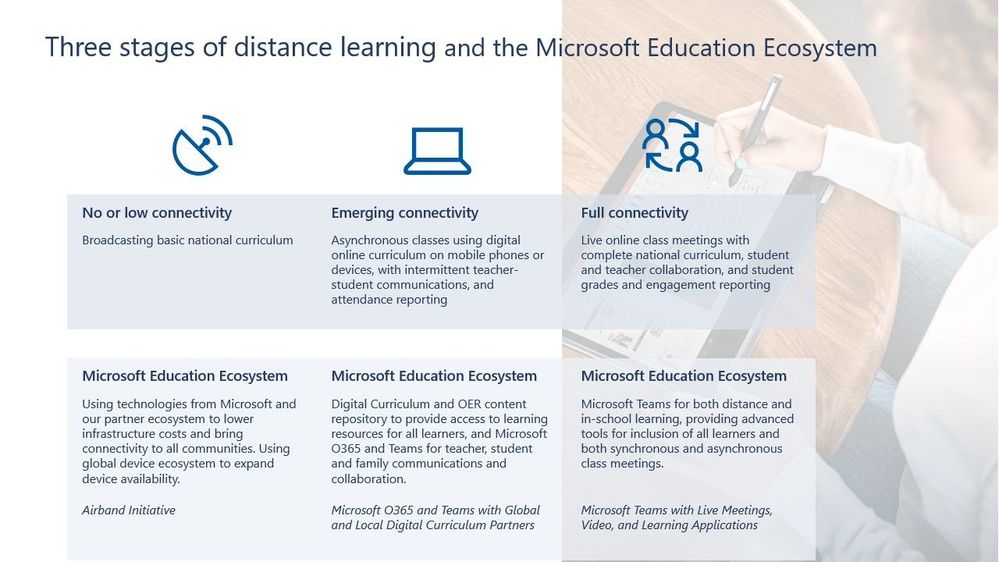
In discussions with UNESCO and ministries of education around the world, Microsoft researchers have discovered that most schools fall into three categories of connectivity. These categories are: No or low connectivity, emerging connectivity, and full connectivity (see example below). Microsoft has developed remote solutions for each category and is constantly working to sustain learning experiences across the board. Nearly all schools are working on a transition to remote learning environments.
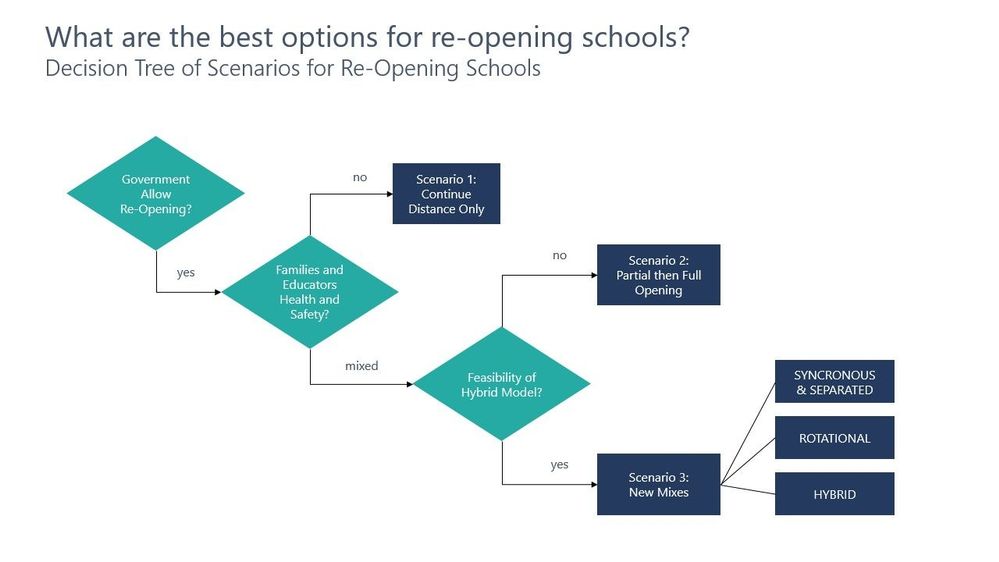
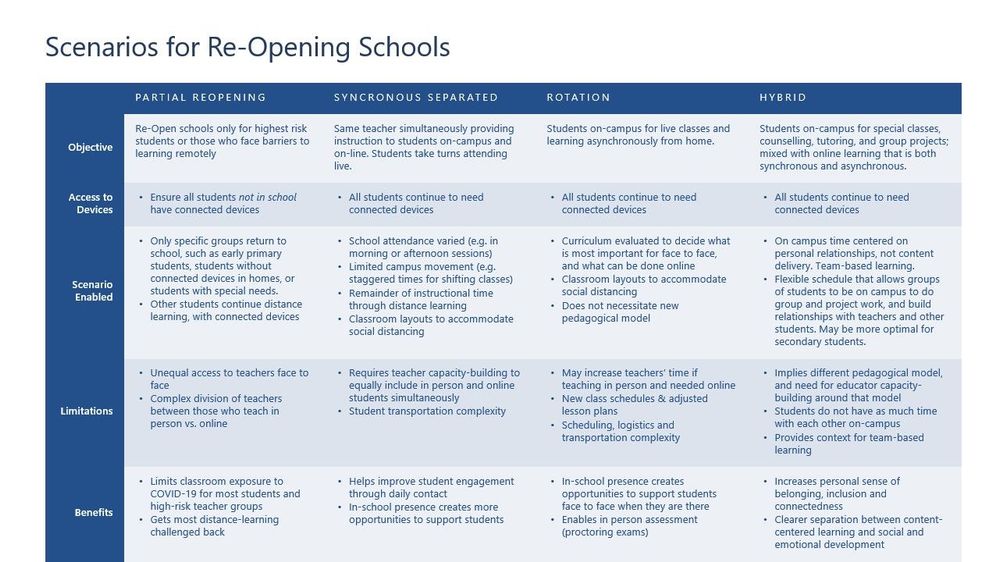
In collaboration with UNESCO, Maria and her team have developed a decision tree and criteria table for addressing scenarios for re-opening schools amid the COVID-19 pandemic. These resources are designed to help schools think through their options and figure out what is best for their organization.
Transitioning to remote and hybrid learning solutions is a challenge being faced by students and educators around the world. Maria laid out the common phases that organizations pass through as they move toward remote and hybrid solutions:
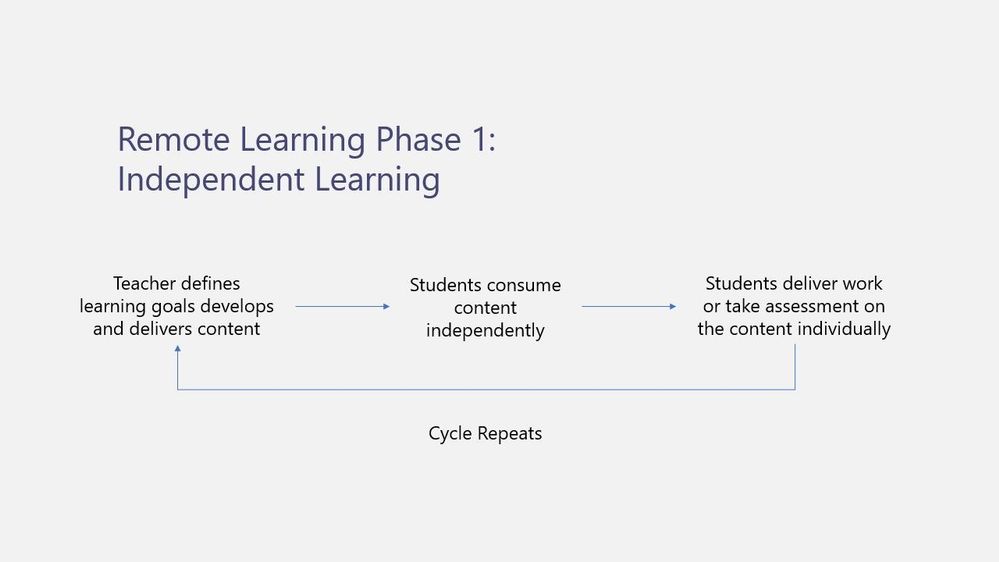
Phase 1- Independent Learning
Phase one details the first phase many educators find themselves in as they transition to a remote solution. As depicted in the image below, it is common for educators to take the traditional teaching model practiced in non-remote/hybrid classrooms and attempt to apply it in a remote environment. Many teachers and students have struggled with this format due to delayed communication, a confusion around the many tools being used by a given organization, and a general hesitancy to ask questions in a remote environment. This independent learning model is outlined in the image below.
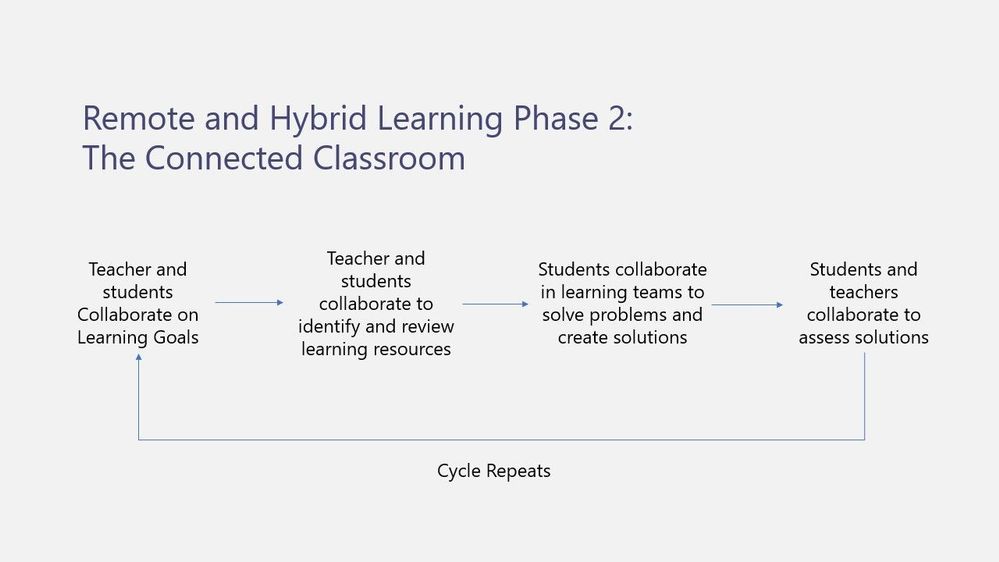
Phase 2- The Connected Classroom
The idea of the connected classroom shifts the traditional model to a more project-based and student-centric environment that lends itself well to remote and hybrid learning scenarios. This model encourages students and teachers to work together to develop collaborative projects and requires students to develop self-management skills as they work solve problems in remote teams. As seen in the image below, phase two encourages teachers to facilitate students collaborating with each other by creating learning experiences within a structured environment that encourage students to take ownership of their own learning. Resources within the Microsoft Education Center on 21st Century Learning Design provide rubrics to help teachers design these engaging learning experiences and can be accessed here.
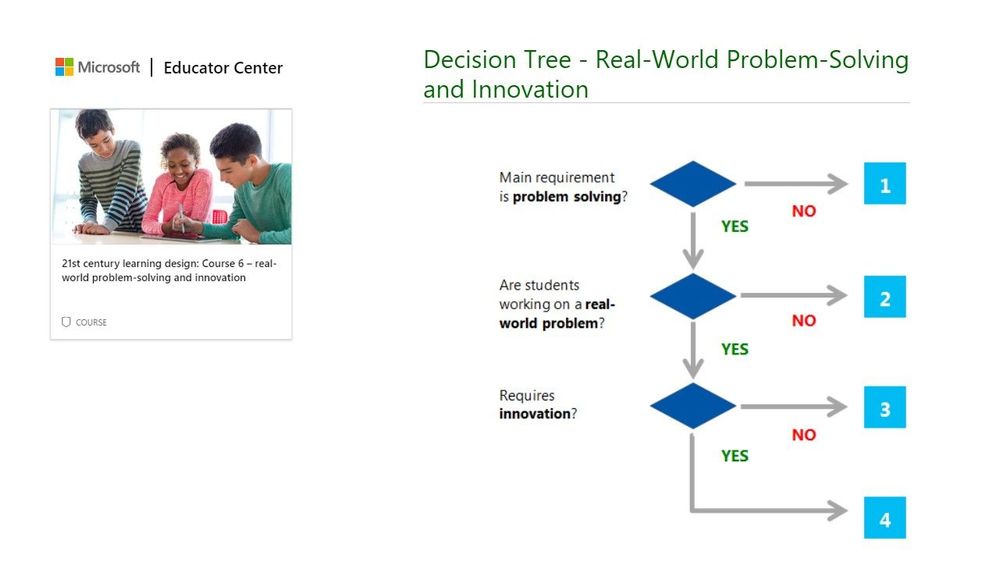
High level assignment rubrics (as seen in the “Real-World Problem Solving example below) are also available within the 21st century learning design section of Microsoft’s Education Center (MEC).
We are here to support you as you work through the challenges of transitioning to remote and hybrid learning environments. For the latest on everything Microsoft EDU, we also invite you to join the Enable Remote Learning Community (ERL) to connect with a global network of educators and discover the latest feature releases and updates.
by Scott Muniz | Jul 17, 2020 | Uncategorized
This article is contributed. See the original author and article here.
This week, Azure Data Factory announced the immediate public availability of Azure Data Factory Managed Virtual Network as public preview.
Microsoft Defender ATP announced high value asset tagging.
@Rolf-42 is our member of the week, and has been a fantastic contributor especially in the Microsoft Learn community.
View the Weekly Roundup for July 13-17 in Sway and attached PDF document.
by Scott Muniz | Jul 17, 2020 | Uncategorized
This article is contributed. See the original author and article here.
Are you an app maker who builds solutions to simplify, automate, and transform tasks and processes for your team where you have deep expertise in the solution domain? Are you skilled in key technical business analyst tasks, such as data modeling, basic UX design, requirements analysis, process analysis, etc.? Do you create and enforce business processes, structures digital collection of information, improves efficiency of repeatable tasks, and automates business processes? Are you use Power Platform to solve business problems? Do you have experience with Visual Basic for Applications, Excel Pivot Tables, Teams and other tools? Do you have a basic understanding of data models, user interface, and processes? If so, I have a great opportunity for you to showcase your skills and be recognized for them… take and pass this beta exam!
The new Microsoft Certified: Power Platform App Maker Associate certification has one exam that is currently in beta: PL-100: Microsoft Power Platform App Maker.
To receive the 80% discount*, use code PL100KLSrise when prompted for payment.
This is NOT a private access code. You can use this code to register for and take the exam on or before 8/14/2020.
*The first 300 people who register can take these exams for an 80% discount! (Why beta exams are no longer free.) The seats are offered on a first-come, first-served basis. You must register for the exam on or before 8/14/2020. Take the exam as soon as possible, so we can leverage your comments, feedback, and exam data in our evaluation of the quality of the questions.
Preparing for Beta Exams
Taking a beta exam is your chance to have a voice in the questions we include on the exam when it goes live. The rescore process starts on the day that exams go live, and final scores are released approximately 10 days later. For updates on when the rescore is complete, follow me on Twitter (@libertymunson). For questions about the timing of beta exam scoring and live exam release, see the Creating high-quality exam: The path from beta to live blog post.
Remember, the number of spots is limited, so when they’re gone, they’re gone. You should also be aware that there are some countries where the beta code will not work (including Turkey, Pakistan, India, and China). You will not be able to take the beta exam in those countries.
Also keep in mind that these exams are in beta, which means that you will not be scored immediately. You will receive your final score and passing status after your exam is live.
Related announcements
Skill up and stand out, with new role-based training and certification!
New role-based certification and training is here, and we’re just getting started!
by Scott Muniz | Jul 17, 2020 | Uncategorized
This article is contributed. See the original author and article here.
The total cost of ownership (TCO) for video analytics is an important consideration for customers. That’s why we integrated
Live Video Analytics from Azure Media Services and
Microsoft Rocket (from Microsoft Research). The integration enables an order-of-magnitude improvement in throughput per edge core (frame per second analyzed per CPU/GPU core), while still maintaining the accuracy of the video analytics insights.
Microsoft Rocket, an open-source project from Microsoft Research, provides cascaded video pipelines that combined with Live Video Analytics from Azure Media Services, makes it easy and affordable for developers to build video analytics applications in their IoT solutions. For details, see our full post on the
IoT blog.


Recent Comments