by Scott Muniz | Sep 18, 2020 | Uncategorized
This article is contributed. See the original author and article here.
The Intune Company Portal app allows you to access corporate data, apps, and resources. It’s important to keep your app up to date with the latest version of Company Portal. We recently had a change in enrollment certificates which required a Company Portal update for some users, and after talking with a few customers who weren’t aware of why and how to keep the company portal updated, we thought it would be good to provide this support tip.
Here are a few reasons to keep your Company Portal updated:
- Prevent security risks that can occur on older OS versions
- Certificate expirations which could prevent access
- New features, bug fixes, or changes to the UI
How to keep your device updated
When using Android devices, it is up to you as a user to keep the app updated. There are two options to keeping your Company Portal updated:
- Recommended: Turn on Auto-Updates within the Google Play store, this will ensure that you always have the latest version on your device.
- Ensure your notifications are turned on for Google Play Store to let you know when your app needs to be updated. (Don’t delay after seeing the notification or you might forget!)
Note: You won’t see a prompt within the Company Portal app that an update is needed.
How to update automatically
If you choose to turn on auto-updates follow these steps:
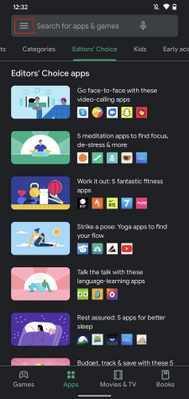
- Open Google Play store and select the Menu icon
- Select Settings
- Select Auto-update apps and choose one of the following:
- Over any network. Data charges may apply
- Over Wi-Fi only
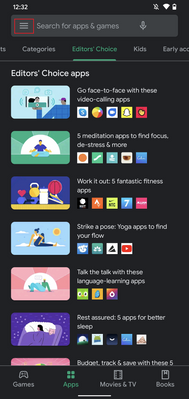 Fig 1. Google Play Store
 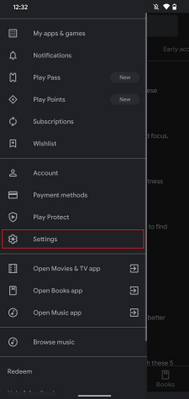 Fig 2. Google Play Store Settings
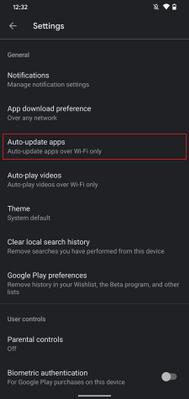 Fig 3. Auto-update apps
 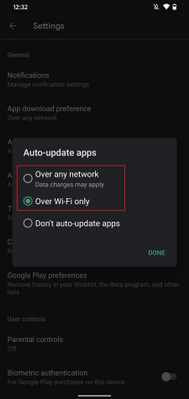 Fig 4. Auto-update apps options
If you choose to auto-update over Wi-Fi to save on possible data charges, see below on how to connect to Wi-Fi automatically.
How to update manually
If you decide to update manually by receiving Google Play notifications do the following:
- Open Google Play store and select the Menu icon
- Select My apps & games
- Select the Intune Company Portal app to update (or select Update All)
- If prompted, review App Permissions, then select Accept to proceed with the app update
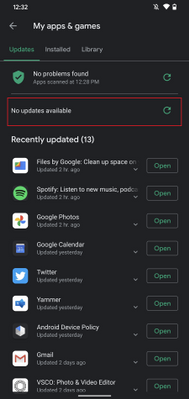 Google Play Store – Manually update apps
Set up your Wi-Fi to connect automatically
If your settings for updates are limited to Wi-Fi connections to prevent possible data usage, it’s helpful to set up your device to connect to Wi-Fi networks automatically:
- Open your device’s Settings menu
-
Select Network & Internet
-
Select Wi-Fi
-
Select Wi-Fi preferences
-
Turn on Connect to open networks
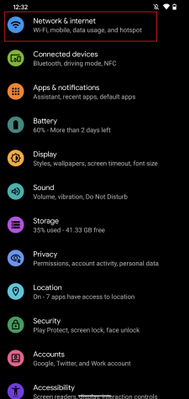 Android Settings
 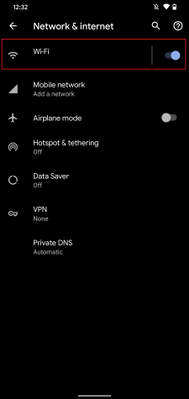 Android – Network & internet settings
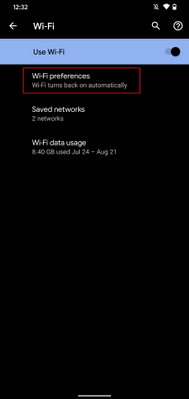 Android – Wi-Fi settings
 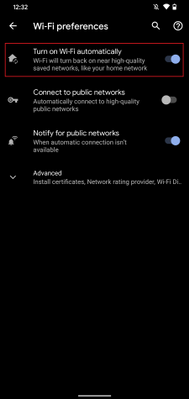 Android – Wi-Fi preferences
Administrative options for updating apps
Device restrictions
As an IT admin, you can also ensure your user has the latest Company Portal version by setting up device restrictions for users enrolled with fully managed, dedicated, and corporate-owned devices by following these steps:
- Navigate to Devices > Android > Configuration policy
- Click Create Profile
-
Platform: Android Enterprise
-
Profile: Select Device restrictions under Fully Managed, Dedicated, and Corporate-Owned Work Profile
<<Screenshot>>
- Open Applications within the accordion
- Set App auto-updates: Devices check for app updates daily. Choose when automatic updates are installed:
-
Not configured: Intune doesn’t change or update this setting.
-
User choice: The OS might default to this option. Users can set their preferences in the managed Google Play app.
-
Never: Updates are never installed. This option isn’t recommended.
-
Wi-Fi only: Updates are installed only when the device is connected to a Wi-Fi network.
-
Always: Updates are installed when they’re available.
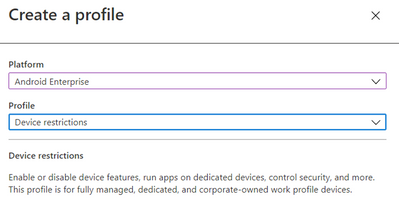 Android Enterprise – Device restriction profile
For more information on Device restrictions for Android Enterprise see this documentation. App auto-updates aren’t available for devices enrolled with Android device administrator or Android work profile.
Configure Conditional Launch
Another option as an IT admin is to configure a minimum Company Portal version within conditional launch settings to prevent users from accessing company resources if they need to update Company Portal. This can be configured by doing the following:
- Navigate to Apps > App protection policy
- Click Create policy and choose Android
- Under Conditional Launch > Device conditions, select Min Company Portal version
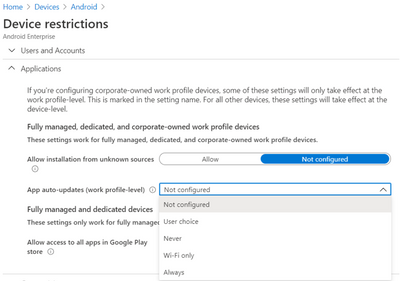 Android Enterprise – Device restriction profile settings
- Once selected, insert a minimum Company Portal version to Value
- Choose an action:
-
Block access: Prevent users from accessing company resources until Company Portal is updated.
-
Wipe data: The user account that is associated with the application is wiped from the device.
-
Warn: This will let users know that they need to update the Company Portal.
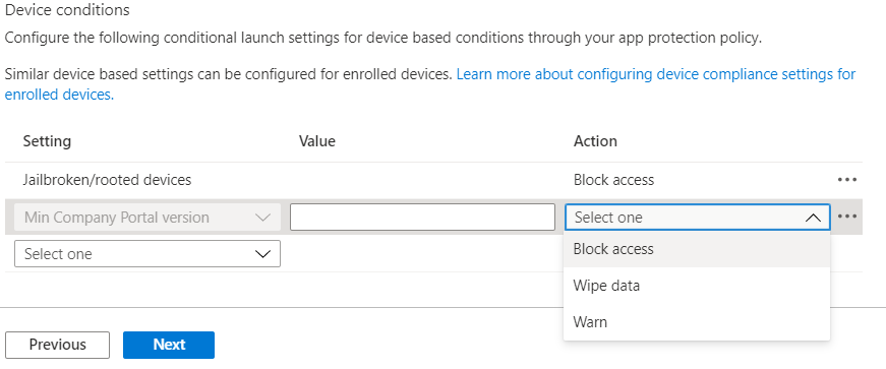
Note: If you choose Block access, forcing an update could lead to unexpected data charges at the time of the update. Learn more about Android app protection policy settings in Microsoft Intune.
We hope this support tip is useful for your users. For more on updating the Company Portal on Android devices, see this documentation:
Let us know if you have any additional questions on this by replying back to this post or tagging @IntuneSuppTeam out on Twitter!
by Scott Muniz | Sep 18, 2020 | Uncategorized
This article is contributed. See the original author and article here.
News this week includes:
Microsoft Ignite preparation is in full swing, with several resources on how what to expect from several produce teams: Microsoft 365, SharePoint, OneDrive, Planner, Stream, Teams for Education, Excel, and Endpoint Manager.
Yammer is rolling out reactions for every conversation or reply in the new Yammer. You can now express yourself through gratitude and celebration, laughter, and sadness-just like in real life!
The Microsoft Learn LTI application is now available. The application enables you to seamlessly embed modules and learning paths from the Microsoft Learn Catalog.
@Tieme Woldman is our Member of the Week, and a great contributor in the Access community.
View the Weekly Roundup for Sept 14-18th in Sway and attached PDF document.
by Scott Muniz | Sep 18, 2020 | Uncategorized
This article is contributed. See the original author and article here.
Microsoft Ignite will take place online, kicking off on the morning of September 22nd, at 8:00 AM in the Pacific Time Zone. The event programming will include live segments, digital breakout sessions, and Q&A, available across multiple time zones. Be sure to visit the Ignite home page to view the event agenda and additional details.
Fun news for developers will kick off on Day 1 with Julia White and her Invent with Purpose on Azure keynote and will be followed by Scott Hunter with The Future of .NET is .NET 5, followed with several additional rebroadcasts to accommodate a worldwide audience. On Day 2, Scott Hanselman and friends will keynote Are we there yet? App Development in Azure. It is a packed agenda, but don’t take my word for it –
Developers at home and at work are resilient and finding ways to adapt and continue to collaborate and be productive remotely, invent at speed and create amazing cloud-powered applications while having fun and helping everyone. Microsoft is unique in the industry and provides the world’s most comprehensive developer toolkit and platform to support your journey as a developer, no matter where you are.
The complete line up for Azure App Developer sessions is listed below:
|
Start Time (PDT)
|
Session name
|
Speaker(s)
|
|
Tuesday, 9/22: 11:15am – 11:30am
|
Key Segment Preview: Ride the Developer Cloud with Visual Studio +.NET, GitHub and Azure
|
Scott Hanselman
|
|
Tuesday, 9/22: 2:30pm-3:00pm
|
The Future of .NET is .NET 5 Digital Breakout
|
Scott Hunter
|
|
Tuesday, 9/22: 3:15pm-3:45pm
|
Ask the Expert: .NET Team
|
Scott Hunter
|
|
Tuesday, 9/23: 10:30pm-11:00pm
|
The Future of .NET is .NET 5 Digital Breakout
|
Scott Hunter
|
|
Wednesday, 9/23: 6:30am-7:00am
|
The Future of .NET is .NET 5 Digital Breakout
|
Scott Hunter
|
|
Wednesday, 9/23: 8:30am-9:00am
|
Are we there yet? App Development in Azure with Scott Hanselman and Friends
|
Scott Hanselman
|
|
Wednesday, 9/23: 1:00pm-1:30pm
|
Enterprise-grade Kubernetes on Azure Digital Breakout Session
|
Brendan Burns
|
|
Wednesday, 9/23: 1:45pm-2:15pm
|
Enterprise-grade Kubernetes on Azure Ask the Experts
|
Brendan Burns
|
|
Wednesday, 9/23: 2:30pm-3:00pm
|
Migrate, Modernize .NET applications on Azure Digital Breakout
|
Gaurav Seth, Daniel Roth
|
|
Wednesday, 9/24: 4:30pm-5:00pm
|
Are we there yet? App Development in Azure with Scott Hanselman and Friends
|
Scott Hanselman
|
|
Wednesday, 9/23: 7:30pm-8:00pm
|
Migrate, Modernize .NET applications on Azure Ask the Experts
|
Gaurav Seth, Daniel Roth
|
|
Wednesday, 9/23: 7:30-8:00pm
|
Ask the Experts: Visual Studio, GitHub, and Azure
|
Victoria Cushing
|
|
Wednesday, 9/23: 9:00pm-9:30pm
|
Enterprise-grade Kubernetes on Azure Digital Breakout Session
|
Brendan Burns
|
|
Wednesday, 9/23: 10:30pm-11:00pm
|
Migrate, Modernize .NET applications on Azure Digital Breakout
|
Gaurav Seth, Daniel Roth
|
|
Wednesday, 9/23: 11:15pm-11:45pm
|
Enterprise-grade Kubernetes on Azure Ask the Experts
|
Brendan Burns
|
|
Thursday, 9/24: 12:30am-1:00am
|
Are we there yet? App Development in Azure with Scott Hanselman and Friends
|
Scott Hanselman
|
|
Thursday, 9/24: 3:30am-4:00am
|
Migrate, Modernize .NET applications on Azure Ask the Experts
|
Gaurav Seth, Daniel Roth
|
|
Thursday, 9/24: 5:00am-5:30am
|
Enterprise-grade Kubernetes on Azure Digital Breakout Session
|
Brendan Burns
|
|
Thursday, 9/24: 6:30am-7:00am
|
Migrate, Modernize .NET applications on Azure Digital Breakout
|
Gaurav Seth, Daniel Roth
|
|
Pre-recorded On-demand
|
Best Practices of Running Cloud Native Applications on Azure
|
Sean McKenna
|
|
Pre-recorded On-demand
|
Event-driven Applications with Azure Functions & Logic Apps
|
Derek Li
|
|
Pre-recorded On-demand
|
Resilient DevOps Practices with Code to Cloud automation
|
Gopinath Chigakkagari
|
|
Pre-recorded On-demand
|
Code, collaborate, and ship from anywhere: Meet the Microsoft Developer Cloud
|
Leslie Richardson, Vix Rian
|
|
On-demand (overflow), will be available on Tuesday, 9/22 at 8 am
|
Empowering Ops with VS Code
|
Zachary Deptawa
|
|
On-demand (overflow), will be available on Tuesday, 9/22 at 8 am
|
Java on Your Terms with Azure
|
Martijn Verburg, Edward Burns
|
|
On-demand (overflow), will be available on Tuesday, 9/22 at 8 am
|
Building Cloud-Native Applications with Azure
|
Uche Nkadi, Kate Olszewska
|
|
On-demand (overflow), will be available on Tuesday, 9/22 at 8 am
|
Serverless APIs with Functions and API Management
|
David Barkol
|
Also check out the Tech community at https://techcommunity.microsoft.com. Here you can share experiences, engage, and learn from experts, while having conversations with the community about Microsoft Ignite.
SWAG? Did someone say SWAG? Yes, we also have an assortment of digital swag that you can take advantage of today:
- Buzzword Bingo: Listen for buzzwords and share your progress on social
- Tech Stretch: A quick visual guide for desk workers who need a break
- Kid’s Activity Pack: A printable pack of fun activities full of tech characters. Engaging kids while allowing caretakers to engage with sessions.
- Desktop wallpapers: Show off your desktop with branded wallpapers
- Digital badge: Let everyone know you participated by printing your all access badge
- Social backgrounds (LinkedIn, Twitter): Background images to use on all your social platforms
- Social stickers
- Microsoft Teams backgrounds: Become a presenter in your next meeting with branded backgrounds
Microsoft Ignite lasts 48-hours and be sure to register for the event. With registration, you can access the full learning experience, including digital breakout sessions and the Connection Zone. What are you waiting for? Take a look at our official session list and add it to your session schedule to be ready for 48-hours of non-stop programming on Tuesday, September 22-24th.
by Scott Muniz | Sep 18, 2020 | Azure, Technology, Uncategorized
This article is contributed. See the original author and article here.
Update: Friday, 18 September 2020 20:21 UTC
We continue to investigate issues within Application Insights Live Metrics. Root cause is not fully understood at this time. Some customers continue to experience issues viewing their Live Metrics data. We are working to establish the start time for the issue, initial findings indicate that the problem began at 9/18 7:00 UTC. We currently have no estimate for resolution.
- Work Around: None
- Next Update: Before 09/18 23:30 UTC
-Ian
![[Guest Blog] My Journey to Ethical AI](https://www.drware.com/wp-content/uploads/2020/09/large-628)
by Scott Muniz | Sep 18, 2020 | Uncategorized
This article is contributed. See the original author and article here.
This article by Humans of IT Student Ambassador Olivia Asemota, a Computer Science undergrad student from Xavier University of Louisiana is part of our Student Ambassador Spotlight series in the lead-up to Microsoft Ignite. Olivia shares about her passion for computer science and ethics, and her future aspirations to blend the two together in her future career.

My journey into the world of computer science and technology began quite differently from other people. For me, it began when I thought I broke the internet. I remember playing on my father’s computer, not really knowing what I was doing, but, nevertheless, pressing as many buttons as I could. I somehow got into the developer tools of the browser and deleted everything on the screen. I immediately froze – did I just break the browser, or worse, the entire Internet? My initial instinct was to get up, run, and never face my dad again, but a quick hit of the refresh button and everything was back to normal.
Though daunting, this slightly traumatic experience is what jumpstarted my fascination with technology. I didn’t know what I did, but curiosity got the best of me, and I began trying to replicate my actions in the days following. Those experiments introduced me to the world of programming and I immediately knew that I had to learn more. From there, I began to scour the internet for online courses so I could better understand what I stumbled upon. I found lessons in Python, Java, HTML, and JavaScript, and I quickly fell in love with the creativity of programming. I grew up thinking that I had to be an artist or actor in order to be creative, but coding taught me that this was not the case. I could write code to do whatever I set my young, imaginative, mind to. It was liberating and exciting.

Once I got to college, I knew Computer Science would be my major. I already had dreams of working at top tech companies or starting my own business. I knew I wanted to use the skills and knowledge I gained to help other people in the best way I could. However, during that first year in college, I discovered a new passion that I believe will tie closely with my software engineering endeavors. I discovered a deep love for philosophy and ethics.
I have always been aware of the good and bad sides of technology. I love how it has shaped our world and expanded our ability to connect with people who have similar interests and beliefs as we do. We have the ability to provide aid to people on the other side of the world whether it’s through monetary or vocal support. But I think there are certain ethical standards that we need to hold ourselves to, especially as it applies to AI and how it affects the lives of people around the world. Blending tech and philosophy was truly eye-opening for me.
My goal in the next 10 years of my life is to become a research scientist in Artificial Intelligence and Machine Learning. I want to help build ethical technology that benefits everyone. I believe this starts with learning about different ethical theories and how they can be applied to AI and ML. There are so many positive possibilities that these technological advancements can give us, and I’m excited to see how it continues to shape our world for the better. This is where my two passions meet. I want to help create better systems for more people, and I think it’s not far out of my reach. I truly believe to begin solving these problems, we need to understand how different aspects of our society affect the way we think and thus, the way we create. Our tools and platforms are a reflection of our thoughts and feelings and maybe this is where we should begin as we move forward.
I don’t have all of the answers. I believe this problem challenges us to reevaluate our connection with our environment and other people. But I do not think hope is lost. We just need to be bold and to take the right risks, and I’m optimistic that our society and way of living can be much better than ever before.
#HumansofIT
#StudentAmbassadors
by Scott Muniz | Sep 18, 2020 | Uncategorized
This article is contributed. See the original author and article here.
Sysmon v12.0
In addition to several bug fixes, this major update to Sysmon adds support for capturing clipboard operations to help incident responders retrieve attacker RDP file and command drops, including originating remote machine IP addresses.
Process Monitor v3.60
This update to Process Monitor, a utility that logs process file, network and registry activity, adds support for multiple filter item selection, as well as decoding for new file system control operations and error status codes.
Procdump v10.0
This release of Procdump, a flexible tool for manual and trigger-based process dump generation, adds support for dump cancellation and CoreCLR processes.
ARM64 ports
In addition, several tools have been newly ported to and are now available for ARM64. These include: AdInsight v1.2, AutoLogon v3.1, Autoruns v13.98, ClockRes v2.1, DebugView v4.9, DiskExt v1.2, FindLinks v1.1, Handle v4.22, Hex2Dec v1.1, Junction v1.07, PendMoves v1.02, PipeList v1.02, Procdump v10.0, Process Explorer v16.32, RegDelNull v1.11, RU v1.2, Sigcheck v2.8, Streams v1.6, Sync v2.2, VMMap v3.26, WhoIs v1.21 and ZoomIt v4.52. Download all ARM64 tools in a single download with the Sysinternals Suite for ARM64.
by Scott Muniz | Sep 18, 2020 | Azure, Technology, Uncategorized
This article is contributed. See the original author and article here.
This blog post covers a new geo function and the basics of geospatial joins.
geo_polygon_to_s2cells
geo_polygon_to_s2cells takes a polygon or multipolygon and a S2 cell level as input and creates an array of all token strings which cover it. Be aware that covering a large-area polygon with small-area cells can lead to a huge amount of covering cells. As a result, the query might return null.
KQL-Query:
let polygon = dynamic({"type":"Polygon","coordinates":[[[0,0],[0,50],[100,50],[0,0]]]});
print s2_cell_token_count = array_length(geo_polygon_to_s2cells(polygon, 5));
Result:
Geospatial joins
This query pattern is oftentimes used in various mobility solutions (geospatial telemetry and static reference data), geospatial risk analysis and agriculture optimization using weather data. It is based on the three-dimensional S2 geometry and the functions geo_polygon_to_s2cells and geo_point_in_polygon. By use of this functionality a geospatial join consists of a coarse-grained join using the S2 cell coverage and the exact validation using the geo_point_in_polygon function.
The four main steps:
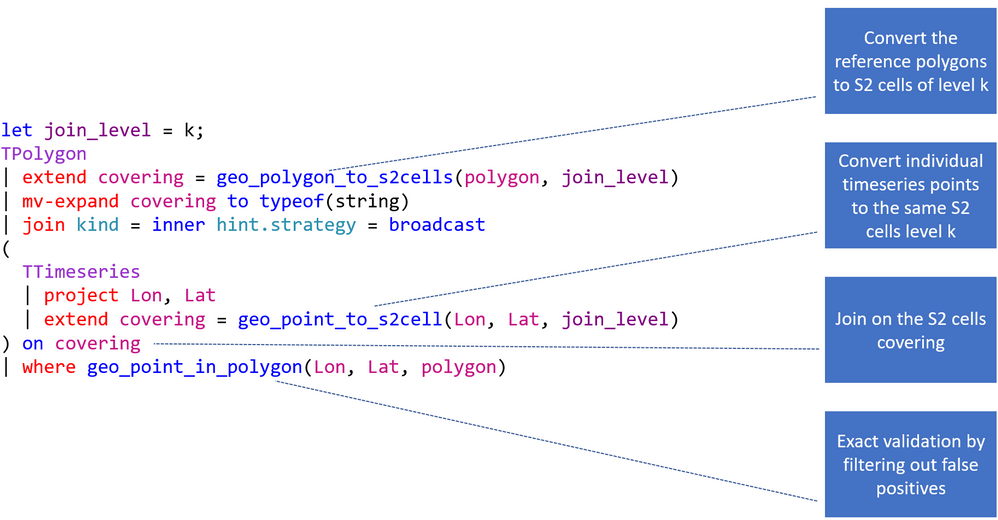
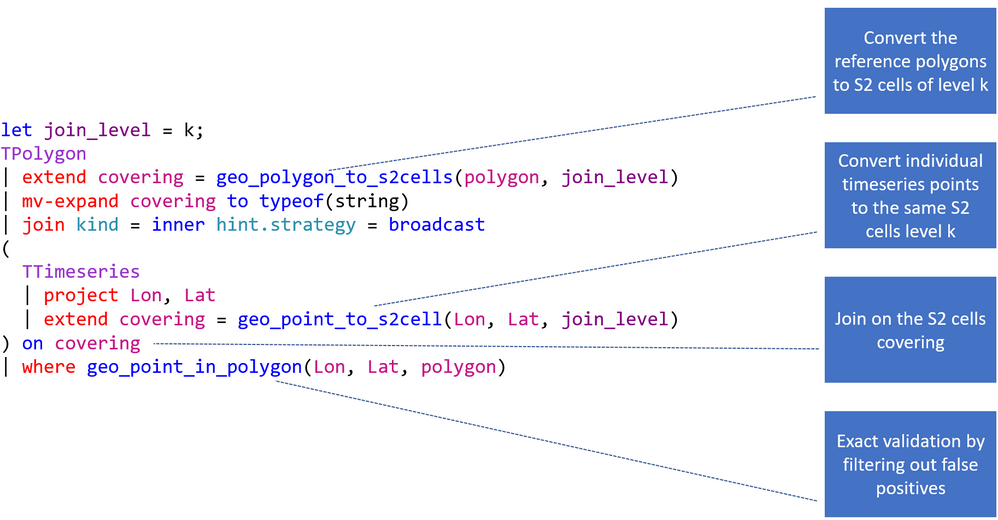
- Converting polygons to S2 cells of level k,
- Converting points to the same S2 cells level k,
- Joining on S2 cells,
- Filtering by geo_point_in_polygon().
The following picture explains the flow of the entire KQL query. First you need to choose the right S2 cell level. It should not be too big and not too small (it is not recommended to use more than 10.000 cells, 65535 are possible in theory). Second you are creating the S2 cell tokens for the static dataset. Next you are joining the polygons with the timeseries based on the tokens. This provides you with a dataset which might still has some false positives (S2 cell overlap) and that is why you need to end the statement with a check if the actual point is in the polygon.
This is a concrete example of a geospatial join based on the StormEvents and US_States table located on the help cluster. It calculates the damage in $ by state.
KQL-Query:
let join_level = 4;
US_States
| project State = features.properties.NAME, polygon = features.geometry
| extend covering = geo_polygon_to_s2cells(polygon, join_level)
| mv-expand covering to typeof(string)
| join kind = inner hint.strategy = broadcast
(
  StormEvents
  | project BeginLon, BeginLat , DamageProperty
  | extend covering = geo_point_to_s2cell(BeginLon, BeginLat, join_level)
) on covering
| where geo_point_in_polygon(BeginLon, BeginLat, polygon)
| summarize CountOfEvents=count(), DamageInDollar=sum(DamageProperty) by tostring(State)
| top 3 by DamageInDollar desc
Result:
| State |
CountOfEvents |
DamageInDollar |
|
Kansas
|
2298
|
533352500
|
|
Texas
|
3889
|
488525500
|
|
Ohio
|
852
|
371630500
|
by Scott Muniz | Sep 18, 2020 | Uncategorized
This article is contributed. See the original author and article here.
My name is Susan Buchanan and today I’d like to discuss some basic troubleshooting for applications hangs using Task Manager, Resource Monitor, and WaitingOn outside of getting an application dump. A special shout out to Leo Fagundes for writing the WaitingOn application.
Troubleshooting application hangs is key to resolution. Getting an application dump will not always be a smoking gun and should be used as a last resort for various reasons as missing symbols for 3rd party applications or waiting on other processes.
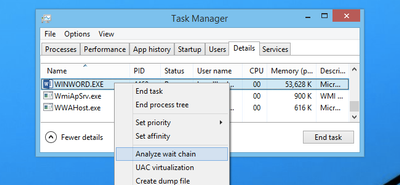
Task Manager & Resource Monitor – Analyze Wait Chain: Beginning with Windows 8, in 2014 we added new options into Task Manager as well as Resource Monitor was the “Analyze Wait Chain” option when you right-click on a task in the Details view. This allows you to see what processes are waiting for a resource that is being used by another process.
WaitingOn.exe a simple tool that helps troubleshoot hung applications and services.
WaitingOn.exe is available at https://github.com/leonardomsft/WaitingOn/releases/download/v1.1/WaitingOn.exe, and besides functional, it’s still experimental. Use it with caution. If you install it on a customer’s machine, please remove it at the end of the troubleshooting session.
WaitingOn.exe displays all the blocked threads from a process and what they are Waiting On. It can also display all blocked threads for all processes in the system.
WaitingOn.exe leverages the Wait Chain Traversal (WCT) API introduced in Windows 2008/Vista. The WCT API is the one behind the “Analyze Wait Chain” functionality in Task Manager and Resource Monitor.
Task Manager
One of the new options added into Task Manager in recent versions was the “Analyze Wait Chain” option when you right-click on a task in the Details view. This allows you to see what processes are waiting for a resource that is being used by another process.
What this means is that if you have an application hanging for some reason, you can analyze the wait chain to see whether it is waiting on something that is in use.
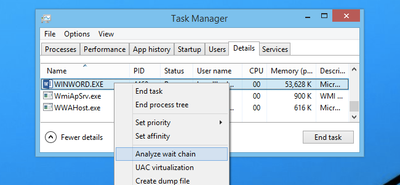
For instance, we printed from Word, and then used this option while the print process was happening to see what would happen. In this case, Word was waiting for splwow64.exe, which handles printing from 32-bit applications.
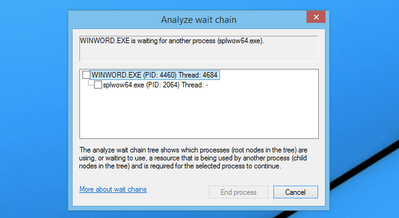
It’s worth noting that because Word is written properly, the GUI interface doesn’t actually hang while it is waiting for the other process.
In this case the process is working correctly and is not hung.
For 3rd party applications, it may show you other processes it is waiting on. If the selected process is waiting for another process, a tree organized by dependency on other processes will be displayed. (See screenshot above).
NOTE: Many system processes depend on other processes and services for normal operation. Both Task Manager and Resource Monitor will display wait chain information for any process.
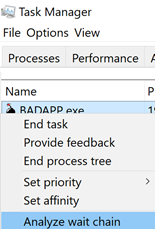
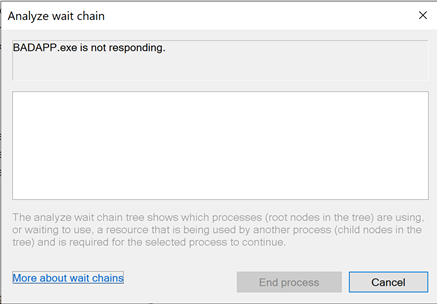
In a second scenario BadApp.exe is not responding

We attempt to Analyze Wait Chain from within Task Manager
If the application is not waiting on anything, it will be empty:
If the application is waiting on something, it will show the process it is waiting for:
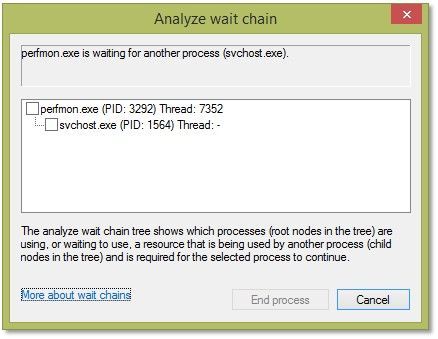
(In this example you can see that Perfmon is waiting on a svchost). We will dig deeper into this in a few moments.
Resource Monitor
Use case example: Badapp
Start Resource Monitor by either typing ResMon from the search box or starting the Resource Monitor icon from the Start Menu.
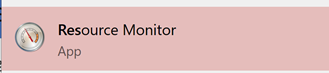
In Resource Monitor we see badapp.exe is not responding.
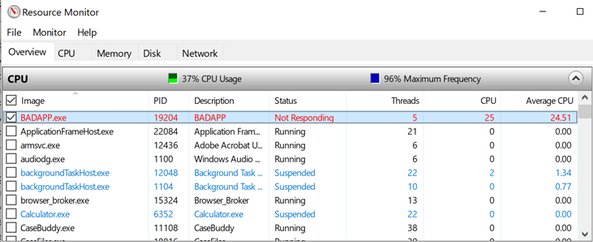
If a process entry in the table is not red, if the process status is Running, and if the program is operating normally, then no action should be required by you.
If a process entry in the table is red, if the process status is not running, and if the program is not operating normally, then you can try killing the process it is waiting on starting with the child processes in red first, then moving to the parent processes.
You can start a “wait chain analysis” from Resource Monitor as well, simply do a right click on the process you want to investigate.
Using WaitingOn.exe & it’s Advantages
WaitingOn.exe has the following advantages over Task Manager and Resource Monitor:
- It displays what type of object is blocking the thread.
- It displays the name of the object blocking the thread.
- It can be scripted.
- It can be run against a computer that you can’t logon (by using PsExec or Remote Powershell).
WaitingOn.exe was built on top of the sample WCF code available in the MSDN documentation.
Use case example: Badapp
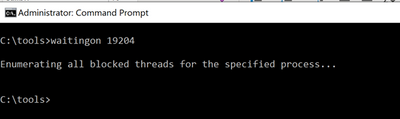
As seen earlier, this process is the parent process that is hung and is not waiting on any other processes thread.
Use case example : Perfmon
In this example, we had a hung perfmon.exe window that was not responding to mouse clicks. Attempting to run the Analyze Wait Chain command from Task Manager produced the following results:
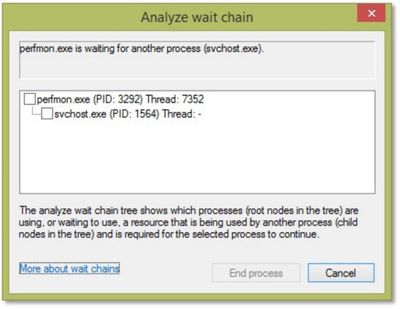
We can see that perfmon.exe (PID 3292) is waiting on an svchost process (PID 1564), but since it hosts many services, there is not much we can do.
<background information>
If you encounter a service host with multiple services, always consider isolating the services. In Windows 10 / WS 2016 we have introduced the change by default (if you have more than 4 GB RAM). To isolate a service, we use the sc.exe command line tool:
sc config <servicename> type= own
Important: there is a space between type= and own which is required!
https://docs.microsoft.com/de-de/windows-server/administration/windows-commands/sc-config
</background information>
Now, running WaitingOn.exe against the hung perfmon.exe revealed that Thread 7352 was blocked by an Alpc called “RPC ControlDNSResolver”, which was found in the svchost.exe handle list:

We then can use Process Explorer to further investigate or kill that object (which might result in unexpected behavior!)
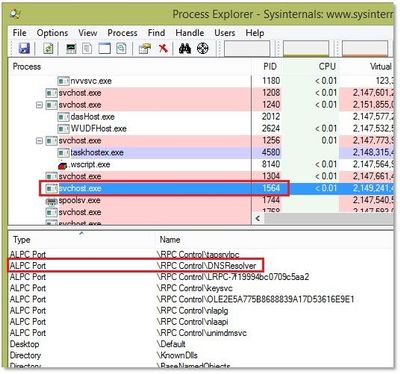
In this case we decided to simply restart the associated service (DNS Cache service) which unfroze the perfmon.exe window.
Additional information:
Links within this article:
by Scott Muniz | Sep 18, 2020 | Uncategorized
This article is contributed. See the original author and article here.

We are just a few days away from our first ever digital Microsoft Ignite. Microsoft 365 Government will be available with in-depth content to pair the all-digital event experience. Specifically, for our government customers we’re diving into two unique conversations about security, compliance, and providing hands on ways you can reduce risk as you accelerate your governments digital transformation.
Today, more than ever, government organizations are facing increasing challenges associated with remote delivery of public services. We have added enhanced regulatory, legal, and forensic investigation capabilities in the government clouds to help address these challenges. We are excited to announce Advanced eDiscovery capabilities in Microsoft 365 Government. Advanced eDiscovery provides a broad set of intelligent capabilities to help customers reduce large volumes of data to a relevant set. For example, an automatically generated query helps filter only for unique content by identifying near duplicates, which can help dramatically reduce data. You can learn more about this and other Advanced eDiscovery capabilities in this demo at aka.ms/GovAdvancedeDiscoveryVideo.
Sessions
For a full list of sessions for Ignite can be found here
Government Sessions
As part of the learning experience we’ve added two on demand sessions specifically targeted to security and compliance professionals and anyone that is looking to learn more about how Microsoft 365 Government can help in protect and navigate the modern digital world. The below sessions will be posted in the Microsoft Tech Community Video Hub launching on Sept 22nd.
- Increase security, reduce risk, and maximize government resources – Steve Faehl US Security CTO; Dean Iacovelli, SLG Director; Bryan Hunt, SLG Director
- Streamline your mission with Microsoft 365 Compliance – Matthew Littleton Microsoft 365 Advanced Compliance Specialist
- Improving the Customer Experience for Government Services– Bobby Chang, Technology Specialist; Brian Duncan, Senior Solutions Architect
Resources
Below is a list of resources you can take a look at now to learn more and bookmark to reference later:
- Register for Microsoft Ignite and start building your event schedule with sessions.
- Access the Virtual Hub for deep-dive technical training for IT pros, developers, and community champions available on September 22nd and get access to interactive guides, community resources and more.
- Check out the Microsoft Tech Community Video Hub launching on September 22nd to view videos and join conversation.
- Follow @Microsoft365 and @MS_Ignite on Twitter to stay up to date with the latest Microsoft 365 and Ignite news.
by Scott Muniz | Sep 18, 2020 | Uncategorized
This article is contributed. See the original author and article here.
This installment is part of a broader series to keep you up to date with the latest features in Azure Sentinel. The installments will be bite-sized to enable you to easily digest the new content.
File hash is a unique value that corresponds to the content of a file computed by using a specified hash algorithm. Using hashes, you can determine if two different files have exactly the same content. Files with identical hash values share identical contents. You can also use hashes to verify if file data has been modified, tampered with, or corrupted. In cybersecurity, one of the most common use cases of file hash is to share Indicators of Compromise, a valuable resource to SOC analysts, security researchers, and threat hunters.
Up until now, different types of entity such as IP, Account, Host, URL have been made available in different areas in Azure Sentinel. We are delighted to announce that FileHash entity has been added to the Analytics and generally available! Let us look at an example of where and how you can start leveraging this great addition today.
Analytic Rule
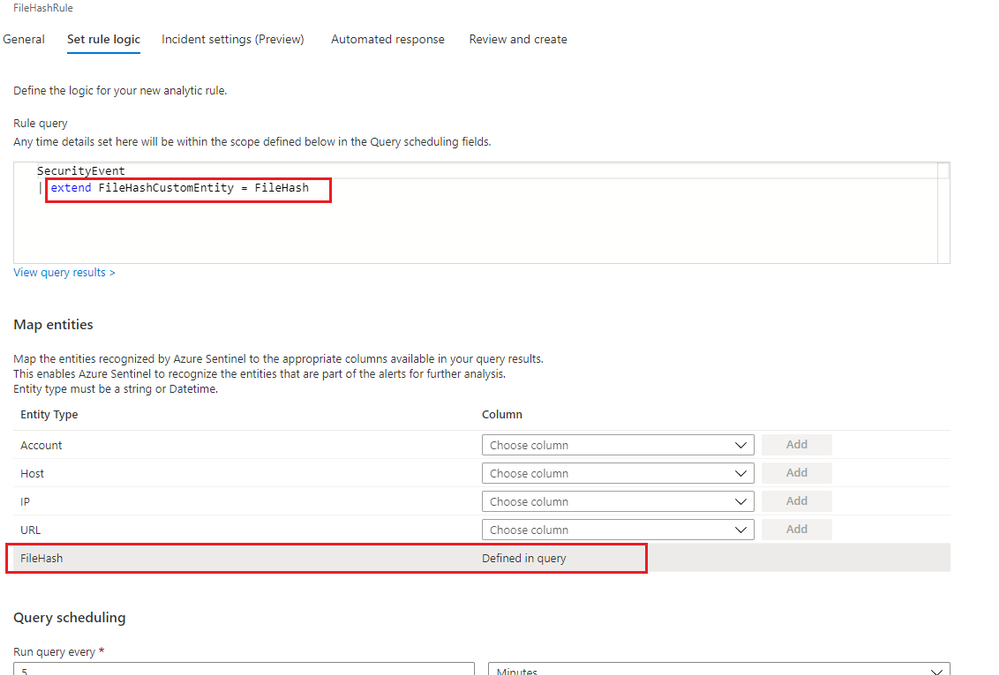
File hash can be used for entity mapping in a scheduled analytic rule. Under Set Rule Logic view of the scheduled analytic rule wizard, you can select any relevant field of a table defined in the rule query and map to the FileHash entity. A new column called FileHashCustomEntity will then be automatically created in the query, and this column name can be customized. If you identify a malicious file on a machine and want to scan your entire environment for existence of that file, you can assign that specific hash value to the FileHashCustomEntity field. This enables Azure Sentinel to recognize this entity that is part of the alerts for further analysis.

Figure1. FileHash in Analytic Rule
Investigation
If Azure Sentinel detects any matches for a known hash value from a detection rule you already set up, incidents with an entity type of FileHash will be created. You can then leverage the full incident view and Investigation graph to analyze the potentially anomalous activity based on this hash information. The Investigation view provides the relevant information including hash value, hash algorithm such as SHA256, MD5, etc., and its friendly name.
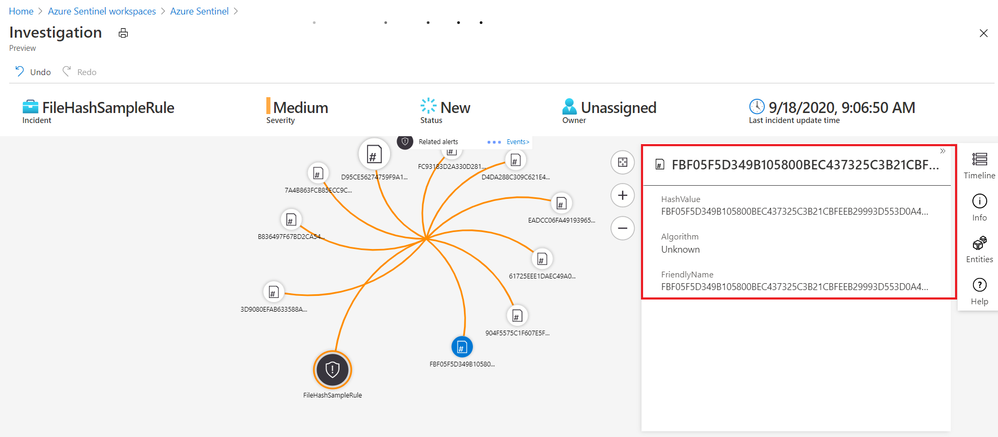
Figure2. FileHash sample in Investigation Graph
Leveraging the power of KQL in Log Analytics, you can also query the matches across your environment to perform further analysis.
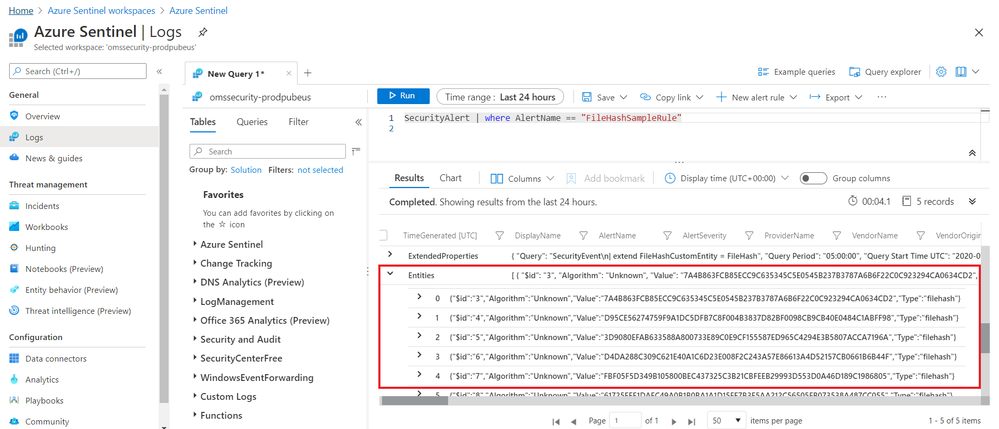
Figure3. FileHash sample in query results
Get started today!
We encourage you to explore the FileHash entity in Azure Sentinel for threat detection and investigation in your environment.
Try it out, and let us know what you think!
You can also contribute new connectors, workbooks, analytics and more in Azure Sentinel. Get started now by joining the Azure Sentinel Threat Hunters GitHub community.


Recent Comments