by Contributed | Sep 30, 2020 | Uncategorized
This article is contributed. See the original author and article here.
Hi everyone!
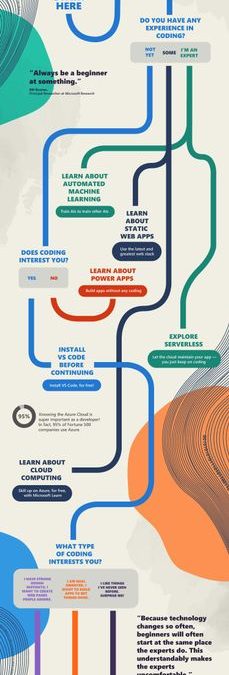
Thanks for joining us for #SkillUpSeptember. We can’t wait to hear what you dove into and what you learned. Just because the month has come to a close, doesn’t mean that your learning stops here. So, we made a fun ‘choose your coding adventure’ infographic so you can easily figure out what you want to learn about next! It will lead you to additional learning resources on topics such as building apps without coding, exploring serverless, creating a simple website, and so much more!
Once you decide what you want to become an expert on next, make sure to check out all of the amazing free tutorials, videos, and online coding environments available on Microsoft Learn and Microsoft Docs.
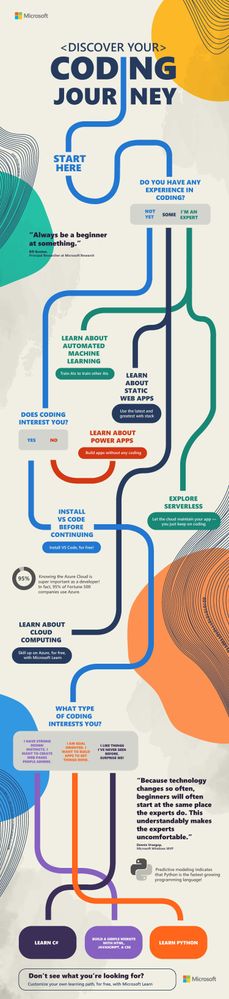 Discover your coding journey infographic
You can download the full resolution infographic (.pdf) below.
Please post what you learned this month in the comments below or share on Twitter using the #SkillUpSeptember hashtag!
Download the infographic here ?
by Contributed | Sep 30, 2020 | Uncategorized
This article is contributed. See the original author and article here.
Today, I worked on a service request that our customer has an internal process that every night they transferred data from table (iot_table1) to another table (iot_table2) based on several filters. Despite that the number of rows of the source table is increasing every day, this process is taking all the transaction log resource due to amount of data that this process is transferring.
In this type of situation, our best recomendation is to use Business Critical o Premium because the IO capacity is greater if you are using General Purpose or Standard. But, our customer, wants to find an alternative to stay in the Standard/General Purpose without moving to Premium/Business Critical in order to reduce the cost.
Let’s assume that our customer has two tables: IOT_Table1 (source) and IOT_Table2 (destination).
CREATE TABLE [dbo].[iot_table1](
	[id] [int] NOT NULL,
	[text] [nchar](10) NULL,
	[Date] [datetime] NULL,
 CONSTRAINT [PK_iot_table1] PRIMARY KEY CLUSTERED
(
	[id] ASC
)WITH (STATISTICS_NORECOMPUTE = OFF, IGNORE_DUP_KEY = OFF) ON [PRIMARY]
) ON [PRIMARY]
GO
CREATE TABLE [dbo].[iot_table2](
	[id] [int] NOT NULL,
	[text] [nchar](10) NULL,
 CONSTRAINT [PK_iot_table2] PRIMARY KEY CLUSTERED
(
	[id] ASC
)WITH (STATISTICS_NORECOMPUTE = OFF, IGNORE_DUP_KEY = OFF) ON [PRIMARY]
) ON [PRIMARY]
GO
We suggested different workarounds to prevent the execution of this process, for example, using an incremental process using Azure Data Factory or the following alternatives using SQL Server Engine:
- Alternative 1) Create a trigger that for every row that you are inserting in the table iot_table1 will be transferred to iot_table2. I’m sharing with you an example about it:
CREATE TRIGGER [dbo].[inserted]
   ON [dbo].[iot_table1]
   AFTER INSERT
AS
BEGIN
    SET NOCOUNT ON;
    INSERT INTO IOT_table2(ID,[TEXT]) SELECT ID,[TEXT] from inserted
END
- Alternative 2) Reduce the amount of numbers of rows to be transferred, for example, creating a table per day.
CREATE TRIGGER [dbo].[inserted]
   ON [dbo].[iot_table1]
   AFTER INSERT
AS
BEGIN
       DECLARE @DAY AS VARCHAR(2)
       DECLARE @MONTH AS VARCHAR(2)
       DECLARE @YEAR AS VARCHAR(4)
       SET NOCOUNT ON;
       SET @DAY = CONVERT(VARCHAR(2),DAY(GETDATE()))
       SET @MONTH = CONVERT(VARCHAR(2),MONTH(GETDATE()))
       SET @YEAR = CONVERT(VARCHAR(4),YEAR(GETDATE()))
       IF @MONTH=9 AND @DAY =25 AND @YEAR=2020
       INSERT INTO IOT_table2_2020_09_25(ID,[TEXT]) SELECT ID,[TEXT] from inserted
    IF @MONTH=9 AND @DAY =26 AND @YEAR=2020
       INSERT INTO IOT_table2_2020_09_26(ID,[TEXT]) SELECT ID,[TEXT] from inserted
    IF @MONTH=9 AND @DAY =27 AND @YEAR=2020
       INSERT INTO IOT_table2_2020_09_27(ID,[TEXT]) SELECT ID,[TEXT] from inserted
    IF @MONTH=9 AND @DAY =28 AND @YEAR=2020
       INSERT INTO IOT_table2_2020_09_28(ID,[TEXT]) SELECT ID,[TEXT] from inserted
    IF @MONTH=9 AND @DAY =29 AND @YEAR=2020
       INSERT INTO IOT_table2_2020_09_29(ID,[TEXT]) SELECT ID,[TEXT] from inserted
END
- You could create an indexed view that the definition, as example, could be:
CREATE OR ALTER VIEW Data_Per_Day_29_09_2020
WITH SCHEMABINDING
AS
SELECT ID, [TEXT] from dbo.iot_table1 where DAY([DATE])=29 and MONTH([DATE])=9 AND YEAR([DATE])=2020

CREATE UNIQUE CLUSTERED Index Data_Per_Day_29_09_2020_X1 ON Data_Per_Day_29_09_2020(ID)
- When you have an indexed view the data will be automatically saved as materialized data, so, in every row that you added in the table depending on the value of the field DATE you are going to have a materialized view with data. If you run the query using this view SELECT * FROM Data_Per_Day_29_09_2020 WITH (NOEXPAND) the data that you are going to have is the materialized data and will be not retrieved from the table. If you use SELECT * FROM Data_Per_Day_29_09_2020 the data will be retrieved from the table.
Enjoy!!

by Contributed | Sep 30, 2020 | Uncategorized
This article is contributed. See the original author and article here.
On the 19th October at 1PM PDT, 9PM BST, Marko Paloski, a Microsoft Learn Student Ambassador from Ss. Cyril and Methodius University in Skopje, North Macedonia, and Jim Bennett, a Cloud Advocate from Microsoft will livestream an in-depth walkthrough of how to run cognitive services on IoT Edge on Learn TV.
The content will be based on a module on Microsoft Learn, our hands-on, self guided learning platform, and you can follow along at aka.ms/LearnLive/RunCognitiveServicesIoTEdge.
You can follow along with us live on October 19, or join the Microsoft IoT Cloud Advocates in our IoT TechCommunity throughout October to ask your questions about IoT Edge development and Cognitive Services containers.
Meet the presenters
 Marko Paloski
Microsoft Learn Student Ambassador, Ss. Cyril and Methodius University

Jim Bennett
Senior Academic Cloud Advocate, Microsoft
Session details
Cognitive Services brings AI within reach of every developer – without requiring machine-learning expertise. All it takes is an API call to embed the ability to see, hear, speak, search, understand and accelerate decision-making into your apps. As well as accessing these cognitive services via the cloud, you can also now download containers that run these services, and deploy them to devices via IoT Edge, allowing them to be accessed offline or in very low bandwidth scenarios..
In this Learn TV Live session, Marko and Jim will learn how to take a language detection cognitive service and deploy it to an IoT Edge device.
Ready to go
Our Livestream will be shown live on this page and at Microsoft Learn TV on Monday 19th October 2020.
This is a Global event and can be viewed LIVE at these times:
USA 1pm PDT
USA 4pm EDT
UK 9pm BST
EU 10pm CEST
India 1.30am (20th October) IST
by Contributed | Sep 30, 2020 | Uncategorized
This article is contributed. See the original author and article here.
Today, I worked on a service request when our customer wants to have an error file in case that any issue may happen running a bulk insert process in Azure SQL Database.
Unfortunately, every time that our customer execute the bulk insert process they faced the following error message:
Msg 4861, Level 16, State 1, Line 19
Cannot bulk load because the file “Error.Txt” could not be opened. Operating system error code 80(The file exists.).
Msg 4861, Level 16, State 1, Line 19
Cannot bulk load because the file “Error.Txt.Error.Txt” could not be opened. Operating system error code 80(The file exists.).
I reproduced the issue and I found the reason why our customer faced this error:
First of all, let’s try to create the example code:
CREATE MASTER KEY ENCRYPTION BY PASSWORD = 'Password123!!!!'
CREATE DATABASE SCOPED CREDENTIAL [JM_Scope] WITH IDENTITY = 'SHARED ACCESS SIGNATURE', SECRET = 'sv=2019-12-12&ss=b&srt=sco&sp=rwdlacx&se=2020-10-28T23:38:22Z&st=2020-09-29T14:38:22Z&spr=https&sig=24TJMAf1hOzE2DDVqw1QRs....'
CREATE EXTERNAL DATA SOURCE [JM_EXT_DSource] WITH ( TYPE = BLOB_STORAGE, LOCATION = 'https://myblobstorage.blob.core.windows.net/jmread', CREDENTIAL = [JM_Scope] );

CREATE EXTERNAL DATA SOURCE [JM_EXT_DSource_Error] WITH ( TYPE = BLOB_STORAGE, LOCATION = 'https://myblobstorage.blob.core.windows.net/jmread/error', CREDENTIAL = [JM_Scope] );

CREATE TABLE Table1 (ID INT)

BULK INSERT [dbo].[Table1]
FROM 'filetoread.txt'
WITH (DATA_SOURCE = 'JM_EXT_DSource'
, FIELDTERMINATOR = 't'
, ERRORFILE = 'error.Txt'
, ERRORFILE_DATA_SOURCE = 'JM_EXT_DSource_Error')
I modified the filetoread.txt with an incorrect values as follows in order to raise a conversion issue.
1
2
3
IK
The first time that I executed the process everything worked as expected and I got an error:
Msg 4864, Level 16, State 1, Line 19
Bulk load data conversion error (type mismatch or invalid character for the specified codepage) for row 4, column 1 (ID).
Completion time: 2020-10-01T00:42:10.9217117+02:00
As result of this issue I got two files:
-
Error.Txt that contains the data lines that are causing the error.
-
Error.Txt.Error.Txt that contains the number line and the error message with all details.
The second time that I executed the process I got another error message:
Msg 4861, Level 16, State 1, Line 19
Cannot bulk load because the file “Error.Txt” could not be opened. Operating system error code 80(The file exists.).
Msg 4861, Level 16, State 1, Line 19
Cannot bulk load because the file “Error.Txt.Error.Txt” could not be opened. Operating system error code 80(The file exists.).
This error is caused because if the ErrorFile exist in the destination folder there is not possible to overwrite and you need to delete the file. You have this information in this doc : “The error file is created when the command is executed. An error occurs if the file already exists. Additionally, a control file that has the extension .ERROR.txt is created. This references each row in the error file and provides error diagnostics. As soon as the errors have been corrected, the data can be loaded.“
Enjoy!
by Contributed | Sep 30, 2020 | Azure, Technology, Uncategorized
This article is contributed. See the original author and article here.
Hello Everyone!
We are exploring to provide a seamless integration with your EDU systems! If you currently use any Learning Management System (LMS), we would love to talk to you.
Please complete this 3 minute survey so we can better understand your context. Don’t forget to leave your email at the end of the survey (optional) if you want to be contacted by us to talk about the new features.
https://microsoft.qualtrics.com/jfe/form/SV_eu6fjkSPOHV4Ld3
Your feedback will be extremely helpful for us and will influence future improvements to the service.
Thank you,
Sagar Lankala
by Contributed | Sep 30, 2020 | Azure, Technology, Uncategorized
This article is contributed. See the original author and article here.
Nested ESXi is very useful for multiple reasons, can’t even begin to guess how many times I’ve done this and been able to demo something, test something, etc.. But keep in mind this is not supported by VMware, see this VMware KB article for the specific details. The supportability from VMware aside, nested ESXi works just fine and you can do this on Azure VMware Solution with relative ease… doesn’t get much better!! So let’s begin.
Segment Profile Creation
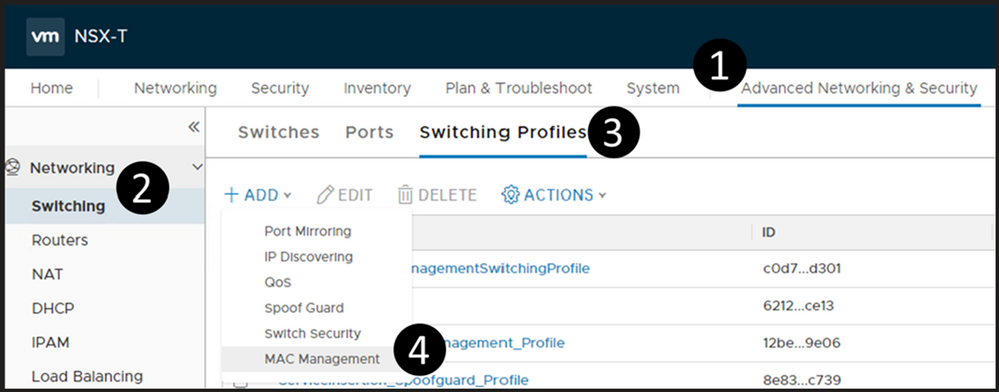
Log into your NSX manager in Azure VMware Solution and navigate your way to MAC Management as shown below.
Create a new MAC Management profile. Make sure you configure it as outlined below. Of course, you can choose whatever name you would like.
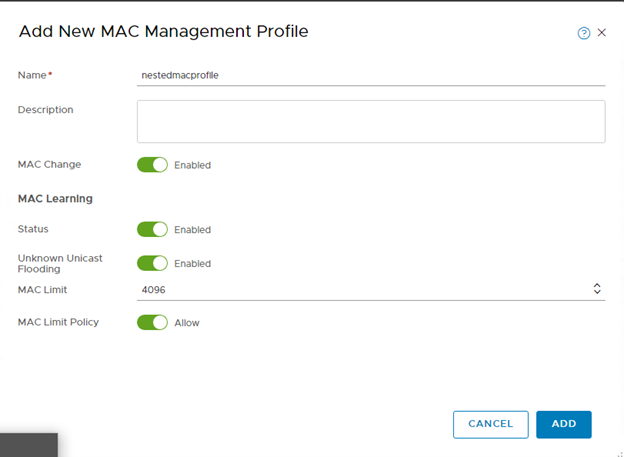
Deploy a Segment
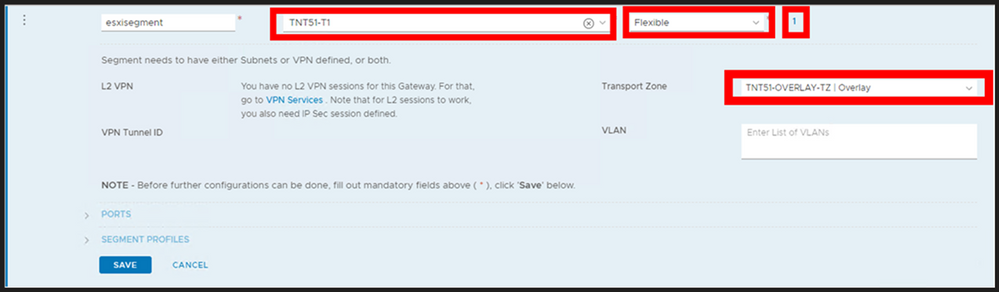
The segment will be the network segment where you will have your ESXi vNIC(s) attached. You can have one segment or multiple, the critical thing here is for every segment created, create it as shown below.
Do steps 1-3 (DO NOT DO STEP 4 YET), then fill in as shown here, name it whatever you like. DO NOT Save.

Now, select Set Subnets (#4 from above)
Define whatever subnet you would like, you should end up with a screen as shown below. Then Apply.
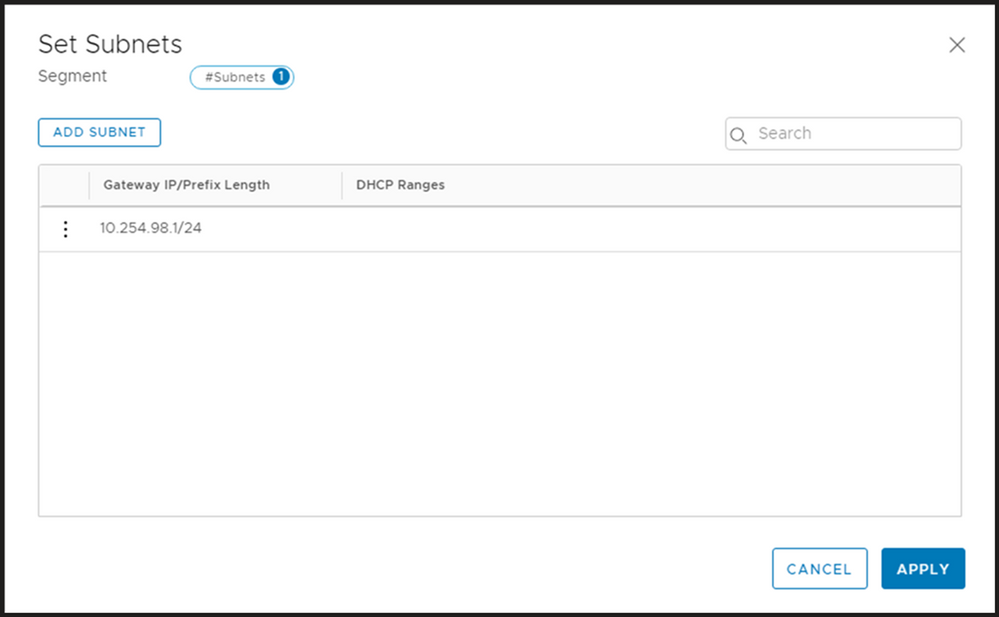
Your screen should look like the picture below, if it does, then choose Save.
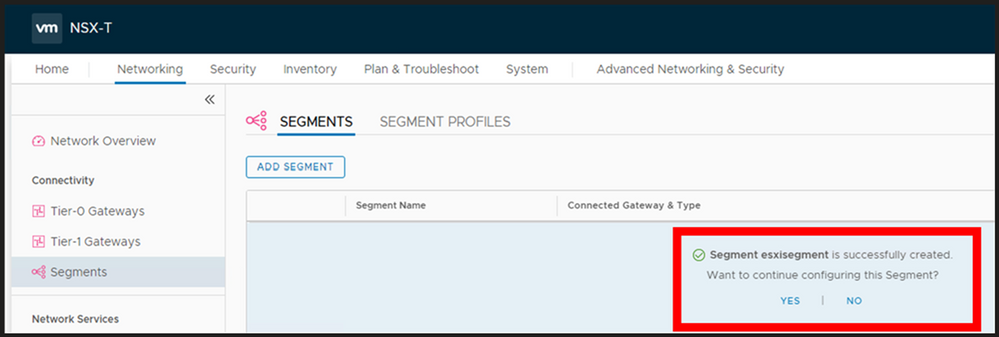
You should now be prompted as shown below, choose YES.
Now expand the segment profile section and change the MAC Discovery segment profile to the one which you just created and Save.
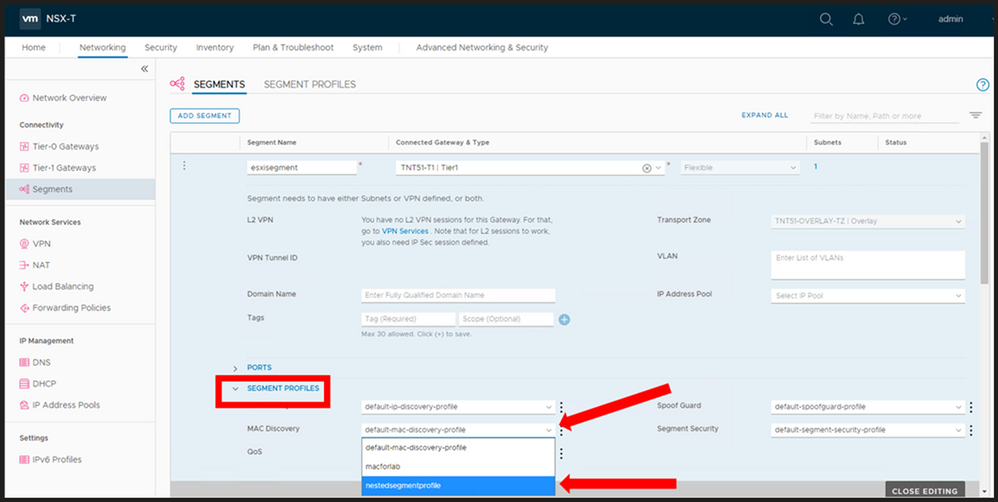
At this point you now have a NSX Segment (subnet) you can start to attach your ESXi hosts vNIC(s) to. Again, you may choose to deploy multiple segments, but this decision will be driven by your needs.
Nested ESXi Disk Requirement
In Azure VMware Solution I have found that you need to make your disk set to IDE. Any virtual hosts which get deployed needs to have their virtual device node changed to IDE.
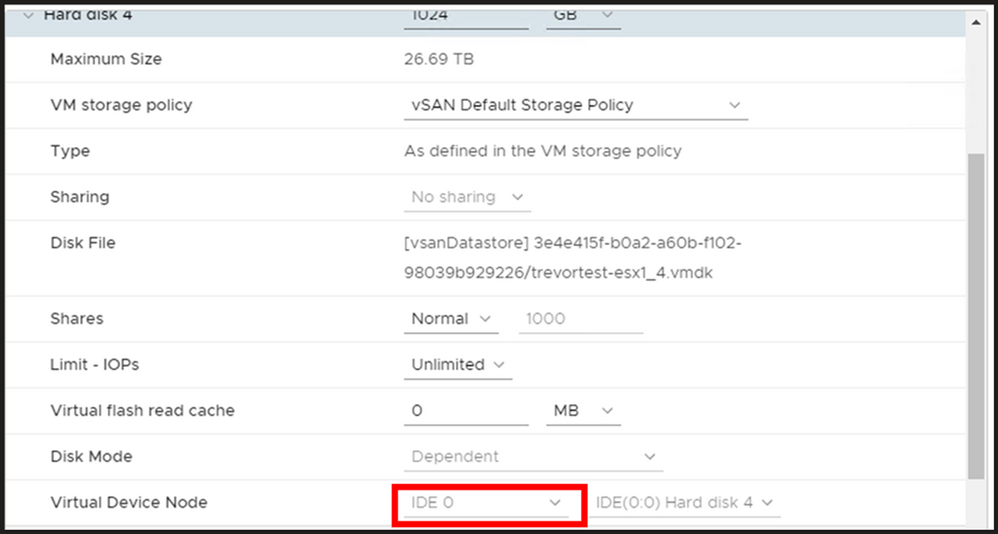
by Contributed | Sep 30, 2020 | Uncategorized
This article is contributed. See the original author and article here.
Our team recently updated the items on the Microsoft 365 Public Roadmap. You can see our upcoming features and when those features will be available!
You can let us know what you think about these new features on Microsoft UserVoice. Join an existing thread or create a new one to tell us how to make Project better.
We also love feedback on existing features! If you have feedback, submit it by using the ‘Feedback’ button in Project for the web. Make sure to include your email so we can contact you directly with any follow up questions or comments. We also monitor the comments on all blog posts, so let us know what you think about this or other articles!
New Features:
-
Task Custom Fields: Store custom information about your projects efficiently by adding custom fields! For more information, check out the blog post on this feature.
-
Dynamics 365 Project Operations: Our team partnered with Dynamics to help launch Project Operations, a new application that has everything you need to run your service business. Check out our new features and capabilities released as part of wave 2 on October 1st. For more information on this product, check out the Project Operations overview page
-
Group by Assigned to: You can organize your tasks by assignee in the Board view. Get insight into what each person is working on! This feature should now be available to all Project users.
-
Self-Service Onboarding: Customers can make a self-service purchase online. New users can try out Project and other Microsoft solutions on their own! Check out the FAQ page for this feature to learn more.
Upcoming Features:
-
Project & Roadmap in Microsoft Teams: Starting in October, you’ll be able to add a project or roadmap as a tab in Teams. Chat with your teammates while viewing and updating your work.
-
Export to Excel: Export your project grid into an Excel spreadsheet. Share this information with colleagues and analyze Project data using the power of Excel!
-
Share projects with groups you don’t own: You can see all your added groups when you add a group to your project. Easily share your work with all the important people without creating new groups.
Answers to top questions:
Q: I was not able to attend Ignite this year, but I still want to watch some sessions! How can I do that?
Microsoft has several recorded sessions from Ignite that you can watch. Here are links to some of our favorites:
Also, we have some post-Ignite opportunities for customer connection. These conversations will run through October and cover a range of topics. You can find more information on these expert connects, including the list of events & the sign up page, on this site. The sign up form for these events can be found here.
by Contributed | Sep 30, 2020 | Azure, Technology, Uncategorized
This article is contributed. See the original author and article here.
Microsoft Azure HPC Cache services include our unique aggregated namespace that simplifies the management of Azure Blob and/or on-premises storage . The aggregated namespace lets you present your backend storage as a single directory structure. Consolidating under a single virtual namespace helps reduce complexity for clients—they see all storage resources as a single file system.
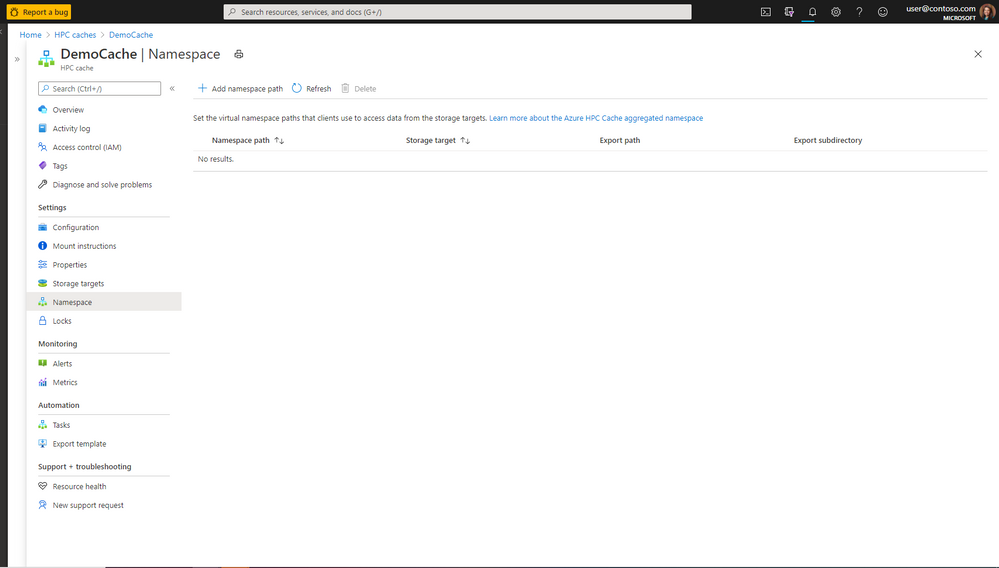
Just as the virtual namespace simplifies data access, our new HPC Cache namespace page makes it easier than ever to add and manage the client-facing file paths. From a single page, you can now set the client-facing paths for all storage targets, visualize the entire aggregated namespace, and administer changes. By consolidating namespace processes and details, this new page provides a seamless experience without any confusing or time-consuming page toggling.
The screenshots below show the functions and information directly accessible from the new namespace page. (From the Azure.com portal, access the HPC Cache page, then click on the Namespace tab.)
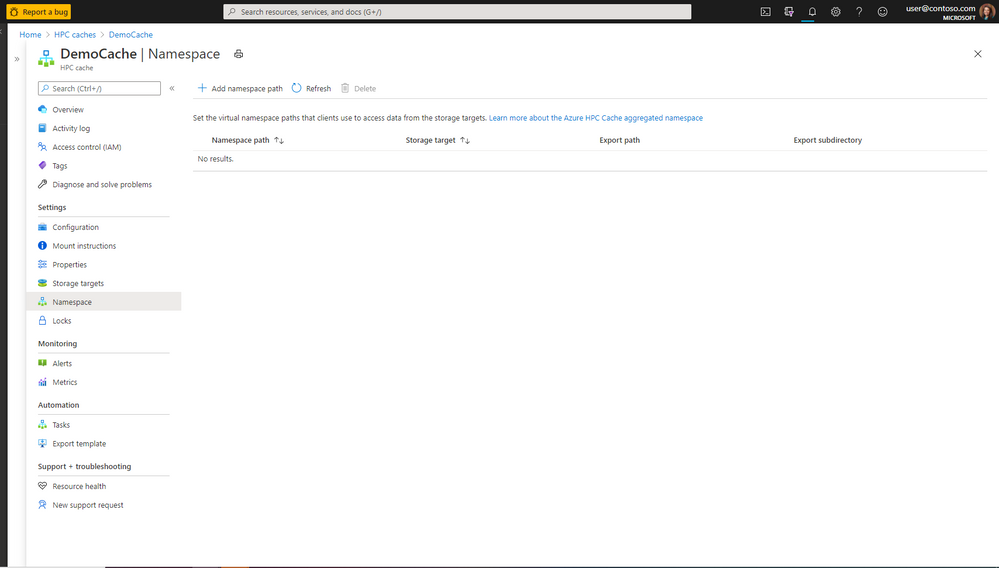
Figure 1. Create, view, and manage an aggregated namespace for multiple backend storage systems—quickly and easily from a single page.
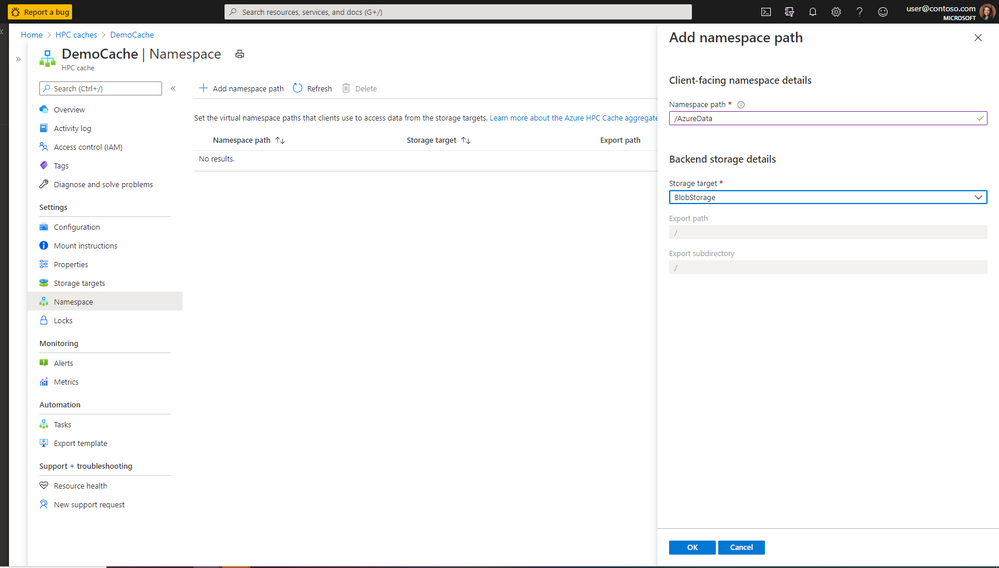
Figure 2. Use the same page to add new client-facing namespace and backend storage details.
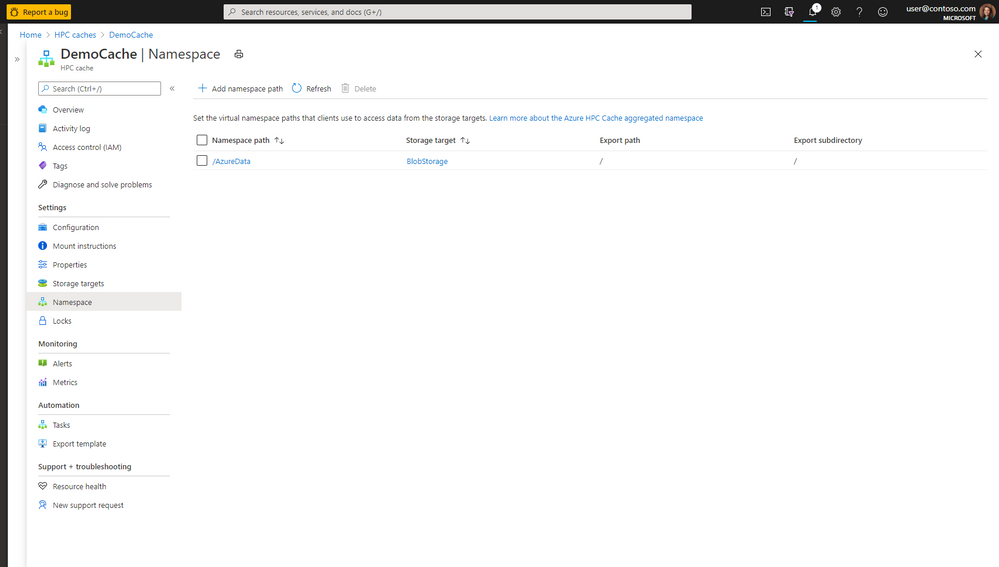
Figure 3. View all the namespace paths and storage-target details without toggling between pages.
If you’d like to see how the layout of the new page works, check out our documentation page to learn how administrators can easily create storage targets, set namespace paths, and manage the virtual namespace.
As always, we appreciate your comments. If you need additional information about Azure HPC Cache services, you can visit our github page or message our team through the tech community. Your feedback helps our team continually enhance HPC Cache services to provide the best-possible user experience and functionality.
Resources
Follow the links below for additional information about Azure HPC Cache and the aggregated namespace functionality.
https://azure.microsoft.com/en-us/services/hpc-cache/
https://docs.microsoft.com/en-us/azure/hpc-cache/hpc-cache-namespace
by Contributed | Sep 30, 2020 | Azure, Technology, Uncategorized
This article is contributed. See the original author and article here.
For some years Microsoft Azure has been offering several different deployment and management choices for the SQL Server engine hosted on Azure. With the release of the Azure Arc support for SQL Server, the range of different options has grown even further. This article should help you make sense of the different choices and assist in your decision-making process.
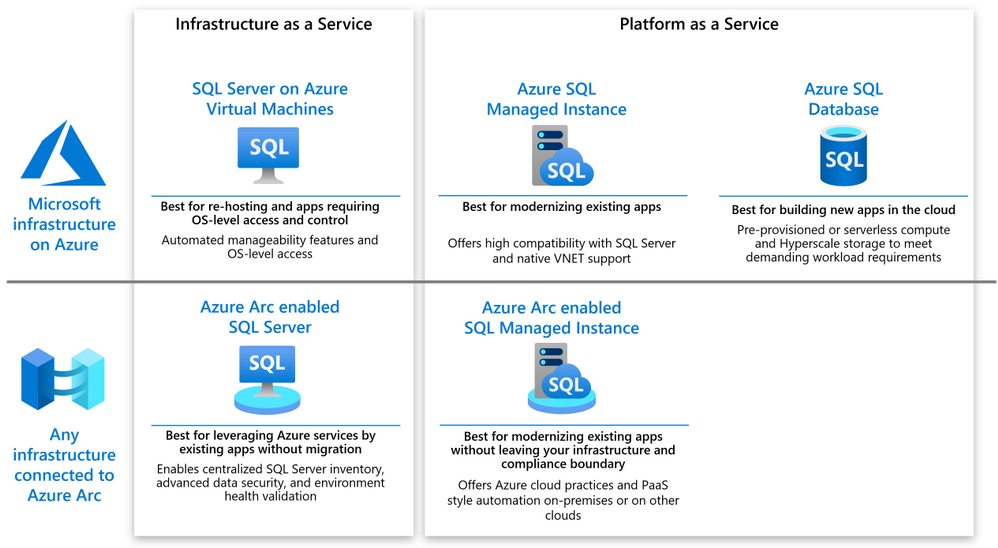
The following diagram shows a high level map of the options available on Azure or via Azure Arc.

As you can see, both on-Azure and off-Azure options offer you a choice between IaaS and PaaS. The IaaS category targets the applications that cannot be changed because of the SQL version dependency, ISV certification or simply because the lack of in-house expertise to modernize. The PaaS category targets the applications that will benefit from modernization by leveraging the latest SQL features, gaining a better SLA and reducing the management complexity.
SQL Server on Azure VM
SQL Server on Azure VM allows you to run SQL Server inside a fully managed virtual machine (VM) in Azure. It is best for lift-and-shift ready applications that would benefit from re-hosting to the cloud without any changes. You will maintain the full administrative control over the application’s lifecycle, the database engine and the underlying OS. You can choose when to start maintenance/patching, change the recovery model to simple or bulk-logged, pause or start the service when needed, and you can fully customize the SQL Server database engine. This additional control involves the added responsibility to manage the virtual machine.
Azure Arc enabled SQL Server
Azure Arc enabled SQL Server (preview) is designed for the SQL Servers running in your own infrastructure or hosted on another public cloud. It allows you to connect the SQL Servers to Azure and leverage the Azure services for the benefit of these applications. The connection and registration with Azure does not impact the SQL Server itself, does not require any data migration and causes no downtime. At present, it offers the following benefits:
- You can manage your entire global inventory of the SQL Servers using Azure Portal as a central management dashboard.
- You can better protect the applications using the advanced security services from Azure Security Center and Azure Sentinel.
- You can regularly validate the health of your SQL Server environment using the On-demand SQL Assessment service, remediate risks and improve performance.
Azure SQL Database
Azure SQL Database is a relational database-as-a-service (DBaaS) hosted in Azure. It is optimized for building modern cloud applications using a fully managed SQL Server database engine, based on the same relational database engine found in the latest stable Enterprise Edition of SQL Server. SQL Database has two deployment options built on standardized hardware and software that is owned, hosted, and maintained by Microsoft.
Unlike SQL Server, it offers limited control over the database engine and the underlying OS, and is optimized for automatic management of the scale up or out operations based on the current demand and bills for the resource consumption on a pay-as-you-go basis. SQL Database has some additional features that are not available in SQL Server, such as built-in high availability, intelligence, and management.
Azure SQL Database offers the following deployment options:
- As a single database with its own set of resources managed via a logical SQL server. A single database is similar to a contained database in SQL Server. This option is optimized for modern cloud-born applications that require a fixed set of compute and storage resources. Hyperscale and serverless options are available.
- An elastic pool, which is a collection of databases with a shared set of resources managed via a logical SQL server. Single databases can be moved into and out of an elastic pool. This option is optimized for modern cloud-born applications using the multi-tenant SaaS application pattern. Elastic pools provide a cost-effective solution for managing the performance of multiple databases that have variable usage patterns.
Azure SQL Managed Instance
Azure SQL Managed Instance is designed for new applications or existing on-premises applications that want migrate to the cloud with minimal changes to use the latest stable SQL Server features. This option provides all of the PaaS benefits of Azure SQL Database but adds capabilities such as native virtual network and near 100% compatibility with on-premises SQL Server. Instances of SQL Managed Instance provide full access to the database engine and feature compatibility for migrating SQL Servers but do not offer admin access to the underlying OS. Azure SQL Managed Instance offers a 99.99% availability SLA.
Azure Arc enabled SQL Managed Instance
Azure Arc enabled SQL Managed Instance is designed to provide the existing SQL server applications an option to migrate to the latest version of the SQL Server engine and gain the PaaS style built in management capabilities without moving outside of the existing infrastructure. The latter allows the customers to maintain the data sovereignty and meet other compliance criteria. This is achieved by leveraging the Kubernetes platform with Azure data services, which can be deployed on any infrastructure.
At present, it offers the following benefits:
- You can easily create, remove, scale up or scale down a SQL Managed Instance within minutes.
- You can setup periodic usage data uploads to ensure that Azure bills you monthly for the SQL Server license based on the actual usage of the managed instances (pay-as-you-go). You can do it even you are running the applications in an air-gapped environment.
- You can leverage the capabilities of latest version of SQL Server that is automatically kept up to date by the platform. No need to manage upgrades, updates or patches.
- Built-in management services for monitoring, backup/restore, and high availability.
Next steps
For related material, see the following articles:
by Contributed | Sep 30, 2020 | Uncategorized
This article is contributed. See the original author and article here.
By Anthony Salcito, Vice President, Education
During Microsoft’s recent global skills announcements, it was shared that over 149M new jobs will be created in technology over the next 5 years. While this shows the immediate need to upskill and reskill on technology to fuel economic growth and talent pipeline, the question remains – how we can ensure a more sustainable solution for many years to come?
At Microsoft, our mission is to empower every student on the planet to achieve more. Connected to this mission, Microsoft continues to work hard to spark student interest in STEM and Computer Science and prepare them for a path where technology is a core subject area connected to success in every role in the future. That’s why I’m excited to share today’s launch of Imagine Cup Junior AI for Good Challenge 2021. This is the second year we’ve run this challenge for secondary students, inviting young and talented minds to come up with ideas to make their world a better place with the power of Artificial Intelligence (AI). In our inaugural year we celebrated 9 winning teams from the hundreds of students across 23 countries who took part, and I was amazed by the imagination of students, the quality of their ideas and submissions.
Imagine Cup Junior AI for Good Challenge brings new skills to students across all subject areas regardless of their experience in technology. No longer is technology a separate discipline but rather a foundational capability that will enhance every students’ future opportunities, no matter what job role they pursue in their future. Students aged 13 to 18 can take part, individually or in teams up to 6, by developing an AI concept based on Microsoft’s AI for Good initiatives. These include AI for Humanitarian Action, AI for Earth, AI for Cultural Heritage, AI for Accessibility and new to our 2021 challenge, AI for Health.
While it’s been a challenging year with remote and blended learning becoming a part of many school days for students, we have introduced a number of new elements to Imagine Cup Junior AI for Good Challenge to increase the opportunity for all students to participate including webinars, hackathons and a beginners kit. To get started, educators need to register at https://.imaginecup.com/junior which will provide access to the Imagine Cup Junior resource kit which includes:
- Imagine Cup Junior for Beginners Kit – five 45-minute lessons that will prepare students for their challenge submission
- Educator guides, student guides, and slides for the following modules for those who would like to take learning further:
- Imagine Cup Junior for Beginners
- Fundamentals of AI
- Machine Learning
- Applications of AI in real life
- Deep learning and neural networks
- AI for Good
- Build your Project in a Day hackathon kit with videos from members of Microsoft’s Education, Artificial Intelligence and Cloud teams. This can be used in class to inspire students and coach them on how to get started, and perhaps even spark excitement to one day work in the field of AI
- Engagement plans for educators on how they can embed the learning within their curriculum
- Access to a series of AI webinars throughout the challenge and regional virtual hackathons for students to build out their projects live
Plus lots more, including challenges using Azure, Minecraft: Education Edition, and social kits and templates to celebrate taking part.
We are also empowering parents and guardians to register and submit on behalf of students in the event that learning from home continues, and the webinar and hackathon series will provide inspirational and exciting learning opportunities for students both at home or in school.
Registration opens today and will close May 21 2021. To ensure the privacy of students, all submissions must be made by educators/instructors/parents/guardians on behalf of their students. While we can’t wait to see ALL the amazing ideas of students around the world, Microsoft will be proud to recognize the top ten ideas globally and recognize their achievement with an Imagine Cup Junior trophy.
Challenge rules and regulations can be found here.
It is never too early to get started, and we hope by cultivating student creativity and passion for technology it will spark interest in and support the development of careers at the cutting edge of technology.
Register today at https://imaginecup.com/junior and empower students to truly change the world. I can’t wait to see their innovation and ideas to help positively change the world!


Recent Comments