by Contributed | Oct 6, 2020 | Uncategorized
This article is contributed. See the original author and article here.
Azure Synapse workspace is easy to create service that enables you to analyze data on Azure Data Lake storage, Azure CosmosDB, and other data sources that contain valuable data. You don’t need to pre-provision compute, create databases or ETL your data in order to start analyzing information. You just need to provision very lightweight workspace that included serverless SQL query endpoint and start querying your data on Data Lake.
In this article you will discover the easiest way to get started with Synapse workspace and run your first query on Data Lake.
Deploy workspace (ETA <5min)
Azure Synapse workspace can be deployed using portal , Azure CLI, and Deployment Templates. The easiest way to create new workspace is to use this Deploy to Azure button that will show you preconfigured form where you can send your deployment request:

You will see a form where you need to enter some basic info like subscription, region, workspace name and username/password. Probably you will need less than a minute to fill-in and submit the form
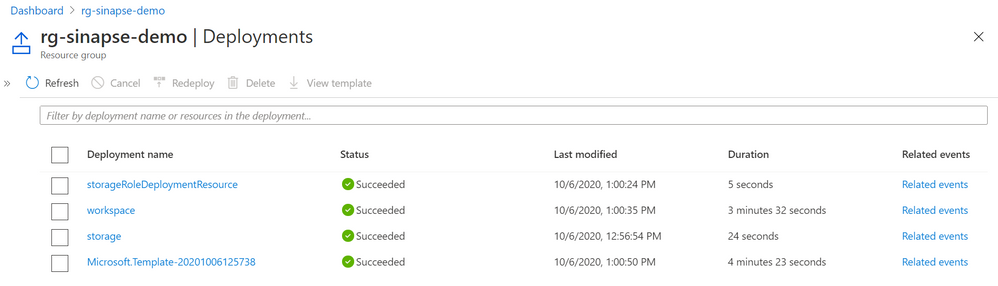
Once you enter all data this template will deploy Azure Data Lake storage account and Synapse workspace. The total deployment time for template and breakdown for individual components is shown in the following figure (taken from one of my experiments):
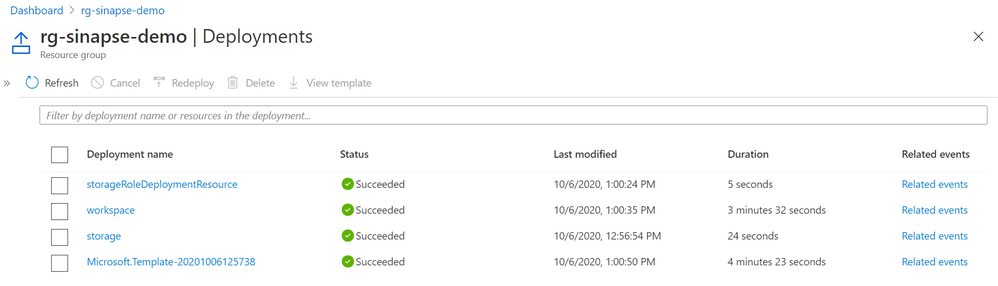
In total you need less than 4.5min to create your fully functional workspace.
Run the query
Once you provision the resource you will see the button that will lead you to resource group and Synapse workspace on Azure Portal. Now you need to Launch Synapse Studio by following the link on top right corner:
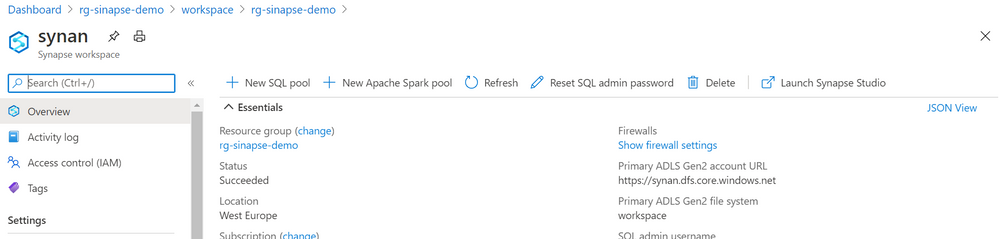
When you open your Synapse Studio just follow New -> SQL query option and paste the following query:
select top 10 *
from openrowset(bulk 'https://pandemicdatalake.blob.core.windows.net/public/curated/covid-19/ecdc_cases/latest/ecdc_cases.parquet',
format='parquet') as a
This query uses publicly available parquet file on that contains ECDC data about COVID cases recorded worldwide. If you run this query, in a couple of seconds you will get the results from this PARQUET file.
Yu can easily create more complex queries and visualize results using built-in Synapse Studio charting functionality.
In total you will probably spend around 5 minutes to get started with synapse analytics and start analyzing data.
If you want to follow the steps described in this article you can see the actions in the following video:
by Contributed | Oct 6, 2020 | Uncategorized
This article is contributed. See the original author and article here.
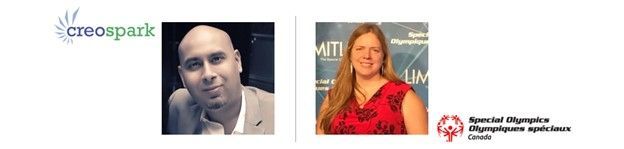
The Intrazone continues to spotlight Microsoft partners, the people and companies who deliver solutions and services to empower our customers to achieve more. In our fifth partner episode, we talk with Noorez Khamis (VP of Technology and Co-founder | Creospark) and his customer, Denise Strong (Director of Information | Special Olympics Canada).
Special Olympics Canada provides opportunities for all athletes in the movement to have input into and access decision-making processes. They strive to enrich the lives of Canadians with an intellectual disability through sport – beautifully summed up in their motto: “An inclusion movement powered by sport.”
Creospark aims to transform your workplace into an enthusiastic environment for your people to work better, faster, and smarter. And their process is grounded with compassion, to facilitate the right change to support people and to give back.
In this episode, our discussion centers around Special Olympics need to further centralize and organize in a single, digital location. We focus on their extranet, moving away from Dropbox, and streamlining content and conversation from headquarters to branch office – and back.
OK, Partner (edition), on with the show…
Subscribe to The Intrazone podcast! Listen this partner episode on Creospark now + show links and more below.
![Left-to-right: Noorez Khamis (VP of Technology and Co-founder | Creospark) and Denise Strong (Director of Information | Special Olympics Canada [The Intrazone guests]](https://techcommunity.microsoft.com/t5/image/serverpage/image-id/224331i19C4487492CEC981/image-size/large?v=1.0&px=999 "NoorezKhamis_DeniseStrong_Creospark-SpecialOlympicsCAN_IZP_006.jpg") Left-to-right: Noorez Khamis (VP of Technology and Co-founder | Creospark) and Denise Strong (Director of Information | Special Olympics Canada [The Intrazone guests]
Left-to-right: Noorez Khamis (VP of Technology and Co-founder | Creospark) and Denise Strong (Director of Information | Special Olympics Canada [The Intrazone guests]
Link to articles mentioned in the show:
-
Hosts and guests
-
Articles and sites
- Events
Subscribe today!
Listen to the show! If you like what you hear, we’d love for you to Subscribe, Rate and Review it on iTunes or wherever you get your podcasts.
Be sure to visit our show page to hear all the episodes, access the show notes, and get bonus content. And stay connected to the SharePoint community blog where we’ll share more information per episode, guest insights, and take any questions from our listeners and SharePoint users (TheIntrazone@microsoft.com). We, too, welcome your ideas for future episodes topics and segments. Keep the discussion going in comments below; we’re hear to listen and grow.
Subscribe to The Intrazone podcast! And listen this partner episode on Creospark now.
Thanks for listening!
The SharePoint team wants you to unleash your creativity and productivity. And we will do this, together, one partner at a time.
The Intrazone links
![Left to right [The Intrazone co-hosts]: Chris McNulty, director PMM (SharePoint, #ProjectCortex – Microsoft) and Mark Kashman, senior product manager (SharePoint – Microsoft).](https://www.drware.com/wp-content/uploads/2020/09/large-259 "Mark Kashman_1-1583812153608.jpeg") Left to right [The Intrazone co-hosts]: Chris McNulty, director PMM (SharePoint, #ProjectCortex – Microsoft) and Mark Kashman, senior product manager (SharePoint – Microsoft).
Left to right [The Intrazone co-hosts]: Chris McNulty, director PMM (SharePoint, #ProjectCortex – Microsoft) and Mark Kashman, senior product manager (SharePoint – Microsoft).
 The Intrazone – a show about the Microsoft 365 intelligent intranet (https://aka.ms/TheIntrazone)
by Contributed | Oct 6, 2020 | Uncategorized
This article is contributed. See the original author and article here.
Did you know that more than one-third of admins that use the Microsoft 365 admin center manage multiple tenants. This applies to two-thirds of enterprise customers and the majority of partners that manage Microsoft 365 tenants for their customers. Historically, the Microsoft 365 admin center was built for single-tenant admins, but recently we began creating experiences for admins who manage multiple tenants.
We’re thrilled to announce that a new multi-tenant management experience called All tenants is now rolling out to Microsoft 365 customers. The All tenants list is specifically for admins that manage two or more Microsoft 365 tenants, including:
- Partners who manage on behalf of
- Merger and acquisition scenarios
- Separate test and production environments
- Regulatory requirements for multiple tenants
We have created a unified form of management that allows admins the ability to manage multiple tenants from a single pane of glass, helping them to save time every single day; in fact, the more tenants they manage, the more time they’ll save. We’re also extending support of our multi-tenant management features to include Azure Active Directory B2B In the coming months. Our goal is to help admins and partners with multiple tenants spend less time juggling, and more time doing.
The experiences we have built enable admins with multiple tenants to:
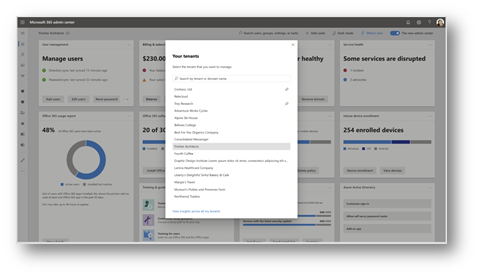
- move quickly between tenants using the Organization Switcher (also called the Tenant Switcher);
- assess service health, service requests, products, and billing across multiple tenants; and
- understand admin setup task activity across multiple tenants.
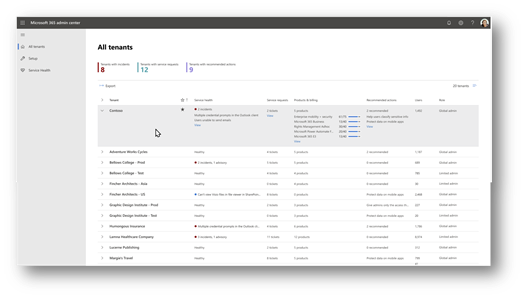
All tenants provides insights about tenants which need your attention:
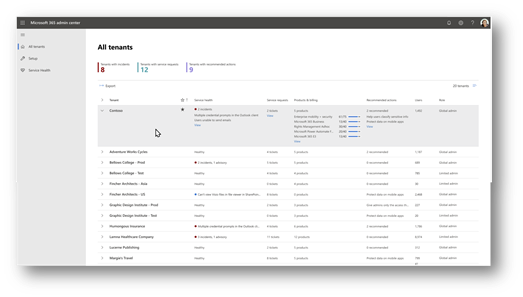
Along with the tenant switcher, the multi-tenant management experience adds the ability to switch between tenants efficiently.
The All tenants list is rolling out now, and once available, you will need to log in with a partner admin account and soon will include admin accounts that have been invited to manage multiple tenants through Azure B2B.
We will continue to work on scenarios and experiences specifically for admins that manage multiple tenants. You can learn more about why we’re investing in these experiences in our recent video, Multi-tenant management in the Microsoft 365 admin center.
Let us know what you think of the new experience using the feedback button in the Microsoft 365 admin center, and let us know what else we can do for you.
by Contributed | Oct 6, 2020 | Azure, Technology, Uncategorized
This article is contributed. See the original author and article here.
To provide customers with an easier network configuration, all newly created virtual clusters will be enabled for access over global virtual network peering connections, now in general availability. This enables customers to pair managed instances in failover group configuration, in an easy and performant way, by simply connecting virtual networks in different regions. By utilizing global virtual network peering for your managed instances, you will save time through easy network configuration and offload your gateways from database replication traffic. Review this new feature and more in this episode with Srdan Bozovic.
Watch on Data Exposed
Resources:
Virtual network peering
Auto-failover groups
View/share our latest episodes on Channel 9 and YouTube!
by Contributed | Oct 6, 2020 | Uncategorized
This article is contributed. See the original author and article here.
Do you implement core application setup processes for small and medium businesses? Do you implement and configure the Microsoft Dynamics 365 Business Central app, including setting up core app functionality and modules and migrating data to Business Central? Do you run the user interface in collaboration with the implementation team to provide the business with manageability and ease of navigation and configure role centers, including adapting insights, cues, action tiles, reports, charts, and extending Business Central by using Microsoft Power Platform components? If so, do you want to be a certified functional consultant? Of course, you do. Be an early adopter and take our beta exam today!
The new Microsoft Certified: Dynamics 365 Business Central Functional Consultant certification has one exam that is currently in beta: Exam MB-800: Microsoft Dynamics 365 Business Central Functional Consultant.
To receive the 80% discount*, use code Sets2MB800 when prompted for payment.
This is NOT a private access code. You can use this code to register for and take the exam on or before 11/3/2020.
*The first 300 people who register can take these exams for an 80% discount! (Why beta exams are no longer free.) The seats are offered on a first-come, first-served basis. You must register for the exam on or before 11/3/2020. Take the exam as soon as possible, so we can leverage your comments, feedback, and exam data in our evaluation of the quality of the questions.
Preparing for Beta Exams
Taking a beta exam is your chance to have a voice in the questions we include on the exam when it goes live. The rescore process starts on the day that exams go live, and final scores are released approximately 10 days later. For updates on when the rescore is complete, follow me on Twitter (@libertymunson). For questions about the timing of beta exam scoring and live exam release, see the blog posts The Path from Beta Exam to Live Exam and More Tips About Beta Exams.
Remember, the number of spots is limited, so when they’re gone, they’re gone. You should also be aware that there are some countries where the beta code will not work (including Turkey, Pakistan, India, and China). You will not be able to take the beta exam in those countries.
Also keep in mind that these exams are in beta, which means that you will not be scored immediately. You will receive your final score and passing status after your exam is live.
Related announcements
Announcing three new Microsoft Certifications for Business Applications
Skill up and stand out, with new role-based training and certification!
New role-based certification and training is here, and we’re just getting started!
Catching up: continuing our journey with new role-based certifications and training
by Contributed | Oct 6, 2020 | Uncategorized
This article is contributed. See the original author and article here.
During Microsoft Ignite 2020, we announced several innovations for SharePoint administration and migration and security. In addition to this news, we produced three on-demand videos to provide a clear first look at these announcements plus showcase how to better manage and secure your productivity cloud investment.
SharePoint and OneDrive in Microsoft 365 enables enterprise-grade content security in compliance with privacy and legal requirements. Beyond innovation, take a moment to learn more about the SharePoint admin role in Microsoft 365 to best manage sites, secure content, control external sharing, move content into Microsoft 365, manage metadata, and more.
SharePoint admin, migration, and security on-demand session videos [embedded]
1 | “Monitor and manage SharePoint in Microsoft 365” by Dave Minasyan, Rk Menon, and Trent Green
SharePoint admins, this session is for you. The intelligent intranet is personal, collaborative, and ever changing. In this session, Dave, Rk and Trent focus on upcoming enhancements to the SharePoint admin center – an updated home page, new site management, content services reporting, combined OneDrive admin settings, and more. Join in to see what’s coming next to monitor and manage the state of your organization’s intranet get informed of all the latest enhancements, and utilize the new experiences to stay productive:
Learn more how to get started with the SharePoint admin center in Microsoft 365.
2 | “What’s new to easily migrate your content to Microsoft 365” by Eric Warnke and Yogesh Rat naparkhi
Join Eric and Yogesh for a demo-driven session on how to migrate your organization’s content into Microsoft 365 with ease and speed! They focus on three areas: moving off legacy file shares, content from SharePoint Server on-premises, and other clouds storage providers like Box, Dropbox, and G Suite. Learn what’s possible with our comprehensive set of first-party tools, services, and partner ecosystem to successfully migrate your content to Microsoft 365:
Learn more about Migration Manager, the SharePoint Migration Tool (SPMT), and Mover.
3 | “What’s new in Security & Compliance in SharePoint and OneDrive [lead SPIN session]” by Sesha Mani
Microsoft runs on trust, as digital data grows exponentially in your organization it is super critical to safeguard your sensitive corporate data. Microsoft is leading the way in enterprise-grade security and comprehensive compliance solutions. In this session, Sesha showcases what’s new and upcoming for SharePoint and OneDrive services in Security & Compliance areas. He also cover how Microsoft helps you achieve zero trust security with existing controls/policies in SharePoint and OneDrive:
Learn more the value and feature of OneDrive and SharePoint security and compliance.
Bonus related session | “Microsoft Teams Administrator Updates for Compliance and Migration” presented by Jeff Teper and Jeremy Chapman.
Keep your users and data safe wherever they’re working from, take a tour of all the recent upcoming updates for Microsoft 365 admins. As people work remotely or in hybrid work environments, potentially on unmanaged devices or less trusted networks, information protection is more important than ever. Jeff and Jeremy talk about and show a simple environment for everybody — from end-users to administrators, in a way where the data is secure and able to be accessed from any device, in any location:
Learn more about security controls in Microsoft 365 and migration options.
Additional admin, migration, and security resources
And like that, you’re all set to better move into, manage and secure your SharePoint and OneDrive investment in Microsoft 365. :)
Thanks,
Mark Kashman, senior product manager – Microsoft 365 marketing
by Contributed | Oct 6, 2020 | Uncategorized
This article is contributed. See the original author and article here.
This document provides an overview of how enterprise customers can migrate their existing
Exchange Transport Rules to Unified DLP portal. It walks through the different stages of
migration and shows the effectiveness of the unified DLP portal as a single place to define all
aspects of your DLP strategy.
In summary, this play book will help to
➢ Understand the migration process.
➢ Understand the unified console and interface.
➢ Develop a strategy for the migration.
➢ Ensure a smooth migration process.
➢ Find resources to support the migration process.
Playbook is attached to this blog post.
This document was written by Pavan Kumar Bandaru, a member of the MIP & Compliance CxE team.
Thank you Pavan!
by Contributed | Oct 6, 2020 | Uncategorized
This article is contributed. See the original author and article here.
How often do you end work thinking ‘this was a great, productive and effective day’? Hopefully you have many of those, but perhaps you also recognize the feeling where you end your day thinking, ‘I was busy, but I didn’t do the things I wanted to do’. We feel disappointed, perhaps anxious and yet as tomorrow comes, we remain busy.
This social norm of busyness doesn’t necessarily equal valuable work. And while technology should facilitate our work, often it can feel like a burden, as we grapple to keep on top of our inbox, messages, and calendar. When we are bounce from message to meeting and back again, zipping through those to-dos, managing mails, and switching between documents and devices, we are constantly chipping away at our attention. Keeping on top of all this noise can feel like an end in itself; but it´s exhausting, ineffective and unlikely to feel meaningful.
Technology, in itself, does not lead to productivity. Our digital tools are amazing, but they are not enough. Unless they are harnessed to the power of human attention, digital technology can lead as much to distraction as it can enablement. Or, as Tony Crabbe, business psychologist specialized in attention summarizes it, “Technology x Attention = Productivity”.
So, what makes the difference between a great day and a distracted, draining day? What does it mean to enable attention through technology, and how can we support our people, and ourselves, to move from busyness to digital productivity? These should be central questions for all of us to grapple with if we want to truly unlock the enabling power of technology.
What are we missing in our approach to productivity and the digital workplace? We’ve certainly got the tools, but have we got the right attention and the right habits? Great days, when we feel productive and make an impact on the problems that matter, have three consistent elements: Purpose, People and Progress (the 3Ps).
Purpose: Recent research showed that employees spend only 44% of their day working on their primary job activities and 40% of their working time is responding to internal emails that they admit add no value to their business1. Yet, when we have a sense of purpose, we can see the clear value of our work, we lean in. We engage. In fact, 25% of performance can be attributed to our sense of meaning in our work.
People: According to one study, there has been a 50% increase in collaboration over the last decade, with people spending 85% of their day in collaborative activities2. Consistent studies find one of the greatest drivers of impact, but also motivation, is the quality of collaboration.
Progress: Teresa Amabile’s research3 shows that one of the greatest motivators is a sense of progress on the projects and tasks that really matter to us on a daily basis. Yet, on our busy days, how many of us leave work exhausted but underwhelmed by our progress on what matters.
Our goal is to help you build holistic strategies for your digital workplaces. Strategies that encompass the scenarios that will add value to your organization, its employees, and encourage new ways of working that facilitate the 3Ps. So how can you plan a your workplace strategy and a technology adoption approach for the continuously evolving digital workplace in a way that harnesses employee attention and leverages the digital workplace as a change agent to catalyze the forming of new digital cultural norms, adapted to today’s work environment?
The Modern Collaboration Architecture (MOCA) came about to try to solve for this challenge. It offers best practices and guidance to help you develop your digital workplace strategy, understand scenarios that will add value, and provide best practices to support individuals in your organization to harness their attention.
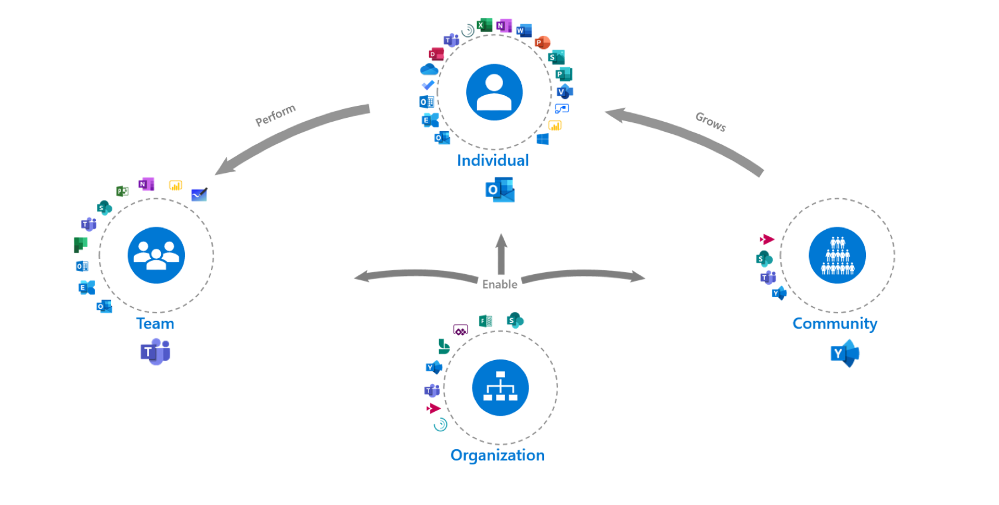
Starting with the purpose we looked at what the specific needs of individuals in the workplace are. What are the common things employees are trying to achieve with technology and what kind of work is the technology designed to facilitate?
When it comes to the people aspect we thought through the different contexts of productivity and attention. We looked from individual work to more collaborative and community-based work. In the MOCA model, the organization plays a facilitation role to enable all individuals, teams, and communities.
Progress is incorporated when we think about the digital cultural norms that we can encourage to facilitate getting work done and the conditions to harness attention. How can we leverage technology and science to learn to facilitate Flow for example, a key factor in employee engagement4 and general well-being5 because it builds this feeling of progress?
Talking about progress, our most collaborative employees are often also the most disengaged3. As teams we rarely discuss our “rules of engagement” that will make the most of people’s time, talents, passions, and attention as we embark on a task. It is time to start.
The intent of the MOCA framework is not to predict ‘THE BEST way to organize your work’, but to act as a guide. As you look at the MOCA, think about the different needs, scenarios, and contexts your employees work in. Does it fit or do you need to adapt based on your organization’s goals? What other tools are end-users using that need to fit in?
Leverage the “MOCA on a page” as a starting point to spark discussions as you consider priority needs and scenarios that will add value to your organization and employees. How you will enable those scenarios based on the evolving technology landscape? And what digital culture norms you want to encourage as you continue the digital workplace journey? If you are that individual who is overloaded or needs to re-take control of your time, do it and think about how you can leverage technology to facilitate that.
You might find yourself asking why ‘how work gets done,’ and ‘how we facilitate employees to harness their attention are so important to business’? Tune in next week for the next blog in the series, “The business case for attention management” from guest blogger Tony Crabbe.
References:
1. Nick Atkin (2012) 40% of staff time is wasted on reading internal emails. The Guardian, Dec 17th
2. Rob Cross, Reb Rebele and Adam Grant (2016) Collaborative overload. Harvard Business Review Jan – Feb
3. Teresa Amabile (2011) The power of small wins. HBR Article
4. Microsoft and London Business School (2019), Work Reworked
5. M. Csikszentmihalyi, Creativity: Flow and the Psychology of Discovery and Invention. New York: Harper Perennials, 1997
Contributing authors
Emma Stephen
Emma a Customer Success Manager at Microsoft and is passionate about bringing the human element into the workplace. She believes technology both enables change and can catalyze wider change efforts if introduced in the right way. Emma is based in Zurich and currently studying for her Masters in Applied Positive Psychology and Coaching Psychology with a hope to leverage this in the organizational context.
@Emma_Stephen
Claudia van der Velden
Claudia a Customer Success Manager at Microsoft and enjoys exploring organizational cultures from an eco-system perspective. In a complex puzzle where all is interconnected, small changes can have a large impact. She believes in the importance of considering all elements for the eco-system to thrive, stay well balanced, and perhaps most importantly, letting go of control and trusting the natural course to find its way. Claudia is based in the Netherlands and studies for her Masters in Applied Psychology, Leadership Development.
@Claudia van der Velden
Tony Crabbe
Tony Crabbe is a Business Psychologist who supports Microsoft on global projects as well as a number of other multinationals. As a psychologist he focuses on how people think, feel and behave at work. Whether working with leaders, teams or organizations, at its core his work is all about harnessing attention to create behavioral change.
His first book, the international best-seller ’Busy’ was published around the world and translated to thirteen languages. In 2016 it was listed as being in the top 3 leadership books, globally. His new book, ‘Busy@Home’ explores how to thrive through the uncertainties and challenges of Covid; and move positively into the hybrid world.
Tony is a regular media commentator around the world, as well as appearances on RTL, the BBC and the Oprah Winfrey Network.
by Contributed | Oct 6, 2020 | Uncategorized
This article is contributed. See the original author and article here.
Secure Score by Groups Workbook
Scenario
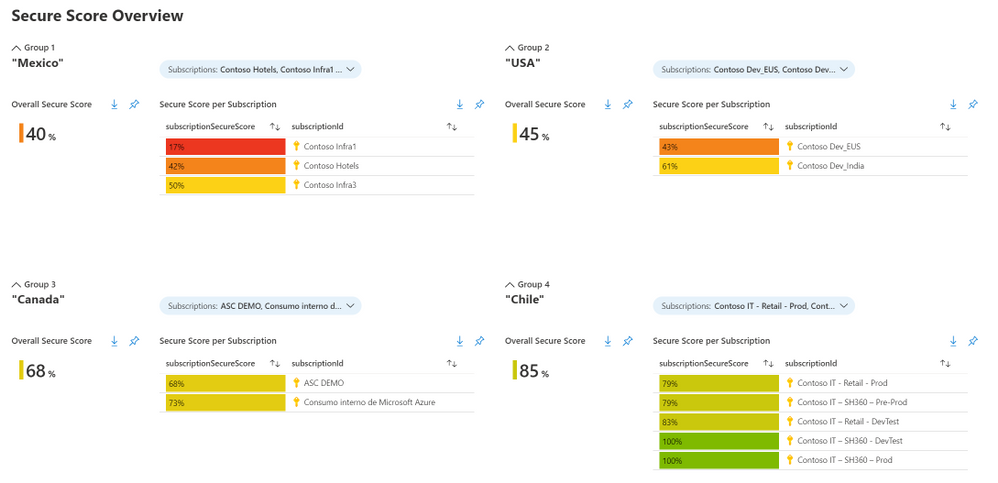
The Azure Resource Graph security baseline for Azure Security and the power of Azure Monitor bring you infinite possibilities to custom Azure Security Center information. Consider a scenario where you want to have visibility of the Secure Score for different subscriptions that are in different regions in a single dashboard. This article explains how to leverage Azure Monitor workbooks to create that. The workbook is available in our GitHub community page and the result looks like this:
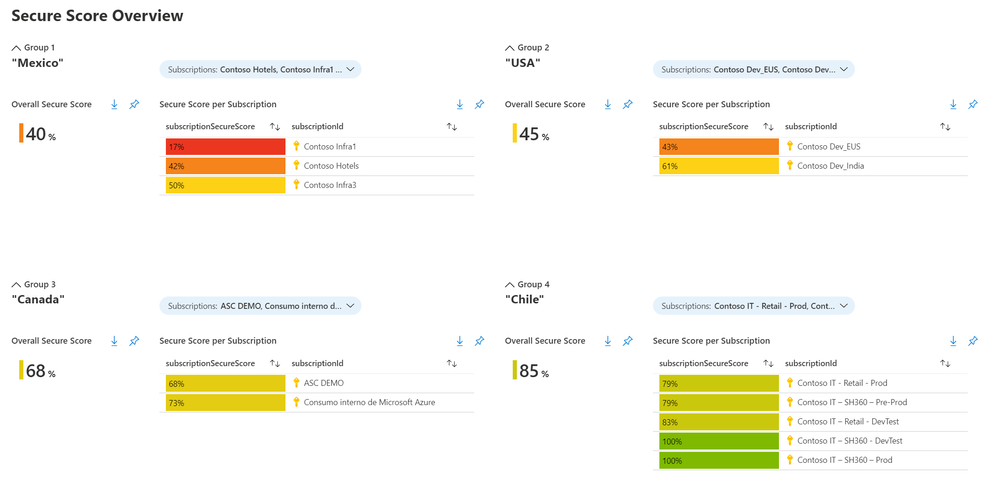 Figure 1: workbook visualization
The queries
This workbook has two queries created using Azure Resource Graph:
- One for obtaining the Overall Secure Score of the selected subscriptions
- The other obtains the individual Secure Score
To obtain the individual score, use the sample query below:
securityresources
| where type == "microsoft.security/securescores"
| extend subscriptionSecureScore = round(100 * ((todouble(properties.score.current))/ todouble(properties.score.max)))
| project subscriptionSecureScore, subscriptionId
| order by subscriptionSecureScore asc
When you run the query in ARG, you will get a similar result to this:
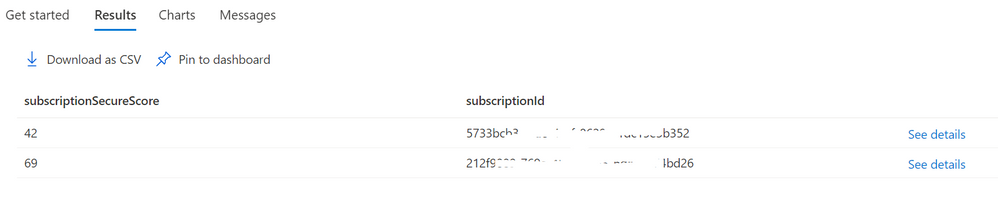 Figure 2: individual secure score query result
Behind the scenes, each security control Current Score and Maximum Score is found here:
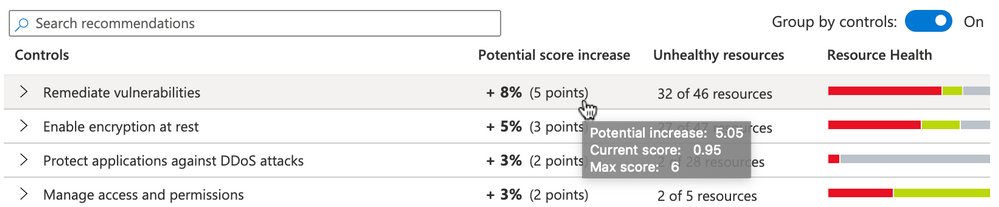 Figure 3: current score and maximum score in ASC
Query: overall secure score – multiple subscriptions
To get the overall secure score of more than one subscription, you can use the next query:
securityresources
| where type == "microsoft.security/securescores"
| extend subscriptionScore = todouble(properties.score.current)/todouble(properties.score.max)
| extend subScoreXsubWeight = todouble(subscriptionScore)*todouble(properties.weight)
| summarize upperValue = sum(subScoreXsubWeight), underValue = sum(todouble(properties.weight))
| extend overallScore = round(100*((upperValue)/(underValue)))
The result would be similar to this:
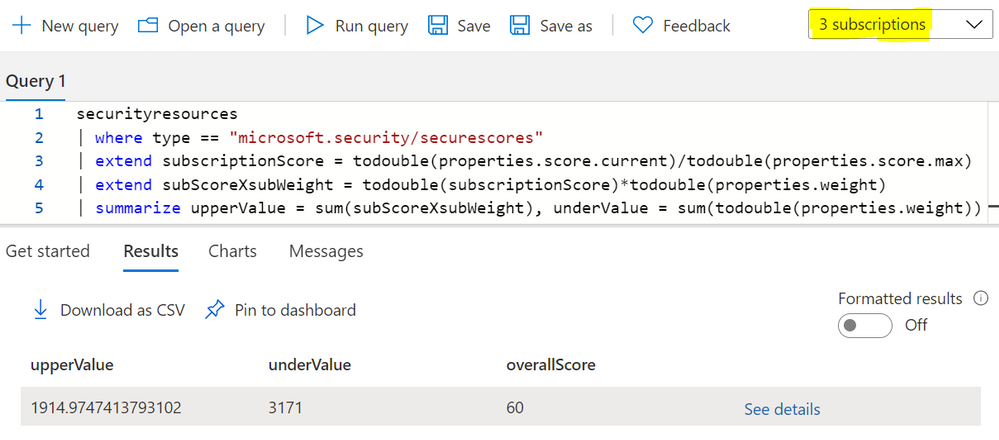 Figure 4: overall secure score query result
Follow this blog post to see the formulas used for Azure Security Center Secure Score.
The Workbook Visualization
The workbook will show by default four groups. Each group has five variables: group, title, subscription picker, overall secure score, secure score per subscription.
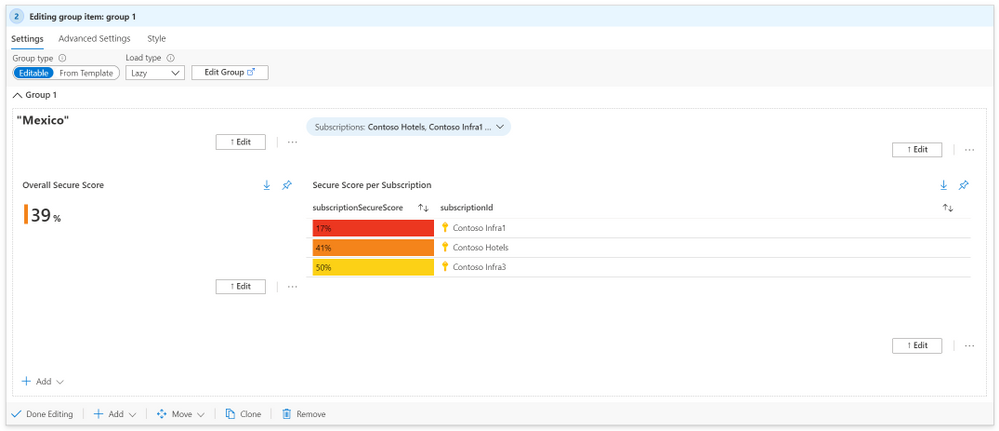 Figure 5: workbook single group
To modify the workbook, start by clicking the Edit button:
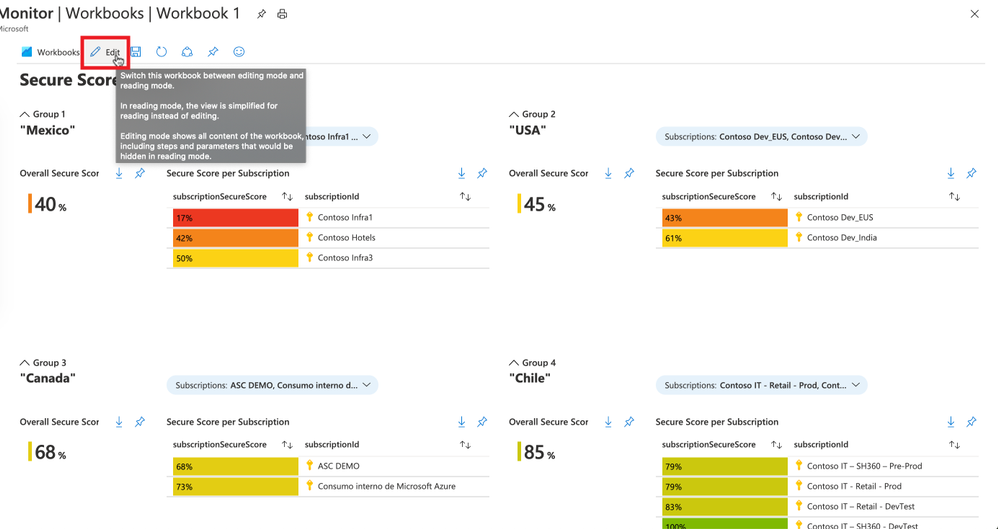 Figure 6: edit workbook
Modify Group Name
- Select the group you want to modify and click the Edit button.
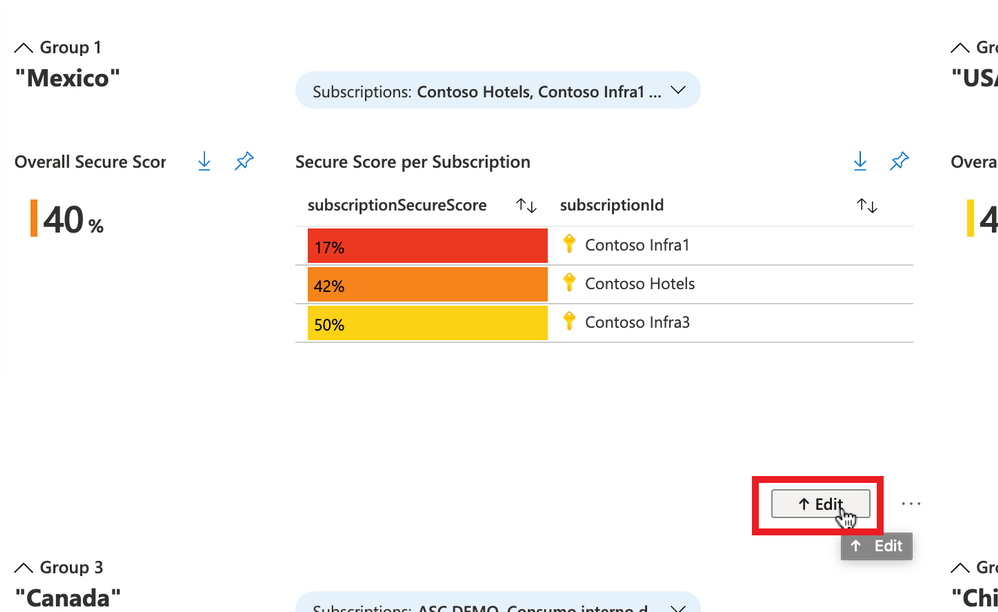 Figure 7: edit group
- At the top, click on Advanced Settings, change the Group title, and click the button Done Editing.
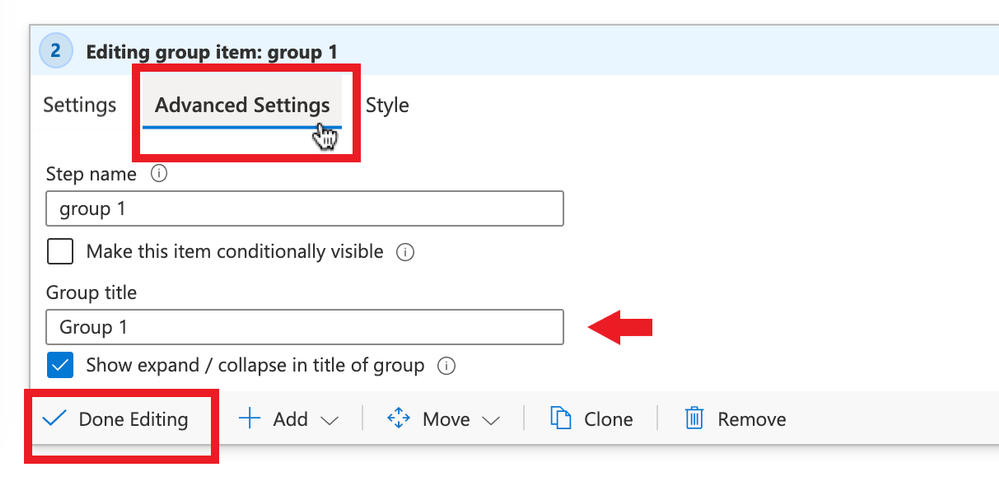 Figure 8: change group title
Modify Title
- Go to the title and click Edit:
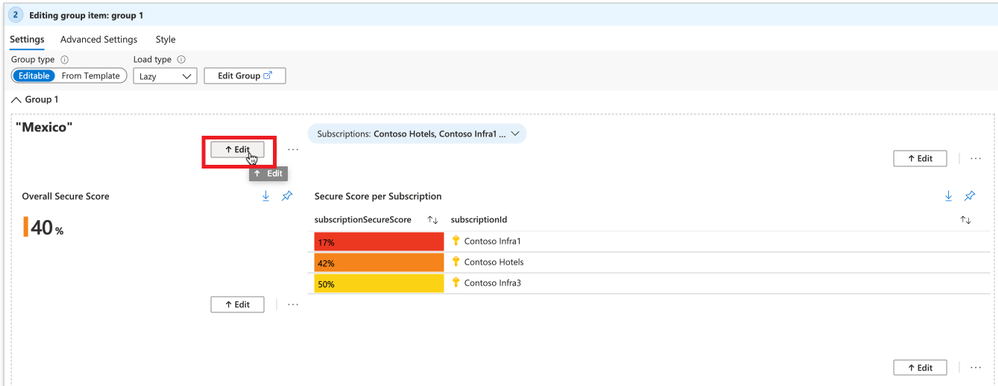 Figure 9: modify title
- Type the title you want in a Markdown syntax, and click the button Done Editing.
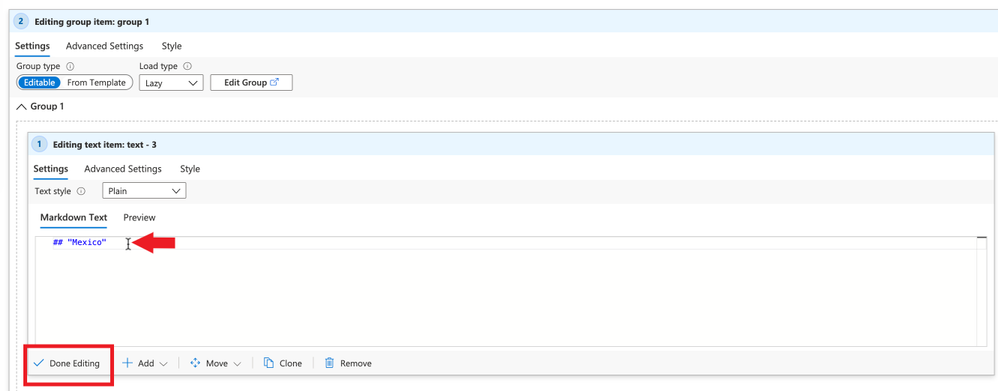 Figure 10: type the title
Create More Groups
- Go to any group
- Click on the three dots and select Clone
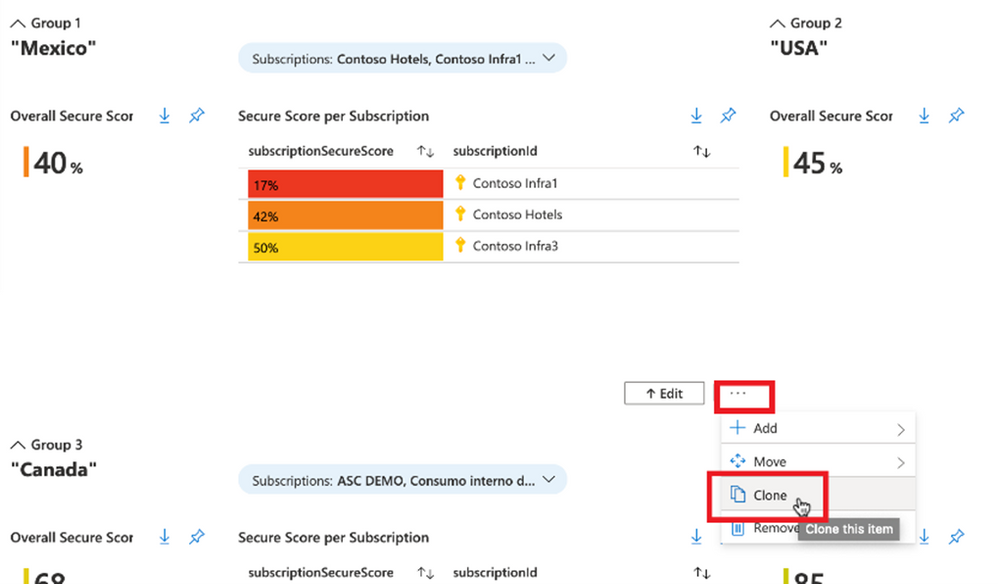 Figure 11: clone the group
Pin It to Your Azure Dashboard
- Your workbook must be in Edit mode, then click the Pin button.
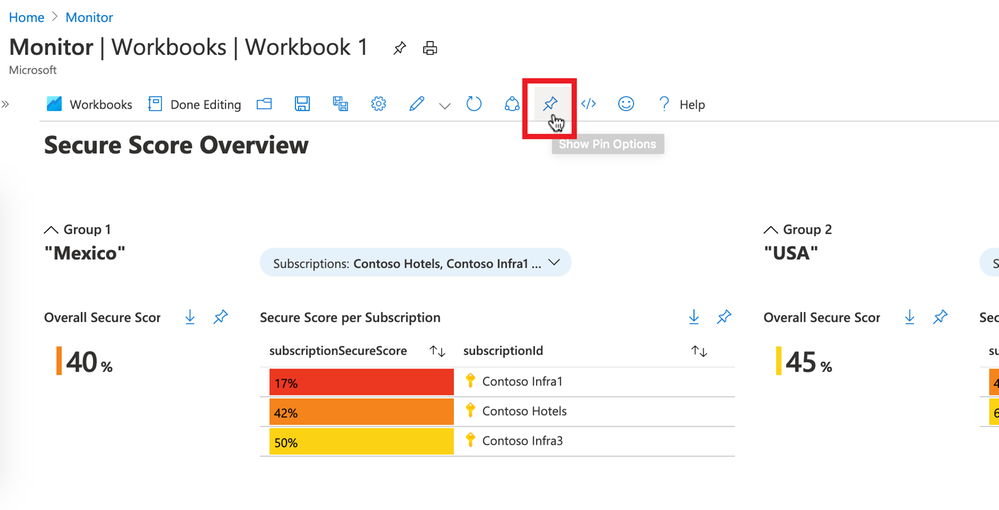 Figure 12: pin it
- Click on Pin All to send each component of your groups to the dashboard.
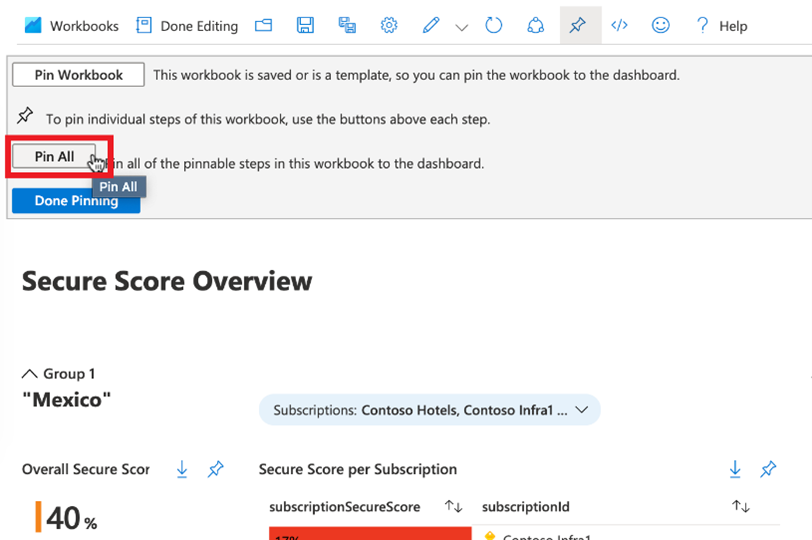 Figure 13: pin all
- Click either on Existing or Create New and choose your Dashboard Name. Then click Create And Pin.
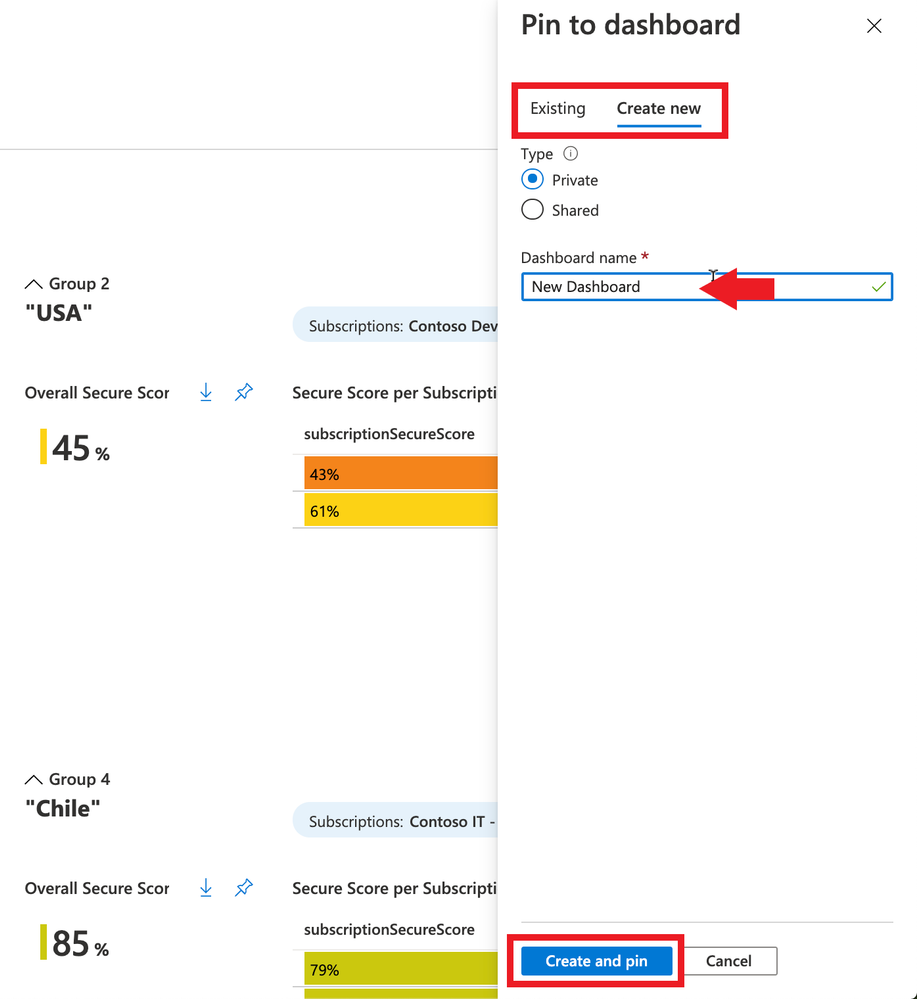 Figure 14: pin to dashboard
- You will see a message saying it was successfully pinned. Click on that and start customizing your dashboard.
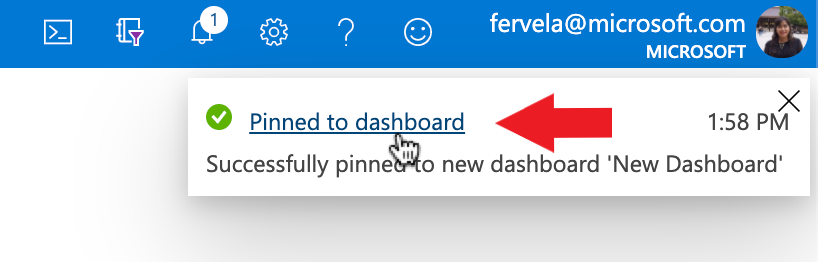 Figure 15: successful message
- Customize your dashboard by clicking the Edit button and moving the information squares.
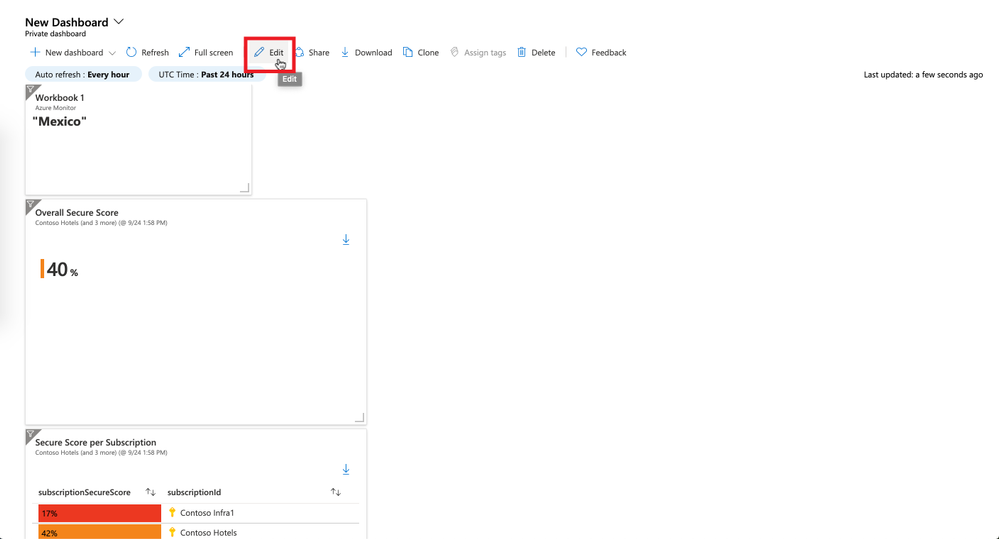 Figure 16: edit dashboard
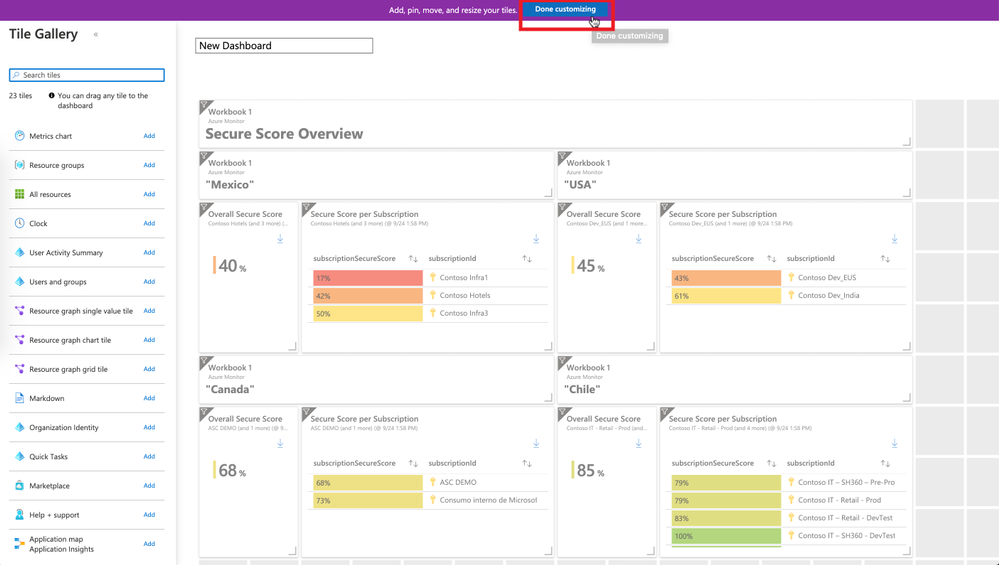 Figure 17: done customizing dashboard
Next Steps
Try it out and share your experience. The workbook is published here in the Azure Security Center GitHub repository.
References
Reviewers
Miri Landau, Senior PM, ASC Engineering
Yuri Diogenes, Principal PM, CxE Security ASC
by Contributed | Oct 6, 2020 | Uncategorized
This article is contributed. See the original author and article here.
The X-Content-Type-Options header is an HTTP header that allows developers to specify that their content should not be MIME-sniffed. This header is designed to mitigate MIME-Sniffing attacks. For each page that could contain user controllable content, you must use the HTTP Header X-Content-Type-Options:nosniff.
Add the below header in the web.config file if the application is hosted by Internet Information Services (IIS) 7 onwards.
<system.webServer>
<httpProtocol>
<customHeaders>
<add name=”X-Content-Type-Options” value=”nosniff”/>
</customHeaders>
</httpProtocol>
</system.webServer>
Please refer to the Link to know more about this particular response header.
The script and styleSheet elements will reject responses with incorrect MIME types if the server sends the response header “X-Content-Type-Options: nosniff”. This is a security feature that helps prevent attacks based on MIME-type confusion. This is been explained in this article.
Recently, I was working on an issue where I was getting below error while calling AJAX functions.
Refused to execute script from ‘http://localhost:8081/ajax/common.ashx’ because its MIME type (‘text/plain’) is not executable, and strict MIME type checking is enabled.
Sample.aspx:1 Refused to execute script from ‘http://localhost:8081/ajax/Ajax_Sample_.Sample,Ajax(Sample).ashx’ because its MIME type (‘text/plain’) is not executable, and strict MIME type checking is enabled.
I see the below code in my application.
<script type="text/javascript" src="/ajax/common.ashx"></script>/ajax/Ajax_Sample_.Sample,Ajax(Sample).ashx
It means that my application is expecting a javascript response from.ashx file but unfortunately, IIS sends the content-type “text/plain” response as it’s a default HTTP handler.
As it would take some time to change the application code and deploy the code to IIS, I added an outbound URL rewrite rule in IIS as a workaround to fix the issue. Below are the steps followed.
<rewrite>
<outboundRules>
<remove name=”Test” />
<rule name=”Test”>
<match serverVariable=”RESPONSE_CONTENT_TYPE” pattern=”text/plain” />
<conditions>
<add input=”{REQUEST_URI}” pattern=”.ashx” />
</conditions>
<action type=”Rewrite” value=”text/javascript” />
</rule>
</outboundRules>
</rewrite>
Refer: https://docs.microsoft.com/en-us/iis/extensions/url-rewrite-module/creating-outbound-rules-for-url-rewrite-module
Note: This is just a workaround to resolve the issue but the permanent solution would be to to change the MIME type in your application code as per the requirement.
Hope this helps :smiling_face_with_smiling_eyes:


Recent Comments