by Contributed | Oct 6, 2020 | Uncategorized
This article is contributed. See the original author and article here.
Final Update: Tuesday, 06 October 2020 21:15 UTC
We’ve confirmed that all systems are back to normal with no customer impact as of 10/06, 21:00 UTC. Our logs show the incident started on10/06, 20:00 UTC and that during the 1 hour that it took to resolve the issue some of the customers in Central US Region may have experienced issues with missed or delayed Log Search Alerts.
Root Cause: The failure was due to issues with one of the backend services.
Incident Timeline: 1 Hour – 10/06, 20:00 UTC through 10/06, 21:00 UTC
We understand that customers rely on Log Search Alerts as a critical service and apologize for any impact this incident caused.
-Jayadev
by Contributed | Oct 6, 2020 | Uncategorized
This article is contributed. See the original author and article here.
Before taking a journey through the lifecycle of an item in Sharepoint, I recommend reading the following Microsoft Docs covering retention in M365. These docs will give you the requisite knowledge of the retention features in M365 before we dive a bit deeper here.
Retention policies help you retain what you need to preserve and delete what you no longer need. What is the difference between a retention label and a retention policy? Let’s take a step back to explain a few gotchas first:
- Labels are applied at the item level (folder, document, or email) whereas retention policies are applied at a container level (mailbox or site).
- All retention policies contain at least one retention rule. The rule defines how long an item is retained and/or when it is deleted. You will notice that when you create a retention policy, the associated retention rule is automatically created.
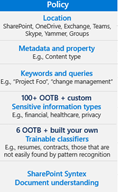
- A retention policy defines where the rule(s) are applied.
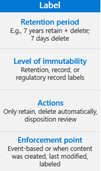
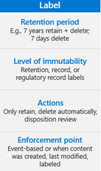
A retention label is simply a retention rule with a few extra features:
- You have can trigger a disposition at the end of the retention period
- You can declare the item as a record or regulatory record
- The enforcement point can be based on an event or when the label was applied
A label policy is simply a retention policy with a few extra features:
Now that you understand the difference between a retention label and a retention policy, our team is ready to take you through a visual representation of the different containers in which an item may reside throughout its lifecycle in SharePoint. The scenarios will show what actions are taken on the item based on each potential retention scenario.
We already know that retention takes precedence over deletion and that the longest retention period always wins. What happens if I have a 2-year delete policy applied to a site alongside an item that has a 3-year retention label? What happens if I apply a 3-year delete label to an item that resides in a site with a 10-year retention policy? While the principles of retention will always be your north star, it can help to have some visual guidance to understand where these items move and when.
For the scenarios below, the Retention Policy (Site level) and the Retention Label (item level) are both configured based on the items creation to Retain and then Delete:
- The Retention Label (item level) is configured to retain for 3 years and then delete
- The Retention Policy (site level) is configured to retain for 10 years and then delete
- The Deletion policy (site level) is configured to delete after 2 years
*NOTE: The Recycle Bin is not indexed and therefore unavailable for searching. As a result, an eDiscovery search cannot find any Recycle Bin content on which to place a hold.
_______________________________________________________________________________________________________________________________________________________________
Scenario 1: End-user takes NO action on the item
Example #1
Policies or Labels: NONE
 Actions: The item remains in place.
Example #2
Policies or Labels: Deletion Policy in Place
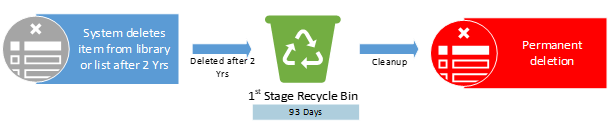
Actions: The deletion policy will delete the item 2 years after creation.
Example #3
Policies or Labels: Retention Policy in Place
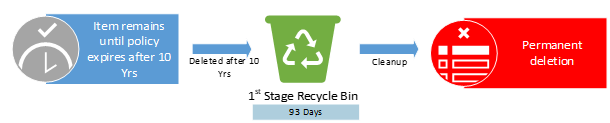 Actions: The item will be deleted 10 years after creation.
Example #4
Policies or Labels: Retention Label in Place
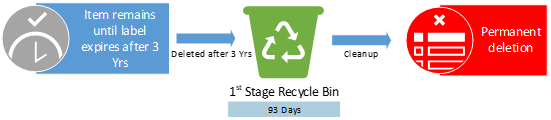 Actions: The item will be deleted 3 years after creation.
Example #5
Policies or Labels: Retention Policy in Place + Deletion Policy in Place
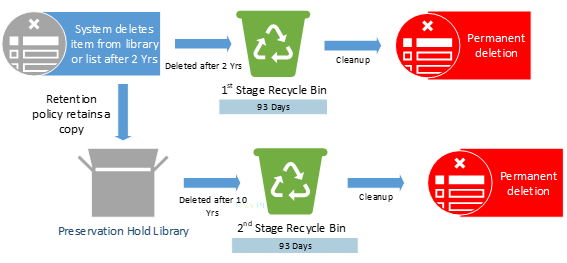
Actions: The item will be deleted after 2 years due to the deletion policy. The retention policy still in effect and a copy of item will be retained in the PHL for the remainder of the 10 years.
Example #6
Policies or Labels: Retention Label in Place + Deletion Policy in Place
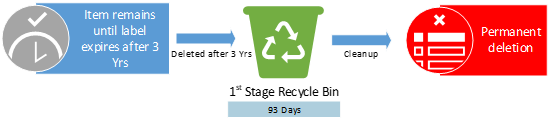
Actions: The retention label prevents the deletion policy from deleting the item. The item will only be deleted at the end of the label retention duration after 3 years.
Example #7
Policies or Labels: Retention Label in Place + Retention Policy in Place + Deletion Policy in Place
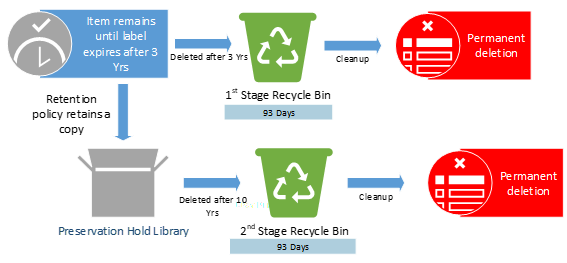
Actions: The retention label prevents the deletion policy from deleting the item. The item will only be deleted at the end of the label retention duration after 3 years.
________________________________________________________________________________________________________________________________________________________________
Scenario 2 – User takes no action on item but empties recycle bin. This triggers a move from first stage recycle bin to second stage recycle bin.
Example #1
Policies or Labels: NONE
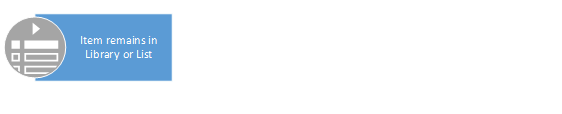 Actions: There is no action taken on the item.
Example #2
Policies or Labels: Deletion Policy in Place

Actions: The item will be deleted after 2 years due to the deletion policy.
Example #3
Policies or Labels: Retention Policy in Place

Actions: The item will be deleted 10 years after creation.
Example #4
Policies or Labels: Retention Label in Place

Actions: The item will only be deleted at the end of the label retention duration after 3 years.
Example #5
Policies or Labels: Retention Policy in Place + Deletion Policy in Place
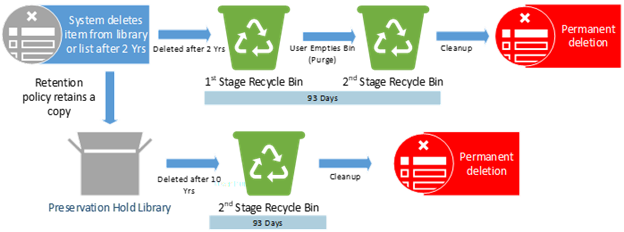
Actions: The item is deleted after 2 years. After deletion, the retention policy still in effect and will retain a copy of the item in the PHL for the remainder of the 10 years.
Example #6
Policies or Labels: Retention Label in Place + Deletion Policy in Place
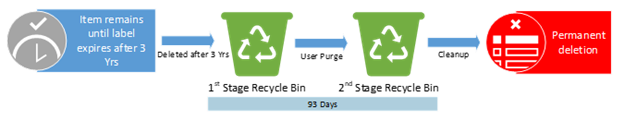 Actions: The retention label prevents the deletion policy from deleting the item. The item will only be deleted at the end of the label retention duration after 3 years.
Example #7
Policies or Labels: Retention Label in Place + Retention Policy in Place + Deletion Policy in Place
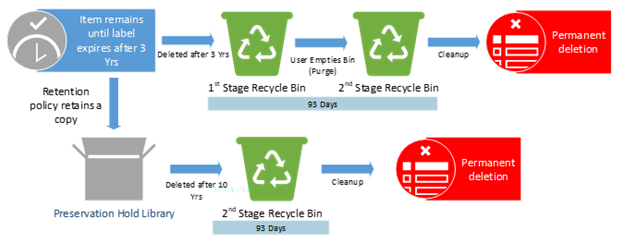
Actions: The retention label prevents the deletion policy from deleting the item. The item will only be deleted at the end of the label retention duration after 3 years. Upon deletion, the retention policy is still in effect and will retain a copy of the item in the PHL for the remainder of the 10 years.
________________________________________________________________________________________________________________________________________________________________
Scenario 3 – User deletes item in first 2 years and does not empty the recycle bin
Example #1
Policies or Labels: NONE
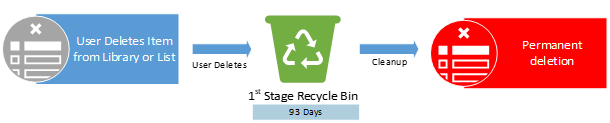
Actions: The end-user deletes item from list or library with no policies in place. Item moves to 1st stage recycle bin.
Example #2
Policies or Labels: Deletion Policy in Place
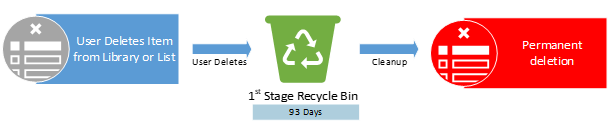
Actions: The deletion policy has no impact. The item was deleted before the deletion policy could take action.
Example #3
Policies or Labels: Retention Policy in Place
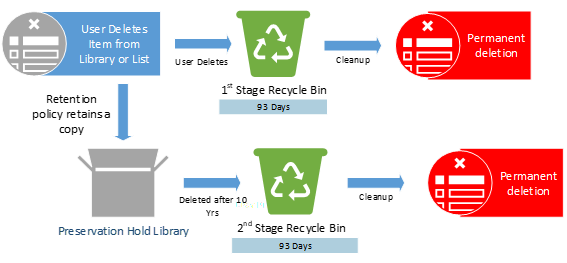 Actions: The retention policy is in effect and will retain a copy of item in the PHL for the remainder of the 10 years.
Example #4
Policies or Labels: Retention Label in Place
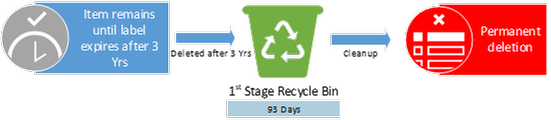
Actions: The end-user is prevented from deleting the item due to the label. The item will only be deleted at the end of the label retention duration of 3 years.
Example #5
Policies or Labels: Retention Policy in Place + Deletion Policy in Place
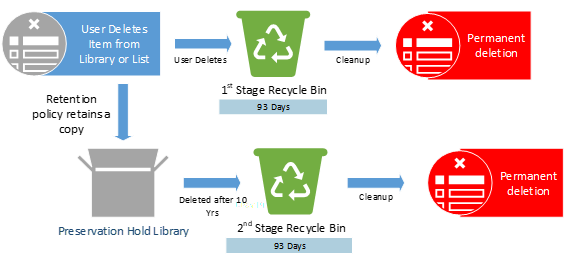
Actions: The deletion policy has no impact here as the end-user deleted the item before 2 years. The retention policy still in effect and will retain a copy of item in the PHL for the remainder of the 10 years.
Example #6
Policies or Labels: Retention Label in Place + Deletion Policy in Place
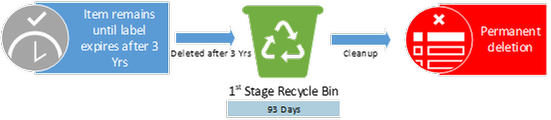
Actions: The retention label prevents both the end-user and deletion policy from deleting the item. The item will only be deleted at the end of the label retention duration of 3 years.
Example #7
Policies or Labels: Retention Label in Place + Retention Policy in place + Deletion Policy in Place

Actions: The retention label prevents both the end-user and deletion policy from deleting the item. The item will only be deleted at the end of the label retention duration of 3 years. The retention policy still in effect and will retain a copy of the item in the PHL for the remainder of the 10 years.
________________________________________________________________________________________________________________________________________________________________
Scenario 4 – User deletes item within the first 2 years and does empty recycle bin. This triggers move from the first stage recycle bin to second stage recycle bin.
Example #1
Policies or Labels: NONE

Actions: User deletes item from list or library with no policies in place.
Example #2
Policies or Labels: Deletion Policy in Place

Actions: The deletion policy has no impact here. The item was deleted by the end-user.
Example #3
Policies or Labels: Retention Policy in Place
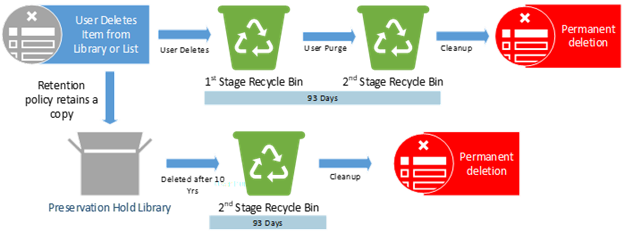
Actions: User deletes the original copy. The retention policy still in effect and will retain a copy of the item in the PHL for the remainder of the 10 years.
Example #4
Policies or Labels: Retention Label in Place

Actions: User deletion is prevented by label. The item will only be deleted at the end of the label retention duration of 3 years.
Example #5
Policies or Labels: Retention Policy in Place + Deletion Policy in Place
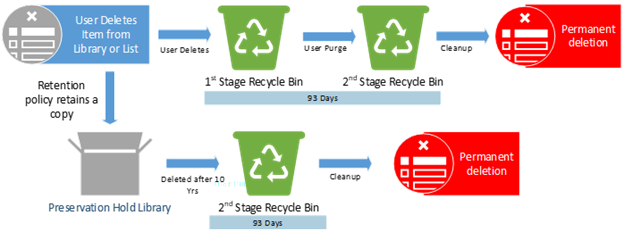
Actions: The deletion policy has no impact here. The retention policy still in effect and will retain a copy of item in the PHL for the remainder of the 10 years.
Example #6
Policies or Labels: Retention Label in Place + Deletion Policy in Place

Actions: The retention label prevents both the end-user and deletion policy from deleting the item. The item will only be deleted at the end of the label retention duration of 3 years.
Example #7
Policies or Labels: Retention Label in Place + Retention Policy in place + Deletion Policy in Place
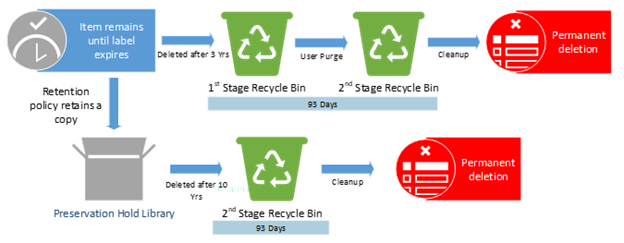
Actions: The retention label prevents both the end-user and the deletion policy from deleting the item. The item will only be deleted at the end of the label retention duration after 3 years. Upon deletion, the retention policy still in effect and will retain the item in the PHL for the remainder of the 10 years.
________________________________________________________________________________________________________________________________________________________________
@Stefanie_Bier and Ryan Sturm (@SnCadvct4all) of the M365 MIP and Compliance CxE team!

by Contributed | Oct 6, 2020 | Uncategorized
This article is contributed. See the original author and article here.
TL;DR – Survey is available at: https://aka.ms/MIP/FeatureSurvey-21H1
Hello Microsoft Security and Compliance tech community
I’m excited to announce that the MIP + DLP 21H1 customer feature survey is now open!
This survey captures the top asks we captured from our customers via the various engagements, discussions and UserVoice suggestions.
The survey is available at: https://aka.ms/MIP/FeatureSurvey-21H1 and it will be opened for the next 2 weeks.
As the platform have really grown over the last few months, this survey is now longer than before and allows you to select to provide your feedback for MIP, DLP or both.
If you want to influence the platform with features and capabilities that you want, need and like, this is the time to make it happen and share your feedback.

Thanks,
Nir Hendler on behalf of the Microsoft Information Protection + Data Loss Prevention product groups
by Contributed | Oct 6, 2020 | Azure, Technology, Uncategorized
This article is contributed. See the original author and article here.
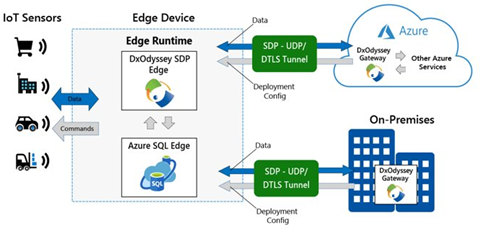
Microsoft Azure SQL Edge, now generally available, and DH2i DxOdyssey for IoT are combining native on-device capabilities with dynamic tunneling technology for an optimal IoT edge security solution.
It’s no news that IoT devices are generating more and more of data, but did you know that ? *
With so much data being created at the edge, security is one of the top concerns for IoT adopters. In a recent study, 97% of IoT adopters have security concerns when implementing IoT, and the top concern was ensuring data privacy.** Data needs to be protected both at the edge and as it moves outside the device boundaries to edge networks and other external networks and devices.
Azure SQL Edge is a small footprint data engine optimized for IoT workloads.
Built on the same code base as Microsoft SQL Server and Azure SQL, Azure SQL Edge provides the same industry leading security, familiar developer experience, and tooling that many teams already know and trust – now extended to IoT deployments for real-time intelligence.
Thanks to this shared codebase, application developers who have been building solutions for SQL Server and Azure SQL can extend their skills to deploy the same code to build IoT solutions at the edge that work with or without network connectivity.
Azure SQL Edge answers the need for an IoT-specific data platform by:
- Providing the flexibility to develop solutions that work with or without network connectivity and help enable secure data movement of the local edge data to on-premises datacenters or to the cloud.
- Offering support with standard tooling, programming languages, and a query language (T-SQL) that are already familiar to developers and compatible with existing code.
- Enabling artificial intelligence (AI) and analytics at the edge.
- Including native support for ingesting and streaming time-series data.
Unparalleled database security of the Microsoft SQL data engine.
The same security features of SQL Server Enterprise available in Azure SQL Edge ensure your data is secure on the device, customer data will be kept safe, and regulatory compliance will be met.
Here are the built-in security features that you won’t have to worry about in your solution thanks to Azure SQL Edge:
- Role-based access control (RBAC) and attribute-based access control (ABAC) to manage access to specific resources based on the user’s group (or role) and/or based on the attributes of the user, target data or resource
- Data protection with the ability to encrypt sensitive data and execute rich computations on encrypted data with Transparent Data Encryption (TDE) and Always Encrypted capabilities
- Sensitive PII/GDPR data discovery using SQL Data Discovery and Classification tool in SSMS
- Data classification to help organizations comply with security regulations by allowing data to be categorized by sensitivity and business impact
Azure SQL Edge extends the security of Azure and SQL Server to the Edge, protecting your data within the database and the Azure IoT Hub infrastructure.
Enhanced secure data movement with DxOdyssey
Beyond the security of the Azure SQL Edge and Azure IoT Hub network, Microsoft has partnered with DH2i to support enhanced security of data movement with its Software Defined Perimeter (SPD) software, DxOdyssey for IoT. DH2i is a software vendor with over 10 years of experience helping customers around the world enhance their data security and SQL Server capabilities with their innovative software offerings. Where common approaches to networking such as VPNs, open ports and SD-WAN are insufficient and lack the security capabilities required to support IoT deployments, DH2i’s DxOdyssey (DxO) for IoT extends SDP software capabilities to edge devices, allowing seamless bi-directional access from edge devices to the datacenter and cloud. As data moves outside of edge device perimeters and between networks, DxO for IoT ensures the data remains secure.

DxO for IoT is purpose-built for IoT use cases where bi-directional communication is needed between edge devices such as sensors, edge gateways or edge servers. Its technology:
- provides discreet, private and secure network communication over untrusted networks, such as the public internet.
- eliminates the lateral network attack surface and is more secure and performant than VPNs, open ports or SD-WAN.
- creates a Zero Trust network architecture for IoT devices and applications while consistently proving less expensive, easier and more effective than those legacy alternatives.
This lightweight software runs on any Linux or Windows host and can be installed on any IoT device or container on x64 and ARM 64 architecture.
When used in tandem with Azure SQL Edge, organizations can ensure their data is secure on the edge device and when passing outside of edge networks and IoT Hub boundaries.
Join us on October 21 to deep dive into edge security and learn about Azure SQL Edge and DxOdyssey for IoT including a demo of how to securely connect a remote user to an edge device, Register Now
* “Edge Computing Solutions for Industrial IoT”, July 2018, Gartner, “Top Strategic IoT Trends and Technologies Through 2023” September 2018, Gartner
** “IoT Signals” September 2020, Microsoft.
by Contributed | Oct 6, 2020 | Uncategorized
This article is contributed. See the original author and article here.
Final Update: Tuesday, 06 October 2020 21:49 UTC
We’ve confirmed that all systems are back to normal with no customer impact as of 10/06, 21:45 UTC. Our logs show the incident started on 10/06, 18:45 UTC and that during the 3 hours that it took to resolve the issue some of customers experienced in East US may experience intermittent data gap and incorrect metric alert activation.
- Root Cause: The failure was due to one of dependent service .
- Incident Timeline: 3 Hours & 0 minutes – 10/06, 18:45 UTC through 10/06, 21:45 UTC
We understand that customers rely on Application Insights as a critical service and apologize for any impact this incident caused.
-Subhash
Initial Update: Tuesday, 06 October 2020 19:55 UTC
We are aware of issues within Application Insights and are actively investigating. Some customers in East US may experience intermittent data gap and incorrect metric alert activation starting 18:45 UTC.
- Work Around: NA
- Next Update: Before 10/07 00:00 UTC
We are working hard to resolve this issue and apologize for any inconvenience.
-Subhash
by Contributed | Oct 6, 2020 | Uncategorized
This article is contributed. See the original author and article here.
Initial Update: Tuesday, 06 October 2020 19:55 UTC
We are aware of issues within Application Insights and are actively investigating. Some customers in East US may experience intermittent data gap and incorrect metric alert activation starting 18:45 UTC.
- Work Around: NA
- Next Update: Before 10/07 00:00 UTC
We are working hard to resolve this issue and apologize for any inconvenience.
-Subhash
by Contributed | Oct 6, 2020 | Azure, Technology, Uncategorized
This article is contributed. See the original author and article here.
Initial Update: Tuesday, 06 October 2020 19:55 UTC
We are aware of issues within Application Insights and are actively investigating. Some customers in East US may experience intermittent data gap and incorrect metric alert activation starting 18:45 UTC.
- Work Around: NA
- Next Update: Before 10/07 00:00 UTC
We are working hard to resolve this issue and apologize for any inconvenience.
-Subhash
by Contributed | Oct 6, 2020 | Uncategorized
This article is contributed. See the original author and article here.
It covers training to help educate and learn how to apply labels to items. It walks through the different types of sensitivity and shows examples of when to apply labels to documents.
Please note that ‘Munson’s Pickles and Preserves Farm’ is a fictitious company name and angle brackets “<>” with RED text enable the training to be updated for deployment, adoption and education for each industry or regulatory compliance.
In summary, this training will help to
➢ Drive adoption &awareness for organizational change of using sensitivity labels
➢ Understand the need for classification and protection of documents.
➢ Develop an awareness for regulatory compliance of documents.
➢ Ensure a consistent knowledge of sensitivity labels.
➢ Find resources to support the implementation of sensitivity labels.
Zip file contain all files is attached to this blog post.
This document was written by Randall Galloway, a member of the MIP & Compliance CxE team.
by Contributed | Oct 6, 2020 | Uncategorized
This article is contributed. See the original author and article here.
It covers training to help educate and learn how to apply labels to items. It walks through the different types of retention and shows examples of when to keep items or delete them.
Please note that ‘Munson’s Pickles and Preserves Farm’ is a fictitious company name and angle brackets “<>” with RED text enable the training to be updated for deployment, adoption and education for each industry or regulatory compliance.
In summary, this training will help to
➢ Drive adoption &awareness for organizational change of using retention labels
➢ Understand the need for classification and governance of items.
➢ Develop an awareness for regulatory compliance of items.
➢ Ensure a consistent knowledge of retention labels.
➢ Find resources to support the implementation of retention labels.
Zip file contain all files is attached to this blog post.
This document was written by Randall Galloway, a member of the MIP & Compliance CxE team.
by Contributed | Oct 6, 2020 | Uncategorized
This article is contributed. See the original author and article here.
When the global pandemic started, we were all thrust into the new (and very lightly explored) area of managing devices remotely 100% of the time. Of course, everyone rushed to their VPN solution only to uncover new obstacles and even more significant challenges which they had never anticipated.
As I talk to customers and I listen to how their management of the Windows estate has changed, I am always surprised by the lack of the “Big 3”:
- Cloud management gateway (CMG)
- Tenant attach
- Co-management
These are the essential features that you need NOW as you continue to modernize and streamline your management solution.
Let’s talk about why those capabilities are so important.
As an IT pro for fifteen years and seven years here at Microsoft, I know that the thing on everyone’s mind is: “How do I make changes with minimal-to-no disruption” while also “marching towards that north star of cloud management?” What a great thought and a very tight line to walk. That’s the reason you should LOVE the “Big 3” – when you use them together, it provides the fastest path for you to move forward to cloud management with no disruption or risk.
Now, to be clear, the Big 3 is excellent, but I wouldn’t be doing anyone any favors if I failed to mention how its foundations are built on identity with Azure Active Directory. With any cloud solution, identity for both the user and the device is essential – and I would even argue they are critical. When you cloud-attach, you connect Configuration Manager with Azure Active Directory – and this allows you to both simplify and enhance the authentication capabilities leveraged by the Big 3. This is the kind of value I’m talking about. Onboarding your Configuration Manager environment to your organization’s Azure Active Directory is the foundation on which cloud-attach is built.
There is no predetermined order in which you need to enable the Big 3. If I’m thinking with the customer side of my brain, I will start with the biggest value; and that means that starting with CMG is a no-brainer, especially in this work-from-anywhere, manage-from-everywhere new normal. Right away, I would enable Cloud Management Gateway. This gives your organization immediate value and instant cloud transformation because you are using your already-established workflows and processes.
Second, I would enable tenant attach because of the immediate value of having your device records in the cloud and being able to take actions on these devices from the cloud console. Finally, co-management provides huge value by enabling Conditional Access and many of the other workloads that can be managed via Configuration Manager.
Each of the Big 3 brings a ton of cloud value, let me highlight some of my favorite capabilities of each that will give you the biggest value and fastest path to the cloud with the smallest amount of effort.
Cloud management gateway
IT Pros are all coping with and/or reacting to how different it is to manage devices that no longer entering the corporate network. The challenge that very quickly follows, however, is how to minimize the management traffic through the VPN. The management traffic passing via VPN can be overwhelming, and the truth is that none of us know how much management traffic there is, although work from anywhere has certainly highlighted how much this can be. Frankly, there is no need for this traffic to pass over the VPN. By enabling CMG you minimize the management traffic coming over the VPN solution and free up bandwidth for the business-critical traffic that does need to return on-premises. When you enable CMG, you maintain a line of sight into your devices wherever they are on the internet, allowing all your established processes and practices to continue, business as usual. This enables you to not only keep on top of things like software deployments and device configuration, but, more crucially, software updates, and patch compliance.
Implementing a CMG can be done with no disruption and no additional risk, providing vast amounts of immediate cloud value to any organization – and, thanks to recent feature improvements, it can be done very easily too. Client certificates, from an enterprise PKI, are the most secure and recommended client authentication mechanism. Still, Azure Active Directory and the recently added token authentication in Configuration Manager current branch (version 2002 and later), remove the need for deploying any additional, often complex infrastructure in order to manage existing (and sometimes legacy) Windows devices over the Internet.
As noted above, CMG is the first thing I recommend any company set up as soon as possible if you currently have an on-premises Configuration Manager solution. Without a CMG, your organization is rapidly falling behind on the journey to cloud management.
Tenant attach
After cloud management gateway, the next feature I would look to enable is tenant attach. This is a fantastic way to extend your on-premises management by attaching to the cloud, and it is genuinely exciting to see the investment being made in Microsoft Endpoint Manager, both on-premises and in the cloud.
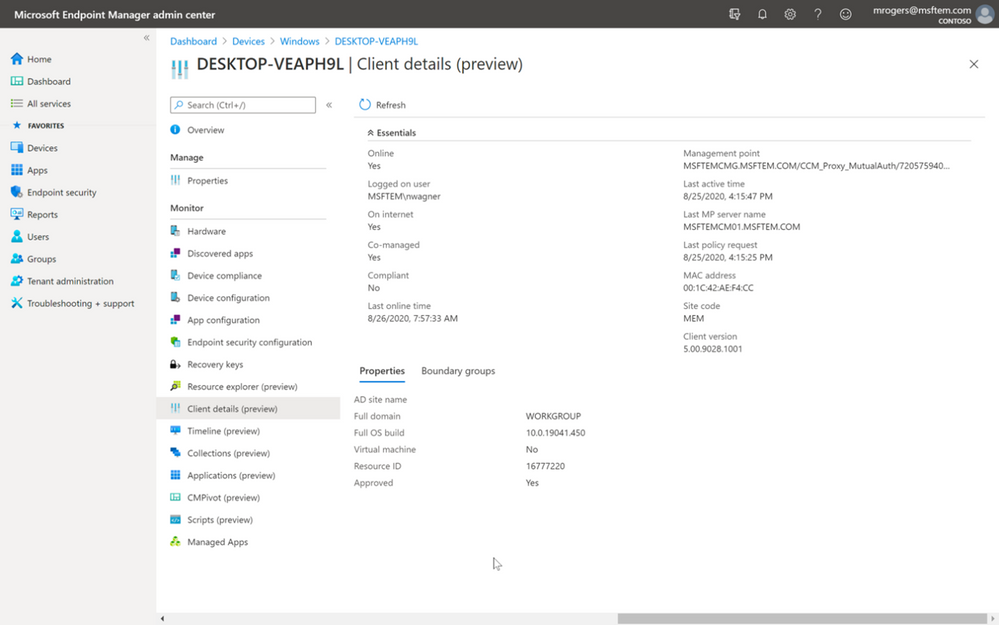
Notice below in the screenshot that I am getting real-time data from Configuration Manager on-premises; this includes clients connected from the Internet over CMG. Let that sink in… cloud-attaching your existing Configuration Manager estate is truly management from virtually anywhere. You can manage devices anywhere on the Internet from anywhere using the cloud console. Even from a phone.
In this console I can see if the device is co-managed, the boundary groups in which the device belongs, if the device is online, and so much more. What you should take away from the screenshot is the frictionless union of on-premises and cloud. While leveraging the cloud console, you can still take advantage of the investments you already have from your on-premises infrastructure. Think about that some more and keep in mind that I mentioned that there’s no disruption when you set this up. This means you don’t have to recreate configuration in the cloud to have it available to your management estate.
You have got to leverage cloud-attach to extend and supercharge your investments on-premises to the cloud!

Figure 1: When you cloud-attach, the Microsoft Endpoint Manager admin center shows real-time data from Configuration Manager and enables you to manage your devices from virtually anywhere.
Not only does tenant attach bring existing management into the admin center, there are also some features that only exist when you are cloud-attached, such as Endpoint Analytics or the brilliant new Timeline which shows events that have occurred on a device in order to improve the troubleshooting experience of your helpdesk.
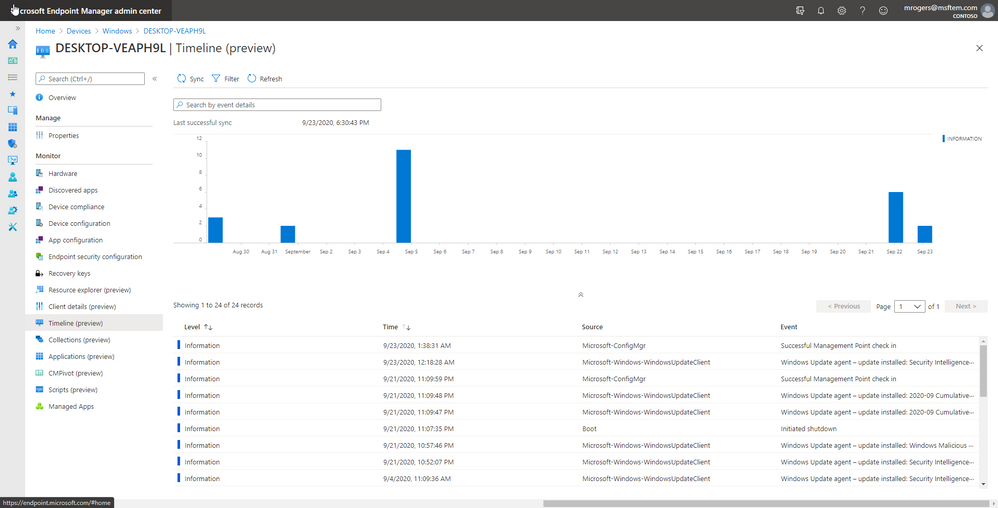
Figure 2: The Timeline view shows events that have occurred on a device to improve the troubleshooting experience of your helpdesk.
Co-management
One common pre-conception is that co-management is just about migration. In reality, co-management is about digital transformation without the need to go through a huge migration effort. I mean, we all remember how much fun that ConfigMgr 2007 to 2012 migration was right?
Conditional Access is one of the most rapidly consumed services today – you simply can’t beat how easy and straightforward it is to enable by using co-management. But that’s not the only reason for using co-management. I’m sure you’ve noticed that there’s a recurring theme here: immediate value. Co-management will help with device provisioning, device actions, and managing individual workloads as well – and it does that immediately.
I get a lot of customers that ask about device provisioning from the cloud, and we always end the conversation with the action to go turn on co-management. Provisioning devices can be such a complex and daunting task for many organizations, and enabling co-management and using Autopilot completely transforms and simplifies the provisioning process. The exciting piece for customers is when the Configuration Manager agent installs from the cloud, and then the device is effortlessly transformed into the corporate standard. This all happens over-the-air without the device needing to come on premises or connect to VPN – and it does this while still leveraging your existing application investments in Configuration Manager. Mind melting isn’t it?!?
Co-management also allows you to simplify your management by lifting workloads to the cloud.
As with any of the Big 3, there’s no one size fits all; digital transformation is about using the cloud that brings your organization the most business value. It’s pretty awesome to be able to control your transformation! When you cloud-attach with co-management you control when you transform, and for what workloads you transform. From the screenshot below you can see the various workloads being managed from the cloud on the specific device, client health, and the last time the device communicated. There are lots of good insights here that you should be using to help drive the transformation of your business to the most secure cloud.
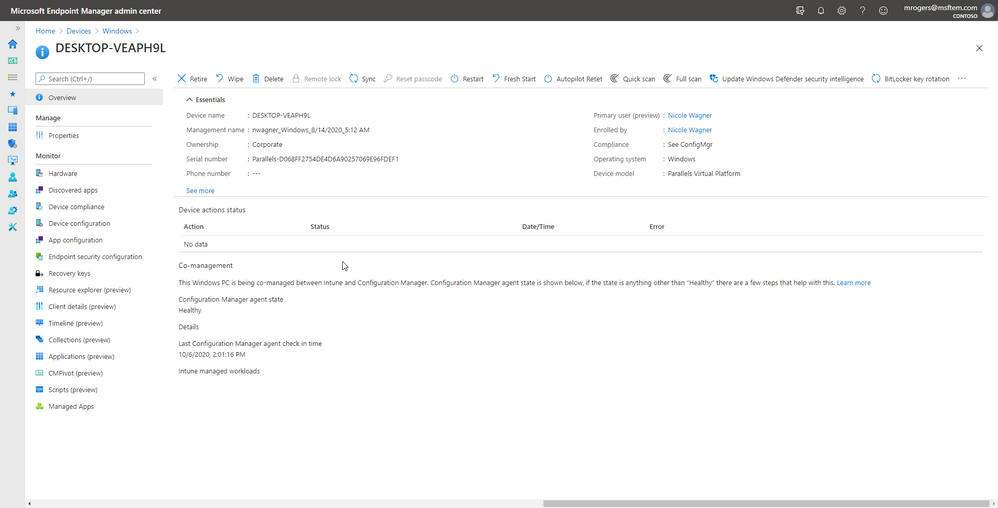
Figure 3: The co-management area shows you the device’s workloads being managed in the cloud, client health, and the last time the device communicated.
To summarize, there are some really simple steps you can take to get huge amounts of cloud value in your existing Configuration Manager environment, without the need to migrate, move, or otherwise cause disruption within your environment. The mantra here is “transformation not migration.”
Below are my exec-level value props for each of the Big 3.
- CMG: Extend the capability of Windows device management and resolve VPN contention – without disruption to current workflows, without the added on-premises infrastructure to manage, and with no additional risk.
- Tenant Attach: This is the simplest way to add value by extending the investment in your on-premises environment to the cloud without recreating net new configuration. Gain actions and insights to devices on-premises or off-premises from the Microsoft Endpoint Manager admin center.
- Co-Management: Enable features in the cloud. Bring new functionality such as Conditional Access for immediate cloud value or begin to transition existing workloads from the cloud at your own pace.
Have questions? Join our Ask Microsoft Anything (AMA) event this Thursday, October 8th from 8:00-9:00 a.m. Pacific Time in the Microsoft Endpoint Manager community!
Reference Links:
Danny Guillory Jr
Senior Program Manager
@sccm_avenger


Recent Comments