
by Contributed | Oct 9, 2020 | Azure, Technology
This article is contributed. See the original author and article here.
On the 13th October at 1PM PDT, 9PM BST, Mustafa Saifee, a Microsoft Learn Student Ambassador from SVKM Institute of Technology, India and Dave Glover, a Cloud Advocate from Microsoft will livestream an in-depth walkthrough of how to develop a secure IoT solution with Azure Sphere and IoT hub on Learn TV.
The content will be based on a module on Microsoft Learn, our hands-on, self guided learning platform, and you can follow along at https://docs.microsoft.com/en-us/learn/modules/develop-secure-iot-solutions-azure-sphere-iot-hub/
You can follow along with us live on October 13, or join the Microsoft IoT Cloud Advocates in our IoT TechCommunity throughout October to ask your questions about IoT Edge development.
Meet the presenters

Mustafa Saifee
Microsoft Learn Student Ambassador
SVKM Institute of Technology

Dave Glover
Senior Cloud Advocate, Microsoft
IoT and Cloud Specialist
Session details
In this session Dave and Mustafa will deploy an Azure Sphere application to monitor ambient conditions for laboratory conditions. The application will monitor the room environment conditions, connect to IoT Hub, and send telemetry data from the device to the cloud. You’ll control cloud to device communications and undertake actions as needed.
Learning Objectives
In this session you will learn how to:
- Create an Azure IoT Hub and Device Provisioning Services
- Configure your Azure Sphere application to Azure IoT Hub
- Build and deploy the Azure Sphere application
- View the environment telemetry from the Azure Cloud Shell
- Control an Azure Sphere application using Azure IoT Hub Direct Method
Ready to go
Our Livestream will be shown live on this page and at Microsoft Learn TV on Tuesday 13th October 2020 or early morning of Wednesday 14th October in APAC time zone.
by Contributed | Oct 9, 2020 | Technology
This article is contributed. See the original author and article here.
Final Update: Friday, 09 October 2020 07:34 UTC
We’ve confirmed that all systems are back to normal with no customer impact as of 10/09, 07:00 UTC. Our logs show the incident started on 10/09, 05:55 UTC and that during the 1 hours & 5 minutes that it took to resolve the issue some customers in East US 2 region may have experienced issues with missed or delayed Log Search Alerts.
Root Cause: The failure was due to an issue with one of our back-end services.
Incident Timeline: 1 Hours & 5 minutes – 10/09, 05:55 UTC through 10/09, 07:00 UTC
We understand that customers rely on Log Search Alerts as a critical service and apologize for any impact this incident caused.
-Vyom
by Contributed | Oct 9, 2020 | Technology
This article is contributed. See the original author and article here.
Introduction
This is John Barbare and I am a Sr Customer Engineer at Microsoft focusing on all things in the Cybersecurity space. In this tutorial I will walk you through the steps of enrolling a Windows Device in Microsoft Endpoint Manager (MEM) and the newly released Android enrollment policy. In previous blogs, I have stated that one has already enrolled the device and to follow certain steps for a particular security policy. Certain feedback has suggested including detailed onboarding/enrollment. With that said, this blog will cover the entire Windows device enrollment process through MEM.
An overview of MEM can be described as a cloud solution platform that unifies several technologies. It is not a new license. The services are licensed according to their individual license’s terms. For more information, see the product licensing terms.
If you currently use Configuration Manager, you also get Microsoft Intune to co-manage your Windows devices. For other platforms, such as iOS/iPadOS and Android, then you will need a separate Intune license. In most scenarios, Microsoft 365 may be the best option, as it gives you Endpoint Manager, and Office 365. For more information, see Microsoft 365.
Device Enrollment in MEM
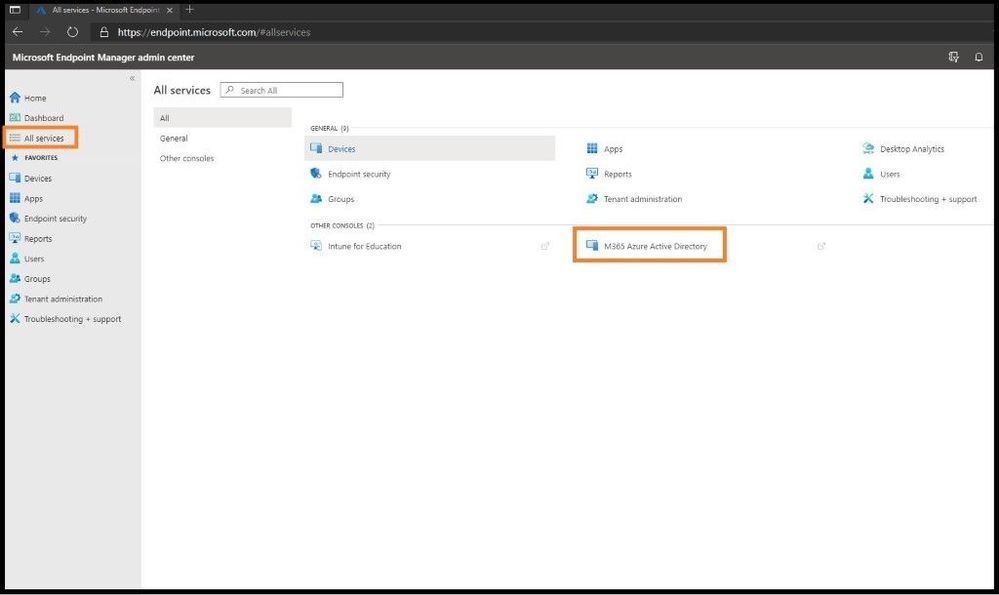
The first item you want to do is enroll your device using Windows 10 automatic enrollment. This can include a corporate issued laptop and/or a bring your own device. Go ahead and sign into https://endpoint.microsoft.com as a Global Administrator so you will have all the necessary permissions. Once on the home dashboard page, navigate to All Services and then M365 Azure Active Directory.
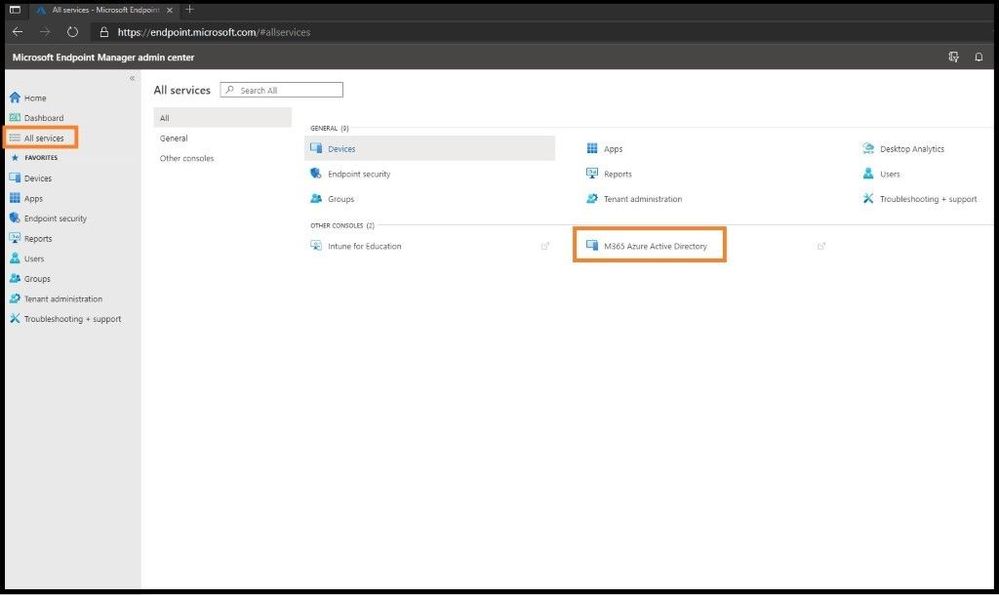
Selecting M365 Azure AD
Azure Active Directory will open in a separate window and scroll down until you locate Mobility (MDM and MAM) and select the text. Two primary applications should be listed, which are Microsoft Intune and Microsoft Intune Enrollment. If the applications are not shown, go ahead and select + Add Application to add them. Next, select Microsoft Intune.
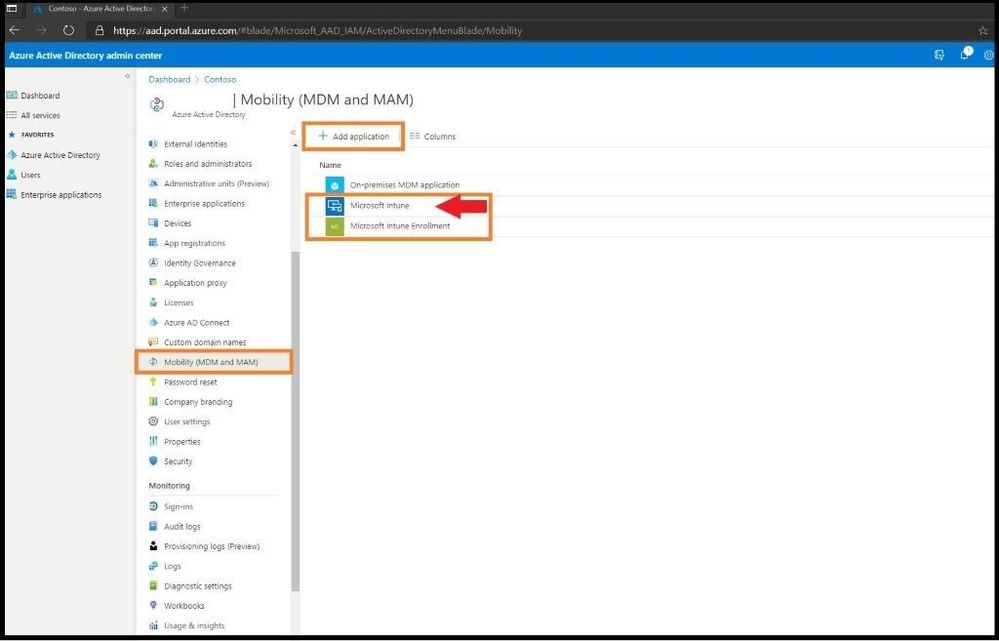
MDM and MAM
Select Some from the MDM user scope (in the middle) to use MDM auto-enrollment to manage enterprise data on your employees’ Windows devices. MDM auto-enrollment will be configured for AAD joined devices and bring your own device scenarios. Next, select the groups you want to configure for Auto Enrollment. A fly out window will appear on the right and select the group(s) for this Auto Enrollment. Next, select some for the MAM user scope and select the MDM user group(s) to be added.
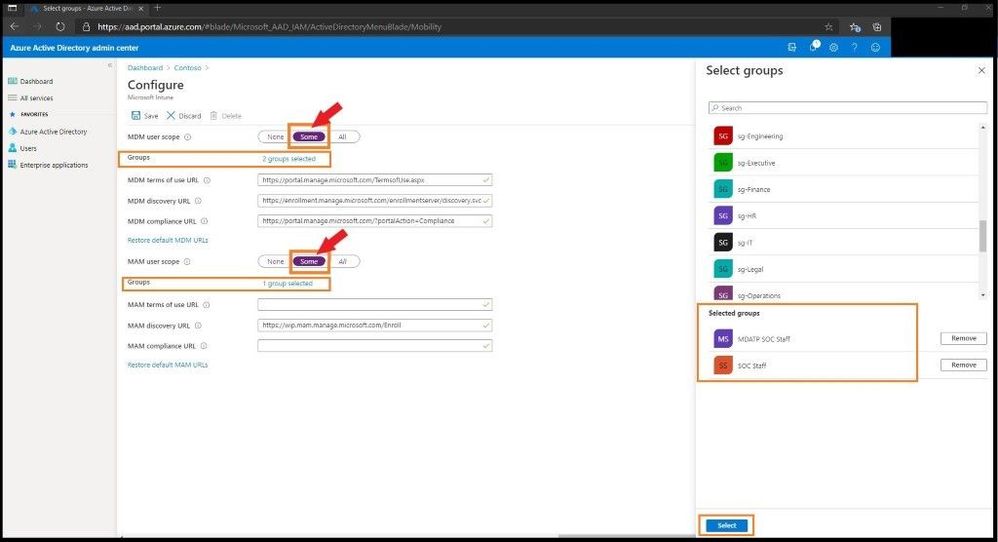
Configure Auto Enrollment
Leave the rest of the default configurations for the rest of the values and select save.
Confirming the Version of Your Windows Machine You are Enrolling
Select the Windows icon on the bottom left side of your window and type WINVER and press enter. Confirm you are running at least Windows 10 Version 1607 and higher.
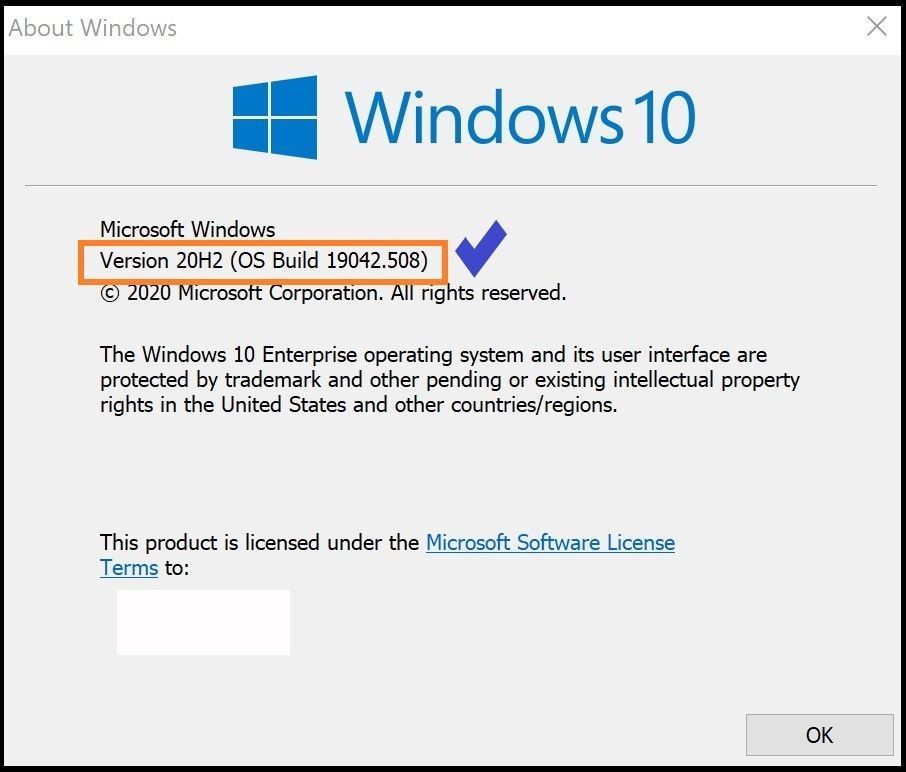
Checking version of WIN 10
Enrolling the Windows 10 Machine
Select the Windows icon on the bottom left side of your window and type settings and press enter. Select the Accounts Tab.
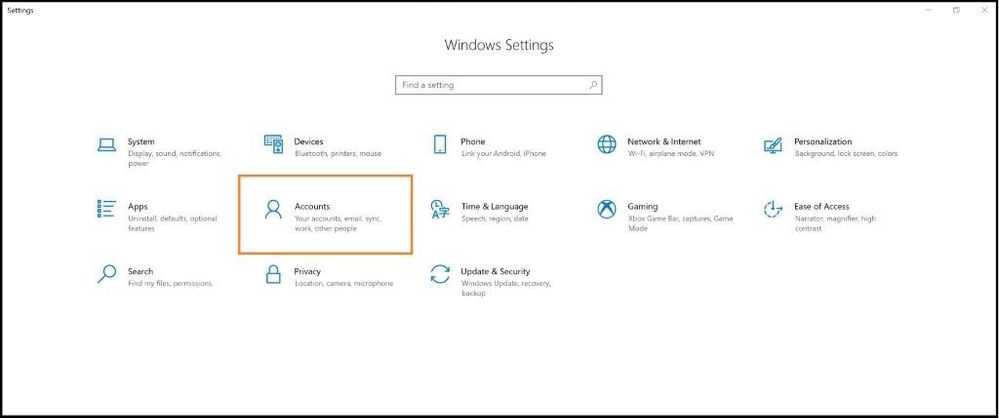
Account Settings
On the left-hand side, select Access work or school and select the + Connect button in the middle of the screen.
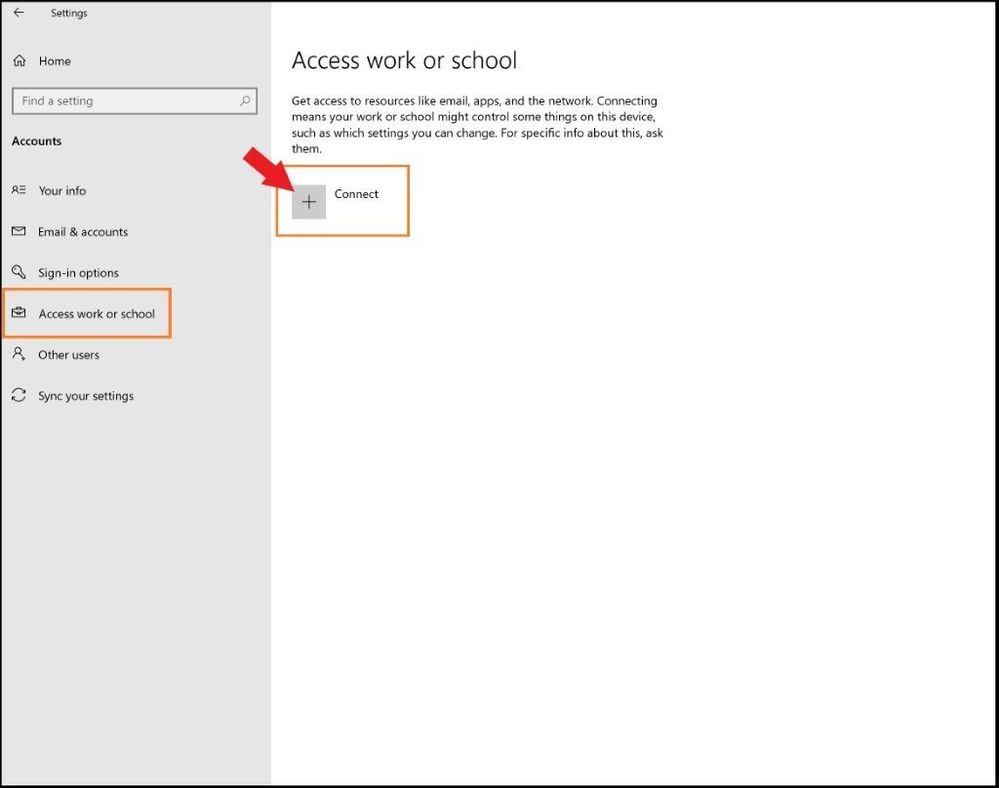
Adding Work or School Account
During the stages of enrollment, you will see multiple screens with one asking for your work or school email. Go ahead and enter your email and select next. During this process it is connecting and synchronizing to MEM and applying any policies that your work or school has applied to the users and/or groups.
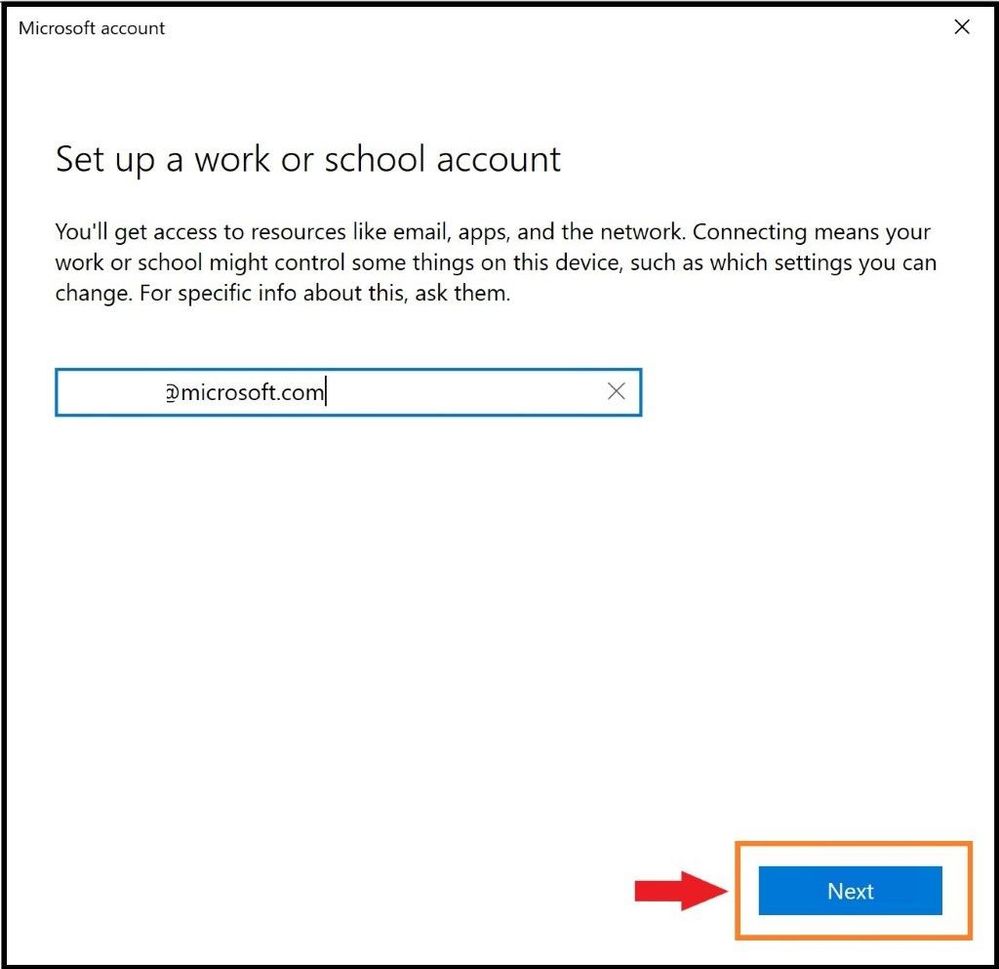
Enter Email
When prompted, enter your credentials used to login.
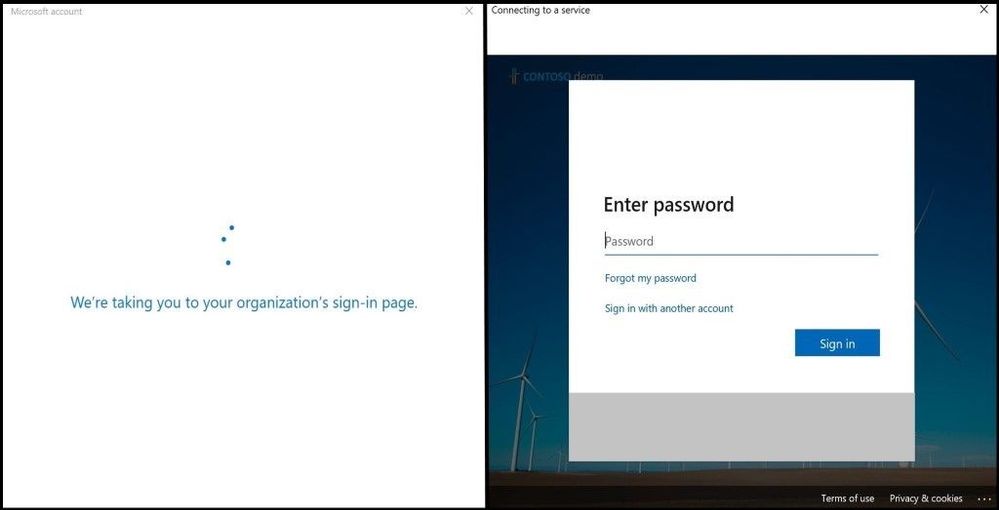
Sign in Page with Password
At the end, select “Got it” to finish the sync process.
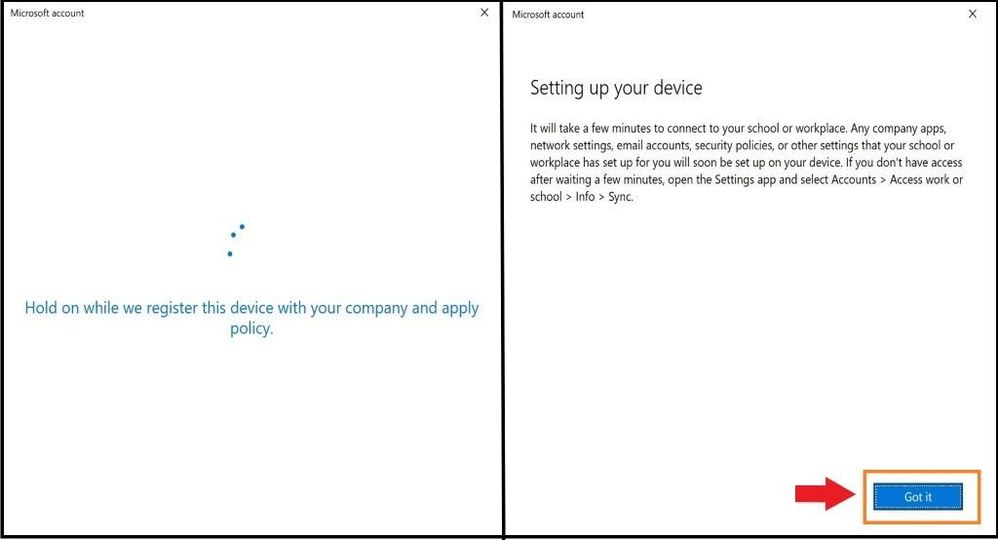
Setting up the Device
As one can see, the account was successfully added as seen below via MDM.
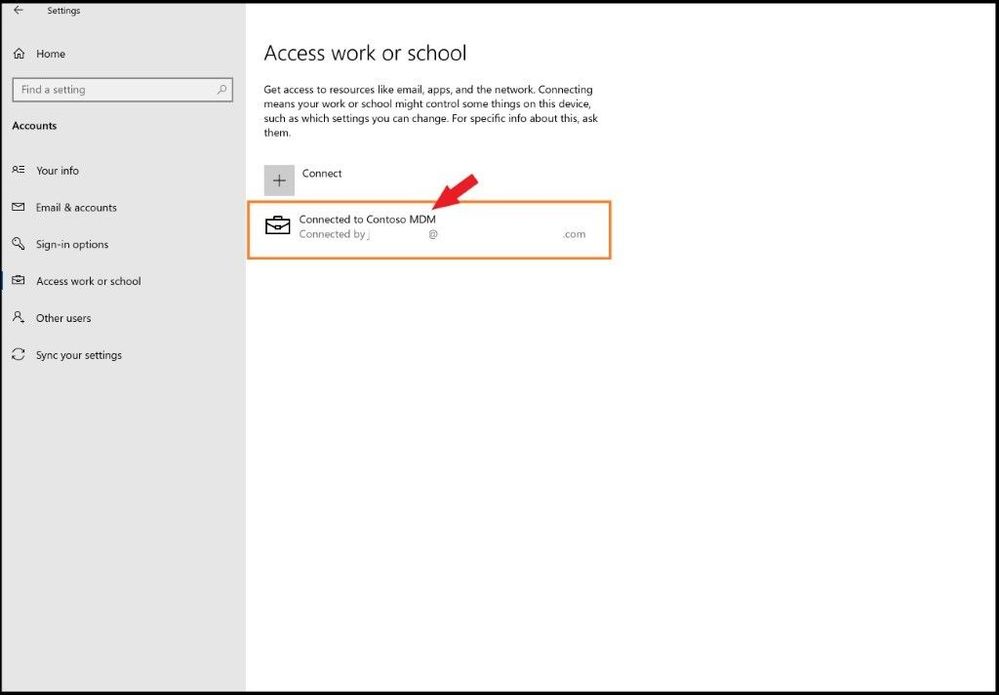
Account Added
Confirming Enrollment in MEM
Head back over to the Microsoft Endpoint Manager admin center and one will land back on the home page. Select the Devices tab on the left and then All Devices. You should see the device you just enrolled in MEM with the matching device name and timestamp (last check in time) to verify. Also, you will see under the Managed by header will be Intune. Since the machine I enrolled in MEM is not compliant per a policy I pre-created and applied in MEM, one can see it is marked as non-compliant. If the device is 100% compliant per your work or school polices, it will show a green check mark under the compliance category.
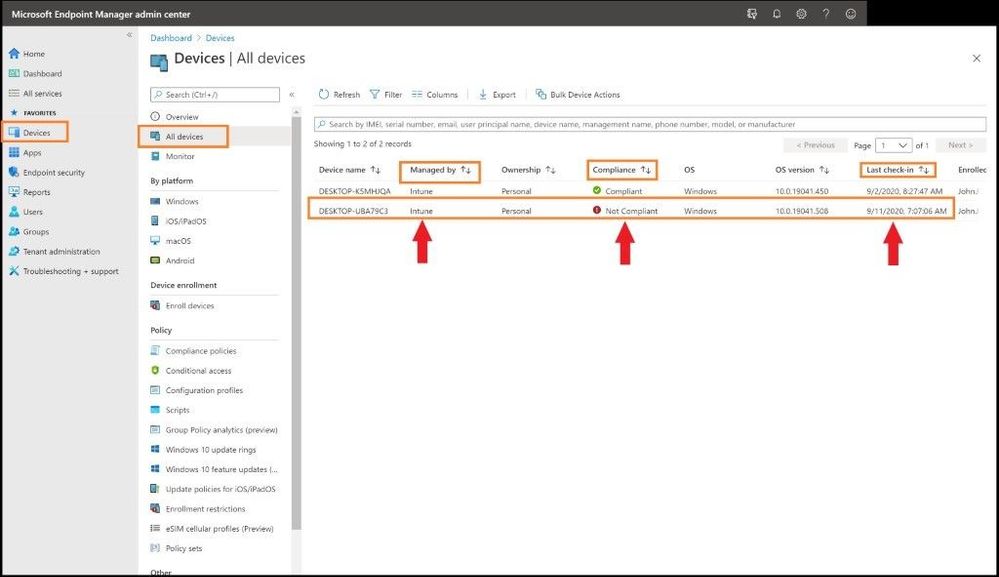
Device Added but not Compliant
Non-Compliant Enrolled Devices
From an Admin’s perspective to see what is not compliant in the newly enrolled device, one will want to investigate further what is out of compliance. This could be the Antivirus version is not up to date, the last Antivirus scan is overdue, the Windows version is not above a certain version, or any policy that your organization deems compliant. You will be notified and be able to see it in this view. To see what policies are making this device or your device non-compliant, click on the non-compliant device that has a red exclamation mark.
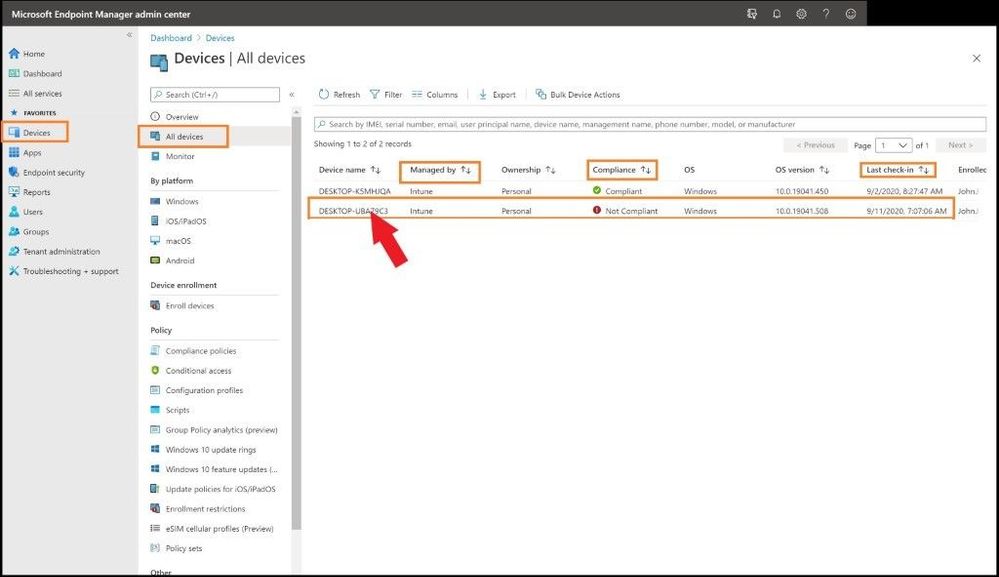
Selecting Added Machine
This will take us to the main dashboard of the device you onboarded and all the settings for the device. On the left-hand side, click on the Device compliance tab to see what policy is making the device not compliant. Next, click on any policy that is in a not compliant state as seen below.
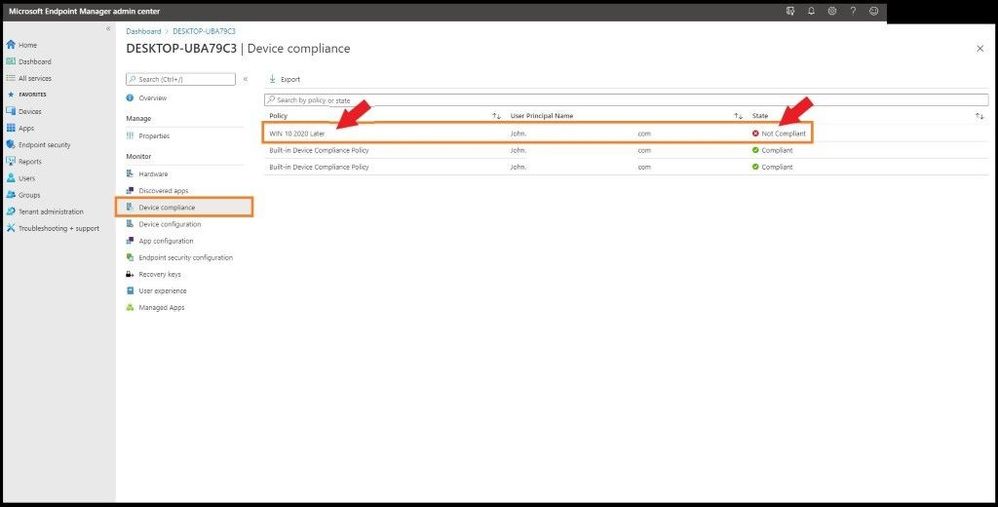
Selecting the Non-Compliant Policy
The WIN 10 2020 Later policy is the policy I created for all my Windows devices. When this particular device was enrolled and this policy was applied, it did not meet the strict policy standards I created in the policy.
After clicking on the WIN 10 2020 Later policy that was applied to my device, I can see all the policy settings and what is not compliant out of the seven polices as seen below. The particular policy that is not compliant is shown in red with a X which is “Require the device to be at or under the machine risk score”. I have my policy set to be at a certain level/threshold of risk as any Administrator will want to know if the device falls to a level that is not acceptable per company policy.
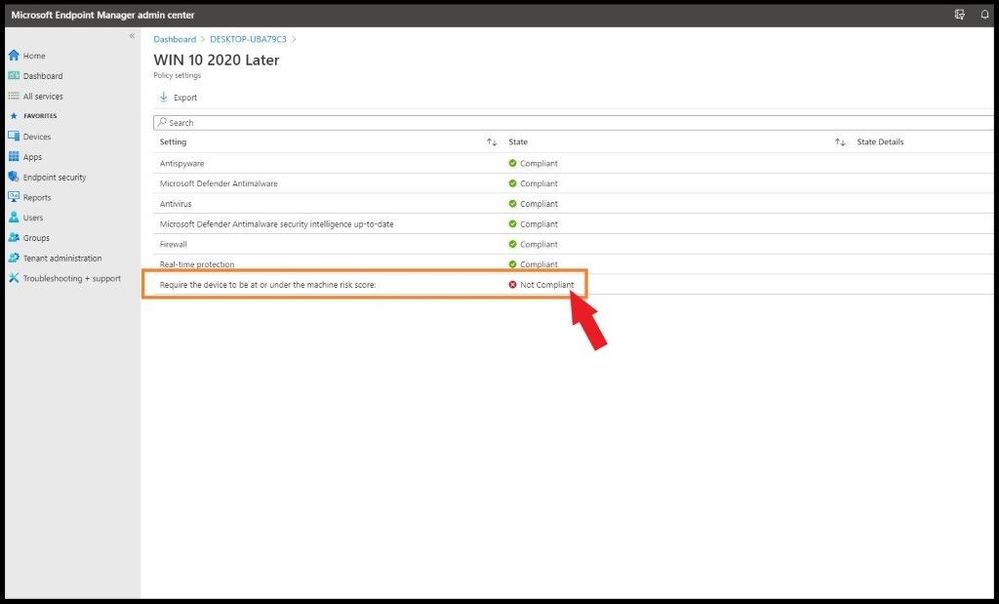
Selecting the Specific Setting
To see how to fix this issue, we will go to the WIN 10 2020 Later policy and view the properties. By selecting Devices on the far-left side, then Compliance policies, and then the WIN 10 2020 Later policy, it will bring me to the actual policy with all the settings inside the policy.
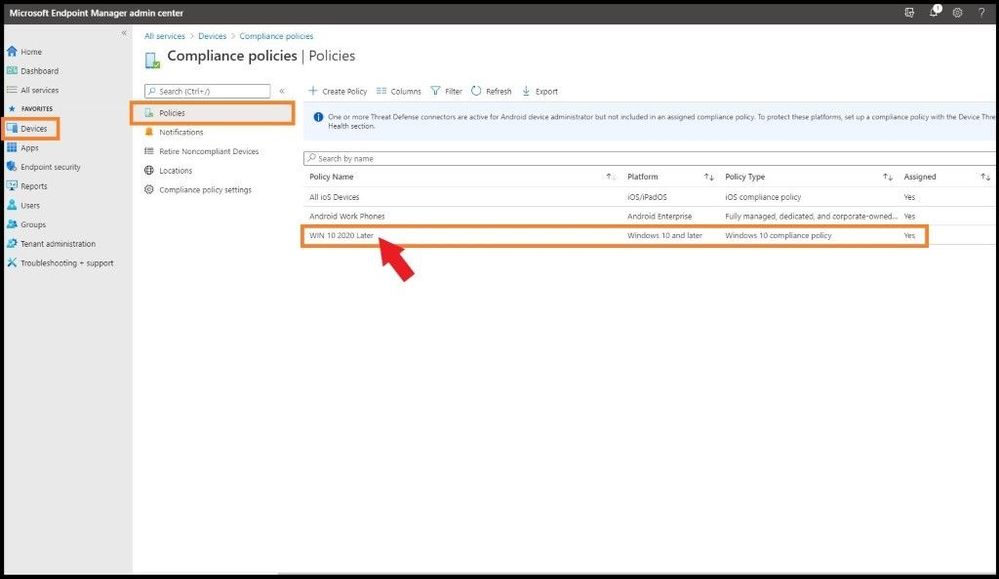
Compliance Policies Page
By clicking on the properties tab, one can see all the settings for the policy in question and what needs to be fixed on the device to be compliant per your organization. One can see for the “Require the device to be at or under the machine risk score” is set to low.
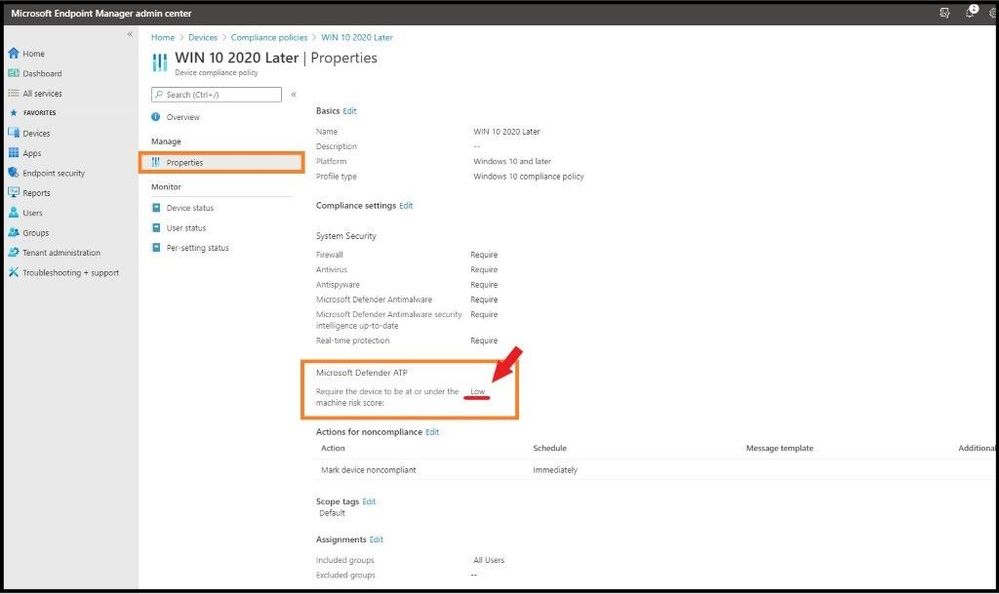
Viewing What is out of Compliance
Since the machine is higher than low according to Microsoft Defender ATP, I will go over and investigate why it is not low and make sure to bring it down to an acceptable risk level of low to be compliant per my organization’s policy. Once this is done, the device will show as compliant in the future unless any of the policies I have applied do not meet the thresholds set inside the MEM portal and policies which were created.
One can always select the Dashboard tab on the main left column to see a snapshot of device enrollment, compliance, configuration, and the status of your enrolled devices. One can also see the device configuration profile status with user and device trends.
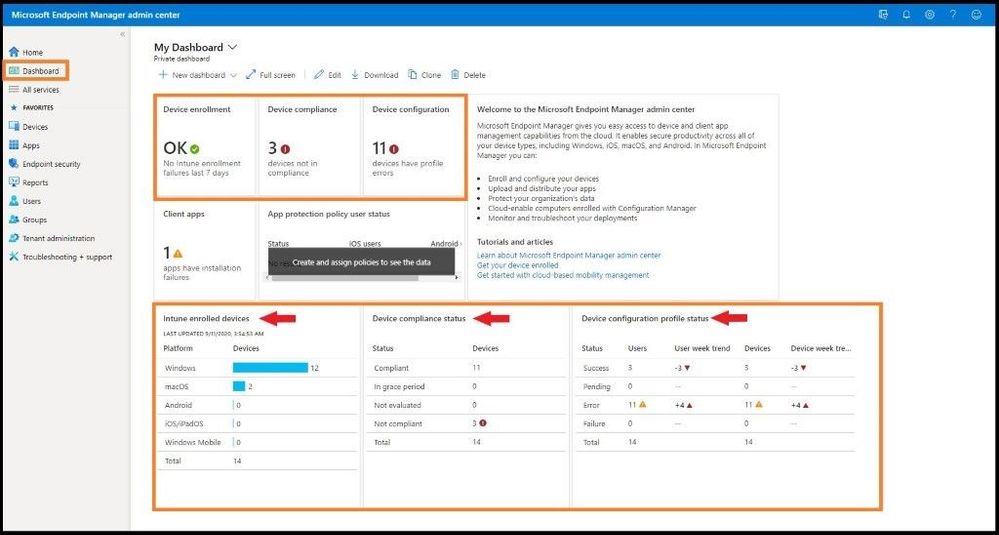
Viewing Dashboard with Information
Android Enrollment for Corporate Owned Devices with a Work Profile Issue
With then new preview feature of Android Enrollment for Corporate owned devices with a work profile, one must take some extra steps, or the device will not be able to enroll. As of this writing, the Dev Team states with an update to the known issues section regarding enrollment and the “Updating Device” screen, a fix will be rolled out very soon. Until then, follow the below steps. One needs to create a specific Android configuration profile related to Android Enterprise with Device restrictions or else the device will fail. This includes Corporate owned dedicated devices, Corporate owned fully managed user devices, and Corporate owned devices with a work profile. The following steps will ensure your Android Enterprise Device will be successful. Select Devices on the far left and then Android.
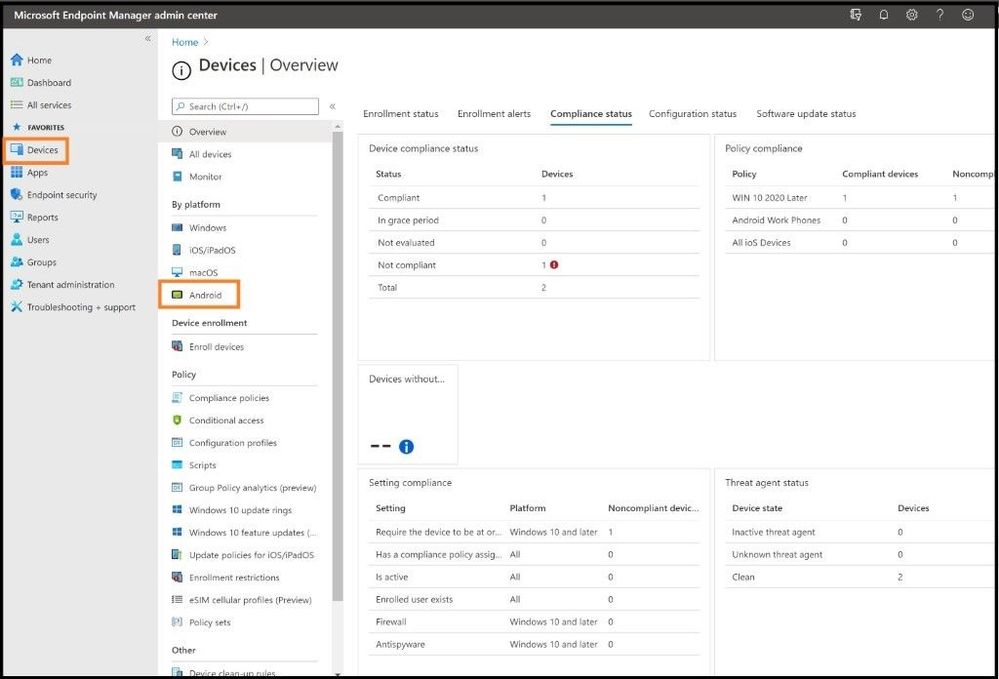
Android Device
Select Configuration profiles and then + Create profile at the top. For Platform, select Android Enterprise and for Profile select Device restrictions and then select create.
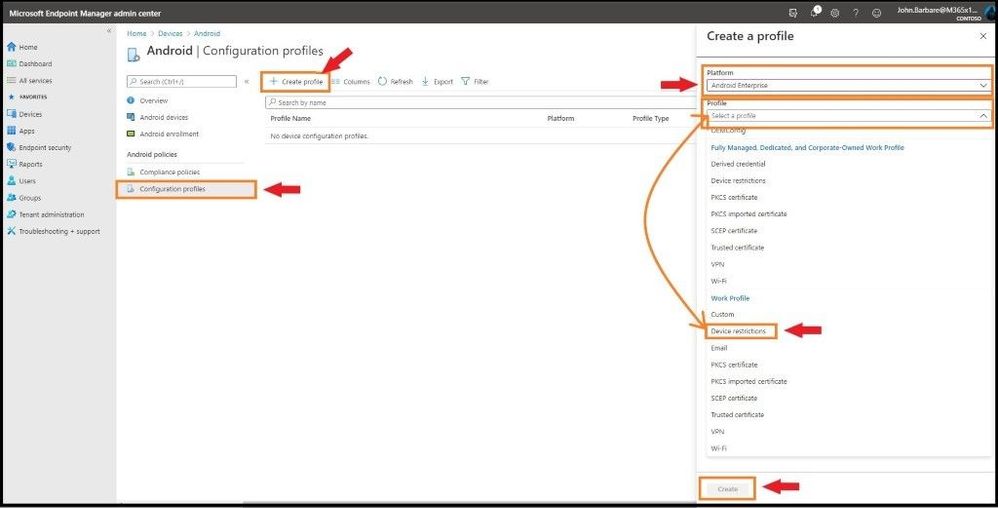
Selecting Device Restrictions
Go through the steps in the configuration settings according to your corporate environment and then apply to the necessary groups for the policy to apply.
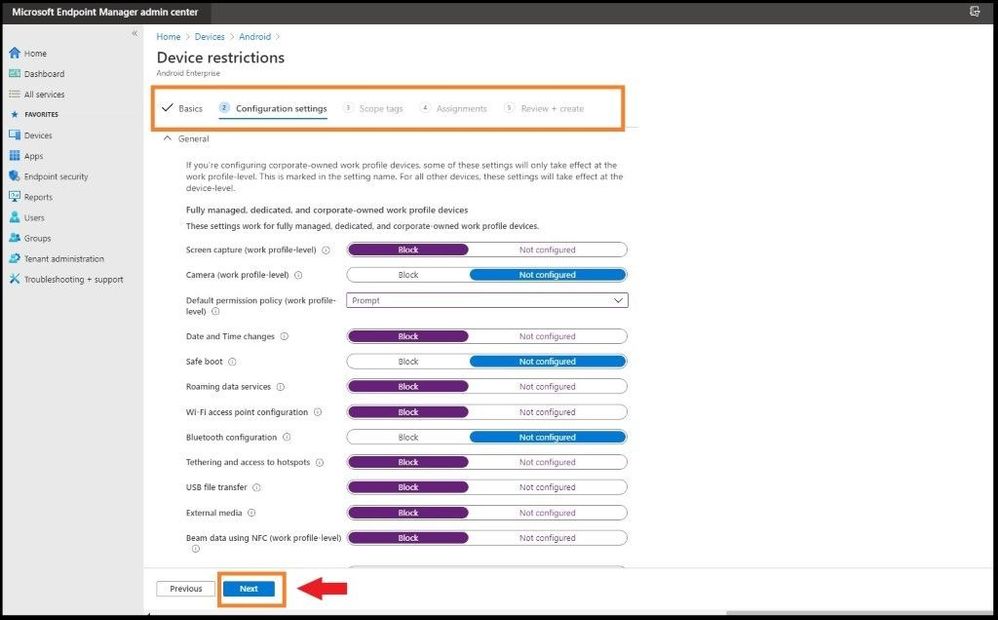
Viewing Configurations Before Applying
Conclusion
Thanks for taking the time to read this blog and I hope you had fun reading how to set up automatic enrollment for Windows 10 devices and also Corporate owned Android devices using the MEM console. The next blog I will show you how to setup and deploy Microsoft Defender ATP using only the MEM dashboard for your enrolled devices without having to download the package (agent) from Microsoft Defender ATP. Hope to see you in the next blog and always protect your endpoints!
Thanks for reading and have a great Cybersecurity day!
Follow my Microsoft Security Blogs: http://aka.ms/JohnBarbare and also on LinkedIn.
References
You may also like:
Securing MEM at Microsoft
by Contributed | Oct 9, 2020 | Azure, Technology
This article is contributed. See the original author and article here.
Thriving on Azure SQL
Many thanks to our colleagues Mahesh Sreenivas, Pranab Mazumdar, Karthick Pakirisamy Krishnamurthy, Mayank Mehta and Shovan Kar from Microsoft Dynamics team for their contributions to this article.
Overview
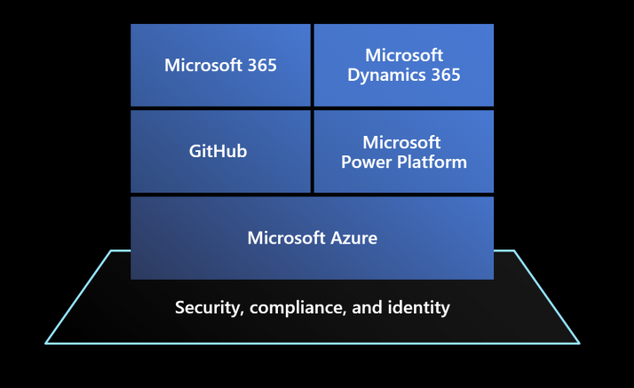
Dynamics 365 is a set of intelligent SaaS business applications that helps companies of all sizes, from all industries, to run their entire business and deliver greater results through predictive, AI-driven insights. Dynamics 365 applications are built on top of a Microsoft Power Platform that provides a scalable foundation for running not just Dynamics apps themselves, but also to let customers, system integrators and ISVs to create customizations for specific verticals, and connect their business processes to other solutions and systems leveraging hundreds of pre-existing connectors with a no-code / low-code approach.
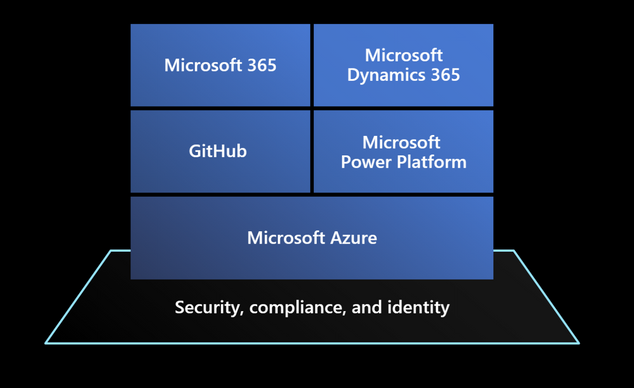
Microsoft Power Platform (also offering services like Power Apps, Power Automate, Power Virtual Agents and PowerBI) has been built on top of Microsoft Azure services, like Azure SQL Database, which offer scalable and reliable underlying compute, data, management and security services that power the entire stack represented in the picture above.
A bit of history
Microsoft Dynamics 365 has its roots in a suite of packaged business solutions, like Dynamics AX, NAV and CRM, running on several releases of Windows Server and SQL Server on customers’ datacenters around the world.
When Software as a Service paradigm emerged to dominate business applications’ industry, Dynamics CRM led the pack becoming one of the first Microsoft’s online services. At the beginning of the SaaS journey, Dynamics services ran on of bare-metal servers in Microsoft’s on-premises datacenters. With usage growing every day, into millions of active users, the effort required to deploy and operate all those servers, manage capacity demands, and respond promptly to issues of continuously growing customer data volumes (with database size distribution from 100 MB up to more than 4 TB for the largest tenants) would eventually become unmanageable.
Dynamics was one of the first adopters of Microsoft SQL Server 2012 AlwaysOn to achieve business continuity, but also to provide a flexible way to move customer databases to new clusters by creating additional replicas to rebalance utilization.
Managing so many databases at scale was clearly a complex task, involving the entire database lifecycle from initial provisioning to monitoring, patching and operating this large fleet while guaranteeing availability, and team learned how to deal with issues like quorum losses and replicas not in a failover-ready state. From a performance perspective, database instances running on shared underlying nodes, made it hard to isolate performance issues and provided limited options to scale up or accommodate workload burst other than moving individual instances to new nodes.
As end customers can run multiple versions of (highly-customized) applications in their environments, generating significantly different workloads, it is no surprise to hear from Mahesh Sreenivas, Partner Group Engineering Manager on the Common Data Service team, that to manage and maintain all this on a traditional platform was “painful for both engineers and end customers”.
The move to Azure and Azure SQL Database
Dynamics 365 team decided to move their platform to Microsoft Azure to solve these management and operational challenges while meeting customer requirements, ensuring platform fundamentals like availability and reliability, and letting the engineering team to focus on adding innovative new features.
Engineering effort from initial designs to production took a couple of years, including migration of the customers to the new Azure based platform, moving from a monolithic code base running on-premises into a world-class planet scale service running on Azure.
Common Data Service on Azure SQL Database
The first key decision was to transition from a suite of heterogeneous applications, each one with its own history and technical peculiarities, to a common underlying platform where Dynamics applications were going to be regular applications just like what other ISV companies could build and run: hence Microsoft Power Platform and its Common Data Service layer was introduced. Essentially, a new no-code, low-code platform built on top of underlying Azure capabilities like Compute, Storage, Network and other specialized services like Azure SQL Database was a way to abstract Dynamics applications from underlying platform, letting Dynamics developers to focus on transitioning to the platform without managing individual resources like database instances.
The same platform today is also hosting other services like PowerApps, Power Automate, Power Virtual Agents or PowerBI, and it is available for other companies to build their own SaaS applications on top of, from no-code simple solutions to full-code specialized ISV apps that don’t need to worry about how to manage underlying resources like compute and various storage facilities.
By moving to Azure a platform that is managing around 1M database instances (as of July 2020), Dynamics team learned a lot about how underlying services are working, but also provided enormous feedback to other Microsoft teams to make their services better in a mutually beneficial relationship.
From an architectural perspective, Common Data Service is organized in logical stamps (or scale groups) that have two tiers, compute and data, where the relational data store is built on Azure SQL Database given team’s previous familiarity with SQL Server 2012 and 2016 on premises. This provides out of the box, pre-configured high availability with a 3 (or more) nines SLA, depending on selected service tiers. Business Continuity is also guaranteed through features like Geo-restore, Active Geo-replication and Auto Failover Groups.
Azure SQL Database also helped the team significantly by reducing database corruption episodes at table, index or backup level compared to running many databases on a shared, single SQL Server instance on-premises. Similarly, the several man hours required for patching at the firmware, operating system and SQL Server on physical machines have been reduced to only managing the application layer and its data.
Azure SQL Database Elastic Pools
Once landed on Azure SQL Database, the second key decision was to adopt Elastic Pools to host their database fleet. Azure SQL Database Elastic Pools are a simple and cost-effective solution for managing and scaling multiple databases that may have varying and unpredictable usage demands. Databases in an elastic pool are on a single logical server, and share a given amount of resources at a set price. SaaS application developers can optimize the price-performance for hundreds of databases within a prescribed resource budget, while delivering performance elasticity for each database and control multi-tenancy by setting min-max utilization thresholds for each tenant. At the same time, they enforce security and isolation by providing separate access control policies for each database. “By moving to Azure SQL Database Elastic Pools, our team doesn’t need to over-invest in this aspect of managing replication because it’s handled by the Azure SQL Database service,” explains Mahesh.
Microsoft Power Platform is using a separate for each tenant using a given service within its portfolio.
The “Spartan” resource management layer
Given the wide spectrum of customer industries, sizes and (customized) workloads, one of the key requirements is the ability to allocate and manage these databases across a fleet of elastic pools efficiently, maximizing resource utilization and management. To achieve this goal, 3 aspects are critical to master:
- Flexibility in sizing and capacity planning
- Agility in scaling resources for individual tenants
- Optimized price-performance
While Azure SQL Database platform provides the foundations to fully manage these aspects (for example, online service tier scaling, ability to move databases between pools, ability to move from single databases to pools, and viceversa, multitude of price-performance choices, etc.), Dynamics team created a dedicated management layer to automate these operations based on application-defined conditions and policies. “Spartan” is that management layer, designed to reduce the amount of manual efforts to the bare minimum, it has a scalable micro-services platform (implemented as an ARM Resource Provider) which is taking care the entire lifecycle of their database fleet.
Spartan is an API layer taking care of database CRUD operations (create, read, update, delete), but also all other operations like moving a database between elastic pools to maximize resource utilization, load balancing customer workloads across pools and logical servers, managing backup retention and restoring databases to a previous point in time. Underlying storage assigned to databases and pools is also managed automatically by the platform to avoid inefficiencies and maximize density. What may appear as a rare operation like shrinking a database in production, is a common task for a platform that needs to operate more than 1M databases and optimize costs.
Elastic Pools are organized in “tiers”, where each tier provides different configurations in terms of underlying service tiers utilized (General Purpose, Business Critical) and compute size allocated so that end customer databases will always run at the optimal price-performance level. Each tier also controls min-max settings for associated databases and define optimal density of databases per pool, in addition to other details like firewall settings and others.
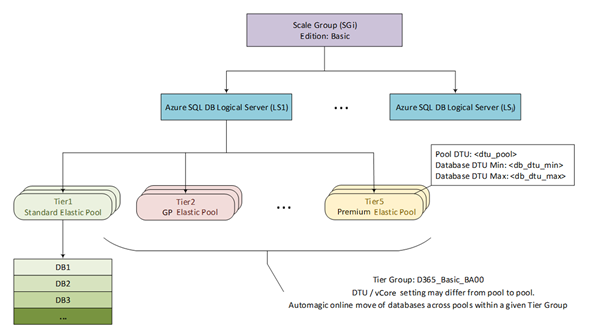
Figure 1 Azure SQL Database layout per Scale Group
The picture above represents this logical organization of Elastic Pools into tiers and shows the combination of DTU and vCore purchasing models that Dynamics team is using to find the best tradeoff between granular resource allocation and cost optimization.
For very large customers, the platform can also move these databases out of a shared pool into a dedicated Azure SQL Single Database with the ability to scale to the largest compute sizes (e.g. M-Series with up to 128 vCore instances).
The level of efficiency of this platform is incredible, if you think that Dynamics team is managing the entire platform with 2 dedicated engineers, that are focused on operating and improving the Spartan platform rather than managing individual databases.
Dynamics 365 and Azure SQL Database: better together!
As mentioned, engineers from Dynamics and Azure teams have worked hard together to improve underlying platforms during this journey. Some platform-wide improvements like Accelerated Networking, introduced to significantly reduce network latency between compute nodes and other Azure services, has been heavily advocated by Dynamics team who highly benefitted from this for their data-centric, data-intensive applications.
In Azure SQL Database, Dynamics team has influenced the introduction of the vCore model to find the right ratio between compute cores and database storage that now can scale independently and optimize costs and performance.
To help get even more out of the relational database resources in Common Data Service, the team implemented Read Scale-Out, which helps boost performance by offloading part of the workload placed on primary read-write database replicas. Like most data-centric services, the workload in Common Data Service is read-heavy—meaning that it gets a lot more reads than writes. And with Read Scale-out, if a call into Common Data Service is going to result in a select versus an update, we can route that request to a read-only replica and scale-out the read workload.
Given the vast variety of customer workloads and scale, Dynamics 365 apps have been also a great sparring partner to tune and improve features like Automatic Tuning with automatic plan correction, automatic index management and intelligent query processing set of features.
Imagine having queries timing out in a 1 million database fleet: is it for lack of the right indexing strategy? A query plan regression? Something else?
To help Dynamics engineers and support organization during troubleshooting and maintenance events, another micro-service called Data Administration and Management Service (DAMS) has been developed to schedule and execute maintenance tasks and jobs like creating or rebuilding indexes to dynamically optimize changes in customer workloads. These tasks can span areas like performance improvements, transaction management, diagnostic data collection and query plan management.
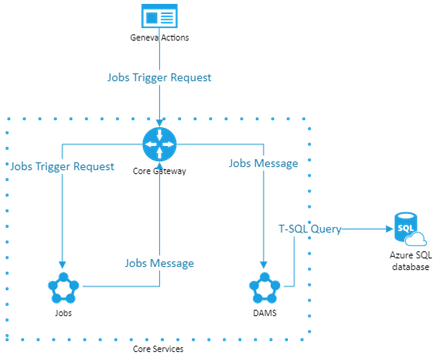
Figure 2 DAMS Architecture
With help from Microsoft Research (MSR), Dynamics team has ported SQL Server’s Database Tuning Advisor (DTA) to Azure SQL and integrated it into the microservice. DTA is a platform for evaluating queries and generating index and statistic recommendations to tune query performance of the most critical database workloads.
Like any other customer database in Azure SQL Database, Dynamics 365 databases have features like Query Store turned on by default. This feature provides insights on query plan choices and performance and simplifies performance troubleshooting by helping them in quickly find performance differences caused by query plan changes.
On top of these capabilities, Dynamics team also created an optimization tool that they share with their end customers to validate if their own customizations are implemented properly, detects things like how many data controls are placed in their visualization forms and provide recommendations that adhere to their best practices.
They also proactively monitor customer workloads to understand critical use cases and detect new patterns that customers may introduce, and make sure that the platform can run them efficiently.
Working side by side with Azure SQL Database engineers, the Dynamic team helped improving many areas of the database engine. One example is related to extremely large query plan caches (100k+ plans), a common problem for complex OLTP workloads, where spinlock contention on plan recompilations was creating high CPU utilization and inefficiencies. Solving this issue helped thousands of other Azure SQL Database customers running on the same platform.
Other areas they helped to improve were Constant Time Recovery, making failover process much more efficient for millions of databases, or managed lock priority for reducing blocking during automatic index creation.
In addition to what Azure SQL Database provides out of the box, Dynamics team also developed specific troubleshooting workflows for customer escalating performance issues. As an example, Dynamics support engineers can run Database Tuning Advisor on a problematic customer workload and understand specific recommendations that could be applied to mitigate customer issues.
A look into the future
Dynamics 365 was one of the prime influencers for increasing Azure SQL Database max instance size from 1TB to 4TB, given the scale of some of the largest end customers. That said, even 4TB now is a limit in their ability to scale, so Dynamics team is looking into Azure SQL Database Hyperscale as their next-gen relational storing tier for their service. Virtually unlimited database size, in conjunction with the separation between compute and storage sizing and the ability to leverage read replicas to scale out customer workloads are the most critical characteristics that the team is looking into.
Dynamics team is working side by side with Azure SQL team in testing and validating Azure SQL Database Hyperscale on all the challenging scenarios mentioned previously, and this collaboration will continue to be successful not only for the two teams respectively, but also for all the other customers running on the platform.

by Contributed | Oct 9, 2020 | Technology
This article is contributed. See the original author and article here.
Postgres is an amazing RDBMS implementation. Postgres is open source and it’s one of the most standard-compliant SQL implementations that you will find (if not the most compliant.) Postgres is packed with extensions to the standard, and it makes writing and deploying your applications simple and easy. After all, Postgres has your back and manages all the complexities of concurrent transactions for you.
In this post I am excited to announce that a new version of pg_auto_failover has been released, pg_auto_failover 1.4.
pg_auto_failover is an extension to Postgres built for high availability (HA), that monitors and manages failover for Postgres clusters. Our guiding principles from day one have been simplicity, and correctness. Since pg_auto_failover is open source, you can find it on GitHub and it’s easy to try out. Let’s walk through what’s new in pg_auto_failover, and let’s explore the new capabilities you can take advantage of.

Fault Tolerance and Graceful Degradation
As soon as your application depends on Postgres in production, many of you want to implement a setup that is resilient to the most common failures we know about. That’s what Fault Tolerance is all about:
Fault tolerance is the property that enables a system to continue operating properly in the event of the failure of (or one or more faults within) some of its components. If its operating quality decreases at all, the decrease is proportional to the severity of the failure, as compared to a naively designed system, in which even a small failure can cause total breakdown. Fault tolerance is particularly sought after in high-availability or life-critical systems. The ability of maintaining functionality when portions of a system break down is referred to as graceful degradation.
If you are running your application in the cloud and you’re using a managed database service—such as Azure Database for PostgreSQL—then you’re probably relying on your database service provider to implement HA for you. But what if you are managing your Postgres database yourself, and you need your application to be highly available?
What if you are managing your Postgres database yourself and you need HA?
We developed the open source pg_auto_failover to implement fault tolerance for Postgres architectures in production. The first design of pg_auto_failover that we introduced last year—which gave you high availability and automated failover, as well as Postgres 12 support—already allowed you to address production incidents, and already implemented graceful degradation when either the primary or the secondary is unavailable.
With the latest release of pg_auto_failover 1.4.0 we are able to deliver high availability for your apps running on Postgres in even more failure scenarios—and we offer more options to implement graceful degradation in common use cases.
The new 1.4 release of pg_auto_failover for Postgres introduces a major new feature in the design referred to as “multiple standby” support by the development team.
While the term “multiple standby” may not seem that impressive, multiple standby support in pg_auto_failover for Postgres completely redefines what you can give your application in terms of high availability and automated failover and fault tolerance.
Single Standby for Failover Capabilities (what pg_auto_failover could already do before 1.4)
Before pg_auto_failover 1.4, a single Postgres standby node was already supported.
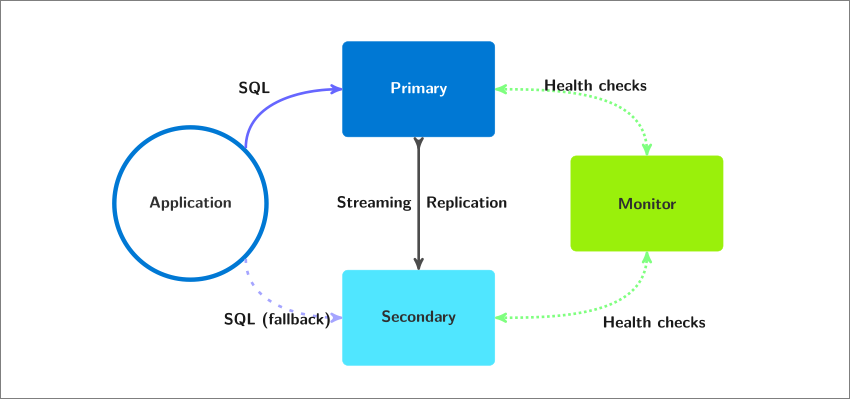 Postgres High Availability Architecture in pg_auto_failover with Single Standby. Depicted in this diagram are 1 primary & 1 standby (called a “secondary” node)
Implementing single standby support for Postgres with pg_auto_failover was (and still is) as simple as running the following commands:
admin@monitor $ pg_autoctl create monitor ...
admin@monitor $ pg_autoctl show uri --monitor

admin@node1 $ pg_autoctl create postgres --monitor <uri> ...
admin@node2 $ pg_autoctl create postgres --monitor <uri> ...
The commands shared above use pg_autoctl which comes with the pg_auto_failover package install, and is the only entry point you need for all your pg_auto_failover usage: initial setup, on-going maintenance, system integration etc. See also the complete reference documentation for pg_autoctl within our pg_auto_failover docs.
Having automated failover to a single standby node in Postgres is a good and solid starting point to have. That said, our options to implement a graceful degradation are severely limited when it comes to the loss of the single standby node. This is because—prior to version 1.4 of pg_auto_failover—pg_auto_failover would always use synchronous commit.
Here is what happened before pg_auto_failover 1.4, back when we always used synchronous commit:
- Using synchronous_commit for each transaction that Postgres commits locally, the client connection is put on hold until the commit is known to have made it to the standby node.
- Postgres is very good at waiting, and very patient: If the standby node becomes unavailable, then the client connection stays on-hold for an infinite period of time (or at least until a restart).
- This means that when the standby node is unavailable, all the PostgreSQL write traffic is put on hold on the primary. And this might not be the graceful service degradation that you want.
Postgres HA with a single standby: Service Availability or Data Availability, pick one
If we want to implement a Postgres failover mechanism that is safe for your data, we need to use synchronous_commit. But then when the single standby node is unavailable, all the SQL write traffic would be put on hold on the primary. Which might not be what you want: what if your customers are waiting for their transactions to process?
That’s why pg_auto_failover switches synchronous_commit off when the only known standby node is unavailable, and signals the currently waiting transactions. That’s a good implementation of the notion of a graceful degradation here: we can’t provide data security anymore, nor the failover capability, and we accept the situation and open the write traffic again on the primary node.
In this context “data security” means that after the standby node has become unavailable, a single copy of the data is maintained, on a single machine. The degradation implemented by pg_auto_failover in that case is graceful in terms of the service: writes are allowed to be processed again. It’s a real degradation for the data security though, and one that you might not be able to accept. Well if that is your situation, keep reading, as you can now create a second standby with pg_auto_failover 1.4.
It should be obvious now that it is impossible to achieve service and data availability with Postgres when using a single standby node. With a single standby the best we can achieve is failover when the primary is not available, and single-node Postgres when the standby is not available.
Multiple Standby Nodes in pg_auto_failover 1.4, for Availability of Service and Data
Starting with pg_auto_failover 1.4.0 it is now possible to register three Postgres nodes for the same Postgres service, and then implement a trade-off that is compliant with High Availability of both the service and the data.
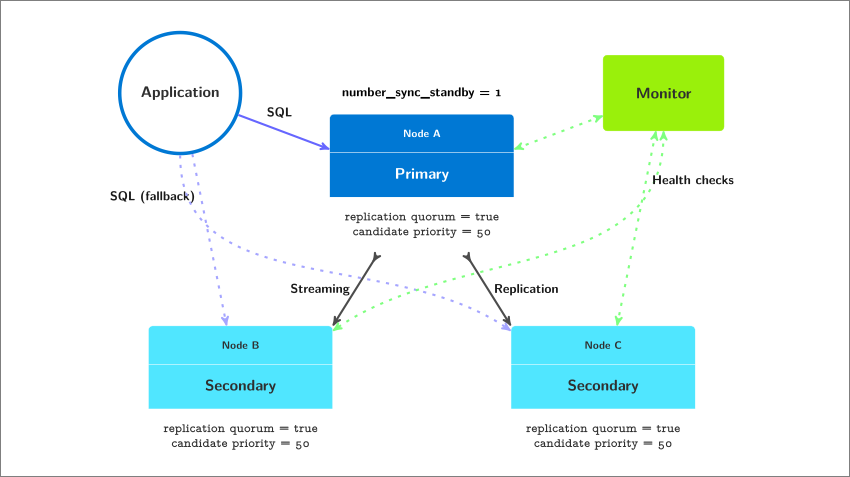 Postgres High Availability Architecture in pg_auto_failover with Multiple Standbys. Depicted in this diagram are 1 primary and 2 standby (often called “secondary”) nodes
Implementing multiple standby support for Postgres HA with pg_auto_failover 1.4 is as simple as running the following commands:
admin@monitor $ pg_autoctl create monitor ...
admin@monitor $ pg_autoctl show uri --monitor

admin@nodeA $ pg_autoctl create postgres --monitor <uri> ...
admin@nodeB $ pg_autoctl create postgres --monitor <uri> ...
admin@nodeC $ pg_autoctl create postgres --monitor <uri> ...
In this classic Postgres HA architecture (as detailed in our docs in the Architectures with two standby nodessection and made possible by pg_auto_failover multiple standby support), we can afford to lose one of our standby nodes and continue to accept writes to the primary with synchronous_commit on, because we still have a functioning standby that can receive and replay all the transactions committed on the primary.
But what if we lost both of our standby nodes? Well, that would prevent our HA system to operate properly. If both standbys are lost, some of you will need Postgres to accept writes, and some of you will need Postgres to refuse writes because you can’t accept the risk that comes with maintaining a single copy of your production data. Of course, it is not the place of pg_auto_failover to make such a choice, so version 1.4.0 gives you the control you need to handle the situation in the best possible way for your application and business needs.
Our documentation covers the replication settings in the Multi-node Architectures section. Simplifying this documentation down to its essence, pg_auto_failover offers the replication setting named number-sync-standbys to control the degradation behavior when losing all the standby nodes. When set to zero, then you have the graceful behavior that we discussed previously where writes are allowed on the primary server, even though it’s the only node left and no other copy of the production data is maintained for you:
admin@monitor $ pg_autoctl set formation number-sync-standbys 0
By default, when you add a second standby that participates in the replication quorum then pg_auto_failover increments its number-sync-standbys from zero to one so that instead, when your primary node is the only one left, then all transactions that are writing data are put on-hold until a standby node is available again.
After all, protecting data durability on more than one node by default has been a good Postgres HA strategy for most of the existing HA systems out there, and is still the only available strategy in many HA systems.
Implementing the graceful degradation part of fault tolerance requires careful evaluation and advanced understanding of your business rules. With pg_auto_failover you can then implement your business needs as you see fit.
Postgres compatibility, including Postgres 13
With the new release of pg_auto_failover 1.4.0 our tool is compatible with Postgres versions 10, 11, 12, and 13.
The pg_auto_failover monitor runs a Postgres service internally: a part of our code is shipped as a Postgres extension named pgautofailover (without any underscores.) The pgautofailover extension is now compatible with Postgres 13, and the good news is that our binary packages for Postgres 13 will be published within the next month.
Getting started with pg_auto_failover for HA, want to implement your first failover?
What if you want to try out pg_auto_failover to implement a controlled failover, which some of you might call a switchover? You can test our Postgres failover mechanism with your application running and without having to introduce a low-level fault in your test environment.
Being able to orchestrate a failover (or switchover) in Postgres when all nodes are up and running also allows you to select a new primary node in your architecture—and can be used as a mechanism to migrate your Postgres production environment to a new physical setup (such as a new hardware or a new hosting facility).
Our pg_auto_failover documentation include developer commands for pg_autoctl with the following easter egg. You can setup a tmux session that runs a primary and two secondary Postgres nodes with only one pg_autoctl developer command:
$ PG_AUTOCTL_DEBUG=1 pg_autoctl do tmux session
     --root /tmp/pgaf
         --first-pgport 9000
         --nodes 3
         --layout tiled
When you try this command, then as soon as your setup is running (it usually takes from 30s up to about a minute on my laptop), then you can implement your first Postgres fully automated failover using pg_auto_failover:
$ PG_AUTOCTL_DEBUG=1 pg_autoctl perform switchover
pg_auto_failover 1.4 with multiple standby nodes
Now that you have done your first Postgres failover with pg_auto_failover, you can learn more about our open source HA solution by reading the pg_auto_failover documentation and trying the different Postgres HA architectures that are outlined there.
I recommend playing with and understanding the 3 replication settings:
number-sync-standbys
replication-quorum
candidate-priority
And then I recommend you play with the pg_autoctl enable maintenance and pg_autoctl disable maintenance commands. And of course, do as many failovers as you feel like you need to in order to understand the impact of those settings on the failover orchestration.
Now, if you play with pg_auto_failover and like it, or just like what you’ve read here, give us a star on the pg_auto_failover github repository. This means a lot because that’s how we know we are on track to provide a useful Postgres HA solution to you. And those stars could have an impact on how many people will contribute to this Open Source project!

by Contributed | Oct 8, 2020 | Technology
This article is contributed. See the original author and article here.
As part of our collective effort to drive inclusive economic recovery and growth, Microsoft and our partners have come together to #BuildFor2030. Microsoft is committed to enabling the UN’s Sustainable Development goals (SDGs), and our #BuildFor2030 campaign highlights partners who have solutions that support the SDGs within commercial marketplace.
Recognizing the 75th United Nations General Assembly – In September, the UN opened its 75th session, with member states reaffirming their commitment to global partnership and global health. In light of this commitment, we are showcasing partners whose solutions align with SDG 3: Good Health & Well Being.
In this blog post, Gavriella Schuster outlines our vision and collective opportunity for a more inclusive economy, along with our approach to journey with our partner ecosystem in this effort.
Many of our Microsoft partners have created innovative solutions in Microsoft AppSource and Azure Marketplace that support those who have been on the frontline of this global pandemic. Below are relevant solutions showcased on our homepages that support our health care workers and institutions, strengthening our communities.
Partner
|
Description
|
AllScripts

|
With FollowMyHealth, patients have a single point of access regardless of their healthcare provider. FollowMyHealth has created a specialized plan to swiftly implement telehealth, no matter what EHR or patient portal a client may be using.
|
Andor Health

|
ThinkAndor is a secure HIPAA compliant messaging and communication platform for Microsoft Teams that empowers experiences through real-time healthcare surveillance and workflow configuration.
|
Corti

|
Corti develops state-of-the-art AI decision-support software for medical triage. It is a decision support platform powered by artificial intelligence (AI).
|
Datos
|
Datos provides a comprehensive connected health platform for managing patients and data outside of the clinic. Health organization can easily manage and track remote care across multiple care teams, patients and devices.
|
ElectrifAi

|
PulmoAi increases radiologist efficiency improves radiological outcomes by aiding in the interpretation of pulmonary exams, using practical AI, machine learning, ad novel image processing techniques developed specifically for the analysis of CT scans.
|
ExactCure
|
DigitalTwin – Pro helps avoid patient under-doses, overdoses and drug-drug interactions. ExactCure develops a software solution to avoid medication errors.
|
Hyro Inc

|
COVID-19 Virtual Assistant provides a conversational solution to aid COVID-19 support and diagnosis. Healthcare professionals can start automating patient queries surrounding COVID-19 within 48 hours using Hyro’s free conversational AI.
|
Innovaccer

|
Innovaccer’s COVID-19 Management system enables self-assessment, CDC-based education, telemedicine, and analytics to empower providers.It is a HIPAA compliant, multi-platform, and robust solution designed to support our healthcare professionals.
|
Jetware

|
LMOT Pool Testing Laboratory Optimizer for Mass Testing (LOMT) provides laboratory software for the management of COVID-19 pool testing. It allows the testing of 2 to 30 times more people with the existing resources of a laboratory.
|
KenSci

|
KenSci RealTime Command Center enables health systems to have a real-time view into bed management and ventilator capacity planning, to provide novel coronavirus affected patients, with better care.
|
Lunit INSIGHT
|
Lunit INSIGHT CRX detects 10 of the most common radiologic findings in a chest x-ray with high accuracy on chest x-rays using Lunit’s cutting-edge deep learning technology.
|
Mazik Global

|
MazikCare COVID-19 Test Scheduler brings mobile testing anywhere. This end-to-end scheduling solution helps local governments and organizations quickly increase the number of testing sites and collect data faster to impact virus detection and spread.
|
Oneview Healthcare Plc

|
Oneview Cloud for COVID-19 enables managed tablet solution to operationalise virtual care and enable digital services at the bedside. This allows remote patients to connect with their care team reducing risk for patients and clinicians by minimizing contact and preserving PPE, as well as enabling loved ones to visit virtually.
|
Phulukisa

|
Electronic Population Health Management Solution allows for the rapid and inexpensive screening of patients by improving information flow and patient care. The solution is designed to screen patients for the most common diseases in the country.
|
Providertech

|
CareX Healthcare Communicator automates communication workflows using text, voice, and email, which helps providers, payers, and FQHCs reduce their workload while engaging patients at scale before, during, and after care.
|
Searchie

|
Return to work after Covid-19 lockdown gets your team back to work safely after the Coronavirus lockdown with virtual video triage. This is a rapid, low-cost technology solution to virtually screen your employees before bringing them back to the office.
|
Sensei Labs

|
Conductor for COVID-19 manages COVID-19 response, business continuity, and accelerate post-crisis recovery. Conductor helps Fortune 500 firms globally to deliver transformations, procurement, M&A transactions, and large scale PMO initiatives.
|
Whiteboard Coordinator

|
COVID-19 ICU Expansion uses intelligent camera system to increase critical care capacity and reduce worker exposure to COVID-19. This solution helps to enhance capacity and protect front-line healthcare workers with a cost effective, scalable remote patient monitoring system.
|
Win Wire

|
COVID-19 Healthcare BOT leverages AI-based chatbot to answer questions about COVID-19 through a natural conversation experience. The BOT uses automated software programming with recommendations from the Centers for Disease Control and Prevention (CDC) and the World Health Organization (WHO) to provide accurate and updated information.
|
Learn how partners can submit solutions to be featured in the #BuildFor2030 campaign at aka.ms/partners/BuildFor2030. Join us to #BuildFor2030!
If you’re interested to learn more and have conversations related to building solutions for an inclusive economy, consider joining this community: http://aka.ms/mpc/inclusive-economy
by Contributed | Oct 8, 2020 | Azure, Technology
This article is contributed. See the original author and article here.
While cloud provides lot of agility, flexibility and ease for creating and managing your resources, it can be very costly if its not managed properly. Azure Advisor helps you analyzing your configurations and usage telemetry and offers personalized, actionable recommendations to help you optimize your Azure resources for reliability, security, operational excellence, performance, and cost. Icing on the cake is Azure Advisor is available at no additional cost.
It provides:
- Best practices to optimize your Azure workloads
- Step-by-step guidance and quick actions for fast remediation
- One place to review and act on recommendations from across Azure
- Alerts to notify you about new and available recommendations
Key things:
Optimize your deployments with personalized recommendations – Advisor provides relevant best practices to help you improve reliability, security, and performance, achieve operational excellence, and reduce costs. Configure Advisor to target specific subscriptions and resource groups, to focus on critical optimizations. Access Advisor through the Azure portal, the Azure Command Line Interface (CLI), or the Advisor API. Or configure alerts to notify you automatically about new recommendations.
Quickly and easily take action – Advisor is designed to help you save you time on cloud optimization. The recommendation service includes suggested actions you can take right away, postpone, or dismiss. Advisor Quick Fix makes optimization at scale faster and easier by allowing users to remediate recommendations for multiple resources simultaneously and with only a few clicks. Recommendations are prioritized according to our best estimate of significance to your environment, and you can share them with your team or stakeholders.
Find all your optimization recommendations in one place – Azure offers many services that provide recommendations, including Azure Security Center, Azure Cost Management, Azure SQL DB Advisor, Azure App Service, and others. Advisor pulls in recommendations from all these services so you can more easily review them and take action from a single place.
by Contributed | Oct 8, 2020 | Technology
This article is contributed. See the original author and article here.
Azure Managed Disks recently announced general availability for server-side encryption (SSE) with customer-managed keys (CMK). This means, alongside encryption with platform managed keys that is enabled by default for all Azure Managed Disks, every disk can also be encrypted with a disk encryption set (customer managed key) that is owned and managed by the end user to protect their data on the cloud.
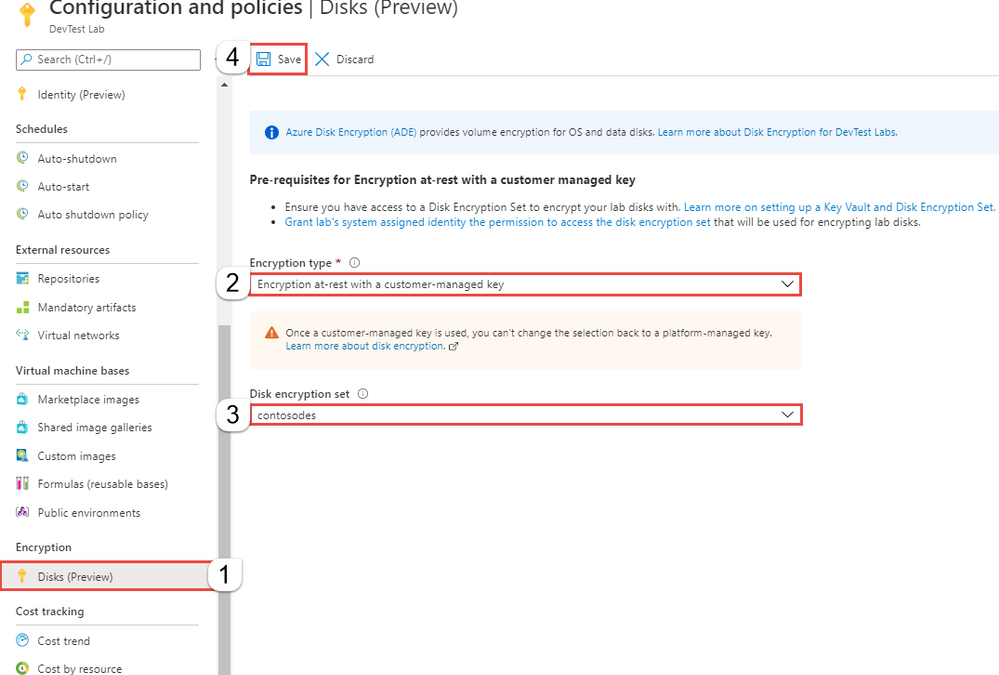
DevTest Labs now enables this feature to be configured at lab level for all virtual machines created as part of the lab. As mentioned above, all OS disks and data disks created as part of a DevTest Lab are encrypted using platform-managed keys. As a lab owner you can choose to encrypt lab virtual machine OS disks using your own disk encryption set. Please note that, currently encryption with a customer managed key is in preview and only supported for DevTest Lab OS disks; support for data disks is coming soon. 
With this, the lab users don’t need to worry about configuring this setting for their individual lab virtual machines – the lab takes care of this for them, thus making it easy to create and use lab virtual machines in a secure manner.
Learn more on configuring encryption for your lab OS disks
Try this feature today and let us know what you think in the comments section. Have a question? Post it on our Azure DevTest Labs Forum
by Contributed | Oct 8, 2020 | Technology
This article is contributed. See the original author and article here.
We are thrilled to celebrate our mentors that have truly made a positive and lasting impact in the lives of other #HumansofIT. Read on to find out who is our FY21 Q1 Most Valuable Mentor award winner!

The FY21 Q1 Most Valuable Mentor award goes to……
Microsoft Azure MVP Thomas Nuanheim! Congratulations, Thomas!
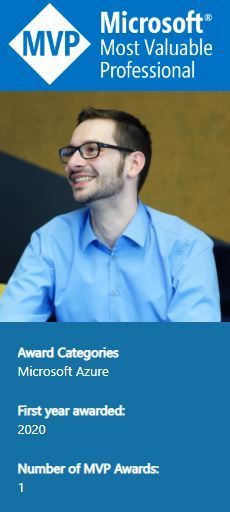
FY21 Q1 Most Valuable Mentor award winner – Thomas Nuanheim
Here’s a bit about Thomas:
He is involved in projects to design and implement cloud solutions (including evaluation of new cloud technology and products) in enterprise environments. You will find him blogging at “cloud-architekt.net”. Thomas shares his experiences with the community in meetup talks and conference sessions. He is also part of the “Azure Meetup Bonn” and “Cloud Identity Summit” organization team.
Here is what Thomas’ recent mentee, Meron Gebremedhin had to say about him (shared with permission):
“From Day One he set up a weekly one-hour meeting sessions using Microsoft Teams, above and beyond. He asked me how I am doing. Never rushed the calls, recognized my achievements, and provided me all materials and demo sessions. Thomas also referred me to other mentors for specific areas I needed help with (that were outside his domain). He made sure I have all the references materials I needed. I can’t express my gratitude enough.”
Has your mentor positively impacted your life and empowered you to #AchieveMore when participating in the Community Mentors Program? Do you want to give your mentor kudos and well-deserved recognition for their efforts? Join the program now and start changing lives!
Cheers to all of you for your contributions to the program thus far, and keep those Most Valuable Mentor nominations coming in at https://aka.ms/nominatemymentor.
Let’s keep learning, growing and celebrating our awesome mentors who make the tech community a better place!
#HumansofIT
#CommunityMentors

by Contributed | Oct 8, 2020 | Technology
This article is contributed. See the original author and article here.
Last week, thousands of people gathered virtually to attend the Grace Hopper Celebration (GHC) of women in technology. In honor of GHC 20, we are spotlighting software industry veteran Sue Bohn, who attended the celebration. “It was very inspiring to see the depth of women in computing today and hear about their experiences,” Sue told me. “Grace Hopper once said that ‘a ship in port is safe, but that is not what ships are for.’ Seeing women today stepping out of the ‘safety zone’ to innovate and add to the profession and to the industry is really, really inspiring to me.” Sue exemplifies the spirit of trailblazers like Admiral Hopper. She has fundamentally changed how our engineering teams interact with customers to make our products best in class. She inspires me every day, and I hope her story inspires you as well.
–Joy Chik
—-
“People have this idea that our job is to create technology,” says Sue Bohn, director of the Customer and Partner Success Team (CXP) in Microsoft’s identity division. “It’s not. Our job is to give people solutions to problems. And we need to solve them the right way. What we think is easy as technologists isn’t always so easy for the average person. We need to understand that customers aren’t like us.”
Although many customer-facing teams live in product support or marketing organizations, Sue’s program managers—who dedicate themselves to solving real problems for real customers—sit within the core engineering group. “We cut the distance between customers, partners, and our engineering team,” she explains. In an era of continuous development, there’s no way to operate at cloud speed without this high-bandwidth connection.
Customer-driven engineering
Continuous, collaborative engineering is decidedly different from waterfall development, which dominated before cloud times. “When the world used to be flat,” Sue muses, customers would evaluate, buy, deploy, and then operate software. “If there was a break-fix, they’d talk to support. Then they’d fall off the end of the earth, and we’d start all over three years later.”
For each new product cycle, customers would sign up for a Technology Access Program to give early feedback on new features. They committed to go live with their deployment in time to participate in a big, splashy product launch. Requests for new features would enter a queue for consideration in subsequent product releases. “Then,” says Sue, “we’d find customers to look at the next thing and never close the loop with the ones who gave us feedback months or years before.”
Today, the world is round. “We’re dropping new functionality into our service every day,” Sue reports. “And so are customers.” Given this accelerated pace of change, engineers now meet with customers and partners multiple times a week to collect feedback on the latest specs. “We really are co-engineering to build what customers want, as opposed to that big bang theory every three years.”

While building what customers want may seem like an obvious approach, it’s a muscle that has taken engineering culture time to strengthen. “Remember, we started as a languages company,” Sue says. “It was really easy then because the customer was us. A developer could say, ‘Self, do I like this feature? Yes,’ and keep on building. But unlike developers writing software for developers, we’re not like the end users creating orders in an ERP system or the doctor logging in to send a prescription. We no longer know who the customers are and what their needs are the way we did when we were writing for ourselves. That’s why my team exists. We have to make sure that we’re not doing what we want the customer to do, but what the customer needs to do.”
Putting customers before code
For Sue, joining the identity CXP team six years ago felt like coming home. Her work as a group program manager responsible for application compatibility in Windows had devolved, to her immense frustration, into a soulless quest to optimize bits. “This didn’t feel right to me,” she recalls. “I felt my real job was to understand which apps customers were using, how scary it was for them to upgrade their operating system, and to help them through that so they wouldn’t lose something in the process.”
Thinking she had perhaps reached the end of the road after more than twenty years at Microsoft, Sue decided to take one last look at internal opportunities before heading out the door. She still remembers the day the following job description recaptured her imagination and her allegiance. It began,
Are you looking for a product engineering role where you get to directly interact with customers and impact them every day? Are you interested in helping design the model for how Microsoft successfully works with customers to drive service usage in a cloud first world? Are you interested in an entrepreneurial opportunity leading a brand-new team that is being built as you are reading this? If you love big goals and a daring challenge, here is your opportunity to be a critical contributor to one of the company’s fastest growing businesses.
When Sue reached out to learn more about the role, she discovered that the hiring manager, a long-time colleague, had actually designed it with her in mind. When writing the job description, he had asked himself, “What would Sue do?”
Sue raves, “It was just so refreshing to see that we were going to have an engineering team that was really building an understanding of the customer.”
The CXP team began as an exercise in transactional support, helping customers deploy identity services and then sending them on their merry way. Although this objective was certainly customer-focused, the team had an ulterior motive. “We wanted to learn where the product had gaps, and we wanted to make the product better,” Sue explains. “But at the beginning, we were just trying to figure out who our customers were and what they needed.”
Recommitting for the long haul
Early on, a seminal customer trip reshaped the team’s strategy. During a visit to Scotland, Sue and a colleague, both fans of a high-end audio system manufacturer, took a personal side trip to the company headquarters in Glasgow. “The company CTO was literally standing in the parking lot waiting for us to come,” she recalls. Over the next two hours, the CTO gave them a tour of the factory, bought them lunch, and explained the company’s customer philosophy. “Their view of a customer was someone they would keep satisfied for 20 years,” Sue recounts.
“Audio systems are like smartphones,” she continues. “There’s always something new, and if you’re an audiophile, there’s a ‘coolness’ of having the latest thing.” At the time of her visit, the CTO offered to upgrade the motherboards of a customer’s 16-year-old amps for the difference in price between the latest equipment and what they had originally paid—with a full five-year warranty.
“What did he just do? He made them a customer for another 20 years,” Sue marvels. “It made me reflect on why we were trying to come up with the right exit strategy for customers in our program. We had become their trusted technical advisor helping them deploy our products, and now we were trying to get rid of them to make room for more customers. I thought, ‘Why are we walking away? Why don’t we keep our customers for 20 years?’”
Sue internalized the big “aha” from this visit, that “long-term relationships do matter. Our customer relationships shouldn’t be transactional.” This shift in mindset coincided with the industry shift to subscription-based software. In the round world, Sue’s long-time personal focus on nurturing customers was no longer radical. It had become crucial to success for a business model where consumption is king.
Once a customer deploys Azure Active Directory, she explains, the next step is to encourage them to use multifactor authentication (MFA) and then conditional access, which makes MFA more user-friendly. “Then we can talk about identity protection. And it goes on this way, like a flywheel, of different ways we can help our customers get value from what they own and weren’t fully using.”
The team no longer talks about exit strategies for customers participating in the CXP program. Fully deployed customers instead “graduate,” remaining on the contact list as alumni. “But we haven’t gotten to many of those because we just keep adding new capabilities,” Sue says. “So, we have more reasons to continue nurturing those relationships, and the crowd keeps growing.”
“What we do really matters”
In Sue’s mind, long-term customer relationships are more fulfilling than any new algorithm or feature would be. “I’ve always been interested in what computers could do for people,” she says. She might have inherited this instinct from her mother, a teacher who long ago skied to her one-room North Dakota schoolhouse to start the stove before classes began. “She followed her students throughout their lives. When she was in her 70s and 80s, she would see something in the paper that someone had done and say, ‘That was my student.’”
Sue feels the same sense of pride in—and responsibility for—the customers her team supports. “Every day we get up and have to realize that what we do really, really matters,” she says. “If our services don’t run, first responders can’t sign in and doctors can’t access hospital records.” In recent months, when customers have pivoted to working from home because of COVID-19, the CXP team has been on high alert, working with engineers to ensure adequate capacity for the sharp jump in cloud-based authentications.
Facing potential work stoppages, companies mulling long-term plans to cloud-shift their operations accelerated their digital transformation in the face of COVID-19. “Customers did a bunch of work in a week that literally would’ve taken months using the standard process of rolling things out in stages,” Sue offers. “COVID took a lot of the wiggle room out. They just had to do it. There was no choice.” She believes the relationships her team has built gave customers the confidence they needed to move ahead at full speed. “They trusted the guidance we gave them,” she says. “They knew that if it didn’t work, we would stand behind it.”
Although the round world has further evolved in response to COVID-19, Sue vows that high-fidelity communications with customers will endure. “I worry that we’ll get into a place that customer obsession is optional,” she admits. “We can’t afford to do that. The world’s businesses have been growing, and now suddenly we come to a screeching halt. But that doesn’t mean we stop. We know our customers will change, and so will their needs. We don’t know exactly how yet, but we’d better be talking to them to find out.”


Recent Comments