by Contributed | Oct 11, 2020 | Azure, Technology
This article is contributed. See the original author and article here.
Overview
Thanks to @Enrique Saggese and @Yaniv Shasha for the brainstorming and proof reading!
Managing and minimizing risk in your organization starts with understanding the types of risks found in the modern workplace. Some risks are driven by external events and factors that are outside of direct control. Other risks are driven by internal events and user activities that can be minimized and avoided. Some examples are risks from illegal, inappropriate, unauthorized, or unethical behavior and actions by users in your organization. These behaviors include a broad range of internal risks from users:
- Leaks of sensitive data and data spillage
- Confidentiality violations
- Intellectual property (IP) theft
- Fraud
- Insider trading
- Regulatory compliance violations
Insider risk management uses the full breadth of service and 3rd-party indicators to help you quickly identify, triage, and act on risk activity. By using logs from Microsoft 365 and Microsoft Graph, insider risk management allows you to define specific policies to identify risk indicators. These policies allow you to identify risky activities and to act to mitigate these risks, for more details Insider Risk Management in Microsoft 365
Alerts in M365 Compliance Insider Risk Management dashboard are automatically generated by risk indicators that match policy conditions . This dashboard enables a quick view of all alerts needing review, open alerts over time, and alert statistics for your organization. All policy alerts are displayed with the following information to help you quickly identify the status of existing alerts and new alerts that need action:
- Status
- Severity
- Time detected
- Case
- Case status
Case & Architecture
SOC team asked how to export Insider Risk Management alerts to Azure Sentinel for enrichment and aggregate these insider risk information with other data sources for monitoring, detection & hunting ?
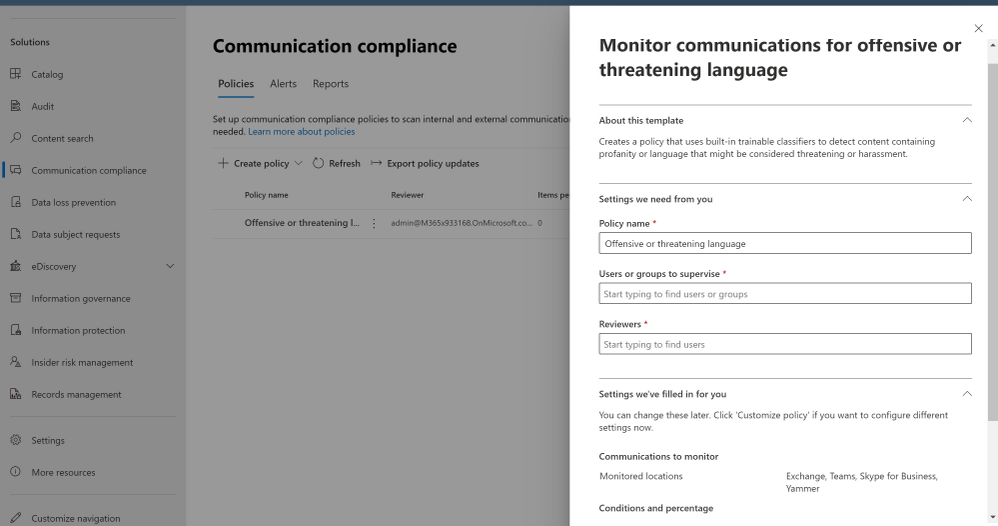
Our use case for today is a corporate policy – standard communications to detect, alert and report on “Offensive language in email”, a built-in classifiers in Microsoft 365 scan sent email messages from Exchange Online mailboxes in your organization for different types of compliance issues. These classifiers use a combination of artificial intelligence and keywords to identify language in email likely to violate anti-harassment policies.
Starting October 16, 2020, you will no longer be able to create policies using "Offensive Language in email" template. Any active policies that use this template will work until they're permanently removed in January 2021. We are deprecating the Offensive Language built-in classifier that supports this template to optimize and fine tune false positives. To address risk issues for offensive language, we recommend using Microsoft 365 communication compliance policies.

Here’s the high-level architecture design / flow:
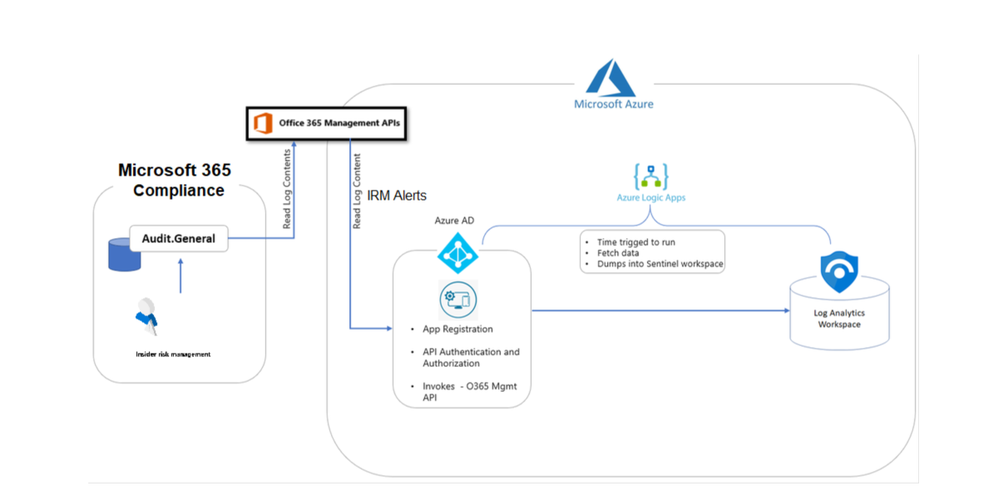
Insider risk management alert information is exportable to Azure Sentinel via the Office 365 Management Activity API schema. You can use the Office 365 Management Activity APIs to export alert information to other applications your organization may use to manage, enrich or aggregate insider risk information.
Implementation
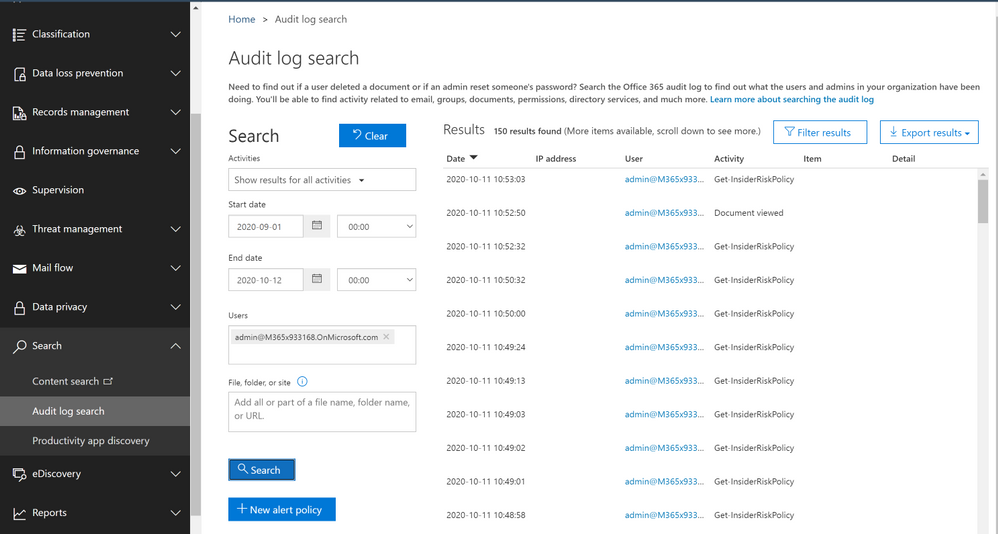
- Sign in to Microsoft 365 Compliance Portal
- Under Solutions > … Show All > Insider risk management
- Click at Insider risk settings
- Define and check “Policy indicators”, “Policy timeframes”
- Exports Alerts > Office 365 Management Activity API (On)
- Click at Policies
- Create Policy > type a Name and choose a policy template, our use case today to detect and alert on an “offensive language in email” > Next
- Define target users & groups
- Specify what content to prioritize
- Select policy indicators
- Set policy timeframes
- Review and Submit
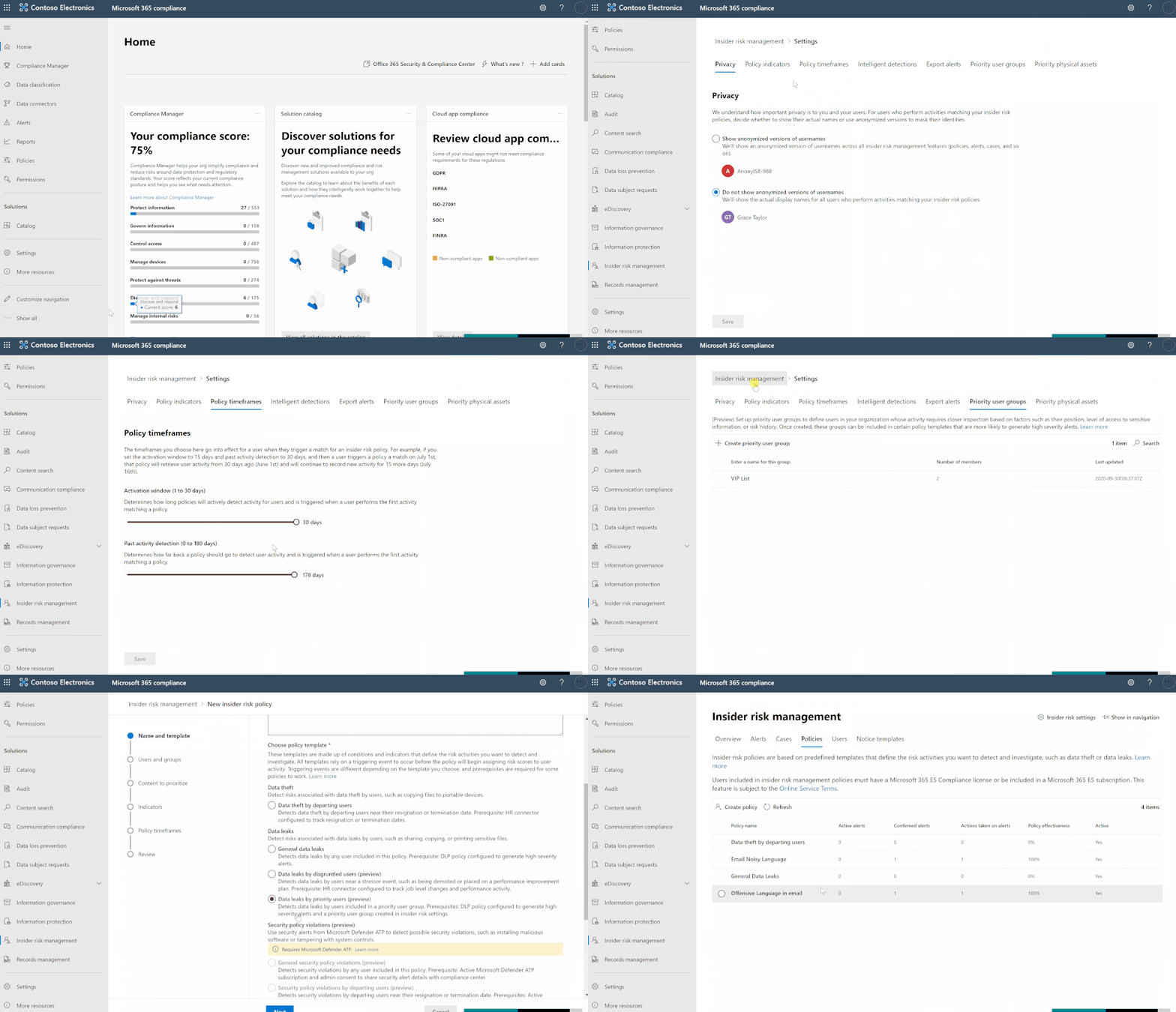
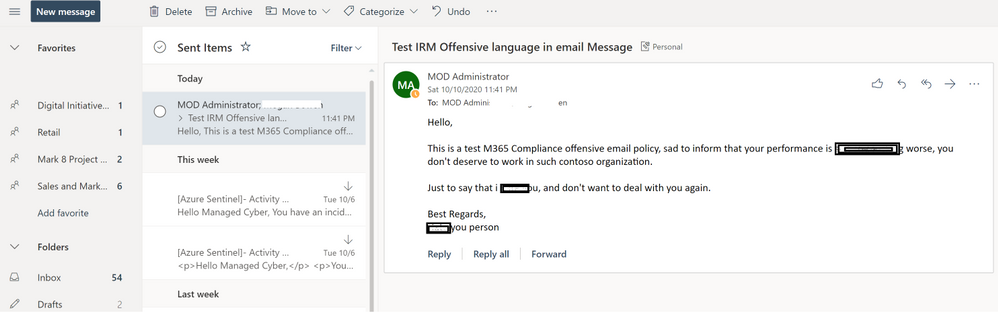
- Open Outlook and send a test message with an offensive language keywords to trigger the alert, usually it might take up to 24 hrs to start capturing communications and generate the alert based on the classifiers detection
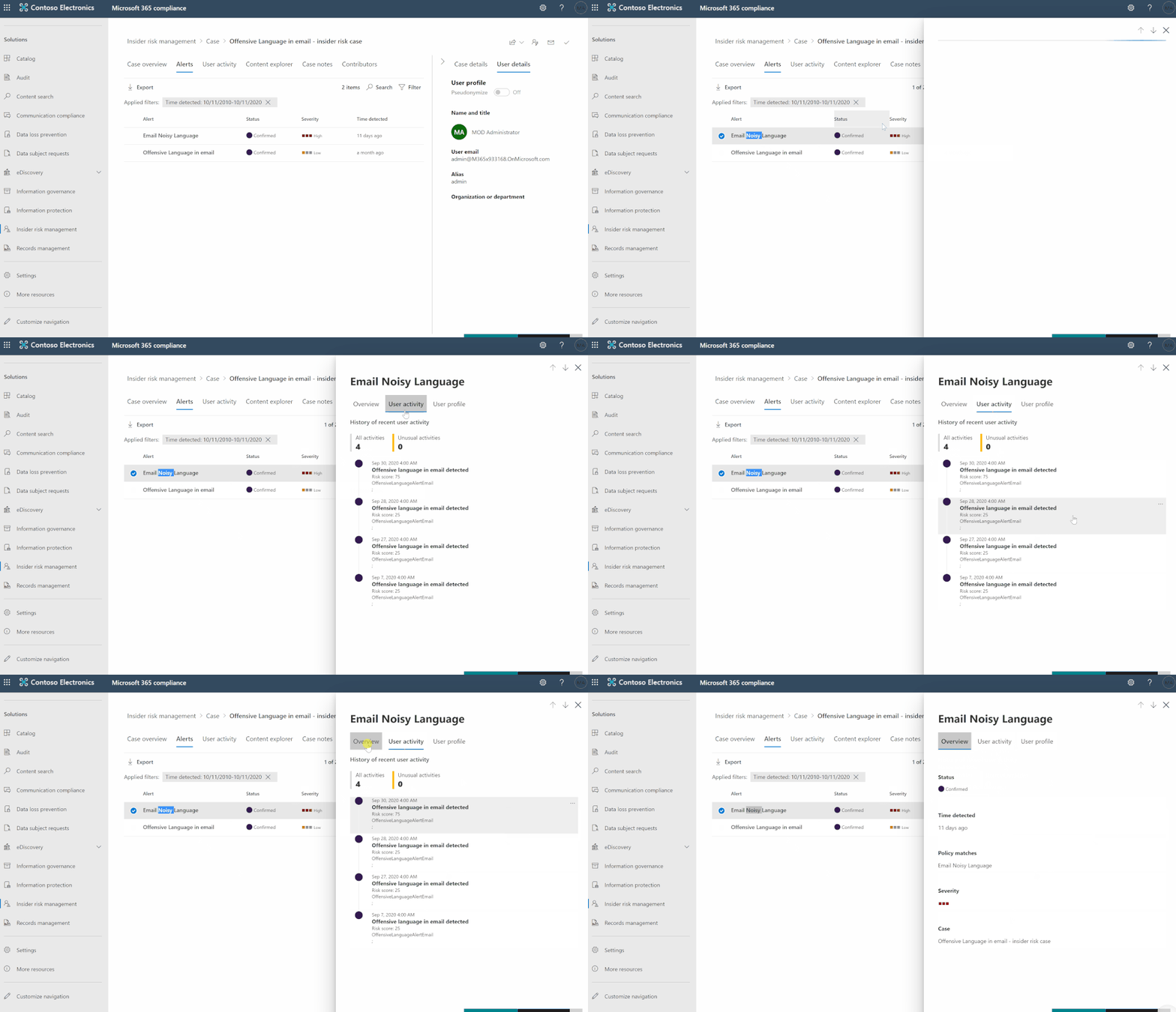
- Go to Insider Risk Management blade, and check the alerts:
- Sign in to Azure Portal and create a new App-registration:
- API permissions: Office 365 Management APIs > Application Permissions (ActivityFeed.Read)
- Grant admin consent
- Certificates & secrets: add new client secret
- Keep a note for client secret, application-client ID, tenant ID and domain name to register the API subscription
- Register the API subscription via PowerShell, open PowerShell as admin, connect to your tenant with a privileged account to register the API subscription ensure that you add the proper client secret, application-ID, tenant ID and domain name & ensure that the content-type is Audit.General a direct link to download the raw script at github:
$ClientID = "<app_id>"
$ClientSecret = "<client_secret>"
$loginURL = "https://login.microsoftonline.com/"
$tenantdomain = "<domain>.onmicrosoft.com"
$TenantGUID = "<Tenant GUID>"
$resource = "https://manage.office.com"
$body = @{grant_type="client_credentials";resource=$resource;client_id=$ClientID;client_secret=$ClientSecret}
$oauth = Invoke-RestMethod -Method Post -Uri $loginURL/$tenantdomain/oauth2/token?api-version=1.0 -Body $body
$headerParams = @{'Authorization'="$($oauth.token_type) $($oauth.access_token)"}
$publisher = New-Guid
Invoke-WebRequest -Method Post -Headers $headerParams -Uri "https://manage.office.com/api/v1.0/$tenantGuid/activity/feed/subscriptions/start?contentType=Audit.General&PublisherIdentifier=$Publisher"
- Deploy IRM-Alerts Connector:
- Sign in to Azure Sentinel
- Playbooks > Add Playbook
- Logic app designer:
- Recurrence (step):
- Interval: 1
- Frequency: Day
- Variable (step):
- Name: AuditGeneral
- Type: String
- Value:
- HTTP (step):
- Method: GET
- URI: Dynamic Content > AuditGeneral
- Headers:
- (Accept) – (application/json)
- (Content-Type ) – (application/json)
- Authentication: Active Directory OAuth
- Parse JSON (step):
- Content: Dynamic Content > Body
- Use sample payload to generate schema:
-
{
    "items": {
        "properties": {
            "contentCreated": {
                "type": "string"
            },
            "contentExpiration": {
                "type": "string"
            },
            "contentId": {
                "type": "string"
            },
            "contentType": {
                "type": "string"
            },
            "contentUri": {
                "type": "string"
            }
        },
        "required": [
            "contentUri",
            "contentId",
            "contentType",
            "contentCreated",
            "contentExpiration"
        ],
        "type": "object"
    },
    "type": "array"
}
- For each (step):
- Select an output from previous steps: Dynamic Content > Body
- HTTP (step):
- Method: GET
- URI: Dynamic Content > contentUri
- Headers:
- (Accept) – (application/json)
- (Content-Type) – (application/json)
- Authentication: Active Directory OAuth
- Send data (step):
- JSON Request body: Dynamic Content > Body
- Custom Log Name: Compliance_IRM_AuditGeneral
- Save the playbook steps and hit run for triggering
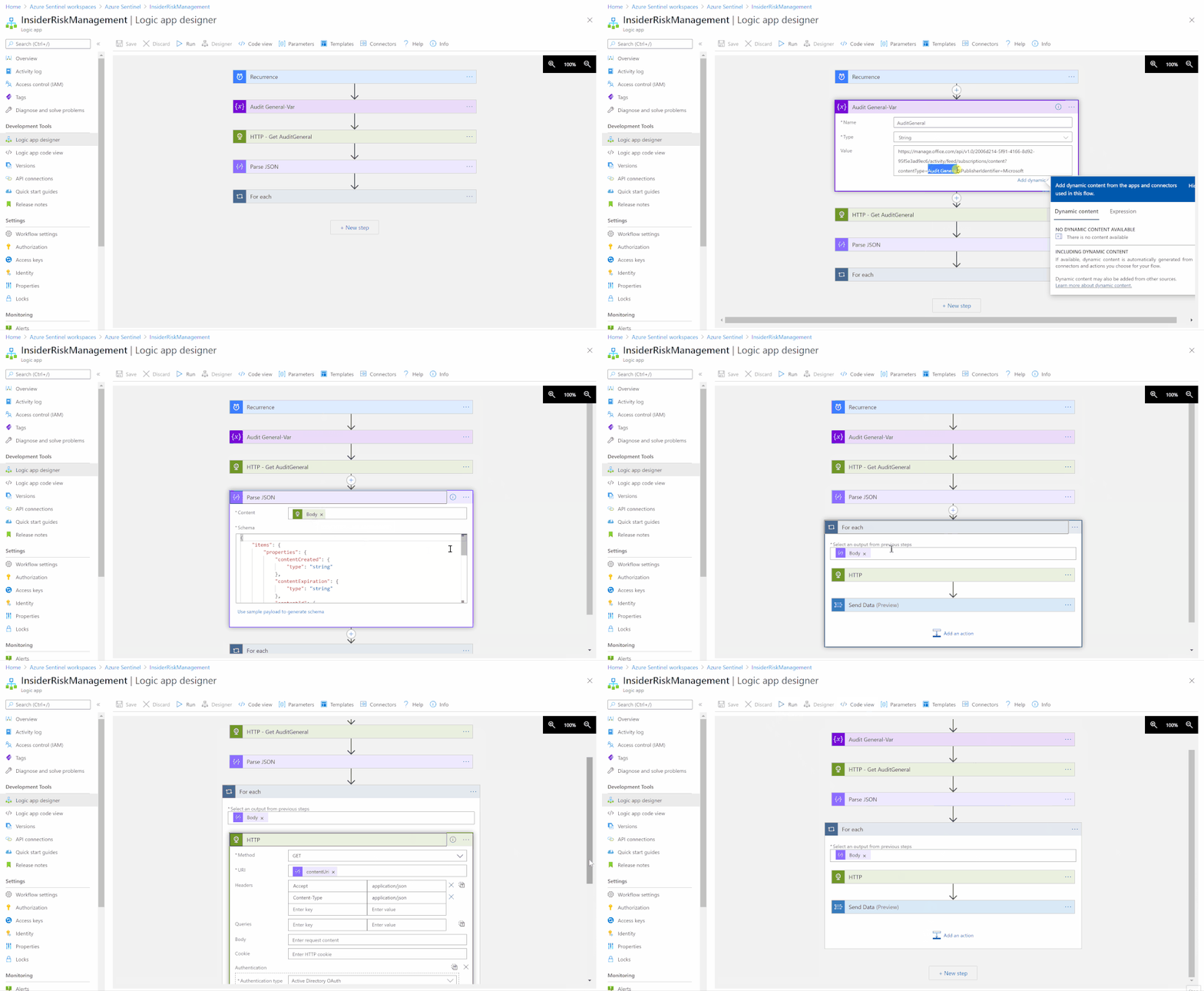
The logic app code view have been uploaded as well to github, please ensure to change the subscription ID and resource group values.
Monitoring, Aggregating, Parsing and Enriching
- Under Azure Sentinel general section > Logs
- A new custom log table been generated “Compliance_IRM_AuditGeneral_CL”
- Here’s the Insider Risk Management alert(s) schema structure pulled from Office 365 Management API to Azure Sentinel Log Analytics workspace:
- Alert Type: Custom
- Category: InsiderRiskManagement
- Name: alert title
- Source: Office 365 Security & Compliance
- Status: Investigating
- Creation time
- Operation: Alert Triggered, Alert Updated
- Record Type: 40
- Workload: Security Compliance Center
- Data:
- UPN
- Risky User ID
- Activation DateTime
- Severity
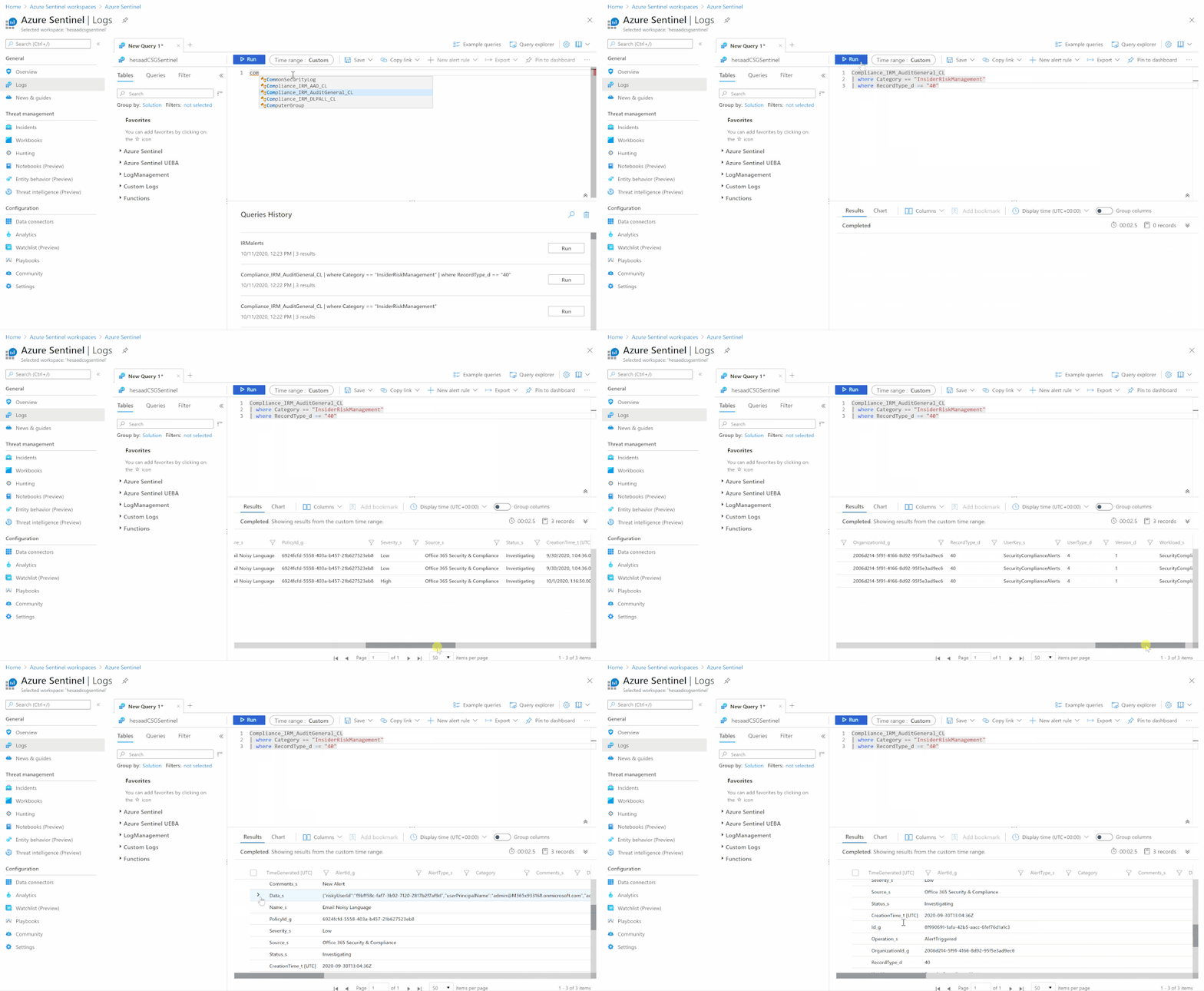
Parsing the data can be done easily via a function, the function query have been uploaded to github as well:
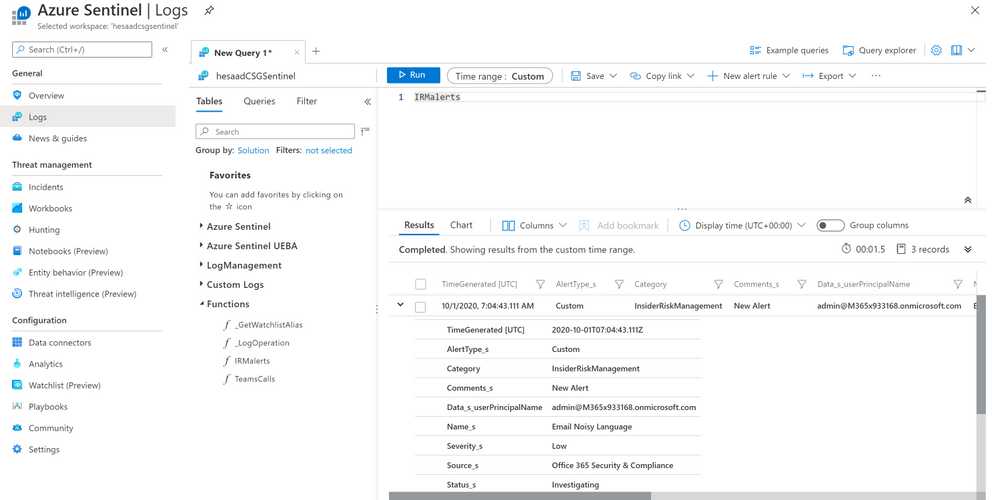
A couple of enriching queries (for example):
Monitoring operations activities and result status of the alerted IRM UPN user
let IRMAlertsLog = Compliance_IRM_AuditGeneral_CL | where Category == "InsiderRiskManagement" | where RecordType_d == "40" | extend IRM_UPN = tostring(parse_json(Data_s).userPrincipalName);
IRMAlertsLog
| project AlertType_s, Category, Comments_s, IRM_UPN, Name_s, Severity_s, Source_s, Status_s
| join (AuditLogs
        | extend AuditLogs_UPN = tostring(parse_json(tostring(InitiatedBy.user)).userPrincipalName)
        | project TimeGenerated, AuditLogs_UPN, OperationName, Result)
        on $left.IRM_UPN == $right.AuditLogs_UPN
| project TimeGenerated, AlertType_s, Category, Comments_s, IRM_UPN, Name_s, Severity_s, Source_s, Status_s, OperationName, Result
Monitoring signin logs locations and status of the alerted IRM UPN user
Compliance_IRM_AuditGeneral_CL
| where Category == "InsiderRiskManagement"
| where RecordType_d == "40"
| extend IRM_UPN = tostring(parse_json(Data_s).userPrincipalName)
| join (SigninLogs
        | project UserPrincipalName, IPAddress, Location)
on $left.IRM_UPN == $right.UserPrincipalName
| project TimeGenerated, AlertType_s, Category, Comments_s, IRM_UPN, Name_s, Severity_s, Source_s, Status_s, IPAddress, Location, CreationTime_t, Operation_s, RecordType_d, ResultStatus_s
Get started today!
We encourage you to try it now and start hunting in your environment.
You can also contribute new connectors, workbooks, analytics and more in Azure Sentinel. Get started now by joining the Azure Sentinel Threat Hunters GitHub community.
by Contributed | Oct 11, 2020 | Azure, Technology
This article is contributed. See the original author and article here.
Pre-requirement:
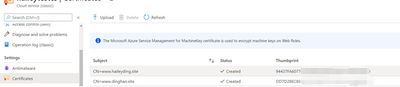
Now, have two domain names: www.haileyding.site, and www.dinghan.site
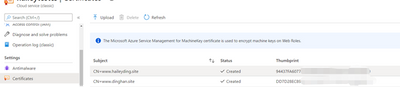
Also, two certificates uploaded to my Cloud Service:
Steps:
The main changes happen on the .csdef file, .cscofg file, and also the OnStart method in the WebRole.cs.
- Add the two domain name in the definition file, named with ‘ServiceDefinition.csdef’.
Refer to this document about how to modify the service definition and configuration files.
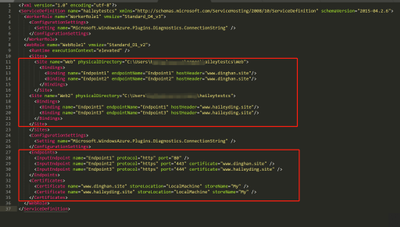
- Add my two certificates into the configuration file, named with ‘ServiceConfiguration.Cloud.cscfg’
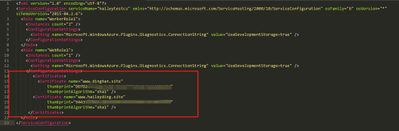
- Since we cannot assign the same local port to multiple endpoints, so we need to override the OnStart method of the RoleEntryPoint class to overcome this issue.
Please be noticed that the executionContext must be set to elevated, otherwise it is not possible for the OnStart method to edit the bindings.
Navigate to the WebRole1 -> WebRole.cs, in this file, we can configure our OnStart method as below:
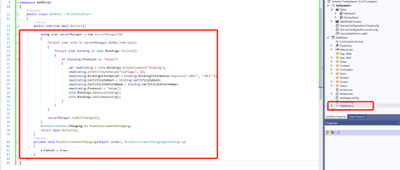
namespace WebRole1
{
public class WebRole : RoleEntryPoint
{
public override bool OnStart()
{
using (var serverManager = new ServerManager())
{
foreach (var site in serverManager.Sites.ToArray())
{
foreach (var binding in site.Bindings.ToList())
{
if (binding.Protocol == “https”)
{
var newbinding = site.Bindings.CreateElement(“binding”);
newbinding.SetAttributeValue(“sslFlags“, 1);
newbinding.BindingInformation = binding.BindingInformation.Replace(“:444:”, “:443:”);
newbinding.CertificateHash = binding.CertificateHash;
newbinding.CertificateStoreName = binding.CertificateStoreName;
newbinding.Protocol = “https”;
site.Bindings.Remove(binding);
site.Bindings.Add(newbinding);
}
}
}
serverManager.CommitChanges();
}
RoleEnvironment.Changing += RoleEnvironmentChanging;
return base.OnStart();
}
private void RoleEnvironmentChanging(object sender, RoleEnvironmentChangingEventArgs e)
{
e.Cancel = true;
}
}
}
- Deploy the changes to my Cloud Service, then verify my custom domain name with HTTPS
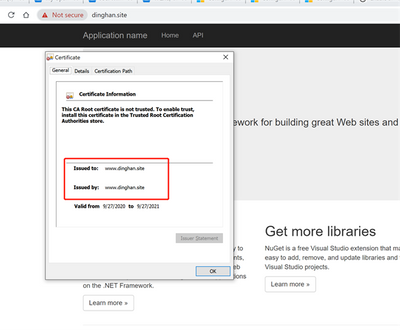
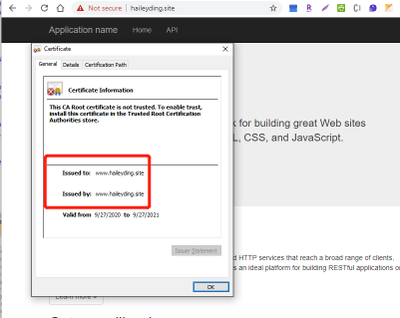
Reference: https://raflrx.wordpress.com/2017/08/08/enable-sni-on-a-windows-azure-cloud-service/
by Contributed | Oct 10, 2020 | Technology
This article is contributed. See the original author and article here.
As a result of the October 8th order from the Fijian Government, Daylight Saving Time (DST) in the Republic of Fiji will begin at 02:00 on December 20, 2020 instead of November 8, 2020.
Microsoft plans to release an update to support this time zone change; however, there is insufficient time to properly build, test, and release such an update before the change goes into effect. In the meantime, we recommend that organizations with devices in the Republic of Fiji follow the interim guidance below.
Interim guidance
Microsoft recommends that users temporarily set the time zone on their devices to “(UTC+12:00) Coordinated Universal Time+12” on November 8, 2020 at 02:00. Selecting this time zone will then reflect the correct local time (Note: events that have occurred in the past, before the update, will not show correctly). We recommend returning time zone settings to “(UTC+12:00) Fiji” after an update from Microsoft has been released and installed.
For Microsoft’s official policy on DST and time zone changes, please see Daylight saving time help and support. For information on how to update Windows to use the latest global time zone rules, see How to configure daylight saving time for Microsoft Windows operating systems.
by Contributed | Oct 9, 2020 | Technology
This article is contributed. See the original author and article here.
The Workplace Analytics team is excited to announce our feature updates for October 2020. (You can see past blog articles here). This month’s update describes one enhancement to a query type and one preview of a major coming attraction:
- Feature preview: Workplace Analytics Home page update
- New attributes in ONA person-to-person queries
Feature preview: Workplace Analytics Home page update
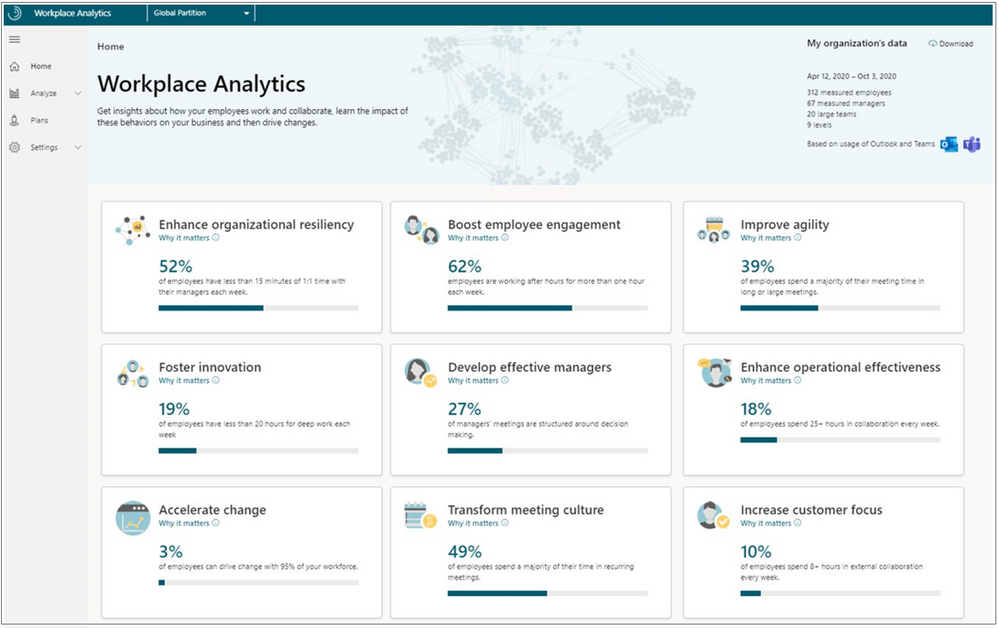
In mid-November of this year, Workplace Analytics will offer a series of research-based business outcomes that will show how your organization gets work done. This update to the Home page of Workplace Analytics lets you select from nine business outcomes to see how your business is doing right now and see recommended best practices that are available to help drive change for the good, moving forward.

Business outcomes
Each of the nine outcomes is described on its own page that shows you analysis about your organization and research-based suggestions on how to maintain or drive change toward business success.
- Enhance organizational resiliency – Small changes to collaboration practices can have transformative effects on organizational productivity at scale.
- Boost employee engagement – Employees with high job satisfaction and a strong sense of belonging are more likely to produce high-quality work, identify business opportunities and remain at the organization.
- Improve agility – Companies that redefine industries and lead markets are less bureaucratic and nimbly adapt to rapid changes in technology and customer needs.
- Foster innovation – Employees who share information, prioritize learning, and protect time for deep thinking generate the new ideas needed for success in rapidly evolving markets.
- Develop effective managers – Managers have a large impact on employee engagement, development, and performance, and are pivotal for driving organizational change.
- Maximize operational effectiveness – Small changes to collaboration practices can have transformative effects on organizational productivity at scale.
- Accelerate change – Slow adoption of new technology harms efforts to attract and retain top talent, improve productivity, and can lead to market failure.
- Transform meeting culture – Meetings are essential for collaboration; however, unnecessary meetings and bad practices can harm engagement and limit productivity.
- Increase customer focus – Companies that prioritize customer relationships and satisfaction grow revenue faster than competitors.
On the card for each insight, you’ll see supporting evidence that links you to related information. This information includes Microsoft Workplace Insights that were researched and written by industry experts, and studies about organizations that have effectively used Workplace Analytics to improve their business outcomes.
On each behavior page, a Take action section lets you select Find out more to see the most effective actions you can do now to drive positive change in your organization. For example, the Boost employee engagement behavior offers a “Best practices” page called Increase frequency of coaching:
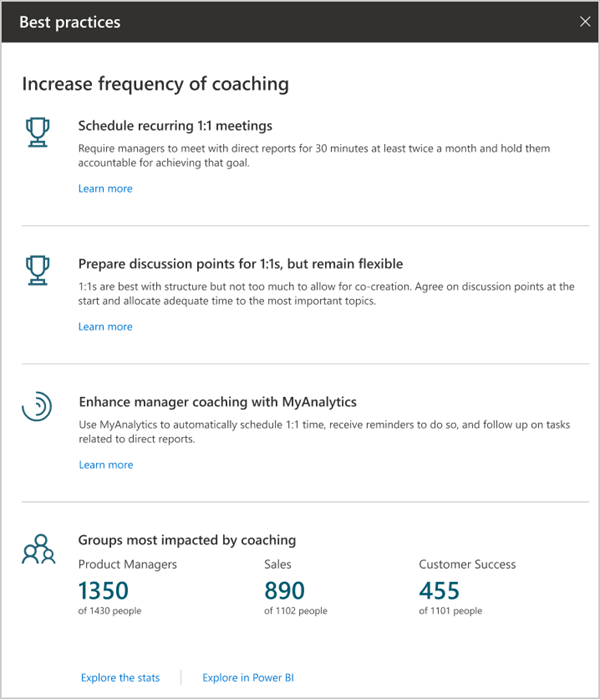
This page gives you recommendations for implementing these best practices – in this case, for example, by scheduling recurring 1:1 meetings and by enhancing manager coaching through MyAnalytics.
Who can use these insights?
You can view all of these insights if you have the analyst or limited analyst role of Workplace Analytics. If you are a people manager, you can only see insights about your own team; for more information, see Workplace Analytics Home for people managers.
To request early access
If you want early access to the organizational insights, complete the Home page update preview form and we’ll follow up to discuss activation with you.
New attributes in ONA person-to-person queries
The recently released Network: Person-to-person query lets analysts measure the quality of connections between people. In particular, it measures strong ties, when two people have many connections in common, and diverse ties, when they share fewer connections but nevertheless work closely together.
We’ve added two new columns to the existing output of this query.
- TieOrigin_GroupId
- TieDestination_GroupId
These columns can be used to aggregate members of a team. Their values are based on the organizational hierarchy data that admins upload to Workplace Analytics. In each of these metrics, the value of GroupId is a unique, de-identified, identifier that’s the same for members of the same team – in other words, they all report to one particular person in the organizational hierarchy.
These columns are useful for looking up the existence of strong ties within a team to understand how cohesive that team is. They are also useful for looking up the existence of Diverse ties within a team to understand if there is an opportunity for novel information to flow into the team. For more information, see ONA person-to-person queries.
by Contributed | Oct 9, 2020 | Azure, Technology
This article is contributed. See the original author and article here.
Using monorepos to increase velocity during early stages of product development | Creating Startups
David Smith
This is a guest post by Victor Savkin, co-founder of Nrwl. Read more about Victor and his company at the end of this article. Building a new product requires a lot of experimentation. Applications appear, disappear, merge, divide. Code has to be shared.
COVID-19 and Mining Social Media – Enabling Machine Learning Workloads with Big Data
Adi Polak
In this article, the author discusses how to enable machine learning workloads with big data to query and analyze COVID-19 tweets to understand social sentiment towards COVID-19.
OfficeDev/M365Bootcamp-TeamsEmergencyResponse
Rabia Williams
Workshop content and sample code from the Global Microsoft 365 Developer Bootcamp in October 2020 focused on building an emergency response center with Teams and SharePoint – OfficeDev/M365Bootcamp-TeamsEmergencyResponse
Beginners Guide to MS Teams Development #2: Bots
Tomomi Imura
Hello, I hope you enjoyed my previous tutorial on how to get started with Microsoft Teams development.
Azure Stack Hub Partner Solutions Series – Umbrellar
Thomas Maurer
Umbrellar is a cloud based company focused on empowering their customers and resellers in making the most of the Azure and Azure Stack Hub clouds and create value to their end-customers in a multi-tenant
Power Platform with John Liu
Rabia Williams
Power Platform with John Liu
Linting Bicep Codes in DevOps Pipeline – ARM TTK
Justin Yoo
Let’s have a look at the Project Bicep and ARM Template Toolkit, and GitHub Actions for both. What is Bicep? The ARM Template DSL Linting Bicep Codes in
First Look at Azure Backup Centre
Sarah Lean
Let’s take a first look at Azure Backup Centre, which was a product announced at Microsoft Ignite 2020. Azure Backup Centre – https://docs.microsoft.com/azur…
Microsoft 365 PnP Weekly – Episode 99 – Microsoft 365 Developer Blog
Waldek Mastykarz
Connect to the latest conferences, training, and blog posts for Microsoft 365, Office client, and SharePoint developers. Join the Microsoft 365 Developer Program.
The Syntax Difference Between Python and PowerShell
Anthony Bartolo
Which scripting language is better? Python or PowerShell? Both are great but what are the syntax differences?
3 Ways Mapping APEX Domains to Azure Functions
Justin Yoo
This post discusses how to map APEX domains to Azure Functions instance in three different ways.
Azure App Service Publish Profile – GitHub Marketplace
Justin Yoo
Retrieve or reset the publish profile of Azure Web App or Functions App in XML format
Microsoft Teams chat history and controlling presenters!
Sarah Lean
I’ve been fielding a lot of questions from friends and family around how to work effectively within Microsoft Teams lately, let’s have a look at those questions and their answers!
Azure + Spring Boot = Serverless – Q&R Avec Julien Dubois
Julien Dubois
Julien Dubois a expérimenté le support de Spring Boot sur Azure Functions, à la fois avec la JVM et avec GraalVM. InfoQ l’a contacté pour approfondir son expérience sur ce sujet.
Recording Microsoft Azure Hybrid Cloud Virtual Event ☁:television:
Thomas Maurer
Recording from our Live Session Microsoft Azure Hybrid Cloud Virtual Event. In this session, you will learn about the unique approach from Microsoft about Az…
Contributing to open source projects: contributors etiquette
Tania Allard
The way we collaborate and interact with others can make a huge difference in getting your contributions merged, belonging to a project or a community. This post was written to help you keep your communications and interactions in open-source cordial and effective. Tagged with beginners, opensource, hacktoberfest.
Learn JavaScript with this series of videos for beginners
Yohan Lasorsa
Learn the foundations you need to know to start coding with JavaScript by watching this free series of videos for beginners. Tagged with javascript, beginners, webdev, node.
AndroidSummit2020 – Modern Android Apps & Dual Screen Experiences!
Nitya Narasimhan
Join me Oct 8-9 at #AndroidSummit to learn about dual screen, multi-posture, Surface Duo Dev and modern mobile experiences!.
by Contributed | Oct 9, 2020 | Technology
This article is contributed. See the original author and article here.
News this week includes:
Business Central Functional Consultants can now be certified!
Microsoft 365 All Tenants list is rolling out.
Retirement of Site Mailboxes in SharePoint Online.
@ArefHalmstrand is our Member of the Week, and a great contributor in the SharePoint community.
View the Weekly Roundup for Oct 5-9 in Sway and attached PDF document.
by Contributed | Oct 9, 2020 | Technology
This article is contributed. See the original author and article here.
This installment is part of a broader series to keep you up to date with the latest features in Azure Sentinel. The installments will be bite-sized to enable you to easily digest the new content.
This blog is a collaboration between myself and my colleague, Sreedhar Ande.
What truly sets Azure Sentinel apart from other SIEM tools or other security solutions in the market is the extensive use of machine learning to fuel built-in analytics and custom machine learning models. These capabilities are the culmination of decades of research and experience protecting Microsoft services at massive scale by Microsoft security experts. As you might already be aware, Microsoft Ignite 2020 announcements highlighted some of the most recent innovations in this space.
We are delighted to announce that 32 new Fusion detections and Build Your Own Machine Learning framework are now available in public preview! Below has a recap of what these features are and how they work.
Fusion Detections
What is Fusion technology in Azure Sentinel?
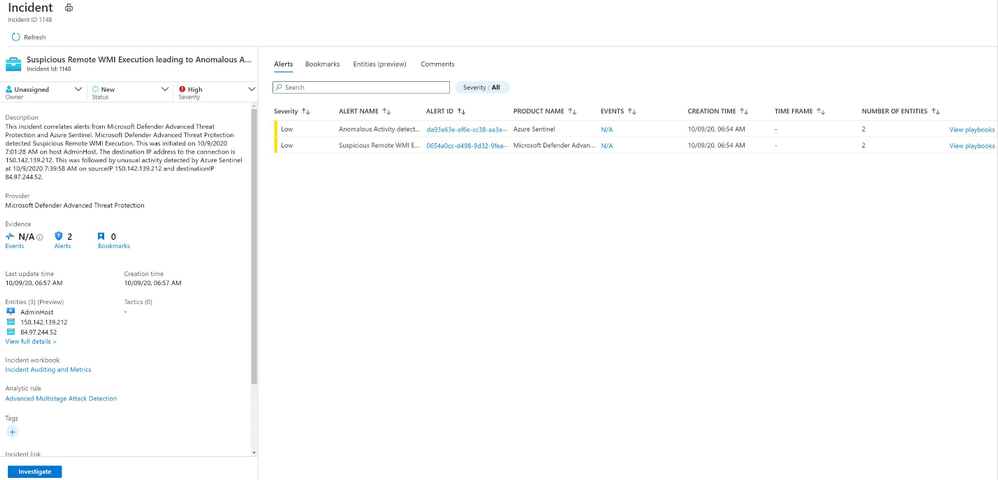
Using machine learning, Fusion detections combine low- and medium-severity alerts from Microsoft and 3rd-party security products into high-severity incidents. By design, these incidents are low-volume, high-fidelity, and high-severity. Here is an example of how a Fusion incident looks like in Azure Sentinel portal.
 Fusion incident
The main goals of Fusion detections can be summarized into two points.
- Fusion detects threats that fly under radar: Azure Sentinel can automatically detect multistage attacks by identifying combinations of anomalous behaviors and suspicious activities that are observed at various stages of the kill-chain. On the basis of these discoveries, Azure Sentinel generates incidents that would otherwise be difficult to catch.
- Alert fatigue reduction: Fusion incorporates graph-based machine learning and a probabilistic kill chain to reduce alert fatigue by 90 percent.
For more details of how Fusion technology works behind the scene, please check out this excellent article by our colleague, Ram Shankar Siva Kumar.
What are the new Fusion detections?
Our Fusion team recently released 32 new Fusion detections in public preview, reaching a total of 70 Fusion incident types which are turned on by default in Azure Sentinel. These additional detections fall into eight scenario types.
MDATP + Palo Alto Network firewall:
- Suspicious remote WMI execution followed by anomalous traffic flagged by Palo Alto Networks firewall
- Suspected use of attack framework followed by anomalous traffic flagged by Palo Alto Networks firewall
AAD IP + MCAS:
- Suspicious inbox manipulation rules set following suspicious Azure AD sign-in (5 distinct detections)
- Multiple VM creation activities following suspicious Azure Active Directory sign-in (5 distinct detections)
- Multiple VM delete activities following suspicious Azure AD sign-in (5 distinct detections)
- Suspicious email deletion activity following suspicious Azure AD sign-in (5 distinct detections)
- Multiple Power BI report sharing activities following suspicious Azure AD sign-in (5 distinct detections)
- Suspicious Power BI report sharing following suspicious Azure AD sign-in (5 distinct detections)
How to enable and use Fusion detections
Under Analytics blade in Azure Sentinel portal, in your Active Rules view, a built-in rule of Fusion rule type named “Advanced Multistage Attack Detection” is enabled by default for all Sentinel workspaces. You have the option to disable the rule any time. There is no extra cost to use this detection rule on top of the normal data ingestion and storage cost. All you need for the rule to work is to have your data connectors configured and data ingested correctly. To see what data connector sources are required for each Fusion incident type, please refer to the documentation.
To get step-by-step instructions about Fusion in Azure Sentinel, please refer to our documentation, which has been revamped with updated detection descriptions, now includes MITRE ATT&CK Tactics and Techniques, and is now organized by threat classifications for easier navigation.
Build Your Own Machine Learning (BYO-ML)
Many security organizations understand the value of machine learning for security, though not many of them have the luxury of professionals who have expertise in both security and ML. We designed the framework Build-Your-Own ML (BYO-ML) for security organizations and professionals to grow with us in their ML journey. Organizations new to ML, or without the necessary expertise, can get significant protection value out of Azure Sentinel’s built-in ML capabilities.
ML detection models can adapt to individual environments and to changes in user behavior, to reduce false positives and identify threats that would not be found with a traditional approach. Azure Sentinel makes it easier for data scientists in these organizations to unlock these insights with a BYO-ML framework.
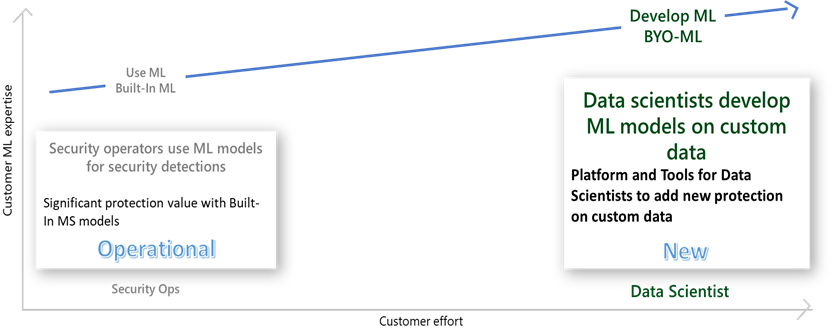 ML levels
What is the Build Your Own Machine Learning (BYO-ML) platform?
For organizations that have ML resources and would like to build customized ML models for their unique business needs, we offer the BYO-ML platform. The platform makes use of the Azure Databricks/Apache Spark environment and Jupyter Notebooks to produce the ML environment. It provides the following components:
- A BYO-ML package, which includes libraries to help you access data and push the results back to Log Analytics (LA), so you can integrate the results with your detection, investigation, and hunting.
- ML algorithm templates for you to customize to fit specific security problems in your organization.
- Sample notebooks to train the model and schedule the model scoring.
Besides all this, you can bring your own ML models, and/or your own Spark environment, to integrate with Azure Sentinel.
For more details on BYO-ML platform, please check out this excellent blog by our colleague, Andi Comisioneru. For supported use cases, please refer to the documentation.
How to use Build Your Own Machine Learning (BYO-ML) platform
To build custom ML models on your data, you have two options.
- For smaller amounts of data, like alerts and anomalies, you can use Azure ML to run models hosted in the Azure Sentinel Notebooks (new menu option currently in Preview). Azure Machine Learning offers Intellisense for improved ease of use, support for existing Jupyter and JupyterLab experiences, as well as point-in-time notebook snapshots and a notebook file explorer for easy notebook collaboration. Dedicated compute and multiple pricing options provide increased flexibility and control. Take advantage of built-in security analytics via MSTICPy and Jupyter notebook templates help you get started.
Note: To use the Notebooks, you must first create an Azure Machine Learning (ML) workspace. For step-by-step instructions on how to create an Azure Machine Learning (ML) workspace, please refer to the documentation.
- For development and operationalization of models built on larger data, like analyzing feeds of raw data, you will need to make this data accessible to the ML model in Azure Databricks.
Apache Spark™ provides a unified environment for building big data pipelines. Azure Databricks builds on this environment, providing a zero-management cloud platform, holistically addressing the platform needed for data analysts to develop their custom ML based security analysis.
You can either bring your raw data directly to the Azure Databricks ML environment, via EventHub or Azure Blobs or you can use the capabilities provided with Azure Sentinel, to export the data from Azure Sentinel Log Analytics tables. Regardless of the export methods used for raw data, you can use the libraries provided by BYO-ML framework to import the scoring of the ML model back into Sentinel Log Analytics tables for further processing and creating incidents.
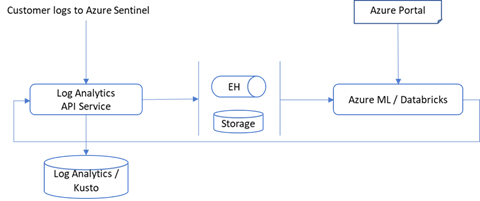 Data flow
You can either set up a new Azure Databricks environment or use one already set up for other use. To set up a new Databricks environment, please refer to the quickstarts document (note that MMLSpark used by our algorithm requires Spark 2.4.5).
On Azure Sentinel roadmap, we plan to support Azure Synapse in addition to Azure Databricks as a BYO-ML development environment.
Get started today!
We encourage you to explore these machine learning innovations in the Azure Sentinel to detect and protect your organization from threats.
Try it out, and let us know what you think!
You can also contribute new Notebooks in Azure Sentinel. Get started now by joining the Azure Sentinel BYOML GitHub community.
by Contributed | Oct 9, 2020 | Technology
This article is contributed. See the original author and article here.
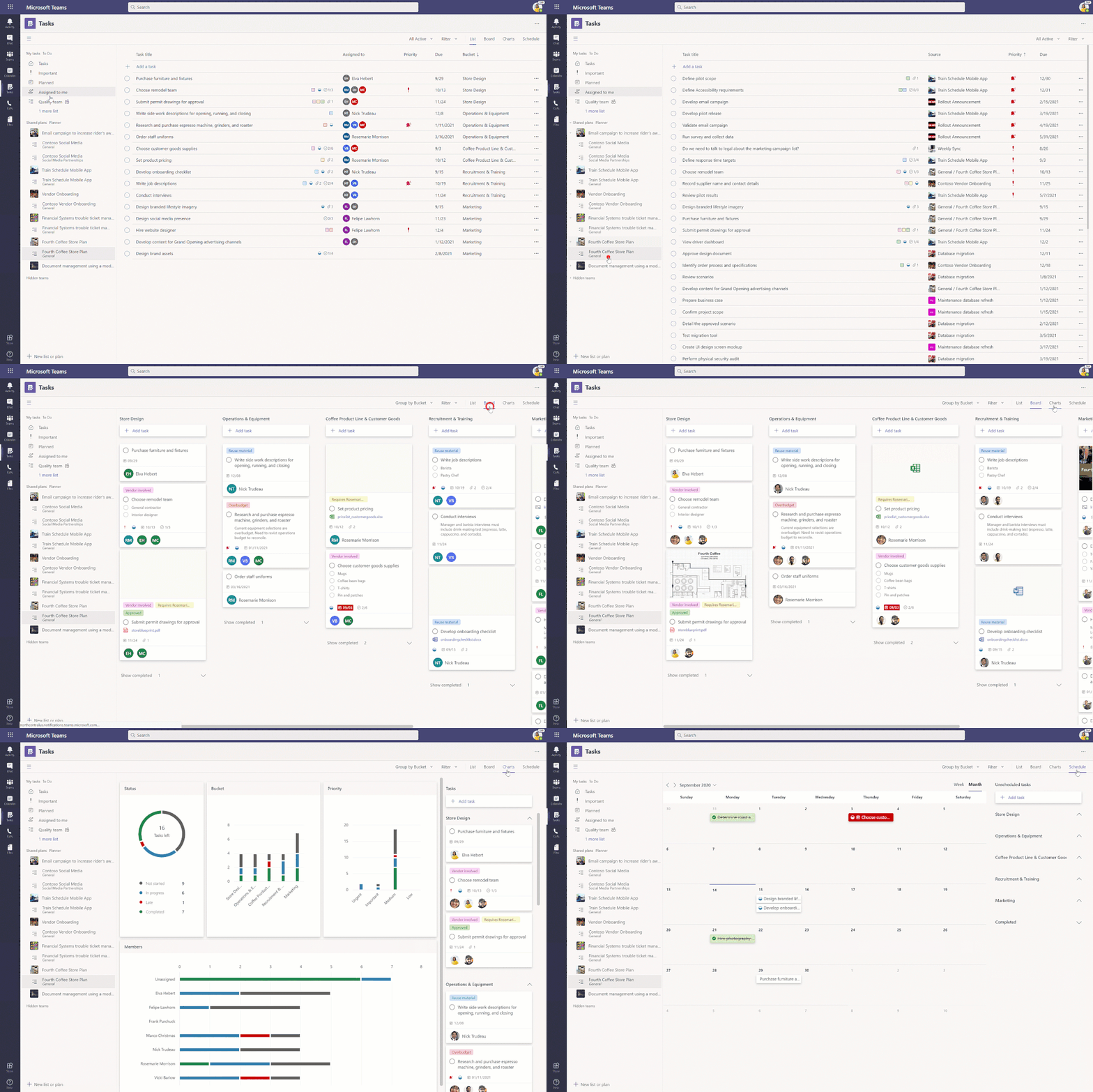
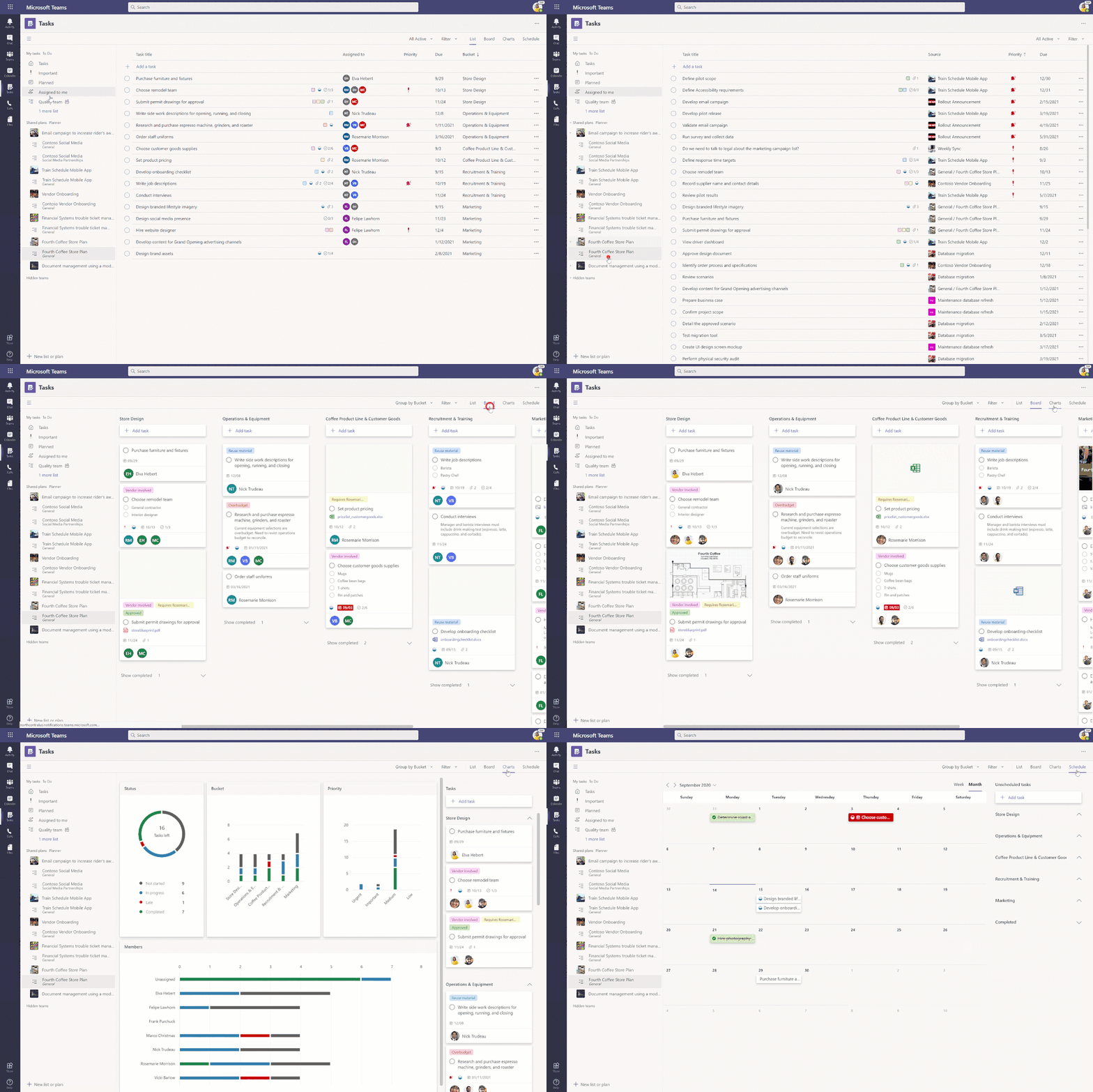
We have exciting news that’s more than a year in the making: Tasks in Microsoft Teams desktop is now 100% rolled out to everyone with a Microsoft 365 subscription across all non-government tenants. There’s more information about government cloud availability later in this post. Tasks in Teams lets you manage your team tasks from Planner and individual tasks from To Do in your hub for teamwork.
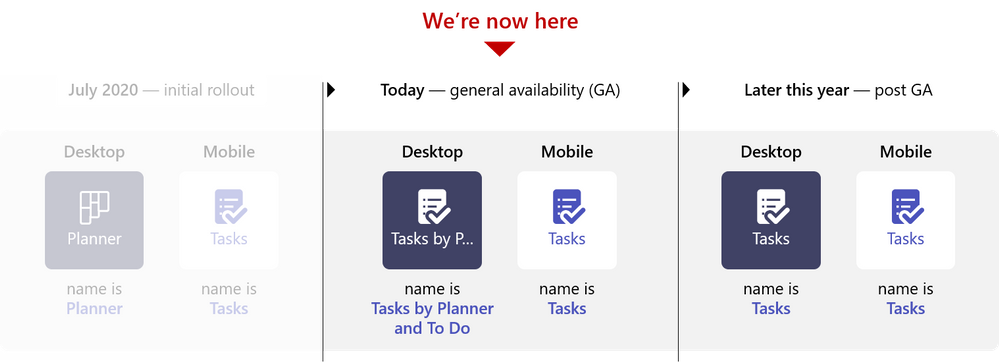
This announcement also moves us to the next stage in our naming sequence, where the app name in Teams changes to Tasks by Planner and To Do in desktop and Tasks in mobile. We will make this change over a weekend to reduce the likelihood of users seeing different names as the name change rolls out, and we expect to make the change by the end of October. We will make an update to our Message Center post when we kick off this change.
Our team has been working on Tasks in Teams around the clock since we first announced it at Microsoft Ignite 2019—and we couldn’t be more excited to bring it to all our users. Tasks in Teams brings together your team plans and individual tasks into one, collaborative space alongside all your chats, meetings, and files. Task management in the app replicates familiar tools and design from Planner and To Do, so there’s almost nothing new to learn. You can learn more about Tasks in Teams from our support page and public rollout blog post.
We’re also excited to report that Tasks in Teams for the Teams mobile app will soon begin rolling out to all users in non-government clouds and is scheduled to be completed in November.
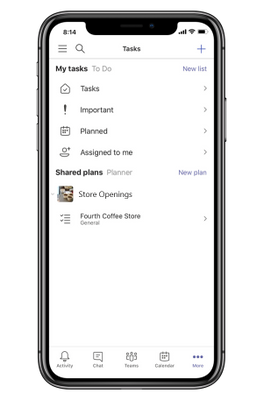
When the Tasks app becomes available on your iOS or Android device, you can find it within the More (…) option at the bottom of the Teams mobile app interface. There’s nothing to download; Tasks will automatically appear in that menu. The Tasks app for Teams mobile is limited to the List view.
We’re working to make Tasks in Teams available for our government cloud offerings, with GCC going live in the coming months. GCC High and DoD will follow after that. We’ll keep you posted about those releases and any initial limitations soon.
In other news, we announced at Ignite that you will soon be able to create tasks from Teams chats or channel conversations. This capability is one of the top requests from our users, so we’re excited to bring this to you soon.
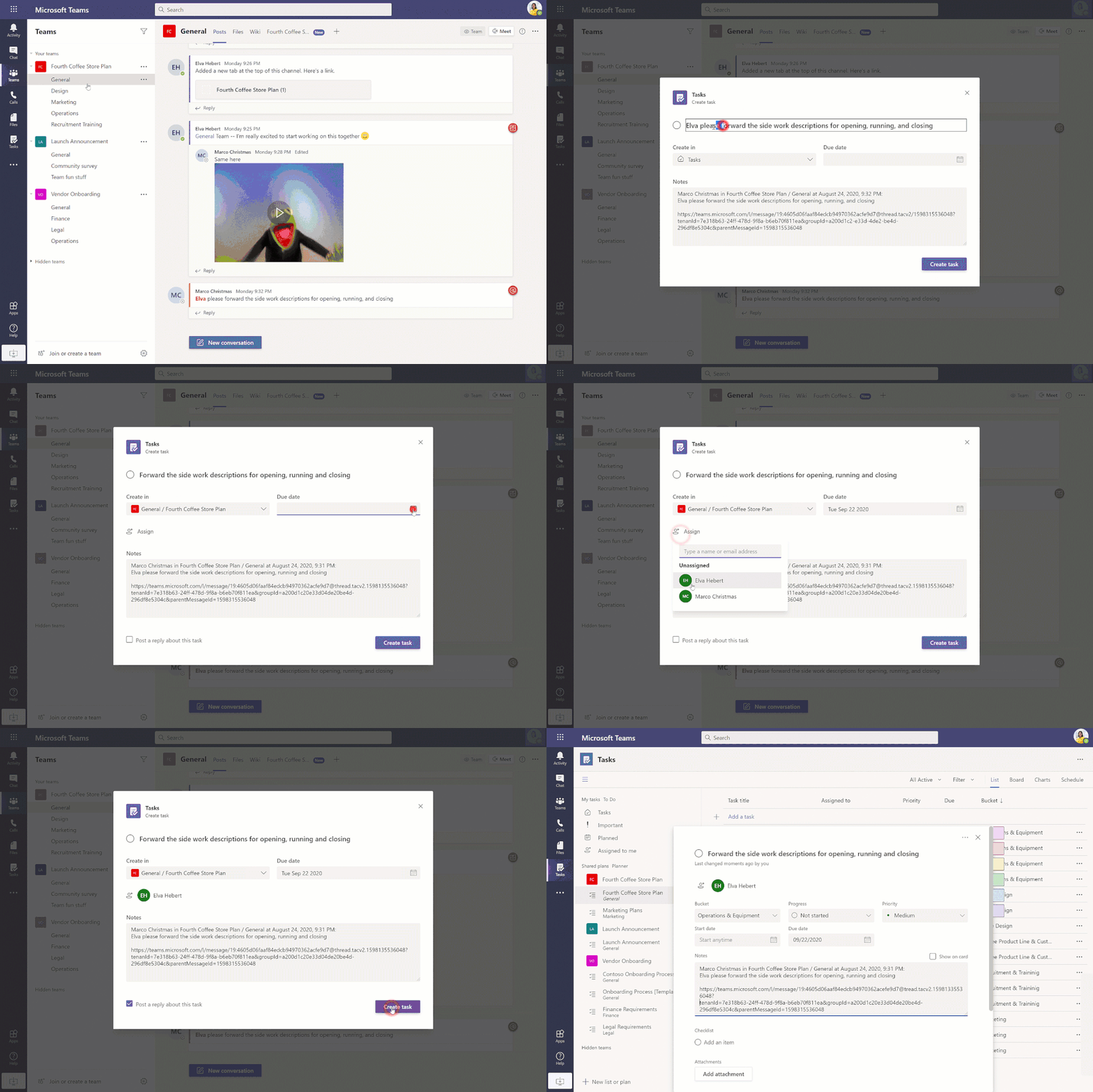
This is just the beginning of an exciting few months, so keep checking our Tech Community Blogs site for all the latest news. And if you have feedback or ideas for Tasks in Teams, leave us a note on UserVoice.
******
“Tasks in Microsoft Teams” – The Intrazone podcast
In case you missed it, several members from our team sat down with the hosts of The Intrazone, a biweekly podcast series, to talk about Tasks in Teams and our journey on connecting task experiences across Microsoft 365. You can listen to that conversation below.
https://html5-player.libsyn.com/embed/episode/id/15346253/height/90/theme/custom/thumbnail/yes/direction/forward/render-playlist/no/custom-color/247ad3/
You might also enjoy:
Task management with Microsoft To Do
by Contributed | Oct 9, 2020 | Technology
This article is contributed. See the original author and article here.
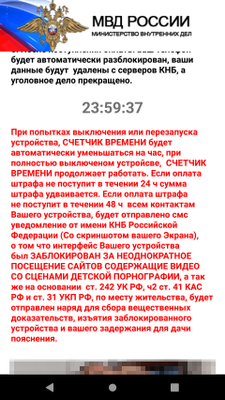
Microsoft researchers found a sophisticated Android malware that uses novel techniques to display its ransom note. The new malware, the latest variant of variant of a ransomware family that’s been in the wild for a while but has been evolving non-stop, exemplifies the rapid evolution of mobile threats that we have also observed on other platforms. Read our technical analysis here: Sophisticated new Android malware marks the latest evolution of mobile ransomware.

Microsoft Defender for Endpoint on Android detects this ransomware (AndroidOS/MalLocker.B) as well as other malicious apps and files using cloud-based protection powered by deep learning and heuristics, in addition to content-based detection. Microsoft Defender for Endpoint on Android, now generally available, extends Microsoft’s industry-leading endpoint protection to Android. Learn more about our mobile threat defense capabilities in Microsoft Defender for Endpoint on Android.
Threat data from endpoints are combined with signals from email and data, identities, and apps in Microsoft 365 Defender, which orchestrates detection, prevention, investigation, and response across domains, providing coordinated defense. Microsoft Defender for Endpoint on Android further enriches organizations’ visibility into malicious activity, empowering them to comprehensively prevent, detect, and respond to against attack sprawl and cross-domain incidents.
by Contributed | Oct 9, 2020 | Technology
This article is contributed. See the original author and article here.
This fall, Microsoft’s hardware partners are rolling out hardware accelerated AV1 video support on new Windows 10 systems with the latest GPUs. With video consuming an ever-increasing portion of the world’s internet traffic, better compression technology helps to improve video image quality while also reducing bandwidth consumption. AV1, which is developed by the Alliance for Open Media (AOM), can reach 50% better compression than H.264 and 20% better than VP9 for the same video content. Enabling hardware support for AV1 allows users to get the benefits of this improved video codec, and shifting decode work from software to hardware typically reduces power consumption and increases battery life on mobile devices.

Microsoft co-founded AOM with the goal of creating transformative, , open-source video codecs together with other leading technology companies.
Here are the components required to experience hardware accelerated AV1 video on Windows 10:
- One of these new GPUs or CPUs:
- Windows 10 build 1909 or later
- The AV1 Video Extension
- A web browser or other application with hardware acceleration support for AV1, including apps built on top of Media Foundation
- As is common with new features like this, you may need to update your graphics driver from time to time to get the latest features and improvements.
Once you have those pieces in place, you will see the benefits of hardware accelerated AV1 video as streaming services roll out more video content encoded with AV1.
If you want to look under the hood to see when you are receiving AV1, some streaming services have ways to show this information. For example, on YouTube you can right-click on the video and select “Stats for nerds”. When the video is AV1 encoded, you will see “av01…” in the “Codecs” line on the stats overlay.
To learn even more about AV1, check out AOM’s get started page. There is an open source AV1 decoder implementation, dav1d, developed by VideoLAN and FFmpeg and sponsored by AOM. Windows media developers who are using DirectX may want to look at the AV1 support in DirectX Video Acceleration (DXVA).


Recent Comments