by Contributed | Oct 13, 2020 | Technology
This article is contributed. See the original author and article here.
To help you provide a more secure browsing experience across your organization, the October 2020 monthly security updates for Windows and Windows Server introduce an option to block Jscript (Jscript.dll) execution in Internet Explorer 11.
Jscript is a legacy Microsoft implementation of the ECMA 262 language specification. Blocking Jscript helps protect against malicious actors targeting the JScript scripting engine while maintaining user productivity as core services continue to function as usual.
Recommended actions
As a security best practice, we recommend that users disable the legacy JScript execution for websites in the Internet and Restricted Sites zones. Details on how to configure this behavior can be found in the following article: Option to disable JScript execution in Internet Explorer (KB4586060).
Microsoft will continue to provide security updates for JScript via the latest cumulative updates for Windows 10, and Cumulative Updates for Internet Explorer 11 or Monthly Rollups for Windows 8.1, Windows Server 2012, and Windows Embedded 8 Standard. If you have
automatic updates enabled, updates will be automatically downloaded and installed on your users’ devices. If you have disabled automatic updates for your organization, you will need to check for updates and install them manually.
by Contributed | Oct 13, 2020 | Azure, Technology
This article is contributed. See the original author and article here.
Greetings from Bruno 
The question of the day is how can we make sure our Log Analytics agent (aka Microsoft Monitoring Agent (MMA)) is always working properly to include an up to date configuration?
Have you ever experienced a situation in which the MMA service was running but doing really nothing? Similar to a grey agent when referring to System Center Operations Manager (SCOM)?
Why flushing
There are several reasons why we’d want to flush the MMA cache. The most common being:
- Heartbeat failure
- Invalid configuration
- System workflows failure
- Network or authentication issues
- Health service issues (service is not running)
Inevitably, it almost always comes down to your MMA(s) not working as expected.
If you’re curious to learn more about how and when to flush the MMA cache, take a look at the How and When to Clear the Cache Microsoft article for more details.
How to flush
According to many online blogs and documentation, you have probably learned by now that flushing the MMA cache is quite easy. In a nutshell, here is what that entails:
- Stop the Microsoft Monitoring Agent service (service name: HealthService).
- Delete (or rename if you prefer) the C:Program FilesMicrosoft Monitoring AgentAgentHealth Service State folder.
- Start the Microsoft Monitoring Agent service.
The steps above can result in something boring when have to be repeated frequently, so why not leverage Azure Automation?
You can easily create an Automation Runbook that will do this for you. However, this operation could be a bit tricky. Since we need to manage resources on a guest OS in the local environment or possibly within 3rd party cloud environments, we’ll need to install and configure a few components on each machine. More specifically:
- The Microsoft Monitoring Agent itself.
- The Hybrid Runbook Worker (HRW).
In comparison to what we see in SCOM, where flushing steps are executed as an agent task by the MMA, we have the sandbox agent that is responsible thus making our effort easier.
Yessss, you got it … All you have to do is create an Azure Automation runbook that manages the flushing steps and that’s it.
Of course, this is just one use case. You could also decide to leverage other methods such as:
- An Azure Automation runbook that call a scheduled task.
- An Azure Automation runbook that picks the necessary components (i.e. scripts) from a storage account / share and copies it to the relevant computers.
In reference to the given scenario, here’s the script I will be using. Feel free to make any necessary change:
#Stopping Service
Write-Output "Stopping the 'Microsoft Monitoring Agent' service ..."
Stop-Service -name Healthservice -Force -Confirm:$false
Write-Output "The 'Microsoft Monitoring Agent' service has been succesfully stopped."

#Getting installation folder
$installationPath = Get-ItemProperty -Path Registry::"HKEY_LOCAL_MACHINESOFTWAREMicrosoftMicrosoft Operations Manager3.0Setup" | Select-Object -expandproperty InstallDirectory
Write-Output "The 'Microsoft Monitoring Agent' is installed in the '$installationPath' folder"

#Removing Health Service State folder
Write-Output "Deleting the 'Health Service State' folder ..."
Remove-Item -LiteralPath "$installationPathHealth Service State" -Recurse:$true -Force -Confirm:$false
Write-Output "The folder 'Health Service State' as been succesfully deleted."

#Wait a bit before restarting the agent
Start-sleep -Seconds 10

#Starting service
Write-Output "Starting the 'Microsoft Monitoring Agent' service ..."
Start-Service -name Healthservice -Confirm:$false
Write-Output "The 'Microsoft Monitoring Agent' service has been succesfully started."

#Logging runbook completion
Write-Output "Runbook execution completed."
Keep in mind that the HRW depends on the Log Analytics agent which writes to an Azure Monitor Log Analytics workspace. The workspace is not only to monitor the machine, but also to download the components required for the Hybrid Runbook Worker.
I won’t get into details of deploying the HRW. For more information about the subject, you can check out the Deploy a Windows Hybrid Runbook Worker Microsoft article.
Once you have correctly configured your HRW, proceed to include the PowerShell script listed above into a new runbook. I can’t stress this enough: TEST!, TEST!, TEST! this out before implementing in Production.
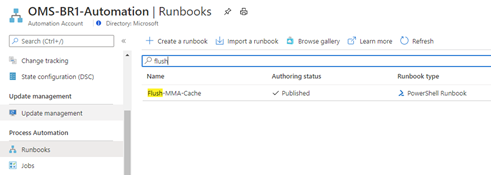
- Import the PowerShell runbook. Here’s an example of what this looks like:

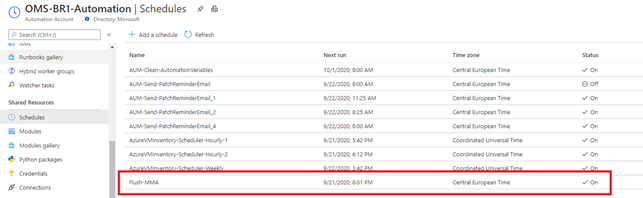
- Schedule it or run it manually as required against the preferred hybrid worker:
- Test! Test! Test!
What’s next? That’s all folks …
Thank you for reading and Happy flushing  .
.
Disclaimer
The sample scripts are not supported under any Microsoft standard support program or service. The sample scripts are provided AS IS without warranty of any kind. Microsoft further disclaims all implied warranties including, without limitation, any implied warranties of merchantability or of fitness for a particular purpose. The entire risk arising out of the use or performance of the sample scripts and documentation remains with you. In no event shall Microsoft, its authors, or anyone else involved in the creation, production, or delivery of the scripts be liable for any damages whatsoever (including, without limitation, damages for loss of business profits, business interruption, loss of business information, or other pecuniary loss) arising out of the use of or inability to use the sample scripts or documentation, even if Microsoft has been advised of the possibility of such damages.
by Contributed | Oct 13, 2020 | Technology
This article is contributed. See the original author and article here.
There is an undeniable difference when it comes to the spoken language of Spanish and the written language of Spanish.
Despite more than 400 million native Spanish speakers throughout the world, only four percent of the internet is in Spanish. English, meanwhile, accounts for less native speakers worldwide but more than 60 percent of the information on the internet.
In celebration of Hispanic Heritage Month – September 15 to October 15 – we’d like to highlight an online publication which is working to close this idiomatic gap and foster technical knowledge for IT professionals in Spanish.
The CompartiMOSS Magazine was founded in 2008 as a home for Microsoft SharePoint information in Spanish. The publication’s two founders – residing in Europe and Latin America – wanted to go beyond borders and provide technical information to users in a language other than English.
The magazine sought to support the adoption of SharePoint Knowledge in Spanish-speaking countries and provide an open platform for worldwide technical experts and community leaders to contribute.
Over time, the magazine expanded its technical focus to include other Microsoft technologies including Office 365, Azure, and more. The founding principles of the magazine, however, remained to provide original articles from various authors in a free digital magazine every quarter.
CompartiMOSS has since become a platform for technical experts to share interests, knowledge and experience, serving as a bridge for technical communities based in many countries. Moreover, there are also many article authors from European and Latin American countries who have been recognized with the MVP award during this time.
The CompartiMOSS management board counts four members, all of them current MVPs based in three different countries in Europe and Latin America: Gustavo Velez, Juan Carlos González, Fabián Imaz, and Alberto Diaz.
Despite the remote challenges we all face at this moment, CompartiMOSS is keeping true to its founding principles by offering a knowledge-sharing platform for high-quality technical information in Spanish language, available to everyone.
For more information on the publication, visit its website.
Happy Hispanic Heritage Month!
by Contributed | Oct 13, 2020 | Technology
This article is contributed. See the original author and article here.
Conditional Access and MCAS RBAC!
By @sarahzin and @erin_boris
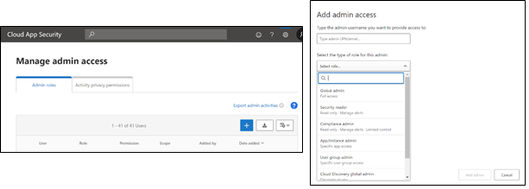
Hi everyone, we are very excited to bring this blog to you on one of our most asked questions regarding Microsoft Cloud App Security (MCAS) access! These days, many customers have a constant dilemma on how to restrict accesses in line with the security best practice, least privilege. As you may know, access to MCAS can be granted through inherited roles from Azure Active Directory (AAD) or through role-based access control (RBAC) assignments from within the MCAS portal itself.
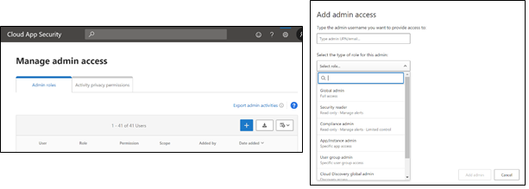
For more information on overall MCAS RBAC, check out our documentation! It is important to note that you cannot overwrite an AAD admin role with a manually assigned MCAS role as AAD role assignments take precedence over MCAS assigned roles.
As it stands today, AAD Global administrators and Security administrators have full access and permissions in MCAS. They can add admins, create policies and settings, upload logs, and perform governance actions.
The Security administrator role is one of the most popular admin roles assigned; this role has permissions to manage additional security related features and products within the Microsoft stack (Microsoft Defender for Endpoint, Intune, etc.). As our customers continue to use our security products, they’ve come to us asking how to limit AAD role permissions for MCAS, and within other products as well. This blog goes over a customer scenario for MCAS and the steps that can be taken to meet their requirements.
Customer Scenario: We follow a very specific RBAC policy. We have Security administrators assigned to specific groups for access across our entire security stack. However, we want to follow least privilege and give access to specific products with the permissions inherited from the Security administrator role. Not all the products have a product-specific administrator role available in AAD. How do we limit the Security administrator role’s access in MCAS without impacting existing permissions to other products?
Solution: AAD Conditional Access
By navigating to the Azure Portal and selecting AAD Conditional Access, we can scope a policy based on specific conditions. For more information regarding Conditional Access, check out our overview documentation.
Let’s start with a Conditional Access policy named “MCAS Restrictions” and begin our conditions on “Users and Groups” under Assignments.
In the screenshots below, we have configured our policy to include the Azure roles of Security administrators and Global administrators (both roles have access to MCAS by default) and exclude two of our users from the policy, Adele and Allan.
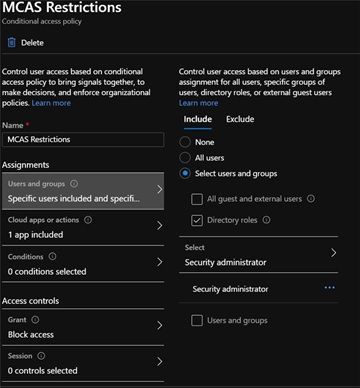
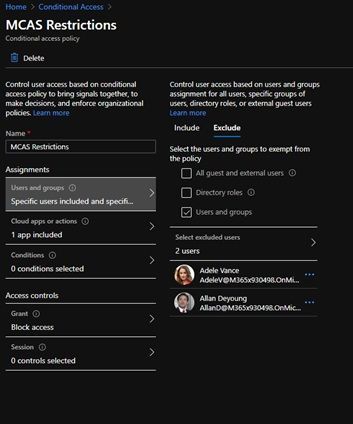
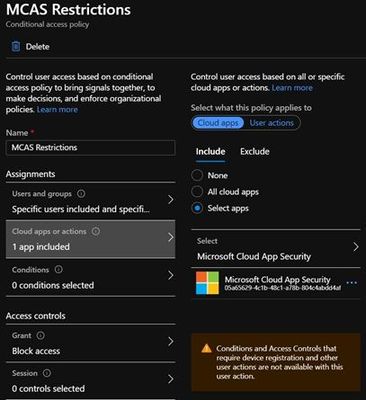
Within the “Cloud App or Action,” we selected Microsoft Cloud Application Security to scope this policy to only those users that are attempting to log into MCAS. We also selected an “Access Control” to Block Access.
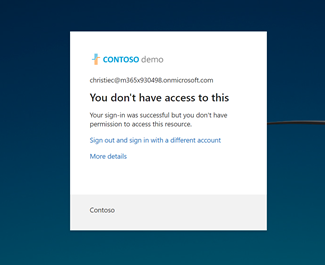
When Christie Cline, who is currently assigned the Security administrator role, attempts to log into MCAS, she receives the following message:
For larger organizations, it can become challenging to separate duties between roles. Conditional Access offers the capability to quickly deny access to users that may be privileged but do not require the ability to login to MCAS and other security applications. In addition, this process is not limited to only the Security admin; it can be scoped to other directory roles. With proper configuration, Conditional Access will take precedence over AAD directory roles.
Let us know if you have any feedback after trying this Conditional Access policy. What other scenarios would you like us to cover? Feel free to comment below!
![[Guest Blog] My Journey from Former Nun to Microsoft Employee (Yes, you read that correctly!)](https://www.drware.com/wp-content/uploads/2020/10/large-664)
by Contributed | Oct 13, 2020 | Technology
This article is contributed. See the original author and article here.
This article was written by Microsoft employee Denise Pyles as part of the Humans of IT Guest Blogger series. Today, Denise is a Senior Ethics and Compliance Manager- she recounts her truly unique journey transitioning into tech as a former nun (yes, really!). Read on to learn about her story.
 Denise shares her story as a former nun who now works in tech
I have a few out-of-the-ordinary differences that I bring to my career. I leveraged most of these experiences and skills when I switched careers. Here are a few of them.
- Currently, I am an ethics and compliance manager who is a nerd in risk management
- I have been a program manager who geeks out on the process
- I was a bartender at one point in my career
- Finally, I am a former nun who now works at Microsoft
This direction is not your typical trajectory to move from one industry to another. In sharing part of my story, I want to offer a few insights on the mindset that helped me successfully navigate a total change of career. I also want to advocate that owning our uniqueness is one of our strongest superpowers throughout our career. Our stories are different, and different is OK.
What are your strengths? Of your strengths, which one is your superpower? What makes you stand out so that you showcase your core strength?
A Nun Story
When people think of nuns, they think mostly of movie characters, like Whoopi Goldberg in “Sister Act,” or famous nuns, like Mother Teresa. Those who may not be familiar with the term, a “nun,” means a “religious sister,” a woman who professes religious vows and lives in a community with other women. I was a Roman Catholic nun, a religious sister, for eight years, and I lived in a community with other women across the United States in houses known as convents.
When people find out that I was a nun, one of the first questions they ask me is, “Did you wear a habit?” My quick response is, “Only bad ones.” All kidding aside, some religious orders still wear a habit. The community I belonged to does not, and I did not wear a habit when I was a nun. I dressed in ordinary clothes and wore a cross or religious pin that identified me as a religious sister.
 Religious Sister – 1996
A Sense of Belonging
I belonged to an International Community and moving across the country and globally is part of their mission of service. While being a religious sister, I was privileged to journey with people in their most intense moments of life – illness, the dying, and times of celebration such a birth, a wedding, or anniversary. I was also trusted to be with people in the ordinary stuff of life while listening, empowering, and serving. I lived that life for eight years.
A turning point for me happened when I decided to leave religious life because of a chronic physical illness. I needed to stay rooted in one place to take care of some health issues. When I left the community, I also knew I needed to make a career change to the corporate world. And the company I wanted to work for was Microsoft.
In what ways have changes in your life given you a different perspective on the trajectory of your career?
Switched Careers from Former Nun to Microsoft Employee
The road to a career at Microsoft was not quick and easy for me. It took a few various job experiences in the corporate environment and a relentless job application process before I finally landed a job at Microsoft.
Let me give you a few numbers of what my persistence looked like in getting to Microsoft: 44, 1, 9, and 1. Forty-four job applications, one rotation as a vendor, nine interviews, and ONE job offer to become a full-time employee.
Forty-four applications are a lot to one company. I knew I would succeed or fail with my work effort and strengths. I just needed someone to give me a chance.
Who or what inspires your persistence? What does persistence look like for you?
The Manager Who Empowered the Opportunity
Who hired me? Ironically enough, it was a manager who had a strong bias AGAINST institutional religion. Believe it or not, that was the same person who hired me into Microsoft. A few years ago, my first manager, who still currently works at Microsoft and is now also my friend, told me the entire backstory of hiring me. He said that when he first looked at my resume, it had “Church Lady” written all over it, and he instantly tossed it aside into the “Reject” pile. He said that he was not going to give me the time of day, much less a chance at an interview. Yet, upon further reflection, he also knew what it was like for people not to give him a chance. So, he finally acknowledged his own internal bias, and decided to take another look at my resume. That has made all the difference in my story.
Now, on second glance, he noticed that I had some project management experience. He then decided to interview me for the job. The interview was a success. I owe my career at Microsoft to my former boss, who challenged himself to have an open mindset and grow beyond his bias.
The First Few Years of Corporate Work
When I first started at Microsoft, I was deliberate in covering my experience in religious life. I was worried I would lose my job if people found out I was a former nun. So, I held back. I also did not want to offend anyone because I was afraid that religion was too much of a hot topic to safely mention. I did not want any of my teammates to feel uncomfortable being around me or act differently with me if they knew I was a nun.
The good news is that a lot of growth happens in our career, and I have learned to embrace my experience as a former nun. I utilize my strengths of being an empathic listener and a servant leader throughout my work today, qualities that matured during my experience in religious life.
Switched Careers with This Mindset
I do not easily give up on things. Some people call me stubborn, but I think of it as determination. I applied 44 times to one company. Forty-three of them were rejections. One of them was a yes, an opportunity. Finally, an open door, and that was all that mattered to enable me to begin my new journey in tech.
I remember something my Dad taught me at a young age about finding a job and working. My Dad was big on action and less on talk or BS about work. He once said to me, “You get your foot in the door with the job offer. Now you have the chance to keep your job by what you do once you’re through the door and working.” The lesson I learned from my Dad is to let your actions speak the value of your talent.
Getting a job offer was the first step. Doing the work would be the key to keeping my job. Throughout that process, quitting is not an option, but learning and growing from the rejections, mishaps, and mistakes.
What is it that you are good at and get better at that? What pieces of your work efforts make you successful right now? Where do you want to go with your strengths and keep moving in that direction? Remember to lead from a position of strength and not from a place of holding back or covering up.
When it comes to switching your career, be all in and relentless throughout the journey. Most often, a career change does not happen overnight. You must be committed to the long haul of change. Do not give in or quit too early, and most importantly, do not quit on yourself.
What are the lessons and kernels of wisdom from your past work experience that will deepen your growth in your career today?
Resiliency Needed
Switching careers or remaining steadfast in your current work environment requires a strong resiliency to be persistent and dedicated to your genuine self, your skillset of strengths, and the purpose of your career. Plus, taking the time to leverage elements of your experience will help you in your current work.
For example, I mentioned at the beginning of this post that I was a bartender at one point in my career. I learned about risk management when I started as a bartender at a pub in a monastery. The bartending was done at a place that valued compliance in ensuring all of us understood the significance of being responsible stewards in serving alcohol.
Another experience was my first job after high school, where I developed black and white film photography for a local newspaper. Here I learned the value of quality work and excellence for the success of others.
Each pivotal moment in our experience will define our life in some way. Learn something from your past, no matter how small or insignificant the jobs may seem.
In what ways do your strengths and growth opportunities propel you forward?
Summary – A Few Questions to Consider for your Career Development
Your experience and persistence help get you where you are today and where you plan to go moving forward. Your mindset throughout it all is essential for growth.
Throughout this post, I proposed a few questions for reflection when thinking about your career development. Here is a summary of the five questions:
- What are your strengths? Of your strengths, which one is your superpower? What makes you stand out so that you showcase your core strength?
- In what ways have changes in your life given you a different perspective on the trajectory of your career?
- Who or what inspires your persistence? What does persistence look like for you?
- What are the lessons and kernels of wisdom from your past work experience that will deepen your growth in your career today?
- In what ways do your strengths and growth opportunities propel you forward?
One final thought. We only get so many ticks on the clock of life to do the work we are meant to do and to share the superpowers we are meant to give. Remember to hold nothing back in going after opportunities, in the chance to work with incredible team players and to be part of amazing organizations that want to make a positive, lasting impact in the world.
You get better and continue to grow when you:
- Stay true to your authentic self
- Work on your strengths
- Share your wisdom
- Empower the differences in others along the way.
What makes you unique? What is your superpower? How will you pay it forward?
I welcome your perspective and insights.
 Microsoft – September 2020
Note: a version of this article first appeared in Denise Pyles’ blog – Mind Trip Blog.
#HumansofIT
#CareerJourneys

by Contributed | Oct 13, 2020 | Technology
This article is contributed. See the original author and article here.
We are excited to partner with NASA to bring you the Day of Data, where your students can explore how data powers our astronauts, our space missions, and our world. Celebrate World Spreadsheet Day and 20 years of humans living and working aboard the International Space Station with live events, lesson plans, and virtual experiences.
- Talk to a NASA Astronaut: Join us for two live events on October 14th at 10am PDT and November 2nd at 10am PST with NASA astronauts and rocket scientists, where they will discuss how they use data and the impact that data has had on their jobs. Speakers will share their personal stories and answer questions from the audience at this Skype in the Classroom Live Event.
- Get Free ‘Day of Data’ Resources from the Microsoft Educator Center (MEC): Dive into immersive NASA-inspired data experiences with standards-aligned lesson plans suited for remote learning. Your students can explore data in a self-paced Excel workbook to earn a Space Data Badge, and have the option to reflect on their experiences using Flipgrid. For detailed lesson plans, curated data sets, and thought-provoking student journals, visit the Microsoft Educator Center. For advanced students, visit the Excel Tech Community to participate in exciting trivia and visualization challenges.
- Attend Free Virtual Space Data Camps with Microsoft stores team: If you would like a guided experience in your classroom or want to celebrate the Day of Data with your family, visit the Microsoft Store virtually through a ‘Space Data Camp’ where a Microsoft Store team member will walk you through the Day of Data experience. Participants will get a chance to earn a digital certificate of completion and a virtual Space Data badge. Space Data Camp.
Today’s learners will enter a world defined by data. Reading and extracting key insights from data will become necessary and expected skills for the workforce of the future. Prepare your students by tapping into their creativity and curiosity today with NASA and Microsoft Hacking STEM – take them on a journey to outer space!


by Contributed | Oct 13, 2020 | Technology
This article is contributed. See the original author and article here.
Surface tools that assist IT admins with core security, management, and diagnostic tasks have been updated with support for Surface Laptop Go and the new Surface Pro X with Microsoft SQ 2 processor.

Updated tools include:
In addition, the latest versions of Surface Brightness Control , Surface Data Eraser and the Surface Dock Firmware Update for Surface Dock 1 already have built in support for the new devices.
You can download these and other tools from Surface Tools for IT, available on the Microsoft Download Center. Surface Laptop Go and Surface Pro X are available for purchase now.
![[Guest Blog] Look At Me Now: Building an Unconventional Personal Brand](https://www.drware.com/wp-content/uploads/2020/10/medium-87)
by Contributed | Oct 13, 2020 | Technology
This article is contributed. See the original author and article here.
This article was written by Emma D’Arcy, a Business Applications MVP based in Philadelphia, Pennsylvania as part of our Humans of IT Guest Blogger series. In this blog post, she discusses her personal journey into the Power Apps world and the challenges she faced along the way.
I remember the day that I arrived home at my parents’ house after having my right hand tattooed with badly misshapen baby blue stars. I remember the day clearly – not because of the act of having been tattooed at such a young age, but because of my dad’s reaction upon making the discovery at dinner that night. “That had better be permanent marker or so help me God.” I was 19 years old, I thought I was invincible with no real concept of consequences. My dad wasn’t so much disgusted with the tattoo itself; he was much more concerned for my future employment prospects. Comments like “No one will hire you” and “you’ll never get a real job” were frequently thrown out at the dinner table that night. Words that sat with me for a long time after.
Two years later, I got my first “grown-up” job working for a large corporate bank in Ireland. Dress code was the standard business attire – suit pants and a smart shirt, the exact opposite to what 21-year-old Emma had wanted to wear. Long sleeves were mandatory for me due to the aforementioned blue stars on my right hand. By this time, I had collected several tattoos, but my most distinguishing features were my ears – I had large stretched ears that were immediately noticeable any time I moved my hair. I had always had an affinity for things that were considered different and I certainly stood out from my colleagues much to the disdain of my superiors.
One afternoon on a rare, warm day at the office, I had tied my hair up off my face in an effort to keep cool while working. Moments later, I was tapped on the shoulder and asked for a “quick chat” in a nearby conference room. I was greeted by our HR rep, my manager and the department head. It had come to their attention that I was not abiding by the corporate dress code. I was told that my stretched ears would be measured on a monthly basis to ensure they wouldn’t get any larger during my time employed with the bank. This was the final straw – I was more determined than ever to prove that my appearance ≠ my value.
Shortly after this event, I enrolled with the National College of Ireland as a part-time student studying for a BSc in Computing. I would work a full day at the office and then make the long trek from South Dublin to the Docklands four times a week to attend classes. I had always had a passion for technology, having spent many years in my teens shadowing my dad at his office as a web developer. He would often share code snippets with me and have me code in specific hex values for various colors. Studying came naturally to me and I finished my first year at NCI with the highest average grade across the entire college for that year, an achievement I have always been proud of.
During my second year of college, my dad suffered a devastating brain injury that completely changed my life. Working full time whilst studying meant that my finances were already quite strained and I had to drop out of college to assist my family financially. I was heartbroken but now even more determined than ever to chase my dreams. With only one year of college education completed, I began applying for junior level tech positions in search of a chance to prove myself. Shortly after, an opportunity that would introduce me to the world of Microsoft Dynamics and the Microsoft Community came my way.
In August of 2013, I began my career in Business Applications with a large biotechnology company. I was introduced to the world of ERP systems and began working with the AX suite, assisting with implementations across the company’s global network. It was a steep learning curve, but I had an incredible support system that encouraged me and helped me tackle the challenges I encountered. One year later, I was tasked with implementing an internal service desk using Dynamics CRM. This was a completely new system to me, and I was eager to impress the leadership team. After some convincing, my boss sent me on a two-day training session at the Microsoft head offices in Leopardstown, Dublin. I remember walking through those huge glass doors and feeling an incredible energy. There was no air of corporate pretentiousness – not a suit to be seen and for the first time I truly felt at home. I knew this was the right career path for me.
I spent two days absorbing all I could about the customization and configuration of Dynamics CRM. I was hooked and fell in love with how much I could build and automate without the need to implement any code. I knew how much of a positive change this technology would have on my colleagues and I began to see how tech could have an impact on the people around me. I wanted to be part of that change.
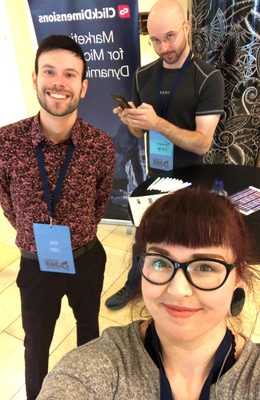
In the years that followed, I continued to learn and grow my career alongside the Microsoft Dynamics platform, but it wasn’t until I was introduced to the Power Platform community did I truly blossom. In April of 2018, I attended the Community Summit in Dublin, Ireland. Whilst working at my employer’s booth on the tradeshow floor, I was introduced to a wonderful human named Chris Huntingford who was better known as TattooedCRMGuy. We chatted about Dynamics and discussed a solution for a mutual client before turning to chat about another mutual interest – tattoos. For me, this was the first time I had met a fellow professional who was unapologetically himself and heavily tattooed. He wasn’t hiding his full sleeves and had made a complete community persona around his artwork. He gave me the confidence to be myself and let my work do the talking for me, not my image. Shortly thereafter TattooedCRMGirl was born.
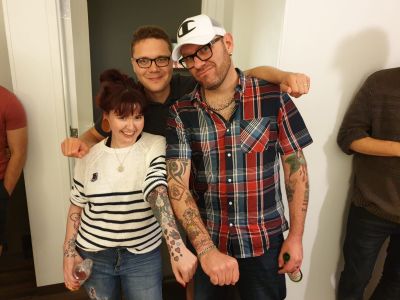
Since then, I have used my distinguishing features as a way of defining my own business brand within the Microsoft community. During work calls I would often tell clients to “look for the girl with the big ears” while at conferences to find me. I have become known across the community for my work which is easily remembered because it was done by “that girl with the tattoos”. My tattoos have no longer become a hinderance to my job, they have become an asset, my calling card. My professional value is no longer limited by what I look like and to those who doubted me before, I can happily proclaim “Look at me now.”:D

So, to my fellow Humans of IT around the world – I want to encourage you to go out there, and be unapologetically yourself. You BELONG here; don’t let anyone else tell you otherwise!
#HumansofIT
#CareerJourneys
by Contributed | Oct 13, 2020 | Azure, Technology
This article is contributed. See the original author and article here.
In part 1, we briefly went over the Five disciplines of Cloud Governance and systematic approach of implementing Cloud Governance Model. In this blog, we will cover the Azure native tools and some 3rd party tools to help and support the implementation of cloud governance for your Azure environment across all of the give disciplines of cloud governance.
AZURE NATIVE TOOLS
- Cost Management
- Azure Blueprints
- Azure Policy
- Azure Cost Management
- Azure Advisor
- Azure Portal
- Azure EA Content Pack
- Security Baseline
- Azure Blueprints
- Azure Policy
- Azure Security Center
- Azure Sentinel
- Subscription Design
- Encryption
- Hybrid Identity
- Azure Networking
- Azure Automation
- Resource Consistency
- Azure Blueprints
- Azure Policy
- Azure Monitor
- Azure Advisor
- Resource Manager Templates
- Resource Graph
- Management Groups
- Identity Baseline
- Azure Blueprints
- RBAC
- Azure AD
- Azure AD B2B
- Azure AD B2C
- Directory Federation
- Directory Replication
- Development Acceleration
- Azure Blueprint
- Azure Policy
- Resource Grouping & Tagging
- Resource Manager Templates
- Azure Advisor
- Azure DevOps
- Azure Site Recovery
- Azure Backup
- Azure Automation
3rd PARTY TOOLS –Following third parties can be used to accomplish similar goals:
- Cost Management
- Security Baseline
- Resource Consistency
- ServiceNow
- HashiCorp Terraform
- Identity Baseline
- Development Acceleration
- Nagios
- HashiCorp Terraform
- Developer Tools like Chef, Puppet
Reference – https://aka/ms/CAF/Gov
by Contributed | Oct 13, 2020 | Azure, Technology
This article is contributed. See the original author and article here.
It’s an iterative process, as cloud estate changes over time, so do cloud governance processes and policies. Cloud Governance spans across the five disciplines:
- Cost Management – Evaluate & Monitor costs, limit IT spend, scale to meet need, create cost accountability
- Security Baseline – Ensure compliance with IT Security requirements by applying a security baseline to all adoption efforts
- Resource Consistency- Ensure consistency in resource configuration. Ensure practices for onboarding, recovery, and discoverability
- Identity Baseline – Ensure the baseline for identity and access are enforces by consistently applying role definitions and assignments
- Deployment Acceleration – Accelerate deployment through centralization, consistency, and standardization across deployment templates
Following systematic approach can help you putting together initial governance foundation:
- Methodology: This helps establishing a basic understanding of the methodology to drive cloud governance in the Cloud Adoption Framework to begin thinking through the end state solution.
- Benchmark: Evaluation and assessment of your AS-IS and TO-BE state to establish a vision for applying the framework.
- Governance MVP: Provides initial foundation to your governance journey with a small, easily implemented set of governance tools.
- Extend and Improvise your Governance MVP: Iteratively enhance your Governance MVP by adding governance controls to address tangible risks as you progress toward the end state.
Reference – https://aka.ms/CAF/Gov


Recent Comments