This article is contributed. See the original author and article here.
In this episode with Drew Skwiers-Koballa, you will be introduced to a new experience for database development with the SQL Database Projects extension for Azure Data Studio. Whether you are familiar with SQL Server Data Tools (SSDT) or new to SQL projects, you can start editing and building SQL projects in Azure Data Studio on Windows, macOS, and Linux.
This article is contributed. See the original author and article here.
October is my favorite time of year, between the change of season, Major League Baseball playoffs, and with football underway. It’s also National Cybersecurity Awareness Month, though with so many cyberattacks and incidents in the news, one month of dedicated focus hardly seems sufficient. For that reason, we will continue to invest heavily in SCI management technologies that work across, not just your Microsoft investments, but that also extends to your third-party technology systems.
I’ll start with interoperability. Your environment will no doubt remain hybrid, with multiple providers mutually committed to supporting your digital transformation efforts. Of all the made at IGNITE, two are most indicative of our commitment to deliver world-class security technologies in conjunction with other market partners, in increasingly critical segments:
Microsoft and FireEye/Mandiant announced a partnership to combine Microsoft’s security products and technologies with Mandiant’s on-the-ground expertise in incident response and threat intelligence; our companies will partner in incident response and SecOps. This is a great example of our willingness to partner and work with security companies across the globe; we may well compete in some areas, but in the end this community of practice is dedicated to protecting our users. Look here for more information on the Microsoft Intelligent Security Association.
Our security investments and partnerships by no means are limited to traditional IT management; we’re very much focused on operational technologies as well. Microsoft and AT&T announced a new joint cellular guardian device solution built on Azure Sphere, which will advance secure cellular connections with lower operating costs.
Another important management offering that advances interoperability is , which enables cross-customer management capabilities, allowing a partner or service provider, or large organizational authority, to consolidate and centralize management and visibility of disparate resources.
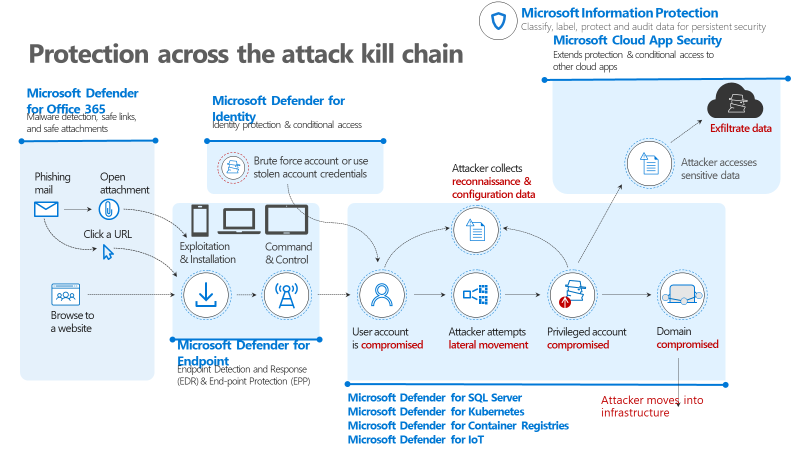
Other updates coming out of IGNITE include a rebranding of sort of our threat protection portfolio: Microsoft Defender is a combined set of offerings, combining Microsoft 365 Defender and Azure Defender, protecting and responding to threats across an attacker kill chain, from identities to endpoints, applications, email, infrastructure and cloud. Thinking left to right, through an attacker lifecycle, this is how our “Microsoft Defender” suite works:
Microsoft Defender for Office 365 complements standard Office 365 gateway and anti-spam capabilities with additional pre-breach protections for user accounts, especially those that might be most visible and therefore attractive to attackers via spear- or whale-phishing. This capability uses isolated detonation “sandboxing” technologies to analyze incoming attachments and URLs.
Microsoft Defender for Endpoint functions as both a pre- and post-breach management and detection tool for not only your Windows devices but iOS and Android. The service’s Threat and Vulnerability Management capabilities help protect your environment from attack by staying current on configurations; and it provides post-breach management by giving your analysts the ability to isolate a compromised endpoint, force authentication, take a forensics image, and respond to the attacker.
Microsoft Defender for Identity offers user entity behavior analysis protections for credentials and provides link analysis insight into victims’ relationships and interactions with other users. This helps your analyst teams understand, respond to, and get ahead of threats to user groups.
Azure Defender extends Azure Security Center’s cloud security posture management capabilities with important new capabilities:
Defender for SQL Server.
Azure Defender for Kubernetes.
Azure Defender for Container Registries.
Azure Defender for IoT is an exciting new offering as part of our recent acquisition of CyberX labs. This extends IT protection to your OT/connective device environment. As we expect to see more attacks against physical devices, for example ransomware, this is an important development.
Azure Sentinel is an OpEx SIEM/SOAR service that manages not only your Microsoft investments, but many third-party ones as well. Sentinel now offers UEBA insights to assist with SecOps.
Here’s a view:
Figure 1: Illustration of Microsoft Defender protection across attack kill chain
Microsoft continues to update and consolidate this suite of offerings to help you centralize and automate more of your security operations, taking advantage of the scale and cost benefits that Cloud can bring. We will continue to integrate our technologies internally and will continue to partner with others around the security community, to protect our customers. One final example, an important resource for partners and customers alike, is this GitHub repository for security operations defenders. Start here to find log analysis queries, sample data sets, SDKs, scripts, connectors, and other resources to accelerate your work. More importantly, use this as an opportunity to join a community of practice , a network of defenders who are working across industries and geographies to protect users, systems, and data.
This being National Cybersecurity Awareness month, I’ll close with a link to a blog that I recently published, with advice on how to accelerate your cybersecurity career and make immediate impact by using default security tools. We and many other security providers remain committed to defending our users and the ecosystem, but we humans, the 8th OSI layer, implement these technologies and solutions. The more we can “move left” and build basic hygiene tools INTO what we deliver and help you implement, the more secure and productive we will be.
This article is contributed. See the original author and article here.
Azure IoT Edge now enables to better prioritize how your devices use bandwidth. This is particularly useful when your IoT Edge devices are going through a metered or constrained connection. You can now decide which messages are sent first to the cloud and when they should be discarded.
Since releasing Microsoft Azure IoT Edge, we have seen many customers using IoT Edge over metered connections like cellular or satellite connections. For these customers, overall bandwidth consumption is a first concern but prioritizing how this limited connection is used is another one. For the first concern, IoT Edge automatically balances the needs for using as little bandwidth as possible to keep operating costs down while remaining reachable from the cloud whenever possible. However even with a low overall bandwidth consumption, companies operating devices on limited bandwidth must not miss critical data such as alarms due to temporary saturation of their bandwidth with lower priority or expired messages.
Route priority and time-to-live are new features in IoT Edge (version 1.0.10 and above) that address this need by letting customers choose which data should be sent first and when it should be discarded. These features expand the existing message routing features of IoT Edge that declares how messages are passed between IoT Edge modules and to the cloud. Let’s take the example of a ship connected over a satellite connection that sends two types of messages: telemetry messages to provide regular updates on the status of its engines and alert messages when something goes wrong. Those messages used to be sent as part of the same queue before, so when the bandwidth was limited, alert messages were sent only once all telemetry messages in front in the queue were processed and thus risked being received too late by operators. With route priority, customers can now define a priority setting for each route. For instance, they can specify that they want to receive their alert messages first, with a priority set to 0, and telemetry messages second, with a priority set to 1. With route time-to-live, they can now also define a time-to-live setting for each route to discard messages after a certain period. For instance, they can decide to discard telemetry messages that are more than an hour old and haven’t been sent yet but keep alert messages for 24 hours.
Here is an example of how to declare routes in the deployment manifest and define priority and time to live:
Note that IoT Edge deployment schema version 1.1.0 or above needs to be used to define these new settings. For more details, you can look at this documentation.
Now that you’ve seen how you can configure your IoT Edge device to prioritize specific telemetry messages over others and define time to live for messages that are no longer useful after a specified amount of time, you might be wondering how you can address the other data flows such as file uploads. We are preparing a follow up article that will provide guidance and best practices on how to leverage Linux Kernel capabilities to have a broader control over bandwidth usage by your IoT Edge devices. Don’t miss it by subscribing to the IoT Blog!
This article is contributed. See the original author and article here.
Since moving to role-based training and certification in 2018, Microsoft Learn has continued to work with industry experts to identify new roles and create training that prepares learners for the skills needed in those roles. This year, responding to a need for non-developers to be able to quickly create apps tailored to their business needs, the Microsoft Learn team developed the role of Microsoft Power Platform App Maker. By skilling up in Microsoft Power Platform, an app maker can create business apps without knowing any code. Microsoft was the first to introduce this new role to the marketplace, and there’s a great deal of excitement about how it can empower individuals and businesses by enabling and encouraging creative solutions. Because it’s so new, let’s take a closer look at what this role can help you do.
What does an app maker do?
An app maker is someone with deep expertise in a solution who builds custom apps for their team that solve a business problem or respond to a need. They may envision, design, build, and implement an app—for example, to simplify, automate, or transform tasks and processes. After the app is up and running, they manage its security and versions. Being able to quickly create an app that helps others in your workplace is what makes this new role so exciting. For example, a Red Cross worker built an in-house shopping cart app to make it easier to order supplies. An elementary school principal with no formal IT training created an app to improve the reading assessment process for students and educators.
To acquire the skills needed to perform the role of app maker, you don’t need to take time out or time off to learn to code. Anyone who’s comfortable using technology to solve business problems can learn to use Microsoft Power Platform Maker tools.
If you want the power to quickly create custom business apps without writing code, head to the App Maker Learning Catalog. The catalog lays out the training you need, from getting started with Power Apps, to app creation, to flow creation. It identifies whether content is available on Microsoft Learn as free, self-paced modules and learning paths or offered as instructor-led training by Microsoft Learning Partners, or both, so you can easily find the best training format for your needs.
To earn certification as a Power Platform App Maker Associate, take Exam PL-100: Microsoft Power Platform App Maker. This exam measures skills such as designing and creating data models and basic user interfaces, managing privacy and compliance for stored data, and analyzing data with Power BI reports and AI Builder. It also measures skills for implementation and management of security, deployment, and versions of apps.
This new role of app maker is a great choice—not just for non-coders but also for coders or developers who want to quickly validate their skills by getting certified as an app maker. If you’re already using Microsoft Power Platform to solve business problems, for example, or you’re skilled in key technical business analyst tasks, such as data modeling, basic UX design, requirements analysis, and process analysis, consider taking the exam and getting certified as an app maker. Anyone who creates and enforces business processes, structures the digital collection of information, improves the efficiency of repeatable tasks, and automates business processes is a good candidate. Experience with Visual Basic for Applications, Excel PivotTables, Microsoft Teams, and other tools helps, as does a basic understanding of data models, user interface, and processes.
Step into this empowering new role. Earn your certification as a Power Platform App Maker Associate. And see how you can empower yourself, your team, and your company.
This article is contributed. See the original author and article here.
We have a number of customers that leverage the benefits offered by the SQL IaaS extension which I had blogged about a few days ago. One of the common feedback was the effort required to enable the extension for multiple VMs especially if you were running multiple SQL Server on Azure VM instances. We have created an easy option for customers to enable the SQL IaaS extensions on all SQL Server virtual machines in an Azure subscription using a feature called Automatic Registration.
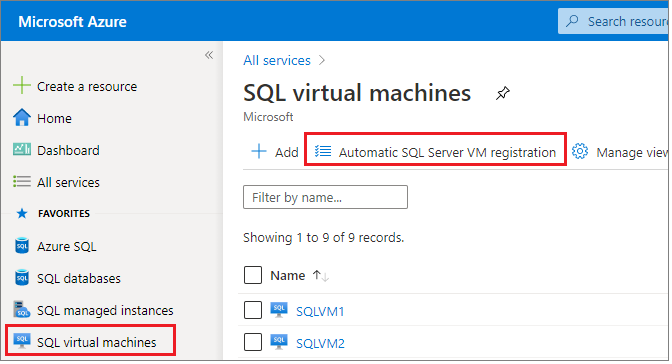
To enable automatic registration of your SQL Server VMs in the Azure portal, follow the steps:
SelectAutomatic SQL Server VM registrationto open theAutomatic registrationpage as shown in the screenshot below.
Choose your subscription from the drop-down.
Read through the terms and if you agree, selectI accept.
SelectRegisterto enable the feature and automatically register all current and future SQL Server VMs with the SQL VM resource provider. This will not restart the SQL Server service on any of the VMs.
If you need to enable this option on multiple Azure subscriptions, then you can leverage this PowerShell script on GitHub to enable this option for a list of subscriptions.
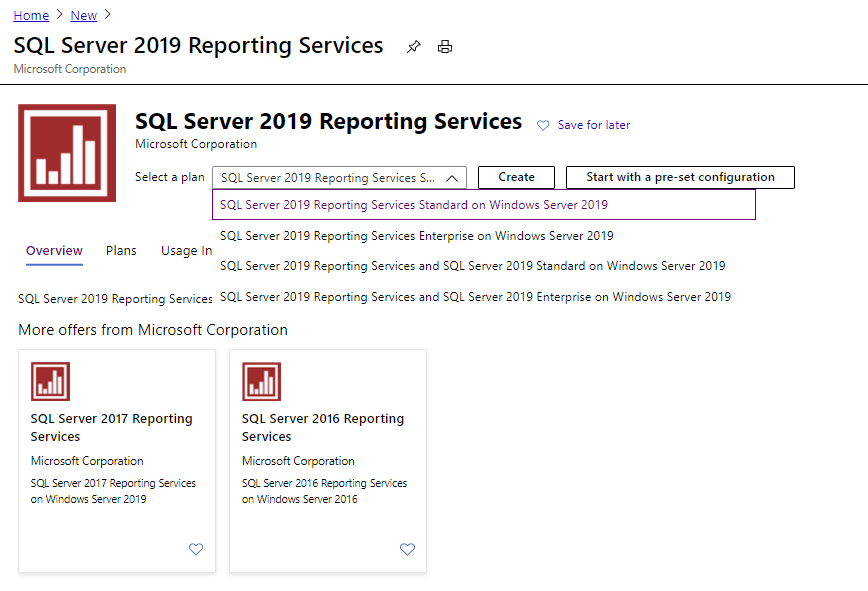
We also introduced new Reporting Services virtual machine images for SQL Server 2016, 2017 and 2019. Now customers have the ability to deploy a Reporting Services virtual machine (SSRS) using Standard and Enterprise edition using pre-configured image types for ease of deployment. This also introduces the choice to deploy a SSRS virtual machine with flexible licensing model using Pay As You Go pricing or leverage your Software Assurance license mobility or Azure Hybrid Benefit when deploying on an Azure virtual machine.
Now you have the ability to move your database engine and reporting workloads into Azure virtual machines using our pre-configured images and automate the entire process using ARM templates. This saves you the time to install reporting services and configure it separately.
This article is contributed. See the original author and article here.
Log Analytics – data export (preview)
Log Analytics data export is publicly available and you ready for you to try!
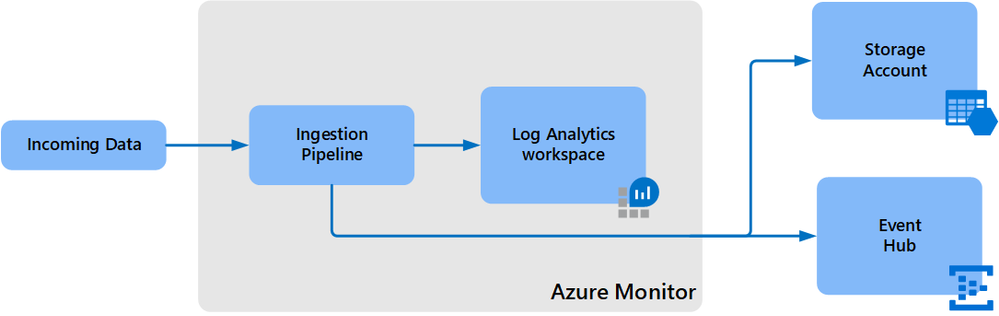
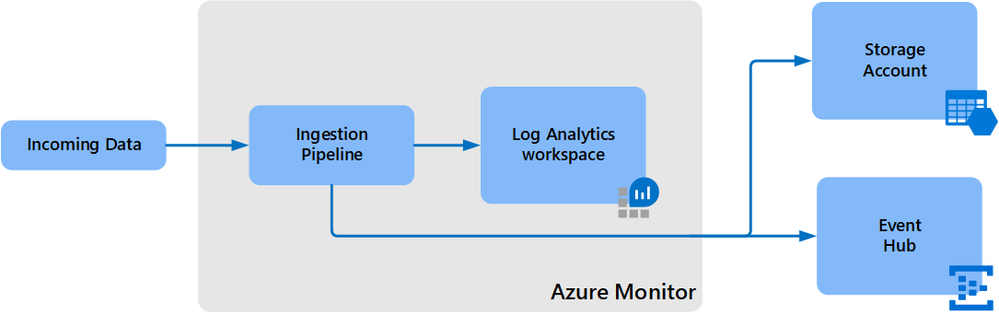
It let’s you export data of selected tables in your Log Analytics workspace as it reaches ingestion and continuously export it to a Azure storage account and event hub.
Benefits
Native capability that is designed for scale
Long retention for auditing and compliance in storage, long beyond the 2 years supported in workspace
Low cost retention in storage
Integration with Azure 3rd party and external solutions such as Data Lake and Splunk through event hub
Near-real-time applications and alerting through event hub
How it works?
Data export was design as the native export path for Log Analytics data and in some cases, can replace alternative solutions used based on query API and were bounded to its limits. Once data export rules are configured in your workspace, any new data arriving at Log Analytics ingestion endpoint and targeted to selected tables in your workspace is exported to your storage account hourly or to event hub in near-real-time.
When exporting to storage, each table is kept under a separate container. Similarly, when exporting to Event Hub, each table is exported to a new event hub instance. Data export is regional and can be configured when your workspace and destination (storage account, event hub) are located in the same region. If you need to replicate your data to other storage account(s), you can use any of the Azure Storage redundancy alternatives.
Configuration is currently available via CLI and REST request and the support in UI, but PowerShell will be added in the near future.
Here is an example of data export rule to storage account – if a table that you defined isn’t supported currently, no data will be exported to destination, but once it gets supported, data will start being exported automatically.
# Get a list of tables in your workspace
az monitor log-analytics workspace table list -g $resourceGroup --workspace-name $workspace --query [].name --output table
#Create export rule to storage in your workspace
az monitor log-analytics workspace data-export create -g $resourceGroup --workspace-name $workspace -n ExportRuleName --tables `
InsightsMetrics `
SecurityEvent `
Heartbeat `
Perf `
WireData `
ConfigurationChange `
--destination $storageAccountId
Supported regions
All regions except Switzerland North, Switzerland West and government clouds. The support for these will be added gradually.
Some points to consider
Not all tables are supported in export currently and we are working to add more gradually. Some tables like custom log require significant work and will take longer. A list of supported tables is available here.
When exporting to event hub, we recommend Standard, or Dedicated SKUs. The event size limit in Basic is 256KB and the size of some logs exceeds it.
Log Analytics data export writes append blobs to storage. You can export to immutable storage when time-based retention policies have the allowProtectedAppendWrites setting enabled. This allows writing new blocks to an append blob, while maintaining immutability protection and compliance. Learn more
Azure Data Lake Storage Gen2 supports for append blob is in preview and requires registration before export configuration can be set. You need to open support request to register the subscription where your Azure Data Lake Gen2 storage is located.
This article is contributed. See the original author and article here.
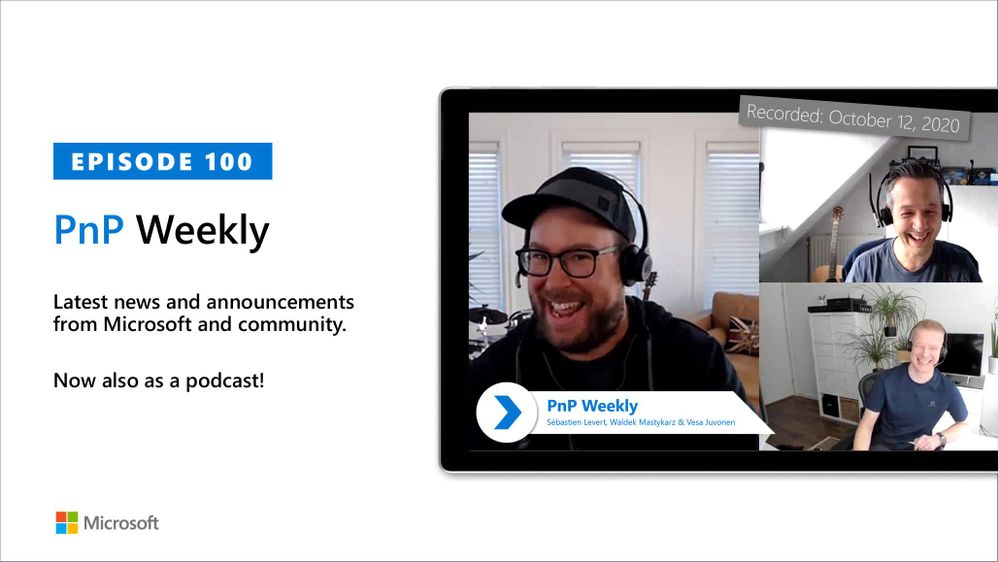
In this weekly discussion of the latest news and topics around Microsoft 365, hosts –Vesa Juvonen (Microsoft) | @vesajuvonen, Waldek Mastykarz (Microsoft) | @waldekm, are joined by Sébastien Levert | @sebastienlevert – Office Apps and Services MVP and head of product at Valo Intranet.
In this milestone Episode 100, Sébastien (Séb) interviews Vesa and Waldek asking questions submitted by community members covering the full gambit of why, what, how.
This episode was recorded on Monday, October 12, 2020.
Did we miss your article? Please use #PnPWeekly hashtag in the Twitter for letting us know the content which you have created.
As always, if you need help on an issue, want to share a discovery, or just want to say: “Job well done”, please reach out to Vesa, to Waldek or to your PnP Community.
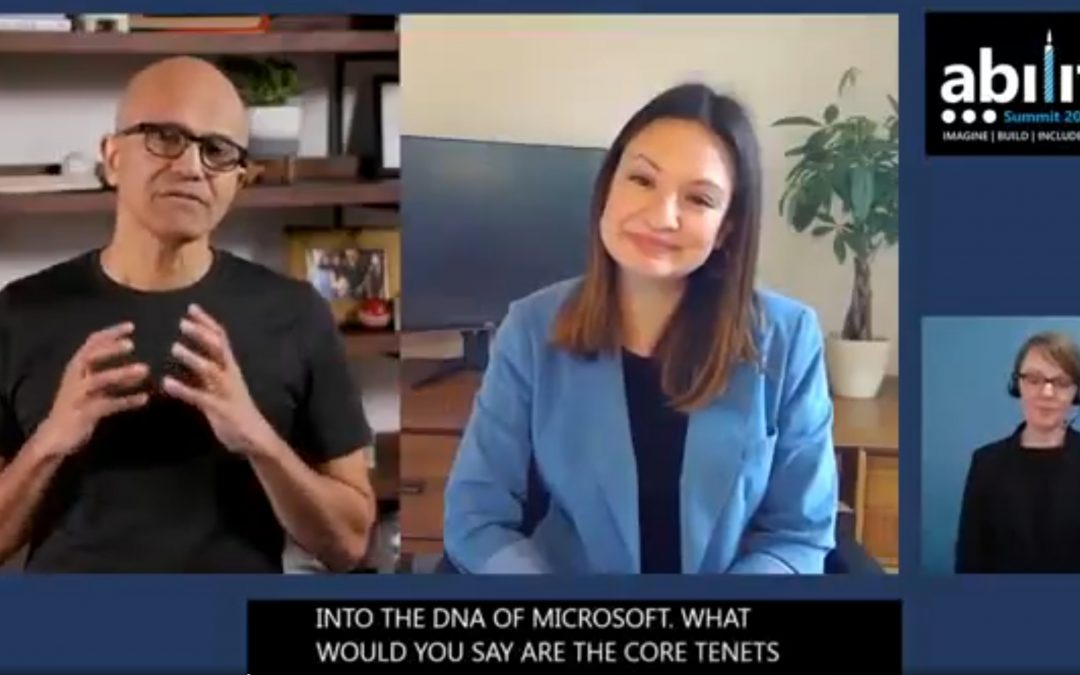
At Ability Summit 2020 Microsoft CEO Satya Nadella explains his personal passion for accessibility technologies and what accessibility means to him and to Microsoft. Satya’s son has made this personal to him. He demonstrates why empathy is core to embedding accessibility into the DNA of Microsoft and into business culture at large.
This article is contributed. See the original author and article here.
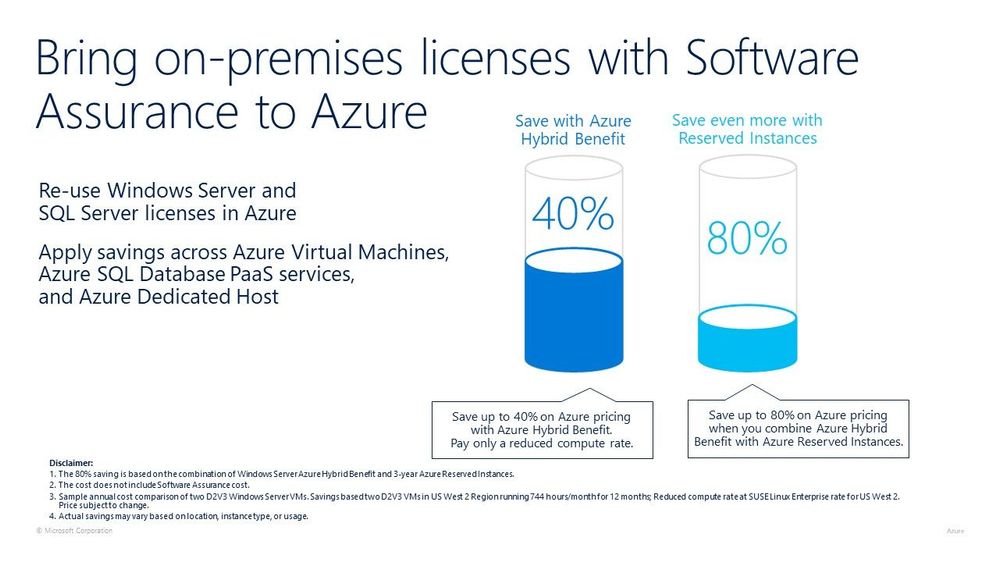
I’ve talked to customers about migrating their workloads to Azure for a number of years now and at some point in the conversation we’ll start to mention where can cost savings can be made and one place that organisations can explore is the Azure Hybrid Benefit (formally Azure Hybrid Use Benefit) offers.
Windows
When you migrate or run your Windows workloads within Azure you can leverage your on prem Software Assurance licenses on Azure. Using Hybrid Benefit is supported on all Azure regions and also on virtual machines (VM) that are running SQL or third party marketplace software. You can also use it on Azure Dedicated Host.
You can apply the offer to your VM when you create it or to your existing VMs.
SQL
Customers with Software Assurance with their SQL license also have the option to use those license when they run SQL on an Azure Virtual Machine. You aren’t just constrained to using the license on Infrastructure as a Service (IaaS) implementation, there is also a chance to save up to 30 percent or even higher on SQL Database & SQL Managed Instance by using your SQL Server licenses with Software Assurance.
Azure Hybrid Benefit
Linux
At Microsoft Ignite 2020, the team announced a new Azure Hybrid Benefit program, which is in preview. This new program allows you to use your on prem Red Hat Enterprise Linux (RHEL) and SUSE Linux Enterprise Server (SLES) licenses within Azure. The benefit is applicable to all RHEL and SLES Marketplace pay-as-you-go (PAYG) images.
If you wish to use the Red Hat benefit you need to apply to become part of the program. To get started with the SUSE program you need to apply here.
Call to Action
If you are looking for more information on the Azure Hybrid Benefit offer, a great place to start is the FAQ the team have configured. Also check out the Azure Hybrid Benefit Saving Calculator which can help you determine what your cost savings will be.
This article is contributed. See the original author and article here.
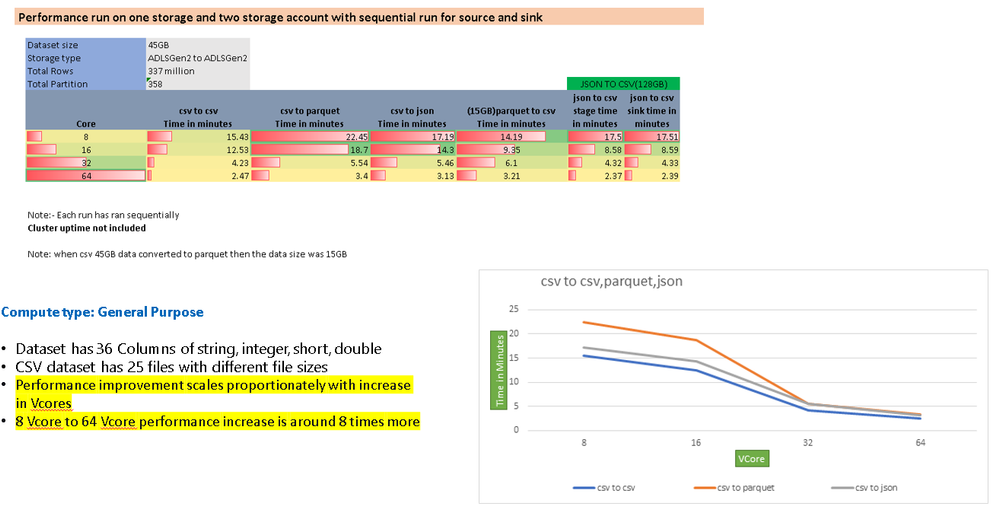
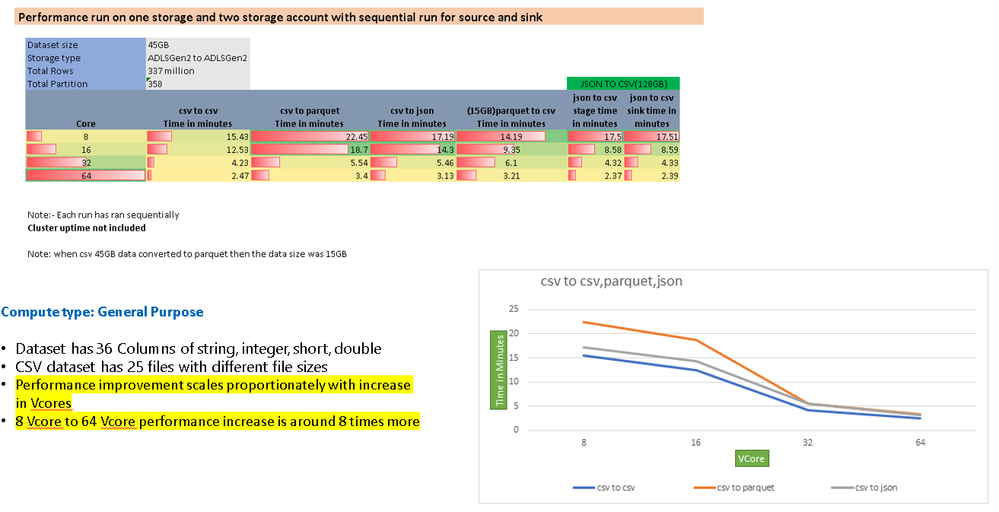
Azure Data Factory Data Flows perform data transformation ETL at cloud-scale. This blog post takes a look at performance of different source and sink types. I’ve put our findings below based on performance tests of different source & sink pairs:
Scenario 1
Source: Delimited Text Blob Store
Sink: Azure SQL DB
File size: 421Mb, 74 columns, 887k rows
Transforms: Single derived column to mask 3 fields
Time: 4 mins end-to-end using memory-optimized 80-core debug Azure IR
Recommended settings: Current partitioning used throughout
Scenario 2
Source: Azure SQL DB Table
Sink: Azure SQL DB Table
Table size: 74 columns, 887k rows
Transforms: Single derived column to mask 3 fields
Time: 3 mins end-to-end using memory-optimized 80-core debug Azure IR
Recommended settings: Source partitioning on SQL DB Source, current partitioning on Derived Column and Sink
Scenario 3
Source: Delimited Text Blob Store
Sink: Delimited Text Blob store
Table size: 74 columns, 887k rows
Transforms: Single derived column to mask 3 fields
Time: 2 mins end-to-end using memory optimized 80-core debug Azure IR
Recommended settings: Leaving default/current partitioning throughout allows ADF to scale-up/down partitions based on size of Azure IR (i.e. number of worker cores)
File-based Source / Sink
Set “current partitioning” on source & sink to allow data flows to leverage native Spark partitioning. This will allow the performance to scale proportionally with an increase in core counts.
Pre and post-processing operations like “save as single file”, “clear folder”, and “delete files” will incur additional time in your ETL process.
Azure SQL DB Source / Sink
SQL DB Source
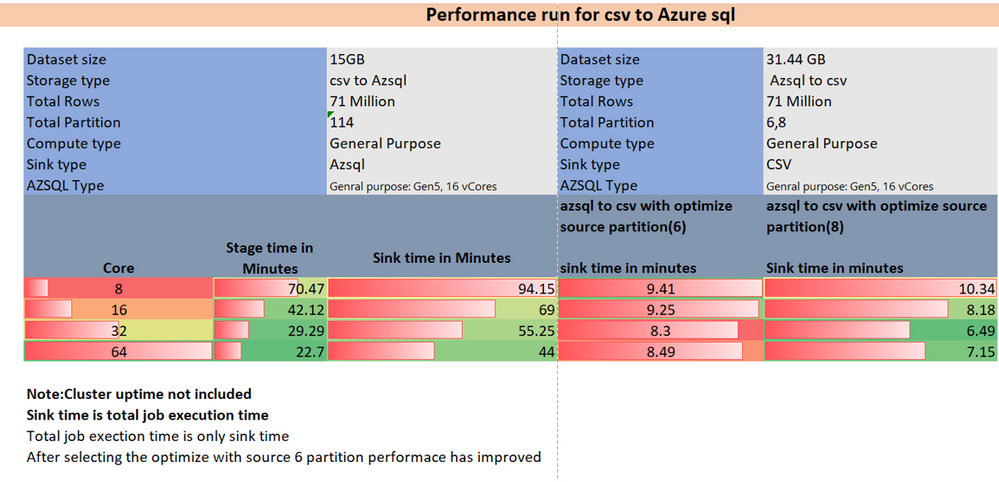
Use “Source” partitioning under Optimize and set the number of partitions equal to the number of cores you are using. Use a high-cardinality column or set of columns as the partition column.
Use “Input query” to minimize the data, columns, and for pushdown functions.
SQL DB Sink
Make sure that you are using a large enough SQL DB tier for your ETL job to write to the database with enough resources.
Adding cores to your job will scale the performance proportionally, but you will always be throttled by the ability of the database to serialize data.
Use current partitioning.
Synapse SQL DW
Synapse DW Source & Sink
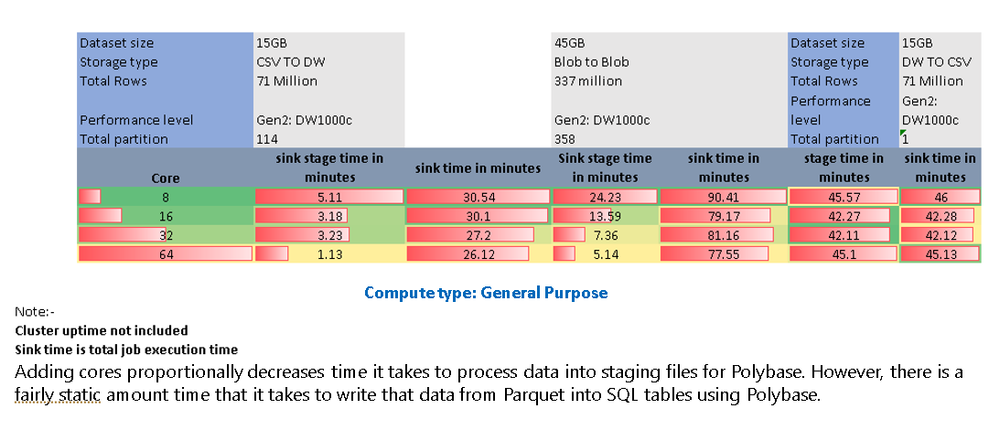
Always use “Enable Staging” and increase core count to minimize data processing times
CosmosDB Source / Sink
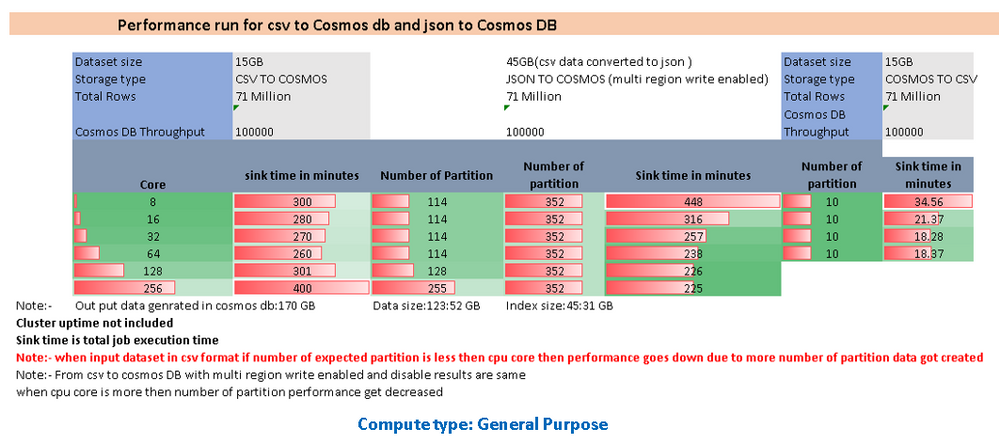
Make use of the “throughput” option on the CosmoDB source and sink to increase the throughput for the ETL job.







Recent Comments