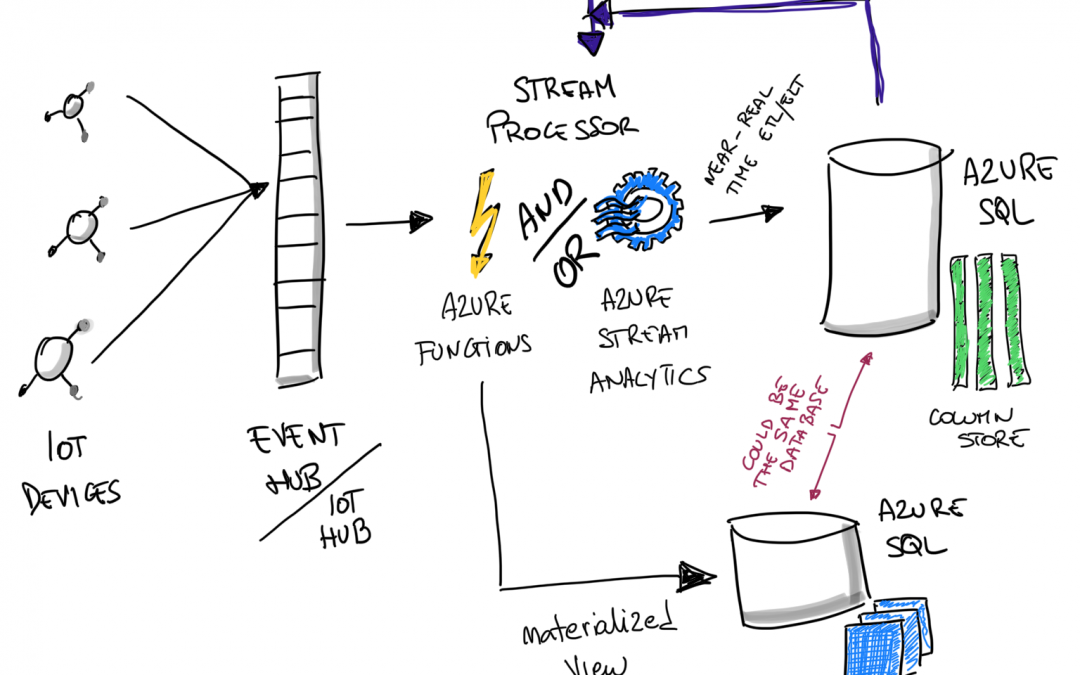
Serverless Streaming At Scale with Azure SQL

Serverless Streaming At Scale with Azure SQL

This article is contributed. See the original author and article here.
serverless streaming with azure sql


Just before Ignite, a very interesting case study done with RXR has been released, where they showcased their IoT solution to bring safety in building during COVID times. It uses Azure SQL to store warm data, allowing it to be served and consumed to all downstream users, from analytical application to mobile clients, dashboards, API and business users. If you haven’t done yet, you definitely should watch the Ignite recording (the IoT part start at minute 22:59). Not only the architecture presented is super interesting, but also the guest presenting it — Tara Walker — is super entertaining and joyful to listen. Which is not something common in technical sessions. Definitely a bonus! Image azure sql iot 2 If you are interested in the details, beside the Ignite recording, take a look also at the related Mechanics video, where things are discussed a bit more deeply.
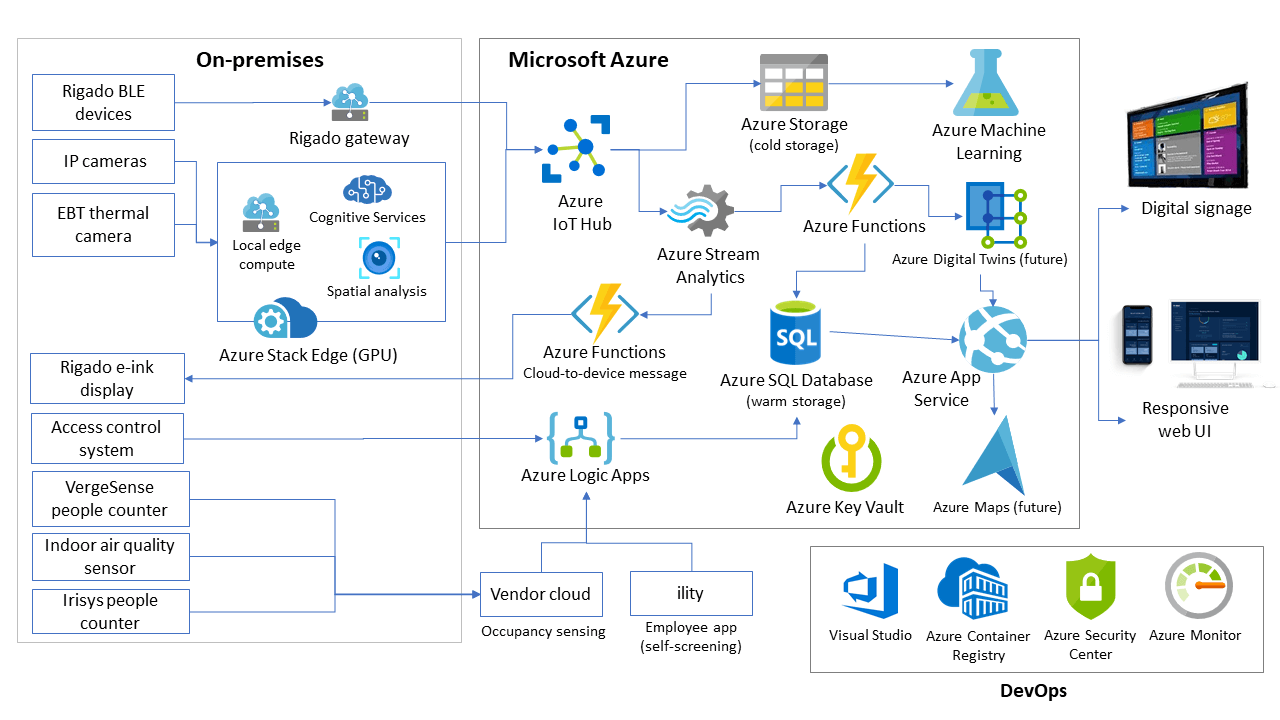

Implement a Kappa or Lambda architecture on Azure using Event Hubs, Stream Analytics and Azure SQL, to ingest at least 1 Billion message per day on a 16 vCores database

The video reminded me that in my long “to-write” blog post list, I have one exactly on this subject. How to use Azure SQL to create a amazing IoT solution. Well, not only IoT. More correctly how to implement a Kappa or Lambda architecture on Azure using Event Hubs, Stream Analytics and Azure SQL. It’s a very generic architecture that can be easily turned to IoT just by using IoT Hub instead of Event Hubs and it can be used as is if you need, instead, to implement an ingestion and processing architecture for the Gaming industry, for example. Goal is to create a solution that can ingest and process up to 10K message/secs, which is close to 1 Billion message per day, which is a value that will be more than enough for many use cases and scenario. And if someone needs more, you can just scale up the solution.


Long Story Short


This article is quite long. So, if you’re in hurry, or you already know all the technical details on the aforementioned services, or you don’t really care too much about tech stuff right now, you can just go away with the following key points.


  1. Serverless streaming at scale with Azure SQL work pretty well, thanks Azure SQL support to JSON, Bulk Load and Partitioning. As any “at scale” scenarios it has some challenges but they can be mostly solved just by applying the correct configuration.

  2. The sample code will allow you to setup a streaming solution that can ingest almost 1 billion of messages per day in less than 15 minutes. That’s why you should invest in the cloud and in infrastructure-as-code right now. Kudos if you’re already doing that.

  3. Good coding and optimization skills are still key to create a nicely working solution without just throwing money at the problem.

  4. The real challenge is to figure out how to create a balanced architecture. There are quite a few moving part in a streaming end-to-end solution, and all need to be carefully configured otherwise you may end with bottlenecks one one side, and a lot of unused power on the other. In both cases you’re losing money. Balance is the key.


If you’re now ready for some tech stuff, let’s get started.


Serverless: This is the way


So, let’s see it in detail. As usual, I don’t like to discuss without also having a practical way to share knowledge, so you can find everything ready to be deployed in your Azure subscription here: Streaming At Scale As that would not be enough, I also enjoyed recording a short video to go through the working solution, giving you a glimpse of what you’ll get, without the need for you to spend any credit, if you are not yet ready to do that: https://www.youtube.com/watch?v=vVrqa0H_rQA


Kappa and Lambda Architectures


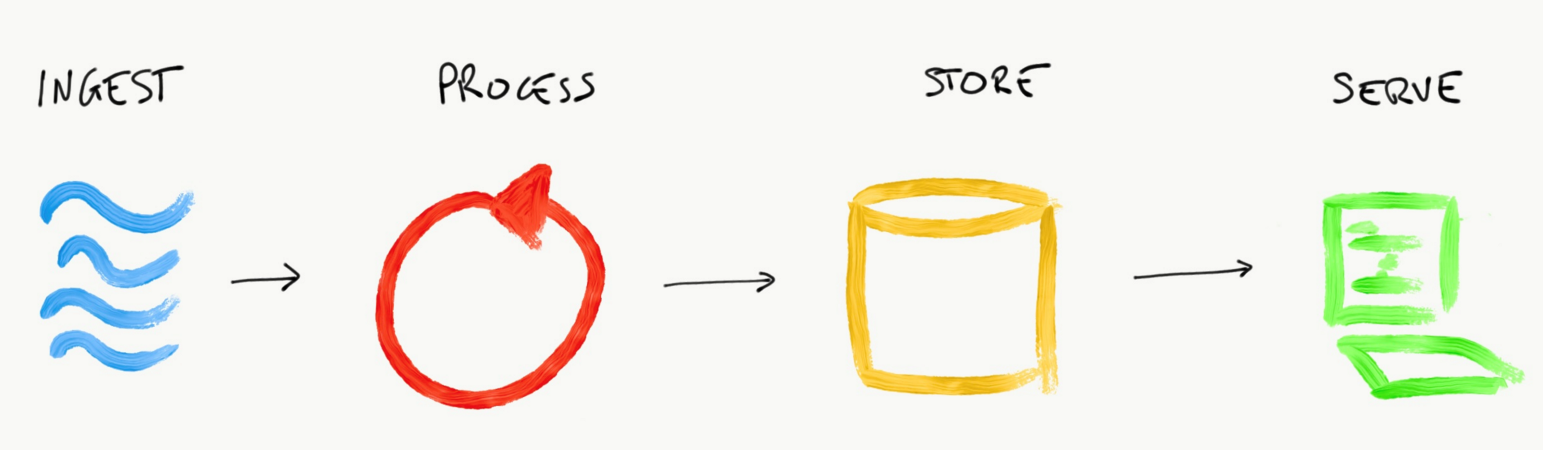
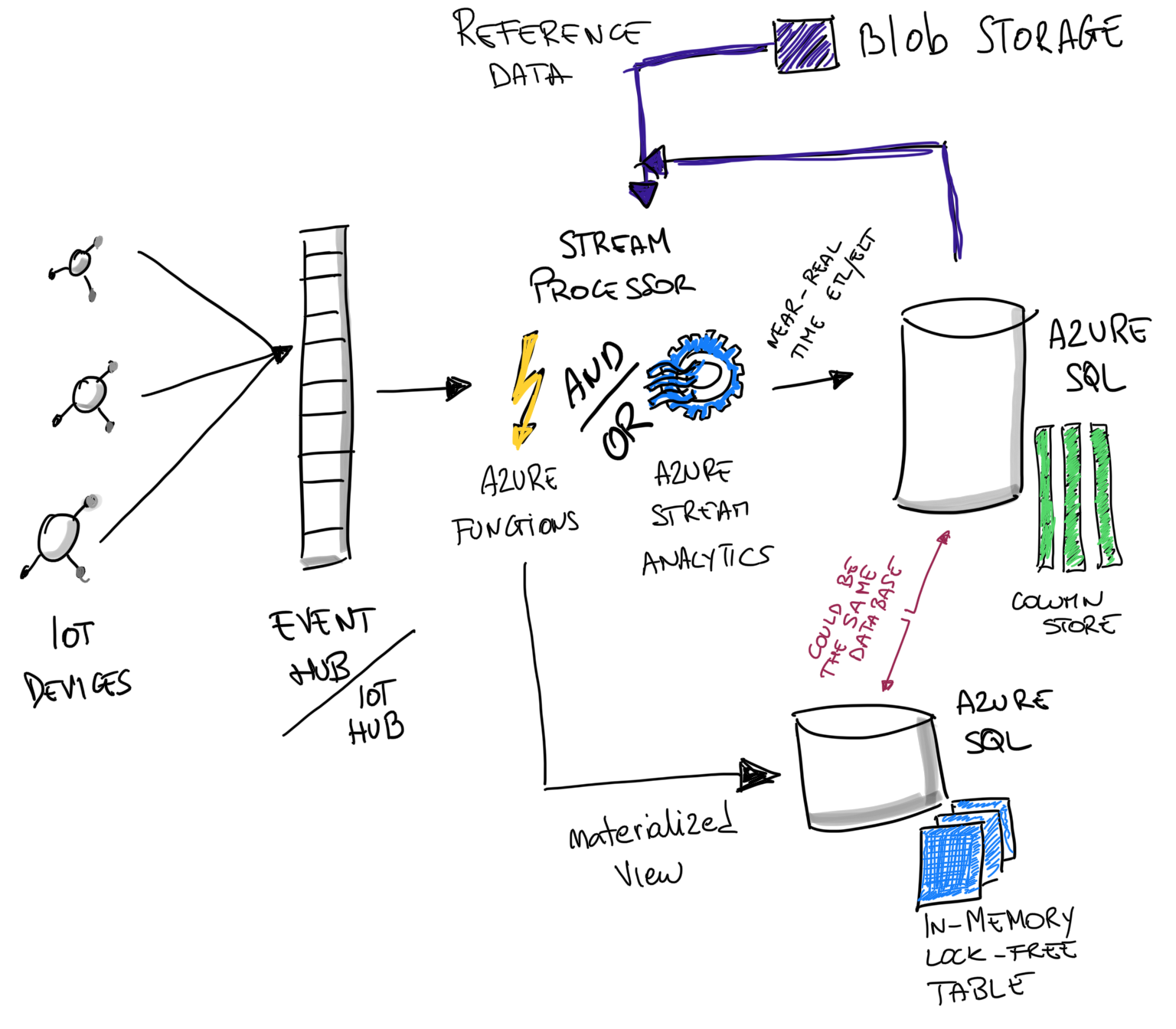
Creating a streaming solution usually means implementing one of two very well know architectures: Kappa or Lambda. They are very close to each other, and it’s safe to say that Kappa is a simplified version of Lambda. Both have a very similar data pipeline:


  1. Ingest the stream of data

  2. Process data as a stream

  3. Store data somewhere

  4. Serve processed data to consumers


Image azure sql iot 3


Ingesting data with Event Hubs


Event Hubs is probably the easiest way to ingest data at scale in Azure. It is also used behind the scenes by IoT Hub, so everything you learn on Event Hubs, will be applicable to IoT Hub too. It is very easy to use, but at the beginning some of the concepts can be quite new and not immediate to grasp, so make sure to check out this page to understand all the details: Azure Event Hubs — A big data streaming platform and event ingestion service Long story short: you want to ingest a massive amount of data in the shortest time possible, and keep doing that for as much as you need. To achieve the scalability you need, a distributed system is required, and so data must be partitioned across several nodes.


Partitioning is King


In Event Hubs you have to decide how to partition ingested data when you create the service, and you cannot change it later. This is the tricky part. How do you know how many partition you will need? That’s a very complex answer, as it is completely dependent on how fast who will read the ingested data will be able to go. If you have only one partition and one of the parallel applications that will consume the data is slow, you are creating a bottleneck. If you have too many partitions, you will need to have a lot of clients reading the data, but if data is not coming in fast enough, you’ll starve your consumers, meaning you are probably wasting your money in running processes that are doing nothing for a big percentage of their CPU time. So let’s say that you have 10Mb/sec of data coming in. If each of your consuming client can process data at 4Mb/sec, you probably want 3 of them to work in parallel (with the hypothesis that your data can be perfectly and evenly spread across all partitions), so you will probably want to create at least 3 partitions. That’s a good starting point, but 3 partitions is not the correct answer. Let’s understand why by making the example a bit more realistic and thus slightly more complex. Event Hubs let you pick and choose the Partition Key, which is the property whose values will be used to decide in which partition an ingested message will land. All messages with same partition key value, will land in the same partition. Also, if you need to process messages in the order they are received, you must put them in the same partition. If fact, ordering is guaranteed only at partition level. In our sample we’ll be partitioning by DeviceId, meaning data coming from the same device will land in the same partition. Here’s how the sample data is generated


stream = (stream
.withColumn(“deviceId”, …)
.withColumn(“deviceSequenceNumber”, …)
.withColumn(“type”, …)
.withColumn(“eventId”, generate_uuid())
.withColumn(“createdAt”, F.current_timestamp())
.withColumn(“value”, F.rand() * 90 + 10)
.withColumn(“partitionKey”, F.col(“deviceId”))
)

Throughput Units


In Event Hubs the “power” you have available (and that you pay for) is measured in Throughput Units (TU). Each TU guarantees that it will support 1Mb/sec or 1000 messages(or events)/sec , whichever came first. If we want to be able to process 10.000 events/sec we need at least 10 TU. Since it’s very unlikely that our workload will be perfectly stable, without any peak here and there, I would go for 12 TU, to have some margin to handle some expected workload spike. TU can be changed on the fly, increasing on reducing them as you need.


Decisions


It’s time to decide how many TU and Partitions we need inour sample. We want to be able to reach at least 10K messages/second. TU are not an issue as they can be change on the fly, but deciding how many partitions we need is more challenging. We’ll be using Stream Analytics, and we don’t exactly know how fast it will be able to consume incoming data. Of course one road is running test to figure out the correct numbers, but we still need to come up with some reasonable numbers also to just to start with such test. Well, a good rule of thumb is the following:


Rule of thumb: create an amount for partitions equal to the number of throughput units you have or you might expect to have in future

For what concern the ingestion part we’re good now. Let’s now move to discuss how to process the data that will be thrown at us, doing it as fast as possible.


Processing Data with Stream Analytics


Azure Stream Analytics is an amazing serverless streaming processing engine. It is based on the open source Trill framework which source code is available on GitHub and is capable to process a trillion message per day. All without requiring you to manage and maintain the complexity of a extremely scalable distributed solution.


Stream Analytics support a powerful SQL-like declarative language: tell it what you want and it will figure out how to do it, fast.

It also supports a SQL-like language so all you have to do to define how to process your event is to write a SQL query (with the ability to extend it with C# or Javascript) and nothing more. Thanks to SQL simplicity and ability to express what you want opposed to what to do, development efficiency is very high. For example determining for how long an event lasted, for example, is as easy as doing this:


SELECT
[user],
feature,
DATEDIFF(second,
LAST(Time) OVER (
PARTITION BY [user], feature
LIMIT DURATION(hour, 1)
WHEN Event = ‘start’
),
Time) as duration
FROM
input
TIMESTAMP BY
Time
WHERE
Event = ‘end’

All the complexity of managing the stream of data used as the input, with all its temporal connotations, is done for you, and all you have to tell Stream Analytics is that it should calculate the difference between a start and end event on per user and feature basis. No need to write complex custom stateful aggregation functions or other complex stuff. Let’s keep everything simple and leverage the serverless power and flexibility.


Embarrassingly parallel jobs


As for any distributed system, the concept of partitioning is key, as it is the backbone of any scale-out approach. In Stream Analytics, since we are getting data from Event Hub or IoT Hub, we can try to use exactly the same partition configuration already defined in those services. If was use the same partition configuration also in Azure SQL, we can achieve what are defined as embarrassingly parallel jobs where there is no interaction between partitions and everything can be processed fully in parallel. Which means: at the fastest speed possible.


Streaming Units


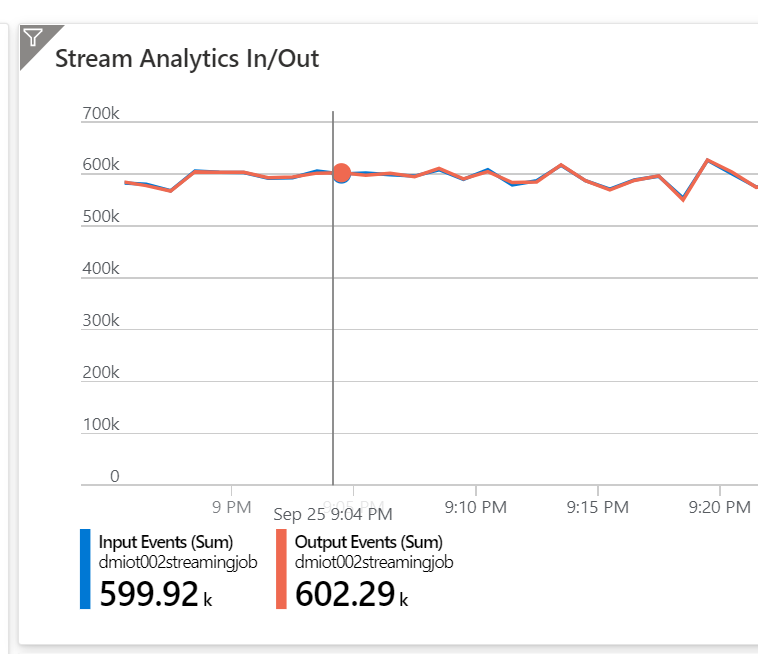
Streaming Units (SU) is the unit of scale that you use — and pay for—in Azure Stream Analytics. There is no easy way to understand how many SU you need, as consumption will totally depend on how complex your query is. The recommendation is to start with 6 and then monitor the Resource Utilization to see how much percentage of available SU you are using. If your query partition data using PARTITON BY, SU usage will increase as your are distributing the workload across nodes. This is good, as it means you’ll be able to process more data in the same amount of time . You also want to make sure SU utilization is below 80% as after that your events will be queued, which means you’ll see higher latency. If everything works well, we’ll be able to ingest our target of 10K events/sec (or 600K events/minute as pictured below) Image azure sql iot 4

Storing and Serving Data with Azure SQL


Azure SQL is really a great database for storing hot and warm data of an IoT solution. I know this is quite the opposite of what many thinks. A relational database is rigid, it requires schema-on-write, and on IoT or Log Processing scenarios, the best approach is a schema-on-read instead. Well, Azure SQL actually supports both and more.


With Azure SQL you can do both schema-on-read and schema-on-write, via native JSON support

In fact, beside what just said, there are several reason for this, and I’m sure you are quite surprised to hear that, so, read on:


  • JSON Support

  • Memory-Optimized Lock-Free Tables

  • Column Store

  • Read-Scale Out


Describing each one of the listed features, even just at a very high level, would require an article on its own. And of course, such article is available here, if you are interested (and you should!): 10 Reasons why Azure SQL is the Best Database for Developers. In order to accommodate a realistic scenario where you have some fields that are always present, while some other can vary by time or device, the sample is using the following table to store ingested data


CREATE TABLE [dbo].[rawdata]
(
[BatchId] [UNIQUEIDENTIFIER] NOT NULL,
[EventId] [UNIQUEIDENTIFIER] NOT NULL,
[Type] [VARCHAR](10) NOT NULL,
[DeviceId] [VARCHAR](100) NOT NULL,
[DeviceSequenceNumber] [BIGINT] NOT NULL,
[CreatedAt] [DATETIME2](7) NOT NULL,
[Value] [NUMERIC](18, 0) NOT NULL,
[ComplexData] [NVARCHAR](MAX) NOT NULL,
[EnqueuedAt] [DATETIME2](7) NOT NULL,
[ProcessedAt] [DATETIME2](7) NOT NULL,
[StoredAt] [DATETIME2](7) NOT NULL,
[PartitionId] [INT] NOT NULL
)

As we really want to create something really close to a real production workload, indexes have been created too:


  • Primary Key Non-Clustered index on EventId, to quickly find a specific event

  • Clustered index on StoredAt, to help timeseries-like queries, like, querying the last “n” rows reported by devices

  • Non-Clustered index on DeviceId, DeviceSequenceNumber to quickly return reported rows sent by a specific device

  • Non-Clustered index on BatchId to allow the quick retrivial of all rows sent by a specific batch


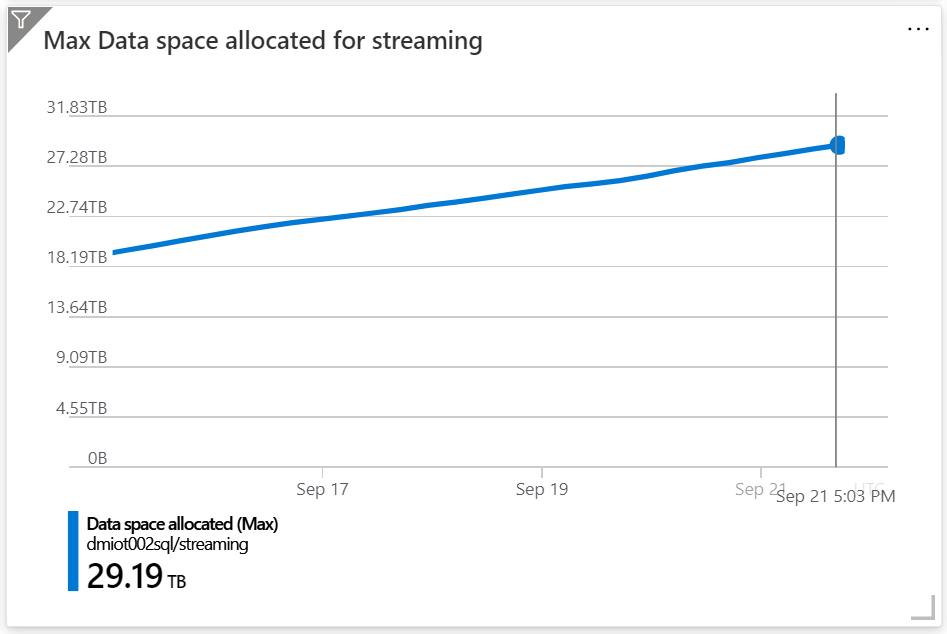
At the time of writing I’ve been running this sample for weeks and my database is now close to 30TB: Image azure sql iot 5 Table is partitioned by PartitionId (which is in turn generated by Event Hubs based on DeviceId) and a query like the following

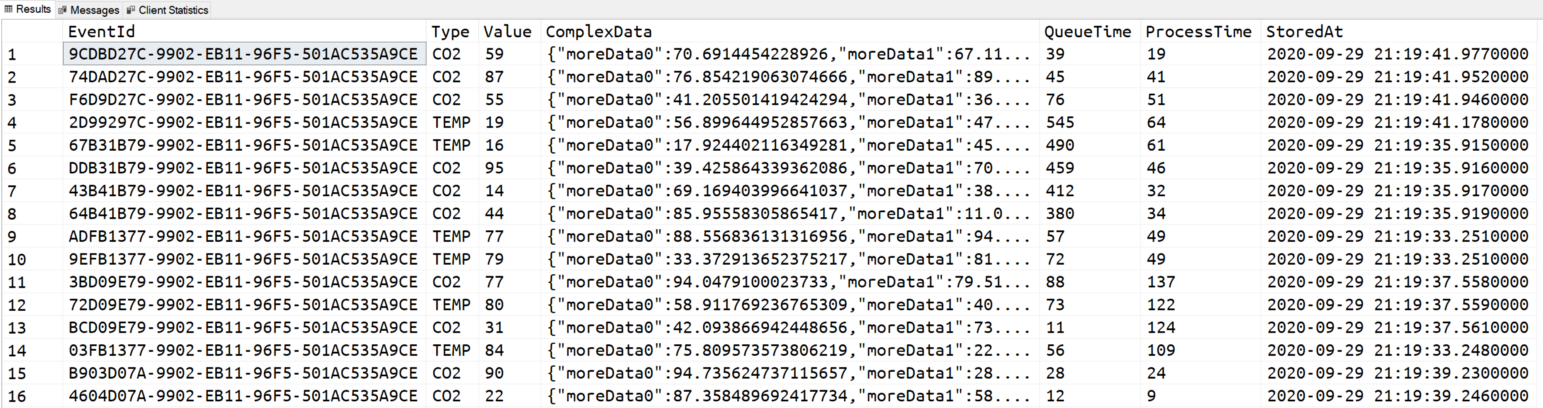
SELECT TOP(100)
EventId,
[Type],
[Value],
[ComplexData],
DATEDIFF(MILLISECOND, [EnqueuedAt], [ProcessedAt]) AS QueueTime,
DATEDIFF(MILLISECOND, [ProcessedAt], [StoredAt]) AS ProcessTime
[StoredAt]
FROM
dbo.[rawdata2]
WHERE
[DeviceId] = ‘contoso://device-id-471’
AND
[PartitionId] = 0
ORDER BY
[DeviceSequenceNumber] DESC

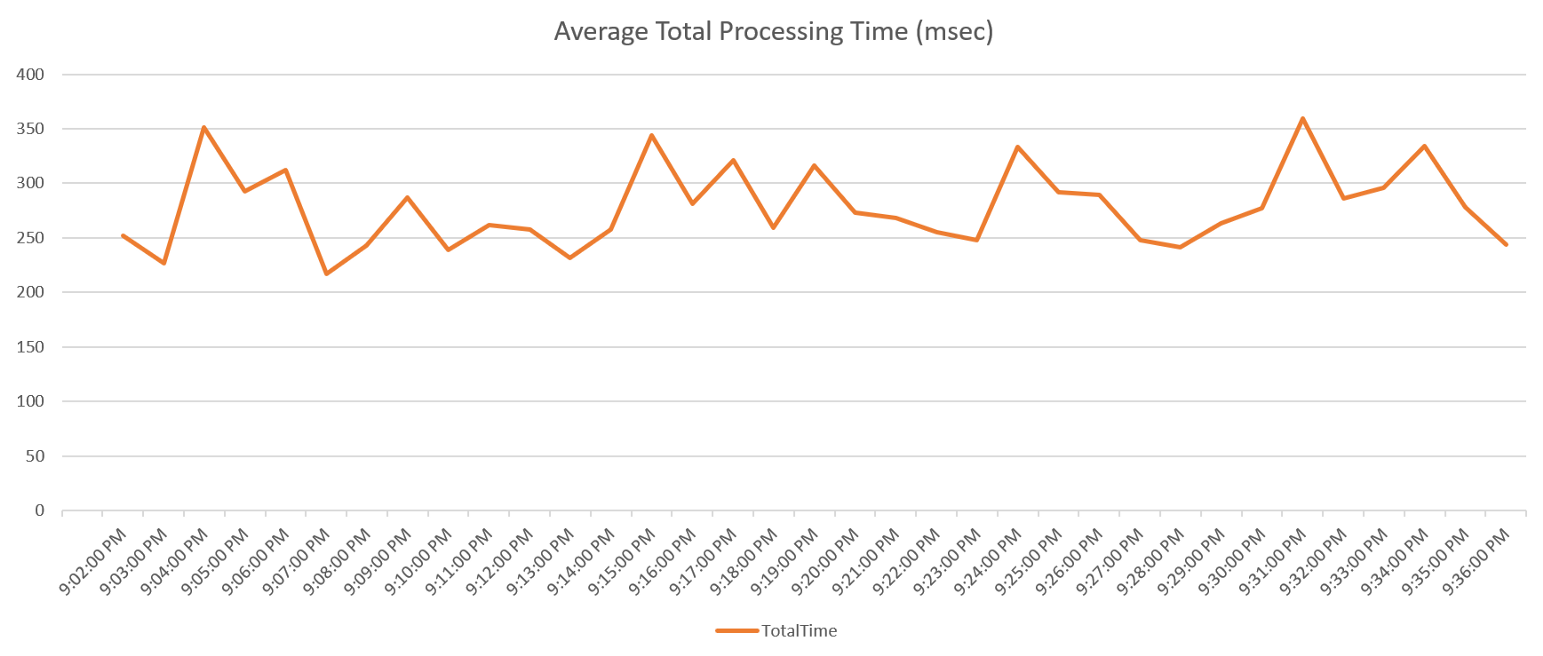
Takes less then 50 msec to be executed including also the time to send the result to the client. That’s pretty impressive. The result also shows something impressive too: Image azure sql iot 6 As you can see, there are two calculated columns QueueTime and ProcessTime that shows, in milliseconds, how much time an event has been waiting in Event Hubs to be picked up by Stream Analytics to be processed, and how much time the same event spent within Stream Analytics before land into Azure SQL. Each event (all the 10K per second) is processed in — overall—less than 300 msec on average. 280msec more precisely. That is very impressive.

End-to-End ingestion latency is around 300msec

You can also go lower than that using some more specific streaming tool like Apache Flink, if you really need to completely avoid any batching technique to decrease the latency to the minimum possible. But unless you have some very unique and specific requirements, processing events in less than a second is probably more than enough for you. Image azure sql iot 7

Sizing Azure SQL database for ingestion at scale


For Azure SQL, ingesting data at scale is not a particularly complex or demanding job, on the contrary of what can expect. If done well, using bulk load libraries, the process can be extremely efficient. In the sample I have used a small Azure SQL 16 vCore tier to sustain the ingestion of 10K event/secs, using on average 15% of CPU resources on a bit more of 20% of the IO resources. This means that in theory I could also use an even smaller 8 vCore tier. While that is absolutely true, you have to think of at least three other factors when sizing Azure SQL:


  • What other workload will be executed on the database? Analytical Queries to aggregated non-trivial amounts of data? Singleton rows lookups to get details on a specific item (for example to get the latest status of a device?)

  • In case the workload will spike, will Azure SQL be able to handle, for example, twice or trice the usual workload? That’s important as spikes will happen, and you don’t want to have a single spike to bring down your nice solution.

  • Maintenance activities may need to be executed (that really depends on the workload and the data shape), like index defragmentation or partitioning compression. Azure SQL needs to have enough spare power to handle such activities nicely.


Just as an example, I have stopped Stream Analytics for a few minutes, allowing messages to pile up a bit. As soon as I restarted it, it tried to process messages as fast as possible, in order to empty the queue and return to the ideal situation where latency is less then a second. In order allow Stream Analytics to process data at higher rate, Azure SQL must be able to handle the additional workload too, otherwise it will slow down all the other components in the pipeline.


As expected, Azure SQL handled the additional workload without breaking a sweat.

For all the needed time, Azure SQL was able to ingest almost twice the regular workload, processing more than 1 Million messages per minute. All of this with CPU usage staying well below 15%, and with a relative spike only to the Log IO — something expected as Azure SQL uses a Write-Ahead Log pattern to guarantee ACID properties—which, still, never went over 45%. Image azure sql iot 8 Really, really, amazing. With such configuration — and remember we’re just using a 16vCore tier, but we can scale up to 80 and more — our system can handle something like 1 billion messages a day, with an average processing latency of less then a second.
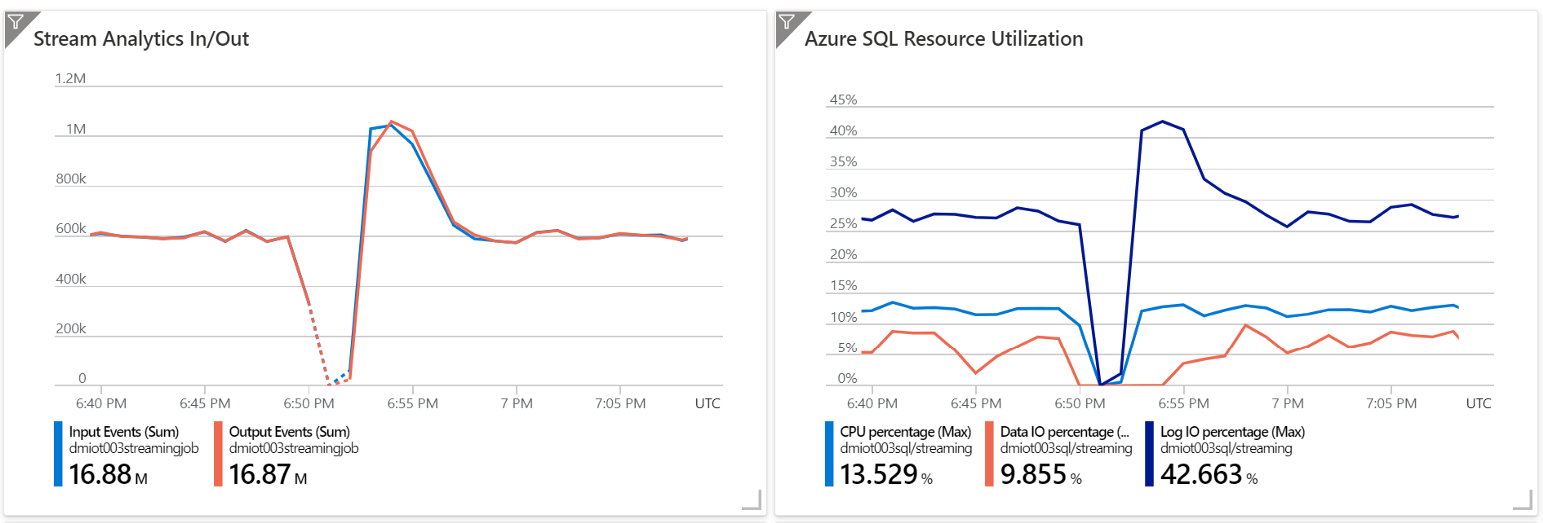

The deployed solution can handle 1 billion messages a day, with an average processing latency of less then a second.

Partitioning is King, again.


Partitioning plays a key role also in Azure SQL: as said before, if need to operate on a lot of data concurrently, partitioning is really something you need to take into account. Partitioning in this case is used to allow concurrent bulk insert into the target table, even if on such table several indexes exists and thus needs to be kept updated. Table has been partitioned using the PartitionId column, in order to have the processing pipeline completely aligned. The PartitionId value is in fact generated by Event Hub, which partitions data by DeviceId, so that all data coming from the same device will land in the same partition. Stream Analytics uses the same partitions provided by Event Hub and so it make sense to align Azure SQL partitions to this logic too, to avoid to cross the streams, which we all know is a bad thing to do. Data will move from source to destination in parallel streams providing the performances and the scalability we are looking for.


CREATE PARTITION FUNCTION [pf_af](int) AS
RANGE LEFT FOR VALUES (0, 1, 2, 3, 4, 5, 6, 7, 8, 9, 10, 11, 12, 13, 14, 15, 16)

Table partitioning also allows Azure SQL to update the several indexes existing on the target table without ending in tangled locking, where transactions are waiting for each other with the result of huge negative impact on performances. As long as table and indexes are using the same partitioning strategy everything will move forward without any lock or deadlock problem.


CREATE CLUSTERED INDEX [ixc] ON [dbo].[rawdata] ([StoredAt] DESC)
WITH (DATA_COMPRESSION = PAGE)
ON [ps_af]([PartitionId])
CREATE NONCLUSTERED INDEX ix1 ON [dbo].[rawdata] ([DeviceId] ASC, [DeviceSequenceNumber] DESC)
WITH (DATA_COMPRESSION = PAGE)
ON [ps_af]([PartitionId])

CREATE NONCLUSTERED INDEX ix2 ON [dbo].[rawdata] ([BatchId])
WITH (DATA_COMPRESSION = PAGE)
ON [ps_af]([PartitionId])


Higher concurrency is not the only perk of a good partitioning strategy. Partitions allow extremely fast data movement between tables. We’ll take advantage of this ability for creating highly compressed column-store indexes soon.


Scale-out the database


What if you need to run complex analytical queries on the data being ingested? That’s a very common requirement for Near-Real Time Analytics or HTAP (Hybrid Transaction/Analytical Processing) solutions. As you have noticed, you still have enough resources free to run some complex queries, but what if you have to run many really complex queries, for example to compare average values of month-over-month, on the same table were data is being ingest? Or what if you need to allow many mobile client to access the ingested data, all running small but CPU intensive queries? Risk of resource contention — and thus low performances — becomes real. That’s when a scale-out approach start to get interesting. With Azure SQL Hyperscale you can create up to 4 readable-copies of the database, all with their own private set of resources (CPU, memory and local cache), that will give you access to exactly the same data sitting in the primary database, but without interfering with it at all. You can run the most complex query you can imagine on a secondary, and the primary will not even notice it. Ingestion will proceed as usual rate, completely unaffected by the fact that a huge analytical query or many concurrent small queries are hitting the secondary nodes.


Columnstore, Switch-In and Switch-Out


Columnstore tables (or index in Azure SQL terms) are just perfect for HTAP and Near Real Time Analytics scenario, as already described times ago here: Get started with Columnstore for real-time operational analytics. This article is already long enough, so I’ll not get into details here, but I will focus on the fact that using columnstore index as a target of a Stream Analytics workload, may not be the best option, if you are also looking for low latency. To keep latency small, a small batch size needs to be used, but this is against the best practices for columnstore, as it will create a very fragmented index. To address this issue, we can use a feature offered by partition table. Stream Analytics will land data into a regular partitioned rowstore table. On scheduled intervals a partition will be switched out into a staging table, so that it be loaded into a columnstore table using Azure Data Factory, for example, so that all best practices can be applied to have the highest compression and the minimum fragmentation.


Still not fast enough?


What if everything just described is still not enough? What if you need a scale so extreme that you need to be able to ingest and process something like 400 Billions rows per day? Azure SQL allows you to do that, by using In-Memory, latch-free, tables, as described in this amazing article: https://medium.com/r/?url=https%3A%2F%2Ftechcommunity.microsoft.com%2Ft5%2Fazure-sql%2Fscaling-up-an-iot-workload-using-an-m-series-azure-sql-database%2Fba-p%2F1106271 I guess that, now, even if you have the most demanding workload, you should be covered. If you need even more power…let me know. I’ll be extremely interested in understanding your scenario.


Conclusion


We’re at the end of this long article, were we learned how it is possible with a Kappa (or Lambda) architecture to ingest, process and serve 10K msg/sec using only PaaS services. As we haven’t maxed out any of the resource of our services, we know we can scale to much higher level. At least twice that goal value, without changing anything and much more than that by increasing resources. With Azure SQL we are just using 16 vCores and it can be scale up to 128. Plenty of space to grow.


Azure SQL is a great database for IOT and HTAP workload
Azure AD provisioning, now with attribute mapping, improved performance and more!

Azure AD provisioning, now with attribute mapping, improved performance and more!

This article is contributed. See the original author and article here.

Howdy folks,

We’ve made several changes to identity provisioning in Azure AD over the past several months, based on your input and feedback:

  • Easily map attributes between your on-premises AD and Azure AD.
  • Perform on-demand user provisioning to Azure AD as well as your SaaS apps.
  • Significantly improved sync performance in Azure AD connect.
  • Manage your provisioning logs and receive alerts with Azure monitor.

And as in previous months, we continue to work with our partners to add provisioning support to more application.

In this blog, I’ll give you a quick overview of each of these areas.

Map attributes from on-premises AD to Azure AD

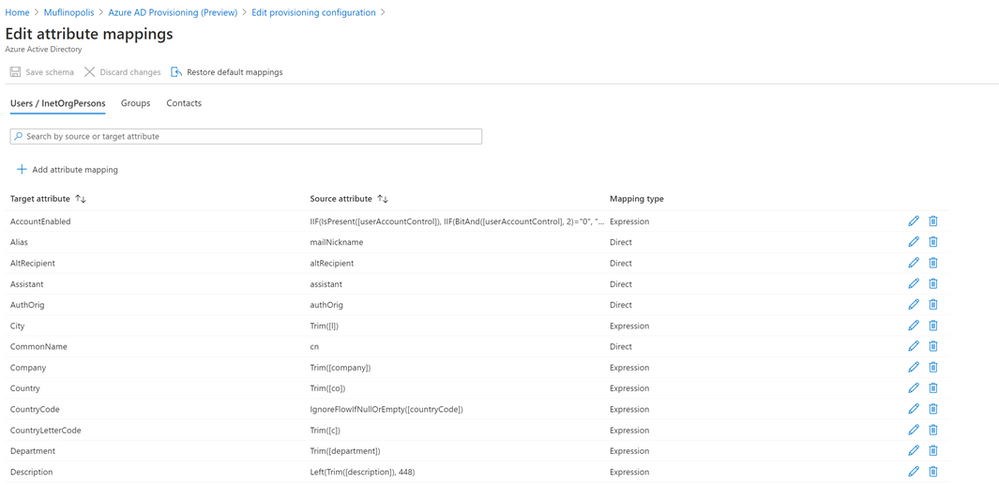
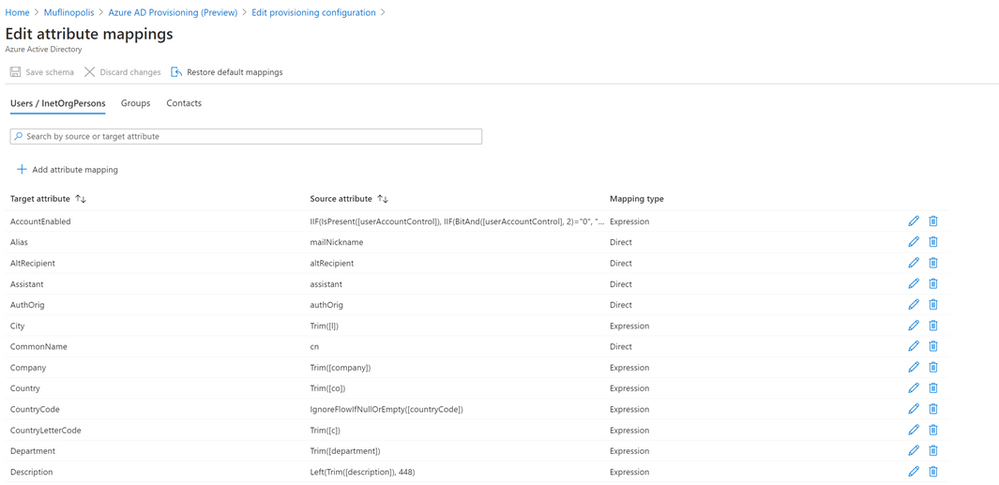
The public preview of Azure AD Connect cloud provisioning has been updated to allow you to map attributes, including data transformation, when objects are synchronized from your on-premises AD to Azure AD.

DBada_0-1603137305538.png

Check out our documentation to learn more on mapping attributes from AD to Azure AD.

On-demand provisioning of users

We’ve enabled on-demand provisioning of users to Azure AD and your SaaS apps. This is useful when you need to quickly provision a user into an app. And it is also useful for administrators when they are testing an integration for the first time. See our documentation for on-demand provisioning of users in Azure AD and quickly provision a user into an app.

Azure AD Connect with improved sync performance and faster deployment

The latest version of Azure AD Connect sync offers a substantial performance improvement for delta syncs and it is up to 10 times faster in key scenarios. We have also made it easier to deploy Azure AD Connect sync by allowing import and export of Azure AD Connect configuration settings. Learn more about these changes in our documentation.

Create custom alerts and dashboards by pushing the provisioning logs to Azure Monitor

You can now store their provisioning logs in Azure Monitor, analyze trends in the data using the rich query capabilities, and build visualizations on top of the data in minutes. Check out our documentation on the integration.

New applications integrated with Azure AD for user provisioning.

We  release new provisioning integrations each month. Recently, we turned on provisioning support for 8×8, SAP Analytics Cloud, and Apple Business Manager.  Check out our documentation on 8×8Apple Business Manager and SAP Analytics cloud

As always, we’d love to hear any feedback or suggestions you have. Let us know what you think in the comments below or on the Azure AD feedback forum.

Best regards,

Alex Simons (twitter: @alex_a_simons)

Corporate Vice President Program Management

Microsoft Identity Division

ALERT! New Blog Series: MCAS Data Protection

ALERT! New Blog Series: MCAS Data Protection

This article is contributed. See the original author and article here.

Blog Series: MCAS Data Protection


October 2020


Hi! Welcome to the kickoff of the Microsoft Cloud App Security (MCAS) Data Protection Blog Series! My name is Sarahzin Chowdhury and I am one of the MCAS and Defender for Identity Program Managers on the Cloud + AI Security Customer Experience Engineering (CxE) team. I know, it is a mouthful… but it really is a wonderful group of folks… I’m definitely not biased at all! To learn more about my team, check out our latest CxE podcast where we introduce ourselves, answer top MCAS questions, and present a brief roadmap!


Now, since I’m relatively new to blogging, I wanted to give you a little background about myself. If you already know me, go ahead and skip this section to the blog links! I’ve been in the cybersecurity industry for about 6.5 years, first starting out in the Government realm; my focus was of course, data protection. Since joining Microsoft early 2019, I’ve been focusing on MCAS and Microsoft Information Protection (MIP). I joined the CxE team several months ago and am very excited to be a part of this organization!


Throughout this series, I’ll be walking you through how to protect your data using MCAS. I’ll be covering some of our top use cases using both real-time (Conditional Access App Control) and near real-time (API-based App Connectors) MCAS mechanisms. In addition, I’ll be covering any of the scenarios requested within the comments below!


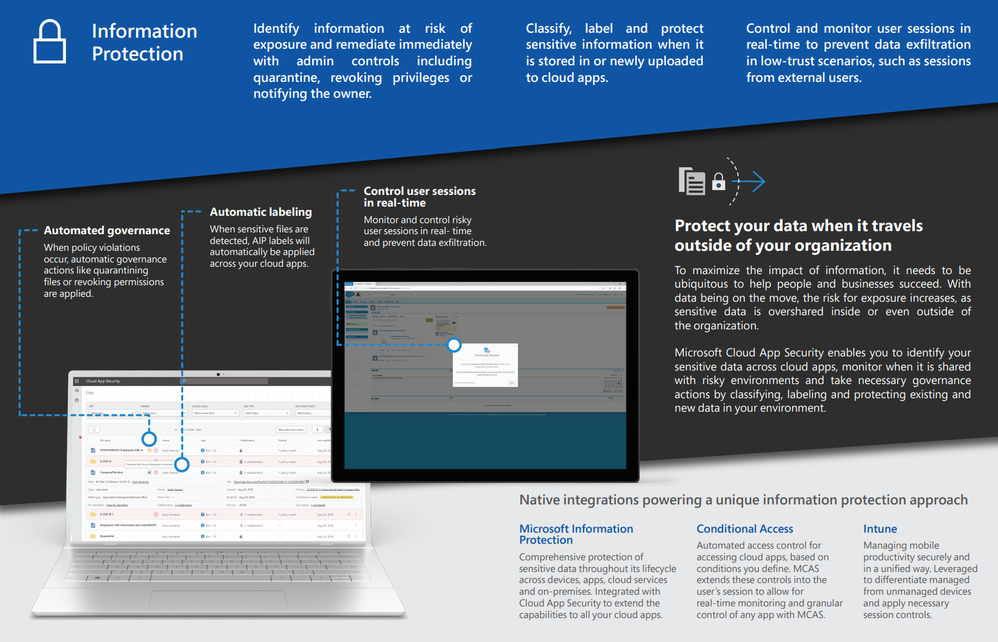
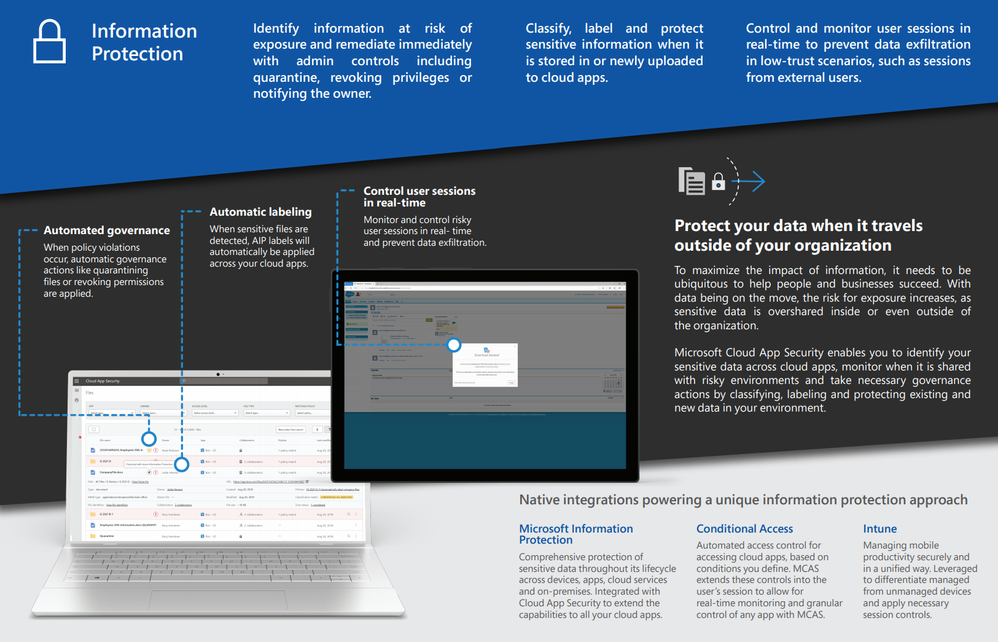
As one of the pillars of MCAS, data protection is a popular customer want. Throughout MCAS, data protection can be implemented in many areas. From using our data classification service or the built-in service to scan all the files in Office 365 and third party connected apps, to implementing data loss prevention (DLP) using our Proxy, there are multiple facets of data protection that build upon each other to bring our customers a robust DLP experience. In additional, MCAS and Azure Information Protection (AIP) are rolled up into our Microsoft Information Protection (MIP) service offering. This blog series’ initial focus will be discussing the end user’s experience with each of the connected apps. We’ll first start off with Box.


Box.png


MCAS Data Protection Blog Links (Updated Monthly):


1. Box Part 1 (near real-time) – Coming soon!

AKS on Azure Stack HCI October Update

AKS on Azure Stack HCI October Update

This article is contributed. See the original author and article here.


Hi All,


We launched the public preview of AKS on Azure Stack HCI last month at Ignite. Since then, lots of you have been trying it out, and giving us feedback. We have also been hard at work to add new features and fix issues that you have found.


Today we are releasing the AKS on Azure Stack HCI October Update.


You can evaluate the AKS on Azure Stack HCI October Update by registering for the Public Preview here: https://aka.ms/AKS-HCI-Evaluate (If you have already downloaded AKS on Azure Stack HCI – this evaluation link has now been updated with the October Update)


Some of the new changes in the AKS on Azure Stack HCI October Update include:


VLAN Support:
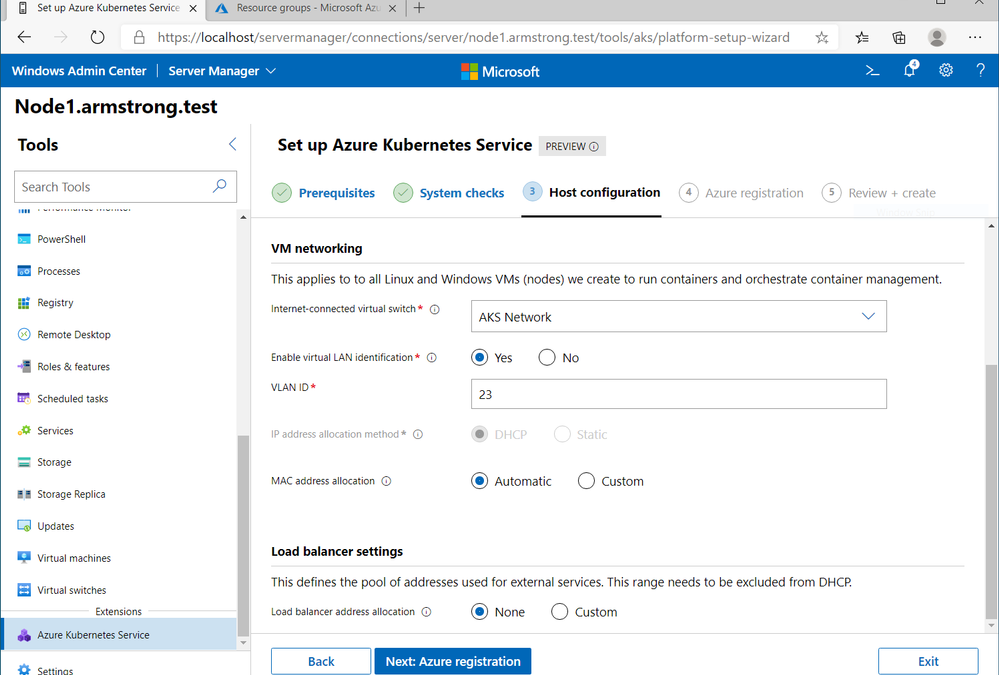
With the AKS on Azure Stack HCI October Update you can now deploy AKS on Azure Stack HCI in environments that have VLANs configured. When you enable an Azure Stack HCI deployment to be a new AKS host – you can now specify a VLAN that will be used for the Kubernetes control plane and worker nodes:


Screenshot of configuring a VLAN on a new AKS on AzureStack HCI deploymentScreenshot of configuring a VLAN on a new AKS on AzureStack HCI deployment

Persistent Volume Resize support:
AKS on Azure Stack HCI allows you to create persistent volumes for your containerized workloads, that are backed by VHDX files (Cosmos Darwin did a great blog post about this). With the October Update you can now resize these volumes after they have been created.


Physical Host Static IP support:
The initial release of AKS on Azure Stack HCI required you to use DHCP in your environment, even for the Azure Stack HCI hosts. We have heard from many of you that you need support for static IP addresses. Full support for static IP addresses is still in our roadmap, but we have made a significant step towards this goal with the October Update. You can now deploy AKS on Azure Stack HCI on an Azure Stack HCI deployment where the physical hosts are configured to use static IP addresses (note: you still need to have DHCP present in your environment for the Kubernetes control plane and worker nodes).


There have been several other changes and fixes that you can read about in the October Update release notes.


Once you have downloaded and installed the AKS on Azure Stack HCI October Update – you can report any issues you encounter, and track future feature work on our GitHub Project at https://github.com/Azure/aks-hci


I look forward to hearing from you all!


Cheers,
Ben

Voice of #HealthcareCloud presents “Operational & Process Improvements with M365″

Voice of #HealthcareCloud presents “Operational & Process Improvements with M365″

This article is contributed. See the original author and article here.

Voices of #HealthcareCloud is a webinar series hosted by myself and Vasu Sharma. My name is Shelly Avery, I am currently a Microsoft Teams Technical Specialist for Health and Life Sciences. Vasu is a Customer Success Manager for Microsoft 365 for Health and Life Sciences. Our goal of this webinar series is to showcase how Healthcare is seeing positive business and clinical outcomes with cloud technology.


We will be bringing new and creative solutions to you at least once a month, so we hope you tune in live or catch the on-demand series after the session is completed.


This session is on October 27th at 10a PST / 11:00 MT, 12:00 CT, 1:00 EST, where we will talk Eden Porsangi and Alfred Ojukwu about how they have worked with Providers to implement technology to help with operational and process improvement using M365. Some of the use cases they will showcase are:


  • Virtual Huddle Boards

  • Managing Capacity

  • Bed Planning

  • Staffing


Please click here to add this event to your calendar or join the Teams Live event here.


Our Presenters:


Eden Porsangi.jpg


Eden Porsangi


Sr Technical Specialist


Health & Life Sciences at Microsoft


Alfred Ojukwu.jpg


Alfred Ojukwu


Sr Specialist


Health & Life Sciences at Microsoft

Azure Marketplace new offers – Volume 90

Azure Marketplace new offers – Volume 90

This article is contributed. See the original author and article here.


We continue to expand the Azure Marketplace ecosystem. For this volume, 96 new offers successfully met the onboarding criteria and went live. See details of the new offers below:


Applications


Apache Tomcat Server on CentOS 7.7.png

Apache Tomcat Server on CentOS 7.7: This image built by Cloud Infrastructure Services provides Apache Tomcat server on CentOS 7.7. Apache Tomcat is an open-source implementation of the Java Servlet, JavaServer Pages, Java Expression Language, and Java WebSocket technologies.


Apache Tomcat Server on Ubuntu 18.04.png

Apache Tomcat Server on Ubuntu 18.04: This image built by Cloud Infrastructure Services provides Apache Tomcat server on Ubuntu 18.04. Apache Tomcat is an open-source implementation of the Java Servlet, JavaServer Pages, Java Expression Language, and Java WebSocket technologies.


Application Modernization with Ionate's.png

Application Modernization with Ionate’s AI/ML: Ionate’s Application Modernization platform dramatically accelerates the digital transformation of legacy systems. The AI/ML-driven platform understands the original business logic of legacy systems and requires no human intervention during the modernization phase.


BizDev Assistant.png

BizDev Assistant: BizDev Assistant from Luciditi Ltd. is an intelligent relationship management tool that helps you grow your network and generate more sales. Get a weekly business development report via email, with all the information you need to nurture your network without leaving your inbox.


Blue Prism Cloud Hub.png

Blue Prism Cloud Hub: The business-friendly interface of Blue Prism Cloud’s Hub gives organizations insight into their process automation landscape, including digital worker utilization and performance. Hub also supports center of excellence (COE) roles and responsibilities to guide successful, scalable outcomes.


Blue Prism Cloud IADA.png

Blue Prism Cloud IADA: Blue Prism Cloud Intelligent Automation Digital Assistant (IADA) acts as the brain of the Blue Prism digital workforce, overseeing cross-departmental workers. IADA aligns business metrics to varied workloads to drive priorities and SLAs and to determine order.


Blue Prism Cloud Interact.png

Blue Prism Cloud Interact: Blue Prism Cloud Interact is a web interface that acts as a bridge between people and digital workers. Accessible via a browser on any computer or mobile device, Interact is designed to address any process that requires manual initiation or human intervention.


Blue Prism Cloud SaaS Digital Workforce.png

Blue Prism Cloud SaaS Digital Workforce: Blue Prism Cloud SaaS Digital Workforce is a turnkey intelligent automation solution that enables companies to access and deploy intelligent digital workers from the cloud to accelerate digital transformation and swiftly extend the benefits of automation across the enterprise.


BlueSales (social media CRM).png

BlueSales (CRM for social media): BlueSales is a cloud CRM system for working with customers through social networks and messengers such as VKontakte, Facebook, Instagram, and WhatsApp. Create bots that correspond with customers to automate customer interaction. This app is available only in Russian.


BOTCHAN for LP.png

BOTCHAN for LP: BOTCHAN for LP is an interactive advertising solution that enables users to connect chatbots to Facebook and LINE ad transition destinations. Collect and visualize customer data while delivering an exceptional customer experience. This app is available only in Japanese.


CentOS 8.1 (Cloud Whiz).png

CentOS 8.1: Cloud Whiz Solutions offers this pre-configured, ready-to-run image of CentOS 8.1. CentOS is a popular Linux distribution derived from Red Hat Enterprise Linux and used by organizations for development and production servers.


CentOS 8.1 (Skylark).png

CentOS 8.1: Skylark Cloud offers this pre-configured, ready-to-run image of CentOS 8.1. CentOS is a popular Linux distribution derived from Red Hat Enterprise Linux and used by organizations for development and production servers.


CentOS 8.2 (Cloud Whiz).png

CentOS 8.2: Cloud Whiz Solutions offers this pre-configured, ready-to-run image of CentOS 8.2. CentOS is a popular Linux distribution derived from Red Hat Enterprise Linux and used by organizations for development and production servers.


CentOS 8.2 (skylark).png

CentOS 8.2: Skylark Cloud offers this pre-configured, ready-to-run image of CentOS 8.2. CentOS is a popular Linux distribution derived from Red Hat Enterprise Linux and used by organizations for development and production servers.


Church Management System.png

Church Management System: iChurch from Web Synergies is a comprehensive digital solution for all activities related to church work. Improve member communications, measure attendance and outreach, and gather robust insights into your overall involvement, impact, and growth.


ClinicalWorks.png

ClinicalWorks/ADR on Azure: ClinicalWorks/ADR is a safety information management system for pharmaceutical companies and medical devices. It includes support for domestic regulations, data exchange with headquarters and affiliates, and more. This app is available only in Japanese.


Cloudockit.png

Cloudockit: Cloudockit generates fully editable 2D and 3D Visio or draw.io diagrams of your cloud and on-premises environments. Save time and energy, reduce the risk of errors, and define templates to work with your own style every time.


CloudSphere CMP.png

CloudSphere CMP: CloudSphere’s Cloud Migration Planning (CMP) platform provides migration planning and governance. Accelerate migrations with agentless discovery and application dependency mapping and provide real-time monitoring with auto remediation capabilities.


ComplEtE.png

ComplEtE: Supporting supply chain managers in all sectors, PORINI’s ComplEtE uses artificial intelligence to replicate the entire value chain to boost performance and reduce overall lead time.


Contour Helm Chart.png

Contour Helm Chart: Bitnami provides this pre-configued Helm chart of Contour, an open-source Kubernetes ingress controller that works by deploying the Envoy proxy as a reverse proxy and load balancer. Bitnami ensures its Helm charts are secure, up-to-date, and packaged using industry best practices.


Data science Integrated Collaboration Environment.png

Data science Integrated Collaboration Environment: Disaster Technologies’ Data science Integrated Collaboration Environment (DICE) provides emergency managers with tools for web-based data visualization, self-service analytics, and data science. With DICE, they can explore a disaster risk data inventory before, during, and after a disaster.


DataFleets - Federated Machine Learning and SQL.png

DataFleets – Federated Machine Learning and SQL: DataFleets is a cloud platform for unified, privacy-preserving enterprise data analytics that makes it easy to deploy federated learning, differential privacy, secure multi-party computation, homomorphic encryption, and more.


DEFEND3D Suite.png

DEFEND3D Suite: Wippit Ltd.’s DEFEND3D suite is a secure transmission service for remote 3D printing. DEFEND3D’s security protocol provides end-to-end protection, allowing you to utilize virtual inventory to manufacture parts in remote locations without any file transfers.


Digital Twin Starter Pack.png

Digital Twin Starter Pack: Digital Twin Starter Pack provides a glimpse of Digital Twinning Australia’s three services (Platform as a Service, Data as a Service, and Analytics as a Service), allowing you to build a minimum viable product and a defensible business case.


DirectID Open Banking Platform.png

DirectID Open Banking Platform: The ID Co. Limited’s DirectID open banking platform assesses bank statement information, affordability, and income to help businesses overcome the challenges of risk, compliance, and fraud. DirectID provides account information service provider (AISP) services in the United Kingdom.


Docker container with prestashop 1.7.6.7.png

Docker container with prestashop 1.7.6.7: SEAQ Servicios SAS provides this pre-configured image of a Docker container with PrestaShop 1.7.6.7, a free and open-source e-commerce web platform. The lightweight image lets you deploy to Microsoft Azure Container Instances without having to provision or manage any underlying infrastructure.


dvelop contract for Microsoft 365.png

d.velop contract for Microsoft 365: d.velop contract for Microsoft 365 extends SharePoint to create an efficient and intuitive digital contract management platform. Quickly and easily create digital contract files, optimize your processes, and increase transparency across your organization with d.velop contract.


Eclipse Analytics.png

Eclipse Analytics: Powered by Microsoft Power BI, Eclipse Analytics is a SaaS solution for public safety answer points (PSAP), 911 centers, and states to report on 911 caller statistics simply and authoritatively. Leverage reporting and analytics to facilitate data-driven operational improvements.


EcoStruxure for Real Estate.png

EcoStruxure for Real Estate: Schneider Electric’s EcoStruxure for Real Estate enables building managers to remotely adjust sensor data, ranging from temperature, humidity, and noise levels to energy use, equipment performance, and space usage. 


EMPHASIGHT.png

EMPHASIGHT: EMPHASIGHT is a financial analysis and fraud detection solution for index and risk scenario analysis of financial reporting and transaction data. Available only in Japanese, EMPHASIGHT helps strengthen the strategic governance of subsidiaries for in-depth management insights.


FeedbackFruits Tool Suite.png

FeedbackFruits Tool Suite: FeedbackFruits Tool Suite originated out of a desire to stimulate interaction between students and teachers. Make every course engaging with a suite of pedagogical tools that enriches Microsoft Teams and learning management systems.


Geometrid.png

Geometrid: Geometrid is a SaaS solution that enables construction project stakeholders to gain visibility across their supply chain. Building owners, developers, and contractors get real-time updates in an interactive 3D environment for element tracking, progress monitoring, analytics, and reporting.


Honeywell Forge Connect.png

Honeywell Forge Connect: Honeywell Forge Connect brings data together across building systems and sites, informing data-driven decisions to help you transform your business operations. All building systems are connected in the same manner, with one connectivity strategy.


Honeywell Forge Digitized Maintenance.png

Honeywell Forge Digitized Maintenance: Honeywell Forge Digitized Maintenance is a SaaS solution for building owners and operators. Digitized Maintenance offers guided real-time performance insights across portfolios, improving operating efficiencies.


Honeywell Forge Energy Optimization.png

Honeywell Forge Energy Optimization: Through a combination of edge and cloud intelligence, the Honeywell Forge Energy Optimization solution agnostically connects diverse building systems and normalizes performance data.


Informatica Enterprise Data Preparation 10.4.1.png

Informatica Enterprise Data Preparation 10.4.1: Informatica Enterprise Data Preparation (EDP) empowers DataOps teams to rapidly discover, blend, cleanse, enrich, transform, govern, and operationalize data pipelines at enterprise scale across hybrid and cloud data lakes for faster insights.


InternetCloudGateway.jpg

InternetCloudGateway: InternetCloudGateway is a flexible security gateway environment on Microsoft Azure that can meet a variety of challenges. Available only in Japanese, the InternetCloudGateway service gives you the flexibility to customize security gateway features.


Kepler Platform by Stradigi.png

Kepler Platform by Stradigi AI (ML & AI): The Kepler platform enables you to bring artificial intelligence and machine learning projects to market faster. Accelerate AI adoption by automating the end-to-end ML process, enabling users with no ML experience to solve hundreds of business-critical use cases.


Learning Device Tracking Platform.png

Learning Device Tracking Platform: The Learning Device Tracking Platform works with Microsoft Monitoring Agent to deliver reports on device configurations and performance across the enterprise. Generate software usage rate, device usage area, device usage rate reports, and more. This app is available in Chinese.


Luware Compliance Recording for Microsoft Teams.png

Luware Compliance Recording for Microsoft Teams: Luware Compliance Recording is a secure, enterprise-grade recording solution for Microsoft Teams that captures all communications features available in Teams: voice calling, chat, audio and video meetings, screen sharing, and IM attachments across all regulated users.


ManageEngine Access Manager Plus with 10 Users.png

ManageEngine Access Manager Plus with 10 Users: ManageEngine Access Manager Plus is a remote access solution that ensures granular access for users. This VPN alternative enables users to monitor and record all actions and provide real-time control over every remote session.


Modshield SB Web Application Firewall (WAF).png

Modshield SB Web Application Firewall (WAF): Modshield is a robust application firewall that protects online businesses by acting as an intrusion prevention system and validating all traffic to and from applications. It provides early detection and blocking to help businesses stay protected with minimal human interaction.


Nozomi Networks Guardian Appliance.png

Nozomi Networks Guardian Appliance: Nozomi Networks Guardian unlocks visibility in your converged operational technology and IoT networks for accelerated security and digital transformation by delivering network visualization, asset inventory, vulnerability assessment, and threat detection in a single application.


oilfield ai waterflood.png

oilfield.ai waterflood: Maillance’s oilfield.ai waterflooding optimization is an AI-enabled solution that helps operators determine the optimal water injection schedule in real time. It facilitates fast decision-making with a focus on recovery rate, oil produced, water cut, and cost per barrel.


Phoenix Enterprise DX.png

Phoenix Enterprise DX: Phoenix Energy Technologies’ Enterprise Data Xchange (EDX) platform controls, manages, and monitors millions of data points from HVAC, lighting, refrigeration, industrial, and consumer-facing machines to provide predictions and insights that help maximize comfort and savings.


ProDigi - Vehicle Routing.png

ProDigi – Vehicle Routing: Built for the unique challenges that distributors and logistics partners face in urban and rural Africa, ProDigi Vehicle Routing automates your order allocation to help you plan highly efficient routes and deliver insights to help steer your logistics network as it grows.


Radius Tactical Mapping.png

Radius Tactical Mapping: Integrated with your 911 phone system, RapidDeploy’s Radius Tactical Mapping enables you to perform searches for addresses, points of interest, and place names in addition to all common geodetic formats, such as latitude, longitude, altitude, what3words, and Google Plus codes.


SAP Integration for Microsoft Teams.png

SAP Integration for Microsoft Teams: Marc Hofer’s SAP Integration for Microsoft Teams establishes communication between your SAP landscape and your Teams channels to drive transparency. This app is available only in German.


Seera - Talent Management 216x216.png

Seera – Talent Management: Seera’s framework-agnostic SeeraCloud Workforce Alignment Platform provides organizations with automation, data-driven decision support, workflows, and analysis across performance management at the individual, team, and organization levels.


Spark Digital Workspace.png

Spark Digital Workspace: Spark is a turnkey intranet solution for midsize companies using Office 365, SharePoint, and Teams. It is inspired by the employee engagement and collaboration experiences built for the most iconic brands in the world but customized to meet your business’s requirements.


SphereShield Ethical Wall for Microsoft Teams.png

SphereShield Ethical Wall for Microsoft Teams: Offering comprehensive control over communications, SphereShield Ethical Wall for Microsoft Teams enables compliance officers to customize and set privacy in real time. Control who can communicate with whom and apply policies for external or internal users and groups.


StoryShare Connect.png

StoryShare Connect: StoryShare Connect encourages effortless employee engagement, collaboration, and communication. It delivers exceptional employee communications using software optimized to reach anyone anywhere at any time and on any device.


StoryShare Learn.png

StoryShare Learn: StoryShare Learn provides a next-generation learning experience in Microsoft Teams. Create your own content, curate pathways combining content from other platforms, deliver content on any device, and track your learning content for insights at your fingertips.


Sysdig Secure DevOps Platform - Enterprise Tier.png

Sysdig Secure DevOps Platform – Enterprise Tier: The Sysdig Secure DevOps Platform shortens time to visibility, security, and compliance for cloud environments. It’s built on open-source tools with the scale, performance, and ease of use that enterprises demand. The Enterprise Tier enables essential and advanced use cases for secure DevOps.


Sysdig Secure DevOps Platform - Essentials Tier.png

Sysdig Secure DevOps Platform – Essentials Tier: The Sysdig Secure DevOps Platform shortens time to visibility, security, and compliance for cloud environments, including Microsoft Azure Kubernetes Service. It’s built on open-source tools with the scale, performance, and ease of use that enterprises demand.


Tackle Cloud Marketplace Platform.png

Tackle Cloud Marketplace Platform: Tackle’s Cloud Marketplace Platform drastically reduces the time to list and sell products in the Azure Marketplace, with zero engineering resources required. Get the visibility, clarity, and ease of use necessary to manage your business and scale your Azure Marketplace operations.


Ubuntu 20.04 LTS Cloud Ready.png

Ubuntu 20.04 LTS Cloud Ready: Start using Ubuntu 20.04 LTS with this ready-to-run image from CloudWhiz Solutions. Ubuntu is an open-source Linux distribution, and Ubuntu 20.04 LTS emphasizes security and performance.


Ubuntu Pro FIPS 18.04 LTS.png

Ubuntu Pro FIPS 18.04 LTS: Canonical’s Ubuntu Pro FIPS 18.04 LTS is a FIPS-certified image for the public cloud. Ubuntu FIPS is a critical foundation for state agencies administering federal programs and for private-sector companies with government contracts.


Visual Compliance.png

Visual Compliance: Visual Compliance from Descartes Systems Group enables organizations of all sizes to manage trade compliance by screening business systems and workflows. Apply anti-money laundering and know-your-customer oversight and get results returned to your Microsoft Dynamics environment.


Wickle.png

Wecrew: Wecrew, a smart building solution from Information Services International-Dentsu Co. Ltd., monitors office space usage and automatically controls air conditioning and lighting. This app is available only in Japanese.


WitFoo Precinct 6.0 Diagnostic SIEM (BYOL).png

WitFoo Precinct 6.0 Diagnostic SIEM (BYOL): WitFoo Precinct is big data diagnostic security information and event management (SIEM) system that provides advance analytics, log collection and aggregation, and nearly real-time intelligence on security threats and attacks.


X0PA for Microsoft Dynamics 365 for Talent.png

X0PA for Microsoft Dynamics 365 for Talent: X0PA AI’s intelligent hiring platform integrates with Microsoft Dynamics 365 Human Resources, contributing predictive analytics capabilities to automate tasks and guard against bias. X0PA AI sources and ranks job candidates by relevance, predictive performance, and predictive loyalty.


Consulting services


1 on 1 AI Consultation - 1-hour Assessment.png

1:1 AI Consultation – 1-hour Assessment: Join Radix for a one-on-one consultation to learn how your organization can get started with artificial intelligence. Radix will discuss the pros and cons of using external service providers, internal data science teams, or Microsoft Azure AI Platform.


3 Day User Based Insurance Assessment Offer UK.png

3 Day User Based Insurance Assessment Offer UK: Zensar Technologies will learn about your business objectives; work with your technical team to collect data; and design and document the key principles for the adoption of smart insurance services using Microsoft Azure and your intelligent edge investments.


8-Wk Zero Trust Implementation for MDM.png

8-Wk Zero Trust Implementation for MDM/MAM/DLP: This engagement from Infused Innovations involves workshops, a mobile device management pilot, a workstation management pilot, and mobile application management, and data loss prevention services.


Advanced Cloud Managed Services- 40-Hr Assessment.png

Advanced Cloud Managed Services: 40-Hr Assessment: G&S will conduct an on-premises infrastructure assessment of your environment and issue a high-level migration plan. To simplify your migration, G&S will implement its ADCLOUD framework. This service is available in Spanish.


AI Fast Discovery- AI Strategy Workshop - 5 days.png

AI Fast Discovery: AI Strategy Workshop – 5 days: This multi-day strategy engagement from Radix consists of a briefing, two workshops, and a final presentation. Radix will determine your company’s objectives, then deliver a prioritized list of strategic AI opportunities and a methodology to implement AI use cases.


AI-100 Azure AI Solutions- 1-Hour Briefing.png

AI-100 Azure AI Solutions: 1-Hour Briefing: Intended for cloud solution architects and AI developers, Qualitia Energy’s briefing will introduce Microsoft Azure Cognitive Services and go over how to enhance bots with QnA Maker and LUIS. Participants should be familiar with C#, Azure fundamentals, and storage technologies.


Azure Cloud Migration- FREE 2-Hr Briefing.png

Azure Cloud Migration: FREE 2-Hr Briefing: In this briefing, solution architects from Direct Experts will review your architecture, discuss migration and cloud security best practices, and provide you with the next steps to kick off your migration to Microsoft Azure.


Azure Cloud Readiness Assessment- 2 weeks.png

Azure Cloud Readiness Assessment: 2 weeks: Are you interested in the freedom, control, and cost savings of Microsoft Azure but not sure where to begin? xTEN will examine your estate’s cloud readiness by reviewing your architecture, performance, and operations.


Azure Database Review- 2 day assessment.png

Azure Database Review: 2 day assessment: Using in-house tools, xTEN will assess your data to uncover ways to improve the performance, stability, and security of your SQL Server estate on Microsoft Azure.


Azure Databricks - 3 Week Proof of Concept.png

Azure Databricks – 3 Week Proof of Concept: In this proof of concept, Pragmatic Works will design Azure Databricks architecture that supports scale and growth; develop coding data flow patterns to simplify integration with new clients; and establish best practices for source control and DevOps pipelines.


Azure Fundamentals- 1-Hr Online Workshop.png

Azure Fundamentals: 1-Hr Online Workshop: Interlake’s workshop will cover the basics of Microsoft Azure and provide architecture guidance. Interlake will also address data security and virtualization options. Demonstrations and a Q&A session will be included.


Azure Governance and Compliance workshop - 1-day.png

Azure Governance and Compliance workshop – 1-day: In this workshop, APENTO will develop a cloud governance framework based on the Microsoft Cloud Adoption Framework for Azure and assist you with an implementation plan to expand and manage your business’s Azure use. 


Azure Governance Review- 4 Hour Assessment.png

Azure Governance Review: 4 Hour Assessment: TechStar will assess your Microsoft Azure environment and suggest cost reduction steps, including automation, reserved instances, and Azure Hybrid pricing. TechStar will also tag resources for better reporting and align your organization into more efficient hierarchies.


Azure Innovation PoCLab - 5-Day Proof of Concept.png

Azure Innovation PoCLab – 5-Day Proof of Concept: In this engagement, prodot will develop a demand-driven proof of concept for your digitization or IoT solution on Microsoft Azure. Follow-up measures include expansion or implementation, with price dependent on project volume.


Azure Sentinel 24x7 Managed Zero Trust Service.png

Azure Sentinel 24×7 Managed Zero Trust Service: This managed service from Infused Innovations will use your Microsoft security licensing to deliver a zero-trust environment. Infused Innovations will maintain security hygiene on all your devices and utilize automated endpoint detection and response.


Azure Sentinel Right Start- 6-Wk Implementation.png

Azure Sentinel Right Start: 6-Wk Implementation: LAB3 Solutions will implement Microsoft Azure Sentinel’s security information and event management for your organization, focusing on the configuration of essential data sources and alerts that drive maximum value and threat-hunting coverage.


Azure StarterKit- 4-Day Use Case Workshop.png

Azure StarterKit: 4-Day Use Case Workshop: Swisscom’s workshop will introduce you to the possibilities offered by Microsoft Azure and will look at licensing, price models, security, and hybrid approaches. Then Swisscom and your company will explore use cases and select one or more to develop.


CIO- 4 Hrs Azure DevOps Jama Connect Workshop.png

CIO: 4 Hrs Azure DevOps Jama Connect Workshop: AS-SYSTEME’s workshop will present the requirements and advantages of Microsoft Azure DevOps Services and Jama Connect when automated. This workshop is available in English and German.


Custom Development - Initial 3-Hr Assessment.png

Custom Development – Initial 3-Hr Assessment: Rare Crew will assess your infrastructure and technology stack, then identify key project areas that could be solved with Microsoft Azure services. Rare Crew will issue a report that summarizes the ideal path for your business to take.


Cyber Essentials Plus- 2-Wk Assessment.png

Cyber Essentials Plus: 2-Wk Assessment: NCC Group will use a questionnaire and a technical audit to assess your organization’s fitness for a Cyber Essentials Plus designation. Cyber Essentials is a government-backed, industry-supported cybersecurity certification in the United Kingdom.


Data Centre Exit - 2Wk Assessment.png

Data Centre Exit – 2Wk Assessment: Xello’s assessment is designed to help customers in Australia migrate from datacenters to Microsoft Azure. Xello considers application migration priorities, total cost of ownership, and associated risks and blockers.


DevOps with Azure 1 Week Assessment.png

DevOps with Azure 1 Week Assessment: In this engagement, IFI Techsolutions will explore Microsoft Azure DevOps and help your team determine how to start automating deployments and implementing DevOps strategies in your development process.


Federal Application Innovation- 4 Wk POC.png

Federal Application Innovation: 4 Wk POC: Applied Information Sciences will empower you to modernize your applications with a proof-of-concept migration on Azure Government. The proof of concept will be followed by an agile, phased migration and effort to continuously modernize your application portfolio.


Free 3 day Smart Factory Azure IOT Assessment SA.png

Free 3 day Smart Factory Azure IOT Assessment SA: Using Microsoft Azure IoT services, Zensar Technologies will show you how to turn your operations into a smart factory. Zensar Technologies will design the guiding principles for smart factory services, then deliver a strategy roadmap. This offer is for customers in South Africa.


Free 3 day Smart Factory Services Assessment Offer.png

Free 3 day Smart Factory Services Assessment Offer: Using Microsoft Azure IoT services, Zensar Technologies will show you how to turn your operations into a smart factory. This offer is for customers in the United Kingdom.


Free 5 Day Assessment Azure Operations Services SA.png

Free 5 Day Assessment Azure Operations Services SA: Zensar Technologies will review your organization’s cloud estate (Microsoft Azure and private cloud environments), then design guiding principles for implementing digital operations. A roadmap will outline strategy and timelines. This offer is for customers in South Africa.


Free 5 Day Azure Analytics Assessment Offer SA.png

Free 5 Day Azure Analytics Assessment Offer SA: In this assessment, Zensar Technologies will review your analytics investments and landscape, work with you to design a custom Azure analytics solution architecture, and build a custom implementation and migration roadmap. This offer is for customers in South Africa.


Free 5 Day SAP Migration Assessment Offer USA.png

Free 5 Day SAP Migration Assessment Offer USA: With this assessment from Zensar Technologies, you’ll receive a comprehensive readiness plan showing what it will take to successfully migrate your SAP applications to Microsoft Azure. This offer is for customers in the United States.


HCL SAP on Azure Cloud Hosting - 3 days Assessment.png

HCL SAP on Azure Cloud Hosting – 3 days Assessment: In this assessment, HCL Technologies will review your IT environment and consider your expectations for SAP on Azure deployment in terms of high availability, backup, and disaster recovery. You’ll then receive migration options.


Hybrid Security with Azure 1 Week Proof of Concept.png

Hybrid Security with Azure 1 Week Proof of Concept: Experts from IFI Techsolutions will help you implement Microsoft Azure Sentinel and related security services so you can stay ahead of the changing threat landscape. Azure Sentinel provides alert detection, threat visibility, and more for your hybrid cloud environment.


Mass Data Processing-IoT Integration.png

Mass Data Processing-IoT Integration: 3-Day Workshop: In this workshop, Gfi Poland will discuss IoT integration patterns and Microsoft Azure support; the future of IoT, machine learning, and edge computing; and the kickoff project for your devices.


SQL Server Support.png

SQL Server Support: Let Aleson ITC’s technicians and database administrators proactively control your Microsoft SQL Server systems so you can bring about improvements in security, performance, and workload availability.


VirtSpace - Delivering Autonomy.png

VirtSpace – Delivering Autonomy: 3 week Imp: In this engagement, NIIT Technologies will implement a virtualized Windows and Office 365 ProPlus experience while reducing IT overhead with security and management features using Windows Virtual Desktop on Microsoft Azure.


Windows Virtual Desktop.png

Windows Virtual Desktop: 10 day rollout: PCSNet Marche’s consultants will help you implement Windows Virtual Desktop within your organization while following Microsoft Azure best practices. This service is available only in Italian.


Released: Support for Dynamic Network Names (DNN) Listeners for Always On Availability Groups

This article is contributed. See the original author and article here.

As of SQL Server 2019 CU8, we now support the use of Availability Group Listeners based on Dynamic Network Names (DNN Listeners).


DNN listeners are especially useful in Azure VM environments, as they eliminate the need to configure Azure Load Balancers, thus simplifying the configuration and setup.  



DNN resources were introduced to Windows Failover Clusters in Windows Server 2016, and have been available for use with SQL FCIs previously.


Dynamic Network Names are a feature which has been supported in Windows Failover Clusters


To learn more, start with the Availability Group overview topic in the documentation, in a new section about DNN listeners: Availability Group Overview – DNN Listener  

Securing access to ADLS files using Synapse SQL permission model

Securing access to ADLS files using Synapse SQL permission model

This article is contributed. See the original author and article here.

Azure Synapse Analytics is analytics service that enables you to implement solutions that enable you users to access data in Azure storage and define permission models that define what user can access some data. Azure Active directory is recommended model for accessing data and defining permission rules on your data. In addition to Azure AD permission model, you can define additional security policies that protect your data even in some cases where Azure AD permission model cannot be used. In this article you will see how to setup fine-grained security policy for SQL users that can access some parts of storage using workspace identity or SAS key. This is must-have setup for scenarios where SQL principals access data or serverless Synapse SQL pool access storage using Managed Identity or SAS token.


Synapse SQL permission model


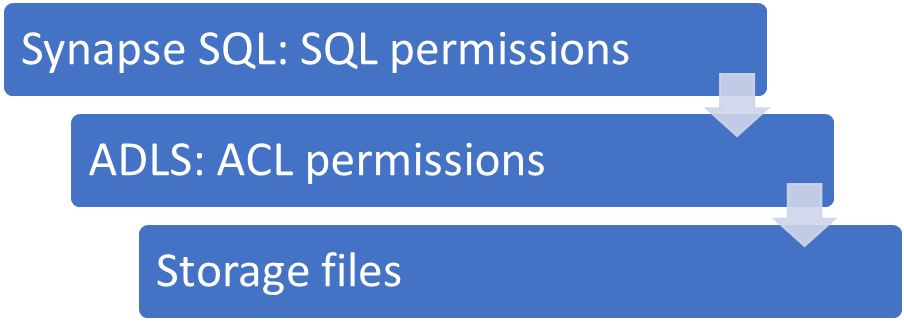
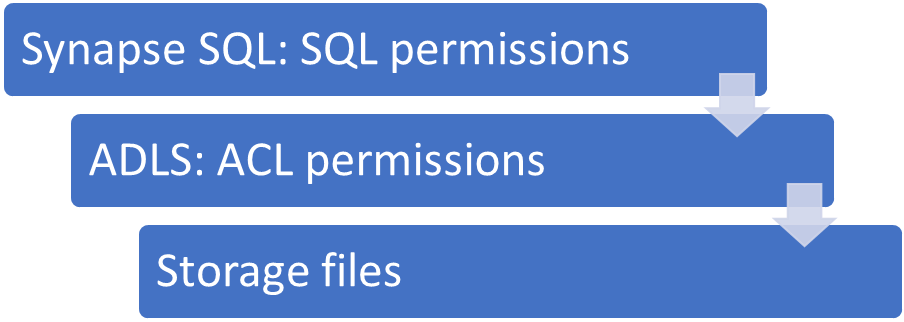
Synapse SQL runtime in Azure Synapse Analytics workspace enables you to define access rights and permissions to read data in two security layers:

JovanPop_0-1603125124403.png


  1. SQL permission layer where you can use standard SQL permission model with users, roles, and permissions defines in SQL runtime.

  2. ACL rules in Azure storage layer where you can define access rules by assigning storage roles to some AAD users.


If you are using Azure Active directory passthrough authentication, you can define granular access rules in Azure storage layer and specify which users could access some files and folders by assigning Azure roles such as Storage Blob Reader or Storage Blob Owner.


However, there are some cases when you will not use AAD passthrough:


  1. When the data placed in ADLS storage and accessed using Shared Access Signature

  2. When the data placed in ADLS storage and accessed using workspace Managed Identity (common cases for this scenario is when your storage is protected using firewall)

  3. When the data placed in Cosmos DB analytical is accessed using Cosmos DB read-only keys

  4. Applications and tool are using SQL principals to access storage using username/password instead of AAD logins. SQL principals may use either SAS token or Managed Identity of workspace to access storage.

If you are using some of these authentication methods, your Synapse SQL runtime has access to any file/folder/container placed in storage layer. If you have different user roles who are accessing data, you need to ensure that some users have access only to some subset of folders. Since you don’t have fine-grained ACL permissions on storage, you need to do the following steps to define permissions in SQL runtime:


  1. Create separate users or roles for the group of users who can access some subset of data on storage.

  2. Create external tables that represent proxies to your data sets on storage. Every external table should reference one set of files on storage.

  3. Grant users REFERENCES permission to credentials that should be used to access storage.

  4. DENY ADMINISTER BULK OPERATION permission to prevent users to directly access any file in storage via OPENROWSET and referenced credential.

  5. GRANT SELECT permission only on external tables that some user groups can access.


Let’s see how to apply this security model in the scenario where two user roles can access only some subfolders in storage.


Scenario


We have ADLS storage with three data sets – Product, RetailSales, and StoreDemographics placed in different folders on the same ADLS storage account. Synapse SQL access storage using Managed Identity that has full access to all folders in storage.


We have two roles in this scenario:


  • Sales Managers who can read data about products and retail sales, and

  • Store Managers who can access data about products and store demographics.


We need to ensure that these roles can access only subsets of data, although Synapse SQL has full access. Therefore, we need to define access rights on SQL layer that will protect access to the resources.


Create users that will access Synapse SQL


In this step we will create two logins that will enable sales managers and store managers to access Synapse SQL:


CREATE LOGIN StoreManager WITH PASSWORD = '100reM4n4G3r!@#$';
GO

CREATE USER StoreManager FROM LOGIN StoreManager;
GO

CREATE LOGIN SalesManager WITH PASSWORD = 'Sa<M4n4G3r!@#$';
GO

CREATE USER SalesManager FROM LOGIN SalesManager;
GO


Now we have two username/password pairs that can access Synapse SQL, but they still cannot access storage.


Create credentials that will be used to access storage


We need some database scoped credential that Synapse SQL runtime will use to the ADLS access storage. Let’s imagine that we are enabling Synapse SQL to access private storage protected with firewall using Managed Identity of the workspace:


CREATE MASTER KEY ENCRYPTION BY PASSWORD = 'Y...0'
CREATE DATABASE SCOPED CREDENTIAL WorkspaceIdentity WITH IDENTITY = 'Managed Identity'
GO

GRANT REFERENCES ON DATABASE SCOPED CREDENTIAL::WorkspaceIdentity TO StoreManager;
GRANT REFERENCES ON DATABASE SCOPED CREDENTIAL::WorkspaceIdentity TO SalesManager;
GO


Once we create DATABASE SCOPED CREDENTIAL, we need to enable users to reference that credential so they can access storage.


Prevent users to explore any data


Users who have REFERENCES permission on some storage might use OPENROWSET function to access any file on that storage. Therefore, we need to ensure that they cannot use this function by explicitly denying ADMINISTER BULK OPERATIONS in master database and ADMINISTER DATABASE BULK OPERATIONS permissions in data warehouse:


--> USE master
DENY ADMINISTER BULK OPERATIONS TO StoreManager;
DENY ADMINISTER BULK OPERATIONS TO SalesManager;

--> USE RetailStore
DENY ADMINISTER DATABASE BULK OPERATIONS TO StoreManager;
DENY ADMINISTER DATABASE BULK OPERATIONS TO SalesManager;


Create external tables that reference folders on storage


Since we have three datasets placed in three folders, we need to create three external tables that will access storage using some credential:


CREATE EXTERNAL DATA SOURCE [Data] WITH
( LOCATION = N'https://....dfs.core.windows.net/data', CREDENTIAL = WorkspaceIdentity )
GO

CREATE SCHEMA store
GO

CREATE EXTERNAL TABLE store.Product (...)
WITH (DATA_SOURCE = Data, LOCATION = N'Product/',FILE_FORMAT = ParquetSnappy)
GO

CREATE EXTERNAL TABLE store.[RetailSales] (...)
WITH (DATA_SOURCE = Data, LOCATION = N'RetailSales/',FILE_FORMAT = ParquetSnappy)
GO

CREATE EXTERNAL TABLE [store].[StoreDemographics] (...)
WITH (DATA_SOURCE = Data, LOCATION = N'StoreDemographics/',...)
GO


Any user that can select data from these tables can read the content of underlying files in ADLA storage.


Enable users to access their data sets


Finally, we need to implement required security settings and allow store managers and sales managers to access only their data sets via proxy external tables:


GRANT SELECT ON OBJECT::store.Product TO StoreManager;
GRANT SELECT ON OBJECT::store.StoreDemographics TO StoreManager;
GO

GRANT SELECT ON OBJECT::store.Product TO SalesManager;
GRANT SELECT ON OBJECT::store.RetailSales TO SalesManager;


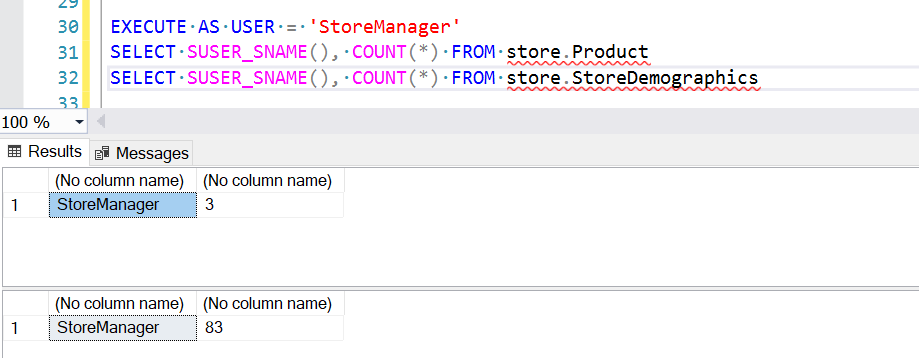
Now if we  try to select data as Store Managers, we will get the results:


JovanPop_1-1603125124409.png


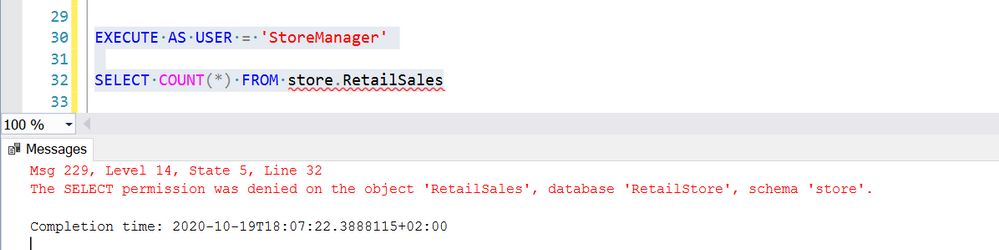
However, if these users try to access store.RetailSales they will get error:


JovanPop_2-1603125124419.png


The similar results will get sales manager when trying to access the tables.


Conclusion


Serverless Synapse SQL runtime enables to define fine-grained permissions and control what resources your users can access. Even if you provide full storage  access to Synapse SQL runtime, you are still not loosing ability to define fine-grained permission to your users using SQL runtime permission model.


Become a Microsoft 365 Defender Ninja

Become a Microsoft 365 Defender Ninja

This article is contributed. See the original author and article here.

Microsoft 365 Defender, part of Microsoft’s XDR solution, leverages the Microsoft 365 security portfolio to automatically analyze threat data across domains, building a complete picture of each attack in a single dashboard. This Ninja blog covers the features and functions of Microsoft 365 Defender – everything that goes across the workloads, but not the individual workloads themselves. The content is structured into three different knowledge levels, with multiple modules: Fundamentals, Intermediate, and Expert.


We will keep updating this training on a regular basis and highlight new resources.


Table of Contents


Security Operations Fundamentals


Module 1. Technical overview


Module 2. Getting started


Module 3. Investigation – Incident


Module 4. Advanced hunting


Module 5. Self-healing


Module 6. Community (blogs, webinars, GitHub)


Security Operations Intermediate


Module 1. Architecture


Module 2. Investigation


Module 3. Advanced hunting


Module 4. Automated investigation and remediation


Module 6. Self-healing


Module 5. Build your own lab


Module 7. Reporting


Security Operations Expert


Module 1. Incidents


Module 2. Advanced hunting


Module 3. APIs, custom reports, SIEM & other integrations


Legend:


vid.png Product videos


webcast.png Webcast recordings


TechCommunity.png Tech Community


docs.png Docs on Microsoft


blogs.png Blogs on Microsoft


GitHub.png GitHub


⤴ External


InteractiveGuides.png Interactive guides


Security Operations Fundamentals


Module 1. Technical overview


Module 2. Getting started


Module 3. Investigation – Incident


Module 4. Advanced hunting


Module 5. Self-healing


Module 6. Community (blogs, webinars, GitHub)


Security Operations Intermediate


Module 1.  Architecture


Module 2. Investigation


Module 3. Advanced hunting


Module 4. Automated investigation and remediation


Module 6. Self-healing


Module 5. Build your own lab


Module 7. Reporting


Security Operations Expert


Module 1. Incidents


Module 2. Advanced hunting


Module 3. APIs, custom reports, SIEM & other integrations