by Contributed | Nov 18, 2020 | Technology
This article is contributed. See the original author and article here.
Earlier this year, I explained our principles about Azure PowerShell releases. On October 27, we released a major version update whose significant change was in performing the authentication to Azure.
Unfortunately, this major release created several issues for many of you. We did the postmortem about this release last week and wanted to share its content.
What happened?
With this release, we changed the library used to perform the authentication to Azure moving from ADAL to MSAL (Microsoft Authentication Library).
Customers encountered errors related to the following categories:
- When the user browser cannot be launched, ‘Connect-AzAccount’ fails with a cryptic error message.
- Long-running operations did not complete successfully.
- PowerShell scripts cannot authenticate to Azure using User managed Identities.
- Customers cannot access the token cache using undocumented API.
Root causes
Different root causes have been identified for each category mentioned above:
- The ‘Connect-AzAccount’ default behavior changed in this version; the error message returned when we could complete the auth was unclear and did not provide recovery guidance to customers.
- The access token for Azure authentication was not refreshed.
- Our tests did not catch the passing of the wrong parameter to Azure Identity when using User Managed identity.
- With the switch to MSAL, token cache objects are no longer accessible.
Mitigation and resolution
We implemented the following fixes in Az.Accounts 2.1.2
- When we cannot launch the user’s browser, the error message provides guidance. We are carefully evaluating the impact of fallback behaviors on usability and script-ability in the context of PowerShell.
- We fixed the logic to refresh the access token.
- We changed the parameter that is passed on to authentication.
Impact
Each issue had a different impact as follows:
- In environments like Docker container or remote session (ssh/PowerShell remoting) to a machine, users were not given proper guidance on how to connect to Azure. CloudShell was also impacted in certain scenarios.
- Azure PowerShell cmdlets running over one hour would fail with an “Unauthorized” error. The most common scenario is an ARM template deployment.
- Authentication to Azure would fail for PowerShell scripts running in Azure functions with user Managed Identity.
- First-party modules using direct access to the Token Cache cannot complete their authentication.
How did it go?
The identification of the root cause of the issues was quick however, the PowerShell gallery suffered an unexpected outage on 10/30 delaying our ability to publish a fix for our customers.
Lessons learned
Even though the preview of the Az.Accounts module was available for 205 days; none of the issues faced were identified. We learned from this incident that our current approach regarding previews is not providing the expected feedback.
Our release monitoring systems did not surface those issues that would have allowed us to address them earlier.
We need to establish a recovery plan so that we can share mitigation with impacted customers and partners.
Our mock tests are missing some scenarios, especially in end-to-end testing.
Corrective actions
Based on the above analysis, we are considering the following:
- We will provide a new cmdlet as well as developer guidance for accessing the token cache.
- We are adding extra checks on PR’s regarding how to access the token cache.
- We will share with the community our test matrix.
- We will perform extra validation on the interactive authentication for each release updating the authentication library.
- We will improve our testing procedures and increase the scope of our CI pipelines.
- We will be adding tests for long-running operations.
- We will investigate how we can apply some of the SDP practices to Azure PowerShell releases.
- We will evaluate test scenarios in environments running PowerShell scripts (Azure Functions, Azure Automation, for example).
- We will improve our monitoring procedures for new releases.
We plan to share our progress made towards those goals by the summer of 2021.
The Azure PowerShell team

by Contributed | Nov 18, 2020 | Azure, Microsoft, Technology
This article is contributed. See the original author and article here.
We continue to expand the Azure Marketplace ecosystem. In November, 65 offers from Cognosys Inc. successfully met the onboarding criteria and went live. Cognosys continues to be a leading Marketplace publisher, with more than 600 solutions available. See details of the new offers below:
|
Applications
|
|
Apache Web Server with CentOS 7.8: This image offered by Cognosys contains Apache Web Server version 2.4.6-93.el7 with CentOS 7.8. Apache Web Server, one of the most popular web servers, is free and open-source software.
|
|
Apache Web Server with Ubuntu 20.04 LTS: This image offered by Cognosys contains Apache Web Server version 2.4.41 with Ubuntu 20.04 LTS. Apache Web Server, one of the most popular web servers, is free and open-source software.
|
|
CentOS 7.8: This image offered by Cognosys contains CentOS 7.8. CentOS is a community-developed distribution of the Linux operating system and is compatible with Red Hat Enterprise Linux.
|
|
CentOS 8.2: This image offered by Cognosys contains CentOS 8.2. CentOS is a community-developed distribution of the Linux operating system and is compatible with Red Hat Enterprise Linux.
|
|
Docker CE with CentOS 7.7 Free: This image offered by Cognosys contains Docker CE with CentOS 7.7. Docker Community Edition (CE) is a free, community-supported version of Docker’s open-source containerization platform. Docker CE is aimed at developers and do-it-yourself operations teams.
|
|
Docker CE with CentOS 7.8: This image offered by Cognosys contains Docker CE version 3:19.03.12-3.el7 with CentOS 7.8. Docker Community Edition (CE) is a free, community-supported version of Docker’s open-source containerization platform.
|
|
Docker CE with CentOS 8.0 Free: This image offered by Cognosys contains Docker CE with CentOS 8.0. Docker uses operating system-level virtualization to deliver software in packages called containers. Docker Community Edition (CE) is a free, community-supported version of Docker’s open-source containerization platform.
|
|
Docker CE with CentOS 8.1: This image offered by Cognosys contains Docker CE with CentOS 8.1. Docker Community Edition (CE) is a free, community-supported version of Docker’s open-source containerization platform.
|
|
Docker CE with CentOS 8.2: This image offered by Cognosys contains Docker CE with CentOS 8.2. Docker Community Edition (CE) is a free, community-supported version of Docker’s open-source containerization platform.
|
|
Docker Community Server with Ubuntu 20.04 LTS: This image offered by Cognosys contains Docker Community Server with Ubuntu 20.04 LTS. Docker Community Server is ideal for developers and small teams looking to get started with Docker and experimenting with container-based apps.
|
|
HAProxy 2.0 with Ubuntu 20.04: This image offered by Cognosys contains HAProxy 2.0.16 with Ubuntu 20.04. HAProxy is free open-source software that provides a high-availability load balancer and proxy server for TCP and HTTP-based applications. It’s used by Twitter, Reddit, GitHub, and many other high-profile websites.
|
|
HAProxy with CentOS 8.2: This image offered by Cognosys contains HAProxy 1.8.23 with CentOS 8.2. HAProxy is free open-source software that provides a high-availability load balancer and proxy server for TCP and HTTP-based applications. It’s used by Twitter, Reddit, GitHub, and many other high-profile websites.
|
|
IIS on Windows Server 2016 Free: This image offered by Cognosys contains IIS on Windows Server 2016. Internet Information Services (IIS) is extensible web server software created by Microsoft. The scalable and open architecture of IIS can handle media streaming, web applications, and other demanding tasks.
|
|
IIS on Windows Server 2019 Free: This image offered by Cognosys contains IIS on Windows Server 2019. Internet Information Services (IIS) is extensible web server software created by Microsoft. The scalable and open architecture of IIS can handle media streaming, web applications, and other demanding tasks.
|
|
Jenkins Docker Container with Ubuntu 20.04 LTS: This image offered by Cognosys contains Jenkins Docker Container with Ubuntu 20.04 LTS. Jenkins is an open-source continuous integration tool written in Java and used for software development.
|
|
Jenkins with Ubuntu Server 20.04 LTS: This image offered by Cognosys contains Jenkins version 2.235.2 with Ubuntu Server 20.04 LTS. Jenkins is an open-source continuous integration tool written in Java and used for software development.
|
|
LAMP with CentOS 7.8: This image offered by Cognosys contains LAMP with PHP 7.3 on CentOS 7.8. The LAMP stack, composed of open-source software, is used for web application development.
|
|
LAMP with CentOS 7.8 MariaDB 10: This image offered by Cognosys contains LAMP with CentOS 7.8, PHP 7.3, and MariaDB 10. The LAMP stack, composed of open-source software, is used for web application development.
|
|
LAMP with Ubuntu Server 20.04 LTS: This image offered by Cognosys contains LAMP with Ubuntu Server 20.04 LTS. The LAMP stack, composed of open-source software, is used for web application development.
|
|
LMS powered by Moodle with CentOS 7.8: This image offered by Cognosys contains Moodle 3.9.2 with CentOS 7.8. Moodle is an open-source learning management system for distance education and other e-learning projects.
|
|
MariaDB 10 with CentOS 7.8: This image offered by Cognosys contains MariaDB 10.5.4 with CentOS 7.8. MariaDB Server is an open-source relational database made by the original developers of MySQL.
|
|
MariaDB 10 with CentOS 8.2: This image offered by Cognosys contains MariaDB 10.5.4 with CentOS 8.2. MariaDB Server is an open-source relational database made by the original developers of MySQL.
|
|
Matomo with Windows Server 2016: This image offered by Cognosys contains Matomo with Windows Server 2016. Matomo is an open-source web analytics platform with a focus on enabling businesses to comply with the General Data Protection Regulation and the California Consumer Privacy Act.
|
|
Mautic with CentOS 8.2: This image offered by Cognosys contains Mautic 3 with CentOS 8.2. Mautic is open-source software that helps online businesses automate repetitive marketing tasks, such as lead generation, contact scoring, and contact segmentation.
|
|
Mautic with Ubuntu 20.04 LTS: This image offered by Cognosys contains Mautic 3 with Ubuntu 20.04 LTS. Mautic is open-source software that helps online businesses automate repetitive marketing tasks, such as lead generation, contact scoring, and contact segmentation.
|
|
MediaWiki with CentOS 8.2: This image offered by Cognosys contains MediaWiki 1.34.2 with CentOS 8.2. Originally developed for Wikipedia, MediaWiki is an open-source wiki engine used to power collaboratively edited reference projects.
|
|
MediaWiki with Windows Server 2016: This image offered by Cognosys contains MediaWiki 1.34.2 with Windows Server 2016. Originally developed for Wikipedia, MediaWiki is an open-source wiki engine used to power collaboratively edited reference projects.
|
|
MediaWiki with Windows Server 2019: This image offered by Cognosys contains MediaWiki 1.34.2 with Windows Server 2019. Originally developed for Wikipedia, MediaWiki is an open-source wiki engine used to power collaboratively edited reference projects.
|
|
MySQL 5.7 with CentOS 7.8: This image offered by Cognosys contains MySQL 5.7.31 with MySQL Community Server 5.7.18 and CentOS 7.8. MySQL is an open-source relational SQL database management system for developing web-based software applications.
|
|
MySQL 8.0 with CentOS 8.2: This image offered by Cognosys contains MySQL 8.0.17 with MySQL Community Server 8.0.17 and CentOS 8.2. MySQL is an open-source relational SQL database management system for developing web-based software applications.
|
|
NGINX with CentOS 7.8: This image offered by Cognosys contains NGINX 1.16.1 with CentOS 7.8. NGINX is an all-in-one API gateway, cache, load balancer, web application firewall, and web server.
|
|
NGINX with Ubuntu Server 20.04 LTS: This image offered by Cognosys contains NGINX 1.18.0 with Ubuntu Server 20.04 LTS. NGINX is an all-in-one API gateway, cache, load balancer, web application firewall, and web server.
|
|
Node.js 10 with CentOS 8.2: This image offered by Cognosys contains Node.js v10.22.0 with CentOS 8.2. Node.js, an open-source cross-platform JavaScript runtime environment, is used for developing tools and applications.
|
|
Node.js 10 with Ubuntu 20.04 LTS: This image offered by Cognosys contains Node.js v10.22.0 with Ubuntu Server 20.04 LTS. Node.js, an open-source cross-platform JavaScript runtime environment, is used for developing tools and applications.
|
|
Node.js 12 with CentOS 7.8: This image offered by Cognosys contains Node.js v12.18.3 with CentOS 7.8. Node.js, an open-source cross-platform JavaScript runtime environment, is used for developing tools and applications.
|
|
Node.js 12 with CentOS 8.2: This image offered by Cognosys contains Node.js v12.18.3 with CentOS 8.2. Node.js, an open-source cross-platform JavaScript runtime environment, is used for developing tools and applications.
|
|
Node.js 12 with Ubuntu 20.04 LTS: This image offered by Cognosys contains Node.js v12.18.3 with Ubuntu Server 20.04 LTS. Node.js, an open-source cross-platform JavaScript runtime environment, is used for developing tools and applications.
|
|
Node.js 14 with CentOS 7.8: This image offered by Cognosys contains Node.js v14.7.0 with CentOS 7.8. Node.js, an open-source cross-platform JavaScript runtime environment, is used for developing tools and applications.
|
|
Node.js 14 with CentOS 8.2: This image offered by Cognosys contains Node.js v14.7.0 with CentOS 8.2. Node.js, an open-source cross-platform JavaScript runtime environment, is used for developing tools and applications.
|
|
OpenJDK 11 with CentOS 7.7 Free: This image offered by Cognosys contains OpenJDK 11 with CentOS 7.7. OpenJDK is an open-source implementation of Java SE (Java Platform, Standard Edition), which is used for developing and deploying Java applications.
|
|
OpenJDK 11 with CentOS 7.8: This image offered by Cognosys contains OpenJDK 11.0.7 with CentOS 7.8. OpenJDK is an open-source implementation of Java SE (Java Platform, Standard Edition), which is used for developing and deploying Java applications.
|
|
OpenJDK 8 with CentOS 7.7 Free: This image offered by Cognosys contains OpenJDK 8 with CentOS 7.7. OpenJDK is an open-source implementation of Java SE (Java Platform, Standard Edition), which is used for developing and deploying Java applications.
|
|
OpenJDK 8 with CentOS 7.8: This image offered by Cognosys contains OpenJDK 8 with CentOS 7.8. OpenJDK is an open-source implementation of Java SE (Java Platform, Standard Edition), which is used for developing and deploying Java applications.
|
|
PHP 5.6 with Ubuntu Server 20.04 LTS: This image offered by Cognosys contains PHP 5.6.4 with Ubuntu Server 20.04 LTS. PHP is a fast, flexible, and pragmatic scripting language suited for web development.
|
|
PHP 7.3 with CentOS 7.7 Free: This image offered by Cognosys contains PHP 7.3 with CentOS 7.7. PHP is a fast, flexible, and pragmatic server-side scripting language suited for web development.
|
|
PHP 7.3 with CentOS 7.8: This image offered by Cognosys contains PHP 7.3.2 with CentOS 7.8. PHP is a fast, flexible, and pragmatic server-side scripting language suited for web development.
|
|
PHP 7.3 with CentOS 8.0: This image offered by Cognosys contains PHP 7.3 with CentOS 8.0. PHP is a fast, flexible, and pragmatic server-side scripting language suited for web development.
|
|
PHP 7.4 with Ubuntu Server 20.04 LTS: This image offered by Cognosys contains PHP 7.4 with Ubuntu Server 20.04 LTS. PHP is a fast, flexible, and pragmatic server-side scripting language suited for web development.
|
|
PostgreSQL with CentOS 7.8: This image offered by Cognosys contains PostgreSQL 9.2.24 with CentOS 7.8. PostgreSQL is an object-relational database management system that can handle workloads ranging from small, single-machine applications to large, internet-facing applications with many concurrent users.
|
|
PostgreSQL with Ubuntu 20.04 LTS: This image offered by Cognosys contains PostgreSQL 12.2 with Ubuntu 20.04 LTS. PostgreSQL is an object-relational database management system that can handle workloads ranging from small, single-machine applications to large, internet-facing applications with many concurrent users.
|
|
PrestaShop with Ubuntu 20.04 LTS: This image offered by Cognosys contains PrestaShop 1.7 with Ubuntu 20.04 LTS. PrestaShop, an open-source e-commerce platform, enables users to create an online store and grow their business with marketing and promotional tools.
|
|
Python 2 with CentOS 7.8: This image offered by Cognosys contains Python 2.7.5 with CentOS 7.8. Python is an interpreted, object-oriented programming language used for rapid application development. Its easy-to-learn syntax emphasizes readability and reduces the cost of program maintenance.
|
|
Python 2 with Ubuntu 20.04 LTS: This image offered by Cognosys contains Python version 2.7.18rc1 with Ubuntu 20.04 LTS. Python is an interpreted, object-oriented programming language used for rapid application development. Its easy-to-learn syntax emphasizes readability and reduces the cost of program maintenance.
|
|
Python 2.7 with Ubuntu 20.04 LTS: This image offered by Cognosys contains Python version 2.7.18rc1 with Ubuntu 20.04 LTS. Python is an interpreted, object-oriented programming language used for rapid application development. Its easy-to-learn syntax emphasizes readability and reduces the cost of program maintenance.
|
|
Python 3 with CentOS 7.8: This image offered by Cognosys contains Python 3.6.8 with CentOS 7.8. Python is an interpreted, object-oriented programming language used for rapid application development. Its easy-to-learn syntax emphasizes readability and reduces the cost of program maintenance.
|
|
Python 3 with Ubuntu 20.04 LTS: This image offered by Cognosys contains Python 3.8.2 with Ubuntu 20.04 LTS. Python is an interpreted, object-oriented programming language used for rapid application development. Its easy-to-learn syntax emphasizes readability and reduces the cost of program maintenance.
|
|
Python 3.6 with Ubuntu 20.04 LTS: This image offered by Cognosys contains Python 3.6.9 with Ubuntu 20.04 LTS. Python is an interpreted, object-oriented programming language used for rapid application development. Its easy-to-learn syntax emphasizes readability and reduces the cost of program maintenance.
|
|
Python 3.7 with Ubuntu 20.04 LTS: This image offered by Cognosys contains Python 3.7.4 with Ubuntu 20.04 LTS. Python is an interpreted, object-oriented programming language used for rapid application development. Its easy-to-learn syntax emphasizes readability and reduces the cost of program maintenance.
|
|
Python 3.8 with Ubuntu 20.04 LTS: This image offered by Cognosys contains Python 3.8 with Ubuntu 20.04 LTS. Python is an interpreted, object-oriented programming language used for rapid application development. Its easy-to-learn syntax emphasizes readability and reduces the cost of program maintenance.
|
|
Redis with CentOS 7.8: This image offered by Cognosys contains Redis 3.2.12 with CentOS 7.8. Redis is an open-source, in-memory, NoSQL data structure store that’s used as a database, cache, and message broker.
|
|
Redis with Ubuntu 20.04 LTS: This image offered by Cognosys contains Redis 5:5.0.7-2 with Ubuntu 20.04 LTS. Redis is an open-source, in-memory, NoSQL data structure store that’s used as a database, cache, and message broker.
|
|
Ubuntu 20.04 LTS: This image offered by Cognosys contains Ubuntu Server 20.04 LTS. Ubuntu is an open-source operating system based on the Debian Linux distribution. It has three editions: Desktop, Server, and Core.
|
|
WordPress with CentOS 7.8: This image offered by Cognosys contains WordPress 5.4.2 with CentOS 7.8. WordPress is open-source software for building websites, blogs, or apps.
|
|
WordPress with CentOS 8.2: This image offered by Cognosys contains WordPress 5.4.2 with CentOS 8.2. WordPress is open-source software for building websites, blogs, or apps. |
|
WordPress with Ubuntu 20.04 LTS: This image offered by Cognosys contains WordPress 5.4.2 with Ubuntu 20.04 LTS. WordPress is open-source software for building websites, blogs, or apps.
|
|

by Contributed | Nov 18, 2020 | Uncategorized
This article is contributed. See the original author and article here.
Microsoft 365 is now available from our new cloud datacenters in Brazil, enabling Brazilian organizations to store their customer data for core online services at rest in country. Learn more about the new Brazil geography for Microsoft 365.
The post Microsoft 365 now available from new Brazil geography appeared first on Microsoft 365 Blog.
Brought to you by Dr. Ware, Microsoft Office 365 Silver Partner, Charleston SC.
by Contributed | Nov 18, 2020 | Technology
This article is contributed. See the original author and article here.
Organizations are continuing to work in a remote or hybrid-remote environment which accentuates the need to protect people, devices, apps, and the data that spans across the entire landscape. An increase in online collaboration has caused an influx of data that is critical for organizations to ensure remains secure, wherever employees are collaborating from. This is supported by the 115 million daily active users on Microsoft Teams, reemphasizing the need to ensure we can protect all the information and data created from increased online collaboration.
Key customer questions for data governance and protection
As the world has shifted to remote work as the new normal, organizations are facing a variety of increasing regulations and challenges. We are often asked a common set of questions by business leaders:
- How can we ensure sensitive data is not purposefully or accidentally shared with unintended recipients?
- With the shift to online collaboration creating an increased volume of information and data, how do we remain complaint with regulations and privacy needs?
- When employees are communicating online, how can we ensure they follow company policies to foster a safe and inclusive culture?
These questions are supported by a Harvard Business Review study commissioned by Microsoft that reveals organizations are finding an increased difficulty in securing and governing their data. While 77% of organizations agree an effective security, risk, and compliance strategy is essential for business success, an alarming 82% acknowledge increased risks and complexities have made an effective data management strategy more challenging.
Understanding the data landscape: structured versus unstructured data
One of the first components of data protection involves understanding how much structured and unstructured data exists in your organization. Structured data, organized in a pattern such as account numbers or credit cards, can often be identified using tools focused on preventing data loss. But how can we also ensure that unstructured data, like an internal release plan or confidential product specifications, also remains protected?
Creating an effective data governance and protection strategy
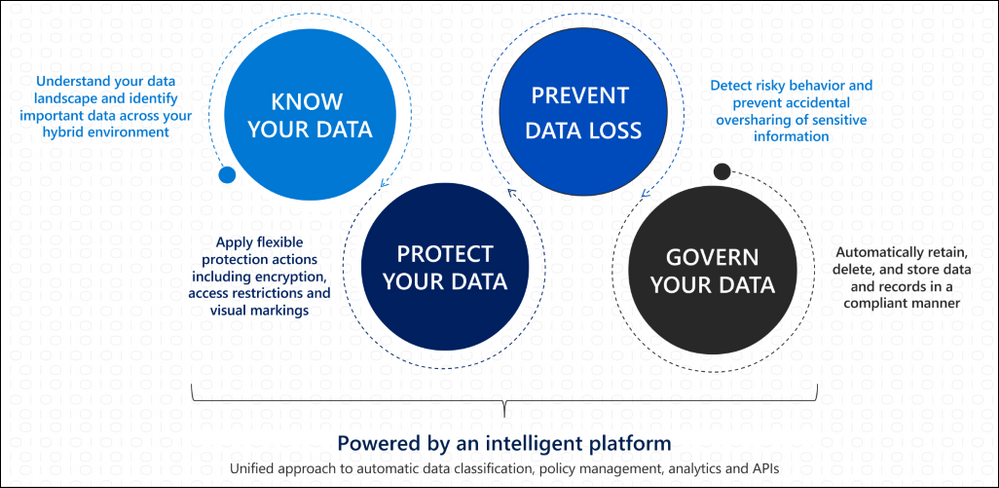
To help customers address complex data management needs, we can leverage built-in protections and AI capabilities to help safeguard both structured and unstructured data wherever it lives. By focusing on an approach of knowing, protecting, and governing data we can effectively build our organizational data governance and protection strategy.
Identifying the volume of structured and unstructured data in our organization helps us understand what protection capabilities we need to implement to have protection across our landscape. Data Loss prevention capabilities can leverage both built-in and custom sensitive information types to help protect structured data. Using trainable classifiers helps us govern our unstructured data by being able to identify items that meet our organization-defined policies to apply protections such as sensitivity or retention polices.

How does that apply to Microsoft Teams?
As part of the Microsoft 365 services, Teams follows all the security best practices and procedures such as service-level security through defense-in-depth and rich controls within the service. This means we can apply these same principles to ensure our collaboration and communication landscape have consistent advanced security and compliance capabilities leveraged from Microsoft 365. Teams enforces team and organization-wide multi-factor authentication (MFA) and single single-on through Azure Active Directory. Teams integration with SharePoint ensures file storage is backed by SharePoint encryption, while items like notes stored in OneNote are backed by OneNote encryption and stored in the team SharePoint site.
Because of this integration with familiar services like SharePoint and Exchange, IT can take advantage of simplified manageability in the centralized Microsoft 365 admin center to protect the data landscape. Let us look at how information protection and data loss prevention are implemented in Teams.
Data Protection in Microsoft Teams
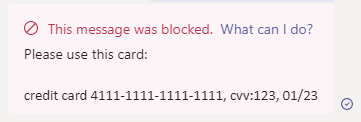
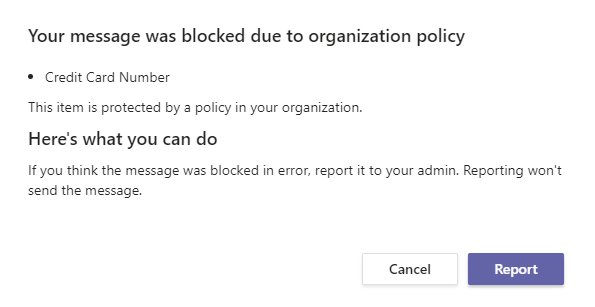
Data Loss Prevention (DLP) capabilities allow IT to define policies that help prevent people from sharing sensitive information, extending into Teams chat, channel, and private channel messages. This also includes protection from OneDrive for Business for documents containing sensitive information shared in Teams messages to ensure unauthorized users cannot access the document. Similar to how DLP works across Microsoft 365 like in Outlook or OneDrive, when a DLP policy violation occurs in Teams the sensitive content is blocked for data protection. Additionally, a helpful end user tip appears to educate the end user on why the content was blocked.
The sender’s view:
An educational policy tip for the sender:
The recipient’s view:

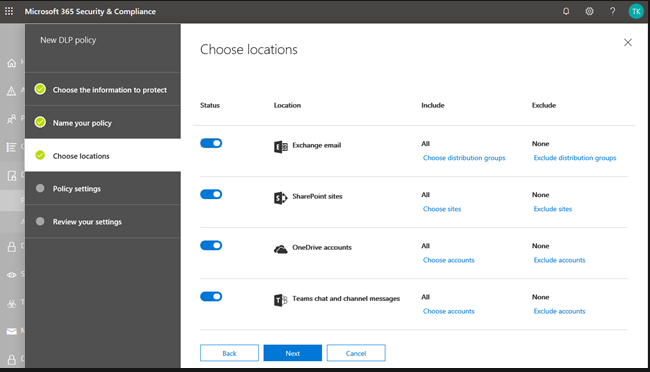
By leveraging the strength of Microsoft 365 security across our data landscape, we can easily leverage existing DLP policies in other services, like Exchange or SharePoint Online, to extend their protection into Teams. IT can also create new policies across Microsoft 365 or specific to Teams depending on organizational needs or requirements.
Sensitivity labels allow us to classify and protect unstructured organizational data that may not be identified through our DLP policies such as a confidential internal memo. Once a sensitivity label is applied to an email or document, the configured protection settings for that specific label are enforced wherever that content travels within the Microsoft ecosystem. This includes encrypting emails or documents, applying watermarks, automatic and recommended labeling, and the ability to protect content in site and group containers.
Now let’s cover how to take advantage of data protection and governance in Teams to address the security needs of your organization.
Applying Data Protection and Governance in your Organization
Data protection and governance is often not a one-size-fits-all model. While organization-wide baseline protections play a critical role in a data management strategy, different business groups, departments, or subsets of users may need heightened protections to ensure data security. Below are some of the most impactful capabilities and controls organizations can implement across their landscape to drive an effective data protection and governance strategy.
How to secure data and prevent data loss
As mentioned throughout this blog, effective data management requires IT to be able to identify, monitor, and automatically protect all sensitive information across Microsoft 365. For structured data, this can be supported through creating data loss prevention policies to intelligently detect and prevent inadvertent disclosure. In order to protect unstructured data, IT can take advantage of sensitivity labels to have protection settings, such as content encryption or markings, applied to the content. The integration of sensitivity labels in Teams helps regulate access to sensitive organizational documents within teams by protecting content at the container level.
For groups or individuals that may need to be prevented from communicating with other groups, such as departments handling confidential information, Information Barrier policies can help IT isolate segments to meet relevant industry standards or regulations. Additionally, with this major shift to online communications we can leverage Communication Compliance in Teams and across Microsoft 365 to foster a safe and inclusive workplace. Communication Compliance helps organizations meet corporate policies such as ethical standards and risk management including identifying potential data leakage.
How to govern data for compliance and regulatory requirements
While items like DLP and Communication Compliance enable organizations meet regulatory requirements, we also need to ensure we can retain and search data across our landscape. Retention policies enabled across Microsoft 365 services, including Teams, help organizations meet both industry regulations and internal policies on data retention and deletion.
Organizations have many reasons to respond to a legal case that might require stakeholders to quickly find and retain relevant data across email, documents, instant messaging conversations, and other content locations. eDiscovery case tools help relevant stakeholders perform tasks like managing holds, case management, content search, and many other similar activities all in the security and compliance center. Additionally, large organizations can be required to turn over all Electronically Stored Information (ESI) which can be assisted by eDiscovery in Teams.
Creating a secure and compliant Microsoft Teams environment
While data protection and governance in Teams is foundational with the increase in online communications, it’s only one set of security capabilities. With Teams you have comprehensive security including items like multi-factor authentication, Conditional Access policies, Safe Attachments, Advanced Threat Protection capabilities, and more that builds on the Microsoft 365 security foundation. You can learn more about leveraging the Microsoft 365 security foundation to manage security and compliance in Teams in our latest Microsoft Ignite session.
In order to create a secure and complaint Teams environment for your organization, please review the below guidance to start enabling these capabilities:
For more depth learning and interactive training make sure to check out the latest Teams training on Microsoft Learn including a specific learning path on enforcing security, privacy, and compliance in Microsoft Teams!
by Contributed | Nov 18, 2020 | Technology
This article is contributed. See the original author and article here.
Although test centers are starting to reopen, you might not have the option of traveling to one to take your exam. Or, maybe you simply don’t want to. As a risk-averse psychometrician, I completely understand. If you haven’t taken the leap to try an online proctored exam—or if you did and ran into an issue—I’m here to help. Online delivered exams are nothing to be afraid of! They really can be less hassle, less stress, and even less worry than traveling to a test center—but only if you’re adequately prepared for what to expect!
Although the vast majority of online deliveries happen without issue, some test takers encounter something unusual or unexpected. Based on our analysis of these errors, most of them could have been prevented or mitigated through a few simple steps. In fact, these steps can maximize the likelihood of an error-free delivery. At the end of the day, it comes down to understanding the system and hardware requirements, bandwidth needs, and what to expect during an online proctored exam.
To that end, I’ve put together a list of helpful steps that should help you better prepare for this experience:
- Watch the video on our online exams page and follow the tips and tricks provided. Although some of the requirements may seem over the top, they’re all for good reasons. The most important goal is to ensure that your testing experience is equivalent to the those of everyone else taking our exam so that you don’t have an unfair advantage or disadvantage. That means making sure you’re in a disruption-free, clean space so that you can completely focus on the exam. We also need to ensure the security and integrity of the certification process in an environment where we have no control (like we would have in a test center) over the hardware, software, or bandwidth that you have in your home or office.
- Run a system test on the same computer and in the same location where you will test. This verifies whether your computer, location, and internet connection meet the system requirements. I cannot tell you how many times I’ve heard that a candidate ran the system test on a different computer or in a different location than that of the exam—and ran into problems. This is a common enough error that it bears repeating: run the system test on the same machine from the same location that you plan to use for the exam. And do it at least 24 hours in advance, so you have time to reschedule if your system doesn’t meet the requirements. In fact, do it before you register!
- Understand the rules. You won’t be able to have food, drinks (although water in a clear glass is allowed), papers, books, your phone, or other things on your desk. And you won’t be able to leave your desk for any reason. If you’re interrupted, your exam will be terminated. Additionally, you’ll be asked to remove your watch. You won’t be able to read questions aloud or to cover your face. (The proctor wouldn’t know whether a test taker is recording the questions or even reading them aloud to someone who’s helping them.) If you need an exception to any of these rules, you may be able to request one through our accommodation process, which is designed to ensure that you have a fair testing experience while still meeting our security standards. I know this might seem excessive, but it’s very similar to what happens when you’re at a test center.
- After you verify your identity and complete the room scan, the proctor will release your exam, so follow the onscreen prompts. I’m surprised by the number of people who don’t do this!
Remember that in an environment we cannot control (your home or office), we’re trying to mimic the same level of security and rigor in the testing process as we have in test centers. The steps we take and the rules that we have in place are critical to maintaining the integrity of our certifications, which I know is as important to you as it is to us. After all, if something undermines the integrity of our program, gives someone an unfair advantage, or makes it possible for them to cheat, it’s undermining the integrity of your certification, too.
So, I ask again. Did you run the system test yet on the computer that you’ll be using to take your exam? This is perhaps the most important thing you can do to maximize the likelihood of a successful exam delivery. Don’t schedule an exam until you can pass the system test! If it fails, find a new computer or location and try again.
As always, I welcome your questions in the chat. But, more important, good luck with your exam!
Learn more about online exams with Pearson VUE.
Learn more about online exams with PSI.

by Contributed | Nov 18, 2020 | Technology
This article is contributed. See the original author and article here.
 In this recorded webcast Microsoft’s Scott Murray and Tony Sims discuss how detect, protect, and respond to ransomware with the Defender stack.
Resources:
Thanks for visiting – Michael Gannotti LinkedIn | Twitter
 Michael Gannotti
by Contributed | Nov 18, 2020 | Azure, Microsoft, Technology
This article is contributed. See the original author and article here.
The Symptoms
Recently I came to a support issue where we tried to use REST API to list SQL resources on an Azure subscription. The output returned results, but it did not show any of the SQL resources that we expected to see. Filtering the result with a GREP only brought up a storage account that had “SQL” in its name, but none of the servers or databases.
These are the commands that were used:
az rest -m get -u 'https://management.azure.com/subscriptions/11111111-2222-3333-4444-555555555555/resources?api-version=2020-06-01'
GET https://management.azure.com/subscriptions/11111111-2222-3333-4444-555555555555/resources?api-version=2020-06-01
The Troubleshooting
The Azure portal showed the full list of Azure SQL servers and databases, for either drilling down through the subscription or going directly to the “SQL servers” or “SQL databases” blades. Commands like az sql db list or az sql server list also returned all SQL resources. Permission issues were excluded by using an owner account for subscription and resources. And it turned out that only one specific subscription was affected, whereas it worked fine for all other subscription.
The Cause
Some list operations divide the result into separate pages when too much data is returned and the results are too large to return in one response. A typical size limit is when the list operation returns more than 1,000 items.
In this specific case, the subscription contained so many resources that the SQL resources didn’t make it onto the first result page. It required using the URL provided by the nextLink property to switch to the second page of the resultset.
The Solution
When using list operations, a best practice is to check the nextLink property on the response. When nextLink isn’t present in the results, the returned results are complete. When nextLink contains a URL, the returned results are just part of the total result set. You need to skip through the pages until you either find the resource you are looking for, or have reached the last page.
The response with a nextLink field looks like this:
{
  "value": [
    <returned-items>
  ],
  "nextLink": "https://management.azure.com:24582/subscriptions/11111111-2222-3333-4444-555555555555/resources?%24expand=createdTime%2cchangedTime%2cprovisioningState&%24skiptoken=eyJuZXh0UG...<token details>...MUJGIn0%3d"
}
This URL can be used in the “-u” parameter (or –uri/–url) of the REST client, e.g. in the az rest command.
Further Information
by Contributed | Nov 18, 2020 | Technology
This article is contributed. See the original author and article here.
LightIngest is a command-line utility for ad-hoc data ingestion into Azure Data Explorer (ADX). The utility can pull source data from a local folder or from an Azure blob storage container. LightIngest is most useful when you want to ingest a large amount of data, because there is no time constraint on ingestion duration. When historical data is loaded from existing system to ADX, all records receive the same the ingestion date. Now, the -creationTimePattern argument allows users to partition the data by creation time, not ingestion time. The -creationTimePattern argument extracts the CreationTime property from the file or blob path; the pattern doesn’t need to reflect the entire item path, just the section enclosing the timestamp you want.
Read more on lightIngest including sample code here.
by Contributed | Nov 18, 2020 | Azure, Microsoft, Technology
This article is contributed. See the original author and article here.
Data format mappings (for example, Parquet, JSON, and Avro) in Azure Data Explorer now support simple and useful ingest-time transformations. In cases where the scenario requires more complex processing at ingest time, use the update policy, which will allow you to define lightweight processing using KQL expression.
In addition, as part of a 1-click experience, you now have the ability to select data transformation logic from a supported list to add to one or more columns.
To learn more, read about mapping transformations.
by Contributed | Nov 18, 2020 | Technology
This article is contributed. See the original author and article here.
Normally we always need to test the whole set of code before accepting a git pull request, in this article we will try to understand the best approach to deal with pull requests and test them locally.
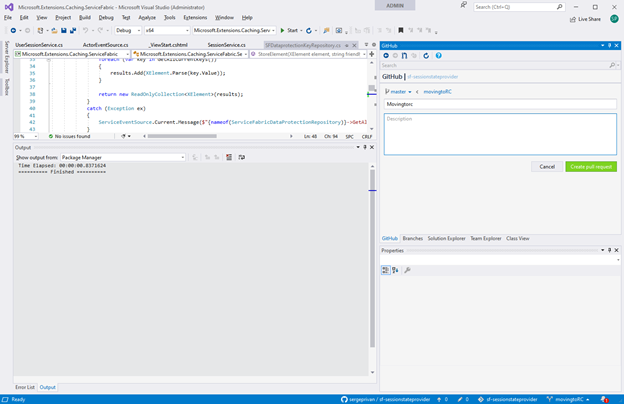
First, we need to get and setup visual studio github extension https://visualstudio.github.com/ we won’t go through the way of setting up it, because this process is very well documented and just start from creating a pull request in the visual studio:
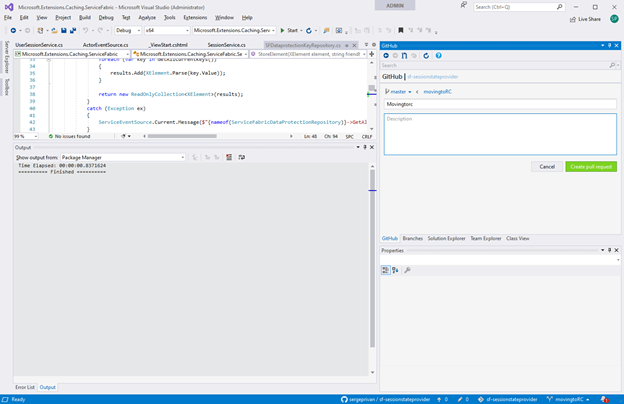
Pull request is being created based on the branch in this case I took movingtoRC one as I want ask someone to check my changes and confirm that I can merge them to the main one:
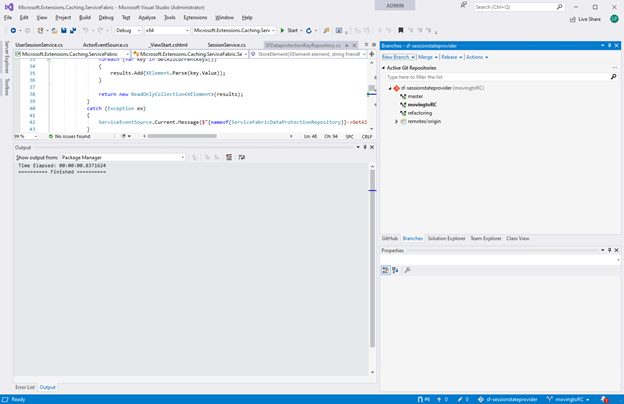
As we have now our pull request ready, we can see that it received an identifier #6
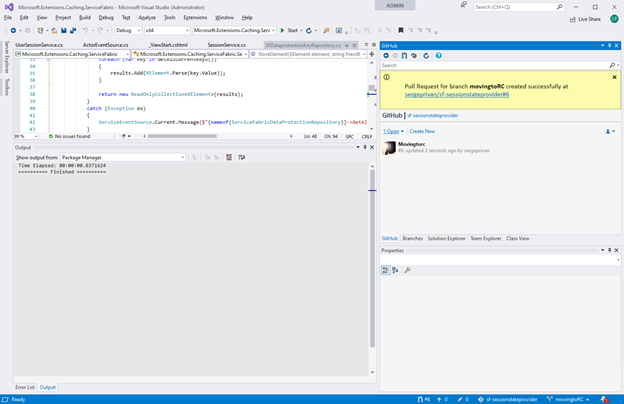
Let’s get this pull request as a branch locally with
git fetch origin
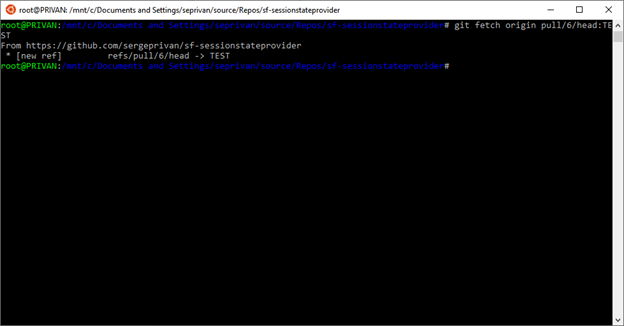
And checkout it locally
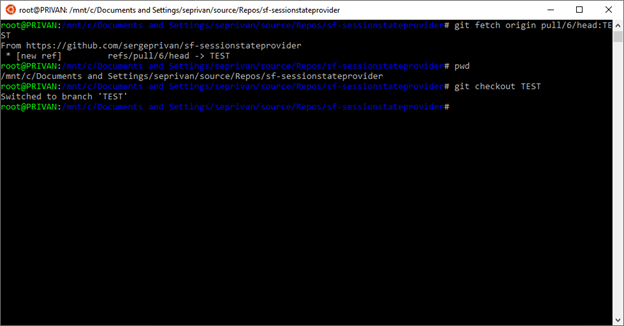
Active branch is now TEST
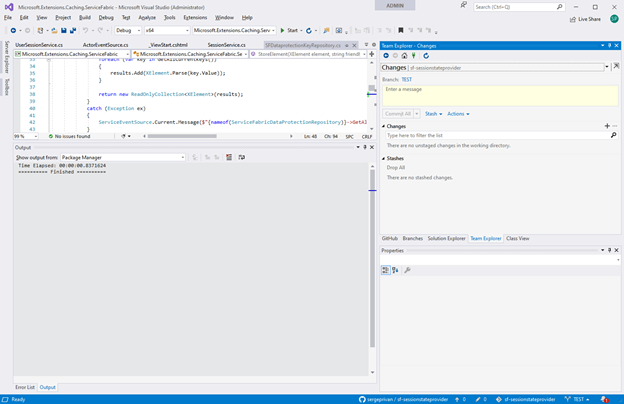
Now we are going to merge main into our pull request branch for testing, mainly we need to make sure here that master is up to date and start merging:
1. use git checkout master to ensure that branch is up to date
2. In my case as you can see it did not work because I had one commit which was not posted to main, in this case you can do resync/update from the VS extension, to get the latest version:
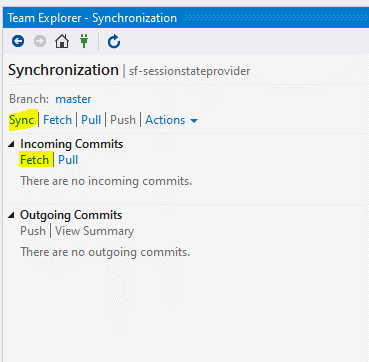
3. After master is up to date, we are switching back to TEST
git checkout TEST
4. And finally, we can merge master to TEST
git merge master
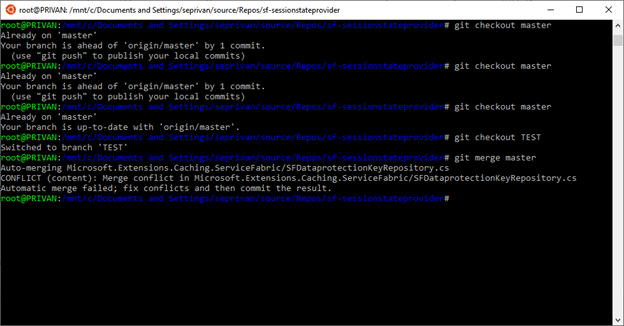
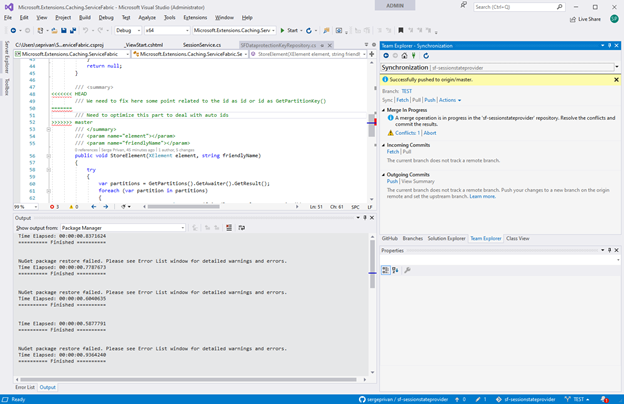
In the output we can see already the conflict as intended in the git output, but what is more important we have the conflicts and changes in the branch which is ready to be tested directly via Visual Studio, so we can switch now to VS and edit/test/build conflict files


Recent Comments