This article is contributed. See the original author and article here.
Season’s greetings, my fellow IT Pros of the world!
As you know, M365 is a set of services for business productivity, security and compliance. Across those services, Microsoft has interwoven an information protection ‘platform,’ which is referred to as Microsoft Information Protection, or MIP.
I was bit confused when I first heard about MIP because it looks/sounds/reads/seems alot like ‘AIP’ (Azure Information Protection). My first thought was “Oh, we re-named AIP to MIP.” However, that’s not right – AIP and MIP are two different types of things – but both arerelated to information protection.
AIP is a ‘thing.’ A product you can purchase, deploy and setup. There is a Windows client and the service has numerous capabilities to label and protect information. You should be aware that AIP end of life is planned for March 2012.
MIP is not a thing – it’s a collective set of information protection capabilities (including most of what AIP can do) across other things. It’s not a product, per se. There is a Windows client but there are also capabilities built-in to the Office desktop/web/mobile apps, as well as the M365 services (think not only Exchange Online, SharePoint Online/OneDrive for Business but also Teams, PowerBI, MCAS, etc.). Further, these MIP capabilities are ever-expanding – there are ideas afoot to extend this into Azure and even 3rd party services.
It is Thanksgiving here in the US and I spent some quality time in my lab over the holiday, going through an “end-to-end scenario” with a part of that MIP platform – our recently-released Endpoint DLP .
I was moved by how cool this capability is, so I thought I’d share some screenshots/pictures of what moved me – some ‘moving pictures,’ if you will (a not-so-subtle reference to one of my favorite bands, Rush, their great album – Moving Pictures – and a sad-nod to the departed drummer/lyricist Neil Peart).
Consider this post ‘inspirational’ … it is not intended to be all-inclusive of configuring EDLP. Use the docs to perform all the steps. For example, I don’t cover device on-boarding at all here – but it needs to be done.
Let’s roll …
Portal/service settings:
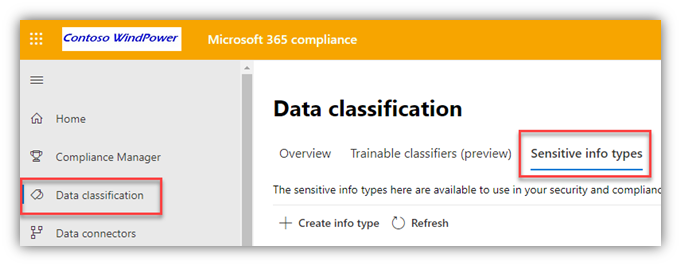
Select a Sensitive Information Type
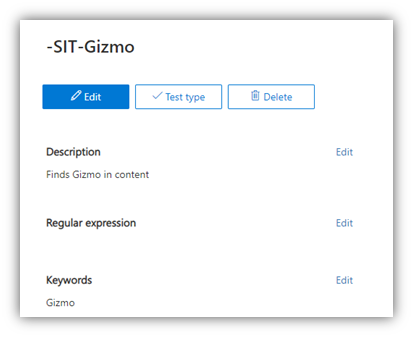
From the Data Classification page in the M365 Compliance portal, select one of the built-in Sensitive Information Types (SIT) or create a ‘custom’ one to use for the DLP policy. Here, I created one that has a keyword string of ‘Gizmo’
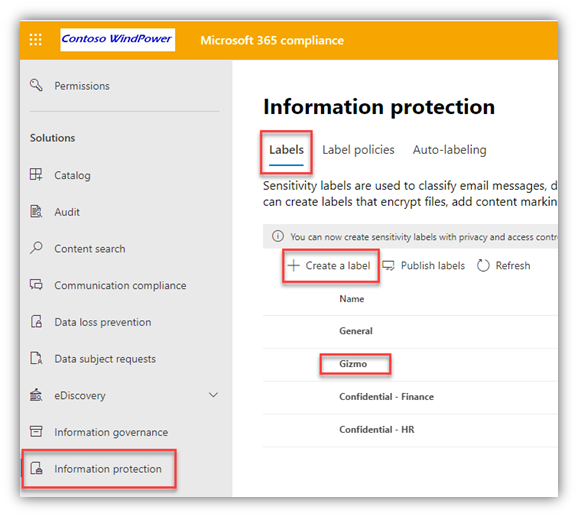
Create a Sensitivity Label
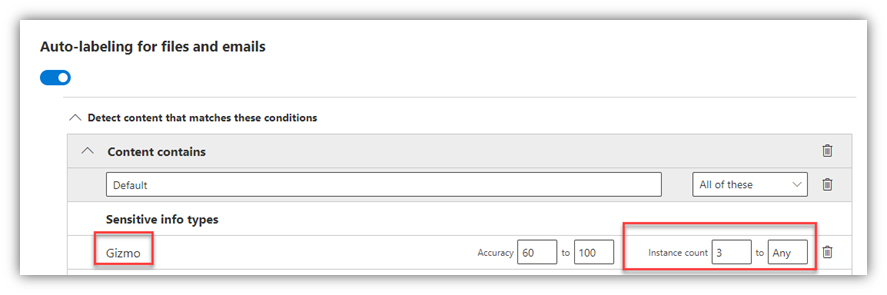
From the Information Protection page in the M365 Compliance portal, I created a Sensitivity Label that automatically labels files and emails that have 3 or more instances of the “Gizmo” Sensitive Information Type
Configure Endpoint DLP Settings
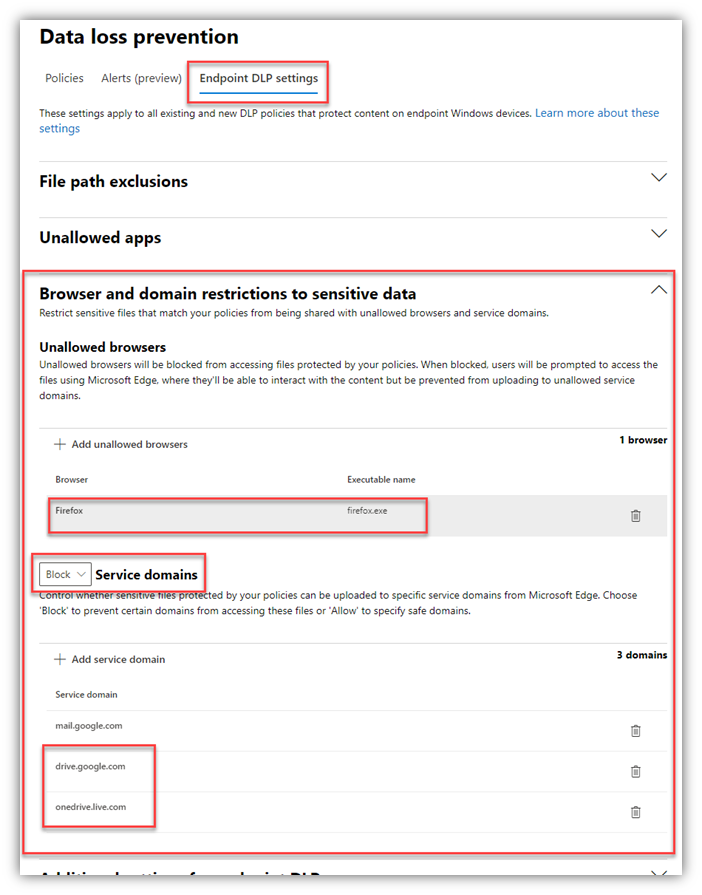
From the Data Loss Prevention page in the M365 Compliance portal, I selected the Endpoint DLP Settings tab and entered a few “service domains” which I set to “Block.” This will block uploads from the Edge browser (which is enlightened for EDLP – another feature of Edge) to both G-drive and OneDrive personal cloud services.
The keen eye will notice I also added Firefox as an ‘unallowed browser’ – this doesn’t block the use of the browser full-stop; rather, it only blocks labeled/sensitive files from being accessed from Firefox.
Create a DLP Policy
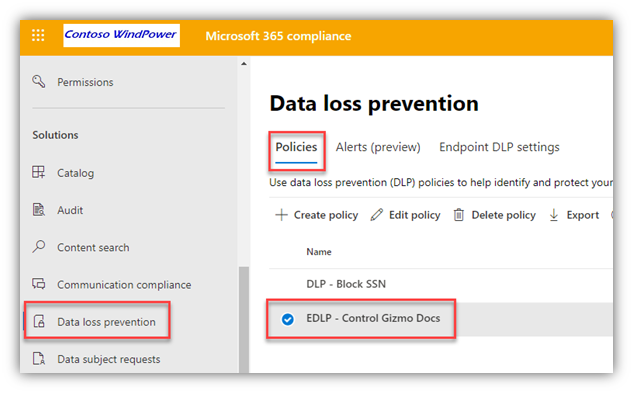
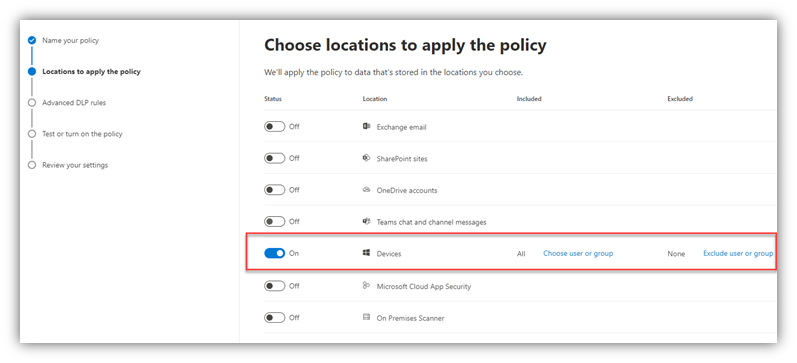
From the same Data Loss Prevention page in the M365 Compliance portal, on the Policies tab, I created a DLP Policy, scoped to “Devices,” that is triggered by the “Gizmo” Sensitivity Label
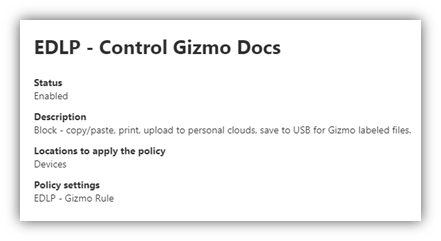
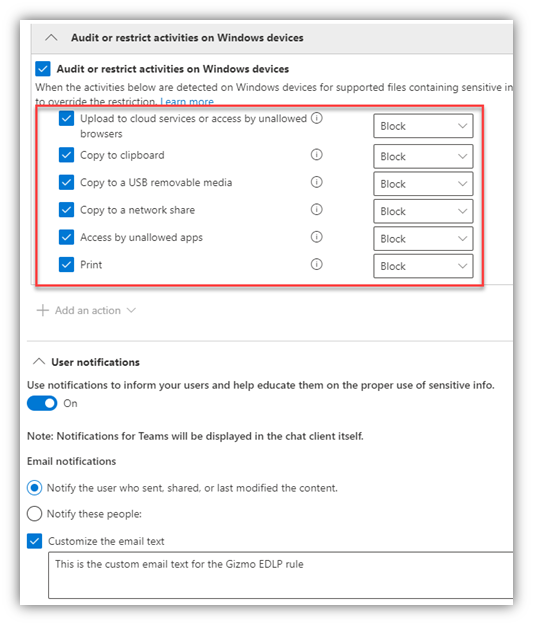
The DLP Policy has the below restrictions defined and I also enabled “User notifications” (with custom text for the notification email subject/body) and “Incident reports” with admin email alerts:
Admin Recap
I created a custom Sensitive Information Type that is keyed on the text string ‘Gizmo’
I created a Sensitivity Label that looks for 3+ instances of that “Gizmo” Sensitive Info Type in a file or email and automatically applies that label to the file
I configured Endpoint DLP Settings to block un-managed browsers (Firefox in this case) and to restrict several activities, including: copy/paste, print, upload to specified blocked cloud services, and saving the file to a USB drive
I created a DLP Policy that applies to Devices and triggers on files or emails with the “Gizmo” Sensitivity Label
End-user Experience
What does this look like for an end user? Let’s take a look…
First, the user first creates and saves a Word doc w/ 3 (or more) instances of the ‘Gizmo’ text string.
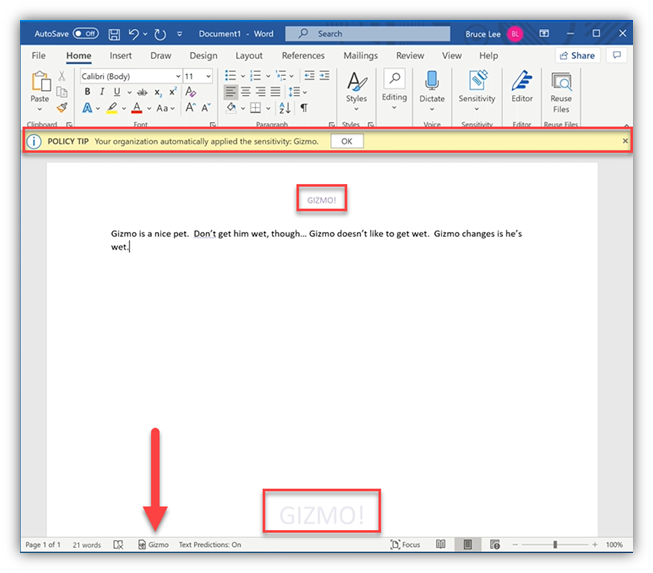
Once the file is labeled (manually or, in the case of this specific Label, automatically), the Sensitivity Label settings apply to the file:
The yellow ‘Policy Tip’ banner informs the user
The visual markings apply to the file – a GIZMO! header and watermark
The status bar at the bottom shows the Label name – Gizmo in this case
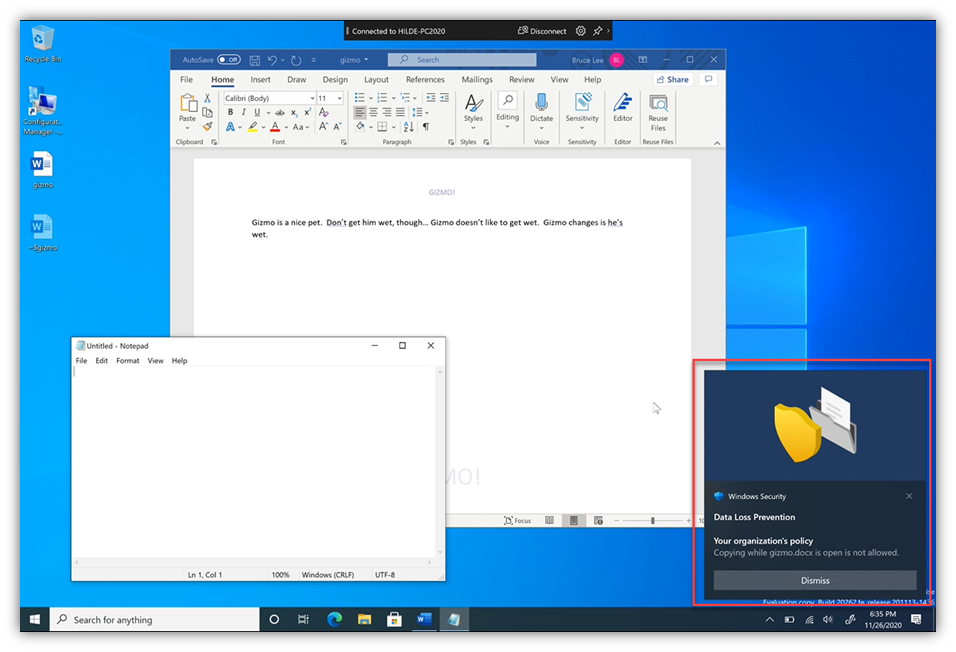
Now, the user does a ‘Select all’ on the text and a Copy … at this point, the Copy action is NOT blocked. This is because the EDLP system allows the content to be copied/pasted into another file within the same process (i.e. another Word file in this case).
However, the user then launches Notepad … at that point, the copy/clipboard action IS blocked – and a UI ‘toast’ is popped. This prevents the content from being copied out of process (i.e. into PowerPoint, or Notepad in this case).
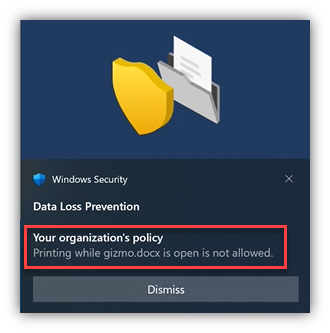
The user now tries to print the file … that, too, is met with a block and a Toast:
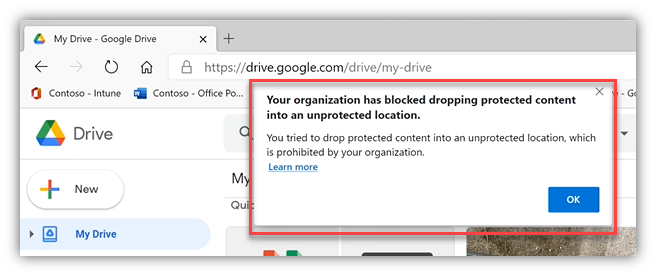
So, the user tries to upload to a personal G-Drive via Edge … Nope.
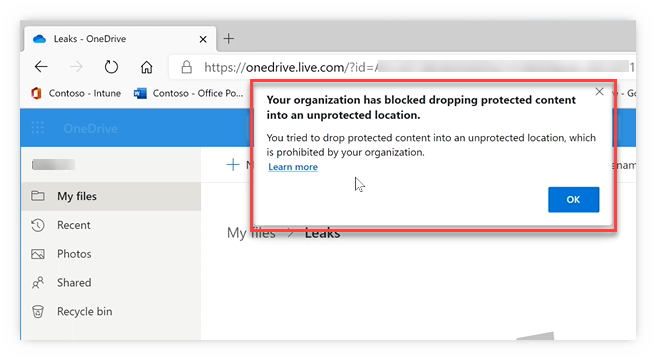
So, the user tries to upload to a personal OneDrive via Edge … Negatory.
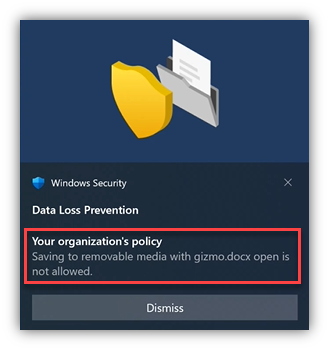
Not easily deterred, the user tries to save the file to a USB stick … care to guess if it worked?
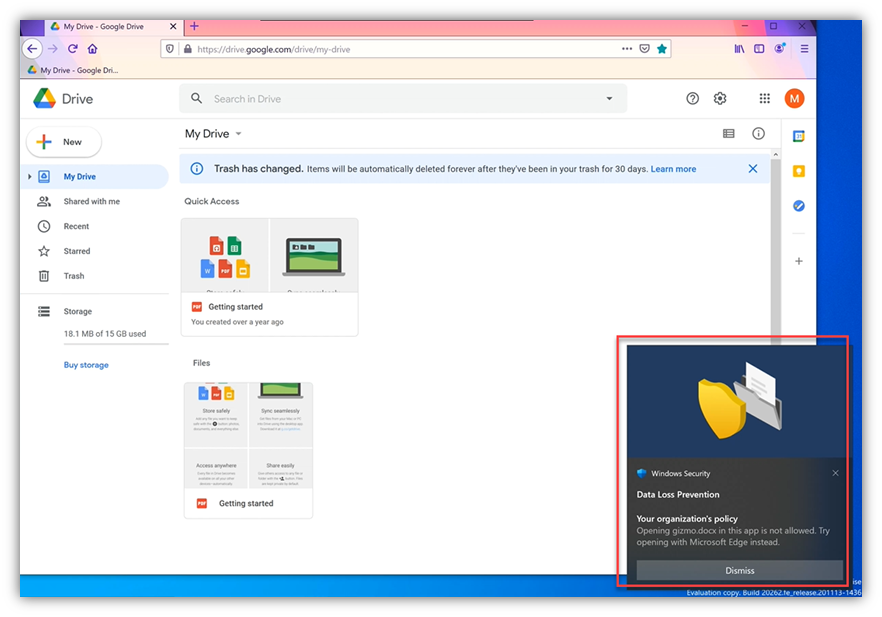
Finally, our user tries to dodge the DLP rule by using Firefox to upload the content to G-Drive… “Would you like butter with that toast?”
A few FAQs:
“Does this only work on Windows?”
Yes, today, this is only possible on Windows 10 but since this capability leverages aspects ofthe Microsoft Defender for Endpoint (MDE) client, which is cross-platform, other platforms are being explored (i.e. MacOS).
“Do we need to be using Microsoft Defender for Endpoint for PC protection? Today, we use a 3rd party product for endpoint protection.”
No, you don’t need to be running MDE actively on your endpoints to be able to use EDLP, you can on-board the devices into the EDLP service without on-boarding them into MDE.
So, there you have it folks … a quick run through of Microsoft Endpoint DLP.
Hopefully, this post helped clarify the difference between AIP and MIP, illustrated how several components of the MIP platform can be combined to provide effective endpoint DLP controls – and I hope the pictures “moved” you enough to get you started with this in your environment.
This article is contributed. See the original author and article here.
Initial Update: Saturday, 28 November 2020 05:02 UTC
We are aware of issues within Application Insights and are actively investigating. Due to power outage in data center, some customers may experience delayed or missed Log Search Alerts, Latency and Data Loss in South Africa North region.
Work Around: none
Next Update: Before 11/28 17:30 UTC
We are working hard to resolve this issue and apologize for any inconvenience. -Vyom
2020-11-24 20:09:21.59 spid5s Script level upgrade for database ‘master’ failed because upgrade step ‘msdb110_upgrade.sql’ encountered error 574, state 0, severity 16. This is a serious error condition which might interfere with regular operation and the database will be taken offline. If the error happened during upgrade of the ‘master’ database, it will prevent the entire SQL Server instance from starting. Examine the previous errorlog entries for errors, take the appropriate corrective actions and re-start the database so that the script upgrade steps run to completion.
2020-11-24 20:09:21.60 spid5s Cannot recover the master database. SQL Server is unable to run. Restore master from a full backup, repair it, or rebuild it. For more information about how to rebuild the master database, see SQL Server Books Online.
2020-11-24 20:09:21.60 spid5s SQL Server shutdown has been initiated
Just before ‘Error: 574’, I noticed ‘show advanced options’ in SQL Error log. I suppose it failed in ‘sp_configure’ scripts. I made below test to reproduce this error.
Open a new query window. Run begin tran first, then run sp_configure query. We can reproduce the same error.
begin tran
sp_configure ‘show advanced options’,1
go
reconfigure
go
According to the test, we felt sure that there was an uncommitted transaction when running ‘msdb110_upgrade.sql’. But where has it come from ? I read SQL Error logs again and found below information:
2020-11-24 20:09:19.52 spid5s Granting login access’DomainUserA’ to msdb database…
2020-11-24 20:09:19.55 spid5s A problem was encountered granting access to MSDB database for login ‘(null)’. Make sure this login is provisioned with SQLServer and rerun sqlagent_msdb_upgrade.sql
2020-11-24 20:09:19.80 spid5s Granting login access’DomainUserB’ to msdb database…
2020-11-24 20:09:19.80 spid5s A problem was encountered granting access to MSDB database for login ‘(null)’. Make sure this login is provisioned with SQLServer and rerun sqlagent_msdb_upgrade.sql
Even though, there are no error code, but those information indicates ‘msdb110_upgrade.sql’ encountered an issue before Error: 574. According to ‘msdb110_upgrade.sql’ scripts, I found below part
——————————————————————————– –wals thru all non sysadmin job owners DECLARE job_nonsysadmin_owners_cursor CURSOR LOCAL FOR SELECT DISTINCT j.owner_sid FROM sysjobs j FOR READ ONLY
OPEN job_nonsysadmin_owners_cursor FETCH NEXT FROM job_nonsysadmin_owners_cursor INTO @owner_sid WHILE (@@fetch_status = 0) BEGIN SELECT @owner_name = SUSER_SNAME(@owner_sid) IF @owner_name IS NOT NULL BEGIN –is job owner member of sysadmin role? BEGIN TRY EXECUTE AS LOGIN=@owner_name — impersonate SELECT @is_sysadmin = ISNULL(IS_SRVROLEMEMBER(‘sysadmin’),0) — check role membership REVERT — revert back END TRY BEGIN CATCH SET @is_sysadmin = 0 END CATCH
IF @is_sysadmin = 0 BEGIN –add job_owner to the SQLAgentUserRole msdb role in order to permit the job owner to handle his jobs –has this login a user in msdb? IF NOT EXISTS(SELECT * FROM sys.database_principals WHERE (sid = @owner_sid) OR (LOWER(name collate SQL_Latin1_General_CP1_CS_AS) = LOWER(@owner_name collate SQL_Latin1_General_CP1_CS_AS))) BEGIN PRINT ” PRINT ‘Granting login access”’ + @owner_name + ”’ to msdb database…’ BEGIN TRY EXEC sp_grantdbaccess @loginame = @owner_name END TRY BEGIN CATCH RAISERROR(‘A problem was encountered granting access to MSDB database for login ”%s”. Make sure this login is provisioned with SQLServer and rerun sqlagent_msdb_upgrade.sql ‘, 10, 127) WITH LOG END CATCH END
PRINT ” PRINT ‘Adding user ”’ + @owner_name + ”’ to SQLAgentUserRole msdb role…’ BEGIN TRY EXEC sp_addrolemember @rolename = ‘SQLAgentUserRole’, @membername = @owner_name END TRY BEGIN CATCH RAISERROR(‘A problem was encountered adding user ”%s” to SQLAgentUserRole. Make sure this is a valid user in MSDB database and rerun sqlagent_msdb_upgrade.sql ‘, 10, 127) WITH LOG END CATCH END END FETCH NEXT FROM job_nonsysadmin_owners_cursor INTO @owner_sid END DEALLOCATE job_nonsysadmin_owners_cursor
It seems this scripts will find out non sysadmin Agent job owners. Grant msdb access to those job owner accounts. However, ‘DomainUserA’ and ‘DomainUserB’ were not logins of this SQL instance. But they are still job owners. This is the reason above ‘try…catch’ block throw out below messages:
2020-11-24 20:09:19.55 spid5s A problem was encountered granting access to MSDB database for login ‘(null)’. Make sure this login is provisioned with SQLServer and rerun sqlagent_msdb_upgrade.sql
I consulted below official document. ‘try…catch’ block may cause an uncommitted transaction.
If an error generated in a TRY block causes the state of the current transaction to be invalidated, the transaction is classified as an uncommittable transaction. An error that ordinarily ends a transaction outside a TRY block causes a transaction to enter an uncommittable state when the error occurs inside a TRY block.
Now we found root cause. Customer removed ‘DomainUserA’ and ‘DomainUserB’ from job owners. Patch upgrade was successful.
This article is contributed. See the original author and article here.
Original release date: November 27, 2020
The Cybersecurity and Infrastructure Security Agency (CISA) is aware of the possible exposure of passwords on Fortinet devices that are vulnerable to CVE 2018-13379. Exploitation of this vulnerability may allow an unauthenticated attacker to access FortiOS system files. Potentially affected devices may be located in the United States.
Fortinet has released a security advisory to highlight mitigation of this vulnerability. CISA encourages users and administrators to review the advisory and apply the necessary updates immediately. Additionally, CISA recommends Fortinet users conduct a thorough review of logs on any connected networks to detect any additional threat actor activity.
Join us on Saturday 12th of December 2020 from 09:00 till 17:00 GMT+00:00 Europe/London
Join the Global AI Student Conference for students by students and learn all about AI.
Learn more about the sessions and content which will be covered.
What is AI, and Why We Care
In this session, we will give a brief overview of the area of Artificial Intelligence and Machine Learning as whole, and talk about why it is important for every student to learn the basics of AI/ML. …
Introduction to Machine Learning and an overview of popular algorithms.
This session would be meant for both beginners and intermediate level students in the field of machine learning. In this session, I would be introducing the basic idea of Machine learning, an overview …
How to protect the oceans with AI and Open Source?
Surfrider Foundation Europe NGO has become a reference in the fight for the protection of the ocean. Unexpectedly, this fight starts in the rivers. During this session, we’ll see how a group of …
With the ever increasing flow of data, comes the industry focus on how to use those data for driving business & insights; but what about the size of the data these days, we have to deal with ? The …
We live in a world full of unstructured data, with data that is not easy to search in. Video/Audio/Images/PDF/… This talk will explain you how you can manage this documents and give your users the …
In this roundtable, we get together with AI researchers and evangelists to discuss the current successes of AI as a field, and look into the nearest future. …
A demonstration on how to create a quiz generator which takes the pictures of your notes and put through the Azure Cognitive Services OCR we get the text, which we put through a jupyter notebook which …
Talk and Demo on Sound Identification and Classification with Tensorflow and Librosa
I aspire to conduct an interactive and implementation based workshop on the less explored format of data in Deep Learning i.e. The sounds. I would start the session with general information and …
Learning AI/ML: Is University the best place to do it?
With many teaching resources available online, including reputable Machine Learning courses like the one on Coursera, people might be tempted to think that they can learn AI/ML by themselves, and they …
With the new world of AI, there are ethical considerations with implementation. We have been thrust quickly and deeply in this new world in 2020. There are ethical implications with bias that need to …
It is very important to ensure fairness while building an AI system which can scale to a large number of users. Thus, I plan to first talk about how fairness is important while building AI apps. I …
In this session, I will discuss about my project “Sign language detection with TensorFlow”. I started this project with an idea to develop an application to bridge the gap that might help people who …
In this talk, we’ll cover the basics of Azure’s Custom Vision service. We’ll begin with a low-code example and then transition to discussing and implementing some use cases that are changing the world …
In this roundtable, we will hear different opinions on what would be the best way to build a career in data science. From taking part in Kaggle competitions to Hackathons, there are many paths that ca …
This article is contributed. See the original author and article here.
Original release date: November 27, 2020
Drupal has released security updates to address vulnerabilities in Drupal 7, 8.8 and earlier, 8.9, and 9.0. An attacker could exploit this vulnerability to take control of an affected system.
The Cybersecurity and Infrastructure Security Agency (CISA) encourages users and administrators to review Drupal Advisory SA-CORE-2020-013 and apply the necessary updates.
Takayuki Fujiwara is an MVP for Windows Development who focuses on adapting XR applications and systems for business layers especially in Japan. Moreover, Takayuki contributes Babylon.js which is a strong WebGL framework and share a lot of knowledge and tips of the framework on his blog. Follow him on Twitter @WheetTweet.
Gora Leye is a Solutions Architect, Technical Expert and Devoper based in Paris. He works predominantly in Microsoft stacks: Dotnet, Dotnet Core, Azure, Azure Active Directory/Graph, VSTS, Docker, Kubernetes, and software quality. Gora has a mastery of technical tests (unit tests, integration tests, acceptance tests, and user interface tests). Follow him on Twitter @logcorner.
Chris Hoard is a Microsoft Certified Trainer Regional Lead (MCT RL), Educator (MCEd) and Teams MVP. With over 10 years of cloud computing experience, he is currently building an education practice for Vuzion (Tier 2 UK CSP). His focus areas are Microsoft Teams, Microsoft 365 and entry-level Azure. Follow Chris on Twitter at @Microsoft365Pro and check out his blog here.
Asma Khalid is an Entrepreneur, ISV, Product Manager, Full Stack .Net Expert, Community Speaker, Contributor, and Aspiring YouTuber. Asma counts more than 7 years of hands-on experience in Leading, Developing & Managing IT related projects and products as an IT industry professional. Asma is the first woman from Pakistan to receive the MVP award three times, and the first to receive C-sharp corner online developer community MVP award four times. See her blog here.
George Chrysovalantis Grammatikos is based in Greece and is working for Tisski ltd. as an Azure Cloud Architect. He has more than 10 years’ experience in different technologies like BI & SQL Server Professional level solutions, Azure technologies, networking, security etc. He writes technical blogs for his blog “cloudopszone.com“, Wiki TechNet articles and also participates in discussions on TechNet and other technical blogs. Follow him on Twitter @gxgrammatikos.
This article is contributed. See the original author and article here.
This session focuses on Machine Learning and the integration of Azure Machine Learning and PyTorch Lightning, as well as learning more about Natural Language Processing.
This session speakers are:
Aaron (Ari) Bornstein – an Senior Cloud Advocate, specializing in AI and ML, he collaborates with the Israeli Hi-Tech Community, to solve real world problems with game changing technologies that are then documented, open sourced, and shared with the rest of the world.
Tal Baumel – a PhD graduate from the Computer Science department at Ben Gurion University. Tal worked on the Natural Language Processing Project under the supervision of Professor Michael Elhadad – focusing on automatic summarization. Tal is now working as a data scientist for Microsoft on Conversation Intelligence in Dynamics 365 Sales Insights.
Watch the video here:
Resources from the session
Resource
URL
Training Your First Distributed PyTorch Lightning Model with Azure ML
This article is contributed. See the original author and article here.
It might be snowing in parts of the Northern Hemisphere, but we won’t let that stop us from sharing Azure news with you. News covered this week includes: New Azure Portal updates for November 2020, Azure Resource Manager template support for Azure file share backup, How to use Windows Admin Center on-premises to manage Azure Windows Server VMs, Multiple new features for Azure VPN Gateway now Generally Available, and our Microsoft Learn Module of the Week.
Azure Portal for November 2020
Two new updates have been applied to the Azure portal which include:
Resource moving: the ability to navigate to a resource group and move resources to another region. The ability to add missing dependencies, customize destination properties, and track the progress of moves are also now available.
Filter pills: bring further consistency to the filtering experience while also making it WCAG 2.1 compliant and fully accessible
Azure Resource Manager (ARM) provides a powerful way to manage infrastructure through declarative templates. Azure Backup now supports configuring backup for existing Azure file shares via ARM templates. This enables organizations to backup existing file shares by specifying the vault and backup policy details in a JSON file which is deployable via using the Azure portal, CLI or Powershell.
Managing Azure Windows Server VMs via On-Premises Windows Admin Center
Currently the Windows Admin Center (WAC) add-in for the Azure Portal is in preview and it might be a while before the feature becomes generally available. Sonia Cuff and Orin Thomas share steps to spin up a WAC gateway server instance on a local VM, configure Windows Server’s built in Azure Network Adapter as a VPN connection.
The following new Azure VPN Gateway features have recently been announced as generally available:
Custom IPsec/IKE policy with DPD timeout: Setting IKE DPD (Dead Peer Detection) timeout allows organizations to adjust the IKE session timeout value based on their connection latency and traffic conditions to minimize unnecessary tunnel disconnect.
FQDN support for site-to-site VPN: Organizations without static public IP addresses can now connect to Azure VPN gateways leveraging dynamic DNS services and their Fully Qualified Domain Name (FQDN). Azure VPN gateways will automatically resolve and update VPN targets to establish IPsec/IKE connections.
APIPA support for BGP speaker:Organizations with legacy VPN routers and Amazon Web Service (AWS) VGW, Google Cloud Platform (GCP) VPN which use Automatic Private IP Addressing (APIPA) addresses as their Border Gateway Protocol (BGP) speaker IP addresses are now supported and can establish BGP sessions with Azure VPN gateways using APIPA (169.254.x.x) addresses.
Community Events
Festive Tech Calendar – New content from different communities and people around the globe for the month of December
Introduction to Cloud Adoption Framework – Sarah Lean investigates Microsoft’s Cloud Adoption Framework offering and what is available for organizations to take advantage of
Patch and Switch – It has been a fortnight, so Rick Claus and Joey Snow are back for another episode.
MS Learn Module of the Week
Implement Windows Server hybrid cloud management, monitoring, and security
Looking to addresses problems related to managing, monitoring, and securing a hybrid environment? This learning path provides insight on how to manage and maintain hybrid Azure and on-premises workloads.
Let us know in the comments below if there are any news items you would like to see covered in next week show. Az Update streams live every Friday so be sure to catch the next episode and join us in the live chat.










Recent Comments