by Contributed | Dec 2, 2020 | Technology
This article is contributed. See the original author and article here.
The article is published here on the Azure SQL Blog: Logging Schema-changes in a Database using DDL Trigger – Microsoft Tech Community
by Contributed | Dec 2, 2020 | Technology
This article is contributed. See the original author and article here.
Every so often I have been asked “how it is possible to log and review the logs when Developers change objects but do not have access to the SQL Audit?”.
Now, even a security person like me should try to understand the real motivation for this before jumping to the conclusion that Auditing is the only right solution.
So first let’s understand the potential motivations:
What is the purpose?
Very often, the background is simply to keep a record of who changed which database-objects to answer typical question like:
- “Did anyone change any index lately?”
- “I thought we had an Index here on this table, did anyone drop it?”
- “Who changed my proc?” (Although I would advise to keep a record of all changes within the header of any module as a best practice)
- “When did the last deployment run/stop?”
- “My old SQL-Function code is gone; does anyone have a copy?”
The motivation is roughly about troubleshooting schema-changes. The aim is not to detect security breaches or even tamper-proof security investigations.
If that is the case, my advice here is to not use Auditing at all for such purpose.
The Auditing feature in SQL Server and Azure SQL Database is really meant to be used by security personae, or Administrators with high privileges:
- The ability to create change, stop and remove Audits is collected under one permission: either ALTER ANY SERVER AUDIT or ALTER ANY DATABASE AUDIT, depending on the scope.
- To read the audit result, at a minimum the ALTER ANY SERVER AUDIT is required for Audits to the Application or Security Log but CONTROL SERVER for Audits to a file. In Azure SQL Database CONTROL DATABASE is when using the system function sys.fn_get_audit_file to read from a File target in Blob Storage. Event Hub or Log Analytics are accessed outside from the SQL engine and not controlled with SQL-permissions.
The above request is much more easily fulfilled with a simple solution that allows the results of the DDL-activities to be stored directly within a database table. This will provide a convenient way to understand what scripts or ad-hoc changes to a database schema happened – but it will not serve as measure against eval actors/attackers.
Security-Note
If the requirement is, to provide an Audit trail for Security and Compliance reasons, out of reach for normal Database Developers or anyone accessing SQL Server alone, then SQL Auditing is the right solution. DDL Triggers and local tables can be easily tampered with once an attacker elevated to basic datawriter or ddl_admin-level permissions.
The solution
If you need to support your Engineering team with a simple record of all DDL statements (Data Definition Language) run against a database, then I recommend using DDL Triggers.
A DDL Trigger is comparable to a stored procedure except it gets activated when any DDL event for which it was created occurs. The list of Events that can be used is here: DDL Events – SQL Server | Microsoft Docs.
Personal anecdote
Over the years working on customer systems, I personally found it to be invaluable and as best practice equipped any database that I designed with such a small trigger and DDL-log-table, just in case. It has helped many times to quickly solve issues with deployments scripts, non-scripted changes to the systems, problems with Source Control and simply getting answers quickly.
The concept is almost trivial and because DDL changes are usually not in performance-critical code-paths, the theoretical overhead on the DDL statement-runtimes is not relevant. (Unless frequent schema-changes are part of a performance-sensitive workload – in which case I would then question if using DDL is a good idea at all in such a place. Note that temporary tables are not caught by DDL Triggers.)
If we want to log “almost any DDL statement”, we can use the keyword DDL_DATABASE_LEVEL_EVENTS and then within the body of the trigger we can ignore certain events.
Note
Events that typically make sense to ignore are: regular Index Rebuild, Reorganize and Update Statistics – routines.
– Rebuild and Reorganize are both covered by the ALTER_INDEX event. But I would recommend keeping an eye on ALTER INDEX … DISABLE, therefore in my example you will find a bit of logic to exclude only ALTER INDEX that is not caused by the DISABLE-option. (“Enable” would be done via a Rebuild, so unfortunately there is a small gap: we will not know when the Index is enabled again. If this turns out to be important, include the Rebuild-option as well, but expect a high volume of events in that case.)
Inside the Trigger we have access to the EVENTDATA()-Function which returns the details on the event in xml-format. The trigger-code extracts the most useful data from it.
The so captured events can then be written to a local database table, which is much more convenient for the purpose of troubleshooting than having to go to a Security Audit.
Note
If you are interested in the Set-Options used when the command was run (this can be useful for debugging purposes), then the SetOptions-Node below TSQLCommand comes in handy.
Finally, we need to make sure that the Trigger will succeed in writing to the table even if the User who triggered the event may not have explicit permissions to write to any table. To keep this example simple my code grants INSERT onto the dedicated table to public. This is the easy way and sufficient for many scenarios. If you need extra security, I recommend using a special account for impersonation during the trigger execution only, using the EXECUTE AS-clause. At the end of the script, you will find an example of how to go about that. That way you can make sure to have least privileges applied and only when really needed.
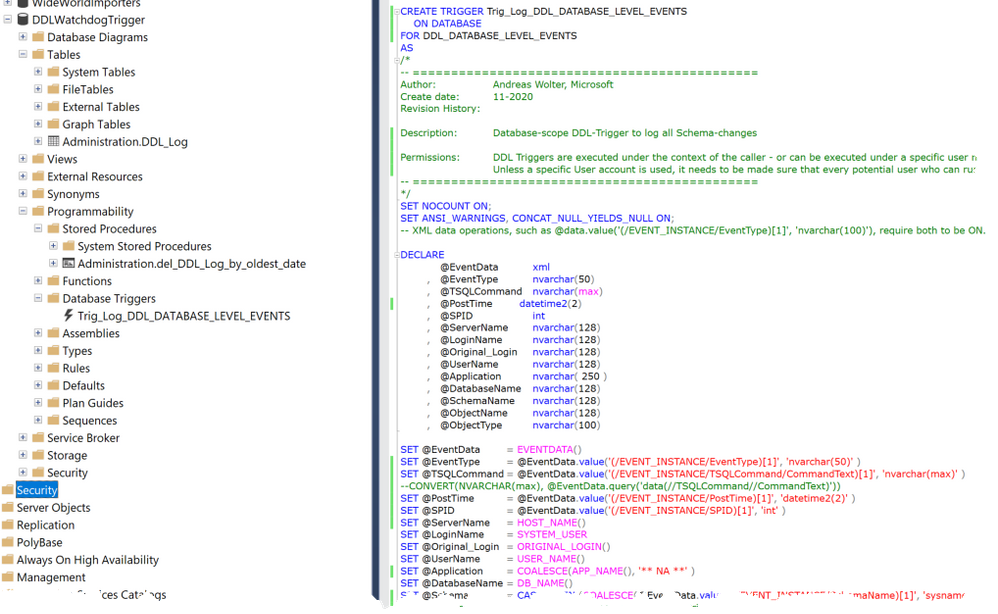
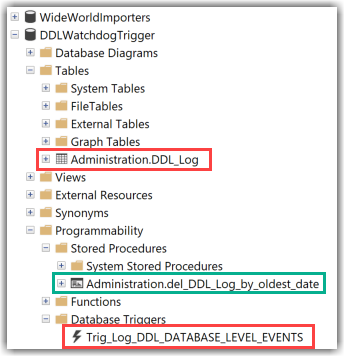
Attached you can find the T-SQL Script which will create the following objects:
- A Database-Level DDL Trigger
- A Table in a dedicated Schema
- A stored procedure to purge data from the table when needed.
Also, I include a Script with some queries to test.
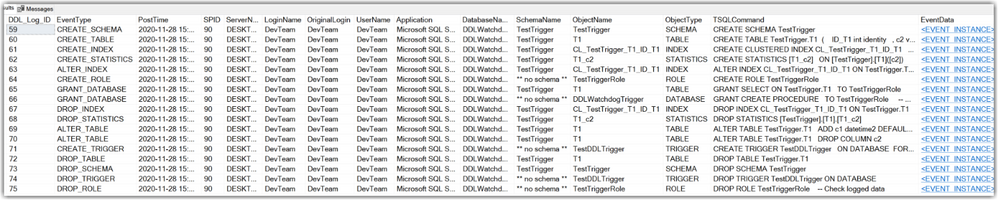
This is how the results in the table look like after running some DDL-commands:
Documentation-links:
I hope you find this script a useful example.
Let me know in the comments how you solve similar requirements in the comments below.
Andreas
by Contributed | Dec 2, 2020 | Technology
This article is contributed. See the original author and article here.
Security baseline for Microsoft Edge version 87
We are pleased to announce the enterprise-ready release of the security baseline for Microsoft Edge, version 87!
We have reviewed the new settings in Microsoft Edge version 87 and determined that there are no additional security settings that require enforcement. The settings from the Microsoft Edge version 85 package continue to be our recommended baseline. That baseline package can be downloaded from the Microsoft Security Compliance Toolkit.
Microsoft Edge version 87 introduced 15 new computer settings, 15 new user settings, and removed 1 setting. We have attached a spreadsheet listing the new settings to make it easier for you to find them.
As a friendly reminder, all available settings for Microsoft Edge are documented here, and all available settings for Microsoft Edge Update are documented here.
Please continue to give us feedback through the Security Baselines Discussion site or this post.
by Contributed | Dec 2, 2020 | Technology
This article is contributed. See the original author and article here.
We recently released the next preview/beta of the Microsoft Drivers for PHP for SQL Server, version 5.9.0-beta2. This preview/beta release has been built with PHP 7.3+ and tested on all supported platforms.
Note: We have changed from “preview” to “beta” versioning terminology in order to support the new Pickle distribution channel. Pickle supports PECL packages so the drivers for PHP will be available via both channels.
Notable items about this release include:
Added
- Support for PHP 8.0
- Support for Pickle
Removed
- Dropped support for PHP 7.2
Fixed
- Pull Request #1205 – minimized compilation warnings on Linux and macOS
- Pull Request #1209 – fixed a bug in fetching varbinary max fields as char or wide chars
- Issue #1210 – switched from preview to beta terminology to enable Pickle support
- Issue #1213 – the MACOSX_DEPLOYMENT_TARGET in config files caused linker errors in macOS Big Sur – Pull Request #1215
Limitations
- No support for inout / output params when using sql_variant type
- No support for inout / output params when formatting decimal values
- In Linux and macOS, setlocale() only takes effect if it is invoked before the first connection. Attempting to set the locale after connecting will not work
- Always Encrypted requires MS ODBC Driver 17+
- Only Windows Certificate Store and Azure Key Vault are supported. Custom Keystores are not yet supported
- Issue #716 – With Always Encrypted enabled, named parameters in subqueries are not supported
- Issue #1050 – With Always Encrypted enabled, insertion requires the column list for any tables with identity columns
- Always Encrypted limitations
Known Issues
- This preview release requires ODBC Driver 17.4.2 or above. Otherwise, a warning about failing to set an attribute may be suppressed when using an older ODBC driver.
- Connection pooling on Linux or macOS is not recommended with unixODBC < 2.3.7
- When pooling is enabled in Linux or macOS:
- unixODBC <= 2.3.4 (Linux and macOS) might not return proper diagnostic information, such as error messages, warnings and informative messages.
- due to this unixODBC bug, fetch large data (such as xml, binary) as streams as a workaround. See the examples here.
Survey
Let us know how we are doing and how you use our drivers by taking our pulse survey.
Install
- On Linux and macOS run the commands below:
sudo pecl install sqlsrv-5.9.0beta2
sudo pecl install pdo_sqlsrv-5.9.0beta2
- To download Windows DLLs for PHP 7.3 or above from the PECL repository, please navigate to SQLSRV or PDO_SQLSRV.
- Direct downloads for released binaries can also be found at the Github release tag.
David Engel
by Contributed | Dec 2, 2020 | Technology
This article is contributed. See the original author and article here.
OLE DB Driver 18.5 for SQL Server is released, bringing support for SQL Data Discovery and Classification and Azure Active Directory Service Principal authentication to the driver along with a number of fixes. The driver can be downloaded directly from Microsoft.
Changes:
Fixed:
| Issue | Details |
| Fixed an issue with embedded NUL characters. | Fixed a bug, which resulted in the driver returning an incorrect length of strings with embedded NUL characters. |
| Fixed a memory leak in the IBCPSession interface. | Fixed a memory leak in the IBCPSession interface involving bulk copy operations of sql_variant data type. |
| Fixed bugs, which resulted in incorrect values being returned for SSPROP_INTEGRATEDAUTHENTICATIONMETHOD and SSPROP_MUTUALLYAUTHENTICATED properties. | Previous versions of the driver returned truncated values of the SSPROP_INTEGRATEDAUTHENTICATIONMETHOD property. Also, in the ActiveDirectoryIntegrated authentication case, the returned value of the SSPROP_MUTUALLYAUTHENTICATED property was VARIANT_FALSE even when both sides were mutually authenticated. |
| Fixed a linked server remote table insert bug. | Fixed a bug which caused a linked server remote table insert to fail if the NOCOUNT server configuration option has been enabled. |
| Fixed the SSPROP_INIT_PACKETSIZE property default value handling | Fixed an unexpected error when the SSPROP_INIT_PACKETSIZE property was set to its default value of 0. For details about this property, see Initialization and Authorization Properties. |
| Fixed buffer overflow issues in IBCPSession | Fixed buffer overflow issues when using malformed data files. |
| Fixed accessibility issues | Fixed accessibility issues in the installer UI and the SQL Server Login dialog (reading content, tab stops). |
by Contributed | Dec 2, 2020 | Azure, Microsoft, Technology
This article is contributed. See the original author and article here.
There is something oddly fascinating about radio waves, radio communications, and the sheer amount of innovations they’ve enabled since the end of the 19th century.
What I find even more fascinating is that it is now very easy for anyone to get hands-on experience with radio technologies such as LPWAN (Low-Power Wide Area Network, a technology that allows connecting pieces of equipment over a low-power, long-range, secure radio network) in the context of building connected products.
“It’s of no use whatsoever […] this is just an experiment that proves Maestro Maxwell was right—we just have these mysterious electromagnetic waves that we cannot see with the naked eye. But they are there.“
— Heinrich Hertz, about the practical importance of his radio wave experiments
Nowadays, not only is there a wide variety of hardware developer kits, gateways, and radio modules to help you with the hardware/radio aspect of LPWAN radio communications, but there is also open-source software that allows you to
build and operate your very own network. Read on as I will be giving you some insights into what it takes to set up a full-blown
LoRaWAN network server in the cloud!
A quick refresher on LoRaWAN
LoRaWAN is a low-power wide-area network (LPWAN) technology that uses the LoRa radio protocol to allow long-range transmissions between IoT devices and the Internet. LoRa itself uses a form of chirp spread spectrum modulation which, combined with error correction techniques, allows for very high link budgets—in other terms: the ability to cover very long ranges!
Data sent by LoRaWAN end devices gets picked up by gateways nearby and is then routed to a so-called network server. The network server de-duplicates packets (several gateways may have “seen” and forwarded the same radio packet), performs security checks, and eventually routes the information to its actual destination, i.e. the application the devices are sending data to.
LoRaWAN end nodes are usually pretty “dumb”, battery-powered, devices (ex. soil moisture sensor, parking occupancy, …), that have very limited knowledge of their radio environment. For example, a node may be in close proximity to a gateway, and yet transmit radio packets with much more transmission power than necessary, wasting precious battery energy in the process. Therefore, one of the duties of a LoRaWAN network server is to consolidate various metrics collected from the field gateways to optimize the network. If a gateway is telling the network server it is getting a really strong signal from a sensor, it might make sense to send a downlink packet to that device so that it can try using slightly less power for future transmissions.
As LoRa uses an unlicensed spectrum and granted one follows their local radio regulations, anyone can freely connect LoRa devices, or even operate their own network.
My private LoRaWAN server, why?
The LoRaWAN specification puts a really strong focus on security, and by no means do I want to make you think that rolling out your own networking infrastructure is mandatory to make your LoRaWAN solution secure. In fact, LoRaWAN has a pretty elegant way of securing communications, while keeping the protocol lightweight. There is a lot of literature on the topic that I encourage you to read but, in a nutshell, the protocol makes it almost impossible for malicious actors to impersonate your devices (messages are signed and protected against replay attacks) or access your data (your application data is seen by the network server as an opaque, ciphered, payload).
So why should you bother about rolling your ow LoRaWAN network server anyway?
Coverage where you need it
In most cases, relying on a public network operator means being dependant on their coverage. While some operators might allow a hybrid model where you can attach your own gateways to their network, and hence extend the coverage right where you need it, oftentimes you don’t get to decide how well a particular geographical area will be covered by a given operator.
When rolling out your own network server, you end up managing your own fleet of gateways, bringing you more flexibility in terms of coverage, network redundancy, etc.
Data ownership
While operating your own server will not necessarily add a lot in terms of pure security (after all, your LoRaWAN packets are hanging in the open air a good chunk of their lifetime anyway!), being your own operator definitely brings you more flexibility to know and control what happens to your data once it’s reached the Internet.
What about the downsides?
It goes without saying that operating your network is no small feat, and you should obviously do your due diligence with regards to the potential challenges, risks, and costs associated with keeping your network up and running.
Anyway, it is now high time I tell you how you’d go about rolling out your own LoRaWAN network, right?
The Things Stack on Azure
The Things Stack is an open-source LoRaWAN network server that supports all versions of the LoRaWAN specification and operation modes. It is actively being maintained by The Things Industries and is the underlying core of their commercial offerings.
A typical/minimal deployment of The Things Stack network server relies on roughly three pillars:
- A Redis in-memory data store for supporting the operation of the network ;
- An SQL database (PostgreSQL or CockroachDB are supported) for storing information regarding the gateways, devices, and users of thje network ;
- The actual stack, running the different services that power the web console, the network server itself, etc.
The deployment model recommended for someone interested in quickly testing out The Things Stack is to use their Docker Compose configuration. It fires up all the services mentioned above as Docker containers on the same machine. Pretty cool for testing, but not so much for a production environment: who is going to keep those Redis and PostgreSQL services available 24/7, properly backed up, etc.?
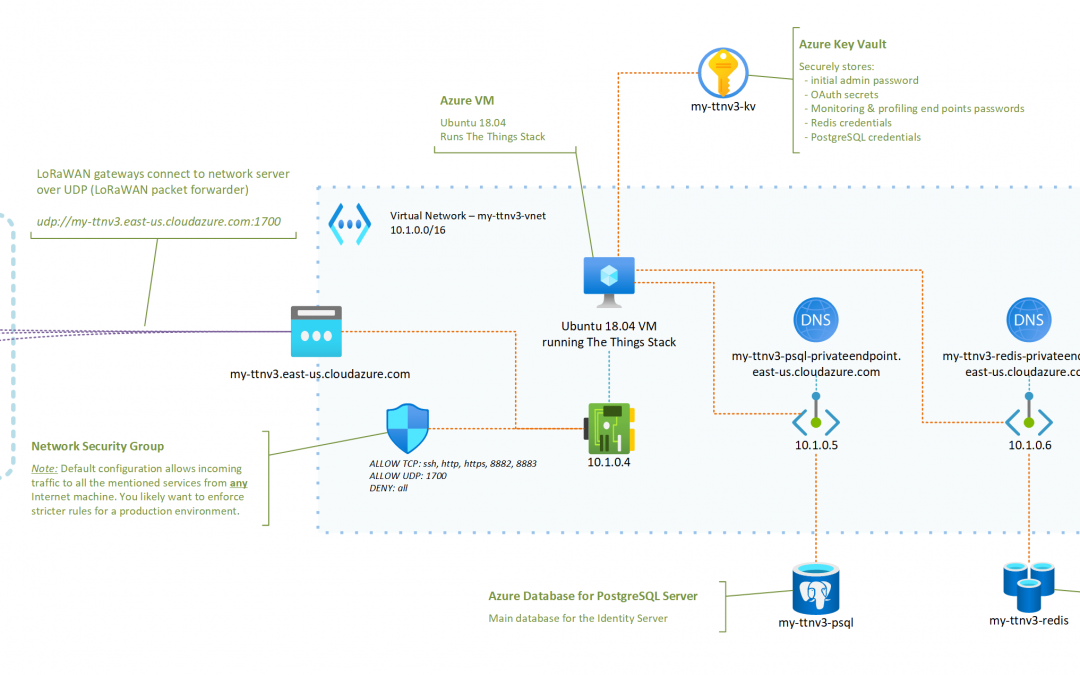
I have put together a set of instructions and a deployment template that aim at showing how a LoRaWAN server based on The Things Stack and running in Azure could look like.
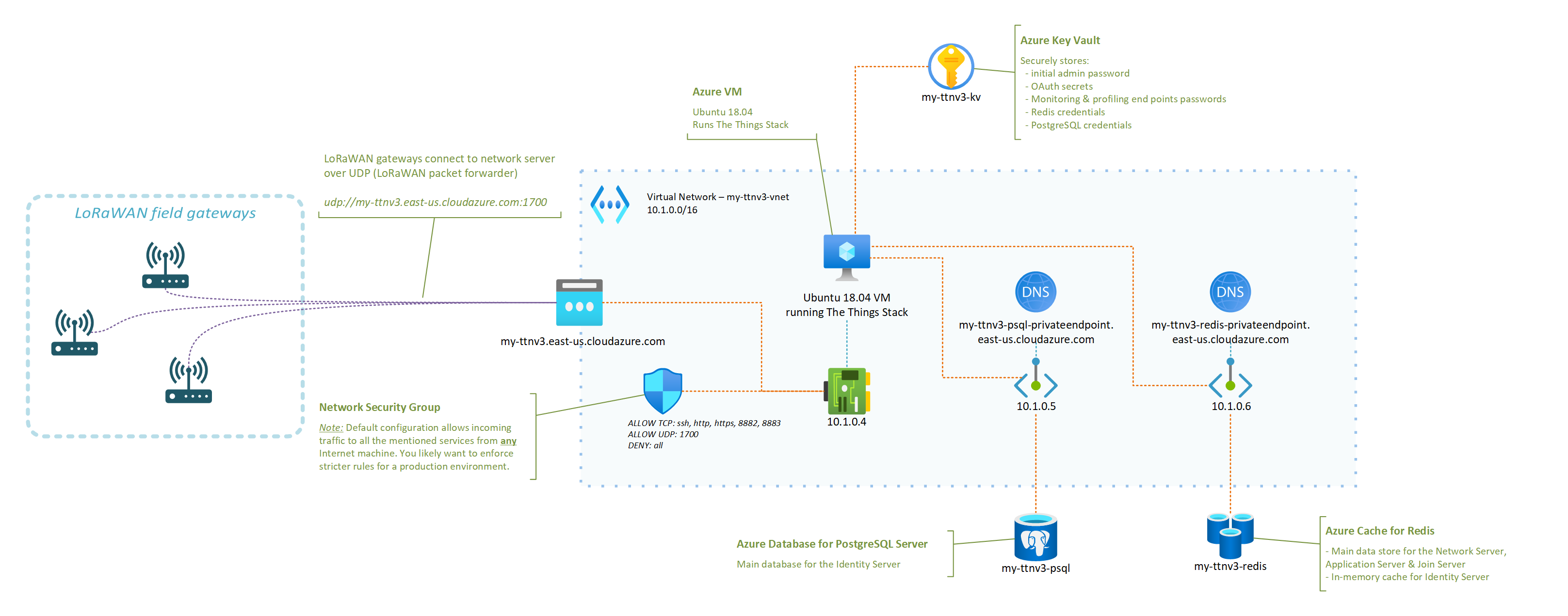
The instructions in the GitHub repository linked below should be all you need to get your very own server up and running!
In fact, you only have a handful of parameters to tweak (what fancy nickname to give your server, credentials for the admin user, …) and the deployment template will do the rest!
OK, I deployed my network server in Azure, now what?
Just to enumerate a few, here are some of the things that having your own network server, running in your own Azure subscription, will enable. Some will sound oddly specific if you don’t have a lot of experience with LoRaWAN yet, but they are important nevertheless. You can:
- benefit from managed Redis and PostgreSQL services, and not have to worry about potential security fixes that would need to be rolled out, or about performing regular backups, etc. ;
- control what LoRaWAN gateways can connect to your network server, as you can tweak your Network Security Group to only allow specific IPs to connect to the UDP packet forwarder endpoint of your network server ;
- completely isolate the internals of your network server from the public Internet (including the Application Server if you which so), putting you in a better position to control and secure your business data ;
- scale your infrastructure up or down as the size and complexity of the fleet that you are managing evolves ;
- … and there is probably so much more. I’m actually curious to hear in the comments below about other benefits (or downsides, for that matter) you’d see.
I started to put together an FAQ in the GitHub repository so, hopefully, your most obvious questions are already answered there. However, there is one that I thought was worth calling out in this post, which is: “How big of a fleet can I connect?“.
It turns out that even a reasonably small VM like the one used in the deployment template—2 vCPUs, 4GB of RAM—can already handle thousands of nodes, and hundreds of gateways. You may find this LoRaWAN traffic simulation tool that I wrote helpful in case you’d want to conduct your own stress testing experiments.
What’s next?
You should definitely expect more from me when it comes to other LoRaWAN related articles in the future. From leveraging DTDL for simplifying end application development and interoperability with other solutions, to integrating with Azure IoT services, there’s definitely a lot more to cover. Stay tuned, and please let me know in the comments of other related topics you’d like to see covered!
by Contributed | Dec 2, 2020 | Technology
This article is contributed. See the original author and article here.
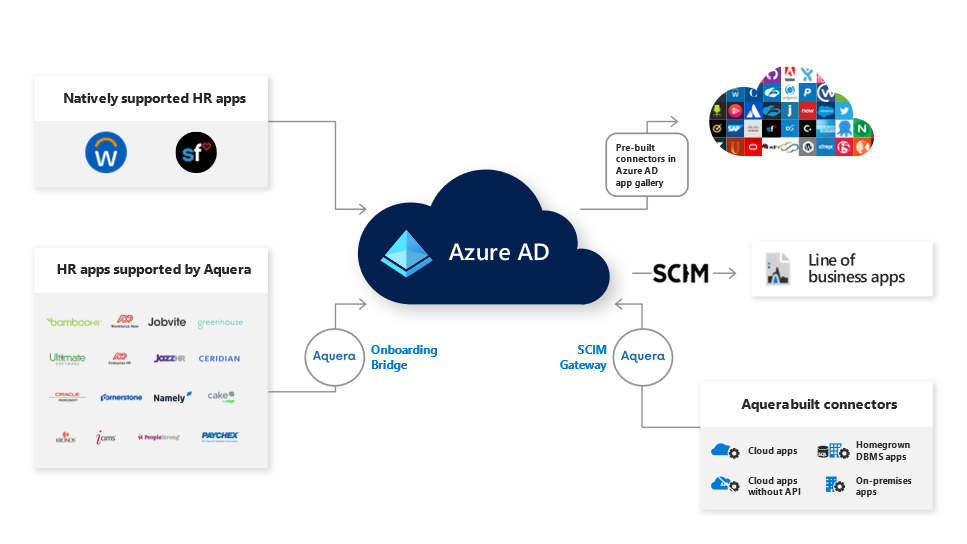
Today we’re announcing a partnership with Aquera to support more of your user provisioning needs. Through our partnership with Aquera, Azure AD or on-premises AD users can be mastered and continually synchronized from over 25 HR applications, and users can be provisioned to over 300 applications, broadening the number of applications you can use for both inbound and outbound user provisioning.
Automated user provisioning from HR apps with the Aquera HR Onboarding Bridge
We’ve heard from our customers that they want their cloud and on-premises HR applications integrated with Azure AD to simplify new employee onboarding and managing the identity lifecycle. Aquera expands Azure AD’s HR provisioning capabilities from two native integrations with Workday and SAP SuccessFactors to a broad array of HR applications.
With the Aquera HR Onboarding Bridge you can now integrate with over 25 HR applications to onboard and synchronize users to Azure AD or on-premises AD. The Aquera HR Onboarding Bridge allows you to import users and attributes in near real-time from multiple HR applications to Azure AD or on-premises AD as well as writeback any attribute back to the HR application.
We will continue to integrate more HR applications directly with Azure AD but for HR applications not currently supported, you can use the Aquera HR Onboarding Bridge. Applications supported with the Aquera HR Onboarding Bridge include ADP Enterprise HR, Bamboo HR, Ceridian Dayforce, Cornerstone OnDemand HR Suite, Namely, UltiPro and more. Here’s what Landmark Health had to say about their experience using the Aquera Onboarding Bridge with Azure AD:
“The ADP to Active Directory / Azure AD Sync Bridge from Aquera enables us to integrate our HR and IT processes by automating user provisioning from ADP Workforce Now to Active Directory. This platform is helping us power the end-to-end identity lifecycle; saving our HR and IT teams time, improving security and positively impacting employee productivity.” –JT Hedges, Director of HR Technologies at Landmark Health
Use Azure AD to manage and secure more applications with the Aquera SCIM Gateway
The Aquera SCIM gateway can help you automatically provision user accounts to an additional 300 cloud and on-premises applications such as Epic, SAP ECC and more. The Aquera SCIM Gateway provides out-of-the-box and built on-demand connectors that you can use to automatically create, update, or deactivate user accounts in target applications that are not already integrated with Azure AD.
To automate user provisioning from Azure AD to a specific application, we first recommend you use the 150+ provisioning connectors available in our Azure AD app gallery. For applications not yet available in our Azure AD app gallery, you can use the Aquera SCIM Gateway. We’ll continue to add more provisioning connectors directly in our Azure AD app gallery and you can request new ones to be added by submitting a request in our Application Network Portal.
Getting started:
To use Aquera’s HR Onboarding Bridge or the SCIM gateway with Azure AD, customers will need an Aquera subscription that can be obtained directly from Aquera. You can learn more about Aquera and these solutions through their Azure Marketplace listings:
As always, we’d love to hear from you. Please let us know what you think in the comments below or on the Azure AD feedback forum.
Best regards,
Sue Bohn
Partner Director of Program Management
Microsoft Identity Division
by Contributed | Dec 2, 2020 | Technology
This article is contributed. See the original author and article here.
Files are the building blocks of our work— helping us collaborate with others to construct the end results. Research documents, data spreadsheets, sales reports, presentations, product videos and other content-rich files are the components that hold up our final deliverable.
“Where can I find that file?” It’s a question we’ve all asked our colleagues, our teams, and, most often, ourselves countless times but not anymore. Today, we are happy to announce our previously disclosed feature Add to OneDrive is now generally available. Now, instead of figuring out the who sent us that file or remembering the original location of the shared content, we can swiftly get back to the files we need, directly within our OneDrive.
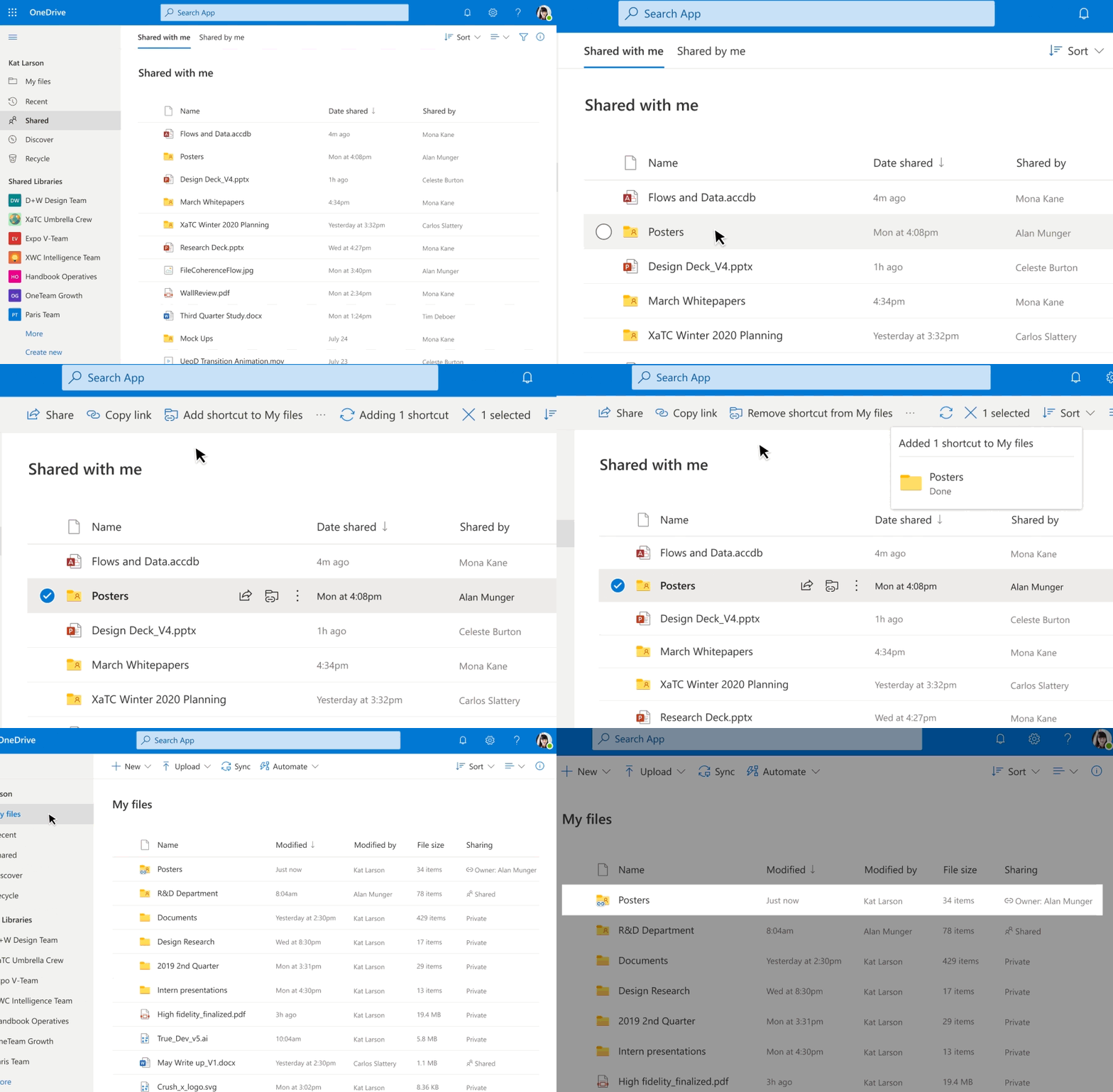
Add to OneDrive makes it easy to add a shortcut to the shared folders directly to our OneDrive. Shared folders include content that others have shared with us through their OneDrive, which surfaces in the “Shared with me“ view or content that is a part of a shared library in Microsoft Teams or SharePoint.
Add to OneDrive makes it easy to add a shortcut to the shared folders directly to our OneDrive
With Add to OneDrive, not only can we bring all our shared content into one place, but we can also work with the shared content with the same power and flexibility as if they are files we own. This means we can easily sync and access these folders from anywhere on any device; securely share and co-author files in the added folder; and stay up to date with @mentions, activity, and notifications. Added folders respect all existing policies, compliance, and security settings, too.
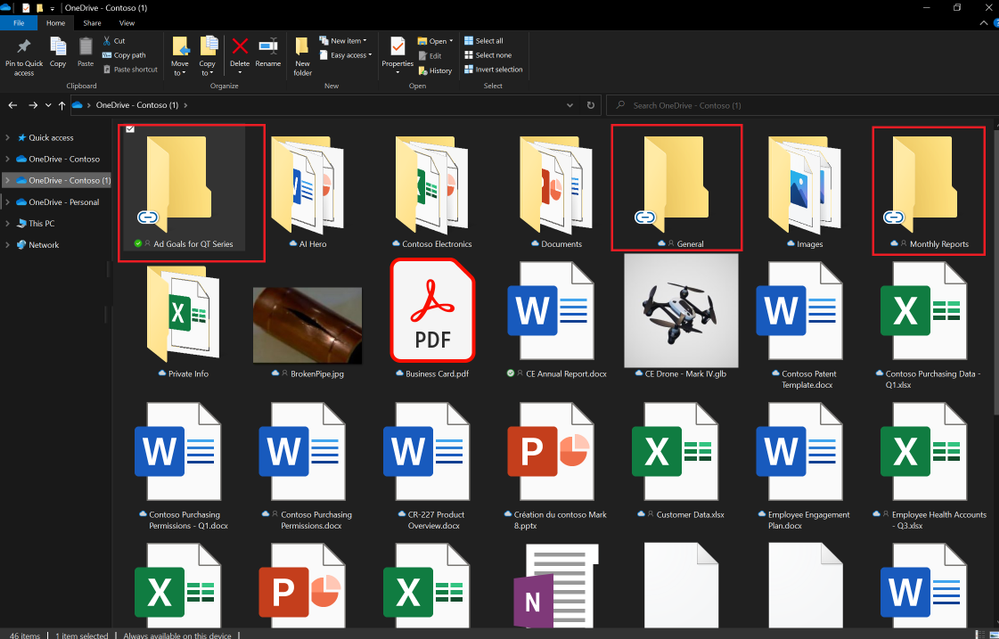 Added folders can be synced to your device for anytime anywhere access.
Since we’ve started rolling out Add to OneDrive to production, we have been humbled by the overwhelming response to the feature in terms of feedback and usage. OneDrive is a foundational product in our effort to power a seamless, connected files experience in Microsoft 365 and features like Add to OneDrive help us in achieving not only easy access to our important content but also efficient organization of files that matter the most to us.
Note: For the next few months, the admins will be able to disable Add to OneDrive for their organizations. This temporary choice is available to help admins drive any required change management with ease. We will inform you before removing this option to opt-out of the feature.
To learn more about the feature do visit the support article here.
Thanks for your time reading about OneDrive,
Ankita Kirti – OneDrive | Microsoft
by Contributed | Dec 2, 2020 | Technology
This article is contributed. See the original author and article here.
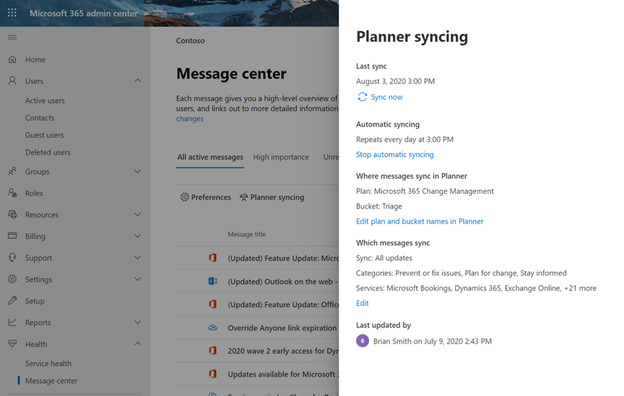
If you’re an IT admin, the Microsoft 365 Message center is your go-to place for news about upcoming feature releases, updates, and maintenance. But Message center posts can be hard to manage and easy to lose track of—and that’s where Microsoft Planner comes in. In September, we announced Planner integration with the Message center, which lets you sync updates from the Message center to a Planner plan. This means you can automatically create Planner tasks from Message center posts to help you manage upcoming changes and any related to-dos.
We’re pleased to announce that this integration is also available for all Microsoft 365 and Office 365 GCC customers. Availability for GCC High and DoD customers is tentatively scheduled for the early part of 2021.
You can learn more about Planner integration with Message center on our dedicated support page.
If you’d like to keep up with all things Planner, our Tech Community Blogs page is the perfect place for learning about the latest announcements. You can also leave us suggestions for improving your Planner experience on UserVoice. And if you’re new to Planner, our support page will help get you started.
by Contributed | Dec 2, 2020 | Technology
This article is contributed. See the original author and article here.
I wanted to take a moment to let you all know that Microsoft Tech Community has regular maintenance windows on Wednesdays and Fridays between midnight and 4am Pacific.
While we always try to ensure that our maintenance periods do not affect your ability to use the community, occasionally we must display our maintenance page. When this is necessary it may not always be possible to let you know in advance, but we will work to restore service as quickly as we can.
On December 4th, between midnight and 4am PT (7am – 11am UTC), we will be making some changes to the Microsoft Tech Community which will require a period of complete downtime. This should not last longer than 2 hours and anyone visiting the site during this time will get our usual Maintenance page.
On behalf of the Microsoft Tech Community, I would like to apologise for any inconvenience this may cause and do check back on Friday for an update on this maintenance period.
Allen Smith
Technical Lead
Microsoft Tech Community


Recent Comments