by Contributed | Dec 6, 2020 | Azure, Microsoft, Technology
This article is contributed. See the original author and article here.
Final Update: Monday, 07 December 2020 00:49 UTC
We’ve confirmed that all systems are back to normal with no customer impact as of 12/7, 00:32 UTC. Our logs show the incident started on 12/6, 23:46 UTC and that during the 46 minutes that it took to resolve the issue customers may have experienced data access issues as well as failed or misfired alerts for Azure Log Analytics in North Europe.
- Root Cause: The failure was due to an upgrade of one of our back end systems.
- Incident Timeline: 46 minutes – 12/6, 23:46 UTC through 12/7, 00:32 UTC
We understand that customers rely on Azure Log Analytics as a critical service and apologize for any impact this incident caused.
-Ian
Update: Monday, 07 December 2020 00:17 UTC
We continue to investigate issues within Log Analytics. Root cause is not fully understood at this time. Some customers may experience experience data access issues as well as failed or misfired alerts for Azure Log Analytics in North Europe. We are working to establish the start time for the issue, initial findings indicate that the problem began at 12/06 23:46 UTC. We currently have no estimate for resolution.
- Work Around: none
- Next Update: Before 12/07 03:30 UTC
-Ian
by Contributed | Dec 6, 2020 | Technology
This article is contributed. See the original author and article here.
Today, we wanted to share some important information on the progress of the Windows 10 Team 2020 Update which started to roll out on October 27, 2020.
First, we would like to thank all the customers who have taken advantage of the opportunity to update their Surface Hub 2S devices using either Windows Update or Windows Update for Business, and more importantly, we would like to thank them for the valuable feedback they have provided on the update process.
To date, we have 70% of all eligible devices in the Phase 1 and 2 regions updated. While the majority of these devices were updated successfully, we have received feedback from a small number of customers who have encountered post-install issues. To ensure that we deliver an update experience of the highest quality, we have taken two important actions:
- We have created a summary of the current list of known issues, solutions and remediations for transparency and to assist your team in diagnosing and resolving issues.
- We have paused the Windows Update phased releases. Phase 1 and 2 were released per the schedule below and Phase 3 and 4 will be paused for the remainder of 2020.
Customers in all regions can continue to update their Surface Hub 2S devices using Windows Update for Business or using the Bare Metal Recovery image. For specific instructions on using Windows Update for Business to manage updating your devices, please refer to the Surface Hub Admin Guide. We recommend reviewing the known issues list as part of building your update plan.
We know that most of our customers require the Windows 10 Team 2020 Update for their 1st-generation Surface Hubs (55” and 84”) to fully update their entire fleet of devices. We continue to make progress on finalizing this release and will share more details as they become available.
Keeping customers secure is our priority. Surface Hub was built with security at the forefront and we will be actively monitoring new threats for applicability on Surface Hub. For customers who are in a state of transition between Windows 10 Team Edition version 1703 and 20H2, we will ensure those customers remain secure by extending support for Windows 10 Team Edition version 1703 through March 16, 2021.
We are committed to delivering the best quality update experience across all Surface Hub devices and to provide transparency on changes to our currently published plan as required. To that end, we will provide another update on December 18, 2020.
by Contributed | Dec 6, 2020 | Azure, Microsoft, Technology
This article is contributed. See the original author and article here.
Symptoms:
Creating or importing database failed due to violation of policy “Azure SQL DB should avoid using GRS backup”
When creating database, you should specify the backup storage to be used, while the default is GRS (Globally redundant storage) and it violates the policy.
While importing database either using Azure Portal, RestAPI, SSMS or SQLPackage you cannot specify the backup storage as it’s not implemented yet.
This cause the import operation to fail with the following exception:
Configuring backup storage account type to ‘Standard_RAGRS’ failed during Database create or update.
Solution:
You can either
- create the database with local backup storage and then import to existing database.
- Use ARM Template to do both create the database with local backup storage and import the bacpac file.
Examples:
Option (A)
- Create the database with Azure Portal or by using T-SQL
CREATE DATABASE ImportedDB WITH BACKUP_STORAGE_REDUNDANCY = ‘ZONE’;
- Import the database using SSMS or SQLPackage
Option (B)
You may use ARM template to create database with specific backup storage and import the database at the same time.
This can be done with ARM template by using the extension named “import”
Add the following Json to your ARM template to your database resource section and make sure you provide the values for the parameters or set the values hardcoded in the template
The needed information is:
Storage Account key to access the bacpac file
Bacpac file URL
Azure SQL Server Admin Username
Azure SQL Server Admin Password
"resources": [
                {
                    "type": "extensions",
                    "apiVersion": "2014-04-01",
                    "name": "Import",
                    "dependsOn": [
                        "[resourceId('Microsoft.Sql/servers/databases', parameters('ServerName'), parameters('databaseName'))]"
                    ],
                    "properties": {
                        "storageKeyType": "StorageAccessKey",
                        "storageKey": "[parameters('storageAccountKey')]",
                        "storageUri": "[parameters('bacpacUrl')]",
                        "administratorLogin": "[parameters('adminUser')]",
                        "administratorLoginPassword": "[parameters('adminPassword')]",
                        "operationMode": "Import"
                    }
                }
            ]
by Contributed | Dec 6, 2020 | Technology
This article is contributed. See the original author and article here.
I want to share the following example in how you can use the “computed column” in some cases, to enhance your queries performance.
On AdventureWorks 2019 sample database, there are two tables TransactionHistory and TransactionHistoryArchive (I changed the type of productID on TransactionHistoryArchive from int to varchar), the tables definitions are :
CREATE TABLE [Production].[TransactionHistory](
	[TransactionID] [int] IDENTITY(100000,1) NOT NULL,
	[ProductID] [int] NOT NULL,
	[ReferenceOrderID] [int] NOT NULL,
	[ReferenceOrderLineID] [int] NOT NULL,
	[TransactionDate] [datetime] NOT NULL,
	[TransactionType] [nchar](1) NOT NULL,
	[Quantity] [int] NOT NULL,
	[ActualCost] [money] NOT NULL,
	[ModifiedDate] [datetime] NOT NULL,
CONSTRAINT [PK_TransactionHistory_TransactionID] PRIMARY KEY CLUSTERED
(
	[TransactionID] ASC
)


CREATE TABLE [Production].[TransactionHistoryArchive](
	[TransactionID] [int] NOT NULL,
	[ProductID] [varchar](10) NOT NULL,
	[ReferenceOrderID] [int] NOT NULL,
	[ReferenceOrderLineID] [int] NOT NULL,
	[TransactionDate] [datetime] NOT NULL,
	[TransactionType] [nchar](1) NOT NULL,
	[Quantity] [int] NOT NULL,
	[ActualCost] [money] NOT NULL,
	[ModifiedDate] [datetime] NOT NULL,
CONSTRAINT [PK_TransactionHistoryArchive_TransactionID] PRIMARY KEY CLUSTERED
(
	[TransactionID] ASC
)
Like in some situation in real environments, the ProductID column type in one of the tables is different than the other, usually due to a bad design.
I changed the ProductID from int to varchar to simulate the issue, and on both tables I created the index that covers the ProductID column:
create index ix_transaction_history_productid on [Production].[transactionhistory] (productid)

create index ix_transaction_historyArchive_productid on [Production].[transactionhistoryarchive] (productid) include (transactiondate)
Even though, if you are running an inner join query like the one below:
SELECT H.ProductID, a.TransactionDate
  FROM  [Production].[TransactionHistory] H  inner join [Production].[TransactionHistoryArchive] A
 on H.productid= A.productid where h.productid = 2
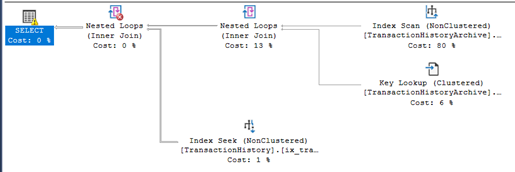
The execution plan is using index scan and not index seek.
SQL Server parse and compile time:
CPU time = 0 ms, elapsed time = 0 ms.
(450 rows affected)
Table ‘TransactionHistory’. Scan count 10, logical reads 20, physical reads 0, page server reads 0, read-ahead reads 0, page server read-ahead reads 0, lob logical reads 0, lob physical reads 0, lob page server reads 0, lob read-ahead reads 0, lob page server read-ahead reads 0.
Table ‘TransactionHistoryArchive’. Scan count 1, logical reads 641, physical reads 0, page server reads 0, read-ahead reads 0, page server read-ahead reads 0, lob logical reads 0, lob physical reads 0, lob page server reads 0, lob read-ahead reads 0, lob page server read-ahead reads 0.
SQL Server Execution Times:
CPU time = 31 ms, elapsed time = 30 ms.
Another example, if you run an inner join without the where clause:
SELECT H.ProductID, a.TransactionDate
  FROM  [Production].[TransactionHistory] H  inner join [Production].[TransactionHistoryArchive] A
 on H.productid= A.productid
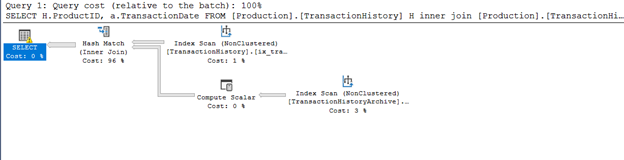
there will be index scans for both tables (Index Scan and Hash Join, hash is used usually when the two tables are Huge and unsorted.):
If you select the table by two different values (different types) , numeric and text values, the query optimizer will choose a scan operation if the parameter type of the predicate is different than the column:
SELECT A.TransactionDate
  FROM   [Production].[TransactionHistoryArchive] A
where A.productid = 2

SELECT A.TransactionDate
  FROM   [Production].[TransactionHistoryArchive] A
where A.productid = '2'
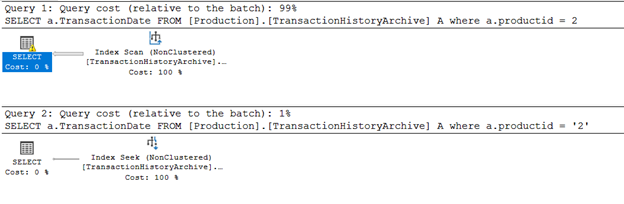
Obviously, the solution is to change the data type of column ProductID in one of the tables to avoid table scans and type conversion.
But you must put in consideration the following:
- The impact of the change on application and ETL packages. Some will fail and some will need to be updated or become having a slower performance.
A small change on database side may cause a lot of code modifications and updates on Applications.
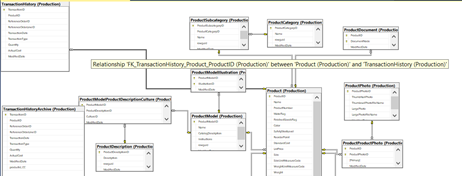
- The database design, like table relations and foreign keys..etc.:
- The bad design and overall performance issues will appear more when the applicationdatabase is live and tables are growing and become huge in size, in testing phases it may not appear.
But you may consider another solution, it will require a small update on database side and mostly requires no code update on TSQL scripts or on application:
- Create a new persisted computed column on the table:
alter table [Production].[transactionhistoryarchive] add productid_CC as convert(int, productid) persisted
- Create an index on the new computed column:
create index ix_transaction_historyArchive_productid_CC on [Production].[transactionhistoryarchive] (productid_CC) include (transactiondate)
with the help of the computed column and it is index, lets try the same queries without doing any changes on them:
SELECT H.ProductID, a.TransactionDate
  FROM  [Production].[TransactionHistory] H  inner join [Production].[TransactionHistoryArchive] A
 on H.productid= A.productid where h.productid = 2
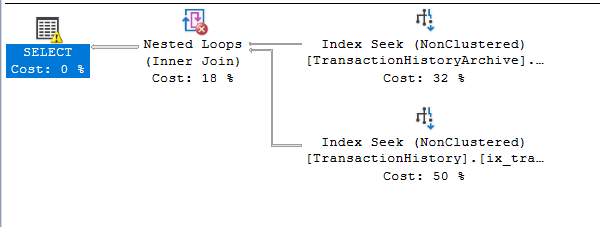
the execution plan, the query optimized is using index seek for both tables, and number of logical reads decreased:
SQL Server parse and compile time:
CPU time = 0 ms, elapsed time = 0 ms.
(450 rows affected)
Table ‘TransactionHistory’. Scan count 10, logical reads 20, physical reads 0, page server reads 0, read-ahead reads 0, page server read-ahead reads 0, lob logical reads 0, lob physical reads 0, lob page server reads 0, lob read-ahead reads 0, lob page server read-ahead reads 0.
Table ‘TransactionHistoryArchive’. Scan count 1, logical reads 3, physical reads 0, page server reads 0, read-ahead reads 0, page server read-ahead reads 0, lob logical reads 0, lob physical reads 0, lob page server reads 0, lob read-ahead reads 0, lob page server read-ahead reads 0.
SQL Server Execution Times:
CPU time = 0 ms, elapsed time = 0 ms.
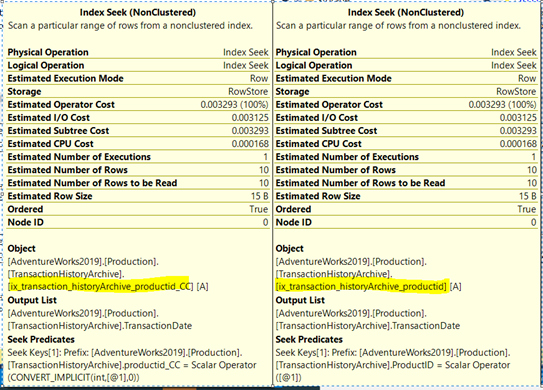
Now the query optimizer is using index seeks; it is smart enough to implicitly use the index created on the computed column even if the computed column ProductID_CC is not explicitly mentioned.
It will be used for queries that have productID in the where clause or use it in physical operations like joins.
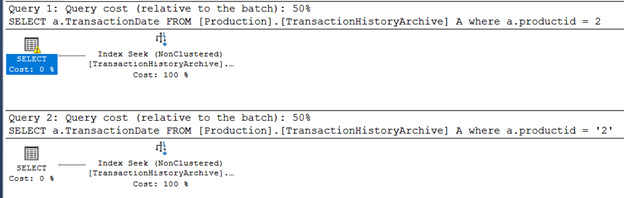
And again If you select the table by two different values (different types) , numeric and text values, the query optimizer will choose the seek operation:
SELECT A.TransactionDate
  FROM   [Production].[TransactionHistoryArchive] A
where A.productid = 2

SELECT A.TransactionDate
  FROM   [Production].[TransactionHistoryArchive] A
where A.productid = '2'
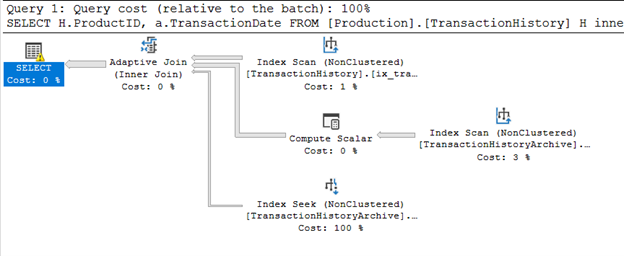
And the inner join query without where clause, now is using adaptive join instead of Hash:
SELECT H.ProductID, a.TransactionDate
  FROM  [Production].[TransactionHistory] H  inner join [Production].[TransactionHistoryArchive] A
 on H.productid= A.productid
Note that to create an index on computed column, the column must be deterministic:
https://docs.microsoft.com/en-us/sql/relational-databases/indexes/indexes-on-computed-columns?view=sql-server-ver15
by Contributed | Dec 6, 2020 | Azure, Microsoft, Technology
This article is contributed. See the original author and article here.
Final Update: Sunday, 06 December 2020 19:44 UTC
We’ve confirmed that all systems are back to normal with no customer impact as of 12/6, 19:30 UTC. Our logs show the incident started on 12/6, 18:08 UTC and that during the 1 hour 22 minutes that it took to resolve the issue customers in Australia Central may have experienced data access issues which could have resulted in missed or false alerts.
- Root Cause: The failure was due to an upgrade to a back end service that failed. The system was rolled back to mitigate the issue.
- Incident Timeline: 1 Hours & 22 minutes – 12/6, 18:08 UTC through 12/6, 19:30 UTC
We understand that customers rely on Azure Log Analytics as a critical service and apologize for any impact this incident caused.
-Ian
Update: Sunday, 06 December 2020 19:17 UTC
Root cause has been isolated to an update to a backend service in Australia Central which is impacting data access. To address this issue we are rolling back the update. Some customers may experience data access issues along with failed or misfired alerts.
- Work Around: none
- Next Update: Before 12/06 22:30 UTC
-Ian

by Contributed | Dec 5, 2020 | Technology
This article is contributed. See the original author and article here.
If you’ve built your application on Postgres, you already know why so many people love Postgres.
And if you’re new to Postgres, the list of reasons people love Postgres is loooong—and includes things like: 3 decades of database reliability baked in; rich datatypes; support for custom types; myriad index types from B-tree to GIN to BRIN to GiST; support for JSON and JSONB from early days; constraints; foreign data wrappers; rollups; the geospatial capabilities of the PostGIS extension, and all the innovations that come from the many Postgres extensions.
But what to do if your Postgres database gets very large?
What if all the memory and compute on a single Postgres server can’t meet the needs of your application?
In this post, let’s walk through when you might want to scale out Postgres horizontally. Specifically, when to use Hyperscale (Citus), a built-in deployment option in our Azure Database for PostgreSQL managed service. But first: what exactly is Hyperscale (Citus)?
What is Hyperscale (Citus) in Azure Database for PostgreSQL?
Citus is an open source extension to Postgres that transforms Postgres into a distributed database.
Citus uses sharding and replication to distribute your Postgres tables and queries across multiple machines—parallelizing your workload and enabling you to use the memory, compute, and disk of a multi-machine database cluster.
Hyperscale (Citus) is the integration of the Citus extension with our managed Postgres service on Azure. When you go to provision an Azure Database for PostgreSQL server on the Azure portal, you’ll see Hyperscale (Citus) is one of the built-in deployment options available to you. (See Figure 1 below.) Under the covers, the Citus open source extension is at the core of Hyperscale (Citus).
In short: Hyperscale (Citus) = managed Postgres service on Azure + Citus
Why would you want to use Hyperscale (Citus) to scale out Postgres on Azure?
- Performance: Because your single node Postgres is not performant enough and cannot keep up with the peaks in your workload.
- Scale: Because your application is growing fast and you want to prepare your Postgres deployment to scale out before you run into performance issues, before you have to send your customers apology letters for poor performance.
- Migrating off Oracle: Because you’re migrating off Oracle and you’ve determined that a scaled-out Postgres deployment will best meet your application’s database requirements.
The beauty of Citus is that as far as your app is concerned, you’re still running on top of Postgres. So if you decide to migrate from a single Postgres node to Citus, the good news is you don’t have to re-architect your application. You can generally make the transition to Citus with minimal changes.1 After all, an application running on Citus is still running on Postgres—just, distributed Postgres.
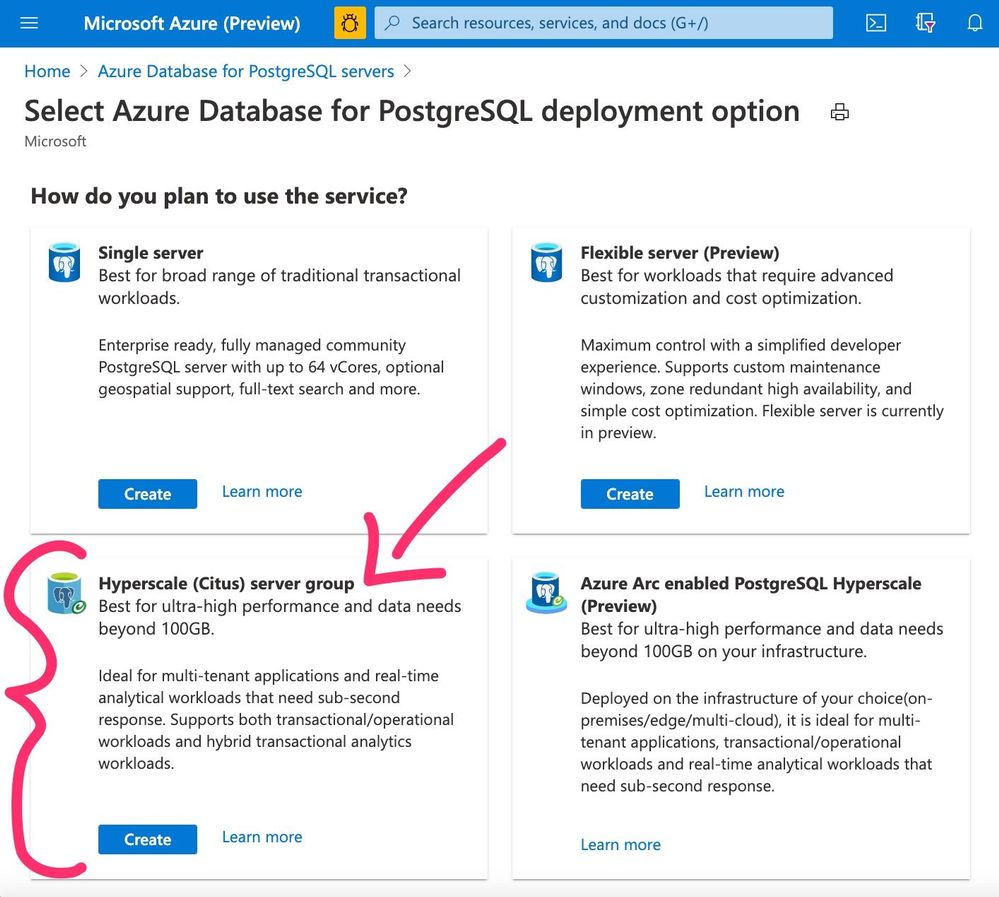 Figure 1: Screenshot of the Azure Portal’s provisioning page for Azure Database for PostgreSQL, showcasing the deployment options, including Hyperscale (Citus).
Why use a managed database service?
Why do so many people run their applications on top of a managed database service?
The primary reason is that by outsourcing database operations, you can focus your time on your application—in terms of new features, bug fixes, refactoring, and adding the kinds of capabilities that make your app more competitive.
I know it seems easy to set up a Postgres server, and it is. You can probably stand one up in 10 minutes or less. But setting up a resilient, production-ready Postgres server takes time and effort. “Production-ready” means you have to architect for backups, high availability, upgrades, hardware issues, security, and monitoring. And even if you have managed your own production Postgres server in the past—managing a distributed Citus cluster is a bit more complicated.
What do I mean? One example is backups. To manage your own backups in Postgres, you have to figure out where to back up to, how to make sure your backup storage is resilient, and how frequently you should backup to meet your RPO (Recovery Point Objective) and RTO (Recovery Time Objective)—and then you have to find a way to automate your backups, too. To manage backups in a distributed Citus cluster, you have to do even more, including making sure you have consistent versions of backups across all your Postgres nodes—hence, more complicated.
A managed database service can make all of this so much easier.
In addition to wanting to outsource the work of managing Postgres in production, another reason why teams use a managed service like Azure Database for PostgreSQL—is time.
Time is, after all, our scarcest resource. Think about it: if you’re lucky, you have about 30K days on this planet.
I point this out because so often when people talk about the value of managed database services, the benefit of a PaaS that often gets overlooked is the opportunity cost. What else could you be doing with your time instead of managing database infrastructure?
Signs you could benefit from Hyperscale (Citus)
Ok, so now you know the primary reasons to scale out Postgres with Hyperscale (Citus) are 1) scale and 2) performance. Often both. But problems with performance and scale manifest in different ways depending on the nature of your workloads. So how do you know if you could benefit from Hyperscale (Citus)?
Here are the 7 signs we often see among teams adopting Hyperscale (Citus):
- Database Size is Big: Your database has gotten big, with 100+ GBs of data.2
- Application is Growing: Your application is growing fast in terms of things like number of users, amount of data, amount of concurrent activity, and rollout of new features in your application that add to the workload for your database. Or perhaps you are planning to grow 10X, so you want to prepare for scale now, in advance of the onslaught.
- Queries are Getting Slow: Your queries are taking longer and longer. Especially with concurrency. (Note: some of you might run into query performance problems even when you don’t yet have a lot of data. This often happens if you have queries that are compute intensive.)
- Nearing Resource Limits of Single Node: Your database resources like memory, CPU, and disk IOPs are getting full—perhaps you’re already on the 2nd largest box, starting to encroach on the limits of what a single Postgres node can do. Think about it: currently, the 2nd-largest Esv3 series VM on Azure has 48 cores with 384GB of memory. By instead provisioning just a 2-node Hyperscale (Citus) cluster with max cores, you can get a total of 128 cores and 864 GB of RAM—plus the ability to add more nodes to your Hyperscale (Citus) cluster when you need to, with zero downtime for the subsequent shard rebalancing.
- Affinity for Postgres: You love Postgres. Your team loves Postgres. Or maybe your team is already skilled with Postgres. We also see some users who stick with Postgres because of the Postgres extensions—such as PostGIS for geospatial use cases and HyperLogLog as an approximation algorithm.
- Want to buy, and not to build: You want your team to work on the features & capabilities of your application—not on sharding at the application layer, with all of its long-term maintenance costs and headaches.
- Want the Benefits of PaaS: You want to adopt a managed database service. And you don’t want to manage hardware, backups, failures, resiliency, updates, upgrades, security, and scaling for a cluster of database servers. If you’ve checked some/many of the boxes above—then adopting Citus as part of a managed database service might be a good fit.
4 examples of common Hyperscale (Citus) use cases
You might be wondering: Is my use case a good fit for Hyperscale (Citus)? Here are 4 example use cases—not an exhaustive list, just a few examples—where Hyperscale (Citus) can help you to improve the scale and performance of your application.
One key characteristic for the first 3 of these use cases is that with Hyperscale (Citus) you can handle a mixture of both transactional & analytical workloads within the same database—at scale. To see how Hyperscale (Citus) performs for mixed workloads (sometimes called HTAP, or hybrid transactional analytical processing), check out this ~15 minute Hyperscale (Citus) demo. The demo uses the HammerDB benchmark to simulate a transactional workload and uses rollups to speed up analytics queries.3
4 examples of use cases that are a fit for Hyperscale (Citus):
- Real-time operational analytics (including time series)
- Multi-tenant SaaS applications
- IOT workloads (that need UPDATEs & JOINs)
- High-throughput transactional apps
Real-time operational analytics (including time series)
One of our users described Citus as insanely fast for real-time analytics.
But what does that mean? When we talk about “real-time analytics”, we’re talking about applications that power customer-facing analytics dashboards. Some example applications include things like web and mobile analytics; behavioral analytics via funnel analysis and segmentation; anomaly and fraud detection; and geospatial analytics. The data being analyzed is generally event data or time series data; this time component is why some of these are also called “time series” use cases.
When I first started working with Citus, the key insight for me was to realize that the “customer-facing” aspect is what drives the “real-time” requirement of these dashboards. Because these analytics dashboards are customer-facing, and because the customers are not willing to wait for coffee (and certainly not overnight!) to get responses to their queries, the data needs to be ingested and made available in the dashboard for analysis in real-time. Or at least, in human real-time, which is usually single digit seconds, or sub-second, or even milliseconds.
Here’s a quick checklist you can use to see if you have a real-time analytics workload that is a good fit for Hyperscale (Citus). If you check most of these boxes—not necessarily all, just most—then the answer is YES.
HYPERSCALE (CITUS) CHECKLIST FOR REAL-TIME OPERATIONAL ANALYTICS:
- Interactive analytics dashboard: You have an interactive analytics dashboard that helps your users visualize and query data.
- Lots of concurrent activity: You have lots of users querying the dashboard at the same time (hence: concurrently.) And ingestion and querying are also concurrent—your users need to query the data while you’re simultaneously ingesting new data in real-time.
- Demanding performance expectations: Your users need sub-second response times for queries (sometimes millisecond response times) even when handling hundreds of analytical queries per second.
- Data needs to be “fresh”: This is the “real-time” bit. Your dashboard needs to continuously ingest and write new data (aka “fresh” data), often at very high throughput to keep up with a stream of events as they happen. Waiting a few days, overnight, or even a few minutes to query data is just not OK for your users.
- Large stream of data: Your dashboard needs to ingest and analyze a large stream of data, with millions of events (sometimes billions of events) per day.
- Event or time series data: Your data captures the many things that have happened (events) along with their associated timestamps, and you want to analyze the data. Some people call this event data, others call it timeseries data.
Notable customer stories from teams using Citus for analytics use cases
- Helsinki Region Transport Authority: This technical story from the Helsinki Region Transport Authority (HSL) shows what scaling out Postgres horizontally with Hyperscale (Citus) can do. The team at HSL has a pretty interesting application that needed to log real-time location data for thousands of vehicles, match it with timetable data, and display it on a map—in order to enforce SLAs and make sure the people of Helsinki weren’t stranded with unreliable service or unpredictable wait times.
- Windows team at Microsoft: Another proof point? The story of the Windows team here at Microsoft who use Citus to scale out Postgres on Azure in order to assess the quality of upcoming Windows releases. The team’s analytics dashboard runs on Citus database clusters with 44 nodes, tracking over 20K types of metrics from over 800M devices (and growing!), fielding over 6 million queries per day, with hundreds of concurrent users querying the dashboard at the same time.
Oh, and there is a comprehensive technical use case guide for real-time analytics dashboards you might find super useful.
Multi-tenant SaaS applications
Many Software as a Service (SaaS) applications are multi-tenant. And it turns out that multi-tenant applications can be a really good fit for sharding with Citus, because the customer ID (sometimes called the `tenant_id`, or `account_id`) makes for a natural distribution key.4 The notion of tenancy is already built into your data model!
Multi-tenant data models generally require your database to keep all tenant data separate from each other. But if you’re a SaaS provider, you often need to run queries across all the tenants, to understand the behavior of your application and what features are working well or not. Sharding your Postgres database with something like Hyperscale (Citus) gives you the best of both worlds: your customer’s data is kept isolated from other customer data and yet you can still monitor/observe how your application is behaving across all of your customers’s activities.
Here’s a checklist to determine if your SaaS application is a good fit for Hyperscale (Citus). If you check most of these items (you don’t need to check them all) then your SaaS app is likely a fit for Citus.
HYPERSCALE (CITUS) CHECKLIST FOR MULTI-TENANT SAAS
- Tenants need to be kept separate: Your SaaS customers only need to read/write their own data and should not have access to data from your other SaaS customers.
- Application is growing fast: Your application is growing fast, in terms of number of users, size of database, or amount of activity—hence the number of monthly active users (MAU) or daily active users (DAU) is increasing.) More specifically, your database is 100s of GBs and growing, your SaaS app has 1000s of customers, you have 100,000+ users (or more.) But these numbers don’t mean that Hyperscale (Citus) is only for large enterprise customers—rather, these numbers mean that Hyperscale (Citus) is for SaaS companies who need to scale, who need to manage growth.
- Performance issues, especially with concurrency: You’re starting to run into performance issues during times with lots of concurrency. Perhaps you find yourself turning off some of your analytics features during peak workloads in order to ensure that critical customer transactions are handled right.
- Will soon hit resource limits of a single Postgres server: You’re running on a single Postgres server today but it’s the next-to-largest instance size—and you realize you will soon hit the resource limits of a single Postgres server.
- Need for cross-tenant queries: You don’t want to give up the ability to run cross-tenant queries for internal monitoring purposes—therefore you don’t want to start using multiple separate databases for different tenants, nor do you want to give up the ability to do JOINS by flipping to a NoSQL database system.
- Want to keep relational database semantics: You don’t want to give up foreign keys for referential integrity, nor give up things like database constraints or secondary indexes. So the cost of migrating to a NoSQL data store to get scale is just not worth it to you.
If docs are what you’re looking for, there is a comprehensive technical use case guide for Multi-tenant applications that should be useful to you.
IOT workloads (that need UPDATEs & JOINs)
It’s been over 20 years since the term “Internet of Things” (IOT) became part of our lexicon. So long that it’s hard to remember what the world was like before we had sensors everywhere, from doorbells to manufacturing lines to elevators to windmills.
Bottom line all these devices generate a ton of data these days, and all that data needs to be monitored and analyzed. Often with these IOT workloads, the sharding key (aka the distribution column in Citus) ends up being the device ID.
Some IOT applications focus only on the most up-to-date working state of each device (what is the current temperature? when was the last login?) Those IOT applications use UPDATEs in the database, where current state of things (“last known values”) can be continuously updated. Other IOT applications need to store and query historic events (how many device failures happened in the last 3 hours?) and can use append-only databases.
Enabling your IOT application to query both historic events and the current working state of the device (how many failures happened when last known temperature was greater than 90 degrees?) makes for a powerful experience. That means your database needs to handle both updates and JOINs—between, say, your devices table and your events table. Some of the different types of IOT queries you might have:
- Aggregate queries, across devices: what’s the total # of devices with a particular attribute or state?
- Activity queries for a device: get all the current and historical activity for a given device?
- Hierarchical queries: show all the disconnected devices in Building 7
- Geospatial queries: show all the devices within a given geographic fenced area?
Why Hyperscale (Citus) for these IOT workloads? Well, first because a relational database like Postgres gives you relational features such as JOINs. And, because Hyperscale (Citus) lets you ingest and query concurrently and at scale. If you’ve read through the other use cases in this post, then you probably see the pattern: by distributing Postgres across multiple servers, Hyperscale (Citus) enables you to parallelize your queries and take advantage of the combined compute, memory, and disk resources of all the servers in the Hyperscale (Citus) server group.
How do you know if your IOT application is a good fit for Hyperscale (Citus)? Here’s a checklist you can start with:
HYPERSCALE (CITUS) CHECKLIST FOR IOT WORKLOADS
- Large numbers of devices: we’ve seen customers with tens of thousands of devices, as well as millions of devices.
- Need real-time, high-throughput ingest: In order to manage what’s going on with your fleet of devices, you need the data now. Which means you need a database that can ingest and write with high throughput and low-latency. Example: 2 billion measurements per hour, which equates to roughly ~500,000 measurements ingested per second.
- Need concurrency: You may have hundreds of users who need to run queries on this IOT data at the same time.
- Query response times in the single digit seconds—or milliseconds: Whether you are managing wind farms or manufacturing devices or fleets of smart meters, one sign that your IOT application could benefit from Hyperscale (Citus) is when your users need their query responses (on fresh data) in the single digit seconds or even in milliseconds. Now. Not in a half hour.
- Large database size: Is your database is 100 GB or more (and growing)? We see IOT customers with database sizes from hundreds of GBs to tens of TBs.
High-throughput transactional apps
Some transactional applications are so big in terms of the sheer amount of data, the number of transactions, and the performance expectations—that a single Postgres server cannot meet their needs. But these applications still need the consistency of transactions (not eventual consistency, but strong consistency.) We call these types of applications “high-throughput transactional applications” or “high-throughput OLTP.” It’s not a perfect name, I know—and truth be told some of our developers use a different name to describe this type of workload: “high-performance CRUD.”
Because many of these workloads involve semi-structured data such as JSON—and because Postgres is well known for its JSON capabilities—these high-throughput transactional apps are a good fit for Postgres. Particularly now that Postgres can be distributed with Hyperscale (Citus).
What are the signs that your high-throughput transactional application might be a good fit for Hyperscale (Citus)? Here’s a checklist. If you can check most of these boxes—not necessarily all, just some—then your app is likely a good fit.
HYPERSCALE (CITUS) CHECKLIST FOR HIGH-THROUGHPUT TRANSACTIONAL APPS:
- Primarily transactional application: Your app is primarily transactional in nature, with creates, reads, updates, and deletes—without the need for many complex queries.
- Semi-structured data like JSON: The objects you’re managing are semi-structured formats like JSON (which Postgres has robust support for.)
- Single key: Your workload is mostly based on a single key, which you just have to create, read, update, and delete. (Therefore the majority of your transactions will only need to go to a single shard in the distributed Citus cluster.)
- High throughput: Your throughput requirements are demanding and cannot be met by a single database server, on the order of 1000s or 10s of thousands of transactions per second.
- Need relational database features: Some teams use NoSQL key-value stores for these types of semi-structured data-intensive workloads—but if you find yourself unwilling to go to NoSQL because there are relational database features you need, then Hyperscale (Citus) might be a good fit. Examples of key relational database features you might want to retain are strong consistency (not that eventual consistency compromise), foreign keys for referential integrity, triggers, and secondary indexes.
Is Hyperscale (Citus) a good fit for you & your application?
When it comes to delivering performance and scale to data-intensive apps, the phrase “it depends” is often bandied about. For good reason. There is no panacea, and it’s always about tradeoffs. I’m hoping the walk through some of the Hyperscale (Citus) use cases—and the checklists—make it easier for you to answer the question of “when to use Hyperscale (Citus) to scale out Postgres?”
In summary, Hyperscale (Citus) gives you the performance and scalability superpowers of the Citus extension combined with all the PaaS benefits of a managed Postgres database service.
And if you’re wondering when you should not use Hyperscale (Citus), well, there are definitely situations where Hyperscale (Citus) is not a fit. The most obvious scenario is when a single Postgres server is sufficient to meet the needs of your application, i.e. when your database fits in memory, performance is snappy, and you’re not faced with the challenges of growth. Another scenario that is not a fit: offline data warehousing—where you run batch offline data loads with lots of complex and custom analytics queries, where you need to analyze TBs of data in a single query, where your data model is not very sharding friendly because you have so many different types of tables and no two tables use the same key. Another scenario where Hyperscale (Citus) is not a fit: where your analytics app doesn’t need to support concurrency.
So if Postgres is your poison and you need more performance and scale than you can eek out of a single Postgres server, you should consider Hyperscale (Citus). Especially if your application is a real-time analytics dashboard, multi-tenant SaaS application, IOT application, or high-throughput OLTP app.
Ways to learn more about Hyperscale (Citus)
To figure out if Hyperscale (Citus) on Azure Database for PostgreSQL is right for you and your app, here are some ways to roll up your sleeves and get started. Since many of you have different learning modes, I’m including a mix of doing, reading, and watching options below. Pick what works best for you!
- Download Citus open source packages to try it out locally
- Read the Citus open source docs at docs.citusdata.com, especially:
- Try some tutorials for multi-tenant SaaS and real-time analytics dashboards.
- Watch this ~15 min Hyperscale (Citus) demo from SIGMOD about scaling out Postgres to achieve high performance transactions & analytics
- Create a Hyperscale (Citus) server group on Azure Database for PostgreSQL to try it out. (And if you don’t yet have an Azure subscription, just create a free Azure account first.)
Oh, and if you want to stay connected, you can follow our @AzureDBPostgres and @citusdata accounts on Twitter. Plus, we ship a monthly technical Citus Newsletter to our open source community. It’s pretty useful. Here’s an archive of past Citus Newsletters: you can sign up here, too.
If you need help figuring out whether Hyperscale (Citus) is a good fit for your workload, you can always reach out to our Hyperscale (Citus) product team—the team that helped to create Hyperscale (Citus)—via email at Ask AzureDB for PostgreSQL. We’d love to hear from you. :)
 Figure 2: The Citus Elicorn is the mascot for our Citus open source project. Called an “elicorn” because it is part elephant and part unicorn, the Elicorn is a mixture of the Postgres project’s elephant mascot and the magical unicorn. Why a unicorn? Because Citus is kind of magical in how we transform Postgres into a distributed database.
Footnotes:
- To distribute Postgres with Citus, there are 2 primary things you need to take care of up front: a) decide on your sharding strategy i.e. what your distribution column will be, and b) make changes to implement that sharding strategy, which could involve updating some of your tables to add the sharding/distribution key on some tables, or could involve deciding which tables to distribute and which tables should become reference tables, or perhaps changing some foreign keys. YMMV but for many people, the amount of change is minimal—and the amount of change is substantially less than trying to shard at the application layer. ↩
- What constitutes a large database size for you may not be large for another application. Your mileage may vary. Sometimes even small’ish Postgres databases have such compute-intensive queries that they outgrow the resources of even the beefiest Postgres servers. ↩
- Marco Slot (lead of our Citus engineering team) created the demo and I did all the video editing on the demo bits, so I can vouch for the usefulness of this Hyperscale (Citus) demo. ↩
- There are a few different names for this puppy. Distribution key, distribution column, sharding key—they all refer to the same thing. Choosing the distribution column is one of the most important decisions you make when you decide to distribute Postgres with Citus, because the distribution column determines how Citus will distribute the data (how Citus will shard the data) across nodes in the cluster. ↩
by Contributed | Dec 5, 2020 | Azure, Microsoft, Technology
This article is contributed. See the original author and article here.
Final Update: Saturday, 05 December 2020 14:50 UTC
We’ve confirmed that all systems are back to normal with no customer impact as of 12/05, 14:14 UTC. Our logs show the incident started on 12/05, 12:02 UTC and that during the 2 hours & 2minutes that it took to resolve the issue. Customers using Application Insights might have experienced intermittent metric data gaps and incorrect alert activations in US Gov regions.
- Root Cause: The failure was due to configuration issue in application insights .
- Incident Timeline: 2 Hours & 2 minutes – 12/05, 12:02 UTC through 12/05, 14:14 UTC
We understand that customers rely on Application Insights as a critical service and apologize for any impact this incident caused.
-Deepika
by Contributed | Dec 4, 2020 | Technology
This article is contributed. See the original author and article here.
News this week includes:
Announcing LAMBDA: Turn Excel formulas into custom functions
Microsoft Teams calling devices for every user
Introducing the Admin Simplified View
@George Hepworth is our member of the week, an excellent contributor in the Access community.
View the Weekly Roundup for Nov 30-Dec 4th in Sway and attached PDF document.
https://sway.office.com/s/uH9B1lYsXjZei8a6/embed

by Contributed | Dec 4, 2020 | Technology
This article is contributed. See the original author and article here.
We’re excited to report that Tasks in Teams for the Teams mobile app is rolling out to all users in non-government clouds. The rollout starts today and will be completed in about a week. You don’t need to download anything new to use the Tasks mobile app: simply select the More (…) option in the Teams mobile app interface on your iOS or Android device and tap Tasks. The Tasks mobile app will automatically appear in that menu once it’s available to you.
Tasks in Teams, which became generally available in October, lets you manage your team tasks from Planner and individual tasks from To Do alongside all your chats, meetings, and files in Teams. If you’ve added Tasks in Teams to your Teams desktop client, it’ll automatically appear in your Teams mobile app, too.
The Tasks mobile app comes with all of the same tools you use to manage Planner and To Do tasks on desktop, including features like attachments and labels in Planner task cards and checklist items in To Do tasks. The biggest difference is how you see your tasks: whereas the Tasks app for desktop offers four different views (Board, Charts, Schedule, and List), the Tasks mobile app surfaces your tasks in the List view only. On a mobile device, this makes it easier to quickly skim all your tasks at once and click into those assignments for more details.
Of course, you can create, edit, and complete tasks in the Tasks mobile app, and you’ll receive and prompt all the familiar notifications, too. All changes in the mobile app are reflected in both Tasks in Teams on desktop and Planner or To Do, depending on where the task lives.
Just like Tasks in Teams isn’t replacing Planner, the Tasks mobile app isn’t replacing the Planner mobile app for iOS and Android, either. Each serves its own purpose: we’d suggest using the Tasks mobile app when you need a compact overview of all your tasks, and the Planner mobile app when you want to manage your collaborative plans in the Board, Schedule, and Charts views.
Don’t see Tasks in your Teams mobile app yet? Hang tight. The app will be rolling out this week and next, so by mid-December everyone should see it.
We’re gearing up for several announcements in the coming months, so keep checking our Tech Community Blogs site for all the latest news. And if you have feedback or ideas for Tasks in Teams or Planner, leave us a note on UserVoice.
Bonus coverage! Have you noticed the darker side of Planner mobile yet? In case you missed it, dark mode for the Planner mobile app was released in October. Dark mode will turn the app’s background back and the text white, which can be easier on the eyes, especially at night.
There’s no setting in the iOS app to enable dark mode; instead, the Planner mobile app will inherit whatever display option you’ve chosen for your phone. To switch to dark mode, select Settings > Display & Brightness > Dark.
The same is true on Android, but you can also turn on dark mode in the Planner mobile app itself. To change displays for your phone; select Settings > Display > Theme > Dark. To change displays in the app, tap Settings > Theme > Dark.
by Contributed | Dec 4, 2020 | Azure, Microsoft, Technology
This article is contributed. See the original author and article here.
Most of the developers may want to stop their MySQL instance over the weekend or by end of business day after development or testing to stop billing and save cost.
Azure Database for MySQL Single Server & Flexible Server (in Preview) supports stop/start of standalone mysql server. These operations are not supported for servers which are involved in replication using read replica feature. Once you stop the server, you will not be able to run any other management operation by design.
In this blog post, I will share how can you use PowerShell Automation runbook to stop or start your Azure Database for MySQL Single Server automatically based on time-based schedule. While the example below is for Single Server, the concept can be easily be extended to Flexible Server deployment option too when PowerShell support is available.
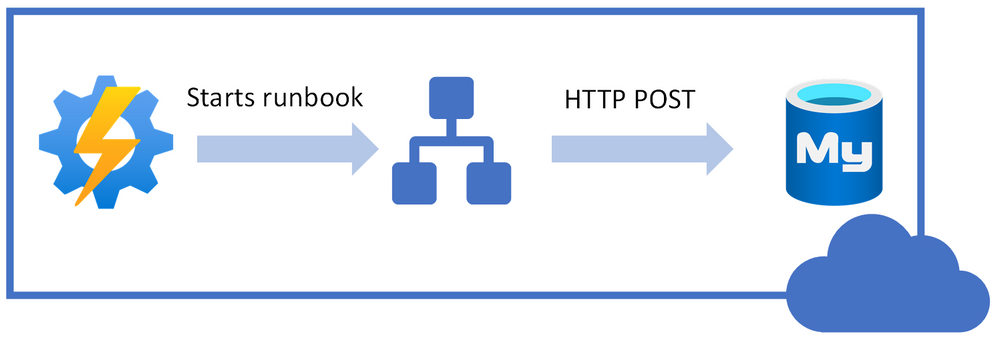
Following is high-level idea of performing stop/start on Azure Database for MySQL Single Server using REST API call from PowerShell runbook.
I will be using Azure Automation account to schedule the runbook to stop/start our Azure Database MySQL Single Server.
You can use the steps below to achieve this task:
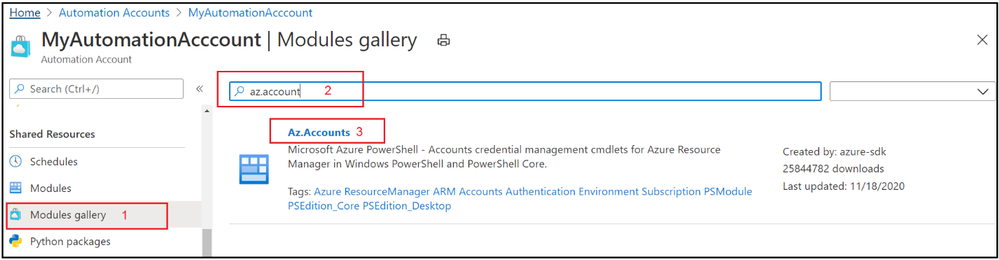
1. Navigate to the Azure Automation Account and make sure that you have Az.Accounts module imported. If it’s not available in modules, then import the module first:
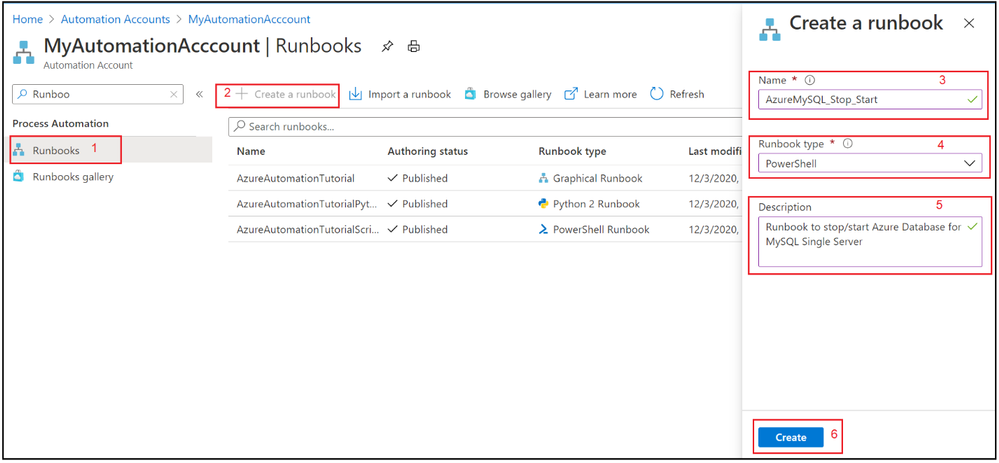
2. Select Runbooks blade and create a new PowerShell runbook.
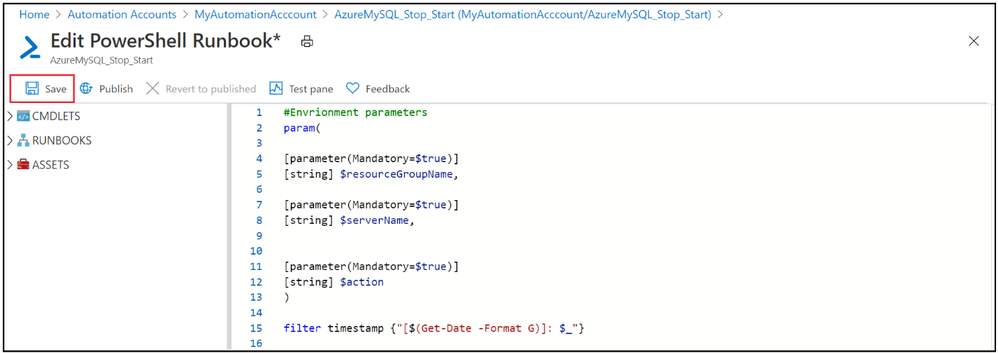
3. Copy & Paste the following PowerShell code to newly created runbook.
#Envrionment parameters
param(

[parameter(Mandatory=$true)]
[string] $resourceGroupName,

[parameter(Mandatory=$true)]
[string] $serverName,


[parameter(Mandatory=$true)]
[string] $action
)

filter timestamp {"[$(Get-Date -Format G)]: $_"}

Write-Output "Script started." | timestamp

#$VerbosePreference = "Continue" ##enable this for verbose logging
$ErrorActionPreference = "Stop"

#Authenticate with Azure Automation Run As account (service principal)
$connectionName = "AzureRunAsConnection"
try
{
    # Get the connection "AzureRunAsConnection "
    $servicePrincipalConnection=Get-AutomationConnection -Name $connectionName

    "Logging in to Azure..."
    Add-AzAccount `
        -ServicePrincipal `
        -TenantId $servicePrincipalConnection.TenantId `
        -ApplicationId $servicePrincipalConnection.ApplicationId `
        -CertificateThumbprint $servicePrincipalConnection.CertificateThumbprint | Out-Null
}
catch {
    if (!$servicePrincipalConnection)
    {
        $ErrorMessage = "Connection $connectionName not found."
        throw $ErrorMessage
    } else{
        Write-Error -Message $_.Exception
        throw $_.Exception
    }
}
Write-Output "Authenticated with Automation Run As Account."  | timestamp

$startTime = Get-Date
Write-Output "Azure Automation local time: $startTime." | timestamp


# Get the authentication token
$azContext = Get-AzContext
$azProfile = [Microsoft.Azure.Commands.Common.Authentication.Abstractions.AzureRmProfileProvider]::Instance.Profile
$profileClient = New-Object -TypeName Microsoft.Azure.Commands.ResourceManager.Common.RMProfileClient -ArgumentList ($azProfile)
$token = $profileClient.AcquireAccessToken($azContext.Subscription.TenantId)
$authHeader = @{
    'Content-Type'='application/json'
    'Authorization'='Bearer ' + $token.AccessToken
}
Write-Output "Authentication Token acquired." | timestamp

##Invoke REST API Call based on specified action

if($action -eq 'stop')
{

        # Invoke the REST API
        $restUri='https://management.azure.com/subscriptions/6ff855b5-ee6d-4bc2-a901-adf5569842e1/resourceGroups/'+$resourceGroupName+'/providers/Microsoft.DBForMySQL/servers/'+$serverName+'/'+$action+'?api-version=2020-01-01'
        $response = Invoke-RestMethod -Uri $restUri -Method POST -Headers $authHeader
        Write-Output "$servername is getting stopped." | timestamp
}
else
{
        # Invoke the REST API
        $restUri='https://management.azure.com/subscriptions/6ff855b5-ee6d-4bc2-a901-adf5569842e1/resourceGroups/'+$resourceGroupName+'/providers/Microsoft.DBForMySQL/servers/'+$serverName+'/'+$action+'?api-version=2020-01-01'
        $response = Invoke-RestMethod -Uri $restUri -Method POST -Headers $authHeader
        Write-Output "$servername is Starting." | timestamp
 }

Write-Output "Script finished." | timestamp
4. Save the runbook
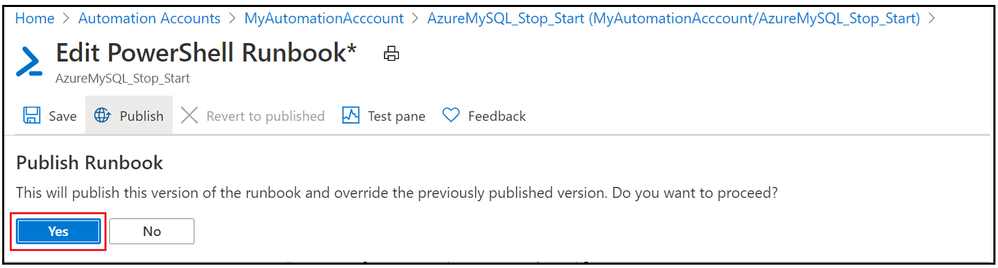
5. Publish the PowerShell runbook
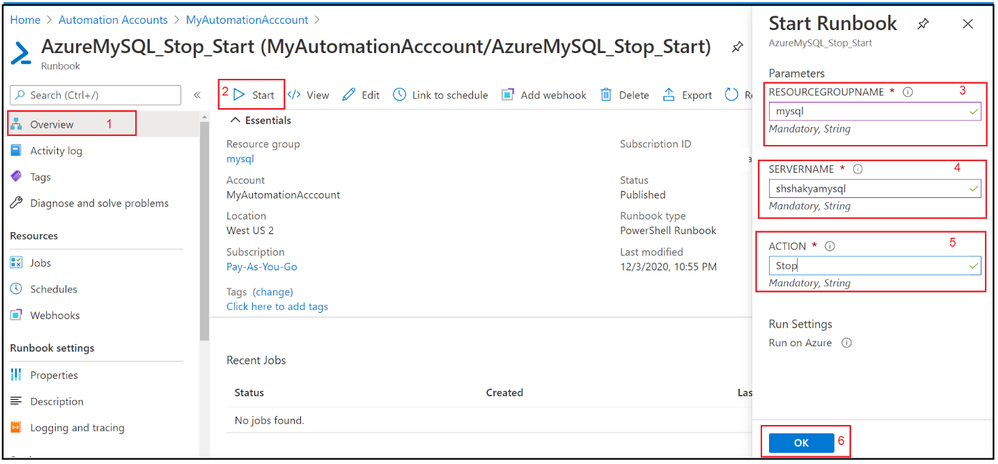
6. Test the PowerShell runbook by entering mandatory field.
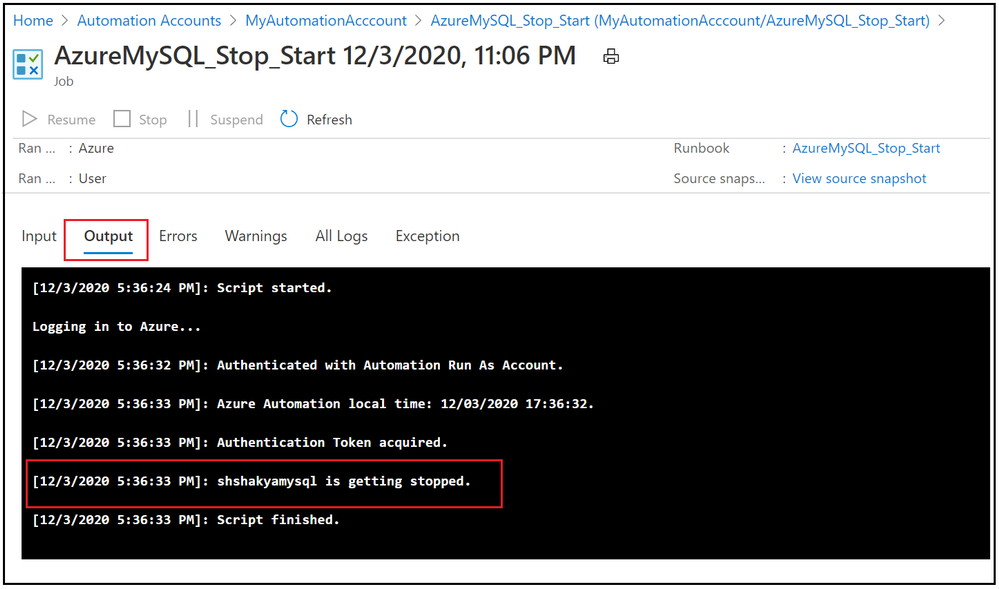
7. Verify the job output:
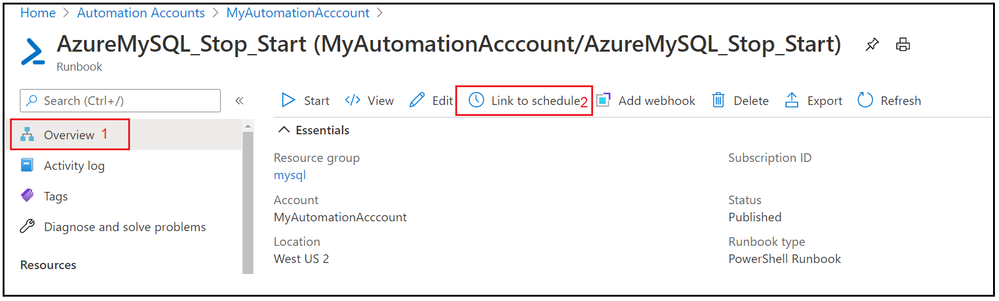
8. Now we have seen that Runbook worked as expected, lets add the schedule to stop and start Azure Database for MySQL Single Server over the weekend. Go to Overview tab and click on Link to schedule
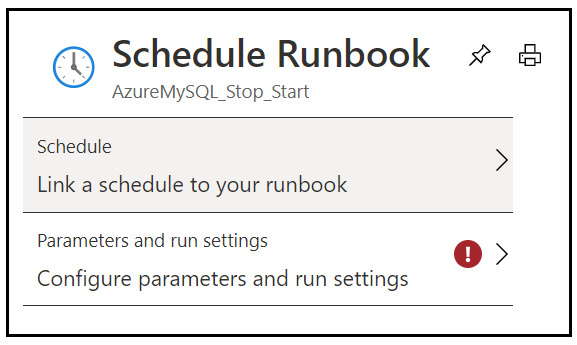
9. Add schedule and runbook parameters.
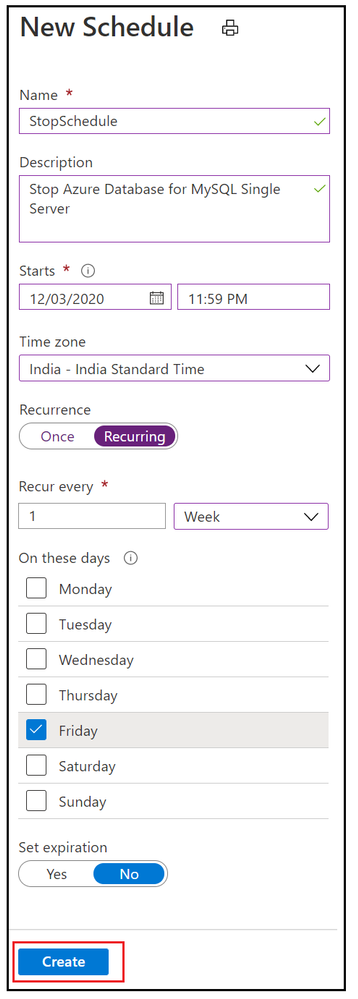
10. Add weekly stop schedule on every Friday night.
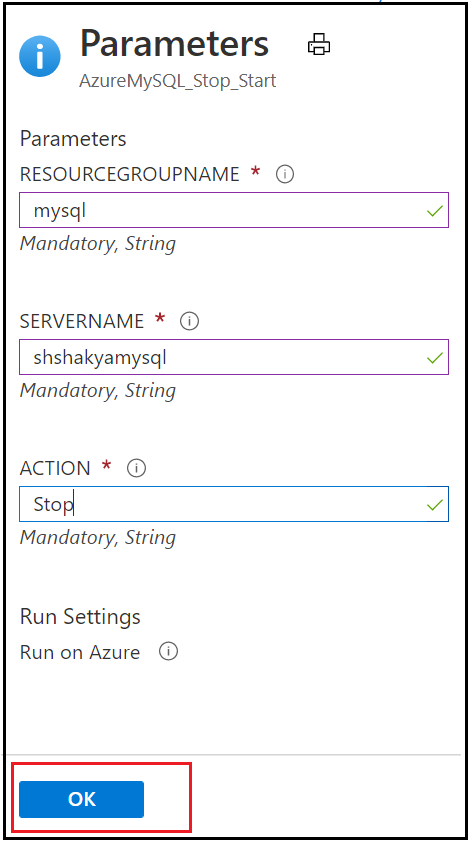
11. Add the parameters to stop Azure Database for MySQL Single Server.
12. Similarly add a weekly schedule for Starting Azure Database for MySQL Single Server on every Monday morning and verify these stop/start schedule by navigating to Runbook’s Schedules blade.
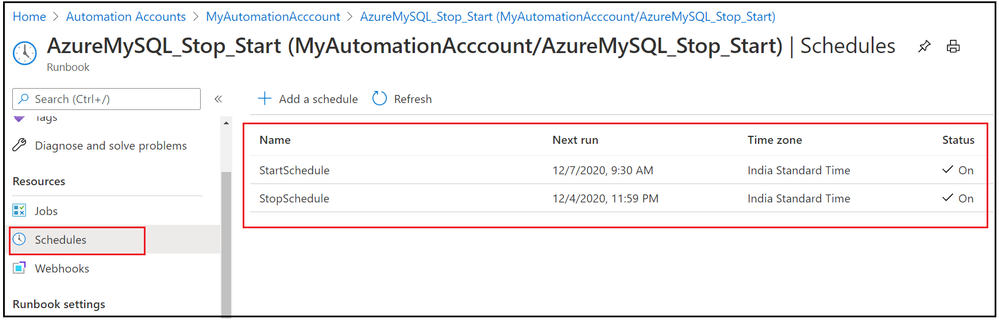
In this activity, we have added two schedules to stop and start Azure Database for MySQL Single Server based on given action.
I hope this will be helpful to you to save cost and hope you enjoyed this learning !!!


Recent Comments