by Contributed | Dec 9, 2020 | Technology
This article is contributed. See the original author and article here.
The Azure Purview Data Map is an intelligent graph that describes all the data across your data estate. You can start creating this intelligent graph by extracting metadata from hybrid data stores. But, typically, this metadata as discovered from the individual data stores is defined in isolation and hence, inconsistent and not complete. This is where classifications and classification rules within the Azure Purview Data Map comes in.
Azure Purview enables you to automatically classify data at scale by defining rules. Classifying data in a unified way enables both data discovery and compliance use cases.
Here are a few key concepts to keep in mind as you get started with classifications:
- Classifications can be used to describe type of data that exist in data asset or schema. In other words, customers can identify the content of data asset or schema using classifications.
- Classifications can be used to describe the phases in their data prep processes (raw zone, landing zone etc.) and assign the classifications to specific assets to mark where they are in the process.
- Classifications can also be used to set priorities and develop a plan to allocate budget and resources wisely to achieve security and compliance needs of an organization.
Now that you have a frame for the kinds of classifications that you want to apply to your data, lets take a quick tour of the capabilities themselves:
Classifications
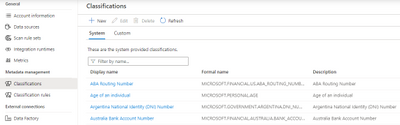
Azure Purview supports 100+ built-in classifications that range from credit cards, account numbers through a wide range of types such as government IDs, location data and more. Customers can create custom classifications. Then using classification rules and custom classification rules, customers can apply these classifications at scale.
Azure Purview makes use of Regex patterns and bloom filters to classify data. These classifications are then associated with the metadata discovered in the Azure Purview Data Catalog.
You can apply the system classifications on a scan either manually or via the system classification rules. Similarly, you can manually apply custom classifications to a scan or via the custom classification rules. In addition, system classifications can also be applied to a scan using custom classification rules. Note that the manually applied classifications are not overridden by subsequent scans.
Classification Rules
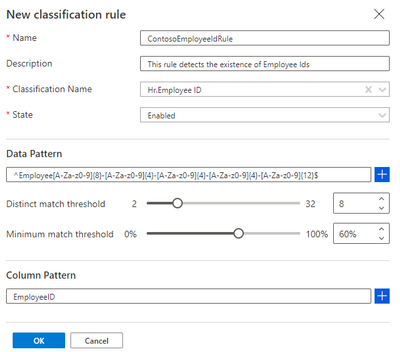
Azure Purview provides a set of default classification rules, which are used by the scanning processes to automatically detect certain data types. The default classification rules are non-editable. However, you can define your own custom classification rules. Every classification rule will be tied to a classification.
For every classification rule, a data pattern with a regular expression representing the data stored in the asset field can be specified. We also set thresholds to reduce false positives. Also, a column pattern with a regular expression representing the column names that should be matched can also be specified while creating a classification rule.
Who can view and manage classifications and classification rules?
- Purview Data Readers can view all classifiers and classification rules.
- Purview Data Curators can create, update, and delete custom classifiers and classification rules.
Conclusion
Create an Azure purview account today and start understanding your data supply chain from raw data to business insights with free scanning for all your SQL Server on-premises and Power BI online.
For more information, check out a demo of Azure Purview or start a conversation within the Azure Purview tech community.
Azure Purview classifications provide users with an excellent mechanism to understand the data estate by tagging assets based on the type of information they represent. We will soon have the capability to automatically deduce the regular expressions for custom classification rules. Stay tuned!
In the meanwhile, go through how-to-guides to create custom classifications and classification rules, apply classifications in Azure Purview and take a quick peek into the supported classifications in Purview.
by Contributed | Dec 9, 2020 | Technology
This article is contributed. See the original author and article here.
Azure Purview enables organizations of all sizes to manage and govern their hybrid data estate. The Azure Purview Data Map enables customers to establish the foundation for effective data governance. Customers create a knowledge graph of data coming in from a range of sources including Azure SQL database, AWS S3 bucket or an on-premises SQL server. Purview makes it easy to register, and automatically scan and classify data at scale.
As you get started with setting up Azure Purview for your organization, here is a ready list of capabilities that you should know:
1. Collections
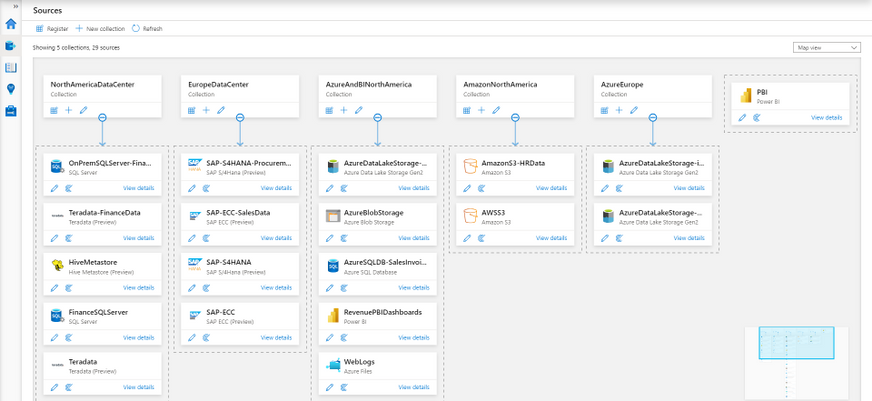
One of the ways of managing your data sources more efficiently is to be able to group and arrange them by function or region. Azure Purview lets you do that using collections, which are hierarchical in nature. Azure Purview will let you set up scans on individual data sources or on collections of data sources.
2. Security and Credentials
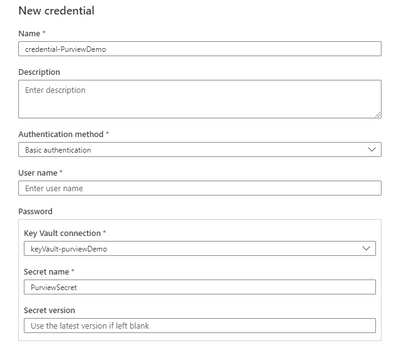
The first thing you will need before setting up scans, is setting up your credentials. Azure Purview is designed to be secure by default. All your credentials are created with a Azure Key Vault connection where they are securely stored and managed. These credentials are further used in your scans to connect to your data sources.
3. Scan-rule sets
Azure Purview scans provide users a fine balance between customizability and re-usability through its scan rule sets.
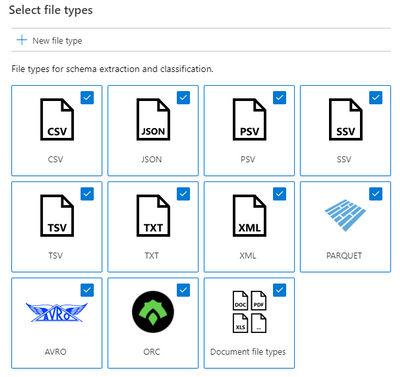
- A scan rule set lets you select file types for schema extraction and classification, and it also let’s you define new custom file types.
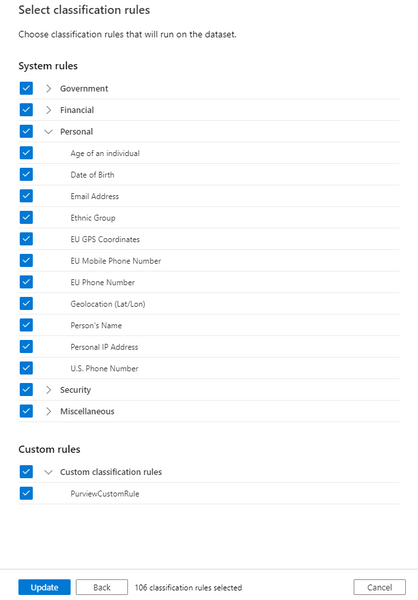
- You can select which system and custom classification rules you want to run. The system classification rules are the same as the sensitive information types in Microsoft 365, which will let you extend your sensitivity labeling policies in the Microsoft 365 Compliance Center to Azure Purview supported stores. Learn how here.
- These scan rule sets can be used across multiple data sources and scans.
- Azure Purview also supports system default scan rule sets that further simplify scan set up.
4. Scan schedules
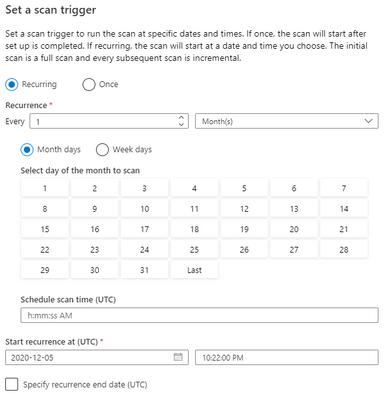
Complying with industry regulations requires you to know where personally identifiable information (PII) exists. Azure Purview allows you to scan your data sources on a regular cadence using flexible scan schedules that lets you define exactly when and how often scans must be run.
5. Scoped scans
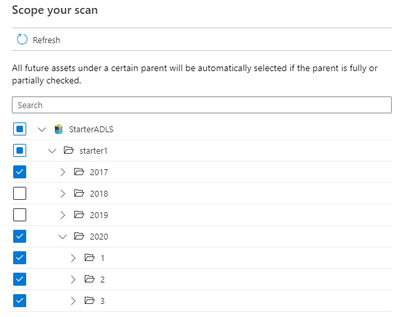
Often times, your data lakes and databases contain certain folders, files or tables that are either considered confidential or contain temporary data that you know is going to be created and deleted frequently. For both these scenarios Purview lets you scope your scans to include only assets that you want scanned and their metadata ingested into the catalog.
6. Scanning on-premises sources
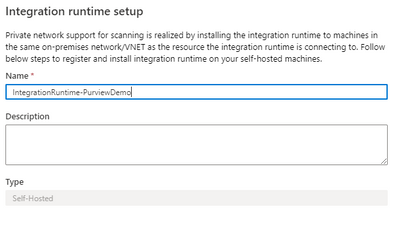
Scan your on-premises sources using the self-hosted Microsoft integration runtime. With a few clicks you can set up your own IR infrastructure on-premises and can start scanning your data sources. This same infrastructure will be used to scan your Azure data sources behind virtual networks as well.
7. Scale and performance
Purview provides a degree of scale and performance for scanning which is truly market differentiating. We have benchmarks to the tune of being able to scan a data lake with a million files in less than 30 minutes for rich metadata and classification. (These values may vary, and depend on the data source type, load on the data source and content type within files)
8. Resource sets
A lot of our customers collect IOT or telemetry data to drive their businesses, which in most cases are files collected on an hourly or daily basis from their source systems. These partitions files share the same schema and classifications. A novel concept that Purview supports is Resource sets, which are used to logically aggregate files that share the same schema and classifications to represent the metadata concisely in your catalog. When a scan runs, it uses folder paths (e.g. yearmonthday) and file nomenclature (e.g. foo1.csv, foo2.csv) to determine if a collection of files can be grouped into a resource set. It is only the resource set that is ingested into the catalog and not the hundreds or thousands of partition files. We have had customers, who via Purview scans have been able to compress 150000 partition files into a single resource set! For them, this tremendously aided in enhancing discoverability of assets for their end users in the Purview Data Catalog.
9. Azure Purview Data Map
The Purview Data Map is a unified map of your data assets and their relationships that enables more effective governance for your data estate. It is a knowledge graph that is the underpinning for the Purview Data Catalog and all the features that it has to offer. It is scalable and robust to meet your enterprise compliance requirements.
Get started with Azure Purview today
Create an Azure purview account today and start understanding your data supply chain from raw data to business insights with free scanning for all your SQL Server on-premises and Power BI online.
For more information, check out a demo of Azure Purview or start a conversation within the Azure Purview tech community.

by Contributed | Dec 9, 2020 | Technology
This article is contributed. See the original author and article here.
Are you responsible for planning, deploying or managing multiple teams across your organization? Have you ever wished that you could pre-build a team based on the business or project need? On Wednesday, December 9th, at 12 Noon EST, Pete and Sam hosted a webcast to walk you through Teams Templates. Check what can be defined in templates, how to create a team from a template, and a few examples of base template types. Hopefully this will give you a taste of how easy it is to spin up a template.
Recording:
Resources:
Presenters/Producers:

Sam Brown, Microsoft Teams Technical Specialist

Pete Anello, Senior Microsoft Teams Technical Specialist
Give us feedback on what you want us to dive into next!
by Contributed | Dec 9, 2020 | Technology
This article is contributed. See the original author and article here.
The Azure Architecture Center is full of useful knowledge and resources. This Azure Tips and Tricks video gives you the tour!
The Azure Architecture Center is your one-stop shop for all things Architecture in Azure! It is a robust collection of resources on Microsoft Docs. You can explore cloud best practices, assess and optimize your workload, and browse many sample architectures for many scenarios.
There are so many sample architectures. There is bound to be one for your scenario. Like here, in architectures for web applications. Let’s look at this architecture, Run a basic web application in Azure.
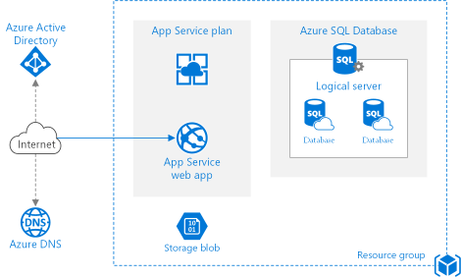
It contains detailed guidance and recommendations, and it even let’s you deploy the sample to Azure.

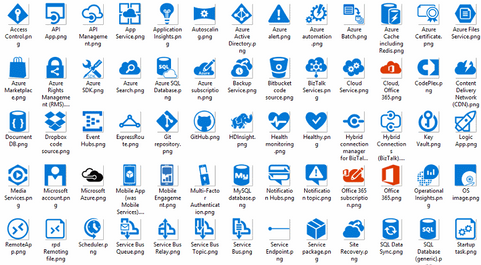
There is more! The Architecture Center also contains icons. You can download these for free and use them in your architecture designs!
There’s also the Application Architecture Guide! This is a complete guide that tells you how to design an application for the cloud. It is really comprehensive!
On top of that, is the Azure Well-Architected Framework. You can use this framework to improve and optimize a workload. The framework takes you through the pillars of Cost Optimization, Operational Excellence, Performance Efficiency, Reliability, and Security.
The Center also contains Design Patterns for the Cloud. These are solutions to well-known problems. You can use them as recipes for your solutions.
The Cloud Adoption Framework is a MASSIVE collection of documentation, implementation guidance, best practices, and tools that are proven guidance from Microsoft. They are designed to accelerate your cloud adoption journey.
And finally, you can use Assessments (which are part of CAF and WAF), to assess your architecture. You can create an assessment to address your needs, and you can take it by answering questions about your design.
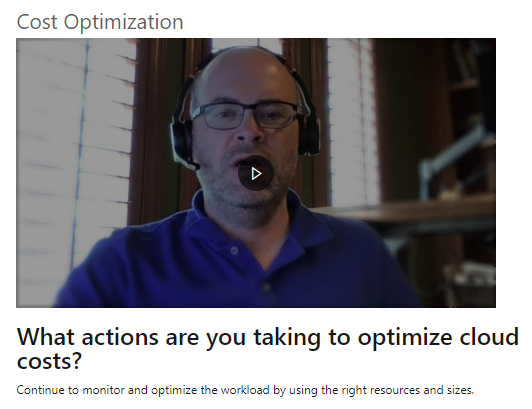
The Azure Architecture Center is an incredible resource for architecture guidance. Go and check it out!

The Azure Architecture Center is being developed and expanded by the legendary (and flamboyantly humble) Microsoft patterns & practices team. You can follow p&p on the Internetz at…
- This Blog: http://aka.ms/AzureArchitectureBlog
- Twitter: http://twitter.com/mspnp
- Facebook: http://facebook.com/mspnp
- See What’s New:
- What’s new in the Azure Architecture Center
- What’s new in the Microsoft Cloud Adoption Framework for Azure
Remember to keep your head in the Cloud,
Ed Price, patterns & practices Community Captain + Publishing Pirate

proven practices for predictable results
Architecture Center | Blog | Twitter | Facebook
by Contributed | Dec 9, 2020 | Technology
This article is contributed. See the original author and article here.
Hi IT Pros,
Microsoft has just released Endpoint Manager – Endpoint Analytics. It is a cool feature, addressing service desk long time need to monitor and identify the devices which have delay sign-in time and performance issue even before Users make the support calls for help.
I have collected all the information related to setup, operation, troubleshooting of Endpoint Analytics and created this blog article for your reference.
Let’s review and enjoy our new EA feature exploration.
It is common for end users to experience long boot times or other disruptions. These disruptions can be due to a combination of:
- Legacy hardware
- Software configurations that are not optimized for end-user experience.
- Issues caused by configuration changes and updates.
Endpoint analytics, which was released on September 22nd, 2020, aims to improve user productivity and reduce IT support costs by providing insights into the user experience.
- provides insights to help you understand your devices’ reboot and sign-in times so you can optimize your users’ journey from power on to productivity.
- helps you proactively remediate common support issues before your users become aware of them and so, reduces the number before your users do.
- allows you to track the progress of enabling your devices to get corporate configuration data from the cloud, making it easier for employees to work from home.
Endpoint Analytics structure
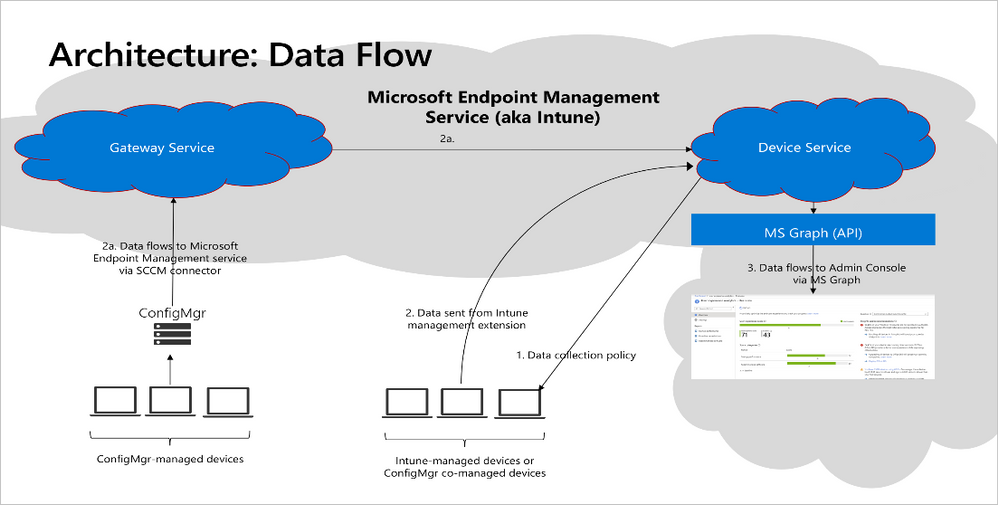
- Endpoint Analytics currently focuses on three areas:
- Start up performance:
- Get end-users from power-on to productivity quickly by identifying and eliminating lengthy boot and sign in delays.
- Leverage the startup performance score and a benchmark to compare to other organizations,
- Recommended actions to improve startup times.
- Proactive remediation scripting:
- Use built-in scripts for common issues or author your own.
- Recommended software:
- Recommendation for optimizing OS and Microsoft software versions.
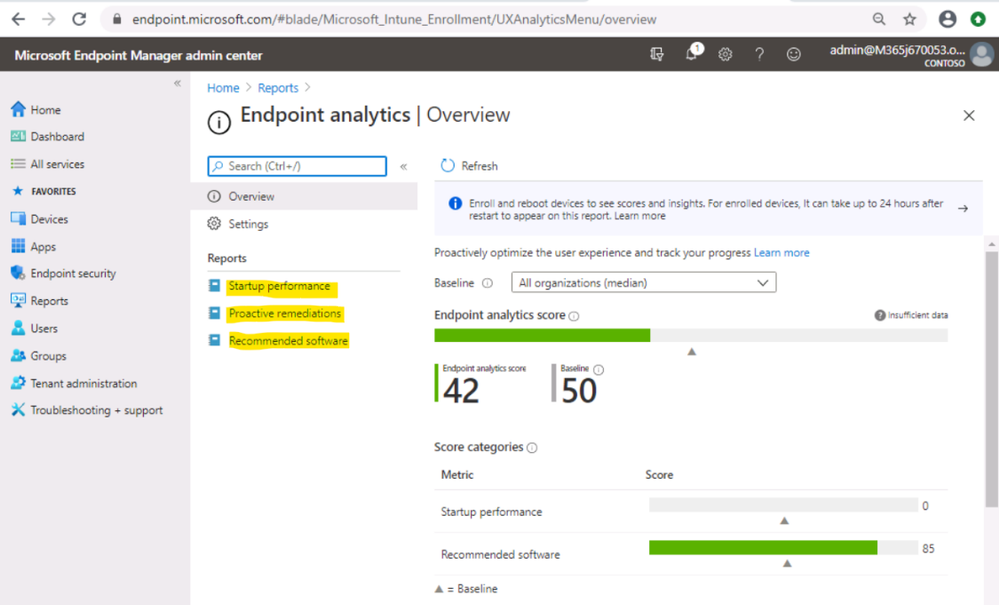
You can enroll devices via Configuration Manager or Microsoft Intune.
- To enroll devices via Intune requires:
- Intune enrolled or co-managed devices running Windows 10 Pro, Windows 10 Pro Education, Windows 10 Enterprise, or Windows 10 Education.
- Windows 10 Pro versions 1903 and 1909 required KB4577062.
- Windows 10 Pro versions 2004 and 20H2 required KB4577063.
- Windows 10 devices must be Azure AD joined or hybrid Azure AD joined.
- Telemetry (Diagtrack) service is enabled on Endpoint
- The Intune Service Administrator role is required to start gathering data.
You can enroll devices via Configuration Manager or Microsoft Intune.
- To enroll devices via SCCM Co-Management:
- Licensing Prerequisites
- Endpoint analytics is included in the following plans:
- Enterprise Mobility + Security E3 or higher
- Microsoft 365 Enterprise E3 or higher.
- Unsupported Windows 10
- Windows 10 Home
- Windows 10 long-term servicing channel (LTSC)
- BYOD, Azure registered devices (Workspace joined device)
- Firewall URL requirement for SCCM Site System Server
- Firewall URL requirement for Intune-managed devices
- https://*.events.data.microsoft.com
To Enable endpoint analytics
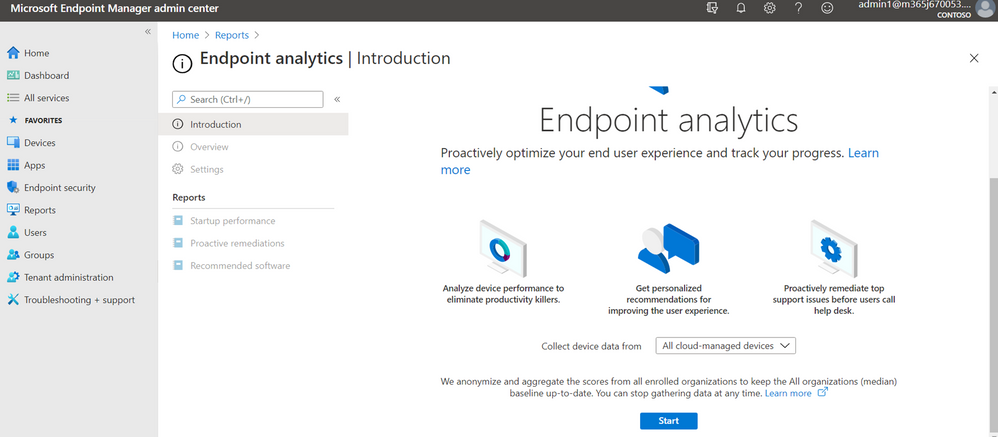
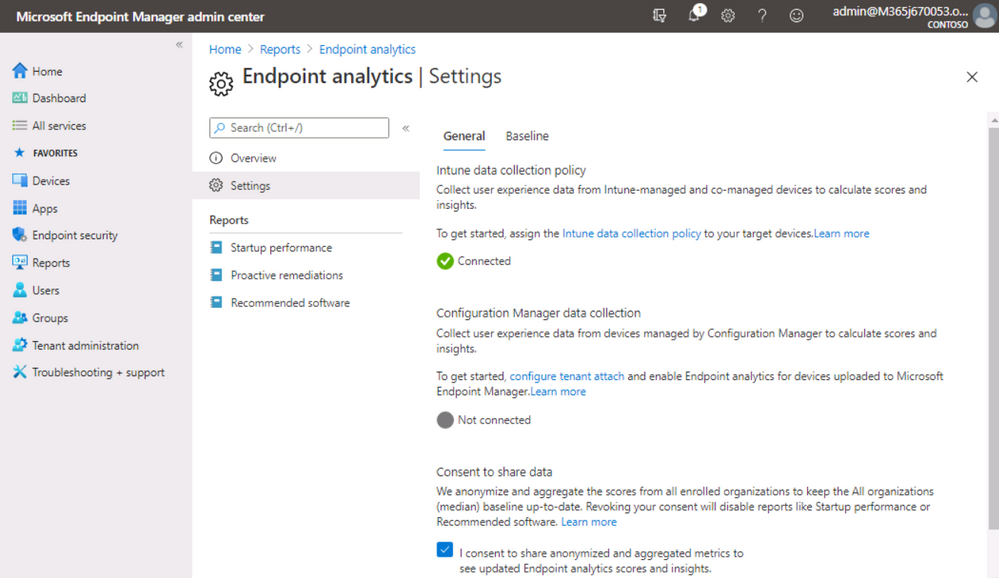
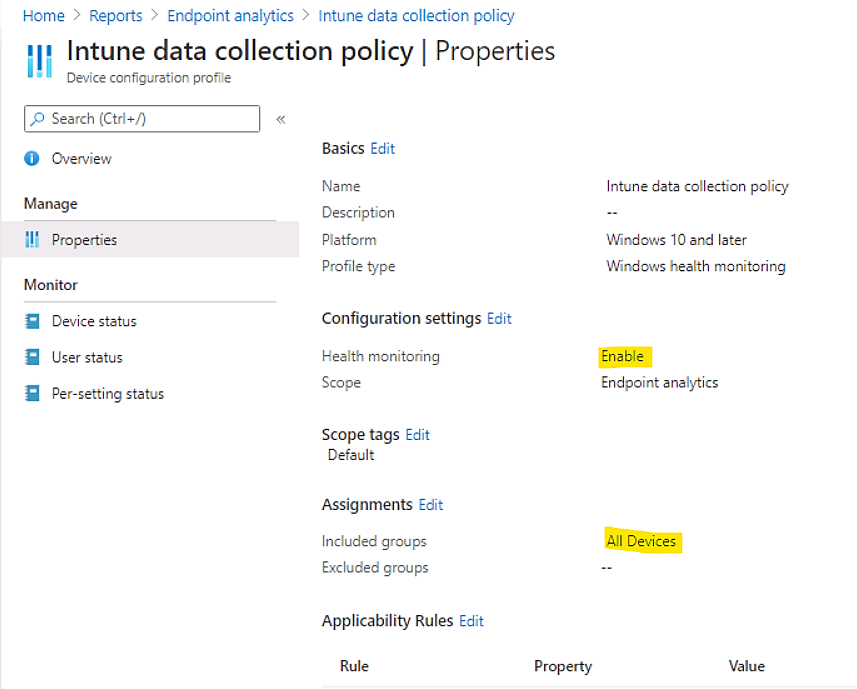
- Configure Intune data collection policy
Click on link as shown:
Enable Endpoint Analytics in SCCM ConsoleCloud ServicesCo-Management
Configure upload
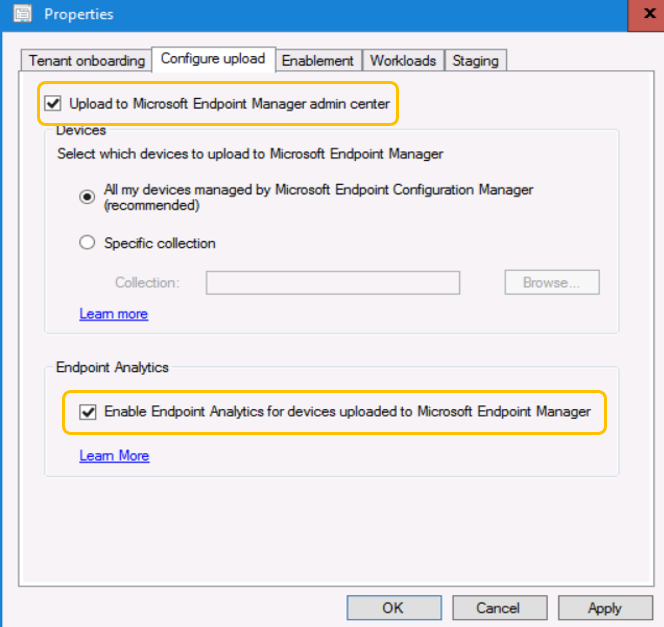
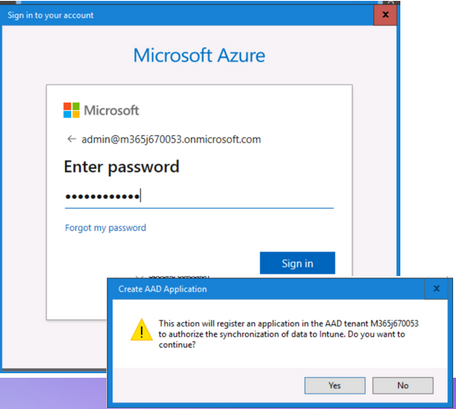
- Sign in and Confirm change to Cloud Service Endpoint Manager.
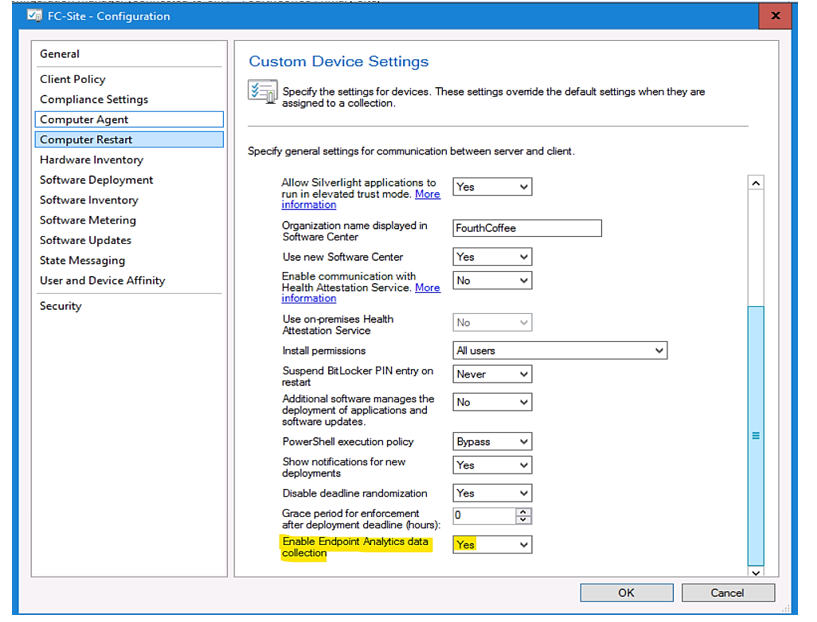
- SCCM Client SettingComputer Agent
Enable Endpoint Analytics data collection: Yes
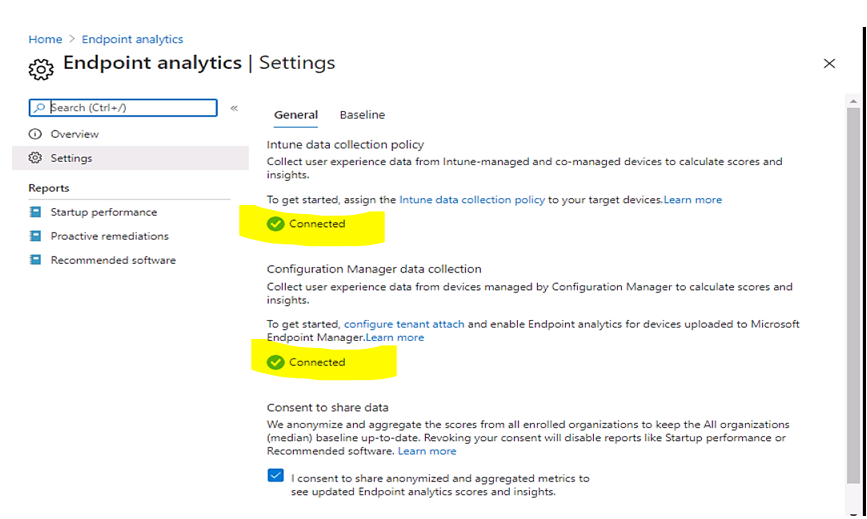
- Check result in Endpoint AnalyticsSettings
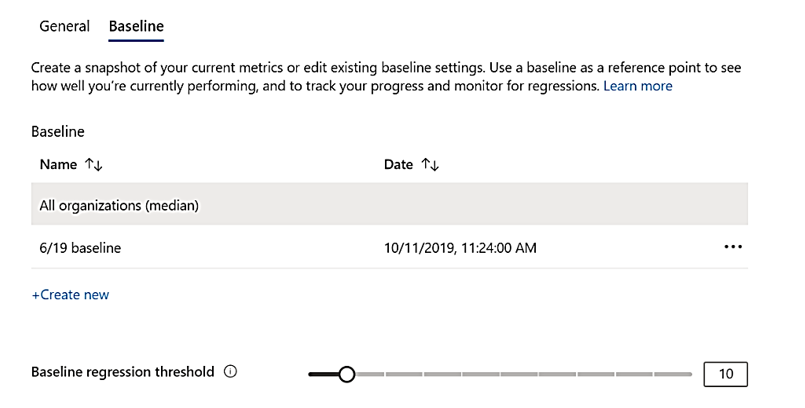
Set baseline to observe progress made in a period.
Baseline management
- You can compare your current scores and sub scores to others by setting a baseline.
- There is a built-in baseline for All organizations (median), which allows you to compare your scores to a typical enterprise.
- There is a limit of 100 baselines per tenant.
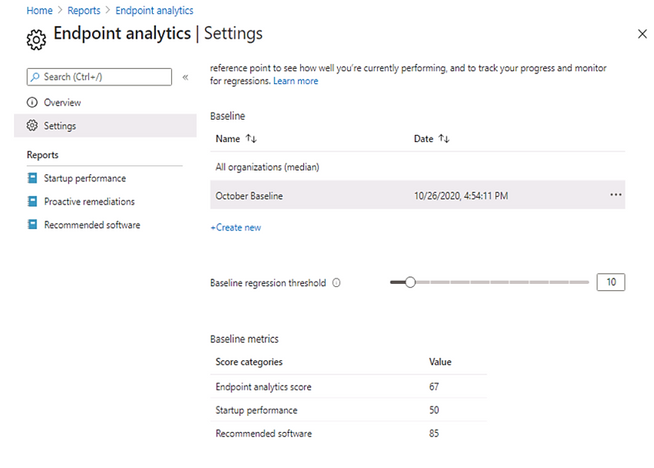
- Your current metrics will be flagged red and show as regressed if they fall below the current baseline in your reports.
- set a regression threshold, the defaults to 10%. With this threshold, metrics are only flagged as regressed if they have regressed by more than 10%.
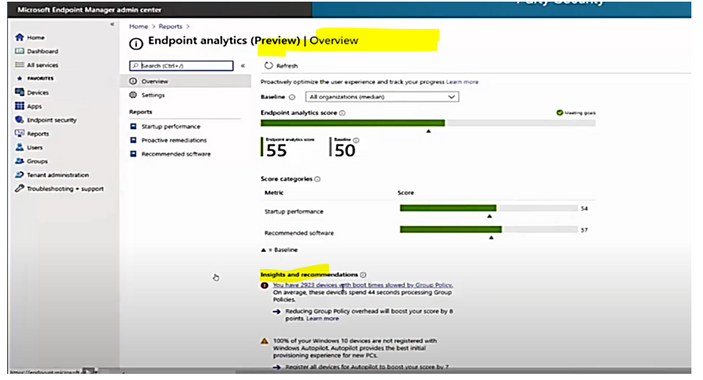
Endpoint Analytics Overview
- Review the “Insights and recommendations” about devices with slow boot time as shown.
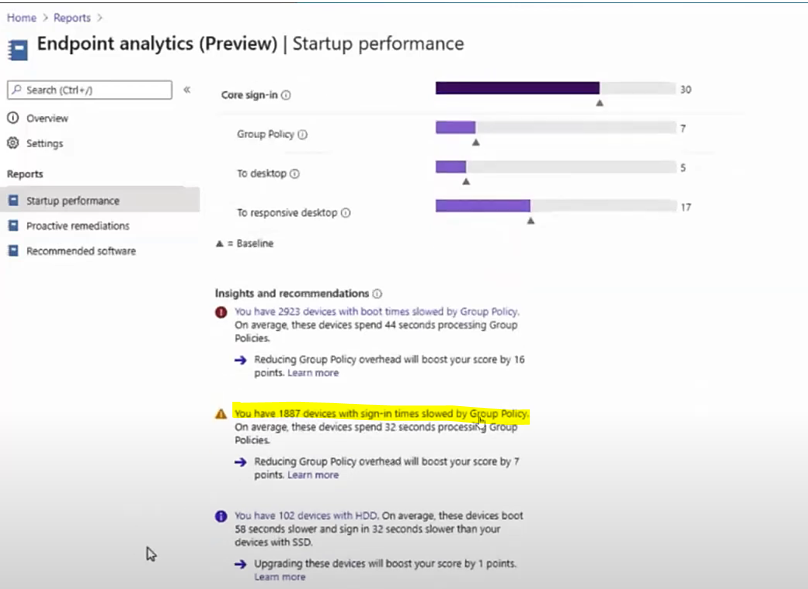
- Review the “Insights and recommendations” about devices with slow GPO processing time.
Endpoint Analytics Startup performance
- After Devices are enrolled, the next reboot will be evaluated and scored.
- Compare boot time based on HDD or SSD disk type.
- Compare boot time based on models and device types.
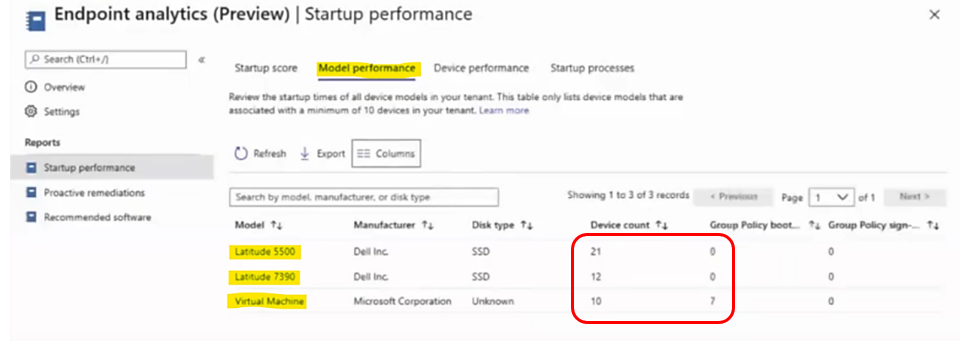
- Sorted by Group Policy boot time to find the worst device.
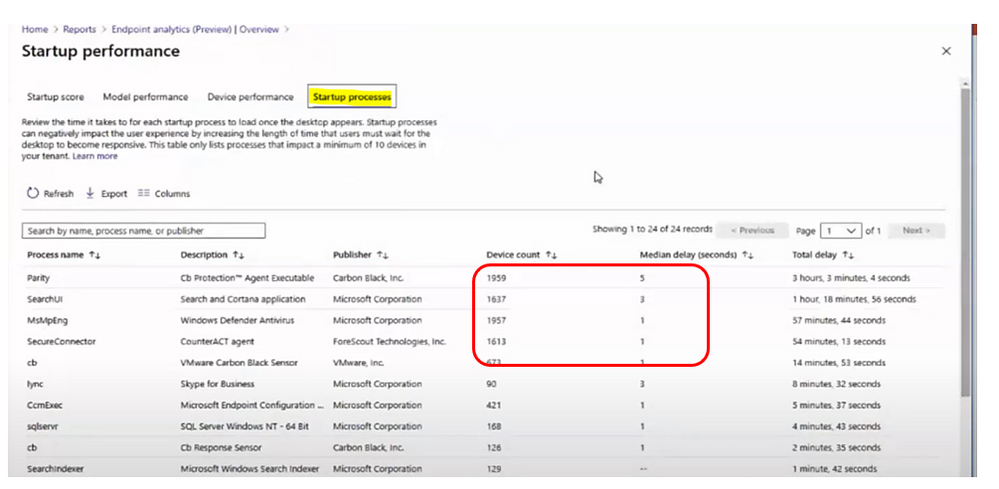
- In Startup processes tab, sorting by Median delay (seconds) to find the worst delay process and number of affected devices.
Endpoint Analytics Proactive Remediation
- Proactive remediations are script packages that can detect and fix common support issues on a user’s device.
- Use Proactive remediations to help increase your User experience score.
- You can create your own script package or deploy one of the downloaded script packages.
- Each script package consists of a detection script, a remediation script, and metadata.
- Microsoft is actively developing new script packages and would like to know about your experiences when you were using them.
There are 2 built-in script packages:
You could create your own script package which includes detection script and remediation script, it is similar to SCCM Configuration Item with Compliance rule and SCCM Baseline Remediation, script example shown in the image:
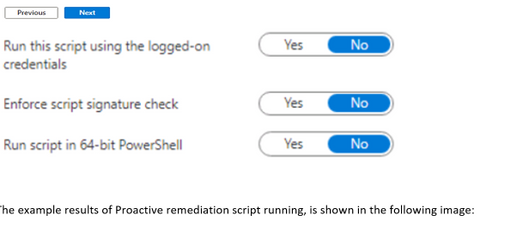
The example results of Proactive remediation script running, is shown in the following image:
Endpoint Analytics Recommended Software
The infrastructure software recommended for the whole corporation environment such as Windows 10, Azure Active Directory, Cloud Management, …
- The Software adoption score is a number between 0 and 100. The score represents a weighted average of the percentage of devices that have deployed with recommended software.
- Windows 10 score: the percent of devices on Windows 10 versus an older version of Windows.
- Autopilot score: the percent of Windows 10 devices that are registered for Autopilot
- Azure Active Directory: the percent of devices enrolled in Azure AD
- Cloud Management: the percentage of PCs that have attached to the Microsoft 365 cloud
Endpoint Analytics Troubleshooting
- Troubleshooting device enrollment and startup performance
- The overview page shows a startup performance score of zero with a banner showing it is waiting for data,
- Device performance tab shows fewer devices than you expect.
Solution:
check Resultant client settings if there is an overriding client setting and endpoint analytics is disabled.
- Update Stale Group Policies script return with error 0x87D00321?
0x87D00321 is a script execution timeout error. This error typically occurs with machines that are connected remotely. A potential mitigation might be to only deploy to a dynamic collection of machines that have internal network connectivity.
- Hardware inventory for devices may fail to process after enabling endpoint analytics.
Errors in the Dataldr.log file:
Begin transaction: Machine=<machine>
*** [23000][2627][Microsoft][SQL Server Native Client 11.0][SQL Server]Violation of PRIMARY KEY constraint ‘BROWSER_USAGE_HIST_PK’. Cannot insert duplicate key in object ‘dbo.BROWSER_USAGE_HIST’. The duplicate key value is (XXXX, Y). : dbo.dBROWSER_USAGE_DATA
ERROR – SQL Error in
ERROR – is NOT retyrable.
Rollback transaction: XXXX
Mitigation: Disable the collection of the Browser Usage (SMS_BrowerUsage) hardware inventory class. This class is not currently leveraged by Endpoint analytics.
- Script requirements for Proactive remediations
If the option Enforce script signature check is enabled in the Settings page of creating a script package, then make sure that the scripts are encoded in UTF-8 not UTF-8 BOM.
More Features will be added to Endpoint Analytics soon
This release is just the beginning. Microsoft will be rapidly rolling out new insights for other key user-experiences soon after the initial release.
___________________
Reference
Disclaimer
The sample scripts are not supported under any Microsoft standard support program or service. The sample scripts are provided AS IS without warranty of any kind. Microsoft further disclaims all implied warranties including, without limitation, any implied warranties of merchantability or of fitness for a particular purpose. The entire risk arising out of the use or performance of the sample scripts and documentation remains with you. In no event shall Microsoft, its authors, or anyone else involved in the creation, production, or delivery of the scripts be liable for any damages whatsoever (including, without limitation, damages for loss of business profits, business interruption, loss of business information, or other pecuniary loss) arising out of the use of or inability to use the sample scripts or documentation, even if Microsoft has been advised of the possibility of such damages.
by Contributed | Dec 9, 2020 | Technology
This article is contributed. See the original author and article here.
We are very happy to announce the availability of initial guidance to run IBM WebSphere Liberty and Open Liberty on Azure Red Hat OpenShift (ARO). This is the first release delivered through an ongoing collaboration between IBM and Microsoft around the WebSphere family of products and Azure. Developed alongside IBM, the guidance utilizes the Open Liberty Operator and provides step-by-step instructions for running WebSphere Liberty or Open Liberty on an ARO cluster. The guidance is intended to make it as easy as possible to get started with production ready deployments utilizing best practices from both IBM and Microsoft. Evaluate the guidance for full production usage and reach out to collaborate on migration cases.
Solution Details and Roadmap
Part of the WebSphere family of products, WebSphere Liberty and Open Liberty are IBM’s next generation Java platforms and are important to cloud modernization of mission critical enterprise Java workloads. Open Liberty is the production-ready, free, open-source base for WebSphere Liberty. Sharing the same core implementation, both offerings are fast, lightweight, modular, and container-friendly cloud native runtimes with robust support for industry standards such as Java EE, Jakarta EE, and MicroProfile.
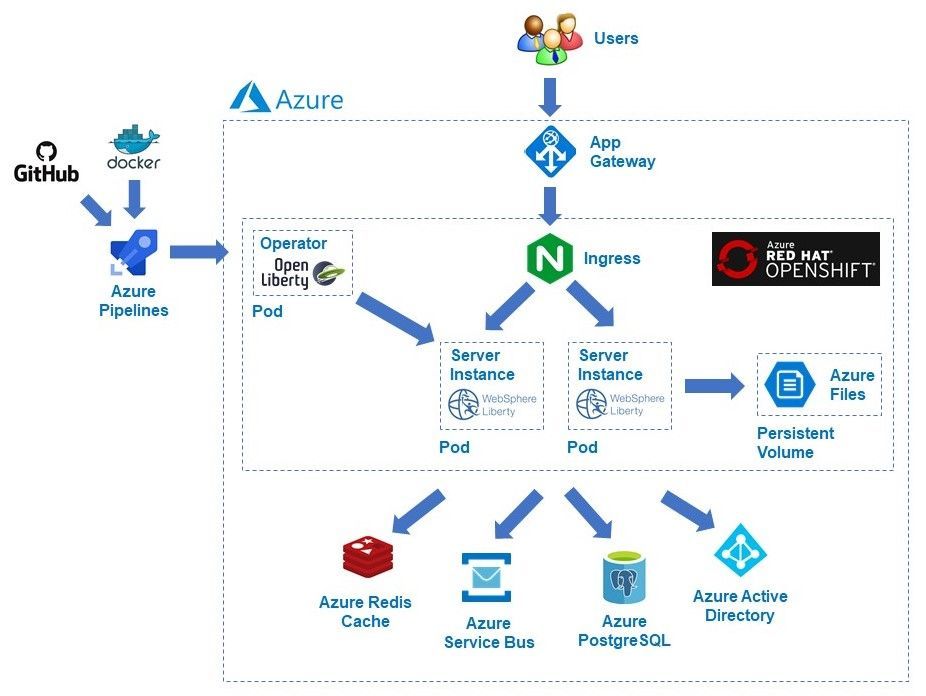
ARO is a fully managed OpenShift service jointly developed, run, and supported by Microsoft and Red Hat. The combination of ARO with WebSphere Liberty and Open Liberty offers a powerful and flexible platform for enterprise Java customers. The Open Liberty Operator allows you to easily and reliably deploy and manage Java applications on both WebSphere Liberty and Open Liberty. The Operator supports both OpenShift as well as Kubernetes. In addition to deployment and management, the Operator also enables gathering traces and dumps.
The guidance uses official WebSphere Liberty and Open Liberty Docker images from IBM and demonstrates using the built-in container registry for ARO. The guidance enables a wide range of production-ready deployment architectures, and you have complete flexibility to customize your deployments. After deploying your applications, you can take advantage of a range of Azure resources for additional functionality.
In the next few months, IBM and Microsoft will provide guidance for running WebSphere Liberty and Open Liberty on Azure Kubernetes Service (AKS). Next year, we will explore providing jointly developed and supported Marketplace offerings targeting WebSphere Traditional on Azure Virtual Machines, WebSphere Liberty/Open Liberty on ARO, and WebSphere Liberty/Open Liberty on AKS.
These solutions follow a Bring-Your-Own-License model. For WebSphere Liberty, they assume you have procured the appropriate licenses with IBM and are properly licensed to run offers in Azure. The solutions themselves are available free of charge, as is Open Liberty and the Open Liberty Operator (customers can purchase optional IBM support for Open Liberty). Customers are responsible for Azure resource usage.
Get started with WebSphere Liberty and Open Liberty on ARO
Explore the guidance, provide feedback, and stay informed of the roadmap. You can also take advantage of hands-on help from the engineering team behind these efforts. The opportunity to collaborate on a migration scenario is completely free while solutions are under active initial development.
by Contributed | Dec 9, 2020 | Technology
This article is contributed. See the original author and article here.
The Azure Synapse Studio is a one-stop-shop for all your data engineering and analytics development, from data exploration to data integration to large scale data analysis. On the Home hub of the Studio, you can easily begin loading data, extracting insights, building interactive reports with Power BI and accessing learning resources in the Knowledge Center to quickly get started with Azure Open Datasets, one-click tutorials, and virtual tours.
Data Hub
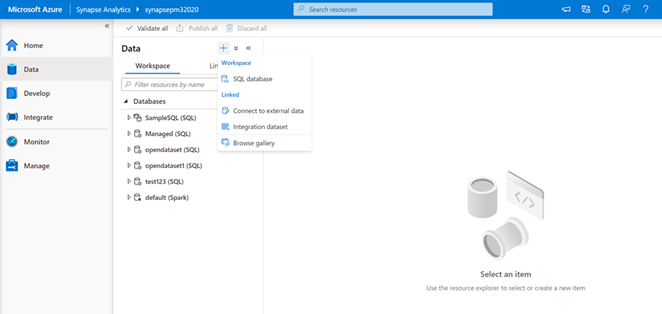
The Data hub houses all workspace databases and allows you to link to external and integration datasets as well as the various sample Azure Open Datasets in the Gallery. Add Azure Open Datasets to access sample data on COVID-19, public safety, transportation, economic indicators, and more. The datasets will automatically added to the Data hub under the “Linked” tab and then “Azure Blog Storage.” With the click of a button, you can then run sample scripts to select the top 100 rows and create an external table or you can also create a new notebook.
The “Workspace” and “Linked” tabs provide a simple way to organize your databases and analytical stores—for both SQL and Spark. The “Workspace” tab shows your SQL and Spark databases created and managed with your Synapse workspace. The “Linked” tab shows connected services ready for in-place analytics, such as data from your operational store in Azure Cosmos DB.
Develop Hub
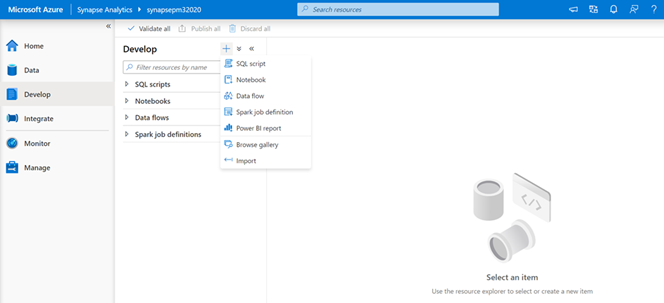
SQL scripts, notebooks, data flows, and Spark job definitions are found in the Develop hub. You can also connect Power BI reports and import existing development artifacts. Sample scripts and sample notebooks from the Gallery in the Knowledge Center will also open in the Develop hub.
Integrate Hub
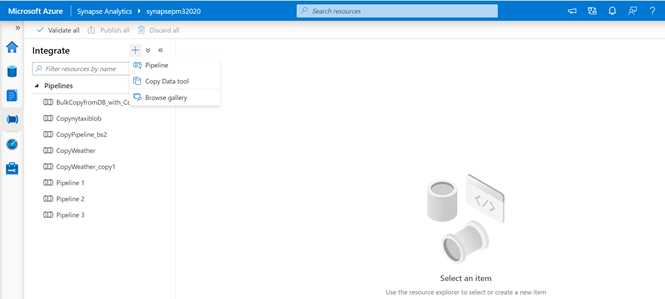
The Integrate hub is home to the data integration capabilities for Azure Synapse. You can create new data pipelines, use the Copy Data Tool to perform a one-time or scheduled data load from 90+ data sources, or bring in one of the 30 different pipeline templates from the Gallery in the Knowledge Center.
Monitor Hub
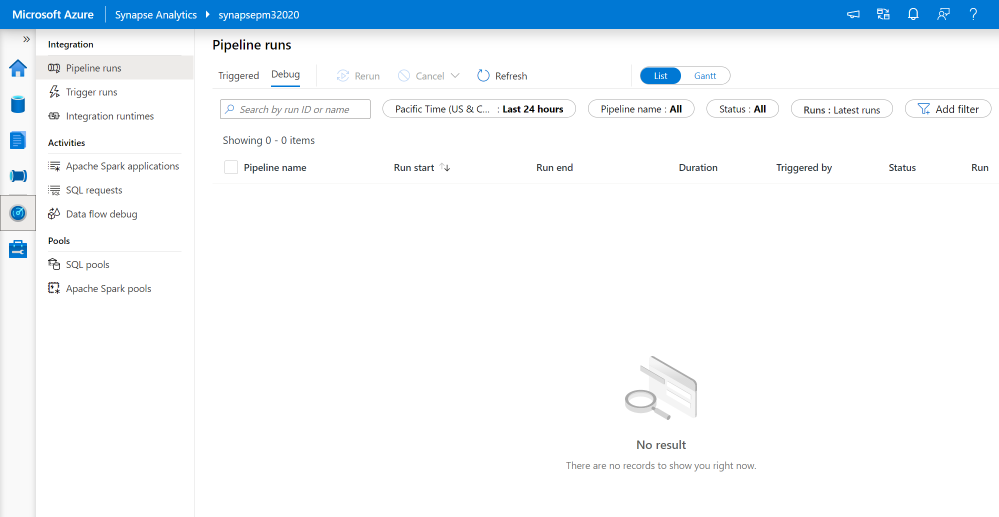
The Monitor hub provides a comprehensive view of performance details and statuses for different integration, activities, and resources in the Azure Synapse workspace.
Manage Hub
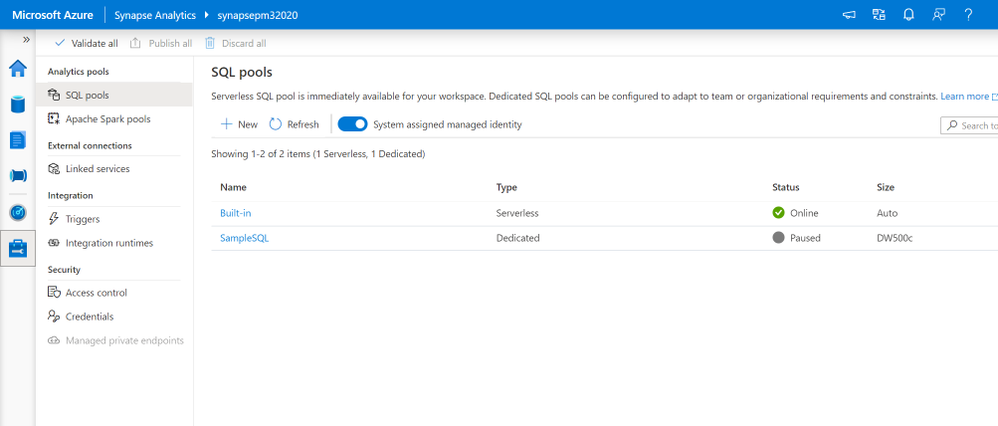
From the Manage hub in the Azure Synapse Studio, you can create, configure, pause, and resume SQL pools and Apache Spark pools; create and delete linked services; create and execute triggers for pipelines; setup integration runtimes; and manage all security access controls and credentials.
Try the Azure Synapse Studio today
by Contributed | Dec 9, 2020 | Technology
This article is contributed. See the original author and article here.
What is SQL Data Sync?
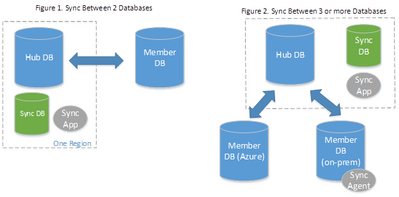
SQL Data Sync is a service built on Azure SQL Database that enables users to synchronize data bi-directionally across multiple databases, both on-premises and in the cloud. SQL Data Sync is based around the concept of a sync group. A sync group is a group of databases that users want to synchronize. SQL Data Sync uses a hub and spoke topology to synchronize data; meaning users define one of the databases in the sync group as the hub database, while the rest of the databases are member databases. SQL Data Sync occurs only between the hub and individual members.
Private link for SQL Data Sync (preview)
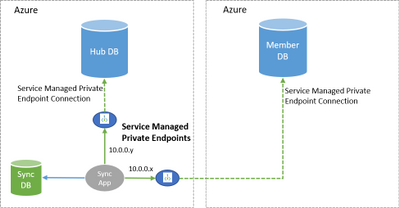
The new private link (preview) feature allows SQL Data Sync users choose a service managed private endpoint to establish a secure connection between the sync service and their member and hub databases during the data synchronization process. A service managed private endpoint is a private IP address within a specific virtual network and subnet. Within Data Sync, the service managed private endpoint is created by Microsoft and is exclusively used by the Data Sync service for a given sync operation.
Setting up private link
In order to use service managed private endpoints with SQL Data Sync, both the member and hub databases must be hosted in Azure (same or different regions), in the same cloud type (e.g. both in public cloud or both in government cloud). Additionally, users must manually approve the service managed private endpoint for SQL Data Sync during the sync configuration, within the “Private endpoint connections” section in the Azure Portal or through PowerShell. Once the service managed private endpoint is approved by the customer, all communication between the sync service and the member/hub databases will happen over the service managed private link. Existing sync groups can be updated to have this feature enabled.
by Contributed | Dec 9, 2020 | Technology
This article is contributed. See the original author and article here.
We are always excited to participate in SAP TechEd, especially because of the unique partnership we share with SAP to jointly help our customers migrate ERP to the cloud. For example, we recently enabled Walgreens Boots Alliance (WBA) to migrate its massive SAP landscape (an estimated 100 terabytes) to Azure, making it one of the largest SAP S/4HANA scale-out configurations in the public cloud.
As an SAP TechEd 2020 Gold Sponsor, Microsoft will be leading a session that covers our new migration offerings, and we’ll co-present with SAP on our latest developments on simplifying a customer’s journey from SAP ERP on-premises to S/4 HANA on Azure. Additionally, there are several sessions run by SAP teams globally that cover planning and analysis with new add–ins for Microsoft Office, running SAP Cloud Platform on Azure, RPA for common scenarios combining SAP and Microsoft Office, and deploying and protecting SAP software in the cloud with Azure NetApp files. You can find these sessions in the course catalogue here.
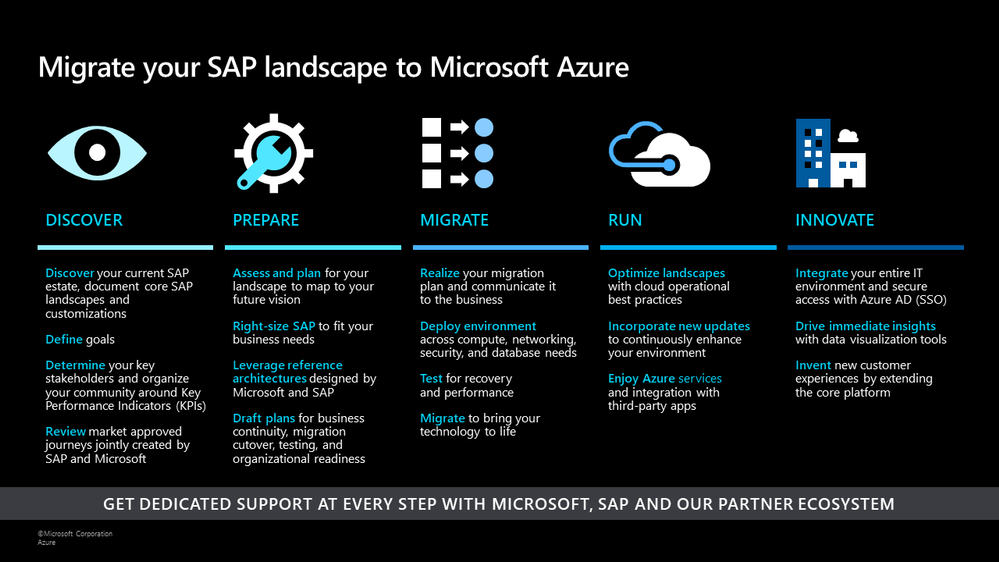
Earlier this year, we announced offerings to help customers optimize costs and increase agility by running their SAP workloads on Azure. At Microsoft Ignite, we shared a migration framework to help customers achieve a secure, reliable, and simplified path to the cloud. Today, we continue to deliver on that promise with additional product updates that will further streamline a customer’s migration journey, drive improved price/performance, and provide simplified management.
SAP on Azure Migration Framework
Drive improved price/performance
As customers move their SAP landscapes to Azure, we want to ensure that they can benefit from new generations of hardware and processors to achieve improved price/performance ratios. We recently launched the new Ddsv4 and Edsv4 VM families based on the 2nd generation Intel Xeon Platinum 8272CL (Cascade Lake). We have also certified a subset of the Edsv4 VMs for SAP HANA. These new VMs deliver up to 20 percent CPU performance improvement compared to their predecessors, the Dv3 and Ev3 VMs, depending on the workload. Customers can also seamlessly transition to these VMs by simply resizing their VMs from the predecessor versions. Learn more about this update here.
Save costs and reduce storage requirements with the new Azure premium storage bursting capability
We continue to innovate on existing technologies such as premium storage to reduce the total cost of ownership for our customers. With the disk bursting capability of our premium storage disks, customers no longer have to size storage configurations at a higher level to account for short-lived peak workloads. Customers can instead rely on premium storage disk bursting to cover such peak demand periods. With this new capability, customers can lower their storage costs substantially across configurations for database management systems such as SAP HANA, Oracle, and SQL Server. Customers can refer to our updated SAP HANA Azure virtual machine storage configurations guide to take advantage of the updated storage size recommendations based on disk bursting. In addition, our new guide Azure Storage types for SAP workload helps customers evaluate the right storage type options for their SAP workloads.
Simplify deployment with the SAP on Azure Deployment Automation Framework
Earlier this year, we introduced introduced our SAP on Azure Deployment Automation Framework. We have evolved the framework and expanded a modular workflow to provide rapid and consistent deployments. With the automation framework, customers can deploy the Azure infrastructure to support and run an SAP system in minutes, in a repeatable fashion, to support multiple use cases. We also introduced extended functionality such as support for Azure Key Vault, Azure , and AnyDB support.
We have already made these capabilities available to a set of private preview customers. Today, we are announcing that these building blocks will be available more broadly in our GitHub Open-Source repository (sap-hana) as (v2.3) for SAP on Azure Deployment Automation soon. The automation solution is based on the best practices specified by Microsoft and SAP as part of our reference architectures for SAP. You can read more about the automation framework in our blog. You can also learn more about the scenarios supported in our GitHub repository.
Azure Backup for SAP HANA now supports incremental backups to save time and reduce costs
With Azure Backup, Azure’s native Backint certified backup solution, customers can protect their SAP HANA deployments in Azure VMs with zero backup infrastructure. We are excited to announce the public preview of support for HANA incremental backups, which allows customers to create cost-effective backup policies catering to their RPO and RTO requirements. To try out this preview offering refer to our documentation and check out this tutorial. To learn more about backups for SAP HANA databases in Azure, explore supported scenarios and FAQs.
SAP and Microsoft partner to deliver supply chain and Industry 4.0 solutions in the cloud
Today, we have further expanded our partnership with SAP to enable customers to design and operate intelligent digital supply chain and Industry 4.0 solutions in the cloud and at the edge. You can read more about how SAP and Microsoft are collaborating closely to shape the future of supply chain and manufacturing here.
SAP TechEd is an amazing opportunity to learn and gain new career skills. After the event, explore the free SAP on Azure learning resources on Microsoft Learn and consider getting certified – Azure is the only cloud vendor that offers an SAP cloud certification.
We look forward to seeing you during our sessions at SAP TechEd!
by Contributed | Dec 9, 2020 | Technology
This article is contributed. See the original author and article here.
We’re very excited to announce today that endpoint detection and response (EDR) in block mode is generally available.
As we announced in our public preview blog, EDR in block mode is a feature in Microsoft Defender for Endpoint that turns EDR detections into blocking and containment of malicious behaviors. This capability uses Microsoft Defender for Endpoint’s industry-leading visibility and detection capabilities and Microsoft Defender Antivirus’s built-in blocking function to provide an additional layer of post-breach blocking of malicious behavior, malware, and other artifacts that your primary antivirus (AV) solution might miss.
This feature has already helped a number of organizations stop a variety of threats where Microsoft was not their primary AV and we’re thrilled to make it now generally available for all customers.
Recently, EDR in block mode was responsible for helping to thwart the IcedID campaign. EDR in block mode kicked in and was able to protect the device from several malicious activities including evasive attacker techniques like process hollowing and steganography that lead to the deployment of the info stealing IcedID malware. Read all about how this attack went down and was stopped “ice cold” in its tracks here: EDR in block mode stops IcedID cold.
To learn more about this capability and learn now it also stopped a NanoCore RAT attack, watch the video below and check out our documentation for guidance on how to enable the feature.
https://www.microsoft.com/en-us/videoplayer/embed/RE4HjW2
We’re excited to bring this new functionality to our customers and look forward to hearing your feedback!
If you’re not yet taking advantage of Microsoft’s industry leading optics and endpoint detection capabilities, sign up for a free trial of Microsoft Defender Endpoint today.


Recent Comments