by Contributed | Jan 21, 2021 | Technology
This article is contributed. See the original author and article here.
As you’re probably aware, Microsoft is in the process of updating Azure services to use TLS certificates from a different set of root certificate authorities (root CAs). Azure TLS Certificate Changes provides details about these updates. Some of these changes affect Azure Sphere, but in most cases no action is required for Azure Sphere customers.
This post provides a primer about the Azure Sphere certificate “landscape”: the types of certificates that the various Azure Sphere components use, where they come from, where they’re stored, how they’re updated, and how to access them when necessary. Furthermore, it also describes how the Azure Sphere OS, SDK, and services make certificate management easier for you. We assume you have a basic familiarity with certificate authorities and the chain of trust. If this is all new to you, we suggest starting with Certificate authority – Wikipedia or other internet sources.
Azure Sphere Devices
Every Azure Sphere device relies on the Trusted Root Store, which is part of the Azure Sphere OS. The Trusted Root Store contains a list of root certificates that are used to validate the identity of the Azure Sphere Security Service when the device connects for device authentication and attestation (DAA), over-the-air (OTA) update, or error reporting. These certificates are provided with the OS.
When daily attestation succeeds, the device receives two certificates: an update certificate and a customer certificate. The update certificate enables the device to connect to the Azure Sphere Update Service to get software updates and to upload error reports; it is not accessible to applications or through the command line. The customer certificate, sometimes called the DAA certificate, can be used by applications to connect to third-party services such wolfSSL that use transport layer security (TLS). This certificate is valid for about 25 hours. Applications can retrieve it programmatically by calling the DeviceAuth_GetCertificatePath function.
Devices that connect to Azure-based services such as Azure IoT Hub, IoT Central, IoT Edge must present their Azure Sphere tenant CA certificate to authenticate their Azure Sphere tenant. The azsphere ca-certificate download command in the CLI returns the tenant CA certificate for such uses.
EAP-TLS network connections
Devices that connect to an EAP-TLS network need certificates to authenticate with the network’s RADIUS server. To authenticate as a client, the device must pass a client certificate to the RADIUS. To perform mutual authentication, the device must also have a root CA certificate for the RADIUS server so that it can authenticate the server. Microsoft does not supply either of these certificates; you or your network administrator is responsible for ascertaining the correct certificate authority for your network’s RADIUS server and then acquiring the necessary certificates from the issuer.
To obtain the certificates for the RADIUS server, you’ll need to authenticate to the certificate authority. You can use the DAA certificate, as previously mentioned, for this purpose. After acquiring the certificates for the RADIUS server, you should store them in the device certificate store. The device certificate store is available only for use in authenticating to a secured network with EAP-TLS. (The DAA certificate is not kept in the device certificate store; it is kept securely in the OS.) The azsphere device certificate command in the CLI lets you manage the certificate store from the command line. Azure Sphere applications can use the CertStore API to store, retrieve, and manage certificates in the device certificate store. The CertStore API also includes functions to return information about individual certificates, so that apps can prepare for certificate expiration and renewal.
See Use EAP-TLS in the online documentation for a full description of the certificates used in EAP-TLS networking, and see Secure enterprise Wi-Fi access: EAP-TLS on Azure Sphere on Microsoft Tech Community for additional information.
Azure Sphere Applications
Azure Sphere applications need certificates to authenticate to web services and some networks. Depending on the requirements of the service or endpoint, an app may use either the DAA certificate or a certificate from an external certificate authority.
Apps that connect to a third-party service using wolfSSL or a similar library can call the DeviceAuth_GetCertificatePath function to get the DAA certificate for authentication. This function was introduced in the deviceauth.h header in the 20.10 SDK.
The Azure IoT library that is built into Azure Sphere already trusts the necessary Root CA, so apps that use this library to access Azure IoT services (IoT Hub, IoT Central, DPS) do not require any additional certificates.
If your apps use other Azure services, check with the documentation for those services to determine which certificates are required.
Azure Sphere Public API
The Azure Sphere Public API (PAPI) communicates with the Azure Sphere Security Service to request and retrieve information about deployed devices. The Security Service uses a TLS certificate to authenticate such connections. This means that any code or scripts that use the Public API, along with any other Security Service clients such as the Azure Sphere SDK (including both the v1 and v2 azsphere CLI), must trust this certificate to be able to connect to the Security Service. The SDK uses the certificates in the host machine’s system certificate store for Azure Sphere Security Service validation, as do many Public API applications.
On October 13, 2020 the Security Service updated its Public API TLS certificate to one issued from the DigiCert Global Root G2 certificate. Both Windows and Linux systems include the DigiCert Global Root G2 certificate, so the required certificate is readily available. However, as we described in an earlier blog post, only customer scenarios that involved subject, name, or issuer (SNI) pinning required changes to accommodate this update.
Azure Sphere Security Service
Azure Sphere cloud services in general, and the Security Service in particular, manage numerous certificates that are used in secure service-to-service communication. Most of these certificates are internal to the services and their clients, so Microsoft coordinates updates as required. For example, in addition to updating the Public API TLS certificate in October, the Azure Sphere Security Service also updated its TLS certificates for the DAA service and Update service. Prior to the update, devices received an OTA Update to the Trusted Root Store which included the new required root certificate. No customer action was necessary to maintain device communication with the Security Service.
How does Azure Sphere make certificate changes easier for customers?
Certificate expiration is a common cause of failures for IoT Devices that Azure Sphere can prevent.
Because the Azure Sphere product includes both the OS and the Security Service, the certificates used by both these components are managed by Microsoft. Devices receive updated certificates through the DAA process, OS and application updates, and error reporting without requiring changes in applications. When Microsoft added the DigiCert Global Root G2 certificate, no customer changes were required to continue DAA, updates, or error reporting. Devices that were offline at the time of the update received the update as soon as they reconnected to the internet.
The Azure Sphere OS also includes the Azure IoT library, so if Microsoft makes further changes to certificates that the Azure IoT libraries use, we will update the library in the OS so that your applications won’t need to be changed. We’ll also let you know through additional blog posts about any edge cases or special circumstances that might require modifications to your apps or scripts.
Both of these cases show how Azure Sphere simplifies application management by removing the need for maintenance updates of applications to handle certificate changes. Because every device receives an update certificate as part of its daily attestation, you can easily manage the update of any locally-managed certificates your devices and applications use. For example, if your application validates the identity of your line-of-business server (as it should), you can deploy an updated application image package that includes updated certificates. The application update services provided by the Azure Sphere platform delivers those updates, removing the worry that the update service itself will incur a certificate expiry issue.
For more information
by Contributed | Jan 21, 2021 | Technology
This article is contributed. See the original author and article here.
Overview
In 2021, each month we will be releasing a monthly blog covering the webinar of the month for the Low-code application development (LCAD) on Azure solution. LCAD on Azure is a new solution to demonstrate the robust development capabilities of integrating low-code Microsoft Power Apps and the Azure products you may be familiar with.
This month’s webinar is ‘Develop Application Lifecycle Management (ALM) processes with GitHub Actions and Power Apps.’ In this blog I will highlight what LCAD on Azure is, the 3 most prevalent products in the webinar and use cases and provide supporting documentation for you to learn more about the webinar’s content.
What is Low-code application development (LCAD) on Azure?
Low-code application development (LCAD) on Azure was created to help developers build business applications faster with less code, leveraging the Power Platform, and more specifically Power Apps, yet helping them scale and extend their Power Apps with Azure services.
For example, a pro developer who works for a manufacturing company would need to build a line-of-business (LOB) application to help warehouse employees’ track incoming inventory. That application would take months to build, test, and deploy, however with Power Apps’ it can take hours to build, saving time and resources.
However, say the warehouse employees want the application to place procurement orders for additional inventory automatically when current inventory hits a determined low. In the past that would require another heavy lift by the development team to rework their previous application iteration. Due to the integration of Power Apps and Azure a professional developer can build an API in Visual Studio (VS) Code, publish it to their Azure portal, and export the API to Power Apps integrating it into their application as a custom connector. Afterwards, that same API is re-usable indefinitely in the Power Apps’ studio, for future use with other applications, saving the company and developers more time and resources.
This is just one scenario that highlights the capabilities of the LCAD on Azure solution. To learn more about the solution itself there is a link at the bottom of this blog in the supporting documentation section. This month’s webinar will focus on the capability to automate application lifecycle management, like the above scenario, with GitHub Actions to further expedite and streamline the development process for developers.
Webinar Content
The webinar explains ‘Fusion Development’ a process that leverages the citizen developer to build low-code applications themselves, further reducing strain on development teams, but professional developers meeting citizen developer’s half-way by extending these applications with custom code.
The webinar includes 2 demos, one on the integration of API management and Power Apps, how to create a CI/CD pipeline using GitHub Actions.
The integration of API management and Power Apps will cover the no cliff extensibility capabilities of Power Apps and Azure together, how to export APIs to Power Apps, and how to connect API management with Power Apps via Microsoft Teams for free.
We introduced Azure API Management connectors to quickly publish Azure API Management backed APIs to the Power Platform for easy discovery and consumption, dramatically reducing the time it takes to create apps connecting to Azure services.
This means that enterprises can now truly benefit from existing assets hosted on Azure, by making these available to Citizen developers with just a few clicks in the Azure portal, thereby eliminating the additional steps to go create custom connectors in the Power Apps or Power Automate maker experiences.
The GitHub Actions demo will cover developer’s ability to build automated software development lifecycle workflows. With GitHub Actions for Microsoft Power Platform, developers can create workflows in their repository to build, test, package, release, and deploy apps; perform automation; and manage bots and other components built on Microsoft Power Platform.
Conclusion
The webinar is currently available on-demand, and the webinar in February will cover the integration of SAP on Azure and Power Apps.
Support Documents
Power Apps x Azure websites
Power Platform x Azure API Management Integration
Power Platform x GitHub Actions Automated SDLC workflows
by Contributed | Jan 21, 2021 | Technology
This article is contributed. See the original author and article here.
We are excited to announce that Application Performance Monitoring (APM) is now fully integrated into Azure Spring Cloud, powered by Application Insights.
Azure Spring Cloud is jointly built, operated, and supported by Microsoft and VMware. It is a fully managed service for Spring Boot applications that lets you focus on building the applications that run your business without the hassle of managing infrastructure.
APM in Azure Spring Cloud offers in-depth performance monitoring for your Spring applications without requiring ANY code changes, recompiling, retesting, or redeployment. APM on Azure Spring Cloud is so seamless that you get the insights on your applications just out of the box. You do not have to do ANYTHING – just deploy your applications and the monitoring data starts flowing. The benefits you get with application monitoring are:
- Visibility into all your applications with distributed tracing, including paths of operation requests from origins to destinations and insights into applications that are operating correctly and those with bottlenecks.
- Logs, exceptions, and metrics in the context of call paths offer meaningful insights and actionable information to speed root cause analysis.
- Insights into application dependencies – SQL Database, MySQL, PostgreSQL, MariaDB, JDBC, MongoDB, Cassandra, Redis, JMS, Kafka, Netty / WebFlux, etc.
- Performance data for every call into operations exposed by applications, including data-like request counts, response times, CPU usage, and memory.
- Custom metrics conveniently auto-collected through Micrometer, allowing you to publish custom performance indicators or business-specific metrics and visualize deeper application and business insights.
- Ability to browse, query, and alert on application metrics and logs.
While both Azure Spring Cloud and Application Insights Java agent are generally available, their integration for out of the box monitoring is in preview.
“Improvements in Azure Spring Cloud are always welcome, especially when they seamlessly integrate products from across the Azure ecosystem. A great example is the introduction of the 3.0 version of the Application Insights Java agent – now we can make better horizontal autoscaling decisions by capturing requests sent to our Netty powered Spring Cloud Gateway and SQL statements issued by our applications are captured and show very nicely in the application map”. — Jonathan Jones, Lead Solutions Architect, Swiss Re Management Ltd. (Switzerland)
“Raley’s is very excited by the continued enhancements to Azure Spring Cloud. With the addition of a Java in-process agent for Application Insights, our developers have fewer integration points to worry about! This enhancement promises to increase our productivity by reducing the development effort and decreasing the effort required to support and troubleshoot issues!” — Arman Guzman, Principal Software Engineer, Unified Commerce, Raley’s (United States)
You can enable the Java in-process monitoring agent when you create or update Azure Spring Cloud:
az spring-cloud create --name ${SPRING_CLOUD_SERVICE}
        --sku standard --enable-java-agent
        --resource-group ${RESOURCE_GROUP}
        --location ${REGION}
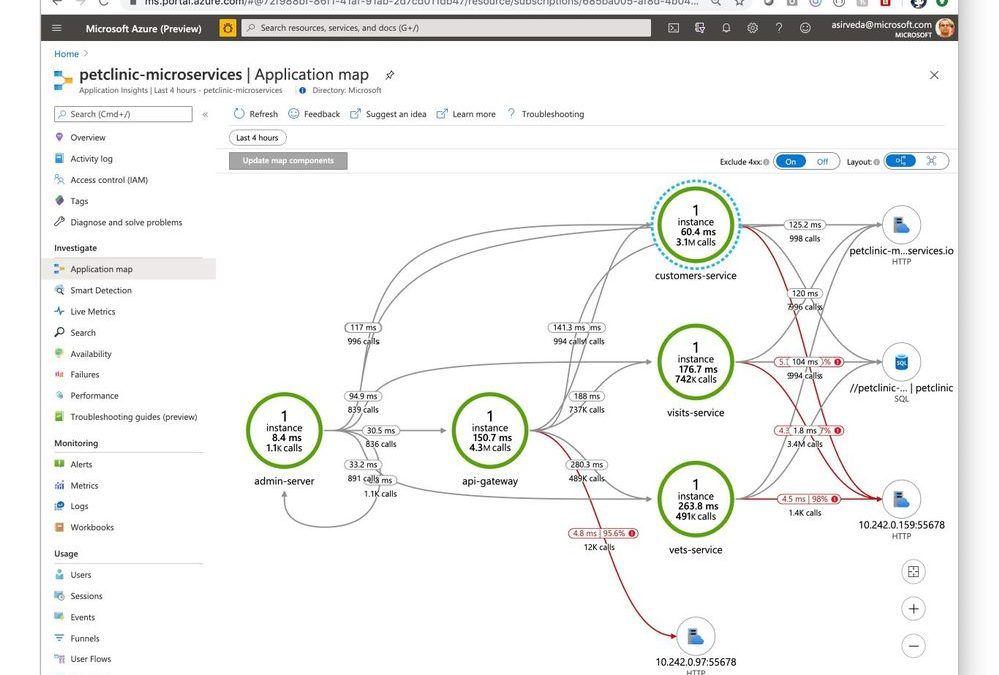
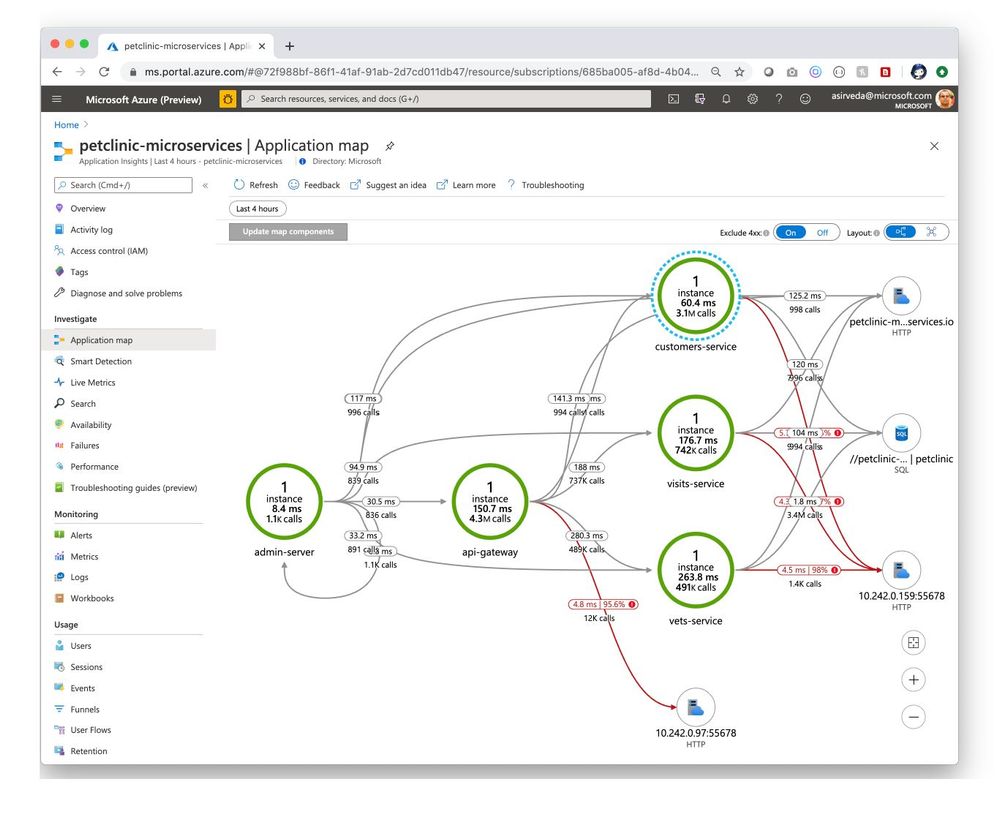
Then, you can open Application Insights created by Azure Spring Cloud and start monitoring applications and their dependencies – we will illustrate this using a distributed version of Spring Petclinic. Navigate to the Application Map blade where you can see an incredible, holistic view of microservices that shows applications that are operating correctly (green) and those with bottlenecks (red) [Figure 1]. Developers can easily identify issues in their applications and quickly troubleshoot and fix them.
Figure 1 – Microservice transactions in Application Insights
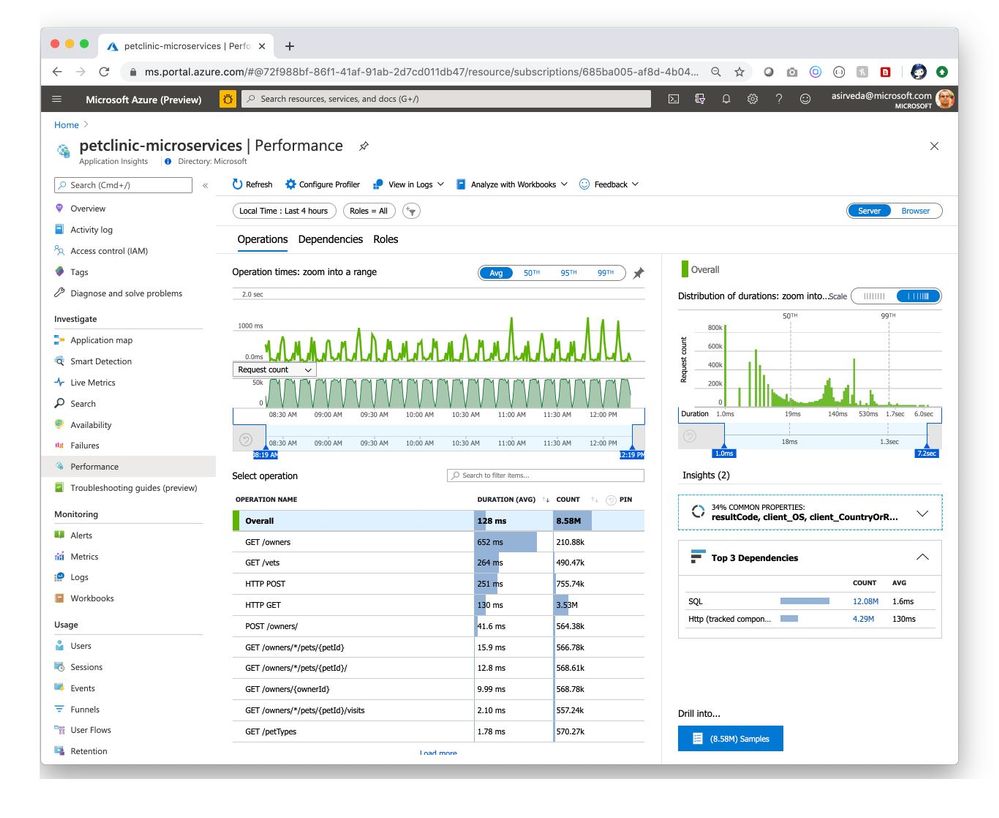
Navigate to the Performance blade where you can see response times and request counts for operations exposed by your applications [Figure 2].
Figure 2 – Performance of operations exposed by applications
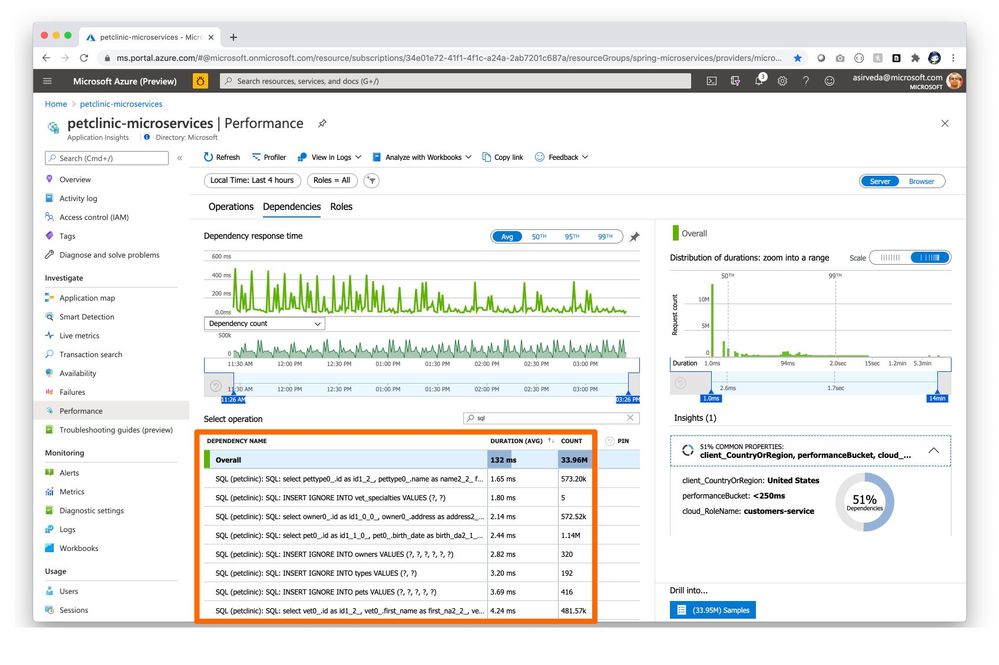
Navigate to the Dependencies tab in the Performance blade where you can see all your dependencies and their response times and request counts [Figure 3].
Figure 3 – Performance of application dependencies
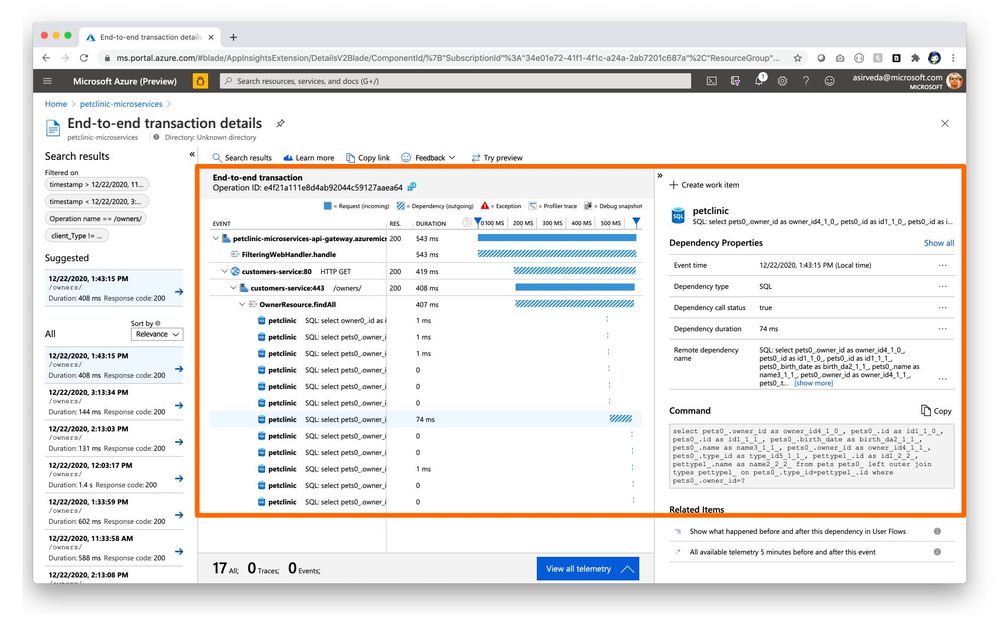
You can click a SQL call or a dependency to see the full end-to-end transaction in context [Figure 4].
Figure 4 – End-to-end application to SQL call transaction details
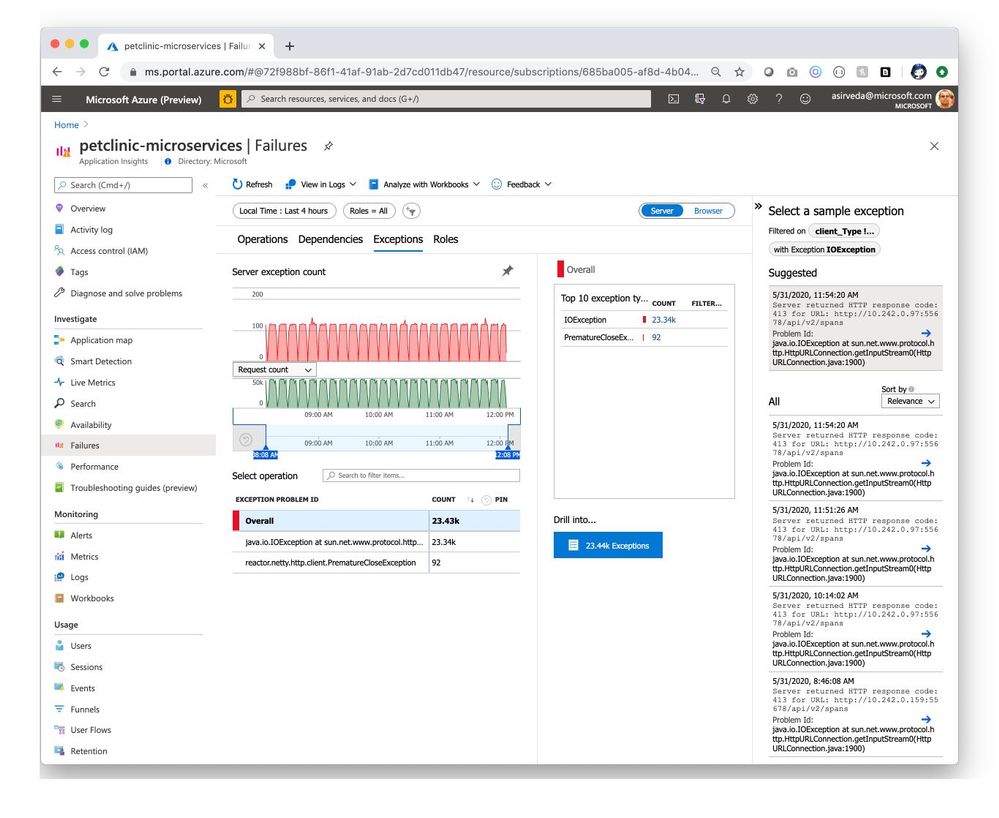
Navigate to the Exceptions tab in the Failures blade to see a collection of exceptions thrown by applications [Figure 5].
Figure 5 – Exceptions thrown by applications
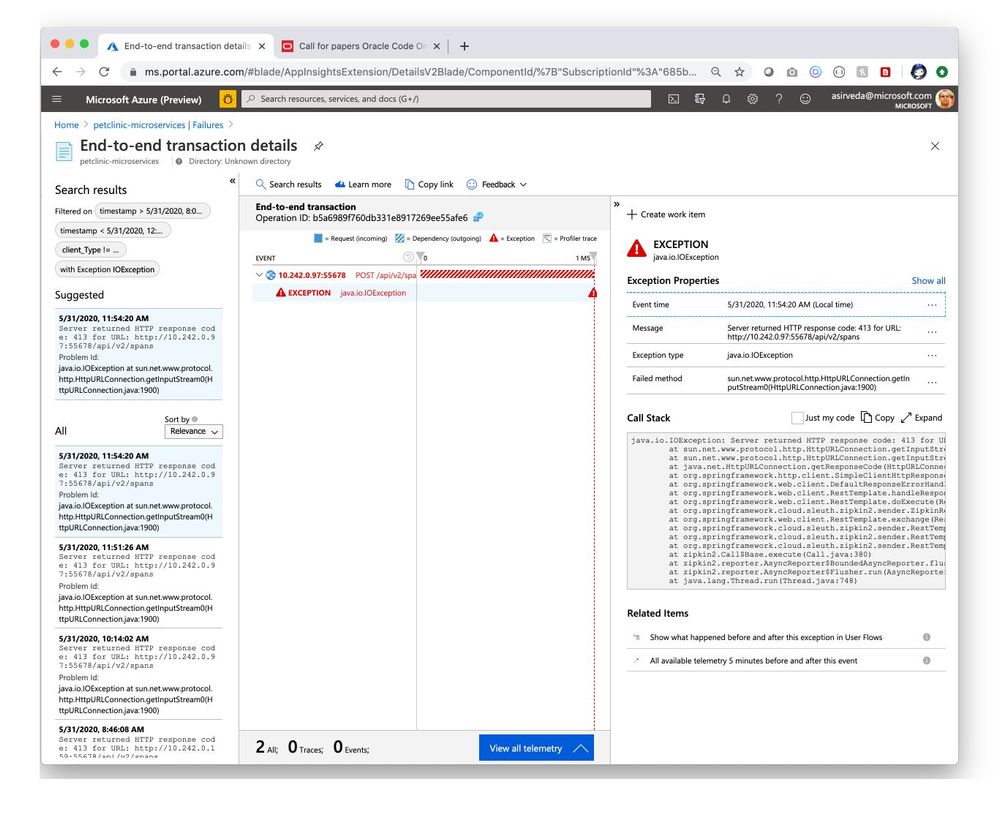
Simply select an exception and drill in for meaningful insights and actionable stack trace [Figure 6].
Figure 6 – End-to-end transaction details for an application exception
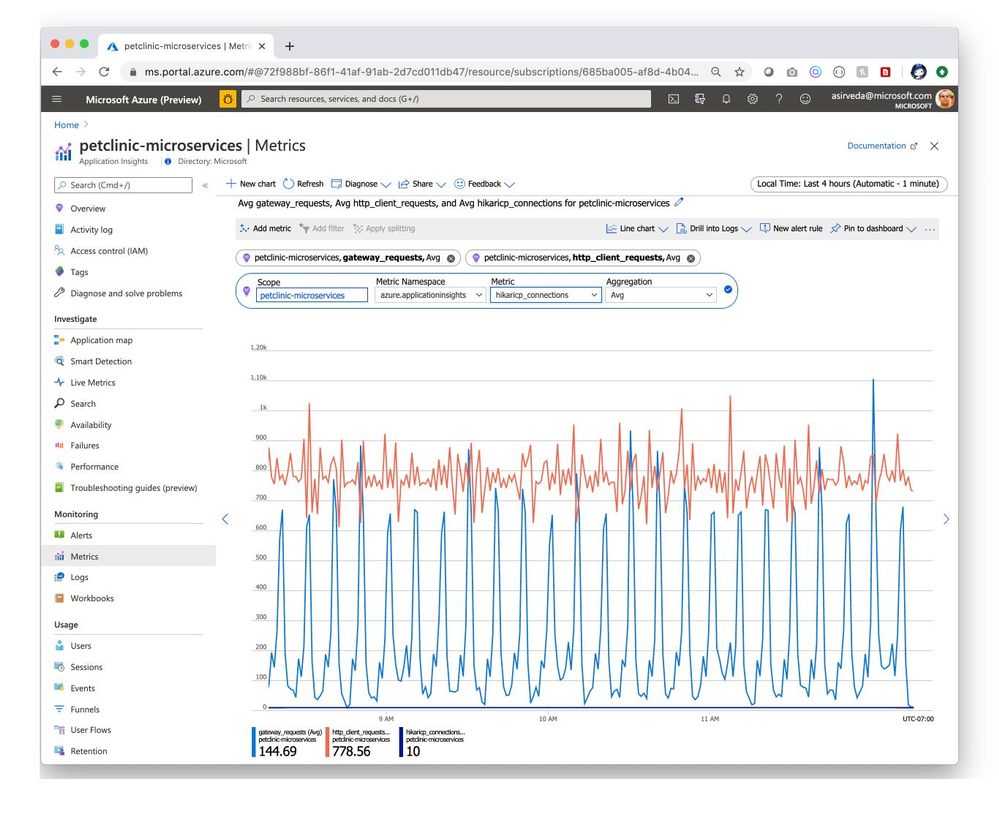
Navigate to the Metrics blade to see all the metrics contributed by Spring Boot applications, Spring Cloud modules, and their dependencies. The chart below showcases gateway-requests contributed by Spring Cloud Gateway and hikaricp_connections contributed by JDBC [Figure 7]. Similarly, you can aggregate Spring Cloud Resilience4J metrics and visualize them.
Figure 7 – Metrics contributed by Spring modules
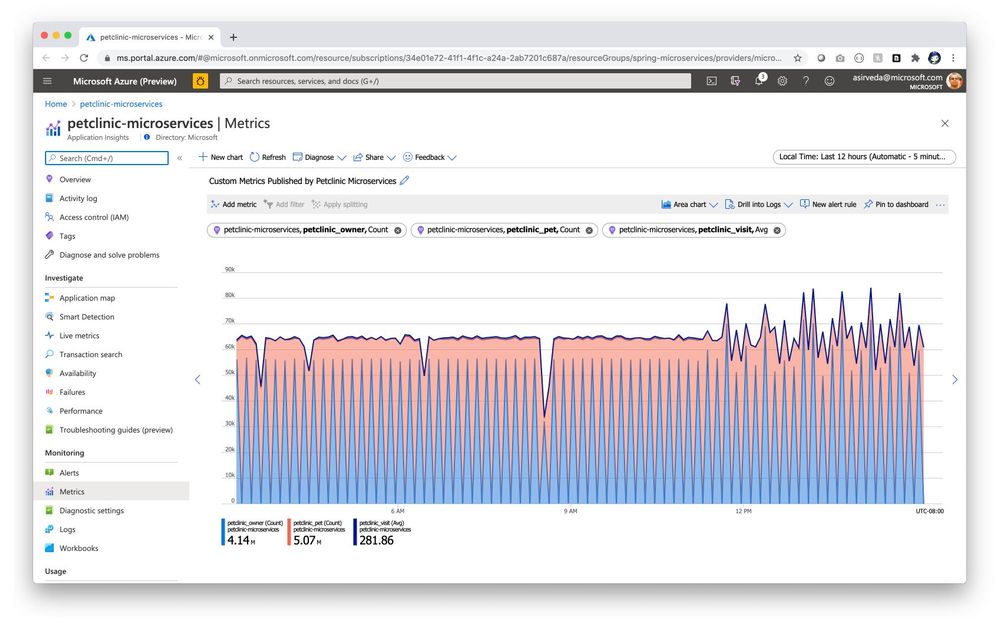
Spring Boot applications register a lot of core metrics – JVM, CPU, Tomcat, Logback, etc. You can use Micrometer to contribute your own custom metrics, say using the @Timed Micrometer annotation at a class level. You can then visualize those custom metrics in Application Insights. As an example, see how pet owners, pets, and their clinical visits are tracked by custom metrics below – you can also see how the pattern changes at 9 PM because applications are driving higher utilization when autoscaling kicked in [Figure 8].
Figure 8 – Custom metrics published by user applications
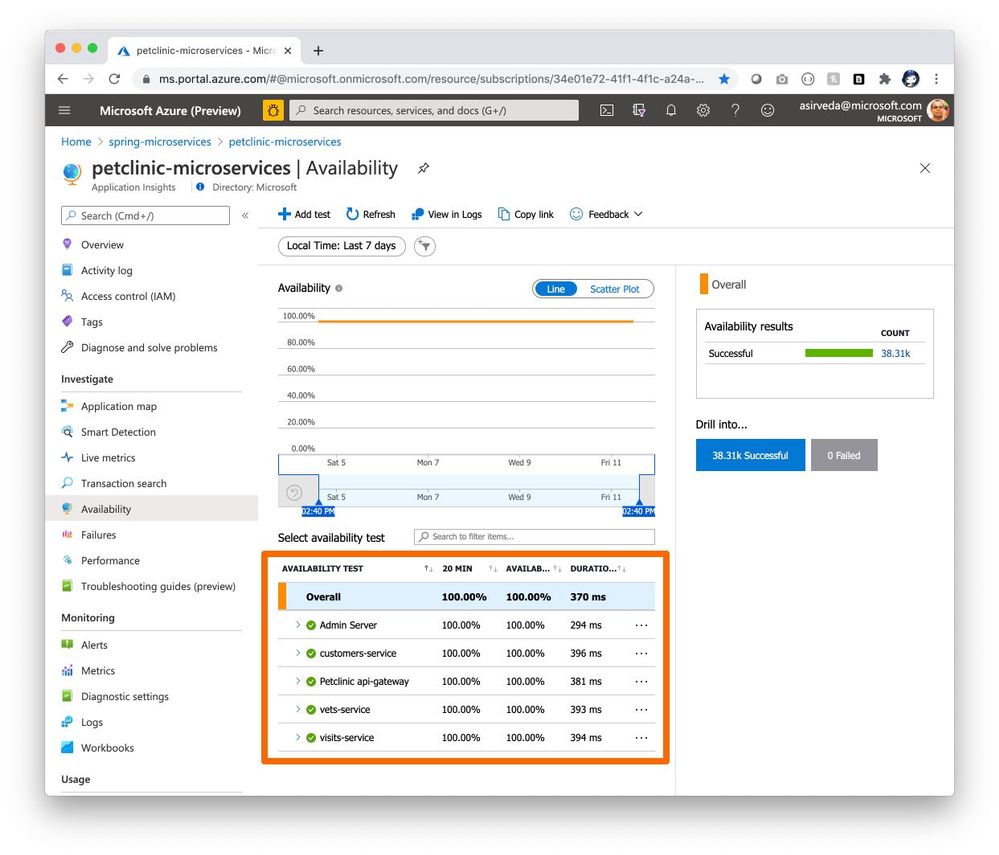
You can use the Availability Test feature in Application Insights to monitor the availability of applications in Azure Spring Cloud. This is a recurring test to monitor the availability and responsiveness of applications at regular intervals from anywhere across the globe. It can proactively alert you if your applications are not responding or if they respond too slowly. The chart below shows availability tests from across North America – West US, South Central, Central US, and East US [Figure 9].
Figure 9 – Availability of application endpoints across time
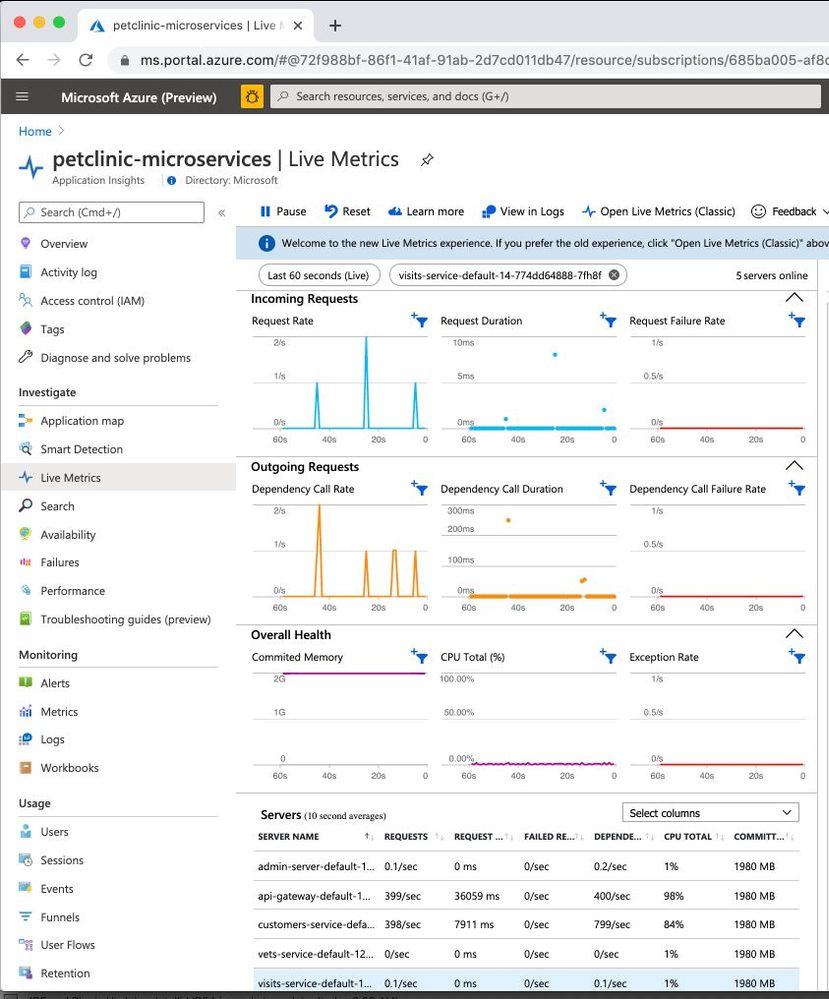
Navigate to the Live Metrics blade where you can see live metrics practically in real-time, within only one second [Figure 10].
Figure 10 – Real-time metrics
Application Insights Java agent is based on OpenTelemetry auto instrumentation effort, where Microsoft collaborates with other brightest minds of the APM space.
Build your solutions and monitor them today!
Azure Spring Cloud abstracts away the complexity of infrastructure management and Spring Cloud middleware management, so you can focus on building your business logic and let Azure take care of dynamic scaling, patches, security, compliance, and high availability. With a few steps, you can provision Azure Spring Cloud, create applications, deploy, and scale Spring Boot applications, and start monitoring in minutes. We will continue to bring more developer-friendly and enterprise-ready features to Azure Spring Cloud.
We would love to hear how you are building impactful solutions using Azure Spring Cloud. Get started today – deploy Spring applications to Azure Spring Cloud using quickstart!
Resources

by Contributed | Jan 21, 2021 | Technology
This article is contributed. See the original author and article here.
Try reading this blog using Immersive Reader! (Right click and open in a new tab)
As Barbara Holzapfel (VP – Microsoft Education) and Satya Nadella (CEO – Microsoft) discussed during their BETTfest keynote, education is going through significant and rapid changes. As schools evaluate what worked and didn’t work last year, it’s clear that having a reliable browser—like Microsoft Edge—is critical to hybrid learning. Microsoft Edge has built-in, “digital-first” learning tools that are proven to raise reading skills and promote inclusive classrooms – all while allowing students and teachers to personalize their web experience, save time, and browse safely. Today, we’re excited to share both recent updates and brand-new functionality to Microsoft Edge as we kickoff 2021. Learn more below!
Use Microsoft Edge to free up device resources and help maintain device performance
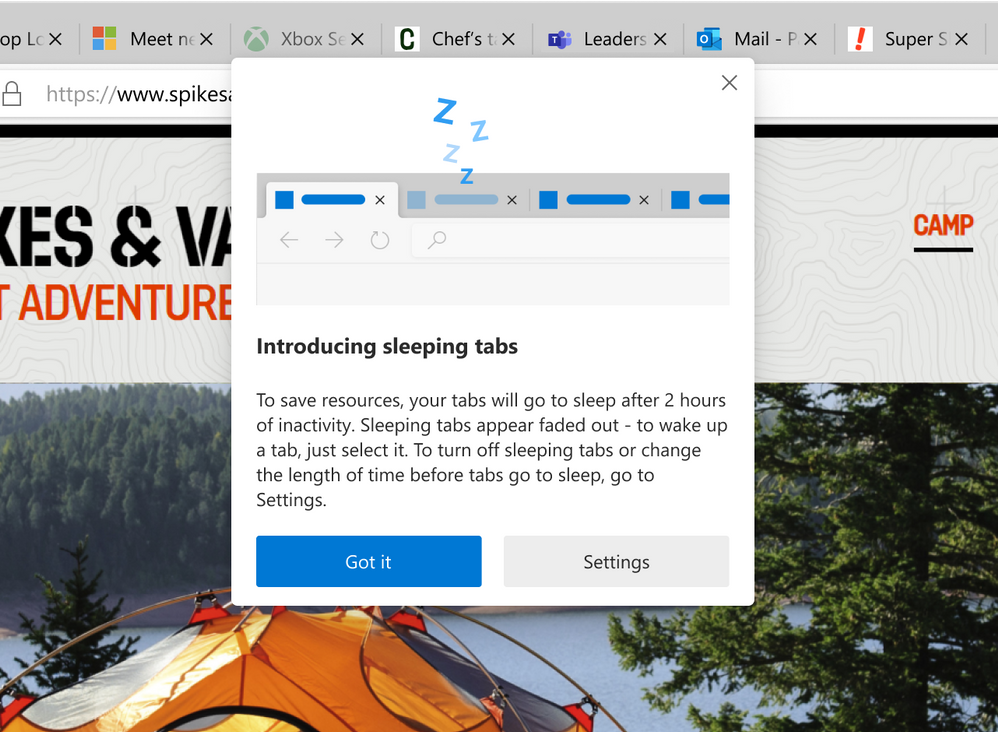
To get hybrid learning off the ground, schools pieced together apps and services to replicate classrooms online. Running multiple apps simultaneously though creates tremendous strain on computer resources—particularly if the device is older with less memory. It’s a zero-sum battle that can easily interrupt and slowdown instruction and learning. Here’s where Microsoft Edge can help: with the new sleeping tabs feature, Microsoft Edge will release system resources from tabs that are inactive after a set period of time. So, instead of unused tabs hogging precious resources, those resources can be used elsewhere for better performance and to help keep learning on track. Sleeping tabs is available in Microsoft Edge version 88+ and can be managed by IT administrators via policy.
Immersive Reader empowers reading independence with additional features
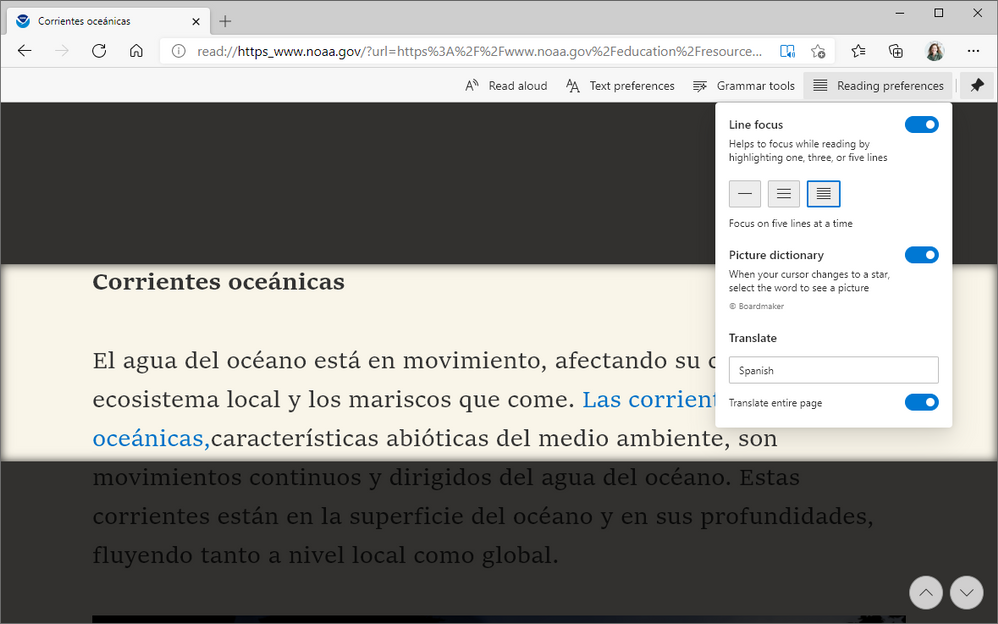
Trying to develop reading skills remotely is challenging; working with a student across a screen is not the same as working across a desk. But with Immersive Reader in Microsoft Edge, you can give your students and teachers inclusive learning tools to help empower reading independence. Like other Microsoft products, Immersive Reader comes built-in to Microsoft Edge. New features like Picture Dictionary and translate rounded out 2020, giving students even more tools in Immersive Reader. Picture Dictionary helps students build vocabulary by showing images of words instead of definitions. And with translate, students can translate their reading into 60+ different languages making this a crucial tool for bi-lingual students or those learning a new language. With Microsoft Edge, not only do you get a fast, reliable browser, but you also get inclusive tools for your teachers and students.

Spark student interest with fun, informative knowledge cards
Researching online can often mean wading through multiple results pages full of uninspiring links to find the right information. For students, it’s a lot of time and a lot of effort. Starting this month in Microsoft Bing, popular student topics now show up as fun, digestible knowledge cards for quick and easy consumption of useful content. When students search for topics like animals, they’ll now get an engaging and visually rich experience right at the top of the Microsoft Bing results page to help make learning easier and more fun.
Give students and teachers a pen for the web
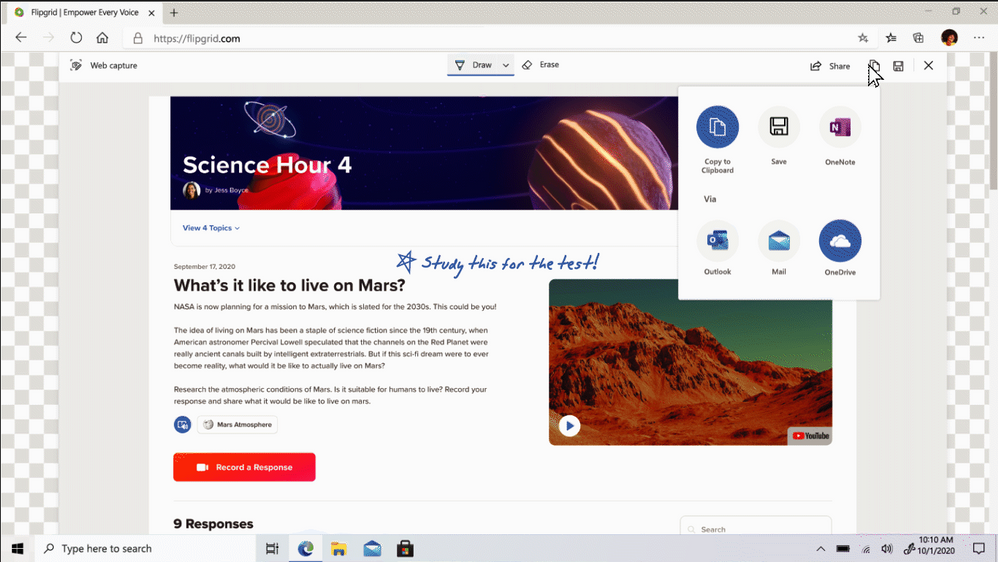
Hybrid learning forced us to consider what “digital best practices” look like for students and teachers online. Analog techniques like handwritten note-taking and drawing have been harder to replicate digitally without comprehensive inking capabilities. With Web Capture in Microsoft Edge, students and teachers can easily ink on content from the web, whether it be a snippet of a page or the whole page itself. By using a digital pen or finger on a touch-enabled device (or a mouse cursor, instead), they can draw, underline, and otherwise write on the captured content and then easily save it into notes or share it with others. It’s a dynamic tool that creates new possibilities for online learning. Try it out from the settings menu or by using CRTL + SHIFT + S on Windows devices.

Secure test taking with Proctorio and Microsoft Edge
Setting up hybrid learning environments is complex—administering exams online adds to that complexity. Enter online proctoring solutions like Proctorio1, available soon as a browser extension from the Microsoft Edge Add-ons site. Trusted by over 1,200 universities, institutions, and corporations, Proctorio administers secure remote proctoring, identity verification, and originality authentication directly through the Microsoft Edge browser. Proctorio is a cost-effective, scalable solution that integrates with your learning management system and can be easily enabled with a simple extension. Deploy the extension to your managed devices—or have users install it on their own—to lock down the online testing environment and get secure, objective results. This Proctorio extension will be available on the Microsoft Edge Add-ons site in the coming weeks.
A lot can happen in a year—2020 sure showed us that. It was only last year that we launched Microsoft Edge with features like Immersive Reader and Collections to help make the web more accessible and inclusive for schools everywhere. We’re continuing that mission in 2021 and we hope that by deploying Microsoft Edge, you’ll get an “easy win” to start the year for both you and your school.
Follow the Tech Community Education Blog to stay informed about all the exciting new features coming to Microsoft Edge or visit the Microsoft Edge education page to download it. And don’t forget to join the conversation with fellow educators on Twitter using #EdgeEdu!
by Contributed | Jan 21, 2021 | Technology
This article is contributed. See the original author and article here.
Moving to the cloud has clear economic benefits: cost savings, productivity gains, scalability, and agility, to name a few. However, many organizations keep sensitive data out of the public cloud due to regulations or to remain in full control, and thus they are missing out on those benefits.
Keep control of your data
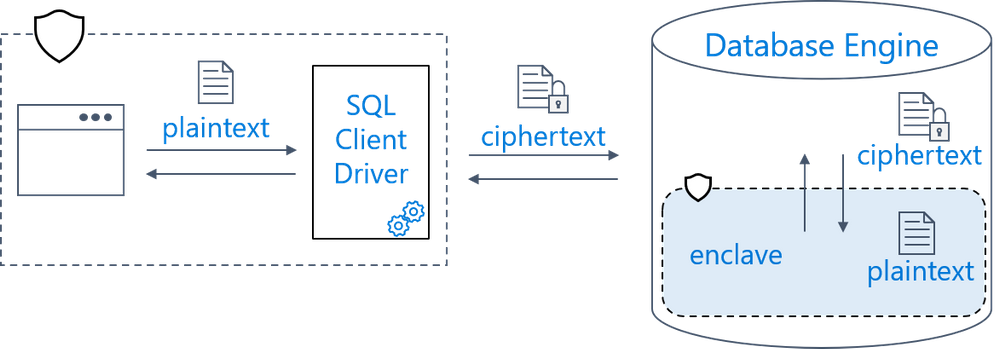
Always Encrypted allows you to store your most sensitive data in the public cloud without giving up the control. With Always Encrypted, your data gets transparently encrypted and decrypted outside of the database (inside the client application) using keys that are never revealed to the database system. As a result, administrators, including cloud operators, cannot see the data or the keys in plaintext. For example, a DBA can query a table holding sensitive data or an OS admin can read the memory of the database system process, but all they can access is encrypted data, not plaintext.
Confidential computing
Client-side encryption typically makes it impossible for the database system to perform any computations on encrypted data, which makes it extremely costly to deploy. To work around it, you need to refactor your apps to perform computations outside of the database, which is often impractical.
Always Encrypted addresses this challenge with confidential computing – the ability to process queries on encrypted data without exposing the data in the clear to admins.
Secure enclaves open new possibilities
Until now, Always Encrypted has supported confidential computing with deterministic encryption, which enables simple point lookup searches and equality joins on encrypted data within the database system.
Now in preview in Azure SQL Database, Always Encrypted with secure enclaves takes confidential computing to the next level. A secure enclave is a protected region of memory within the SQL database engine process. It acts as a trusted execution environment for processing sensitive data inside the database engine. A secure enclave appears as an opaque box for the rest of the database engine process and other processes on the hosting machine. There is no way to view any data or code inside the enclave from the outside, even with a debugger. Therefore, during query processing, the secure enclave can safely decrypt sensitive data and perform rich computations on the plaintext.
Always Encrypted with secure enclaves provides two key benefits:
- Rich confidential queries, including pattern matching (LIKE) and range comparisons. These new capabilities make it possible to protect a much broader set of sensitive information (names, address, phone numbers, sensitive numerical data) without painful compromises.
- In-place encryption – allowing cryptographic operations inside the secure enclave, to eliminate the need to move the data outside of the database for initial encryption or key rotation.
In Azure SQL Database, Always Encrypted uses Intel Software Guard Extensions (Intel SGX) enclaves – a hardware technology supported in databases that use the new DC-series hardware generation, now also in preview. Selecting DC-series for your database places it on the hardware equipped with Intel SGX, which is a prerequisite for enabling Always Encrypted with secure enclaves.
With this release, Azure SQL Database joins the growing family of Azure confidential computing services, including confidential virtual machines, confidential containers, confidential machine learning, and confidential IoT edge devices.
Customers who are already using secure enclaves
Here are some examples of customers who are already using Always Encrypted with secure enclaves in Azure SQL Database.
Royal Bank of Canada
“Our project focuses on working with different partners to bring more value to respective customers by exchanging encrypted data wherein no person, process or system can see each other’s data. Always Encrypted with secure enclaves in Azure SQL Database provides us the framework for managing encrypted data and running queries on top of them, while minimizing work on our end. By leveraging Always Encrypted that helps ensure that RBC and Microsoft don’t have access to customer data, we can create a new platform to provide services that we couldn’t offer before.” — Eddy Ortiz, VP of Solution Acceleration and Innovation, Royal Bank of Canada
Financial Fabric
“Always Encrypted with secure enclaves enables the DataHub service from Financial Fabric to meet the strictest of Financial Services Industry data security requirements where PII data remains encrypted throughout its life cycle. Financial calculations on sensitive data are computed completely within the secure “walls” of the enclave giving banks, hedge funds and investors control so that their unencrypted PII data and related computations stay within the secure enclave.” — Paul A. Stirpe Ph.D., Chief Technology Officer, Financial Fabric
Next steps
For more information and to get started with Always Encrypted with secure enclaves, see:
by Contributed | Jan 21, 2021 | Technology
This article is contributed. See the original author and article here.
by Contributed | Jan 21, 2021 | Technology
This article is contributed. See the original author and article here.
In the coming months, Cloud App Security will be updating its UI to provide a more consistent experience across Microsoft 365 security portals.
Use this blog to learn about the changes as they unfold.
Week of January 10, 2021
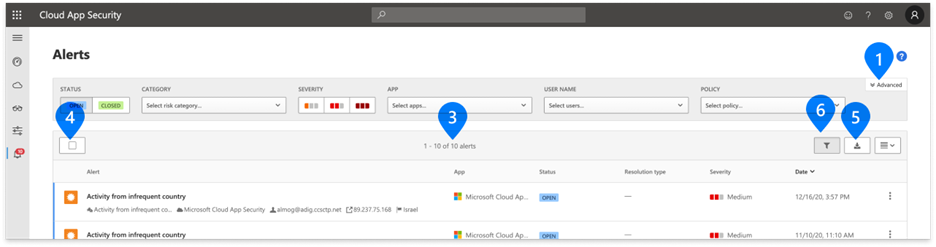
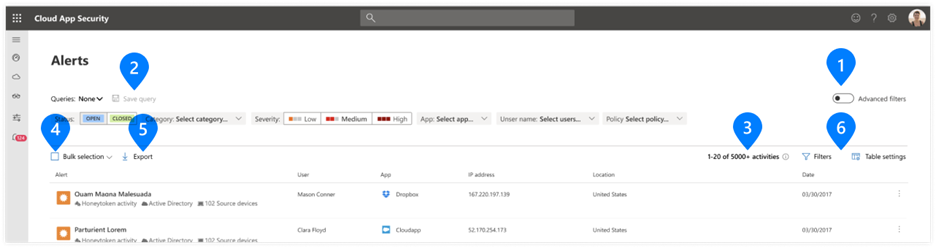
What’s changed: We’ve updated the following filters and controls for tables and forms across all Cloud App Security portal pages.
- The design and positioning of Basic and Advanced filters toggle control
- The design of Advanced filters in forms such as policies
- The design and positioning of table controls
Examples
1. Basic/Advanced filters toggle
2. Save query button
3. Number of results (X of Y) indicator
|
4. Bulk selection check box
5. Export button
6. Table settings controls
|
Current design
|
New design
|
We look forward to sharing more with you. We encourage you to investigate these changes and ask questions.
– The MCAS team

by Contributed | Jan 21, 2021 | Technology
This article is contributed. See the original author and article here.
We continue to expand the Azure Marketplace ecosystem. For this volume, 88 new offers successfully met the onboarding criteria and went live. See details of the new offers below:
|
Applications
|
|
Adaptive Learning by Vitalyst: Vitalyst’s Adaptive Learning app serves as a central location in Microsoft Teams to access learning resources, sign up for training sessions, and ask questions about Teams and other applications.
|
 |
aiola-azure-saas: Aiola’s powerful virtual analyst connects business users to data and AI through a user-friendly chat interface in Slack, WhatsApp, or Microsoft Teams. Accessing forecasting models or promotion optimization is as easy as texting a question.
|
 |
Ambyint InfinityPL Plunger Lift Optimization: Ambyint’s InfinityPL enables engineers and field personnel to increase production on plunger-lift wells by detecting anomalous behavior and determining optimal controller setpoints. InfinityPL uses physics-based AI and subject matter expertise to identify well problems.
|
 |
Ambyint InfinityRL Rod Lift Optimization: Ambyint’s InfinityRL reduces operating costs and increases production volumes for rod-lift wells. It uses physics-based AI and subject matter expertise to improve operational effectiveness and drive bottom-line performance.
|
 |
B2X eCommerce: Part of Grupo Hasar’s suite, B2X is a business-to-business omnichannel solution with customer portfolio management, individual price lists, suggested products, and a promotions engine. This solution is available in Spanish.
|
 |
Bosch.IO Retail Service Dashboard: Bosch.IO Retail Service Dashboard provides the grocery industry with a holistic view of data streaming from their IoT services, sensors, and equipment across the store. Retailers can monitor coolers, checkout lines, and more.
|
 |
CentOS 7.8 HPC: desktop.studio AG provides this ready-to-use CentOS 7.8 image for high-performance computing workloads running on InfiniBand networks. It includes optimizations and recommended configurations to deliver consistency and reliability.
|
 |
CloudMoyo On-the-job Training Management System: CloudMoyo’s On-the-Job Training Management System simplifies the administration of training programs for the railroad industry, including critical field roles like locomotive engineers, diesel engineers, and equipment operators.
|
 |
CloudOps 365: CloudOps 365 from Asurgent gives decision-makers insight into their organization’s Microsoft 365 tenants, helping them determine licensing status, security posture, adoption program performance, and more.
|
 |
Content Migration – Legacy systems to Office 365: Migration Accelerator from Proventeq smoothly migrates the assets of your enterprise content management platform, enabling you to maximize the potential of your content and information management infrastructure throughout each stage of your migration to Office 365.
|
 |
Counter-Strike: Condition Zero on Ubuntu 18.04 LTS: Get a private game server for Counter-Strike: Condition Zero on Ubuntu 18.04 LTS with this one-click deployment from Tidal Media. Counter-Strike: Condition Zero features updated character models, textures, maps, and other graphical tweaks.
|
 |
Digital Inspection of Roads: HAL24K’s Digital Inspection of Roads augments and digitalizes agencies’ daily road inspections using video footage from consumer-grade cameras. Digital Inspection of Roads uses machine learning models to automatically detect defects.
|
 |
Dorabot AI-CLP Interactive Edition: Dorabot’s AI-CLP helps logistics workers optimize container use and load planning. AI-CLP can be seamlessly integrated with warehouse management systems, and it can handle complicated scenarios involving collocation specifications and weight distribution balance.
|
 |
Dr.Bridge: Dr. Bridge from Nihon Unisys Ltd. uses AI to enhance bridge inspection efforts. Through photo analysis, it diagnoses deterioration factors and construction soundness. This app is available only in Japanese.
|
 |
Enhanced Offloaded Auditing for D365 – Audit Away: Designed to be used with the Microsoft Power Platform, Audit Away from cloudThing captures record changelogs from Microsoft Dataverse (formerly known as the Common Data Service) and publishes them to configurable storage targets.
|
 |
Experian Address Validation: Experian Address Validation standardizes, validates, and enriches addresses during data entry, enabling you to reduce data entry time by up to 80 percent. The real-time hosted API works with addresses from 245 countries, validating against official postal address sources.
|
 |
Experian Aperture Data Studio: Experian Aperture Data Studio combines self-service data quality and globally curated data sets in an intelligent platform. Use it to gain a single customer view and improve day-to-day operational efficiency and reporting accuracy.
|
 |
Experian Email Validation: Standardize and validate email addresses with Experian Email Validation. Whether you choose to integrate the API into a website, at a point of sale, or in a call center or CRM system, the API seamlessly protects your data quality.
|
 |
Experian Phone Validation: Standardize and validate landline or mobile numbers with Experian Phone Validation. The API references multiple sources to check the existence, validity, format, type, provider, portability, and reachability of each phone number.
|
 |
GPS-Enterprise: GPS-Enterprise, a holistic platform for predictive analytics, delivers end-to-end data ingestion, processes extremely complex modeling, and provides deep insights through data visualizations.
|
 |
Helio “Demand Planning @ Weather”: Helio from Analytic Partners quantifies the impact of weather on business performance. Its predictive forecasts, fueled by machine learning, help companies answer important business questions by looking forward instead of backward.
|
 |
Identity Protection Suite: Image & video redaction: brighter AI’s Identity Protection Suite automatically anonymizes faces and license plates in images and videos, helping companies comply with the General Data Protection Regulation and other data privacy laws.
|
 |
Johns Hopkins Balance: Balance is a digital behavioral health program committed to delivering convenient and accessible mental health resources. Connect your employees with a program rooted in providing care on their time and on their terms.
|
 |
Journey Insights for CX: Based on Microsoft Azure Cognitive Services architecture, Genoa Performance’s Journey Insights CX captures customer interactions and processes so companies can enhance brand engagement. This app is available only in Portuguese.
|
 |
KinderConnect: KinderConnect helps childcare providers and agencies save time on everyday administrative tasks while minimizing the possibility of fraud. The web-based portal can be customized to each agency’s particular needs and state regulations.
|
 |
KinderTrack: KinderTrack supports case work done by childcare subsidy agencies, streamlining eligibility determination, provider payments, attendance tracking, reporting, and more. Every change made in the system is recorded in history tables, providing a complete audit trail.
|
 |
KNIME Executor BYOL for Azure: KNIME Executor instances execute workflows for KNIME Server. This bring-your-own-license offer provides workflow execution for KNIME Server Large and can utilize a Microsoft Azure virtual machine scale set to spread deployment of KNIME Executor instances across Azure Availability Zones.
|
 |
KNIME Server Large BYOL for Azure: KNIME Server is enterprise software for collaboration, automation, management, and deployment of data science workflows. This bring-your-own-license offer is a requirement for using the KNIME Executor solution.
|
 |
KnowYourPeople: GBG KnowYourPeople provides fast and auditable background checks so companies can screen job applicants and employees. Use the cloud-based portal to streamline processes and efficiently meet compliance requirements.
|
 |
Kuma Service Mesh 1.0: This template-based offer from Kong is meant for pre-production and production environments where customers need Kuma Service Mesh capabilities running on a Microsoft Azure Kubernetes Service cluster.
|
 |
Low Carbon App: OrxaGrid’s Low Carbon App determines the optimal size of solar panels, batteries, and electric vehicle charging stations for a selected residential, commercial, or industrial site. OrxaGrid aims to maximize financial savings for building owners while reducing carbon emissions.
|
 |
LumApps: Empower your employees with the LumApps intranet, which provides access to personalized and multilingual content according to each employee’s profile and location. LumApps can be easily configured and customized to fit brand identity.
|
 |
Lumeta Community Edition Command Center v4.0.0.0: FireMon’s Lumeta CloudVisibility delivers security, endpoint discovery, and anomaly detection for hybrid enterprises. Eliminate security blind spots and replace them with authoritative visibility into mobile, virtual, and cloud assets.
|
 |
Metro Activity Planner: Metro Activity Planner is a project and task management module within the Metro software suite from Retail Manager Solutions. Features include project templates, a workflow engine, a capacity calculator, and an activity planner.
|
 |
Minerva: Minerva Patient Engagement Suite, MphRx’s flagship platform, enables healthcare organizations to provide telemedicine and holistic care onsite. Deployed in more than 20 countries, the platform is used by more than 1.5 million patients and 350,000 healthcare professionals.
|
 |
mTHM: mPrest’s Transformer Health Management (THM) monitors power transformers for abnormalities. THM aggregates information from multiple sensors and uses advanced analytical algorithms to gauge transformer health and predict failures.
|
 |
OneWindow Workplace for Healthcare: Withum’s OneWindow Workplace for Healthcare simplifies the rollout and adoption of Microsoft 365 in healthcare organizations. OneWindow creates consistency and engages employees through corporate communications, leadership conversations, and data dashboards.
|
 |
PeopleSense – Easy People Counting: Retailers, service providers, councils, and facility managers can use PeopleSense to monitor pedestrians and vehicles to gauge activity, optimize service intervals, improve customer experience, and flag potential security breaches.
|
 |
Phonexia Voice Verify: Powered by deep neural networks and designed for contact centers, Phonexia Voice Verify authenticates customers over the phone. Its voice biometrics can verify a person after only three seconds of speech and detect speaker changes throughout the call to help prevent fraud.
|
 |
powerThings – Power Platform Solution Accelerators: cloudThing’s powerThings are pre-built accelerators that can be deployed atop the Microsoft Power Platform to solve common technical challenges and deliver cloudThing capabilities.
|
 |
QuTScloud: Empower your organization to optimize its cloud data and maximize the value of the cloud with QuTScloud, a virtual network attached storage (NAS) appliance from QNAP Systems. QuTScloud includes expandable storage along with data sharing, backup, and security features.
|
 |
REMS: Based on Microsoft Dynamics 365 Customer Engagement, Bitforit’s Real Estate Management System (REMS) extends typical CRM functionalities with real estate processes, including purchase, legal, eviction, rent, and collaboration with developers, government, brokers, and service providers.
|
 |
Reverse Proxy Server + NginX on Ubuntu 18.04: Tidal Media offers this image of Reverse Proxy Server + NginX on Ubuntu 18.04, specially hardened for Microsoft Azure and pre-configured for rapid and secure deployment. Provide an additional level of abstraction and control to ensure the smooth flow of network traffic.
|
 |
RiskIQ PassiveTotal: RiskIQ PassiveTotal integrates with Azure Sentinel and Azure Defender to give security teams a 360-degree view of their attack surface to better detect threats and defend their enterprise. Accelerate investigations, increase visibility, and respond more effectively to threats.
|
 |
Riverbed SaaS Accelerator: An easy-to-deploy service, Riverbed Technology’s SaaS Accelerator maximizes SaaS application performance by overcoming network limitations of latency and data congestion as well as the unpredictability of last-mile user experiences.
|
 |
SAP Data Custodian: SAP Data Custodian is a public cloud and SAP application data protection service that can help mitigate cloud data protection concerns and help you move to the cloud with confidence. Features include data residency control, contextual data access control, and customer-controlled encryption keys.
|
 |
SearchUnify – Cognitive Search Engine: SearchUnify from Grazitti Interactive is a unified cognitive search platform and insights engine that facilitates the building of AI-based apps. SearchUnify’s out-of-the-box support for more than 35 native connectors helps you access relevant information without leaving Microsoft Dynamics 365.
|
 |
Secure Linux – RedHat 7.4: BISSaN offers this hardened Linux – RedHat 7.4 image to provide a security-focused environment that is ideal for running web applications, databases, and application servers. The solution also helps mitigate insufficient authorization and network and program attack threats.
|
 |
Serialization for the Supply Chain: The Digimarc platform supports the creation, quality control, and detection of Digmarc’s unique code, which is used to create serialized digital identities for media objects and facilitate greater visibility in the supply chain.
|
 |
Shufti Pro Identity verification KYC AML solutions: Shufti Pro is an AI-powered identity verification solution that employs artificial intelligence and human intelligence to provide robust identification solutions that help eliminate risks and identity theft and financial crimes.
|
 |
Smaartbrand: Smaartbrand from Enixta Innovations taps the customer voice from multiple channels (e-commerce, social media, vlogs, blogs) in various formats (audio, text, images, videos) to extract actionable insights so that brands can enhance their product offerings and customer experience.
|
 |
Supply Chain: Production Planning Simulation Soft: Cosmo Tech Supply Chain is a digital supply chain twin that simulates and optimizes production plans and drives the alignment of decisions throughout the supply chain. Simulate demand variability arising from unexpected events and adjust plans while achieving desired KPIs.
|
 |
SYSOTools.com: Available only in Spanish, SYSOTools is a technology and collaborative assistant that enables stakeholders to extend the occupational safety and health strategy more effectively and efficiently across your organization.
|
 |
Testportal for K12 Education: The Testportal platform enables reliable online knowledge assessment via proctored exams, tests, and quizzes. Its integration with Microsoft Teams facilitates easy test sharing and provides secure identity verification thanks to Azure Active Directory.
|
 |
Thought Machine Vault: Thought Machine Vault is a cloud-native core banking platform designed to enable banks to deploy modern systems and move away from the legacy IT platforms. Vault is built around APIs using a microservice architecture.
|
 |
Unimetis: Based on Microsoft Dynamics 365 Customer Engagement, Unimetis is an education lifecycle managing platform that helps facilitate, optimize, and manage the daily routines of students, teachers, and faculty.
|
 |
VibSign: VibSign, available only in Japanese, uses artificial intelligence and IoT sensors to detect the state of bearings in rotating machines and help prevent sudden outages and unplanned downtime of factory equipment.
|
 |
Virtual Conference Manager: Virtual Conference Manager (VCM) from Opsgility makes it easy to deliver a virtual conference with a rich set of interactivity options for your attendees. Built on Microsoft Teams, VCM ensures your conference is secure and can be accessed from a browser or the Teams app.
|
 |
Voicespin APPs: Voicespin is a scalable call center and global VoIP gateway solution for inbound and outbound calls that enables users to make calls directly from a browser.
|
 |
WInsights for Animal Healthcare: Powered by Microsoft Azure, WinWire Technologies’ WInsights for animal healthcare transforms data into actionable insights to help animal health organizations improve animal well-being, monetize critical data assets, drive growth, and accelerate time-to-market.
|
 |
Your identity: Available only in Spanish, Your Identity simplifies the process of identifying customers through place of residence verification; fingerprint, facial, and vocal biometric registration; crime sheet research; and more.
|
Consulting services
|
 |
2-Day App Modernization Workshop: Active Solution’s App Modernization Workshop will help you move your application to Microsoft Azure, which enables you to focus on delivering business value faster instead of having to handle growing hardware needs and a complex IT infrastructure.
|
 |
2-day workshop: Secure authentication with FIDO2: In this two-day workshop, perinova IT-Management will work with you to develop a strategy for passwordless login, multifactor authentication, single sign-on, and a password safe for your organization. Deliverables include recommendations for Azure licensing and services.
|
 |
4-Hr Workshop on Azure WVD by Embee: Delivered via Microsoft Teams, Embee Software’s free Windows Virtual Desktop workshop will provide you with a basic understanding of the components required to deploy on Microsoft Azure, including a readiness assessment to help you plan your next steps.
|
 |
AI & Data Discovery 2-Week Workshop: Want to learn how to make your data work for you? Predica’s Artificial Intelligence & Data Discovery Workshop will help your organization develop a suitable data strategy; understand technology, licensing, and skills requirements; and identify key pain points.
|
 |
App Modernization: 2-Week Workshop: Aligned with Microsoft’s Cloud Adoption Framework, Lunavi’s App Modernization Workshop includes a deep assessment of the chosen application and its associated data components, creation of new application architecture integrated with the Azure Landing Zone, and testing and validation.
|
 |
Azure App Development 1-Day Spark Workshop: Vectorform’s Azure App Development Workshop will help you kickstart your Azure projects by explaining opportunities, industry and market trends, and company dynamics. Vectorform will also identify potential solutions and outline best next steps for your organization.
|
 |
Azure Cloud Optimization Platform Accelerator: 4-Week Implementation: The Cloud Optimization Platform Accelerator from Neudesic is designed to help your organization easily understand and control your Microsoft Azure cloud environment to reduce costs, increase performance, and maintain compliance.
|
 |
Azure Synapse – 2-Hour Free Workshop: Available only in Spanish, 54cuatro’s free workshop will introduce you to Azure Synapse Analytics and create a roadmap from your current data warehouse platform to a modern data warehouse model on Microsoft Azure.
|
 |
Azure Synapse – 10-Day Migration Assessment: Get a thorough review of your current data platform along with a roadmap for migrating your workloads to Azure Synapse Analytics in 54cuatro’s 10-day assessment. This service is available only in Spanish.
|
 |
Cloud transformation prestudy: 3-week assessment: Learn how to take advantage of modern Microsoft Azure services to gain a competitive advantage in Etteplan More’s three-week cloud transformation assessment. Deliverables include a roadmap detailing next steps and which Azure services will bring the best value to your business.
|
 |
Data Modernization: 2-Week Workshop: Aligned with the Microsoft Cloud Adoption Framework, Lunavi’s Data Modernization workshop will teach you how to bring together data from across your organization to uncover new insights and integrate Azure apps and services with your data sources.
|
 |
Implement FHIR HL7 HIPAA on Azure SaaS PoC: In this proof of concept, TwoConnect will work with your healthcare organization to identify FHIR, HL7, and HIPAA app migration or integration opportunities that would improve operational efficiency.
|
 |
Introduction to AKS and Kubernetes: 1-day workshop: This one-day workshop from Gofore Oyj serves as a technical introduction to Kubernetes and Azure Kubernetes Service (AKS). Workshop topics include an introduction to the services, the benefits of using them, and identifying right time to start using AKS.
|
 |
Kubernetes 1-day Proof-Of-Concept: In this one-day Kubernetes proof of concept, Active Solution’s experts will teach you how your team can use Azure Kubernetes Services to remove bottlenecks in production processes. Develop and deliver high-quality apps faster with Kubernetes.
|
 |
Maestro Cloud Management Service: Standardize and automate complex Microsoft Azure environments with this managed service from Softline. Softline will provide monitoring, customized cost analytics, utilization reports, alerts, infrastructure recommendations, and more.
|
 |
Manage API’s w/ Azure & BizTalk: 3-Day Assessment: API management platforms are designed to extend BizTalk’s protocol mediation and message format transformation capabilities. In this offer, TwoConnect will review your company’s APIs and determine a migration path to Microsoft Azure API Management.
|
 |
Microsoft Azure DevOps CIO: 1-Hr Assessment: DevOps solutions enable a consistent experience across hybrid multi-cloud environments to accelerate application development while optimizing pipelines with cloud-native DevOps technologies. Learn how you can benefit from Azure DevOps in ITCO’s one-hour assessment.
|
 |
Migration Strategy as a Service: 6-Week Assessment: Looking for a flexible, scalable, and reliable environment for your IT ecosystem? In this six-week assessment, Tech Mahindra will use its InfoWise AI-augmented solution to assess your current setup and provide optimizations for your organization’s move to Microsoft Azure.
|
 |
Secure Account Lifecycle Management: 8-Week Implementation: Designed to automate and streamline the user identity lifecycle, Catalyte’s eight-week implementation will connect Azure Active Directory with the Workday human capital management solution to enhance enterprise HR management and protect your apps and users.
|
 |
Security and Compliance: 3-Week Proof of Concept: In this three-week proof of concept, Conterra will assess your current infrastructure, prepare the environment for security features, configure scenarios, and implement security and compliance features for your pilot user group.
|
 |
Sopra Steria Go2Cloud Assessment and Roadmap 6 weeks: Available in Norwegian, Sopra Steria’s six-week assessment will help you develop a business case and plan to lift and shift your organization’s data from a datacenter to Microsoft Azure. Take advantage of Azure components for IaaS, PaaS, and SaaS.
|
 |
Surveyor 360 WVD: 10-Day Assessment: Phoenix Software’s Surveyor 360 WVD offering is designed to help you assess your current environment and seamlessly transition to Windows Virtual Desktop for specific use cases or at scale across your organization.
|
 |
Teams Workshop: This workshop from Move provides an introduction to Microsoft Teams, enabling you to manage, adapt, and secure the productivity and collaboration platform and help users with simple issues.
|
 |
VMware Azure Transition: 2-Week Assessment: Through a series of discussions and discovery sessions, Insight’s experts will develop an understanding of where your organization is today and what steps you can take toward Azure VMware Solution.
|
 |
Windows/SQL 2008 End of Support – 1-Day Workshop: Migrating to Microsoft Azure allows you to continue to innovate securely in the cloud while making it faster, easier, and less expensive to remain current with security updates and regulatory compliance. In this one-day workshop, BrainScale will prepare you for migration to Azure or SQL Managed Instance.
|
 |
WVD: 2-Day Assessment: Sela Group’s experts will engage with your relevant stakeholders in this two-day assessment to gather information and help you determine how to successfully and efficiently implement Windows Virtual Desktop in your organization.
|
 |
WVD: 10-Day Implementation: Simplify the management of your virtualized desktop and app environment by connecting your virtual machines to Windows Virtual Desktop in this 10-day implementation from Sela Group.
|
|

by Contributed | Jan 21, 2021 | Dynamics 365, Microsoft 365, Technology
This article is contributed. See the original author and article here.
Truly engaged, always connected
As digital commerce continues to evolve and become an integral revenue stream for retailers and consumer goods companies, it is paramount for these companies to digitally transform their supply chain as well. They need the agility to rapidly plan and adapt to changing customer needs, use AI and machine learning to automate order orchestration, fulfilment, and delivery, and lastly, seamlessly add new fulfilment methods like buy online pick up in store (BOPIS) or curbside pick-up. Customer shopping behaviors are constantly changing, but customers continue to seek near-instant gratification when buying online or in-store. If a product is not on the shelf when they need it, they will order it from another retailer instantly using their cell phone.
According to a recent study by Forrester Consulting commissioned by Microsoft, 69 percent of retail businesses were impacted due to disruptions in supply chain and shifting customer demand caused by the COVID-19 pandemic, and only 51 percent of retail decision makers felt their supply chains are prepared to meet growing digital commerce needs. One of the ways to achieve agility is to enhance end-to-end visibility of their supply chain and have access to real-time omnichannel inventory data. Creating a digital supply chain twin is a starting point to help businesses gain visibility all the way from the supplier upstream to the customer downstream. With the digital twin, the supply chain leaders can predict disruptions, simulate different countermeasures to overcome them, and automate the execution of these countermeasures to resolve the issues in a timely manner. Further, with real-time visibility into their inventory, retailers can drive demand for overstock products and expedite replenishment of out-of-stock items in a cost-effective manner.
Companies like Michael Hill are using Microsoft Dynamics 365 Supply Chain Management to be more agile in responding to changing market needs. With their stores impacted by lockdowns due to the pandemic, Michael Hill accelerated their roll out of Microsoft Dynamics 365 to gain end-to-end supply chain visibility and improve availability of their valuable inventory. They overcame complications related to shipping to global customers and seamlessly shifted to using each retail store as a warehouse location so that customers can order jewelry online and pick up at the store of their choice.
“Moving our supply chain onto Dynamics 365 was a major step-change from our legacy platform, but the really exciting part is the speed with which we are now adapting to changing business needs be they driving incremental efficiencies in our warehouse, trialing new fulfilment models or unlocking deeper insights into customer experiences. We are able to trial and mature new models faster than ever before.”Ian Dallas, Program Manager Supply Chain and Finance, Michael Hill
They can take the customer-first approach using Dynamics 365 Supply Chain Management to support its warehouse management system (WMS), transform its supply chain, and connect production, inventory, and distribution directly to in-store operations and customer fulfilment. They are now able to expand their fulfilment choice to their customers including curbside pickup as a contactless option in Canada.
“Now that we have established Dynamics 365 as our operating WMS, the world is our oystertactically, we are able to deliver agile flow solutions that we could only dream of with our legacy systems. Strategically, we have a foundation for our expanding supply chain transformation endeavors, enabling integration with best of breed partners to deliver outstanding customer experiences.”Nat Cooper, GM Global Logistics, Michael Hill
Dynamics 365 Supply Chain Management helps companies close the gap between demand and fulfilment to deliver a delightful customer experience. Companies can rapidly re-plan supply and distribution of products in near real-time within minutes with in-memory microservice to effectively adapt to shifting customer demand.
“It’s like magic. With Planning Optimization, our master planning went from five to seven hours to less than five minutes and the on boarding couldn’t have gone any smoother.”Andy Lee, IT Operations Manager, Fenwick
The intelligent distributed order management system can manage, automate, and optimize order fulfillment to ensure on-time delivery in a cost-effective manner. This ensures that the inventory is not only stored closest to where the customer demand is, but also in the right quantity to reduce the time to fulfillment. It helps drive down excess inventory.
Companies like Dr. Martens have implemented virtual warehouses using real-time omnichannel inventory data and together with their overnight store replenishment capability, they are able to get the right products to the right store within a short lead time.
Also, according to the study by Forrester, retailers are building redundancy into their supplier network to gain agility and become more resilient. Forty-five percent of the retailers are planning to increase the size of the distribution networks, and 42 percent of the retailers plan to onboard more suppliers to ensure greater flexibility going forward. This includes adding transportation partners to alleviate bottlenecks in getting goods to customers as demand fluctuates. Forty-eight percent of retailers consider last-mile delivery to be one of the top five most important components of supply chain agility. Dynamics 365 Supply Chain Management helps retailers optimize their sourcing and fulfillment strategy with a fast and sophisticated supplier qualification process. It enhances collaboration with vendors using portals and streamlines planning of inbound and outbound shipments to ensure on time delivery to the customer.
As retailers embark on their journey to the next normal, they can improve resilience and easily scale with cloud and edge computing enabling faster decision making in a compressed timeframe.
A company like Chemist Warehouse, a large regional retailer with 500 franchise stores and 20,000 products, digitally transformed to the cloud to be able to offer a true omnichannel retail experience to its customers. Chemist Warehouse integrated the enterprise resource planning (ERP), customer relationship management (CRM), and business-to-business offerings from Dynamics 365 to achieve complete transparency about which products are on order, who is delivering what, when it will be delivered, and who has ordered it. This has helped them streamline delivery and pave the way for expanding its online customer offering from click and collect, to click and deliver, while the customer experience at the point of purchase (whether in-store or online) is made as friction free as possible.
“The main reason to leverage the Dynamics 365 platform is time to value-add. The mantra for us is scalability and agilitythey’re the two things that we bear in mind with everything we do. It’s really to be able to provide a better experience to the customer.”Jules Cardinale, Chief Information Officer, Chemist Warehouse
Learn more
The post Quickly respond to changing retail needs with an intelligent supply chain appeared first on Microsoft Dynamics 365 Blog.
Brought to you by Dr. Ware, Microsoft Office 365 Silver Partner, Charleston SC.
by Contributed | Jan 21, 2021 | Technology
This article is contributed. See the original author and article here.
Today we are announcing the availability of Azure IoT Edge for Linux on Windows, also known as EFLOW, in public preview. EFLOW enables customers for the first time to run production Linux-based cloud-native workloads on Windows IoT. Customers retain their existing Windows IoT assets plus benefit from the power of Windows IoT for applications that require an interactive UX and high-performance hardware interaction. There is no longer a need to choose between Windows or Linux; customers can now leverage the best of both platforms.
Windows IoT is deployed in millions of intelligent edge solutions around the world in numerous industries including manufacturing, retail, medical equipment and public safety. Customers choose Windows to power their edge devices because it is an out of the box that provides a rich platform to create locked-down, interactive user experiences with natural input, provides world class security, enterprise grade device management, and 10 years of servicing allowing you to build a solution that is designed to last. In addition to all these features, customers also want to benefit from existing Linux workloads and leverage the advances in cloud-native development.
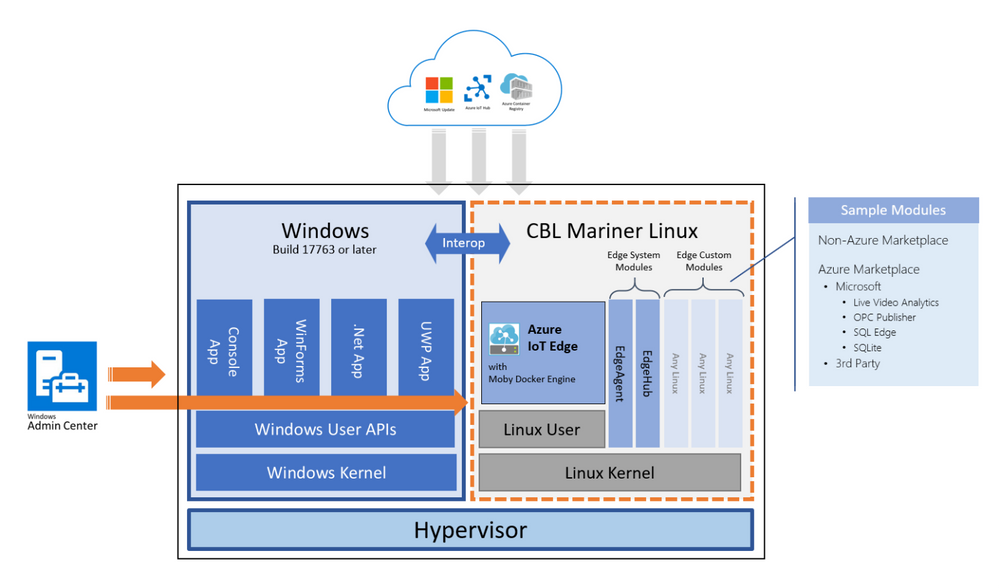
EFLOW provides the ability to deploy Linux IoT Edge modules onto a Windows IoT device. This opens a world of capabilities for commercial IoT as well as AI/ML with the availability of pre-built modules from the Azure Marketplace such as Live Video Analytics, SQL Edge, and OPC Publisher as a few examples. As a developer, you may also choose to implement your own custom modules using the Linux distribution of your choice to address specific business requirements. Running Linux modules on Windows IoT becomes a seamless of your solution.
In addition, Windows applications can easily interact with Linux modules running on the same physical device. A Windows process that provides UI or accesses cameras, sensors, or other hardware can seamlessly communicate with business logic or ML inferencing provided by a Linux module.
So how does it work?
How do you run Linux IoT Edge Modules on Windows IoT devices? Windows has had a Linux kernel for years which is used in products like Windows Subsystem for Linux (WSL). Microsoft leveraged that kernel and produced a user mode to develop an internal Linux distribution, CBL-Mariner, which is open sourced and already used in the Azure Kubernetes Service on Azure Stack HCI.
The magic of EFLOW is that we are running an optimized Linux virtual machine and Azure IoT Edge, on a Windows host. This allows you to run Linux modules from the Azure marketplace or from other sources, that simultaneously communicate with existing Windows code and the Azure cloud. And the entire solution is built, validated, and maintained by Microsoft.
The EFLOW solution includes:
Windows Admin Center
A Windows Admin Center (WAC) extension facilitates installation, configuration, and diagnostics from a remote workstation or on the local device. IT can administer the entire deployment with their existing infrastructure like any other Windows service using WAC, reducing the overall infrastructure management complexity.
Interoperability
Bi-directional communication between Windows processes and Linux containers provides the best of both worlds where Windows process can provide UI or hardware proxy for business logic and ML inferencing provided by the Linux containers.
Curated Linux VM with Azure IoT Edge
A Linux virtual machine, based on CBL-Mariner, is purpose-built for Azure IoT Edge, validated using an automated test pipeline, and supported as a Tier 1 environment for Azure IoT Edge workloads.
Microsoft Update
Integration with Microsoft Update to keep the software up to date, including the Windows runtime components, the Mariner VM, and Azure IoT Edge.
So why does this matter?
Based on customer input, we developed EFLOW to provide an integrated end-to-end solution for workloads that normally require separate hardware and software.
Imagine a retail store with cameras recording the activity. Many network video recorders like this are powered by Windows IoT. The videos are only used when something changes or something of interest has occurred. If the store wanted to use the camera feed for local analytics or other intelligence, they may need to add a Linux box to leverage Linux AI workloads. With EFLOW, the operator can easily deploy Linux-based Azure Live Video Analytics on Windows, leveraging their existing Windows expertise and investments. They can then tie this with the new or existing ML models and have gone from having a basic video recording system to an intelligent solution that can trigger actions based on the content of the video feed.
EFLOW is available on all Hyper-V capable Windows 10 installations. This makes 100s of millions of existing devices EFLOW capable, which can easily be managed and connected through Azure.
Want to know more or where to get started?
Start by watching the IoT Show: IoT Edge for Linux on Windows 10 IoT Enterprise on Channel9.
Detailed documentation to get started is available at https://aka.ms/AzIoTEdgeforLinuxOnWindows
Stay in touch
If you want to stay up to date and get notified of future updates to Azure IoT Edge for Linux on Windows, you can register using this link. Note that the information you will share will only be used by Microsoft for the purpose of keeping you informed about this product.


Recent Comments