by Contributed | Jan 22, 2021 | Technology
This article is contributed. See the original author and article here.
When designing any solution, we often look for common practices or patterns that can be re-used. Think about this from a Software development perspective. You’ve probably heard about the Factory Method pattern, Builder or Singleton patterns.
What about design patterns for the cloud? Fortunately a number of well-known patterns already exist and are documented! You can find those over on the Azure Architecture Center, in the Cloud Design Patterns section.
In the following video, Chris Reddington and Peter Piper explore the Gatekeeper Pattern and the Valet Key Pattern.
https://www.youtube-nocookie.com/embed/zM3hJBZu2vA
What is the Gatekeeper Pattern?
The Gatekeeper Pattern helps you to protect your application and services by exposing your application or service through a dedicated instance. This dedicated instance (the gatekeeper) is a type of Façade layer that decouples clients from your trusted hosts. The gatekeeper may perform tasks like authentication or authorization, or other sanitization steps such as rate limiting or checking for specific metadata in requests.
It may be useful in scenarios where you have a distributed application (e.g. a set of microservices), and want to centralize your validation steps for simplicity. Alternatively, if your application has requirements for a high level of protection from malicious threats, then you may want to consider reviewing this pattern.
What should you consider before implementing the Gatekeeper pattern?
- The Gatekeeper should be kept lightweight, and typically focuses upon validation/sanitization. Try not to get pulled into a trap of any processing related to your applications, which would introduce coupling between services!
- As the Gatekeeper is “less trusted” than your trusted hosts, they are typically hosted in separate environments.
- As the Gatekeeper is a Façade-based pattern, you are introducing an extra step in your application’s routing which means this may increase latency.
- Given that the Gatekeeper is a type of Façade, be careful not to introduce a point of failure into your architecture. Implement scaling of your Gatekeeper component as needed.
This is just a brief summary of the pattern, and some key considerations. For the full detail, check out The Gatekeeper Pattern on the Azure Architecture Center.
What is the Valet Key Pattern?
The Valet Key pattern could also be considered if security is important. At a high level, the Valet Key Pattern is an approach to prevent direct access to resources and instead uses keys or tokens to restrict access to those resources.
Consider an Azure Storage Account with blobs in a private container. You could provide access to the account using the Storage Account Key, but that would grant overall direct access to the storage account and pose a security risk. Instead, you could generate time-bound permissions-restricted access to a set of files in the Storage Account using Shared Access Signatures. A Shared Access Signature is an example implementation of the Valet Key pattern.
What should you consider before implementing the Valet Key pattern?
- As a token/key is required to provide restricted access, how do you provide that secret material to the user in the first place? Make sure to send it to the user securely.
- Ensure that you have a key rotation strategy in place ahead of time. Don’t wait until a token is compromised to test your operational process of rotating keys!
The Valet Key is a separate architectural pattern in its own right, but worth noting it is commonly used in combination with the Gatekeeper pattern.
This is just a brief rundown of the pattern, and some common considerations. For the full detail, check out The Valet Key Pattern on the Azure Architecture Center.
Remember, there are many more cloud design patterns that you can use in your own solutions! Check them out on the Azure Architecture Center. If you prefer video/audio content, then take a look at Architecting in the Cloud, One Pattern a time series on Cloud With Chris.

by Contributed | Jan 22, 2021 | Technology
This article is contributed. See the original author and article here.
Cars Island On Azure
Daniel Krzyczkowski is a Microsoft Azure MVP from Poland. Passionate about Microsoft technologies, Daniel loves learning new things about cloud and mobile development. His main tech interests include Microsoft Azure cloud services, IoT, Azure DevOps and Universal Windows Platform app development. For more, check out his Twitter @dkrzyczkowski and his blog.

CI/CD for Azure Data Factory: Adding a production deployment stage
Craig Porteousis is a Principal Consultant with Advancing Analytics and Microsoft Data Platform MVP. Craig counts more than 12 years of experience working with the Microsoft Data Platform, from database administration, through analytics and data engineering. Craig founded Scotland’s data community conference, DATA:Scotland, co-organises the Glasgow Data User Group and enjoys talking data at conferences across the UK and Europe. For more, check out his Twitter @cporteous

Introducing the LogAnalytics.Client NuGet for .NET Core
Tobias Zimmergren is a Microsoft Azure MVP from Sweden. As the Head of Technical Operations at Rencore, Tobias designs and builds distributed cloud solutions. He is the co-founder and co-host of the Ctrl+Alt+Azure Podcast since 2019, and co-founder and organizer of Sweden SharePoint User Group from 2007 to 2017. For more, check out his blog, newsletter, and Twitter @zimmergren

Building micro services through Event Driven Architecture part13: Consume events from Apache KAFKA and project streams into ElasticSearch.
Gora Leye is a Solutions Architect, Technical Expert and Devoper based in Paris. He works predominantly in Microsoft stacks: Dotnet, Dotnet Core, Azure, Azure Active Directory/Graph, VSTS, Docker, Kubernetes, and software quality. Gora has a mastery of technical tests (unit tests, integration tests, acceptance tests, and user interface tests). Follow him on Twitter @logcorner.

Teams Real Simple with Pictures: New Calendar View in Lists Web App + Teams
Chris Hoard is a Microsoft Certified Trainer Regional Lead (MCT RL), Educator (MCEd) and Teams MVP. With over 10 years of cloud computing experience, he is currently building an education practice for Vuzion (Tier 2 UK CSP). His focus areas are Microsoft Teams, Microsoft 365 and entry-level Azure. Follow Chris on Twitter at @Microsoft365Pro and check out his blog here.
by Contributed | Jan 22, 2021 | Technology
This article is contributed. See the original author and article here.
This article will introduce the difference between control channel and rendezvous channel. And code a simple python application to interpret its process.
Pre-requirement: understand azure relay https://docs.microsoft.com/en-us/azure/azure-relay/relay-what-is-it
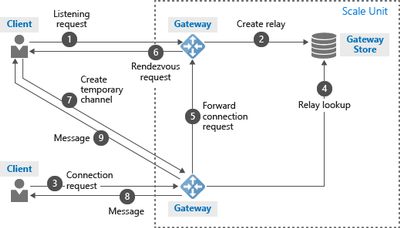
The control channel is used to setup a WebSocket to listen the incoming connection. It allows up to 25 concurrent listeners for one hybrid connection. The control channel takes response from step #1 to #5 in following architecture.
When a sender open a new connection. The control channel chose one active listener. The active listener will setup a new WebSocket as rendezvous channel. The messages will be transferred via this rendezvous channel. The rendezvous channel takes response from step #6 to #9 in above architecture.
Below is a simple Python application to realize control channel and rendezvous channel
- Below code will create a control channel.
wss_uri = ‘wss://{0}/$hc/{1}?sb-hc-action=listen’.format(service_namespace, entity_path) + ‘&sb-hc-token=’ + urllib.quote(token)
ws = WebSocketApp(wss_uri,
on_message=on_message,
on_error=on_error,
on_close=on_close)
- Follow is control channel’s on_message callback function. The sender connection on the control channel will contains a url. The url is the rendezvous url need to be established.
The callback function will use create_connection to create a new WebSocket on this rendezvous url. After finish creating rendezvous channel, the WebSocket will call recv() to receive messages.
def on_message(ws, message):
data = json.loads(message)
url = data[“accept”][“address”]
ws = None
try:
ws = create_connection(url)
connected = ws.connected
if connected:
receive_msg = ws.recv()
//Process message
….
ws.send(message_process_result)
else:
except Exception, ex:
…
finally:
…
Some times, the callback function will be triggered even sender dose not send any message. It is actually control channel notifications. For example, if the relay server wait long time and can’t get response from listener, it will send a “listener not response immediately” notification to listener side when listener recover.
by Contributed | Jan 22, 2021 | Technology
This article is contributed. See the original author and article here.
Lots to cover this week. News stories to be discussed include the availability of Azure Defender architectural references for IoT, Backup for Azure Managed Disk is now in limited preview, Azure IoT Edge for Linux on Windows available for public preview, ITOps Talks: All Things Hybrid update and of course the Microsoft Learn Module of the Week.
Azure Defender architectural references for IoT
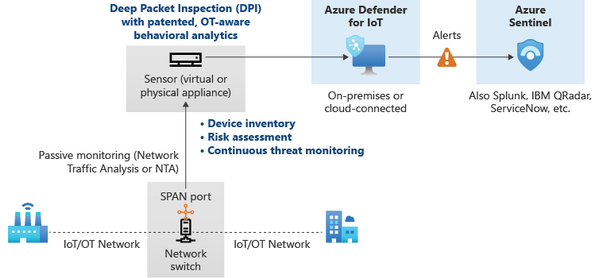
Azure Defender for IoT provides two sets of capabilities, agentless solution for organizations, and agent-based solution for device builders. Designed for scalability in large and geographically distributed environments with multiple remote locations, the agentless solution enables a multi-layered distributed architecture by country, region, business unit, or zone.
The agent-based solution offers numerous modes to thwart security attacks. Built-In mode offers real-time monitoring, recommendations and alerts, and single-step device visibility. Enhanced mode analyzes raw security events from your devices and can include IP connections, process creation, user logins, and other security-relevant information.
More information can be found here: Azure Defender for IoT architecture
Backup for Azure Managed Disk is in limited preview
Azure Backup now enables the ability to configure protection for Azure Managed Disk currently in limited public preview. Azure Backup provides snapshot lifecycle management for managed disk by automating periodic creation of snapshots and retain them for a configured duration using Backup policy. The backup solution is crash-consistent which takes point in time backup of a managed disk using incremental snapshots with support for multiple backups per day and does not impact production application performance. It supports backup and restore of both OS and Data disk (including Shared disk), regardless of whether or not they are currently attached to a running Azure Virtual machine.
Read the following documentation to learn more about Azure Disk Backup.
Fill this form to sign-up for preview.
Azure IoT Edge for Linux on Windows
The solution enables the ability to run containerized Linux workloads alongside Windows applications in Windows IoT deployments. IoT Edge for Linux on Windows works by running a Linux virtual machine on a Windows device which comes pre-installed with the IoT Edge runtime. Any IoT Edge modules deployed to the device run inside the virtual machine. Windows applications running on the Windows host device can communicate with the modules running in the Linux virtual machine.
Further details can be found here: Azure IoT Edge for Linux on Windows available for public preview
Periscope up – What’s on the horizon for ITOps Talks: All Things Hybrid event
Acknowledging there is room for improvement in the way virtual events are delivered, the team is currently heads down building on-demand content. The event’s theme is a 300 level look at Hybrid architecture, harnessing the best of on-premises and cloud, from aspects of enablement, security and management. Microsoft Engineers and Experts have been working with our team to ensure all content presented is demo heavy and an acurate representation of the challenges experianced in harnessing a hybrid architecture.
Details surrounding all the upcoming sessions can be found in Rick Claus’ post here: Periscope up – what’s on the horizon for hybrid event
Community Events
- Patch and Switch – Rick Claus and Joey Snow are back again? Unusual for them to have back to back shows. Must be announcing something big for 2021.
- ITOps Talks: All Things Hybrid – A new type of event that allows you to watch sessions on your time. Focusing on “All Things Hybrid” the event, the sessions will focus on hybrid based cloud strategies and resources at a 300 level.
MS Learn Module of the Week

AZ-104: Monitor and back up Azure resourcesotect against threats with Microsoft Defender Advanced Threat Protection
Learn how to monitor resources by using Azure Monitor and implement backup and recover in Azure. This learning path helps prepare you for Exam AZ-104: Microsoft Azure Administrator. Get a grasp on how to handle infrastructure and service failure, recover from the loss of data, and recover from a disaster by incorporating reliability into your architecture.
This learning path can be completed here: AZ-104: Monitor and back up Azure resources
Let us know in the comments below if there are any news items you would like to see covered in the next show. Be sure to catch the next AzUpdate episode and join us in the live chat.
by Contributed | Jan 21, 2021 | Technology
This article is contributed. See the original author and article here.
Would you like to learn how your program works? You can learn it with Small Basic Online.
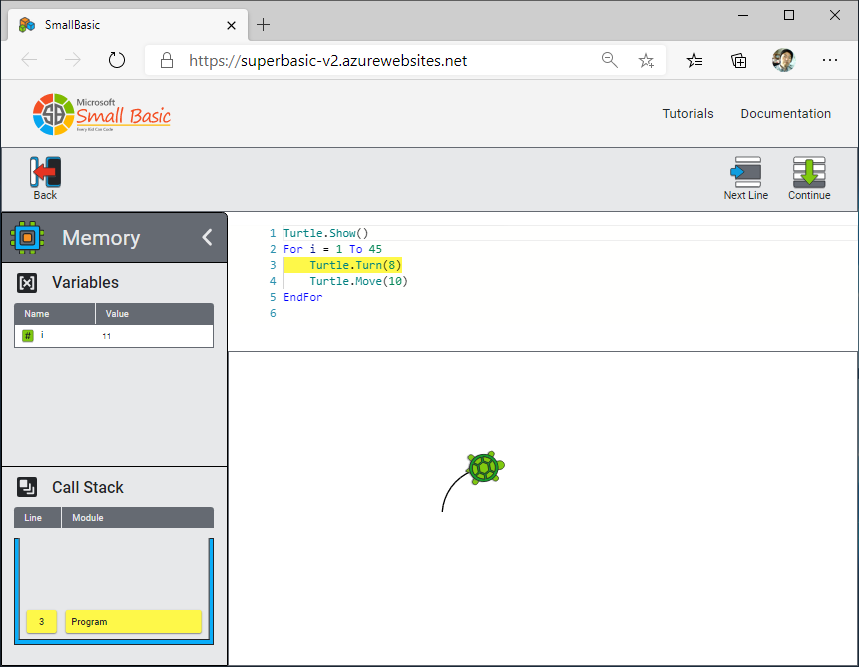
Small Basic Online has new Debug feature. You can run your program step by step. And you can see values of variables and call stack.
Steps to see how your program runs:
- Type your program in Small Basic Online editor.
- Push [Debug] button.
- Push [Memory] icon to see variables and call stack.
- Push [Next Line] button to advance one step in your program.
If you’d like to set break point, insert Program.Pause() command in the editor. Then use [Continue] button to run till the break point.
Have Fun with Debug!
by Contributed | Jan 21, 2021 | Technology
This article is contributed. See the original author and article here.
We met to discuss the big changes that happened within the Microsoft government cloud instances: GCC, GCC High, and DoD.
Watch the recording here.
https://www.youtube-nocookie.com/embed/V7SMtvduzLg
Below are a list of links to articles featured:
Thank you to
@Sarah.Gilbert for providing the links during our meeting!
by Contributed | Jan 21, 2021 | Technology
This article is contributed. See the original author and article here.
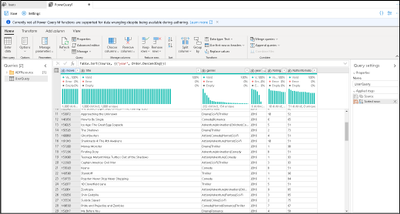
The Azure Data Factory team is excited to announce a new update to the ADF data wrangling feature, currently in public preview. Wrangling in ADF empowers users to build code-free data prep and wrangling at cloud scale using the familiar Power Query data-first interface, natively embedded into ADF. Power Query provides a visual interface for data preparation and is used across many products and services. With Power Query embedded in ADF, you can use the PQ editor to explore and profile data as well as turn your M queries into scaled-out data prep pipeline activities. Data Flows in ADF and Synapse Analytics will now focus on Mapping Data Flows with a logic-first design paradigm, while the Power Query interface will enable the data-first wrangling scenario.
With Power Query in ADF, you now have a powerful tool to use in your ADF ETL projects for data profiling, data prep, and data wrangling. You have immediate feedback from introspection of your Lake and database data with the Power Query M language available for your data exploration. You can then take your resulting mash-up and save it as a first-class ADF object and orchestrate a data pipeline with that same M Power Query executing on Spark.
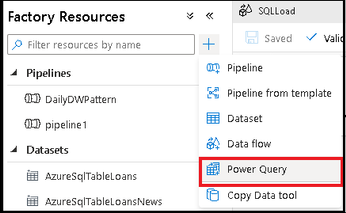
When you have completed your data exploration, save your work as a Power Query object and then add it as a Power Query activity on the ADF pipeline canvas. With your Power Query activity inside of a pipeline, ADF will execute your M query on Spark so that your activity will automatically scale with your data by leveraging the ADF data flow infrastructure.

In the example above, I added my Power Query activity to my pipeline for cleaning addresses from my ingested Lake data folders with Power Query, then handing the results off to a Data Flow via ADLS Gen2, where I perform data deduplication and then use the ADF pipeline to send emails when the process completes.
Because you are in the context of an ADF pipeline, you can define destination sinks for your Power Query mash-up so that you can persist the results of your transformations to data store like ADLS Gen2 storage or Synapse Analytics SQL Pools. Leverage the power of ADF to define source and destination mappings, database table settings, file and folder options, and other important data pipeline properties that data engineers need when building scalable data pipelines in ADF.
Click here to learn more about Azure Data Factory and the power of data wrangling at cloud scale with the new updated Power Query public preview feature in ADF.
by Contributed | Jan 21, 2021 | Technology
This article is contributed. See the original author and article here.
Update: Thursday, 21 January 2021 22:59 UTC
Root cause has been isolated to a backend component scale issue which was impacting customers with workspace-enabled Application Insights resources in West US2 and West US regions. To address this issue we are investigating scaling options in the backend components.
- Work Around: None
- Next Update: Before 01/22 01:00 UTC
-Jeff
Initial Update: Thursday, 21 January 2021 22:33 UTC
We are aware of issues within Application Insights and are actively investigating. Some customers may experience delayed or missed Log Search Alerts and Latency and Data Loss.
- Next Update: Before 01/22 01:00 UTC
We are working hard to resolve this issue and apologize for any inconvenience.
-Jeff
by Contributed | Jan 21, 2021 | Technology
This article is contributed. See the original author and article here.
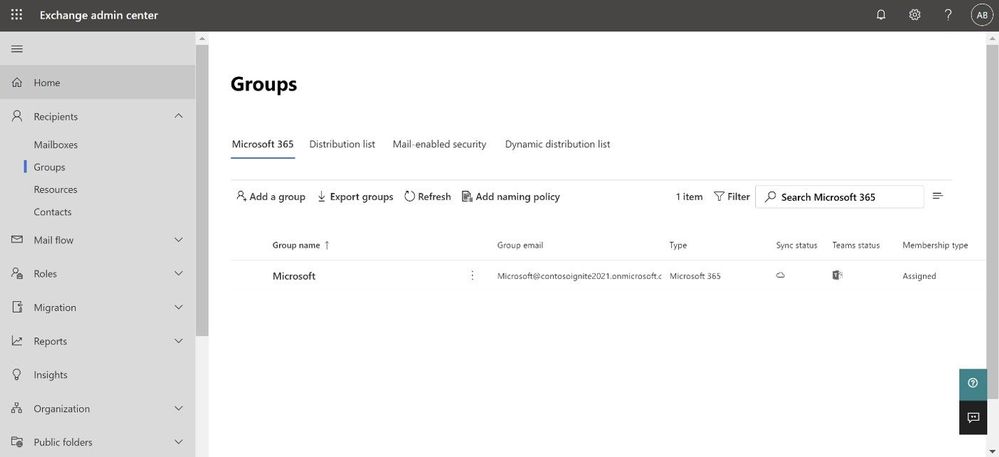
Continuing on our path to release the new EAC, we wanted to tell you that the Groups feature is now available. The experience is modern, improved, and fast. Administrators can now create and manage all 4 types of groups (Microsoft 365 group, Distribution list, Mail-enabled Security group and Dynamic distribution list) from the new portal.
We wanted to call out some improvements in Groups experience in the new EAC when compared with classic EAC.
Ease of discoverability: With a new tabbed design approach, groups are now separated out into 4 different pivots. Admins no longer need to filter or sort functions to find group types. You can click on the pivot of the group type you want to manage, and all such groups will be populated in that view.
More controls during group creation: The new group creation flow design wizard (the flyout panel that pops from the right) guides you through creation and is consistent with the other parts of the portal. To create any group, there are no pop-ups anymore and you do not have to leave the page that you are on. You simply click on the Add a group button and a guided flyout opens to assist you with group creation.
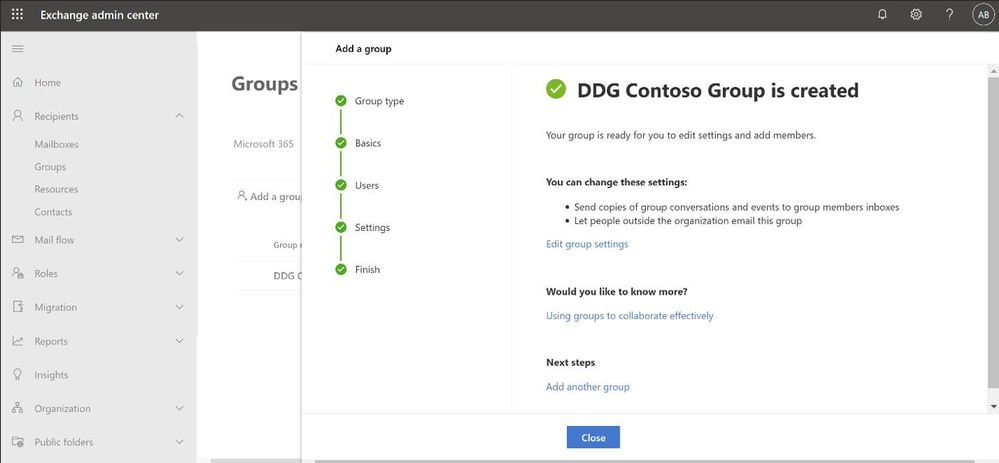
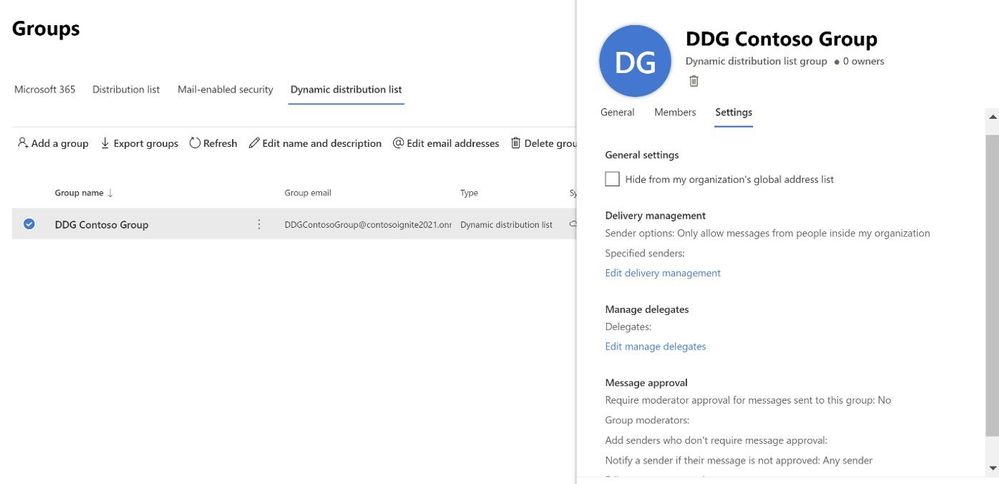
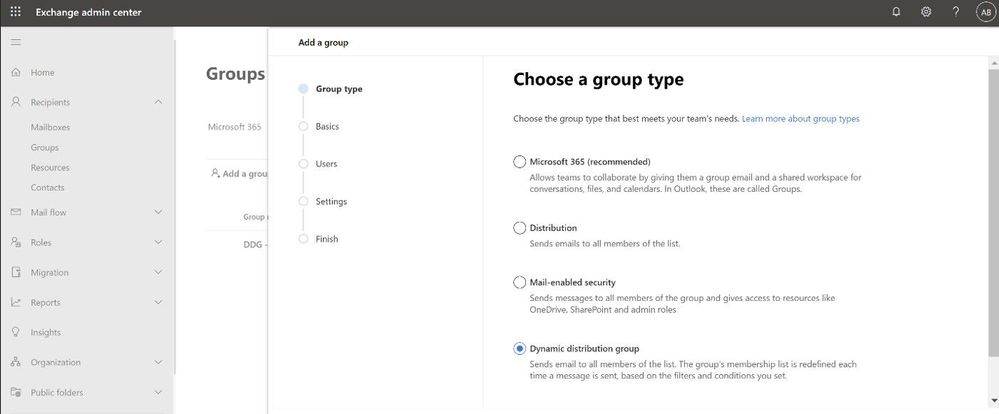 Performance: The new design is faster and more performant. It takes very little time for you to see the groups that are already created. If creating new groups, once the group is created, you can additionally edit the group settings directly from the completion page (see below).
Settings management
All group settings including general settings, delivery management, manage delegates, message approval, etc. are also now available in the new EAC.
Happy groups management!
If you have feedback on the new EAC, please go to Give feedback floating button and let us know what you think:
If you share your email address with us while providing feedback, we will try to reach out to you to get more information, if needed:

Learn more
To learn more, check the updated documentation. To experience groups in the new EAC, click here (this will take you to the new EAC).
The Exchange Online Admin Team
by Contributed | Jan 21, 2021 | Technology
This article is contributed. See the original author and article here.
I was recently troubleshooting an issue with Bot Composer 1.2 to create and publish the bot on Azure government cloud. But even after performing all the steps correctly we end up getting a 401 unauthorized error when the bot is tested on web chat.
Below are the things that need to be added to bot for making it work on Azure Gov cloud.
https://docs.microsoft.com/en-us/azure/bot-service/bot-service-resources-faq-ecosystem?view=azure-bot-service-4.0#how-do-i-create-a-bot-that-uses-the-us-government-data-center
Just to isolate the problem more, we deployed the exact same bot from composer on Normal App service and (not azure government one) and everything works smoothly there. So we got to know that the issue only happens when the deployment happens on the Azure government cloud.
We eventually figured out the following steps that are needed to make it work properly over azure government cloud.
** We need to make a code change for this to work and for making the code change, we would have to eject the run time otherwise composer will never be able to incorporate the change.
Create the bot using Composer.
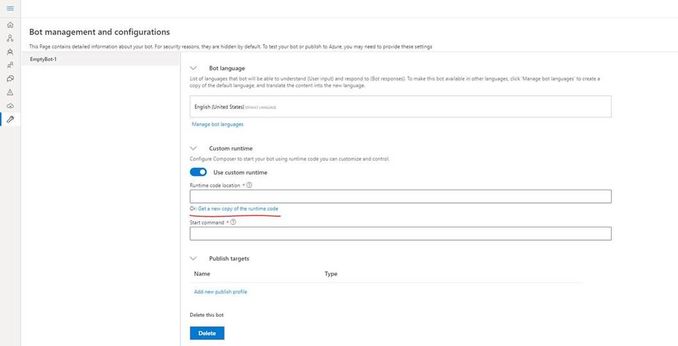
Click on the “Project Settings” and then make sure you select “Custom Runtime” and then click on “get a new copy of runtime code”
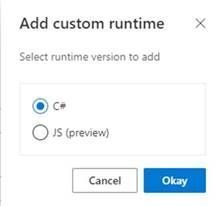
Once you do that, a folder called as “runtime” will be created in the project location for this composer bot.
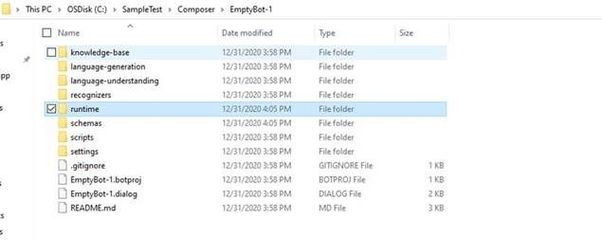
In the runtime, go to the azurewebapp folder and then open the .csproj file in Visual Studio and make the following changes (the following changes are required for the Azure government cloud)
- Add below line in startup.cs :
services.AddSingleton<IChannelProvider, ConfigurationChannelProvider>()
- Modify BotFrameworkHttpAdapter creation to take channelProvider in startup.cs as follows.
var adapter = IsSkill(settings) ? new BotFrameworkHttpAdapter(new ConfigurationCredentialProvider(this.Configuration), s.GetService<AuthenticationConfiguration>(), channelProvider: s.GetService<IChannelProvider>()) : new BotFrameworkHttpAdapter(new ConfigurationCredentialProvider(this.Configuration), channelProvider: s.GetService<IChannelProvider>());
- Add a setting as following in your appsettings.json (this can be added from composer as well)
"ChannelService": "https://botframework.azure.us"
Build the ejected web app as follows :
C:SampleTestComposerTestComposer1runtimeazurewebapp>dotnet build
Now we need to build the schema by using the given script : (from powershell)
PS C:SampleTestComposerTestComposer1schemas> .update-schema.ps1 -runtime azurewebapp
Next we need to publish this bot to Azure app service, we will make use of az webapp deployment command. Firstly create the zip of contents within the “.netcoreapp3.1” folder (not the folder itself) which is inside the runtime/azurewebapp/bin/release :
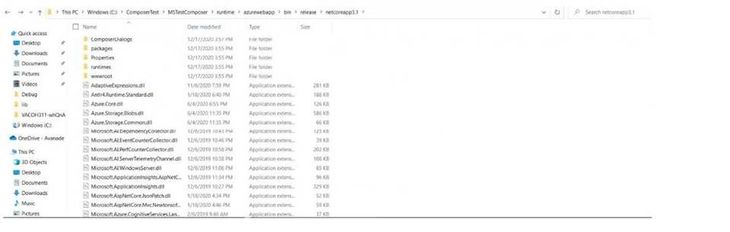
Now we will use the command as follows :
Az webapp deployment source config-zip –resource-group “resource group name” –name “app service name” –src “The zip file you created”
This will publish the bot correctly to Azure and you can go ahead and do a test in web chat.
In short we had to make few changes from code perspective to get things working in Azure government cloud and for making those changes to a bot created via composer we need to eject the runtime and then make those code changes, build and update the schema and finally publish.
References :
Pre-requisites for Bot on Azure government cloud : Bot Framework Frequently Asked Questions Ecosystem – Bot Service | Microsoft Docs
Exporting runtime in Composer : Customize actions – Bot Composer | Microsoft Docs


Recent Comments