
by Contributed | Jan 27, 2021 | Dynamics 365, Microsoft 365, Technology
This article is contributed. See the original author and article here.
Today, we published the 2021 release wave 1 plans for Microsoft Dynamics 365 and Microsoft Power Platform, a compilation of new capabilities that are planned to be released between April 2021 and September 2021. This first release wave of the year offers hundreds of new features and enhancements, demonstrating our continued investment to power digital transformation for our customers and partners.
Highlights from Dynamics 365
- Microsoft Dynamics 365 Marketing focuses on deeper personalization to engage customers, more channels to reach customers with the right messages, and analytics to improve results and achieve your business goals.
- Microsoft Dynamics 365 Sales is adding enhancements to save time so sellers can focus on selling, to provide more access to data insights, and to enhance the mobile experience for sellers on-the-go. Look out for updates to automation and sequencing, Conversation Intelligence, and many exciting updates to the mobile app!
- Microsoft Dynamics 365 Customer Service is delivering the all-in-one contact center, now with first-party voice built on Azure Communication Services and intelligent, skill-based, omnichannel routing across channels. In addition, we are enhancing agent productivity capabilities in knowledge management, timeline, email, and agent dashboards.
- Microsoft Dynamics 365 Field Service introduces a comprehensive experience for customers that will allow them to self-schedule service and rate technicians to ensure the maximum satisfaction. These investments matched with enhanced productivity capabilities for technicians through the new knowledge management module will enable the best technician and customer relationship.
- Microsoft Dynamics 365 Finance brings our intelligent cash flow offering to preview with automation based on predictive results. Users will experience out of the box machine learning showing when customers are predicted to pay, forecasting what budget should be, and viewing forecasted cash positions. We continue to expand localizations; this release adds Egypt, extending the number of out-of-the-box countries and regions to 43 and the number of languages to 48. We are also shipping the general availability of Electronic Invoicing Add-on for Dynamics 365the first configurable globalization microservice that extends existing capabilities in Dynamics 365 Finance, Dynamics 365 Supply Chain Management, and Dynamics 365 Project Operations. This will provide better scalability and agility for customers to adapt to changing regulatory requirements.
- Microsoft Dynamics 365 Supply Chain Management provides a unified real-time view across finance, manufacturing, supply chain, warehouse, inventory, and transportation management in one single application for running a business. The cloud asset management software leverages scale units in the cloud to run mission-critical processes without interruption. Advanced predictive analytics and Power Platform tie-ins have allowed us to optimize and automate asset management, IoT, machine telemetry, planning, warehousing, material sourcing, and logistics. Other notable features for this release are in the areas of rebates, inbound landed cost, and global inventory accounting.
- Microsoft Dynamics 365 Project Operations delivers rich new experiences with the ability to forecast, use, and invoice non-stocked materials on projects and enables the ability to setup contractual commitments like billing methods and chargeability rules by task or a work breakdown schedule element. Customers using Dynamics 365 Project Service Automation will be able to upgrade to Dynamics 365 Project Operations when upgrade scripts become available.
- Microsoft Dynamics 365 Guides is focusing on intelligent workflows. By taking further advantage of data captured with Microsoft HoloLens as well as AI innovations, users can get to work and confirm their results faster and simpler than ever.
- Microsoft Dynamics 365 Human Resources continues to broaden the Human Capital Management (HCM) ecosystem through integration APIs and strategic partnerships. The employee experience expands to support additional enhancements for benefits management such as notifications, summary statements, and a consolidated view of employee’s enrollments.
- Microsoft Dynamics 365 Commerce has released new capabilities that are now available in preview to support B2B operational flows for the e-commerce channel. This B2B offering provides our customers with an integrated B2B and B2C e-commerce offering in a single commerce solution with unified merchandising and site management capabilities enabling a wide range of business models across industries and verticals. Also, generally available in this wave are multiple functional and usability enhancements to the existing buy online, pickup in store (BOPIS) processing flows. These new BOPIS enhancements will allow organizations more flexibility to offer their shoppers multiple pick-up delivery options and allows for configuration and selection of pickup timeslots.
- Microsoft Dynamics 365 Fraud Protection adds behavioral and mobile fingerprinting improving the accuracy of fraud management rules.
- Microsoft Dynamics 365 Business Central delivers a set of new features designed to simplify and improve the way our partners administer tenants, and the way administrators manage licensing and permissions. Application enhancements expands the integration with Teams and adds country and regional expansions.
- Microsoft Dynamics 365 Customer Voice expands the capabilities to collect feedback with pre-filled answers, file upload support, drill down question type, and customized survey header. Additional capabilities designed to improve survey response rate includes pause and resume survey to enable users to complete the survey on a different device, automated survey reminders for recipients who have not filled the survey, and over-surveyed management to avoid sending too many surveys to the same person within a given period. Finally, creating a follow up action workflow is made easier with Microsoft Power Automate survey response trigger.
- Microsoft Dynamics 365 Customer Insights audience insights capabilities enables every organization to unify and understand their customer data. Audience Insights added support for on-premises data ingestion including new Power Query connectors, additional controls for AI-based data unification, new first- and third-party enrichments like Experian, new predictive models for transaction churn, and support for new first- and third-party activation destinations like Marketo. The engagement insights capability (preview) in Dynamics 365 Customer Insights enables organizations to interactively understand how their customers are using their products and servicesboth individually and holisticallythrough their website, mobile apps, and connected products touchpoints. Engagement insights expands to multi-channel analytics over data from other channels for richer customer analytics, downstream actions, and optimizations.
Industry accelerators
- Dynamics 365 education accelerator adds a marketing and communications feature which will allow districts and ministries of education to effectively take a proactive communication approach with various stakeholders such as educators, community members, and parents.
- Dynamics 365 media and communications accelerator further expands on the “fan engagement” theme adding additional support for virtual events and health and hygiene at physical venues. This release includes features to aid in registering and participating in virtual sessions and Teams-based events as well as additions for importing content metadata enabling search personalization and other key enhancements.
Highlights from Power Platform
- Microsoft Power BI continues to invest in three key areas that drive a data culture: amazing data experiences, integrations where teams work, and modern enterprise BI.
- Power BI Pro delivers AI infused insights to help everyone easily discover insights. We will also continue to make authoring Power BI content easier than ever through the new Quick Create experiences while continuing to evolve our advanced capabilities like small multiples and composite models. Power BI will further expand the integration with Teams with new experiences in Teams channels, meetings, and chat.
- Power BI Premium continues to deliver features that help organizations accelerate the delivery of insights at scale, meeting the most demanding needs of an enterprise. This release adds flexible licensing models for organizations to choose between per user and per capacity licensing options.
- Power BI Embedded delivers a new generation of the product helping customers increase their ROI, scale rapidly, and get up to 16x faster performance. Customers will also get visibility into utilization at the workspace level, enabling consistent utilization analysis and cost management. In addition, Embedded Generation 2 introduces a lower entry level for paginated reports and AI workloadsstart with an A1 SKU and grow as you need!
- Microsoft Power Apps combines the flexibility of a blank canvas that can connect to any data source with the power of rich forms, views, and dashboards modeled over data in Microsoft Dataverse. This release adds Monitor for end-user app debugging capabilities, printing support (one top ask from our maker community), and mixed reality capabilities for canvas apps. We are also enhancing the global relevance search experience and adding in-app notifications for model-driven apps. Power Apps portals enhances Power BI integration to support Microsoft Azure Analysis Services live connections and enables the ability to send custom data objects, which provide additional context for personalizing reports and dashboards for end users. On the Dataverse for Teams front, we added the ability to share apps with colleagues outside a team and enabled editing of table data in excel.
- Microsoft Power Automate enhances cloud flow integration with other Microsoft products. For example, there is a new trigger when an action is performed in Microsoft Dataverse. This feature improves working with the common events model and provides better integration with Dynamics 365 Finance + Operations. Power Automate Desktop was released to general availability in December 2020, and it enables makers to automate the diversity of applications on their desktops. Going forward, we will provide migration for existing Softomotive and UI flows customers, secure credential management, and much more. Finally, there are improved experiences in Process advisor, a process mining capability in Power Automate that reveals insights into how people work, provides rich visualizations where users can identify repetitive, time-consuming processes best suited for automation.
- Microsoft Power Virtual Agents brings improvements in the authoring experience with topic suggestions from bot sessions, image and video support, and new topic trigger management to improve your bot’s triggering capabilities. For Power Virtual Agents (PVA) bots authored in Teams we are adding the “@mention” capability, and the ability to share your bot with a security group. We are also building on our Power Automate integration with better error handling. Finally, we will acquire PCI and HITRUST certifications and support for the government cloud.
- AI Builder, a Power Platform capability, will introduce new AI functionalities in preview as well as form processing improvements. New capabilities include new region availability and signature detection in form processing in order to detect if a signature is present at a specific location in a document.
For a complete list of new capabilities, check out the Dynamics 365 and Power Platform 2021 release wave 1 plans.
Early access period
Starting February 1, 2021, customers and partners will be able to validate the latest features in a non-production environment. These features include user experience enhancements that will be automatically enabled for users in production environments during April 2021. Take advantage of the early access period, try out the latest updates in a non-production environment, and get ready to roll out updates to your users with confidence. To see the early access features, check out the Dynamics 365 and Power Platform pages. For questions, visit the Early Access FAQ page.
We’ve done this work to help youour partners, customers, and usersdrive the digital transformation of your business on your terms. Get ready and learn more about latest product updates and plans, and share your feedback in the community forum for Dynamics 365 or Power Platform.
The post 2021 release wave 1 plans for Dynamics 365 and Power Platform now available appeared first on Microsoft Dynamics 365 Blog.
Brought to you by Dr. Ware, Microsoft Office 365 Silver Partner, Charleston SC.
by Contributed | Jan 27, 2021 | Technology
This article is contributed. See the original author and article here.
Create Azure Data Explorer Dashboards for IoT Data and Alarm Visualisation
We show how to configure simple but effective Azure Data Explorer (ADX) dashboards on streaming data ingested from Azure IoT Hub with the aim of creating visual indication of alarm conditions (e.g. temperature exceeding a threshold). ADX is a natural destination for IoT data as it provides managed ingestion from IoT Hub and advanced analytics/ad-hoc queries on the ingested data. Recently, the ADX team has added a powerful dashboarding feature that allows the mapping of ADX Kusto Query Language (KQL) queries into dashboards within the ADX Web UI. The native dashboards allow the user to seamlessly export queries from the Web UI, optimise dashboard rendering performance and provides auto refresh capability for near real-time visualisation experience.
The starting point is having an IoT Hub with sensors transmitting data to its device to cloud endpoint. Once data starts flowing into the IoT Hub, start configuring the ingestion into an ADX table and building the dashboards using the typical end to end scenario in the following steps:
- Create an ADX cluster by following the steps here.
- Enable streaming ingestion on the ADX cluster as explained here. Streaming ingestion is a powerful feature in situations where low latency between ingestion and query is needed as is typical for IoT scenarios.
- Create an ADX database by following the steps here.
For the remaining steps use the ADX web interface to run the necessary queries and view the dashboards. Add the ADX cluster to the web interface as explained in the previous link. One of the great features of the ADX Web UI is that it can be hosted by other web portals as an HTML iframe.
- Create a table in ADX to put the ingested data in. In this example a simple message json structure is used with many sensors identified by “sensorName”, where, for example, “sensor1” carries Temperature values:
{
    "sensorName": "sensor1",
    "SensorReading": 21.171
}
The following ADX query creates a table ‘iot_parsed’ with three columns. Note that since the message does not carry a timestamp, the ‘iothub-enqueuedtime’ property, which is generated by the IoT Hub, is used for that purpose:
.create table iot_parsed (Timestamp: datetime, Sensor: string, Value: real)
Add a json ingestion mapping to instruct the ADX cluster to place the message components in the correct table columns:
.create table ['iot_parsed'] ingestion json mapping
'iot_parsed_mapping' '[{"column":"Timestamp","path":"$.iothub-enqueuedtime","datatype":"datetime"},{"column":"Sensor","path":"$.sensorName","datatype":"string"},{"column":"Value","path":"$.SensorReading","datatype":"real"},]'
This link provides more information on ingestion mapping in ADX. The table is now ready to receive data from the IoT Hub.
- Next use the instructions here to connect the IoT Hub to the ADX cluster and start ingesting the data into the staging table.
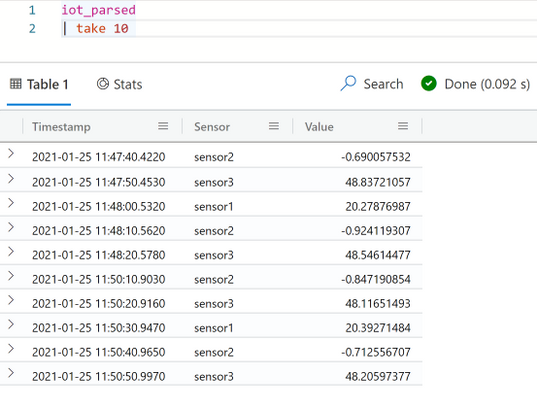
- Once the connection is verified, data will start flowing to the table. Use the following query in the ADX Web UI to examine a data sample of 10 rows:
iot _parsed
| take 10
It is important to note at this point that since a very simple telemetry message structure is used in this example, it is straightforward to create a table with a specific schema to ingest the data directly from the IoT Hub. In scenarios where the message structure is more complex, and probably variable over time, it is good practice to first ingest the data into a staging table with one ‘dynamic’ column. The staging table can then be processed into other tables each of which with a specific schema to serve different analytics use-cases. This processing can be carried out as new data arrives in the staging table using update policies.
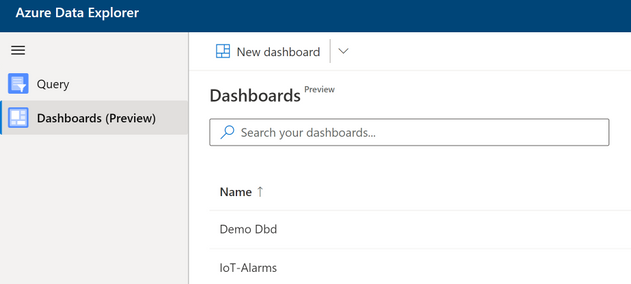
- Now that the data is streamed regularly into the table, start building dashboards to display the data and to indicate alarm conditions in near real-time. The dashboard experience is available in the web UI and can be accessed in the left menu. Select “Dashboards (Preview)” and then select the option to build a new dashboard. Specify the ADX cluster URI and the database to use as a data source for the dashboards.
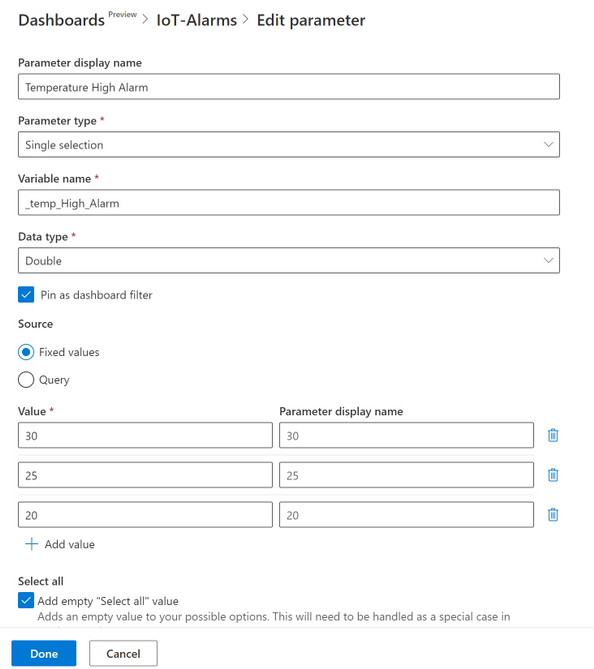
- In order to add flexibility and filtering capabilities to the dashboards, parameters can be configured for use in the visuals. After selecting “Parameters” add two single selection parameters one representing the limit to trigger a high temperature alarm and the other as a limit for triggering a low temperature alarm. Note that by default there are two parameters defined for the start and end of the time period that is used in the time charts. Each parameter in this case can have a number of values from which one value can be selected to use in the dashboards at any time (e.g. to change the alarm threshold at any time without having to re-build the dashboards).
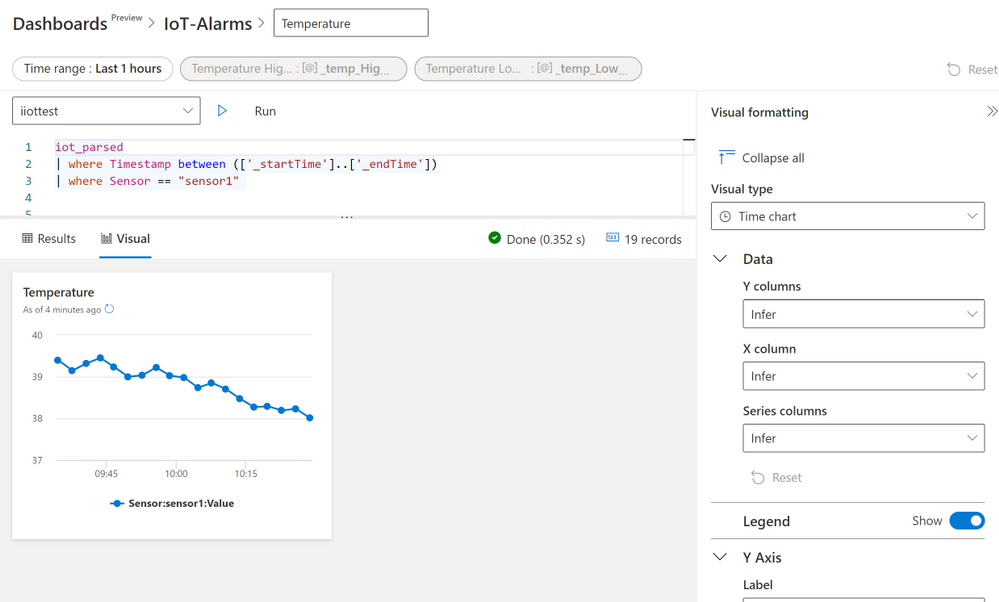
- Add a time chart of the temperature values (sensor1 in this case) between time values represented by the built-in parameters _startTime and _endTime. Use the query:
iot_parsed
| where Timestamp  between (['_startTime'] .. ['_endTime'])
| where Sensor =="sensor1"
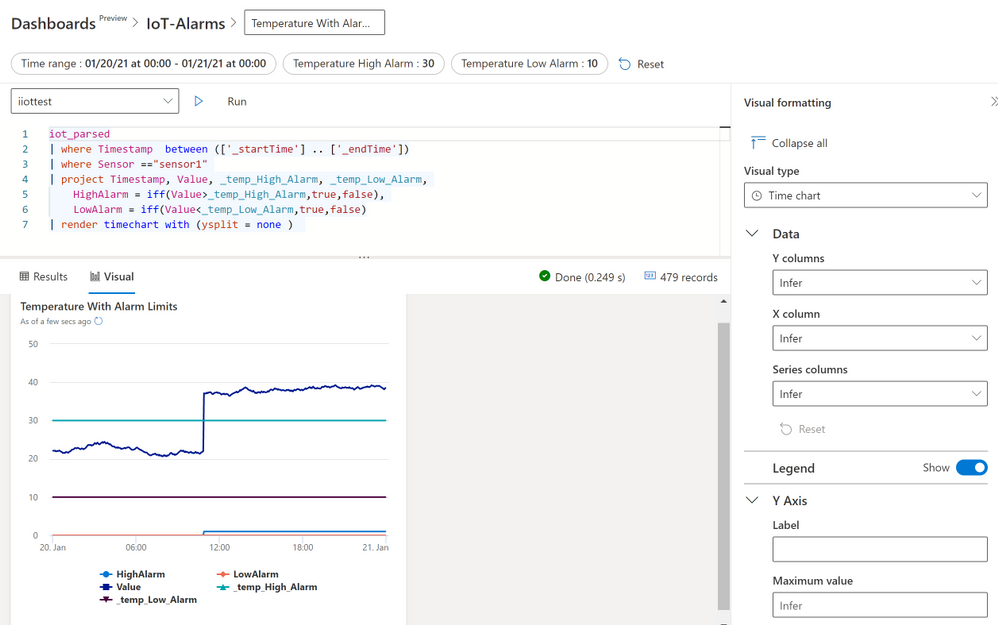
On the “Visual formatting” section use the “Time chart” visual type. For the other fields leave the “Infer” option so that ADX can decide the values needed as shown below. Next click “Run” to see the time plot for sensor1. Apply the changes to use the visual in the dashboard.
(Note: inferring the axes parameters for the plot is straightforward in this case as the table has a simple schema. In cases where there is a more complex table structure it is advisable to specify the values by the developer).
- Extend the time chart of the first visual by adding values from the parameters that represent the alarm thresholds. In addition, add two logic variables (true or false) that would be set by the query if the actual temperature reading is larger than the high threshold or lower than then low threshold. The latter is achieved using the “iff” operator.
iot_parsed
| where Timestamp  between (['_startTime'] .. ['_endTime'])
| where Sensor =="sensor1"
| project Timestamp, Value, _temp_High_Alarm, _temp_Low_Alarm,
    HighAlarm = iff(Value>_temp_High_Alarm,true,false),
    LowAlarm = iff(Value<_temp_Low_Alarm,true,false)
| render timechart with (ysplit = panels)
Examining the resulting charts observe that the “HighAlarm” variable becomes “True” as soon as the temperature goes above the “_temp_High_Alarm” parameter value. By changing the parameter value, alarm thresholds can change immediately and applied in the visual.
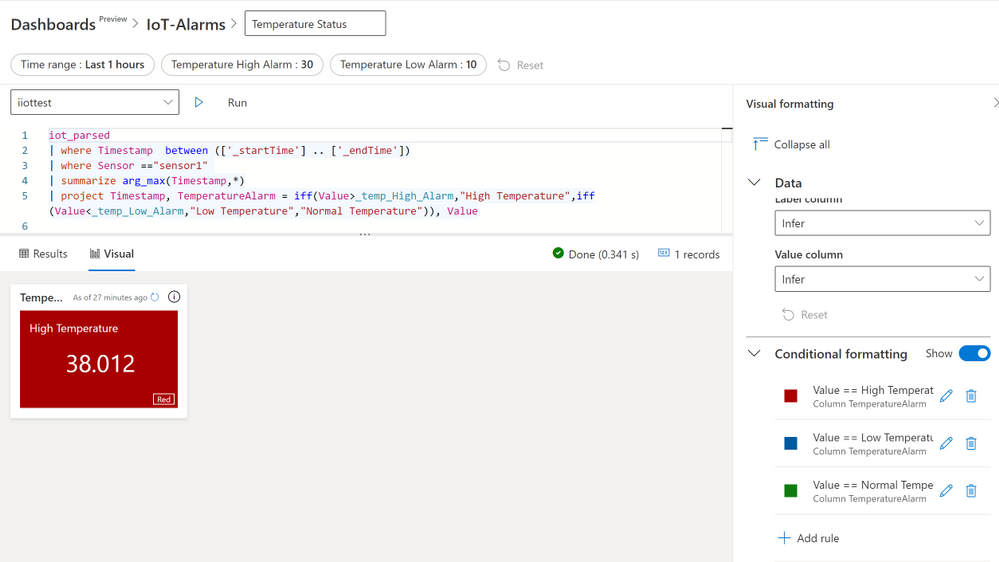
- Finally use the “Conditional Formatting” feature for the “Multi Stat” visual to build a coloured alarm indicator where a panel changes colour according the whether the temperature is above the high threshold, below the low threshold or in the normal region between the two thresholds. The query to use here is:
iot_parsed
| where Timestamp  between (['_startTime'] .. ['_endTime'])
| where Sensor =="sensor1"
| summarize arg_max(Timestamp,*)
| project Timestamp, TemperatureAlarm = iff(Value>_temp_High_Alarm,"High Temperature",iff(Value<_temp_Low_Alarm,"Low Temperature","Normal Temperature")), Value
The above query uses the “summarize arg_max(Timestamp,*)” operation to get the latest temperature value, then a nested “iff” statement is used to set a variable called “TemperatureAlarm” to one of three values (“High Temperature”, “Low Temperature” or “Normal Temperature”). Use the value of “TemperatureAlarm” in the Conditional Formatting rule panel to set the visual colour to red, blue or green as shown below.
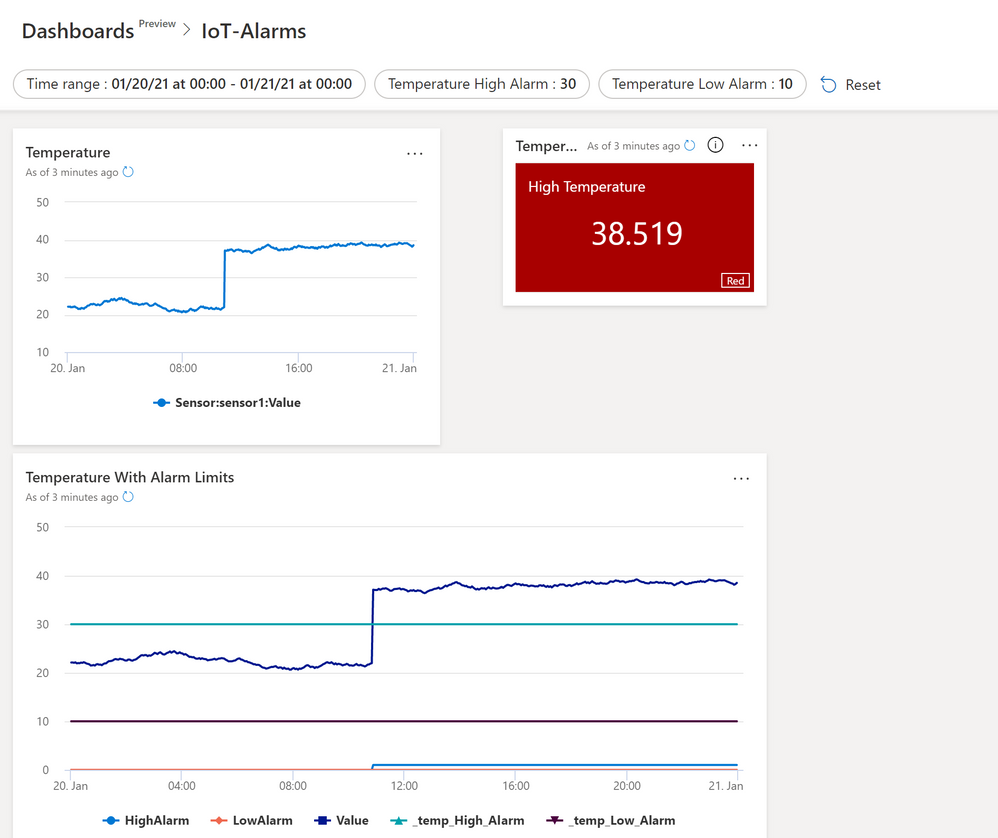
- Below is the final dashboard with all the three visuals together. Set this dashboard to update at regular time interval using the auto refresh feature to achieve a fast and near real time data and alarm display.
- Clean up resources: If the Azure resources used in this example are no further needed then remove the ADX cluster as explained here.
ADX is an excellent destination for IoT data and we have demonstrated one reason for that in building these versatile dashboards. But this is not the end of the story and we highly recommend considering how to combine these dashboards with more advanced features of ADX such as Time Series Analysis and Anomaly Detection. Additionally, we can combine the Azure Industrial IoT platform with ADX to build a truly powerful solution for ingestion, analysing and displaying OPC-UA data from the factory floor. ADX also has powerful integration features that allow us, for example, to extend the alarm detection logic by sending emails or triggering other business processes using other Azure capabilities such as Logic Apps.

by Contributed | Jan 27, 2021 | Technology
This article is contributed. See the original author and article here.
Welcome back to Reconnect. For this week’s edition, we are joined by none other than three-time Windows IoT MVP titleholder Ken Marlin!
Based in Phoenix, Arizona, Ken is a Microsoft Champion with more than 30 years of Microsoft experience supporting all products and programs, with specialities in Microsoft OEM Embedded appliances as well as OEM System Builder and Volume programs.
Since 2016, Ken has been working with Arrow Electronics as Microsoft Business Development Manager. There, he has worked directly with key customers as their trusted partner in the design and support of their projects and solutions. More recently, Ken has also been excited to work with the US Navy for a Flight Simulator that will run on Windows 10 IoT Enterprise LTSC 2019.
Ken fondly recalls his time in the MVP program from 2014 to 2016. For example, Ken created, managed and ran an event called the Avnet Tech Games, which was a geek Olympics event for college students. The event supported up-and-coming tech enthusiasts for 12 years, during which Ken held his MVP status for the final three years of the event until 2016.
For new members to the MVP family, Ken suggests: “Always try and work closely with your Microsoft teams to provide them feedback on their products and direction of the industry.”
Now, Ken is delighted to be part of the Reconnect program and “stay in touch with peers and understand the IoT industry.” Plus, “their feedback is great,” he adds.
Going forward, Ken looks forward to the next Windows 10 IoT product that will be released in the fall of 2021. “I hope to promote this product to all my customers and be an advocate for moving the IoT channel forward,” he says.
For more on Ken, check out his blog and YouTube channel.

by Contributed | Jan 27, 2021 | Technology
This article is contributed. See the original author and article here.
Discover the best practices of implementing Cloud Skills into your courses and learning resource with Lee Stott and Dr Majd Sakr, Carnegie Mellon University
Date: February 15, 2021
Time: 12:30 PM – 02:00 PM (Pacific) 3.30 PM EST 8.30 GMT
Location: Global
Format: Livestream
Topic: Cloud Development
Register Now
Hands-on large projects that are immersive students in real-world scenarios which utilize data, infrastructure, and cost management of cloud resources are key learning scenario. Students learn at much faster rate by undertaking Project Based Learning and this method of teaching has several pedagogical benefits. Microsoft Engineers, Data Scientists and Cloud Advocates have been working with the Carnegie Mellon University to further the development of these technologies and further the application of these processes in the academic world. The collaboration has resulted in the Carnegie Mellon University offering dedicated courses on Cloud Developer and Cloud Administration which has led to the development of several Learning Paths on Microsoft Learn. With the growing interest and need for skilled individuals in cloud, data science and ML/AI, the session will share how Carnegie Mellon can successfully scale an effective training technique to reach a large and wide audience.
Speakers Bios

Dr Majd Sakr
Teaching Professor, Computer Science Department, School of Computer Science
Carnegie Mellon University
Majd F. Sakr is a Teaching Professor in the Computer Science Department within the School of Computer Science at Carnegie Mellon University. He is also the co-director of the Master of Computational Data Science (MCDS) Program at the School of Computer Science at Carnegie Mellon. From 2007-2013, Majd was a Computer Science faculty at Carnegie Mellon University in Qatar (CMUQ), where he also held the positions of Assistant Dean for Research and Coordinator of the Computer Science Program. Majd has extensive teaching experience and number of research publications in relation to the teaching of project-based online courses in cloud computing with over a decade of experience in this field. Majd is presently leading the development of the Sail() Platform at Carnegie Mellon University which focuses on workforce training in cloud, data science and ML/AI.
https://www.cmu.edu/

Lee Stott
Principal Program Manager, Cloud and AI
Lee Stott is a Principal Program Manager within the Academic Ecosystems team which sits in the Microsoft Cloud + AI organization. Lee’s focus is on our global strategy for academic faculty engagements and student developers leading cross Microsoft engineering initiatives around new products, services and learning resources.
http://aka.ms/faculty
@lee_stott
Microsoft Learn Resources
Microsoft Learn Carnegie Mellon University Cloud Developer
Microsoft Learn Carnegie Mellon University Cloud Administration
Microsoft Learn LTI Application
Microsoft Professional Certifications
Exam AZ-103: Microsoft Azure Administrator
Exam AZ-400: Designing and Implementing Microsoft DevOps Solutions
by Scott Muniz | Jan 27, 2021 | Security, Technology
This article is contributed. See the original author and article here.
Mozilla has released security updates to address vulnerabilities in Firefox, Firefox ESR, and Thunderbird. An attacker could exploit some of these vulnerabilities to take control of an affected system.
CISA encourages users and administrators to review Mozilla Security Advisories for Firefox 85, Firefox ESR 78.7, and Thunderbird 78.7 and apply the necessary updates.

by Scott Muniz | Jan 27, 2021 | Security, Technology
This article is contributed. See the original author and article here.
Official websites use .gov
A .gov website belongs to an official government organization in the United States.

Secure .gov websites use HTTPS A
lock ( )
) or
https:// means you’ve safely connected to the .gov website. Share sensitive information only on official, secure websites.
by Scott Muniz | Jan 27, 2021 | Security
This article was originally posted by the FTC. See the original article here.
With every passing day, the news on COVID-19 vaccine distribution seems to change. One reason is that distribution varies by state and territory. And scammers, always at the ready, are taking advantage of the confusion.
Brought to you by Dr. Ware, Microsoft Office 365 Silver Partner, Charleston SC.
by Scott Muniz | Jan 27, 2021 | Security, Technology
This article is contributed. See the original author and article here.
Original release date: January 27, 2021
CISA has released a malware analysis report on Supernova malware affecting unpatched SolarWinds Orion software. The report contains indicators of compromise (IOCs) and analyzes several malicious artifacts. Supernova is not part of the SolarWinds supply chain attack described in Alert AA20-352A.
CISA encourages users and administrators to review Malware Analysis Report MAR-10319053-1.v1 and the SolarWinds advisory for more information on Supernova.
This product is provided subject to this Notification and this Privacy & Use policy.
by Contributed | Jan 27, 2021 | Technology
This article is contributed. See the original author and article here.
Event Trigger in Azure Data Factory is the building block to build an event-driven ETL/ELT architecture (EDA). Data Factory’s native integration with Azure Event Grid let you trigger processing pipeline based upon certain events. Currently, Event Triggers support events with Azure Data Lake Storage Gen2 and General Purpose version 2 storage accounts, including Blob Created and Blob Deleted.
As with any architecture, it’s sometimes critical to enforce Role Based Access Control (RBAC) to ensure that only certain members on the team can access certain sensitive information. Unauthorized access to listen to, subscribe to updates from, and trigger pipelines linked to blob accounts should be strictly prohibited.
Azure Data Factory make it really easy for you and enforce the following rules:
- To successfully create a new or update an existing Event Trigger, the Azure account signed into the Data Factory needs to have owner access to the relevant storage account. Otherwise, the operation with fail with Access Denied
- Data Factory needs no special permission to your Event Grid, and you do not need to assign special RBAC permission to Data Factory service principal for the operation.
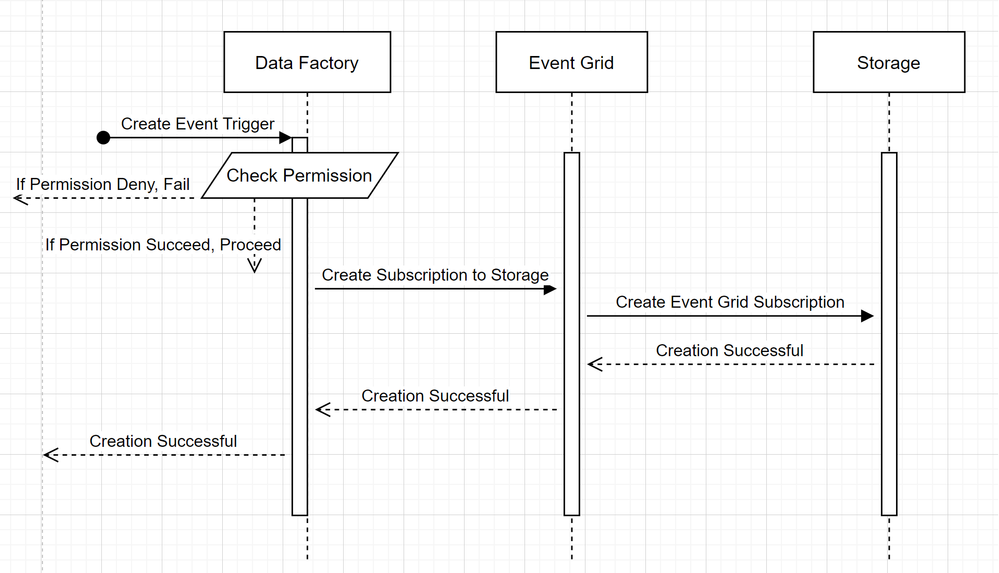
In order to understand how Azure Data Factory delivers the two promises, let’s take a step back and take a sneak peek behind the scene. These are the high level architecture for integration among Data Factory, Storage, and Event Grid.
- Create a new Event Trigger
Two noticeable callouts from the flows are:
- Azure Data Factory makes no direct contact with Storage account. Request to create a subscription is instead relayed and processed by Event Grid. Hence, your Data Factory needs no permission to Storage account in this stage
- Access control and permission checking happens on Azure Data Factory side. Before ADF issues a request to subscribe to Storage event, it checks the permission for the user. More specifically, it checks whether the Azure account signed in and attempting to create the Event trigger have owner access to the relevant Storage account. If the permission check fails, trigger creation also fails
- Storage event trigger Data Factory pipeline run
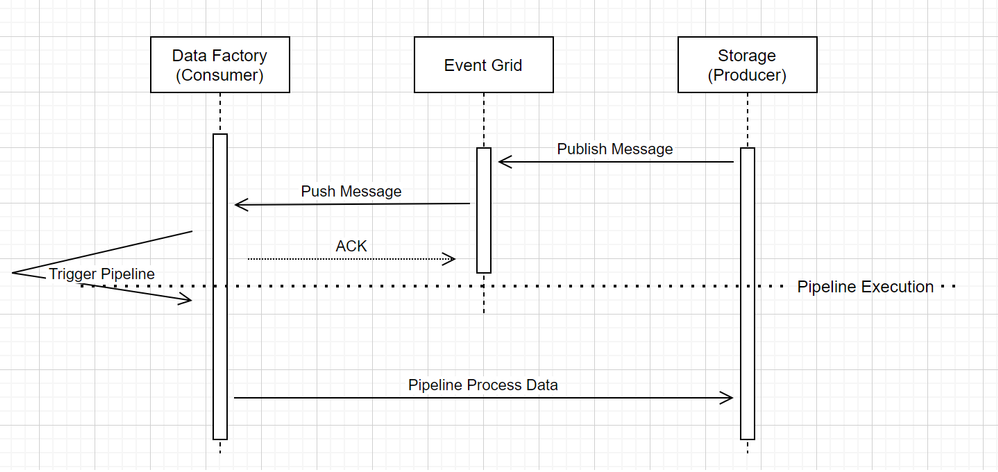
When it comes to Event triggering pipeline in Data Factory, two noticeable call outs in the workflow:
- Event Grid uses a Push model that it relays the message as soon as possible when storage drops the message into the system. This is different from messaging system, such as Kafka where a Pull system is used.
- Event Trigger on Azure Data Factory serves as an active listener to the incoming message and it properly triggers the associated pipeline.
- Event Trigger itself makes no direct contact with Storage account
- That said, if you have a Copy or other activity inside the pipeline to process the data in Storage account, Data Factory will make direct contact with Storage, using the credentials stored in the Linked Service. Please ensure that Linked Service is set up appropriately
- However, if you make no reference to the Storage account in the pipeline, you do not need to grant permission to Data Factory to access Storage account
What’s in the bag for the future?
The team is currently in the process of expanding functionalities for Event Trigger. Soon, we will support Custom Event in Event Grid to give customers even more flexibilities in defining the Event Driven Architecture. Please keep an eye out for the exciting announcement, as we test the functionality thoroughly and gradually roll it out to General Availability.
by Contributed | Jan 27, 2021 | Technology
This article is contributed. See the original author and article here.
After the Windows updates from November 2020, you might be facing some issues running Bulk Inserts or working with linked servers, if you keep an open session for more than 10 hours.
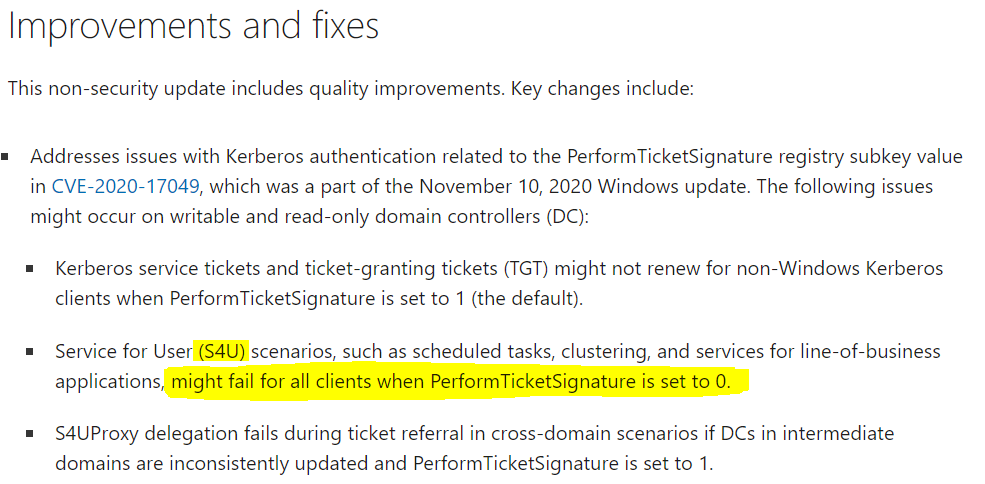
Some recent changes were done on the Windows side when it comes to the way S4U (Unconstrained delegation) Kerberos tickets work.
This is a long existing SQL issue where it expects to be able to have long lived delegatable sessions without the user ever re-authenticating. This issue is normally hidden by the fact that you can renew the TGT for up to 7 days by default. However, a recent patch for PerformTicketSignatures was released and the default setting does not issue renewable tickets.
Managing deployment of Kerberos S4U changes for CVE-2020-17049 (microsoft.com)
After installing this update on domain controllers (DCs) and read-only domain controllers (RODCs) in your environment, you might encounter Kerberos authentication and ticket renewal issues. This is caused by an issue in how CVE-2020-17049 was addressed in these updates.
|
Solution:
To solve this problem, there are two possibilities:
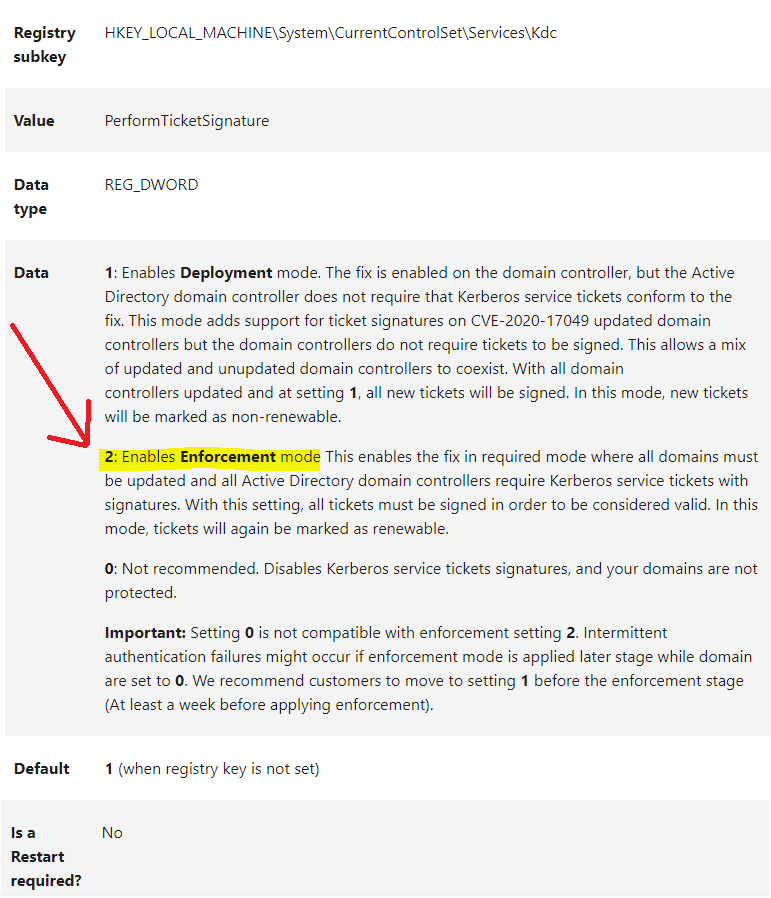
1. Install in all Domain Controllers the December 2020 update and Change the PerformTicketSignature key to 2 on all Domain Controllers
December 8, 2020—KB4593226 (OS Build 14393.4104) (microsoft.com)
Managing deployment of Kerberos S4U changes for CVE-2020-17049 (microsoft.com)
2. Change the authentication to Constrained delegation (S4UProxy)
The issue only happens with unconstrained delegation (S4U). So, the same problem will not happen in a constrained delegation environment.
Unconstrained delegation is considered vulnerable and a configuration with constrained delegation or resource based constrained delegation would be the most secure approach.
Other Windows Server Versions:
The same issue can be found in all Windows Security Patches after November 2020
Windows Server 2012 R2 – KB4586845
Windows Server 2012 – KB4586834
Credits:
Thank you to @dineu , Support Escalation Engineer from SQL Server Networking Team, for your help writing this post.


Recent Comments