by Contributed | Jan 29, 2021 | Technology
This article is contributed. See the original author and article here.
While helping Windows Enterprise customers deploy and realize the benefits of Windows 10, I’ve observed there’s still a lot of confusion regarding the security features of the operating system. However, the key benefits of Windows 10 involve these deep security features. This post serves to detail the Device Guard and Credential Guard feature sets, and their relationship to each other.
First, let’s set the foundation by thinking about the purpose of each feature:
Device Guard is a group of key features, designed to harden a computer system against malware. Its focus is preventing malicious code from running by ensuring only known good code can run.
Credential Guard is a specific feature that is not part of Device Guard that aims to isolate and harden key system and user secrets against compromise, helping to minimize the impact and breadth of a Pass the Hash style attack in the event that malicious code is already running via a local or network based vector.
The two are different, but complimentary as they offer different protections against different types of threats. Let’s dive in and take a logical approach to understanding each.
It’s worth noting here that these are enterprise features, and as such are included only in the Windows Enterprise client.
Virtual Secure Mode
The first technology you’ll need to understand before we can really dig into either Device Guard or Credential Guard, is Virtual Secure Mode (VSM). VSM is a feature that leverages the virtualization extensions of the CPU to provide added security of data in memory. We call this class of technology Virtualization Based Security (VBS), and you may have heard that term used elsewhere. Anytime we’re using virtualization extensions to provide security, we’re essentially talking about a VBS feature.
VSM leverages the on chip virtualization extensions of the CPU to sequester critical processes and their memory against tampering from malicious entities.
The way this works is the Hyper-V hypervisor is installed – the same way it gets added in when you install the Hyper-V role. Only the hypervisor itself is required, the Hyper-V services (that handle shared networking and the management of VMs themselves) and management tools aren’t required, but are optional if you’re using the machine for ‘real’ Hyper-V duties. As part of boot, the hypervisor loads and later calls the real ‘guest’ OS loaders.
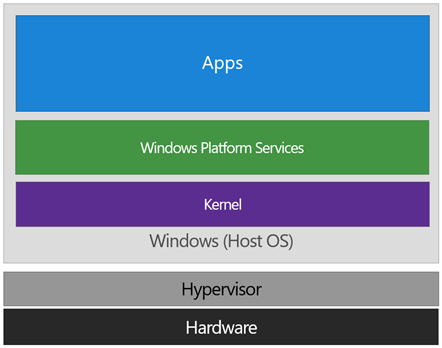
The diagram below illustrates the relationship of the hypervisor with the installed operating system (usually referred to as the host operating system)
The difference between this and a traditional architecture is that the hypervisor sits directly on top of the hardware, rather than the host OS (Windows) directly interacting at that layer. The hypervisor serves to abstract the host OS (and any guest OS or processes) from the underlying hardware itself, providing control and scheduling functions that allow the hardware to be shared.
In VSM, we’re able to extend this by tagging specific processes and their associated memory as actually belonging to a separate operating system, creating a ‘bubble’ sitting on top of the hypervisor where security sensitive operations can occur, independent of the host OS:
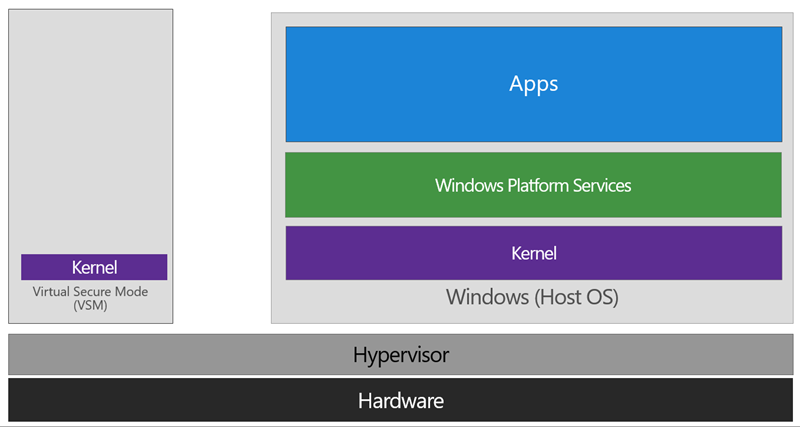
In this way, the VSM instance is segregated from the normal operating system functions and is protected by attempts to read information in that mode. The protections are hardware assisted, since the hypervisor is requesting the hardware treat those memory pages differently. This is the same way to two virtual machines on the same host cannot interact with each other; their memory is independent and hardware regulated to ensure each VM can only access it’s own data.
From here, we now have a protected mode where we can run security sensitive operations. At the time of writing, we support three capabilities that can reside here: the Local Security Authority (LSA), and Code Integrity control functions in the form of Kernel Mode Code Integrity (KMCI) and the hypervisor code integrity control itself, which is called Hypervisor Code Integrity (HVCI).
Each of these capabilities (called Trustlets) are illustrated below:
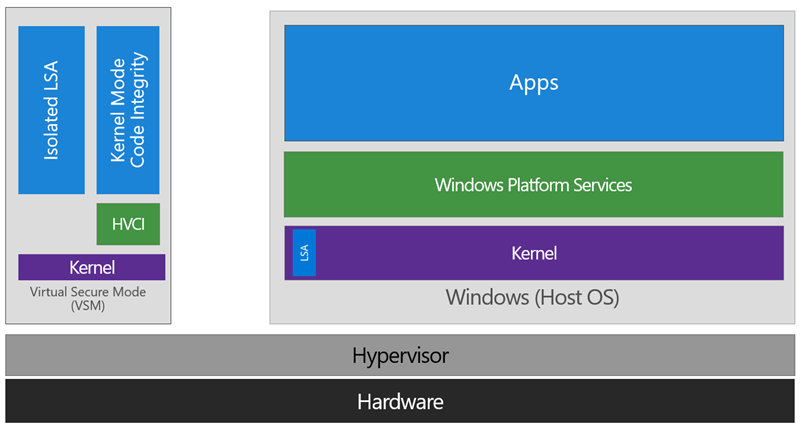
When these capabilities are handled by Trustlets in VSM, the Host OS simply communicates with them through standard channels and capabilities inside of the OS. While this Trustlet-specific communication is allowed, having malicious code or users in the Host OS attempt to read or manipulate the data in VSM will be significantly harder than on a system without this configured, providing the security benefit.
Running LSA in VSM, causes the LSA process itself (LSASS) to remain in the Host OS, and a special, additional instance of LSA (called LSAIso – which stands for LSA Isolated) is created. This is to allow all of the standard calls to LSA to still succeed, offering excellent legacy and backwards compatibility, even for services or capabilities that require direct communication with LSA. In this respect, you can think of the remaining LSA instance in the Host OS as a ‘proxy’ or ‘stub’ instance that simply communicates with the isolated version in prescribed ways.
Deploying VSM is fairly straightforward. You simply need to verify you have the appropriate hardware configuration, install certain Windows features, and configure VSM via Group Policy.
Step One: Configure Hardware
In order to use VSM, you’ll need a number of hardware features to be present and enabled in the firmware of the machine:
- UEFI running in Native Mode (not Compatibility/CSM/Legacy mode)
- Windows 64bit and it’s associated requirements
- Second Layer Address Translation (SLAT) and Virtualization Extensions (Eg, Intel VT or AMD V)
- A Trusted Platform Module (TPM) is recommended.
Step Two: Enable Windows Features
The Windows features you’ll need to make VSM work are called Hyper-V Hypervisor (you don’t need the other Hyper-V components) and Isolated User Mode:
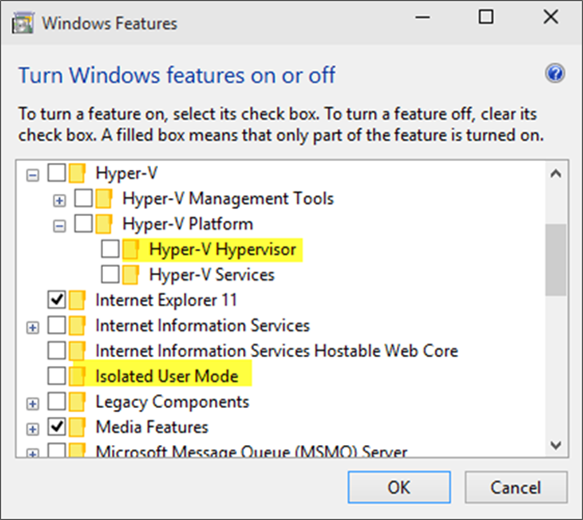
If these options are greyed out or unavailable for install, it will typically indicate that the hardware requirements in step one haven’t been met.
You’ll notice the name of the feature is called Isolated User Mode in here. It actually is the Virtual Secure Mode feature – you can thank a last minute name change for that. In order to not confuse people, this isn’t planned to change to reflect the VSM name at this time, and may look to being integrated as a standard Windows feature at a later stage.
Update: In Windows 10, Version 1607 this is indeed an integrated feature and no longer needs to be explicitly enabled.
Step Three: Configure VSM
VSM and the Trustlets loaded within are controlled via either Mobile Device Management (MDM) or Group Policy (GP).
For the purposes of this article, I’ll cover the Group Policy method as that’s the most commonly used option, but the same configuration is possible with MDM.
The GP setting you need to know about is called Turn On Virtualization Based Security, located under Computer Configuration Administrative Templates System Device Guard in the Group Policy Object Editor:
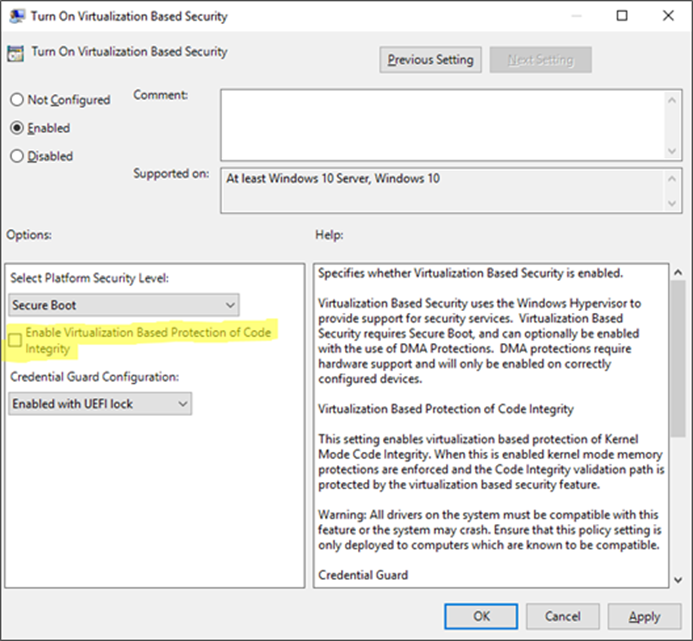
Enabling this setting, and leaving all the settings blank or at their defaults will turn on VSM, ready for the steps below for Device Guard and Credential Guard. In this default state, only the Hypervisor Code Integrity (HVCI) runs in VSM until you enable the features below (protected KMCI and LSA).
Device Guard
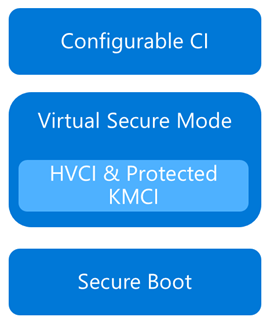 Now that we have an understanding of Virtual Secure Mode, we can begin to discuss Device Guard. The most important thing to realize is that Device Guard is not a feature; rather it is a set of features designed to work together to prevent and eliminate untrusted code from running on a Windows 10 system.
Device Guard consists of three primary components:
- Configurable Code Integrity (CCI) – Ensures that only trusted code runs from the boot loader onwards.
- VSM Protected Code Integrity – Moves Kernel Mode Code Integrity (KMCI) and Hypervisor Code Integrity (HVCI) components into VSM, hardening them from attack.
- Platform and UEFI Secure Boot – Ensuring the boot binaries and UEFI firmware are signed and have not been tampered with.
When these features are enabled together, the system is protected by Device Guard, providing class leading malware resistance in Windows 10.
Configurable Code Integrity (CCI)
CCI dramatically changes the trust model of the system to require that code is signed and trusted for it to run. Other code simply cannot execute. While this is extremely effective from a security perspective, it provides some challenges in ensuring that code is signed.
Your existing applications will likely be a combination of code that is signed by the vendor, and code that is not. For code that is signed by the vendor, the easiest option is just to use a tool called signtool.exe to generate security catalogs (signatures) for just about any application.
More detail on this in an upcoming post.
The high level steps to configure code integrity for your organization is:
- Group devices into similar roles – some systems might require different policies (or you may wish to enable CCI for only select systems such as Point of Sale systems or Kiosks.
- Use PowerShell to create integrity policies from “golden” PCs
(use the New-CIPolicy Cmdlet)
- After auditing, merge code integrity policies using PowerShell (if needed)
(Merge-CIPolicy Cmdlet)
- Discover unsigned LOB apps and generate security catalogs as needed (Package Inspector & signtool.exe – more info on this in a subsequent post)
- Deploy code integrity policies and catalog files
(GP Setting Below + Copying .cat files to catroot – C:WindowsSystem32{F750E6C3-38EE-11D1-85E5-00C04FC295EE})
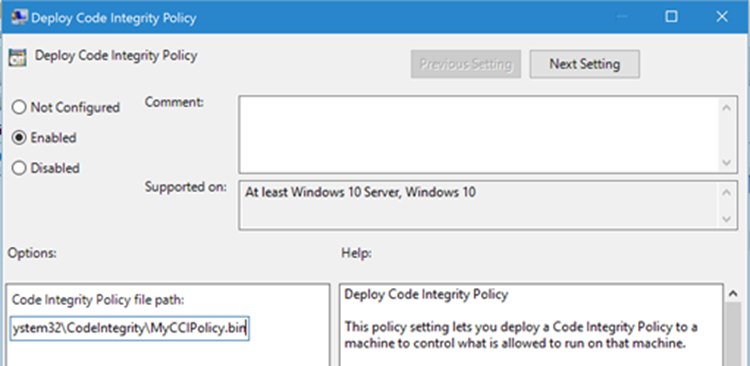
The Group Policy setting in question is Computer Configuration Administrative Templates System Device Guard Deploy Code Integrity Policy:
VSM Protected Code Integrity
The next component of Device Guard we’ll cover is VSM hosted Kernel Mode Code Integrity (KMCI). KMCI is the component that handles the control aspects of enforcing code integrity for kernel mode code. When you use Configurable Code Integrity (CCI) to enforce a Code Integrity policy, it is KMCI and it’s User-Mode cousin, UMCI – that actually enforces the policy.
Moving KMCI to being protected by VSM ensures that it is hardened to tampering by malware and malicious users.
Platform & UEFI Secure Boot
While not a new feature (introduced in Windows 8), Secure Boot provides a high-value security benefit by ensuring that firmware and boot loader code is protected from tampering using signatures and measurements.
To deploy this feature you must be UEFI booting (not legacy), and the Secure Boot option (if supported) must be enabled in the UEFI. Once this is done, you can build the machine (you’ll have to wipe & reload if you’re switching from legacy to UEFI) and it will utilize Secure Boot automatically.
For more information about the specifics of deploying Device Guard, start with the deployment guide.
Credential Guard
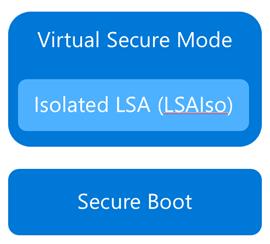 Although separate from Device Guard, the Credential Guard feature also leverages Virtual Secure Mode by placing an isolated version of the Local Security Authority (LSA – or LSASS) under it’s protection.
The LSA performs a number of security sensitive operations, the main one being the storage and management of user and system credentials (hence the name – Credential Guard)
Credential guard is enabled by configuring VSM (steps above) and configuring the Virtualization Based Security Group Policy setting with Credential Guard configured to be enabled.
Once this is done, you can easily check if Credential Guard (or many of the other features from this article) is enabled by launching MSINFO32.EXE and viewing the following information:
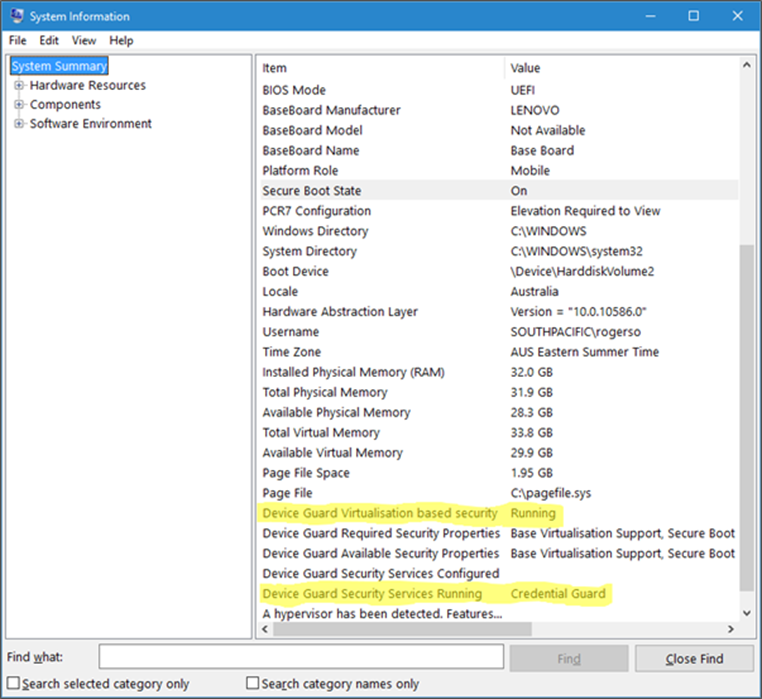
You can also check for the presence of the LSAIso process, which is running in VSM:
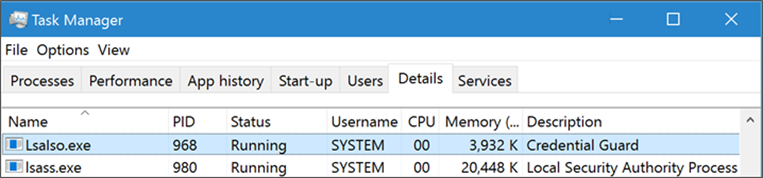
I hope this article has been useful for you and answered at least some of your questions about Device Guard and Credential Guard.
If your thirst for knowledge is not yet quenched and you need more information while you wait for the follow up posts, check out the following Channel9 videos that cover this topic:
https://channel9.msdn.com/Blogs/Seth-Juarez/Isolated-User-Mode-in-Windows-10-with-Dave-Probert
https://channel9.msdn.com/Blogs/Seth-Juarez/Isolated-User-Mode-Processes-and-Features-in-Windows-10-with-Logan-Gabriel
https://channel9.msdn.com/Blogs/Seth-Juarez/Isolated-User-Mode-in-Windows-10-with-Dave-Probert
Stay tuned for further posts about this and other Windows 10 features. Hey, why not subscribe?
Author: Ash

by Contributed | Jan 28, 2021 | Technology
This article is contributed. See the original author and article here.
Over the course of 8 weeks, developers gathered virtually to participate in the Microsoft Azure Hack for Social Justice event. The hackathon challenge statement was straightforward: design and build an application prototype that uses Azure to address a social justice issue. Participants were given access to Microsoft technical mentors, dedicated Azure environment, and self-paced learning resources. Although technology alone cannot solve complex societal issues, our hope is that participants will develop solutions that can help empower communities and drive change.
Over 500 participants registered for the hack, 300+ were from the U.S., and 6 winning projects were selected. Check out these creations:
1st Place : Equitable Restroom Access for Gender Non-Conforming
Created by: Mahesh Babu (@smaheshbabu)
Provides safe restroom access for transgender, gender non-conforming, disabled individuals, and parents traveling with kids to find restrooms per their needs.
Azure Services Used: Azure Functions, Azure SendGrid
2nd Place: GetPro
Created by: Amina Fong (@fongamina), William Broniec (@1345613864), Zechen Lu (@tommylu123)
Web app that centralizes information and professional resources for underrepresented populations to help even the playing field in educational and career opportunities.
Azure Services Used: Azure App Services, Azure SQL Database
3rd Place: Legal Helper Bot
Created by: Murtada Ahmed
Not knowing the law and ones rights can expose already vulnerable groups to more discrimination and abuse. Legal Helper Bot was created to change that.
Azure Services Used: Azure Bot Services, Azure Storage
Honorable Mentions
Racial Bias and Score Prediction of COMPAS Score
Created by: Yuki Ao (@aoyingxue)
Inform people of the racial bias in the U.S. Justice system and give the offenders a chance to know their score level beforehand.
TutorFirst
Created by: Farhan Mashud (@fm1539), Isfar Oshir (@iao233), Mohammed Uddin (@msu227)
App for low income students to receive free, high quality tutoring from tutor volunteers.
Feminist Action Board
Created by: Aroma Rodrigues (@AromaRodrigues)
Subscribes to a news API to provide real time news on gender violence and tracks organizations, petitions, and initiatives
On behalf of the Microsoft U.S. Azure team, I’d like to sincerely thank all of the participants, and congratulate the winners on a job well done. Also, thank you to the mentors and judges who volunteered their time to give back to the community.
Next up: check out these new hackathons that are open for registration
by Contributed | Jan 28, 2021 | Technology
This article is contributed. See the original author and article here.
We are excited to announce that the Update Baseline is now a part of the Security Compliance Toolkit! If you’re not yet familiar with this great tool, the Update Baseline offers Microsoft’s set of recommended policy configurations for Windows Updates to help you:
- Ensure that the devices on your network receive the latest monthly security updates in a timely manner.
- Provide a great end user experience throughout the update process.
The Update Baseline includes Windows Update policies as well as power and Delivery Optimization policies—all designed to streamline the update process, improve patch compliance, and help ensure your devices stay secure. In fact, devices that are configured using the Update Baseline reach, on average, a compliance rate between 80-90% within 28 days.
What is included in the Update Baseline?
For Windows Update policies, the Update Baseline offers recommendations around:
- Deadlines, the most powerful tool in the IT administrator’s arsenal for ensuring devices get updated on time.
- Downloading and installing updates in the background without disturbing end users. This also removes bottlenecks from the update process.
- A great end user experience. Users don’t have to approve updates, but they get notified when an update requires a restart.
- Accommodating low activity devices (which tend to be some of the hardest to update) to ensure the best-possible user experience while respecting compliance goals.
How do I apply the Update Baseline?
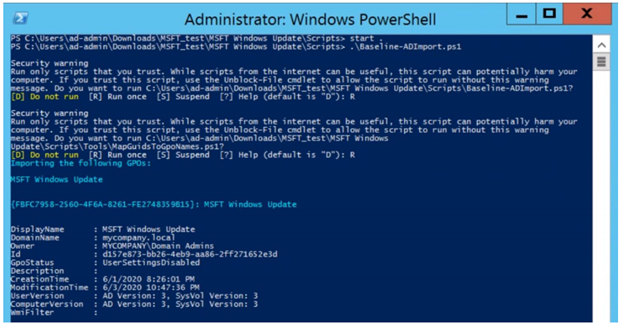
If you manage your devices via Group Policy, you can apply the Update Baseline using the familiar Security Compliance Toolkit framework. With a single PowerShell command, the Update Baseline Group Policy Object (GPO) can be loaded into Group Policy Management Center (GPMC) as shown below:
You can add the MSFT Windows Update GPO that adds the Update Baseline to GPMC with a single command.
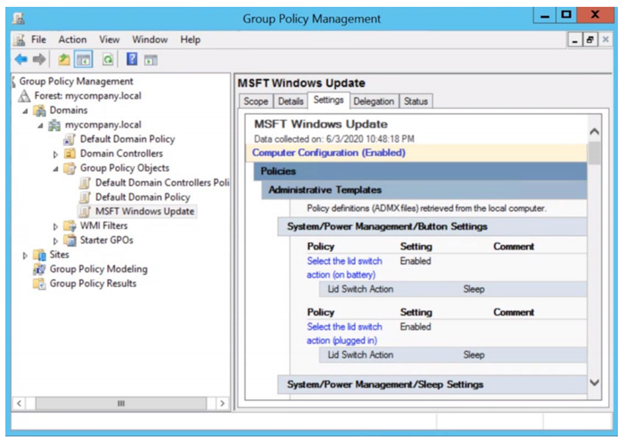 You can then view the Update Baseline GPO (MSFT Windows Update) in the GPMC.
That’s it! Simple and easy.
Download the updated Security Compliance Toolkit today to start applying security configuration baselines for Windows and other Microsoft products.
I also encourage you to learn more about common policy configuration mistakes for managing Windows updates and what you can do to avoid them to improve update adoption and provide a great user experience.
Other cool tidbits? The Update Baseline will continue to be updated and improved as needed, and an Intune solution to apply the Update Baseline is coming soon! Let us know your thoughts and leave a comment below.
by Contributed | Jan 28, 2021 | Technology
This article is contributed. See the original author and article here.
The Azure Sphere 21.01 feature release includes the following components:
- Updated Azure Sphere OS
- Updated Azure Sphere SDK for Windows and for Linux
- Updated Azure Sphere extensions for Visual Studio and for Visual Studio Code
If your devices are connected to the internet, they will receive the updated OS from the cloud. You’ll be prompted to install the updated SDK on next use, or you can install it now. To install the latest SDK, see the installation Quickstart for Windows or Linux:
New and changed features in the 21.01 release
The 21.01 release includes additional features in the CLI v2 Beta, a new API to help applications monitor their memory usage, support for application crash data collection, and improved capabilities in Azure Sphere Explorer. In addition, we’ve added the ability to control current for GPIOs and additional ways to access ADC peripherals.
The following sections provide details about these changes.
Azure Sphere CLI v2
In the 21.01 release, the Azure Sphere CLI v2 continues to evolve, but is still considered a Beta product. We encourage you to use this new, more powerful CLI and to report any problems by using the v2 Beta CLI azsphere feedback command. In general, the V2 CLI is backwards compatible with the V1 CLI; however, it has a few differences that are worth noting, as described in the online documentation.
In each subsequent release of CLI v2, we aim to maintain backwards compatibility for both input (command names, parameter names, parameter values) and output in JSON and yaml. In cases where such compatibility is not possible, we will provide at least 6 months’ notice before making changes.
The 21.01 release of CLI v2 supports simplified object identification so that you can use either use the ID (GUID), IP address, or Local Connection ID to identify the device.
API features
Several of the Applibs libraries contain new functions at this release:
- New memory functions allow high-level applications to monitor their own memory usage. The functions return the total memory usage, user-mode memory usage, and peak user-mode memory usage.
- New GPIO libraries components, which include gpiopin_request, pin_config_param_type, and GPIO_SET_PIN_CONFIG_IOCTL, allow you to control the amount of current used to drive GPIO pins.
Support for crash data collection
Optional diagnostic data can be configured to collect a full Linux core dump when an application or system service crashes.
The Device Group – Patch function in the public API (PAPI) supports enabling crash dump collection for one or more of your device groups.
Access to ADC peripherals
ADC peripherals can now be accessed in the following ways:
- Simplified functions that are wrappers for base Linux functionality.
- Advanced functions that rely on Linux ioctls that communicate with the peripheral directly.
Code snippets are provided for both simplified and advanced functions that show how to:
- Get the channel specification
- Set the reference voltage
- Get the sample bit count
- Read the ADC
See the Implementation Overview for a side-by-side comparison of reading the ADC with the simplified, advanced, and Linux sysfs implementations.
New features in the 21.01 SDK
The IoT C SDK that is released with Azure Sphere was upgraded to the July LTS Refresh. This update contains an important security patch.
Updated Azure Sphere Explorer in Visual Studio and Visual Studio Code
Azure Sphere Explorer has been updated for this release. Visual Studio supports a read-only version and the Visual Studio Code version now supports write capabilities.
New and updated samples for 21.01
The 21.01 release includes the following new and updated sample hardware designs and applications:
- A new ADC sample that demonstrates how to use analog-to-digital conversion (ADC) functionality.
- Updates to the HTTPS_CurlEasy sample to showcase chunked downloads.
We have continued to make more of our existing Azure Sphere samples available for download through the Microsoft Samples Browser.
In addition, we now provide a collection of unmaintained samples and hardware designs in the Azure Sphere Gallery.
For more information on Azure Sphere OS feeds and setting up an evaluation device group, see Azure Sphere OS feeds and Set up devices for OS evaluation.
For self-help technical inquiries, please visit Microsoft Q&A or Stack Overflow. If you require technical support and have a support plan, please submit a support ticket in Microsoft Azure Support or work with your Microsoft Technical Account Manager. If you would like to purchase a support plan, please explore the Azure support plans.
by Contributed | Jan 28, 2021 | Technology
This article is contributed. See the original author and article here.
Editor’s note (1/28/21): Title was updated to make it shorter
There is a growing need for virtual meetings, consults, and appointments but also an increase in the amount of time people are dedicating to try to schedule those appointments. Back and forth phone calls, emails, text messages. Bookings can make it easier, so you can spend more time talking to customers rather than trying to schedule them, and it does it in a secure and integrated way with Microsoft 365.
Microsoft Bookings helps making scheduling and managing appointments easy and seamless. It does this through a web-based booking tool where people have the flexibility to see and book services when it’s convenient for them, it makes it easier to manage staff’s time by integrating with Outlook’s calendar and keeps everyone updated with timely and automatic email confirmations and reminders to reduce no-shows, all these also helps organizations reduce repetitive scheduling tasks.
Bookings is flexible, customizable, secure as it uses a mailbox in Exchange Online, and can be designed to fit scenarios and needs of different parts of an organization.
We have worked with various industries to enable different scenarios. Tele-Health by virtual consultations with doctors through Microsoft Teams, educational classrooms, financial consulting, organizations internal services like legal/IT/HR provided to their employees, candidate interviews, assisted shopping in retail, and government services. To read more on how customers are using Bookings for these scenarios, please click here.
These scenarios demand high scale, to help make sure Bookings works well for you and scale to your needs, we have prepared these best practices.
1. Planning for scale
Each Bookings calendar is currently designed to handle a maximum of 2,500 bookings across all services in that calendar per day, along with a creation limit of 10 booking requests per second, this will work for common scenarios.
If your requirements exceed this, you should plan to distribute the load using the steps below.
- Create a Bookings calendar with just one service.
- Clone this calendar to multiple calendars.
- You can opt-in to the Bookings preview to use a clone option and optout of the preview anytime you want to.
- Limit each calendar for specific audiences, like:
By buildings or operating group
By booking period (mornings only vs afternoons)
- Dividing the load across different Bookings calendars will help ensure none of them will reach the 2,500 limit.
2. Set how far in advance your customers can book an appointment
Finding the optimal value for the maximum advance appointment time your customers can book can help prioritize the daily limits for appointments that are closer to “today”. We have attached a simple Excel spreadsheet where you can enter the values to help you estimate the number of appointments and forward-looking time you can have in your Bookings calendar.
Follow the instructions below to use the attached spreadsheet.
- Calculating the maximum advance appointment time in which those 2,500 appointments could be achieved.
- Open the booking availability timeframe only for that period of time.
- Keep updating the timeframe once the slots are full or a day has passed, so people will always have the option to book up to the same timeframe in advance.
If you got confused (don’t worry, we did too), below is an example. This example is calculated at the calendar level, not at the service level.
- If the appointment duration is 10 minutes, and the maximum number of working hours are 8, then the possible number of appointments/day will be 8*60/10. This means up to 48 appointments per staff member, assuming you don’t need buffer time between appointments.
- If we consider 5 staff members per booking calendar, the max number of appointments you can have in a workday will be 240.
- Considering that opening more than 2,500 slots will throttle the system, then the ability to book a service shouldn’t be opened for more than 2500/240 = ~10.5 days
- Assuming a 5-day week, do not let your customers book appointments 2 weeks before the current date (I.e. today). This will ensure that your customers can always book an appointment
- You can choose to move the booking timeframe every day to always have a 2 week pre-booking time or do it when your bookings are filling up.
We are actively working to increase the scaling limits as you read this and we will post a new communication as soon as our systems are updated.
As always, please let us know if you have any feedback in our UserVoice channel.
Thank you!
Gabriel on behalf of the Bookings team
by Contributed | Jan 28, 2021 | Technology
This article is contributed. See the original author and article here.
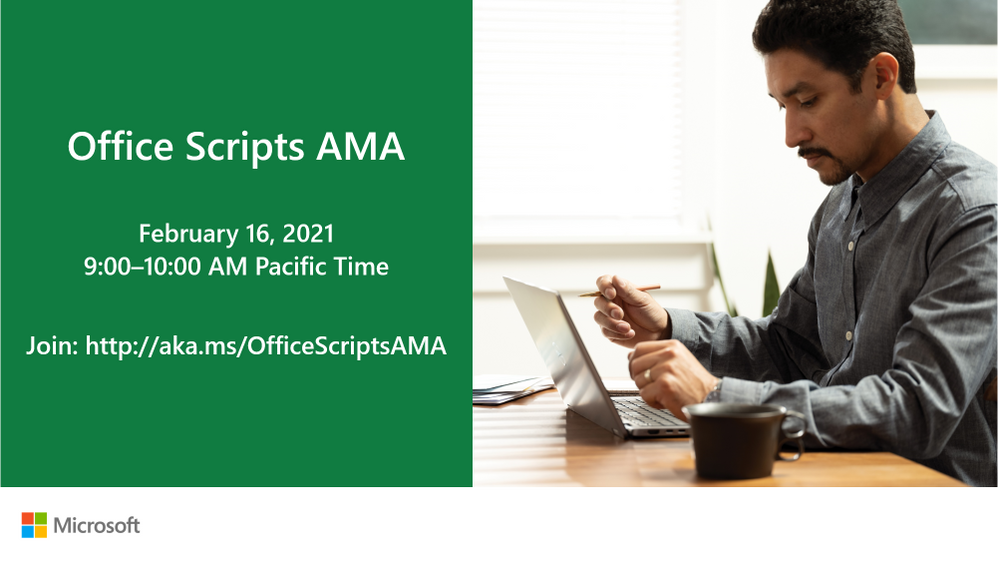
We’re so excited to announce our first-ever Ask Microsoft Anything (AMA) for Office Scripts! The AMA will take place on Tuesday, February 16, 2021, from 9:00 a.m. to 10:00 a.m. PT in the Excel AMA space. Add the event to your calendar and view it in your time zone here.
During this AMA, you will have the opportunity to share your questions and feedback about Office Scripts and receive responses directly from our product team. Facing trouble with automating on Excel for web? Have an idea that would make our feature better? Let us know- we’re eager to hear and learn from you!
Looking forward to seeing you at the AMA. In the meantime, happy scripting!
The Office Scripts team
by Contributed | Jan 28, 2021 | Technology
This article is contributed. See the original author and article here.
Want to help defend the world against cyber attacks? We want you to influence our designs, plans, and guidance so we can have a global impact together. That’s why we need your participation in our security community.
As part of our community, you can speak directly to our engineering teams and get early access to changes by joining our webinars, participating in private previews, reviewing product roadmaps, attending in-person events, or providing feedback on our forums.
Webinars
To check out our upcoming webinars, or recordings of past webinars, visit https://aka.ms/SecurityWebinars.
Videos
We’re creating a series of short videos detailing a particular feature or scenario. Check them out at https://aka.ms/SecurityCommunityVideos.
Email List
To receive emails about upcoming webinars, events, and other announcements, visit https://aka.ms/SecurityEmailList.
Forums & Blogs
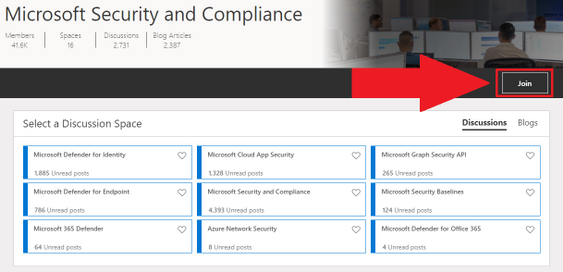
Got questions or feedback? Check out our product-specific forums where you can speak directly to our engineering teams, and our blogs where you can see the latest product developments. Go here and then click the join button.
Ninja Training
Want to go deep into the technical details? Our Ninja Training is for you.
Podcasts
Check out our Azure Security Podcast at https://aka.ms/AzSecPod and our Azure Security Center In The Field podcast at https://aka.ms/ASCInTheField.
Private Communities
We have several private communities that operate under NDA that may be right for you.
To apply to join our private preview program, where you can get early access to changes in exchange for your feedback, visit https://aka.ms/SecurityPrP.
To apply join our US government security community, visit https://aka.ms/SecGovCommunity.
GitHub
We welcome your contributions at our GitHub repositories. You can also find workbooks, scripts, playbooks, detections, sample data, and more.
<!– Old links
Forums
Azure Active Directory
Azure Advanced Threat Protection and ATA
Microsoft Information Protection
Azure Security Center
Azure Security Center for IoT
Azure Security and Identity
Azure Sentinel
Azure Network Security
Microsoft Cloud App Security
Microsoft Defender Advanced Threat Protection
Microsoft Graph Security API
Office 365 Identity & Authentication
Microsoft Security and Compliance
–>
Find Us on LinkedIn
We have a general discussion group on LinkedIn called the Microsoft Security Community, where I announce highlights from this site. Please join the group and feel free to connect with me.
by Contributed | Jan 28, 2021 | Technology
This article is contributed. See the original author and article here.
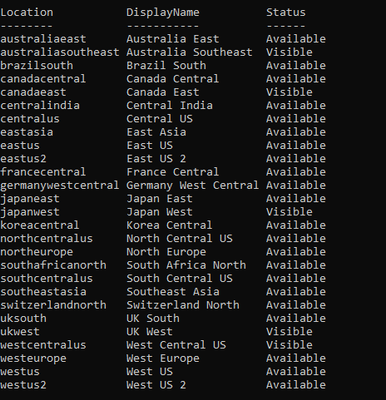
This article describes to check your quota and what should be your next when you reach Synapse workspace default limit.
If you exceeds workspace limits the error message you receive is – “ReachedPerSubscriptionWorkspaceLimit: Reached the maximum number of workspaces allowed for Subscription”
Facts:
Current default limit is 20 Synapse workspaces per subscription/region. i.e. There is a limit of 20 SQL servers per subscription by default.
Check Details about your subscription and workspaces:
Get the details about the workspace created in your subscription. This will help to optimize your resources
- Check for workspaces created and regions available to the subscription.
Following are list Rest APIs for Synapse
Azure Synapse Analytics REST API Reference | Microsoft Docs
- Available Regions
Ref document: Providers – Get (Azure Resource Management) | Microsoft Docs
GET https://management.azure.com/subscriptions/{SuBGUID}/providers/Microsoft.Synapse?api-version=2020-06-01
- Workspaces List
Workspaces – List (Azure Synapse) | Microsoft Docs
GET https://management.azure.com/subscriptions/{subscriptionId}/providers/Microsoft.Synapse/workspaces?api-version=2019-06-01-preview
Run following script in PowerShell 7
$SubscriptionId ={SubscriptionId}


# ------------------------------------------------------------------

# first login to Azure Account
Write-Host "Connecting to Azure Account..."
if((Get-AzContext) -eq $null)
{
    Connect-AzAccount
}

# set subscription context
Write-Host "Selecting subscription..."
$context = Set-AzContext -Subscription $SubscriptionId

# get AAD token for REST calls
Write-Host "Getting Bearer token from AAD for REST calls..."
$apiToken = [Microsoft.Azure.Commands.Common.Authentication.AzureSession]::Instance.AuthenticationFactory.Authenticate($context.Account, $context.Environment, $context.Tenant.Id, $null, "Never", $null)
$headers = @{ 'authorization' = ('Bearer {0}' -f ($apiToken.AccessToken)) }

# Get Locations where Synapse is available
Write-Host "Getting Locations where Synapse is available..."
$synapseLocations = Get-AzLocation | Where-Object { $_.Providers -contains "Microsoft.Synapse" } | Sort-Object Location | Select-Object Location, DisplayName

# ------------------------------------------------------------------------------
# get subscription quota and regional available SLOs for Synapse SQL

Write-Host "Getting subscription quota settings for Synapse..."
$quotaResults = [System.Collections.ObjectModel.Collection[psobject]]@()

foreach($location in $synapseLocations)
{
    # ------------------
    # available slos
    # https://docs.microsoft.com/en-us/rest/api/sql/capabilities/listbylocation
    $capabilitiesUri = "https://management.azure.com/subscriptions/$SubscriptionId/providers/Microsoft.Sql/locations/$($location.Location)/capabilities?api-version=2020-08-01-preview"
    $regionalCapabilities = ConvertFrom-Json (Invoke-WebRequest -Method Get -Uri $capabilitiesUri -Headers $headers).Content

    # ------------------------------------

    $quotaResults += [PSCustomObject]@{
        Location = $location.Location;
        DisplayName = $location.DisplayName;
        Status = $regionalCapabilities.status;
    }
}

$quotaResults | ft -AutoSize
Sample output.
- Check details about usage matrix for SQL Pools
Workspace Managed Sql Server Usages – List (Azure Synapse) | Microsoft Docs
GET https://management.azure.com/subscriptions/{subscriptionId}/resourceGroups/{resourceGroupName}/providers/Microsoft.Synapse/workspaces/{workspaceName}/sqlUsages?api-version=2019-06-01-preview
Use following script in PowerShell 7
$SubscriptionId ={SubscriptionId}
# ------------------------------------------------------------------
# first login to Azure Account
Write-Host "Connecting to Azure Account..."
if((Get-AzContext) -eq $null)
{
    Connect-AzAccount
}
# set subscription context
Write-Host "Selecting subscription..."
$context = Set-AzContext -Subscription $SubscriptionId
# get AAD token for REST calls
Write-Host "Getting Bearer token from AAD for REST calls..."
$apiToken = [Microsoft.Azure.Commands.Common.Authentication.AzureSession]::Instance.AuthenticationFactory.Authenticate($context.Account, $context.Environment, $context.Tenant.Id, $null, "Never", $null)
$headers = @{ 'authorization' = ('Bearer {0}' -f ($apiToken.AccessToken)) }
# ------------------------------------------------------------------------------
# SQL server DTU limits
Write-Host "Getting SQL DTU limits..."
# all servers in this subscription for SQL
# https://docs.microsoft.com/en-us/rest/api/sql/servers/list
# GET https://management.azure.com/subscriptions/{subscriptionId}/providers/Microsoft.Sql/servers?api-version=2019-06-01-preview
$serversUri = "https://management.azure.com/subscriptions/$SubscriptionId/providers/Microsoft.Sql/servers?api-version=2019-06-01-preview"
$serverList = (ConvertFrom-Json (Invoke-WebRequest -Method Get -Uri $serversUri -Headers $headers).Content).value
$serverQuotas = @()
foreach($server in $serverList)
{
    # usage detail of indiviual server
    # https://docs.microsoft.com/en-us/rest/api/sql/servers/usages
    # GET https://management.azure.com/subscriptions/{subscriptionId}/resourceGroups/{resourceGroupName}/providers/Microsoft.Sql/servers/{serverName}/usages?api-version=2014-01-01
    $serverQuotaUri = "https://management.azure.com$($server.id)/usages?api-version=2014-01-01"
    $serverQuota = (ConvertFrom-Json (Invoke-WebRequest -Method Get -Uri $serverQuotaUri -Headers $headers).Content).value
$serverQuotas += [PSCustomObject]@{
        Location = $server.location;
        Id = $server.id;
        Name = $server.name;
        CurrentDTU = ($serverQuota | ? { $_.name -eq 'server_dtu_quota_current' }).currentValue;
        DTULimit = ($serverQuota | ? { $_.name -eq 'server_dtu_quota_current' }).limit;
    }
}
$serverQuotas | Sort-Object Location, Name | ft Location, Name, CurrentDTU, DTULimit -AutoSize
Sample result
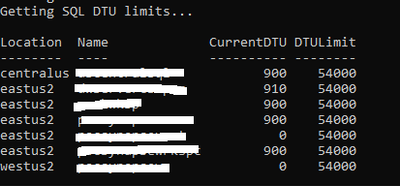
Next Step: If you want to increase the quota, feel free to contact us through @ support .
by Contributed | Jan 28, 2021 | Technology
This article is contributed. See the original author and article here.
Today, and every Wednesday Data Exposed goes live at 9AM PT on LearnTV. Every 4 weeks (mostly the first week of each month), we’ll do a News Update. We’ll include product updates, videos, blogs, etc. as well as upcoming events and things to look out for. We’ve included an iCal file, so you can add a reminder to tune in live to your calendar. If you missed the episode, you can find it at https://aks.ms/AzureSQLYT along with other videos.
Along with the News Update on Data Exposed Live, you can read this blog to get the guide and links to all the things discussed in the show. Here’s the February 2021 update:
Product updates
Confidential computing using Always Encrypted with secure enclaves went into public preview last week. This expands Always Encrypted by enabling in-place encryption and rich confidential queries, including pattern matching, range comparisons, and sorting. This announcement is available in the new DC-series hardware configuration in preview for Azure SQL Database. Jakub Szymaszek came on the show to explain more and show a demo. You can read more in the blog here.
Also related to security is the topic of Azure Defender for SQL. Over the past month, a few updates and enhancements were made to Azure Defender for SQL in the Azure Security Center:
A great resource which I have recently found is the Release notes for Azure Security Center. Not always related to SQL, but oftentimes relevant in some form or fashion.
Also slightly unrelated but at the same time very much related to Azure SQL was the announcement that Microsoft will establish a new datacenter region in Chile as part of a “Transforma Chile” initiative.
Microsoft recently released a website dedicated to the topic of .NET application migration. Of course, Azure SQL plays a big part here, so you might find the new site and resources interesting.
Alan Yu came on the show to talk about the latest updates to Azure Data Studio including some sneak peeks.
Videos
We continued to release new and exciting Azure SQL videos this month. Here is the list, or you can just see the playlist (https://aka.ms/dataexposedyt) we created with all the episodes!
- What is aka.ms/sqlworkshops? – Buck Woody
- [MVP Edition] Always Encrypted in SQL Server 2019 – Mladen Prajdic
- Azure SQL Connectivity Performance Tips & Tricks – Silvano Coriani
- Simplify Authentication with Managed Identities for Azure Resources – Silvano Coriani
- How to Troubleshoot Elastic Job in Azure SQL Database – Kate Smith
Blogs
As always, our team is busy writing blogs to share with you all. Blogs contain announcements, tips and tricks, deep dives, and more. Here’s the list I have of SQL-related topics you might want to check out.
- Azure Blog
- SQL Server Tech Community
- Azure SQL Tech Community
- Azure SQL Devs’ Corner
- Azure Database Support (SQL-related posts)
- Microsoft Learn Tech Community
- Chris Testa-O’Neill came on the show to talk to use about Microsoft Azure certification updates. This included the announcement of two new Data & AI related exams, DP-203 and AI-102. For more information, see the Microsoft Learn Blog with all the details.
Upcoming events
As always, there are lots of events coming up this month. Here are a few to put on your calendar and register for:
2/3: Data Exposed Special: The Azure SQL and Azure Data Factory engineering teams are partnering for an all-day learning event where the community can come together to learn about Azure SQL and Azure Data Factory, connect with the experts, and participate in a Hackathon, all across two time zones – America and Asia. Register today!
2/11: Azure Webinar Series: Gain Economic Value Migrating to Azure SQL
2/20: Multicloud4U
SQL Edge to Cloud, Bob Ward
2/27: Scottish Summit
Notebooks 101 for SQL People, Julie Koesmarno
In addition to these upcoming events, here’s the schedule for Data Exposed Live:
2/3: Around the Clock with Azure SQL & Azure Data Factory
2/10: Deep Dive: Best practices assessment for Azure SQL VMs, Managed Instances, and SQL Servers
2/17: Azure SQL Security: The What, Why & How of Securing your Data with Azure SQL
2/24: Something Old, Something New with Buck Woody
Plus find new, on-demand Data Exposed episodes released every Thursday, 9AM PT at aka.ms/DataExposedyt
Featured Microsoft Learn Module
Learn with us! This month I highlighted the Deploy and configure servers, instances, and databases for Azure SQL module. Check it out!
Anna’s pick of the month: SQL Server Virtual Conference by C# Corner
This pick of the month is technically in January, but it’s at the very end and it hasn’t happened yet, so here we are. This is an awesome, community-run event taking place this Friday. When you register, you can buy a ticket (for only $5!) or donate to a charity focused on helping food-insecure children related to COVID 19. I am a big fan of C# Corner already but using this event to help raise money for the kids is special. Additionally, the SQL Server and Azure SQL product group leader, Asad Khan, will be delivering the keynote! Get your tickets here, the event is January 29-30th.
Until next time…
That’s it for now! Be sure to check back next month for the latest updates, and tune into Data Exposed Live every Wednesday at 9AM PST on LearnTV. We also release new episodes on Thursdays at 9AM PST and new #MVPTuesday episodes on the last Tuesday of every month at 9AM PST at https://aka.ms/dataexposedyt.
Having trouble keeping up? Be sure to follow us on twitter to get the latest updates on everything, @AzureSQL. You can also download the iCal link with a recurring invite!
We hope to see you next time, on Data Exposed!
–Anna and Marisa

by Contributed | Jan 28, 2021 | Technology
This article is contributed. See the original author and article here.
|
Welcome to the Security Community webinar calendar!
Please note that the registration links will be made available approximately two weeks before the webinar. Until then, all dates are tentative. Recordings of previous webinars are below. Want to join our email list to be notified about future webinars? Visit https://aka.ms/SecurityCommunity.
|
Upcoming Public Community Webinars:
Asterisk (*) indicates updates to the deck.
Date & Time in PST |
Topic |
Registration |
2020-21 Winter Series
(08:00-09:00 AM PST time)
|
Feb 3, 2021
|
Azure Confidential Computing: Confidential computing nodes on Azure Kubernetes Service |
Link |
Feb 4, 2021
|
Azure Sentinel: Accelerate Your Azure Sentinel Deployment with the All-in-One Accelerator |
Feb 16, 2021
|
The Billion-Dollar Central Bank Heist |
Feb 18, 2021
|
Azure Sentinel: Best practices for converting detection rules from Splunk, QRadar, and ArcSight to Azure Sentinel rules |
Feb 23, 2021
|
Azure Security Center: Best Practices for Improving Your Secure Score |
Mar 9, 2021
|
Azure Security Center: Azure Defender for Storage |
Mar 18, 2021
|
Azure Sentinel: Data Collection Scenarios |
March 24, 2021
|
Who wants a thousand free puppies? Managing open source software security in the enterprise |
Recordings of Past Webinars:
Asterisk (*) indicates updates to the file.
Date
|
Topic
|
Recording
|
Deck
|
AZURE ADVANCED THREAT PROTECTION
|
Sep 24, 2019
|
Identity Security Posture assessments
|
MP4
|
YouTube
|
Deck
|
Sep 16, 2019
|
Deployment and Configuration
|
MP4
|
YouTube
|
Deck
|
Jul. 15, 2019
|
Detections part 2 of 2
|
MP4
|
YouTube
|
Deck
|
Jun. 24, 2019
|
Unified SecOps Portal
|
MP4
|
YouTube
|
Deck
|
Apr 29, 2019
|
Detections part 1 of 2
|
MP4
|
YouTube
|
Deck
|
AZURE INFORMATION PROTECTION
|
Jun 2, 2020
|
MIP and Power BI integration
|
MP4
|
YouTube
|
Deck
|
May 23, 2019
|
Unified Labeling in AIP
|
MP4
|
YouTube
|
Deck
|
Apr 18, 2019
|
MIP SDK | How to leverage the SDK
|
MP4
|
YouTube
|
Deck
|
Apr 11, 2019
|
Monitoring | Visibility into who is accessing data
|
MP4
|
YouTube
|
N/A
|
Apr 4, 2019
|
Protection | Protect data at rest and in motion
|
MP4
|
YouTube
|
Deck
|
Mar 28, 2019
|
Classification | Label taxonomy and recommendations
|
MP4
|
YouTube
|
Deck
|
Mar 21, 2019
|
Discovery | Discover data at rest
|
MP4
|
YouTube
|
Deck
|
Mar 14, 2019
|
Introduction | AIP basics and latest announcements
|
MP4
|
YouTube
|
Deck
|
AZURE NETWORK SECURITY
|
Dec 10, 2020
|
Azure Network Security Advanced Architecture
|
MP4
|
YouTube
|
Deck
|
Dec 8, 2020
|
Azure Network Security for SOCs
|
MP4
|
YouTube
|
Deck
|
Dec 3, 2020
|
Getting started with Azure Firewall Manager |
MP4
|
YouTube
|
Deck
|
Dec 1, 2020
|
Manage application and network connectivity with Azure Firewall |
MP4
|
YouTube
|
Deck
|
Nov 12, 2020
|
Boosting your Azure Web Application (WAF) deployment |
MP4
|
YouTube
|
Deck
|
Nov 10, 2020
|
Getting started with Azure Distributed Denial of Service (DDoS) Protection |
MP4
|
YouTube
|
Deck
|
Oct 27, 2020
|
Protecting your web apps with Azure Web Application Firewall (WAF) |
MP4
|
YouTube
|
Deck
|
Oct 15, 2020
|
Introduction to Azure Network Security
|
MP4
|
YouTube
|
Deck
|
Nov 14, 2019
|
Introduction to WAF
|
MP4
|
YouTube
|
Deck
|
Nov 12, 2019
|
DDoS Protection
|
MP4
|
YouTube
|
Deck
|
AZURE SECURITY CENTER
|
Jan 7, 2021
|
Azure service layers protection |
MP4
|
YouTube
|
Deck |
Dec 7, 2020
|
Investigating Azure Security Center alerts using Azure Sentinel |
MP4
|
YouTube
|
Deck |
Nov 30, 2020
|
Azure Defender for SQL Anywhere |
MP4
|
YouTube
|
Deck |
Nov 9, 2020
|
Ignite 2020 Announcements |
MP4
|
YouTube
|
Deck |
Nov 2, 2020
|
Enhance IoT Security & Visibility with Azure Defender and Azure Sentinel |
MP4
|
YouTube
|
Deck |
Oct 28, 2020
|
Multi Cloud support in ASC |
MP4
|
YouTube
|
Deck |
Oct 26, 2020
|
VM Protection |
MP4
|
YouTube
|
Deck
|
Mar 11, 2020
|
Security Benchmark Policy
|
MP4
|
YouTube
|
Deck
|
Feb 20, 2020
|
Secure Score enhanced model
|
MP4
|
YouTube
|
Deck
|
Sep 10, 2019
|
Secure Score
|
MP4
|
YouTube
|
Deck
|
AZURE DEFENDER for IoT
|
Jan 20, 2021
|
Leveraging OT Behavioral Analytics and Zero Trust for OT Cyber Resilience |
MP4
|
YouTube
|
Deck
|
Sep 17, 2020
|
MITRE ATT&CK for ICS: CyberX Demo and Azure IoT/OT Security Deep Dive
|
MP4
|
YouTube
|
Deck
|
Nov 19, 2019
|
End-to-End security for IoT
|
MP4
|
YouTube
|
Deck
|
Aug 05, 2019
|
Basics and latest announcements on ASC for IoT
|
MP4
|
YouTube
|
Deck
|
AZURE SENTINEL
|
Jan 21, 2021
|
Auditing and monitoring your Azure Sentinel workspace |
MP4
|
YouTube
|
Deck |
Jan 19, 2021
|
Azure Notebooks Fundamentals – How to get started |
MP4
|
YouTube
|
Deck
|
Jan 12, 2021
|
Machine Learning detections in the AI-infused Azure Sentinel SIEM |
MP4
|
YouTube
|
Deck
|
Sep 30, 2020
|
Unleash your Azure Sentinel automation Jedi tricks and build Logic Apps Playbooks like a Boss |
MP4
|
YouTube
|
Deck
|
Sep 29, 2020
|
Enabling User and Entity Behavior Analytics (UEBA) | Hunting for Insider Threats |
MP4
|
YouTube
|
Deck
|
Sep 14, 2020
|
Empowering the Azure Sentinel Community with Pre-Recorded Datasets for research and training purposes |
MP4
|
YouTube
|
Deck
|
Sep 09, 2020
|
KQL part 3 of 3 – Optimizing Azure Sentinel KQL queries performance |
MP4
|
YouTube
|
Deck
|
Sep 02, 2020
|
Log Forwarder deep dive | Filtering CEF and Syslog events |
MP4
|
YouTube
|
Deck
|
Aug 19, 2020
|
Threat intelligence automation with RiskIQ |
MP4
|
YouTube
|
Deck
|
Aug 12, 2020
|
Threat hunting and reduce dwell times with Azure Sentinel
|
MP4
|
YouTube
|
Deck
|
Jul 28, 2020
|
KQL part 2 of 3: KQL hands-on lab exercises |
MP4
|
YouTube
|
*Deck
|
Jul 9, 2020
|
Workbooks deep dive – Visualize your security threats and hunts
|
MP4
|
YouTube
|
Deck
|
Jun 23, 2020
|
Multi-tenant investigations
|
MP4
|
YouTube
|
Deck
|
Jun 15, 2020
|
Deploying and Managing Azure Sentinel as Code
|
MP4
|
YouTube
|
Deck
|
Jun 2, 2020
|
KQL part 1 of 3: Learn the KQL you need for Azure Sentinel
|
MP4
|
YouTube
|
*Deck
|
May 13, 2020
|
Using Sigma to accelerate your SIEM transformation to Azure Sentinel
|
MP4
|
YouTube
|
Deck
|
Apr 22, 2020
|
Threat Hunting on AWS using Sentinel
|
MP4
|
YouTube
|
Deck
|
Apr 20, 2020
|
MSSP and Distributed Organization Support
|
MP4
|
YouTube
|
Deck
|
Mar 31, 2020
|
Extending and Integrating Sentinel (APIs)
|
MP4
|
YouTube
|
*Deck
|
Mar 18, 2020
|
Deep Dive on Threat Intelligence
|
MP4
|
YouTube
|
Deck
|
Mar 4, 2020
|
Recap of RSA 2020
|
MP4
|
YouTube
|
Deck
|
Feb 19, 2020
|
Tackling Identity
|
MP4
|
YouTube
|
*Deck
|
Feb 12, 2020
|
Deep Dive on Correlation Rules
|
MP4
|
YouTube
|
*Deck
|
Jan 29, 2020
|
Threat Hunting – revisited
|
MP4
|
YouTube
|
Deck
|
Jan 22, 2020
|
End-to-End SOC scenario
|
MP4
|
YouTube
|
Deck
|
Nov 20, 2019
|
Cloud & on-prem architecture
|
MP4
|
YouTube
|
*Deck
|
Nov 13, 2019
|
Post-Ignite. Understanding Azure Sentinel features and functionality deep dive
|
MP4
|
YouTube
|
*Deck
|
Sep 18, 2019
|
Threat Hunting
|
MP4
|
YouTube
|
Deck 1, Deck 2
|
AZURE PURVIEW
|
Jan 27, 2021
|
Introduction to Azure Purview
|
TBA
|
TBA
|
TBA
|
MICROSOFT CLOUD APP SECURITY
|
Apr 15, 2020
|
Enabling Secure Remote Work
|
MP4
|
YouTube
|
Deck
|
Oct 07, 2019
|
Extending real-time monitoring & controls to any app
|
MP4
|
YouTube
|
Deck
|
July 2, 2019
|
App Discovery and Log Collector Configuration
|
MP4
|
YouTube
|
Deck
|
Apr 16, 2019
|
Automation and integration with Microsoft Flow
|
MP4
|
YouTube
|
Deck
|
Apr 9, 2019
|
Connecting 3rd party Applications
|
MP4
|
YouTube
|
Deck
|
Mar 26, 2019
|
Conditional Access App Control
|
MP4
|
YouTube
|
Deck
|
Mar 19, 2019
|
Threat detection
|
MP4
|
YouTube
|
Deck
|
Mar 12, 2019
|
Information Protection
|
MP4
|
YouTube
|
Deck
|
MICROSOFT DEFENDER FOR ENDPOINT
|
Sep 16, 2020
|
Get started with Microsoft Defender ATP: from zero to hero |
MP4
|
YouTube
|
Deck
|
Jul 7, 2020
|
Deploy MDATP capabilities using a phased roadmap
|
MP4
|
YouTube
|
Deck
|
Apr 2, 2020
|
End-to-end security for your endpoints
|
MP4
|
YouTube
|
Deck
|
MICROSOFT 365 DEFENDER
|
Jan 28, 2021
|
Protect, Detect, and Respond to Solorigate using Microsoft 365 Defender
|
MP4
|
YouTube
|
Deck
|
Nov 17, 2020
|
l33tSpeak | Advanced hunting in Microsoft 365 Defender
|
MP4
|
YouTube
|
Demo
|
Aug 5, 2020
|
Advanced Hunting series – Episode 4: Let’s hunt! Applying KQL to incident tracking
|
MP4
|
YouTube
|
Demo
|
Jul 29, 2020
|
Advanced Hunting series – Episode 3: Summarizing, Pivoting, and Visualizing Data
|
MP4
|
YouTube
|
Demo
|
Jul 22, 2020
|
Advanced Hunting series – Tracking the Adversary Episode 2: Joins
|
MP4
|
YouTube
|
Demo
|
Jul 15, 2020
|
Advanced Hunting series – Tracking the Adversary Episode 1: KQL Fundamentals
|
MP4
|
YouTube
|
Demo
|
MICROSOFT MISC SECURITY WEBINARS
|
Microsoft x Secure 2020 event – October 20-23, 2020
|
Oct 20
|
Keynote 1 with Ann Johnson
|
MP4
|
|
|
Keynote 2 with Alex Weinert
|
MP4
|
|
|
Oct 21
|
Keynote with Mark Simos
|
MP4
|
|
Deck
|
Zero Trust for Devices with Clay Taylor
|
MP4
|
|
|
Oct 22
|
Zero Trust for Data with Marc Meunier
|
MP4
|
|
|
Zero Trust for Apps with Alex Esibov
|
MP4
|
|
|
Zero Trust for Identity with Sarah Handler
|
MP4
|
|
|
Oct 23
|
Zero Trust for Infrastructure & Network with Sinead O’Donovan
|
MP4
|
|
|
Microsoft’s Zero Trust Implementation with Mark Skorupa
|
MP4
|
|
|
|
Dec 9, 2020
|
Microsoft Digital Defense Report |
MP4
|
YouTube
|
Deck
|
Oct 29, 2020
|
Cybersecurity Basics: Securing Yourself
|
MP4
|
YouTube
|
Deck
|



 Now that we have an understanding of Virtual Secure Mode, we can begin to discuss Device Guard. The most important thing to realize is that Device Guard is not a feature; rather it is a set of features designed to work together to prevent and eliminate untrusted code from running on a Windows 10 system.
 Although separate from Device Guard, the Credential Guard feature also leverages Virtual Secure Mode by placing an isolated version of the Local Security Authority (LSA – or LSASS) under it’s protection.


Recent Comments