by Contributed | Feb 4, 2021 | Technology
This article is contributed. See the original author and article here.
By Seth Patton, General Manager, Microsoft 365 Next Gen Productivity & Employee Experience
Today we introduced Microsoft Viva, the new employee experience platform designed to help people connect, focus, learn, and thrive at work.
In 2020, the way people work evolved—rapidly. Businesses have transformed to meet the needs of their customers and empowered their employees to make decisions and act faster. Today, many businesses have adapted to hybrid work; now, they need to make that approach more sustainable.
Microsoft Viva is built on Microsoft 365 to bring together communications, knowledge, learning, and insights into an integrated employee experience that empowers people and teams to be their best‚ from anywhere.
The importance of employee engagement is well known to executives, but changing conditions have led to burnout and isolation, making it harder for employees to feel connected and inspired at work. As a leader, you want to ensure the success and wellbeing of your workforce, but many are struggling to provide engaging, supportive employee experience.
Introducing Microsoft Viva Connections
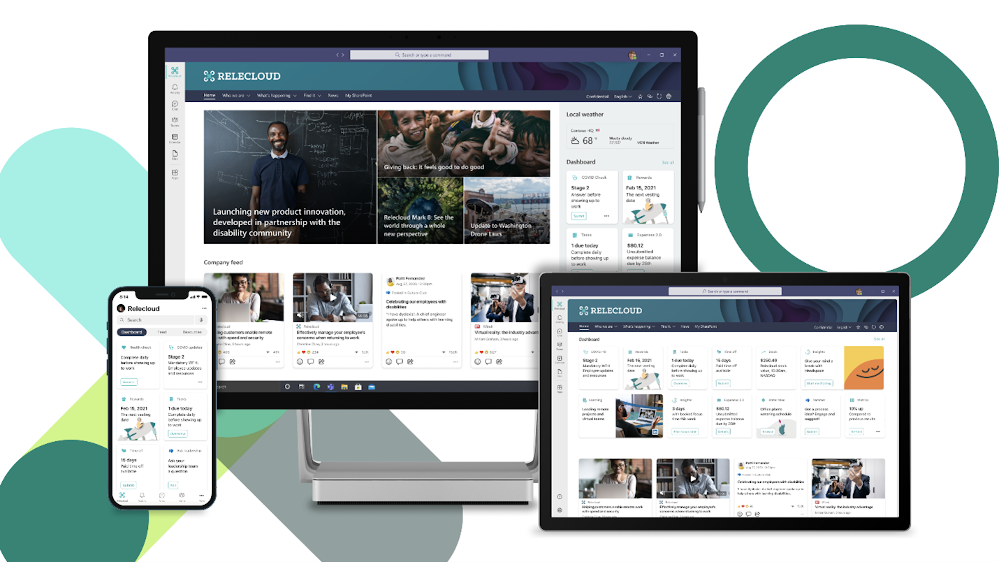
Viva Connections is your gateway to a modern employee experience. It is personalized and appears in the apps and devices your employees already use every day, such as Microsoft Teams. Viva Connections gives people a curated, company-branded experience that brings together relevant news, conversations, and other resources.
Viva Connections offers a new way for leaders to shape culture and invite employees to participate in building an inclusive workplace that helps everyone succeed.
Viva Connections is the launchpad for Microsoft Viva and the gateway to your employee experience.
Keep everyone engaged and informed
Effective communication is essential to a healthy business, but with so many channels, information overload is a real thing. It’s easy for critical information and updates to get lost in all the extra noise.
The most successful companies are those that share and build on the collective contributions of their employees. Microsoft Viva makes it easy for everyone to discover the information they need, participate in the conversation, and share their unique perspective and expertise.
Viva Connections delivers a unified, personalized feed in which employees can explore news and contribute to the conversation from virtually anywhere. You can publish content from popular Microsoft 365 apps, such as SharePoint, Yammer, or Microsoft Stream, to a single feed and post the external news and content you want employees to see.
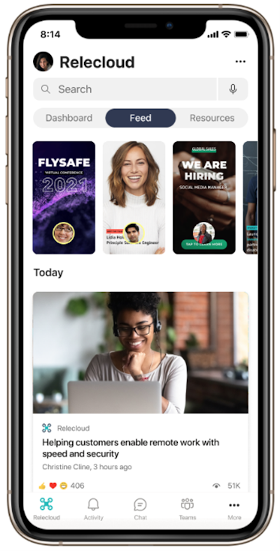 Personalize your feed, and enable employee contribution.
Reach specific departments, regions, or job roles within your organization by using audience targeting or share with everyone in their personalized feed. Bring employees’ attention to items in their feeds with boost based on properties such as always on top, until read, and X number of impressions.
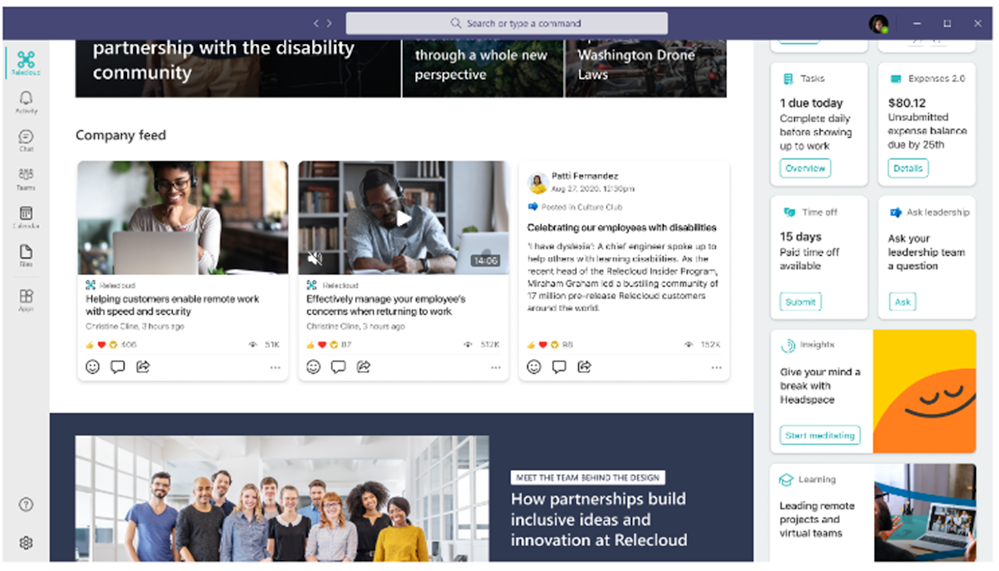 Target content to employees.
Microsoft Viva also makes it easy for employees to share feedback and participate in conversations about company news and announcements seamlessly with Yammer communities.
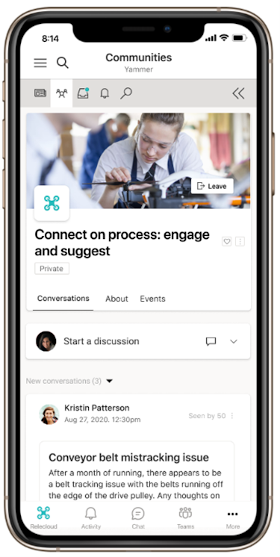 Stay connected to communities and conversations you care about.
Curate a personalized and branded employee destination
In addition to the feed, Viva Connections provides your employees with a personalized dashboard so that they can stay in the flow of work. The dashboard is the company home for employees, and it is designed to be the central destination where everyone can discover company resources and complete tasks.
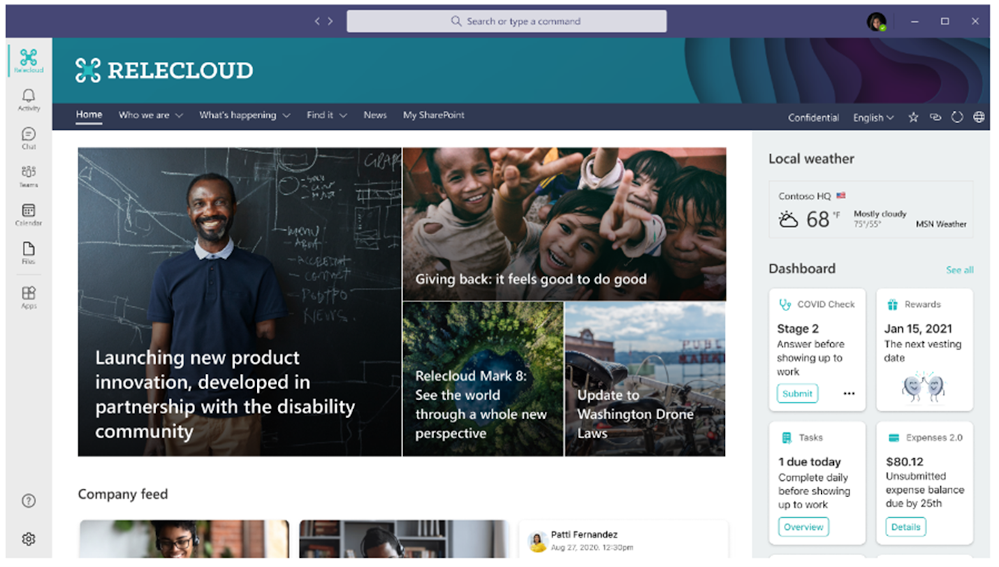 Find helpful resources, such as training, benefits, or timecards, in the dashboard.
Support every employee from the top floor to the shop floor
From the dashboard, you can customize resources for different employee groups, such as frontline workers, whose time to consume content is often limited to their breaks. You can configure Viva Connections to give them a comprehensive view of everything they need, minimizing the time they spend away from their core tasks.
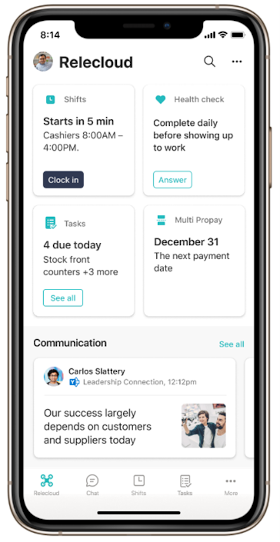 Give frontline workers the tools they need to succeed on any device.
Extensible to fit your business
Viva Connections builds on the power and momentum of the Microsoft Teams ecosystem and extensibility framework. You can easily create a card for any existing Teams app, or you can do more by using familiar Microsoft developer tech, from low-code solutions such as Microsoft Power Apps to custom solutions with SharePoint Framework (SPFx) and Adaptative Cards. You can also plug in third-party partner apps.
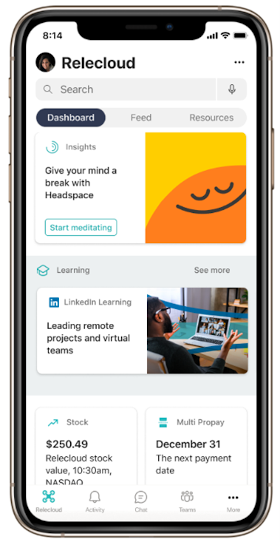 Access other Microsoft Viva modules, third-party apps, and internal apps
Deploy Viva Connections on your existing infrastructure
Viva Connections is built on your current Microsoft 365 ecosystem, and powered by SharePoint, so you can accelerate time to value and start engaging your workforce immediately:
- Extend your SharePoint intranet content, including your home site, into Microsoft Teams.
- Target your content based on your existing Azure Active Directory groups.
- Customize your dashboards with Power Apps, SPFx, and the third-party solutions you have already deployed throughout your organization.
- Aggregate news and conversations from SharePoint and Yammer.
- Drive engagement in employee communities in Yammer to support employee resource groups, knowledge sharing, and leadership initiatives.
- Pin files and videos from Microsoft OneDrive and Microsoft Stream.
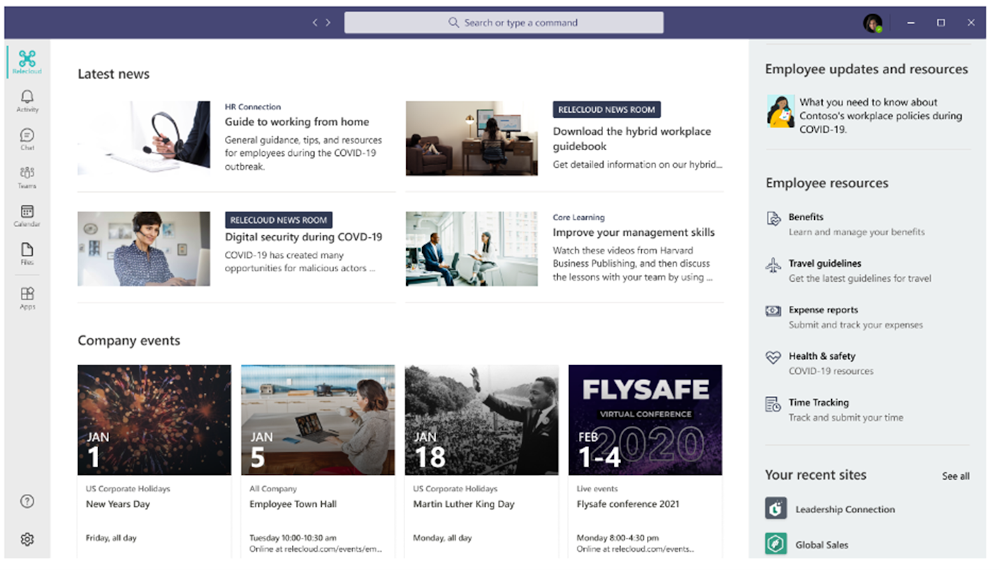 Seamlessly integrate your existing home site.
Get ready for Microsoft Viva Connections
Microsoft Viva is your new integrated employee experience, empowering everyone to be their best. Viva Connections will be available for desktop in the first half of 2021 and for mobile in summer 2021. Additional features will roll out over the course of 2022. To get ready you can:
by Contributed | Feb 4, 2021 | Technology
This article is contributed. See the original author and article here.
By Seth Patton, General Manager, Microsoft 365 Next Gen Productivity & Employee Experience
Microsoft Viva Topics uses artificial intelligence (AI) to empower people with knowledge and expertise in the apps they use every day and to connect, manage, and protect content across systems and teams.
Viva Topics connects people with knowledge and expertise in the apps they use every day.
Viva Topics is one of the four modules of Microsoft Viva, the employee experience platform built on Microsoft 365 that empowers people and teams to be their best from wherever they work. Viva brings together communications, knowledge, learning, resources, and insights into an employee experience that integrates seamlessly into the apps you use every day, such as Microsoft Teams. Learn more about Microsoft Viva.
We’re pleased to announce that today, Viva Topics has reached general availability for our commercial customers – one of four modules announced today as part of Microsoft Viva.
Microsoft Viva, the employee experience platform built on Microsoft 365, is introduced by Satya Nadella, Jared Spataro, thought leaders, and customers.
A growing sea of information
Each day, our pool of shared information grows, and the complexity of gaining knowledge grows with it. Today, the average employee spends more than an hour a day searching or recreating information that already exists in their organization—more than triple the time they spent just five years ago. Onboarding, skill development, and knowledge drain are paramount issues for leadership and information workers alike.
(source: Spiceworks/Ziff Davis. Knowledge Sharing in a Changing World. February 2021. [Commissioned by Microsoft].)
Wasted time is frustrating and unproductive, but solutions are available. Based on an analysis by Forrester Research, a typical organization can see benefits of US $42 million to $127 million by adopting Viva Topics as part of Microsoft 365 solutions for Knowledge and Content Services.
(source: Forrester Research commissioned by Microsoft. New Technology: The Projected Total Economic Impact™ of Microsoft 365 Knowledge & Content Services. February 2021.)
Our commitment
Preserving knowledge, reducing disruptions, optimizing people’s time, and improving decision-making are goals that leaders and employees share. We recognized that combining the capacity of the Microsoft Cloud with the AI power of the Microsoft Graph created an opportunity to help our customers transform content into knowledge.
Almost two years ago, we launched the Project Cortex Preview Program. We were humbled at how many customers were eager to help shape the product. For more than a year, dozens of companies, such as Arla Foods, Mott MacDonald, Unilever, and Siemens Healthineers, have been using Viva Topics to put knowledge to work across their organizations.
Viva Topics
Starting today, we’re making this powerful solution available for all Microsoft 365 customers to try or purchase. Let’s look at how Viva Topics works.
Topic highlights connect you to knowledge in Microsoft 365
Turn content into knowledge that works
Viva Topics builds on the Microsoft 365 apps and content you already use every day and the connections you have with people across your organization. Viva Topics uses AI to reason over your organization’s data and automatically organizes content and expertise across your systems and teams into related topics, such as projects, products, processes, and customers.
Soon, Viva Topics will integrate information from outside the Microsoft 365 cloud using our Graph–based content connectors—available from both Microsoft and our partners—which integrate knowledge from more than 130 data sources, including Salesforce, ServiceNow, MediaWiki, file shares , and Microsoft Azure services. Connectors also include a robust set of APIs to facilitate development of your own connectors.
“In an increasingly distributed and hybrid workforce, companies need to create consistent and frictionless experiences that make it easy for employees to get work done, regardless of where they are working,” said Melanie Lougee, Head of Employee Workflow Strategy at ServiceNow. “Our integrations with Microsoft Teams and Microsoft Viva provide one-stop-shop access to information and services for employees across IT, HR, Facilities, Legal and Finance. ServiceNow Employee Workflows provide unified experiences for employees across the enterprise, and we’re thrilled to continue to partner with Microsoft to enhance engagement, collaboration and productivity for the future of work.”
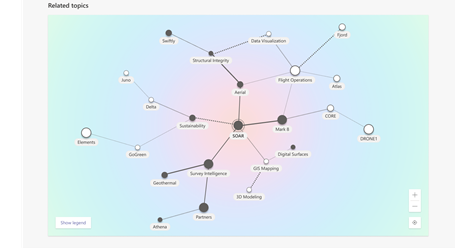 Topic connections on a topic page
When Microsoft Viva discovers topics, they appear as suggestions in the topic center. In the future, the topic center can be accessed from Microsoft Teams or SharePoint. You will be able to use the topic center to discover recommended content based on the topics you follow or manage, personalized by the Microsoft Graph. You can also manage your connections to shared topics.
Suggested content and topics are governed by privacy controls, security and the Microsoft Graph. Users can only see the content where they already have access. Relevance and suggested people are based on open signals from the Graph – activities such as authoring a document. People can control which topics they wish to be associated with. Passive activities like reading a document are excluded from relevance calculations.
Additionally, the Topics web part is available for all licensed users to view suggested and personalized topics and manage their connections to topics. You’ll be able to add this web part to any pages in SharePoint or Microsoft Teams, so you can build knowledge into your existing employee experiences, such as intranet sites.
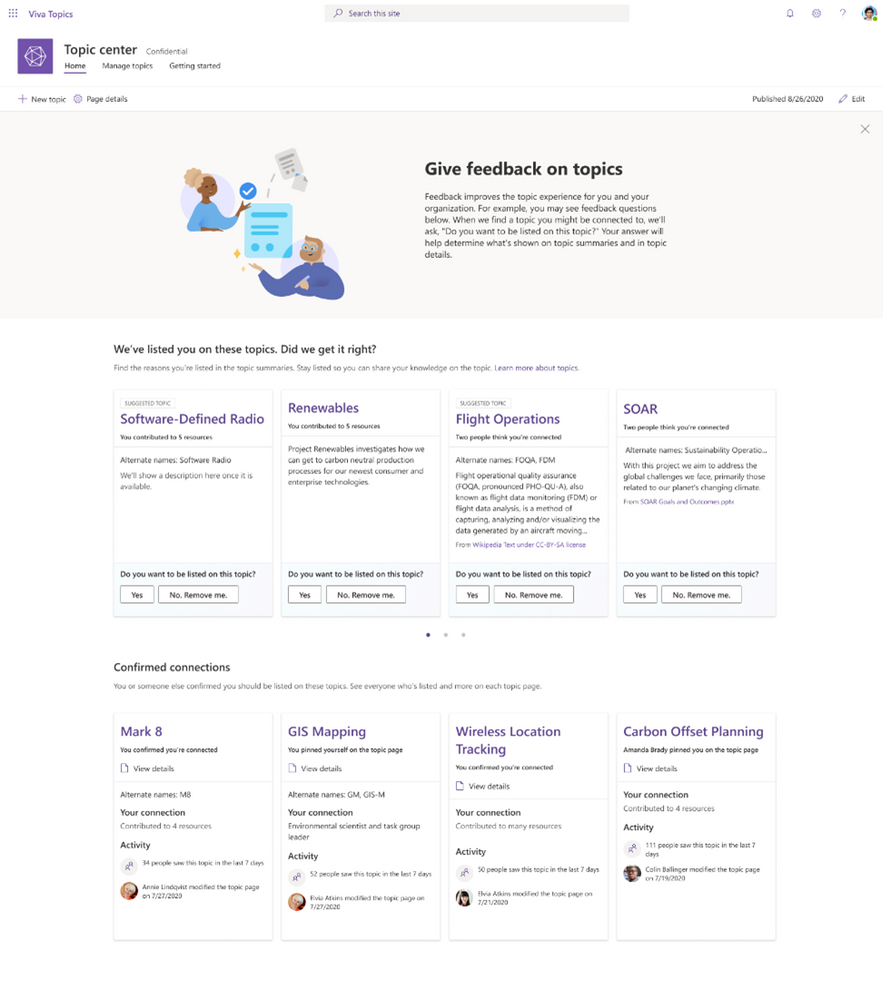 Personalized knowledge in the topic center
Organize knowledge into topic pages
When Microsoft Viva identifies topics, it collects and curates related information in topic pages. Topic pages are built automatically by AI and augmented by experts. Topic pages enable your organization’s experts to share and refine knowledge about the topic by adding and editing pages with wiki-like simplicity.
Topic pages provide a comprehensive view of related information, including:
- Alternate names.
- Definitions.
- Recommended and suggested people.
- Recommended and suggested content.
- Related sites and teams.
- Map of related topics.
- Optional web part integration, such as Yammer communities.
Over time, human expertise and AI combine to improve the quality of shared knowledge.
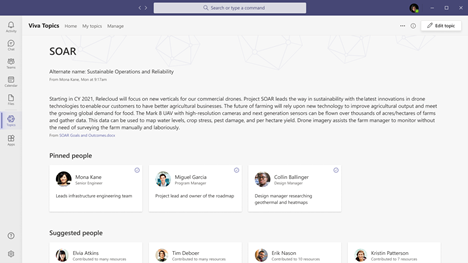 Topic pages combine the best of AI and human curation
Make knowledge easy to discover and use
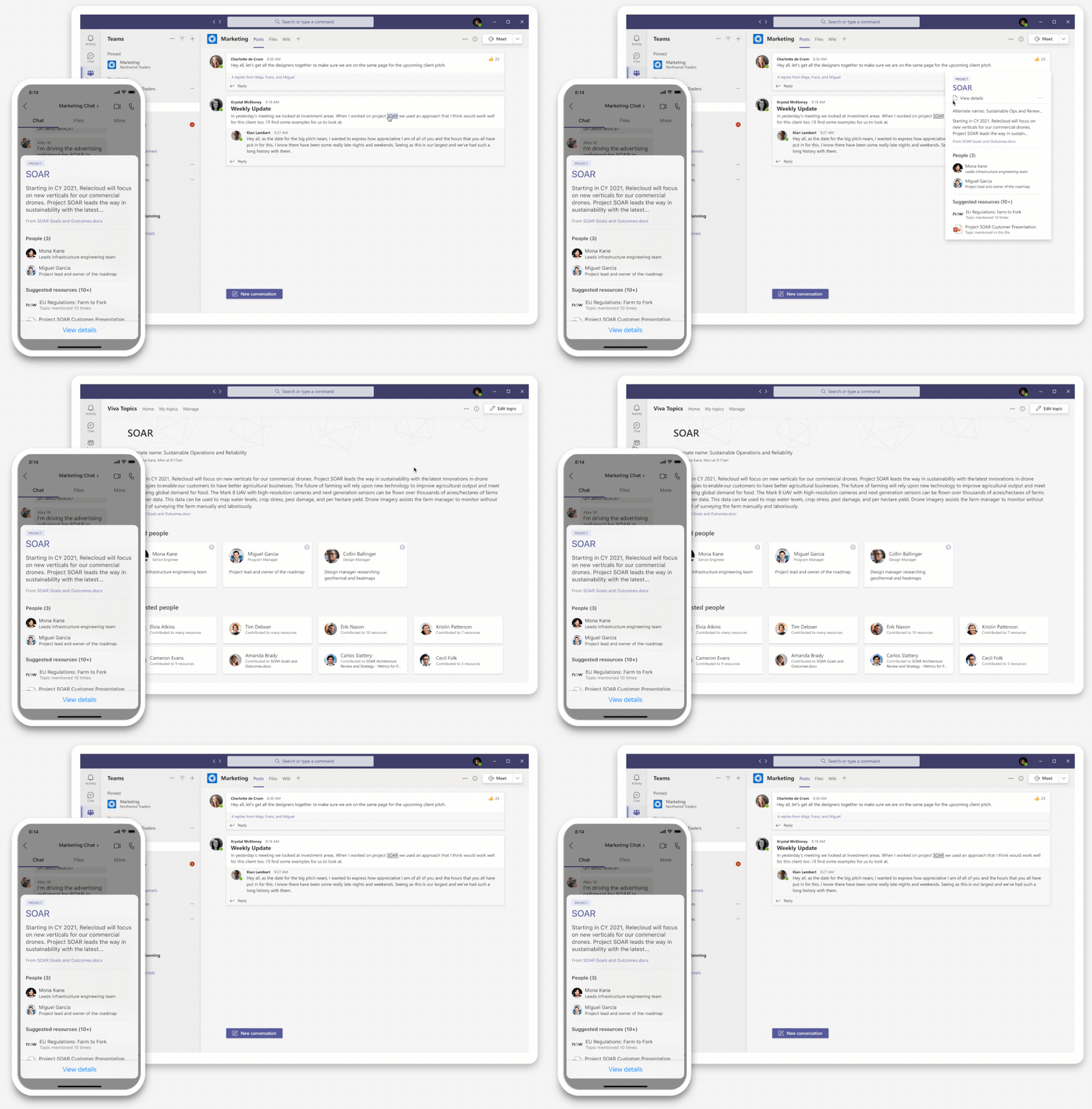
While working in Microsoft 365 apps, you’ll see topics highlighted when they appear in pages, messages, and content. These highlights reveal topic cards. Topic cards provide knowledge in context without searching or changing apps. Cards summarize the topic with alternate names, definitions, experts, and recommended resources.
If you’ve ever joined a new company or project and encountered unfamiliar acronyms or terms, topic cards provide a quick way to connect to shared knowledge. They also connect you to topic pages for more detail.
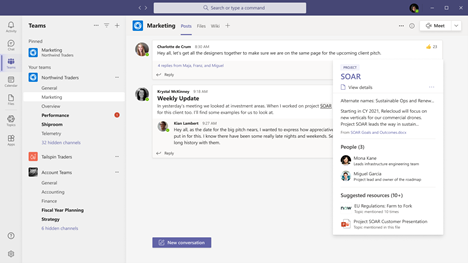 Topic cards in Microsoft Teams
And Viva Topics is integrated into other Microsoft applications, such as SharePoint and Microsoft Search. Topic highlights will be integrated into Microsoft Teams, Outlook, and other Microsoft 365 apps throughout 2021, creating a personalized experience and putting knowledge right at your fingertips.
Viva Topics also makes Microsoft Search better. When your search query relates to a topic, the topic card is returned as the primary answer.
Viva Topics connects people to recommended experts as well. Expertise is added to user profiles and extended to people cards throughout Microsoft 365—another way for knowledge to find you as you work.
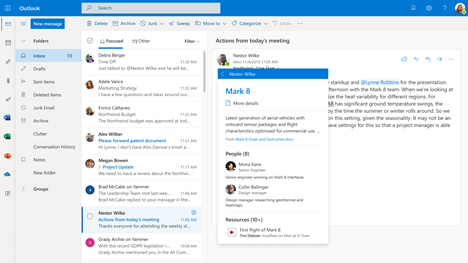 Topic cards attached to people cards in Microsoft Outlook
Soon, you’ll also be able to use Viva Topics to find answers to common questions. If Viva knows the answer, you’ll get it immediately. If not, Viva can ask known experts for their response. Over time, their accepted answers are added to everyone’s shared knowledge, so everyone benefits.
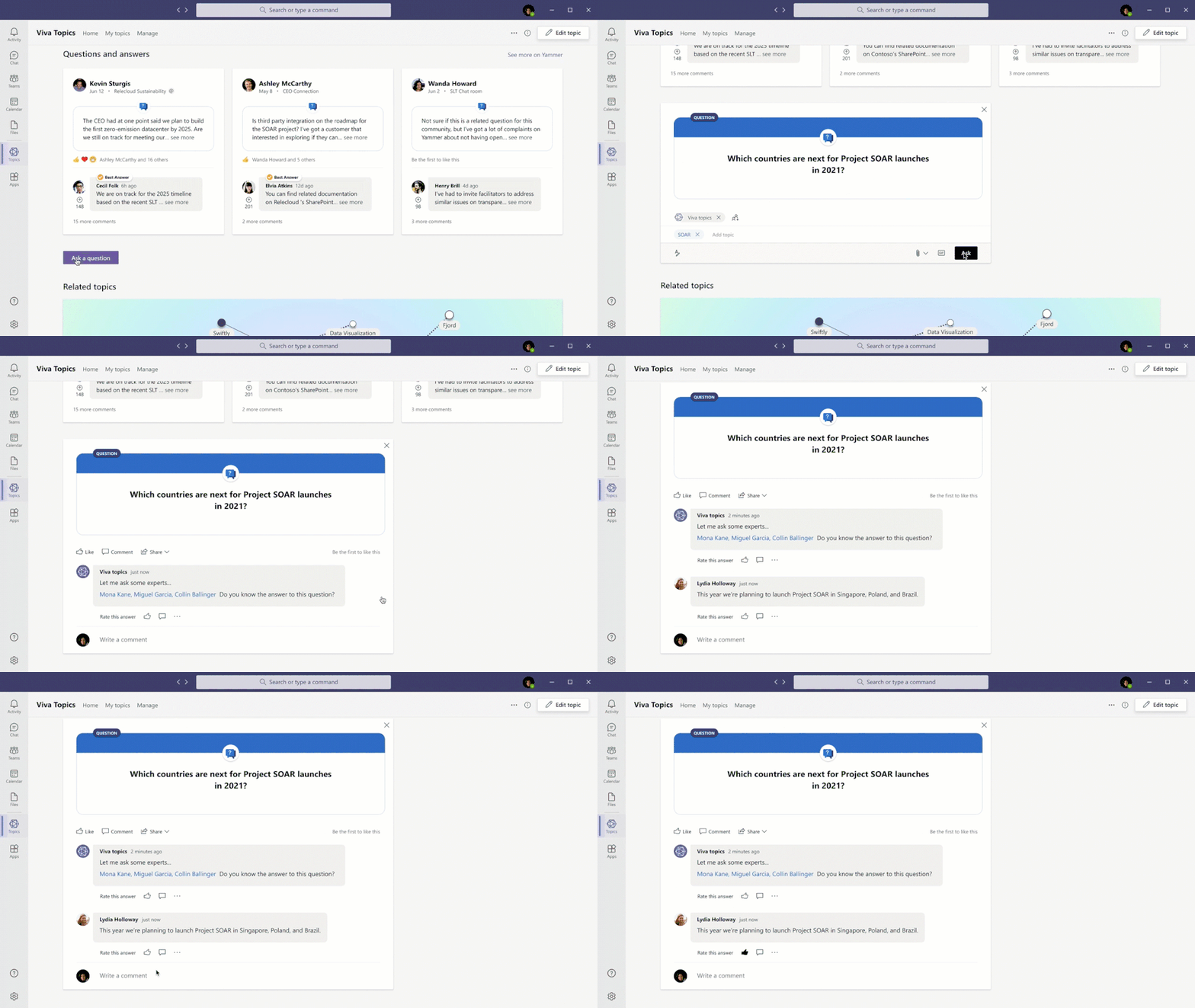 Microsoft Viva Topics automatically connects your questions to expert answers
.
Security, compliance, and administration
Viva Topics delivers the security, privacy, and compliance you expect from Microsoft 365 and the Microsoft Graph. Users have access to only those topics to which they’ve been granted access.
In addition, the topic center enables knowledge managers to shape the knowledge life cycle. They can review suggested topics and decide whether to approve or remove them. They can also review interactions and feedback to find the topics that are the most helpful—and those that require refinement.
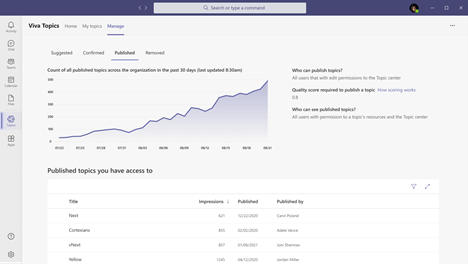 Trending and management in the topic center
As an administrator, you’re in control of knowledge discovery. You can control which content is included in Viva Topics based on selected sites, teams, or labels. Only licensed users have access to topic cards, topic pages, and topic centers.
Microsoft Viva Topics works with our other content management tools, including Microsoft 365 E5 Compliance and SharePoint Syntex, to apply security and compliance policies to content automatically. Licensed users see topics based on the content they can access. You can also shape the visibility of the topics themselves to further shape knowledge with appropriate security.
Next steps
We invite you to learn more about Microsoft Viva, Viva Topics, and Microsoft’s solutions for knowledge and content services. Want to see more? Just visit the Viva Topics Resource Center for an interactive demo.
In addition, we’re proud to introduce the Preferred and Charter members of the Microsoft 365 Content Services Partner Program. These members have been trained to envision and deliver solutions based on Viva Topics and other Microsoft 365 capabilities for knowledge and content services. Microsoft Viva will provide an open and extensible platform as well as a strong and growing ecosystem of partners so that it works seamlessly with your existing systems and tools. Partners can sign up today for more information.
If you’re ready to try Viva Topics, trials and purchases are available today.
Please join our community on the Microsoft Tech Community, or visit our Viva Topics Resource Center for demos, white papers, analyst research, videos, and more. We look forward to hearing from you as we put knowledge to work, together. Thanks.
– Seth Patton, General Manager, Microsoft 365 Next Gen Productivity & Employee Experience
by Contributed | Feb 4, 2021 | Technology
This article is contributed. See the original author and article here.
A common question we hear from IT departments is to how to get finer grain control over the permissions that are granted to teachers for managing labs. In this blog post, we’ll show how to create a custom role that only gives teachers the ability to:
- Addremove students from a lab
- Send an email invitation to a student
- Startstopreset a student’s VM
This means that teachers will not be able to perform operations such as:
- Change a lab’s quota
- Increase the number of VMs in the pool
- Set a lab’s schedule
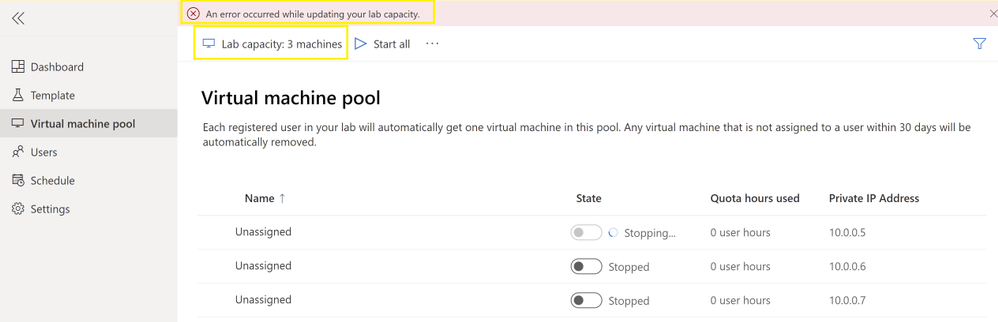
When a teacher uses the management portal, they will be shown an error message if they attempt to perform an operation that they don’t have permission to do. For example, if the teacher modifies the lab capacity and attempts to save this change, they will be shown the following error:
In the rest of this post, we’ll walk through the detailed steps for creating a custom role following directions that are outlined in the article Azure custom roles. You can use the custom role explained in this post as a starting point based on your school’s unique needs.
Steps to Create and Assign a Custom Role
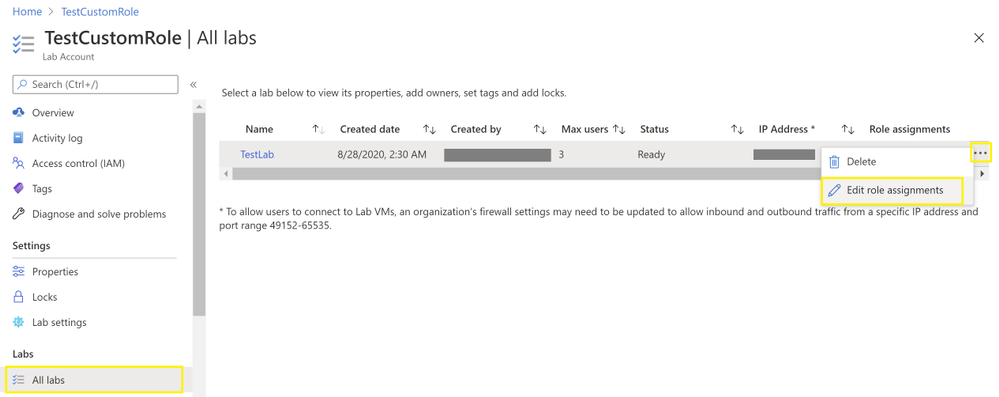
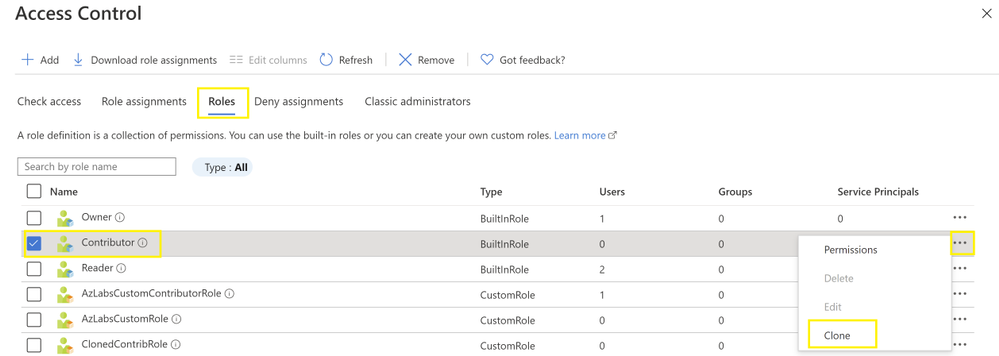
1. Using the Azure Portal, let’s start by cloning Azure Lab Services’ built-in Contributor role for an existing lab. First, you’ll need to select the lab and choose to Edit role assignments. Then, select the Roles and choose Clone. Follow the steps in the wizard to finish creating the cloned role. You will need to give the custom role a name. In this example, we’ll name the custom role AzLabsCustomContributorRole.
NOTE: When a teacher is assigned the built-in Contributor role for an existing lab (and the Reader role on the lab account):
- They can’t create new labs.
- They have access to view and change all the lab’s settings.
- They only have access to viewchange settings for the specific lab that they are assigned to as a lab contributor.
2. Next, let’s look at the permissions for the cloned role by selecting the role and choosing Edit.
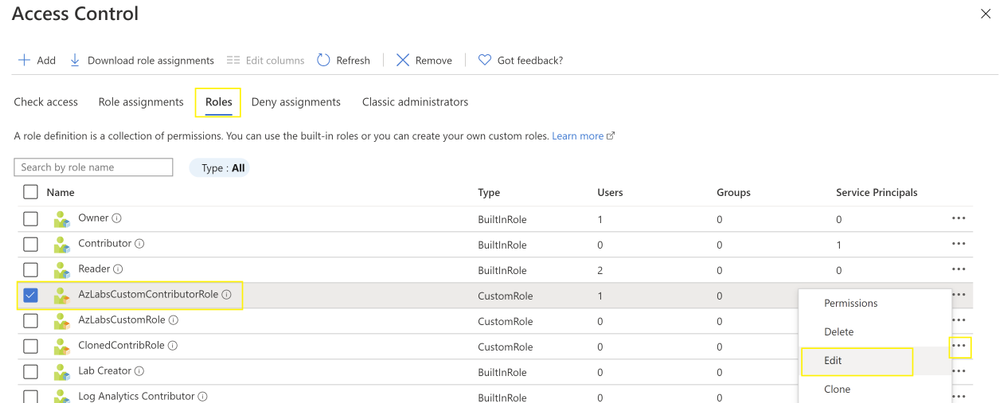
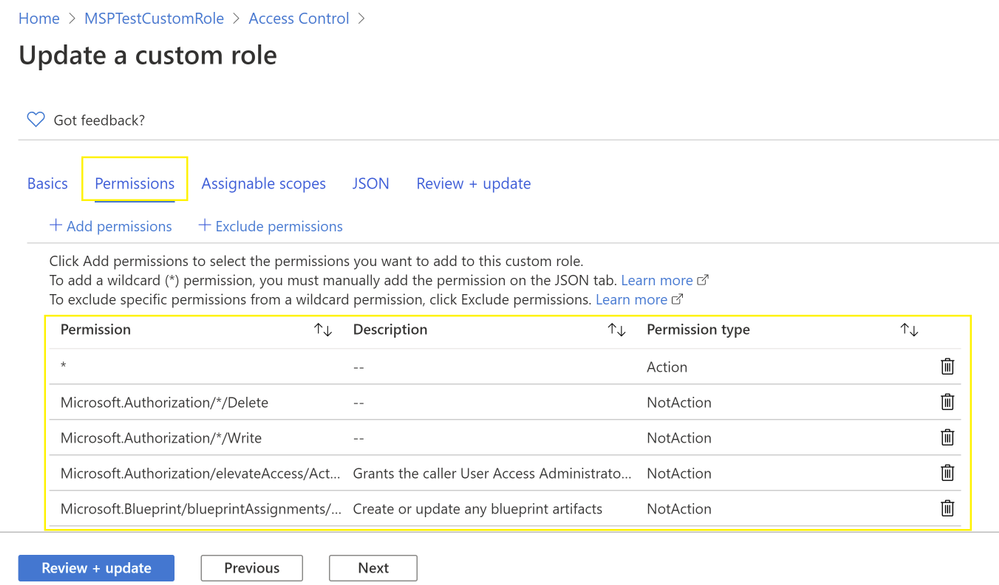
As shown in the above screenshot, the cloned Contributor role includes both a wildcard (*) Action and several NotAction permissions:
- The wildcard Action grants access to viewchange all the lab’s management settings.
- The NotAction permissions allow you to subtract specific permissions from the wildcard permission.
Using this approach, we can add more NotAction permissions to deny a lab contributor access to specific management operations in Azure Lab Services.
3. To add more NotAction permissions, click the Exclude button. In the search field, enter labs to navigate to the permissions for Azure Lab Services. Finally, click on the Microsoft Azure Lab Services tile to view Azure Lab Services’ individual permissions.
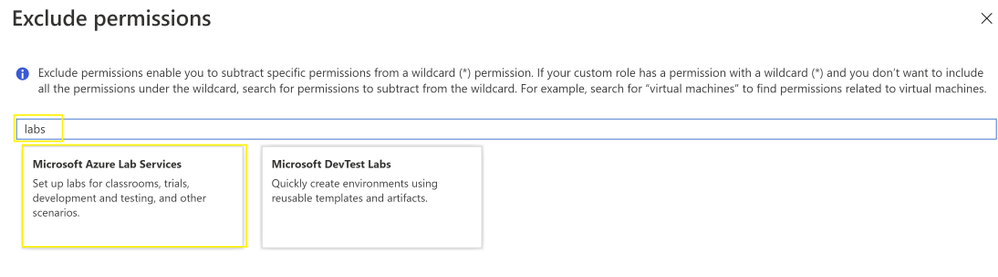
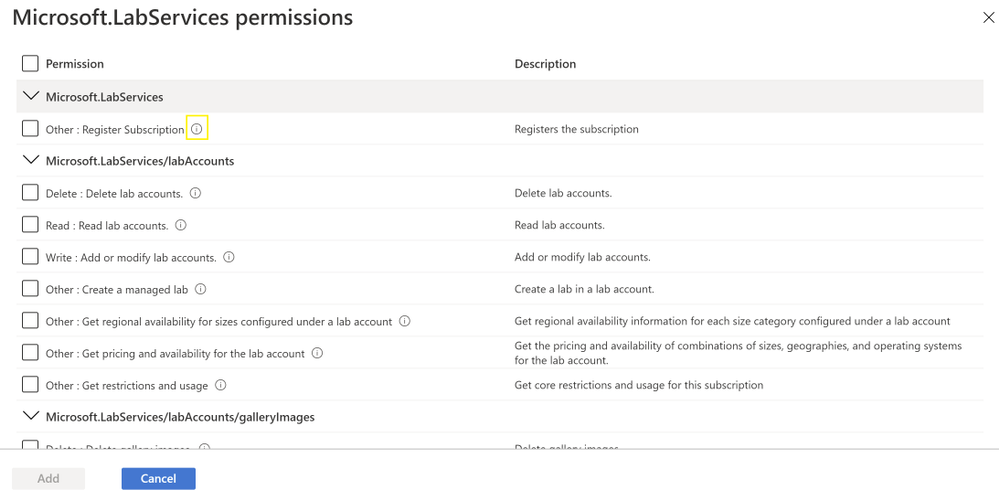
NOTE: To view each permission’s full name, click on the Information icon next to each permission.
Here is the list of permissions that we will add as NotActions:
Category
|
Permission
|
Description
|
Microsoft.LabServices/labAccounts/labs/ |
Delete
|
Delete labs. |
Microsoft.LabServices/labAccounts/labs/ |
Write |
Add or modify labs. |
Microsoft.LabServices/labAccounts/labs/environmentSettings |
Delete |
Delete environment setting. |
Microsoft.LabServices/labAccounts/labs/environmentSettings |
Write |
Adds or modifies environment setting. |
Microsoft.LabServices/labAccounts/labs/environmentSettings |
Other (publish/action) |
Provisions/deprovisions VM resources. |
Microsoft.LabServices/labAccounts/labs/environmentSettings |
Other (start/action) |
Starts the template VM. |
Microsoft.LabServices/labAccounts/labs/environmentSettings |
Other (stop/action) |
Stops the template VM. |
Microsoft.LabServices/labAccounts/labs/environmentSettings |
Other (saveImage/action) |
Save current template VM image to the Shared Image Gallery. |
Microsoft.LabServices/labAccounts/labs/environmentSettings |
Other (resetPassword/action) |
Resets password on the template VM. |
Microsoft.LabServices/labAcounts/labs/environmentSettings/schedules |
Delete |
Delete a scheduled event. |
Microsoft.LabServices/labAcounts/labs/environmentSettings/schedules |
Write |
Add or modify a scheduled event. |
Microsoft.LabServices/labAccounts/labs/users |
Write |
Modifies user, such as an individual’s quota. |
Another option, is to edit the custom role’s JSON directly under the JSON tab:
{
“properties”: {
“roleName”: “AzLabsCustomContributorRole”,
“description”: “Custom contributor role for labs”,
“assignableScopes”: [
“/subscriptions/{Your Sub ID}“
],
“permissions”: [
{
“actions”: [
“*”
],
“notActions”: [
“Microsoft.Authorization/*/Delete”,
“Microsoft.Authorization/*/Write”,
“Microsoft.Authorization/elevateAccess/Action”,
“Microsoft.Blueprint/blueprintAssignments/write”,
“Microsoft.Blueprint/blueprintAssignments/delete”,
“Microsoft.LabServices/labAccounts/labs/delete”,
“Microsoft.LabServices/labAccounts/labs/write”,
“Microsoft.LabServices/labAccounts/labs/environmentSettings/Start/action”,
“Microsoft.LabServices/labAccounts/labs/environmentSettings/Stop/action”,
“Microsoft.LabServices/labAccounts/labs/environmentSettings/SaveImage/action”,
“Microsoft.LabServices/labAccounts/labs/environmentSettings/ResetPassword/action”,
“Microsoft.LabServices/labAccounts/labs/environmentSettings/Publish/action”,
“Microsoft.LabServices/labAccounts/labs/environmentSettings/write”,
“Microsoft.LabServices/labAccounts/labs/users/write”,
“Microsoft.LabServices/labAccounts/labs/environmentSettings/schedules/delete”,
“Microsoft.LabServices/labAccounts/labs/environmentSettings/schedules/write”,
“Microsoft.LabServices/labAccounts/labs/environmentSettings/delete”
],
“dataActions”: [],
“notDataActions”: []
}
]
}
}
NOTE: In the above JSON, make sure that you replace “{Your Sub ID}” with the ID of your Azure subscription.
4. Once you’re done making changes to the custom role’s permissions, click the Review + update button, followed by the Update button to save the custom role.
5. To grant these permissions to a teacher, you will need assign the teacher two roles – refer to the article about Managing Identity for more info:
- The Reader role at the lab account level.
- The custom role that you defined in the previous steps, at the lab level.
6. When a teacher accesses the lab’s management screens, they will still be able to see the buttons for all the management operations. However, when they attempt to perform actions or save changes to permissions that are denied by the custom role, they will receive an error message and will be prevented from completing the operation.
PowerShell Script
We also have added a PowerShell script that you can use to automatically import this example custom role for you. You can find this script along with the steps to run it, in our GitHub repo.
Troubleshooting
When you create a custom role, if you get the error message “Role definition limit exceeded. No more role definitions can be created.”, ensure that you haven’t exceeded the 2000 role assignment limit per subscription. More details can be found in the article, Azure role assignments limit.
We hope that you find this post helpful!
~Az Labs team

by Contributed | Feb 4, 2021 | Technology
This article is contributed. See the original author and article here.
An Employee Experience Platform (EXP) is a digital platform that puts people at the center by bringing together systems of work with systems of support into an integrated employee experience.
In this episode, Chris and I talk with Jared Spataro (CVP | Microsoft) about the new EXP service offering, Microsoft Viva – disclosed today (Feb. 4th, 2021). We discuss its people’s success design, then dig into its four main components: Connections, Insights, Learnings and Topics. You’ll hear how Viva builds on foundational capabilities like Yammer, SharePoint, Stream, Workplace Analytics, Microsoft Search, LinkedIn, Glint and more.
Viva empowers people and teams to be their best, and by the end of this episode, you’ll see that Elvis has indeed left the building, the cat is out of the bag, Viva is here and it’s a big announcement from Microsoft.
Listen to podcast below:
https://html5-player.libsyn.com/embed/episode/id/17798336/height/90/theme/custom/thumbnail/yes/direction/backward/render-playlist/no/custom-color/247bc1/
Subscribe to The Intrazone podcast! And listen to episode 61 now + show links and more below.
Jared Spataro (CVP | Microsoft) [Intrazone guest].
Links to important on-demand recordings and articles mentioned in this episode:
- Guests and co-hosts
- Articles and sites
- Events
Subscribe today
Listen to the show! If you like what you hear, we’d love for you to Subscribe, Rate and Review it on iTunes or wherever you get your podcasts.
Be sure to visit our show page to hear all the episodes, access the show notes, and get bonus content. And stay connected to the SharePoint community blog where we’ll share more information per episode, guest insights, and take any questions from our listeners and SharePoint users (TheIntrazone@microsoft.com). We, too, welcome your ideas for future episodes topics and segments. Keep the discussion going in comments below; we’re hear to listen and grow.
Subscribe to The Intrazone podcast! And listen to episode 61 now.
Thanks for listening
The SharePoint teams want you to unleash your magic, creativity, and productivity – and be compliant about it all. And we will do this, together, one employee experience at a time.
The Intrazone links
+ Listen to other Microsoft podcasts at aka.ms/microsoft/podcasts.
![Left to right [The Intrazone co-hosts]: Chris McNulty, director (SharePoint – Microsoft) and Mark Kashman, senior product manager (SharePoint – Microsoft).](https://www.drware.com/wp-content/uploads/2020/11/large-375 "Chris-Mark_in-studio.jpg") Left to right [The Intrazone co-hosts]: Chris McNulty, director (SharePoint – Microsoft) and Mark Kashman, senior product manager (SharePoint – Microsoft).
Left to right [The Intrazone co-hosts]: Chris McNulty, director (SharePoint – Microsoft) and Mark Kashman, senior product manager (SharePoint – Microsoft).
 The Intrazone – a Microsoft podcast that covers the Microsoft 365 intelligent intranet: https://aka.ms/TheIntrazone.

by Contributed | Feb 4, 2021 | Business, Microsoft 365, Microsoft Teams, Microsoft Viva, Technology
This article is contributed. See the original author and article here.
Even before COVID-19 turned our lives upside down, a new generation of digital tools was opening up new possibilities for the future of work. What we didn’t expect was that this future would arrive almost overnight last March, as millions of businesses around the world responded to the pandemic by moving to remote and hybrid…
The post Microsoft Viva: Empowering every employee for the new digital age appeared first on Microsoft 365 Blog.
Brought to you by Dr. Ware, Microsoft Office 365 Silver Partner, Charleston SC.
by Scott Muniz | Feb 4, 2021 | Security, Technology
This article is contributed. See the original author and article here.
Cisco has released security updates to address vulnerabilities in Cisco products. An attacker could exploit some of these vulnerabilities to take control of an affected system.
CISA encourages users and administrators to review the following Cisco Advisories and apply the necessary updates. For updates addressing lower severity vulnerabilities, see the Cisco Security Advisories page.

by Contributed | Feb 4, 2021 | Technology
This article is contributed. See the original author and article here.
Introduction into security principles in the context of database systems
By Andreas Wolter
Preface
While many of us are practicing ‘social distancing’, and spend lots of time at home, I am finally finding the time to share some of the topics with the public that I have been working on since I joined Microsoft at the end of 2018.
In the recent years and with increasing frequency, one of the asks in terms of Security to the SQL Engine On-Prem as well as SQL Azure Database has been coming up with solutions to help accomplish “Separation of Duties”. This is a good thing, because it reassures my point of view that Separation of Duties is becoming increasingly important in IT and specifically Cloud-based systems.
On the other hand, we noticed that there is not a broad understanding in the technical community yet as to what Separation of Duties (aka SoD) really means and how it can be accomplished today. It occurs to me that the understanding is often vague and sometimes even contradicting depending on who you ask. It might therefore help to provide some context and guidance on what SoD really is and how it relates to other commonly referenced security principles that have been established over the last decades in IT.
If you are not already an expert in IT security, I hope that you will find this series useful.
Intro: Motivation
Security principles in information technology or cybersecurity (I won’t touch on physical security in these articles) exist as guidelines to assist design and decision processes in architecture, implementation, and reactive procedures when incidents happen. The purpose is to help designing for security in the first place, by using common proven patterns, and to be able to effectively assess a systems security.
Building secure systems from the start can be an expensive task, but over the years we have all seen security incidents which can cost millions and cause companies or even banks to go out of business. (i.e. see https://www.ibm.com/ae-en/security/data-breach )
One word of caution: Simply complying with these security principles provides no guarantee of preventing successful attacks. Some attackers invest a lot of time thinking to come up with ever new methods and exploit attack vectors which may not have been considered before.
But following these security principles helps to reach the following objectives:
- Reducing the blast radius of an attack
- i.e. attackers may not gain access to all targeted services because of partitioning or may not be able to elevate to all permissions to gain access to all documents
- Increasing the time for a successful attack
- this also goes back to #1 as it becomes harder to gain sufficient access
- Increasing the chances of early detection (!!)
- More controls and audits usually mean more chances of raising triggers or errors along the way
- Improving forensic abilities after detection
- Better audit trails allow for more successful investigations
Security at first
Therefore, I strongly advise to implement the proper security controls from start. And this is not just because it is common knowledge among IT architects that changing running systems is more expensive than making sure that Security is a main pillar in the architecture from the start.
To take it one step further: security should be THE FIRST pillar to be implemented. What I mean by that is that, ideally, nothing gets deployed before all security measures have been put in place. Otherwise, it is easily possible to admit backdoors or other security issues in the foundation, purposefully or not, that remain undetected. The very first measure therefore should be to put Auditing in place. We will talk more about Auditing in a later article.
Contents
This series of articles will provide an overview on the most commonly cited security principles and concepts which are often used when talking about Separation of Duties – or even intermingled with it – and briefly clarify their meaning and relation. Expect a lot of keywords (not buzzwords though, I promise)
Principle of Least Privilege (POLP) Need to know
Delegation of Authority Separation of Privilege
Audit Trail Separation of Duties
– These articles will be released one by one over the next weeks and the links will then be updated one by one as well.
One more principle you should keep in mind when designing security: “KISS” – Keep it simple, stupid
As already mentioned in my article from 2017 (Separation of Duties (SoD) and role-based security conception in SQL Server), it is absolutely vital to keep the user experience as simple as possible. Anything “too much” of an effort (and that can be just “too many clicks”) will lead to users to try to find ways around it. And they will.
Example
A common example of that is the shared Admin account. Instead of having one elevated account per person, often especially in small shops, developers share one common privileged account. Among other things this renders Auditing almost useless as no one can really tell who did what.
Note
Separation of concerns (SoC)
Over time I have heard it being used when actually “Separation of Duties” was meant. SoC is NOT a security principle and rather a basic programming design principle which leads to modular (or “functional”) programming. Hopefully, this clears up this common mix-up.
Wikipedia-Article: https://en.wikipedia.org/wiki/Separation_of_concerns
Let me know if you find this series helpful and what else you want to hear about in the future.
Andreas
Special thanks to
Raul Garcia, former SQL Security PM and “honorable member for life” :) – your knowledge in Security and SQL Security helped me make sure to not overlook anything important and meet a certain quality bar ;)
Steven Gott, one of our most senior Security Engineers, for your critical viewpoints which help me look ahead, although I know I can’t possible mention everything.
Ralf Dietrich from Sarpedon Quality Lab® Germany for countless hours of brainstorming about secure architectures even while being based in separate time zones.
“Security Logo” by pixabay is licensed under CC0
by Contributed | Feb 4, 2021 | Technology
This article is contributed. See the original author and article here.
Introduction
As Microsoft Endpoint Manager Configuration Manager Engineers we have always been asked by Business or IT Managers to accurately report on the Software Updates currently deployed in our environments. This could be as easy as just deploying Endpoint Protection updates or as advanced as deploying every category and 3rd Party Updates.
From our experience working with Microsoft Customers we have realized that for an IT Administrator new to Configuration Manager it can be difficult to consume all the hundreds of the out of box reports. That becomes even more difficult when you are an IT Manager just wanting to know overall compliance on a dashboard.
To address the above challenges a customer Solution called “Microsoft Endpoint Manager Update Compliance Dashboard” has been created to give you a holistic, easy to use PowerBI Dashboard that accurately reports on Software Updates.
Solution
This solution created by a few Microsoft Customer Engineers with years of experience in the field getting asked the same questions about Updates Compliance will address your Update Reporting needs.
The offering provides a customer the opportunity to engage with a Customer Engineer and focus on a few areas like
- Performance Review of your current collections identifying any bottlenecks
- Root Cause Analysis of critical business processes
- Developing a plan to prioritize the biggest risks to your deployment and provide suggested resolutions
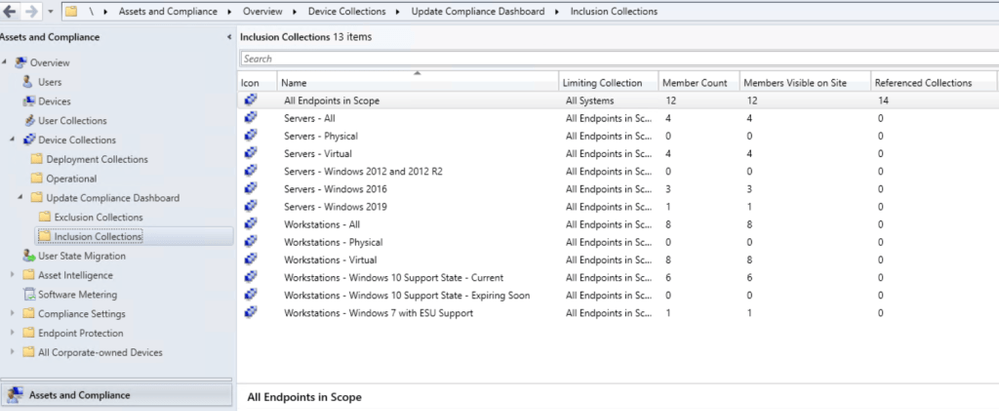
A set of Unique Inclusion and Exclusion Collections get created to identify valid Software Update reporting
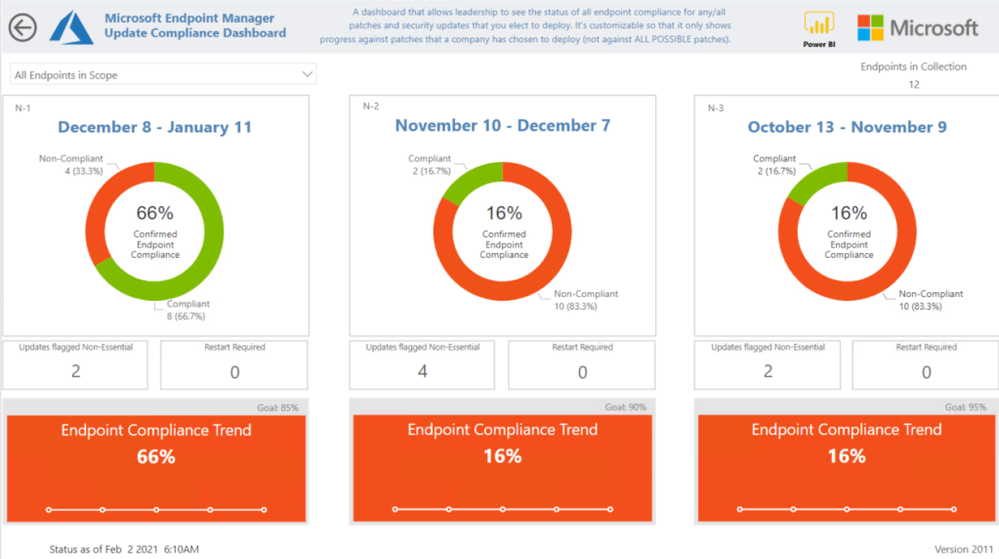
Data is visualized by patch release cycle over the past 6 months and everything prior. These encompass Servicing Stack updates, Microsoft Updates, and WSUS integrated third-party apps
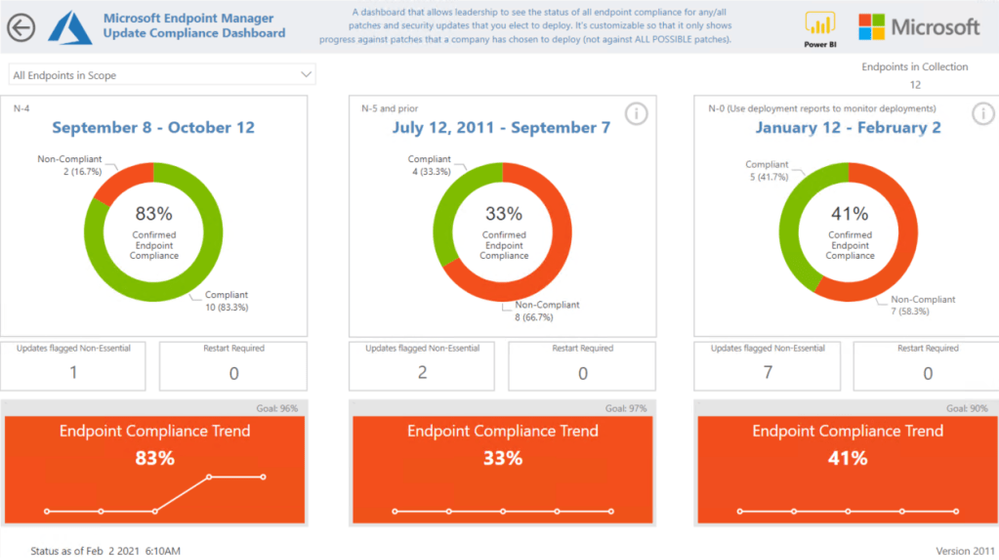
A unique Blacklisting feature which helps admins to determine if past deployments, Collection membership rules, and Software Update Group rules accounted for all business requirements over each patch release cycle
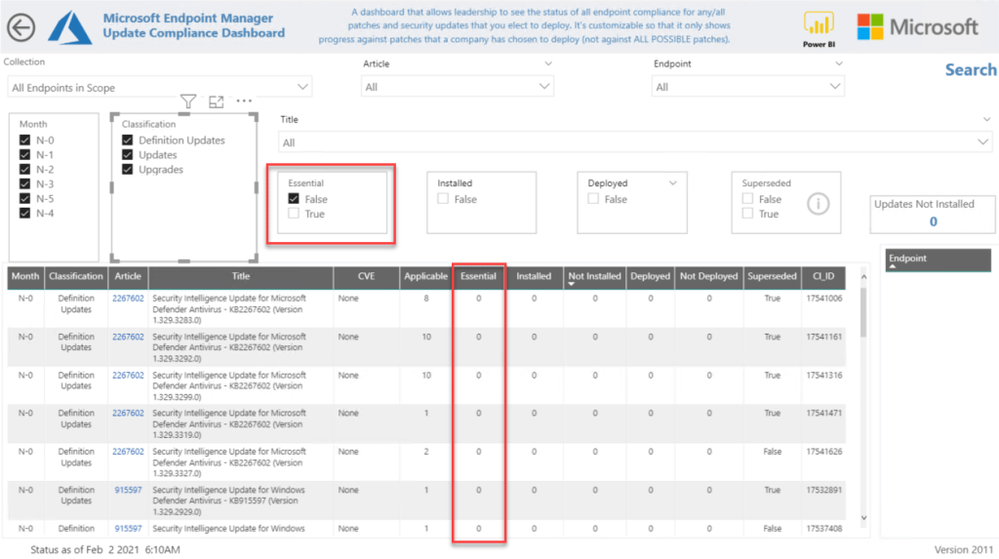
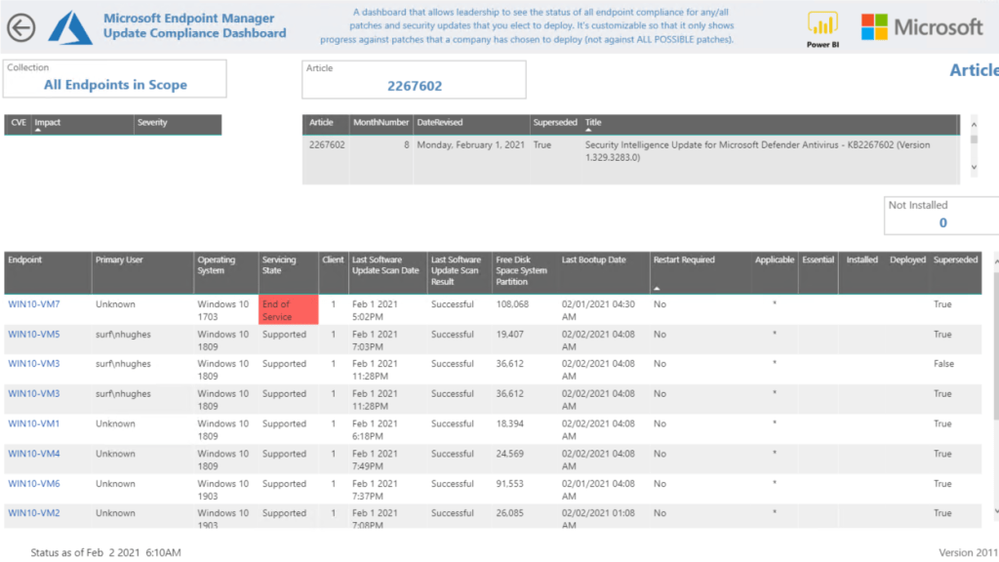
Extensive drill-through reporting details for accuracy and transparency
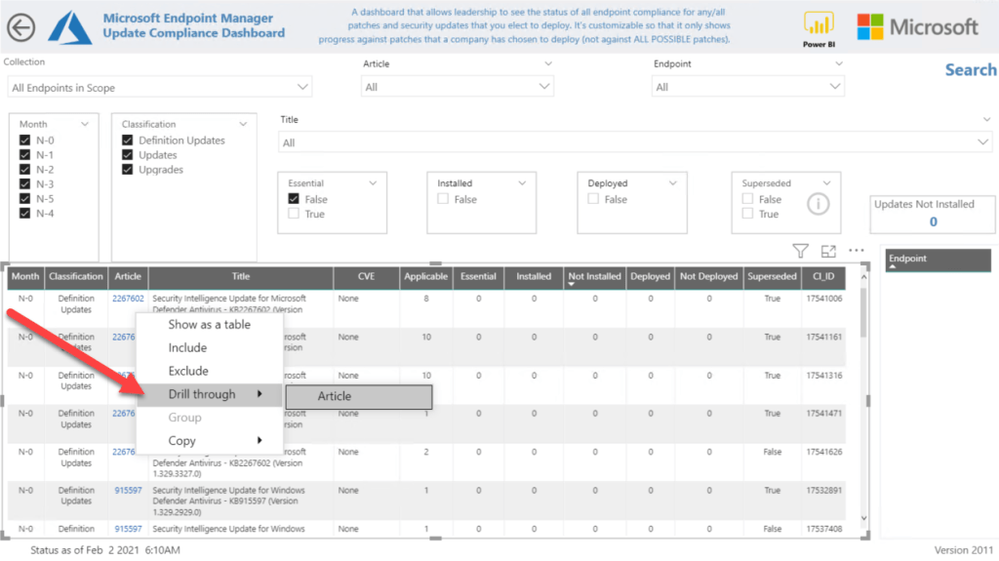
Drill Through to Article
An easy to use Search to quickly see updates that are not deployed
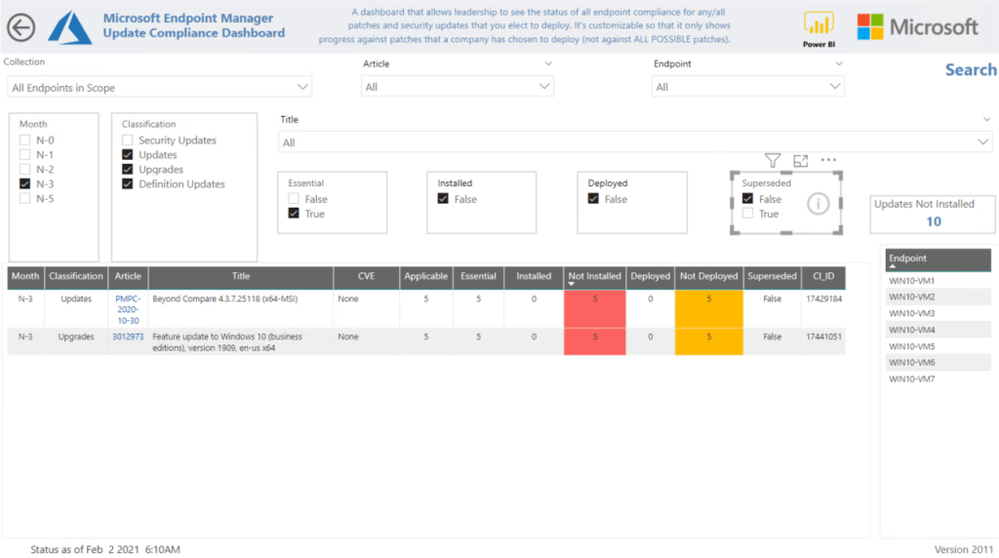
Evaluates monthly compliance on a per device basis, not by average deployment success rate, which is vital to keeping every organization secure
Conclusion
This solution will provide accurate reporting of your Software Updates across the entire IT Environment.
How do I book this engagement?
If you are a Microsoft Premier customer you can reach out to your Customer Success Account Manager(CSAM) for more questions!
Special thanks to the Dev Team:
Chris Sugdinis, Ken Wygant, Michael Schmidt, Morris Lloyd, Nathan Hughes , Russ Rimmerman, Shawn Rand, Sidnei Brandao, Todd Sterrett, Tom Ferguson, Suhail Abdul Salam, Werner Rall
Disclaimer
The sample scripts or Power BI Dashboards are not supported under any Microsoft standard support program or service. The sample scripts or Power BI Dashboards are provided AS IS without warranty of any kind. Microsoft further disclaims all implied warranties including, without limitation, any implied warranties of merchantability or of fitness for a particular purpose. The entire risk arising out of the use or performance of the sample scripts and documentation remains with you. In no event shall Microsoft, its authors, or anyone else involved in the creation, production, or delivery of the scripts or Power BI Dashboards be liable for any damages whatsoever (including, without limitation, damages for loss of business profits, business interruption, loss of business information, or other pecuniary loss) arising out of the use of or inability to use the sample scripts or documentation, even if Microsoft has been advised of the possibility of such damages.
by Contributed | Feb 4, 2021 | Technology
This article is contributed. See the original author and article here.
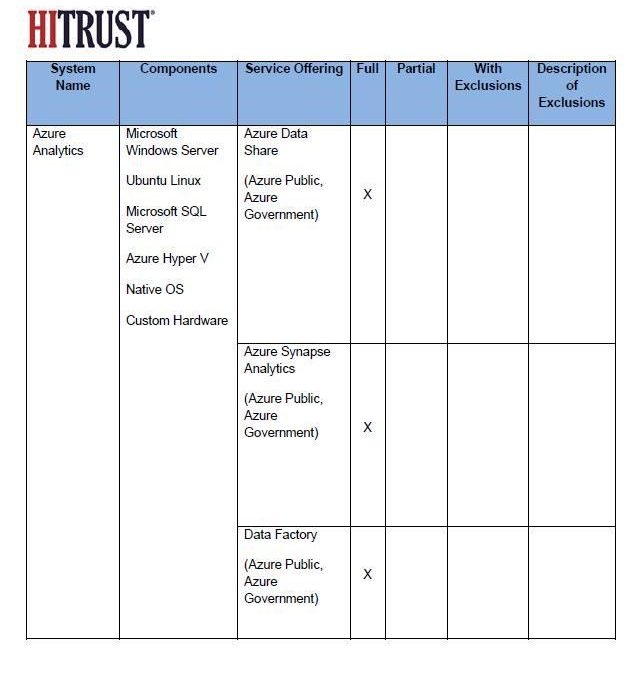
We are really excited to announce that Azure Data Factory is now HITRUST compliant. Full audit report from HITRUST alliance can be found in Azure Trust Center under GRC Assessment Reports section. We have achieved Full Compliance per HITRUST standard.
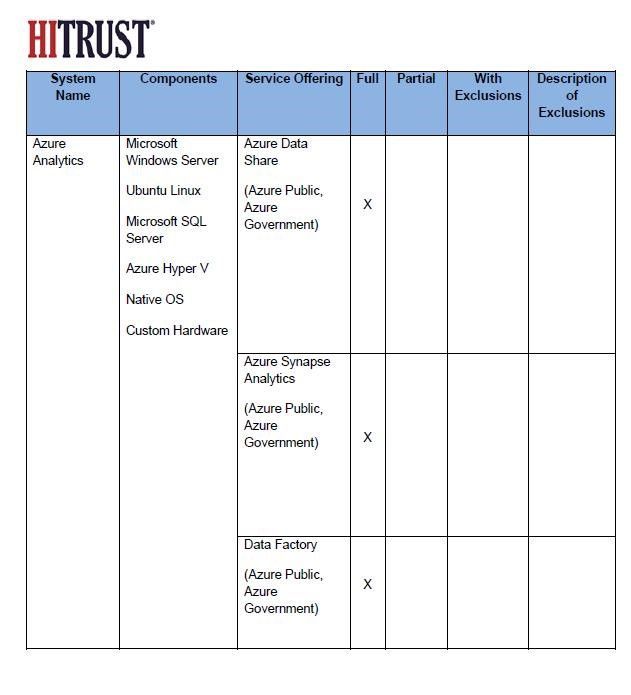
Attached please see the screen shot from the Audit Report. Along with Azure Data Factory, Azure Synapse Analytics and Azure Data Share are also certified for full compliance.
by Contributed | Feb 4, 2021 | Technology
This article is contributed. See the original author and article here.
blog texgt


Recent Comments