by Contributed | Feb 19, 2021 | Technology
This article is contributed. See the original author and article here.
Host: Raman Kalyan – Director, Microsoft
Host: Talhah Mir – Principal Program Manager, Microsoft
Guest: Robert McCann – Principal Applied Researcher, Microsoft
The following conversation is adapted from transcripts of Episode 1 of the Uncovering Hidden Risks podcast. There may be slight edits in order to make this conversation easier for readers to follow along. You can view the full transcripts of this episode at: https://aka.ms/uncoveringhiddenrisks
In this podcast we’ll take you through a journey on insider risks to uncover some of the hidden security threats that Microsoft and organizations across the world are facing. We will bring to surface some best-in-class technology and processes to help you protect your organization and employees from risks from trusted insiders; all in an open discussion with topnotch industry experts.
RAMAN: Hi, I’m Raman Kalyan, I’m with Microsoft 365 Product Marketing Team.
TALHAH: And I’m Talhah Mir, Principal Program Manager on the Security Compliance Team.
RAMAN: Welcome to episode one, where we’re talking about using artificial intelligence to hunt for insider risks within your organization. Talhah, we’re going to be talking to Robert McCann today.
TALHAH: Yeah, looking forward to this! Robert’s been here for 15 years, crazy-smart guy. He’s an applied researcher, a Principal Applied Researcher at Microsoft, and he’d been like a core partner of ours, leading a lot of the work in the data science and the research space. In this podcast, we’ll go deeper into what are some of the challenges we’re coming across, how we’re planning to tackle some of those challenges, and what they mean in terms of driving impact with the product itself.
RAMAN: Robert, how long you’ve been in this space now?
ROBERT: I’ve been doing science for about 15 years at Microsoft. The insider risk, about a year.
RAMAN: Nice. What’s your background?
ROBERT: I am an applied researcher at Microsoft. I’ve been working on various forms of security for many years. You can see all the gray in here, it’s from that. I’ve done some communication security, like email filtering or attachment, email attachment filtering. I’ve done some protecting Microsoft accounts or user’s accounts, a lot of reputation work. And then the last few years I’ve been on ATP products. So basically, babysitting corporate networks, looking to see if anybody had got through the security protections, post breach stuff. So, that’s a lot of machine learning models across that whole stack. The post breach thing is a lot about looking for suspicious behaviors on networks or suspicious processes. And then the last year or so, I wanted to try to contribute to the insider threat space.
RAMAN: What does it mean to be an applied researcher?
ROBERT: An applied researcher, that’s a propeller head. So we all know what propeller heads are. Basically, I get to go around and talk to product teams, figure out their problems, and then go try to do science on it and try to come up with technical solutions. AI is a big word. There’s a lot of different things that we do under that umbrella. A lot of supervised learning, a lot of unsupervised learning to get insights and to ship detectors. I basically get to do experiments, see how things would work, and then try to tech transfer it to a product.
RAMAN: So, you said you spend most of your time in the external security space, things like phishing, ransomware, people trying to attack us from the outside. How is insider threat different? Do you ever think, “Wow, this isn’t what I expected,” or, “Here are some challenges,” or, “Here’s some cool stuff that I think I could apply.”
ROBERT: Yeah. It’s a very cool space. Number one, because it’s very hard from a scientist’s perspective, which I enjoy. The first thing that you hit on, that’s really the sort of fundamental first thing that makes it hard is that they’re already inside. They’re already touching assets. People are doing their normal work and they inside threaten might not even be malicious. It might be inadvertent. It’s a very challenging thing. It’s different than trying to protect a perimeter. It’s trying to sort of watch all this normal behavior inside and look for any place that anybody might be doing anything that’s concerning from a internal assets perspective.
RAMAN: When you think about somebody doing something challenging, is it just like, hey, I’ve downloaded a bunch of files. Because today I might download a bunch of files. Tomorrow, I might just go back to my normal file thing. But if I look across an organization, besides a Microsoft, that’s 200,000 people. That could probably produce a lot of noise, right? So how do you kind of filter through that?
ROBERT: So actually, the solutions that are right now in the product and what we’re trying to leverage to improve the product are built on a lot of AI things. There are very sophisticated algorithms that try to take documents and classify what’s in those documents, or customers might go and label documents, and then you try to use those labels to classify more documents. There’s a lot of very sophisticated, sort of deep learning, natural language processing stuff that we leverage. And those are very strong signals to try to see, okay, this behavior over here, that’s not so concerning, but this behavior right here, that’s a big deal. Now we need to fire an alert. Or maybe it’s a little more of a deal, but then I sort of got some sentiment based on how the person’s doing, the employee, if I combine those things, now it becomes compelling. It’s a very hard noise reduction problem.
RAMAN: As you were talking, Robert, one thing that sort of occurred to me is I’ve had conversations with customers, and you mentioned this around leveraging, artificial intelligence and learning and helping the system learn. A lot of questions I get from customers is like, “What is artificial intelligence in this context? And how do I know that this is something that I should trust, or how is it different than maybe what I’m doing today?”
ROBERT: I’ve seen this play out time and time again on many, many times that sort of a security team has tried to start leveraging AI to do smart detections. It’s a very different game. It’s not, “I have precise detection criteria, and if you satisfy that, then I understand what I did, and I understand the detection.” It is a very statistical machine that sometimes you must assume it’s going to make mistakes. So, one key thing you need to be able to do to trust that machine is you need to measure how well it’s doing. You have to have a way to babysit the thing, basically. And you have to set your expectations to understand that there is error going to happen, but there has to be an error bar met. So that’s basically what you’re babysitting against.
ROBERT: Another very key thing is when it fires a detection, that thing can’t be opaque. It needs to explain how in the heck or why in the heck it thinks that this thing is a threat, right? So, the deep learning folks, like for image classification or natural language processing work, they sort of jumped on board real fast with the deep learning thrust without really worrying too much about being able to explain why that thing was classifying images the way it was. And they were ecstatic because they’re getting so much better results than they’ve gotten the decade before. Right? But then it came to the point where they started realizing, hey, I can game this thing, and I’ll prove it to you. And then you take a picture, and you change a few pixels, and then I make that thing classify the cat as somebody else. When you use a camera for detecting people, facial recognition, and identity verification, that becomes a serious problem.
They sort of went under this phase now, and it’s very hot right now, can you do these sophisticated models that also can … you can explain why they did what they did. And there’s a ton of science and a ton of work trying to crack open the black boxes, right? Those big, sophisticated learners. But you don’t have to go to that phase. There’s all this other AI that works very, very well and is a very effective, and I would say is probably the most common stuff that’s used and delivers the most value in industry that’s not so opaque. And the models are simple enough or I guess opaque enough, or they’re explainable enough that you can tell a customer, “I detected this threat because this, and this, and this happened.” Right? So, explainability is very key to trying to trust AI.
TALHAH: That brings up another key question we get from customers a lot. This idea of transparency in the model or the explainability in the model that is a key attribute, right? So it looks like we’re learning from years and years of data science and research in this space to apply that into the models that we build. Can you talk about a little bit? Insider risk, what do you think constitutes a good model? What kind of explainability should be in that model so we can help our customers make the right decision on whether something is bad or not?
ROBERT: Well, you have to put on the customer hat, which sometimes is hard as a scientist. A scientist might be satisfied saying, “If the explanation for some prediction by some model is … The feature 32 was this far away from a margin.” Okay? So, there’s some technical explanations why a classification might happen. But the customer, they just want to know, “What are the actually human actions that caused that?” You got to have a model where you can add simple enough features where you can boil it down and say, “This person’s suspicious because they printed this document that’s highly confidential, and then they did it again two days later, and then they did it again three days later, and then they did it again four days later.” And you must have that very human intelligible output from your model, which is something that is very easy to skip if you don’t have explainability top of mind. You have to pick the appropriate technologies.
TALHAH: Because it’s really about trying to abstract the way all the science behind the scenes, right? We should just be able to easily explain to the customer, “Here’s what we saw.” How we detected should be irrelevant to them. Here’s what is happening with this potential actor. Let’s go make the decision on how to manage that risk.
RAMAN: Yeah. And I think that is the sort of the key here, right? As you think about there’s the tech, which is how do I try to detect these things? And then there’s the person consuming the output of the tech, right? And typically, the person consuming the output of the tech is somebody who may be in HR or in legal, maybe a security analyst, but they have to interface with HR and legal. And they may not be as sophisticated. I’m technical, but I’m not as technical obviously as Robert and probably you. And I don’t want to go deep dive into some algorithm to try to figure out, “Well, what’s going on here?” I want to do, “Hey, the risk score of this individual is high and here’s the related activity that the system found, and this is why you should believe it.”
TALHAH: Yeah. In fact, we’ve seen this in our customers. We’ve seen this in our own experience in that the people that have to make the timely and informed decision on how to manage insider risk is oftentimes the business or HR or legal. They don’t want to get into the technical details behind the model that was used or this, that, or whatnot. They just need something that’s easy to understand in business terms so they can make that determination on what needs to happen. Rob and I were just on a call with a customer earlier this week and they raised this question on why we can’t do supervised learning for these detectors, so I’d love to get your thoughts on some of the challenges or maybe some of the opportunities or how you’re looking at the types of learning models that you use for these detectors.
ROBERT: One of the challenges is how much context it needs. And if you want labels, you got to be able to take and give that context to the customer when they have alerts, right? They need to be able to accurately say, “Hey, this alert’s right, and it’s easy for me to tell that, and I can do it in an efficient way because the product just gave me an explanation.” Now, once you’re able to sort of explain yourself and you’re able to give it to the customers, so they can efficiently triage, now you’re starting to crack open this sort of virtuous cycle where they can start giving you labels, and you can pull them back in house and you can start learning how to do supervised classification on this stuff. It’s very key. You need this sort of label generation mechanism, right?
ROBERT: So, that’s key for opening supervised learning. But it’s also key in that insider threats can be very subjective. One tenant can want to see the same activity, and another tenant might say, “Ah, that’s not important to me. Don’t tell me that, please. That’s noise.” Right? So now you got to be able to do classification that’s customized per tenant, right? And that each tenant doesn’t want to go in and fiddle with all your AI and make it to work just right for them. An easier way for them to express what they want is to give you feedback. We explain detections, they give us feedback, and now we can start learning. Okay, supervised model works for these types of customers. This other supervised model works for these types of customers, and now we can sort of get this customization game going as well. But all of that and all of those supervised learning techniques, they rely on labels, and you got to do a good job explaining to your customers to get that feedback.
RAMAN: One question, Robert, I also get is around … Today, a lot of the tools or a lot of my detection capabilities are reactionary. I got fired or I’m not happy, and I downloaded a bunch of stuff and I’m out of here. I resign. Right? But prior to that, maybe a month prior, or maybe it’s four months prior, or even three weeks prior, there might’ve been some activity that was happening that might’ve indicated that I was about to do it. Well, can you help me predict? Can you help me be more proactive? And I think, again I go back to this is a spectrum of things, right? We’re not going to know today, is Talhah bad tomorrow? Probably not. Right? But it could be like, hey, review time’s coming up. Didn’t get the bonus he wanted. He’s been working on insider risk for the last two years. And now it’s like, “Okay, I’m out of here, man. I’m going to go somewhere else.” So I guess the big question I want to ask is, how do we answer that for customers when they ask us that? What would be your answer?
ROBERT: There’s something here, and Raman, I think you sort of hinted at it; is that there’s past behavior that we could look at and we could say, “Okay, from our past experience, this sort of sequence, 10% of the time end up with something that we didn’t like. So, if we see that in the future, let’s do that again.” So actually, on a technical side, we’re doing a lot of work on sequential pattern mining, and it boils down to just that. What are sequences of activity based on the type of context that Talhah mentioned, it might be sentiment, or it might be something else that tend to lead up to things that in hindsight we know were bad. Okay, so we’re going to use that to predict in the future. But there’s also stuff that maybe we didn’t see before. So maybe we also look for here’s some machinery that today … Here’s sequences that are totally abnormal, but let’s go get somebody on them, and let’s look at that and let’s start get that labeling loop going on, so we can understand if that sequence is good or bad, so in the future, we can protect other people with the same observations. But your question about being preemptive is a good one. And I think sort of the sequential mining aspect, very fun from a technical standpoint. And I think it’d be very valuable for our customers, for sure.
RAMAN: Because I think that this is highlighting for me from a tech perspective … You know, I’m a marketing guy, so I’m about selling it, selling the story. But as I think about this, what becomes very clear to me is that you can’t just use one thing, one signal. Can’t just be like, “Oh, somebody is on an endpoint and they tried to copy something to a USB and that might be bad.” There are multiple things going on, right? There’s sentiment analysis. There might be other activity. It’s who they’re talking, to how many times they’re trying to access stuff. Did they come into a building when they shouldn’t have been in the building?
All of these different elements can come into play, and to Talhah’s earlier point, it’s really about … because we’re dealing with employees, you can’t assume that everybody is bad, right. It could be like, “Wow, I couldn’t get my PC to turn on at home, so now I got to go to the office and do it there.” Maybe that was in the middle of the night. I don’t know. But I think that’s the big challenge in this space from my perspective is that you just can’t rely on one set of signals. It has to be multiple signals, and the machine learning is key to really driving an exposure of, this could be something that you might want to take a closer look at. You’re always going to have a human element, I guess, right?
TALHAH: That’s absolutely true. In fact, this reminds me, when we were sort of establishing the program at the company, we had a whole virtual team put together and we were trying to kind of ground ourselves on a principle, and one of the guys on the team actually proposed something that just stuck, which is this program should be built on the principle of assume positive intent but maintain healthy skepticism. What that effectively means is you just follow the data. That’s it. Don’t start off thinking everybody’s bad. Don’t start off thinking you’re going to catch bad guys. This is about looking at the data, as much of the data, as much of the context, to Rob’s point. And just follow that until you get to a point where it’s like, this looks odd. This looks potentially risky. And then you take that information, you surface it for the business with the right context, right explainability in the model so that they can make the decision.
RAMAN: I think presenting that in a way that allows you to make that informed decision does two things. One, it gives you the ability to kind of say, “Hey, this might be bad for me,” but two, it also allows you to filter out the noise to say, “Hey, not everything is bad,” because what I also hear is, “I’m done with …” Let’s imagine using a data loss prevention tool to try to detect insider risk, right? That’s challenging because, A, that’s just one set of signals. It’s a very siloed approach. And B, you’re going to be overwhelmed with a ton of alerts because it’s very rules-based, right? It’s not [crosstalk] using all this machine learning type of stuff. How do you prevent alert fatigue? And I think that’s where you need this combination of signals to not only look at what might be potentially problematic but presents it in a way that you can then make that informed decision.
RAMAN: So, Rob, one of the things that … As we look forward, there’s a number of different types of detections that we could, potentially look at. One is sequential modeling. That’s an interesting one, and we’d love for you to explain about that. The other one is around this concept of low and slow. From what I understand, it’s not about this big burst of, “I come in today, I download a thousand files, and I’m out of here.” It’s more, “I’m now a little bit irritated, and over the next six months, I’m going to download a file here, a file there, 10 files here.” I’d love for you to kind of deep dive into that.
ROBERT: Yeah. I mean, those are the really interesting cases, right? Those are the people that are being very stealthy, right? And the people that we want to try to detect. It’s a little bit different of a game. Like you said, the bursty stuff, did they do something abnormal to themselves or did they go over some globally agreed upon threshold that this thing is just bad behavior, right? That’s a different game than looking at somebody who’s trying to stay under the radar and taking long-term. You got to model things a little differently. Number one, you got to look at longer history. I’m not looking at bursts of daily activity. I’m looking at what they’ve done in the long term. So now you have engineering issues because you got to have the scale to look at everybody’s rich, long history. But then after you get that, okay, are monitoring somebody, it’s very hard to tell. In stock markets, how do you tell the difference between two flat lines where one’s a good investment and one’s not a good investment? It’s hard because it’s low and it’s slow, right? The behavior is subtle.
ROBERT: One thing that we’re looking at is how can we tighten the screws when we do anomaly detection, right? So, it’s easy to tighten anomaly detection to the level of detecting a burst. Okay? You can do that, right? Now we want to tighten anomaly detection to the point we can pick out two flat lines and tell the difference from good behavior and bad behavior. Right? What does normal mean? I mean, normal has got to be right in between those two. How do we find that normal, right? The way that we’re doing that is we’re modeling people based upon what’s normal for groups of similar employees, right? How tight can we say what’s normal behavior for devs so that we can have a model that looks at low and slow normal work behavior for devs and low and slow, little bit worse than normal behavior for devs and pick that apart. You just got to do tighter anomaly detection, and you got to compare them to groups that’s going to give you a definition of normal behavior that’s tight enough that you’re going to be able to pick out, even though they’re low and slow, you’re going to be able to pick out the different behavior over a long period of time.
TALHAH: So Rob, being a long-term researcher, what are some of the pet peeves or some of the things that really have annoyed you about some of the product pitches you’ve seen where they over-promise or the way they position AI? I’d love to hear some of the stories that you have on what kind of just gives you the shivers.
ROBERT: As scientists, we have a community and we go talk to each other, and you get to know people, and you figure out what’s really behind that magic sauce. And it’s not as impressive sounding as the marketing. So that means the marketing is doing a good job, I guess. Right? But that’s sort of a pet peeve from a scientist standpoint. I mean, good signs that you should see to sort of prove that stuff out is you should see scientific activity. If they say they’re doing good science, they probably have scientists working for them. And if they have scientists working for them, then those scientists like to do things, publish, or make patents. You should see some scientific evidence happening there. I think that’s sort of a telltale sign. So that’s one pet peeve; overselling how much is going on there.
Another pet peeve is this idea that machine learning or AI is a magic bullet that you just throw stuff at and it magically gives you exactly what you want. It doesn’t work that way. Computers are basically just big, really fast calculators, right? And we’ve figured out some algorithms that they can look at some data and pick out some patterns quickly, but that’s what they are. They’re pattern finders. The scientific community has been clever in how they take that sort of big, fancy calculator and put it into making some business decisions that are crucial and stitching them together. Like we talked about, you know, here’s a module that does sentiment analysis. Big, fancy calculator, right? Here’s a module that does confidentiality of the file. Big, fancy calculator. And then there’s all this business stuff that comes in that has to stitch that together to make a good decision. It’s not just the AI. It’s the stitching together in the appropriate ways that solves your business problem that’s really the magic sauce, right? So that’s another pet peeve. You just throw stuff in AI and then you suddenly got a million-dollar business. It doesn’t work that way. You’ve got to put these components together and work hard on them because they’re challenging, but you got to stitch them together correctly. It’s the whole ecosystem.
RAMAN: And that’s actually an interesting point, Robert. I like that because in a way, what you’d say is: I’m creating clothing, right? And I’ve got different types of fabric, different types of zippers. And I stitch it together and I produce it and it’s like, “Hey, here you go. Here’s your shirt.” And somebody says, “I don’t like it that way. I want to be able to stitch it in a different way.” Or if new fabric comes out, I’m going to use that in new types of clothing. And I think this is what to me is interesting about what you just said, which is you’ve got these different calculators that are looking at different parts of the puzzle, right? Taking different signals in, and then the secret sauce is how do you stitch it together to produce something that you might want to consider as being an anomaly or abnormal behavior, but then be able to provide feedback back into that calculator to say, “Hey, I didn’t like that.” Or “This didn’t work for me. Stitch it together somewhat differently.”
ROBERT: Yeah, you’re right. I mean, how do you trust these black boxes? It’s all that logic that babysits it. You’ve got to have some guardrails in there, so the thing doesn’t go off the rail and mess up with everything else that you’re stitching together. It’s that sort of business logic on top that’s super, super valuable and just as impressive to me as the AI under the hood, to tell you the truth.
RAMAN: Robert, appreciate you being here today. This has been great, great conversation on the tech. As you think about the future and where we see ourselves in five years from now, what are your projections in terms of what might be different than what we have today?
ROBERT: Yeah, that’s a great question. I think some of the big thing is, solve these sorts of challenging tweaks, which is like, Talhah mentioned multi-users. We solve multi-users. We get good enough anomaly detection that we can pick off the low and slow, even differentiate that. I think one thing would be super powerful that you get to, is if you get this sort of feedback coming, right? Because once you get this feedback loop coming, then you crack open the AI door for all kinds of algorithms. There’s a lot more supervised stuff that we could use, and we could leverage that would make us even more powerful, which would give better detectors to people, which would give us more labels to get even more powerful. And when you sort of get that mutual synergy going, I think the detections, they skyrocket.
And then one other thing is tax space. Industry has these threat matrices, right? And they sort of have this benchmarks that they’re trying to work against, and they’re writing down simple rules to detect that, and they’re using sophisticated AI targeted at known bad behaviors. I see that sort of landscape roadmap start happening in the insider threat space as well. Because it’s going to prioritize what we do from a product standpoint and from a research standpoint, and it’s going to be an input to our models. “Hey, this is known bad stuff. We better be able to detect that.” Stitch things together to detect those sequences.
To learn more about this episode of the Uncovering Hidden Risks podcast, visit https://aka.ms/uncoveringhiddenrisks.
For more on Microsoft Compliance and Risk Management solutions, click here.
To follow Microsoft’s Insider Risk blog, click here.
To subscribe to the Microsoft Security YouTube channel, click here.
Follow Microsoft Security on Twitter and LinkedIn.
Keep in touch with Raman on LinkedIn.
Keep in touch with Talhah on LinkedIn.
Keep in touch with Robert on LinkedIn.
by Contributed | Feb 19, 2021 | Technology
This article is contributed. See the original author and article here.
As you know, Microsoft Cloud App Security can help protect several SaaS applications. It gives you control over the actions carried out by your users and to the data they decide to store in the cloud. SaaS app protection is indeed critical, but that should not come at the cost of neglecting the protection of your Infrastructure as a Service (IaaS).
For that purpose, Cloud App Security can integrate with your AWS platform and detect risky behavior, control data sharing and help review best practice recommendations.
Note: While this blog is specific to AWS, Cloud App Security can also help you secure your Azure and Google Cloud Platform environments in the same way.
Why Connect AWS?
Microsoft Cloud App Security will help your protecting your AWS infrastructure in the following ways:
Benefit
|
Description
|
Feature or policy
|
Cloud Security Posture Management
|
A large portion of security issues we see daily are related to:
– Accidental or malicious configuration changes
– Lack of compliance to products’ best practices
MCAS can help in both of these areas.
Policies can be configured to alert you when a configuration is modified in a way that may impact security.
Best practices for AWS (as well as for other IaaS platforms) are reported in MCAS, making it a single pane of glass for your cloud security recommendations.
|
Get security configuration recommendations for AWS | Microsoft Docs
Activity policy templates: “IAM Policy Change”, “Security Group Configuration changes”, Network ACL changes”, etc.
|
Compromised account or insider threat
|
As for most applications, when AWS is connected, the applicable build-in threat detection policies will apply automatically. Some are standard and apply to all apps, some are tailored for IaaS.
|
Built-in policies such as “Multiple delete VM activites”, “Multiple VM creation activities”, “Impossible Travel”, “Activity from infrequent country”, “Connection from Risky IP”. Etc.
|
Data leakage protection
|
Many of the security incident we’ve seen in the news in the past few months/years are often due to improperly shared documents or folders.
To help you limit these risks, MCAS can detect publicly shared AWS S3 buckets and alert you, or automatically make them private.
Note: MCAS does not inspect the content of files stored in AWS S3 buckets, only their sharing status.
|
File policy template: “Publicly accessible S3 buckets”
Activity policy template: “S3 Bucket Activity”
|
How to Connect AWS to Microsoft Cloud App Security?
Let’s start with connecting AWS and Cloud App Security. Several steps need to be accomplished in this connection: Cloud App Security needs to gather (1) all the activities happening at the AWS level, like it does for other apps, and (2) some of the configuration settings and best practice guidance to review the account’s security configuration. In order to get the activities and security recommendations, the connection of AWS to Cloud App Security is two-fold:
- You must connect Microsoft Cloud App Security with AWS for Security Auditing: this will provide you with all the activities happening in your AWS environment, as well as the sharing status of your S3 buckets.
This is demonstrated in the video below.
- You need to connect Microsoft Cloud App Security to AWS for Security Recommendations: this will provide you with best practice security recommendations regarding your AWS environment directly in your Cloud App Security console.
The video below shows how to establish this connection, as well as how to leverage Security recommendations from the Cloud App Security console.
A step-by-step procedure to establish these connections is also available here.
Protect AWS – Threat detection
Once AWS is connected, the built-in threat detection policies listed here are in place analyzing the activities of taking place in AWS.
Let’s note the policies below that are specific to IaaS platforms and apply only to AWS and Azure:
Policy name
|
Description
|
Unusual multiple storage deletion activities (preview)
|
This policy profiles your environment and triggers alerts when users perform multiple storage deletion or DB deletion activities in a single session with respect to the baseline learned, which could indicate an attempted breach.
|
Multiple delete VM activities
|
This policy profiles your environment and triggers alerts when users perform multiple delete VM activities in a single session with respect to the baseline learned, which could indicate an attempted breach.
|
Unusual multiple VM creation activities (preview)
|
This policy profiles your environment and triggers alerts when users perform multiple create VM activities in a single session with respect to the baseline learned, which could indicate an attempted breach.
|
Unusual region for cloud resource (preview)
|
This policy profiles your environment and triggers alerts when a user performs suspicious creation activities in a cloud region that was not recently, or was never, accessed. This may indicate that an attacker is creating cloud resources to run malicious activities like crypto mining.
|
Quick Config – Quick Value!
In addition to the built-in threat detection policies there are a number of file and activity policy templates specifically for AWS activities, that you can use as a starting point to create your own policies.
The list is available here:
Template
|
Description
|
Publicly accessible S3 buckets (AWS)
|
Alert when an S3 bucket in AWS is publicly accessible.
|
Virtual Private Network (VPC) changes (AWS)
|
Alert on any API calls made to create, update, or delete an Amazon VPC, an Amazon VPC peering connection, or an Amazon VPC connection to classic Amazon EC2 instances.
|
IAM Policy changes (AWS)
|
Alert on any API calls made to change IAM policy
|
Console Sign-in Failures (AWS)
|
Alert of multiple sign-in failures to AWS console.
|
CloudTrail changes (AWS)
|
Alert on any API call made to create, update, or delete a CloudTrail trail, or to start or stop logging a trail.
|
EC2 Instance changes (AWS)
|
Alert on any API call is made to create, terminate, start, stop, or reboot an Amazon EC2 instance.
|
Network Gateway changes (AWS)
|
Alert on API call made to create, update, or delete customer’s internet gateway.
|
Network Access Control List (ACL) changes (AWS)
|
Alert on any configuration changes involving Network ACLs.
|
S3 Bucket Activity (AWS)
|
Alert when AWS S3 API call is made to PUT or DELETE bucket policy, bucket lifecycle, bucket replication, or to PUT a bucket ACL. The alert will also cover Cross-origin resource sharing PUT bucket and DELETE bucket events.
|
Security Group Configuration changes (AWS)
|
Alert on configuration changes which involve security groups.
|
When you create a new policy from a template the default behavior is to create an alert, so you can be notified of a match to the policy. This does not have any impact on the users or environment. After reviewing the policy matches you can decide to configure governance actions to be taken when there is a policy match. For example, a policy that is created from the Publicly accessible S3 buckets (AWS), you can decide to “Make private” or “Remove a collaborator”.
The video below will details how to create and configure these policy templates:
Custom policy
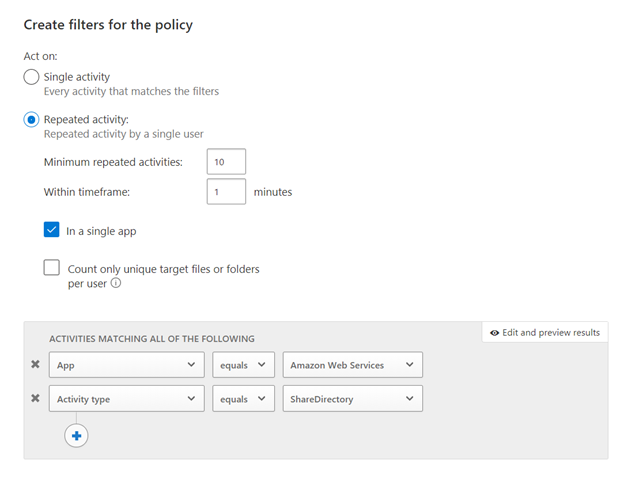
All the templates we discussed above are great best practices and apply to most customers. However, they may not capture the uniqueness of your environment. For that, you can configure custom policies. Here are a few best practices when configuring these:
- Single or repeated activity?
- That would be depending on your needs. For example, we can imagine that a case where a number of S3 buckets would become public in a short amount of time would be suspicious. On the other side, changing a critical security setting would only need to happen once to show a risk.
- Activity Filters: filters will help define the criteria for your new policy to trigger. You can filter but app, user, client type, etc. Here are a few relevant filter examples you may want to consider
- App: always start with the app you are creating the policy for. This will limit the number of entries when applying a filter on the Activity Type.
- Activity Type: every activity policy should have an activity type filter: they will define when the policy triggers. For AWS it could be a configuration change, or a sharing change in an AWS bucket.
- Other filters can bring additional value, and they should be reviewed as needed.
And now, a real-life example. The policy below will alert when a large number of S3 buckets are shared within a minute:
Reviewing and addressing AWS Security Config recommendations in Microsoft Cloud App Security
Microsoft Cloud App Security can also help you verify and ensure that your AWS environment configuration complies with Amazon’s best practices recommendations. Our official documentation, here, describes how to get started. Once you navigate through the page, you can start reviewing the recommendations.
Note: these recommendations showing up in your environment do not necessarily mean that a security incident has happened, but rather that the environment is not following security best practices.
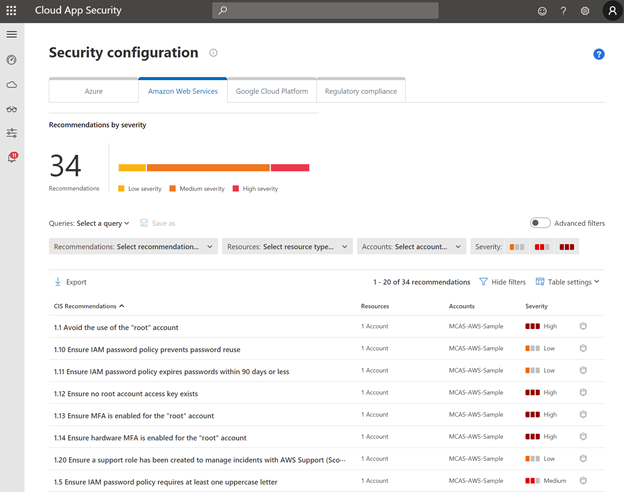
The filters in this page can be used to prioritize high severity recommendations, or specific AWS accounts in your environment. As an example, let’s review the first item from the list above.
One of the critical recommendations is to avoid the use of the “root” account in AWS. By clicking on the recommendation, Microsoft Cloud App Security automatically redirects you to the AWS portal, where you can take action.
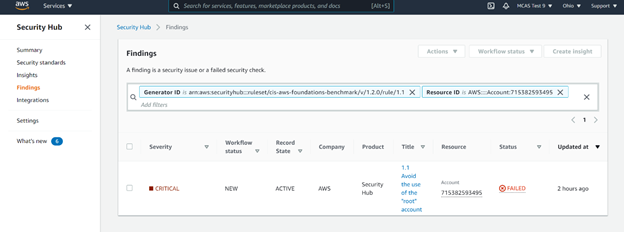
Note: not only will the security recommendation page show security configuration best practices for AWS, but also for Azure and Google Cloud Platform, should you use these. This will make Microsoft Cloud App Security your “one stop shop” to review your Cloud Platform Security Posture (CSPM).
Share your use case!
Now that you know all you need to get started with protecting AWS using Microsoft Cloud App Security, please share with us your thoughts and your use cases. We would love to hear your feedback on our AWS integration.
Blog by @Gershon Levitz , Idan Basre and @Yoann Mallet




![[RECAP] 24h Change Collaboration in Healthcare | Holographic Surgery Event](https://www.drware.com/wp-content/uploads/2021/02/large-971)
![[Alt text] Satya's tweet reads, "At a time when expanding access to healthcare has never been more important, it's fantastic to see how surgeons around the world are using mixed reality to transcend space, in order to collaborate with colleagues and improve patient care."](https://www.drware.com/wp-content/uploads/2021/02/large-972 "satya tweet on MR.JPG")


Recent Comments