by Contributed | Feb 25, 2021 | Technology
This article is contributed. See the original author and article here.
Hello! In today’s “Voice of the Partner” blog, Prakash Narayanamoorthy, Principal Microsoft Security Architect for Wipro, explains how his company transformed their identity and access management (IAM) offer while delivering an elevated level of governance and secure access across external identities. Prakash and his team streamlined external access and strengthened security for their customers—all with a new unified Microsoft solution: Azure Active Directory External Identities.
Streamlining IAM for today’s business
by Prakash Narayanamoorthy, Principal Microsoft Security Architect for Wipro
Wipro Limited is a leading global information technology, consulting, and business process services company. We harness the power of cognitive computing, hyper-automation, robotics, cloud, analytics, and emerging technologies to help our clients adapt to the digital world and make them successful. A company recognized globally for its comprehensive portfolio of services, strong commitment to sustainability, and good corporate citizenship, we have over 180,000 dedicated employees serving clients across six continents. With a staff of more than 8,000 security professionals, Wipro has been helping global customers transform their identity and access management (IAM) challenges for more than 20 years.
With most of our customers already in, or migrating to, single or multi-cloud environments, we want to enable them to connect securely from anywhere, and on any device. On-premises IAM solutions often aren’t scalable and can’t address the digital-transformation initiatives now embraced by organizations worldwide. We recognized that today’s evolving threat landscape demands a next-gen IAM solution to keep up with business and security requirements—and we wanted to provide that solution powered by Microsoft Identity.
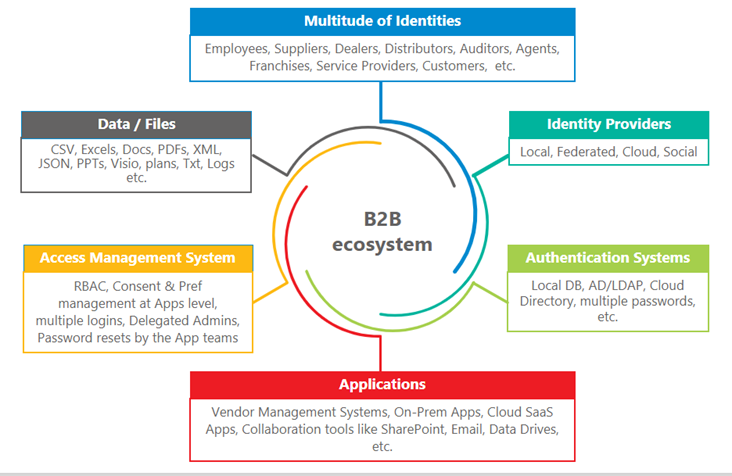
Figure 1: Today’s B2B ecosystem
A unified IAM solution
In my role as Principal Microsoft Security Architect, I own the Azure and Microsoft 365 security and compliance architecture and consulting charter, as well as go-to-market (GTM) strategies. As part of our Microsoft IAM offerings, we provide end-to-end solutions and services for our customers, who often are suffering from complex, inefficient onboarding and access-governance processes. In many cases, clients were leveraging existing IAM solutions with manual intervention. These legacy approaches don’t provide the agility and visibility across external identities that today’s organizations require.
My team was looking for a framework that would quickly adapt the Azure Active Directory (Azure AD) platform for servicing customers’ partner and guest-user identities in one solution. We wanted something that could provide seamless and secure access for our customers’ external users. In seeking to address their pain points—onboarding, access, identity governance, and secure collaboration—we found the perfect solution in Azure AD External Identities.
By leveraging Microsoft Graph APIs to automate Azure AD External Identities functionalities, we’re able to mitigate our customers’ key challenges around user registration and onboarding. Our application onboarding helps to onboard external-facing single sign-on (SSO) apps quickly and seamlessly.
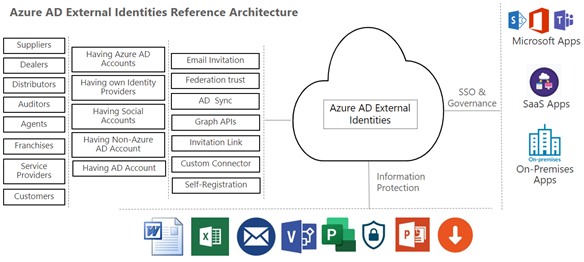
Figure 2: Azure AD External Identities architecture
The Azure AD External Identities difference
In our customers’ previous partner-user and guest-user identity ecosystem, there were multiple legacy SSO solutions used to grant access to applications. Some user identities were stored on-premises, posing potential security risks. Onboarding for external users was time consuming due to the complexity and costs of managing multiple disconnected identity systems. By unifying access with Azure AD External Identities, we’ve reduced complexity and increased agility for our customers—providing them with easy onboarding and secure access for all their external identities.
Wipro now provides an end-to-end solution for our customers’ IAM challenges. With Azure AD External Identities, we’re able to make the external application-onboarding process seamless. Even better, customers can allow guest users access to Microsoft Teams, and through Azure AD they can implement strict controls on how teams are named and classified, as well as who can create them, and whether guests can be added as team members—all with improved overall governance and security.
With Azure AD, we’ve seen a plethora of functionalities stand out as clear differentiators. For example: risk-based authorization via Azure AD Conditional Access, passwordless sign-in, self-service features, and easy options for onboarding external identities—along with strong identity governance through complete access packages and easy recertification. We work closely with the Microsoft engineering team, and we always get timely support to help solve our customers’ IAM challenges.
Real results
With the Azure AD External Identities approach, we’ve simplified and streamlined onboarding processes for our customers’ external users. There’s easy integration with network delivery controllers; meaning, on-premises apps are secured against external identities. Having Conditional Access with Azure AD Identity Protection helps minimize risks during sign-in and throughout the entire session. With the one-time password (OTP) sign-in feature, we’ve been able to avoid storing external users’ passwords, which improves security controls. Some benefits our customers have experienced include:
- Simplified on- and off-boarding processes
- Enabled seamless, secure access to enterprise applications
- Improved overall security, compliance and risk reduction
- Reduced effort required to onboard external-facing applications with SSO
- Created a centralized IAM platform for reduced costs
- Reduced external identity risks
- Improved customer experience through an intuitive UI/UX
- Reduced administrative overhead
Overall, Azure AD External Identities has enabled Wipro to provide our customers with a seamless, integrated security approach, improving their enterprise security and compliance posture in one solution. Even better, Azure AD External Identities is now free to organizations with at least 50K users.
Learn more
I hope Wipro’s account of adopting Azure AD External Identities to streamline IAM for their customers provides you with ideas for your organization. To learn more about our customers’ experiences, take a look at the other stories in the “Voice of the Partner” series.
Learn more about Microsoft identity:
by Contributed | Feb 25, 2021 | Technology
This article is contributed. See the original author and article here.
At Visio, we are constantly working on new features to enhance the Visio for the web experience. In this blog, we provide a step-by-step guide on how to design a flowchart leveraging some of the latest capabilities in Visio for the web. Learn how to create and coauthor professional-looking flowcharts for effective decision making and process execution.
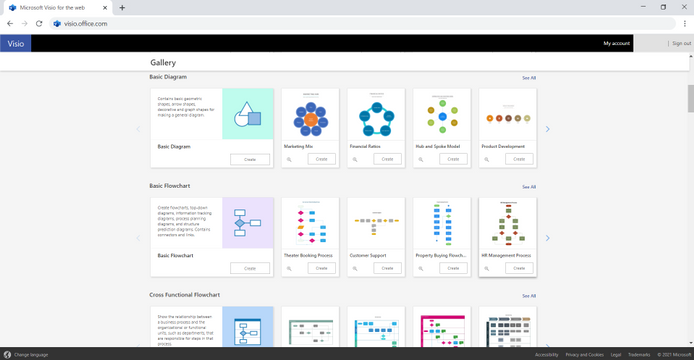
Let’s start with the home page—which, if you’re new to Visio, can be accessed at visio.office.com. Visio for the web provides a variety of flowchart and diagram templates so you can get started fast. Choose from a variety of templates for basic and cross-functional flowcharts and start creating your desired flowchart in a single click. It’s that simple!
Create data-driven diagrams directly in Excel
Alternatively, you can use the Visio Data Visualizer add-in to create your flowchart in Excel. To do this, create a new Excel spreadsheet or insert a new worksheet in an existing file and follow the steps below:
- Under the Insert tab, click on Get Add-ins.
- Search for “Visio Data Visualizer” and click on Add. Once you’ve completed this step, a dedicated button will appear in the Excel ribbon.
- Click on the dedicated button and select from any of the available basic or cross-functional flowchart samples to get started. created along with the underlying data presented in a tabular format in the Excel sheet.
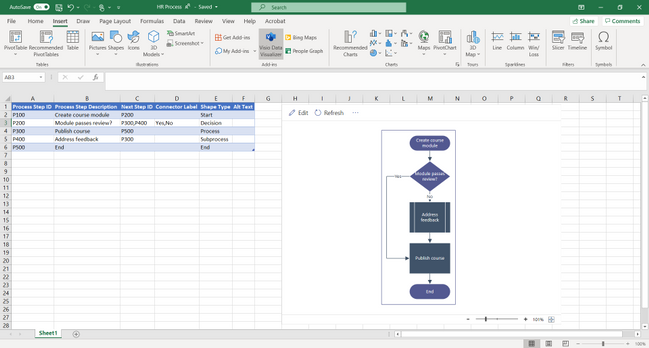
Update the data in the Excel table and click Refresh to see your changes reflected directly in the flowchart. If you have a Visio Plan 1 or Visio Plan 2 license, you can do even more with your flowchart—like add text, apply a design theme, or resize and reposition the shapes in your flowchart—using either Visio desktop or Visio for the web. If you don’t already have a license, we recommend Visio Plan 1 for basic diagram creation and editing and Visio Plan 2 if you need advanced features, like two-way sync and data graphics. You can compare plans to decide which option is best for you or try Visio Plan 2 free for 30 days.
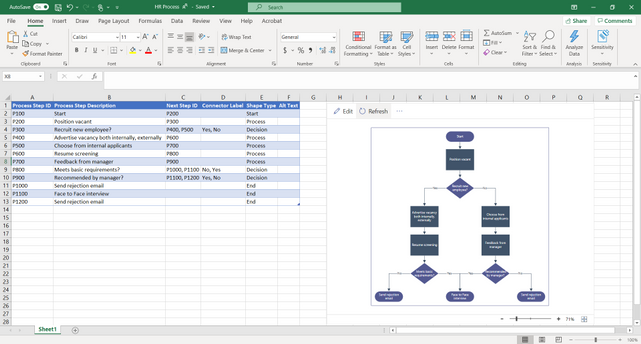
To edit your flowchart in Visio for the web, for example, click Edit in the add-in menu bar. Then, click on Design and select one of the available Themes from the drop-down. You can also choose from the various Theme Colors.
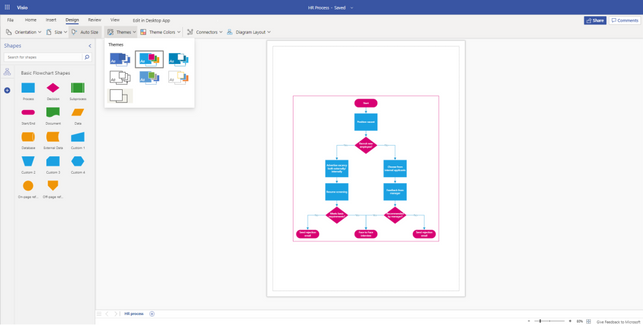
Insert pictures into your Visio diagram
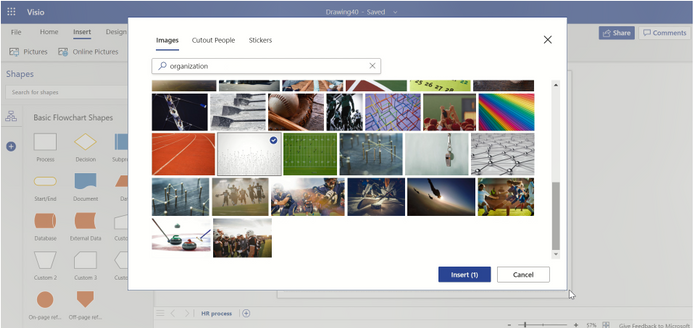
To further illustrate and personalize your flowchart, click on the recently added Stock Images option available from the Insert tab. Here, you can search through a variety of images. Select the image that is most appropriate for your flowchart and click Insert. The selected image can also be resized and reoriented to serve as a background for your flowchart.
Automatically resize the canvas to fit the shapes on the page
If you need to resize the canvas to fit your flowchart, click on the Size drop-down under the Design tab and select Fit to Drawing. The canvas will automatically resize to the outermost content borders, leaving some space for margins on all sides, but removing unnecessary blank space.
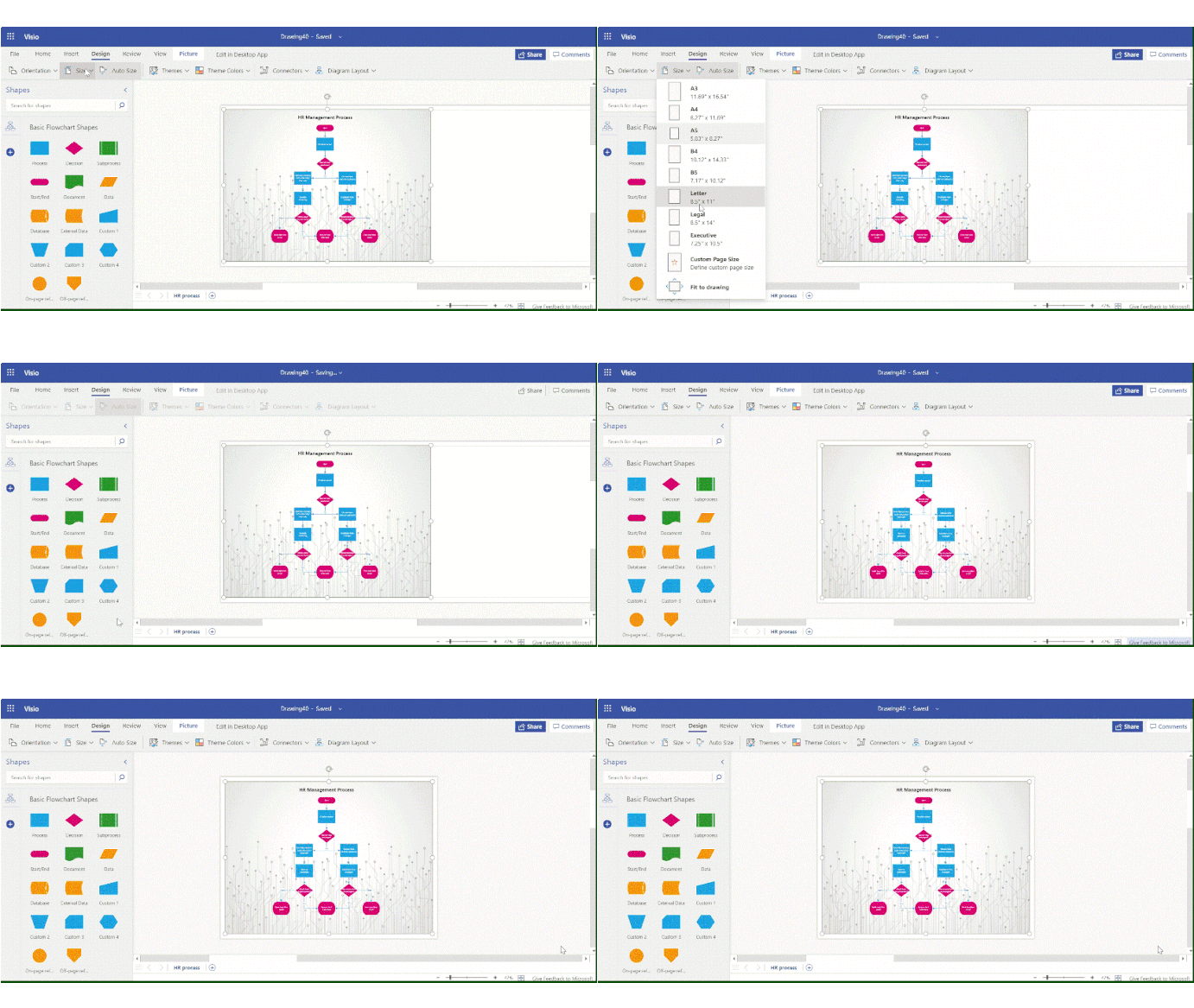
Need to embed your flowchart in a presentation or document?
Click File > Save As > Download as Image. Here, you can select the type of image file you want and desired resolution. Click on Download to save the image to your local machine and easily insert it into your files.
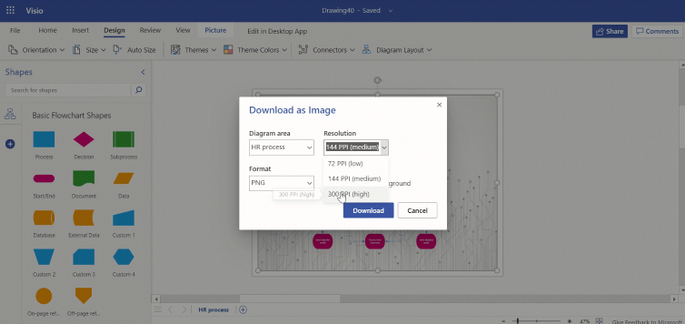
Share your diagram with others
Alternatively, you can share your Visio diagram as a link or via email by clicking the Share button in the top right corner. Choose from the various link settings to restrict the audience and allow/prohibit editing access to your file.
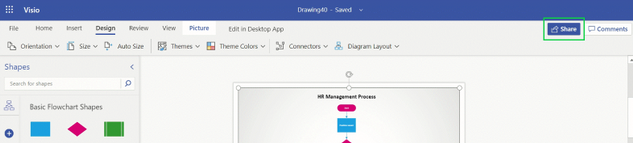
Keep visiting Tech Community and follow us on Twitter to stay current on the latest releases. We also hope you’ll submit ideas for features through our UserVoice site. Lastly, if you have specific questions or comments about any of the abovementioned capabilities, please send a note to tellvisio@microsoft.com.

by Contributed | Feb 25, 2021 | Technology
This article is contributed. See the original author and article here.
We continue to expand the Azure Marketplace ecosystem. For this volume, 85 new offers successfully met the onboarding criteria and went live. See details of the new offers below:
|
Applications
|
|
16-Bit Legacy Applications in Azure: APPtechnology’s Microsoft Azure-hosted or local containerization solution allows legacy applications with compatibility issues to be deployed to users on 64-bit Windows 10 devices. Migrate all your users to Windows 10 while retaining the secure use of existing business apps.
|
 |
ANSYS Cloud: The Ansys Cloud service offers on-demand computing resources optimized for Ansys simulation applications running in a secure cloud environment hosted on Microsoft Azure. Run full-featured Ansys applications on cloud-based workstations accessible via a web browser.
|
 |
Apache Web Server with CentOS 7.9: Cognosys offers this pre-configured image of Apache HTTP Server 2.4.6 with CentOS 7.9. Launched in 1995, Apache HTTP Server is an open-source, cross-platform web server.
|
 |
Apache Web Server with Red Hat 8: Cognosys offers this pre-configured image of Apache HTTP Server 2.4.37 with Red Hat 8.2. Launched in 1995, Apache HTTP Server is an open-source, cross-platform web server.
|
 |
Appointment Management System: PetalMD’s solution digitizes the planning of medical resources and captures patient demand by connecting to your appointment scheduling platforms. The solution helps reduce waiting periods, increase patient satisfaction, and standardize data access and performance.
|
 |
Armorblox Email Protection: Powered by natural-language understanding, Armorblox is an API-based cloud office security platform that helps protect Microsoft 365 and Exchange users from targeted phishing attacks and sensitive data loss over email.
|
 |
astorTime Basic (Temperature and Attendance): astorTime Basic provides a workforce attendance and temperature management system using an integrated handheld device, making it suitable for mobile use in outdoor environments.
|
 |
BlockAPT SOAR Platform: The BlockAPT SOAR platform combines threat intelligence, endpoint security, vulnerability management, device monitoring, and incident response management in one platform to help businesses significantly decrease cybersecurity risks.
|
 |
Bosch Connected Building Services: Bosch Connected Building Services connect equipment and building infrastructure, convert data into a uniform format, and create a digital map of the facility that serves to help you assess its current and historic condition.
|
 |
Builder Studio: Powered by Microsoft Azure, the Builder Studio platform industrializes software development using Lego-like reusable features, an AI-powered assembly line, and a curated network of experts to customize the reusable features.
|
 |
cCloud ai: The cPacket cCloud Visibility Suite provides a range of packet-data-based services to deliver always-on network intelligence for your Microsoft Azure environment. Features include filtering, traffic aggregation, and load balancing.
|
 |
CentOS 7.9: Cloud Maven Solutions offers this pre-configured, ready-to-use image of CentOS 7.9. CentOS is a popular operating system running in hosted environments, and CentOS 7.9 includes major changes that pertain to booting up and managing the system.
|
 |
CentOS 7.9 (Free): Cloud Maven Solutions offers this free, pre-configured, and ready-to-use image of CentOS 7.9. CentOS is a popular operating system running in hosted environments, and CentOS 7.9 includes major changes that pertain to booting up and managing the system.
|
 |
CentOS 7.9 (Free): Cognosys offers this free pre-configured image of CentOS Linux release 7.9 on Microsoft Azure. CentOS 7.9 is a popular operating system running in hosted cloud environments.
|
 |
CentOS 8.3: ProComputers.com offers this Minimal CentOS 8.3 image with an auto-extending root file system and cloud-init included. CentOS 8.3 is mainly used as a common base system on top of which other appliances can be built and tested. This image comes with Security-Enhanced Linux enabled.
|
 |
CentOS Stream: ProComputers.com offers this Minimal CentOS 8 Stream image with an auto-extending root file system and cloud-init included. CentOS Stream is an upstream development platform that enables you to quickly and easily see what’s coming next in Red Hat Enterprise Linux.
|
 |
Cerri Enterprise project and task Platform: Crafted to meet global enterprise needs ranging from simple to complex project collaboration functionality, Cerri’s platform of interconnected apps helps you meet the demands of today’s enterprises and the challenges of project management and team collaboration.
|
 |
Denodo Platform 8.0 (Annual): Denodo provides real-time integrated views combining all your Microsoft Azure data and SaaS and on-premises databases and applications. Quickly create a logical data warehouse combining cloud and on-premises databases, data lakes, and applications.
|
 |
DocHawk: DockHawk for Microsoft Teams enables you to quickly associate employees with the certifications that apply to them. Manage expiration intervals and send email reminders to employees detailing upcoming or expired certifications.
|
 |
Docker CE with CentOS 7.9: Cognosys offers this pre-configured image of Docker Community Edition with CentOS 7.9. Docker CE is ideal for developers and small teams looking to get started with Docker and experimenting with container-based apps.
|
 |
Dragon Professional Anywhere: Nuance Dragon Professional Anywhere delivers cloud-hosted speech recognition for the enterprise and public sector, empowering busy professionals to use their voices naturally to create detailed, accurate documentation.
|
 |
Earth Knowledge Insight Services: Earth Knowledge Insight Services give context and insight to business decision-making, looking far beyond climate change alone. The solution incorporates more than 140 Global Climate Indicators to help you isolate and mitigate key risk factors.
|
 |
EcoStruxure Facility Expert: EcoStruxure Facility Expert is IoT-based software that delivers operational and energy efficiency while ensuring business continuity and occupants’ comfort in individual facilities or across a portfolio of buildings.
|
 |
EcoStruxure Traceability Advisor: EcoStruxure Traceability Advisor provides end-to-end traceability and transparency across the supply chain for the consumer packaged goods market. Gain full visibility into your supply chain by capturing and analyzing history, location, and supplier data from different sources.
|
 |
Haproxy With CentOS 7.9: Cognosys offers this pre-configured image of Haproxy with CentOS 7.9. Haproxy is open-source software that provides a high availability load balancer and proxy server for TCP-based and HTTP-based applications, spreading requests across multiple servers.
|
 |
Haproxy With Red Hat 8: Cognosys offers this pre-configured image of Haproxy with Red Hat 8. Haproxy is open-source software that provides a high availability load balancer and proxy server for TCP-based and HTTP-based applications, spreading requests across multiple servers.
|
 |
Infinigent HCM: Available as a SaaS, hosted, or on-premises solution, Infinigent Software Solutions’ enterprise-ready human capital management (HCM) platform covers all your workforce management processes, including resourcing, time and attendance, payroll, benefits, and performance management.
|
 |
Infosys Cloud Infrastructure Validation: The Infosys Cloud Infrastructure Validation (ICIV) platform helps conduct Microsoft Azure cloud-readiness and non-functional validation for an Azure cloud platform using open-source technology and pre-configured templates.
|
 |
InMate Needs Assessment System: Built using Microsoft Dynamics 365 and the Microsoft Power Platform, InMate Needs Assessment System helps evaluate substance abuse, mental illness, and other assessment processes among prison inmates, then determines the appropriate welfare programs.
|
 |
Intelligent Text Extractor: A computer-vision-based OCR solution, Intelligent Text Extractor provides accurate text extraction on printed, hand-printed, and handwritten text. It supports multiple languages, auto-classification of unfamiliar document templates, and validation for text types and formats.
|
 |
Intelligent Trade Promotion Optimization: Pactera Technologies’ enterprise-scale, AI-powered Intelligent Trade Promotion Management Platform helps you design accurate, automated trade promotion plans with a high ROI. Predict sales along with the effects of cannibalization, customer switching, stockpiling, and more.
|
 |
Investigative Case Management: Based on Microsoft Dynamics 365 and the Microsoft Power Platform, MERP Systems’ Investigative Case Management system addresses digging and fire-related incidents. Facilitate time-based reporting and the efficient management of complaints from receipt to resolution.
|
 |
InvestSuite – Investtech-as-a-Service: InvestSuite is a B2B SaaS solution that helps banks, brokers, wealth managers, pension funds, and other financial institutions serve their clients better via InvestSuite’s Robo Advisor, StoryTeller, Self Investor, and Portfolio Optimizer modules.
|
 |
Jenkins with CentOS 7.9: Cognosys offers this pre-configured image of Jenkins with CentOS 7.9. Jenkins is an open-source tool written in Java that provides continuous integration services for software development.
|
 |
Jenkins with Red Hat 8: Cognosys offers this pre-configured image of Jenkins 2.249.2 with Red Hat 8.2. Jenkins is an open-source tool written in Java that provides continuous integration services for software development.
|
 |
JKIT Smart Factory (MVP1): John Keells Information Technology (JKIT) Smart Factory (MVP1) is an IoT-enabled asset and environment monitoring platform that can be used across many industry verticals. Get live updates on a wide spectrum of measurements and notify responsible parties to act accordingly.
|
 |
JKIT Smart Office (MVP1): John Keells Information Technology (JKIT) Smart Office (MVP1) is a mobile app designed to enhance employee workflows and processes. Built on Microsoft Azure, it enables anyone with “requestor” access to create and submit various types of requests.
|
 |
JKIT Smart Retail (MVP1): Smart Retail (MVP1) is a multifaceted mobile app designed to enhance customer experience. From purchase frequencies to brand preferences, Smart Retail captures a range of critical insights to help you deliver personalized shopping experiences.
|
 |
LAMP with CentOS 7.9 MariaDB 10: Cognosys offers this ready-to-run LAMP stack on CentOS 7.9 with MariaDB 10.5.8. LAMP is an archetypal model of web service solution stacks, named as an acronym of its original components: Linux OS, Apache HTTP Server, MySQL RDBMS, and the PHP programming language.
|
 |
LAMP with Red Hat 8: Cognosys offers this ready-to-run LAMP stack on Red Hat 8.3 with MariaDB 10.3.27. LAMP is an archetypal model of web service solution stacks, named as an acronym of its original components: Linux OS, Apache HTTP Server, MySQL RDBMS, and the PHP programming language.
|
 |
Learning-Teaching-Evaluation-Monitoring Ecosystem: Secure Learning’s integrated platform for blended teaching, personalized learning, and assessment includes a web interface for administration, a teacher enablement app, the @Home Learner app, and more to drive the digital transformation of K-12 education.
|
 |
LMS powered by Moodle with CentOS 7.9: This pre-configured image from Cognosys contains LMS powered by Moodle 3.9.1 with CentOS 7.9. LMS powered by Moodle is used for blended learning, distance education, flipped classroom, and other e-learning projects to help educators and trainers achieve learning goals.
|
 |
Logicalis – Eugenio: Serving as a bridge between IoT data and your business layer from device to the cloud, the EUGENIO IoT platform helps developers create IoT solutions based on a secure, reliable, and scalable end-to-end infrastructure.
|
 |
Managed Azure Sentinel through Tiberium CDC: Powered by Azure Sentinel, the Tiberium Cyber Defence Centre is a managed service that delivers cloud-native cyber detection and response outcomes for organizations looking to measurably improve their cybersecurity posture.
|
 |
MariaDB 10 with CentOS 7.9: Cognosys offers this pre-configured image of MariaDB 10.5.8 with CentOS 7.9. MariaDB Server is a popular open-source relational database created by the original developers of MySQL.
|
 |
MariaDB 10 with Red Hat 8: Cognosys offers this pre-configured image of MariaDB 10.3.17 with Red Hat 8. MariaDB Server is a popular open-source relational database created by the original developers of MySQL.
|
 |
Meat Value Chain Optimization with AI: With its disruptive AI technology, Völur provides the meat industry new real-time insights, production plans, what-if simulations, and recommendations on the most optimal cutting and processing solutions. Make your business more sustainable and more profitable with Völur.
|
 |
myData Connector: Available only in Greek, Data Communication’s myData Connector is a SaaS solution and middleware tool between your organization’s enterprise resource planning system and the myData platform.
|
 |
MySQL 5.7 with CentOS 7.9: Cognosys offers this pre-configured image of MySQL 5.7.32 with CentOS 7.9. MySQL is a popular open-source relational SQL database management system for developing web-based software applications.
|
 |
Nginx With CentOS 7.9: Cognosys offers this pre-configured image of Nginx 1.16.1 with CentOS 7.9. NGINX is an all-in-one API gateway, cache, load balancer, web application firewall (WAF), and web server.
|
 |
Nuance CDE One: Nuance CDE One enables clinical documentation improvement teams to engage collaboratively with physicians, resulting in better-quality documentation that is more reflective of each patient’s acuity and level of care.
|
 |
Nuance Patient Engagement: Designed to deliver better patient experiences with AI‑powered, omni‑channel technology, Nuance Patient Engagement brings world-class consumer engagement to healthcare and advances the quality of service that organizations deliver across the patient journey.
|
 |
PeterConnects Receptionist: PeterConnects Receptionist is a comprehensive telephone operator’s console for Microsoft Teams, providing a range of smart features for fast and easy call handling and efficient call distribution for organizations of all sizes.
|
 |
Photone4: Preparing Your Workplace for COVID-19: Photone4 is a temperature, social distancing, and personal protective equipment (PPE) detection solution powered by AI. It provides detailed insights through real-time alerts and reports, enabling faster decisions and helping you comply with OSHA regulations in the workplace.
|
 |
Production Quality Dashboard for Manufacturing: This Power BI dashboard enables manufacturing companies to leverage analytics and data visualization tools to make smart predictions, optimize product mix, reduce cycle times, and improve quality.
|
 |
Questback Leadership: Future-proof your company by developing your greatest assets — your leaders — with Questback Leadership, a next-generation leadership development solution powered by Microsoft Azure.
|
 |
SchoolWise for Microsoft Teams: SchoolWise for Microsoft Teams combines assessment, academic tracking, learner support, and curriculum planning into one place in Teams. Gain full visibility into teaching and learning to improve student learning outcomes in your school.
|
 |
Sitecore Content Hub: Sitecore Content Hub is a unified, highly configurable SaaS solution for planning, organizing, and distributing sales and marketing content across your internal organization and external marketing channels.
|
 |
Smartface Enterprise App Store: The Smartface Enterprise App Store module provides an in-house, enterprise-specific app store with a customizable mobile storefront to provide access to your business’s apps.
|
 |
SmartMessage Marketing and Digital Communication: SmartMessage is an enterprise-ready, omnichannel marketing communication platform that covers a comprehensive set of solutions, including features that support the creation, automation, execution, and reporting of email, SMS, push, and social media campaigns.
|
 |
SmartTAP 360° Live: AudioCodes SmartTAP 360° Live is an enterprise compliance recording solution for Microsoft Teams. Record all online voice, video, and IM interactions for AI-powered analysis and to meet regulatory compliance requirements.
|
 |
Synergies: Synergies’ banking platform connects legacy systems to new technology, enabling organizations to leverage core technologies, access an open banking ecosystem, integrate systems, and rapidly develop products to open new revenue streams.
|
 |
The Programmatic Platform: The Programmatic Platform provides marketers with a comprehensive management toolkit to design, optimize, and deliver campaigns via a step-by-step process, including an interactive brief, dynamic media planning, automated pilot setup, and a real-time reporting dashboard.
|
 |
Thycotic Privilege Manager: Thycotic Privilege Manager simplifies the implementation of a comprehensive endpoint privilege management strategy that includes a principle of least privilege (PoLP) security posture and application control. Mitigate security threats without disrupting business users and IT teams.
|
 |
TomTom Traffic Stats: TomTom Traffic Stats provides historical road traffic speeds and travel times in more than 75 countries, delivering average and median speeds, speed limits, street names, and road class, along with sample sizes for confidence in results.
|
Consulting services
|
 |
10-Week CAF Ready Assessment: Designed to accelerate your journey to Microsoft Azure, Alithya’s Cloud Adoption Framework (CAF) Ready Assessment includes an Azure setup guide with recommendations for your cloud resources and a best-practices presentation.
|
 |
Application Modernization Advisory 4-Week Assessment: SoftwareONE’s Application Modernization Advisory helps you define and design an ideal approach to modernize your applications using Microsoft Azure services. Benefit from simple cost management, extended functions, and faster provisioning of your applications.
|
 |
Azure Analytics Workshop: 4-Hour Workshop: DataArt’s Microsoft Azure data experts will provide a comprehensive understanding of end-to-end analytics (from data collection to BI and forecasting), how to use Azure Synapse Analytics, and the benefits of implementing an analytics culture in your organization.
|
 |
Cloud Services for Azure – Lighthouse: Fujitsu’s Cloud Services for Azure is an end-to-end service that delivers digital transformation to Microsoft Azure. With Azure Lighthouse, you maintain control over tenant access while enabling Fujitsu to deliver a holistic managed service.
|
 |
CLOUDETEERs Golden Tenant Setup and Management: Each compliant Microsoft Azure Active Directory tenant setup and managed by CLOUDETEER includes compliance and deployment pipelines, in-depth dashboards, an open-source monitoring stack, a private Git repository where tenant configurations are stored as code, and more.
|
 |
Data and Infrastructure Migration: 3-Week Assessment: In this three-week assessment, Waterleaf Digital will help you optimize your current application and server workloads while providing insights on the business and technology benefits of moving additional workloads to Microsoft Azure.
|
 |
Data Driven Company Assessment – 4 Weeks: Sopra Steria Norway will help you establish a data strategy and roadmap to facilitate data-driven decision-making in your organization. Take the first step toward becoming a data-driven company and learn how artificial intelligence can deliver business benefits.
|
 |
GOTOP LabService: Microsoft Azure Lab Services enable instructors to quickly set up labs for classroom use and specify the number and type of VMs required. Available in Traditional Chinese, GOTOP Information’s service provides technical assistance to help you set up Azure Lab Services. |
 |
Install SAP1 on Azure: 4-Week implementation: Looking to install SAP Business One on Microsoft Azure for your organization? OfficeTechHub’s four-week implementation includes a full installation on Azure, backup and disaster recovery configuration, and more.
|
 |
IoT-Automated-Pack-Training Workshop: 9 Hours: Available only in Traditional Chinese, Weblink International’s IoT workshop helps educators understand IoT architecture, recognize different sensor signals, and use Microsoft Power Automate to transfer IoT data to Azure SQL Database for in-depth Power BI reports.
|
 |
MOQdigital Managed Sentinel: MOQdigital provides a managed security service using Microsoft Azure Sentinel. MOQdigital can help set up Azure Sentinel in your organization’s environment, including offering Azure Sentinel as a service for ongoing incident management, response, and investigation. |
 |
NLP (AI) in Action: 2-Week Proof of Concept: Ilitia Technologies will deliver a proof of concept that solves your business use case by applying artificial intelligence/natural language processing services on Microsoft Azure. This offer is available only in Spanish.
|
 |
NNIT Managed Foundation Services: Using Microsoft Azure Lighthouse, NNIT will maintain, monitor, and advise on your Azure workloads. Benefit from a platform that scales automatically, keeps administrative overhead to a minimum, and facilitates the healthy operation of your workloads. |
 |
One-Day AI Assessment by Cognitive Machines: Developing cognitive products leveraging recent advancements in AI can be daunting. In this free assessment, Cognitive Machines’ Microsoft-certified data scientists will identify AI-driven data transformation opportunities and define an implementation plan for your business.
|
 |
POC – Windows Virtual Desktop (5 Days): In this proof of concept, Inetum will implement a Windows Virtual Desktop environment enabling you to validate its ability to meet your business needs, such as telecommuting or app consumption that requires 3D graphics rendering. This offer is available only in French.
|
 |
Smart Cloud Infrastructure: 10-Week Implementation: No matter what stage your organization’s data strategy is in, MostWare’s smart cloud infrastructure implementation helps you achieve your data goals and realize optimal data maturity. This offer is available only in Dutch.
|
 |
Synapse Analytics One-Day Proof of Concept: Microsoft Azure Synapse Analytics provides a variety of tools that work well together under one interface. Available only in German, this proof of concept from Ceteris will help you implement data-gathering concepts aligned with the practical abilities of Azure Synapse Analytics.
|
 |
Virtual Desktop as a Service: MITIBI will provide fast deployment and configuration of Windows Virtual Desktop for your organization. Give your employees the freedom to work from anywhere with familiar tools and 24/7 technical and consulting support. |
 |
Windows Virtual Desktop: 2-Hour Briefing: Bridgeall offers this free two-hour briefing to help you understand how implementing Windows Virtual Desktop can benefit your organization. Deliverables include an implementation outline and clearly defined next steps.
|
 |
Windows Virtual Desktop: 2-Week Implementation: Team Venti will collaborate with you to understand your objectives, requirements, and desired outcomes, then deliver a Windows Virtual Desktop experience with built-in, intelligent security to enable your business to scale based on your needs.
|
|
by Contributed | Feb 25, 2021 | Technology
This article is contributed. See the original author and article here.
In a blog post earlier this year, I talked about how we’re taking Azure certifications for data and AI to the next level. As part of that process, we’ve got great news for AI engineers. Exam AI-102: Designing and Implementing a Microsoft Azure AI Solution (beta) is here! It replaces Exam AI-100 (retiring on June 30, 2021). Exam AI-102 (beta) is the only exam required to earn an Azure AI Engineer Associate certification.
Decide whether this the right certification for you
As an Azure AI engineer, you build, manage, and deploy AI solutions that leverage Azure Cognitive Services, Azure Cognitive Search, and Microsoft Bot Framework. And you participate in all phases of AI solutions development—from requirements definition and design to development, deployment, maintenance, performance tuning, and monitoring.
Your colleagues include solution architects, and you use your skills to translate their vision. You also work with data scientists, data engineers, IoT specialists, and AI developers to build complete end-to-end AI solutions. You’re proficient in C#, Python, or JavaScript. Plus, you can use REST-based APIs and SDKs to build computer vision, natural language processing, knowledge mining, and conversational AI solutions on Azure?
Does this describe your workday? If so, this certification—and the new beta exam—is for you!
Prove your skills now
Take advantage of the limited-time discounted beta exam offer. The first 300 people who take Exam AI-102 (beta) on or before March 24, 2021, can get 80 percent off market price!
To receive the discount, when you register for the exam and are prompted for payment, use code AI-102WINDSOR. This is not a private access code. The seats are offered on a first-come, first-served basis. As noted, you must take the exam on or before March 24, 2021. Please note that this beta exam is not available in Turkey, Pakistan, India, or China.
Get ready to take Exam AI-102 (beta):
Do you have questions? I’ve got answers
What will happen to Exam AI-100? This exam retires on June 30, 2021. If you’ve already started preparing, you still have time to take it before that date.
If you’re just beginning your exam prep, consider taking the new Exam AI-102 (beta) instead. To compare versions, check out the skills outlines.
I already earned my Azure AI Engineer Associate certification. Can I renew it by passing the new Exam AI-102 (beta)? No. Starting in March 2021, to renew your certification, you need to pass a renewal assessment on Microsoft Learn. For more information, see Stay current with in-demand skills through free certification renewals and our FAQs, Renew your Microsoft Certification.
Can I take this exam online? Yes. Online delivered exams—taken from your home or office—can be less hassle, less stress, and even less worry than traveling to a test center—especially if you’re adequately prepared for what to expect. To find out more, check out my blog post Online proctored exams: What to expect and how to prepare.
When will I get my exam results? The rescore process starts on the day an exam goes live, and final scores for beta exams are released approximately 10 days after that. For details on the timing of beta exam rescoring and results, read my post, Creating high-quality exams: The path from beta to live. For more information, follow me on Twitter (@libertymunson).
Ready to get started?
Remember, the number of spots is limited to the first 300 candidates taking Exam AI-102 (beta) on or before March 24, 2021.
Pass Exam AI-102 (beta), earn your certification, and prove you have the engineering skills required to build, manage, and deploy AI solutions on Azure.
Related announcements
Level up with Microsoft Certified: Azure AI Engineer Associate
Azure data engineers: Exam DP-203 (beta) now available
Understanding Microsoft Azure certifications
Finding the right Microsoft Azure certification for you
by Contributed | Feb 25, 2021 | Technology
This article is contributed. See the original author and article here.
Final Update: Thursday, 25 February 2021 14:23 UTC
We’ve confirmed that all systems are back to normal with no customer impact as of 02/25, 01:22 UTC. Our logs show the incident started on 02/25, 01:55 UTC and that during the 30 minutes that it took to resolve the issue some customers may have experienced intermittent data gaps and incorrect alert activation in East US region.
- Root Cause: The failure was due to issue in one of our dependent service.
- Incident Timeline: 30 minutes – 02/25, 01:22 UTC through 02/25, 01:55 UTC
We understand that customers rely on Application Insights as a critical service and apologize for any impact this incident caused.
-Harshita
by Contributed | Feb 25, 2021 | Technology
This article is contributed. See the original author and article here.
Initial Update: Thursday, 25 February 2021 12:47 UTC
We are aware of issues within Application Insights and are actively investigating. Some customers may experience intermittent data gaps and incorrect alert activation in Canada Central region.
- Work Around: None.
- Next Update: Before 02/25 17:00 UTC
We are working hard to resolve this issue and apologize for any inconvenience.
-Vamshi

by Scott Muniz | Feb 25, 2021 | Security, Technology
This article is contributed. See the original author and article here.
Official websites use .gov
A .gov website belongs to an official government organization in the United States.

Secure .gov websites use HTTPS A
lock ( )
) or
https:// means you’ve safely connected to the .gov website. Share sensitive information only on official, secure websites.
by Contributed | Feb 25, 2021 | Technology
This article is contributed. See the original author and article here.
This guide describes how to build near real time Power BI reports leveraging Synapse Link and SQL On-Demand. The intent is to demonstrate the simplicity of using these technologies.
Now let’s start!
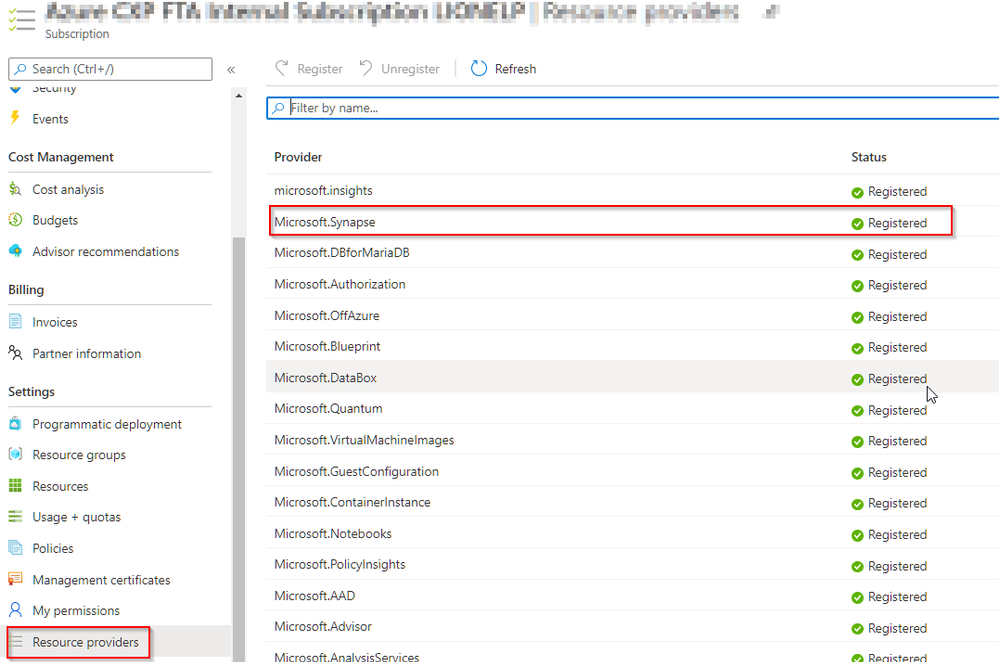
Ensure you have the new Synapse Workspace enabled in your subscription:
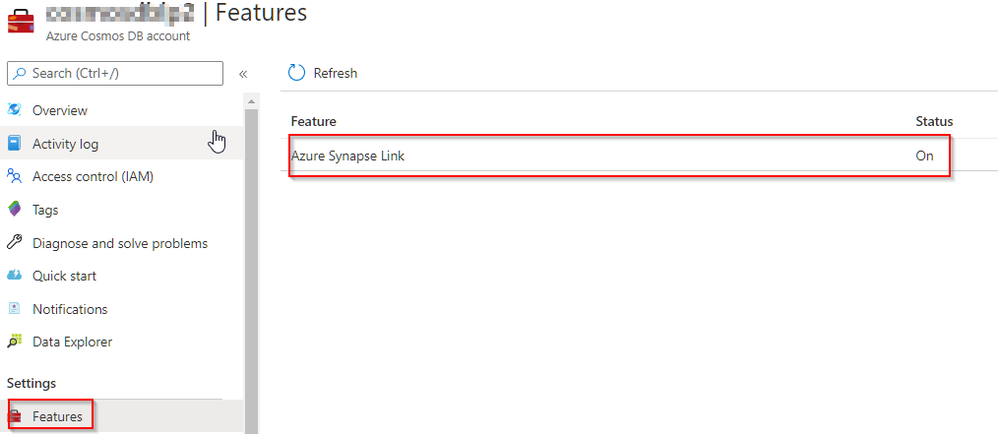
Ensure you have Synapse Link enabled at your Cosmos DB account
Create your Database and container, verify the container has the Analytical Store enabled
As a prerequisite you need to ensure you are running Cosmos DB Python SDK v4.1.0 by executing the code below in a notebook:
import azure.cosmos as cosmos
print (cosmos.__version__)
Result should be 4.1.0, if it’s below then run this command in a new cell:
pip install --force-reinstall azure-cosmos
You’ll then need to open a new notebook to get the new version taken into account and run the following code:
import azure.cosmos
from azure.cosmos.partition_key import PartitionKey

database = cosmos_client.create_database_if_not_exists('RetailDemo')
print('Database RetailDemo created')

container = database.create_container_if_not_exists(id='WebsiteData', partition_key=PartitionKey(path='/CartID'),analytical_storage_ttl=-1)


print('Container WebsiteData created')
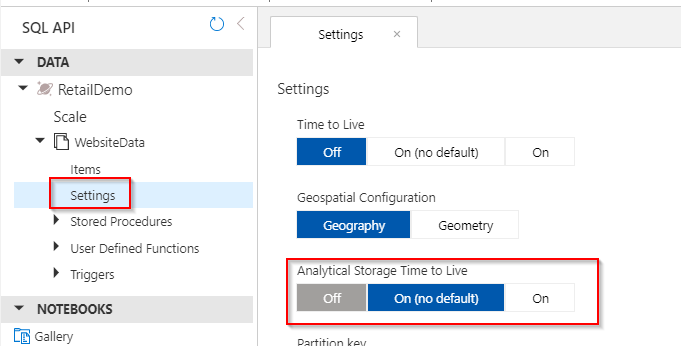
Note that you have created in the database RetailDemo a container named WebsiteData partitioned on CartID and you enabled the Analytical Store with the the parameter “analytical_storage_ttl=-1”
Once the container is created you can check the Analytical Store is enabled by default:
Then let start to load a small sample of data, for this you just need to create a new notebook in your Cosmos DB Data Explorer as follow:
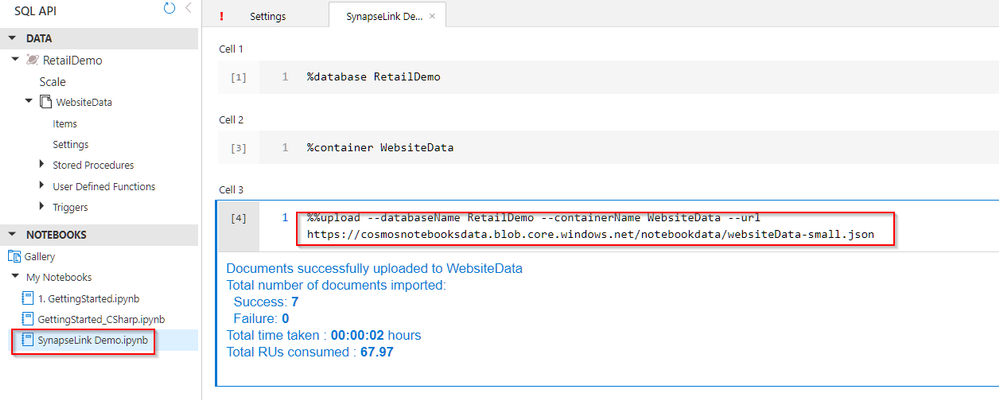
Code to run in your notebook:
%%upload --databaseName RetailDemo --containerName WebsiteData --url https://cosmosnotebooksdata.blob.core.windows.net/notebookdata/websiteData-small.json
Here is how the data look like now:
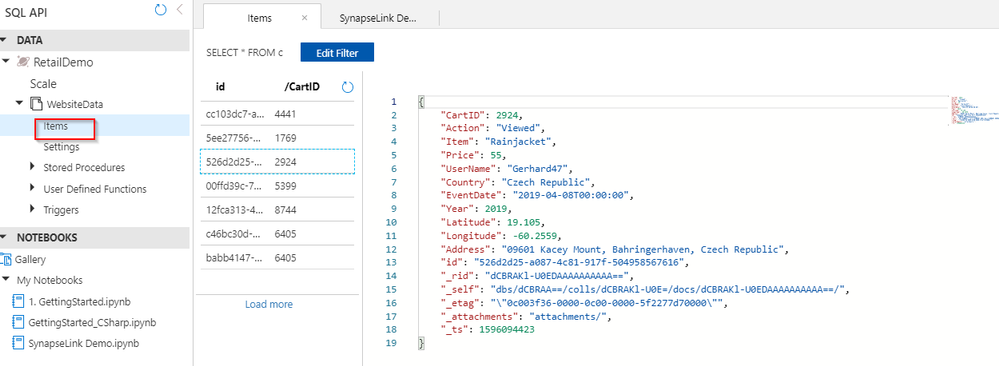
Once this first step is complete you have a container with a few items and an Analytical Store on it.
Next Step is to go to Synapse Workspace and from there to Synapse Studio, create a SQL On Demand Database and test querying the Cosmos DB Analytical Store from there.
You can either use an existing Synapse Workspace or create a new one and launch Synapse Studio directly on your Workspace.
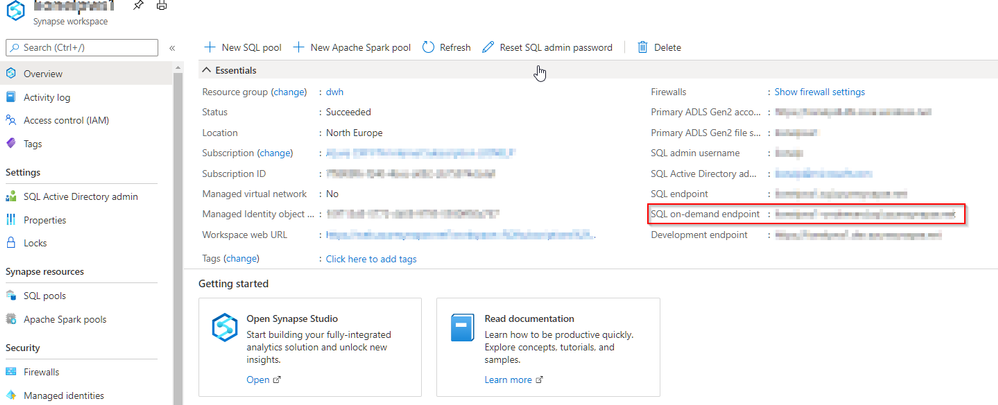
To discover how to create a SQL On-Demand Database and start learning how it works simply use this link:
https://docs.microsoft.com/en-us/azure/synapse-analytics/quickstart-sql-on-demand
Now you can create a view in the On-Demand Database with the following syntax:
Click on the Develop icon on the left side to access the SQL script and Notebooks, click on the ‘+’ sign to get a new SQL script then connected to the SQL On-Demand engine and ‘myondemanddb’ database.
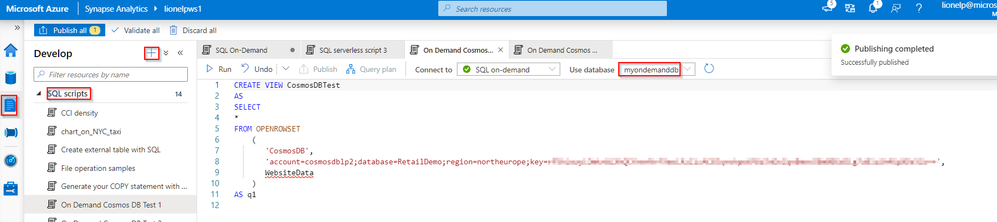
Code to run in your SQL script:
CREATE VIEW CosmosDBTest
AS
SELECT
*
FROM OPENROWSET
    (

     'CosmosDB',
       'account=cosmosdblp2;database=RetailDemo;region=northeurope;key=your_key',
       WebsiteData
    )

AS q1
In my my current example region is northeurope.
Once the view is created, you can run simplistic queries such as the ones below and get the results from the CosmosDB container WebsiteData:
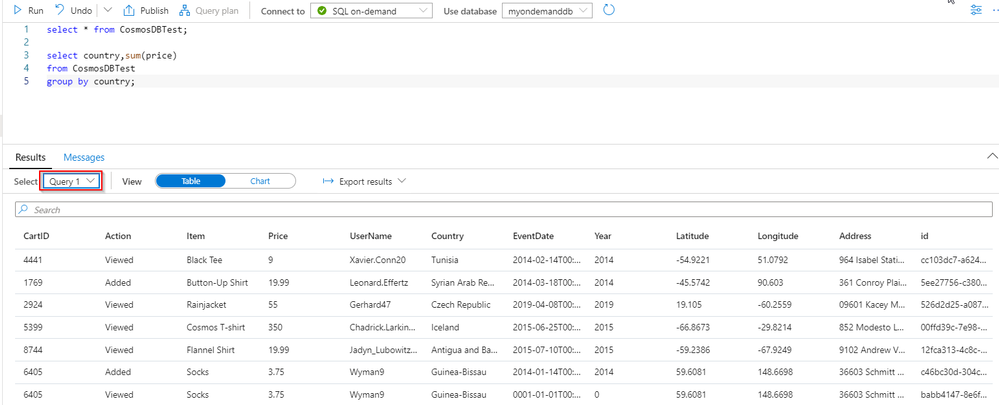
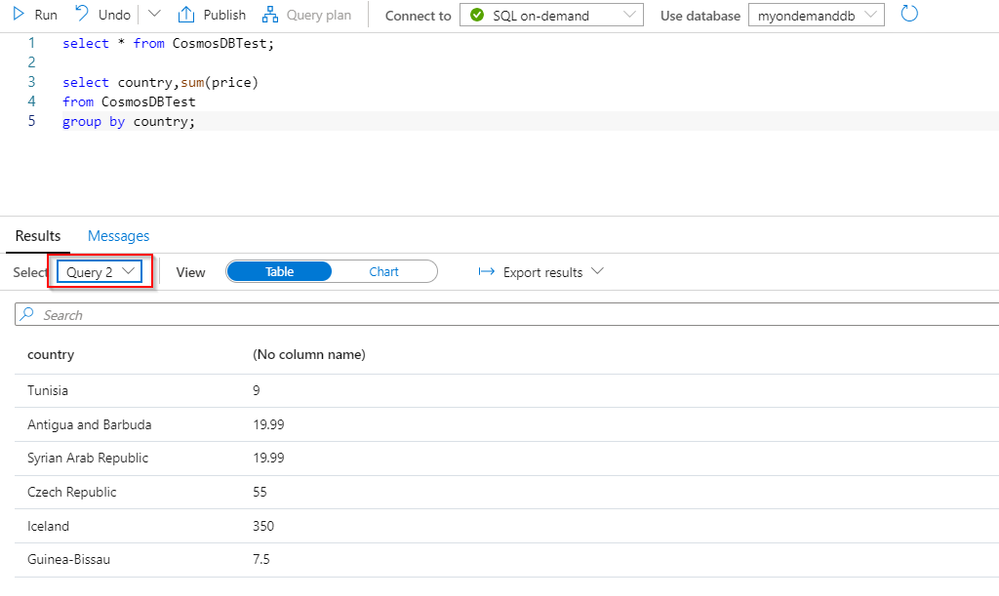
Code to run in your SQL script:
select * from CosmosDBTest;

select country,sum(price)
from CosmosDBTest

group by country;
Note that Synapse Link take care of the JSON document flattening into a table format for you.
Now that the general mechanism is now in place so you are ready to build a Power BI report on top of this. In case you don’t have PBI Desktop already you can get it from there:
https://www.microsoft.com/en-us/download/details.aspx?id=58494
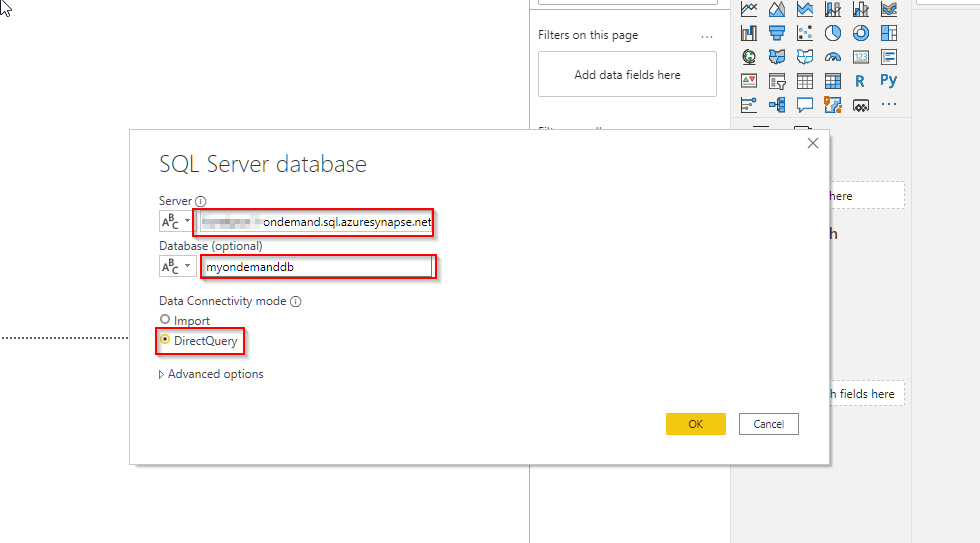
Start PBI Desktop and select the Azure SQL Database source and put the SQL On-Demand endpoint as the server name:
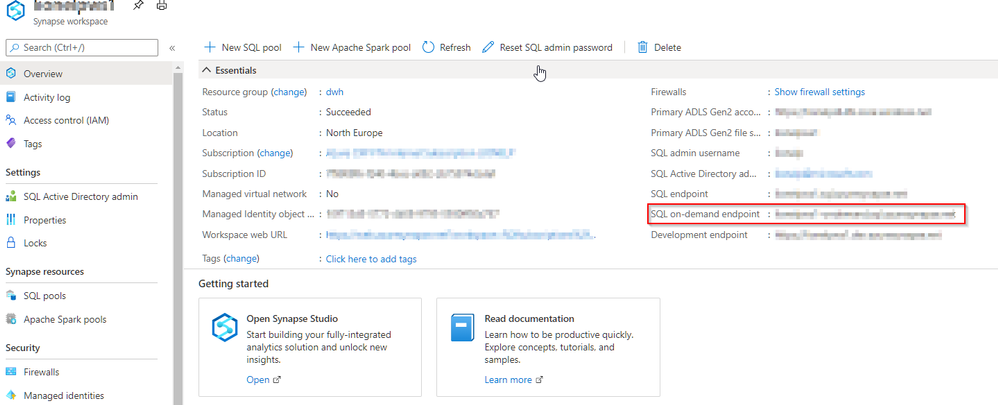
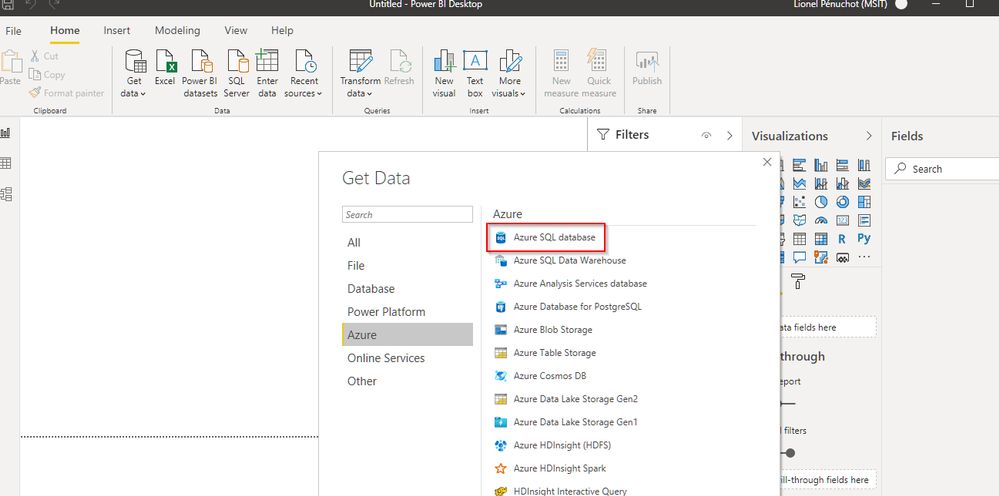
Do not forget to specify port 1433 (yours-ondemand.sql.azuresynapse.net,1433) and DirectQuery mode:
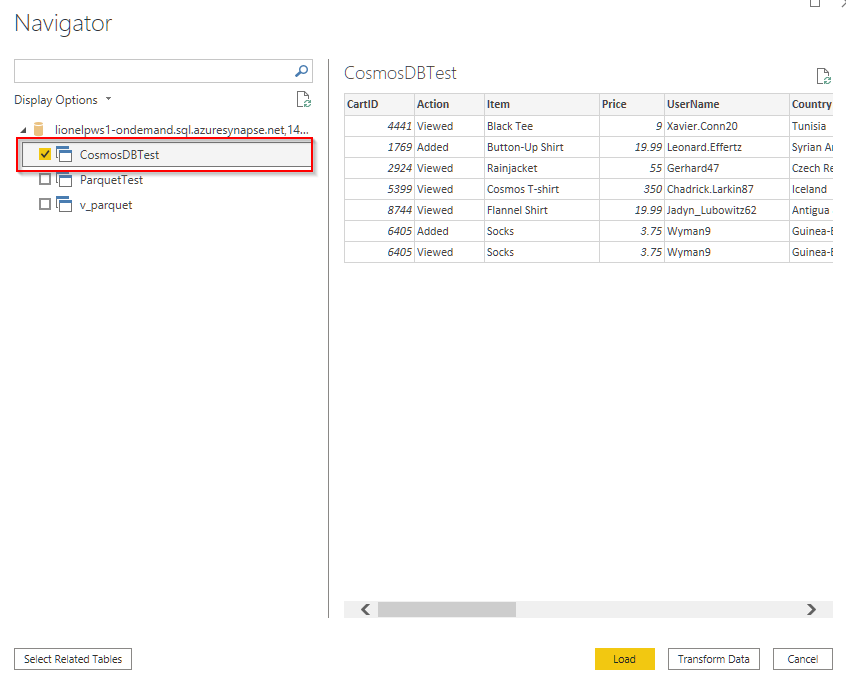
After giving your credentials let’s pick up the view CosmosDBTest that you created precedingly:
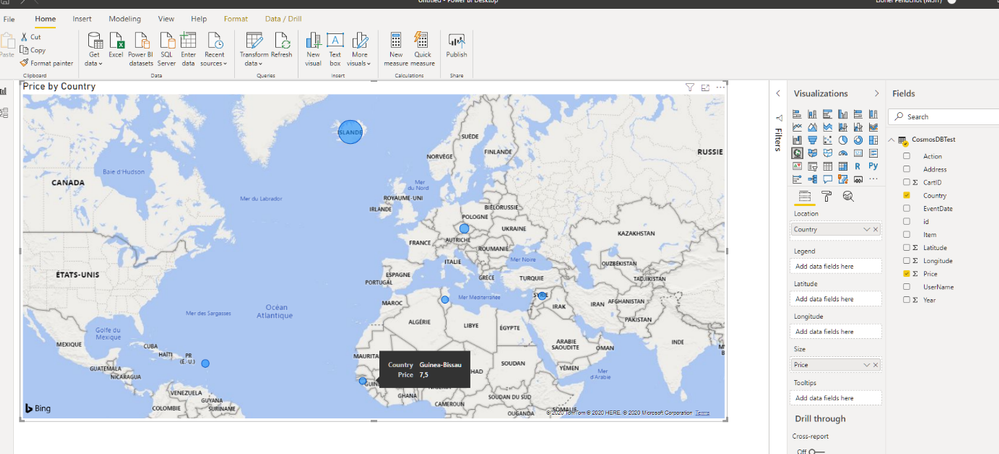
Here is the simple report we can build and let focus on Guinea-Bissau, the current price value is 7.5:
Let’s go back to CosmosDB and select the corresponding items where we can raise the price of the corresponding item by 100 for instance:
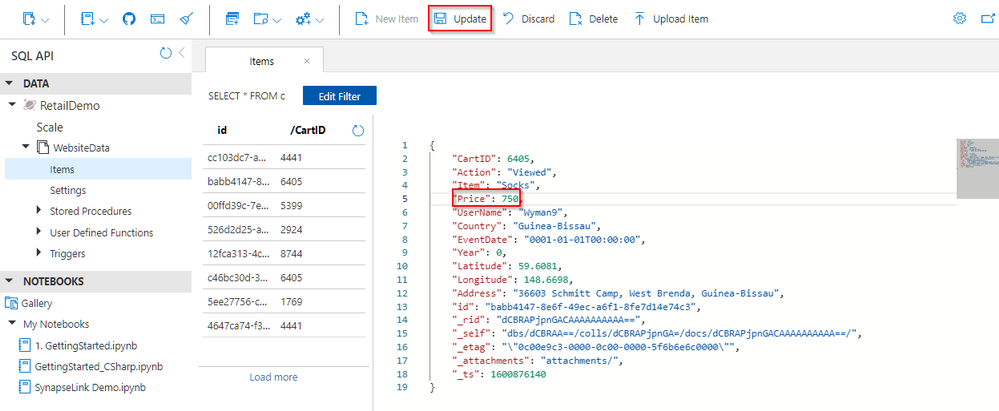
After a latency of around a minute the price increase is reflected on the report:
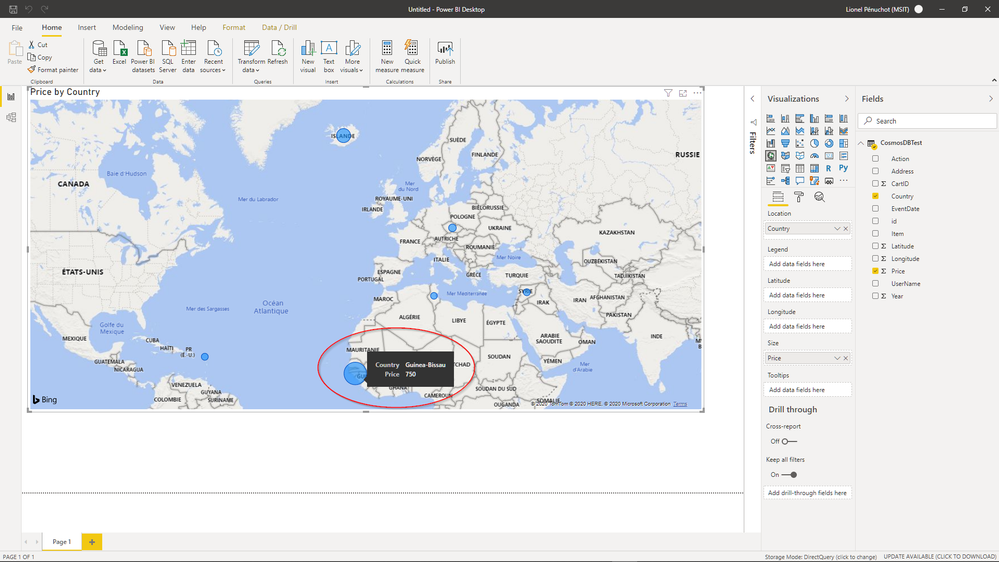
And what if you load a larger set of Data into your Cosmos DB container?
Let’s then take a larger data set and bulk load it into your container as follow:
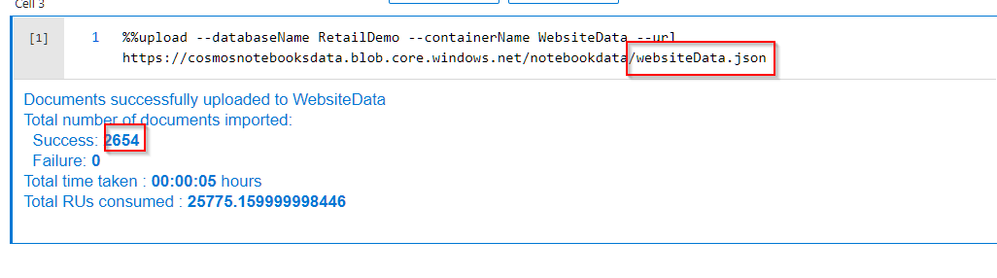
How is this rendered in Power BI?
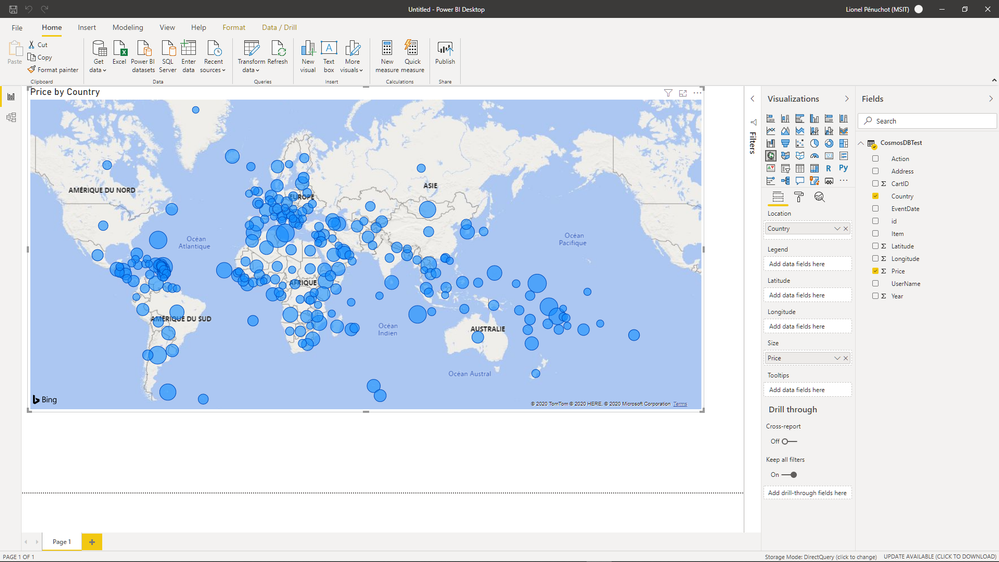
Almost there!
What if you publish to your Power BI Tenant?
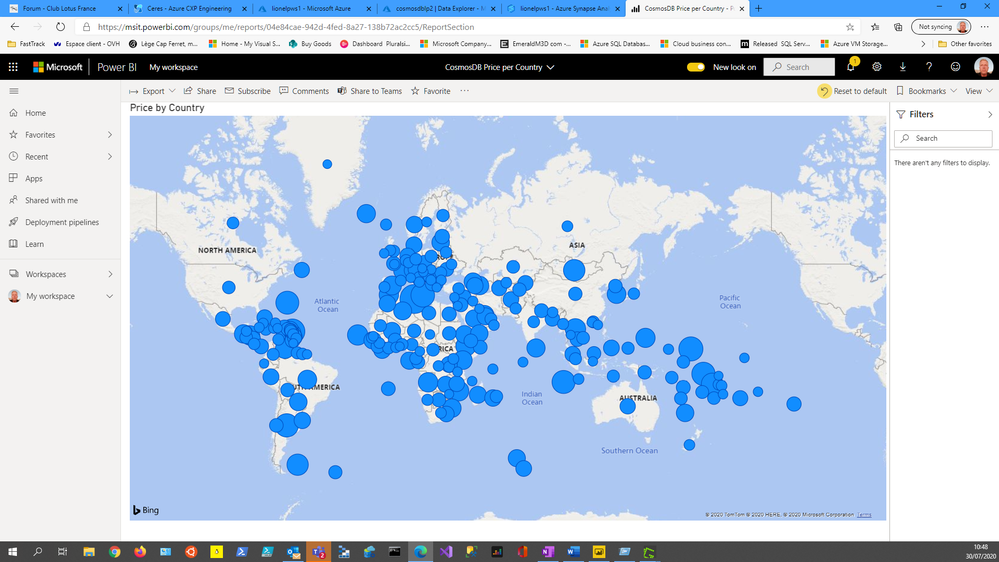
This is it!
To wrap this up:
- I enabled the Analytical Store on a Cosmos DB container
- I created a SQL on-demand view on this container Analytical Store
- I created a Power BI report connected to the SQL on-demand database as a regular Azure SQL Database
Call to Action:
by Contributed | Feb 25, 2021 | Technology
This article is contributed. See the original author and article here.
The data space used in an Azure SQL database or SQL Managed Instance database can be larger than expected – and on occasions significantly larger than expected – when compared with the actual number of records in the individual tables. This can lead to the impression of a problem with the database storage itself. However, this is almost certainly never the case and the issue can be resolved by carrying out a few maintenance procedures.
Storage space types for a database
To understand why this happens we should first review the different types of storage space used to the manage the file space of a database:
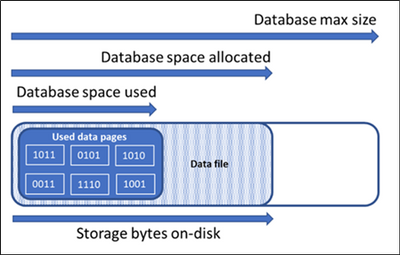
- Used Data space – This is the amount of space used to store the database data, which is stored in 8 KB pages. Generally, the space used increases and decreases due to inserts and deletes respectively. In some cases, the space used does not change on inserts or deletes depending on the amount and pattern of data involved in the operation and any fragmentation. For example, deleting one row from every data page does not necessarily decreasing the space used.
- Allocated Data space – The amount of formatted file space made available for storing database data. The amount of space allocated grows automatically, but never decreases after deletes. This behavior ensures that future inserts are faster since space does not need to be reformatted.
- Data space allocated but unused – The difference between the amount of data space allocated and data space used. This quantity represents the maximum amount of free space that can be reclaimed by shrinking database data files.
- Data max size – The maximum amount of space that can be used for storing database data.
The following diagram illustrates the relationship between the different types of storage space for a database:
Maintenance plan
Now we know that the used data space does not always change when inserts and deletes are performed and therefore can be greater than what could be expected when considering the number of records in the tables. How do we resolve this? This can be achieved by following the maintenance steps below to reduce index fragmentation, cleaning up any ghost records and then cleaning the Persisted Version Store:
1) Index fragmentation
Fragmentation exists when indexes have pages in which the logical ordering within the index, based on the key value of the index, does not match the physical ordering inside the index pages. The following example finds the average fragmentation percentage of all indexes in the Sales.SalesOrderDetail table in the AdventureWorks2012 database:
SELECT a.index_id, name, avg_fragmentation_in_percent, fragment_count, avg_fragment_size_in_pages  FROM sys.dm_db_index_physical_stats (DB_ID('AdventureWorks2012'), object_id('Sales.SalesOrderDetail'), NULL, NULL, NULL) AS a
JOIN sys.indexes AS b ON a.object_id = b.object_id AND a.index_id = b.index_id
The following links detail how to rebuild indexes to reduce the fragmentation (the second link includes an index and statistics maintenance script you can download):
2) Ghost Records
Ghost records are records that are deleted from a leaf level of an index page but aren’t physically removed from the page. Instead, the record is marked as ghosted meaning to be deleted. This means that the row stays on the page, but the row header is modified to indicate the row is a confirmed ghost record. The reason behind this is to optimize performance during a delete operation. Ghosts are necessary for row-level locking, but also necessary for snapshot isolation where we need to maintain the older versions of rows. The number of ghost records can build up in a database until they are cleaned. The database engine runs a ghost cleanup process in the background that sometime after the delete transaction is committed, physically removes ghosted records from pages.
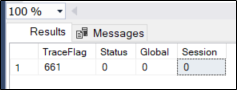
It is also possible the ghost cleanup process is disabled (not generally recommended). Disabling the ghost cleanup process can cause your database to grow unnecessarily large and can lead to performance issues. You can check if the ghost cleanup process is disabled by running the following command:
DBCC Tracestatus (661)
If the “Status” flag is set to 0, then this indicates that the ghost clean-up is enabled. If “Status” flag is set 1, then the process has been disabled.
To confirm if there are ghost records on your database execute this T-SQL:
SELECT sum(ghost_record_count) total_ghost_records, db_name(database_id)
FROM sys.dm_db_index_physical_stats (NULL, NULL, NULL, NULL, 'SAMPLED')
GROUP BY database_id
ORDER BY total_ghost_records DESC
If there are ghost records, you can delete the ghost records manually from the database by executing an index rebuild. This process reclaims disk space by compacting the pages based on the specified or existing fill factor setting and reorders the index rows in adjoining pages.
Another option is to use sp_clean_db_file_free_space to clean all pages in all files of the database. For example, this T-SQL will clean the ghost records from the AdventureWorks2012 database:
USE master;
GO
EXEC sp_clean_db_free_space @dbname = N'AdventureWorks2012';
For more details about the Ghost clean process refer to the following guide: Ghost cleanup process guide – SQL Server | Microsoft Docs
3) Persisted Version Store (PVS)
PVS is a database engine mechanism for persisting the row versions generated in the database itself instead of the traditional tempdb version store. PVS enables resource isolation and improves availability of readable secondaries. The accelerated database recovery (ADR) feature uses PVS.
You can check the database PVS size by running the following T-SQL:
SELECT DB_Name(database_id), persistent_version_store_size_kb
FROM sys.dm_tran_persistent_version_store_stats
WHERE database_id = add your database ID
If PVS size is large you can enforce the PVS cleanup by executing the following T-SQL:
EXEC sys.sp_persistent_version_cleanup [database_name]
The links below contains more information about PVS and ADR:
Database shrink process
If required, the DBCC SHRINKFILE command can be executed after the above maintenance procedures to release allocated space.
The following example shrinks the size of a data file named DataFile1 in the UserDB user database to 7 MB.
USE UserDB;
GO
DBCC SHRINKFILE (DataFile1, 7);
GO
However, there are several best practices to be aware of when considering using DBCC SHRINKFILE:
- A shrink operation is most effective after an operation that creates a large amount of unused space, such as a truncate table or a drop table operation.
- Most databases require some available free space for regular day-to-day operations. If you shrink a database repeatedly and its size grows again, then it’s likely that regular operations require the shrunk space. In these cases, repeatedly shrinking the database is a wasted operation.
- A shrink operation doesn’t preserve the fragmentation state of indexes in the database, and generally increases fragmentation to a certain degree. This is another reason not to repeatedly shrink the database.
- Shrink multiple files in the same database sequentially instead of concurrently. Contention on system tables can cause blocking and lead to delays.
More details about DBCC SHRINKFILE are contained in this link: DBCC SHRINKFILE (Transact-SQL) – SQL Server | Microsoft Docs
Conclusion
In this article we have considered the scenario where the used size of an Azure SQL Database or SQL Managed Instance Database is much larger than expected when compared with the actual number of records in the tables.
This can be resolved by carrying out a few maintenance procedures such as rebuilding indexes to reduce index fragmentation, cleaning up ghost records and cleaning the Persisted Version Store. If required, the DBCC SHRINKFILE command can also be executed afterwards to release allocated space.
I hope this article was helpful for you, please feel free to share your feedback in the comments section.
Sabrin Alsahsah
by Contributed | Feb 25, 2021 | Technology
This article is contributed. See the original author and article here.
Initial Update: Thursday, 25 February 2021 10:32 UTC
We are aware of issues within Log Search Alerts and are actively investigating. Some Customers may experience issues with missed or delayed Log Search alerts or experienced difficulties accessing data for resources hosted in East US region.
- Work Around: None
- Next Update: Before 02/25 14:00 UTC
We are working hard to resolve this issue and apologize for any inconvenience.
-Harshita


Recent Comments