Manage time off requests with Human Resources app for Microsoft Teams

Manage time off requests with Human Resources app for Microsoft Teams

This article is contributed. See the original author and article here.

With more employees working remote, it is more important than ever to meet workers where they work. This includes making tasks related to human resources easier to track from home. This becomes even more important as more organizations use Microsoft Teams not only for collaboration but also to help improve employee experiences and productivity.

We’re announcing the Dynamics 365 Human Resources app for Microsoft Teams, which is now generally available. The app lets employees view their time-off balance and quickly submit time-off requests. They can also send their coworker’s information about upcoming time off in Microsoft Teams channels and chats outside the Human Resources app. This experience is seamless across devices.

This embed requires accepting cookies from the embed’s site to view the embed. Activate the link to accept cookies and view the embedded content.

This site uses cookies for analytics, personalized content and ads. By continuing to browse this site, you agree to this use.

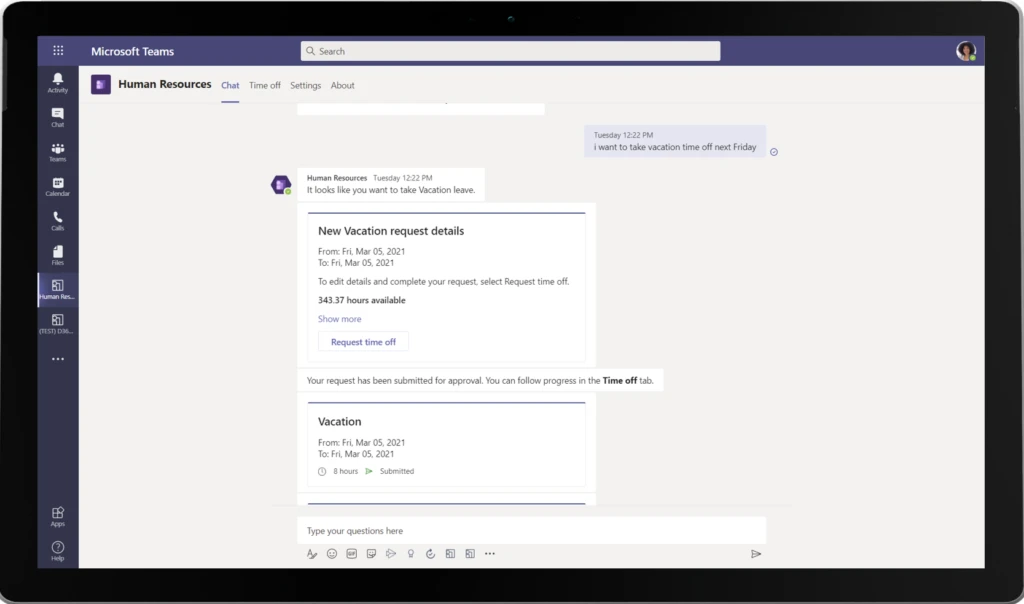
Making a request to take a sick leave or vacation is as simple as chatting with a bot. The bot provides employees with the number of hours that they have available to take off. They can chat with the bot to submit a requestor can use the Time off tab to view existing requests, upcoming leave, and more. Employees can also submit partial day leave or submit leave requests that are comprised of different dates and leave types.

Leave request view


How it helps managers

The Human Resources app makes it easier for managers, like Jonathan Mayer of Spairliners, to stay in the loop. Spairliners was an early adopter of the Human Resources app Teams app. Jonathan said it has helped his company gain user acceptance while rolling out leave and absences to colleagues.

“The pandemic and generalization of home office had increased our usage of Teams. It is really nice and user friendly to be able to request leaves directly from Teams,” said Jonathan Mayer, who is head of Project Management, Process and IT at Spairliners. “As a manager, the workflow is also faster as you can accept or reject requests without opening another tool.”

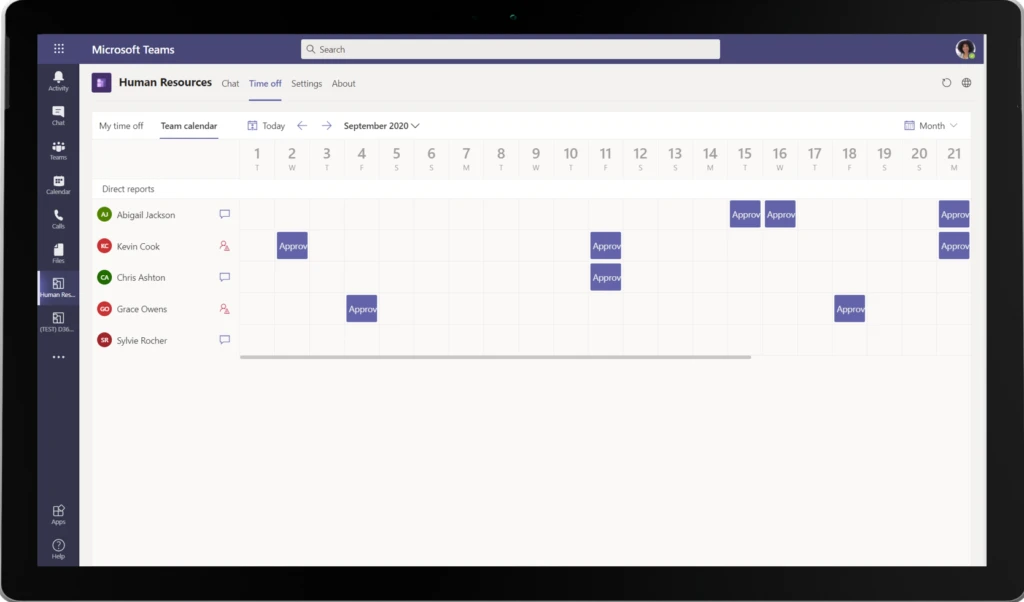
Once requests are submitted, the manager (or the leave request approver depending on how the leave workflow is configured) is sent a Teams notification. The manager can quickly look at the leave details and also see the availability of other team members to ensure that there are no gaps in coverage if someone is away. They can approve or deny the leave request using the interactive bot messages.

Manger view for human resources app


Employees are notified via a Teams notification as soon as their leave requests are approved or denied. To ensure that their team members are aware of the upcoming leave request, employees can easily share the approved leave requests with a Teams channel or with other team members via a Teams message.

Next steps

We’re looking forward to hearing your feedback and how the app is helping your organization. Enable the Dynamics 365 Human Resources app for Microsoft Teams directly in the Microsoft Teams app store.

To learn more about these exciting new capabilities, see Human Resources app in Teams.


The post Manage time off requests with Human Resources app for Microsoft Teams appeared first on Microsoft Dynamics 365 Blog.

Brought to you by Dr. Ware, Microsoft Office 365 Silver Partner, Charleston SC.

Drive personalized interactions with real-time customer journey orchestration

Drive personalized interactions with real-time customer journey orchestration

This article is contributed. See the original author and article here.

Faced with a historic level of social and business disruption, companies have been forced to respond quickly and strategically to meet the challenge. To help address this challenge, and elevate customer experiences, we are introducing real-time customer journey orchestration capabilities in Microsoft Dynamics 365 Marketing.

Elevate customer experiences

Connecting with people has never been more important, and customer expectations have never been higher. Customer tolerance for disjointed experiences, or even worse, tone-deaf communications is unacceptable. Organizations that deliver better end-to-end customer experiences (CX) are taking share. Despite a decade of discussion about the importance of CX, many companies have failed to elevate their experiences to the level desired.

Beyond the human value of great experiences, elevated experiences are critical to driving business valueenabling growth and driving brand equity, preventing churn, and enabling higher marketing and customer engagement return on investment.

Dynamics 365 Marketing is working to revolutionize how organizations address these challenges to enable teams such as marketing, sales, customer success, commerce, or customer service to create engaging and impactful customer-led experiences.

We are announcing real-time customer journey orchestration capabilities in Dynamics 365 Marketing will be released for preview as part of the April 2021 release wave 1 updates in EMEA and North America. This landmark innovationbrings together the worlds of customer experience and marketing automation and is designed to help businesses:

  • Engage customers in real-time
  • Win customers and earn loyalty faster
  • Personalize customer experiences with AI
  • Build customer trust with a unified, adaptable platform

Plus, commercial Microsoft 365 E3 and E5 customers will get six months of free access to Dynamics 365 Marketing at no additional cost. We’ll have more details on this offer to share soon, along with eligibility details, and we are excited to see you reap the benefits of these solutions together.

Moving from segment-based marketing to real-time interactions

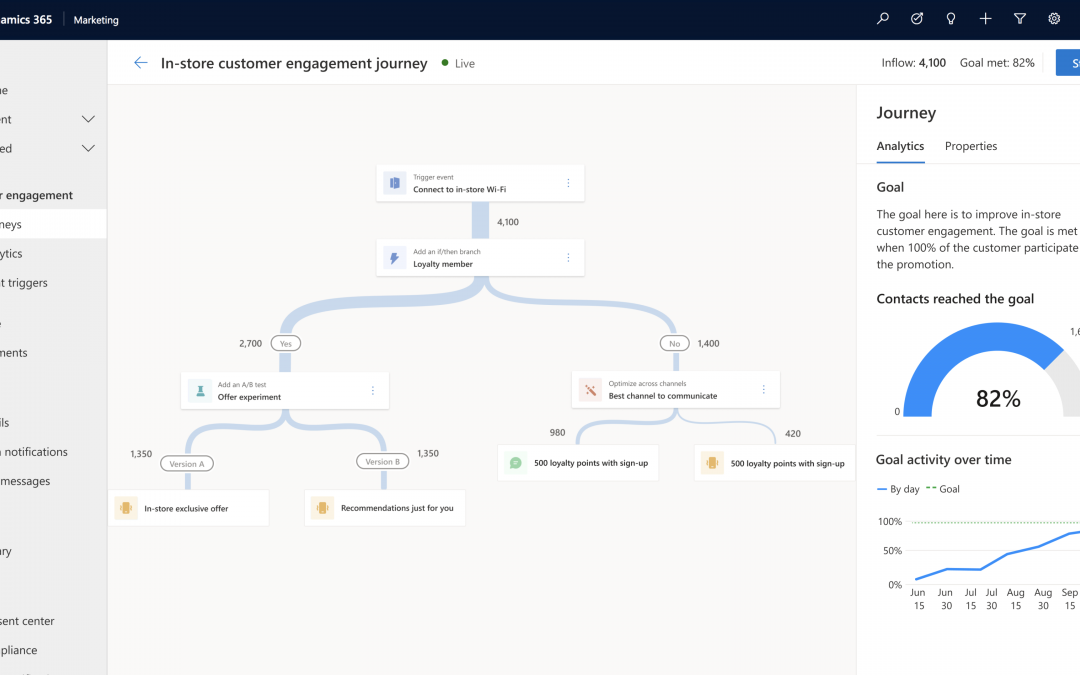
Customer journey orchestration helps you make the next great leap in customer experiences: from segment-based marketing campaigns to moments-based interactions, creating a personalized, holistic customer journey for each individual. This enables you to strengthen your relationships at every touchpoint across both digital and physical, breaking down walls between marketing, sales, commerce, and service organizations. Dynamics 365 Marketing responds to customer actions during the journey.
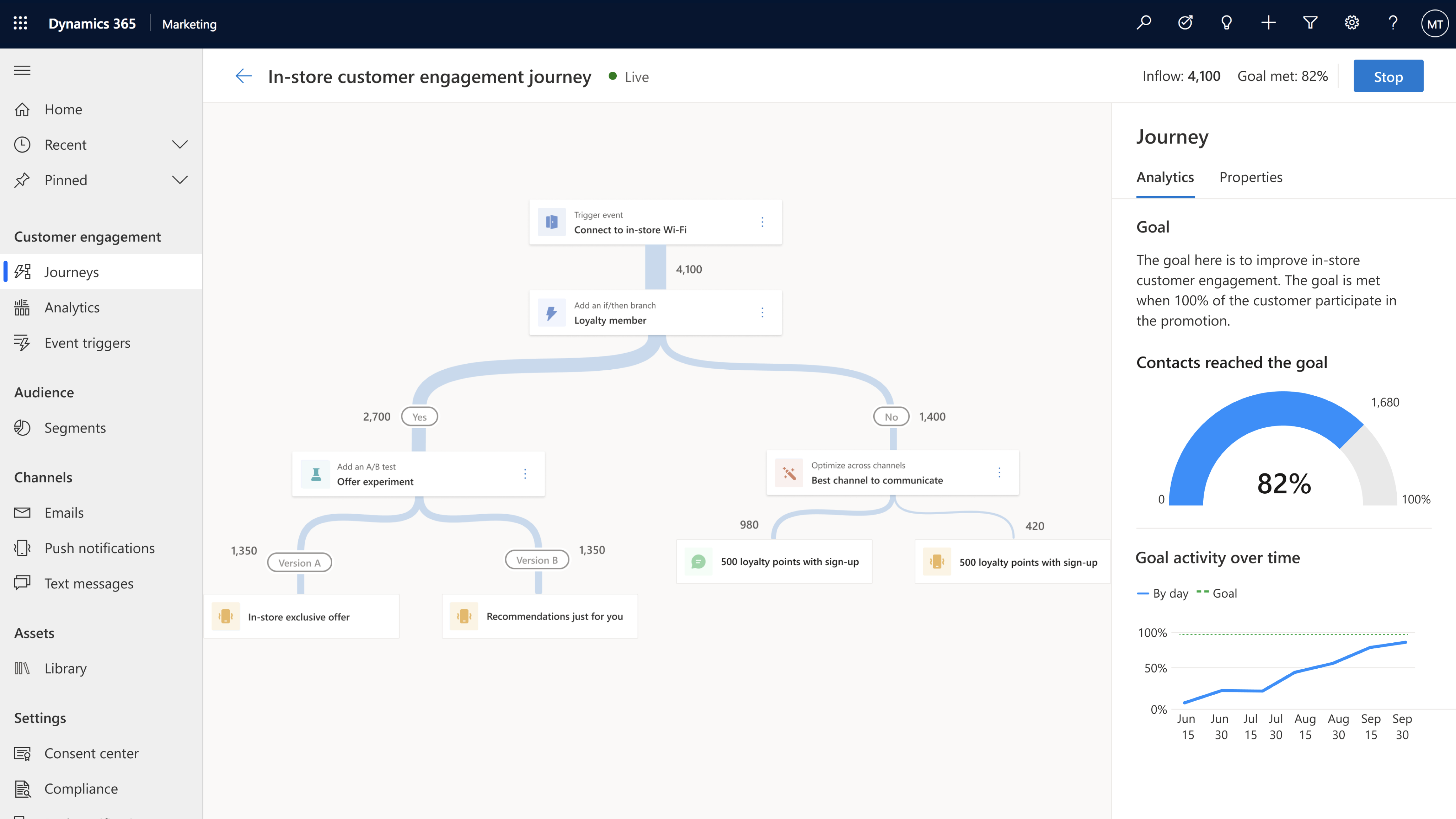
Dynamics 365 Marketing responds to customer actions during the journey.

Win customers and earn loyalty

In the highly competitive technology market, HP’s brand is built on its high-quality products and differentiated service. Loyalty is critical to enabling business performance (Customer Lifetime Value, Gross Margin, etc.) and every support call is an opportunity. HP is working to turn support interactions into personalized engagement moments using Dynamics 365 Marketing with customer journey orchestration. This will allow HP to break down longstanding data silos, better engage customers in real-time with the most impactful messaging, and leverage AI-driven recommendations.

logo, icon“With customer journey orchestration in Dynamics 365 Marketing, our agents will gain a real-time 360-degree view of each customer and their support experience,” explains Brian Johnston, Business Architect, HP. “We’ll be making the most of our customers’ time and treating them with empathy and understanding. It makes HP feel real to the customer, and it makes the customer feel real to HP”

The result will be an enhanced and highly-personalized customer service experience that improves quality of service, builds customer lifetime loyalty, and also saves the company money by shortening the time spent solving problems.

Personalize customer experiences with AI to enable more engaging content

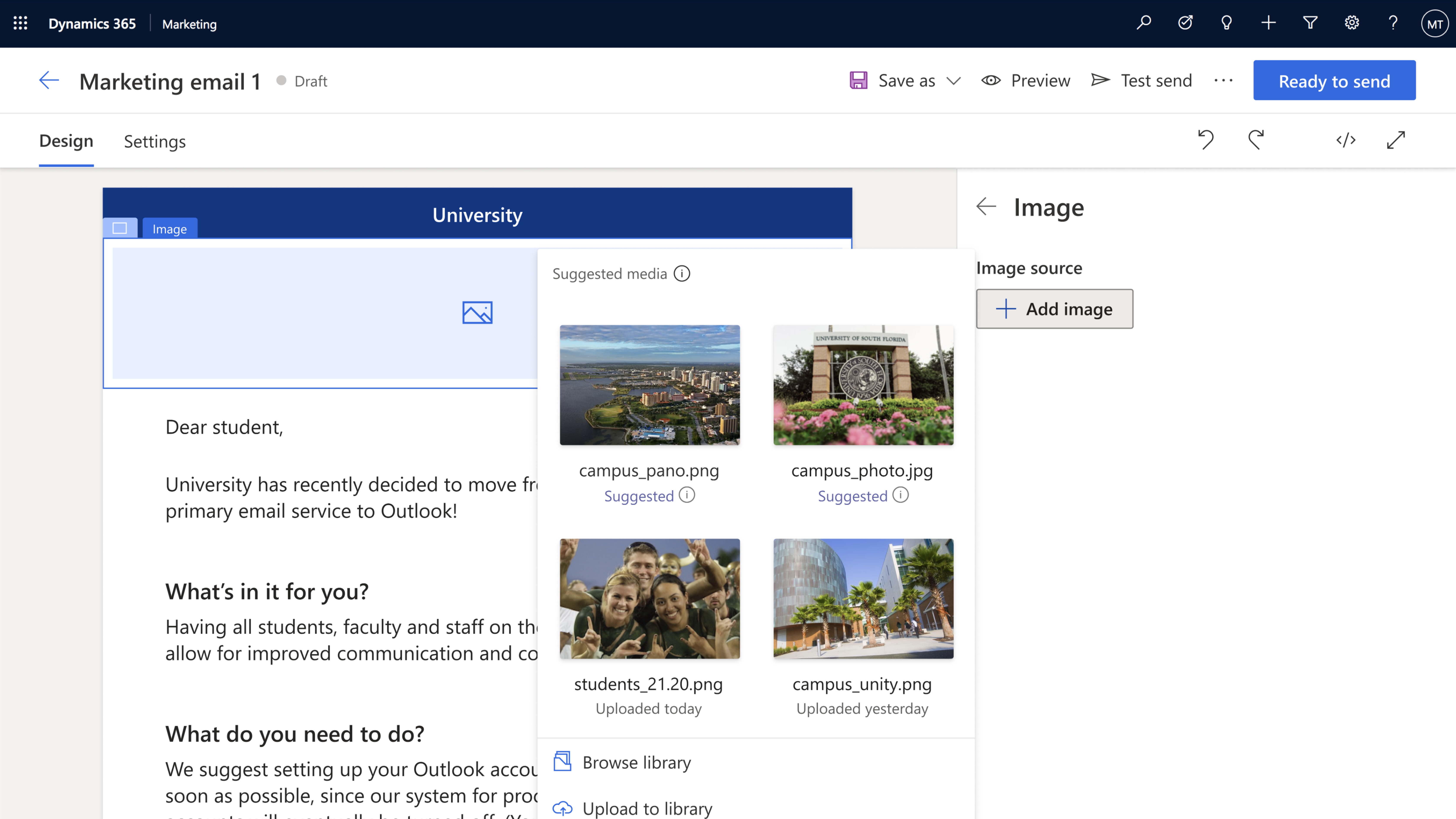
Authoring impactful content quickly and easily is a big challenge. With built-in AI recommendations for content, channels, customer segmentation, and analytics, companies can be sure to deliver the right message. The reimagined email editor helps select and deliver the best image, video, document, or fragment using AI. A new centralized asset library allows you to search, version, manage and use AI to tag your digital assets.

Journey authoring is also assisted by AI with targeted customer segments, channel optimization, and experimentation. As customers engage, the customer journey adapts and responds to interactions with relevant content driving further engagement.
pending alt text

We’re engineering AI throughout Dynamics 365 Marketing to help you create engaging and impactful messages faster. Powerful experimentation capabilities and analytics track progress towards your business objectives, helping you to exceed business goals.

Campari raises the bar for delivering customer experiences

The Campari Group, home to some of the world’s iconic alcoholic spirit brands, knows how to create great brand experiences and is always working to deepen its relationships with customers. To gain a 360-degree customer view and enhance the personalization of its marketing, sales, and customer service efforts, Campari Group deployed Microsoft Dynamics 365 Customer Insights and Dynamics 365 Marketing. With AI-driven recommendations and customer journey orchestration, Campari Group can now personalize real-time marketing messages for maximum impact across all customer touchpoints.

a sign lit up at night

“Customer journey orchestration enables contextually relevant and consistent real-time conversations with every customer across all interaction points,” explains Chad Niemuth, Vice President, Global IT Marketing and Sales. “We can more precisely align marketing messages for each communication channel to gain the greatest impact. We see the effects in in-store sales and also in e-commerce, which is particularly important during COVID.”

Within weeks, Campari Group connected all the data points in Dynamics 365 Customer Insights and deployed its first email marketing automation campaign against those segments in the United States. Roll-out in the United Kingdom and Australia followed shortly.

Stronger connections with Microsoft Teams

The dramatic shift to online meetings and virtual events has made it even more important for event managers to easily use Teams and Dynamics 365 Marketing.

At Microsoft Ignite, we announced new and updated features that enable you to run rich webinars and events, true to your brand with a professional experience for attendees. We also announced the ability of Teams to easily follow up with event attendees with Dynamics 365 Marketing. This allows you to continue connecting with attendees, nurturing them into loyal customers.
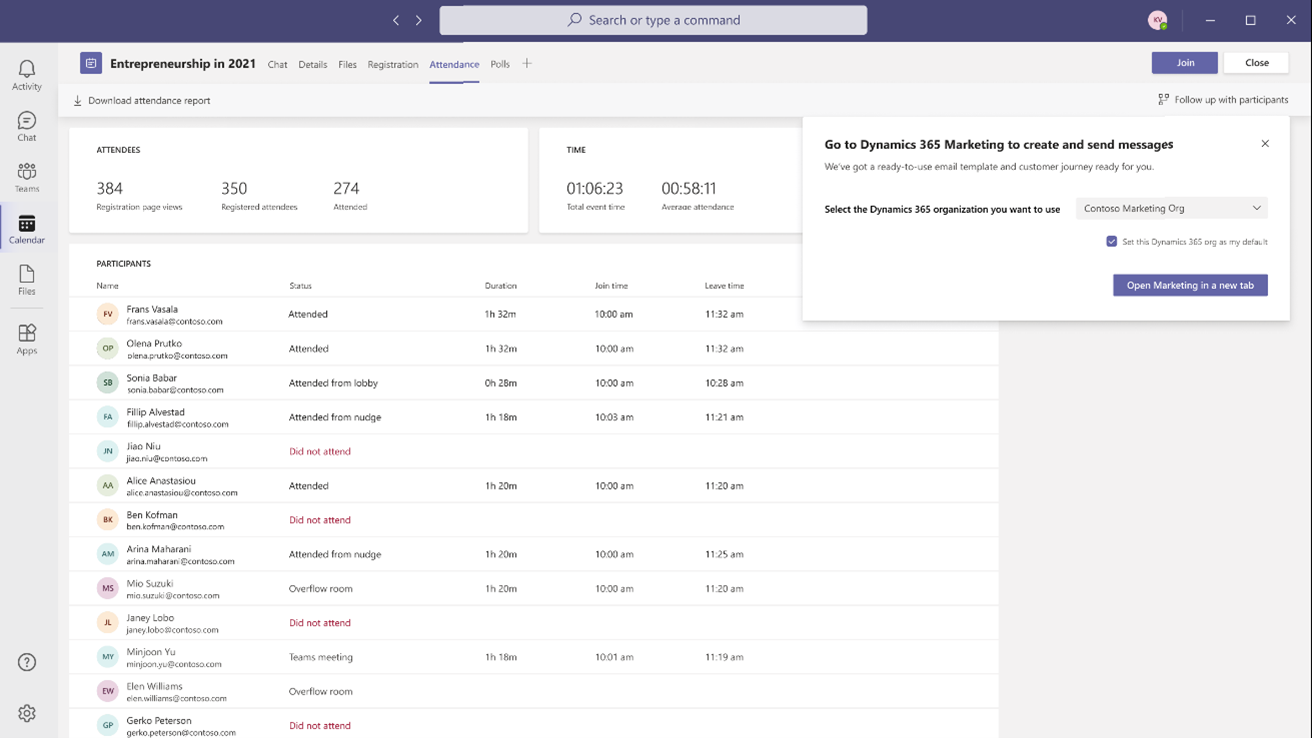
Turn event attendees into loyal customers.

Turn insights into action

Microsoft’s customer data platform, Dynamics 365 Customer Insights, makes it easy to unify customer data, identify high-value customer segments, or those likely to churn. When you combine it with Dynamics 365 Marketing, you can engage customers in a personalized way and in real-time to drive meaningful actions. Seamlessly use segments from Dynamics 365 Customer Insights to target marketing campaigns. Personalize content with rich profile information, and create individual journeys based on customer history and preferences. With the addition of Dynamics 365 Customer Insights and Microsoft Azure Synapse Analytics, you build custom AI models and improve relevancy with advanced segmentation and targeting that can then be brought to life with Dynamics 365 Marketing.

Learning customers’ preferences and sentiment is critical to personalizing engagement. Today, we are also announcing real-time survey capabilities for Microsoft Dynamics 365 Customer Voice that enable you to adapt customer journeys or trigger relevant communications. For example, if a customer is not satisfied with a specific product feature or service, the response can quickly stop marketing campaigns while also notifying an account manager for personalized follow-up.

Together, these connected applications help companies personalize moments that matter across all touchpoints in a customer’s journey and build deeper customer relationships with more meaningful engagement across both digital and physical channels.

Agencies bring customer-first approach to journey creation

Developing highly impactful and personalized experiences across the customer journey requires a fresh approach. We are excited to be working with a number of leading agencies that have expertise in transforming customer experiences to deliver stronger connections to leading brands and measurable business impact.

VMLY&R logo

“VMLY&R is excited to partner with Microsoft, helping empower organizations to reimagine and transform customer experiences. Harnessing the power of AI, data, and insights to create connected customer and brand experiences have never been more important. We look forward to collaborating with Microsoft and the Dynamics 365 team to deliver amazing customer experiences for organizations around the world,” says David Mitchell, Chief Technology Officer, VMLY&R.

Agencies such as VMLY&R (a WPP company) and Kin + Carta use creativity, technology, and culture to create experiences that engage customers one-on-one across every touchpoint from marketing through service, across both digital and physical experiences.

logo

“As people have more and more ways to interact with brands, it’s never been more vital to deliver a consistent, seamless experience for customers and to look towards the future to find innovative ways to meet their needs,” says Rob McGowan, Managing Director of Edit, part of the Kin+Carta connective. “It’s this challenge that we believe the new customer journey orchestration features in Dynamics 365 Marketing are ideally placed to answer.”

Learn more and get started

To learn more about how your organization can elevate your customer experiences, visit the Dynamics 365 Marketing webpage and sign up for a free trial to explore all capabilities in Dynamics 365 Marketing and the preview of real-time customer journey orchestration capabilities planned to be released in North America and EMEA April 2021.

The post Drive personalized interactions with real-time customer journey orchestration appeared first on Microsoft Dynamics 365 Blog.

Brought to you by Dr. Ware, Microsoft Office 365 Silver Partner, Charleston SC.

Import historical data to optimize fraud protection

Import historical data to optimize fraud protection

This article is contributed. See the original author and article here.

To help boost your fraud protection strategy, we’ve released an improved data upload experience in Dynamics 365 Fraud Protection. The centralized interface guides you through importing historical data for purchase protection and loss prevention.

For details about this feature, refer to the schema for purchase protection and loss prevention. If some fields are not applicable to your industry, you can leave them blank. We recommend that you upload as much information as possible to capitalize on the adaptive machine learning capabilities.

Steps to improve your data uploadexperience

1. Export data from your data warehouse and prepare your data to match the schema.
We recommend uploading 3 to 6 months of historical data for optimal results.Upload data from at least 10 unique staff/POS devices to generate your first Loss Prevention report. For Purchase Protection, we suggest loading 3 to 6 months of mature data where refunds and label data are present.

2.Prepare your data to match the schema. Pay attention to the date format, which requires ISO 8601 in UTC time.

You can use DateTime.UtcNow.ToString(“o”) to convert datetime format.

For SQL, you can use SELECT: CONVERT(VARCHAR(33), DateColumn, 127) FROM MyTable.

Or, you can use the Excel function =CONCAT(TEXT([cell],”yyyy-mm-ddThh:mm:ss”),”.0000000Z”) to make the conversion.

Be sure to review and remove all escaped characters, such as commas, new line characters, and multi-line characters.

3. Prepare data files to upload.

Save the data in UTF-8 encoding.You can split a file that exceeds 10 GB into multiple uploads. Try to make the column header the same as what is specified in the schema to leverage the auto-mapping capability.

4. Upload the file in the Fraud Protection portal.

Follow the directions for purchase protection and loss prevention, upload the data file, and then map the data columns accordingly. When data upload and mapping is complete, you can start processing the data.

The processing may take some time depending on the size of data. A loss prevention report will be generated and ready to view after data processing is complete. For purchase assessments, the assessments are ready to use when data upload is complete. You can integrate purchase APIs, if you have not already done so, and then use the assessment scores to make decisions about your transactions.

To upload historical data and enhance your fraud prevention journey, feel free tosign in now. If you’re not currently using Dynamics 365 Fraud Protection, you cansign up for a free trial.

The post Import historical data to optimize fraud protection appeared first on Microsoft Dynamics 365 Blog.

Brought to you by Dr. Ware, Microsoft Office 365 Silver Partner, Charleston SC.
Help fight COVID vaccine scams: Share these tips with those you know

Help fight COVID vaccine scams: Share these tips with those you know

This article was originally posted by the FTC. See the original article here.

Since the start of the pandemic, people are spending a lot more time alone at home. What’s more, there’s a lot of confusion about when, how, and where to sign up and get vaccinated. Add those two things together, and you get scammers taking advantage and spreading false information, hoping isolated people will believe their lies.  


 As you may have noticed from yesterday’s blog, this week we’re focusing on ways you can connect with people who are isolated while fighting fraud at the same time. Today, we’re highlighting tips you can share to help people avoid COVID vaccine scams.

  • Don’t pay to sign up for the COVID vaccine. Anyone who asks for a payment to put you on a list, make an appointment for you, or reserve a spot in line is a scammer.
  • You can’t pay to get early access to the vaccine. That’s a scam.
  • On Medicare? You don’t have to pay to get the COVID-19 vaccine. Only scammers will ask you to pay.
  • Ignore sales ads for the vaccine. You can’t buy it – anywhere. It’s only available at federal- and state-approved locations.
  • Nobody legit will call, text, or email about the vaccine and ask for your Social Security, bank account, or credit card number. That’s a scam.

Thanks for being a friendly fraud fighter!

Brought to you by Dr. Ware, Microsoft Office 365 Silver Partner, Charleston SC.
Microsoft 365 Defender now delivers unified experiences across endpoint, email and collaboration

Microsoft 365 Defender now delivers unified experiences across endpoint, email and collaboration

This article is contributed. See the original author and article here.

Today we are announcing the public preview of the integration of our endpoint and email and collaboration capabilities into Microsoft 365 Defender. Security teams can now manage all endpoint, email and cross product investigations, configuration, and remediation within a single unified portal.  Now is the time to start using this new unified experience in preview and as we move to general availability of the unified experience the previously distinct portals will be phased out.


We are also announcing new and enhanced features only available in the Microsoft 365 Defender portal to help you respond faster such as new unified investigation pages for alerts and specifically email, as well as a brand-new Learning hub surfacing best practice and instructional resources to help you leverage the platform.


Getting familiar with Microsoft 365 Defender and the unified portal


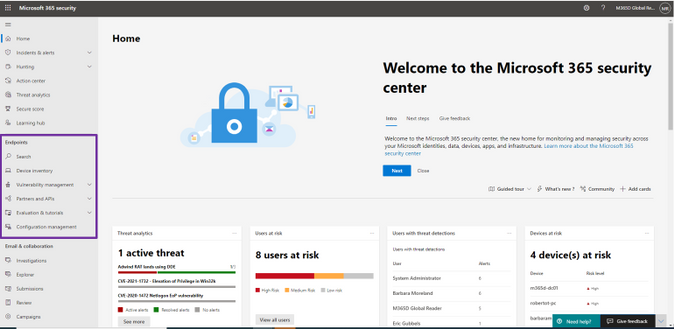
For Microsoft Defender for Endpoint users, existing capabilities are now available within Microsoft 365 Defender. To get started, navigate to security.microsoft.com. You will find everything you are used to in the navigation bar on the left, under “Home” or under Endpoints. Learn what’s changed in our in-depth documentation. 


 endpoint_features.png


Figure 1: Endpoint features integrated into Microsoft 365 Defender.  


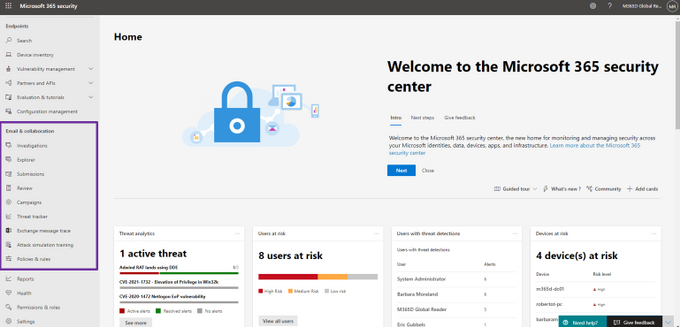
For Microsoft Defender for Office 365 users, the Threat Management capabilities and email security-related reports are now available in Microsoft 365 Defender under Email & collaboration in the navigation bar. To get started, go to security.microsoft.com. Learn what’s changed in our in-depth documentation


 email_features.png


Figure 2: Email and collaboration features integrated into Microsoft 365 Defender. 


If you have integrations and connections with SIEM solutions such as Azure Sentinel, these will continue to work and no changes are required. When you are ready to move all of your users to the new experience you can enable automatic URL redirection for Microsoft Defender for Endpoint and automatic URL redirection for Microsoft Defender for Office 365. If you have built custom detections or use device-related queries in Microsoft Defender for Endpoint, follow the links to learn how to migrate them. Compliance-related Office 365 features are available in the Microsoft 365 compliance center 


There are lots of exciting new areas to explore:


  • Unified alerts queue. See prioritized alerts from across your Microsoft 365 security products in a single, unified alerts queue.

  • Unified user page. Visualize any user entity in a single dashboard. This new page allows security professionals to investigate every asset related to the user and imports critical information from all your deployed Microsoft 365 security products.

  • Unified investigation page. This view provides details for automatic investigation and response including triggering alerts, impacted assets and deep-dive details across your Endpoint and Office 365 environments.

  • Learning hub. Leverage official guidance from resources such as the Microsoft security blog, the Microsoft security community on YouTube, and the official documentation at docs.microsoft.com. These resources, articles, videos and how-to guides give you best practices and instructions on how to take advantage of the features in Microsoft 365 Defender.

  • Email entity page. A frequent request from customers has been better email investigation capabilities. Now you have a 360-degree view of an email alert integrated with context and related data from across the Microsoft 365 environment. This includes enhancements such as junk mailbox rules, spam confidence levels and authentication and detonation details. 

  • Integrated alert detail page. A comprehensive point of view for a specific alert including the alert story, timeline, alert classification, impacted entities, related incidents and more. 

  • Role-based access in Microsoft 365 Defender. Microsoft 365 Defender now recognizes RBAC configurations and custom roles from the individual Microsoft 365 solutions and holistically enforces them at the cross-product level. Check out the documentation for more details.

  • Threat analytics. Leverage detailed threat intelligence reports from Microsoft security experts to understand the most critical real world threats and actors. Related alerts and incidents in a customer environment are escalated for remediation and recommendations are provided to remediate any vulnerabilities and exposures. Learn more.


We’re excited to hear your feedback as you explore the unified portal and we will continue to update the documentation throughout the preview.  Our mission is to empower you with the most unified extended detection and response (XDR) solution in the industry so that you can focus on what’s important: preventing and remediating threats. 


To read more about the unified portal experience, check out: 


Microsoft 365 PnP Weekly – Episode 116

Microsoft 365 PnP Weekly – Episode 116

This article is contributed. See the original author and article here.

pnp-weekly-116.png


In this installment of the weekly discussion revolving around the latest news and topics on Microsoft 365, hosts – Vesa Juvonen (Microsoft) | @vesajuvonen, Waldek Mastykarz (Microsoft) | @waldekm are joined by Porto, Portugal-based MVP, João Mendes – Senior Office 365 Solution/Architect Developer, Storm Technology Ltd | @joaojmendes.     


The episode’s discussion focuses on being familiar with your tools in order to create beautiful apps, the need for a Fluent tutorial, and top features that could be added to SPFx one day and on João’s story-filled career.


The session was recorded on Monday, March 1, 2021.


Did we miss your article? Please use #PnPWeekly hashtag in the Twitter for letting us know the content which you have created. 


As always, if you need help on an issue, want to share a discovery, or just want to say: “Job well done”, please reach out to Vesa, to Waldek or to your Microsoft 365 PnP Community.


Sharing is caring!

Experiencing Data Access Issue in Azure portal for Log Analytics – 03/02 – Resolved

This article is contributed. See the original author and article here.

Final Update: Tuesday, 02 March 2021 11:41 UTC

We’ve confirmed that all systems are back to normal with no customer impact as of 03/02, 10:40 UTC. Our logs show the incident started on 03/02, 08:30 UTC and that during the  2 Hours & 10 minutes that it took to resolve the issue some customers may have experienced intermittent data latency, data access and incorrect alert activation in Japan East region.
  • Root Cause: The failure was due to issue with one of our backend service which became unhealthy during the impacted window.
  • Incident Timeline: 2 Hours & 10 minutes – 03/02, 08:30 UTC through 03/02, 10:40 UTC
We understand that customers rely on Azure Log Analytics as a critical service and apologize for any impact this incident caused.

-Vyom

Azure Blueprints vs Azure Resource Manager template specs

Azure Blueprints vs Azure Resource Manager template specs

This article is contributed. See the original author and article here.

Hello folks,


I’ve had a few conversations lately with IT pros and operations folks that made me think that there may be a disconnect or some confusion about the role of Azure blueprints and ARM templates specs.


There were comments like “are blueprint still even a thing?” and “I’m not bothering with Blueprints since templates specs are almost here.”


Maybe I’m missing the meaning of these interactions. Or there is a disconnect. I’m not 100% sure, however, if there is a chance that someone in the community is confused, I decided to cover the difference and when you would them. We’re not going to take you through the creation of each of these since there are many tutorials and resources available online already.
For example:


The same can be said for ARM Templates Specs


So, let’s start.


What Is Azure Blueprints?


In any enterprise you always have teams that are responsible for defining what and how resources are deployed in your environment. (on-prem, in the cloud or in both).  Your networking team defines the network design, the IP addressing, the routing…  Your security team defines what services are allowed, who has access… Your legal department may have requirements for compliance such as where you can deploy your resources…  You get the picture.


Without any tools to allow you to tie all these requirements together you end up with a deployment process that can take a long time because every teams wants and needs to sign-off on your deployment.  And it makes it difficult to replicate since in most cases its tied together with custom scripting.


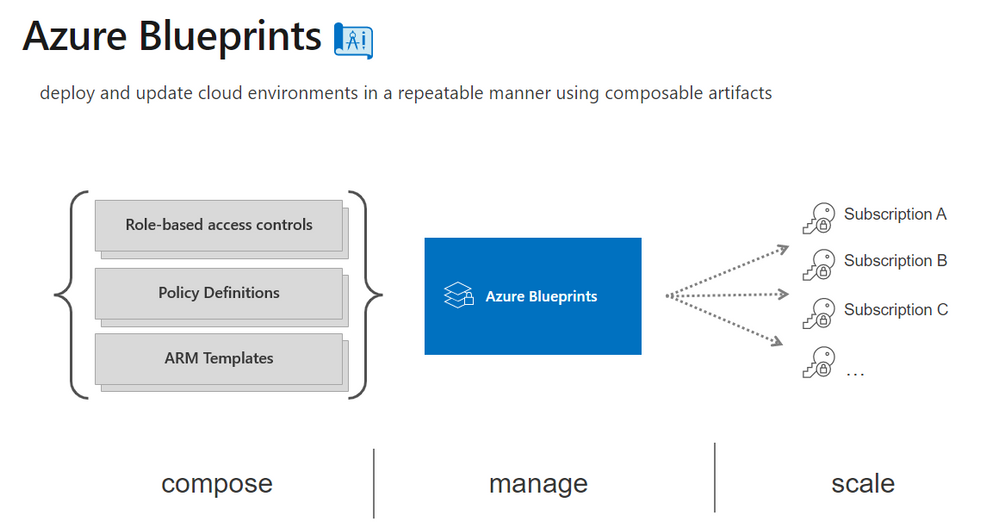
Azure Blueprint allows you to create a way to package all these components together and makes it super easy to “stamp” your blueprint on any environment dev, test, prod or other.


blueprint.png


There are samples available here


What is Azure Resource Manager (ARM) Templates Specs?


new template specs.png


One of the greatest problems when managing your infrastructure as code (IaC) with Azure templates is marrying the need for manageable, secure, versions-controlled way while sharing templates.  You can use GitHub, or any other “repo”, however if you’re deploying linked templates for example the link requires either a publicly accessible point or a shared access signature to a blob therefore making them secure is more problematic.


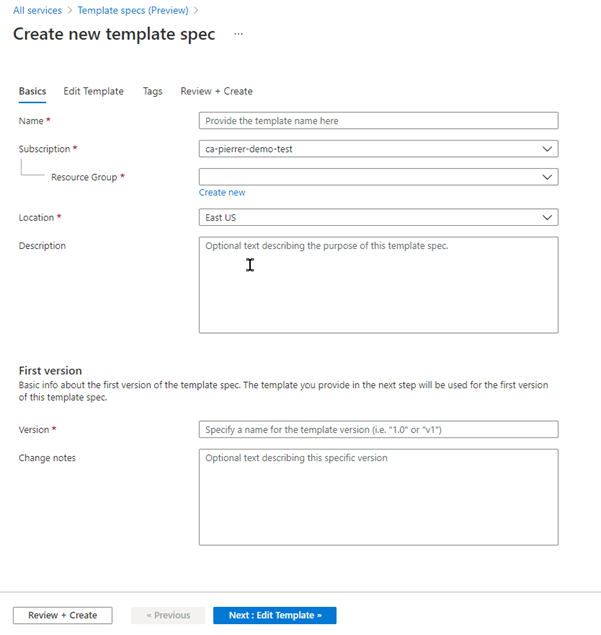
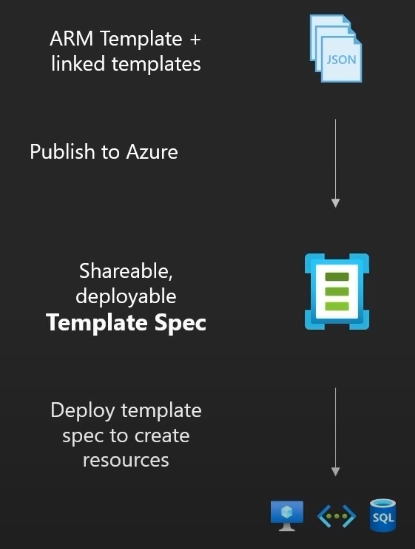
Template Specs is a new resource type for storing ARM templates in a resource group.  The purpose of doing that is to allow more efficient sharing, deployment, and control of the Templates shared within an organization.  In effect your templates become a first party resource type stored in your subscription.  They can be standalone or modular, thus providing you with a very flexible way to deploy them.


And yes, Templates Specs also includes an RBAC (Role based access control) but it’s to control who has access to the template itself and what I can do with it (Read access, vs contributor access for example). Not RBAC in terms of controlling what is the access of the resource deployed by said template.


template-specs.png


Conclusion


Now that we’ve covered what both Blueprints and Templates Specs are, we understand that:


  • Yes, Azure Blueprints are still a thing and you should be investigating them in your own environment if you’re not already, to ensure all your deployments conform to all the requirements of your organization.

  • Azure Resource Manager Template Specs will NOT displace the need for Blueprints since they server a completely separate purpose.


I can even see in the future, Azure Blueprint pointing at Templates Specs as artifacts within a blueprint.


There you have it folks.  Let me know in the comments below if you’d like us to cover specific subjects.


Cheers.


Pierre


Customer Offerings:Device Protection w/ Microsoft Endpoint Manager & Microsoft Defender for Endpoint

Customer Offerings:Device Protection w/ Microsoft Endpoint Manager & Microsoft Defender for Endpoint

This article is contributed. See the original author and article here.

Introduction 


Welcome to another customer offering article to inform you about how to configure, setup, and deploy endpoint protection policies which include protective measures from Microsoft. In this article, we will present Premier Services Offerings WorkshopPLUS – Device Protection with Microsoft Endpoint Manager and Microsoft Defender for Endpoint.


Offering Overview 


With customers needing a deployment solution to push out Microsoft security policies and configurations, this offering will address this and more. This Premier offering builds on the fundamental security components and features of any Microsoft Endpoint Configuration Manager environment such as RBAC or role-based administration, Endpoint Protection​, Exploit Guard, Application Guard, Microsoft Defender for Endpoint, BitLocker Drive Encryption, and Compliance Settings. With this new customer offering, we were able to provide a 3-day hands on training in a live demo tenant to meet and exceed customer expectations. 


What the workshop entailsWhat the workshop entails


What’s Included 


The content of this offering is a mix of education, administration, compliance, and security best practices at the L200-L300 level. This offering focuses on the breadth of Microsoft Endpoint Configuration Manager, Microsoft Defender for Endpoint, M365 Security (on-prem and in the cloud), and also Intune. The Device Protection with Microsoft Endpoint Manager and Microsoft Defender for Endpoint workshop is a three day engagement where you will learn about configuring a tenant using  labs hosted in the cloud (Microsoft Labs on Demand) with a full M365 E5 license (EMS E5 + M365 E5 + Office 365 E5). Each module contains scenarios that provide students with in-depth expertise, tools, and hands-on experience to help implement and troubleshoot security related concepts as they pertain to Microsoft Endpoint Configuration  Manager. 


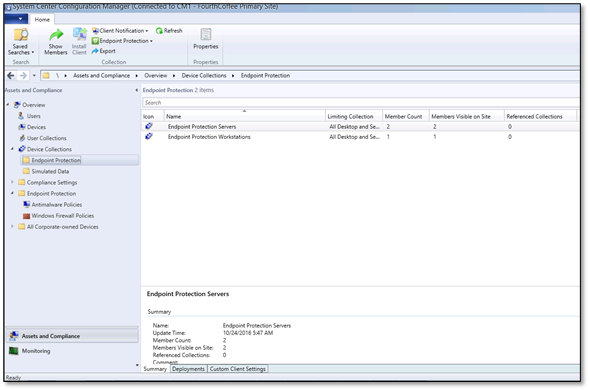
Endpoint Protection policiesEndpoint Protection policies


Areas Covered 


The sections  below sections are covered in detail throughout the three-day offering and expand on each objective to maximize your understanding of each topic and focus area through knowledge transfer modules. 


Introduction to Endpoint Security​ – Overall introduction to security settings and recommendations that can be managed using Microsoft Endpoint Configuration Manager and Intune.


Role Based Access Control – Overview of Role Based Administration Control concept in Microsoft Endpoint Configuration Manager, including the reporting feature.


Endpoint Protection Technologies Overview – Objectives focus on a deeper dive into the technologies that make up Endpoint Protection.


Antimalware Policies – Objectives focus on learning the basic concepts and terminology for Endpoint Protection Antimalware Policies for Microsoft Defender Antivirus.


CAMP and Security Intelligence Updates  Objectives focus on managing Endpoint Protection Definition updates through Configuration Manager. 


Endpoint Protection Alerts and Reporting – Objectives focus on how to configure and use alerts and report notifications within Configuration Manager. 


Endpoint Protection Troubleshooting – Objectives focus on learning troubleshooting techniques for securing endpoints.   


Exploit Guard and Application Guard – Objectives focus on learning about Attack Surface Reduction, Controlled Folder Access, and Exploit and Network Protection. You will also learn how to mitigate security threats using containers by deploying Application Guard.  


Microsoft Defender for Endpoint – Objectives focus on learning how to onboard endpoints to Microsoft Defender for Endpoint using Microsoft Endpoint Configuration Manager and explore basic operational possibilities within Microsoft Defender for Endpoint portal.  


Device Encryption – Learn what is BitLocker and explore modern management possibilities to control device encryption with Microsoft Endpoint Configuration Manager and Intune.  


Compliance settings – Dive deeper into the compliance settings topic, including management possibilities using Microsoft Endpoint Manager (Intune).  


Hands on with Labs on Demand


During this offering there are multiple hands-on labs exercises using Microsoft’s Labs on Demand. Each student will be an administrator of their own demo tenant where they will create and deploy security policies using Microsoft Endpoint Configuration Manager. Once the polices are deployed to another machine, the student will be able to view and test out those policies. The areas are listed below are covered in the lab exercises: 


  • Endpoint Security

  • Implementing RBAC 

  • Endpoint Protection policies

  • CAMP and Security Intelligence updates 

  • Endpoint protection alerts and reporting 

  • Endpoint protection troubleshooting 

  • Exploit Guard and Application Guard 

  • Microsoft Defender for Endpoint

  • Device Encryption 

  • Compliance settings 


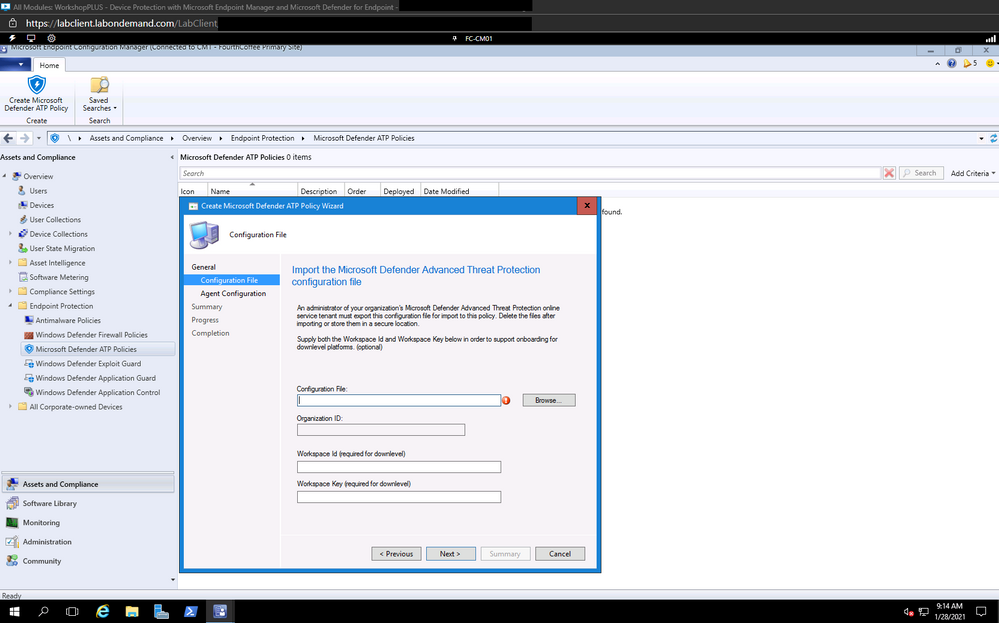
Creating the configuration file for Endpoints for MDECreating the configuration file for Endpoints for MDE


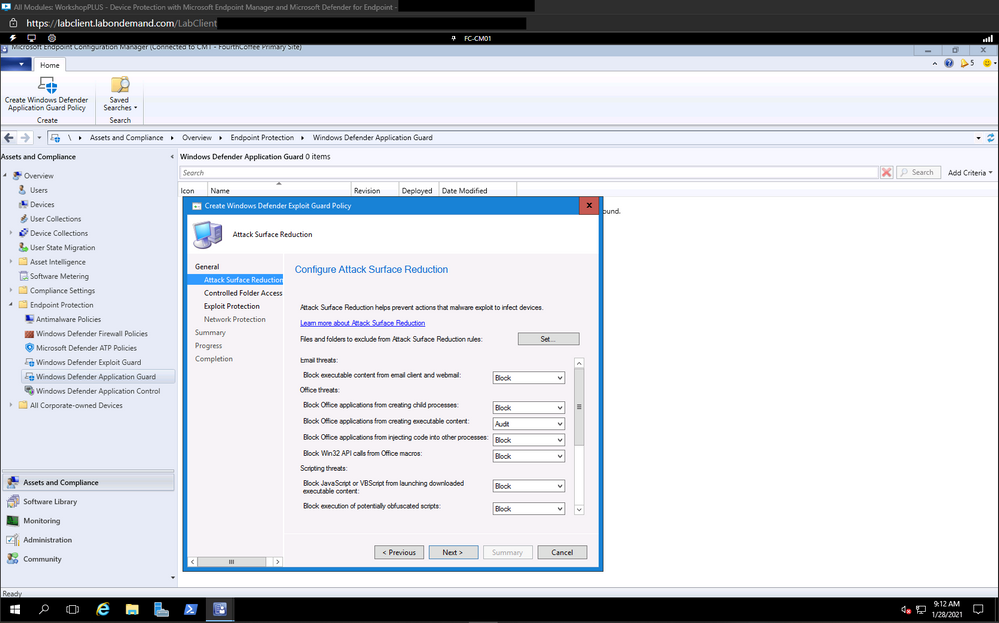
Configuring Attack Surface Reduction RulesConfiguring Attack Surface Reduction Rules


Configuring Bitlocker drive encryption in MEMConfiguring Bitlocker drive encryption in MEM


Objectives


After completing this course, you will understand how to set up, configure, and manage Microsoft Endpoint Configuration Manager Role Based Access​, Endpoint Protection for Microsoft Endpoint Manager, Application Guard and Exploit Guard integration​, Microsoft Defender for Endpoint​, BitLocker Drive Encryption, and compliance settings.


Key Personnel For this Offering 


This course is targeted at IT staff who have already started designing and implementing Microsoft Endpoint Configuration Manager integration with Microsoft Security products and concepts. To ensure that students are successful at the end of this WorkshopPLUS, it is highly recommended they meet the following criteria:​


  • Existing knowledge of Microsoft Endpoint Configuration Manager ​

  • Moderate knowledge of Windows Platform and Microsoft Security products​

  • Basic knowledge of Microsoft Endpoint Manager (Intune)​


Disclaimer 


As of this writing, the above modules are in scope. However, they might change as Microsoft Endpoint Configuration Manager, Intune, Microsoft Defender for Endpoint, and M365 Security are subject to change. 


Follow up and feedback


For further information, please contact your Microsoft Account Representative, Customer Success Account Manager (CSAM), or Service Delivery Manager (SDM).


To improve this or any other workshop, we always consider feedback from you. At Microsoft, achieving a high level of satisfaction among our customers and partners around the world is a core component of our business. For that reason, please don’t hesitate to complete the surveys and provide feedback.


Credit 


Special thanks and credit to the development team:


Anton Tatarkin, Senior Customer Engineer, Intune / EMS / Configuration Manager, Netherlands


John Barbare, Senior Customer Engineer – Cybersecurity, Monitoring Solutions (Sentinel, M365 Defender, MDE, MDI, MCAS), Unites States


Charles Baldridge, Customer Engineer, Configuration Manager, United States

Announcing the preview of Zone Redundant Storage (ZRS) option for Azure managed disks

This article is contributed. See the original author and article here.

We are excited to introduce the preview of Zone Redundant Storage (ZRS) option for Azure managed disks! This capability provides synchronous replication of data across the three Zones in a region, enabling disks to tolerate Zonal failures which may occur due to natural disasters or hardware issues.  ZRS option is currently supported for Premium SSD and Standard SSD disks.


Use ZRS disks for legacy applications to achieve better availability


You can achieve high availability for your workloads using application-level replication across two zones, for example, SQL Always On. However, suppose you are using industry-specific proprietary software or legacy applications like older versions of SQL Server, which don’t support application-level synchronous replication; ZRS disks will provide improved availability via storage-level replication. For example, if a zone goes down due to natural disasters or hardware failures, ZRS disk will continue to be operational. If your virtual machine (VM) in the affected Zone becomes unavailable, you could use a virtual machine in another zone and attach the same ZRS disk.


Use ZRS with shared disks


You can also use the ZRS option for shared disks to provide improved availability for clustered or distributed applications like SQL FCI, SAP ASCS/SCS. You can attach a shared ZRS disk to primary and secondary VMs allocated on different zones to take advantage of both ZRS disks and Availability Zones for VMs for higher availability. In the event of a primary zone failure, you can quickly fail over to the secondary VM using SCSI persistent reservation.


Use ZRS disks to achieve zero RPO


For LRS disks, you can achieve better durability by taking frequent backups of your disks using ZRS snapshots. You can also enable cross-zone disaster recovery for LRS disks via Azure Site Recovery. However, these options do not provide zero Recovery Point Objective (RPO). If your application must meet zero RPO, then ZRS disks could be the solution.


Pricing and performance


You can find the price for Premium SSD and Standard SSD ZRS disks at the disks storage pricing page. The IOPS and bandwidth provided by ZRS disks is same as the corresponding LRS disks. For example, a P30 (128 GiB) LRS Premium SSD disk provides 5000 IOPS and 200 MB/second bandwidth, which is same for P30 ZRS Premium SSD disk. Disk latency for ZRS is higher than that of Locally Redundant Storage (LRS) due to the cross zonal copy of data.


Get started


If you are interested in participating in the preview, request access by filling out this form. A list of regions where the feature is supported can be tracked on the documentation page. We will keep adding new regions throughout the public preview.


Review the ZRS disks preview documentation to learn how to do the following:


  1. Create a VM with ZRS OS and data disks.

  2. Create multiple VMs in different zones with a shared ZRS disk.

  3. Create VMSS with ZRS OS and data disk.