by Contributed | Mar 3, 2021 | Technology
This article is contributed. See the original author and article here.
Pipeline sometimes needs to understand and reads metadata from trigger that invokes it. For instance, with Tumbling Window Trigger run, based upon window start and end time, pipeline will process different data slices or folders. In Azure Data Factory, we use Parameterization and System Variable to pass meta data from trigger to pipeline.
This pattern is especially useful for Tumbling Window Trigger, where trigger provides window start and end time, and Custom Event Trigger, where trigger parse and process values in custom defined data field. Please note that different trigger types offer different metadata, and System Variable will contain most up to date information for each one.
- Data Factory UI
This section shows you how to pass meta data information from trigger to pipeline, within the Azure Data Factory User Interface.
Go to the Authoring Canvas and edit a pipeline
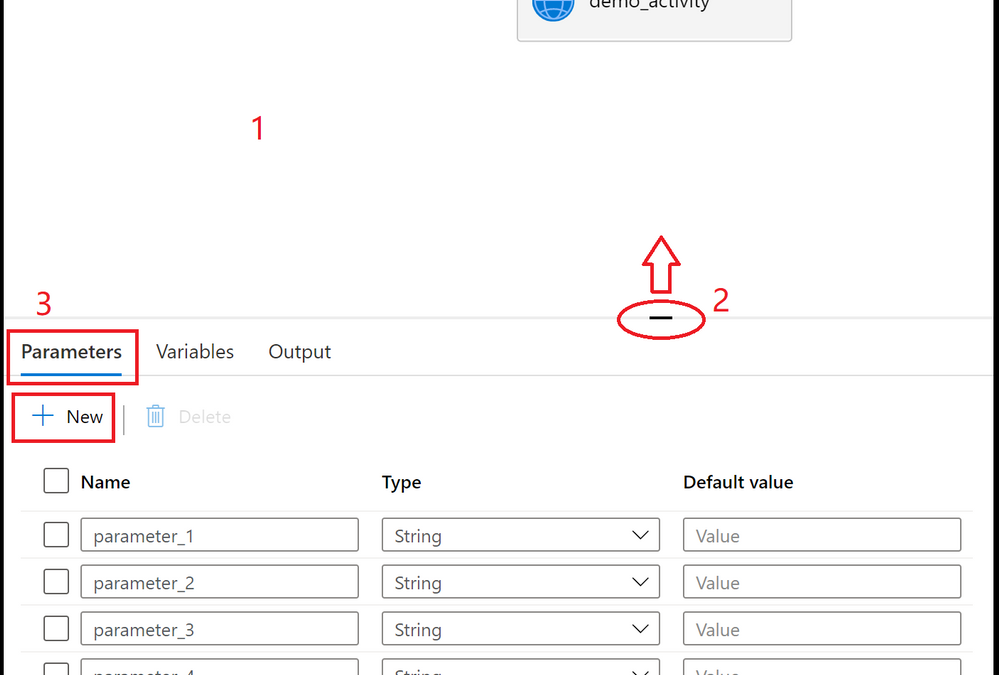
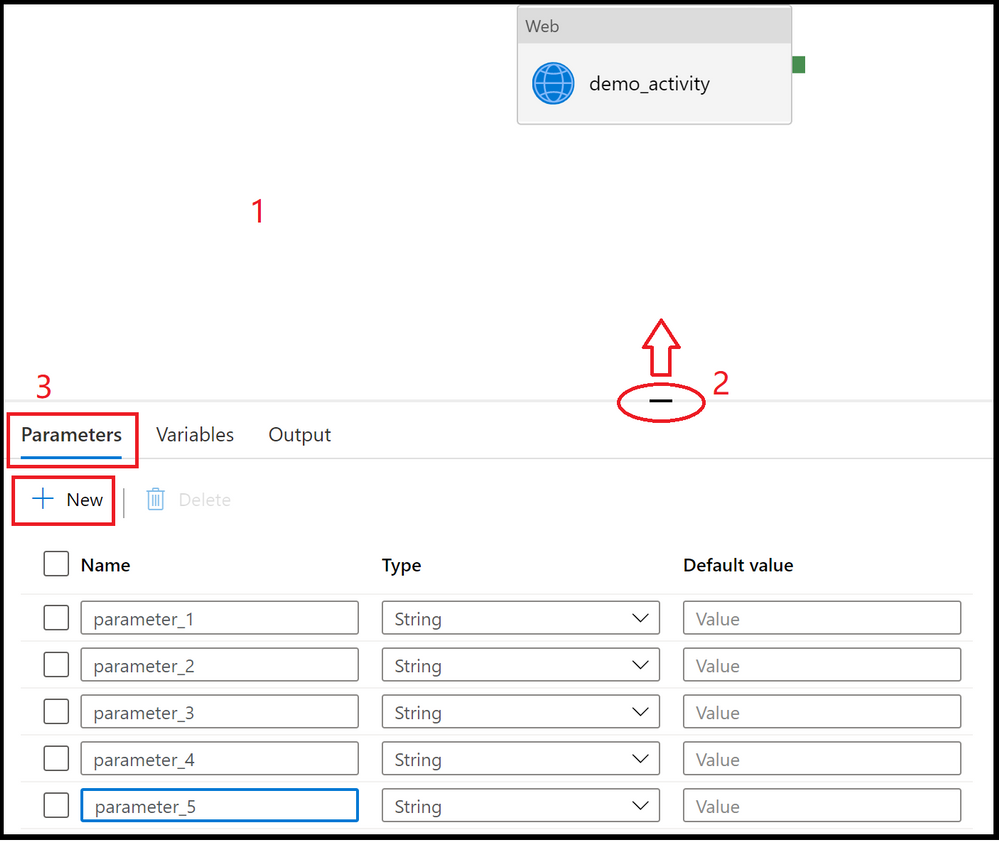
Click on the blank canvas to bring up pipeline settings. Do not select any activity. You may need to pull up the setting panel from the bottom of the canvas, as it may have been collapsed
Select Parameters section and select + New to add parameters
Add triggers to pipeline, by clicking on + Trigger.
Create or attach a trigger to the pipeline, and click OK
In the following page, fill in trigger meta data for each parameter. Use format defined in System Variable to retrieve trigger information. You don’t need to fill in the information for all parameters, just the ones that will assume trigger metadata values. For instance, here we assign trigger run start time to parameter_1.
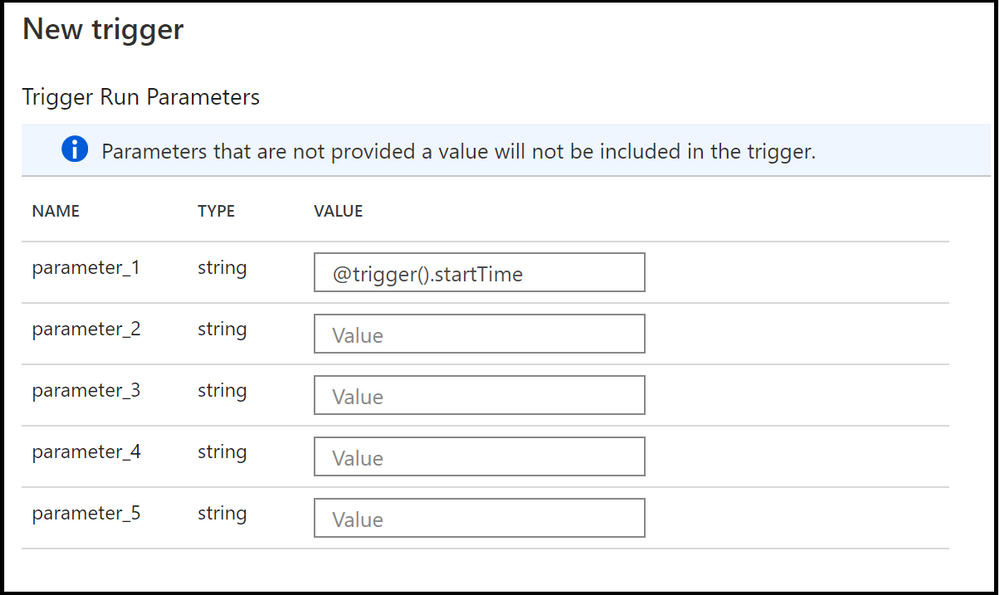
- To use the values in pipeline, utilize parameters @pipeline().parameters.parameterName, not system variable, in pipeline definitions. For instance, in our case, to read trigger start time, we’ll reference @pipeline().parameters.parameter_1.
- JSON Schema
To pass in trigger information to pipeline runs, both the trigger and the pipeline json need to be updated with parameters section.
- Pipeline Definition
Under properties section, add parameter definitions to parameters section
{
    "name": "demo_pipeline",
    "properties": {
        "activities": [
            {
                "name": "demo_activity",
                "type": "WebActivity",
                "dependsOn": [],
                "policy": {
                    "timeout": "7.00:00:00",
                    "retry": 0,
                    "retryIntervalInSeconds": 30,
                    "secureOutput": false,
                    "secureInput": false
                },
                "userProperties": [],
                "typeProperties": {
                    "url": {
                        "value": "@pipeline().parameters.parameter_2",
                        "type": "Expression"
                    },
                    "method": "GET"
                }
            }
        ],
        "parameters": {
            "parameter_1": {
                "type": "string"
            },
            "parameter_2": {
                "type": "string"
            },
            "parameter_3": {
                "type": "string"
            },
            "parameter_4": {
                "type": "string"
            },
            "parameter_5": {
                "type": "string"
            }
        },
        "annotations": [],
        "lastPublishTime": "2021-02-24T03:06:23Z"
    },
    "type": "Microsoft.DataFactory/factories/pipelines"
}
- Trigger Definition
Under pipelines section, assign parameter values in parameters section. You don’t need to fill in the information for all parameters, just the ones that will assume trigger metadata values.
Here is a Schedule Trigger that will pass its trigger start time
{
    "name": "trigger1",
    "properties": {
        "annotations": [],
        "runtimeState": "Started",
        "pipelines": [
            {
                "pipelineReference": {
                    "referenceName": "demo_pipeline",
                    "type": "PipelineReference"
                },
                "parameters": {
                    "parameter_1": "@trigger().startTime"
                }
            }
        ],
        "type": "ScheduleTrigger",
        "typeProperties": {
            "recurrence": {
                "frequency": "Minute",
                "interval": 15,
                "startTime": "2021-03-03T04:38:00Z",
                "timeZone": "UTC"
            }
        }
    }
}
- Use trigger metadata in pipeline
To use the values in pipeline, utilize parameters @pipeline().parameters.parameterName, not system variable, in pipeline definitions.
by Contributed | Mar 3, 2021 | Technology
This article is contributed. See the original author and article here.
Recent high profile cyberattacks have highlighted the importance of having strong standards and features built into infrastructure monitoring and management tools. Microsoft System Center Operations Manager (SCOM) offers world class monitoring capabilities and includes powerful built-in security features.
Our increased focus on customers security concerns have led us to include enhancements to many security related features in recent SCOM update rollups. We know that organizations have strict controls and best practices and we want to ensure that our customers have the right tools to prevent attacks and gain peace of mind. Here are some of SCOM’s security offerings.
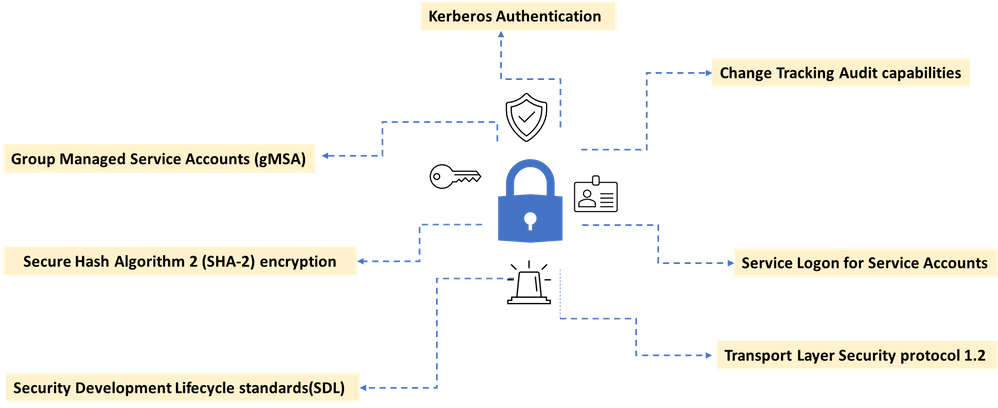
A new addition to SCOM 2019 was increasing out of the box security configuration through support for group managed service accounts (gMSA).Group Managed Service Accounts (gMSA) has been a very popular capability because it alleviates the need for password management – now all accounts used in SCOM can be gMSA. A detailed guide on how to configure gMSA accounts in lieu of your existing SCOM accounts is provided here.
Another important best practice is to disable interactive and remote interactive sessions for service accounts. SCOM 2019 supports hardening of service accounts and does not require granting the “Allow log on locally” user right for several accounts. The default configuration on SCOM 2019 Management Servers, Gateways, and Agents, is that service accounts and RunAs accounts will now leverage the “Log on as a Service” user right, and no longer require the “Log on locally” user right.
An additional security feature in SCOM is that Run As account credentials can only be distributed to computers that you specify. Automatically distributing Run As account according to discovery could introduce a security risk, which is why an automatic distribution option is not included in Operations Manager.
Authentication in Operations Manager
SCOM implements a default set of authentication protocols, including Kerberos, NTLM, Transport Layer Security/Secure Sockets Layer (TLS/SSL) as part of an extensible architecture. In addition, some protocols are combined into authentication packages such as Negotiate and the Credential Security Support Provider. These protocols and packages enable authentication of users, computers, and that in turn ensures access to resources in a secure manner.
SCOM also mandates a least privileged model for its security account matrix. The least privileged model is a best practice in IT security and the concept is that any user, service, or process should have only the bare minimum privileges necessary to execute the required task. Mandating this principle reduces the risk of attackers gaining access to sensitive data by compromising low level user accounts or devices.
Auditing in Operations Manager
We recently introduced Management pack change tracking, a feature that allows enhanced audit tracking capabilities in SCOM. Management Packs are essentially the arteries of SCOM that help the core of SCOM function well. They include monitoring configurations and data collection parameters tailored for specific applications and services. Management packs are released by both Microsoft and third-party vendors for a range of tools and applications that need to be monitored in the customer’s landscape.
SCOM allows to be defined giving access rights to perform actions on the monitored objects. These roles can be defined to determine who can potentially change monitoring settings for applications and services through Management Packs. A profile is defined on a group of users which impose Role-based security and limit privileges that users have for various aspects of Operations Manager. The change tracking feature allows the administrators to do an easy root cause analysis as and when required to keep track of what changes are being done by which user and when.
Security is built-into SCOM
To help customers deploy the latest security protocols, we enable Transport Layer Security (TLS) protocol version 1.2 for System Center Operations Manager management groups. In support of our commitment to use best-in-class encryption, SCOM’s engineering team is continually upgrading our cryptographic infrastructure. Customers can configure the Web console and Reporting server to use Secure Sockets Layer (SSL) connections to ensure that both incoming requests and outbound responses are encrypted prior to transmission.
System Center Operations Manager provides layers of protection built into the product to safeguard against security breaches. SCOM follows Microsoft’s Software Development Lifecycle(SDL) policy , which considers security and privacy throughout all phases of the development process. The SCOM team uses Microsoft approved SDL tools like BinSkim, CredScan, Codesign Validation, and Anti malware to perform security checks for each line of code they produce. In addition to these tools and to add further protection, our code is also encrypted with Secure Hash Algorithm 2 (SHA-2).
We are very proud to offer a product like System Center Operations Manager, one that continues to support evolving industry security needs and strives to keep our customers safe and productive.
by Contributed | Mar 3, 2021 | Technology
This article is contributed. See the original author and article here.
Recent high profile cyberattacks have highlighted the importance of having strong standards and features built into infrastructure monitoring and management tools. Microsoft System Center Operations Manager (SCOM) offers world class monitoring capabilities and includes powerful built-in security features.
Our increased focus on customers security concerns have led us to include enhancements to many security related features in recent SCOM update rollups. We know that organizations have strict controls and best practices and we want to ensure that our customers have the right tools to prevent attacks and gain piece of mind. Here are some of SCOM’s security offerings.
A new addition to SCOM 2019 was increasing out of the box security configuration through support for group managed service accounts (gMSA).Group Managed Service Accounts (gMSA) has been a very popular capability because it alleviates the need for password management – now all accounts used in SCOM can be gMSA. A detailed guide on how to configure gMSA accounts in lieu of your existing SCOM accounts is provided here.
Another important best practice is to disable interactive and remote interactive sessions for service accounts. SCOM 2019 supports hardening of service accounts and does not require granting the “Allow log on locally” user right for several accounts. The default configuration on SCOM 2019 Management Servers, Gateways, and Agents, is that service accounts and RunAs accounts will now leverage the “Log on as a Service” user right, and no longer require the “Log on locally” user right.
An additional security feature in SCOM is that Run As account credentials can only be distributed to computers that you specify. Automatically distributing Run As account according to discovery could introduce a security risk, which is why an automatic distribution option is not included in Operations Manager.
Authentication in Operations Manager
SCOM implements a default set of authentication protocols, including Kerberos, NTLM, Transport Layer Security/Secure Sockets Layer (TLS/SSL) as part of an extensible architecture. In addition, some protocols are combined into authentication packages such as Negotiate and the Credential Security Support Provider. These protocols and packages enable authentication of users, computers, and that in turn ensures access to resources in a secure manner.
SCOM also mandates a least privileged model for its security account matrix. The least privileged model is a best practice in IT security and the concept is that any user, service, or process should have only the bare minimum privileges necessary to execute the required task. Mandating this principle reduces the risk of attackers gaining access to sensitive data by compromising low level user accounts or devices.
Auditing in Operations Manager
We recently introduced Management pack change tracking, a feature that allows enhanced audit tracking capabilities in SCOM. Management Packs are essentially the arteries of SCOM that help the core of SCOM function well. They include monitoring configurations and data collection parameters tailored for specific applications and services. Management packs are released by both Microsoft and third-party vendors for a range of tools and applications that need to be monitored in the customer’s landscape.
SCOM allows to be defined giving access rights to perform actions on the monitored objects. These roles can be defined to determine who can potentially change monitoring settings for applications and services through Management Packs. A profile is defined on a group of users which impose Role-based security and limit privileges that users have for various aspects of Operations Manager. The change tracking feature allows the administrators to do an easy root cause analysis as and when required to keep track of what changes are being done by which user and when.
Security is built-into SCOM
To help customers deploy the latest security protocols, we enable Transport Layer Security (TLS) protocol version 1.2 for System Center Operations Manager management groups. In support of our commitment to use best-in-class encryption, SCOM’s engineering team is continually upgrading our cryptographic infrastructure. Customers can configure the Web console and Reporting server to use Secure Sockets Layer (SSL) connections to ensure that both incoming requests and outbound responses are encrypted prior to transmission.
System Center Operations Manager provides layers of protection built into the product to safeguard against security breaches. SCOM follows Microsoft’s , which considers security and privacy throughout all phases of the development process. The SCOM team uses Microsoft approved SDL tools like BinSkim, CredScan, Codesign Validation, and Anti malware to perform security checks for each line of code they produce. In addition to these tools and to add further protection, our code is also encrypted with Secure Hash Algorithm 2 (SHA-2).
We are very proud to offer a product like System Center Operations Manager, one that continues to support evolving industry security needs and strives to keep our customers safe and productive.
by Contributed | Mar 2, 2021 | Technology
This article is contributed. See the original author and article here.
Today is UNESCO World Engineering Day for Sustainable Development. A day to celebrate how applying engineering skills can improve modern life and achieve positive environmental impact. While the UN Sustainable Development Goals represent an ambitious challenge to enhance the peace and prosperity on the planet, UN SDG goal #2 ‘Zero Hunger’ calls for bold and transformative steps to end hunger and help people achieve food security, acquire better nutrition, and promote sustainable agriculture. The United Nations predicts, “if recent trends continue, the number of people affected by hunger will surpass 840 million by 2030, or 9.8 percent of the population.” Powerful tools like Microsoft’s commercial FarmBeats precision agriculture technology are already playing a pivotal role in helping us achieve ‘Zero Hunger’ by combining a farmer’s knowledge and intuition about their farm with data-driven decision making. However, making these tools approachable, reducing the complexity, and training communities in using data, machine learning, AI, and the world of IoT is still a significant challenge.
Meet the FarmBeats for Students program designed to bring the fundamentals of AI, machine learning, data science, and the emerging world of IoT into the classroom. Developed in partnership with the National FFA and Microsoft, the program combines an affordable hardware kit produced by Seeed Studio with FREE curated curriculum and activities designed to give students hands-on experience building a garden monitoring system. First, they assemble a Raspberry Pi equipped with atmospheric and environmental sensors to understand their soil’s health by streaming, visualizing, and analyzing their sensor data in Excel. Next, they use Excel to construct an agent for automating their garden or greenhouse. Finally, using Lobe’s no-code machine learning application, they build models to analyze plant health and nutrient problems in their plants and identify pests in their garden. The course ends with an introduction to Microsoft’s Responsible AI Framework and presents a discussion about some of the social and ethical challenges raised by this new technology.
It has been inspiring to partner with National FFA. Together we have built this rich collection of materials to kickstart the next generation of food producers in achieving the 2030 goal of Zero Hunger. Today, over 800,000 students in grades seven-adult participate in formal agricultural education instructional programs throughout the United States. Their community of dedicated academic advisors brings leadership and classroom/laboratory education programs to their students by introducing work-based tools to achieve real-world success. National FFA has been at the forefront of helping students discover their talents through their programs of hands-on career experiences. The FarmBeats for Students program infuses rural education pathways with 21st Century skills that enable students to see connections between technology and data-driven decision making while academically aligning to the AI4K12 Big 5 Ideas, AFNR career standards, CSTA standards, and Common Core Math Standards.
On this World Engineering Day for Sustainable Development, we are proud to launch the FarmBeats for Students program. With the release of the kit and curriculum combined with today’s students’ ingenuity and passion, we are confident that we are building modern engineering skills that will help solve real-world problems like alleviating the threats of hunger and feeding the world.
by Contributed | Mar 2, 2021 | Technology
This article is contributed. See the original author and article here.
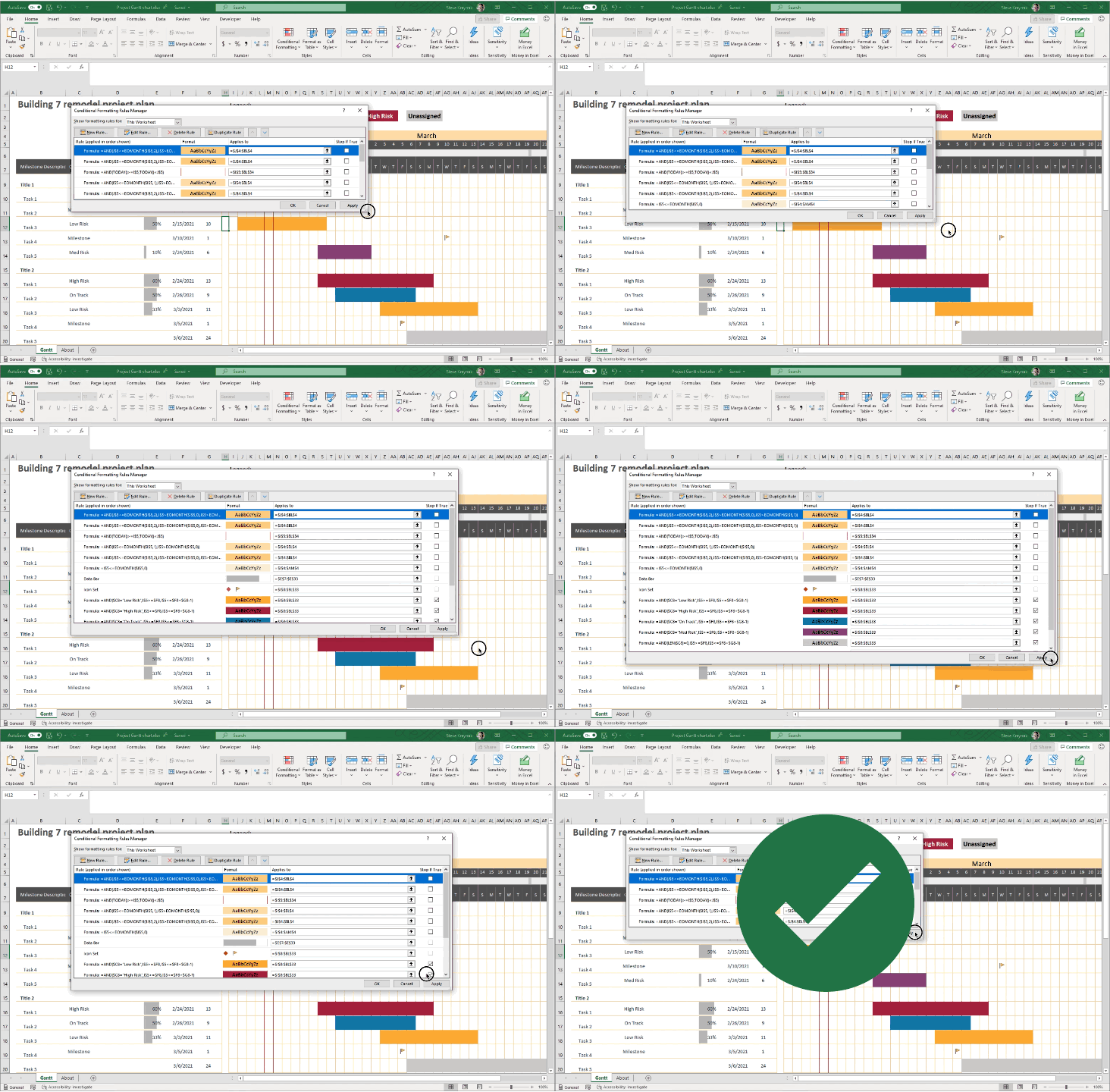
We’re happy to announce a highly requested improvement to the Conditional Formatting dialogs in Excel for Windows. If you’re a Microsoft 365 subscriber, they’re now resizable so you can see more rules at a time, and it’s easier to see the formula and range that the rules apply to. This includes the Conditional Formatting Rules Manager and New/Edit Rule dialogs.
That’s not all. If you’re a Microsoft 365 subscriber, in Excel for Windows and coming soon to Excel for Mac, there’s a new button so you can duplicate a selected conditional formatting rule.
Animation showing the Conditional Formatting Rules Manager dialog being resized.
To create a copy of a rule, you no longer need to manually recreate the formula and format of the rule you’re trying to copy. Simply select the rule, and click “Duplicate Rule” to create the copy. This should be really useful when you want to create a few rules that are similar, but with some slight modifications. You can create one rule, then duplicate it and make the necessary tweaks to the new rule. You don’t need to start from scratch for each one.
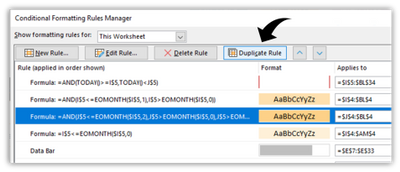 Screen shot showing the new Duplicate Rule button in the Conditional Formatting Rules Manager dialog.
The ability to resize the Conditional Formatting dialogs is one of the top requests that we’ve received, and we hope you like it. If you have additional suggestions, please use the feedback button on the Help tab of the ribbon to let us know.
To get these improvements, you must be a Microsoft 365 subscriber, and you need to install the latest updates. For Windows, this is version 16.0.13530 or greater. For Mac this is version 16.47 or greater.
by Contributed | Mar 2, 2021 | Technology
This article is contributed. See the original author and article here.
At the launch in early December, we gave you a sneak peek of the ability to manage multicloud data sources with Azure Purview. Today, I’m happy to announce, that you can now use Azure Purview to discover, manage and govern data residing in Amazon Web Services S3, in public preview.
A few reasons why you should consider governing your AWS S3 data with Azure Purview:
- Discover data stored in Amazon S3 buckets: Scan data in Amazon S3 buckets in a matter of clicks using Azure Purview without needing to deploy software or perform complex configurations in your AWS environment with the help of the Azure Purview scanner. The Azure Purview scanner is an automated scanning and classification agent that reads metadata and sample content to capture the data asset and classify it.
- Zero in on sensitive data: Classify data using pre-defined sensitive information types to classify your data. Sensitive information types are defined in the Microsoft 365 Compliance center and include any configured regular expressions and keywords.
- Security insights. Discover the types of sensitive data you have stored in Amazon S3 buckets, and pinpoint its location. Verify that your sensitive data is not stored in unexpected locations, avoid data leakage, and follow compliance regulations.
- Ensure data isolation and compliance: The Purview scanner that runs in the Microsoft account in AWS features full data isolation and complies with the highest Microsoft standards for data privacy. The Purview scanner does not store any customer data.
- Simplified billing: The billing model on the Purview end is Customers using Azure Purview to manage Amazon AWS S3 data may face additional charges as part of their Amazon AWS billing due to data transfers and API calls. This charge varies by region. Refer to the Billing and Management console within the AWS Management Console to view the charges. Refer http://aka.ms/Purviewpricing
Now, let’s dive into what you can achieve with this feature!
1. Scan Amazon S3 buckets
Azure Purview now provides a managed, built-in solution to explore and govern data across your data estate, including both Azure storage services and Amazon S3 buckets.
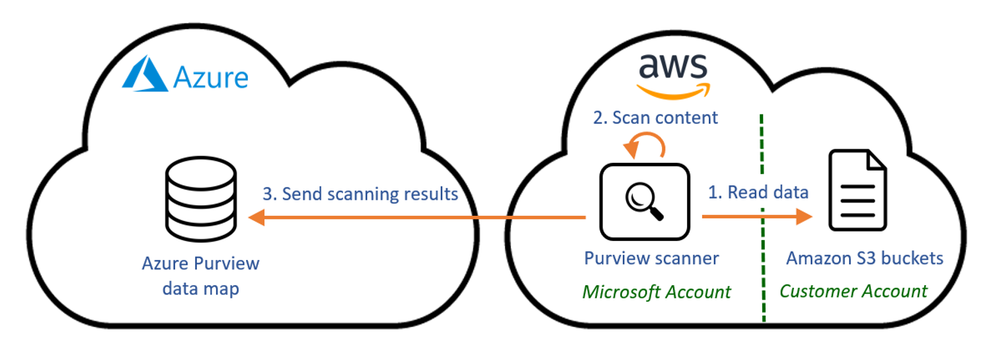
Azure Purview uses unique technology to scan Amazon S3 bucket data, including an easy setup and configuration process and the highest Microsoft standards for data privacy:
- The Purview scanner is deployed in a Microsoft account in AWS.
- Scans are initiated by a simple configuration in Azure Purview, and do not require manual service deployments or maintenance.
- Scanner access to the organization’s S3 buckets is granted by a dedicated role in AWS.
The Purview scanning setup ensures full data privacy by scanning Amazon S3 data locally in AWS. The scanning service uses full data isolation and does not store any data in AWS. Only the scanning results and metadata are sent to the Azure Purview data map, where it is displayed for administrators together with the scanning results from Azure services.
The Purview roadmap includes additions for even more non-Azure storage services and aims to strengthen Azure Purview’s multi-cloud capabilities, empowering data administrators to maximize the value of their data with a single view across their clouds.
2. Configure Amazon S3 in Azure Purview
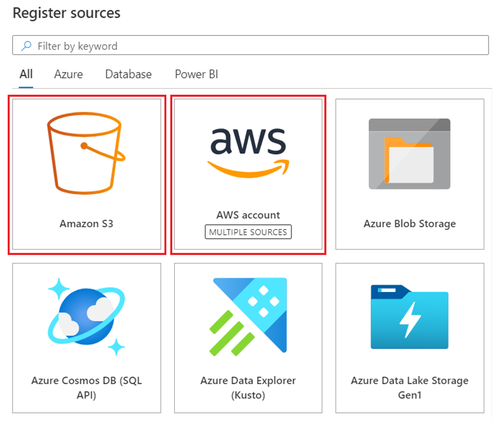
Similar to the Azure data sources in Purview, you first need to register the Amazon S3 bucket as a Purview data source, and then initiate your scan.
Registration
You can either register one Amazon S3 bucket, for scanning a single bucket, or register an AWS account, for scanning all S3 buckets in the account.
Scanning
When setting up the scan of Amazon S3 bucket or AWS account, you need to provide the Purview scanner credentials to access to the organization’s S3 buckets.
To grant this access, you first need to create a role in AWS Identity & Access Management. This role requires read only access to the S3 buckets you wish to scan. If the buckets are KMS-encrypted, a decrypt permission is needed as well.
To keep your buckets security and ensure this new role can only be used for your Purview scanning, use these configurations when creating the role:
- Microsoft account ID – to allow accessing the buckets from Microsoft account only
- External ID – a unique identifier for your Purview account used for accessing the bucket, for an additional layer of security
You get both the Microsoft account ID and the external ID values when you create a Purview credential object. You’ll need to copy-paste them into the AWS Identity & Access Management role creation screens:
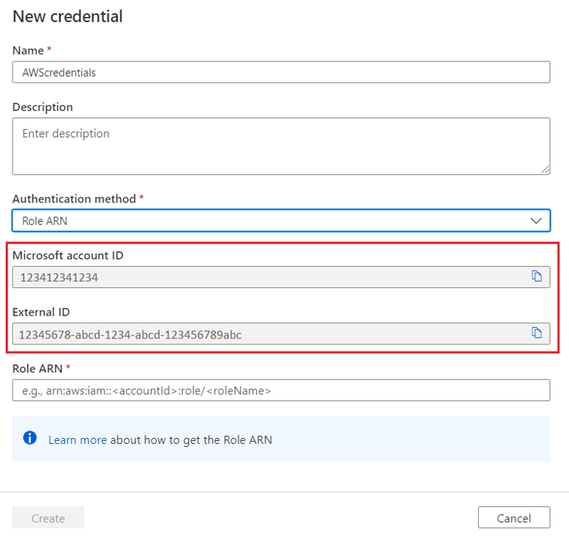
Once the role is created, copy the role ARN value from AWS, and paste it in the Purview credential object in Purview portal. Then use the credential object to initiate a scan on your Amazon S3 bucket or AWS account.
3. Enable discovery of Amazon S3 data by your data consumers in Azure Purview Data Catalog
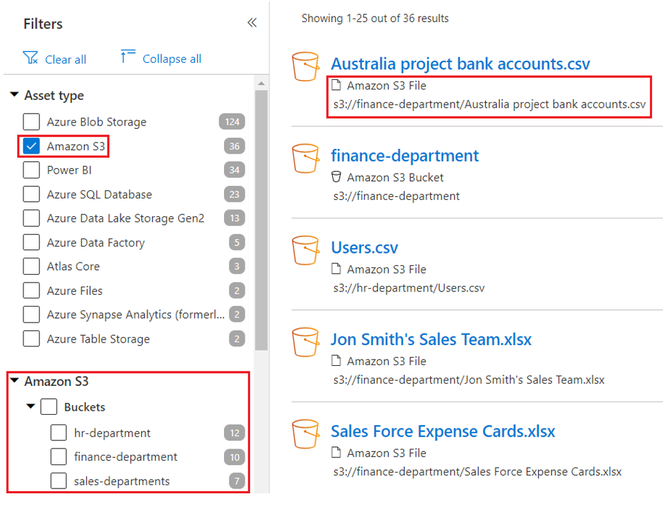
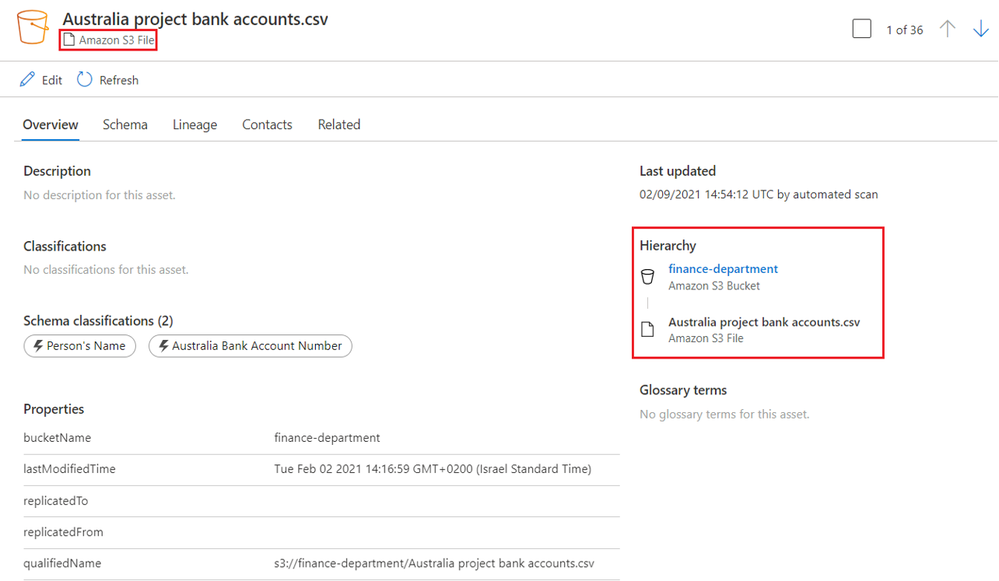
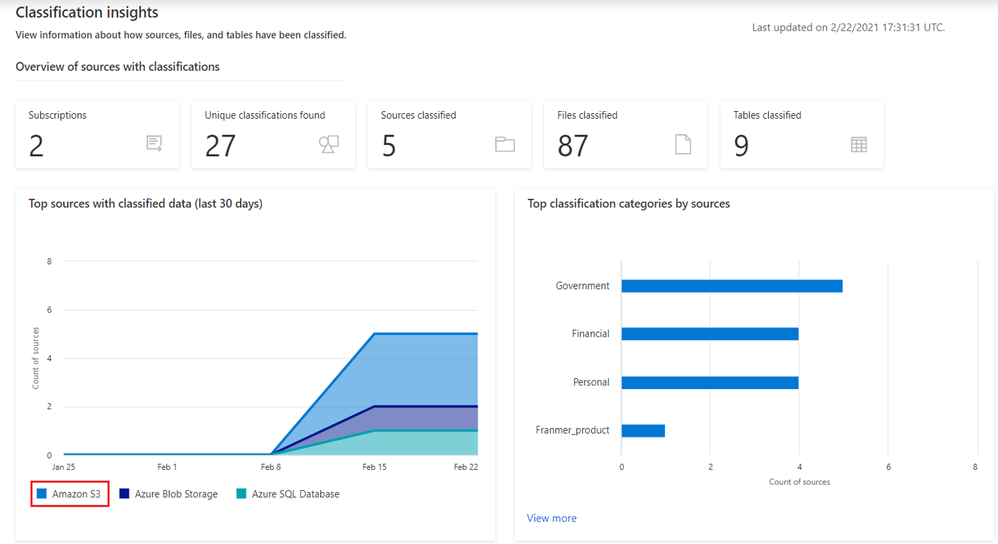
4. Get granular insights into sensitive data within your AWS S3 sources:
In the insight reports, see a unified view of all scanned data, including AWS S3.
Get started!
Get started today with documentation!
by Contributed | Mar 2, 2021 | Technology
This article is contributed. See the original author and article here.
We recently released an update to Microsoft JDBC Driver for SQL Server, version 9.2.1. The update addresses an issue with the new Azure Service Principal authentication option.
Fixed issues
- Fixed an issue with client secret being empty during ActiveDirectoryServicePrincipal authentication in an Azure environment #1519
Getting the latest release
The latest bits are available to download from Microsoft, from the GitHub repository, and via Maven Central.
Add the JDBC 9.2.1 RTW driver to your Maven project by adding the following code to your POM file to include it as a dependency in your project (choose .jre8, .jre11, or .jre15 for your required Java version).
<dependency>
  <groupId>com.microsoft.sqlserver</groupId>
  <artifactId>mssql-jdbc</artifactId>
  <version>9.2.1.jre11</version>
</dependency>
Help us improve the JDBC Driver by taking our survey, filing issues on GitHub or contributing to the project.
Please also check out our
tutorials to get started with developing apps in your programming language of choice and SQL Server.
David Engel
by Contributed | Mar 2, 2021 | Technology
This article is contributed. See the original author and article here.
We are excited to announce the Champion Management Platform coming later this month! As we put the final touches on version 1, we wanted to ensure you had awareness of the platform and what was coming as part of it.
Champions are our heartbeat, and we are excited to be able to deliver a set of tools aimed at helping you manage, scale, and inspire your teamwork champions to achieve even more. This solution is built to be lightweight and easy to customize so you can fit it into your program however it is best suited.
The Champion Management Platform is built on the SharePoint framework and loaded directly into Microsoft Teams. You can load it to an existing champion team or deploy a new team template specifically for champions and load the solution there. Let’s talk about the three main components of the platform in this version.
Champion management and nomination
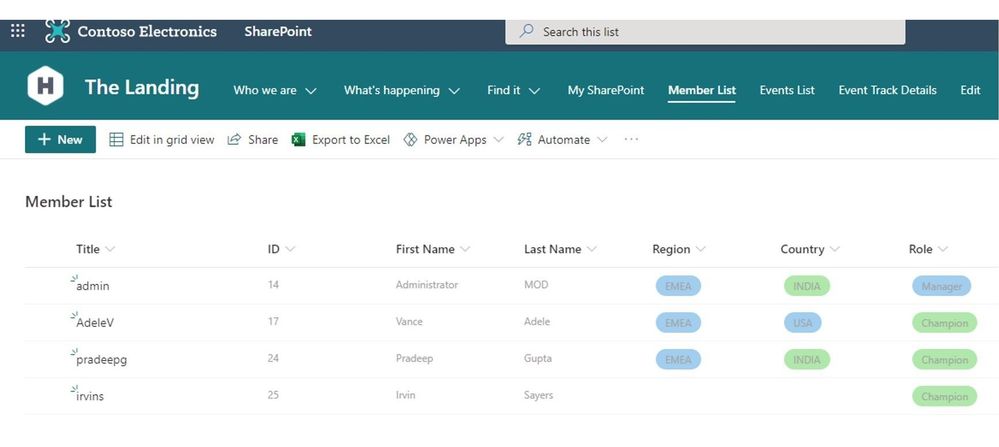
The first part of this toolset aims to help manage the champions in your organization by keeping a list of members, enabling the ability to signup new champions, and providing an approval system to onboard new members into the champion program.
Leaderboard
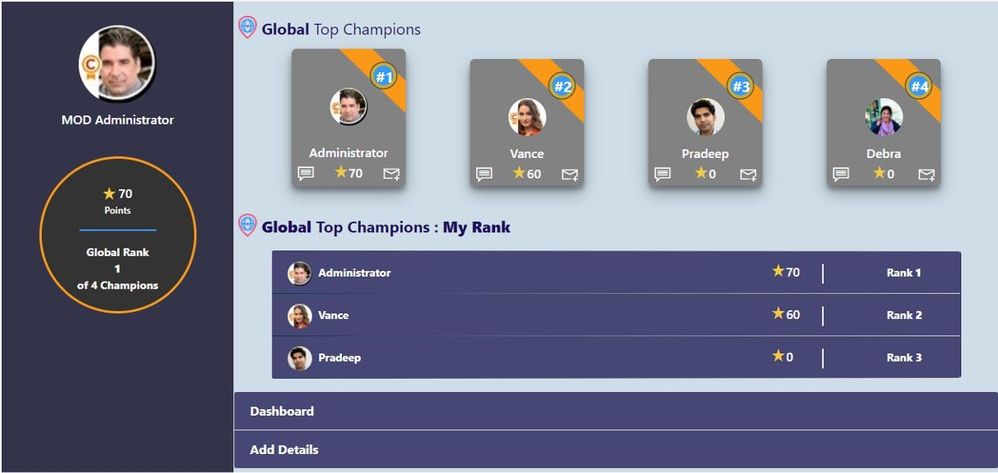 The Leaderboard allows you to track campaigns across the champion group. You will be able to define the types of actives and point values. Champions will be able to see their ranking from a global perspective, based on people near them in location, as well as the specialty they have assigned.
Digital Badge
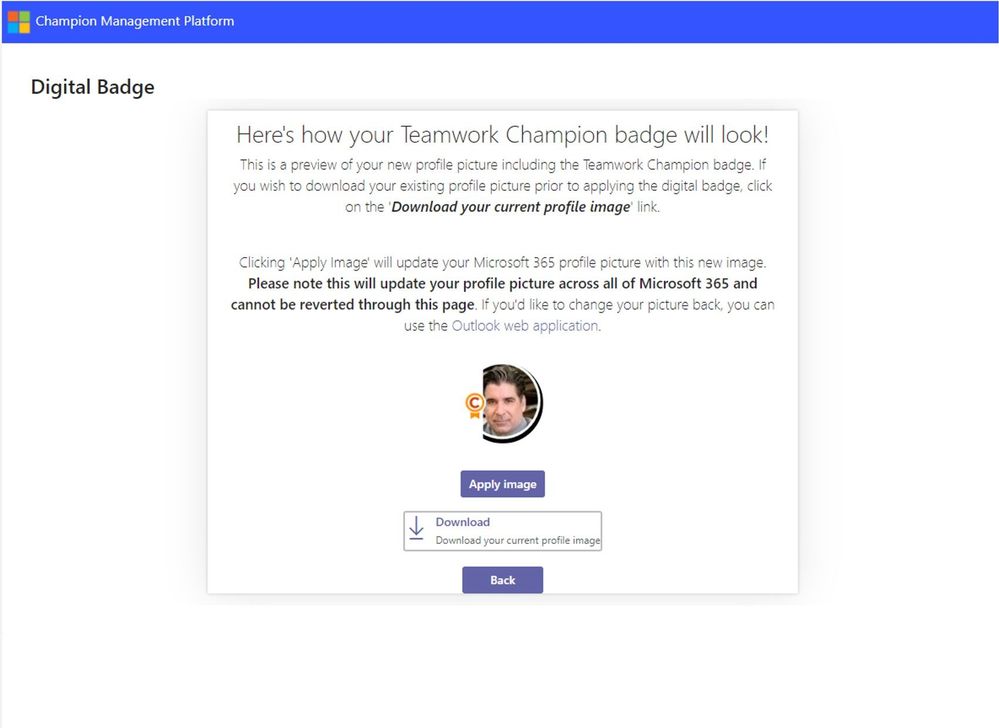
The Digital Badge allows you to easily overlay a teamwork champion badge over your profile image for display across the Microsoft 365 solutions. Showcasing this badge helps to identify champions and provide a bit of recognition for their contributions to the role.
We can not wait to hear how you leverage this platform the drive results in your own champion programs. Let us know your feedback and ideas on how we can improve, and thank you for everything you do!
Champion Management Platform – Microsoft Adoption
/Josh
by Contributed | Mar 2, 2021 | Technology
This article is contributed. See the original author and article here.
(VOICES OF DATA PROTECTION – Episode 2)
Host: Bhavanesh Rengarajan – Principal Program Manager, Microsoft
Guest: Maithili Dandige – Group Program Manager for Information Protection, Microsoft
Guest: Randall Galloway – Senior Program Manager, Microsoft
Guest: Joel Oleson – Director of Microsoft National Practice, Perficient
The following conversation is adapted from transcripts of Episode 2 of the Voices of Data Protection podcast. There may be slight edits in order to make this conversation easier for readers to follow along.
This podcast features the leaders, program managers from Microsoft and experts from the industry to share details about the latest solutions and processes to help you manage your data, keep it safe and stay compliant. If you prefer to listen to the audio of this podcast instead, please visit: aka.ms/voicesofdataprotection
BHAVANESH: Hey all, welcome to Voices of Data Protection. I’m your host, Bhavanesh Rengarajan, and I’m a Principal Program Manager at Microsoft. In this episode, I talk with Maithili Dandige, Joel Oleson, and Randall Galloway.
So, Maithili, we’ve heard a lot about these difficult times. It would be great to understand from you firsthand as to what are the top issues for our customers in and around the information protection space.
MAITHILI: One of the big ways I want to answer your question is from the point of view of data and users. If you see that 90% of our workforce moved home, what are some of the considerations that we need to consider with respect to information protection?
The biggest thing to think about is, look at your data, it follows where your information workers go. And so, the controls that you’ve put in place at work, now they need to work at home. That’s one aspect.
The second aspect that is to look at where these sensitive conversations are happening. We saw a huge shift moving from not sharing of documents and emails, but a huge rise in chats and sensitive chats happening within our Teams workload.
When you look at one example that I can think about are board meetings and calls. These confidential meetings have now moved home. One has to think about the sensitivity of the discussion, which sensitive data should be allowed to share, and what are the aspects in which you need to save these records. All of those concentrations come in context of the sensitivity around the data and the discussion.
When customers are thinking about information protection we provide, does it really fit their needs? Because our controls work on all sorts of egress endpoints, whether they are our data at rest or data in transit, across emails, chats, and their third-party apps. One of the things we are doing with information protection is really building that unified policy that allows an admin to protect the data across all of their egress vectors.
RANDALL: Joel, where do you see customer challenges in information protection, in regard to the capabilities across a plethora of data sources? Maybe you can share some of your customer stories with us.
JOEL: Yeah, so the platform has the capabilities, and the capabilities continue to improve and improve. But what I’ve noticed is, organizations often are slow to even understand the capabilities. Just like I talk about organizational change management and adoption, a lot of it is educating those who are in charge of the technology to be able to understand they need to enable things, that the default settings often aren’t sufficient to be able to get the capabilities.
The Compliance Center, as an example, has been great for being able to do a quick assessment and understand industry-based requirements or organization-based requirements, to be able to say, what are the things we need to be able to do to ensure compliance across our Teams chats or across the videos that we may be storing and recording? And while it is different in different organizations, there’s some necessary requirements to be able to have success.
Success often starts with teaching IT or those in charge of the platform how to enable these things and getting that first line that are responsible for the technology platform aligned with the needs, so there’s information protection and governance really around the platform, making sure that the customer understands what’s necessary. As a consulting group, we often will spend time with IT to educate them on how to manage the platform.
BHAVANESH: Thanks a lot, Joel. What I hear you say, is that we’ve had traditional DLP (data loss prevention), which has been running in Exchange and SharePoint Server for so many years now. Now, as we see this uptake in remote conversations over Teams, it’s really important that we infuse all these feature sets into Teams DLP, and more importantly, with respect to adoption, try to create that awareness with customers so that they understand exactly what knobs turn on and when.
Maithili, are you really betting heavily on solving some of these issues for our customers?
MAITHILI: I would say absolutely. I think one of the things that we see, and as Joel mentioned, automation is going to be key to helping our customers at this problem.
Let me give you an example. We just announced some of our new capabilities as part of Know Your Data pillar, and really the mission here for us is analytics and giving insights to admins and awareness of where their sensitive data is located.
As an example, if we can tell you that here is where your organization or parts of your organization are sharing sensitive data or in chats or in emails or documents, then you can come up with a more informed strategy of how you want to go about protecting that data. That is a big part and core part of our investments and you’ll see us do more and more work there.
The second part that we really want to help our customers, which has been a huge challenge for them, is assistance as they deploy the policy, because deploying a policy means that they actually have to fine tune it to meet their needs. Whether it’s for a regulatory purpose they’re doing it or for a security aspect to protect some sensitive or intellectual data, you need to kind of build that policy out and then test it out.
One of the capabilities that we’ve announced recently is called the Simulation Mode, and the Simulation Mode really helps the customer test their policies before they deploy, and we’ll be doing more of these assisted, intelligent technologies that really ease the onboarding for the customers and automate things on behalf of them. That’s kind of what I hope customers continue to benefit from as we launch these capabilities.
RANDALL: Joel, are you seeing customers deploy MIP and DLP together or deploy independently, and is there a better together story there?
JOEL: There is a better together for sure, and in terms of customers and who uses what, when often I find that it comes down to some kind of compliance officer or somebody who’s concerned about IP. Often, it comes as part of the migration, moving the data to SharePoint Online or they see an uptick in Teams, and there’s this concern of data sprawl or there’s concern of data leaks. And all it takes is one little leak or attack, and all of a sudden, it’s the lights come on and it’s, hey, what is being shared, what is where.
Sometimes, there’s a proactive strategy where, when the data’s going in, we’re going to turn these things on, but often, people have been running SharePoint for a decade and there’s this question of, how can we be more sensitive about our data? We’re moving this data from on-prem to online; how do we get our arms around this?
What I find with those two different strategies, it’s the question of “How do we be more compliant from a perspective of Data Loss Prevention? How we know where our data is going, and understanding where the boundaries are, where the edge is in terms of sharing?” And a lot of the times, it’s the business that’s driving this sharing with partners or sharing with customers, and so basically, you’re getting a lot of this a lot closer to where the crown jewels are.
Then you see the compliance needs come in and say, hey, we’re oversharing here. We’re treating all the data the same and that’s not how we need to be doing it. This pendulum swing comes in where it pushes security to say, hey, we can’t do any of the sharing and it becomes debilitating.
There’s this question of, how do we wrestle this and just be such a way that we can actually start to compartmentalize and classify our data in such a way that we can actually, when we’re working with partner data, we’re essentially understanding whether it’s sensitive or not, and really being able to break that and classify that data up, and so these strategies of classification and understanding your data and being able to kind of get your arms around it so that you can have different policies for different data.
Then when you start getting down to the individual files, especially as it relates to sensitivity, one of my favorite stories, I’m working with the security team. They had just done a brute force test and they’ve got this report that shows all the vulnerabilities of the network.
And the security team — this is kind of funny. It’s like they’re sharing it with other members of the security team and they’re doing it over e-mail. And one of the guys on the security team says, “What are we doing? There is no password protection on this file. There is no tracking. What in the world? Who are we? How can we think that this is okay for us to be sharing company sensitive, ultra, uber sensitive information, and we’re passing it around an email? Where should this data be?”
It was kind of this major wakeup call to understand what the right ways are they should share information, how do we make sure that we’re actually getting the tracking we need, that there’s the not being able to share it outside the organization.
That’s where those rights managements and the policies around the file itself can become so important and was really a major wakeup call for our being able to understand classification of data and being able to make sure that not all data is treated equal, because not all data is equal.
RANDALL: Joel, what are you seeing with customers in their organizations around regulatory challenges on how they do data management encryption? What are we seeing those customers accept as compliance?
JOEL: I think that compliance is something that has continued to evolve and the importance of it is absolutely critical when you think about things like GDPR, but absolutely things like HIPAA, the positioning of more of these, like the educational vertical, and even the healthcare verticals inside of Microsoft to be able to support this data.
I love being able to see support for patient data, because I think the default support and collaboration has been, everything gets treated the same. But in these organizations, we’ve traditionally kept our records separate from collaboration and we end up with these silos of information. What Microsoft 365 has been able to support is breaking down some of these silos.
But, what’s interesting about this is how, as we’re kind of breaking down some of these silos and allowing information to be classified and being able to even do some automation of the data and being able to keep the data where it lives but being able to add classification and compliance around the data where it lives.
I think that what’s interesting about these organizations has been, they’ve been able to do more with their data. As Microsoft’s been adding more and more features, as consultants we’ve been to get more involved in the compliance requirements.
And a great example of this, I was working in an organization where we were working in their collaboration environment, but there were absolutely some historical records and actually things that should have been records, but because of the ease of the platform, that business unit decided to store that data in the Microsoft 365 space, and they started getting more and more comfortable with the platform. Well, what they didn’t understand was there was features that we could use to be able to help them be more compliant with their data.
And so, as an example, we walked them through the Compliance Center, so they would understand things like DLP and like the rights management features to be able to say, here’s how we can leverage these sharing features, but also, from a compliance perspective, like, say, when you’re working with patient data, being able to keep it so that it’s not being shared, we can actually see who’s actually seen this data. A lot of this is just making sure that those features are enabled and turned on, based on the compliance, based on a number of requirements that the customers have, industry requirements that are coming down from governmental regulations even.
MAITHILI: When you mentioned the number of labels that organizations use and want an organization to think about, when you think about being successful at implementing MIP, the analogy that we use within the compliance world is very similar to what if folks are familiar with Marie Kondo, who kind of specializes in organizing and simplifying and sparking joy. I think the same kind of principles apply in some sense.
We talk to our customers, and one is like, think about all the things you want to edit, right? When you’re moving to the cloud, you want to think about all of the things you don’t want to bring to your new home. You might want to push some of these records, not bring them to the cloud. As you’re bringing them, you might want to think about different retention periods. You should also be thinking about information governance in context of information protection, as you think about your strategy.
Then when you think about organizing, you really want to create a very simple system, a system where you have no more than actually three to five labels to start with, especially for sensitivity labels, and really think hard about your assets, how you want to organize, and then how do you want to educate your end users? Because keep that solution simple so that you can actually be successful in maintaining that system. And as you’re getting success, then you can think about over time adding more policies. And so, very much the Marie Kondo approach also applies to customers.
To learn more about this episode of the Voices of Data Protection podcast, visit: https://aka.ms/voicesofdataprotection.
For more on Microsoft Information Protection & Governance, click here.
To subscribe to the Microsoft Security YouTube channel, click here.
Follow Microsoft Security on Twitter and LinkedIn.
Keep in touch with Bhavanesh on LinkedIn.
Keep in touch with Maithili on LinkedIn.
Keep in touch with Joel on LinkedIn and Perficient’s website.
Keep in touch with Randall on LinkedIn.
by Scott Muniz | Mar 2, 2021 | Security, Technology
This article is contributed. See the original author and article here.
Microsoft has released out-of-band security updates to address vulnerabilities affecting Microsoft Exchange Server 2013, 2016, and 2019. A remote attacker can exploit three remote code execution vulnerabilities—CVE-2021-26857, CVE-2021-26858, and CVE-2021-27065—to take control of an affected system and can exploit one vulnerability—CVE-2021-26855—to obtain access to sensitive information. These vulnerabilities are being actively exploited in the wild.
CISA encourages users and administrators to review the Microsoft blog post and apply the necessary updates or workarounds.


Recent Comments